

Å håndtere utgifter kan være en hodepine for økonomidirektører. Du må holde styr på kvitteringer, godkjenninger og refusjoner, samtidig som du prøver å overholde regler og holde deg innenfor budsjettet. Programvare for utgiftshåndtering skal gjøre dette enklere, men kanskje Expensify ikke dekker behovene dine.
Etter min erfaring er det viktig å finne en løsning som er tilpasset teamets spesifikke behov. Enten du trenger bedre integrasjon, brukervennlige grensesnitt eller mer omfattende rapportering, finnes det et alternativ for deg.
Jeg har grundig gjennomgått og testet ulike alternativer for å gi deg de beste alternativene til Expensify. I denne artikkelen veileder jeg deg gjennom mine favoritter og gir deg tydelig innsikt i hva hver av dem tilbyr. La oss finne den riktige løsningen på teamets utfordringer innen utgiftshåndtering.
Hva er Expensify?
Expensify er en programvare for utgiftshåndtering som er utviklet for å forenkle registrering og håndtering av bedriftsutgifter. Den brukes ofte av økonomimedarbeidere og bedriftseiere som trenger en pålitelig måte å håndtere kvitteringer, godkjenninger og refusjoner på. Funksjoner som skanning av kvitteringer, utgiftsrapportering og arbeidsflyter for godkjenning bidrar til å gjøre utgiftshåndteringen mer effektiv. Alt i alt tilbyr Expensify en praktisk løsning for håndtering av utgifter og opprettholdelse av økonomisk kontroll.
Sammenligningstabell over alternativer til Expensify
Score legend (out of 5)
- Excellent4.5–5
- Good4–4.4
- Average3–3.9
- Below average2–2.9
- Poor1–1.9
Sorted by: Default
| Tool | Starting Price | Website | |||||||
|---|---|---|---|---|---|---|---|---|---|
Best for expense tracking with email integrations | 3.7 out of 5 | 4 | 4 | 4 | 4 | 4 | 2 | $11.99/user/month Free demo available | Website |
Best for no platform fees and analytics | 3.7 out of 5 | 3 | 4 | 4 | 3 | 4 | 4 | $15/user/month Free plan + Free demo available | Website |
Best for automation and compliance | 3.7 out of 5 | 4 | 4 | 4 | 3 | 4 | 3 | $4/user/month 14-day free trial | Website |
Best for integrated financial tools | 3.8 out of 5 | 4 | 4 | 4 | 4 | 3 | 4 | $12/user/month Free plan + demo available | Website |
Best for Canadian companies | 3.7 out of 5 | 4 | 4 | 4 | 3 | 3 | 4 | $7/user/month 30-day free trial + free demo available | Website |
Best for linking expenses to procurement | 2.8 out of 5 | 3 | 3 | 3 | 3 | 2 | 3 | Pricing upon request Free demo available | Website |
Best for complete financial operations | 3.2 out of 5 | 3 | 3 | 4 | 3 | 3 | 3 | Pricing upon request Free to use | Website |
Best for integrated travel and expense | 3.3 out of 5 | 4 | 4 | 4 | 3 | 3 | 2 | $7/report Free demo available | Website |
Best for user-friendly expense reporting | 3.7 out of 5 | 4 | 4 | 4 | 3 | 4 | 3 | Pricing upon request Free demo available | Website |
Best for user experience and security | 3.5 out of 5 | 3 | 4 | 4 | 3 | 3 | 4 | $8/user/month 30-day free trial + free demo available | Website |


Hvorfor du kan stole på våre programvareanbefalinger
6,700+
Reviews
20
Industry experts
16+
Evaluation factors
14
Years
Teamet vårt har testet og anmeldt programvare siden 2012. Vi er selv økonomiledere, så vi vet hvor vanskelig og hvor viktig det er å velge riktig programvare.
I denne guiden har vi vurdert verktøyene gjennom praktisk testing og uavhengig research og gitt dem poeng ut fra våre utvelgelseskriterier.
Anmeldelsene våre bygger på vår egen redaksjonelle vurdering. De er ikke et salgsargument.
Anmeldelser av de beste alternativene til Expensify
Nedenfor finner du mine detaljerte sammendrag av de beste alternativene til Expensify som kom med på kortlisten min. Anmeldelsene mine gir en grundig gjennomgang av de viktigste funksjonene, fordelene og ulempene, integrasjonene og de ideelle bruksområdene for hvert verktøy, slik at du kan finne det som passer best for deg.
 Best for expense tracking with email integrations
- Free demo available
- From $11.99/user/month (billed annually)
Visit WebsiteCustomer Rating:4.6/5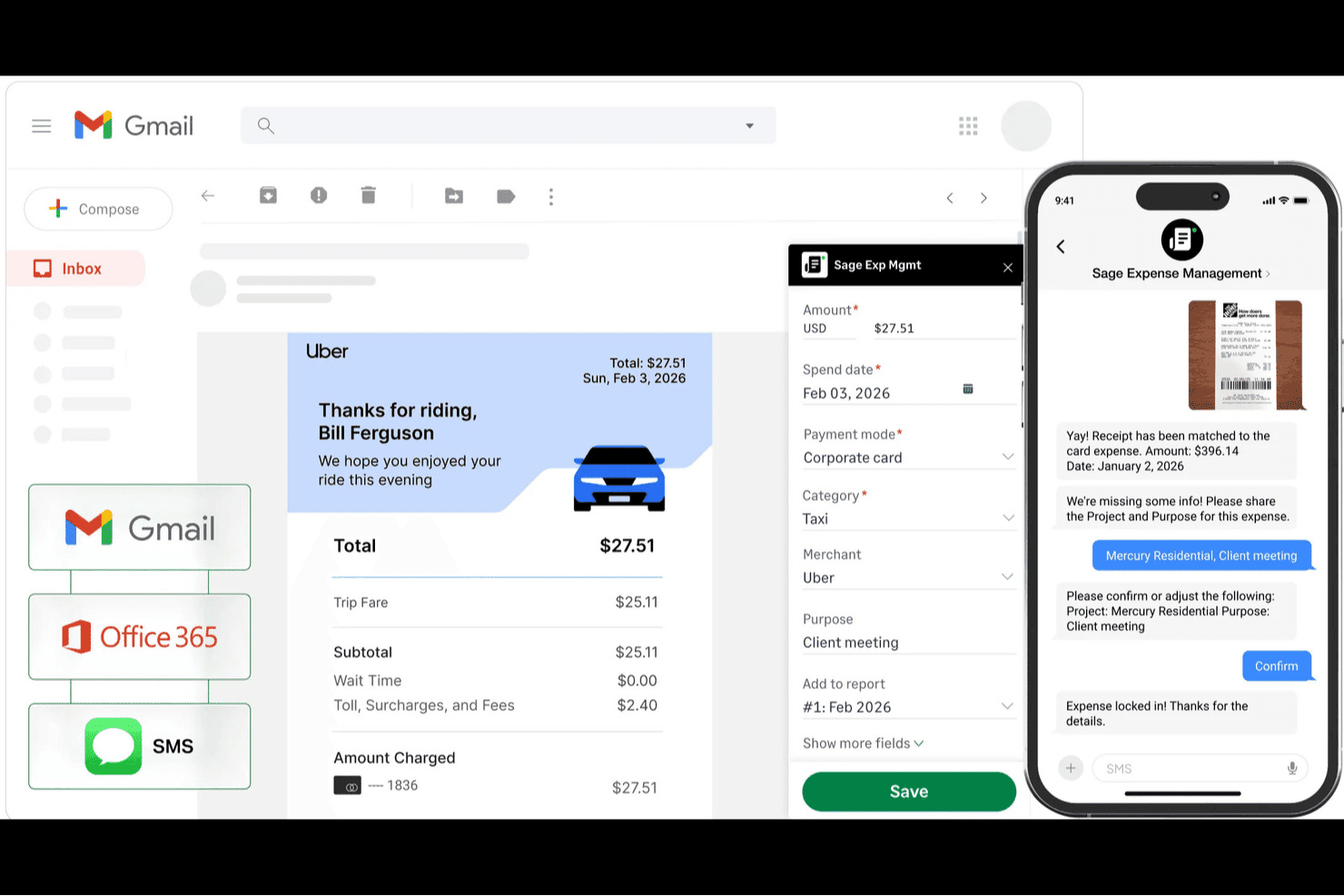
Sage Expense Management auto-captures receipts from Gmail and SMS into expense reports. Sage Expense Management (formerly Fyle) is an expense tracking platform built for small and mid-sized businesses that want to capture receipts across multiple channels, reconcile corporate cards in real time, and sync approved expenses directly into their accounting software.
Who Is Sage Expense Management Best For?
Sage Expense Management is a strong fit for small and mid-sized businesses that already use QuickBooks, Xero, or the Sage accounting ecosystem and want flexible receipt capture without switching corporate card programs.
Why I Picked Sage Expense Management (formerly Fyle)
I picked Sage Expense Management because of how it handles receipt capture directly through email, which is where expense documentation actually lives for most finance teams. Forwarding a receipt to a personal "Magic Mail" address or using the Gmail or Outlook add-in to capture it in one click removes the step of ever opening a separate app. Combined with real-time card feeds for Visa and Mastercard, submitted expenses are matched to transactions automatically, cutting reconciliation time significantly.
Sage Expense Management Key Features
- Budget dashboards: Set budgets by category, cost center, department, or project, with configurable threshold alerts and live spend visibility.
- Multi-level approval workflows: Route expenses through multi-stage, policy-driven approval chains with real-time violation flagging across departments or projects.
- GPS-based mileage tracking: Log trips automatically via GPS or manually using Google Maps, with support for custom rates, commute deductions, and recurring trips.
- Accounting system sync: Two-way sync with QuickBooks Online, Xero, Sage Intacct, Sage 300 CRE, and Sage 50 posts approved expenses in real time.
Sage Expense Management Integrations
Sage Expense Management offers native integrations with QuickBooks Online, Xero, Sage 50, Sage Intacct, Sage 300 CRE, Perk, Slack, Gmail, and Outlook. Its Business plan also includes API access for custom integrations.
Pros and Cons
Pros:
- Budget dashboards expose spend before close
- Existing cards receive real-time transaction matching
- Multiple receipt-submission routes reduce employee friction
Cons:
- US-only ACH restricts global payouts
- Receipt mismatches leave manual reconciliation work
Learn more about Sage Expense Management (formerly Fyle): Best for no platform fees and analytics
- Free plan + Free demo available
- From $15/user/month
Visit WebsiteCustomer Rating:4.7/5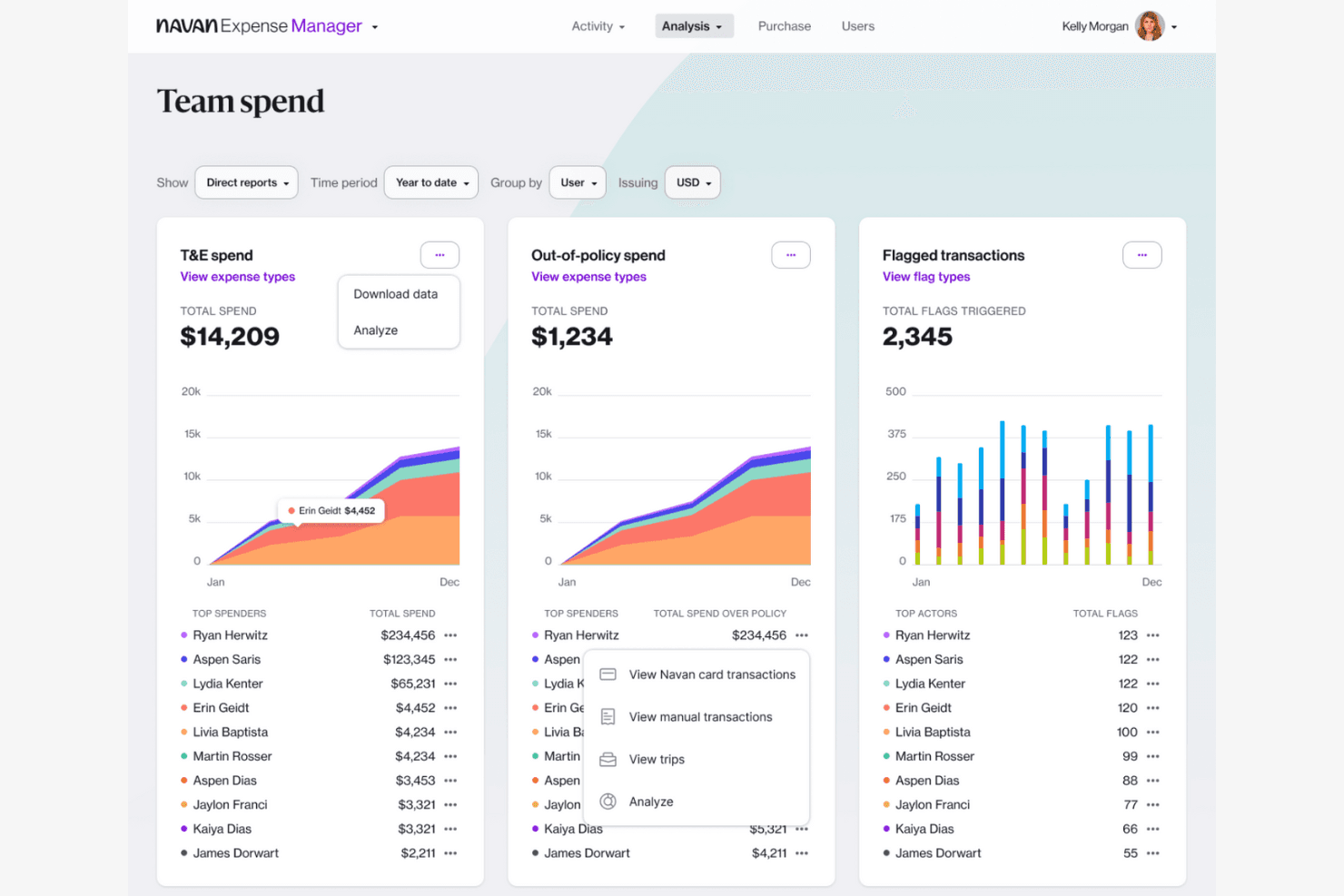
Navan tracks team spend, policy violations, and flagged transactions. Navan is a travel and expense platform that appeals to finance teams and travel-heavy businesses that want booking, spend policy enforcement, real-time reconciliation, and employee reimbursements managed in one place.
Who Is Navan Best For?
Navan suits finance and accounting teams at travel-heavy businesses that want booking, expense tracking, and reimbursements managed in a single platform.
Why I Picked Navan
I picked Navan as one of the best because it's the only tool on this list that charges no platform fee and bundles travel booking directly into the expense workflow. I appreciate that spend policy enforcement happens at the point of swipe, so out-of-policy transactions get flagged or declined before they ever become an expense report problem. Real-time dashboards powered by ThoughtSpot let me drill into team spend as it happens, not after month-end close.
Navan Key Features
- Travel and expense booking: Employees can book flights, hotels, trains, and rental cars directly in Navan, with travel costs automatically pulled into the expense workflow.
- Per diem policy configuration: Admins can set location- and trip-based per diem rates with rules for full, first, and last travel days using calendar-day or rolling-clock calculations.
- Multi-entity ERP sync: Navan connects natively to NetSuite, QuickBooks, Xero, and Sage, with field-level mapping for GL codes, subsidiaries, custom fields, and department details.
- Corporate and virtual cards: Navan issues physical and virtual corporate cards in USD, GBP, and EUR, with spend limits and out-of-policy declines enforced at the point of swipe.
Navan Integrations
Navan offers native integrations with Oracle NetSuite, QuickBooks Online, Xero, Sage Intacct, DATEV, Visa, Mastercard, and American Express, plus 30+ HRIS integrations. Its Navan Expense API supports custom ERP connections.
Pros and Cons
Pros:
- Real-time dashboards surface spend patterns
- Flags policy violations before month-end review
- Combines travel bookings with expense reconciliation
Cons:
- Support follow-through varies when travel issues arise
- Receipt scans capture only basic transaction details
Learn more about Navan: Best for automation and compliance
- 14-day free trial
- From $4/user/month
Visit WebsiteCustomer Rating:4.5/5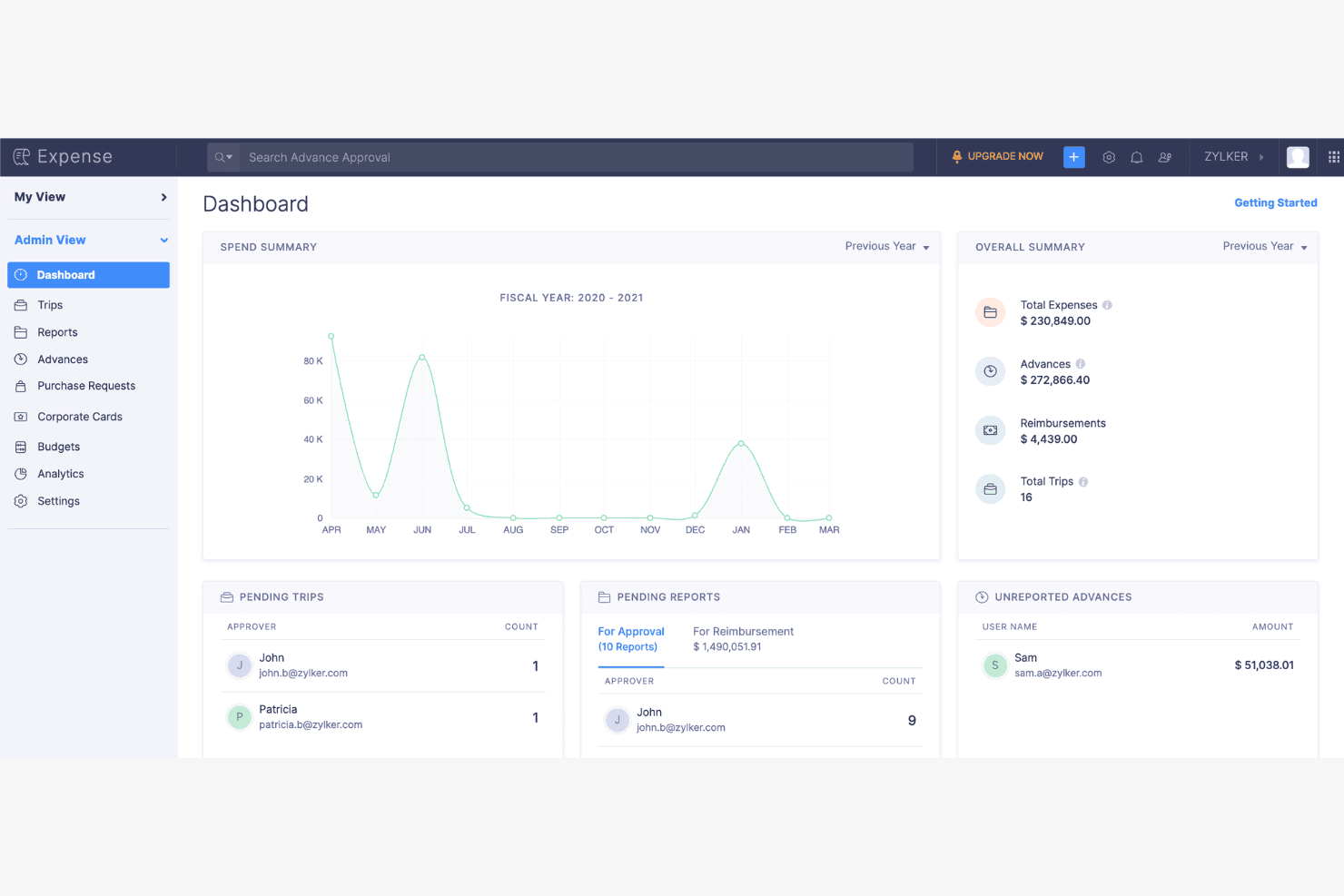
Zoho Expense gives admins a full financial overview dashboard. Zoho Expense is a travel and expense management platform built for finance teams, small business owners, and controllers who need to automate receipt capture, enforce spend policies, and keep expense data in sync with their accounting systems.
Who Is Zoho Expense Best For?
Finance and accounting teams at small to mid-sized businesses who need automated expense workflows, policy enforcement, and accounting integrations without a large software budget.
Why I Picked Zoho Expense
Zoho Expense earns its spot on my shortlist because of how well it handles automation and compliance together, without requiring you to choose one over the other. I particularly like the agentic AI reporting, which can autonomously generate and submit expense reports on a schedule, including corporate card transactions, so my team isn't manually chasing submissions at close. The configurable multi-level approval workflows let me enforce spend policies with real routing logic based on amount, department, or project, and the AI-powered audit layer flags duplicate claims and alcohol-related expenses before they reach a reviewer.
Zoho Expense Key Features
- Multi-currency expense tracking: Employees can log expenses in any currency, with exchange rates applied automatically when reimbursing in a different currency.
- GPS mileage tracking: The mobile app records mileage in real time using GPS, converting each trip into a reimbursable expense based on your configured rate.
- Corporate card reconciliation: Card transactions from Visa, Mastercard, and Amex feed directly into Zoho Expense, where receipts are matched to transactions automatically.
- Per diem rate management: Admins can configure location-based per diem rates by travel duration, pulling from government rate sources or entering custom rates.
Zoho Expense Integrations
Zoho Expense lists 2,500+ integrations, including Zoho Books, QuickBooks Online, Xero, Sage Accounting, Visa, Mastercard, American Express, CSG Forte, and HSBC. It also provides a REST API for custom integrations.
Pros and Cons
Pros:
- Policy rules flag duplicate and alcohol claims
- Project-level billable expense reporting
- Scheduled AI reports reduce close-cycle chasing
Cons:
- Complex approval routing takes setup time
- OCR sometimes misreads faded receipts
Learn more about Zoho Expense: 4Best for integrated financial tools
Brex
- Free plan + demo available
- From $12/user/month
Visit WebsiteCustomer Rating:4.5/5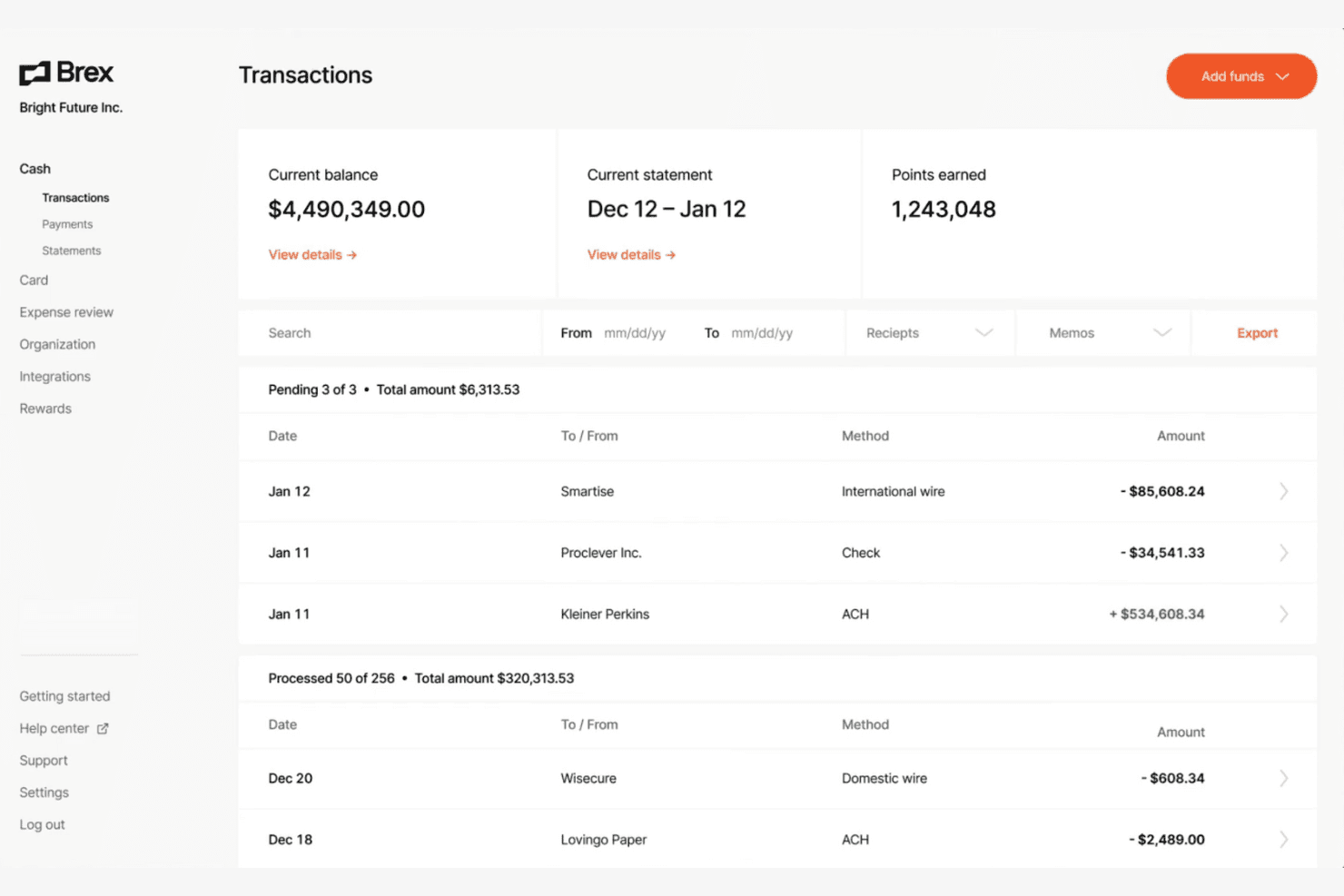
Brex lets users monitor cash transactions and balances in real time. Brex is a spend management platform that brings corporate cards, expense automation, bill pay, and travel booking together in one place—making it a strong fit for finance teams that want to manage and control company spending without juggling multiple tools.
Who Is Brex Best For?
Brex suits finance teams at growing companies that want corporate cards, expense management, bill pay, and travel booking in a single platform.
Why I Picked Brex
I picked Brex as one of the best because it's the only tool on this list that pulls corporate cards, expense automation, bill pay, and travel booking into a single platform. I especially like how travel bookings connect directly to expense reports: when my team books a flight through Brex, the receipt and expense fields populate automatically. The live budget dashboards let budget owners see card and reimbursement spend in real time, so there's no waiting for month-end to catch overruns.
Brex Key Features
- AI-powered GL coding: Brex AI generates GL coding suggestions, merchant mapping, and expense field recommendations based on your company's existing data.
- Multi-entity support: Finance teams can manage cards, reimbursements, policies, and ERP syncing across multiple subsidiaries and international entities from one account.
- Bill pay with PO matching: Brex automatically two-way matches incoming invoices to purchase orders and flags any bills that arrive without a corresponding PO.
- SOC 1 and SOC 2 Type II certification: Brex holds SOC 1 Type II, SOC 2 Type II, and PCI-DSS certifications, covering security controls for finance teams with compliance obligations.
Brex Integrations
Brex offers 1,000s of native integrations, including Oracle NetSuite, QuickBooks Online, Sage Intacct, Xero, Workday, and SAP Concur. It also provides APIs and webhooks for custom expense, accounting, payment, and travel integrations.
Pros and Cons
Pros:
- Receipt uploads reduce manual entry
- Live budgets expose spend before close
- Travel bookings connect to expense records
Cons:
- Reimbursements can take 4–8 business days
- Receipt autofill still needs corrections
 Best for Canadian companies
- 30-day free trial + free demo available
- From $7/user/month
Visit WebsiteCustomer Rating:4.4/5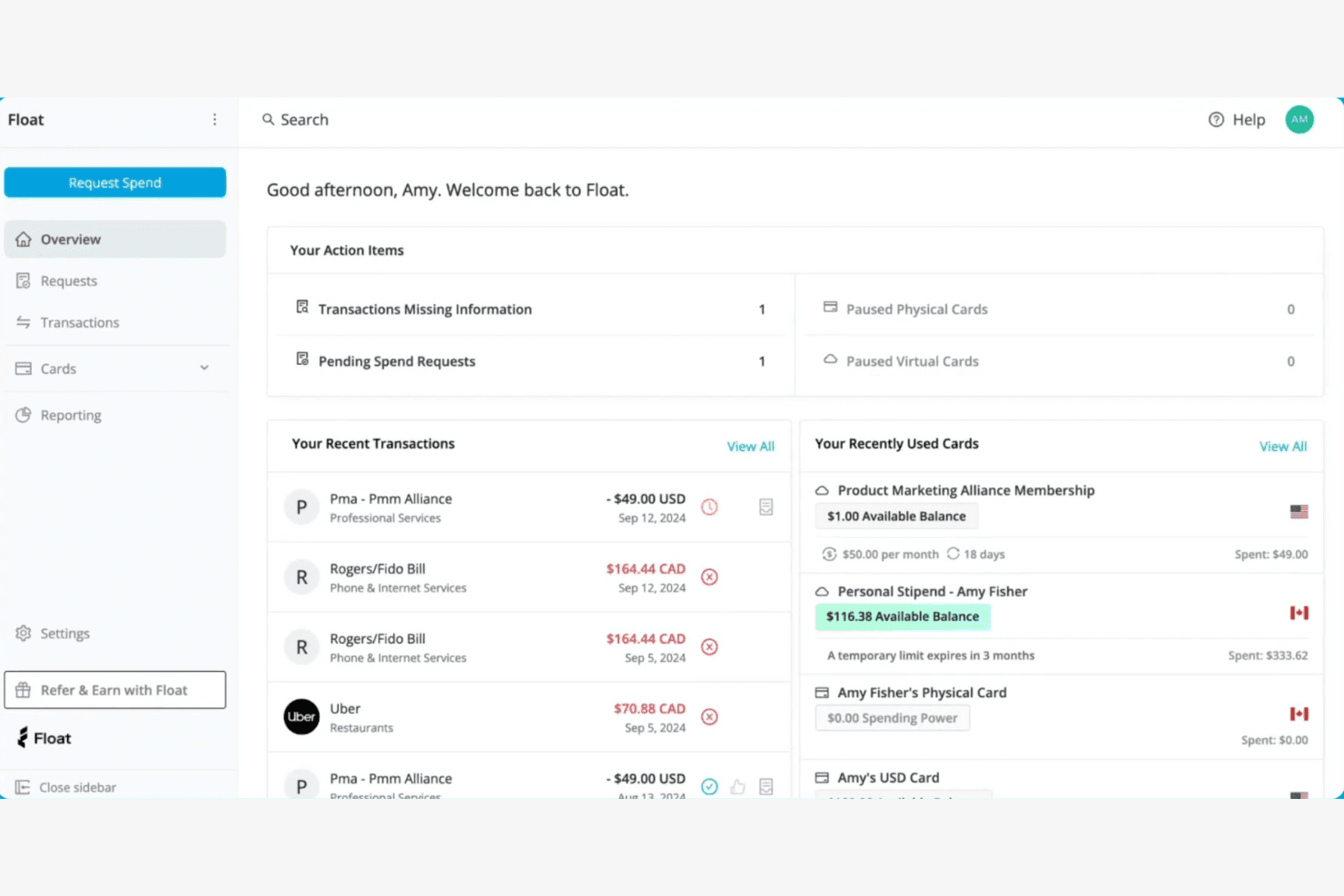
Float gives users a central dashboard to track spend and cards. Float is a financial operations platform built for Canadian businesses that want to manage corporate cards, employee reimbursements, and vendor bill payments in one place—without piecing together separate tools.
Who Is Float Best For?
Float is purpose-built for Canadian small businesses and growing teams that want corporate cards, reimbursements, and bill payments managed in a single CAD-native platform.
Why I Picked Float
I picked Float as one of the best Expensify alternatives because it's purpose-built for Canadian businesses in a way that most expense tools simply aren't. Float handles corporate cards, employee reimbursements with direct CAD payouts via EFT, and vendor bill payments all in one platform, so Canadian finance teams aren't stitching together separate tools or manually reconciling across CAD and USD accounts. I especially appreciate that Canadian tax codes are built directly into the expense automation workflows.
Float Key Features
- Multi-level approval workflows: Route spend requests and reimbursements through configurable, multi-step approval chains with dynamic approvers based on manager level.
- Vendor bill pay: Intake vendor invoices, extract bill details, code and approve them, then pay in CAD, USD, or 19 additional currencies via EFT, ACH, wire, or SEPA.
- Float Intelligence transaction coding agent: Automatically suggests GL and tax codes based on your chart of accounts and historical coding patterns, with suggestions flagged for review before syncing.
- Real-time spend reporting: Track transactions as they happen, compare team budgets against actuals, and build custom reports by merchant, cardholder, or GL code.
Float Integrations
Float offers native integrations with QuickBooks Online, Xero, NetSuite, Deel, Dayforce, BambooHR, and Slack. It also provides a REST API and webhooks for custom integrations.
Pros and Cons
Pros:
- Canadian tax codes support localized expense review
- Live budget views help spot overspending
- Receipt capture and approvals reduce expense follow-up
Cons:
- Unmatched receipts still require employee cleanup
- Accounting sync can need manual refreshes
Learn more about Float: Best for linking expenses to procurement
- Free demo available
- Pricing upon request
Visit WebsiteCustomer Rating:4.2/5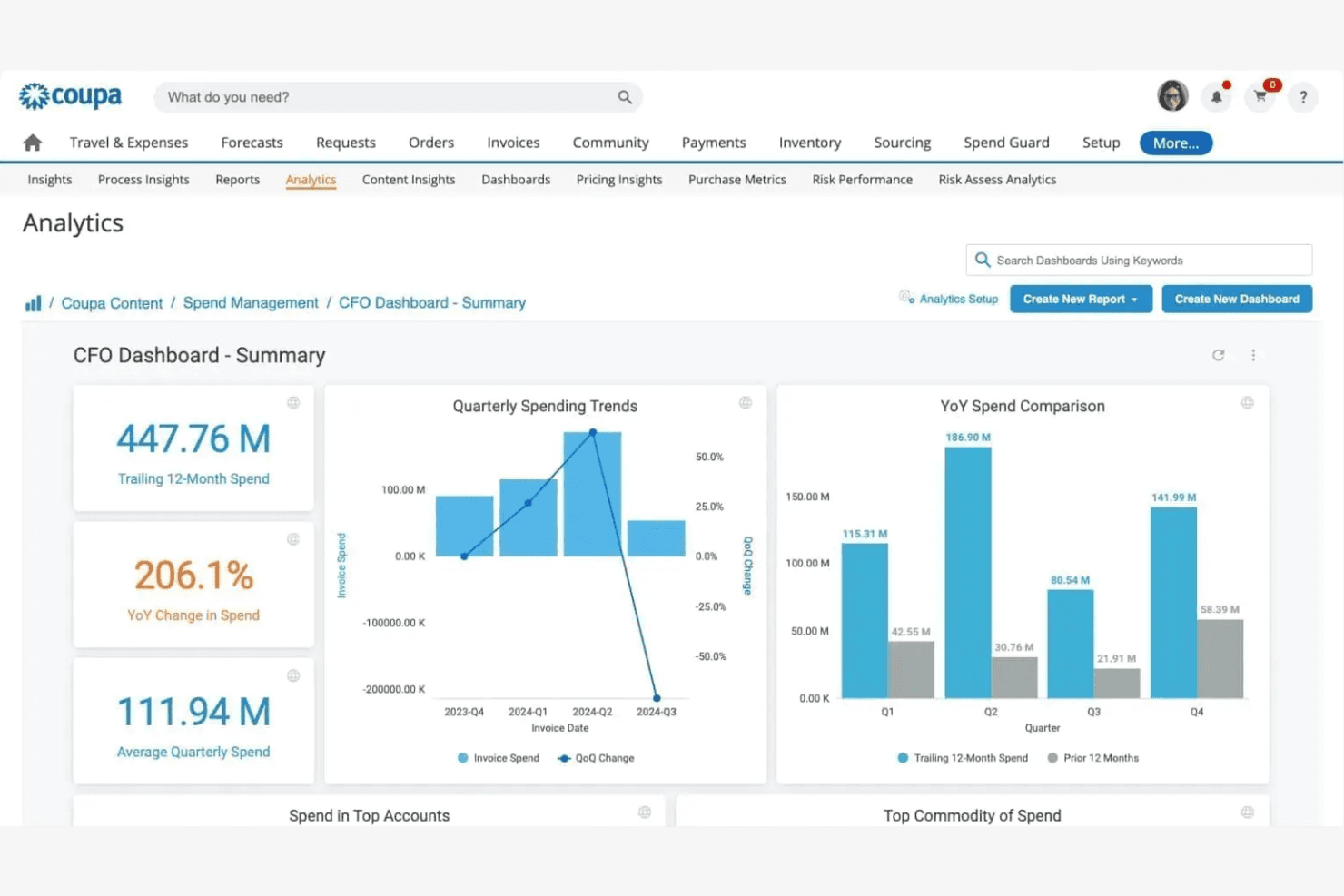
Coupa gives CFOs a real-time spend analytics summary dashboard. Coupa is an enterprise spend management platform that handles expense capture, policy enforcement, card reconciliation, and direct employee reimbursements—making it a fit for finance teams that need visibility across travel and expense alongside broader procurement workflows.
Who Is Coupa Best For?
Coupa is a strong fit for finance teams at mid-size to enterprise companies that need expense management as part of a broader spend control strategy.
Why I Picked Coupa
I picked Coupa as one of the best because it's built for finance teams that have outgrown standalone expense tools and need expense data to live inside a broader spend control system. I love how it connects travel expense capture directly to procurement analysis, so my team can spot which expensed transactions should really be going through a PO. Coupa's fraud detection through SpendGuard monitors expenses in real time for duplicates and out-of-policy spend, which adds a layer of control that Expensify simply doesn't offer.
Coupa Key Features
- Expense-to-procurement analysis: Compares expensed transactions against PO-backed invoices to flag spend that could move through a purchase order instead.
- Corporate card reconciliation: Ingests transaction feeds from Amex, Visa, Mastercard, and AirPlus to auto-generate draft expense reports for employee review.
- VAT and per diem support: Tracks expenses against global compliance requirements, including VAT and per diem rules, across international employee populations.
- SmarterTrip location-based tracking: Uses employee location data to automatically capture and categorize business expenses during travel.
Coupa Integrations
Coupa has documented integrations with Coupa Pay, Coupa SpendGuard, and NetSuite for payments, fraud monitoring, expense exports, and reimbursement records. Its REST API supports custom integrations using JSON or XML.
Pros and Cons
Pros:
- Supports direct employee reimbursements outside payroll cycles
- Reviewers praise approval status tracking
- Connects expense controls with procurement visibility
Cons:
- Setup can take longer than expected
- Receipt uploads can be clunky or slow
Learn more about Coupa: Best for complete financial operations
- Free to use
- Pricing upon request
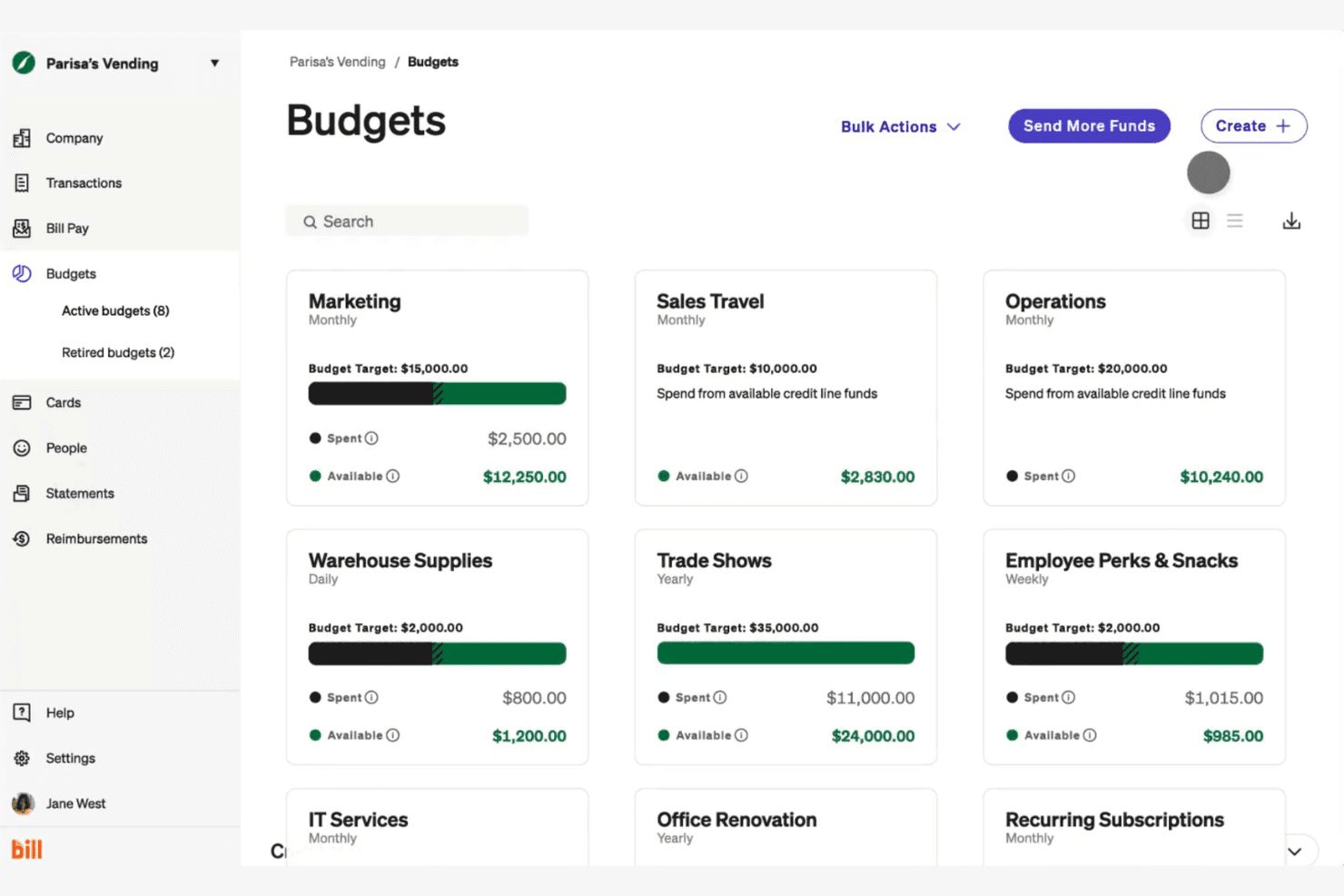
BILL Spend & Expense lets users manage multiple budgets at a glance. BILL Spend & Expense is a free spend management platform that bundles corporate cards, budgets, expense reporting, and employee reimbursements—making it a practical fit for small and mid-sized finance teams that want spending controls and accounting integrations without paying for software.
Who Is BILL Spend & Expense Best For?
Finance teams at small and mid-sized businesses that want corporate cards, budgets, and expense reporting in one free platform will get the most out of BILL Spend & Expense.
Why I Picked BILL Spend & Expense
BILL Spend & Expense earns its spot on my shortlist because it covers the full financial operations loop without charging for the software. I particularly like that budgets work as the control layer: without an assigned budget, a card simply declines, so policy enforcement is structural rather than reliant on manual review. Pair that with built-in travel booking across 500+ airlines and real-time spend tracking against those same budgets, and you get a genuinely complete picture of where money is going.
BILL Spend & Expense Key Features
- Corporate card controls: Issue physical and virtual cards with individual spending limits, merchant restrictions, and the ability to freeze cards in real time.
- Multi-platform accounting sync: Connect natively to QuickBooks, Oracle NetSuite, Sage Intacct, Xero, Acumatica, and Microsoft Dynamics, with automatic daily transaction sync.
- Employee reimbursements: Submit out-of-pocket expenses in 21 local currencies through the mobile app and route requests through a two-step approval process before ACH payout.
- Built-in travel booking: Book flights, hotels, and rental cars directly in BILL, with access to 500+ airlines and 1.5 million hotels, included at no extra cost.
BILL Spend & Expense Integrations
BILL Spend & Expense has native integrations with QuickBooks Online and Desktop, Oracle NetSuite, Sage Intacct, Xero, Acumatica, Microsoft Dynamics, Slack, and Gmail. Its API supports custom spend, card, and budget workflows.
Pros and Cons
Pros:
- Mobile receipt capture keeps expense records organized
- Built-in travel booking tracks spend against budgets
- Budget controls decline spending when funds run out
Cons:
- Reimbursements cap at $15,000 and take days to arrive
- Receipt matching can miss or detach uploads
Learn more about BILL Spend & Expense:
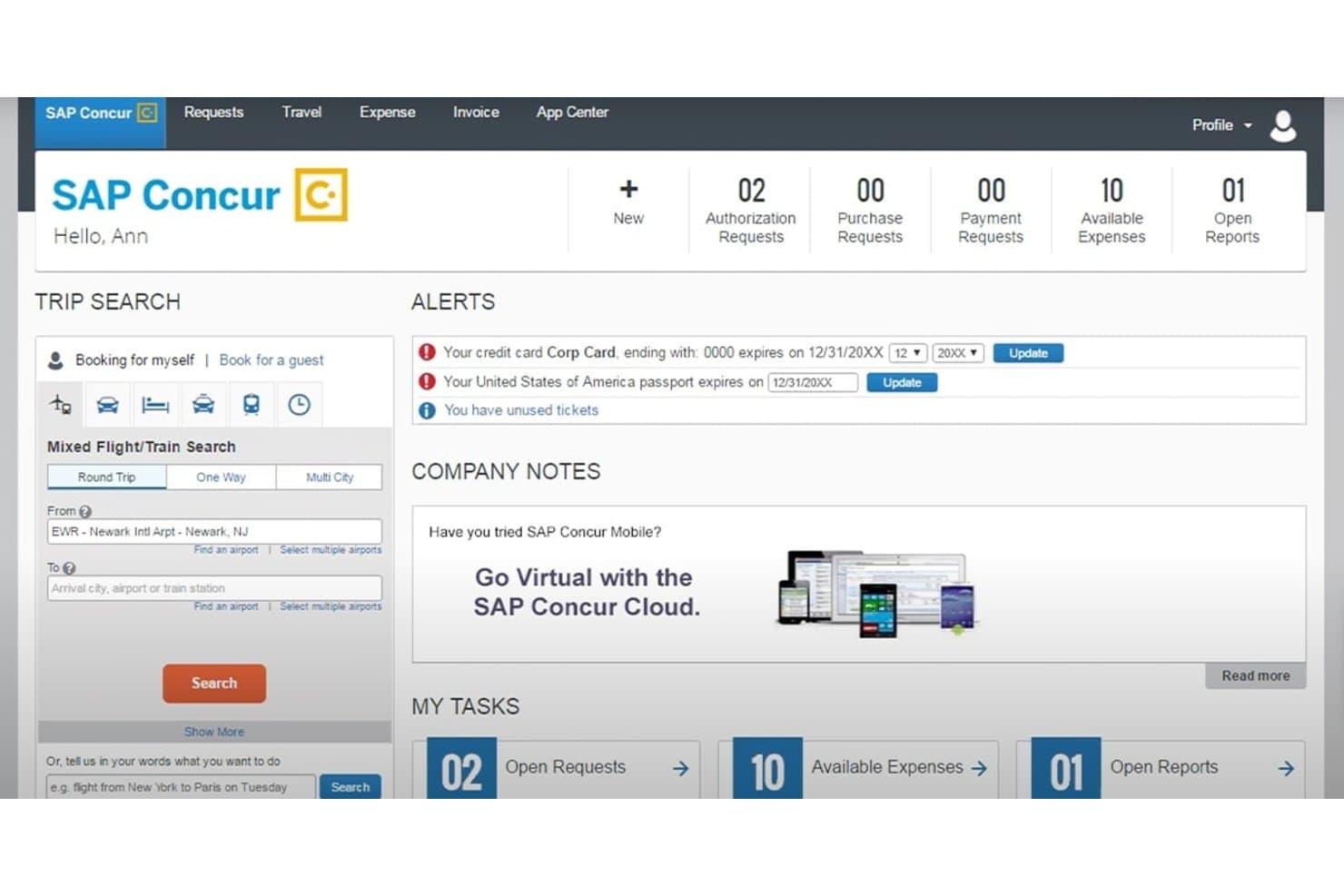
SAP Concur centralizes travel booking, expenses, and alerts in one dashboard. SAP Concur is an enterprise-grade expense and travel management platform that connects trip booking, receipt capture, and approval workflows in one place—making it a strong fit for finance teams that need ERP integration and policy enforcement at scale.
Who Is SAP Concur Best For?
SAP Concur is a strong fit for finance teams at mid-size to enterprise organizations that need travel and expense managed in one connected system—especially those already running SAP.
Why I Picked SAP Concur
I picked SAP Concur because it's the only tool on this list that genuinely unifies travel booking and expense reporting in one connected system. When a trip gets booked, that itinerary data flows directly into an expense report, so my team isn't manually recreating costs after the fact. ExpenseIt can itemize a hotel bill in under 30 seconds, and multi-level approval routing keeps everything policy-compliant before it ever reaches finance.
SAP Concur Key Features
- Standard accounting extract: Configure journal-entry fields, file format, delimiters, and field order to match your accounting system's import requirements.
- 150+ standard reports: Access out-of-the-box spend reports covering trends, forecasts, and KPIs without building custom queries.
- Budget overview dashboard: View spent, pending, and remaining budget amounts by period, with year-to-date consumption tracking and Excel export.
- 330+ ERP and accounting integrations: Connect Concur Expense to ERP, payroll, HR, and procurement systems through pre-built connectors or custom APIs.
SAP Concur Integrations
SAP Concur reports 330+ ERP, CRM, and accounting integrations, including SAP ERP, SAP S/4HANA, QuickBooks Desktop, and QuickBooks Online. It also connects with 300+ TMC partners and 700+ solution and service partners, with APIs for custom integrations.
Pros and Cons
Pros:
- Finance can review trip costs before ticketing
- Mobile receipt capture reduces manual entry
- Policy checks organize expense review
Cons:
- Dated screens add navigation steps
- Receipt scanning can require corrections
Learn more about SAP Concur: Best for user-friendly expense reporting
- Free demo available
- Pricing upon request
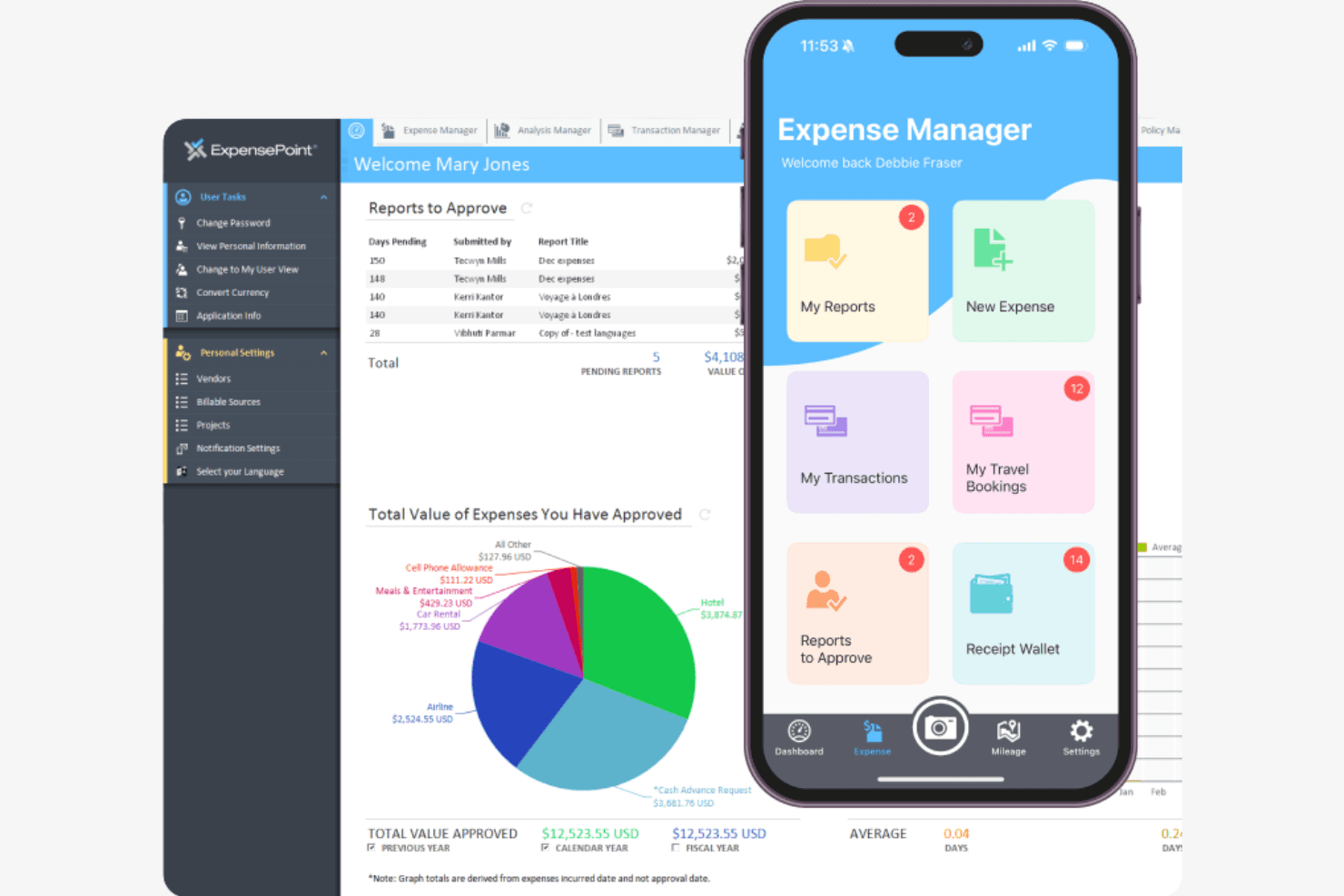
ExpensePoint lets users manage expenses via web and mobile dashboards. ExpensePoint is a cloud-based expense management platform designed for finance and accounting teams that need to automate receipt capture, enforce spend policies, and reconcile corporate card transactions without heavy manual work.
Who Is ExpensePoint Best For?
ExpensePoint is a strong fit for finance and accounting teams at mid-sized organizations that need a guided, structured approach to expense management with hands-on onboarding support.
Why I Picked ExpensePoint
I picked ExpensePoint as one of the best because its Receipt Reader is genuinely one of the cleaner receipt-to-report experiences I've seen. You photograph a receipt, and the OCR pulls vendor name, date, total, and taxes automatically, handling handwritten tips and faded text across 18 languages. I also appreciate how the Workflow Manager lets you temporarily reassign approvals when someone's out, then reinstate the original approver without rebuilding your chain from scratch.
ExpensePoint Key Features
- Multi-tier approval workflows: Configure approval chains by department, role, project code, or cost center, with support for temporary approver reassignment when someone is out.
- Corporate card reconciliation: Import card transactions and match them against receipts, vendors, and project codes, with unmatched expenses flagged for review.
- Travel booking management: Book trips directly in the platform and link receipts, itineraries, and e-receipts to expense reports from one place.
- 150+ accounting and ERP integrations: Connect to QuickBooks, Sage Intacct, NetSuite, Microsoft Dynamics 365, and other platforms to push approved expense data into your accounting workflows.
ExpensePoint Integrations
ExpensePoint offers 150+ integrations, including QuickBooks, Sage Intacct, NetSuite, Microsoft Dynamics 365, Oracle, and Payworks. An API is available for custom integrations.
Pros and Cons
Pros:
- Receipt matching reduces cardholder follow-up
- Temporary approver reassignment preserves approval chains
- Receipt OCR captures totals, dates, and taxes
Cons:
- Reimbursement payouts can require external steps
- Card feeds can arrive three-to-five days late
Learn more about ExpensePoint: Best for user experience and security
- 30-day free trial + free demo available
- From $8/user/month
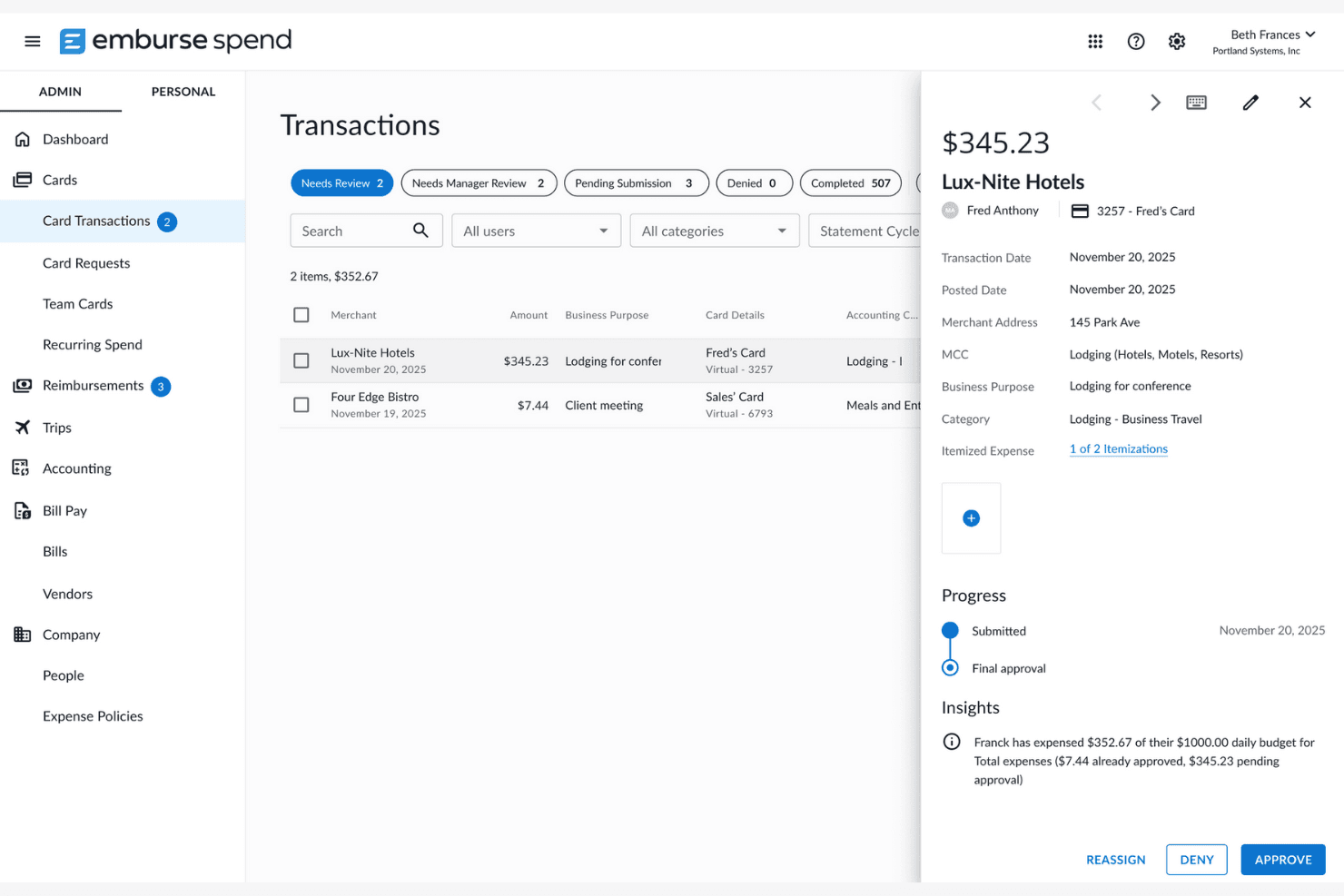
Emburse Spend lets admins review and approve card transactions. Emburse Spend is a spend management platform for small and midsize businesses that brings together card spend, employee reimbursements, invoice approvals, and accounting integrations in one place.
Who Is Emburse Spend Best For?
Emburse Spend is a strong fit for small and midsize finance teams that want to consolidate card spend, reimbursements, and invoice approvals without overhauling their existing card setup.
Why I Picked Emburse Spend
Emburse Spend earns its spot on my shortlist because of how seriously it takes both user experience and security. I appreciate that it's one of the few SMB-focused tools carrying SOC 1 and SOC 2 Type II certifications alongside ISO 27001, ISO 27701, and PCI DSS compliance. On the UX side, I like that approval routing is fully configurable by payment source, merchant, category, and amount threshold, so my team isn't wrestling with rigid workflows when spend policies get complex.
Emburse Spend Key Features
- Real-time expense submission: Employees can submit expenses as they happen via mobile app, desktop, or email forwarding, eliminating end-of-month report batching.
- Two- and three-way PO matching: Incoming supplier invoices can be matched against purchase orders before approval, supporting tighter AP controls.
- Pre-approval requests: Team members can request one-time funds for planned purchases, specifying amount, merchant, category, and date range before spending occurs.
- ACH reimbursement processing: Approved expenses are paid directly to employees' connected bank accounts, with Basic covering 50 monthly reimbursements and Plus offering unlimited.
Emburse Spend Integrations
Emburse Spend offers native integrations with QuickBooks Online and Desktop, Xero, NetSuite, Sage Intacct, Salesforce, Amazon Business, Uber, Slack, and AmTrav. Its REST/JSON API with OAuth 2.0 supports custom integrations.
Pros and Cons
Pros:
- Security certifications strengthen finance oversight
- Configurable approvals fit department-level rules
- Receipt uploads support prompt expense submissions
Cons:
- Support follow-through receives mixed reviews
- Card transactions can arrive days late
Learn more about Emburse Spend:
Andre alternativer til Expensify
Her er noen flere alternativer til Expensify som ikke kom med på kortlisten min, men som likevel er verdt å sjekke ut:
Related Reviews
How I Evaluate Expensify Alternatives
I split my evaluation into two layers: the baseline every tool must clear—receipt capture, approval workflows, accounting sync—and the differentiators that separate the right fit from the rest.
Core Functionality (Table Stakes For This List)
When I'm selecting tools for my list, I rank each one on a scale from 0 (does not offer the functionality) to 5 (excels in this area) for each core functionality listed below. Then, I calculate the tool's total score into a percentage. Each tool needs to achieve a minimum total score of 75% to be considered for inclusion.
- Receipt Capture & OCR: I evaluate how well each tool extracts merchant names, amounts, dates, and line items from a photo—especially crumpled taxi receipts or faded restaurant bills.
- Expense Report Workflows: Multi-level approval routing matters here. I look for configurable rules, like auto-routing reports over a set amount to a finance director instead of a direct manager.
- Corporate Card Management: Whether a platform issues its own cards or pulls feeds from major banks, I check for real-time transaction visibility and the ability to set per-employee or per-category spend limits.
- Employee Reimbursements: I look at how each tool handles direct-deposit payouts for out-of-pocket spend, including support for multi-currency reimbursements for distributed teams.
- Accounting & ERP Integrations: A tool's sync with platforms like QuickBooks, Xero, NetSuite, or Sage is where I focus—specifically, whether it maps custom GL codes and pushes journal entries automatically.
- Policy & Compliance Controls: I evaluate each platform's ability to flag out-of-policy spend at submission, maintain audit trails, and support receipt retention rules that hold up during tax reviews.
Once I have a list of tools that meet this criteria, I consider what sets each platform apart.
Differentiating Factors (What Sets Vendors Apart)
Here's how I compare and contrast different vendors:
Standout Features
AI-driven categorization is a major differentiator. Tools like Brex and Ramp use machine learning to auto-code expenses to the correct GL accounts, which saves hours during month-end close. I also look at whether a platform extends into bill pay and AP automation, since consolidating vendor invoices and employee expenses in one place simplifies reconciliation. Travel booking integration matters for teams with frequent travelers who benefit from itinerary data flowing directly into expense reports.
Beyond Features
Pricing model matters a lot here. Some platforms like Brex and Ramp offset SaaS costs through card interchange revenue, while others charge per user—which hits differently at 50 employees vs. 500. I also evaluate scalability: a tool that works for a single-entity startup may buckle when you add subsidiaries or international teams. Security certifications like SOC 2 Type II and PCI DSS are worth checking, especially when the platform stores receipt images and processes reimbursement banking details.
Hvorfor se etter et alternativ til Expensify?
Selv om Expensify er et godt valg av programvare for utgiftshåndtering, finnes det flere grunner til at noen brukere ser etter alternative løsninger. Det kan hende du ser etter et alternativ til Expensify fordi:
- Du trenger flere tilpasningsmuligheter
- Teamet ditt trenger bedre integrasjonsmuligheter
- Du ønsker mer konkurransedyktige priser
- Du trenger mer omfattende rapporteringsfunksjoner
- Bedriften din har behov for internasjonal støtte
- Du ønsker raskere responstid fra kundestøtten
Hvis noe av dette høres kjent ut, har du kommet til rett sted. Listen min inneholder flere alternativer innen programvare for utgiftshåndtering som kan være bedre for team som ser etter alternative løsninger.
Viktige funksjoner i Expensify
Her er noen av de viktigste funksjonene i Expensify, slik at du kan sammenligne hva alternative løsninger tilbyr:
- Utgiftshåndtering: Automatiserer oppretting, innsending, godkjenning og refusjon av utgifter, slik at det blir enklere for deg å administrere økonomiske arbeidsflyter.
- Reisebestilling: Gjør det mulig for teamet ditt å bestille flyreiser, hoteller og biler, og synkroniserer alle bestillinger med utgifter for reisehåndtering.
- Expensify-kort: Et firmakort som gir cashback og bidrar til å redusere Expensify-regningene dine, samtidig som det håndterer selskapets utgifter.
- Kvitteringsskanning: Brukere kan enkelt skanne kvitteringer via foto, e-post eller tekst for automatisk behandling, noe som sparer tid og reduserer feil.
- Import av kredittkort: Kobler til firmakort for automatisk import og avstemming av transaksjoner, slik at du kan håndtere utgifter effektivt.
- Global refusjon: Tilrettelegger for refusjon i lokale valutaer over hele verden, noe som gjør løsningen ideell for det internasjonale teamet ditt.
- Virtuelle kort: Gir ubegrenset tilgang til virtuelle kort for ansatte og prosjekter, og tilbyr fleksible løsninger for pengebruk.
- Utgiftsrapporter: Forenkler innsending og godkjenning av utgifter og sikrer smidige og rettidige refusjoner.
- AI-drevet automatisering: Bruker AI til å kategorisere utgifter, flagge brudd og minimere feil, noe som øker nøyaktigheten.
- Utgiftssporing: Registrerer og kategoriserer ulike utgifter, inkludert kvitteringer og kjørelengde, for å gi deg detaljert økonomisk innsikt.