

Mobile betalingsapper er digitale verktøy som lar deg sende, motta og administrere penger ved hjelp av smarttelefonen eller nettbrettet ditt. Hvis du leter etter de beste mobile betalingsappene, ser du sannsynligvis etter sikre og pålitelige måter å håndtere transaksjoner på, støtte forretningsdriften eller forenkle personlige betalinger – uten bryderiet med kontanter eller kort.
Med så mange alternativer er det vanskelig å vite hvilken app som passer behovene dine, tilbyr de riktige funksjonene og holder dataene dine trygge. Denne listen hjelper deg med å sammenligne de beste mobile betalingsappene for 2026, slik at du kan ta velinformerte beslutninger og ligge i forkant i et finanslandskap i rask endring.
Hvorfor du kan stole på våre programvareanbefalinger
6,700+
Reviews
20
Industry experts
16+
Evaluation factors
14
Years
Teamet vårt har testet og anmeldt programvare siden 2012. Vi er selv økonomiledere, så vi vet hvor vanskelig og hvor viktig det er å velge riktig programvare.
I denne guiden har vi vurdert verktøyene gjennom praktisk testing og uavhengig research og gitt dem poeng ut fra våre utvelgelseskriterier.
Anmeldelsene våre bygger på vår egen redaksjonelle vurdering. De er ikke et salgsargument.
Sammenligningstabell for mobile betalingsapper
Denne sammenligningstabellen oppsummerer prisdetaljene for utvalget mitt av de beste mobile betalingsappene:
| Tool | Best For | Trial Info | Price | ||
|---|---|---|---|---|---|
| 1 | Best for approving global payouts from mobile | Free plan available | Pricing upon request | Website | |
| 2 | Best for social payment tracking | No free demo or trial | Plans start at 1.9% + $0.10 per transaction | Website | |
| 3 | Best for global transaction support | Free plan + free demo available | From $0.30/transaction | Website | |
| 4 | Best for low-cost international payments | Free plan available | From $0.43/transfer (Varies on location/currency) | Website | |
| 5 | Best for secure biometric authentication | Not available | Pricing upon request | Website | |
| 6 | Best for enterprise-level payment processing | Not available | Pricing upon request | Website | |
| 7 | Best for direct bank-to-bank transfers | Free plan available | Pricing upon request | Website | |
| 8 | Best for integrating with Android business tools | Free to use | Free to use | Website | |
| 9 | Best for instant peer-to-peer transfers | Free plan available | Free to use | Website | |
| 10 | Best for magnetic stripe terminal compatibility | Free plan available | Free to use | Website |


Anmeldelser av mobile betalingsapper
Nedenfor finner du mine detaljerte oppsummeringer av de mobile betalingsappene som kom med på kortlisten min. Anmeldelsene mine gir et detaljert innblikk i funksjonene, de beste bruksområdene og integrasjonene til hver plattform, slik at du kan finne den beste for deg.
 Best for approving global payouts from mobile
- Free plan available
- Pricing upon request
Visit WebsiteCustomer Rating:4.5/5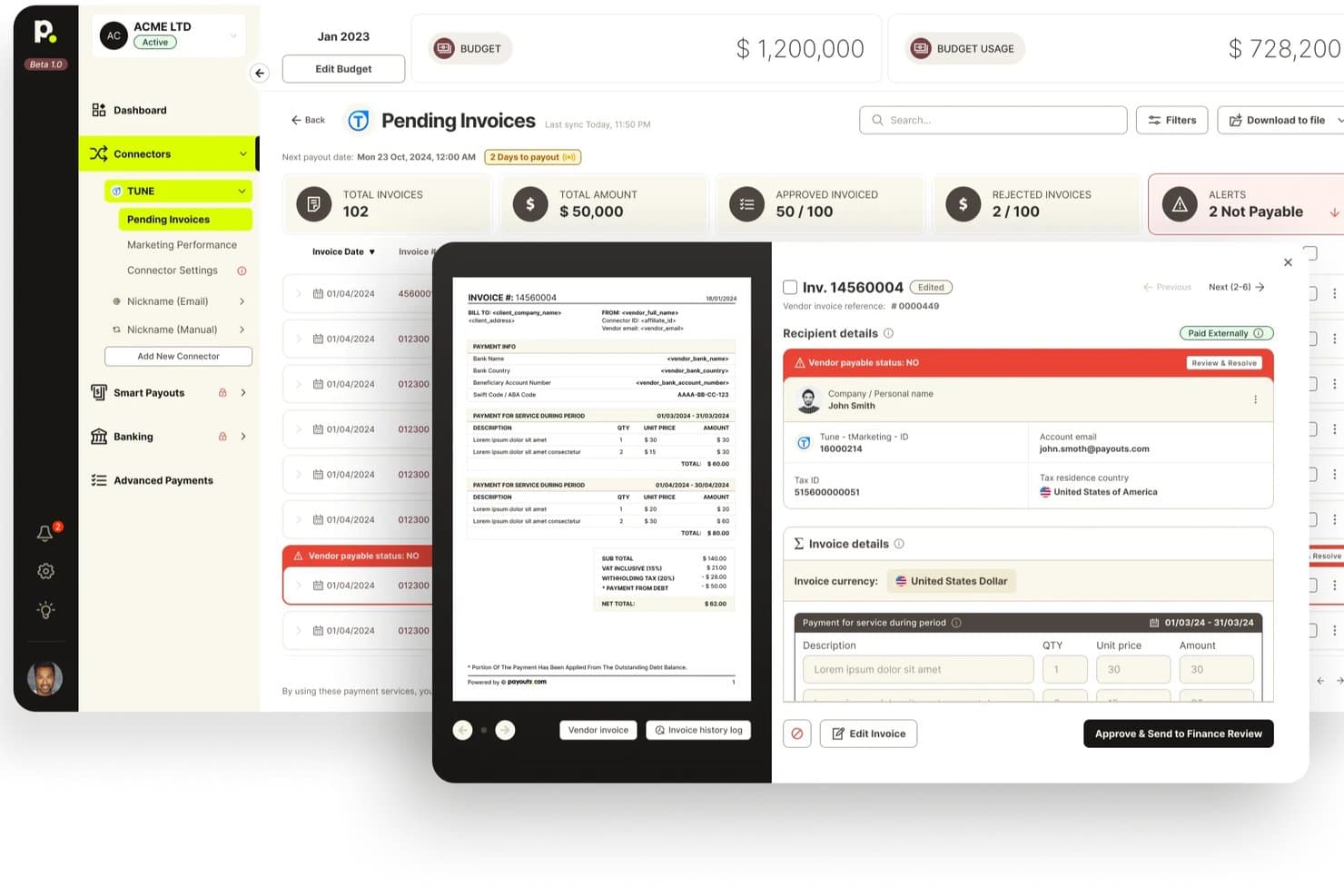
Payouts offers a pending invoices dashboard with invoice previews, vendor payable status alerts, and approval workflows for billing management. Payouts is a financial operating system that combines global AP automation, multi-rail payment execution, mobile approval workflows, and multi-currency account management across 190+ countries.
Who Is Payouts Best For?
Payouts is a strong fit for finance teams at mid-market and enterprise companies that need to approve and manage high-volume global payouts from wherever they happen to be.
Why I Picked Payouts
Payouts earns its spot on my shortlist because of how well it handles global payout approvals from a mobile device. I love that you can configure multi-tier approval chains with delegation and dual-approval enforcement, then act on them from your phone with OTP-secured authorization. In practice, that means a treasury manager traveling across time zones can approve a high-value SWIFT or SEPA Instant payment in seconds, with a full audit trail capturing every action automatically.
Payouts Key Features
- Multi-rail payment execution: Send payments across 40+ rails, including ACH, SEPA Instant, SWIFT, RTP, FedNow, PayPal, Venmo, and crypto, from a single platform.
- Virtual and prepaid card issuance: Generate Visa and Mastercard virtual cards on demand with per-transaction spending caps, merchant-category locks, and velocity limits across 38 currencies.
- AI Digital Employees: Autonomous agents that can onboard vendors, run KYC/KYB checks, chase invoices, and schedule payments via email, WhatsApp, or voice.
- 1099 and year-end tax reporting: Generate contractor tax forms and year-end filings directly within the platform without needing a separate reporting tool.
Payouts Integrations
Payouts offers 50+ pre-built integrations, including NetSuite, QuickBooks, Xero, SAP, Plaid, Salesforce, Slack, Persona, and ComplyAdvantage. It also supports REST API, webhooks, CSV, and SFTP connections for custom workflows.
Pros and Cons
Pros:
- Strong enterprise-grade controls and audit logs
- Handles 40+ payment rails globally
- Mobile approvals include OTP-secured authorization
Cons:
- Limited accessibility for field POS payments
- No dedicated native mobile app
Learn more about Payouts: Best for social payment tracking
- No free demo or trial
- Plans start at 1.9% + $0.10 per transaction
Visit WebsiteCustomer Rating:4.7/5
Venmo offers a mobile dashboard with balances, crypto, and group expense splitting. If you’re looking for a mobile payment app that makes tracking and sharing payments with others simple, Venmo is worth a look. Its social feed and payment notes make it easy for small teams, freelancers, or groups to keep tabs on shared expenses and split costs transparently. This approach helps users manage group payments and reimbursement in a way that’s visible and easy to reference later.
Why I Picked Venmo
Venmo’s social payment tracking sets it apart from other mobile payment apps. The app’s transaction feed lets users see, comment on, and keep a record of shared payments, which is especially useful for groups managing expenses together. I picked Venmo because its payment notes and public or private sharing options help users clarify the purpose of each transaction and keep everyone on the same page. For anyone who needs transparency and a simple way to track group payments, Venmo’s social features make it a strong choice.
Venmo Key Features
Some other features that make Venmo appealing for mobile payments include:
- Instant Transfer to Bank: Move funds from your Venmo balance to your bank account within minutes for a small fee.
- Venmo Debit Card: Use a physical card linked to your Venmo balance for in-store and online purchases.
- Business Profiles: Set up a dedicated profile for business transactions and accept payments from customers.
- QR Code Payments: Generate and scan QR codes to send or receive payments quickly in person.
Venmo Integrations
Integrations include PayPal, Braintree, Mastercard, Visa, Hulu, Uber, Shopify, The Bancorp Bank, Synchrony Bank, MoneyPass, and select authorized merchant apps and websites.
Pros and Cons
Pros:
- Offers business profiles for small merchants
- Supports instant transfers to bank accounts
- Social feed makes payment activity transparent
Cons:
- No buyer or seller protection for purchases
- Transaction limits on large payments
Learn more about Venmo: Best for global transaction support
- Free plan + free demo available
- From $0.30/transaction
Visit WebsiteCustomer Rating:4.6/5
PayPal enables secure mobile checkout with one-time passcode authentication. If your business needs to send or receive payments across borders, PayPal offers a trusted platform for global transactions. It’s especially useful for e-commerce sellers, freelancers, and organizations working with international clients or vendors. PayPal’s multi-currency support and buyer protection features help reduce friction and risk when handling payments worldwide.
Why I Picked PayPal
When handling payments that cross international borders, I look for tools that make global transactions simple and secure. PayPal is a strong fit because it supports payments in over 25 currencies and is available in more than 200 countries, making it easy to do business with clients and vendors worldwide. I appreciate that PayPal offers built-in buyer and seller protection, which helps reduce risk for both parties during cross-border transactions. These features make PayPal a reliable choice for businesses and professionals who need to manage international payments without added complexity.
PayPal Key Features
Some other features that make PayPal useful for mobile payments include:
- QR Code Payments: Accept in-person payments by generating and scanning QR codes.
- Recurring Payment Setup: Schedule and manage automatic recurring payments for subscriptions or services.
- PayPal.Me Links: Create personalized payment links to request money from anyone.
- Instant Transfer to Bank: Move funds instantly from your PayPal balance to a linked bank account or debit card.
PayPal Integrations
Integrations include BigCommerce, Etsy, QuickBooks, Salesforce, Paymentus, Woo, Miva, Wix, GoFundMe Pro, and Otter.
Pros and Cons
Pros:
- Integrates with major e-commerce platforms
- Offers buyer and seller protection policies
- Supports payments in over 25 currencies
Cons:
- Charges high fees for international transfers
- Holds funds for account verification
Learn more about PayPal: 4Best for low-cost international payments
Wise
- Free plan available
- From $0.43/transfer (Varies on location/currency)
Visit WebsiteCustomer Rating:3.8/5
Wise offers a Multi-currency dashboard with balances, transactions, and earning options. If your business needs to send or receive payments across borders without high fees, Wise is built for you. Finance teams and operations managers at startups, SMBs, and global companies use Wise to move money internationally at real exchange rates. Its transparent pricing and multi-currency account features help you avoid hidden costs and simplify global transactions.
Why I Picked Wise
What sets Wise apart from mobile payment apps is its focus on minimizing the cost of international transfers. I picked Wise because it uses real exchange rates and low, transparent fees, which is especially important for businesses making frequent cross-border payments. The multi-currency account lets you hold and pay out in dozens of currencies, reducing the need for multiple bank accounts. For finance teams managing global vendors or remote staff, Wise helps keep international payment costs predictable and easy to track.
Wise Key Features
Some other features that make Wise useful for businesses handling mobile payments include:
- Batch Payments: Send payments to multiple recipients at once using a single file upload.
- Business Debit Card: Issue physical or virtual debit cards for team spending in multiple currencies.
- Xero and QuickBooks Integration: Sync transactions directly with popular accounting software for easier reconciliation.
- User Permissions: Set different access levels for team members to control who can view, send, or approve payments.
Wise Integrations
Integrations include QuickBooks, Xero, Sage Business Cloud Accounting, Oracle NetSuite, Wave, Zoho Books, FreeAgent, Odoo, and more.
Pros and Cons
Pros:
- Mobile app allows full account management
- Batch payment feature for mass payouts
- Transparent mid-market exchange rates
Cons:
- Restricted availability of debit card
- Limited in-person payment capabilities
Learn more about Wise:

Apple Pay lets iOS users make secure in-store, app, and web payments. For businesses and professionals who prioritize security, Apple Pay offers a mobile payment solution built around biometric authentication. It’s especially useful for teams using iPhones or iPads, letting users authorize payments with Face ID or Touch ID. This approach helps organizations reduce fraud risk and streamline transactions without relying on physical cards.
Why I Picked Apple Pay
Security is a top concern for many businesses handling mobile payments, which is why I picked Apple Pay for its advanced biometric authentication. With Face ID and Touch ID, users can authorize payments using their unique physical traits, reducing the risk of unauthorized transactions. Apple Pay also uses device-specific numbers and dynamic security codes for each swipe or purchase, adding another layer of protection. For organizations that want to prioritize secure, cardless transactions, these features make Apple Pay a strong choice.
Apple Pay Key Features
In addition to its security-focused authentication, Apple Pay offers several other features worth noting:
- Contactless In-Store Payments: Make purchases at NFC-enabled terminals using your iPhone or Apple Watch.
- Online and In-App Purchases: Pay quickly within supported apps and websites without entering card details.
- Loyalty and Rewards Card Storage: Add and use store loyalty cards and rewards programs directly from your device.
- Peer-to-Peer Payments: Send and receive money through Apple Cash within Messages.
Apple Pay Integrations
Integrations include Apple Wallet, Apple Watch, iPhone, iPad, Mac, Safari, App Store, Apple Music, Apple TV+, iMessage, and PRESTO transit cards.
Pros and Cons
Pros:
- Real-time transaction notifications for payments
- No card details shared with merchants
- Biometric authentication with Face ID or Touch ID
Cons:
- Cannot store non-Apple transit cards
- Only available on Apple devices
Learn more about Apple Pay:

Worldpay is a global payment processing service for businesses with multiple payment methods. Worldpay is designed for large organizations that need to process high volumes of payments across multiple channels and geographies. Enterprise finance teams and payment operations leaders can use Worldpay as a payment system to manage complex flows, support global currencies, and maintain compliance. Its advanced fraud prevention and financial services settlement tools help businesses reduce risk and keep transactions moving smoothly at scale.
Why I Picked Worldpay
For organizations handling large-scale, complex payment needs, Worldpay stands out for its enterprise-level processing capabilities. I picked Worldpay because it supports multi-currency transactions and omnichannel payment acceptance, which are essential for businesses operating globally or across multiple sales channels. Its advanced fraud detection and risk management tools help finance teams maintain security and compliance, even as transaction volumes grow. If you need a solution that can handle high transaction loads and adapt to enterprise requirements, Worldpay is built for that scale.
Worldpay Key Features
Some other features that make Worldpay valuable for enterprise payment processing include:
- Customizable Payment Gateways: Configure payment gateways to match specific business requirements and workflows.
- Recurring Billing Support: Automate subscription and membership payments with built-in recurring billing tools.
- Detailed Transaction Reporting: Access granular transaction data and export reports for reconciliation and analysis.
- Chargeback Management Tools: Track, respond to, and manage chargebacks directly within the platform.
Worldpay Integrations
Integrations include Shopify, Sage Intacct, NMI Payments, AestheticsPro, CXT Software, HungerRush, Revaly, Juspay, Gr4vy, and more.
Pros and Cons
Pros:
- PCI DSS compliance and tokenization for security
- Advanced fraud detection tools
- Supports multi-currency and cross-border payments
Cons:
- Occasional delays in settlement of funds
- Limited support for small business use cases
Learn more about Worldpay:

Zelle is a mobile payment service for instant bank-to-bank transfers. For finance teams and professionals who need to move money quickly between bank accounts, Zelle offers a direct transfer solution built into many banking apps. Its real-time payments appeal to businesses and individuals who want to avoid third-party wallets or waiting periods. Zelle is especially useful for those who prioritize speed and simplicity in sending or receiving funds directly from their bank.
Why I Picked Zelle
Zelle stands out for its ability to send money directly between bank accounts without requiring a separate wallet or holding account. I picked Zelle because its integration with major banks allows users to transfer funds in real time, often within minutes. This direct bank-to-bank approach eliminates the need for manual transfers or waiting periods, which is especially valuable for finance professionals who need immediate access to funds. For anyone who values speed and directness in mobile payments, Zelle’s core features make it a practical choice.
Zelle Key Features
Some other features that make Zelle useful for mobile payments include:
- No Account Numbers Shared: Users only need an email address or mobile number to send or receive money.
- Mobile App Access: Zelle offers a standalone app for users whose banks do not support Zelle natively.
- Payment Request Functionality: Users can request payments from others directly within the app on their mobile phone or banking interface.
- Transaction Notifications: Both senders and recipients receive real-time alerts for each transaction.
Zelle Integrations
Integrations include Bank of America, Wells Fargo, Chase, Capital One, U.S. Bank, PNC, Truist, TD Bank, Navy Federal Credit Union, QuickBooks Online, Expensify, and more.
Pros and Cons
Pros:
- Uses email or phone number for payments
- Accessible through most major bank apps
- No fees for sending or receiving money
Cons:
- Cannot link to credit cards for payments
- Only works with U.S. bank accounts
Learn more about Zelle:

Google Wallet lets you store and use event passes with QR codes across Google apps. If your team relies on Android devices, Google Wallet offers a payment solution that fits right into your existing workflows. It’s designed for users who want to manage payments, loyalty cards, different card numbers, and passes all in one place, with tight integration across Google’s suite of business tools. This app helps businesses and professionals keep all digital payments organized and accessible directly from their Android phones.
Why I Picked Google Wallet
I chose Google Wallet because it’s built to work with Android business tools, making it a natural fit for teams already using Google’s ecosystem. The app lets you store and manage payment cards, loyalty programs, and transit passes, all accessible from your Android device. I appreciate how it syncs with Google Workspace, allowing for easy expense tracking and integration with other Google services. For businesses that rely on Android, these features help centralize payment management and reduce friction in day-to-day transactions.
Google Wallet Key Features
Some other features in Google Wallet that stand out for mobile payment management include:
- Contactless Payments: Make secure payments at terminals using near-field communication and your Android device.
- Digital Gift Card Storage: Store and access digital gift cards directly within the app for easy redemption.
- Transaction History: View a detailed log of all your recent payments and transfers for better record-keeping.
- In-App Security Controls: Set up fingerprint or PIN authentication to add an extra layer of security to your transactions.
Google Wallet Integrations
Integrations include Google Pay, Google Maps, Gmail, Google Search, Family Link, Android, BMW digital car keys, and more.
Pros and Cons
Pros:
- Offers strong device-level security features
- Enables tap-to-pay on most Android devices
- Integrates directly with Android business tools
Cons:
- No built-in invoicing or billing features
- Not available on iOS devices
Learn more about Google Wallet:

Cash App lets you instantly send and receive money with friends and family. If you need a mobile wallet app that specializes in fast, direct transfers, Cash App is designed for instant peer-to-peer payments. It’s a strong fit for small businesses, freelancers, or teams that need to send or receive money quickly without waiting for bank processing times. Cash App also supports features like direct deposit and a linked debit card, making it more versatile than basic transfer apps.
Why I Picked Cash App
For anyone who needs to move money instantly between individuals, Cash App stands out for its real-time peer-to-peer transfer capabilities. I picked it because users can send and receive funds within seconds, which is especially useful for splitting expenses, paying contractors, or reimbursing colleagues on the spot. The app also lets you access transferred funds immediately with a linked debit card, so there’s no waiting for bank processing. These features make Cash App a practical choice for teams and professionals who value speed and convenience in mobile payments.
Cash App Key Features
Some other features that make Cash App appealing for mobile payments include:
- Direct Deposit Support: Receive paychecks or other deposits directly into your Cash App account.
- Bitcoin Buying and Selling: Buy, sell, and store Bitcoin within the app.
- Cash Card Integration: Use a physical or virtual debit card linked to your Cash App balance for purchases.
- Customizable Payment Links: Create unique payment links to request money from others.
Cash App Integrations
Integrations include Square, Afterpay, Shopify, WooCommerce, Adobe Commerce, Jotform, and more.
Pros and Cons
Pros:
- Allows direct deposit of paychecks
- Offers a physical Cash Card for spending
- Instant transfers between users with no delay
Cons:
- No native business invoicing features
- Limited to U.S. and U.K. users only
Learn more about Cash App: Best for magnetic stripe terminal compatibility
- Free plan available
- Free to use

Samsung Pay offers multiple verification methods before activating virtual cards. Businesses that need a mobile payment app compatible with older point-of-sale systems may want to consider Samsung Pay. Its magnetic secure transmission (MST) technology lets users pay at terminals that only accept magnetic stripe cards, not just NFC. This makes it a practical choice for retailers and service providers who work with legacy payment hardware.
Why I Picked Samsung Pay
Unlike most mobile payment apps, Samsung Pay stands out for its ability to work with magnetic stripe terminals, not just NFC-enabled ones. This is possible because of its magnetic secure transmission (MST) technology, which lets users pay at older card readers that haven’t been upgraded for contactless payments. I picked Samsung Pay for this list because it helps businesses and professionals accept mobile payments in environments where other mobile wallets might not work. For anyone who needs broad compatibility with both new and legacy payment hardware, this feature can be a real advantage.
Samsung Pay Key Features
In addition to its compatibility with magnetic stripe terminals, I also found these features worth noting:
- Loyalty Card Storage: Store and access digital versions of loyalty and membership cards within the app.
- Samsung Rewards Program: Earn points for every purchase made with Samsung Pay, which can be redeemed for various rewards.
- In-App Online Payments: Make purchases directly within supported apps and websites using Samsung Pay.
- Biometric Authentication: Use fingerprint or iris scanning to authorize payments securely.
Samsung Pay Integrations
Integrations include TD Bank, RBC, CIBC, Scotiabank, American Express, Mastercard, Visa, Interac, Tangerine, and Simplii Financial.
Pros and Cons
Pros:
- Provides Samsung Rewards for purchases
- Supports major Canadian and global banks
- Works with both NFC and MST terminals
Cons:
- Not accepted by all international merchants
- Only available on Samsung devices
Learn more about Samsung Pay:
Andre mobile betalingsapper
Her er noen flere alternativer for mobile betalingsapper som ikke kom med på kortlisten min, men som likevel er verdt å se nærmere på:
- 11Square PaymentsBest for integrated point-of-sale solutions
- 12MonzoBest for real-time spending notifications
- 13CommBankBest for Australian business banking integration
- 14Currency CloudBest for multi-currency account management
- 15PhonePeBest for business payments in India
How I Evaluate Mobile Payment Apps
Whether a controller needs to approve a vendor payment from the road or a field team needs to accept card payments on-site, I split my evaluation into baseline must-haves and true differentiators.
Core Functionality (Table Stakes For This List)
When I'm selecting tools for my list, I rank each one on a scale from 0 (does not offer the functionality) to 5 (excels in this area) for each core functionality listed below. Then, I calculate the tool's total score into a percentage. Each tool needs to achieve a minimum total score of 65% to be considered for inclusion.
- Mobile Transaction Processing: I check whether the app supports full send, receive, and request flows natively on iOS and Android—not just a mobile-responsive version of a desktop dashboard.
- Multi-Payment Method Support: Each app should handle cards, ACH/bank transfers, and digital wallets so your team can pay vendors or collect from customers however they prefer.
- Payment Security & Encryption: I evaluate PCI-DSS compliance level, tokenization, and MFA options, since finance teams handling live transactions from personal devices need layered protection.
- Transaction History & Reporting: Searchable logs with filters and exportable reports matter here—your AP team needs to pull last quarter's vendor payments in seconds, not scroll endlessly.
- Accounting Software Integration: I look for native connections to platforms like QuickBooks, Xero, or NetSuite with two-way sync so transactions post to the GL without manual re-entry.
- Real-Time Notifications & Confirmations: Push alerts for payment completions, failed transactions, and pending approvals keep treasury managers informed without having to open the app repeatedly.
Once I have a list of tools that meet this criteria, I consider what sets each platform apart.
Differentiating Factors (What Sets Vendors Apart)
Here's how I compare and contrast different vendors:
Standout Features
Multi-tier approval workflows matter a lot when controllers or treasury managers need to authorize payments remotely before funds leave the account. I also look for multi-currency support with real-time FX rates, especially for teams paying overseas vendors or contractors. Receipt capture with OCR is another feature I evaluate closely—snapping a photo of an invoice and having line-item data auto-attach to a transaction saves AP teams from manual data entry during reconciliation.
Beyond Features
Pricing transparency is one of the first things I evaluate—hidden per-transaction fees or FX markups can quietly erode margins, so I check whether vendors publish clear, all-in rate structures. Settlement speed also matters for cash flow forecasting; I look at whether a platform offers same-day or instant payouts versus standard multi-day windows. Finally, I consider scalability, particularly multi-entity and role-based permission support, since a tool that works for a five-person team but buckles under multi-location operations won't serve a growing finance org for long.
Slik velger du mobile betalingsapper
Det er lett å gå seg vill i lange funksjonslister og kompliserte prismodeller. For å hjelpe deg med å holde fokus mens du går gjennom den unike prosessen din for valg av programvare, får du her en sjekkliste over faktorer du bør ha i tankene:
| Faktor | Hva du bør vurdere |
|---|---|
| FaktorSkalerbarhet | Hva du bør vurdereVil appen støtte transaksjonsvolumet ditt etter hvert som virksomheten vokser? Sjekk om det finnes begrensninger på antall brukere eller transaksjoner. |
| FaktorIntegrasjoner | Hva du bør vurdereKobler appen seg direkte til regnskaps-, POS- eller ERP-systemene dine? Mangler her kan føre til manuelt arbeid. |
| FaktorTilpasningsmuligheter | Hva du bør vurdereKan du tilpasse betalingsflyter, merkevarebygging eller rapportering etter virksomhetens behov, eller er opplevelsen fastlagt? |
| FaktorBrukervennlighet | Hva du bør vurdereVil teamet og kundene dine oppleve grensesnittet som intuitivt? Test med faktiske brukere før du bestemmer deg. |
| FaktorImplementering og oppstart | Hva du bør vurdereHvor lang tid vil det ta å komme i gang? Se etter tydelige oppsettsveiledninger, støtte ved migrering og opplæringsressurser. |
| FaktorKostnad | Hva du bør vurdereEr alle gebyrer tydelige, inkludert transaksjonsgebyrer, månedsgebyrer og tilfeldige ekstrakostnader? Sammenlign de totale eierkostnadene. |
| FaktorSikkerhetstiltak | Hva du bør vurdereOppfyller appen PCI DSS-standardene og tilbyr verktøy for forebygging av svindel? Spør om kryptering og samsvar. |
| FaktorTilgjengelig kundestøtte | Hva du bør vurdereEr hjelp tilgjengelig når du trenger det – særlig utenom arbeidstid eller i perioder med stor pågang? |
Hva er mobile betalingsapper?
Mobile betalingsapper er programvareverktøy som lar virksomheter ta imot betalinger ved hjelp av smarttelefoner eller nettbrett, vanligvis gjennom kontaktløse korttransaksjoner eller digitale lommebøker. Denne typen betalingsplattform gjør mobile enheter om til betalingsterminaler og muliggjør rask, sikker og fleksibel betalingsmottakelse. De brukes mye av forhandlere, tjenesteleverandører og feltteam som trenger å behandle transaksjoner mens de er på farten, uten dedikert maskinvare.
Funksjoner
Når du velger mobile betalingsapper, bør du se etter følgende viktige funksjoner:
- Støtte for kontaktløse betalinger: Lar deg behandle betalinger fra kort for tapping og betaling eller digitale lommebøker ved hjelp av NFC-aktiverte enheter, noe som gjør transaksjoner raske og praktiske for både bedrifter og kunder.
- Digitale kvitteringer: Send elektroniske kvitteringer til kunder via e-post eller SMS, reduser papirbruken og gjør det enklere å spore og lagre transaksjonsopplysninger.
- Transaksjonshistorikk: Gir søkbare oppføringer over alle betalinger, refusjoner og annulleringer, noe som hjelper med avstemming, rapportering og revisjonsspor.
- Refusjonsbehandling: Lar deg utstede fullstendige eller delvise refusjoner direkte fra appen, noe som effektiviserer kundeservice og håndtering av returer.
- Tilgang for flere brukere: Støtter flere personalpålogginger eller brukerroller, slik at team kan behandle betalinger under én bedriftskonto samtidig som du beholder oversikten.
- Sikkerhetskontroller: Omfatter funksjoner som PIN-beskyttelse, biometrisk pålogging og kryptering for å beskytte sensitive betalingsopplysninger og forhindre uautorisert tilgang.
- Integrasjon med regnskaps- eller POS-systemer: Kobler seg direkte til den eksisterende forretningsprogramvaren din, reduserer manuell dataregistrering og forbedrer økonomisk nøyaktighet.
- Tilpassbar merkevareprofilering: Lar deg legge til bedriftens logo eller navn på kvitteringer og betalingsskjermer, slik at merkevaren din styrkes ved hver transaksjon.
- Mulighet for betaling uten nett: Gjør det mulig å ta imot betalinger selv uten internettforbindelse, og synkroniserer transaksjonene når forbindelsen er gjenopprettet.
Fordeler
Implementering av mobile betalingsapper gir flere fordeler for teamet og bedriften din. Her er noen av fordelene du kan se frem til:
- Raskere betalingsbehandling: Mottak av kontaktløse betalinger og betalinger med digitale lommebøker fremskynder transaksjonene og reduserer ventetiden for kundene.
- Større mobilitet: Team kan behandle betalinger hvor som helst ved hjelp av smarttelefoner eller nettbrett, noe som støtter feltsalg, arrangementer og tjenester på farten.
- Bedre sporing av transaksjoner: Innebygd transaksjonshistorikk og digitale kvitteringer gjør det enklere å avstemme betalinger og opprettholde nøyaktige oppføringer.
- Forbedret sikkerhet: Sikkerhetskontroller som kryptering, PIN-beskyttelse og samsvar med betalingsstandarder bidrar til å beskytte sensitive opplysninger.
- Forenklede refusjoner og returer: Refusjonsbehandling i appen effektiviserer kundeservicen og reduserer det manuelle arbeidet for personalet.
- Enkel integrasjon med forretningssystemer: Direkte tilkoblinger til regnskaps- eller POS-programvare reduserer manuell registrering og forbedrer den økonomiske nøyaktigheten.
- Tilpassbar kundeopplevelse: Funksjoner som merkevareprofilerte kvitteringer og tilgang for flere brukere lar deg tilpasse betalingsprosessen etter bedriftens behov.
Kostnader & priser
Valg av mobile betalingsapper krever en forståelse av de ulike prismodellene og abonnementene som er tilgjengelige. Kostnadene varierer basert på funksjoner, teamstørrelse, tillegg og mer. Tabellen nedenfor oppsummerer vanlige abonnementer, gjennomsnittsprisene deres og typiske funksjoner som er inkludert i mobile betalingsappløsninger:
Sammenligningstabell for abonnementer for mobile betalingsapper
| Abonnementstype | Gjennomsnittspris | Vanlige funksjoner |
|---|---|---|
| AbonnementstypeGratisabonnement | Gjennomsnittspris$0 | Vanlige funksjonerTar imot grunnleggende betalinger, tilbyr digitale kvitteringer, gir begrenset transaksjonshistorikk og grunnleggende sikkerhetskontroller. |
| AbonnementstypePrivatabonnement | Gjennomsnittspris$5-$15/bruker/måned | Vanlige funksjonerInkluderer alle gratisfunksjoner, legger til refusjonsbehandling, støtter begrensede integrasjoner og tilbyr grunnleggende rapportering. |
| AbonnementstypeBedriftsabonnement | Gjennomsnittspris$20-$40/bruker/måned | Vanlige funksjonerLegger til tilgang for flere brukere, avansert transaksjonshistorikk, integrasjon med regnskaps- eller POS-systemer og tilpassbar merkevareprofilering. |
| AbonnementstypeStorbedriftsabonnement | Gjennomsnittspris$50-$100/bruker/måned | Vanlige funksjonerTilbyr alle bedriftsfunksjoner, avansert sikkerhet, prioritert brukerstøtte, tilpasset oppstart og samsvarsadministrasjon. |
Vanlige spørsmål om mobilbetalingsapper
Her er noen svar på vanlige spørsmål om mobilbetalingsapper:
Er mobilbetalingsapper sikre for forretningstransaksjoner?
Ja, de fleste mobilbetalingsapper bruker kryptering og tokenisering. De fleste apper følger også PCI DSS-standardene for å beskytte sensitive betalingsdata. Kontroller alltid at appen tilbyr flerfaktorautentisering og regelmessige sikkerhetsoppdateringer for å redusere risikoen for svindel eller datainnbrudd.
Kan mobilbetalingsapper fungere uten internettforbindelse?
Ja, noen mobilbetalingsapper tilbyr funksjoner for betaling uten nett, slik at du kan motta betalinger når tilkobling ikke er tilgjengelig. Transaksjonene lagres lokalt og behandles når enheten kobler seg til internett igjen, men ikke alle apper støtter denne funksjonen, så bekreft dette før du velger en app.
Hvordan integreres mobilbetalingsapper med regnskapssystemer?
Mange mobilbetalingsapper tilbyr direkte integrasjoner eller eksportalternativer for regnskapsprogramvare. Dette bidrar til å automatisere synkroniseringen av transaksjoner, reduserer manuell registrering og forbedrer nøyaktigheten ved avstemming. Kontroller at appen er kompatibel med regnskapsverktøyene du allerede bruker, før du velger en løsning.
Hvilke typer betalinger kan jeg motta med mobilbetalingsapper?
Du kan vanligvis motta betalinger med kredittkort, debetkort, kontaktløse betalinger og digitale lommebøker som Apple Pay eller Google Pay. Noen apper støtter også betaling med QR-kode eller bankoverføring, så se gjennom de støttede betalingsmetodene for å finne en løsning som samsvarer med kundenes preferanser.
Tar mobilbetalingsapper transaksjonsgebyrer?
Ja, de fleste mobilbetalingsapper tar et gebyr per transaksjon, og gebyret kan variere etter betalingstype og abonnement. Noen kan også ha månedlige gebyrer eller ekstra kostnader for premiumfunksjoner. Se gjennom den fullstendige gebyroversikten for å få oversikt over de totale eierkostnadene.