Programvare for automatisering av leverandørgjeld er en digital løsning som effektiviserer fakturabehandling, arbeidsflyter for godkjenning og betalinger. Uten slik programvare ender økonomiteam ofte opp begravd i regneark, på jakt etter signaturer og i full fart med å rette opp forsinkede betalinger, i stedet for å fokusere på helheten.
Med bakgrunn innen økonomistyring og mange år med fordypning i økonomiverktøy har jeg testet mer programvare for leverandørgjeld enn jeg kan telle. Den riktige løsningen sparer ikke bare tid. Den strammer inn kontrollene, øker teamets effektivitet og gir ledelsen innsyn i sanntid, slik at de kan styre virksomheten videre. Den gjør leverandørgjeld fra en rotete backoffice-oppgave til en smidig og strategisk prosess.
Etter omfattende praktisk testing og gjennomgang av tilbakemeldinger fra brukere har jeg snevret inn utvalget til de beste plattformene for automatisering av leverandørgjeld. Dette er verktøyene som virkelig hjelper, enten du vokser raskt, håndterer mange leverandører eller bare er klar for å slutte å jakte på godkjenninger og begynne å få kontroll.
Why Trust Our Software Recommendations
6,700+
Reviews
20
Industry experts
16+
Evaluation factors
14
Years
Our team has been testing and reviewing software since 2012. As finance leaders ourselves, we know how difficult—and important—it is to choose the right software.
For this guide, we evaluated tools using hands-on testing and independent research, scoring tools using our selection criteria.
Our reviews reflect our human editorial judgment, not a sales pitch.
Sammenligningstabell for programvare for automatisering av leverandørgjeld
Denne sammenligningstabellen oppsummerer prisdetaljene for mine beste utvalgte programmer for automatisering av leverandørgjeld:
| Tool | Best For | Trial Info | Price | ||
|---|---|---|---|---|---|
| 1 | Best for rapidly growing businesses | Free plan available; 90-day free trial | From $25/month | Website | |
| 2 | Best with integrated fraud detection | Free demo available | Pricing upon request | Website | |
| 3 | Best for automated approval workflows | Free demo available | From $499/month (billed annually) | Website | |
| 4 | Best for automated invoice processing | Free demo available | Pricing upon request | Website | |
| 5 | Best for AI-powered bill entry | 21-day free trial available | From $99/month | Website | |
| 6 | Best for automated three-way matching | Free demo available | Pricing upon request | Website | |
| 7 | Best for AI-driven invoice automation | Free demo available | Pricing upon request | Website | |
| 8 | Best for startups | Free demo available | Pricing upon request | Website | |
| 9 | Best for multi-method payment support | Free plan + free demo available | From $15/user/month | Website | |
| 10 | Best for automated cash flow insights | 30-day free trial available | From $2.50/month | Website |


Anmeldelser av den beste programvaren for automatisering av leverandørgjeld
Utforsk den beste programvaren for automatisering av leverandørgjeld gjennom mine raske og tydelige anmeldelser. Få innsikt i funksjoner, fordeler, ulemper og integrasjoner, slik at du kan finne verktøyet som hjelper deg med å effektivisere arbeidsflyter, redusere manuelle feil og få bedre kontroll over leverandørgjelden din.
 Best for rapidly growing businesses
- Free plan available; 90-day free trial
- From $25/month
Visit WebsiteCustomer Rating:4.2/5
In Melio, you can combine payments and make partial payments, offering you flexibility when it comes to paying. Plus, you can use credit cards to pay vendors through Melio—even if those vendors don’t take cards. For small to medium-sized businesses looking to optimize financial operations, Melio provides a solution tailored to simplify vendor payment management. With features like optical character recognition for invoice data extraction and automated payment scheduling, Melio enhances your payment processes and cash flow management. This allows your team to focus more on strategic growth opportunities, reducing manual tasks and improving overall efficiency.
Why I Picked Melio
I picked Melio for its unique ability to enhance your accounts payable process by offering flexible payment options and automated workflows. The platform's capability to integrate seamlessly with QuickBooks and other accounting systems provides an effortless way to manage vendor payments and reduce manual entry errors. Additionally, Melio's feature of allowing payments via credit card, even if vendors only accept checks or bank transfers, offers unprecedented flexibility in managing cash flow. This makes it a compelling choice for businesses seeking to streamline their financial operations and improve efficiency.
Melio Key Features
In addition to its flexible payment options and seamless integration capabilities, Melio offers a range of features that enhance your accounts payable automation experience.
- Mobile App: Manage payments on the go with ease, allowing you to send and track payments from anywhere, which is perfect for business owners who are always on the move.
- Virtual Cards: Use virtual cards for secure online business expenses, providing a layer of protection against fraud and unauthorized transactions.
- Customizable Approval Workflows: Digitize your approval processes by assigning roles and permissions, ensuring transparency and control over your payment operations.
- International Payments: Facilitate payments to overseas suppliers, making it an essential feature for businesses engaged in global trade.
Melio Integrations
Integrations include QuickBooks Online, QuickBooks Desktop, and Xero. An API is also available for custom integrations.
Pros and Cons
Pros:
- Can schedule payments ahead of time
- Can pay vendors with credit cards even if they don’t accept them
- Simple and intuitive interface
Cons:
- No automation features beyond the basics
- Setting up new vendors could be improved

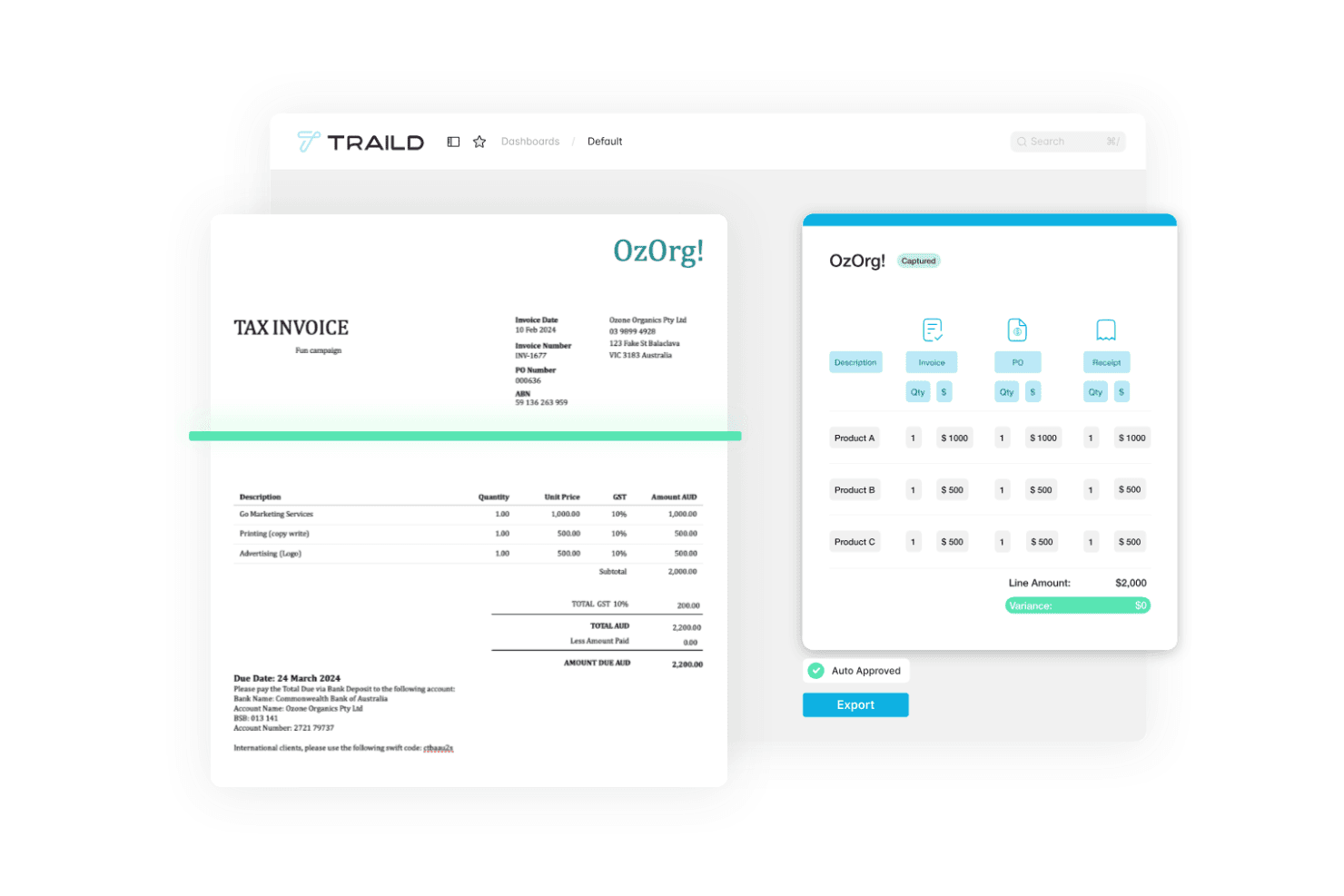
Traild displays an accounts payable automation dashboard that captures invoice data, validates line items, and automates invoice approvals. Traild is an AP automation platform that handles AI-driven invoice capture, PO matching, multi-level approval workflows, supplier verification, and fraud detection across the full invoice-to-pay cycle.
Who Is Traild Best For?
Traild is a good fit for mid-market finance teams that need structured AP controls without the complexity of an enterprise-grade implementation.
Why I Picked Traild
I've included Traild in my top picks because its approval workflow builder gives AP teams real control over how invoices move through the business. I like that you can set up templates with custom routing rules based on invoice type, supplier, cost center, or spend threshold, so different invoice categories follow different paths without manual intervention. You can also layer in conditional logic, meaning a utilities invoice routes differently than a capital expenditure without building those rules from scratch each time.
Traild Key Features
- AI invoice capture: Automatically extracts and codes invoice data using AI, reducing manual data entry across all invoice formats.
- 2-3 way PO matching: Matches invoices against purchase orders and receipts to flag discrepancies before approval.
- Supplier verification: Validates supplier bank details and contact information to reduce payment fraud risk.
- Automated statement reconciliation: Reconciles supplier statements against your AP records to catch missing or duplicate invoices.
Traild Integrations
Traild offers native integrations with Acumatica, SYSPRO, IFS, NetSuite, SAP Business One, MYOB, and Xero, providing real-time two-way data flow with each ERP.
Pros and Cons
Pros:
- Multi-entity management under one login
- Handles industry-specific AP workflows well
- Built-in AI fraud and anomaly detection
Cons:
- No self-serve free trial available
- Limited number of ERP integrations
Learn more about Traild: Best for automated approval workflows
- Free demo available
- From $499/month (billed annually)
Visit WebsiteCustomer Rating:4.8/5
Precoro's dashboard centralizes all purchase orders and includes statuses, purchaser details, and related documents. For those in search of a dependable accounts payable automation solution, Precoro presents a platform that centralizes invoice management and boosts financial accuracy. Tailored for mid-sized companies, Precoro integrates with various accounting systems, providing real-time visibility and customizable approval workflows. Its AI-powered features minimize manual tasks, prevent errors, and ensure timely payments, making it a suitable option for finance teams looking to improve their AP processes.
Why I Picked Precoro
I picked Precoro for its ability to enhance accuracy and control in accounts payable processes through its AI-powered invoice capture and customizable approval workflows. These features significantly reduce manual intervention, allowing your team to focus on strategic tasks rather than tedious data entry. Precoro’s integration with various accounting systems also ensures seamless operation, providing real-time visibility across multiple entities and currencies. This makes it an ideal choice for finance teams seeking to improve their AP operations without the hassle of complex setups.
Precoro Key Features
In addition to its invoice capture and approval workflows, Precoro offers several other features that enhance the accounts payable process:
- Three-Way Matching: This feature ensures that invoices are accurately matched with purchase orders and receipts, reducing the chances of errors and fraudulent activities.
- Supplier Portal: It allows for streamlined communication with vendors, improving relationship management and facilitating quicker resolution of discrepancies.
- Built-in Spend Controls: These controls help your team maintain budgetary compliance by setting limits and alerts for spending, ensuring financial discipline.
- Real-Time Visibility: With comprehensive dashboards, your team can track invoices, budgets, and spending across various departments and entities, enhancing transparency and decision-making.
Precoro Integrations
Integrations include NetSuite, QuickBooks Online, QuickBooks Desktop, Xero, Sage Intacct, and Microsoft Dynamics 365.
Pros and Cons
Pros:
- Efficient purchase order creation and tracking
- Robust three-way matching system
- Customizable workflows adapt to various business needs
Cons:
- Dependence on technology for AP processes
- Mobile app could be improved
Learn more about Precoro: Best for automated invoice processing
- Free demo available
- Pricing upon request
Visit WebsiteCustomer Rating:4.3/5
Paylocity’s dashboard displays automated invoice workflows and real-time visibility into payment approvals. For businesses aiming to simplify financial operations, Paylocity's Accounts Payable Automation Software offers a streamlined approach to managing payment processes and enhancing financial oversight. It appeals particularly to organizations looking to reduce manual errors and make informed decisions by automating workflows and providing real-time insight into transactions. By integrating with HR and IT solutions, Paylocity allows your team to focus resources on strategic growth, positioning itself as a valuable partner in financial management.
Why I Picked Paylocity
I picked Paylocity for its ability to transform traditional accounts payable tasks into a more efficient and accurate process through its AI-powered automation. The software offers automated invoice processing and approval workflows, which reduce manual data entry and minimize errors. Additionally, Paylocity supports real-time tracking and seamless integration with existing financial systems, providing your team with enhanced visibility and control over financial operations. These features collectively enable businesses to optimize their accounts payable processes, ultimately leading to cost savings and improved vendor relationships.
Paylocity Key Features
In addition to the reasons I previously mentioned, here are some other key features that make Paylocity's Accounts Payable Automation Software stand out:
- Fraud Detection: The software leverages AI to monitor transactions and identify suspicious activities, enhancing security and reducing the risk of fraud.
- Spend Analytics: This feature provides detailed insights into spending patterns, helping your team make data-driven decisions and identify areas for cost optimization.
- Policy Compliance: Automated checks ensure that all transactions adhere to company policies and regulatory standards, simplifying audits and maintaining compliance.
- Vendor Management: Streamlined onboarding and management of vendors improve relationships and ensure timely payments, enhancing your team's efficiency in handling vendor-related tasks.
Paylocity Integrations
Integrations include AxisCare, BenefitsMe, CompareMedsRX, Crunchtime, 15Five, 3rd Degree Screening, 401GO, 4MyBenefits, 7shifts, and ABG (Alliance Benefit Group).
Pros and Cons
Pros:
- Integrates HR and financial workflows
- Real-time spend analytics
- AI-driven invoice automation
Cons:
- Complex feature set for smaller teams
- Reporting setup may require training
Learn more about Paylocity: Best for AI-powered bill entry
- 21-day free trial available
- From $99/month
Visit WebsiteCustomer Rating:4.9/5
A digital invoice from MakersHub displaying itemized purchase details, payment terms, and total amount due. Imagine transforming your finance department's workflow with a tool that integrates into your existing systems, eliminating tedious data entry and reducing processing time by up to 90%. MakersHub's Accounts Payable Automation Software is designed for industries like construction and manufacturing, providing a centralized hub for managing approvals and payments. This intelligent platform captures invoice details automatically, freeing your team to focus on more strategic tasks while ensuring accuracy and compliance in financial records.
Why I Picked MakersHub
I picked MakersHub for its innovative WiseVision technology, which drastically reduces manual data entry by capturing all relevant data from various bill formats. This feature is particularly valuable for businesses seeking to streamline their accounts payable processes, as it enhances accuracy and saves substantial time. Additionally, the software's seamless integration with QuickBooks allows for efficient bill and payment management, automatically creating vendors and items to ensure smooth financial operations. The customizable approval flows and granular user access further support effective team collaboration, addressing the needs of organizations with complex workflows.
MakersHub Key Features
In addition to the reasons I picked MakersHub, there are several key features that make it a compelling choice for accounts payable automation.
- Auto-Mapping Rules: This feature allows you to configure mapping rules once, ensuring that expenses are correctly coded and new items are automatically created in the Chart of Accounts.
- AP Collaboration Hub: Your team can collaborate with context by adding notes and documents, facilitating a streamlined review process.
- Powerful Search & Filters: You can quickly locate specific bills by using various search filters, enhancing the efficiency of document retrieval.
- Granular User Access: Set flexible permissions for each user to access the necessary information without compromising the security of your accounting system.
MakersHub Integrations
Integrations include Sage Intacct and QuickBooks.
Pros and Cons
Pros:
- Integration with QuickBooks
- Multi-layered approval process
- Automation of bills and payments
Cons:
- Certain features are limited to higher-tier plans
- Steep learning curve for new users
Learn more about MakersHub: Best for automated three-way matching
- Free demo available
- Pricing upon request
Visit WebsiteCustomer Rating:4.6/5
Procurify's dashboard provides an overview of the procure-to-pay process, allowing users to manage and track purchases efficiently. For those looking to improve their accounts payable processes, Procurify provides a solution that integrates procurement and payment functions, specifically designed for mid-market businesses. It features AI-driven invoice processing and mobile access, which helps tackle challenges like manual errors and slow payment cycles, ensuring your financial operations are accurate. With vendor management and budget oversight capabilities, Procurify aligns with popular accounting systems, making it a practical choice for teams aiming to optimize financial management.
Why I Picked Procurify
I picked Procurify for its AI-driven invoice processing and automated reconciliation, which address the tedious manual tasks often faced by finance teams. These features enhance accuracy and reduce the risk of errors, allowing your team to focus on strategic financial planning. Additionally, its integration with popular accounting systems like QuickBooks facilitates seamless data management, making it a practical choice for businesses aiming to modernize their spend management. Procurify's approach to streamlining procure-to-pay processes aligns well with organizations looking to improve financial efficiency and accuracy.
Procurify Key Features
In addition to its AI-driven invoice processing and automated reconciliation, Procurify offers several other noteworthy features for accounts payable automation.
- Bill Management: This feature allows you to easily manage and track bills, providing real-time visibility into your financial obligations and helping to maintain strong vendor relationships.
- Flexible Payment Options: Procurify supports multiple payment methods, including ACH, wire transfers, and checks, ensuring you can handle vendor payments in the way that best suits your business needs.
- Real-Time Tracking: With this feature, your team can monitor accruals and financial data as they happen, allowing for more accurate budget forecasting and financial planning.
- Mobile Access: The Procurify mobile app enables you to manage requests, expenses, and approvals on-the-go, ensuring that your accounts payable processes are not hindered by location constraints.
Procurify Integrations
Integrations include QuickBooks Online, QuickBooks Desktop, NetSuite, Sage Intacct, Microsoft Dynamics 365, and API support for custom integrations.
Pros and Cons
Pros:
- The mobile app allows for approvals and management on the go
- Offers customizable reporting
- Real-time budget tracking
Cons:
- Editing purchase order requests can be cumbersome
- Could use more advanced analytics features
Learn more about Procurify: Best for AI-driven invoice automation
- Free demo available
- Pricing upon request
Visit WebsiteCustomer Rating:4.8/5
DOKKA's automated invoice processing feature streamlines and automates the extraction and organization of invoice data. For those seeking a solution to automate their accounts payable processes, DOKKA offers an AI-driven platform designed to simplify financial workflows. This tool appeals to finance professionals like CFOs and Accounts Payable Managers who aim to enhance efficiency and improve cash flow visibility. By integrating with various ERP systems, DOKKA reduces manual tasks and mitigates fraud, providing tailored solutions that improve overall business outcomes.
Why I Picked DOKKA
I picked DOKKA because its AI-powered platform excels in automating end-to-end accounts payable tasks, making it a standout choice for finance teams. DOKKA's advanced technology allows for seamless integration with various ERP systems, which means your team can easily adapt it to fit existing workflows. With features like automated invoice processing and multi-level approval workflows, DOKKA significantly reduces manual tasks and errors, leading to faster payment cycles and better cash flow management. This focus on efficiency and accuracy enables your team to shift attention from routine tasks to more strategic financial initiatives.
DOKKA Key Features
In addition to its robust automation capabilities, DOKKA offers several features that enhance the Accounts Payable process for your finance team:
- Google-Style Document Search: Quickly locate invoices, comments, or approval histories with powerful indexing and keyword searches.
- Automated Purchase Order Matching: Accurately reconcile purchase orders with invoices, minimizing payment errors by visualizing discrepancies.
- Line Item Extraction: Effortlessly extract detailed information from invoices into journal entries, improving processing speed and record accuracy.
- Centralized Workspace: Facilitate real-time collaboration, document management, and transparency among team members, ensuring everyone stays informed and aligned.
DOKKA Integrations
Native integrations with DOKKA include QuickBooks Online, Xero, Sage 50, Sage 200, Microsoft Dynamics 365, Oracle NetSuite, SAP Business One, Priority ERP, Exact, and Zoho Books.
Pros and Cons
Pros:
- Offers enhanced collaboration features
- Provides customizable workflows
- Highly accurate data extraction
Cons:
- Limited offline capabilities
- Limited scalability for large enterprises
Learn more about DOKKA:

Airbase lets you customize expense policies and set rules to automate a lot of broad spend management tasks along with AP. For finance professionals seeking a reliable solution to optimize their accounts payable operations, Airbase offers a platform tailored to streamline invoice processing, approval workflows, and vendor management. Its integration of AI technology ensures accuracy and reduces manual errors, providing operational efficiency and financial visibility. By leveraging Airbase, you can transform traditional, error-prone workflows into efficient processes, ultimately driving better financial control and supporting your organization's growth.
Why I Picked Airbase
I picked Airbase because it offers a specialized accounts payable automation solution that is particularly beneficial for startups. Its AI-driven invoice capture and workflow automation significantly reduce manual workload and enhance compliance. The platform's integration with popular ERPs ensures that your financial data remains synchronized, providing real-time visibility and control over operations. This combination of features allows startups to efficiently manage their accounts payable processes while focusing on strategic growth.
Airbase Key Features
In addition to its suitability for startups, Airbase offers several key features that enhance accounts payable automation.
- Guided Procurement: This feature simplifies the purchasing process for employees by providing a no-code routing system that ensures compliance without technical complexity.
- Expense Management: The AI-based OCR system automatically generates expense reports from receipt images, reducing manual data entry and ensuring compliance.
- Corporate Cards: Airbase integrates pre-approvals and expenditure details directly into the general ledger, with options for both virtual and physical card programs.
- Automatic Syncing to the GL: This feature ensures that all vendor and payment details are seamlessly synchronized with the general ledger, enhancing accounting transparency and efficiency.
Airbase Integrations
Integrations include Xero, NetSuite, Slack, QuickBooks Online, Sage Intacct, Indent, Microsoft Dynamics 365 Business Central, and Intuit QuickBooks Desktop.
Pros and Cons
Pros:
- Virtual credit cards offer secure and controlled spending
- Real-time reporting for all non-payroll spend
- Mobile app enables on-the-go expense management
Cons:
- Mobile app functionality is limited
- Reporting capabilities are limited
 9Best for multi-method payment support
Ramp
- Free plan + free demo available
- From $15/user/month
Visit WebsiteCustomer Rating:4.8/5
Ramp provides an automated accounts payable dashboard that categorizes transactions, syncs expenses, and flags missing memos for review. For those seeking to enhance their accounts payable processes, Ramp offers an innovative solution that caters to businesses aiming to accelerate their financial operations. As a tool designed with AI-driven invoice processing and seamless integration capabilities, it appeals particularly to finance teams looking to eliminate the inefficiencies of manual workflows. By automating tasks such as invoice capture and approval routing, Ramp not only speeds up processing times but also provides real-time insights into cash flow, helping your team focus on strategic financial management rather than repetitive tasks.
Why I Picked Ramp
I picked Ramp for its unique ability to address inefficiencies in the accounts payable process with features like optical character recognition (OCR) for accurate data extraction and automated approval routing. These functionalities allow your team to process invoices faster and reduce errors, tackling the challenges of manual systems. Additionally, Ramp's integration with existing financial systems maintains a consistent workflow, enhancing visibility and control over cash flow. These capabilities make Ramp an attractive solution for finance teams aiming to optimize their accounts payable operations.
Ramp Key Features
In addition to the features that initially drew me to Ramp, there are several other functionalities that can greatly enhance your accounts payable operations.
- Real-Time Reporting: Provides dashboards and reports that offer insights into processing times, spending patterns, and vendor performance, allowing your team to make informed financial decisions.
- Digital Audit Trails: Maintains comprehensive records of all invoice actions, supporting compliance and internal controls, which can be crucial during audits.
- Fraud Detection: Utilizes two and three-way matching to identify discrepancies and prevent unauthorized payments, ensuring the security of your financial transactions.
- Global Payment Capabilities: Facilitates payments to vendors worldwide, allowing your team to manage international transactions seamlessly and efficiently.
Ramp Integrations
Integrations include Xero, QuickBooks, Netsuite, Sage, and an API is available for custom integrations.
Pros and Cons
Pros:
- Automated expense reporting and receipt matching
- Ability to issue multiple virtual cards with customizable controls
- Comprehensive reporting features
Cons:
- Challenges integrating with less common ERP systems
- Limited advanced accounting features
 10Best for automated cash flow insights
Xero
- 30-day free trial available
- From $2.50/month
Visit WebsiteCustomer Rating:4.4/5
Xero lets you track and manage bills effectively, providing a clear view of accounts payable and cash flow. For those looking to address accounts payable challenges, Xero offers a tailored solution for small businesses. It automates tasks such as invoice processing and payment tracking, saving you time and reducing errors while providing better cash flow visibility. This makes it an appealing choice for business owners focused on improving efficiency, reducing operational costs, and maintaining strong vendor relationships.
Why I Picked Xero
I picked Xero for its ability to transform accounts payable processes through features like automated invoice uploads using OCR and AI, and streamlined approval workflows. These capabilities address the challenges of time-consuming manual entries and potential errors. The software's real-time dashboards enhance cash flow management by allowing you to track due payments with ease. With Xero, you not only benefit from reduced processing times and improved accuracy but also from maintaining strong vendor relationships through timely payments.
Xero Key Features
In addition to the features I highlighted earlier, Xero offers various other functionalities that make it a strong candidate for automating your accounts payable processes.
- Automated Data Capture: Xero uses OCR and AI technology to automatically upload and process invoices, reducing manual data entry tasks.
- Electronic Payments: You can facilitate vendor payments directly within the software, streamlining the financial transaction process.
- Invoice Matching: The software automatically compares purchase orders and invoices to ensure consistency and minimize errors.
- Real-Time Visibility: Xero provides dashboards and reports that allow you to track due payments and manage cash flow more effectively.
Xero Integrations
Integrations include Hubdoc, Syft, Stripe, Xero Inventory Plus, Shopify Integration, Xero Practice Manager, HubSpot CRM Integration, Xero Analytics Plus, Etsy, and Xero Workpapers.
Pros and Cons
Pros:
- User-friendly interface
- Good reporting features
- Cloud-based accessibility
Cons:
- May not be suitable for large enterprises
- Mobile app is not as robust as desktop version
Learn more about Xero:
Andre alternativer for automatisering av leverandørgjeld
Her er noen andre gode alternativer som ikke helt nådde opp på listen over den beste programvaren for automatisering av leverandørgjeld, men som fortsatt er verdt å vurdere:
- 11TipaltiBest for global organizations
- 12CentimeBest for all-in-one cash management
- 13XledgerBest for multi-entity financial management
- 14SettleBest for small CPG businesses
- 15Quadient AP By BeanworksBest for managing multiple locations
- 16SlashBest for real-time cash flow visibility
- 17PairsoftBest for fast-growing businesses
- 18RoutableBest for global vendor payments
- 19Rippling SpendBest for advanced policy controls
- 20Doxis SpendControlBest for multi-currency support
- 21BILLBest for international payments
- 22QuickBooks OnlineBest for sole proprietors
- 23TrailHQBest for streamlining invoice data capture
- 24MineralTreeBest for financial services firms
- 25StampliBest for collaboration
- 26Sage IntacctBest for large organizations
- 27DocuWareBest for remote teams
- 28BonsaiBest for freelancers
- 29BaswareBest for predictive analytics and benchmarking
- 30DualEntryBest for automated invoice matching
Relatert økonomiprogramvare
Hvis du fortsatt ikke har funnet det du leter etter, kan du se nærmere på noen andre nært beslektede verktøy vi har testet og vurdert:
- Regnskapsprogramvare
- Programvare for leverandørgjeld
- Programvare for utgiftsrapporter
- Programvare for utgiftssporing
- Programvare for økonomirapportering
- ERP-programvare
- POS-systemer
- Faktureringsprogramvare
- Prognoseprogramvare
- Tjenester for kjøpmannskontoer
How I Evaluate Accounts Payable Automation Software
I look at AP tools through two lenses: baseline requirements like 3-way matching and ERP sync, plus the differentiators—like global payments or AI coding—that separate the right fit from the rest.
Core Functionality (Table Stakes For This List)
When I'm selecting tools for my list, I rank each one on a scale from 0 (does not offer the functionality) to 5 (excels in this area) for each core functionality listed below. Then, I calculate the tool's total score into a percentage. Each tool needs to achieve a minimum total score of 75% to be considered for inclusion.
- Invoice Capture & OCR: I check whether the tool can ingest invoices from email, upload, and EDI, then extract line-item data accurately enough to reduce manual correction on high-volume runs.
- Approval Workflow Automation: Multi-tier routing with conditional rules matters here—I look for delegation, mobile approvals, and notifications that keep invoices from stalling in someone's inbox.
- PO & Invoice Matching: I evaluate whether the platform handles automated 2-way and 3-way matching with configurable tolerances, since even small mismatches can cascade into month-end reconciliation headaches.
- Integrated Payment Execution: The tool should let you schedule and send payments via ACH, check, wire, and virtual card from one place rather than forcing your team into a separate banking portal.
- ERP & Accounting Integration: Bidirectional sync with systems like NetSuite, QuickBooks, SAP, or Sage Intacct is what I look for—GL codes, vendor records, and PO data should flow both ways in real time.
- Vendor Management & Compliance: I look at how the platform handles vendor onboarding, W-9/W-8 collection, and duplicate detection, plus whether it maintains audit-ready records your controller can pull during a review.
Once I have a list of tools that meet the criteria, I consider what sets each platform apart.
Differentiating Factors (What Sets Vendors Apart)
Here's how I compare and contrast different vendors:
Standout Features
AI-powered GL coding is a big differentiator. I look for platforms where machine learning auto-assigns accounts, cost centers, and departments based on historical patterns. This alone can cut hours off a high-volume coding queue. Virtual card rebate programs are worth evaluating too, since they let your AP team generate cashback on vendor payments. For multi-subsidiary organizations dealing with cross-border vendors, global support with native multi-currency payments and localized tax compliance makes a real difference.
Beyond Features
Company size matters more than most buyers realize. I evaluate whether a platform's pricing model—per invoice, per user, or flat tier—aligns with your AP volume without penalizing growth. Security and compliance certifications like SOC 2 Type II and PCI-DSS are worth checking, especially if your team handles payment execution in-platform. Pricing transparency rounds out the picture. I look for clear fee breakdowns that account for payment rail costs and implementation so there are no surprises post-contract.
Slik velger du programvare for automatisering av leverandørgjeld
Det kan føles overveldende å velge riktig programvare når du må forholde deg til lange funksjonslister og forvirrende prisplaner. For å gjøre det enklere får du her noen viktige faktorer du bør ha i bakhodet når du går gjennom utvelgelsesprosessen.
| Faktor | Hva bør vurderes |
|---|---|
| FaktorSkalerbarhet | Hva bør vurderesVil denne programvaren vokse med virksomheten din? |
| FaktorIntegrasjoner | Hva bør vurderesKan den integreres med de eksisterende systemene dine (f.eks. ERP-systemer og CRM-systemer)? |
| FaktorTilpasningsmuligheter | Hva bør vurderesKan du tilpasse den til de spesifikke behovene dine? |
| FaktorBrukervennlighet | Hva bør vurderesSynes de som skal bruke den at den er brukervennlig? |
| FaktorBudsjett | Hva bør vurderesPasser den innenfor de økonomiske rammene dine? |
| FaktorDatasikkerhet | Hva bør vurderesFinnes det tiltak for å beskytte dataene dine? |
| FaktorSupport | Hva bør vurderesEr det tilgjengelig pålitelig kundestøtte? |
| FaktorSamsvar | Hva bør vurderesHjelper den deg med å overholde regelverket? |
Trender innen programvare for automatisering av leverandørgjeld
Programvare for automatisering av leverandørgjeld utvikler seg raskt. Etter å ha gått gjennom de nyeste lanseringene og funksjonsoppdateringene, ble tre tydelige trender synlige. Hvis du ønsker å kutte kostnader, øke kontrollen og redusere manuelle feil, bør du følge med på disse trendene:
- Kunstig intelligens og maskinlæring: Disse teknologiene gjør automatisering av AP smartere ved å forbedre prognoser for kontantstrøm, styrke svindeloppdagelsen og håndtere komplekse beslutninger på egen hånd.
- Hyperautomatisering: Dette går lenger enn grunnleggende automatisering ved å kombinere verktøy som kunstig intelligens og RPA for å automatisere så mange AP-prosesser som mulig. Målet? Raskere arbeidsflyter, færre feil og bedre effektivitet.
- Avansert dataanalyse: Flere AP-løsninger bruker analyse for å gi virksomheter dypere innsikt i utgiftsmønstre og økonomisk helse. NetSuite hjelper for eksempel selskaper med å håndtere utgifter og kontantstrøm gjennom sine kraftige analyseverktøy.
- Blokkjedeteknologi: Noen leverandører begynner å utforske blokkjede som en måte å sikre transaksjonsregistre, redusere risikoen for svindel og sørge for åpenhet. Ved å opprette et digitalt hovedbokregister som ikke kan endres, kan blokkjede gjøre fakturabehandlingen sikrere og mer effektiv.
- Funksjoner for svindelforebygging: Sikkerhet er viktigere enn noen gang, og automatiserte verktøy for svindeloppdagelse har blitt en nødvendighet. Disse algoritmene hjelper virksomheter med å oppdage og stanse uredelig aktivitet før den blir et problem.
Hva er programvare for automatisering av leverandørgjeld?
Programvare for automatisering av leverandørgjeld er et digitalt verktøy som automatiserer behandlingen, godkjenningen og betalingen av leverandørfakturaer.
Den erstatter manuelle AP-arbeidsflyter med funksjoner som automatisk innhenting av fakturaer, treveis matching, distribusjon av godkjenninger og planlagte betalinger. Denne programvaren er utviklet for regnskapsteam og økonomidirektører og reduserer menneskelige feil, forkorter fakturasyklustiden og sikrer samsvar med interne kontroller.
Ved å gi sanntidsinnsikt i forpliktelser og kontantstrøm hjelper programvare for automatisering av leverandørgjeld økonomiledere med å optimalisere arbeidskapitalen og skalere driften effektivt.
Funksjoner i programvare for automatisering av leverandørgjeld
Når du velger programvare for automatisering av leverandørgjeld, bør du se etter følgende nøkkelfunksjoner:
- Fakturabehandling: Denne funksjonen lar deg hente inn, skanne og digitalisere fakturaer, slik at du kan droppe manuell registrering og redusere menneskelige feil. Den fremskynder godkjenningene og gir gevinst i form av spart tid.
- Automatiserte godkjenningsarbeidsflyter: Du kan kartlegge godkjenningsprosessene dine med tilpassede regler og ruting. Det betyr at du sender fakturaer til de riktige personene til riktig tid – ikke mer jakt på signaturer.
- Integrasjon med regnskapssystemer: Koble direkte til de eksisterende regnskaps- eller ERP-verktøyene dine. På den måten flyter dataene sømløst – dobbeltregistrering elimineres, og alle tallene dine holdes synkronisert.
- Oppdagelse av duplikater og svindel: Programvaren flagger mistenkelige eller dupliserte fakturaer automatisk. Det er en praktisk måte å oppdage potensiell svindel før den slipper gjennom.
- Planlegging av betalinger: Planlegg og automatiser betalinger, slik at du aldri går glipp av en forfallsdato – eller betaler for tidlig. Dette holder kontantstrømmen stabil og leverandørene fornøyde.
- Dokumenthåndtering: Lagre, organiser og hent frem fakturaer og betalingsoppføringer med noen få klikk. Du slipper å lete gjennom bunker med papirarbeid når revisjonssesongen kommer.
- Rapportering og analyse: Få tydelig innsikt i utgifter, godkjenningstider og flaskehalser i arbeidsflyten med innebygde dashbord og tilpassbare rapporter. Disse dataene hjelper deg med å oppdage trender og finne måter å spare penger på.
- Tilgangskontroller for brukere: Angi tillatelser for hvem som kan se, godkjenne eller redigere de ulike delene av AP-prosessen. Det sørger for at sensitiv informasjon er i de riktige hendene, og bidrar til samsvar.
- Mobiltilgjengelighet: Se på fakturaer eller godkjenn betalinger mens du er utenfor kontoret. Denne fleksibiliteten bidrar til at arbeidet fortsetter, uansett hvor du befinner deg.
Vanlige AI-funksjoner i programvare for automatisering av leverandørgjeld
I tillegg til standardfunksjonene i programvare for automatisering av leverandørgjeld som er nevnt ovenfor, inkluderer mange av disse løsningene AI-funksjoner som:
- Intelligent datauttrekking: AI skanner og tolker fakturadetaljer – som datoer, beløp og leverandører – uten at du trenger å registrere noe manuelt. Dette reduserer feil betraktelig og sparer mye tid.
- Automatisk avviksdeteksjon: Programvaren bruker AI til å oppdage uvanlige betalingsmønstre, utgifter utenfor retningslinjene eller mulig svindel, og varsler om problemer du kanskje ikke ville oppdaget med det blotte øyet.
- Prediktiv analyse: AI gjennomgår fakturahistorikken din og forutser behov for kontantstrøm eller risiko for forsinkede betalinger, slik at du kan ta bedre økonomiske beslutninger før det haster.
- Smart godkjenningsflyt: Med AI lærer systemet bedriftens arbeidsmåter og foreslår eller videresender automatisk godkjenninger basert på faktiske arbeidsflytmønstre, noe som reduserer flaskehalser og frigjør mental kapasitet.
- Automatisk matching av leverandører: AI kobler fakturaer mot innkjøpsordrer og kvitteringer, selv når detaljene ikke stemmer helt overens. Dette løser avvik raskt – og betyr at du slipper færre problemer.
Fordeler med programvare for automatisering av leverandørgjeld
Overgang til programvare for automatisering av leverandørgjeld kan utgjøre en stor forskjell for teamet og virksomheten din. Her er noen viktige fordeler du kan forvente:
- Bedre oversikt: Sentraliserte data og rapportering i sanntid gir bedre innsikt i prosessen for leverandørgjeld og den generelle økonomiske situasjonen.
- Tidsbesparelser: Automatisering av repetitive oppgaver som dataregistrering og fakturabehandling frigjør tid for teamet ditt, slik at dere kan fokusere på viktigere arbeid.
- Færre feil: Programvaren minimerer menneskelige feil ved automatisk å registrere og matche fakturadata med innkjøpsordrer.
- Bedre styring av kontantstrømmen: Overvåking av fakturaer og betalinger i sanntid hjelper deg med å styre kontantstrømmen bedre og forutse fremtidige behov.
- Bedre etterlevelse: Automatisering sikrer at alle fakturaer behandles i henhold til myndighetskrav, noe som reduserer risikoen for manglende etterlevelse.
- Bedre leverandørforhold: Raskere og mer nøyaktig betalingsbehandling holder leverandørene fornøyde og kan føre til bedre betalingsvilkår eller rabatter.
- Kostnadsbesparelser: Færre manuelle prosesser reduserer administrasjonskostnadene og sannsynligheten for kostbare feil.
Kostnader og priser for programvare for automatisering av leverandørgjeld
Prisen på programvare for automatisering av leverandørgjeld varierer vanligvis etter funksjoner og teamstørrelse. De fleste verktøy følger en forutsigbar trinnvis prismodell. Bruk tabellen nedenfor til raskt å sammenligne vanlige abonnementer, gjennomsnittlige kostnader og viktige funksjoner, slik at du kan budsjettere på en smart måte og velge riktig løsning for økonomiteamet ditt.
| Abonnementstype | Gjennomsnittlig pris (per bruker, per måned) | Vanlige funksjoner |
|---|---|---|
| AbonnementstypeGratis | Gjennomsnittlig pris (per bruker, per måned)$0 | Vanlige funksjonerGrunnleggende fakturabehandling, begrenset dokumentlagring, brukerstøtte via e-post og grunnleggende rapportering. |
| AbonnementstypeOppstart | Gjennomsnittlig pris (per bruker, per måned)$20-30 | Vanlige funksjonerFakturabehandling, dokumentlagring, brukerstøtte via e-post og chat, grunnleggende integrasjoner og rapportering. |
| AbonnementstypeBedrift | Gjennomsnittlig pris (per bruker, per måned)$50-70 | Vanlige funksjonerAvansert fakturabehandling, utvidet dokumentlagring, tilgang for flere brukere, avanserte integrasjoner og detaljert rapportering. |
| AbonnementstypeStørre virksomhet | Gjennomsnittlig pris (per bruker, per måned)$100-150 | Vanlige funksjonerOmfattende fakturabehandling, ubegrenset dokumentlagring, dedikert brukerstøtte, tilpassede integrasjoner og avansert analyse. |
Vanlige spørsmål om programvare for automatisering av leverandørgjeld
Har du flere spørsmål om AP-automatisering eller hva du bør ta hensyn til når du ser etter en løsning? Her er noen vanlige spørsmål og svar:
Hva er de viktigste fordelene ved å automatisere leverandørgjeld?
\u003cspan style=\u0022font-weight: 400;\u0022\u003eDette kan AP-programvare gjøre for økonomiavdelingen din:\u003c/span\u003e
\u003cul\u003e
\t\u003cli style=\u0022font-weight: 400;\u0022\u003e\u003cstrong\u003eSpar tid:\u003c/strong\u003e\u003cspan style=\u0022font-weight: 400;\u0022\u003e Teamet ditt bruker langt mindre tid på manuell dataregistrering, kommunikasjon med leverandører og lignende.\u003c/span\u003e\u003c/li\u003e
\t\u003cli style=\u0022font-weight: 400;\u0022\u003e\u003cstrong\u003eReduser arbeidskostnadene:\u003c/strong\u003e\u003cspan style=\u0022font-weight: 400;\u0022\u003e Du trenger ikke å ansette flere medarbeidere i AP-teamet etter hvert som virksomheten vokser – programvaren bidrar til å håndtere økende betalingsvolum.\u003c/span\u003e\u003c/li\u003e
\t\u003cli style=\u0022font-weight: 400;\u0022\u003e\u003cstrong\u003eReduser feil:\u003c/strong\u003e\u003cspan style=\u0022font-weight: 400;\u0022\u003e Automatisering reduserer risikoen for feil som kan oppstå ved manuell registrering.\u003c/span\u003e\u003c/li\u003e
\t\u003cli style=\u0022font-weight: 400;\u0022\u003e\u003cstrong\u003eDatainnsyn: \u003c/strong\u003e\u003cspan style=\u0022font-weight: 400;\u0022\u003eØkonomirapporter oppdateres i sanntid. Du får oppdaterte data som grunnlag for beslutninger, ikke historiske data.\u003c/span\u003e\u003c/li\u003e
\u003c/ul\u003e
Hvilke oppgaver kan løsninger for AP-automatisering håndtere?
\u003cspan style=\u0022font-weight: 400;\u0022\u003eDette kan AP-automatisering håndtere for deg:\u003c/span\u003e
\u003cul\u003e
\t\u003cli style=\u0022font-weight: 400;\u0022\u003e\u003cspan style=\u0022font-weight: 400;\u0022\u003eGodkjenning og ruting av innkjøpsrekvisisjoner, innkjøpsordrer og fakturaer.\u003c/span\u003e\u003c/li\u003e
\t\u003cli style=\u0022font-weight: 400;\u0022\u003e\u003cspan style=\u0022font-weight: 400;\u0022\u003eInnhenting av fakturadata ved hjelp av OCR og kunstig intelligens.\u003c/span\u003e\u003c/li\u003e
\t\u003cli style=\u0022font-weight: 400;\u0022\u003e\u003cspan style=\u0022font-weight: 400;\u0022\u003eKommunikasjon med leverandører.\u003c/span\u003e\u003c/li\u003e
\t\u003cli style=\u0022font-weight: 400;\u0022\u003e\u003cspan style=\u0022font-weight: 400;\u0022\u003eBetalinger, særlig gjentakende betalinger.\u003c/span\u003e\u003c/li\u003e
\u003c/ul\u003e
Hvordan implementerer man AP-automatisering?
For å implementere AP-automatisering bør du begynne med å evaluere de nåværende AP-prosessene og identifisere behovene dine. Utarbeid en forretningsmessig begrunnelse for å få støtte fra interessentene. Dokumenter kravene dine og velg en leverandør av AP-automatisering som dekker behovene dine. Opprett og gjennomfør en implementeringsplan med tydelige trinn og tidsplaner.
Hvor mye tid sparer AP-automatisering?
AP-automatisering kan spare betydelig med tid ved å redusere manuelle oppgaver. I gjennomsnitt kan du forvente å spare 60% til 80% av tiden som vanligvis brukes på mottak av fakturaer og innhenting av data. Denne effektiviteten gjør at teamet ditt kan fokusere på oppgaver med høyere verdi.
Hvordan kan RPA og AI brukes til automatisering av leverandørgjeld?
RPA (robotisert prosessautomatisering) og AI (kunstig intelligens) kan automatisere repetitive oppgaver som fakturabehandling, dataregistrering og validering. Disse teknologiene gjør arbeidsflyten for leverandørgjeld mer effektiv og nøyaktig, reduserer feil og fremskynder behandlingstiden.
Hvordan håndterer man unntak i AP-automatisering?
Håndtering av unntak i AP-automatisering innebærer å sette opp arbeidsflyter for å håndtere avvik, for eksempel uoverensstemmelser mellom fakturaer eller manglende informasjon. Teamet ditt kan gjennomgå og løse disse unntakene manuelt eller bruke maskinlæringsalgoritmer til å identifisere og korrigere vanlige problemer over tid.
Hvilke sikkerhetstiltak finnes for programvare for AP-automatisering?
Programvare for AP-automatisering omfatter vanligvis flere sikkerhetstiltak, for eksempel datakryptering, tilgangskontroller for brukere og revisjonsspor. Disse funksjonene bidrar til å beskytte økonomidataene dine mot uautorisert tilgang og sikrer samsvar med bransjestandarder.