

Et verktøy for kostnadssporing i byggebransjen er et programvareverktøy som hjelper teamet ditt med å registrere, kategorisere og overvåke prosjektkostnader i sanntid. Hvis du leter etter det beste verktøyet for kostnadssporing i byggebransjen, ønsker du sannsynligvis å få bedre oversikt over kostnadene, redusere manuelle feil og holde prosjektene innenfor budsjettet – særlig når du håndterer flere oppdrag, leverandører og krav til etterlevelse. Denne listen hjelper deg med å sammenligne ledende alternativer for 2026, slik at du kan finne en løsning som passer arbeidsflytene dine, støtter nøyaktig rapportering og sørger for at den økonomiske driften går smidig.
Hvorfor du kan stole på våre programvareanbefalinger
6,700+
Reviews
20
Industry experts
16+
Evaluation factors
14
Years
Teamet vårt har testet og anmeldt programvare siden 2012. Vi er selv økonomiledere, så vi vet hvor vanskelig og hvor viktig det er å velge riktig programvare.
I denne guiden har vi vurdert verktøyene gjennom praktisk testing og uavhengig research og gitt dem poeng ut fra våre utvelgelseskriterier.
Anmeldelsene våre bygger på vår egen redaksjonelle vurdering. De er ikke et salgsargument.
Sammenligningstabell for verktøy for kostnadssporing i byggebransjen
Denne sammenligningstabellen oppsummerer prisopplysningene for mine beste utvalgte verktøy for kostnadssporing i byggebransjen.
| Tool | Best For | Trial Info | Price | ||
|---|---|---|---|---|---|
| 1 | Best for accounting-integrated expense tracking | Free demo available | From $11.99/user/month (billed annually) | Website | |
| 2 | Best for integrated job costing and expense control | 30-day free trial | From $49/month (billed annually) | Website | |
| 3 | Best for syncing expenses with service operations | Free demo available | Pricing upon request | Website | |
| 4 | Best for real-time collaboration on project costs | Free demo available | Pricing upon request | Website | |
| 5 | Best for customizable expense tracking databases | Free trial available | From $49/month (billed annually) | Website | |
| 6 | Best for rule-based construction per diems | Free demo available | Pricing upon request | Website | |
| 7 | Best for automated invoice and receipt data extraction | 14-day free trial + free demo available | From $20.80/client/month (billed annually) | Website | |
| 8 | Best for field expense tracking via mobile devices | Free demo available | Pricing upon request | Website | |
| 9 | Best for automated receipt capture and logging | Free demo available | Pricing upon request | Website | |
| 10 | Best for multi-user expense approval workflows | 14-day free trial + free demo available | From $139/month | Website |


Anmeldelser av verktøy for kostnadssporing i byggebransjen
Nedenfor finner du mine detaljerte sammendrag av verktøyene for kostnadssporing i byggebransjen som kom med på kortlisten. Anmeldelsene mine gir et detaljert innblikk i funksjonene, de beste bruksområdene og integrasjonene til hver programvare, slik at du kan finne den som passer best for deg.
 Best for accounting-integrated expense tracking
- Free demo available
- From $11.99/user/month (billed annually)
Visit WebsiteCustomer Rating:4.6/5
Sage Expense Management auto-captures receipts from Gmail, SMS, and Office 365. Sage Expense Management is an expense tracking tool for construction teams that captures receipts via text message, reconciles corporate card transactions in real time, and syncs job costs and cost codes directly to accounting systems like Sage 300 CRE, Sage Intacct, and QuickBooks.
Who Is Sage Expense Management Best For?
Construction accountants and bookkeepers who need field-submitted expenses to flow directly into Sage 300 CRE, Sage Intacct, or QuickBooks will get the most out of this tool.
Why I Picked Sage Expense Management
Sage Expense Management earns its spot on my shortlist because of how tightly it connects field expense capture to construction accounting systems like Sage 300 CRE, Sage Intacct, and QuickBooks. I especially like the text-based receipt capture: when a card is swiped on-site, the crew member gets a text and replies with a photo, no app login needed, and the receipt matches to the transaction automatically with cost code and job number applied. From there, those coded expenses sync directly into your accounting system, so job costs land where they belong without manual re-entry.
Sage Expense Management Key Features
- Budget alerts: Set spend thresholds by project, department, or category and get email notifications when budgets hit defined percentages.
- Multi-stage approvals: Route expenses through multiple approval tiers with policy-driven rules before they reach accounting.
- Linked cost code dropdowns: Selecting a job automatically narrows the available cost codes and cost categories to only those attached to that job.
- Offline mobile capture: Submit receipts, mileage, and per diem entries in the field without a connection, and the app syncs when you're back online.
Sage Expense Management Integrations
Sage Expense Management offers integrations with Sage Intacct, Sage 300 CRE via HH2 Sync, QuickBooks Online, QuickBooks Desktop, Xero, and Sage 50 (beta). Business plans also include API access for custom integrations.
Pros and Cons
Pros:
- Offline capture supports field submissions
- Job and cost-code expense allocation
- Texted receipts reconcile against existing card transactions
Cons:
- Receipt scans sometimes need manual correction
- No committed-cost or change-order visibility
Learn more about Sage Expense Management (formerly Fyle): Best for integrated job costing and expense control
- 30-day free trial
- From $49/month (billed annually)
Visit WebsiteCustomer Rating:4.5/5
Contractor Foreman dashboard showing project costs, invoices, and billing items. Contractor Foreman is a construction management platform designed for contractors and project managers who need to keep a close eye on project expenses. It brings together tools for tracking costs, managing documents, and organizing daily operations in one place. If you’re looking to control spending and improve visibility across multiple jobs, this platform offers features tailored to construction workflows.
Who Is Contractor Foreman Best For?
Contractor Foreman is well suited for small to mid-sized construction firms that need centralized control over job costs and project expenses.
Why I Picked Contractor Foreman
What stands out about Contractor Foreman is how it brings job costing and expense control together in one platform. I picked it because you can track actual costs against budgets in real time, which is essential for construction teams managing multiple projects. The tool also lets you assign expenses directly to jobs and cost codes, so you always know where your money is going. This level of integration helps reduce overspending and gives project managers the financial visibility they need to keep projects on track.
Contractor Foreman Key Features
Some other features that make Contractor Foreman useful for construction expense tracking include:
- Document management: Store, organize, and share project documents, receipts, and invoices in a centralized location.
- Change order tracking: Create, approve, and monitor change orders to keep project costs updated and controlled.
- Time tracking: Log worker hours and allocate labor costs directly to specific jobs or cost codes.
- Vendor management: Track vendor contacts, purchase orders, and payments to maintain clear records of all project-related spending.
Contractor Foreman Integrations
Integrations include QuickBooks Online, CompanyCam, Gusto, Google Calendar, and Square.
Pros and Cons
Pros:
- Offers built-in change order management
- Links receipts and invoices to projects
- Tracks expenses by job and cost code
Cons:
- Reporting options for expenses are basic
- No direct bank feed for expense import
Learn more about Contractor Foreman: Best for syncing expenses with service operations
- Free demo available
- Pricing upon request
Visit WebsiteCustomer Rating:4.5/5
BuildOps dashboard displaying project budget tracking, KPIs, and progress data. BuildOps is a construction management platform designed for commercial contractors who need to connect field service operations with expense tracking. It appeals to businesses looking to unify job costing, invoicing, and service workflows in one system. If you want to reduce manual entry and keep financial data aligned with daily operations, BuildOps offers tools built for that purpose.
Who Is BuildOps Best For?
BuildOps is a strong fit for commercial contractors and service businesses that need to connect expense tracking with field operations.
Why I Picked BuildOps
What drew me to BuildOps is how it connects expense tracking directly with service operations, which is a challenge for many commercial contractors. The platform lets you sync job costs, purchase orders, and invoices with field activities, so your financial data always reflects what’s happening on-site. I like that you can track expenses in real time as technicians complete work orders, making it easier to manage budgets and spot overruns early. This level of integration helps teams avoid manual data entry and ensures that project costs stay aligned with actual service delivery.
BuildOps Key Features
Some other features that make BuildOps useful for construction expense tracking include:
- Customizable cost codes: Assign and track expenses using cost codes tailored to your company’s accounting structure.
- Mobile expense capture: Upload receipts and enter expenses from the field using the mobile app.
- Vendor management: Store vendor details, track purchase history, and manage payments within the platform.
- Role-based permissions: Control who can view, enter, or approve expenses based on user roles.
BuildOps Integrations
Integrations include ADP, Sage Intacct, Arcoro, Avalara, Azuga, and Accordant.
Pros and Cons
Pros:
- Highly responsive customer support team
- Mobile receipt and PO capture for techs
- All-in-one field and office management
Cons:
- Some lag and bugs in the mobile app
- Higher cost than basic tracking apps
Learn more about BuildOps: Best for real-time collaboration on project costs
- Free demo available
- Pricing upon request
Visit WebsiteCustomer Rating:4.5/5
BuildBook dashboard showing team chat, selections, and project updates. BuildBook offers construction teams a way to track expenses while keeping everyone connected throughout a project. It’s designed for residential builders, remodelers, and contractors who need to manage costs and communication in one place. If you’re looking to reduce miscommunication and keep your project’s finances organized, BuildBook brings these elements together in a single platform.
Who Is BuildBook Best For?
BuildBook is a good fit for residential construction teams and contractors who need to manage project expenses and team collaboration in one platform.
Why I Picked BuildBook
I picked BuildBook because it brings real-time collaboration directly into expense tracking for construction projects. The platform lets teams share updates, upload receipts, and comment on cost changes as they happen, so everyone stays informed. I like that you can assign expenses to specific tasks or phases, making it easier to see where money is going throughout the project. This focus on live communication and transparency helps prevent costly misunderstandings and keeps your financial records accurate.
BuildBook Key Features
Some other features in BuildBook help construction teams manage expenses and projects more efficiently:
- Budget tracking dashboard: View and update construction budgets in real time to monitor spending against estimates.
- Change order management: Create, track, and approve change orders directly within the platform to keep cost adjustments organized.
- Document storage: Store invoices, receipts, and contracts in a centralized location for easy access and audit trails.
- Client portal: Share selected financial updates and documents with clients to keep them informed without exposing internal details.
BuildBook Integrations
Integrations include QuickBooks.
Pros and Cons
Pros:
- QuickBooks integration for accounting sync
- Client portal for sharing financial progress
- Centralized document storage for receipts and invoices
Cons:
- Budgeting features may be basic for large projects
- Not designed for commercial construction workflows
Learn more about BuildBook: Best for customizable expense tracking databases
- Free trial available
- From $49/month (billed annually)
Visit WebsiteCustomer Rating:4.4/5
Knack database interface displaying bank records, balances, and transaction data. Knack gives construction teams a way to build their own expense tracking databases without coding. It’s a strong fit for firms that need expense management software for unique workflows or project requirements. If your business wants more control over how you collect, organize, and report on construction costs, Knack offers flexible tools to design the system you need.
Who Is Knack Best For?
Knack is a good fit for construction businesses that need to customize expense tracking workflows to match specific project or organizational requirements.
Why I Picked Knack
I picked Knack because it lets you design a construction expense tracker that fits your exact process, not the other way around. With Knack, you can create custom fields, forms, and approval workflows to match how your team actually manages costs. I appreciate that you can build dashboards and reports tailored to your project or client needs, so you always see the data that matters most. This level of flexibility is hard to find in off-the-shelf construction expense tracking tools.
Knack Key Features
Some other features in Knack help construction teams manage expenses and data more efficiently:
- Role-based access controls: Set permissions so only authorized users can view or edit sensitive expense data.
- Automated notifications: Trigger email or in-app alerts when expenses are submitted, approved, or require attention.
- Mobile-friendly interface: Access and update expense records from any device, including smartphones and tablets.
- File attachment support: Upload and store receipts, invoices, and supporting documents directly within each expense record.
Knack Integrations
Integrations include QuickBooks, Salesforce, HubSpot, Google Sheets, and Mailchimp.
Pros and Cons
Pros:
- Real-time dashboard updates for project costs
- File uploads for receipts and invoices
- Mobile access for field expense entry
Cons:
- No direct integration with construction ERP systems
- Reporting features may lack advanced analytics
Learn more about Knack: Best for rule-based construction per diems
- Free demo available
- Pricing upon request
Visit WebsiteCustomer Rating:4.4/5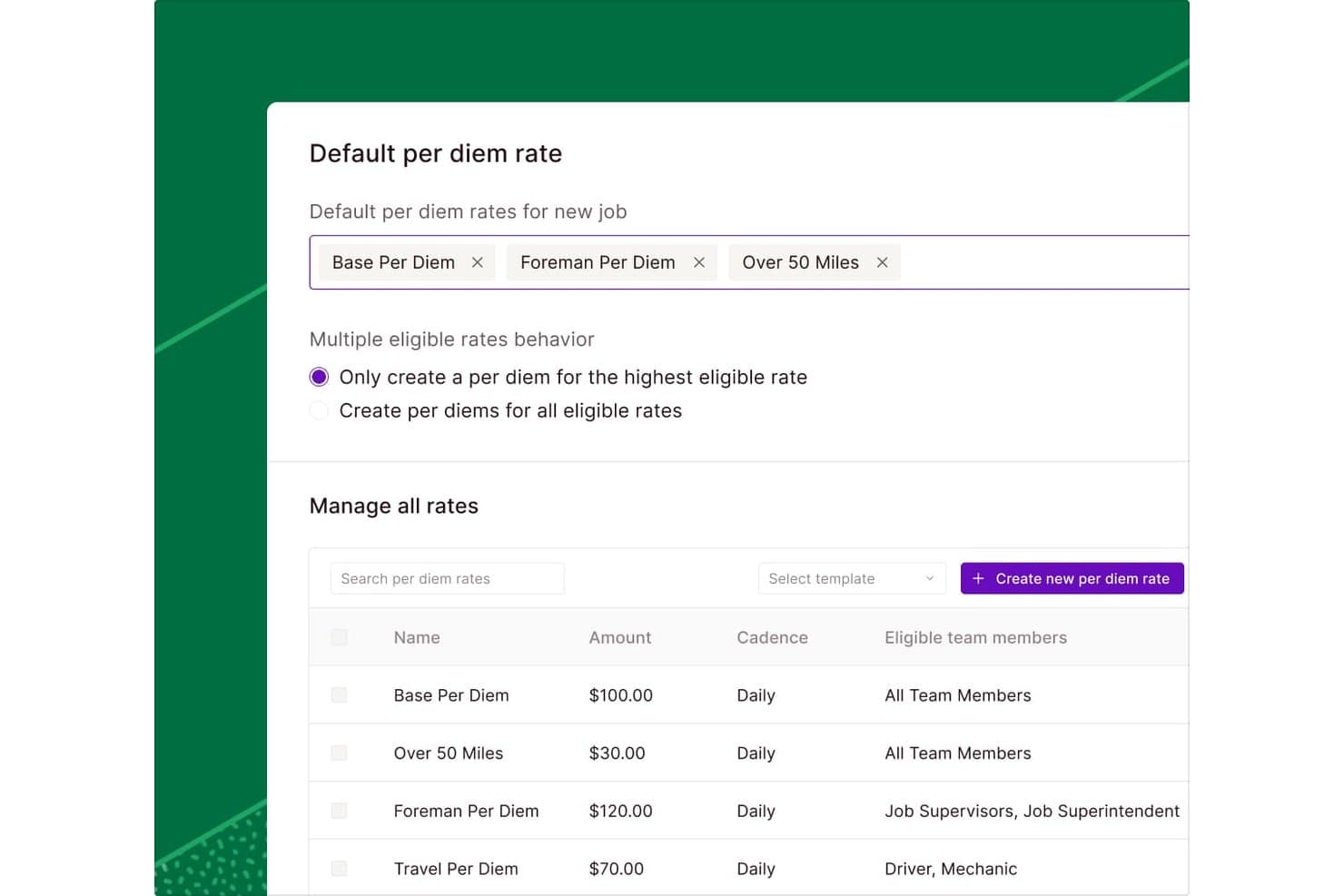
Miter lets users configure per diem rates and eligibility rules by role. Miter is a construction expense management platform that handles field expense tracking, corporate card management, per diems, reimbursements, and accounts payable, with job-cost coding and direct sync to construction accounting systems.
Who Is Miter Best For?
Miter is a strong fit for general contractors and construction accountants who need granular per diem rules, job-cost coding, and direct ERP sync across their field expense workflows.
Why I Picked Miter
I've included Miter in my top picks because its per diem engine is genuinely the most rule-specific I've seen for construction: you can set eligibility by job, union status, distance traveled, or work performed, then route approvals to job supervisors before payout. I also like that per diems can be paid out through payroll or sent directly by ACH, and the costs sync automatically to job costing and your accounting system.
Miter Key Features
- Receipt submission via SMS: Field workers can text receipt photos directly to Miter without needing to open the app.
- Expense approval routing: Approvals can be configured to route by job, department, or org chart to the right reviewer.
- Corporate card job-cost coding: Card transactions can be split across multiple jobs, cost codes, cost types, and GL accounts in a single step.
- Accounts payable invoice matching: Miter flags duplicate invoices and mismatched purchase-order quantities or amounts before payment.
Miter Integrations
Miter offers native integrations with Sage Intacct, Sage 300 CRE, Viewpoint Vista, Foundation, Acumatica, Oracle NetSuite, and Procore. Its REST API supports custom integrations with construction accounting and field systems.
Pros and Cons
Pros:
- Field workers submit receipt photos by text
- Job-cost splits span jobs and cost codes
- Rule-based per diems match job conditions
Cons:
- Users report tedious entry and job corrections
- Planned-budget variance tracking isn’t documented
Learn more about Miter: 7Best for automated invoice and receipt data extraction
Dext
- 14-day free trial + free demo available
- From $20.80/client/month (billed annually)

Dext dashboard showing categorized receipts, invoices, and expense data. Dext offers construction businesses a way to digitize and organize financial paperwork with minimal manual effort. It’s especially useful for contractors and finance teams who handle large volumes of invoices and receipts. By automating document capture and extraction, Dext helps reduce errors and save time on expense tracking.
Who Is Dext Best For?
Dext is a good fit for construction finance teams and contractors who need to automate invoice and receipt data entry.
Why I Picked Dext
What drew me to Dext is how it automates the extraction of data from invoices and receipts, which is a major time-saver for construction teams dealing with high volumes of paperwork. The platform uses OCR technology to pull key details from documents, so you don’t have to enter amounts, dates, or vendor names by hand. I also like that Dext can process documents from multiple sources, including email and mobile uploads, making it easier to capture expenses from the field. This focus on automated data extraction helps reduce manual errors and keeps expense records accurate for construction projects.
Dext Key Features
In addition to automated data extraction, Dext offers several features that support construction expense tracking:
- Multi-currency support: Track and process expenses in different currencies for international projects or vendors.
- Line item extraction: Capture individual line items from invoices and receipts for more detailed expense records.
- Automated expense categorization: Assign expenses to the correct categories based on rules or historical data.
- Cloud document storage: Store all captured documents securely online for easy access and audit readiness.
Dext Integrations
Integrations include Xero, QuickBooks, Sage, PayPal, KashFlow, Twinfield, and MYOB.
Pros and Cons
Pros:
- Speeds up field crew data entry
- Tracks costs by project category
- Connects with accounting software
Cons:
- High subscription costs for teams
- Lacks native AIA billing features
Learn more about Dext: Best for field expense tracking via mobile devices
- Free demo available
- Pricing upon request

SmartBarrel dashboard tracking project hours, budgets, progress, and productivity data. SmartBarrel gives construction teams a way to track expenses directly from the field using mobile devices. It’s designed for contractors and project managers who need real-time visibility into job site spending. The platform helps address challenges like delayed expense reporting, lost receipts, and manual data entry.
Who Is SmartBarrel Best For?
SmartBarrel is a good fit for construction companies and field crews that need to track and manage expenses directly from job sites using mobile devices.
Why I Picked SmartBarrel
What stands out to me about SmartBarrel is how it’s built for field teams who need to capture expenses on the go. The mobile-first design lets workers snap photos of receipts and log expenses directly from job sites, which helps reduce delays and lost paperwork. I also appreciate that SmartBarrel allows supervisors to review and approve expenses in real time, so project costs stay visible and up to date. This focus on field expense tracking makes it a strong fit for construction businesses that want to keep job site spending under control.
SmartBarrel Key Features
Some other features in SmartBarrel help construction teams manage expenses and documentation more efficiently:
- Automated expense categorization: Expenses are automatically sorted into predefined categories for easier tracking and reporting.
- Digital document storage: Store receipts and expense documents securely in the cloud for easy access and audit trails.
- Role-based access controls: Set permissions for who can view, submit, or approve expenses based on user roles.
- Exportable expense reports: Generate and export detailed reports for accounting, project management, or compliance needs.
SmartBarrel Integrations
Integrations include Procore, CMiC, Viewpoint, Plexxis, Foundation, and Power BI.
Pros and Cons
Pros:
- Rugged offline time clock hardware
- Tracks labor costs and job codes
- AI biometric facial verification
Cons:
- Initial dashboard can feel cluttered
- Geared more toward larger work crews
Learn more about SmartBarrel: Best for automated receipt capture and logging
- Free demo available
- Pricing upon request

Buildwise expense management dashboard displaying project cost records and filters. Buildwise offers construction teams a way to manage project expenses with a focus on digitizing paperwork and simplifying cost tracking. It’s designed for contractors, project managers, and finance teams who want to reduce manual entry and keep expense records organized. The platform helps address common challenges like lost receipts, inconsistent documentation, and time-consuming reconciliation.
Who Is Buildwise Best For?
Buildwise is a good fit for construction companies and contractors who need to digitize and automate expense documentation in the field.
Why I Picked Buildwise
What drew me to Buildwise is how it automates receipt capture and logging, which is a major pain point for construction teams handling expenses across multiple projects. The platform lets users snap photos of receipts from their phones, automatically extracting and logging key details into the expense system. I also like that Buildwise organizes these digital records by project, making it easier to track spending and prepare for audits. This focus on automation and documentation helps reduce lost paperwork and manual entry errors that often slow down construction expense management.
Buildwise Key Features
Some other features in Buildwise help construction teams manage expenses and documentation more efficiently:
- Multi-project expense tracking: Track and categorize expenses across multiple jobs or projects from a single dashboard.
- Role-based permissions: Control who can view, submit, or approve expenses based on user roles.
- Custom expense categories: Create and manage categories tailored to your company’s specific cost codes or accounting needs.
- Exportable reports: Generate and export detailed expense reports for accounting, audits, or project reviews.
Buildwise Integrations
Integrations include QuickBooks.
Pros and Cons
Pros:
- Clean and simple user interface
- Flat monthly fee for unlimited users
- Real-time project job cost tracking
Cons:
- Not meant for large enterprise firms
- Mobile app lacks some web features
Learn more about Buildwise: 10Best for multi-user expense approval workflows
Clyr
- 14-day free trial + free demo available
- From $139/month

Clyr dashboard displaying expense tracking, approvals, and spending analytics. Clyr is a construction-focused expense management platform designed for teams that need to track and control spending across multiple users and projects. It’s a good fit for contractors, project managers, and finance teams who want to centralize expense capture and approval. The platform helps reduce paperwork and manual errors by digitizing receipts and automating expense categorization.
Who Is Clyr Best For?
Clyr suits construction companies and contractors that need multi-user expense tracking and approval across multiple projects.
Why I Picked Clyr
What stands out about Clyr is how it handles multi-user expense approval workflows, which is a common challenge for construction teams managing multiple projects and field staff. The platform lets you set up custom approval chains, so expenses can be routed to the right managers or project leads before being finalized. I appreciate that you can assign permissions by user or role, making it easier to control who can submit, review, or approve expenses. This structure helps construction businesses maintain tighter oversight and accountability for project spending.
Clyr Key Features
Some other features that make Clyr useful for construction expense tracking include:
- Receipt capture via mobile app: Team members can snap photos of receipts from the field and upload them directly to the platform.
- Automated expense categorization: The system uses rules and AI to assign expenses to the correct categories and projects.
- Real-time expense dashboard: View up-to-date spending across projects, users, and categories in a single dashboard.
- Integration with accounting software: Sync expense data with QuickBooks, Sage, and other accounting platforms for streamlined reconciliation.
Clyr Integrations
Integrations include QuickBooks, Sage Intacct, Xero, Foundation, Viewpoint Vista, and Gusto.
Pros and Cons
Pros:
- Works with any existing credit card
- AI automatically codes to job and phase
- SMS chatbot for instant receipt capture
Cons:
- Support can be slow to respond at times
- Not ideal for very small solo outfits
Learn more about Clyr:
Andre verktøy for kostnadssporing i byggebransjen
Her er noen flere alternativer for kostnadssporing i byggebransjen som ikke kom med på kortlisten, men som likevel er verdt å undersøke:
- 11Sage Intacct ConstructionBest for advanced financial reporting and analytics
- 12BuildxactBest for tracking supplier and subcontractor expenses
- 13ArchdeskBest for multi-location cost oversight
- 14QuickbaseBest for custom workflow automation
- 15CMiCBest with unified project and financial data
How I Evaluate Construction Expense Trackers
I split my evaluation into two layers: the baseline requirements a tool must cover—job costing, receipt capture, accounting sync—and the differentiators that set the best options apart.
Core Functionality (Table Stakes For This List)
When I'm selecting tools for my list, I rank each one on a scale from 0 (does not offer the functionality) to 5 (excels in this area) for each core functionality listed below. Then, I calculate the tool's total score into a percentage. Each tool needs to achieve a minimum total score of 55% to be considered for inclusion.
- Job Cost Tracking: I check whether expenses can be allocated to specific jobs, phases, and cost codes—for example, tagging a concrete delivery to a foundation phase under a specific site.
- Receipt & Invoice Capture: Field crews need to log receipts on-site, so I evaluate each tool's mobile scanning, OCR accuracy, and ability to auto-code captured data to the right job.
- Budget vs. Actuals Reporting: Real-time visibility into how a project's spend compares to its original estimate matters, and I look for variance alerts and committed cost tracking.
- Accounting Integration: I look for sync with the platforms construction firms actually use—Sage 300 CRE, Viewpoint, Foundation, QuickBooks—and whether data flows both ways.
- Approval Workflows: Multi-level routing is key when a superintendent approves in the field and a controller signs off at the office, so I evaluate how configurable each workflow is.
- Subcontractor & AP Management: Most construction spend flows through subs, so I evaluate whether a tool tracks commitments, retainage, lien waivers, and vendor payments per project.
Once I have a list of tools that meet this criteria, I consider what sets each platform apart.
Differentiating Factors (What Sets Vendors Apart)
Here's how I compare and contrast different vendors:
Standout Features
Change order management is a big differentiator. I look for tools that let you log a change order and automatically adjust the project budget and forecast in one step. An offline-capable mobile app also matters because many job sites lack reliable connectivity, and field staff need to capture receipts and log expenses regardless. Corporate card programs with per-job spending limits give controllers real-time visibility into purchases as they happen, cutting down on reimbursement cycles and manual coding.
Beyond Features
How well a tool fits your existing construction ERP ecosystem is one of the first things I evaluate. A tracker that syncs with Sage 300 CRE or Viewpoint saves hours of duplicate GL entry each month. I also consider whether the platform scales for your firm type—a specialty sub running five jobs has different needs than a multi-entity GC with regional offices. Compliance and audit readiness rounds out my evaluation; lien waiver tracking, COI management, and full approval audit trails protect your firm during disputes and audits.
Slik velger du et verktøy for kostnadssporing i byggebransjen
Det er lett å gå seg vill i lange funksjonslister og kompliserte prismodeller. For å holde fokus mens du arbeider deg gjennom den unike prosessen med å velge programvare, kan du bruke denne sjekklisten over faktorer du bør ha i mente:
| Skalerbarhet | Hva bør du vurdere? |
|---|---|
| SkalerbarhetSkalerbarhet | Hva bør du vurdere?Vil verktøyet håndtere flere prosjekter, brukere eller større utgiftsvolum etter hvert som virksomheten vokser? Se etter begrensninger på antall brukere, prosjektgrenser eller ekstra kostnader. |
| SkalerbarhetIntegrasjoner | Hva bør du vurdere?Kan det kobles direkte til regnskaps-, lønns- eller prosjektstyringssystemene dine? Bekreft kompatibilitet med verktøy som QuickBooks, Xero eller Procore. |
| SkalerbarhetTilpasningsmuligheter | Hva bør du vurdere?Kan du tilpasse kostnadskoder, godkjenningsarbeidsflyter eller rapportformater slik at de samsvarer med prosessene i virksomheten? Unngå rigide systemer som tvinger deg til å tilpasse deg. |
| SkalerbarhetBrukervennlighet | Hva bør du vurdere?Vil teamet ditt ta det i bruk raskt? Se etter tydelig navigasjon, minimalt behov for opplæring og logiske arbeidsflyter som samsvarer med dagens praksis. |
| SkalerbarhetImplementering og oppstart | Hva bør du vurdere?Hvor lang tid vil oppsettet ta, og hvilke ressurser kreves? Spør om datamigrering, støtte til opplæring og om du vil trenge bistand fra IT-avdelingen. |
| SkalerbarhetKostnad | Hva bør du vurdere?Er prisnivåene transparente og forutsigbare? Vær oppmerksom på skjulte gebyrer, kostnader per bruker eller ekstra kostnader for integrasjoner og support. |
| SkalerbarhetSikkerhetstiltak | Hva bør du vurdere?Tilbyr plattformen rollebasert tilgang, revisjonsspor og datakryptering? Sørg for at den oppfyller virksomhetens krav til sikkerhet og etterlevelse. |
| SkalerbarhetTilgjengelig kundestøtte | Hva bør du vurdere?Hvilke supportkanaler tilbys, og når er de tilgjengelige? Vurder om du trenger hjelp døgnet rundt, dedikerte kundekontakter eller selvbetjeningsressurser. |
Hva er verktøy for kostnadssporing i byggebransjen?
Et verktøy for kostnadssporing i byggebransjen er et programvareverktøy som hjelper byggevirksomheter med å registrere, kategorisere og overvåke prosjektrelaterte kostnader i sanntid. Disse systemene samler kostnadsdata fra leverandører, underentreprenører og interne team på ett sted, noe som gjør det enklere å administrere budsjetter og kontrollere utgiftene. Ved å spore kostnader på prosjekt- eller oppdragsnivå bidrar verktøy for kostnadssporing i byggebransjen til nøyaktig rapportering, kostnadsprognoser og økonomiske beslutninger gjennom hele prosjektets livssyklus.
Funksjoner i verktøy for kostnadssporing i byggebransjen
Når du velger et verktøy for kostnadssporing i byggeprosjekter, bør du se etter følgende viktige funksjoner:
- Prosjektbasert kostnadssporing: Tilordne og overvåk kostnader for hvert prosjekt eller oppdrag, slik at alle utgifter blir riktig knyttet til prosjektet og er enkle å gjennomgå.
- Håndtering av innkjøpsordrer: Opprett, utsted og følg opp innkjøpsordrer til leverandører og underleverandører. Dette bidrar til å kontrollere forpliktelser og forhindre uautoriserte utgifter.
- Fakturakobling: Koble fakturaer til spesifikke innkjøpsordrer eller kostnadskoder, slik at det blir enklere å kontrollere kostnader og redusere feil eller doble betalinger.
- Rapportering av budsjett mot faktiske kostnader: Sammenlign planlagte budsjetter med løpende utgifter, slik at overskridelser kan oppdages tidlig og den økonomiske kontrollen blir bedre.
- Oppfølging av endringsordrer: Registrer og håndter endringer i prosjektets omfang eller kostnader, slik at alle justeringer dokumenteres og gjenspeiles i budsjettene.
- Dokumenthåndtering: Lagre og organiser kvitteringer, kontrakter og støttedokumenter i systemet, slik at de er enkle å finne frem og klare for revisjon.
- Håndtering av leverandører og underleverandører: Oppretthold detaljerte opplysninger om leverandører, følg opp utgiftene deres og overvåk betalingsstatusen for bedre håndtering av relasjonene.
- Integrasjon med regnskapsprogramvare: Synkroniser kostnadsdata med regnskapsplattformen for å effektivisere avstemmingen og redusere manuell dataregistrering.
- Brukertillatelser og godkjenninger: Angi rollebasert tilgang og arbeidsflyter for godkjenning, slik at bare autoriserte brukere kan registrere, godkjenne eller endre utgifter.
- Tilpassbar rapportering: Generer tilpassede rapporter om utgifter, forpliktelser og budsjettstatus for å møte behovene til ulike interessenter.
Fordeler med kostnadssporing for byggeprosjekter
Implementering av et verktøy for kostnadssporing i byggeprosjekter gir flere fordeler for teamet og virksomheten din. Her er noen av fordelene du kan se frem til:
- Bedre kostnadsoversikt: Sentralisert kostnadssporing per prosjekt eller oppdrag gir deg en tydelig oversikt i sanntid over hvor pengene brukes.
- Bedre budsjettkontroll: Rapportering av budsjett mot faktiske kostnader og oppfølging av endringsordrer hjelper deg med å oppdage overskridelser tidlig og holde prosjektene økonomisk på rett spor.
- Effektiviserte godkjenninger og bedre etterlevelse: Rollebaserte tillatelser og arbeidsflyter for godkjenning sikrer at bare autoriserte utgifter behandles, og støtter interne kontroller og revisjonsberedskap.
- Raskere og mer nøyaktig rapportering: Automatisert datafangst og tilpassbare rapporter reduserer manuelt arbeid og gir tidsriktig innsikt for beslutningstaking.
- Enklere håndtering av leverandører og underleverandører: Integrerte opplysninger og betalingsoppfølging gjør det enklere å håndtere leverandørrelasjoner og unngå manglende eller doble betalinger.
- Færre manuelle feil: Kobling av fakturaer, innkjøpsordrer og støttedokumenter i ett system reduserer feil ved dataregistrering og tapte papirer.
- Enklere integrasjon med regnskap: Direkte synkronisering med regnskapsprogramvare eliminerer dobbeltregistrering og gjør avstemmingen raskere.
Kostnader og priser for kostnadssporing i byggeprosjekter
Ved valg av et verktøy for kostnadssporing i byggeprosjekter må du ha forståelse for de ulike prismodellene og abonnementene som er tilgjengelige. Kostnadene varierer basert på funksjoner, teamstørrelse, tillegg og mer. Tabellen nedenfor oppsummerer vanlige abonnementer, gjennomsnittsprisene deres og typiske funksjoner som er inkludert i løsninger for kostnadssporing i byggeprosjekter:
Sammenligningstabell for abonnementer for kostnadssporing i byggeprosjekter
| Abonnementstype | Gjennomsnittspris | Vanlige funksjoner |
|---|---|---|
| AbonnementstypeGratisabonnement | Gjennomsnittspris$0 | Vanlige funksjonerGrunnleggende kostnadssporing per prosjekt, begrenset antall brukere, enkel rapportering og brukerstøtte via e-post. |
| AbonnementstypePersonlig abonnement | Gjennomsnittspris$22–$169 per måned | Vanlige funksjonerTilgang for én bruker, prosjektbasert kostnadssporing, grunnleggende håndtering av innkjøpsordrer og standardrapporter. |
| AbonnementstypeBedriftsabonnement | Gjennomsnittspris$22.30–$399 per måned | Vanlige funksjonerTilgang for flere brukere, avansert rapportering, håndtering av leverandører og underleverandører, integrasjoner og arbeidsflyter for godkjenning. |
| AbonnementstypeVirksomhetsabonnement | Gjennomsnittspris$599+/bruker/måned | Vanlige funksjonerUbegrenset antall prosjekter, tilpassede arbeidsflyter, avansert sikkerhet, dedikert brukerstøtte og tilpassede integrasjoner. |
Vanlige spørsmål om kostnadssporing for byggeprosjekter
Her er noen svar på vanlige spørsmål om kostnadssporingsverktøy for byggeprosjekter:
Hvordan bidrar et kostnadssporingsverktøy for byggeprosjekter til å håndtere prosjektbudsjetter?
Et kostnadssporingsverktøy for byggeprosjekter bidrar til å håndtere prosjektbudsjetter ved å registrere og kategorisere alle kostnader i sanntid. Dette gjør det mulig å sammenligne faktiske utgifter med planlagte budsjetter, oppdage overskridelser tidlig og gjøre informerte justeringer før problemene eskalerer.
Kan kostnadssporingsverktøy for byggeprosjekter integreres med regnskapsprogramvare?
Ja, de fleste kostnadssporingsverktøy for byggeprosjekter kan integreres med populære regnskapsprogrammer. Dette reduserer behovet for manuell dataregistrering, gjør avstemmingen raskere og sikrer at regnskapsopplysningene dine forblir korrekte og oppdaterte.
Hvilke typer utgifter kan spores med disse verktøyene?
Du kan spore direkte kostnader som materialer, arbeidskraft og utstyr, samt indirekte kostnader som tillatelser, forsikring og faste kostnader. Mange systemer lar deg også fordele utgifter til bestemte prosjekter, faser eller kostnadskoder.
Passer kostnadssporingsverktøy for byggeprosjekter for små entreprenører?
Ja, mange kostnadssporingsverktøy for byggeprosjekter tilbyr abonnementer og funksjoner som er utviklet for små entreprenører. Se etter løsninger med enkelt oppsett, gunstige priser og mulighet for skalering etter hvert som virksomheten vokser.
Hvor sikre er dataene som lagres i et kostnadssporingsverktøy for byggeprosjekter?
De fleste anerkjente kostnadssporingsverktøyene for byggeprosjekter bruker kryptering, rollebaserte tilgangskontroller og revisjonsspor for å beskytte dataene dine. Gå alltid gjennom leverandørens sikkerhetspolicyer for å sikre at de oppfyller virksomhetens standarder og krav til samsvar.