

Virtuelle betalingsløsninger er digitale plattformer som lar deg sende, motta og administrere betalinger på nettet uten fysiske kort eller kontanter.
Hvis du sammenligner de beste virtuelle betalingsløsningene, ser du sannsynligvis etter sikre og fleksible alternativer som støtter alt fra global netthandel til kontoer for virksomheter med flere valutaer og automatisert utgiftshåndtering. Når økonomifunksjoner er under konstant press for å holde tritt med krav til samsvar, etterspørsel og digital endring, kan det å velge riktig løsning hjelpe deg med å arbeide effektivt og ha kontroll.
Denne listen hjelper deg med å sammenligne de beste plattformene på en trygg måte og ta det beste valget for teamets betalingsbehov.
Hvorfor du kan stole på våre programvareanbefalinger
6,700+
Reviews
20
Industry experts
16+
Evaluation factors
14
Years
Teamet vårt har testet og anmeldt programvare siden 2012. Vi er selv økonomiledere, så vi vet hvor vanskelig og hvor viktig det er å velge riktig programvare.
I denne guiden har vi vurdert verktøyene gjennom praktisk testing og uavhengig research og gitt dem poeng ut fra våre utvelgelseskriterier.
Anmeldelsene våre bygger på vår egen redaksjonelle vurdering. De er ikke et salgsargument.
Sammenligningstabell for virtuelle betalingsløsninger
Denne sammenligningstabellen oppsummerer prisopplysningene for mine beste utvalgte programmer for virtuelle betalingsløsninger:
| Tool | Best For | Trial Info | Price | ||
|---|---|---|---|---|---|
| 1 | Best for AI-native global payout automation | Free plan available | Pricing upon request | Website | |
| 2 | Best for global payment integrations | Free demo available | From 0.4% per paid invoice | Website | |
| 3 | Best for travel and expense integration | Free plan available | Pricing upon request | Website | |
| 4 | Best for consumer-to-business transfers | Free plan + free demo available | From $0.30/transaction | Website | |
| 5 | Best for automated accounts payable | Free demo available | From $249/month | Website | |
| 6 | Best for multi-entity spend control | Free plan + free demo available | From $12/user/month | Website | |
| 7 | Best for international currency transfers | Free plan available | From $0.43/transfer (Varies on location/currency) | Website | |
| 8 | Best for local payment method access | Free demo available | Pricing upon request | Website | |
| 9 | Best for automated expense reporting | Not available | From $5/user/month | Website | |
| 10 | Best for multi-currency business accounts | Free plan available | From $9.99/month | Website |


Anmeldelser av de beste virtuelle betalingsløsningene
Nedenfor finner du mine detaljerte sammendrag av de beste virtuelle betalingsløsningene som kom med på kortlisten min. Anmeldelsene mine gir et detaljert innblikk i funksjonene, prisene og integrasjonene til hver plattform, slik at du kan finne den beste løsningen for deg.
 Best for AI-native global payout automation
- Free plan available
- Pricing upon request
Visit WebsiteCustomer Rating:4.5/5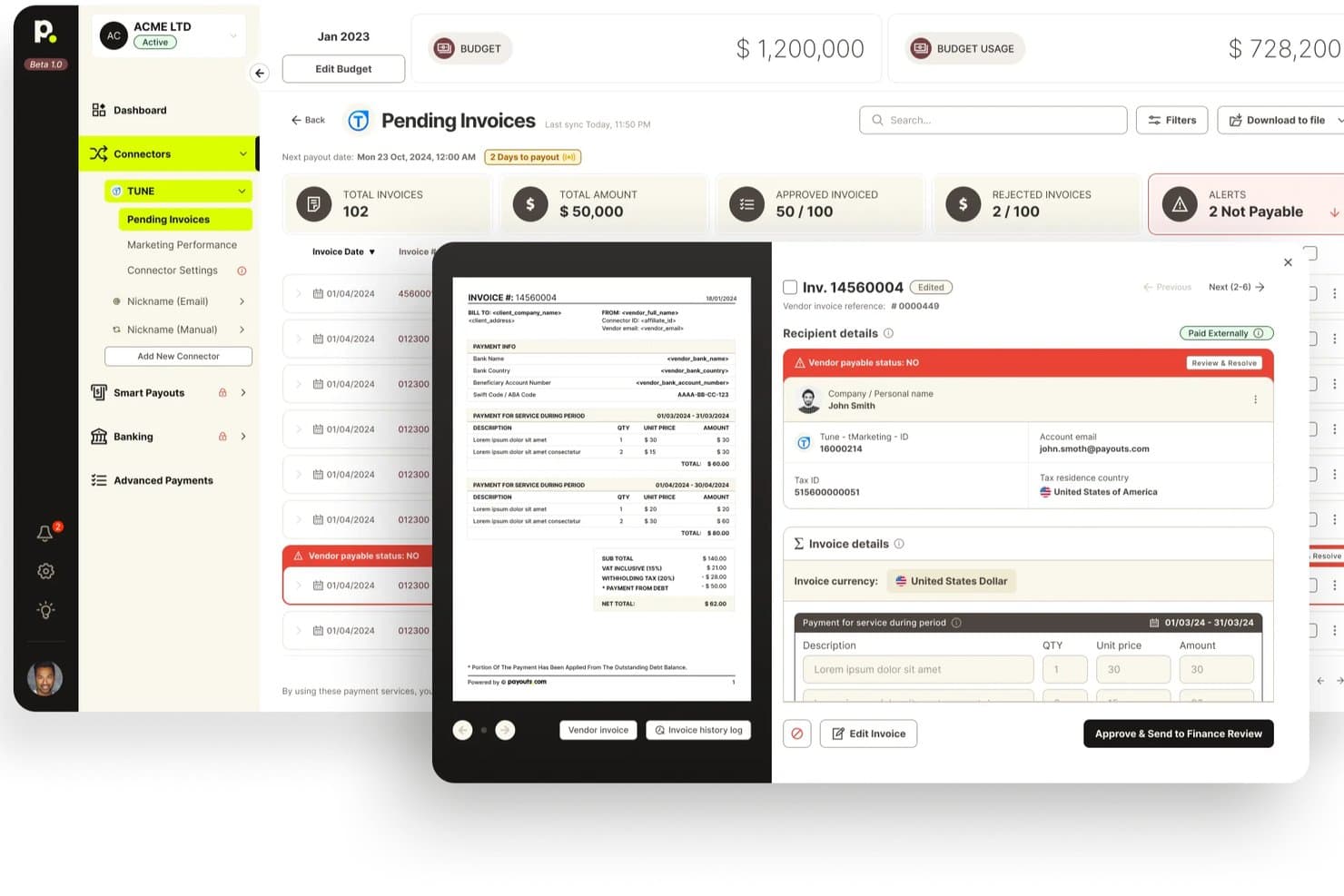
Payouts offers a pending invoices dashboard with invoice previews, vendor payable status alerts, and approval workflows for billing management. Payouts is a global payment automation platform that combines virtual and physical card issuance, multi-rail payouts across 40+ payment methods, AP automation, multi-currency treasury wallets, and AI-powered vendor onboarding in one system.
Who Is Payouts Best For?
Payouts is a strong fit for finance and AP teams managing high-volume, cross-border supplier payments who need a single platform to handle payouts, card issuance, and compliance without stitching together multiple tools.
Why I Picked Payouts
Payouts earns its spot on my shortlist because its AI-native architecture does something most virtual payment platforms don't: it automates the full payout lifecycle, from vendor onboarding to payment execution, using AI Digital Employees that chase invoices, resolve exceptions, and route approvals without manual intervention. I'm also a fan of the smart rail routing across 40+ payment methods, which automatically selects the fastest or cheapest rail per destination and falls back to the next-best option if one fails.
Payouts Key Features
- Multi-currency treasury wallets: Scoped ledger wallets support 40+ currencies with instant internal transfers and an immutable double-entry ledger for multi-entity operations.
- Vendor self-serve onboarding portal: Suppliers complete identity verification, bank verification, and tax form submission independently, with an average onboarding time of around six minutes.
- Tax compliance automation: The platform collects and validates W-9, W-8BEN, and W-8BEN-E forms, runs real-time TIN matching, and generates year-end 1099 and 1042-S filings directly within the system.
- Three-gate payout lifecycle: Every payment moves through separate approval, authorization, and execution stages, enforcing segregation of duties with a full audit trail at each gate.
Payouts Integrations
Payouts offers 50+ pre-built integrations, including NetSuite, SAP, QuickBooks, Xero, Sage Intacct, Microsoft Dynamics, Stripe, Plaid, Persona, and ComplyAdvantage. Its REST API, webhooks, and SFTP/CSV support custom connections.
Pros and Cons
Pros:
- Advanced multi-currency treasury wallet support
- Wide coverage of 40+ payment rails
- AI digital employees automate payout workflows
Cons:
- Payment links expire quickly for global teams
- No rewards on virtual card spend
Learn more about Payouts: Best for global payment integrations
- Free demo available
- From 0.4% per paid invoice
Visit WebsiteCustomer Rating:4.6/5
Stripe enables online payments, global transactions, and marketplace payouts. Stripe is a cloud-based virtual payment platform built for businesses that need to accept payments online, issue a unique virtual card number for secure tracking, manage global currencies, and connect with hundreds of payment methods and marketplaces.
Who Is Stripe Best For?
Stripe suits finance teams and developers at growth-focused companies handling high payment volumes and complex business payments across multiple countries.
Why I Picked Stripe
I picked Stripe as one of the best because it handles payment integrations on a global scale. I rely on Stripe’s API to connect with hundreds of currencies, local payment methods, and major e-commerce platforms for fast international expansion.
Stripe Key Features
- Virtual cards: Create and manage virtual payment cards for specific team members or workflows.
- Automated recurring billing: Set up and manage recurring payments for subscriptions and invoicing.
- Customizable checkout: Add a tailored checkout flow supporting networks like Visa to your website for a seamless payment experience.
- Real-time fraud detection: Use built-in machine learning tools to identify and prevent fraudulent transactions.
Stripe Integrations
Stripe offers native integrations with HubSpot, NetSuite, QuickBooks, Xero, Shopify, WooCommerce, Salesforce, FreshBooks, Squarespace, and BigCommerce. An API is available for custom integrations.
Pros and Cons
Pros:
- Flexible APIs for custom workflows
- Offers advanced fraud prevention tools
- Supports many global payment methods
Cons:
- Some features require developer resources
- Disputes can be hard to resolve
Learn more about Stripe: Best for travel and expense integration
- Free plan available
- Pricing upon request
Visit WebsiteCustomer Rating:4.7/5
Navan centralizes travel card management with flexible payment controls. Navan is an integrated travel and expense management platform that centralizes booking, payments, card management, automation, and real-time reporting for businesses managing virtual payment solutions.
Who Is Navan Best For?
Navan suits finance and HR teams at mid-sized to large businesses that manage high volumes of corporate travel bookings and related expenses.
Why I Picked Navan
I picked Navan as one of the best because I can book business travel, issue virtual cards, and reconcile trip payments in one workflow. I use built-in policy controls and real-time tracking to keep spending aligned while syncing expenses directly to our finance system.
Navan Key Features
- Automated receipt capture: Lets users photograph and upload receipts via the mobile app.
- Live travel agent support: Provides 24/7 real-time help for bookings and itinerary changes.
- Mobile policy enforcement: Applies company travel rules on flights and hotels automatically during booking.
- Mileage reimbursement calculation: Calculates and tracks distance-based reimbursements for employee travel.
Navan Integrations
Navan offers native integrations with NetSuite, QuickBooks Online, Xero, Concur, Okta, Slack, Google Workspace, Microsoft 365, and Uber for Business, and provides an API for custom integrations.
Pros and Cons
Pros:
- Automated receipt capture and expense sync
- Real-time travel spend tracking and reporting
- Virtual cards for every trip booking
Cons:
- Refund processing can be slow for canceled trips
- Travel policy customization options are limited
Learn more about Navan: Best for consumer-to-business transfers
- Free plan + free demo available
- From $0.30/transaction
Visit WebsiteCustomer Rating:4.6/5
PayPal Virtual Terminal lets merchants manually process card payments. PayPal is a digital payment platform for sending, receiving, and managing consumer and business transactions online, offering an alternative to traditional payment methods with features like payment processing, digital invoicing, and quick funds transfers for merchants.
Who Is PayPal Best For?
PayPal is a good fit for e-commerce businesses and retailers who want to accept payments from a broad base of global consumers.
Why I Picked PayPal
I picked PayPal as one of the best because I can request payments from consumers by email, website, or QR code, and funds are sent directly to my business account. I use its buyer and seller protection policies during high-volume retail seasons.
PayPal Key Features
- Mass payouts: Send digital alternatives to paper checks in bulk to multiple recipients.
- Subscription billing: Set up and manage recurring payment plans.
- Transaction reporting: Access detailed transaction histories and downloadable reports.
- Mobile payment acceptance: Accept consumer payments via mobile devices and apps.
PayPal Integrations
PayPal offers native integrations with Shopify, WooCommerce, BigCommerce, Magento, Wix, Xero, QuickBooks, Salesforce, Netsuite, Squarespace, and Zapier. An API is available for custom integrations.
Pros and Cons
Pros:
- Fast merchant fund availability
- Protection policies for buyers and sellers
- Supports consumer payments in many countries
Cons:
- Fees are higher than those of some competitors
- Account freezes can happen without warning
Learn more about PayPal: Best for automated accounts payable
- Free demo available
- From $249/month
Visit WebsiteCustomer Rating:4.5/5
Tipalti automates invoices, supplier payments, tax, and reconciliation. Tipalti is an accounts payable automation platform for handling invoice processing, global supplier payments, tax compliance, and payment reconciliation within virtual payment solutions.
Who Is Tipalti Best For?
Tipalti is well suited for midsize and enterprise finance teams that need to automate global accounts payable and mass payments to suppliers or freelancers.
Why I Picked Tipalti
I picked Tipalti as one of the best for automated accounts payable because I can manage end-to-end payables, automate invoice capture and approval, and ensure compliance with payment regulations in over 190 countries through a unified workflow.
Tipalti Key Features
- Global payments engine: Lets you send payments to 196 countries in multiple currencies.
- Supplier portal: Allows vendors to onboard, provide payment details, and update tax information.
- Tax compliance automation: Collects and validates W-9 and W-8 forms for suppliers.
- Automated payment reconciliation: Matches payments with invoices and updates records in real time.
Tipalti Integrations
Tipalti offers native integrations with NetSuite, QuickBooks Online, Slack, BambooHR, Zenwork, Everflow, Sage Intacct, Xero, and Oracle, and provides an API for custom integrations.
Pros and Cons
Pros:
- Built-in supplier onboarding and self-service portal
- Automates global tax compliance and validation
- Handles international mass payments and currencies
Cons:
- Approval workflows are not highly customizable
- Implementation and onboarding can be complex
Learn more about Tipalti: Best for multi-entity spend control
- Free plan + free demo available
- From $12/user/month
Visit WebsiteCustomer Rating:4.4/5
Airwallex enables global spend management with virtual cards and payments. Airwallex is a global spend management and virtual payment solution that lets you issue physical and virtual cards, track company spend in real time, and manage payments across multiple entities and currencies.
Who Is Airwallex Best For?
Finance and operations teams at multinational companies that need to issue virtual cards and manage spending across different subsidiaries or regions.
Why I Picked Airwallex
I picked Airwallex because I can issue virtual and physical cards for multiple entities, set spending controls by subsidiary, and see consolidated spend data in real time for every location. That level of control over entity-level spending is hard to replicate.
Airwallex Key Features
- Multi-currency wallets: Store, manage, and optimize funds in multiple currencies with automatic conversions.
- Global bill pay: Schedule, pay, and reconcile supplier invoices across markets from a single dashboard.
- Custom approval workflows: Configure multi-level approvals for payments and card spend based on your company policies.
- Integration with accounting platforms: Sync transaction data directly to Xero, NetSuite, or QuickBooks Online.
Airwallex Integrations
Airwallex offers native integrations with Xero, NetSuite, QuickBooks Online, Shopify, and WooCommerce. An API is available for custom integrations.
Pros and Cons
Pros:
- Pre-approval workflows for controlled spending
- Flexible multi-currency wallets for payments
- Detailed real-time transaction tracking by entity
Cons:
- Virtual card issuance may require additional setup steps
- Reimbursement options are limited in some regions
 7Best for international currency transfers
Wise
- Free plan available
- From $0.43/transfer (Varies on location/currency)
Visit WebsiteCustomer Rating:3.8/5
Wise lets businesses hold, send, receive, and convert currencies globally. Wise is an international payments platform for virtual payment solutions, letting you hold, send, receive, and convert money in dozens of currencies through a single business account.
Who Is Wise Best For?
Wise makes sense for finance teams at global companies that need to manage payments or vendor transfers in multiple currencies.
Why I Picked Wise
I picked Wise as one of the best for international currency transfers because I can send payments to over 160 countries, manage dozens of local currency accounts, and see transparent, real exchange rates before every transfer.
Wise Key Features
- Bulk payments tool: Upload a file to pay multiple suppliers or contractors at once.
- Multi-user permissions: Assign roles for team members to manage payments or view activity.
- Virtual business debit cards: Create digital cards for individual employees or teams to manage business expenses.
- Automated payment approval workflows: Set customizable approval rules for outgoing payments.
Wise Integrations
Wise offers native integrations with Xero and QuickBooks and provides an API for custom integrations.
Pros and Cons
Pros:
- Simple process for issuing virtual business cards
- Multi-currency business accounts available
- Real-time payments tracking for each transfer
Cons:
- Limited in-country business card support
- No recurring payments automation for virtual cards
Learn more about Wise: Best for local payment method access
- Free demo available
- Pricing upon request
Visit WebsiteCustomer Rating:3.8/5
Adyen dashboard tracks transactions, payment details, and statuses. Adyen is a global payment platform for virtual payment solutions that connects with global financial institutions to combine online, mobile, and in-person payments with advanced risk management tools and support for over 250 payment methods.
Who Is Adyen Best For?
Adyen is ideal for global businesses and e-commerce companies needing to accept a wide range of local and international payment methods.
Why I Picked Adyen
I picked Adyen as one of the best because I can give customers access to dozens of local payment methods from a single platform. I use its dynamic checkout to tailor payment options by country and monitor transactions in real time.
Adyen Key Features
- Risk management suite: Includes built-in fraud detection and risk rule configuration.
- Unified commerce reporting: Consolidates transaction data from online and in-person channels.
- Real-time payment notifications: Sends instant updates on payment status and settlement.
- Chargeback management tools: Lets you manage, respond to, and track chargebacks directly in the dashboard.
Adyen Integrations
Adyen offers native integrations with Shopify, WooCommerce, Magento, Salesforce Commerce Cloud, Oracle Commerce, SAP Commerce Cloud, Wix, PrestaShop, BigCommerce, and an API for custom integrations.
Pros and Cons
Pros:
- Real-time consolidated reporting for multi-channel payments
- Advanced risk management and fraud prevention tools
- Supports over 250 local and global payment methods
Cons:
- Account approvals can take several weeks
- Chargeback handling is sometimes slow and complex
Learn more about Adyen: Best for automated expense reporting
- Not available
- From $5/user/month
Visit WebsiteCustomer Rating:4.5/5
Expensify manages expenses, virtual cards, receipts, and reimbursements. Expensify is a cloud-based expense management platform for teams that provides expense tracking, virtual card issuing, automated receipt capture, reimbursement tools, and spend policy controls.
Who Is Expensify Best For?
Expensify is a strong fit for finance teams at small to mid-sized businesses needing automated expense management and virtual card payments.
Why I Picked Expensify
I picked Expensify as one of the best because I can automate receipt capture, generate expense reports with one click, and issue virtual cards for controlled spending all in one platform. I manage approvals right from the mobile app.
Expensify Key Features
- SmartScan receipt capture: Lets users photograph receipts for instant digital record creation.
- Policy-driven compliance checks: Applies custom spend rules to transactions as they occur.
- Automatic GL mapping: Matches expenses to accounting codes for streamlined reconciliation.
- Corporate card management: Offers issuing, tracking, and managing of multiple virtual and physical cards.
Expensify Integrations
Expensify offers native integrations with NetSuite, QuickBooks Online, Xero, Sage Intacct, Oracle, Salesforce, Gusto, and Bill.com. It connects with Zapier and provides an API for custom integrations.
Pros and Cons
Pros:
- Fast reimbursement processing for employees
- Automated receipt matching for transactions
- Real-time virtual card expense tracking
Cons:
- Limited reporting customization for virtual card spend
- Approval workflows can be rigid
 Best for multi-currency business accounts
- Free plan available
- From $9.99/month

Revolut Business offers multi-currency accounts, cards, and payments. Revolut Business is a cloud-based virtual payment platform that provides multi-currency accounts, company cards, global money transfers, spending controls, and automated payment workflows for businesses.
Who Is Revolut Business Best For?
Revolut Business fits finance teams at global startups and growing businesses managing spend across multiple currencies and international subsidiaries.
Why I Picked Revolut Business
I picked Revolut Business as one of the best for multi-currency business accounts because I can hold, exchange, and manage over 25 currencies with real-time rates, issue company cards with spend controls, and automate bulk international payments from one platform.
Revolut Business Key Features
- Automated expense management: Streamline submission, approval, and tracking of expenses within the platform.
- Virtual and physical company cards: Issue cards for employees with customizable spending limits and controls.
- Scheduled payments: Set up recurring or future-dated payments directly from the account dashboard.
- Open banking integrations: Link external business bank accounts for consolidated financial visibility and payments.
Revolut Business Integrations
Revolut Business offers native integrations with Xero, QuickBooks, FreeAgent, Sage, and Slack. An API is available for custom integrations.
Pros and Cons
Pros:
- Bulk payment automation for payroll and suppliers
- Multi-currency accounts support over 25 currencies
- Real-time currency exchange for transfers
Cons:
- No automatic recurring payments for virtual cards
- Not all features are available in every country
Learn more about Revolut Business:
Andre virtuelle betalingsløsninger
Her er noen flere virtuelle betalingsløsninger som ikke kom med på kortlisten min, men som likevel er verdt å undersøke:
- 11MarqetaBest for custom card issuing solutions
- 12SquareBest for online payment flexibility
- 13BILLBest for automating invoice-to-pay workflows
- 14HelcimBest for transparent interchange-plus pricing
- 15SpendeskBest for approval workflows with spend tracking
- 16PleoBest for fast employee card issuance
- 17PayhawkBest for multinational expense management
- 18RampBest for real-time spend controls
- 19EmburseBest for employee expense policy enforcement
How I Evaluate Virtual Payment Solutions
I split my evaluation into two layers: baseline capabilities every AP team needs—card issuance, spend controls, and ERP reconciliation—and the differentiators that set vendors apart.
Core Functionality (Table Stakes For This List)
When I'm selecting tools for my list, I rank each one on a scale from 0 (does not offer the functionality) to 5 (excels in this area) for each core functionality listed below. Then, I calculate the tool's total score into a percentage. Each tool needs to achieve a minimum total score of 65% to be considered for inclusion.
- Virtual Card Issuance: I check whether the platform can generate single-use, multi-use, and lodged cards—and whether teams can issue them instantly via API or only through a manual portal.
- Spend Controls & Limits: Each tool should let you set per-card spend caps, expiration dates, and merchant category restrictions so a marketing team's SaaS subscription card can't be used at a retail vendor.
- AP/ERP Integration: I look for native connectors to systems like NetSuite, QuickBooks, SAP, and Sage, plus open API access for teams running less common or custom-built ERP environments.
- Reconciliation & Reporting: Auto-matching transactions to open invoices and passing GL codes back to your ledger matters here—manual CSV exports and hand-matching defeat the purpose of going virtual.
- Multi-Rail Payment Support: Not every supplier accepts cards, so I evaluate whether the platform also supports ACH, wire, and check payments to keep your full payables workflow in one place.
- Fraud Prevention & Security: PCI compliance and tokenization are baseline, but I also look for controls like velocity limits, instant card lock/unlock, and single-use numbers that expire after one transaction.
Once I have a list of tools that meet this criteria, I consider what sets each platform apart.
Differentiating Factors (What Sets Vendors Apart)
Here's how I compare and contrast different vendors:
Standout Features
Rebate programs are a major differentiator. I evaluate whether a platform shares interchange revenue back with your organization, which can turn AP from a cost center into a source of measurable savings. Supplier enablement matters just as much—platforms that run managed onboarding campaigns to convert vendors from check to card acceptance save your team months of manual outreach. I also look for real-time transaction alerts and in-app approval workflows that give controllers instant visibility when a card is used outside policy.
Beyond Features
Compliance certifications like SOC 2 Type II and PCI DSS Level 1 matter here because your auditors will ask about them during SOX reviews—I check whether vendors publish these openly. Pricing transparency is another area I evaluate closely, especially around rebate structures and FX markups that can quietly erode the savings virtual cards are supposed to deliver. For teams paying suppliers across borders, I also consider multi-currency card issuance and local payment rail support, since a platform limited to one currency creates workarounds your AP team shouldn't have to manage.
Slik velger du virtuelle betalingsløsninger
Det er lett å gå seg vill i lange funksjonslister og komplekse prisstrukturer. For å hjelpe deg med å holde fokus mens du går gjennom den unike prosessen for valg av programvare, får du her en sjekkliste over faktorer du bør ha i tankene:
| Faktor | Hva du bør vurdere |
|---|---|
| FaktorSkalerbarhet | Hva du bør vurdereVil løsningen støtte økt transaksjonsvolum, flere ansatte eller nye selskaper uten store oppgraderinger eller kostnader? |
| FaktorIntegrasjoner | Hva du bør vurdereKan løsningen kobles direkte til regnskapsprogrammet, ERP-systemet, HR-systemene eller bankforbindelsene dine for å unngå manuelt arbeid? |
| FaktorTilpasningsmuligheter | Hva du bør vurdereHvor enkelt kan du justere forbruksgrenser, godkjenningsflyter eller retningslinjer for utstedelse av kort slik at de passer virksomhetens nøyaktige behov? |
| FaktorBrukervennlighet | Hva du bør vurdereVil ansatte innenfor og utenfor økonomi kunne ta løsningen i bruk raskt, og er mobilbruken god for ansatte som er på farten? |
| FaktorImplementering og innføring | Hva du bør vurdereHvor lang tid tar det å komme i gang, og hvilke ressurser – fra teamet ditt eller leverandøren – trengs for å gjøre overgangen smidig? |
| FaktorKostnad | Hva du bør vurdereFinnes det, utover månedlige avgifter, ekstra kostnader for utstedelse, internasjonale betalinger eller brukerplasser som kan påvirke TCO? |
| FaktorSikkerhetstiltak | Hva du bør vurdereTilbyr løsningen svindelforebygging, datakryptering, rollebasert tilgang og revisjonsspor som er i tråd med virksomhetens risikotoleranse? |
| FaktorKrav til samsvar | Hva du bør vurdereStøtter plattformen relevante regelverk, som PCI DSS, GDPR, SOX eller lokale krav til oppbevaring av skatteregistre som du må oppfylle? |
Hva er virtuelle betalingsløsninger?
Virtuelle betalingsløsninger er digitale plattformer som lar virksomheter utstede sikre, kortløse betalingsmetoder for transaksjoner på nettet eller fysisk. Disse løsningene gjør det mulig for organisasjoner å kontrollere, spore og avstemme utgifter med virtuelle kort eller tokeniserte betalinger.
Økonomiteam bruker dem til å administrere ansattes kjøp, automatisere utgiftsprosesser og håndheve bedriftens retningslinjer for forbruk i sanntid.
Funksjoner
Når du velger virtuelle betalingsløsninger, bør du se etter følgende viktige funksjoner:
- Utstedelse av virtuelle kort: Generer umiddelbart sikre, unike betalingsopplysninger for engangsbruk eller gjentatt bruk, noe som gjør det enklere å kontrollere og spore transaksjoner.
- Sanntidsovervåking av transaksjoner: Loggfør og vis automatisk hver transaksjon etter hvert som den finner sted, slik at økonomiteam kan overvåke forbruket nøye i hele organisasjonen.
- Tilpassbare forbruksbegrensninger: Angi grenser, begrensninger for forhandlere og godkjenningsflyter for hvert kort eller hver bruker for å håndheve budsjetter og redusere risikoen for uautoriserte kjøp.
- Automatisert utgiftsrapportering: Registrer transaksjonsdata, koble sammen kvitteringer og kategoriser utgifter automatisk for å minimere manuell dataregistrering og mulige feil.
- Integrasjon med regnskapssystemer: Synkroniser transaksjons- og utgiftsdata direkte med hovedboken, ERP-systemet eller verktøyene for økonomirapportering for effektiv avstemming.
- Støtte for flere valutaer: Utsted kort og behandle transaksjoner i ulike valutaer for å støtte team som opererer i internasjonale markeder.
- Verktøy for håndheving av retningslinjer: Bruk bedriftens regler for utgifter direkte på betalinger, slik at hver transaksjon oppfyller krav til etterlevelse og revisjon.
- Tilgang via mobilapp: Gi ansatte mulighet til å administrere kort, laste opp kvitteringer og følge med på forbruket på mobilenhetene sine.
- Svindeloppdagelse og sikkerhetskontroller: Aktiver avanserte sikkerhetstiltak som transaksjonsvarsler, kryptering og tokenisering for å redusere eksponeringen for svindel eller datainnbrudd.
- Brukertillatelser basert på roller: Tildel ulike tilgangsnivåer for administratorer, ledere og ansatte for å opprettholde riktig oversikt og kontroll.
Fordeler
Implementering av virtuelle betalingsløsninger gir flere fordeler for teamet og virksomheten din. Her er noen av fordelene du kan se frem til:
- Bedre kontroll over forbruket: Angi kortgrenser og begrensninger for å sikre at ansattes kjøp følger bedriftens retningslinjer og budsjetter.
- Raskere avstemming: Synkroniser transaksjoner og kvitteringer automatisk med regnskapssystemer, noe som reduserer tiden det tar å avslutte måneden betydelig.
- Sanntidsinnsikt i utgifter: Følg med på bedriftens forbruk etter hvert som det skjer, slik at økonomiteam kan oppdage problemer og justere budsjetter raskt.
- Forbedret sikkerhet: Bruk tokeniserte betalinger, rollebasert tilgang og umiddelbare kortkontroller for å redusere risikoen for svindel og uautoriserte transaksjoner.
- Forbedret etterlevelse: Håndhev regler for retningslinjer og registrer transaksjonsposter som er klare for revisjon, i ett system for å oppfylle regulatoriske krav.
- Forenklet introduksjon: Utsted eller deaktiver kort umiddelbart for nyansatte eller ansatte som slutter, slik at det blir enkelt å administrere tilganger når teamet endres.
- Støtte for global drift: Gjør transaksjoner i flere valutaer mulig og utsted kort til ansatte i ulike land for å støtte internasjonal ekspansjon.
Kostnader og priser
Valg av virtuelle betalingsløsninger krever en forståelse av de ulike prismodellene og abonnementene som er tilgjengelige. Kostnadene varierer basert på funksjoner, teamstørrelse, tilleggstjenester og mer. Tabellen nedenfor oppsummerer vanlige abonnementer, gjennomsnittsprisene deres og typiske funksjoner som er inkludert i virtuelle betalingsløsninger:
Sammenligningstabell for abonnementer for virtuelle betalingsløsninger
| Abonnementstype | Gjennomsnittspris | Vanlige funksjoner |
|---|---|---|
| AbonnementstypeGratisabonnement | Gjennomsnittspris$0 | Vanlige funksjonerInkluderer grunnleggende utstedelse av virtuelle kort, begrenset antall transaksjoner, standard sikkerhetsfunksjoner og e-poststøtte. |
| AbonnementstypePersonlig abonnement | Gjennomsnittspris$5–$15/bruker/måned | Vanlige funksjonerTilbyr individuell kontoadministrasjon, tilpassbare forbruksgrenser, sanntidssporing av transaksjoner og standardrapporter. |
| AbonnementstypeBedriftsabonnement | Gjennomsnittspris$15–$35/bruker/måned | Vanlige funksjonerMuliggjør automatisert utgiftsrapportering, integrasjon med regnskapssystemer, håndheving av retningslinjer og administrasjon av flere brukere. |
| AbonnementstypeForetaksabonnement | Gjennomsnittspris$35–$100+/bruker/måned | Vanlige funksjonerTilbyr avanserte godkjenningsflyter, dedikert kontostøtte, tilpasset API-tilgang, global valutastøtte og avansert analyse. |
Vanlige spørsmål om virtuelle betalingsløsninger
Her er noen svar på vanlige spørsmål om virtuelle betalingsløsninger:
Støtter virtuelle betalingsløsninger flere valutaer?
Ja, mange virtuelle betalingsløsninger lar deg utstede kort og behandle transaksjoner i flere valutaer. Dette er nyttig for selskaper med internasjonale team eller leverandører, men du bør undersøke hvordan gebyrer for valutaomregning og vekslingskurser håndteres.
Hvor raskt kan virtuelle kort utstedes til ansatte?
Virtuelle kort kan ofte utstedes umiddelbart. Du oppretter ganske enkelt kortet på den valgte plattformen og deler opplysningene sikkert med den ansatte, slik at kortet kan brukes med én gang til godkjente kjøp eller reiseutgifter.
Kan jeg sette utgiftsgrenser og kontrollere hvor virtuelle kort brukes?
Ja, de fleste virtuelle betalingsløsninger lar deg tilpasse utgiftsgrenser, angi forhandlerkategorier og opprette regler for når og hvor kort kan brukes. Dette hjelper økonomiteam med å håndheve retningslinjer og unngå uautoriserte transaksjoner.
Hva skjer hvis et virtuelt kort blir kompromittert eller ikke lenger trengs?
Du kan umiddelbart deaktivere eller slette et virtuelt kort via administrasjonsoversikten. Denne raske handlingen bidrar til å redusere risikoen for svindel og hindrer fremtidige uautoriserte belastninger på kortet.
Passer virtuelle betalingsløsninger for små bedrifter?
Ja, små bedrifter kan dra nytte av utgiftskontrollene, den automatiserte utgiftssporingen og den enkle oppstartsprosessen som virtuelle betalingsløsninger tilbyr. Disse verktøyene hjelper mindre team med å spare tid og holde orden etter hvert som de vokser.