

Det er ingen enkel oppgave å håndtere økonomi, særlig når du hele tiden må lage nøyaktige prognoser. Du trenger verktøy som kan håndtere enorme datamengder og raskt gi deg innsikt. AI-verktøy for prognoser kan hjelpe teamet ditt med å forutse fremtidige trender og ta velinformerte beslutninger.
Etter min erfaring kan AI-funksjoner som prediktiv analyse og maskinlæring endre måten du jobber med prognoser på. Disse verktøyene kan spare tid og redusere feil, slik at du kan konsentrere deg om strategi.
Jeg vil guide deg gjennom de beste AI-verktøyene for prognoser på markedet og fremheve funksjonene og fordelene deres. Målet mitt er å gi deg en objektiv og grundig undersøkt vurdering, slik at du kan velge den beste løsningen for dine behov.
Hvorfor du kan stole på våre programvareanbefalinger
6,700+
Reviews
20
Industry experts
16+
Evaluation factors
14
Years
Teamet vårt har testet og anmeldt programvare siden 2012. Vi er selv økonomiledere, så vi vet hvor vanskelig og hvor viktig det er å velge riktig programvare.
I denne guiden har vi vurdert verktøyene gjennom praktisk testing og uavhengig research og gitt dem poeng ut fra våre utvelgelseskriterier.
Anmeldelsene våre bygger på vår egen redaksjonelle vurdering. De er ikke et salgsargument.
Sammenligningstabell for AI-verktøy for prognoser
Denne sammenligningstabellen oppsummerer prisdetaljene for mine beste utvalgte AI-verktøy for prognoser:
| Tool | Best For | Trial Info | Price | ||
|---|---|---|---|---|---|
| 1 | Best for customizable AI agents for enterprises | Free plan available | Pricing upon request | Website | |
| 2 | Best for AI-assisted financial forecasting and data automation | Free demo available | Pricing upon request | Website | |
| 3 | Best for go-to-market strategies | Free demo available | Pricing upon request | Website | |
| 4 | Best for enterprise predictive planning using AI modeling | Free demo available | Pricing upon request | Website | |
| 5 | Best for AI-powered SMB financial forecasting and what-if analysis | Free demo available | Pricing upon request | Website | |
| 6 | Best for real-time financial forecasting powered by predictive AI insights | Free demo available | Pricing upon request | Website | |
| 7 | Best for machine learning–enhanced workforce forecasting | Free demo available | Pricing upon request | Website | |
| 8 | Best for AI-driven continuous budgeting and forecasting | Free demo available | Pricing upon request | Website | |
| 9 | Best for AI-assisted forecasting within Excel workflows | Free demo available | Pricing upon request | Website | |
| 10 | Best for AI-backed enterprise forecasting and scenario intelligence | 30-day free trial | Pricing upon request | Website |


Anmeldelser av de beste AI-verktøyene for prognoser
Nedenfor finner du mine detaljerte sammendrag av de beste AI-verktøyene for prognoser som kom med på kortlisten. Anmeldelsene mine gir en detaljert gjennomgang av de viktigste funksjonene, fordelene og ulempene, integrasjonene og ideelle bruksområdene for hvert verktøy, slik at du kan finne det beste for deg.
 Best for customizable AI agents for enterprises
- Free plan available
- Pricing upon request
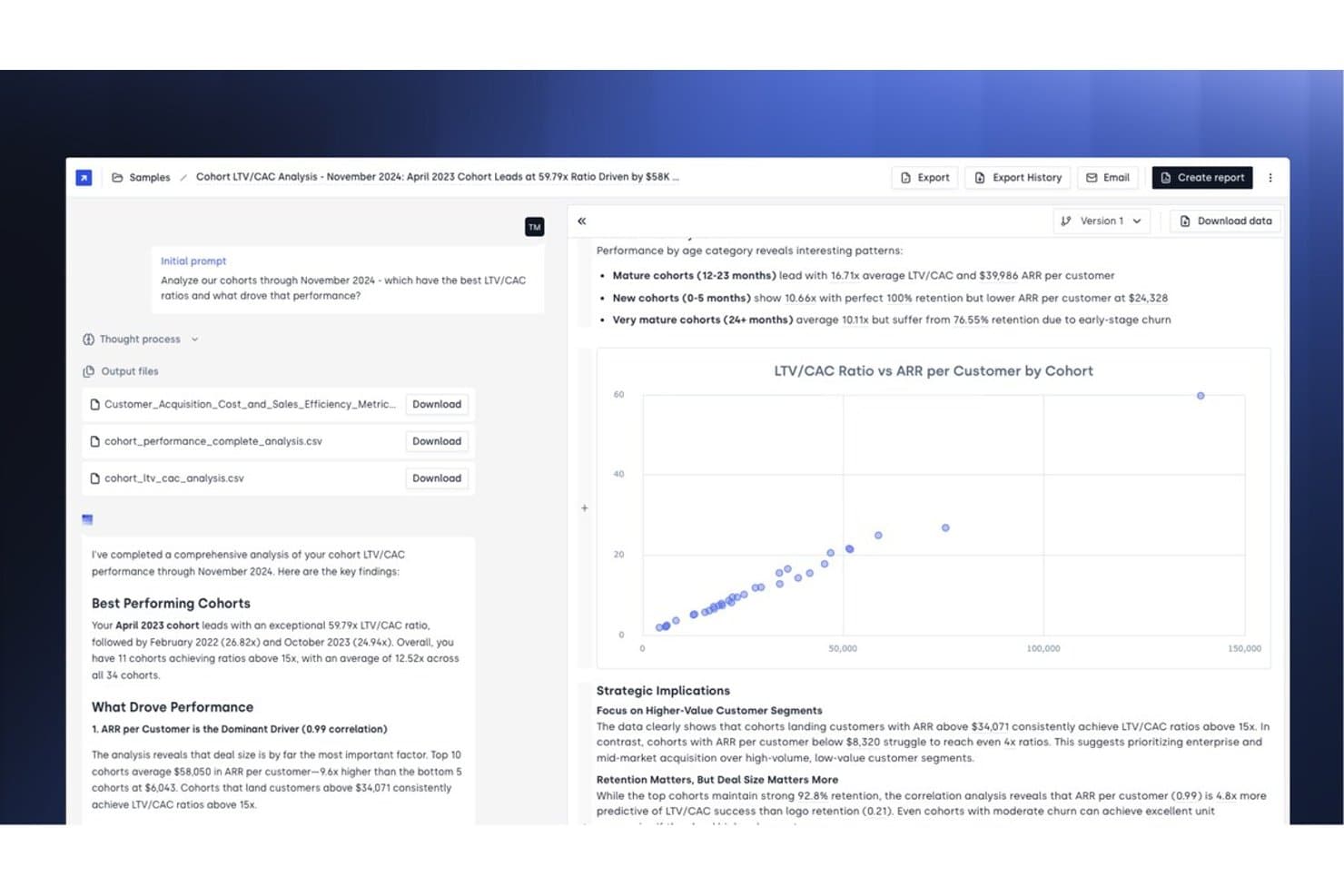
Concourse offers AI-powered cohort LTV/CAC analysis with automated insights, scatter plot visualizations, and strategic recommendations for forecasting customer performance. Concourse is an agentic AI platform built for enterprise finance teams, offering customizable AI agents that handle forecasting, variance analysis, close management, and financial reporting across connected ERPs, data warehouses, and CRMs.
Who Is Concourse Best For?
Concourse is a strong fit for CFOs and FP&A teams at mid-market to enterprise companies running complex, multi-system finance operations.
Why I Picked Concourse
I picked Concourse as one of the best because the agent-building model is genuinely unlike anything else I've seen in finance AI. Instead of a fixed forecasting dashboard, you build agents mapped to your real workflows. The Forecasting Agent models scenarios in seconds, and the Flux & Variance Agent doesn't just surface variances, it drafts the commentary automatically. What earns my confidence is that calculations run in code rather than the LLM itself, so every number is fully traceable.
Concourse Key Features
- Agent builder and workflow automation: Lets users create custom AI agents for specific finance workflows with drag-and-drop process mapping.
- Context layer with persistent memory: Stores business logic and definitions so agents learn from historical actions and refine outputs over time.
- Multi-surface output delivery: Exports analysis and forecasts directly to Excel, PowerPoint, Sheets, Slack, Teams, and Email.
- Audit trails and granular access controls: Tracks every agent action with logs for SOX/internal audit and supports RBAC at the dataset and agent level.
Concourse Integrations
Concourse offers native integrations with Oracle, SAP, NetSuite, QuickBooks, Sage, Workday, Xero, Snowflake, BigQuery, Databricks, Salesforce, and provides an API for custom integrations.
Pros and Cons
Pros:
- Auto-generates variance commentary and narratives
- Calculations run in code, not LLMs
- Agents map to real finance workflows
Cons:
- Not suited for lean finance teams
- Agent configuration demands significant upfront effort
Learn more about Concourse: Best for AI-assisted financial forecasting and data automation
- Free demo available
- Pricing upon request
Visit WebsiteCustomer Rating:4.7/5
Datarails delivers AI-driven budgeting, reporting, and financial workflow accuracy. Datarails is a financial data management platform designed for finance teams looking to optimize their budgeting and reporting processes. It offers AI-driven solutions to enhance data accuracy and support financial workflows.
Why I picked Datarails: Datarails excels in financial data management, providing tools that are essential for maintaining data integrity. Its AI features include automated data consolidation and error detection, ensuring your financial reports are accurate. Predictive analytics can be used to help anticipate trends and make informed decisions. This focus on data management helps your team maintain control over financial processes and improve efficiency.
Standout features and integrations:
Features include customizable reporting and real-time data synchronization. These features help your team tailor reports to your needs and ensure data is always up to date. You can automate repetitive tasks, freeing up time for more strategic work.
Integrations include QuickBooks, NetSuite, SAP, Oracle, Microsoft Dynamics, Salesforce, Xero, Sage Intacct, Workday, and more.
Pros and Cons
Pros:
- Predictive analytics capabilities
- Automated error detection
- Strong focus on data management
Cons:
- Requires Excel proficiency, as advanced features are complex for non-spreadsheet users
- Limited dashboarding and visualization capabilities
Learn more about Datarails: Best for go-to-market strategies
- Free demo available
- Pricing upon request
Visit WebsiteCustomer Rating:4.7/5
HockeyStack’s Odin AI dashboard visualizing full-funnel performance and sales-qualified leads by channel. HockeyStack is designed to empower marketing and sales teams with AI-driven insights and data analytics, offering a solution for those seeking to enhance their go-to-market strategies. If you're a business professional in need of precise forecasting tools, HockeyStack might just be the key to unlocking actionable insights and improving your decision-making processes. By addressing the complex needs of revenue generation and strategic planning, it aims to bridge the gap between data and strategy.
Why I Picked HockeyStack
I picked HockeyStack for its unique ability to provide AI-driven forecasting solutions tailored specifically for go-to-market strategies. The platform's specialized AI model stands out by offering tools like the AE Forecast Challenger Agent, which is designed to improve sales forecasting accuracy. This, coupled with its deal resurrection and marketing budget optimization features, makes it an appealing choice for those looking to refine their sales processes and drive revenue growth.
HockeyStack Key Features
In addition to its AI-driven forecasting capabilities, HockeyStack offers:
- Account Pre-call Briefs: This feature ensures your sales team is well-prepared for calls by providing detailed insights into client accounts.
- Open Deal Next Best Step Generator: It identifies actionable steps to advance deals, helping you prioritize effectively.
- Expansion Opportunity Finder: This tool helps prioritize growth opportunities by analyzing market data and customer segments.
- Win/Loss Intelligence: It provides insights from previous deals to inform future sales strategies and improve win rates.
HockeyStack Integrations
Integrations include 6sense, Bombora, Demandbase, Salesforce Pardot, Marketo, HubSpot, Calendly, HeyFlow, BigQuery, Snowflake, Drift, Intercom, Google Ads, Facebook Ads, Salesforce, and ActiveCampaign.
Pros and Cons
Pros:
- Unifies marketing, product, and sales data
- Customizable attribution reporting across buyer journeys
- AI-driven insights support go-to-market decision-making
Cons:
- Advanced features may require onboarding time
- Pricing not publicly available
Learn more about HockeyStack: Best for enterprise predictive planning using AI modeling
- Free demo available
- Pricing upon request
Visit WebsiteCustomer Rating:4.5/5
Anaplan helps enterprises manage financial, supply chain, and sales planning. Anaplan is a cloud-based planning platform designed for large enterprises. It supports complex business functions like financial planning, supply chain management, and sales forecasting, leveraging AI to enhance decision-making processes.
Why I picked Anaplan: The platform excels in enterprise scalability, making it ideal for large organizations. Its AI-driven predictive analytics and scenario planning provide deep insights into future trends. These features allow your team to manage large datasets and complex business models efficiently. Anaplan's ability to scale and adapt to your company's needs ensures you stay ahead in a dynamic market.
Standout features and integrations:
Features include advanced forecasting models, collaborative planning, and real-time data updates. These features help your team make informed decisions quickly. You can customize models to fit your unique business requirements.
Integrations include Salesforce, Workday, Microsoft Azure, SAP, Oracle, Google Cloud, Tableau, DocuSign, Slack, and ServiceNow.
Pros and Cons
Pros:
- Flexible modeling options
- Real-time calculations incorporating finance and sales data
- Scalable for large enterprises
Cons:
- Complicated cost models are tied to data volume and complexity
- Steep learning curve and significant implementation requirements
Learn more about Anaplan: Best for AI-powered SMB financial forecasting and what-if analysis
- Free demo available
- Pricing upon request
Visit WebsiteCustomer Rating:4.9/5
Fuelfinance offers real-time insights and automated financial reporting. Fuelfinance, or Fuel, is a financial planning and analysis platform tailored for startups and small businesses. It offers AI capabilities such as real-time financial insights and automated reporting to help users manage their finances effectively.
Why I picked Fuelfinance: Fuel stands out for its focus on small to medium-sized businesses (SMBs), providing them with tools that are often reserved for larger enterprises. Its AI features include automated financial reporting and instant what-if analyses. These capabilities align well with its USP of being best for SMB financial planning. The AI CFO functionality offers personalized financial insights and guidance, making it a valuable tool for growing businesses.
Standout features and integrations:
Features include real-time dashboards, customizable reporting, and anomaly detection. These help you keep track of financial data and identify any irregularities. By giving you the ability to create custom dashboards through a simple chat interface, Fuelfinance ensures you have the insights you need.
Integrations include QuickBooks, Stripe, HubSpot, Salesforce, Xero, Zoho, Pipedrive, Shopify, Slack, Google Sheets, and more.
Pros and Cons
Pros:
- Real-time anomaly detection
- Extensive integration ecosystem
- AI-powered forecasting
Cons:
- Limited to SMBs
- Overwhelming feature density for new users
Learn more about fuelfinance: Best for real-time financial forecasting powered by predictive AI insights
- Free demo available
- Pricing upon request
Visit WebsiteCustomer Rating:4.9/5
Drivetrain offers AI-powered real-time forecasting and scenario planning for finance teams. Drivetrain is a financial planning and analysis tool designed for businesses seeking agility in their financial processes. It caters to finance teams by offering real-time forecasting and scenario planning, leveraging AI for accurate insights.
Why I picked Drivetrain: Drivetrain's real-time forecasting capabilities make it a standout choice for dynamic financial environments. Its AI features include predictive analytics and automated scenario modeling, helping your team anticipate changes and adapt strategies. The tool allows you to visualize financial outcomes instantly, providing the flexibility needed in fast-paced markets. This ensures you can make swift, informed decisions that align with your business objectives.
Standout features and integrations:
Features include customizable dashboards, collaborative planning tools, and real-time data syncing, allowing your team to tailor insights to your business needs and work together efficiently.
Integrations include Salesforce, QuickBooks, Xero, Microsoft Dynamics, Google Sheets, Slack, HubSpot, NetSuite, Workday, SAP, and more.
Pros and Cons
Pros:
- Automated data ingestion
- Flexible scenario modeling
- Centralized actual/forecast data
Cons:
- Higher cost for smaller teams
- Complex mapping and alignment of data sources
Learn more about Drivetrain: Best for machine learning–enhanced workforce forecasting
- Free demo available
- Pricing upon request
Visit WebsiteCustomer Rating:4.4/5
Workday Adaptive Planning delivers AI-driven financial, workforce, and sales planning. Workday Adaptive Planning is a business planning platform used primarily by mid-sized to large enterprises. It focuses on financial, workforce, and sales planning, utilizing AI to deliver data-driven insights and forecasting.
Why I picked Workday Adaptive Planning: The platform's emphasis on workforce planning sets it apart, offering tools that cater to HR and finance teams. Its AI-driven predictive analytics enhance your ability to forecast workforce needs effectively. You can leverage scenario modeling to explore different staffing strategies. These capabilities help your team make informed decisions about hiring and resource allocation.
Standout features and integrations:
Features include intuitive dashboards, drag-and-drop report building, and flexible budgeting tools. These features allow your team to visualize data clearly and create detailed financial reports. The predictive forecaster uses machine learning models to generate forecasts based on past performance, which can help you make data-driven decisions.
Integrations include Salesforce, Microsoft Excel, NetSuite, Oracle, SAP, Workday HCM, Google Workspace, ServiceNow, Slack, and more.
Pros and Cons
Pros:
- Flexible budgeting tools
- Real-time integrated forecasting
- Strong collaboration and data consolidation features
Cons:
- Interface is not as sleek as niche forecasting programs
- Can be complex for smaller teams
Learn more about Workday Adaptive Planning: Best for AI-driven continuous budgeting and forecasting
- Free demo available
- Pricing upon request
Visit WebsiteCustomer Rating:4.2/5
Planful delivers AI-enhanced budgeting, forecasting, and financial reporting. Planful is a cloud-based financial planning and analysis platform designed for finance teams across various industries. It focuses on budgeting, forecasting, and financial reporting, utilizing AI to enhance planning accuracy and efficiency.
Why I picked Planful: Planful excels in budgeting and forecasting, offering AI-driven insights to improve financial planning processes. Its AI features include automated modeling and predictive analytics that help your team create accurate forecasts. The platform's intuitive interface allows for easy scenario planning, which enables you to explore different financial outcomes. This ensures you can make informed decisions that align with your business goals.
Standout features and integrations:
Features include flexible reporting, conversational forecasting, and real-time data updates. These features allow your team to generate reports that meet specific needs and keep track of financial data. You can analyze various scenarios to understand the potential impacts of market conditions on your business.
Integrations include NetSuite, Salesforce, QuickBooks, Microsoft Dynamics, SAP, Oracle, Xero, Workday, and more.
Pros and Cons
Pros:
- Cloud-native automation
- Easy-to-use scenario planning
- Strong focus on budgeting and forecasting
Cons:
- Complex implementation and onboarding
- Limited native data integration
Learn more about Planful: 9Best for AI-assisted forecasting within Excel workflows
Cube
- Free demo available
- Pricing upon request
Visit WebsiteCustomer Rating:4.6/5
Cube provides AI-driven budgeting and forecasting, integrated directly with Excel. Cube is a financial planning and analysis platform designed for finance teams looking to streamline their budgeting and forecasting processes. It caters to users who rely heavily on Excel, offering AI-driven insights and seamless integration with spreadsheets.
Why I picked Cube: Cube stands out for its Excel integration, making it a top choice for teams that prefer working within familiar spreadsheet environments. Its AI features include automated data consolidation and predictive analytics, helping you make informed financial decisions. The tool empowers your team to leverage existing Excel models while enhancing them with AI capabilities. This approach minimizes disruption and maximizes efficiency in financial planning.
Standout features and integrations:
Features include real-time data syncing, version control, and agentic AI that's specifically designed for financial planning and analysis. These features ensure your team has access to up-to-date information at all times. You can create tailored reports that match your specific business needs.
Integrations include QuickBooks, NetSuite, Google Sheets, Microsoft Dynamics, Salesforce, Oracle, Xero, Workday, SAP, and more.
Pros and Cons
Pros:
- Customizable financial reporting
- Real-time data automation
- Excel-centric integration
Cons:
- Limited analytics and visualization capabilities
- Higher cost for smaller teams
Learn more about Cube: Best for AI-backed enterprise forecasting and scenario intelligence
- 30-day free trial
- Pricing upon request

IBM Planning Analytics delivers AI-enhanced financial planning, budgeting, and forecasting. IBM Planning Analytics is a comprehensive business planning solution tailored for large enterprises. It excels in financial planning, budgeting, and forecasting, leveraging AI to enhance data integration and analytics.
Why I picked IBM Planning Analytics: The tool's strength lies in its data integration capabilities, making it ideal for complex enterprise environments. Its AI-driven analytics provide deep insights into financial data, allowing your team to make informed decisions. You can automate data consolidation and gain a unified view of your business metrics. These features ensure you have the information you need to optimize your planning processes.
Standout features and integrations:
Features include customizable dashboards, real-time data analysis, and demand planning. These features help your team visualize new data and assess different business scenarios effectively. The ability to create custom reports ensures you can tailor insights to your specific needs.
Integrations include SAP, Oracle, Salesforce, Microsoft Dynamics, Workday, NetSuite, Google Analytics, Tableau, IBM Watson, JD Edwards, and more.
Pros and Cons
Pros:
- Ability to handle complex planning models
- Automation of traditional forecasting methods
- Excel-native integration capabilities
Cons:
- Can be expensive for small businesses
- May require technical expertise for setup
Learn more about IBM Planning Analytics:
Andre AI-verktøy for prognoser
Her er noen flere alternativer for AI-verktøy for prognoser som ikke kom med på kortlisten min, men som likevel er verdt å sjekke ut:
- 11Jedox Best for predictive financial planning with integrated AI analytics
- 12AkkioBest for no-code AI forecasting models
- 13PigmentBest for visual financial forecasting with AI-driven scenario simulation
- 14VenaBest for embedding AI insights into financial forecasting processes
- 15ProphixBest for integrated financial planning
- 16DataRobotBest for customizable predictive analytics
How I Evaluate AI Forecasting Tools
Any tool on this list needs to go beyond repackaged regressions—I look for AI that actually sharpens your P&L or cash flow forecasts over time. I split my evaluation into core functionality a tool must offer to qualify and differentiating factors that separate one option from another.
Core Functionality (Table Stakes For This List)
When I'm selecting tools for my list, I rank each one on a scale from 0 (does not offer the functionality) to 5 (excels in this area) for each core functionality listed below. Then, I calculate the tool's total score into a percentage. Each tool needs to achieve a minimum total score of 65% to be considered for inclusion.
- AI/ML Forecasting Engine: I check whether the tool uses actual machine learning models—not just linear regressions relabeled as AI—to generate revenue, expense, or cash flow predictions from historical data.
- Financial Data Integration: The tool should connect natively to ERPs and accounting systems like NetSuite, SAP, or QuickBooks so forecasts pull live actuals instead of stale CSV uploads.
- Scenario & Driver-Based Planning: I look for the ability to model multiple scenarios tied to real business drivers, like headcount changes or pricing shifts, that recalculate forecasts automatically.
- Rolling & Continuous Forecasts: Rather than static annual forecasts, I evaluate whether the tool supports rolling windows that refresh as new monthly or quarterly actuals flow in.
- Variance & Anomaly Detection: Good AI forecasting tools flag when actuals drift from predictions. I look for automated alerts and accuracy tracking, not just basic budget-vs-actual tables.
- Forecast Reporting & Dashboards: Finance teams need board-ready outputs. I evaluate whether dashboards cover P&L, cash flow, and revenue views with drill-down and export options.
Once I have a list of tools that meet this criteria, I consider what sets each platform apart.
Differentiating Factors (What Sets Vendors Apart)
Here's how I compare and contrast different vendors:
Standout Features
Explainable AI is a big differentiator. When your CFO asks why the model predicts a revenue dip in Q3, you need the tool to show which drivers and data points shaped that output. I also look for natural language querying, where finance users can type a question like "What happens to margin if we delay hiring?" and get an instant forecast response. Auto-generated commentary is another feature I value—tools that draft variance narratives and board summaries save FP&A teams hours during close cycles.
Beyond Features
Forecast accuracy is where I spend the most time. I evaluate whether the tool offers backtesting and continuous model retraining so predictions sharpen as your data grows. Security and compliance carry extra weight when you're feeding in sensitive GL and payroll data; I check for SOC 2 Type II certification and role-based access controls that support SOX audit requirements. The integration ecosystem matters too, especially bi-directional Excel sync, since most FP&A teams still build board decks in spreadsheets.
Slik velger du AI-verktøy for prognoser
Det er lett å gå seg vill i lange funksjonslister og komplekse prismodeller. For å hjelpe deg med å holde fokus mens du går gjennom den unike prosessen din for valg av programvare, får du her en sjekkliste over faktorer du bør ha i bakhodet:
| Faktor | Hva du bør vurdere |
|---|---|
| FaktorSkalerbarhet | Hva du bør vurdereKan verktøyet vokse sammen med teamet ditt? Vurder om det støtter økende datamengder og flere brukere uten ytelsesproblemer. |
| FaktorIntegrasjoner | Hva du bør vurdereKan det kobles til de eksisterende systemene dine? Sjekk kompatibiliteten med eksisterende programvare som CRM- eller ERP-systemer for å sikre god dataflyt. |
| FaktorTilpasningsmuligheter | Hva du bør vurdereKan du tilpasse verktøyet etter behovene dine? Vurder om du kan endre dashbord eller rapporter slik at de passer til de spesifikke forretningskravene dine. |
| FaktorBrukervennlighet | Hva du bør vurdereEr det brukervennlig for team uten teknisk kompetanse? Se etter intuitive grensesnitt og minimalt behov for opplæring for å unngå en bratt læringskurve. |
| FaktorImplementering og innføring | Hva du bør vurdereHvor lang tid vil oppsettet ta? Vurder tiden og ressursene som kreves for utrulling og innledende opplæring. Rask innføring kan spare tid og kostnader. |
| FaktorKostnad | Hva du bør vurderePasser det inn i budsjettet ditt? Sammenlign prisplaner og skjulte gebyrer. Ta hensyn til de totale eierkostnadene, inkludert oppgraderinger og vedlikehold. |
| FaktorSikkerhetstiltak | Hva du bør vurdereEr dataene dine beskyttet? Kontroller om verktøyet overholder bransjestandarder og tilbyr funksjoner som kryptering og tilgangskontroller. |
| FaktorTilgjengelig kundestøtte | Hva du bør vurdereFår du hjelp når du trenger det? Sjekk tilgjengeligheten av støttekanaler som direktechat, telefon eller e-post, og vurder svartidene. |
Hva er AI-verktøy for prognoser?
AI-verktøy for prognoser er programvareløsninger som bruker kunstig intelligens til å forutsi fremtidige trender og resultater basert på historiske data. Disse verktøyene brukes vanligvis av økonomimedarbeidere, analytikere og bedriftsledere som trenger nøyaktige prognoser for å ta velinformerte beslutninger. Funksjoner for prediktiv analyse, automatisert databehandling og scenariomodellering bidrar til å analysere trender, optimalisere ressursallokering og planlegge for ulike forretningsscenarier. Alt i alt gir disse verktøyene verdifull innsikt som forbedrer beslutningstaking og strategisk planlegging.
Funksjoner
Når du velger AI-verktøy for prognoser, bør du se etter følgende viktige funksjoner:
- Prediktiv analyse: Bruker historiske data til å forutsi fremtidige trender og bidrar til strategiske beslutninger.
- Automatisert databehandling: Effektiviserer innsamling og analyse av data, noe som sparer tid og reduserer feil.
- Scenariomodellering: Gjør det mulig for brukere å teste ulike forretningsscenarier, noe som forbedrer planlegging og risikostyring.
- Prognoser i sanntid: Gir oppdaterte prognoser og gjør det mulig å reagere raskt på endrede forhold.
- Tilpassbare kontrollpaneler: Lar brukere tilpasse datavisualiseringer for å fremheve viktige måltall og innsikter.
- Avviksdeteksjon: Identifiserer uregelmessige mønstre i dataene og bidrar til å oppdage potensielle problemer tidlig.
- Naturlig språkbehandling: Forenkler samhandlingen med verktøyet ved å la brukere spørre etter data ved hjelp av dagligspråk.
- Integrasjonsmuligheter: Kobler til eksisterende systemer for å sikre en helhetlig datastrøm og omfattende analyse.
- AI-drevet innsikt: Gir handlingsrettede anbefalinger basert på dataanalyse og forbedrer beslutningstakingen.
- Samarbeidsverktøy: Legger til rette for samarbeid ved å gjøre det mulig for flere brukere å arbeide med prognoser og modeller samtidig.
Fordeler
Implementering av AI-verktøy for prognoser gir flere fordeler for teamet og virksomheten din. Her er noen av fordelene du kan se frem til:
- Bedre nøyaktighet: Prediktiv analyse forbedrer prognosenes presisjon og reduserer gjetting i beslutningsprosessen.
- Tidsbesparelser: Automatisert databehandling fremskynder analysen og frigjør tid til strategiske oppgaver.
- Bedre planlegging: Scenariomodellering hjelper deg med å forberede deg på ulike utfall og reduserer risikoen.
- Raske svar: Prognoser i sanntid gjør det mulig å reagere raskt på markedsendringer.
- Forbedret innsikt: AI-drevet innsikt gir handlingsrettede anbefalinger som veileder virksomhetens strategier.
- Økt samarbeid: Samarbeidsverktøy lar teamet arbeide effektivt sammen med prognoser og planer.
- Tidlig oppdagelse av problemer: Avviksdeteksjon varsler deg om uregelmessigheter og gjør proaktiv problemløsning mulig.
Kostnader og priser
Valg av AI-verktøy for prognoser krever en forståelse av de ulike prismodellene og abonnementene som er tilgjengelige. Kostnadene varierer avhengig av funksjoner, teamstørrelse, tillegg og mer. Tabellen nedenfor oppsummerer vanlige abonnementer, gjennomsnittsprisene deres og typiske funksjoner som er inkludert i løsninger for AI-verktøy for prognoser:
Sammenligningstabell for AI-verktøy for prognoser
| Abonnementstype | Gjennomsnittspris | Vanlige funksjoner |
|---|---|---|
| AbonnementstypeGratisabonnement | Gjennomsnittspris$0 | Vanlige funksjonerGrunnleggende prognosefunksjoner, begrenset databehandling og grunnleggende rapportering. |
| AbonnementstypePersonlig abonnement | Gjennomsnittspris$10-$30/bruker/måned | Vanlige funksjonerPrediktiv analyse, tilpassbare kontrollpaneler og begrensede integrasjoner. |
| AbonnementstypeBedriftsabonnement | Gjennomsnittspris$50-$100/bruker/måned | Vanlige funksjonerAvansert scenariomodellering, prognoser i sanntid og forbedret databehandling. |
| AbonnementstypeVirksomhetsabonnement | Gjennomsnittspris$150-$300/bruker/måned | Vanlige funksjonerOmfattende AI-drevet innsikt, fullstendige integrasjonsmuligheter og dedikert kundestøtte. |
Vanlige spørsmål om verktøy for KI-prognoser
Her er noen svar på vanlige spørsmål om verktøy for KI-prognoser:
Hvor nøyaktige er verktøy for KI-prognoser sammenlignet med tradisjonelle metoder?
Verktøy for KI-prognoser er ofte mer nøyaktige enn tradisjonelle metoder fordi de analyserer store og komplekse datasett og identifiserer mønstre mennesker kanskje overser. Du vil vanligvis få bedre prognoser for salg, etterspørsel eller økonomiske trender, men nøyaktigheten avhenger av datakvaliteten og forretningskonteksten din.
Kan verktøy for KI-prognoser håndtere plutselige markedsendringer eller avvik?
Ja, de fleste verktøy for KI-prognoser tilpasser seg plutselige markedsendringer ved å bruke sanntidsdata og adaptive algoritmer. De markerer uvanlige mønstre eller hendelser, slik at du kan oppdage risikoer og muligheter raskere enn med statiske, regelbaserte modeller.
Hvilke data trenger jeg for å få mest mulig ut av et verktøy for KI-prognoser?
Du får de beste resultatene med rene, historiske data om salg, produksjon, utgifter og andre viktige nøkkeltall. Hvis du inkluderer eksterne data, for eksempel økonomiske indikatorer eller markedstrender, kan verktøyet lage mer pålitelige prognoser for virksomheten din.
Hvordan hjelper verktøy for KI-prognoser med å overholde regelverket innen økonomisk planlegging?
Verktøy for KI-prognoser gjør det enklere å spore og dokumentere forutsetningene bak prognosene dine. Du kan bruke revisjonsspor og rapporteringsfunksjoner for å oppfylle regulatoriske standarder og vise åpenhet overfor revisorer og interessenter.