

Gjennomgang av Vena for økonomisk planlegging og analyse i 2026
Vena gir teamet ditt fleksibel rapportering og budsjettering, og skiller seg ut med enkel integrasjon med eksisterende systemer.

Reviewed by Kianna Walpole
We review tools independently, and commissions help fund our testing. See our transparency policy, our methodology, or suggest a tool.
Vena is a forecasting software built for finance teams that need structured FP&A planning—budgeting, rolling forecasts, and reporting—without abandoning the Excel workflows they already rely on. I'd consider it if your team wants more governance and collaboration than raw spreadsheets provide, but doesn't need the heavy technical lift of a platform like Anaplan. Where Anaplan often requires dedicated implementation resources and technical expertise, Vena's Excel-native interface means finance teams can own the tool directly, without leaning on IT or external consultants to get productive.
Vena Evaluation Summary
4.5/5
- Pricing upon request
- Free demo available
Why Trust Our Software Recommendations
6,700+
Reviews
20
Industry experts
16+
Evaluation factors
14
Years
Our team has been testing and reviewing software since 2012. As finance leaders ourselves, we know how difficult—and important—it is to choose the right software.
For this guide, we evaluated tools using hands-on testing and independent research, scoring tools using our selection criteria.
Our reviews reflect our human editorial judgment, not a sales pitch.
Vena Overview
Pros
- Vena makes it easy to build detailed reports that actually help you make sense of your real-time data.
- The layout is clean and intuitive, so most users can pick it up quickly without needing hours of training.
- Vena’s financial planning features take a lot of the headache out of budgeting. With dashboards, templates, and built-in tools, it helps keep everything organized and moving forward.
Cons
- Getting everything up and running can be a bit of a project, especially if you’ve got a lot of moving parts to connect. It’s manageable, but you’ll want to set aside some time.
- When you’re working with really large datasets or doing heavy calculations, you might notice some lag. It’s not a dealbreaker, but something to be aware of during crunch time.
- Vena covers a lot out of the box, but if you’re looking to customize it deeply, you might run into some limits. Power users may need to get creative or loop in extra support.
Is Vena Right For Your Needs?
Who Would be a Good Fit for Vena?
- Retail ChainsVena helps your team manage large volumes of sales data and generate insightful forecasts.
- Manufacturing FirmsYou can use Vena to track costs and optimize production planning with accurate financial reports.
- Finance DepartmentsVena's detailed and versatile budgeting tools—such as audit trails, what-if scenario modeling, and variance analysis—enhance your team's strategic planning.
- Operations TeamsWith Vena, you get better visibility into operational costs, aiding in efficient resource allocation.
- Educational InstitutionsVena assists in managing funding and expenses across your institution, providing clear financial insights.
Who Would be a Bad Fit for Vena?
- FreelancersVena’s advanced features may be too complicated for simple budgeting and financial planning tasks.
- Small StartupsVena's complexity and cost might not align with your limited budget and simpler needs.
- Non-Financial TeamsIf your work doesn't involve detailed financial analysis, Vena's capabilities could be unnecessary.
- Local Retail ShopsYou might find Vena too complex for straightforward sales and expense tracking.
- ConsultantsVena's extensive reporting tools may not be needed for your personal financial management.
- Small NonprofitsYou can use simpler tools for managing donations and expenses without needing Vena's extensive setup.
Core Features
Budgeting and Forecasting: Vena lets you create detailed budgets and forecasts, helping your team plan financial strategies effectively. You can gain access to real-time insights that aid in making informed decisions.
Reporting: With Vena, you can generate detailed financial reports that simplify complex data entry. Your team can also customize reports to fit specific needs, enhancing clarity and communication.
Data Consolidation: Vena seamlessly consolidates data from various sources, saving your team time and reducing errors at month end. This feature ensures you have a single source of truth for financial analysis.
Scenario Modeling: With Vena, you can simulate different business scenarios, allowing your team to prepare for various outcomes. This helps enhance strategic planning by evaluating potential risks and opportunities.
Workflow Automation: Vena automates repetitive tasks, freeing up your finance team's time for more strategic activities. This boosts productivity by reducing manual workload, which can be very valuable during the financial close and financial consolidation processes.
Collaboration Tools: Vena's collaboration features let your team work together efficiently, sharing insights and updates in real-time. As a result, you can streamline processes and ensure everyone stays aligned and informed.
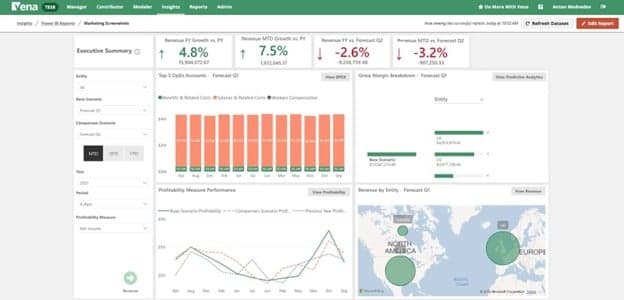
Ease of Use
Vena's onboarding process might feel a bit involved, but the payoff is worth it. Throughout the process, your team will have access to advanced resources and support, ensuring a smoother transition to the system. The detailed guides and responsive support team will also help you get up to speed, though it may take some time initially. After you're familiar, the platform's advanced capabilities become more accessible, allowing you to realize its full value in your financial planning tasks.

New Product Updates from Vena
Vena Adds Analytics Agent and Expands MCP Capabilities
Vena adds a new Analytics Agent that works with live financial models to handle multi-step analysis, retain business context, and show how answers were calculated. Vena MCP also expands access to governed financial and operational data through supported AI tools while preserving existing permissions and controls. Highlights include:
- Analytics Agent: Analyze variances, trends, comparisons, rankings, and financial performance using live Vena data.
- Business Context and Memory: Retain organization-wide and individual instructions, preferences, and business context across conversations.
- Traceable Analysis: Review underlying logic, missing context, assumptions, and calculations before rerunning an analysis.
- Expanded MCP Access: Extend governed Vena financial and operational data to supported enterprise AI tools.
- Automations and Skills: Use Vena data for recurring analysis, scheduled workflows, and proactive alerts.
- Desktop AI Workflows: Work with Vena data alongside local files in supported tools such as Claude Cowork and ChatGPT Work.
Visit Vena’s official site for more details.
Vena Launches Advanced Financial Consolidation Solution
Vena launches Financial Consolidation with intercompany eliminations, multi-currency translation, ownership structures, audit controls, and AI-assisted analysis. The Excel-native solution helps finance teams manage complex consolidation while connecting actuals with planning and reporting. Highlights include:
- Multi-Entity Consolidation: Supports complex organizational structures, ownership models, and consolidated reporting.
- Intercompany Eliminations: Automates matching and elimination of intercompany transactions during close.
- Multi-Currency Support: Handles currency translation across entities operating in different currencies.
- Governed Close Workflows: Adds workflow, versioning, period locking, entity-level security, and audit history.
- AI-Powered Analysis: Helps surface variances, identify breaks, explain changes, and generate finance insights.
- Excel-Native Experience: Keeps finance teams working in Excel while adding structured consolidation logic and controls.
Visit Vena’s official site for more details.
Vena Joins the Acumatica Marketplace
Vena is now available on the Acumatica Marketplace, enabling organizations to connect Acumatica ERP data with Vena for financial planning and performance management. The integration helps finance teams work with ERP data across familiar Microsoft applications while improving planning, reporting, and decision-making. Highlights include:
- Acumatica Marketplace Availability: Discover and deploy the Vena integration directly from the Acumatica Marketplace.
- ERP Data Integration: Connect Acumatica ERP data to Vena for planning, forecasting, reporting, and analytics.
- Microsoft Platform Support: Work with connected data across Microsoft Excel, Power BI, and Microsoft Fabric.
Visit Vena's official site for more details.
Vena Unveils AI-Enhanced Platform Innovations
Vena introduces new AI-powered finance and planning capabilities designed to improve financial consolidation, forecasting, and cross-platform data management. These updates help finance teams reduce manual work, accelerate planning workflows, and connect operational and financial data more efficiently. Highlights include:
- Vena Financial Consolidation: Streamline financial close processes with AI-enabled consolidation workflows, audit-ready reporting, and Excel-native planning tools.
- Vena Planning Agent: Generate forecasts, update plans, and apply scenario modeling using natural language prompts.
- Vena MCP Server: Connect tools like ChatGPT, Claude, and Microsoft Copilot to governed Vena data and planning workflows.
- Unified Data Layer With Acterys: Connect Excel and Power BI planning workflows with shared real-time operational and financial data.
Visit Vena’s official site for more details.
Vena Specs
- 2-Factor Authentication: Yes
- Accounts Payable: No
- Accounts Receivable: No
- API: No
- Approval Workflows: No
- Balance Sheet: Yes
- Billing/Invoicing: No
- Budgeting: Yes
- Calendar Management: No
- Comparative Reporting: No
- CRM Integration: Yes
- Custom Reports: No
- Customer Management: No
- Dashboard: Yes
- Data Export: Yes
- Data Import: Yes
- Data Visualization: Yes
- Expense Tracking: Yes
- External Integrations: Yes
- Forecasting: Yes
- General Account Ledger: Yes
- Historical Data Analysis: No
- Inventory Tracking: No
- Multi-Currency: Yes
- Multi-User: Yes
- Notifications: Yes
- P&L: Yes
- Payroll: No
- Scenario Planning: No
- Scheduling: Yes
- Supplier Management: No
- Tax Management: No
- Time Management: No
Alternatives to Vena


Vena FAQs
Hva skjer videre?
Klar til å videreutvikle ferdighetene dine som økonomiprofesjonell? Abonner på vårt gratis nyhetsbrev.