

As melhores alternativas ao Quicken facilitam a gestão de vários orçamentos, o acompanhamento das despesas e o planeamento do futuro — tudo isto sem problemas de sincronização, interfaces pouco intuitivas ou folhas de cálculo dispersas que podem atrasar o seu trabalho. Se a sua configuração atual parece mais frustrante do que funcional, talvez esteja na altura de encontrar uma ferramenta que mantenha os seus dados financeiros organizados e precisos.
Com mais de 15 anos de experiência em gestão financeira e software digital, ajudei profissionais e executivos da área financeira a simplificar os seus processos de orçamentação e a melhorar a visibilidade sobre as contas. A ferramenta certa não só facilita a gestão do dinheiro — também liberta tempo para o planeamento estratégico e para uma tomada de decisões mais inteligente.
Eis as minhas escolhas das melhores alternativas ao Quicken para o ajudar a simplificar os seus fluxos de trabalho, melhorar a precisão e encontrar a solução certa para os seus objetivos financeiros.
O que é o Quicken?
O Quicken é um software de gestão de finanças pessoais que ajuda os utilizadores a organizar o seu dinheiro e a planear o futuro. Concebido tanto para profissionais como para utilizadores comuns, permite acompanhar rendimentos, despesas, orçamentos e investimentos num só lugar. Com funcionalidades de orçamentação, acompanhamento de despesas e elaboração de relatórios, o Quicken proporciona uma visão clara da sua saúde financeira — ajudando-o a controlar as despesas e a tomar decisões financeiras informadas.
Tabela comparativa das alternativas ao Quicken
Esta tabela comparativa resume os detalhes de preços das minhas principais escolhas de alternativas ao Quicken.
Score legend (out of 5)
- Excellent4.5–5
- Good4–4.4
- Average3–3.9
- Below average2–2.9
- Poor1–1.9
Sorted by: Default
| Tool | Starting Price | Website | |||||||
|---|---|---|---|---|---|---|---|---|---|
Best for investment strategies | Not rated | 2 | 3 | 3 | 4 | 2 | Not rated | Pricing upon request Free plan available | Website |
Best for flexible financial planning | 3.0 out of 5 | 2 | 5 | 3 | 3 | 3 | 2 | $14.99/month 34-day free trial available | Website |
Best for automated investing | Not rated | Not rated | Not rated | 3 | 3 | 2 | 2 | $5/month Not available | Website |
Best for data analysis tools | Not rated | Not rated | 2 | Not rated | 2 | 3 | 2 | $169 one-time Not available | Website |
Best for collaborative budgeting | 3.2 out of 5 | 2 | 4 | 4 | 4 | 3 | 2 | $14.99/month 7-day free trial available | Website |
Best for free money management tools | Not rated | 3 | 2 | 3 | 3 | 2 | Not rated | Pricing upon request Free plan available | Website |
Best for subscription management | Not rated | 4 | 4 | 3 | 3 | 2 | Not rated | $7/month Free plan + 7-day free trial available | Website |
Best for Google Sheets integration | Not rated | Not rated | 4 | 4 | 3 | 3 | 2 | $99/year 30-day free trial available | Website |
Best for financial forecasting | 3.3 out of 5 | 3 | 4 | 4 | 3 | 4 | 2 | $14.95/month Free plan available | Website |
Best for privacy and security | Not rated | 3 | 3 | 3 | 3 | 4 | Not rated | Pricing upon request Free trial limited to 100 manually entered transactions + 14-day trial available | Website |


Why Trust Our Software Recommendations
6,700+
Reviews
20
Industry experts
16+
Evaluation factors
14
Years
Our team has been testing and reviewing software since 2012. As finance leaders ourselves, we know how difficult—and important—it is to choose the right software.
For this guide, we evaluated tools using hands-on testing and independent research, scoring tools using our selection criteria.
Our reviews reflect our human editorial judgment, not a sales pitch.
Análises das melhores alternativas ao Quicken
Seguem-se os meus resumos detalhados das melhores alternativas ao Quicken que entraram na minha lista. As minhas análises apresentam uma visão aprofundada das principais funcionalidades, vantagens e desvantagens, integrações e casos de utilização ideais de cada ferramenta, para o ajudar a encontrar a melhor opção para si.
 Best for investment strategies
- Free plan available
- Pricing upon request
Visit WebsiteCustomer Rating:4.3/5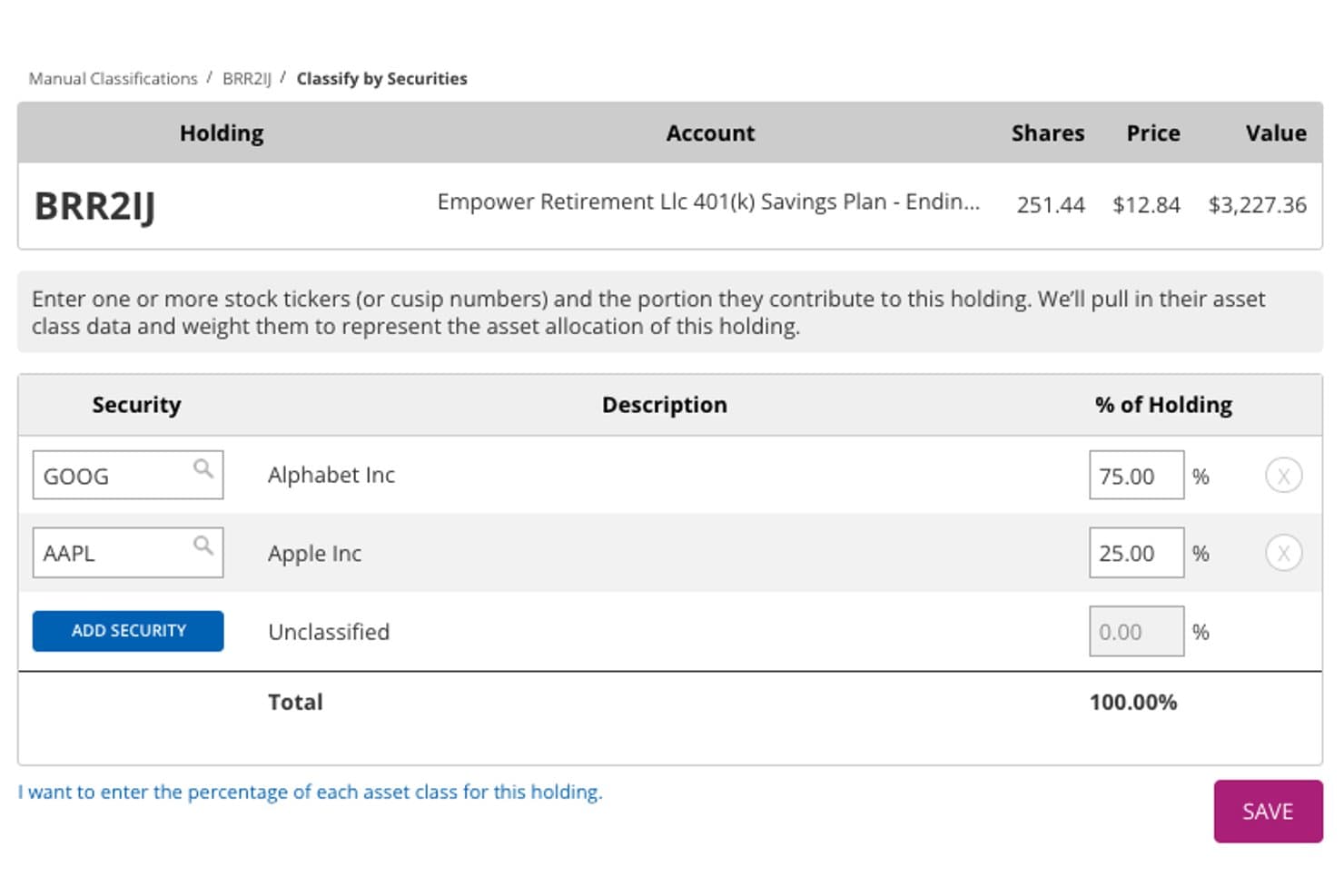
Empower lets users classify holdings by assigning stock tickers and percentages. Empower Personal Dashboard is a free personal finance tool that appeals to investment-focused individuals who want to track net worth, monitor portfolio performance, and plan for retirement alongside everyday budgeting and cash flow.
Who Is Empower Best For?
Empower Personal Dashboard suits individual investors who want a free, consolidated view of their portfolio performance, retirement projections, and net worth alongside everyday budgeting.
Why I Picked Empower
I picked Empower as one of the best because its Portfolio Analysis tool goes deeper than most free personal finance tools will. I can track investment performance against benchmarks, review my allocation against long-term goals, and assess whether my portfolio's risk level is too high or too low, all in one place. The Retirement Planner layers on top of that, letting me model different retirement ages and withdrawal strategies to see how my choices play out over time.
Empower Key Features
- Net worth tracking: View all assets and liabilities in one place to see your total net worth and the impact of saving or paying down debt.
- Transaction rules: Set rules that automatically apply updated descriptions and categories to matching transactions, including past ones.
- Savings planner: Plan and monitor progress toward specific savings goals, such as travel, retirement, or an emergency fund.
- Debt paydown tool: See all debts together and track your progress toward paying them off over time.
Empower Personal Dashboard Integrations
Empower Personal Dashboard doesn't have clearly documented native integrations. It connects investment, cash, credit, retirement, mortgage, loan, savings, and checking accounts through Yodlee FastLink.
Pros and Cons
Pros:
- Reviewers value its consolidated net-worth view
- Retirement scenarios support long-term planning
- Portfolio analysis compares investments against benchmarks
Cons:
- Reviewers report unreliable account connections and missing transactions
- No documented Quicken file import
Learn more about Empower: 2Best for flexible financial planning
YNAB
- 34-day free trial available
- From $14.99/month
Visit WebsiteCustomer Rating:4.5/5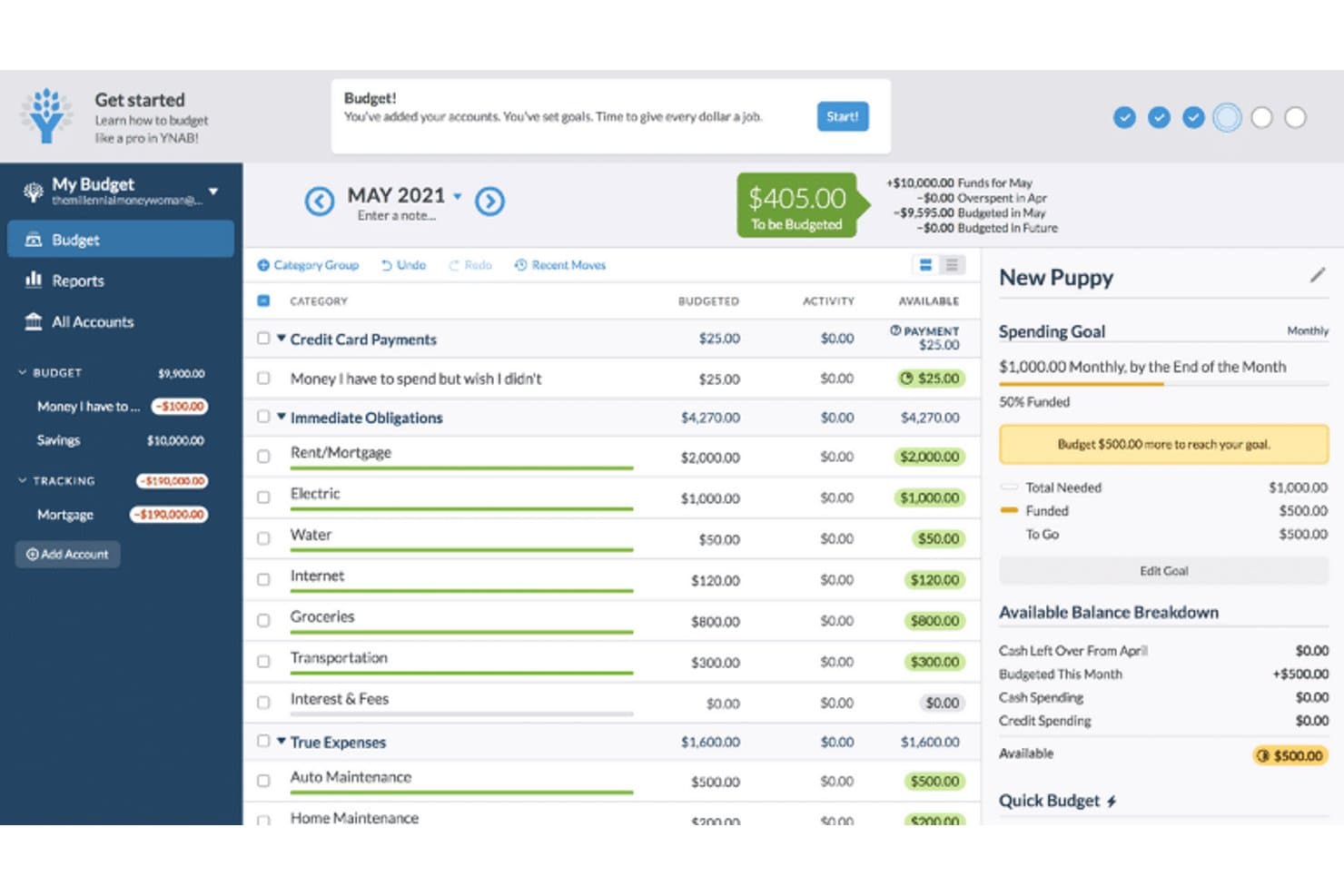
YNAB helps users track savings goals alongside monthly budget categories. YNAB is a personal budgeting app that uses zero-based budgeting to help households and individuals assign every dollar a purpose, track spending, and plan for goals like debt payoff and savings.
Who Is YNAB Best For?
YNAB is a strong fit for households and individuals who want to actively manage spending and work toward savings goals using a zero-based budgeting approach.
Why I Picked YNAB
I picked YNAB as one of the best because its zero-based budgeting approach is genuinely flexible in a way most alternatives aren't. I love how you can assign every dollar a purpose before spending it, then adjust category funding mid-month as priorities shift without losing visibility into where you stand. The loan payoff planner and savings targets let you model real financial decisions, like how an extra $200 toward a debt changes your payoff timeline.
YNAB Key Features
- Subscription sharing: Share one YNAB subscription with up to six people, each with a separate login and control over what they share.
- Net worth report: View assets, debts, and net worth over time with month-by-month account balance snapshots exportable as CSV or TSV files.
- Scheduled transactions: Log future and repeating transactions in your account register to keep upcoming expenses like rent or utility bills visible.
- Account syncing: Connect bank and credit card accounts to import transactions automatically using read-only, aggregator-powered connections.
YNAB Integrations
YNAB has native integrations with Plaid and MX for linked-bank data. It also offers a REST and JSON API for custom integrations and connects with 1,500+ apps through Zapier.
Pros and Cons
Pros:
- Shared household plans provide separate member logins
- Debt payoff planner models time and interest
- Flexible zero-based budgets adapt as priorities change
Cons:
- Limited investment analytics and business accounting tools
- No documented Quicken-specific data migration path

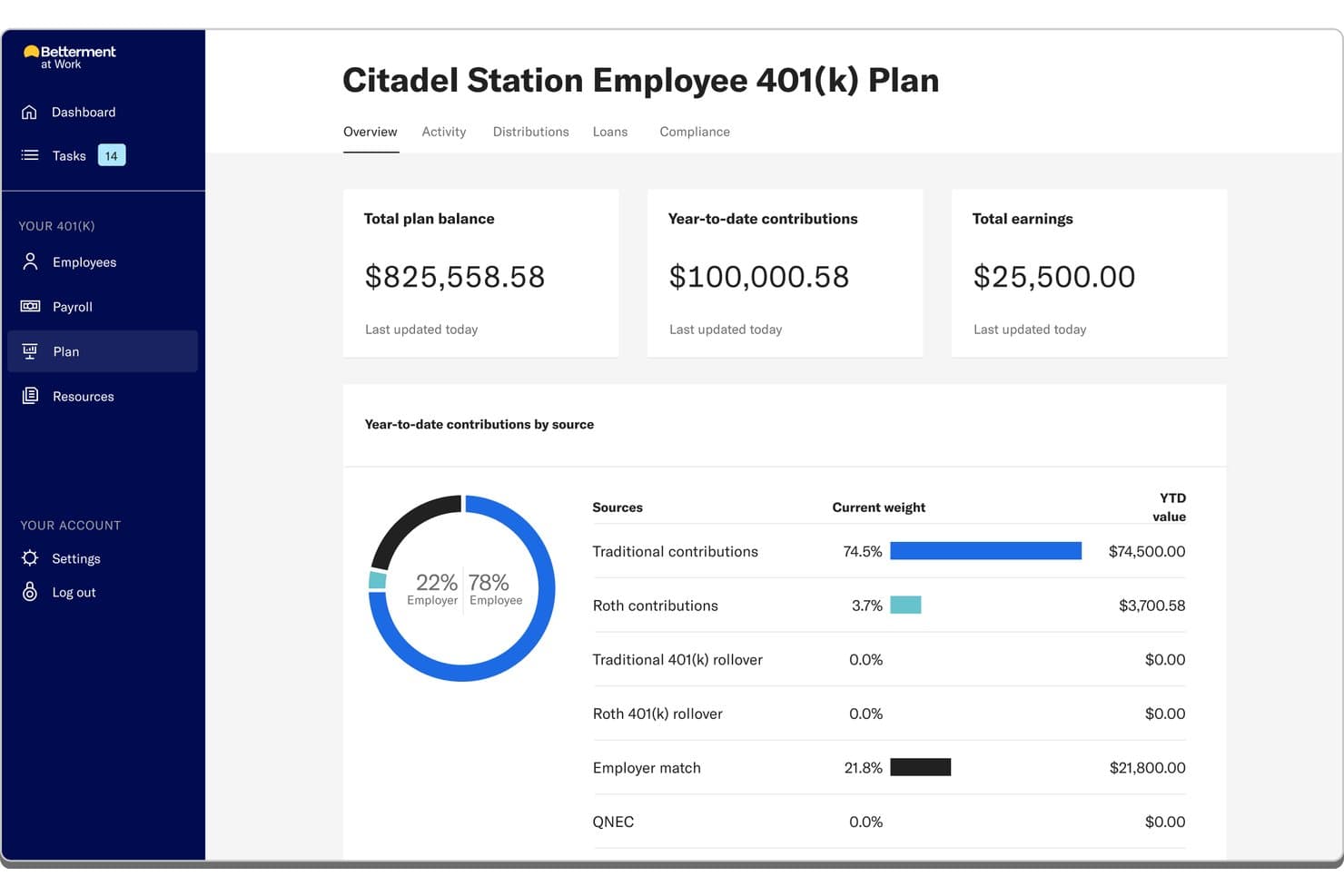
Betterment tracks 401(k) plan balances, contributions, and earnings by source. Betterment is an automated investing platform that appeals to personal finance enthusiasts who want goal-based portfolio management, tax-loss harvesting, and hands-off wealth building without the manual effort of traditional investing tools.
Who Is Betterment Best For?
Betterment is a strong fit for personal finance enthusiasts who want a hands-off approach to long-term investing, with automated portfolio management and built-in tax optimization.
Why I Picked Betterment
I picked Betterment as one of the best because it handles the parts of personal finance Quicken users often neglect: long-term investing and tax optimization. I particularly like how it automates tax-loss harvesting in taxable accounts, selling underperforming holdings and replacing them with similar ones to offset gains. Pair that with goal-based portfolio management across retirement accounts, IRAs, and taxable accounts, and you get a hands-off investing setup Quicken simply can't replicate.
Betterment Key Features
- Multiple portfolio strategies: Choose from a range of expert-built portfolios, including Core, Value Tilt, impact-focused, and crypto ETF options, or build a custom portfolio with your own stock and ETF selections.
- Asset location across accounts: Betterment coordinates your investments across taxable and retirement accounts, placing assets in the account type where they're taxed most favorably.
- Tax impact preview: Before you make a transfer, allocation change, or withdrawal, Betterment shows you the estimated tax impact so you can make informed decisions.
- Securities lending: Opt in to lend eligible shares from your portfolio and receive monthly cash payments, with each loan backed by cash collateral worth at least the full market value of the shares.
Betterment Integrations
Betterment documents TurboTax as a third-party OAuth app that can import Betterment tax forms. No native integration count or public API is stated.
Pros and Cons
Pros:
- Hands-off portfolio management suits set-and-forget investors
- Goal-based investing tracks long-term portfolio progress
- Automated tax-loss harvesting can offset investment gains
Cons:
- No bill management or payment tools
- No budgeting or expense tracking
Learn more about Betterment:
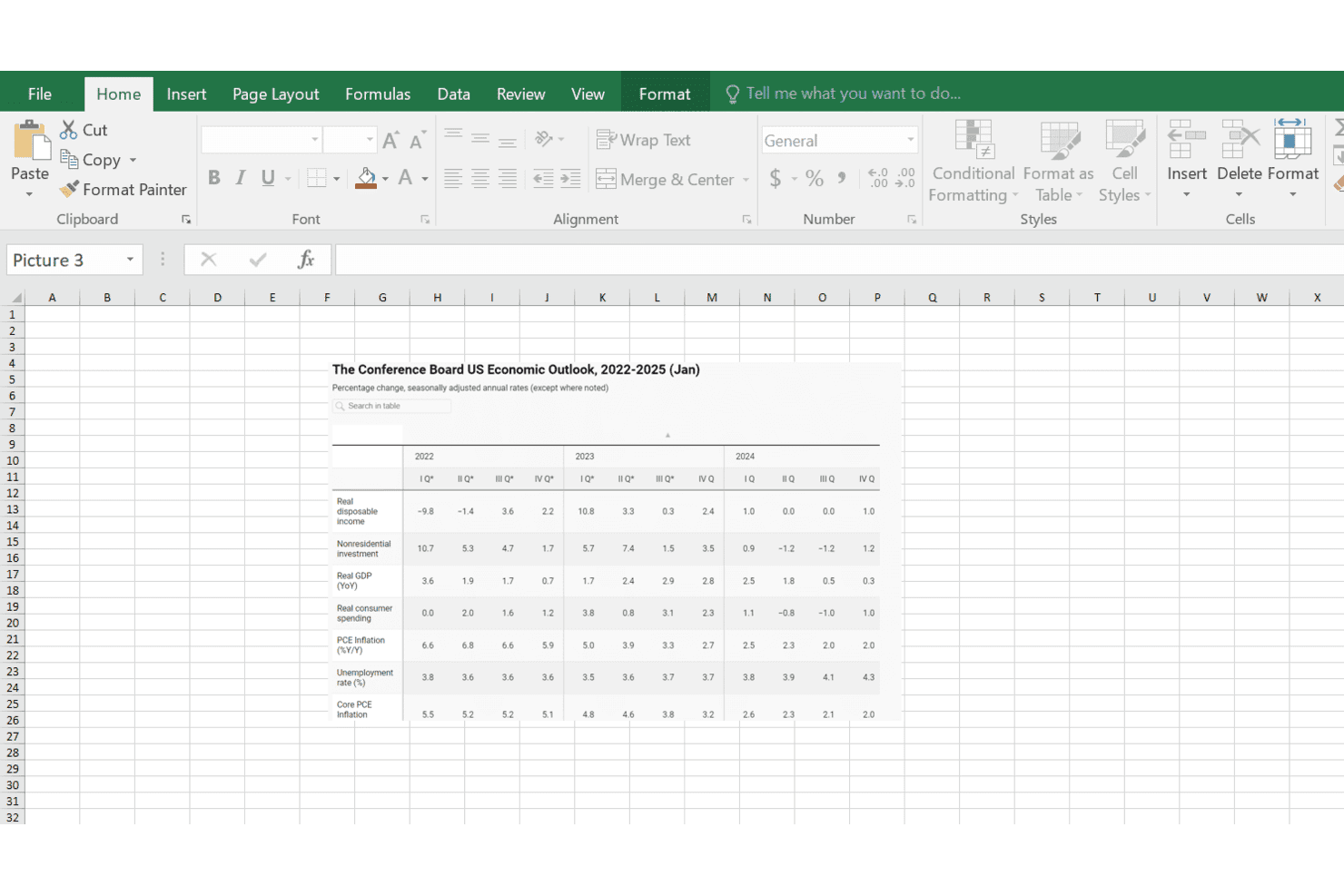
Microsoft Excel displays economic data in a structured table format. Microsoft Excel is a spreadsheet tool that appeals to detail-oriented personal finance enthusiasts and small business owners who want full control over how they organize, analyze, and visualize their financial data.
Who Is Microsoft Excel Best For?
Excel is a strong fit for personal finance enthusiasts who want to build fully customized budgeting and analysis workflows from scratch using formulas, PivotTables, and charts.
Why I Picked Microsoft Excel
I picked Microsoft Excel as one of the best Quicken alternatives because it gives data-driven finance professionals unmatched control over how they build and analyze financial models. PivotTables let you slice budget data any way you need, while formulas like STOCKHISTORY pull in historical market prices at daily, weekly, or monthly intervals for investment analysis. I appreciate that you can design custom income-versus-expense templates that automatically calculate variances, something no off-the-shelf personal finance app lets you tailor this precisely.
Microsoft Excel Key Features
- Household budget template: A pre-built template lets you enter income and expenses, then automatically calculates the difference between projected and actual costs.
- Stocks linked data type: Pull in real-time or delayed market data for stocks, ETFs, mutual funds, and other instruments directly into your spreadsheet cells.
- CSV import and export: Import financial data from external sources or export your records as CSV files for use in other tools.
- Workbook sharing with permissions: Share your spreadsheet via OneDrive with view or edit access, allowing collaborators to work in the file simultaneously.
Microsoft Excel Integrations
Excel has one documented native integration, OneDrive, for storing and sharing workbooks. It also offers the Microsoft Graph Excel REST API for custom integrations and supports workbook collaboration through SharePoint Online.
Pros and Cons
Pros:
- CSV imports support flexible financial reporting
- Custom budget sheets compare projected and actual costs
- PivotTables and charts clarify financial trends
Cons:
- No bill reminders or consolidated net-worth tracking
- Manual entry replaces automatic bank syncing
Learn more about Microsoft Excel: Best for collaborative budgeting
- 7-day free trial available
- From $14.99/month
Visit WebsiteCustomer Rating:4.7/5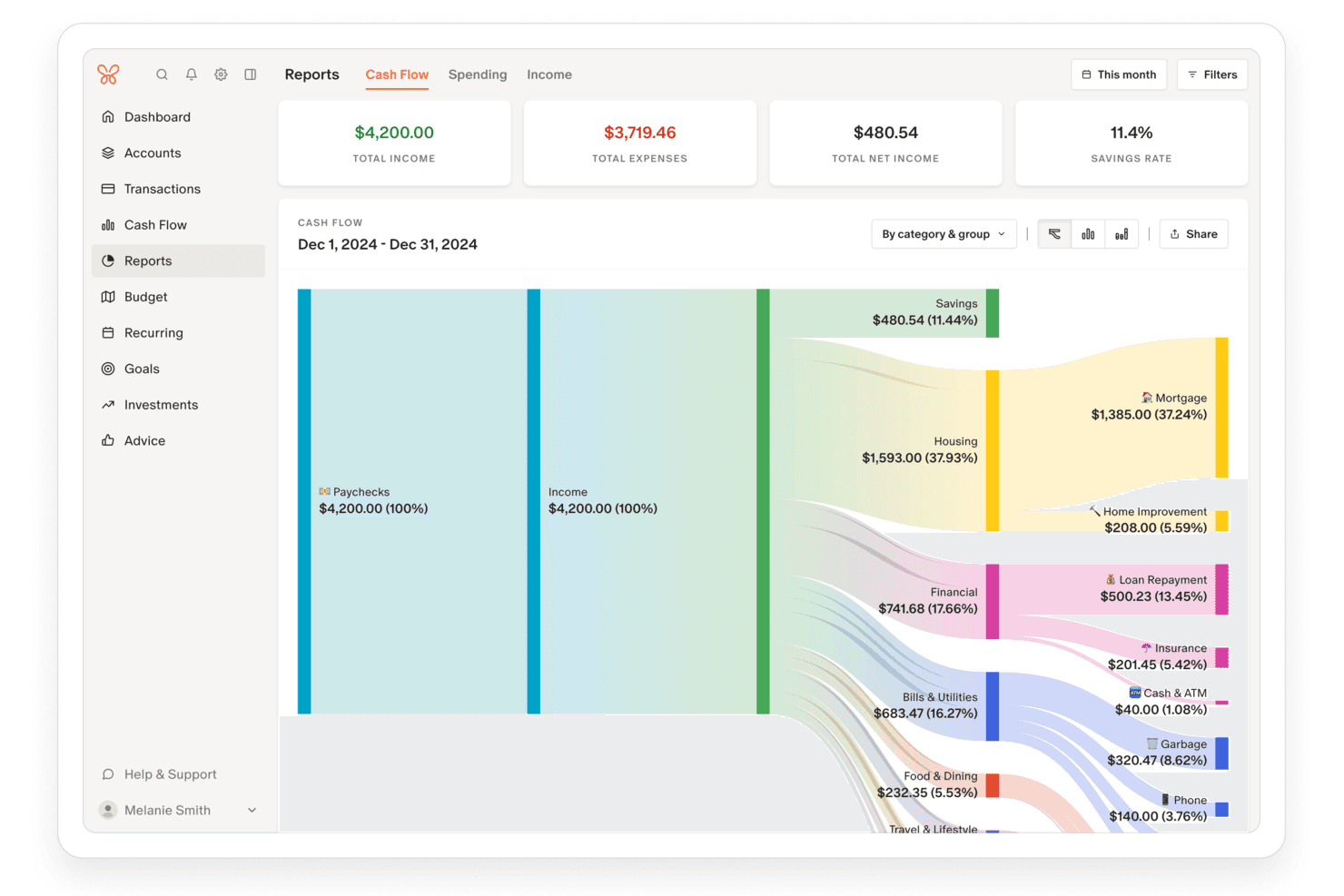
Monarch Money visualizes monthly cash flow with a Sankey diagram. Monarch Money is a personal finance app that brings all your accounts—bank, credit cards, investments, and more—into one place, making it especially useful for households and individuals who want to track spending, build budgets, and plan financial goals together.
Who Is Monarch Money Best For?
Monarch Money is a great fit for couples and households who want to manage their finances together in one shared view.
Why I Picked Monarch Money
I picked Monarch Money as one of the best Quicken alternatives because of how well it handles shared household finances. I love that two people can log in separately, see all their accounts in one dashboard, tag each other on transactions, and work toward shared savings goals together. The Flex Budgeting option groups spending into fixed, flexible, and non-monthly buckets, which I find maps better to how households actually think about money than a rigid category list does.
Monarch Money Key Features
- Account aggregation: Connect bank accounts, credit cards, loans, investments, real estate, vehicles, and crypto from more than 13,000 financial institutions in one dashboard.
- AI transaction categorization: Automatically categorize transactions using machine learning, with custom rules you can create to handle recurring or unique transactions.
- Net worth tracking: View your net worth over time across all assets and liabilities, with filters to break down individual asset and liability categories.
- Goal planning: Set savings or debt-paydown goals with a target amount and planned monthly contribution, then assign specific accounts to track progress toward each goal.
Monarch Money Integrations
Monarch Money connects to more than 13,000 financial institutions through Plaid, Finicity, and MX, plus Zillow and VinAudit for property and vehicle values. An API for custom integrations isn't documented.
Pros and Cons
Pros:
- Automatic categorization and rules reduce transaction sorting
- Flex budgets adapt to household spending patterns
- Shared household access supports joint budgeting
Cons:
- Business tools lack double-entry accounting
- No direct Quicken data migration
Learn more about Monarch Money:
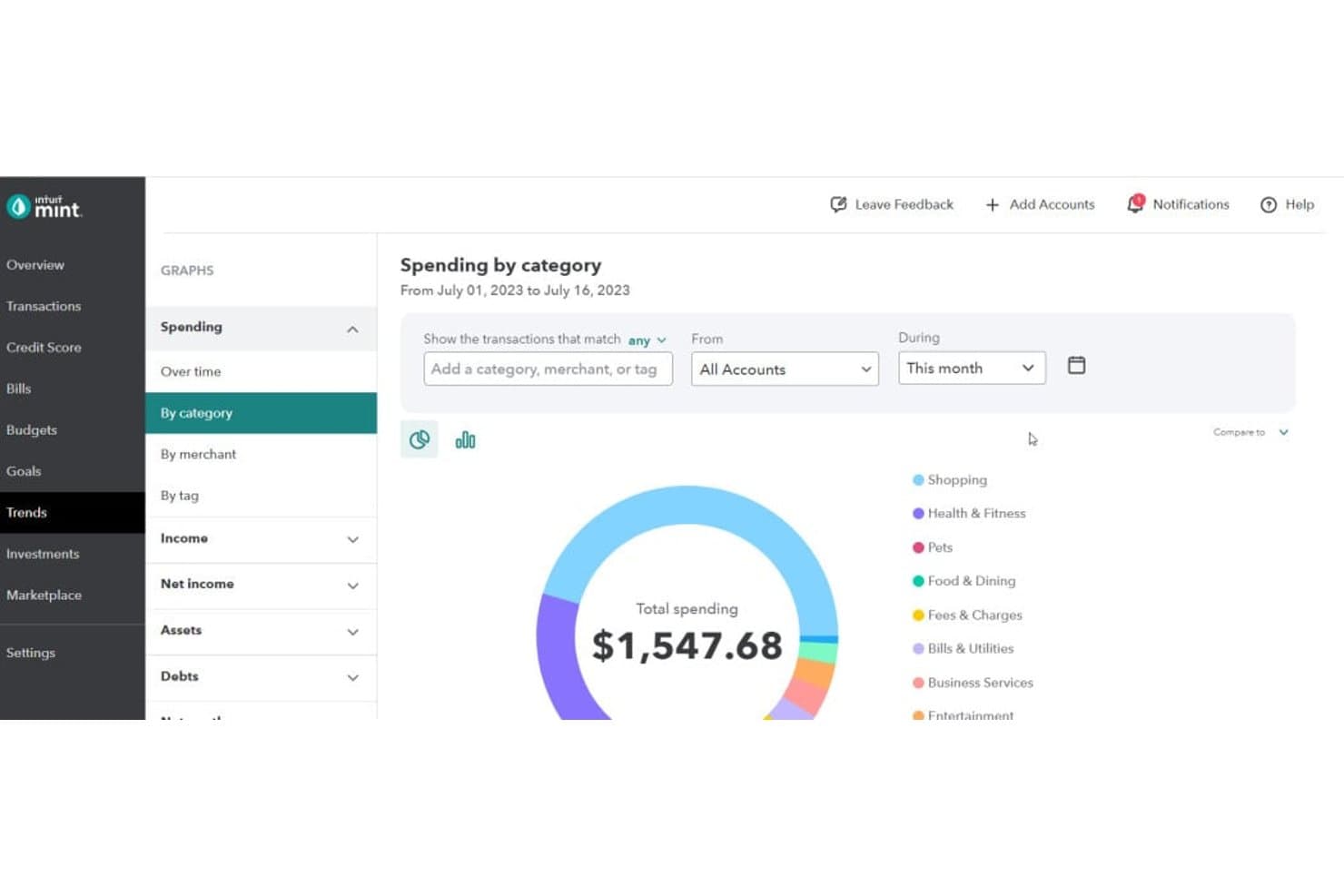
Mint breaks down monthly spending visually by category. Credit Karma is a free personal finance platform from Intuit that lets you track spending, income, net worth, and credit health in one place—making it an option for individuals who want consolidated financial visibility without paying for it.
Who Is Mint Best For?
Credit Karma suits individuals who want free credit monitoring and a consolidated snapshot of their accounts, net worth, and spending—without needing dedicated budgeting tools.
Why I Picked Mint
I picked Credit Karma as one of the best free money management tools because it pulls spending, income, and net worth into a single view at no cost. I appreciate that it automatically categorizes transactions across thousands of linked institutions, covering cash, investments, property, credit, and loans. Free credit score monitoring with daily updates from Equifax and TransUnion is a genuine bonus you won't find bundled into most Quicken alternatives without a paid tier.
Mint Key Features
- Transaction auto-categorization: Credit Karma automatically assigns each transaction a best-fit category from more than two dozen options, which you can manually adjust.
- Bill tracking and reminders: After linking credit accounts, you can track upcoming bills, outstanding balances, and minimum payment amounts tied to your credit tradelines.
- Manual asset entry: You can manually add cash, investment, and property values to fill gaps in your connected account data.
- Credit report monitoring: Credit Karma monitors your credit reports and alerts you to changes, pulling daily updates from Equifax and TransUnion.
Mint Integrations
Credit Karma doesn't have any native integrations. It connects to thousands of financial institutions for account aggregation, although coverage varies and updates can occur every 72 hours.
Pros and Cons
Pros:
- Automatic transaction categories simplify spending review
- Consolidated net-worth and cash-flow snapshot
- Daily credit monitoring complements net-worth tracking
Cons:
- No Quicken import or direct migration path
- No true budget-setting or annual spending views
Learn more about Mint: Best for subscription management
- Free plan + 7-day free trial available
- From $7/month
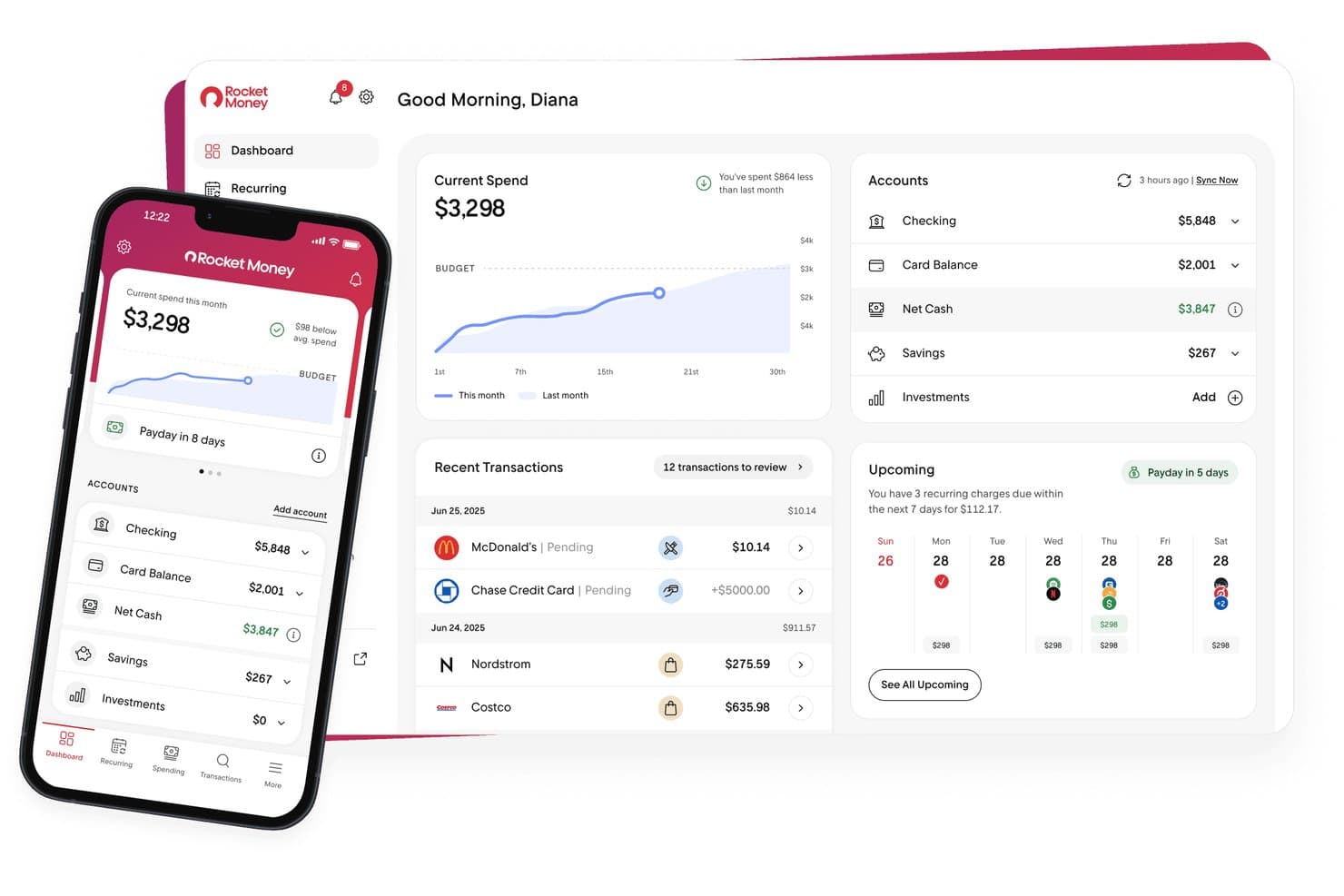
Rocket Money tracks spending, accounts, and upcoming bills in one dashboard. Rocket Money is a personal budgeting app that helps household budgeters track spending, manage recurring bills, and identify subscriptions they may want to cancel or renegotiate.
Who Is Rocket Money Best For?
Rocket Money is a strong fit for personal household budgeters who want an easy way to spot and cancel unwanted subscriptions while keeping tabs on their monthly spending.
Why I Picked Rocket Money
I picked Rocket Money as one of the best because subscription management is genuinely where it shines. It automatically surfaces recurring charges across all your linked accounts, then lets you request a cancellation directly through the app, with the concierge team handling the actual cancellation process. On Premium+, it also negotiates recurring bills like internet and phone on your behalf, which is a level of hands-on cost-cutting I haven't seen matched elsewhere.
Rocket Money Key Features
- Spending breakdown: Rocket Money categorizes transactions and displays income-versus-spending charts, frequent spend, and largest purchases across linked accounts.
- Automated savings goals: The app analyzes linked accounts to determine when to move money toward a savings goal, with options for automated or custom contributions.
- Net worth tracking: Premium members can view assets, debts, and net worth over time, with the option to add missing accounts manually or through Plaid.
- Transaction export: Premium members can export filtered transactions as a CSV file, delivered by email for download on desktop.
Rocket Money Integrations
Native integrations are not clearly documented. Rocket Money connects financial accounts through Plaid, Fidelity accounts through Akoya, credit data through Experian, and Financial Goals deposits through nbkc bank; no public API is documented.
Pros and Cons
Pros:
- Bill negotiation can cut recurring costs
- Clear spending dashboards and summaries
- Subscription detection and cancellation assistance
Cons:
- No Quicken migration or financial statements
- Investment tracking stops at balances
Learn more about Rocket Money: Best for Google Sheets integration
- 30-day free trial available
- From $99/year (billed annually)
Visit WebsiteCustomer Rating:4/5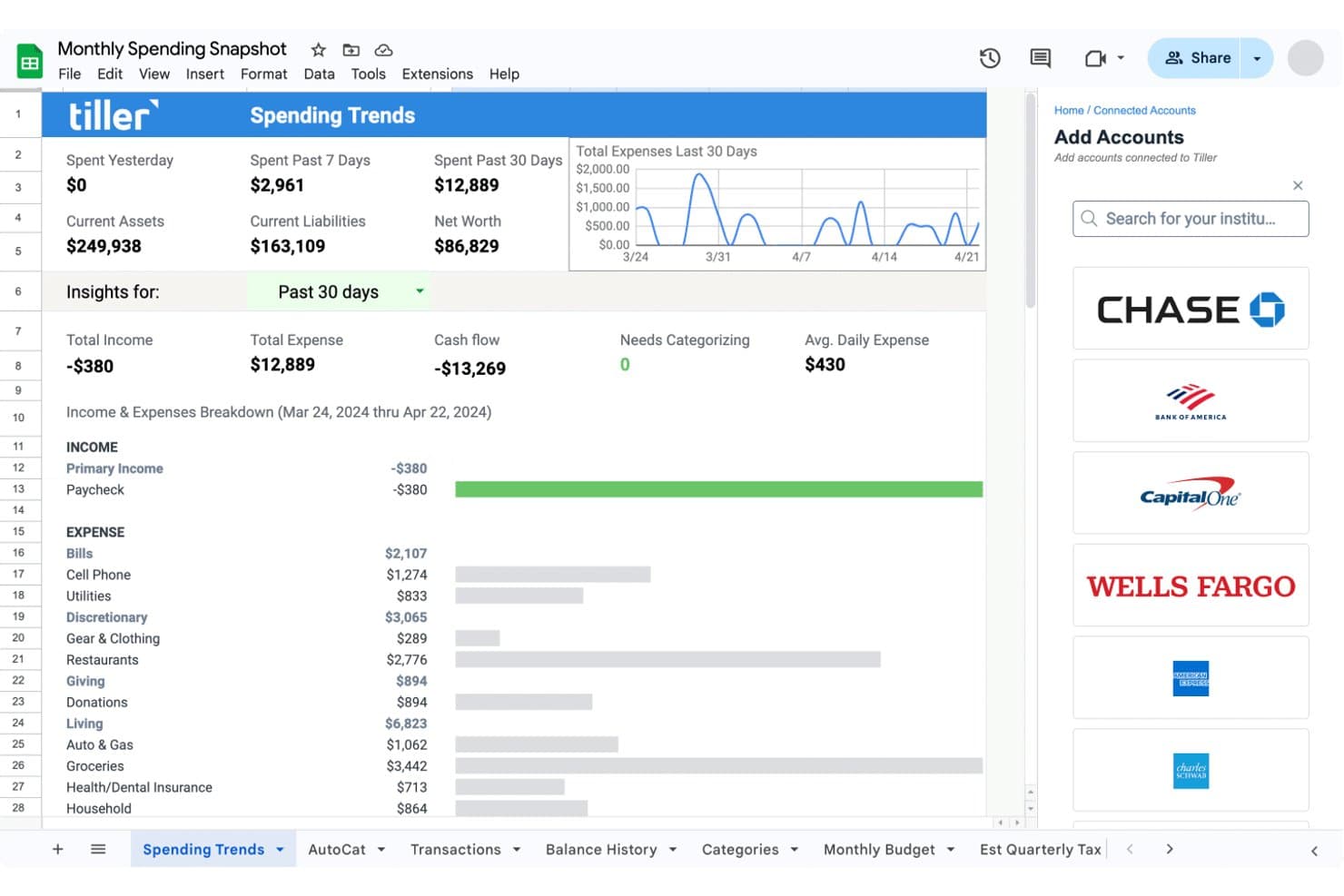
Tiller Money tracks spending trends and net worth in Google Sheets. Tiller Money is a spreadsheet-native personal finance tool that automatically feeds your bank transactions, balances, and spending into Google Sheets or Excel—appealing to hands-on budgeters who want full control over how they track and analyze their finances.
Who Is Tiller Money Best For?
Tiller Money is a strong fit for hands-on personal budgeters who already live in Google Sheets or Excel and want automated transaction feeds without giving up spreadsheet control.
Why I Picked Tiller Money
I've included Tiller Money in my top picks because it's the only Quicken alternative that feeds your bank transactions directly into Google Sheets, letting you build and own your financial system entirely in a spreadsheet. I love how AutoCat applies your own category rules automatically, and how the Foundation Template gives you a live budget-vs-actual view without locking you into someone else's layout. If you already live in Google Sheets, this is a genuinely powerful replacement for Quicken's manual register.
Tiller Money Key Features
- Secondary user access: Add up to five secondary users to your account so household members or partners can fill transactions and run AutoCat without touching billing or account settings.
- Hello, Money daily email: Receive a morning summary of recent charges, transactions, and balances across all connected accounts without opening a spreadsheet.
- Solo Business P&L view: Track business income, expenses, and profits in a real-time profit and loss view built directly into your spreadsheet.
- AI-assisted analysis: Connect tools like Claude, ChatGPT, or Gemini to your Tiller spreadsheet to ask questions about your spending, build dashboards, or update transaction categories.
Tiller Money Integrations
Tiller offers native integrations with Google Sheets, Microsoft Excel, Plaid, and Yodlee. It supports Claude through Tiller MCP and Zapier, but no public REST or GraphQL API is documented.
Pros and Cons
Pros:
- Automated rules categorize transactions
- Household members can share budgeting workflows
- Custom categories support Quicken-style analysis
Cons:
- Investment holdings lack Quicken-level detail
- No bill payment or due-date tracking
Learn more about Tiller Money:
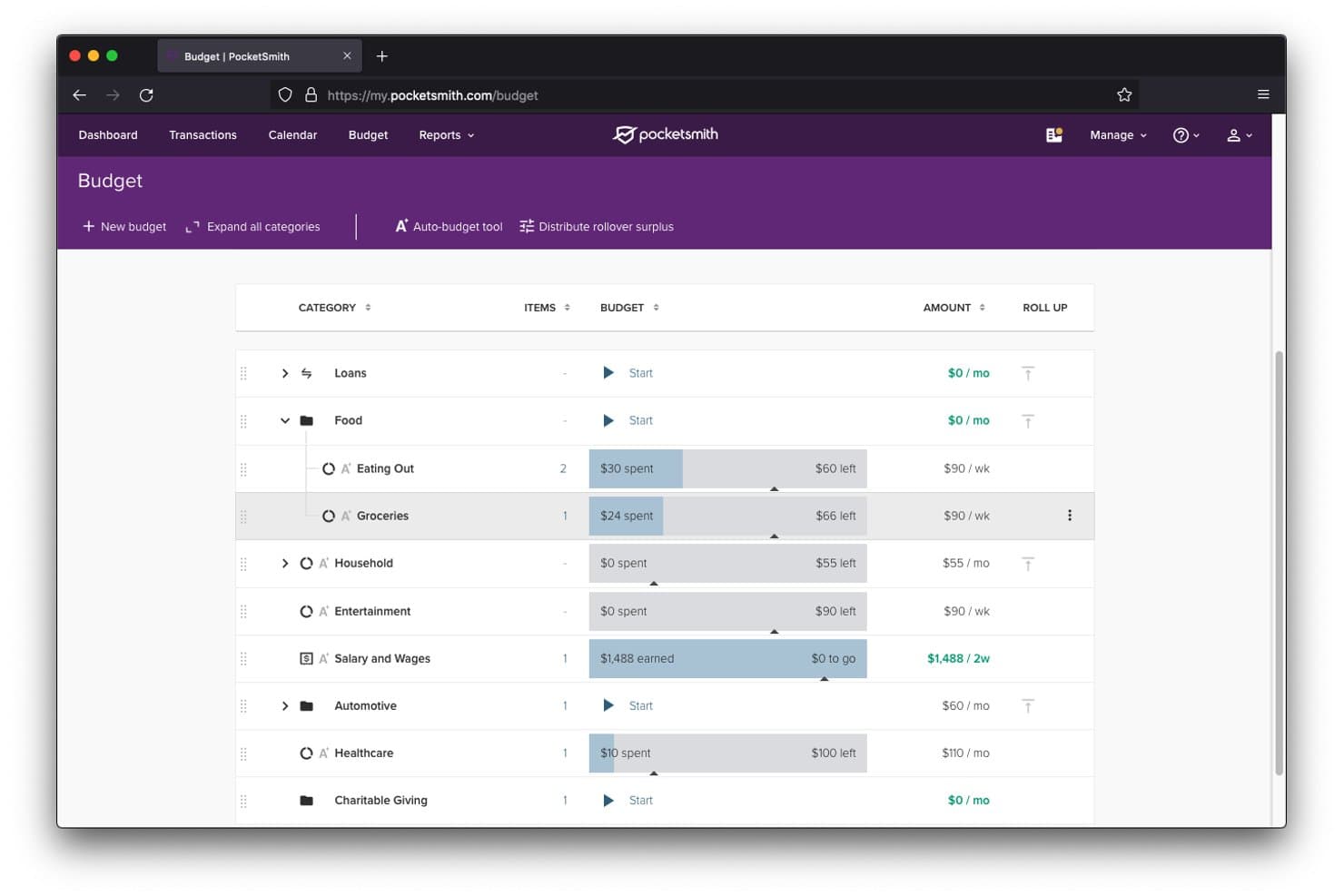
PocketSmith lets users track spending against budgets by category. PocketSmith is a personal finance tool built for individuals who want to go beyond basic budgeting—connecting accounts across 12,000+ institutions worldwide, tracking spending, and projecting future balances years ahead.
Who Is PocketSmith Best For?
PocketSmith is a strong fit for personal finance enthusiasts who want to map out their financial future—not just track what they've already spent.
Why I Picked PocketSmith
I picked PocketSmith as one of the best because its cashflow forecasting goes further than any other tool on this list—projecting daily account balances up to 60 years ahead on the top plan. I especially like the what-if scenario builder, which lets you model different financial outcomes side by side, so you can see exactly how a decision today changes your balance years from now. It also connects to 12,000+ institutions across 49 countries, so your projections draw from real account data.
PocketSmith Key Features
- Multi-currency account tracking: Monitor accounts, assets, and liabilities in their native currencies or a chosen base currency, with exchange rates updated daily.
- Rollover budgeting: Carry unspent or overspent budget amounts forward into the next period automatically.
- Quicken transaction importer: Import your existing Quicken transaction history directly into PocketSmith using a dedicated importer.
- Custom dashboards: Build personalized dashboards from selected widgets to focus on the accounts, budgets, or financial data most relevant to you.
PocketSmith Integrations
PocketSmith connects to bank-feed providers including Yodlee, Plaid, Salt Edge, Akahu, Basiq, and Mastercard across supported regions. It also offers a REST API for custom integrations.
Pros and Cons
Pros:
- Dedicated importer eases transaction-history migration
- Compares what-if scenarios for financial decisions
- Projects future balances decades ahead
Cons:
- No local storage for desktop switchers
- Some users report missing transactions
Learn more about PocketSmith: Best for privacy and security
- Free trial limited to 100 manually entered transactions + 14-day trial available
- Pricing upon request
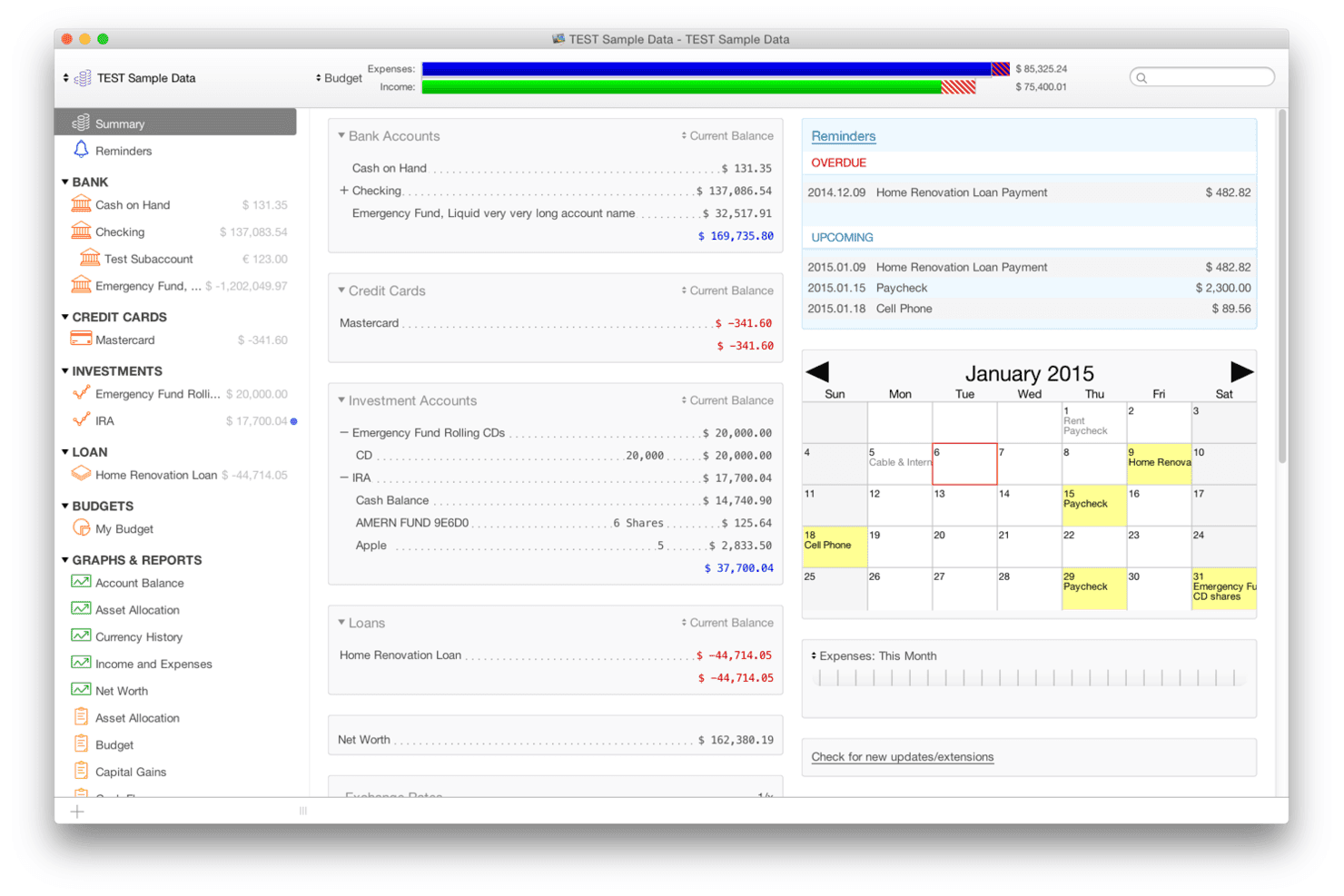
Moneydance displays accounts, budgets, and reminders in one dashboard. Moneydance is a desktop-first personal finance app that lets privacy-conscious households track accounts, manage budgets, monitor investments, and download bank transactions—all with financial data stored locally on your own device.
Who Is Moneydance Best For?
Moneydance is a strong fit for privacy-conscious individuals and households who want to keep their financial data stored locally rather than in the cloud.
Why I Picked Moneydance
I picked Moneydance because it's one of the few Quicken alternatives that keeps your financial data encrypted and stored locally on your own device rather than in the cloud. Your online banking passwords never leave your computer, and even when syncing is enabled, your financial data is encrypted before it goes anywhere. I also appreciate that it supports investment tracking across stocks, bonds, mutual funds, and CDs, with built-in cost-basis calculations and automatic price downloads.
Moneydance Key Features
- Budget interval customization: Set budgets on weekly, biweekly, monthly, or annual cycles, or mix intervals across different budget line items.
- Scheduled transaction reminders: Create one-time or recurring transaction reminders with flexible daily, weekly, monthly, or annual recurrence options.
- Multi-format report export: Save reports as HTML, CSV, tab-delimited text, or PDF, and export graphs as image files.
- Multi-currency support: Manage accounts and view financial reports across multiple currencies within a single data file.
Moneydance Integrations
Moneydance doesn't have any native integrations documented. It supports transaction downloads through OFX Direct Connect and Moneydance+ via Plaid, plus a Kotlin/Java extension API for custom integrations.
Pros and Cons
Pros:
- Checkbook-style registers ease account tracking
- Detailed investment reports track cost basis
- Encrypted local storage protects financial records
Cons:
- Budgeting trails Quicken for zero-based workflows
- Quicken imports can require account cleanup
Learn more about Moneydance:
Outras alternativas ao Quicken
Eis algumas alternativas adicionais ao Quicken que não entraram na minha lista, mas que vale a pena conhecer:
- 11BanktivityBest for Mac users
- 12CountAboutBest for importing Quicken data
- 13WaveBest for freelancers and small businesses
- 14Float ForecastingBest for real-time expense management
- 15Odoo AccountingBest for integrated business operations
- 16XeroBest for cloud-based accounting
- 17Goodbudget Best for envelope budgeting
- 18EveryDollarBest for zero-based budgeting
- 19PlaidBest for financial data connectivity
- 20WealthicaBest for investment tracking
- 21MoneyspireBest for desktop financial management
How I Evaluate Quicken Alternatives
I evaluate each tool in two layers: the baseline must-haves—like syncing bank and brokerage accounts—and the differentiators, like debt tracking or tax exports, that determine real fit.
Core Functionality (Table Stakes For This List)
When I'm selecting tools for my list, I rank each one on a scale from 0 (does not offer the functionality) to 5 (excels in this area) for each core functionality listed below. Then, I calculate the tool's total score into a percentage. Each tool needs to achieve a minimum total score of 65% to be considered for inclusion.
- Account Aggregation & Sync: I check whether a tool reliably connects checking, savings, credit cards, and investment accounts—and how often it auto-refreshes balances.
- Budgeting & Expense Tracking: Custom spending categories, budget goal-setting, and rules-based transaction sorting matter here—like auto-tagging grocery or utility charges.
- Investment & Net Worth Monitoring: Tools that pull in brokerage and retirement holdings alongside property and liability values give a much clearer financial picture over time.
- Bill Management & Cash Flow: I look for upcoming bill reminders, due date alerts, and basic cash flow forecasting so users can anticipate shortfalls before they happen.
- Financial Reporting & Exports: The ability to generate income vs. expense summaries, spending trend charts, and tax-ready reports—and export them as CSV or PDF—is key.
- Security & Data Encryption: I evaluate encryption standards, multi-factor authentication options, and whether bank connections use read-only access through aggregators like Plaid.
Once I have a list of tools that meet this criteria, I consider what sets each platform apart.
Differentiating Factors (What Sets Vendors Apart)
Here's how I compare and contrast different vendors:
Standout Features
Tax optimization features are a big differentiator—I look for tools that track deductible expenses and capital gains throughout the year, not just at filing time. Debt payoff planning is another area I evaluate closely, especially tools offering snowball or avalanche strategies with clear payoff timelines. I also consider whether a platform supports shared household access so couples or families can manage finances together with appropriate permissions. Mobile app parity matters too, since expense capture and account checks happen on the go more often than at a desk.
Beyond Features
Pricing model matters a lot when switching from Quicken—I check whether a tool charges a subscription or offers a one-time purchase, since that's a common reason users look for alternatives in the first place. Data ownership is another factor I weigh carefully, especially whether you can export your full transaction history if you cancel. I also evaluate how well a platform connects with tax prep software and brokerage accounts, since disconnected tools mean manual data entry during tax season. Migration support for importing Quicken data files (QIF, QFX, OFX) is worth checking too.
Por que procurar uma alternativa ao Quicken?
Embora o Quicken seja um software útil, existem vários motivos pelos quais alguns utilizadores procuram soluções alternativas. Pode estar à procura de uma alternativa ao Quicken porque…
- Precisa de uma aplicação móvel com melhores funcionalidades
- Procura preços mais acessíveis
- Pretende funcionalidades de colaboração melhoradas
- A sua equipa necessita de suporte para várias moedas
- Precisa de uma solução com acessibilidade global
- Está frustrado com o apoio ao cliente limitado
Seja qual for o motivo, certifique-se de que a sua alternativa ao Quicken responde a requisitos semelhantes. As aplicações de orçamentação mais especializadas podem ser adequadas, mas a solução também deve acompanhar o crescimento da sua empresa, para garantir que obtém a melhor opção para a sua equipa.