

O software de processamento salarial para pequenas empresas automatiza os pagamentos aos funcionários, o cálculo de impostos e a entrega de declarações. Como resultado, pode melhorar a precisão e reduzir o trabalho necessário para processar os salários.
No entanto, escolher a plataforma certa pode ser difícil. Este guia compara as principais opções com base na facilidade de utilização, nas integrações e na fiabilidade do processamento salarial. Destaca também as ferramentas que avaliei pessoalmente para diferentes necessidades de pequenas empresas.
Why Trust Our Software Recommendations
6,700+
Reviews
20
Industry experts
16+
Evaluation factors
14
Years
Our team has been testing and reviewing software since 2012. As finance leaders ourselves, we know how difficult—and important—it is to choose the right software.
For this guide, we evaluated tools using hands-on testing and independent research, scoring tools using our selection criteria.
Our reviews reflect our human editorial judgment, not a sales pitch.
Tabela comparativa: software de processamento salarial para pequenas empresas
Esta tabela comparativa resume os detalhes de preços das minhas principais escolhas de software de processamento salarial para pequenas empresas.
Sorted by: Default
| Tool | Starting Price | Website | |
|---|---|---|---|
Best for automated tax notice resolution | 4.4 out of 5 | $35/user/month + $89/month platform fee Free demo available | Website |
Best for integrated benefits and payroll | 4.6 out of 5 | $49/month Free demo available | Book Demo |
Best for payroll bundled with time tracking and HR | 4.5 out of 5 | $50/month 30-day free trial | Website |
Best for compliant global payroll | 4.7 out of 5 | $29/employee/month Free demo available | Website |
Best for automated payroll across systems | 4.9 out of 5 | $8/user/month 14-day free trial + free demo available | Website |
Best for scalable payroll and HR support | 4.7 out of 5 | Pricing upon request Free demo available | Website |
Best for syncing POS timecards and tips | 4.2 out of 5 | $6/user/month Not available | Website |
Best for automatic scheduled pay runs | 4.2 out of 5 | $20/month Not available | Website |
Best for payroll-linked bookkeeping | 4.1 out of 5 | $46/month 30-day free trial available | Website |
Best for guided payroll setup | 5.0 out of 5 | $17/month 30-day free trial + free demo available | Website |


Avaliações do melhor software de processamento salarial para pequenas empresas
Abaixo, encontrará avaliações detalhadas das ferramentas de processamento salarial incluídas na minha lista restrita. Abordo as funcionalidades, os casos de utilização ideais, as integrações e os preços de cada plataforma. Como resultado, pode comparar as opções com maior facilidade.
 1Best for automated tax notice resolution
Warp
- Free demo available
- From $35/user/month + $89/month platform fee
Visit WebsiteCustomer Rating:4.4/5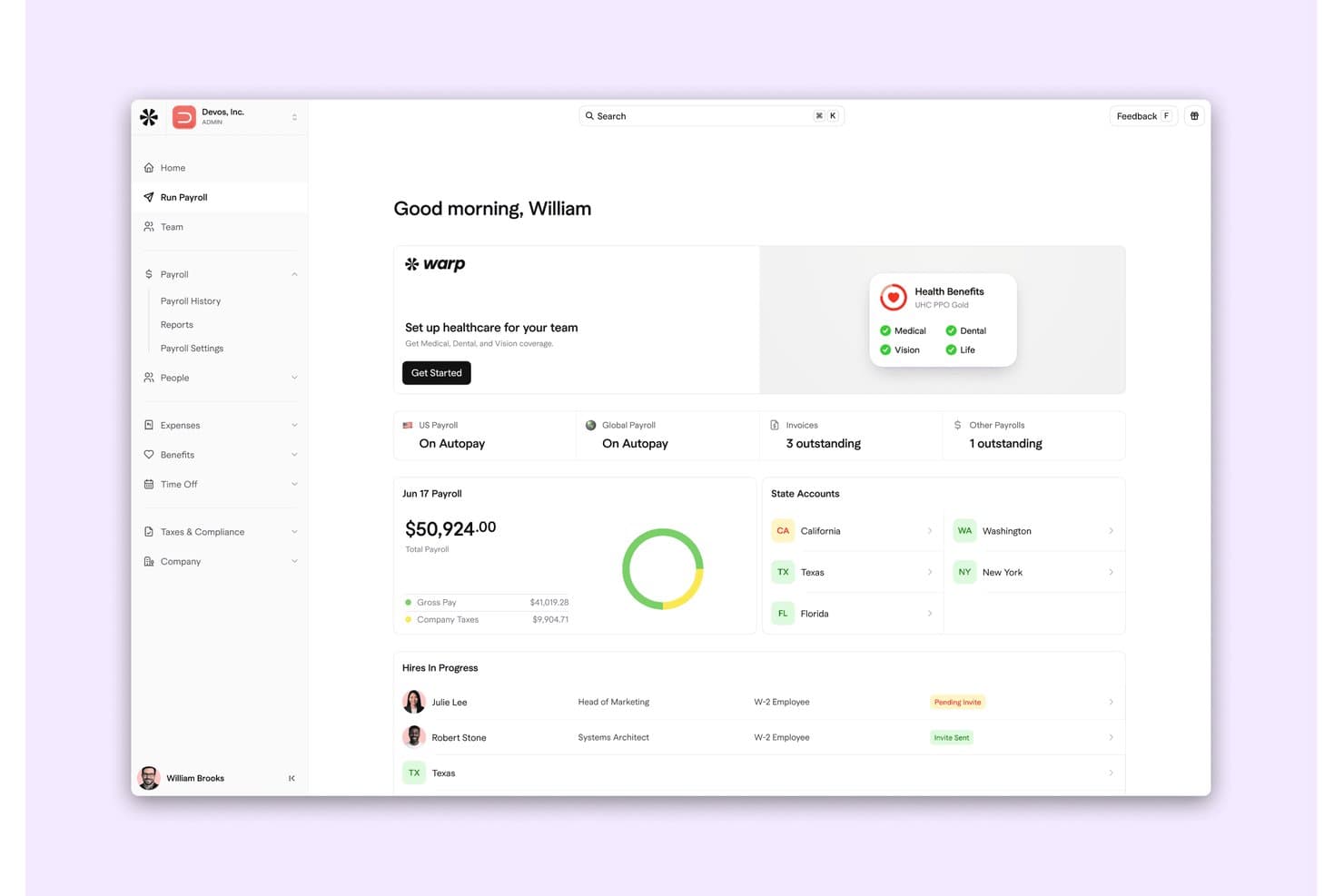
Warp centralizes payroll, benefits, and hiring in one dashboard. Warp is an AI-native payroll and HR platform for small businesses that handles payroll processing, automated tax filing, multi-state compliance, benefits administration, and contractor payments across the US and globally.
Who Is Warp Best For?
Warp is a strong fit for small business owners and their bookkeepers who need automated, multi-state payroll with built-in tax compliance and HR tools in one place.
Why I Picked Warp
Warp earns its spot on my shortlist because its AI-driven tax notice resolution is genuinely one of a kind. I love that it automatically handles 80% of incoming tax notices without any intervention, escalating only the complex cases to its compliance team with full context already attached. Its AI agents also identify required state tax agencies and submit registration applications on your behalf, which is a real time-saver if you're expanding to new states.
Warp Key Features
- Multi-state payroll compliance: Covers payroll and tax compliance across up to 3 states on Starter and all 50 states on Pro and Enterprise, with no per-state add-on fees.
- Benefits administration: Offers medical, dental, vision, 401(k), HSA/FSA, and commuter benefits through Warp's in-house licensed brokerage, with deductions synced directly to payroll.
- Accounting integrations: Connects natively with QuickBooks, Xero, NetSuite, and Rillet to post payroll journal entries automatically after each pay run.
- Employee self-service portal: Lets employees submit tax documents, set up direct deposit, enroll in benefits, request time off, and view pay history via web or mobile app.
Warp Integrations
Warp offers native integrations with QuickBooks, Xero, NetSuite, Rillet, Ashby, Lever, Checkr, and Slack. Its REST API, webhooks, and SDKs support custom integrations, while Sage Intacct and Puzzle are listed as coming soon.
Pros and Cons
Pros:
- Reviewers report responsive support
- Tax agents resolve most notices automatically
- Reviewers praise multi-state tax handling
Cons:
- Users flag unfinished features and options
- Some reviewers report navigation friction
Learn more about Warp: Best for integrated benefits and payroll
- Free demo available
- From $49/month
Visit WebsiteCustomer Rating:4.6/5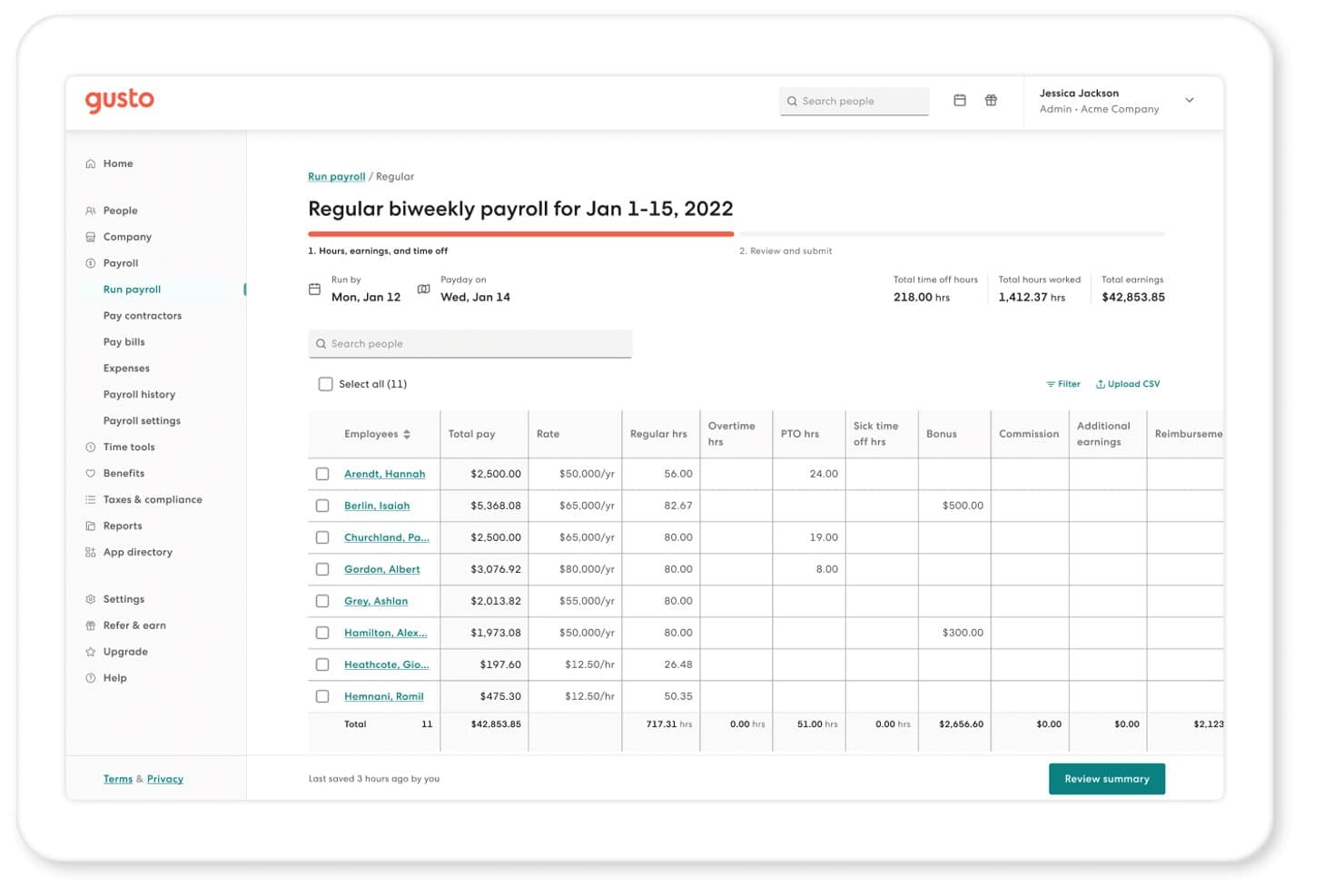
Gusto offers a detailed biweekly payroll run screen showing employee hours, earnings, PTO, bonuses, and total pay in one view. Gusto is a payroll and HR platform for small businesses that combines automated payroll runs, tax filing, benefits administration, and contractor payments in a single system.
Who Is Gusto Best For?
Gusto is a strong fit for small business owners and office managers who handle payroll and benefits without a dedicated HR or payroll specialist on staff.
Why I Picked Gusto
I picked Gusto as one of the best because of how tightly its benefits administration connects to payroll. When an employee enrolls in health insurance or a 401(k), those deductions flow into payroll automatically, with no manual entry required. I also appreciate AutoPilot, which lets me schedule payroll to run on a set cadence and flags exceptions before anything processes.
Gusto Key Features
- Unlimited payroll runs: Run payroll as often as needed each month without paying extra fees.
- Global contractor payments: Pay international contractors in over 120 countries directly through Gusto.
- Accounting software integrations: Sync payroll data with QuickBooks, Xero, FreshBooks, Aplos, and other small business accounting tools.
- Employee self-service portal: Employees can access pay stubs, tax forms, and update personal and banking details online or via the mobile app.
Gusto Integrations
Gusto offers native integrations with QuickBooks, Xero, FreshBooks, Aplos, Autobooks, ZipBooks, and When I Work, and provides an API for custom integrations.
Pros and Cons
Pros:
- Same-day and next-day direct deposit available
- Built-in benefits enrollment tied to payroll
- Automated tax filing across all jurisdictions
Cons:
- Phone support limited to higher-tier plans
- Per-person pricing gets costly as headcount grows
 Best for payroll bundled with time tracking and HR
- 30-day free trial
- From $50/month (billed annually)
Visit WebsiteCustomer Rating:4.5/5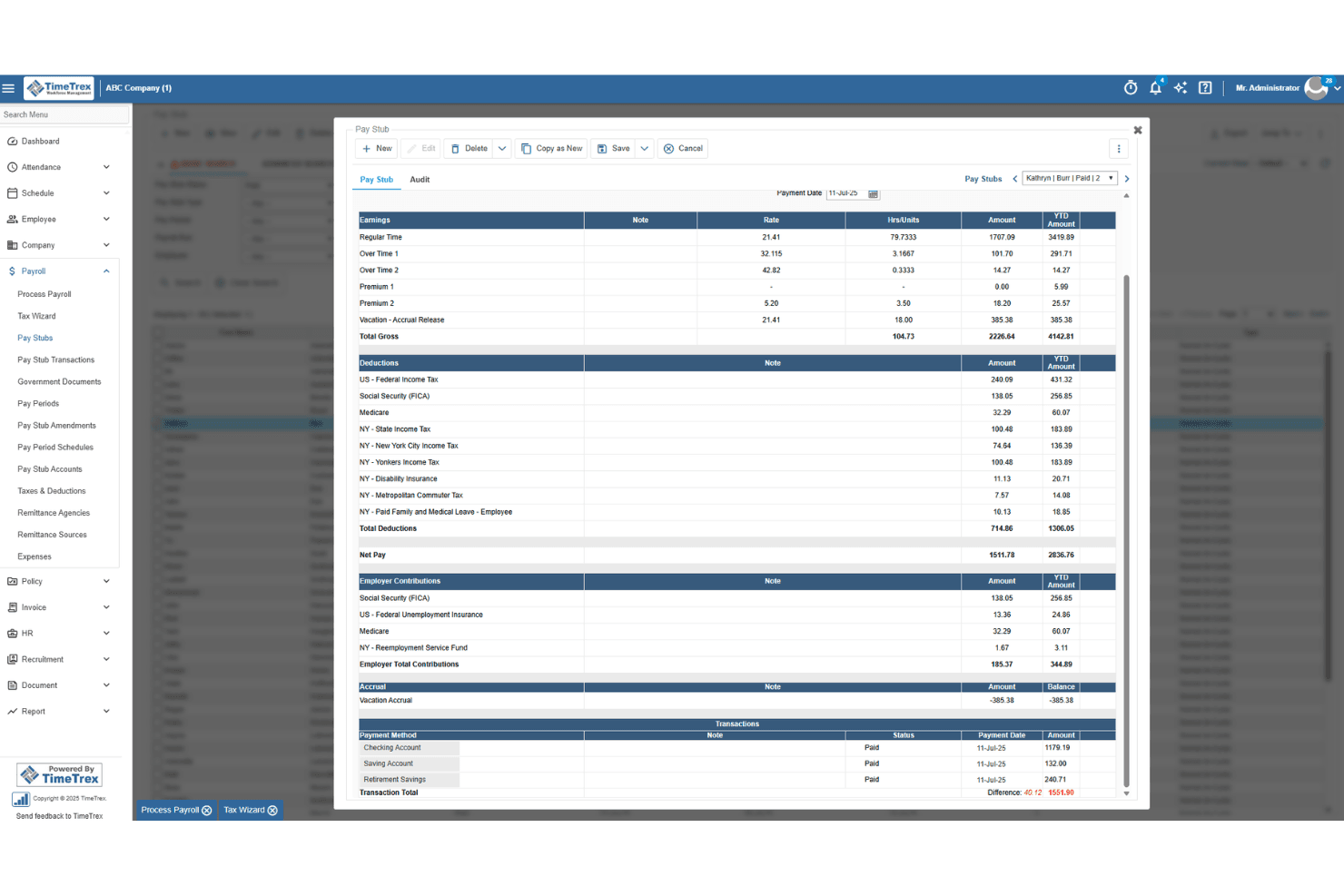
TimeTrex generates detailed pay stubs with earnings, deductions, and taxes. TimeTrex is a workforce management and payroll platform that combines time and attendance tracking, employee scheduling, leave management, HR tools, and integrated payroll processing in a single system.
Who Is TimeTrex Best For?
TimeTrex is a strong fit for small businesses that already rely on time clocks or shift-based scheduling and want payroll built into the same system.
Why I Picked TimeTrex
TimeTrex earns its spot on my shortlist because it's one of the few payroll tools that pulls time tracking and payroll into a single, genuinely connected system. I like that hours flow directly from timesheets into pay calculations, so there's no manual export or reconciliation step between the two. The AI-powered scheduling also helps avoid costly overtime before it happens. If your team punches in and out daily and you want payroll to reflect that automatically, TimeTrex is built for exactly that workflow.
TimeTrex Key Features
- Tax Wizard: Organizes remittance events by due date and walks you through the steps to review, verify, and process U.S. and Canadian payroll tax payments and filings.
- General ledger export: Exports payroll data in QuickBooks, Sage 50, Sage 300, Xero, and CSV formats so you can import it directly into your accounting software.
- Biometric facial recognition time clock: Lets employees clock in and out using facial recognition, capturing verified attendance data that feeds directly into payroll.
- Configurable deductions and tax formulas: Supports custom deduction rules with wage bases, annual limits, and eligibility dates, including a built-in 401(k) contribution formula example.
TimeTrex Integrations
TimeTrex lists integrations with Intuit QuickBooks, Sage, ADP, Paychex, Surepay, and Ceridian. It also offers a RESTful API for custom integrations.
Pros and Cons
Pros:
- Reviewers praise patient, prompt support
- Reviewers report fewer payroll errors
- Timesheets feed directly into payroll
Cons:
- Reviewers report cluttered setup screens
- Employers handle tax filing manually
Learn more about TimeTrex: Best for compliant global payroll
- Free demo available
- From $29/employee/month
Visit WebsiteCustomer Rating:4.7/5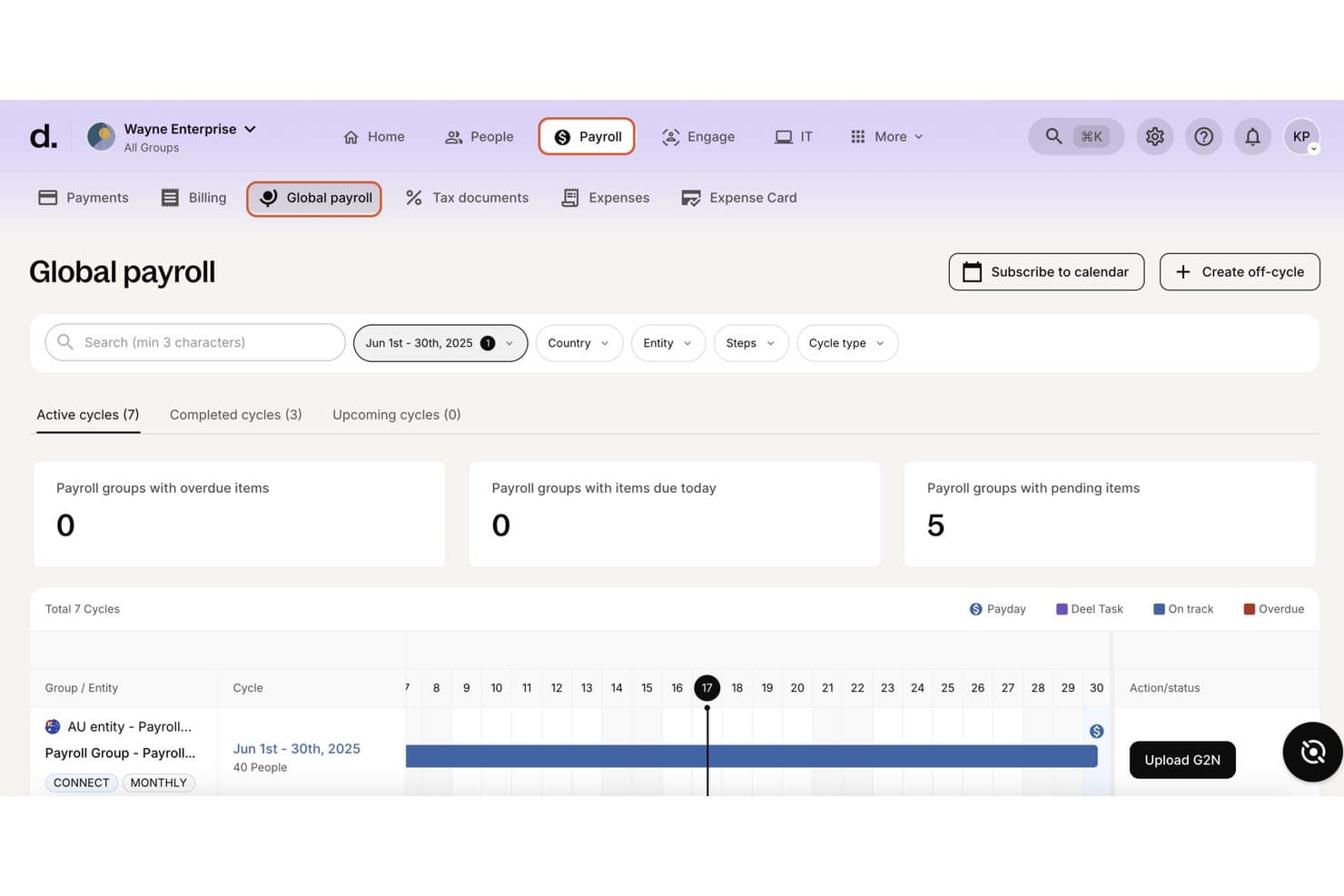
Deel Payroll includes active cycle tracking, payroll group summaries, and a visual timeline for managing multiple payroll cycles. Deel Payroll is a global payroll platform for international teams. It supports payroll processing, tax compliance, contractor payments, and employer of record services. Additionally, businesses can manage workers across more than 150 countries.
Who Is Deel Payroll Best For?
Deel Payroll suits small businesses and startups with international teams. It is particularly useful for companies managing contractors and employees across multiple countries.
Why I Picked Deel Payroll
I picked Deel Payroll because it automates cross-border compliance. Before each payroll run, the platform applies relevant tax rules and statutory requirements. I also like its anomaly detection, which flags missing data and potential misclassifications. As a result, teams can address errors before approving payroll.
Deel Payroll Key Features
- Support for multiple worker types: Pay employees, contractors, EOR, and PEO staff through one unified dashboard.
- Global accounting integrations: Sync payroll data directly with platforms like QuickBooks, NetSuite, and Xero.
- Employee and contractor self-service: Let team members access pay stubs, contracts, tax documents, and update details independently.
- 24/7 multi-channel support: Get help any time via live chat, phone, email, Slack, or Teams.
Deel Payroll Integrations
Deel Payroll offers native integrations with QuickBooks, Xero, NetSuite, Sage, SAP, and Oracle. An API is available for custom integrations.
Pros and Cons
Pros:
- Automatic tax filing across multiple jurisdictions
- Built-in EOR and contractor compliance tools
- Handles payroll across 150+ countries natively
Cons:
- Setup can be slow for first-timers
- Overkill for domestic-only small businesses
Learn more about Deel Payroll: Best for automated payroll across systems
- 14-day free trial + free demo available
- From $8/user/month (billed annually)
Visit WebsiteCustomer Rating:4.9/5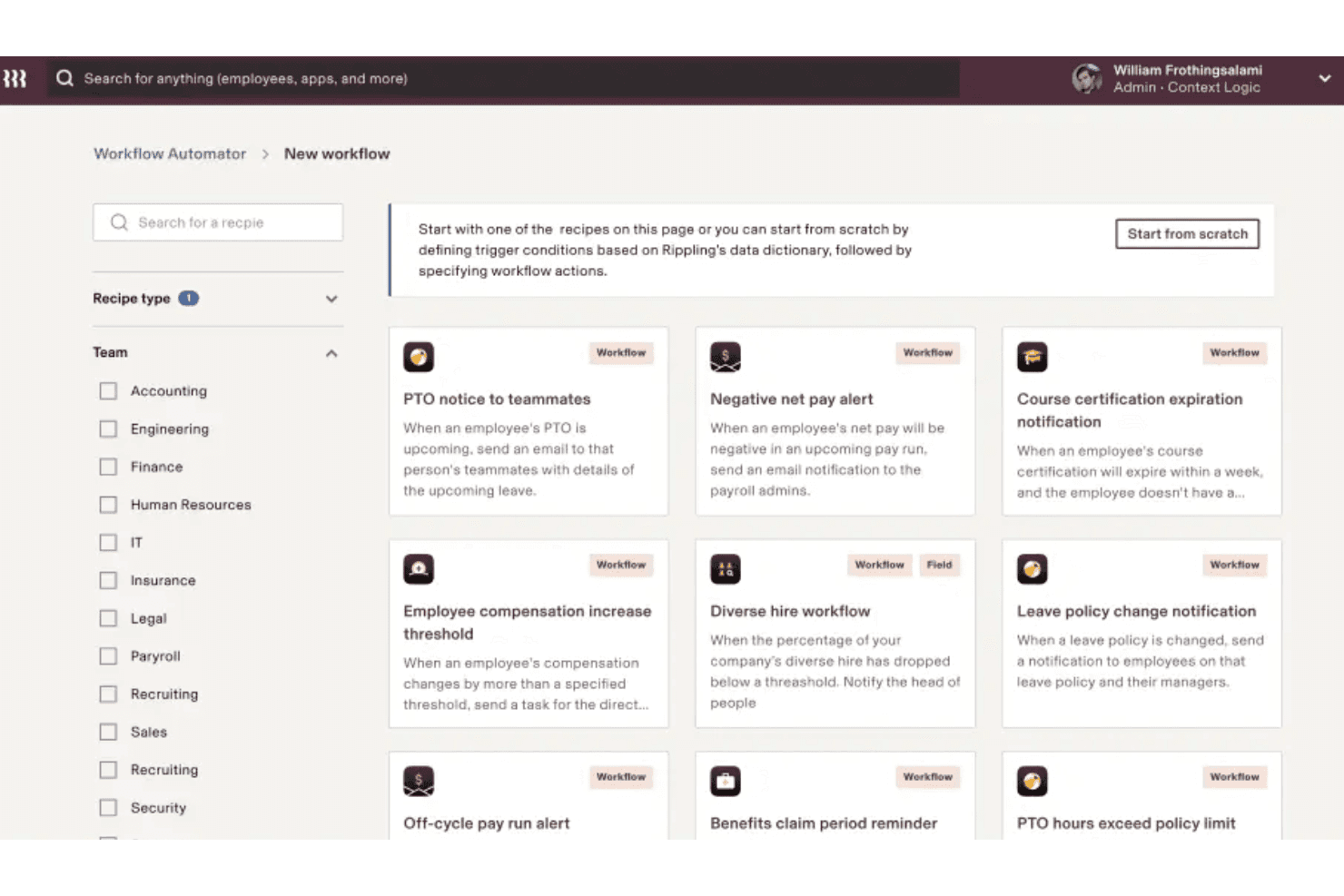
Rippling's Workflow Automator includes pre-built recipe templates for PTO notices, negative pay alerts, and diverse hire workflows to automate HR and payroll processes. Rippling is a payroll platform that connects payroll with HR, IT, and finance data. It automates pay runs and handles federal, state, and local tax filings. Additionally, businesses can pay W-2 employees and 1099 contractors through the same system.
Who Is Rippling Best For?
Rippling is a strong fit for growing small businesses that manage distributed teams, hire frequently, or pay a mix of domestic employees and international contractors.
Why I Picked Rippling
I picked Rippling because it connects payroll with HR, IT, and finance data. For example, salary details, benefit deductions, and tax withholdings flow into payroll during onboarding. I also like its pay-run comparison tool. It flags unexpected changes in gross pay or deductions before approval.
Rippling Key Features
- Native accounting integrations: Sync payroll data directly with QuickBooks, Xero, and NetSuite for accurate GL entries.
- Global contractor payments: Pay contractors internationally with built-in compliance for multiple currencies and tax codes.
- Custom pay types: Set up and automate unique pay codes like stipends, commissions, or bonuses within each payroll run.
- Self-service employee portal: Employees access pay stubs, tax forms, and update banking and personal details through a web or mobile app.
Rippling Integrations
Rippling offers native integrations with QuickBooks, Xero, NetSuite, Slack, Google Workspace, Microsoft 365, Expensify, and Zoom. An API is also available for custom integrations.
Pros and Cons
Pros:
- Pays W-2 employees and 1099 contractors together
- Full-service federal, state, and local tax filing
- Automated payroll runs across multiple pay schedules
Cons:
- Feature depth can overwhelm very small teams
- Setup requires time for multi-system configuration
 Best for scalable payroll and HR support
- Free demo available
- Pricing upon request
Visit WebsiteCustomer Rating:4.7/5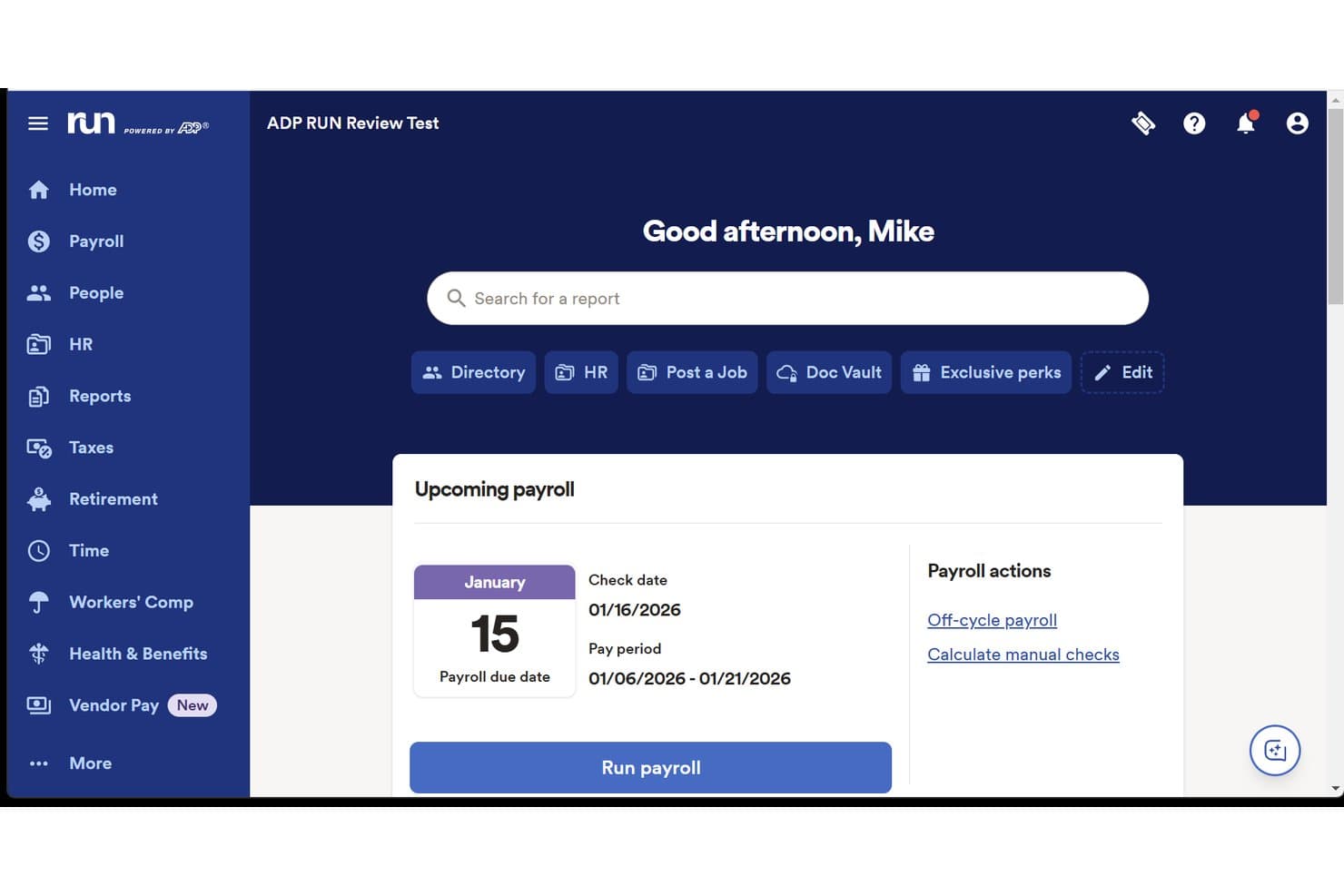
ADP Run offers a clean home dashboard displaying upcoming payroll details, pay period dates, and quick-action payroll buttons for small business owners. RUN Powered by ADP is a payroll and HR platform for small businesses that handles automated payroll runs, multi-jurisdiction tax filing, W-2 and 1099 processing, contractor payments, and HR tools like onboarding and benefits administration.
Who Is ADP Run Best For?
ADP Run is a strong fit for small businesses with 1–49 employees that anticipate growth and want a payroll provider they won't outgrow.
Why I Picked ADP Run
I've included ADP Run in my top picks because of how well it handles growth without forcing a platform switch. The tiered package structure lets you start on Essential Payroll and upgrade through to HR Pro as HR needs expand, then carry forward to ADP Workforce Now past 49 employees. I also rely on RUN & Done® for recurring salaried payroll automation and ADP Assist's AI error flagging to catch discrepancies before a payroll run is ever submitted.
ADP Run Key Features
- Full-service payroll tax filing: Automatically calculates, withholds, files, and remits payroll taxes for federal, state, and local jurisdictions.
- Employee self-service portal: Employees access pay stubs, tax forms, and update personal or banking information through a secure portal.
- Native accounting integrations: Synchronizes payroll data with QuickBooks, Xero, Sage, and other major small business accounting platforms.
- Contractor and 1099 management: Processes payments to contractors and generates required 1099 year-end forms within the same system.
ADP Run Integrations
ADP Run offers native integrations with QuickBooks, Xero, Sage, Wave, Acumatica, and Workday for accounting and payroll data sync. An API is available for custom integrations.
Pros and Cons
Pros:
- Built-in workers' comp and benefits administration
- Scales to enterprise without platform switching
- Automatic multi-jurisdiction payroll tax filing included
Cons:
- Advanced HR tools require plan upgrades
- Support quality varies by subscription tier
Learn more about ADP Run: Best for syncing POS timecards and tips
- Not available
- From $6/user/month
Visit WebsiteCustomer Rating:4.2/5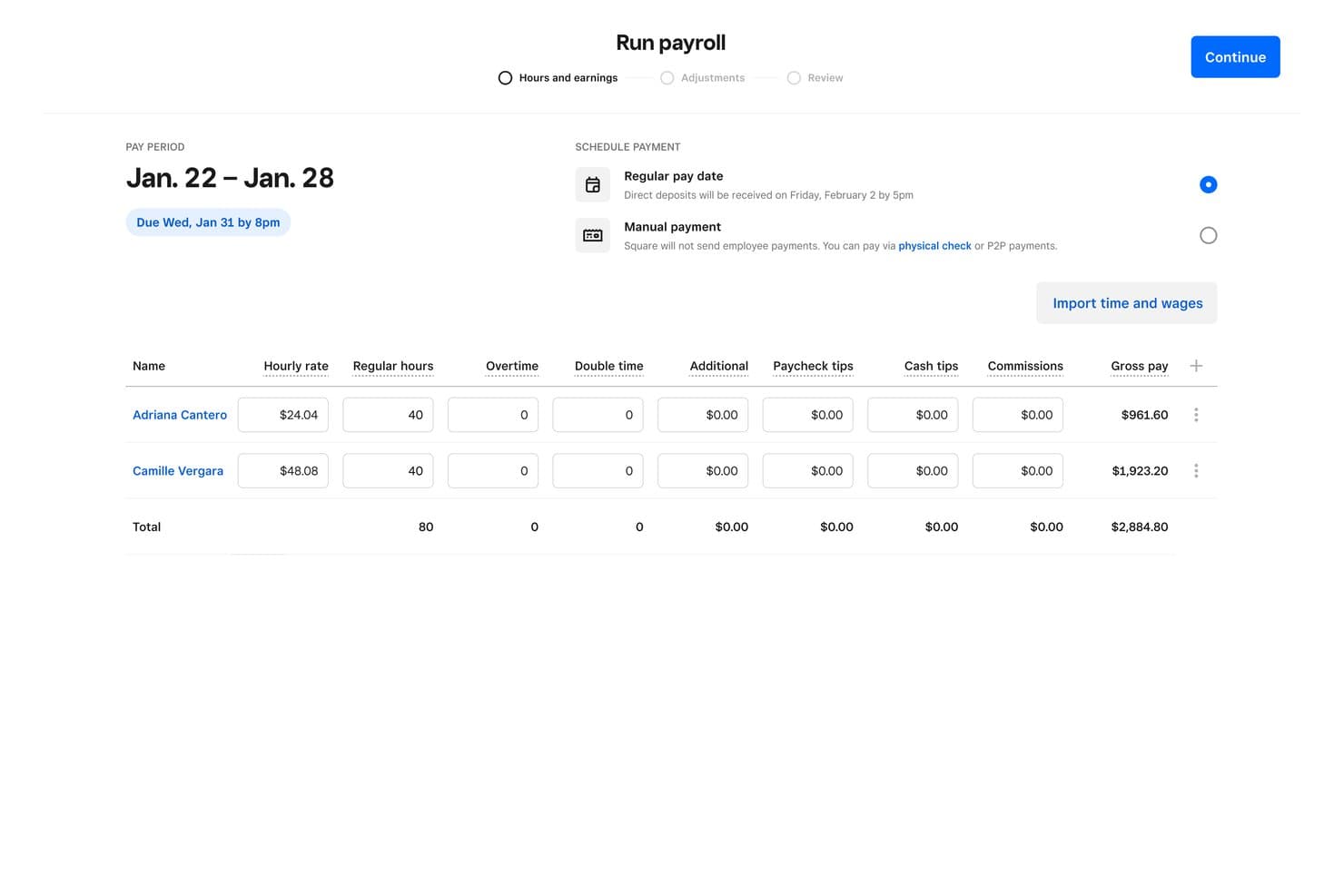
Square Payroll offers a clean run payroll interface where users can review employee hours, hourly rates, and gross pay before submitting payroll for the pay period. Square Payroll is a small business payroll platform built within the Square ecosystem, covering W-2 and 1099 payroll runs, automated tax filings, direct deposit, and timecard and tip imports from Square POS.
Who Is Square Payroll Best For?
Square Payroll is best for retail, food service, and hospitality businesses. It is especially useful for companies already using Square POS.
Why I Picked Square Payroll
Square Payroll earns its spot on my shortlist because of how cleanly it pulls timecard and tip data directly from Square POS into each payroll run. Staff hours and tip totals flow in automatically, so there's no manual reconciliation or re-entering of clock-in data before I process payroll. On top of that, the auto payroll feature runs payroll on schedule without requiring me to log in each pay period.
Square Payroll Key Features
- Automatic payroll tax filing: Calculates, withholds, and files federal and state payroll taxes for each pay run.
- Year-end tax form generation: Produces and distributes W-2 and 1099 forms for employees and contractors.
- QuickBooks Online integration: Connects payroll data directly to your accounting platform for GL sync.
- Employee self-service portal: Lets workers view pay stubs and update their information via web or mobile.
Square Payroll Integrations
Square Payroll offers native integrations with QuickBooks Online and the Square POS ecosystem. An API is available for custom integrations.
Pros and Cons
Pros:
- Runs auto-payroll on a set schedule
- Handles both W-2 and 1099 workers
- Automatic tip importing from Square POS
Cons:
- Customer support is hard to reach
- Limited usefulness outside the Square ecosystem
Learn more about Square Payroll:
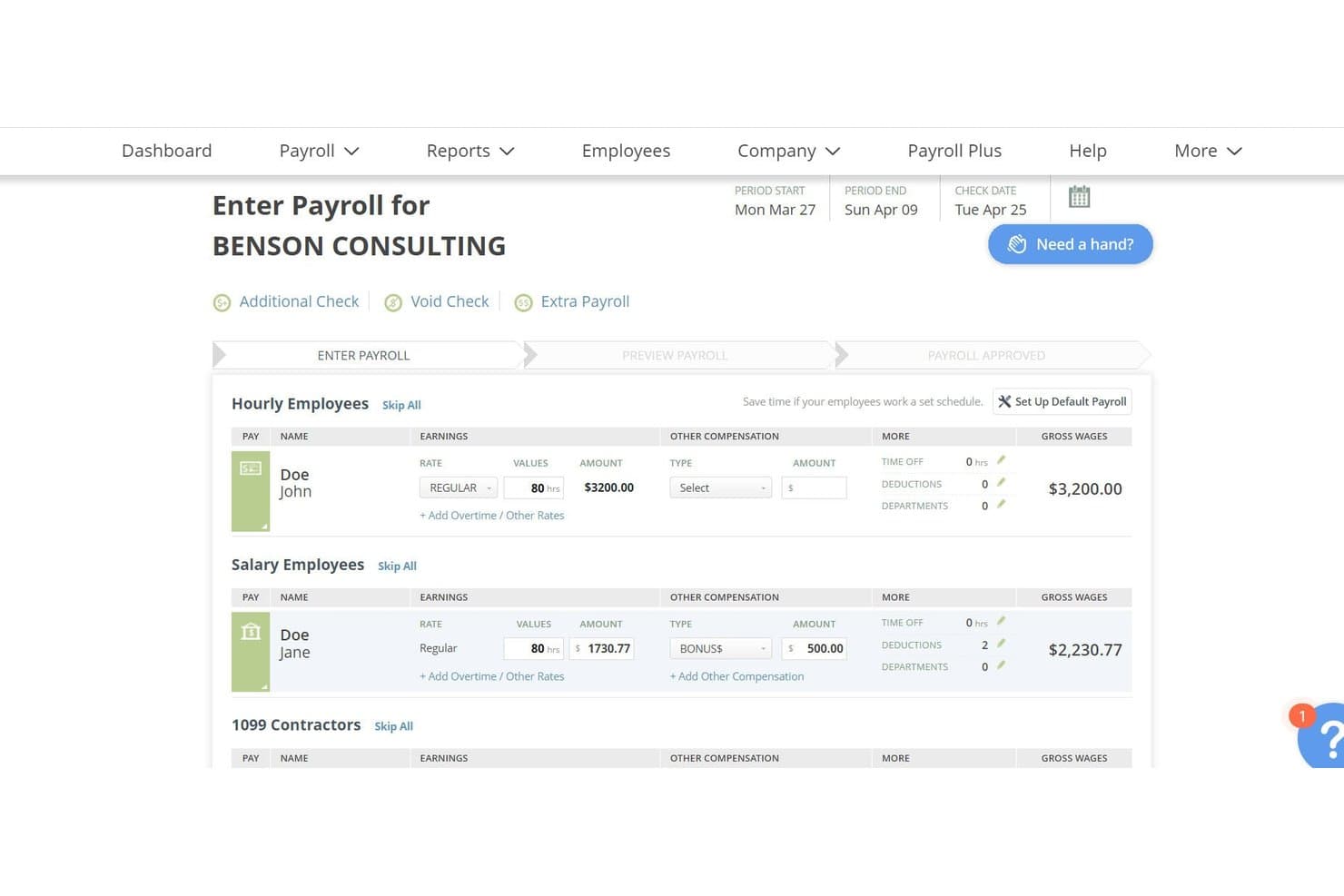
SurePayroll offers a clear payroll entry interface that separates hourly, salary, and 1099 contractor employees with earnings, deductions, and gross wages displayed per employee. SurePayroll is a small business payroll platform that handles automated pay runs, payroll tax calculation and filing, W-2/1099 support, and direct deposit for both employees and contractors.
Who Is SurePayroll Best For?
SurePayroll is a good fit for small business owners and household employers who want payroll to run on a set schedule without manual intervention each pay period.
Why I Picked SurePayroll
SurePayroll earns its spot on my shortlist because of AutoPayroll, which lets you set payroll to run on a fixed schedule without touching it each pay period. I like that it covers both hourly and salaried workers automatically, so mixed teams don't fall through the cracks. The tax penalty guarantee is also notable: if SurePayroll files incorrectly and a penalty results, they cover the cost.
SurePayroll Key Features
- Full-service tax filing: Handles calculation, filing, and payment of federal, state, and local payroll taxes with a penalty guarantee.
- Accounting software integration: Connects with QuickBooks, Xero, Sage 50, Zoho Books, and other major small business platforms.
- Employee self-service portal: Lets employees view pay stubs, access tax forms, and update personal info online or through the mobile app.
- Contractor and 1099 management: Supports contractor payments and automatically generates year-end 1099-NEC forms within the same platform.
SurePayroll Integrations
SurePayroll offers native integrations with QuickBooks, Xero, Sage 50, Zoho Books, AccountEdge, and Less Accounting. An API is available for custom integrations.
Pros and Cons
Pros:
- Tax penalty guarantee covers filing errors
- Includes nanny and household payroll support
- AutoPayroll runs on a fixed schedule automatically
Cons:
- Local tax filing requires an add-on purchase
- W-2 preparation and filing costs extra
Learn more about SurePayroll: Best for payroll-linked bookkeeping
- 30-day free trial available
- From $46/month
Visit WebsiteCustomer Rating:4.1/5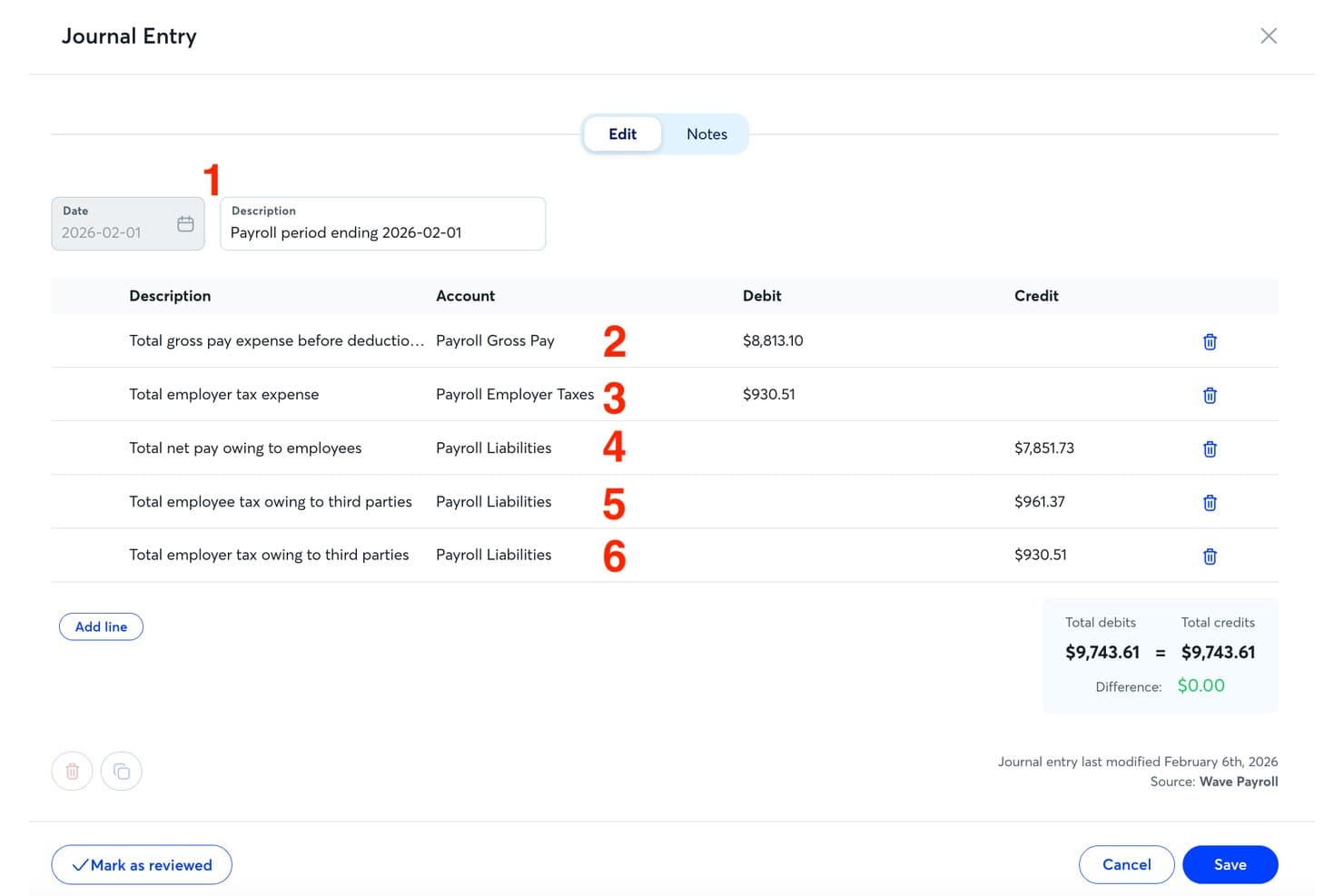
Wave Payroll offers a detailed payroll journal entry view that automatically records gross pay, employer taxes, and payroll liabilities with balanced debits and credits. Wave Payroll is a small business payroll tool built directly into the Wave accounting platform, covering automated payroll runs, tax filing across all 50 US states, W-2 and 1099 generation, and direct deposit for both employees and contractors.
Who Is Wave Payroll Best For?
Wave Payroll fits small business owners and freelancers who already use Wave Accounting and want payroll without switching platforms.
Why I Picked Wave Payroll
I picked Wave Payroll as one of the best because the payroll-to-bookkeeping link is genuinely built in, not bolted on. Every time I run payroll, Wave automatically generates the corresponding journal entries directly in Wave Accounting, so my books reflect payroll costs without any manual GL work. I also like that W-2s, W-3s, and 1099-NECs are generated within the same system, keeping year-end reconciliation contained in one place.
Wave Payroll Key Features
- Employee self-service portal: Employees can log in to access pay stubs, W-2s, and update their contact or banking details.
- Full-service tax filing in all 50 states: Wave handles federal and state payroll tax calculation, payment, and filing automatically.
- Support for both W-2 and 1099 payments: Pay employees and independent contractors in one unified system.
- Mobile payroll app: Run payroll and access pay cycles from your iPhone with the Wave payroll app.
Wave Payroll Integrations
Wave Payroll offers native integration with Wave Accounting. Native integrations with other accounting or business tools are not clearly documented. An API for custom integrations is not available.
Pros and Cons
Pros:
- Unified contractor and employee payment system
- Tax filing covers all 50 US states
- Journal entries auto-sync to Wave Accounting
Cons:
- Only available for US-based businesses
- No phone support for payroll questions
Learn more about Wave Payroll: Best for guided payroll setup
- 30-day free trial + free demo available
- From $17/month
Visit WebsiteCustomer Rating:5/5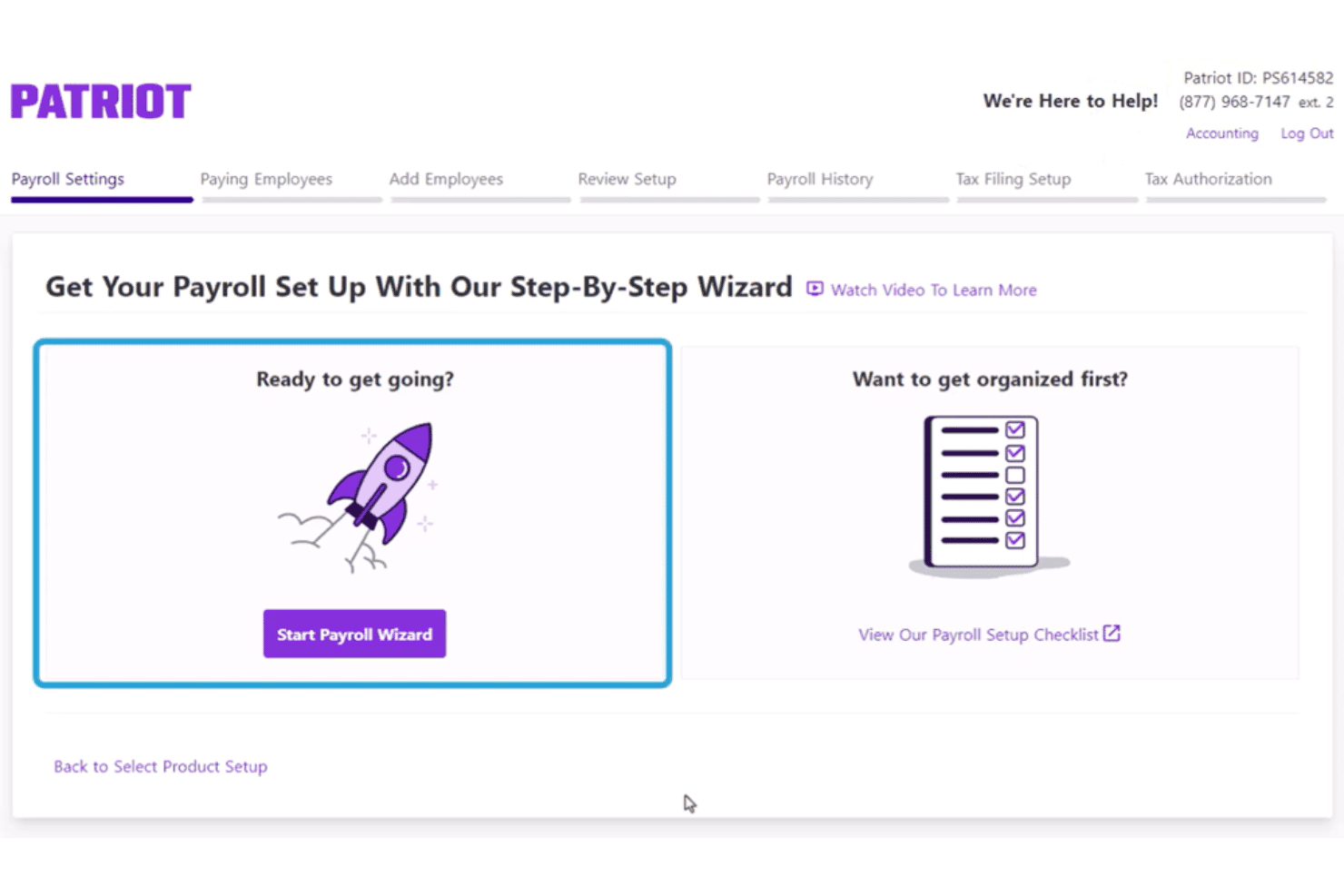
Patriot Software offers a step-by-step payroll setup wizard with options to start immediately or view a setup checklist. Patriot Software is a U.S.-based payroll platform for small businesses that handles automated payroll runs, direct deposit, payroll tax filing, contractor payments, and year-end tax form generation.
Who Is Patriot Software Best For?
Patriot Software suits small U.S. business owners and bookkeepers managing payroll for teams up to 500 employees without a dedicated payroll specialist.
Why I Picked Patriot Software
I picked Patriot Software as one of the best because its free assisted onboarding is genuinely hands-on: a USA-based team enters your employee data and year-to-date payroll figures for you. The guided setup wizard walks you through each configuration step in sequence, so nothing falls through the cracks. Once configured, the three-step payroll run takes under three minutes, and Auto Payroll handles recurring runs on schedule from there.
Patriot Software Key Features
- Two-way QuickBooks integration: Sync payroll data directly with QuickBooks Online or export to QuickBooks Desktop for accurate GL entries.
- Employee self-service portal: Employees can access pay stubs, tax documents, and update personal or banking info online or from a mobile device.
- Unified contractor and W-2 payroll: Pay and track both employee and contractor payments within the same payroll run, including 1099 e-filing.
- Multi-state payroll support: Handle federal, state, and local payroll taxes for remote and hybrid workforces across multiple states.
Patriot Software Integrations
Patriot Software offers native integrations with QuickBooks Online and QuickBooks Desktop. An API is available for custom integrations.
Pros and Cons
Pros:
- US-based phone and chat support available
- Unlimited payroll runs per month included
- Free assisted onboarding with live specialists
Cons:
- Time tracking requires a separate tool
- US-only, no international employee payroll
Learn more about Patriot Software:
Outro software de processamento salarial para pequenas empresas
Eis algumas opções adicionais de software de processamento salarial para pequenas empresas que não entraram na minha lista restrita, mas que vale a pena conhecer:
- 11JustworksBest for PEO payroll with employee benefits
- 12Paychex FlexBest for dedicated payroll specialists
- 13QuickBooks PayrollBest for native QuickBooks accounting sync
- 14OnPayBest for one-price unlimited pay runs
- 15PaylocityBest for managed wage garnishments
- 16TriNetBest for flexible payroll service levels
- 17PaycorBest for proactive compliance alerts
- 18FingercheckBest for payroll tied to time tracking
How I Evaluate Payroll Software for Small Businesses
I evaluate payroll tools in two stages. First, I assess essential functions such as tax filing and direct deposit. Then, I compare differentiators such as pricing transparency and multi-state coverage.
Core Functionality (Table Stakes For This List)
When I'm selecting tools for my list, I rank each one on a scale from 0 (does not offer the functionality) to 5 (excels in this area) for each core functionality listed below. Then I convert the tool's total score to a percentage. Each tool needs to achieve a minimum total score of 65% to be considered for inclusion.
- Automated Payroll Runs: I look for scheduled deposits, off-cycle payments, and automatic payroll for salaried and hourly workers.
- Payroll Tax Filing: Each tool should calculate, file, and remit federal, state, and local taxes automatically. In addition, I consider whether it provides penalty protection for filing errors.
- Employee and Contractor Payments: I check whether the platform pays W-2 employees and 1099 contractors through the same system.
- Year-End Tax Forms: The tool should generate and distribute W-2s, 1099s, and W-3s electronically. It should also support corrections when necessary.
- Accounting Integrations: I evaluate how well payroll data syncs with platforms such as QuickBooks and Xero. Additionally, I favor customizable general ledger mapping over basic CSV exports.
- Employee Self-Service: I look for portals where workers can access pay stubs and tax forms. Employees should also be able to update banking details independently.
Once I identify the tools that meet these requirements, I consider what distinguishes each platform.
Differentiating Factors (What Sets Vendors Apart)
Here's how I compare and contrast different vendors:
Standout Features
Direct deposit speed is an important differentiator. For example, same-day and next-day payments help businesses retain funds longer. However, employees still receive their pay on time.
I also evaluate built-in benefits administration. Health insurance, retirement, and workers’ compensation deductions should sync with payroll automatically. Finally, strong contractor management can reduce year-end work for businesses that regularly pay freelancers.
Beyond Features
Pricing transparency also affects my evaluation. I check whether tax filing, year-end forms, and new-hire reporting are included. Otherwise, paid add-ons can increase the actual cost.
Next, I assess multi-state tax coverage for businesses with remote employees. Strong platforms should handle reciprocity agreements and local taxes without manual workarounds.
Finally, I evaluate onboarding support. Guided setup is especially helpful for first-time payroll users. Likewise, migration assistance can make switching from another provider easier.
Como escolher software de processamento salarial para pequenas empresas
É fácil perder-se em listas extensas de funcionalidades e estruturas de preços complexas. Para o ajudar a manter-se concentrado enquanto conduz o seu processo específico de seleção de software, eis uma lista de fatores a ter em conta:
| Fator | O que deve considerar |
|---|---|
| FatorEscalabilidade | O que deve considerarO software acompanhará o crescimento à medida que adiciona locais ou passa de alguns funcionários para muitos? Procure preços flexíveis e limites de utilizadores. |
| FatorIntegrações | O que deve considerarA ferramenta sincroniza-se com os seus sistemas de contabilidade, ponto de venda ou controlo de horas existentes, evitando a introdução duplicada de dados ou os carregamentos manuais? |
| FatorPossibilidade de personalização | O que deve considerarOs fluxos de trabalho, os calendários de pagamento e as opções de relatórios podem ser configurados para corresponder às suas necessidades específicas, incluindo depósitos divididos ou deduções especiais? |
| FatorFacilidade de utilização | O que deve considerarA interface é suficientemente clara para que uma pessoa que não seja especialista em processamento salarial consiga processar os salários com confiança e tratar exceções sem cometer erros? |
| FatorImplementação e integração inicial | O que deve considerarQue apoio e formação estão disponíveis para mudar de sistema a meio do ano ou importar dados históricos? Estão incluídos assistentes de configuração? |
| FatorCusto | O que deve considerarAté que ponto as taxas são previsíveis quando o número de funcionários muda? Tenha atenção aos extras e às cobranças por cada processamento salarial, que podem aumentar o preço base. |
| FatorMedidas de segurança | O que deve considerarO fornecedor disponibiliza encriptação, auditorias SOC e controlos de permissões para manter os seus dados salariais sensíveis protegidos? |
| FatorDisponibilidade do apoio | O que deve considerarQuando surgem problemas, consegue obter apoio humano por telefone, chat ou e-mail durante o seu horário de trabalho efetivo — e não apenas durante o horário comercial habitual? |
O que é o software de processamento salarial para pequenas empresas?
O software de processamento salarial ajuda as pequenas empresas a pagar aos funcionários e prestadores de serviços. Também calcula impostos, gere deduções e distribui formulários fiscais. Estas plataformas destinam-se geralmente a proprietários, contabilistas e responsáveis administrativos. Como resultado, as empresas podem processar os salários sem cálculos manuais extensos ou um departamento dedicado ao processamento salarial.
Funcionalidades do software de processamento salarial para pequenas empresas
Ao selecionar software de processamento salarial para pequenas empresas, procure as seguintes funcionalidades essenciais:
- Processamento automático de salários: Agendamento e processamento dos salários regulares e extraordinários de funcionários e prestadores de serviços, eliminando cálculos manuais e reduzindo erros.
- Declaração de impostos sobre salários: Calcula, retém, declara e paga automaticamente os impostos federais, estaduais e locais sobre salários, ajudando-o a manter a conformidade sem assistência externa.
- Geração de formulários fiscais de fim de ano: Cria e distribui os formulários W-2 e 1099 à sua equipa e às autoridades fiscais, simplificando as obrigações anuais de declaração.
- Portal de autosserviço dos funcionários: Permite aos funcionários acederem de forma segura aos seus recibos de vencimento, formulários fiscais e informações pessoais, libertando-o dos pedidos diários de documentos.
- Integração com software de contabilidade: Sincroniza os dados salariais com plataformas de contabilidade como o QuickBooks ou o Xero, mantendo o seu livro-razão geral preciso e atualizado.
- Suporte para vários tipos de trabalhadores: Permite pagar a funcionários W-2 e a prestadores de serviços 1099 através de uma única plataforma, simplificando a gestão de uma força de trabalho diversificada.
- Opções de depósito direto e cheque: Disponibiliza pagamentos rápidos e fiáveis através de depósito direto ou cheques imprimíveis, apoiando as diferentes preferências dos trabalhadores e das empresas.
- Relatórios personalizáveis: Oferece relatórios configuráveis sobre salários, impostos, benefícios e deduções, para que possa analisar os custos laborais e cumprir os requisitos regulamentares.
- Controlo do tempo e da assiduidade: Integra-se com ferramentas de controlo do tempo ou disponibiliza opções incorporadas, garantindo que o processamento salarial se baseia em horas e trabalho extraordinário precisos.
- Gestão da conformidade: Assinala potenciais problemas relacionados com salários, impostos ou legislação laboral e ajuda-o a acompanhar a evolução da regulamentação, especialmente no caso de empresas com equipas remotas ou distribuídas por vários estados.
Vantagens do software de processamento salarial para pequenas empresas
A implementação de software de processamento salarial para pequenas empresas proporciona várias vantagens à sua equipa e à sua empresa. Eis algumas das que pode esperar:
- Ciclos salariais mais rápidos: As funcionalidades de automatização aceleram cada processamento salarial, permitindo que funcionários e prestadores de serviços recebam atempadamente sem intervenções manuais.
- Conformidade fiscal precisa: As ferramentas incorporadas de declaração fiscal ajudam a calcular, declarar e pagar corretamente os impostos sobre salários, reduzindo o risco de penalizações dispendiosas ou erros de conformidade.
- Redução da carga administrativa: Os portais de autosserviço dos funcionários, os formulários automatizados de fim de ano e a integração com plataformas de contabilidade aliviam a carga diária dos proprietários ou contabilistas.
- Gestão simplificada de vários tipos de trabalhadores: O suporte para funcionários W-2 e prestadores de serviços 1099 num único local torna o processamento salarial de uma força de trabalho diversificada muito menos confuso.
- Maior precisão financeira: A sincronização direta com o seu sistema de contabilidade mantém os livros contabilísticos precisos e simplifica a reconciliação.
- Decisões mais informadas: Os relatórios personalizáveis sobre salários e custos laborais fornecem informações úteis que ajudam a orientar o seu orçamento e a estratégia da empresa.
- Maior satisfação dos funcionários: O acesso fácil a recibos de vencimento, formulários fiscais e depósitos diretos promove uma maior confiança e reduz as dúvidas da sua equipa sobre o processamento salarial.
Custos e preços do software de processamento salarial para pequenas empresas
O preço do software de processamento salarial depende do número de trabalhadores, das funcionalidades incluídas e do suporte disponível. A maioria dos fornecedores cobra uma mensalidade pela plataforma, acrescida de uma taxa separada por cada trabalhador. No entanto, a declaração de impostos, a administração de benefícios e o processamento salarial em vários estados podem ter custos adicionais. A tabela abaixo compara os planos comuns, os preços médios e as funcionalidades típicas.
Tabela de comparação de planos de software de processamento salarial para pequenas empresas
| Tipo de plano | Preço médio | Funcionalidades comuns |
|---|---|---|
| Tipo de planoPlano gratuito | Preço médio$0-$10/utilizador/mês | Funcionalidades comunsProcessamento salarial básico, depósito direto limitado, portal de autosserviço e suporte mínimo. |
| Tipo de planoPlano pessoal | Preço médio$10-$30/utilizador/mês | Funcionalidades comunsProcessamento salarial automático, cálculos fiscais, suporte para funcionários e prestadores de serviços, relatórios básicos e depósito direto padrão. |
| Tipo de planoPlano empresarial | Preço médio$30-$50/utilizador/mês | Funcionalidades comunsDeclaração fiscal completa, formulários de fim de ano, integrações com ferramentas de contabilidade, relatórios personalizáveis e suporte em direto. |
| Tipo de planoPlano empresarial avançado | Preço médio$50+/utilizador/mês | Funcionalidades comunsConformidade avançada, configuração para várias localizações, integração personalizada, suporte prioritário e funcionalidades avançadas de segurança de dados. |
Software de processamento salarial para pequenas empresas: Perguntas frequentes
Eis algumas respostas a perguntas comuns sobre software de processamento salarial para pequenas empresas:
De que forma o software de processamento salarial para pequenas empresas simplifica a entrega de declarações fiscais?
O software de processamento salarial para pequenas empresas automatiza os cálculos, as entregas e os pagamentos de impostos sobre salários às autoridades federais, estaduais e locais. Isto reduz o trabalho manual, ajuda a evitar erros dispendiosos e garante o cumprimento das obrigações, mesmo que não tenha um especialista dedicado em impostos sobre salários na sua equipa.
O software de processamento salarial pode gerir tanto empregados como prestadores de serviços independentes?
Sim, a maioria das soluções de software de processamento salarial para pequenas empresas permite pagar tanto a empregados W-2 como a prestadores de serviços 1099. Pode processar os salários de uma força de trabalho mista, e o sistema gera automaticamente os formulários fiscais obrigatórios de final de ano para cada tipo.
E se os meus funcionários trabalharem em vários estados ou cidades?
Muitas plataformas de processamento salarial gerem requisitos fiscais estaduais e locais, incluindo cálculos e entregas automáticos para diferentes jurisdições. Isto simplifica o cumprimento das obrigações se tiver funcionários remotos ou membros da equipa que mudem de residência.
É fácil integrar o software de processamento salarial com plataformas de contabilidade?
Sim, as principais soluções incluem normalmente integração direta com ferramentas como o QuickBooks ou o Xero. Isto significa que os dados salariais são sincronizados automaticamente com o seu razão geral, reduzindo a introdução manual de dados e os erros de reconciliação.
Quão seguro é o software de processamento salarial para pequenas empresas?
O software de processamento salarial para pequenas empresas utiliza encriptação, acesso baseado em funções e certificações de conformidade como a SOC 2 para proteger os seus dados sensíveis relativos a salários, impostos e funcionários. Verifique sempre quais as normas de segurança cumpridas por cada fornecedor antes de tomar uma decisão.
Como beneficiam os portais de autosserviço dos funcionários a minha equipa?
Os portais de autosserviço permitem que os funcionários acedam aos recibos de vencimento e aos formulários W-2, além de atualizarem autonomamente os seus dados bancários ou pessoais. Isto poupa-lhe tempo em pedidos administrativos e ajuda os trabalhadores a obter imediatamente aquilo de que precisam.