

As soluções de pagamento virtual são plataformas digitais que permitem enviar, receber e gerir pagamentos online sem cartões físicos ou dinheiro.
Se está a comparar as melhores soluções de pagamento virtual, é provável que esteja à procura de opções seguras e flexíveis que suportem tudo, desde o comércio eletrónico global até contas empresariais multimoeda e a gestão automatizada de despesas. Com as operações financeiras sob pressão constante para acompanhar os requisitos de conformidade, a procura e a transformação digital, escolher a solução certa pode ajudá-lo a manter a eficiência e o controlo.
Esta lista ajudá-lo-á a comparar com confiança as principais plataformas e a fazer a melhor escolha para as necessidades de pagamento da sua equipa.
Why Trust Our Software Recommendations
6,700+
Reviews
20
Industry experts
16+
Evaluation factors
14
Years
Our team has been testing and reviewing software since 2012. As finance leaders ourselves, we know how difficult—and important—it is to choose the right software.
For this guide, we evaluated tools using hands-on testing and independent research, scoring tools using our selection criteria.
Our reviews reflect our human editorial judgment, not a sales pitch.
Tabela de comparação de soluções de pagamento virtual
Esta tabela de comparação resume os detalhes de preços das minhas principais seleções de software de soluções de pagamento virtual:
Sorted by: Default
| Tool | Starting Price | Website | |
|---|---|---|---|
Best for AI-native global payout automation | 4.5 out of 5 | Pricing upon request Free plan + free demo available | Website |
Best for global payment integrations | 4.6 out of 5 | $0/month Free plan + Free demo available | Website |
Best for travel and expense integration | 4.7 out of 5 | $15/user/month Free plan + Free demo available | Website |
Best for consumer-to-business transfers | 4.6 out of 5 | Pricing upon request Free plan + demo available | Website |
Best for automated accounts payable | 4.5 out of 5 | $249/month Free demo available | Website |
Best for multi-entity spend control | 4.4 out of 5 | $29/month Free plan + free demo available | Website |
Best for international currency transfers | 3.8 out of 5 | $0.43/transfer Free plan available | Website |
Best for local payment method access | 3.8 out of 5 | $0.13 + payment method fee Not available | Website |
Best for automated expense reporting | 4.5 out of 5 | $5/user/month Not available | Website |
Best for multi-currency business accounts | Not rated | £10/month Not available | Website |


Avaliações das melhores soluções de pagamento virtual
Abaixo encontrará os meus resumos detalhados das melhores soluções de pagamento virtual que entraram na minha lista restrita. As minhas avaliações apresentam uma análise detalhada das funcionalidades, dos preços e das integrações de cada plataforma, para o ajudar a encontrar a melhor opção para si.
 Best for AI-native global payout automation
- Free plan + free demo available
- Pricing upon request
Visit WebsiteCustomer Rating:4.5/5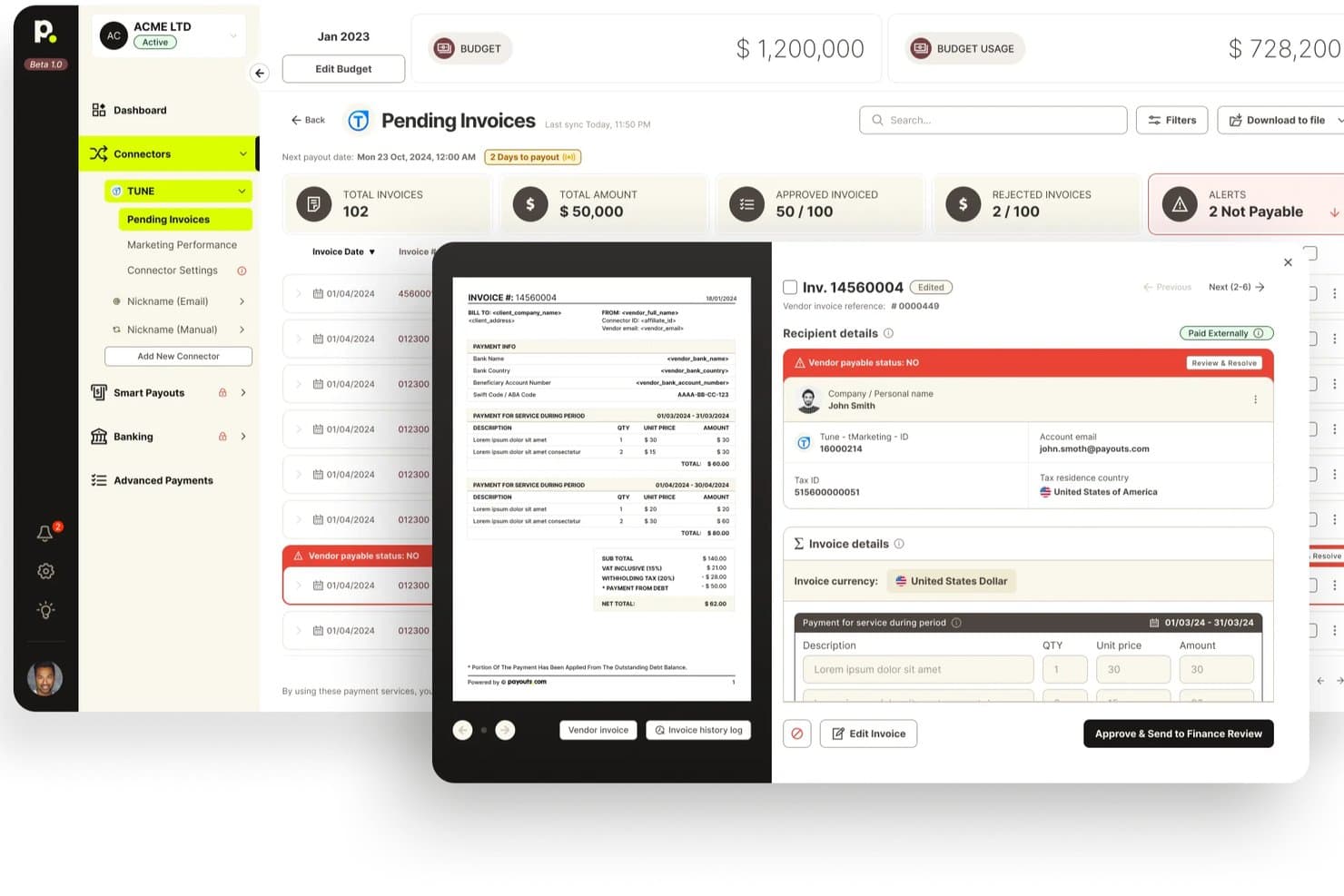
Payouts offers a pending invoices dashboard with invoice previews, vendor payable status alerts, and approval workflows for billing management. Payouts is a global payment automation platform that combines virtual and physical card issuance, multi-rail payouts across 40+ payment methods, AP automation, multi-currency treasury wallets, and AI-powered vendor onboarding in one system.
Who Is Payouts Best For?
Payouts is a strong fit for finance and AP teams managing high-volume, cross-border supplier payments who need a single platform to handle payouts, card issuance, and compliance without stitching together multiple tools.
Why I Picked Payouts
Payouts earns its spot on my shortlist because its AI-native architecture does something most virtual payment platforms don't: it automates the full payout lifecycle, from vendor onboarding to payment execution, using AI Digital Employees that chase invoices, resolve exceptions, and route approvals without manual intervention. I'm also a fan of the smart rail routing across 40+ payment methods, which automatically selects the fastest or cheapest rail per destination and falls back to the next-best option if one fails.
Payouts Key Features
- Multi-currency treasury wallets: Scoped ledger wallets support 40+ currencies with instant internal transfers and an immutable double-entry ledger for multi-entity operations.
- Vendor self-serve onboarding portal: Suppliers complete identity verification, bank verification, and tax form submission independently, with an average onboarding time of around six minutes.
- Tax compliance automation: The platform collects and validates W-9, W-8BEN, and W-8BEN-E forms, runs real-time TIN matching, and generates year-end 1099 and 1042-S filings directly within the system.
- Three-gate payout lifecycle: Every payment moves through separate approval, authorization, and execution stages, enforcing segregation of duties with a full audit trail at each gate.
Payouts Integrations
Payouts offers 50+ pre-built integrations, including NetSuite, SAP, QuickBooks, Xero, Sage Intacct, Microsoft Dynamics, Stripe, Plaid, Persona, and ComplyAdvantage. Its REST API, webhooks, and SFTP/CSV support custom connections.
Pros and Cons
Pros:
- Advanced multi-currency treasury wallet support
- Wide coverage of 40+ payment rails
- AI digital employees automate payout workflows
Cons:
- Payment links expire quickly for global teams
- No rewards on virtual card spend
Learn more about Payouts: Best for global payment integrations
- Free plan + Free demo available
- From $0/month
Visit WebsiteCustomer Rating:4.6/5
Stripe enables online payments, global transactions, and marketplace payouts. Stripe is a cloud-based virtual payment platform built for businesses that need to accept payments online, issue a unique virtual card number for secure tracking, manage global currencies, and connect with hundreds of payment methods and marketplaces.
Who Is Stripe Best For?
Stripe suits finance teams and developers at growth-focused companies handling high payment volumes and complex business payments across multiple countries.
Why I Picked Stripe
I picked Stripe as one of the best because it handles payment integrations on a global scale. I rely on Stripe’s API to connect with hundreds of currencies, local payment methods, and major e-commerce platforms for fast international expansion.
Stripe Key Features
- Virtual cards: Create and manage virtual payment cards for specific team members or workflows.
- Automated recurring billing: Set up and manage recurring payments for subscriptions and invoicing.
- Customizable checkout: Add a tailored checkout flow supporting networks like Visa to your website for a seamless payment experience.
- Real-time fraud detection: Use built-in machine learning tools to identify and prevent fraudulent transactions.
Stripe Integrations
Stripe offers native integrations with HubSpot, NetSuite, QuickBooks, Xero, Shopify, WooCommerce, Salesforce, FreshBooks, Squarespace, and BigCommerce. An API is available for custom integrations.
Pros and Cons
Pros:
- Flexible APIs for custom workflows
- Offers advanced fraud prevention tools
- Supports many global payment methods
Cons:
- Some features require developer resources
- Disputes can be hard to resolve
Learn more about Stripe: Best for travel and expense integration
- Free plan + Free demo available
- From $15/user/month
Visit WebsiteCustomer Rating:4.7/5
Navan centralizes travel card management with flexible payment controls. Navan is an integrated travel and expense management platform that centralizes booking, payments, card management, automation, and real-time reporting for businesses managing virtual payment solutions.
Who Is Navan Best For?
Navan suits finance and HR teams at mid-sized to large businesses that manage high volumes of corporate travel bookings and related expenses.
Why I Picked Navan
I picked Navan as one of the best because I can book business travel, issue virtual cards, and reconcile trip payments in one workflow. I use built-in policy controls and real-time tracking to keep spending aligned while syncing expenses directly to our finance system.
Navan Key Features
- Automated receipt capture: Lets users photograph and upload receipts via the mobile app.
- Live travel agent support: Provides 24/7 real-time help for bookings and itinerary changes.
- Mobile policy enforcement: Applies company travel rules on flights and hotels automatically during booking.
- Mileage reimbursement calculation: Calculates and tracks distance-based reimbursements for employee travel.
Navan Integrations
Navan offers native integrations with NetSuite, QuickBooks Online, Xero, Concur, Okta, Slack, Google Workspace, Microsoft 365, and Uber for Business, and provides an API for custom integrations.
Pros and Cons
Pros:
- Automated receipt capture and expense sync
- Real-time travel spend tracking and reporting
- Virtual cards for every trip booking
Cons:
- Refund processing can be slow for canceled trips
- Travel policy customization options are limited
Learn more about Navan: Best for consumer-to-business transfers
- Free plan + demo available
- Pricing upon request
Visit WebsiteCustomer Rating:4.6/5
PayPal Virtual Terminal lets merchants manually process card payments. PayPal is a digital payment platform for sending, receiving, and managing consumer and business transactions online, offering an alternative to traditional payment methods with features like payment processing, digital invoicing, and quick funds transfers for merchants.
Who Is PayPal Best For?
PayPal is a good fit for e-commerce businesses and retailers who want to accept payments from a broad base of global consumers.
Why I Picked PayPal
I picked PayPal as one of the best because I can request payments from consumers by email, website, or QR code, and funds are sent directly to my business account. I use its buyer and seller protection policies during high-volume retail seasons.
PayPal Key Features
- Mass payouts: Send digital alternatives to paper checks in bulk to multiple recipients.
- Subscription billing: Set up and manage recurring payment plans.
- Transaction reporting: Access detailed transaction histories and downloadable reports.
- Mobile payment acceptance: Accept consumer payments via mobile devices and apps.
PayPal Integrations
PayPal offers native integrations with Shopify, WooCommerce, BigCommerce, Magento, Wix, Xero, QuickBooks, Salesforce, Netsuite, Squarespace, and Zapier. An API is available for custom integrations.
Pros and Cons
Pros:
- Fast merchant fund availability
- Protection policies for buyers and sellers
- Supports consumer payments in many countries
Cons:
- Fees are higher than those of some competitors
- Account freezes can happen without warning
Learn more about PayPal: Best for automated accounts payable
- Free demo available
- From $249/month
Visit WebsiteCustomer Rating:4.5/5
Tipalti automates invoices, supplier payments, tax, and reconciliation. Tipalti is an accounts payable automation platform for handling invoice processing, global supplier payments, tax compliance, and payment reconciliation within virtual payment solutions.
Who Is Tipalti Best For?
Tipalti is well suited for midsize and enterprise finance teams that need to automate global accounts payable and mass payments to suppliers or freelancers.
Why I Picked Tipalti
I picked Tipalti as one of the best for automated accounts payable because I can manage end-to-end payables, automate invoice capture and approval, and ensure compliance with payment regulations in over 190 countries through a unified workflow.
Tipalti Key Features
- Global payments engine: Lets you send payments to 196 countries in multiple currencies.
- Supplier portal: Allows vendors to onboard, provide payment details, and update tax information.
- Tax compliance automation: Collects and validates W-9 and W-8 forms for suppliers.
- Automated payment reconciliation: Matches payments with invoices and updates records in real time.
Tipalti Integrations
Tipalti offers native integrations with NetSuite, QuickBooks Online, Slack, BambooHR, Zenwork, Everflow, Sage Intacct, Xero, and Oracle, and provides an API for custom integrations.
Pros and Cons
Pros:
- Built-in supplier onboarding and self-service portal
- Automates global tax compliance and validation
- Handles international mass payments and currencies
Cons:
- Approval workflows are not highly customizable
- Implementation and onboarding can be complex
Learn more about Tipalti: Best for multi-entity spend control
- Free plan + free demo available
- From $29/month
Visit WebsiteCustomer Rating:4.4/5
Airwallex enables global spend management with virtual cards and payments. Airwallex is a global spend management and virtual payment solution that lets you issue physical and virtual cards, track company spend in real time, and manage payments across multiple entities and currencies.
Who Is Airwallex Best For?
Finance and operations teams at multinational companies that need to issue virtual cards and manage spending across different subsidiaries or regions.
Why I Picked Airwallex
I picked Airwallex because I can issue virtual and physical cards for multiple entities, set spending controls by subsidiary, and see consolidated spend data in real time for every location. That level of control over entity-level spending is hard to replicate.
Airwallex Key Features
- Multi-currency wallets: Store, manage, and optimize funds in multiple currencies with automatic conversions.
- Global bill pay: Schedule, pay, and reconcile supplier invoices across markets from a single dashboard.
- Custom approval workflows: Configure multi-level approvals for payments and card spend based on your company policies.
- Integration with accounting platforms: Sync transaction data directly to Xero, NetSuite, or QuickBooks Online.
Airwallex Integrations
Airwallex offers native integrations with Xero, NetSuite, QuickBooks Online, Shopify, and WooCommerce. An API is available for custom integrations.
Pros and Cons
Pros:
- Pre-approval workflows for controlled spending
- Flexible multi-currency wallets for payments
- Detailed real-time transaction tracking by entity
Cons:
- Virtual card issuance may require additional setup steps
- Reimbursement options are limited in some regions
 7Best for international currency transfers
Wise
- Free plan available
- From $0.43/transfer (Varies on location/currency)
Visit WebsiteCustomer Rating:3.8/5
Wise lets businesses hold, send, receive, and convert currencies globally. Wise is an international payments platform for virtual payment solutions, letting you hold, send, receive, and convert money in dozens of currencies through a single business account.
Who Is Wise Best For?
Wise makes sense for finance teams at global companies that need to manage payments or vendor transfers in multiple currencies.
Why I Picked Wise
I picked Wise as one of the best for international currency transfers because I can send payments to over 160 countries, manage dozens of local currency accounts, and see transparent, real exchange rates before every transfer.
Wise Key Features
- Bulk payments tool: Upload a file to pay multiple suppliers or contractors at once.
- Multi-user permissions: Assign roles for team members to manage payments or view activity.
- Virtual business debit cards: Create digital cards for individual employees or teams to manage business expenses.
- Automated payment approval workflows: Set customizable approval rules for outgoing payments.
Wise Integrations
Wise offers native integrations with Xero and QuickBooks and provides an API for custom integrations.
Pros and Cons
Pros:
- Simple process for issuing virtual business cards
- Multi-currency business accounts available
- Real-time payments tracking for each transfer
Cons:
- Limited in-country business card support
- No recurring payments automation for virtual cards
Learn more about Wise: Best for local payment method access
- Not available
- From $0.13 + payment method fee
Visit WebsiteCustomer Rating:3.8/5
Adyen dashboard tracks transactions, payment details, and statuses. Adyen is a global payment platform for virtual payment solutions that connects with global financial institutions to combine online, mobile, and in-person payments with advanced risk management tools and support for over 250 payment methods.
Who Is Adyen Best For?
Adyen is ideal for global businesses and e-commerce companies needing to accept a wide range of local and international payment methods.
Why I Picked Adyen
I picked Adyen as one of the best because I can give customers access to dozens of local payment methods from a single platform. I use its dynamic checkout to tailor payment options by country and monitor transactions in real time.
Adyen Key Features
- Risk management suite: Includes built-in fraud detection and risk rule configuration.
- Unified commerce reporting: Consolidates transaction data from online and in-person channels.
- Real-time payment notifications: Sends instant updates on payment status and settlement.
- Chargeback management tools: Lets you manage, respond to, and track chargebacks directly in the dashboard.
Adyen Integrations
Adyen offers native integrations with Shopify, WooCommerce, Magento, Salesforce Commerce Cloud, Oracle Commerce, SAP Commerce Cloud, Wix, PrestaShop, BigCommerce, and an API for custom integrations.
Pros and Cons
Pros:
- Real-time consolidated reporting for multi-channel payments
- Advanced risk management and fraud prevention tools
- Supports over 250 local and global payment methods
Cons:
- Account approvals can take several weeks
- Chargeback handling is sometimes slow and complex
Learn more about Adyen: Best for automated expense reporting
- Not available
- From $5/user/month
Visit WebsiteCustomer Rating:4.5/5
Expensify manages expenses, virtual cards, receipts, and reimbursements. Expensify is a cloud-based expense management platform for teams that provides expense tracking, virtual card issuing, automated receipt capture, reimbursement tools, and spend policy controls.
Who Is Expensify Best For?
Expensify is a strong fit for finance teams at small to mid-sized businesses needing automated expense management and virtual card payments.
Why I Picked Expensify
I picked Expensify as one of the best because I can automate receipt capture, generate expense reports with one click, and issue virtual cards for controlled spending all in one platform. I manage approvals right from the mobile app.
Expensify Key Features
- SmartScan receipt capture: Lets users photograph receipts for instant digital record creation.
- Policy-driven compliance checks: Applies custom spend rules to transactions as they occur.
- Automatic GL mapping: Matches expenses to accounting codes for streamlined reconciliation.
- Corporate card management: Offers issuing, tracking, and managing of multiple virtual and physical cards.
Expensify Integrations
Expensify offers native integrations with NetSuite, QuickBooks Online, Xero, Sage Intacct, Oracle, Salesforce, Gusto, and Bill.com. It connects with Zapier and provides an API for custom integrations.
Pros and Cons
Pros:
- Fast reimbursement processing for employees
- Automated receipt matching for transactions
- Real-time virtual card expense tracking
Cons:
- Limited reporting customization for virtual card spend
- Approval workflows can be rigid


Revolut Business offers multi-currency accounts, cards, and payments. Revolut Business is a cloud-based virtual payment platform that provides multi-currency accounts, company cards, global money transfers, spending controls, and automated payment workflows for businesses.
Who Is Revolut Business Best For?
Revolut Business fits finance teams at global startups and growing businesses managing spend across multiple currencies and international subsidiaries.
Why I Picked Revolut Business
I picked Revolut Business as one of the best for multi-currency business accounts because I can hold, exchange, and manage over 25 currencies with real-time rates, issue company cards with spend controls, and automate bulk international payments from one platform.
Revolut Business Key Features
- Automated expense management: Streamline submission, approval, and tracking of expenses within the platform.
- Virtual and physical company cards: Issue cards for employees with customizable spending limits and controls.
- Scheduled payments: Set up recurring or future-dated payments directly from the account dashboard.
- Open banking integrations: Link external business bank accounts for consolidated financial visibility and payments.
Revolut Business Integrations
Revolut Business offers native integrations with Xero, QuickBooks, FreeAgent, Sage, and Slack. An API is available for custom integrations.
Pros and Cons
Pros:
- Bulk payment automation for payroll and suppliers
- Multi-currency accounts support over 25 currencies
- Real-time currency exchange for transfers
Cons:
- No automatic recurring payments for virtual cards
- Not all features are available in every country
Learn more about Revolut Business:
Outras soluções de pagamento virtual
Eis algumas soluções de pagamento virtual adicionais que não entraram na minha lista restrita, mas que ainda vale a pena conhecer:
- 11MarqetaBest for custom card issuing solutions
- 12SquareBest for online payment flexibility
- 13BILLBest for automating invoice-to-pay workflows
- 14HelcimBest for transparent interchange-plus pricing
- 15SpendeskBest for approval workflows with spend tracking
- 16PleoBest for fast employee card issuance
- 17PayhawkBest for multinational expense management
- 18RampBest for real-time spend controls
- 19EmburseBest for employee expense policy enforcement
How I Evaluate Virtual Payment Solutions
I split my evaluation into two layers: baseline capabilities every AP team needs—card issuance, spend controls, and ERP reconciliation—and the differentiators that set vendors apart.
Core Functionality (Table Stakes For This List)
When I'm selecting tools for my list, I rank each one on a scale from 0 (does not offer the functionality) to 5 (excels in this area) for each core functionality listed below. Then, I calculate the tool's total score into a percentage. Each tool needs to achieve a minimum total score of 65% to be considered for inclusion.
- Virtual Card Issuance: I check whether the platform can generate single-use, multi-use, and lodged cards—and whether teams can issue them instantly via API or only through a manual portal.
- Spend Controls & Limits: Each tool should let you set per-card spend caps, expiration dates, and merchant category restrictions so a marketing team's SaaS subscription card can't be used at a retail vendor.
- AP/ERP Integration: I look for native connectors to systems like NetSuite, QuickBooks, SAP, and Sage, plus open API access for teams running less common or custom-built ERP environments.
- Reconciliation & Reporting: Auto-matching transactions to open invoices and passing GL codes back to your ledger matters here—manual CSV exports and hand-matching defeat the purpose of going virtual.
- Multi-Rail Payment Support: Not every supplier accepts cards, so I evaluate whether the platform also supports ACH, wire, and check payments to keep your full payables workflow in one place.
- Fraud Prevention & Security: PCI compliance and tokenization are baseline, but I also look for controls like velocity limits, instant card lock/unlock, and single-use numbers that expire after one transaction.
Once I have a list of tools that meet this criteria, I consider what sets each platform apart.
Differentiating Factors (What Sets Vendors Apart)
Here's how I compare and contrast different vendors:
Standout Features
Rebate programs are a major differentiator. I evaluate whether a platform shares interchange revenue back with your organization, which can turn AP from a cost center into a source of measurable savings. Supplier enablement matters just as much—platforms that run managed onboarding campaigns to convert vendors from check to card acceptance save your team months of manual outreach. I also look for real-time transaction alerts and in-app approval workflows that give controllers instant visibility when a card is used outside policy.
Beyond Features
Compliance certifications like SOC 2 Type II and PCI DSS Level 1 matter here because your auditors will ask about them during SOX reviews—I check whether vendors publish these openly. Pricing transparency is another area I evaluate closely, especially around rebate structures and FX markups that can quietly erode the savings virtual cards are supposed to deliver. For teams paying suppliers across borders, I also consider multi-currency card issuance and local payment rail support, since a platform limited to one currency creates workarounds your AP team shouldn't have to manage.
Como escolher soluções de pagamento virtual
É fácil perder-se em longas listas de funcionalidades e estruturas de preços complexas. Para o ajudar a manter-se concentrado enquanto avança no seu processo específico de seleção de soluções, eis uma lista de verificação dos fatores a ter em conta:
| Fator | O que considerar |
|---|---|
| FatorEscalabilidade | O que considerarA solução suportará o crescimento do volume de transações, um maior número de colaboradores ou novas entidades sem atualizações ou custos significativos? |
| FatorIntegrações | O que considerarA solução pode ligar-se diretamente ao seu software de contabilidade, sistema ERP, sistemas de RH ou parceiros bancários para evitar trabalho manual? |
| FatorPersonalização | O que considerarCom que facilidade pode ajustar limites de despesas, fluxos de aprovação ou políticas de emissão de cartões para responder às necessidades exatas da sua empresa? |
| FatorFacilidade de utilização | O que considerarOs colaboradores das áreas financeira e não financeira conseguirão adotá-la rapidamente e a utilização em dispositivos móveis é adequada para colaboradores em movimento? |
| FatorImplementação e integração inicial | O que considerarQuanto tempo demora a começar a utilizar a solução e de que recursos — da sua equipa ou do fornecedor — necessita para tornar a transição simples? |
| FatorCusto | O que considerarPara além das taxas mensais, existem custos adicionais de emissão, pagamentos internacionais ou lugares de utilizador que possam afetar o custo total de propriedade? |
| FatorMedidas de segurança | O que considerarA solução disponibiliza prevenção contra fraude, encriptação de dados, acesso baseado em funções e registos de auditoria alinhados com a tolerância ao risco da sua empresa? |
| FatorRequisitos de conformidade | O que considerarA plataforma suporta os regulamentos relevantes, como PCI DSS, RGPD, SOX ou as normas locais de manutenção de registos fiscais que deve cumprir? |
O que são soluções de pagamento virtual?
As soluções de pagamento virtual são plataformas digitais que permitem às empresas emitir métodos de pagamento seguros e sem cartão para transações online ou presenciais. Estas soluções permitem às organizações controlar, acompanhar e reconciliar despesas através de cartões virtuais ou pagamentos tokenizados.
As equipas financeiras utilizam-nas para gerir compras dos colaboradores, automatizar processos de despesas e aplicar as políticas de despesas da empresa em tempo real.
Funcionalidades
Ao selecionar soluções de pagamento virtuais, esteja atento às seguintes funcionalidades essenciais:
- Emissão de cartões virtuais: Gere instantaneamente credenciais de pagamento seguras e únicas para utilização única ou recorrente, facilitando o controlo e o acompanhamento das transações.
- Monitorização de transações em tempo real: Registe e apresente automaticamente cada transação à medida que ocorre, permitindo às equipas financeiras monitorizar de perto as despesas em toda a organização.
- Controlos de despesas personalizáveis: Defina limites, restrições de comerciantes e fluxos de aprovação para cada cartão ou utilizador, de modo a aplicar os orçamentos e reduzir o risco de compras não autorizadas.
- Relatórios de despesas automatizados: Recolha dados das transações, associe recibos e categorize automaticamente as despesas para minimizar a introdução manual de dados e potenciais erros.
- Integração com sistemas de contabilidade: Sincronize diretamente os dados de transações e despesas com o seu livro razão, ERP ou ferramentas de relatórios financeiros para uma reconciliação eficiente.
- Suporte para várias moedas: Emita cartões e processe transações em várias moedas para apoiar equipas que operam em mercados internacionais.
- Ferramentas de aplicação de políticas: Aplique as regras de despesas da empresa diretamente aos pagamentos, garantindo que cada transação cumpre os requisitos de conformidade e auditoria.
- Acesso através de aplicação móvel: Permita aos colaboradores gerir cartões, carregar recibos e acompanhar as despesas nos seus dispositivos móveis.
- Deteção de fraude e controlos de segurança: Ative salvaguardas avançadas, como alertas de transações, encriptação e tokenização, para reduzir a exposição a fraudes ou violações de dados.
- Permissões de utilizador baseadas em funções: Atribua diferentes níveis de acesso a administradores, gestores e colaboradores para manter uma supervisão e controlos adequados.
Vantagens
A implementação de soluções de pagamento virtuais proporciona várias vantagens para a sua equipa e para a sua empresa. Eis algumas das que pode esperar:
- Maior controlo das despesas: Defina limites e restrições para os cartões, garantindo que as compras dos colaboradores cumprem as políticas e os orçamentos da empresa.
- Reconciliação mais rápida: Sincronize automaticamente as transações e os recibos com os sistemas de contabilidade, reduzindo drasticamente o tempo necessário para o fecho mensal.
- Visibilidade das despesas em tempo real: Acompanhe as despesas da empresa à medida que ocorrem, ajudando as equipas financeiras a detetar problemas e a ajustar rapidamente os orçamentos.
- Segurança reforçada: Utilize pagamentos tokenizados, acesso baseado em funções e controlos instantâneos dos cartões para reduzir o risco de fraude e de transações não autorizadas.
- Conformidade melhorada: Aplique as regras das políticas e registe transações prontas para auditoria num único sistema, de modo a cumprir os requisitos regulamentares.
- Integração simplificada: Emita ou desative instantaneamente cartões para novos colaboradores ou funcionários que abandonem a empresa, facilitando a gestão dos acessos à medida que a equipa muda.
- Suporte para operações globais: Permita transações em várias moedas e emita cartões para colaboradores em diferentes países, apoiando a expansão internacional.
Custos e preços
A seleção de soluções de pagamento virtuais exige uma compreensão dos vários modelos de preços e planos disponíveis. Os custos variam consoante as funcionalidades, a dimensão da equipa, os complementos, entre outros fatores. A tabela abaixo resume os planos comuns, os respetivos preços médios e as funcionalidades normalmente incluídas nas soluções de pagamento virtuais:
Tabela comparativa de planos para soluções de pagamento virtuais
| Tipo de plano | Preço médio | Funcionalidades comuns |
|---|---|---|
| Tipo de planoPlano gratuito | Preço médio$0 | Funcionalidades comunsInclui emissão básica de cartões virtuais, transações limitadas, funcionalidades de segurança padrão e suporte por e-mail. |
| Tipo de planoPlano pessoal | Preço médio$5–$15/utilizador/mês | Funcionalidades comunsOferece gestão de conta individual, limites de despesas personalizáveis, acompanhamento de transações em tempo real e relatórios padrão. |
| Tipo de planoPlano empresarial | Preço médio$15–$35/utilizador/mês | Funcionalidades comunsPermite relatórios de despesas automatizados, integração com sistemas de contabilidade, aplicação de políticas e gestão de vários utilizadores. |
| Tipo de planoPlano empresarial avançado | Preço médio$35–$100+/utilizador/mês | Funcionalidades comunsDisponibiliza fluxos de aprovação avançados, suporte dedicado à conta, acesso personalizado à API, suporte para moedas globais e análises avançadas. |
Perguntas frequentes sobre soluções de pagamento virtual
Aqui estão algumas respostas a perguntas comuns sobre soluções de pagamento virtual:
As soluções de pagamento virtual são compatíveis com várias moedas?
Sim, muitas soluções de pagamento virtual permitem emitir cartões e processar transações em várias moedas. Isto é útil para empresas com equipas ou fornecedores internacionais, mas deverá verificar de que forma são tratadas as comissões de conversão de moeda e as taxas de câmbio.
Com que rapidez podem ser emitidos cartões virtuais para os colaboradores?
Os cartões virtuais podem muitas vezes ser emitidos instantaneamente. Basta criar o cartão na plataforma escolhida e partilhar os dados de forma segura com o colaborador, permitindo a utilização imediata em compras autorizadas ou despesas de viagem.
Posso definir limites de gastos e controlar onde os cartões virtuais são utilizados?
Sim, a maioria das soluções de pagamento virtual permite personalizar limites de gastos, especificar tipos de comerciantes e definir regras sobre quando e onde os cartões podem ser utilizados. Isto ajuda as equipas financeiras a aplicar as políticas e a evitar transações não autorizadas.
O que acontece se um cartão virtual for comprometido ou deixar de ser necessário?
Pode desativar ou eliminar imediatamente um cartão virtual através do painel de gestão. Esta ação rápida ajuda a reduzir o risco de fraude e impede futuras cobranças não autorizadas nesse cartão.
As soluções de pagamento virtual são adequadas para pequenas empresas?
Sim, as pequenas empresas podem beneficiar dos controlos de gastos, do acompanhamento automatizado de despesas e da integração simples proporcionados pelas soluções de pagamento virtual. Estas ferramentas ajudam as equipas mais pequenas a poupar tempo e a manter a organização à medida que crescem.