

Gerir as finanças da sua empresa pode ser bastante desafiante, especialmente quando se trata de faturação e emissão de faturas. Se lida com questões financeiras, sobretudo faturação e emissão de faturas, conhece bem a frustração de tentar cobrar pagamentos em atraso e lidar com ciclos de faturação complexos. É aqui que o software certo pode fazer toda a diferença.
Na minha experiência, as melhores ferramentas de faturação e emissão de faturas simplificam estes processos, dando-lhe a si e à sua equipa mais tempo para se concentrarem em iniciativas estratégicas. Estas soluções podem minimizar os erros e melhorar o fluxo de caixa, facilitando o seu trabalho.
Neste artigo, partilharei as minhas principais escolhas de software de faturação e emissão de faturas. Esta lista inclui ferramentas específicas de emissão de faturas, bem como plataformas mais abrangentes de faturação, pagamentos e receitas, nas quais a emissão de faturas é um fluxo de trabalho essencial. Algumas ferramentas são mais adequadas para trabalhadores independentes e equipas pequenas, enquanto outras suportam operações financeiras empresariais. Apoiei cada escolha numa investigação aprofundada e em conhecimentos práticos, para garantir que encontra a solução mais adequada às necessidades da sua equipa.
Why Trust Our Software Recommendations
6,700+
Reviews
20
Industry experts
16+
Evaluation factors
14
Years
Our team has been testing and reviewing software since 2012. As finance leaders ourselves, we know how difficult—and important—it is to choose the right software.
For this guide, we evaluated tools using hands-on testing and independent research, scoring tools using our selection criteria.
Our reviews reflect our human editorial judgment, not a sales pitch.
Tabela comparativa de software de faturação e emissão de faturas
A tabela abaixo compara os detalhes de preços das minhas principais escolhas de software de faturação e emissão de faturas.
| Tool | Best For | Trial Info | Price | ||
|---|---|---|---|---|---|
| 1 | Best with AI-driven AP and AR automation | Free plan available | Pricing upon request | Website | |
| 2 | Best for complex contract management | Free demo available | Pricing upon request | Website | |
| 3 | Best for complex deal flow automation | Free demo available | Pricing upon request | Website | |
| 4 | Best for accounting integration | 30-day free trial | From $38/month | Website | |
| 5 | Best for open-source options | Free plan available | From $11.67/month (billed annually) | Website | |
| 6 | Best for online payment processing | Free plan + demo available | Pricing upon request | Website | |
| 7 | Best for ERP integration | Free demo available | Pricing upon request | Website | |
| 8 | Best for simple invoicing solutions | Free plan available | From $9.99/month | Website | |
| 9 | Best for freelancers and startups | Free plan + 30-day trial available | From $19/month | Website | |
| 10 | Best for automated expense management | 14-day free trial | From $10/month | Website |


Análise do melhor software de faturação e emissão de faturas
Apresentamos abaixo os meus resumos detalhados do melhor software de faturação e emissão de faturas que integrou a minha seleção. As minhas análises oferecem uma visão detalhada das principais funcionalidades, vantagens e desvantagens, integrações e casos de utilização ideais de cada ferramenta, para o ajudar a encontrar a melhor opção para si.
 Best with AI-driven AP and AR automation
- Free plan available
- Pricing upon request
Visit WebsiteCustomer Rating:4.5/5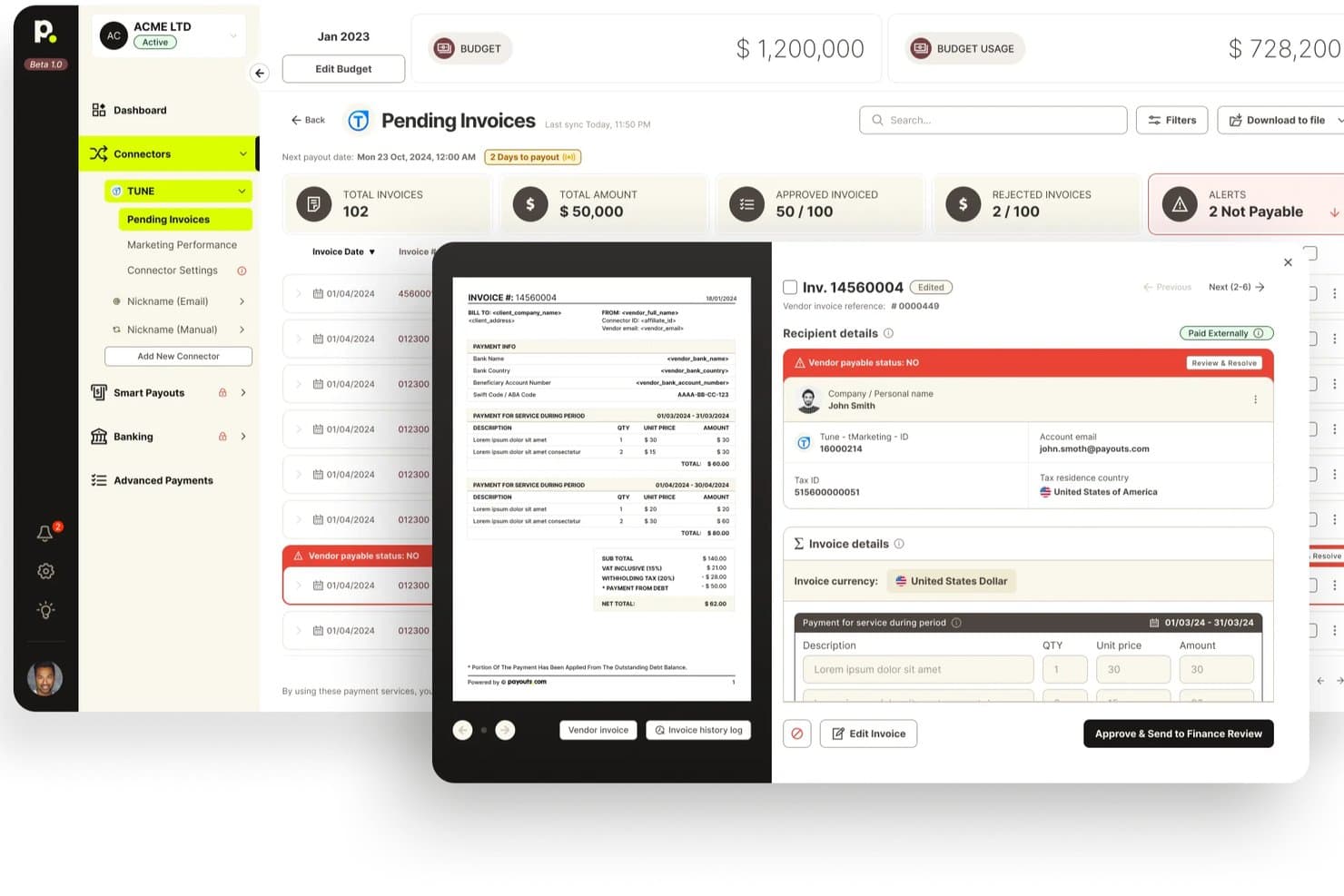
Payouts offers a pending invoices dashboard with invoice previews, vendor payable status alerts, and approval workflows for billing management. Payouts is an AP and AR automation platform that combines AI-driven invoice processing, global payment disbursement, automated dunning, tax compliance, and reconciliation in a single system.
Who Is Payouts Best For?
Payouts suits mid-market finance teams managing high-volume, cross-border vendor payments alongside accounts receivable operations.
Why I Picked Payouts
Payouts earns its spot on my shortlist because the AI automation it applies to both AP and AR is genuinely differentiated. I picked it specifically for the AI Digital Employees feature, which chases missing documents and follows up on blocked payouts over email, WhatsApp, and voice. On the AR side, I like that automated dunning runs alongside cash application, so overdue invoices get chased and matched in the same workflow.
Payouts Key Features
- OCR invoice capture: Invoices can be imported by email, inbox sync, manual entry, or API, with automatic data extraction.
- Three-way PO matching: The system matches purchase orders, invoices, and receipts to prevent payment errors.
- Global multi-rail payment support: Enables payouts in 135+ currencies across 190+ countries using 40+ payment rails.
- Real-time tax ID verification: Instantly checks tax identification numbers against IRS records and supports tax form collection.
Payouts Integrations
Payouts offers native integrations with NetSuite, Priority ERP, PayPal, Venmo, Everflow, Outlook, Awin, Outbrain, and provides an API for custom integrations.
Pros and Cons
Pros:
- Automates tax ID verification at scale
- Supports cross-border payments in 135+ currencies
- AI agents chase overdue invoices autonomously
Cons:
- Setup requires significant onboarding support
- Not ideal for freelancers or small teams
Learn more about Payouts: Best for complex contract management
- Free demo available
- Pricing upon request
Visit WebsiteCustomer Rating:4.2/5
Younium automates subscription billing, invoicing, and revenue management. Younium is a subscription billing and invoicing platform built for B2B companies with recurring revenue models. It combines automated invoicing, subscription management, revenue recognition, and contract lifecycle management in a single system.
Who Is Younium Best For?
Younium is a strong fit for mid-market and enterprise SaaS companies that manage recurring subscriptions, complex pricing structures, and high volumes of contract-driven billing.
Why I Picked Younium
I picked Younium because it handles contract changes without creating additional work for finance teams. When customers upgrade plans, add products, or make mid-term changes, the platform automatically updates billing schedules, invoices, and revenue recognition records. I also like that every contract adjustment is tracked through a detailed audit trail, making it easier to maintain accuracy and support compliance requirements as subscription businesses scale.
Key Features
- Billing and revenue sync: Automatically updates invoices, billing schedules, and revenue recognition records when subscription changes occur.
- Subscription management: Supports recurring billing models, contract amendments, renewals, and usage-based pricing structures.
- Revenue recognition: Helps finance teams comply with ASC 606 and IFRS 15 requirements through automated revenue tracking.
- Contract lifecycle management: Tracks contract versions, amendments, and customer changes throughout the subscription lifecycle.
Integrations
Younium integrates with Salesforce, HubSpot, NetSuite, QuickBooks, Xero, Stripe, Microsoft Dynamics 365, Avalara, Fortnox, Exact Online, and Slack. It also supports Zapier, webhooks, and a REST API for custom integrations.
Pros and Cons
Pros:
- Supports multi-entity subscription billing
- Built-in ASC 606 and IFRS 15 compliance
- Tracks MRR, ARR, and churn metrics
Cons:
- Payment plans require detailed setup
- Cannot credit the same invoice twice
Learn more about Younium: Best for complex deal flow automation
- Free demo available
- Pricing upon request
Visit WebsiteCustomer Rating:4.7/5
DealHub AI offers a guided interface where sales reps can select solutions and define project duration. DealHub AI is a quote-to-revenue platform that brings CPQ, contract management, subscription management, and automated billing into one AI-powered workflow.
Who Is DealHub AI Best For?
DealHub AI is a strong fit for B2B sales and revenue operations teams at mid-market to enterprise companies managing high-volume or complex deal cycles.
Why I Picked DealHub AI
I picked DealHub AI as one of the best because of how it handles the full arc of a complex deal without dropping the baton between stages. What I find genuinely useful is the automated approval workflow engine: parallel approvals run simultaneously, so a deal requiring sign-off from legal, finance, and sales leadership doesn't move in a single-file queue. On the billing side, every mid-cycle amendment, like an upsell or co-term, updates the billing schedule automatically from the effective date, with no manual finance ticket required.
DealHub AI Key Features
- Subscription billing scheduler: Automates recurring billing across monthly, annual, usage-based, and milestone payment schedules.
- Multi-currency billing: Generates invoices in local currencies and handles exchange rates for international deals.
- Revenue recognition: Maps billing events to recognized revenue to support ASC 606 and IFRS 15 compliance.
- DealRoom: A shared digital workspace where buyers and sellers track deal milestones, documents, and approvals.
DealHub AI Integrations
DealHub AI integrates with Salesforce, Microsoft Dynamics, HubSpot, and SugarCRM, as well as Stripe and Avalara for billing and tax compliance.
Pros and Cons
Pros:
- Includes ASC 606/IFRS 15 revenue recognition
- Consolidates all pricing into one document
- Supports usage-based, tiered, and fixed pricing
Cons:
- Frequent UI bugs require page refreshes
- Advanced customization options are quite limited
Learn more about DealHub AI:

QuickBooks helps SMBs integrate invoicing, payroll, and expenses QuickBooks is a complete accounting software solution designed for small- to medium-sized businesses. It manages invoicing, payroll, and expense tracking, allowing you to concentrate on growing your business.
Why I picked QuickBooks: QuickBooks excels in accounting integration, making it a top choice for SMBs needing seamless financial management. Its invoicing feature is straightforward, allowing you to create and send invoices quickly, while an expense tracking tool monitors your spending, ensuring you stay within budget. The payroll management system simplifies employee payments and merges smoothly with your existing accounts.
Standout features and integrations:
Features include the ability to generate detailed financial reports, giving you insights into your business's performance, and also manage your cash flow effectively with its budgeting tools. The tax preparation feature helps you prepare for tax season with minimal stress.
Integrations include PayPal, Shopify, Amazon, Square, TSheets, BILL, Expensify, HubSpot, Salesforce, Mailchimp, and more.
Pros and Cons
Pros:
- Extensive reporting capabilities
- Tax preparation tools
- Strong financial management features
Cons:
- Steep learning curve
- Limited industry features
 Best for open-source options
- Free plan available
- From $11.67/month (billed annually)
Visit WebsiteCustomer Rating:4.7/5
Invoice Ninja provides solutions for invoicing, time tracking, and expenses Invoice Ninja is a highly flexible billing and invoicing platform ideal for budget-conscious freelancers and small businesses. It provides customizable invoice tracking and expense management at a lower cost.
Why I picked Invoice Ninja: Invoice Ninja is unique for its open-source options, making it highly customizable for tech-savvy users. The invoicing feature supports multiple currencies and languages, which is great for international clients. Time tracking is integrated, allowing you to bill clients accurately, while expense management ensures your spending stays within budget.
Standout features and integrations:
Features include customizable invoice templates that let you align them with your brand identity. The client portal is a convenient way for your clients to view their invoices and make card payments (via credit card or debit card) or bank transfers. Automatic billing for recurring payments saves you time.
Integrations include Zapier, Slack, Stripe, PayPal, Authorize.net, WePay, Mailchimp, Google Analytics, QuickBooks Online, Xero, and more.
Pros and Cons
Pros:
- Supports multiple currencies
- Generous free plan
- Highly customizable open-source options
Cons:
- Limited customer support options
- Requires technical knowledge for customization
Learn more about Invoice Ninja: Best for online payment processing
- Free plan + demo available
- Pricing upon request
Visit WebsiteCustomer Rating:4.6/5
PayPal supports online payment methods, invoicing, and transaction management PayPal is a widely used online payment processing platform serving individuals and businesses of all sizes. It facilitates online transactions, invoicing, and payment collection, making it easy for you to manage financial transactions.
Why I picked PayPal: PayPal excels in online payment processing, offering a reliable and secure method for handling transactions. Its invoicing feature allows you to send professional invoices quickly and receive payments online, and it supports multiple currencies, which is ideal for businesses with international clients. PayPal's buyer and seller protection ensures that your transactions are safe and secure.
Standout features and integrations:
Features include the ability to set up recurring payments using custom-branded invoices, which is useful for subscription-based services. You can manage your transactions on the go using your mobile device, providing flexibility and convenience.
Integrations include Shopify, WooCommerce, BigCommerce, Xero, QuickBooks, Adobe Commerce, Squarespace, Wix, Salesforce, HubSpot, and more.
Pros and Cons
Pros:
- Mobile app for transactions
- Secure buyer and seller protection
- Global acceptance
Cons:
- Complex dispute resolution
- High transaction fees
Learn more about PayPal:

NetSuite manages finance, billing, and orders in one system NetSuite is cloud-based enterprise resource planning (ERP) software that serves mid-sized to large businesses. It covers financial management, billing, and order management, providing an all-in-one platform for your business operations.
Why I picked NetSuite: NetSuite excels in ERP integration, offering extensive solutions for businesses needing unified operations management. Its billing feature automates invoicing and payment processing, reducing manual effort. Financial management tools give you a real-time overview of your financial status, helping you make the correct choices. Order management ensures efficient processing and fulfillment, enhancing your operational efficiency.
Standout features and integrations:
Features include advanced financial reporting that gives you insights into your financial performance. You can manage your entire order-to-cash process within the platform, simplifying operations. Customizable dashboards provide real-time data, helping you track key performance indicators effectively.
Integrations include Salesforce, Shopify, Adobe Commerce, HubSpot, Expensify, Avalara, Concur, Adaptive Insights, Docusign, PayPal, and more.
Pros and Cons
Pros:
- Efficient order management
- Real-time data dashboards
- Strong ERP integration
Cons:
- Costly for small businesses
- Complex implementation process
 Best for simple invoicing solutions
- Free plan available
- From $9.99/month
Visit WebsiteCustomer Rating:4.6/5
Invoicely helps small teams manage invoicing, expenses, and time tracking Invoicely is an online invoicing software program designed for small businesses and freelancers. It offers invoicing, expense tracking, and time tracking, making it easier for you to manage your billing needs.
Why I picked Invoicely: Invoicely provides simple invoicing solutions that are easy to use and efficient for small businesses. The invoicing feature lets you create and send invoices with just a few clicks, and expense tracking keeps a close eye on your spending, ensuring you stay within your budget. Time tracking integrates seamlessly, allowing you to bill clients accurately for your work hours.
Standout features and integrations:
Features include invoice generation and time tracking to track billable hours and ensure accurate client billing. Reporting tools provide insights into your company's financial health, helping you make informed decisions.
Integrations include PayPal, Stripe, Mollie, Authorize.net, WePay, Dropbox, and more.
Pros and Cons
Pros:
- User-friendly for small businesses
- Complete payment integration
- Simple setup process
Cons:
- No mobile app
- Limited advanced features
Learn more about Invoicely: 9Best for freelancers and startups
Wave
- Free plan + 30-day trial available
- From $19/month
Visit WebsiteCustomer Rating:4.4/5
Wave helps freelancers and startups manage invoicing, accounting, and receipts Wave is a financial software suite designed for freelancers, entrepreneurs, and small startups. It handles invoicing, accounting, and receipt scanning, making your financial management straightforward and efficient.
Why I picked Wave: Wave is tailored for freelancers and startups that need a simple yet effective financial management solution. The invoicing feature allows you to easily generate invoices, while receipt scanning helps you keep track of your expenses. The accounting component lends you a full view of your finances in one place.
Standout features and integrations:
Features include customizable invoice templates to elevate brand consciousness. Monitoring your payments and income helps you understand your cash flow better, while the reporting tools offer details about your financial health, which guides your business decisions.
Integrations include PayPal, Etsy, Zapier, Google Sheets, Slack, Mailchimp, Stripe, Shopify, HubSpot, and more.
Pros and Cons
Pros:
- Free invoicing software
- Easy invoice generator
- Tailored for small businesses
Cons:
- Occasional syncing issues
- Limited advanced features
Learn more about Wave: 10Best for automated expense management
Envoice
- 14-day free trial
- From $10/month
Visit WebsiteCustomer Rating:4.7/5
Envoice automates invoice capture, expense processing, and receipt management Envoice is a billing- and expense-focused financial automation tool designed for businesses that need to process incoming invoices, track expenses, and manage receipts with minimal manual effort. It’s best suited for teams that deal with high volumes of supplier invoices and want better visibility into payables.
Why I picked Envoice: Envoice is particularly strong in automating invoice intake and expense documentation. Its invoice processing tools extract data from uploaded or emailed invoices, reducing manual data entry and helping speed up approvals. Receipt capture allows teams to digitize and store expense records centrally, while consolidated expense reports make it easier to monitor spend across vendors and departments. For finance teams focused on controlling incoming costs rather than customer billing, Envoice helps keep payables organized and auditable.
Standout features and integrations:
Features include automated invoice data extraction to speed up accounts payable workflows, customizable expense categories for clearer cost tracking, and approval workflows to route invoices and expenses for review before payment. The dashboard provides a real-time view of pending invoices, approved expenses, and overall spend, helping teams avoid missed or delayed payments.
Integrations include Xero, QuickBooks, Sage, FreshBooks, Microsoft Dynamics, NetSuite, SAP, Oracle, Dropbox, Google Drive, OneDrive, and more.
Pros and Cons
Pros:
- Approval workflows for invoice and expense control
- Centralized receipt and expense management
- Automated invoice capture and data extraction
Cons:
- Not designed for complex billing scenarios (e.g., subscriptions or usage-based billing)
- Limited support for outgoing customer invoicing
Learn more about Envoice:
Outro software de faturação e emissão de faturas
Eis algumas opções adicionais de software de faturação e emissão de faturas que não entraram na minha seleção, mas que vale a pena conhecer:
- 11Zoho InvoiceBest for global invoicing
- 12Zoho BillingBest for subscription management
- 13Bill4timeBest for legal professionals
- 14FlexpriceBest for on-premise billing infrastructure
- 15SquareBest for small retail businesses
- 16TipaltiBest for built-in compliance
- 17MinuteDockBest for flexible time tracking
How I Evaluate Billing and Invoicing Software
My evaluation has two layers: the baseline every billing tool must clear—like recurring invoicing and payment gateway support—and the differentiators that separate the best fits.
Core Functionality (Table Stakes For This List)
When I'm selecting tools for my list, I rank each one on a scale from 0 (does not offer the functionality) to 5 (excels in this area) for each core functionality listed below. Then, I calculate the tool's total score into a percentage. Each tool needs to achieve a minimum total score of 75% to be considered for inclusion.
- Invoice Creation & Customization: I check whether you can build branded, professional invoices with flexible templates, multi-currency support, and configurable line items for different client types.
- Recurring & Automated Billing: Platforms should handle scheduled billing cycles for retainers, subscriptions, or fixed-interval contracts with auto-send and adjustable frequency options.
- Online Payment Processing: I evaluate which payment gateways each tool supports and whether customers can pay directly from the invoice via credit card, ACH, or other methods.
- Accounts Receivable Tracking: Real-time invoice status (sent, viewed, overdue) matters, along with automated reminder sequences that reduce the manual chase for outstanding payments.
- Tax Calculation & Compliance: I look for automated tax logic that handles VAT, GST, and sales tax across multiple jurisdictions rather than forcing manual rate entry on every invoice.
- Accounting System Integration: Each tool should sync invoices, payments, and customer records with platforms like QuickBooks, Xero, or NetSuite to avoid double-entry and reconciliation headaches.
Once I have a list of tools that meet this criteria, I consider what sets each platform apart.
Differentiating Factors (What Sets Vendors Apart)
Here's how I compare and contrast different vendors:
Standout Features
A client self-service portal is a big differentiator—it lets customers view invoices, download receipts, and update payment details on their own, which cuts down on back-and-forth for AR teams. I also evaluate multi-entity management, especially for firms billing across subsidiaries that need consolidated reporting. Built-in time and expense tracking is another factor I weigh, since agencies and consultancies benefit from converting billable hours directly into invoices without toggling between tools.
Beyond Features
Pricing structure matters—I look at whether a vendor charges per user, per invoice, or a flat rate, and how those costs scale as your volume grows. Compliance is another key factor; finance teams need SOC 2, PCI DSS, and role-based access controls to protect sensitive payment data. I also consider industry fit, since a tool built for SaaS subscription billing handles very different workflows than one designed for professional services firms billing by the hour.
Como escolher software de faturação e emissão de faturas
É fácil ficar preso a listas extensas de funcionalidades e estruturas de preços complexas. Para o ajudar a manter o foco enquanto analisa o seu processo específico de seleção de software, eis uma lista de verificação dos fatores a ter em conta:
| Fator | O que considerar |
|---|---|
| FatorEscalabilidade | O que considerarO software acompanhará o crescimento da sua empresa? Considere se consegue lidar com mais clientes, transações e utilizadores à medida que expande a atividade. Procure planos flexíveis. |
| FatorIntegrações | O que considerarVerifique a compatibilidade com as ferramentas que já utiliza. Certifique-se de que se liga aos sistemas de contabilidade, CRM e pagamentos para evitar silos de dados. |
| FatorPersonalização | O que considerarPode adaptar o software aos seus fluxos de trabalho? Procure opções para modificar modelos e automatizar tarefas de acordo com as suas necessidades. |
| FatorFacilidade de utilização | O que considerarA interface é intuitiva? A sua equipa deve conseguir utilizá-la sem formação extensa. Teste-a pessoalmente para verificar a facilidade de utilização. |
| FatorImplementação e integração inicial | O que considerarQuanto tempo demora a configuração? Procure ferramentas com tutoriais orientados ou apoio durante a integração inicial, para minimizar as interrupções. |
| FatorCusto | O que considerarO preço cabe no seu orçamento? Compare os planos e verifique se existem custos ocultos. Certifique-se de que obtém valor pelo que paga. |
| FatorMedidas de segurança | O que considerarEstão implementadas medidas de proteção de dados? Verifique a existência de encriptação e o cumprimento dos regulamentos de proteção de dados, para salvaguardar informações sensíveis. |
| FatorDisponibilidade do apoio | O que considerarQue opções de apoio estão disponíveis? Certifique-se de que tem acesso a ajuda atempada através de chat, e-mail ou telefone, especialmente em momentos críticos. |
O que é software de faturação e emissão de faturas?
O software de faturação e emissão de faturas é uma ferramenta que automatiza o processo de criação e envio de faturas, acompanhamento de pagamentos e gestão de ciclos de faturação. Os contabilistas, profissionais da área financeira e proprietários de pequenas empresas utilizam frequentemente estas ferramentas para garantir uma faturação precisa e uma cobrança eficiente dos pagamentos.
A faturação automatizada, o acompanhamento de pagamentos e os modelos personalizáveis ajudam a reduzir erros, poupar tempo e manter uma aparência profissional. De um modo geral, estas ferramentas simplificam a gestão financeira e melhoram o fluxo de caixa.
Funcionalidades
Ao escolher software de faturação e emissão de faturas, esteja atento às seguintes funcionalidades principais:
- Faturação automatizada: Gera e envia faturas automaticamente, poupando tempo e reduzindo erros manuais.
- Acompanhamento de pagamentos: Monitoriza os pagamentos e os saldos pendentes para garantir cobranças atempadas e manter o fluxo de caixa.
- Modelos personalizáveis: Cria faturas alinhadas com a sua marca, reforçando o profissionalismo e o reconhecimento por parte dos clientes.
- Faturação recorrente: Configura ciclos de faturação automatizados para serviços de subscrição, garantindo fluxos de receitas consistentes.
- Acompanhamento de despesas: Regista as despesas da empresa para gerir orçamentos e melhorar o planeamento financeiro.
- Suporte para várias moedas: Processa transações em diferentes moedas, sendo útil para empresas com clientes internacionais.
- Portal do cliente: Disponibiliza aos clientes uma plataforma para consultar faturas, efetuar pagamentos e gerir as suas contas bancárias.
- Relatórios financeiros: Gera relatórios para obter uma visão do desempenho financeiro, ajudando na tomada de decisões.
- Acompanhamento do tempo: Regista com precisão as horas faturáveis para garantir uma faturação exata aos clientes e otimizar a afetação de recursos.
- Medidas de segurança: Protege dados financeiros sensíveis através de encriptação e do cumprimento dos regulamentos de proteção de dados.
Benefícios
A implementação de software de faturação e emissão de faturas proporciona vários benefícios à sua equipa e à sua empresa. Eis alguns dos benefícios que pode esperar:
- Poupança de tempo: A faturação automática e o acompanhamento de pagamentos libertam tempo valioso, permitindo que a sua equipa se concentre noutras tarefas.
- Precisão: Reduz os erros manuais na faturação e nos relatórios financeiros, garantindo registos financeiros precisos.
- Gestão do fluxo de caixa: Monitoriza os pagamentos pendentes e acompanha as despesas para manter um fluxo de caixa saudável.
- Aparência profissional: Os modelos de faturas personalizados refletem a sua marca, valorizando a imagem da sua empresa.
- Conveniência para os clientes: Os portais do cliente permitem aos clientes consultar e pagar faturas, melhorando a sua experiência e satisfação.
- Escalabilidade: O aumento do número de transações e clientes é facilmente acomodado graças aos processos automatizados.
- Segurança dos dados: As salvaguardas de segurança e o cumprimento dos regulamentos garantem que as informações financeiras sensíveis estão devidamente protegidas.
Custos e preços
A escolha de software de faturação e emissão de faturas exige uma compreensão dos vários modelos de preços e planos disponíveis. Os custos variam consoante as funcionalidades, a dimensão da equipa, os complementos e outros fatores. A tabela abaixo resume os planos comuns, os respetivos preços médios e as funcionalidades normalmente incluídas nas soluções de software de faturação e emissão de faturas:
Tabela de comparação de planos de software de faturação e emissão de faturas
| Tipo de plano | Preço médio | Funcionalidades comuns |
|---|---|---|
| Tipo de planoPlano gratuito | Preço médio$0 | Funcionalidades comunsFaturação básica, acompanhamento de pagamentos e gestão limitada de clientes. |
| Tipo de planoPlano pessoal | Preço médio$5-$25/utilizador/mês | Funcionalidades comunsFaturas personalizáveis, acompanhamento de despesas e relatórios básicos. |
| Tipo de planoPlano empresarial | Preço médio$30-$60/utilizador/mês | Funcionalidades comunsFaturação automatizada, suporte para várias moedas e relatórios avançados. |
| Tipo de planoPlano empresarial de grande dimensão | Preço médio$70-$150/utilizador/mês | Funcionalidades comunsAnálises abrangentes, integrações personalizadas e suporte dedicado. |
Perguntas frequentes sobre software de faturação e emissão de faturas
Eis algumas respostas a perguntas comuns sobre software de faturação e emissão de faturas:
Como pode o software de faturação e emissão de faturas ajudar a reduzir os erros manuais nos processos financeiros?
O software de faturação e emissão de faturas minimiza os erros manuais ao automatizar tarefas de rotina, como a introdução de dados e os cálculos. Isto resulta em menos erros nas faturas e num processo de reconciliação mais eficiente. A automatização também impõe a normalização, ajudando-o a manter a consistência em todos os documentos financeiros.
O software de faturação e emissão de faturas consegue processar transações em várias moedas ou transações internacionais?
Sim, muitas plataformas de faturação processam faturas em várias moedas e suportam a tributação internacional. Pode definir taxas de câmbio, gerir regras fiscais por região e garantir que a sua empresa global se mantém organizada e rigorosa além-fronteiras.
Com que frequência devem ser reconciliados os dados financeiros ao utilizar plataformas de faturação e emissão de faturas?
Deve reconciliar os dados financeiros pelo menos mensalmente. No entanto, muitos CFOs optam por uma reconciliação semanal ou diária quando lidam com volumes de transações mais elevados. Uma reconciliação frequente permite identificar mais rapidamente as discrepâncias, garantindo que os seus registos estão atualizados para auditorias e relatórios.