

O software de IA para contas a receber utiliza inteligência artificial e automatização para apoiar decisões de crédito e processos desde a faturação até ao recebimento, desde a cobrança e aplicação de recebimentos até à gestão de litígios. Se estiver a comparar ferramentas, verifique como cada uma se liga ao seu ERP, explica as suas recomendações e preserva os documentos comprovativos das decisões de cobrança e dedução. Comparei 10 opções para o ajudar a encontrar uma solução adequada à dimensão da sua equipa, às suas necessidades de visibilidade do fluxo de caixa e aos seus controlos existentes.
Porque pode confiar nas nossas recomendações de software
6,700+
Reviews
20
Industry experts
16+
Evaluation factors
14
Years reviewing software
A nossa equipa testa e analisa software desde 2012. Como líderes na área financeira, sabemos o quão difícil — e importante — é escolher o software certo.
Para este guia, avaliámos as ferramentas através de testes práticos e pesquisa independente, pontuando-as de acordo com os nossos critérios de seleção.
As nossas análises refletem o juízo da nossa equipa editorial, e não um discurso de vendas.
Tabela de comparação: software de IA para contas a receber
Compare preços e especificações lado a lado do software de IA para contas a receber que entrou na minha lista restrita.
Score legend (out of 5)
- Excellent4.5–5
- Good4–4.4
- Average3–3.9
- Below average2–2.9
- Poor1–1.9
Sorted by: Default
| Tool | Starting Price | Website | |||||||
|---|---|---|---|---|---|---|---|---|---|
Best for collections and supplier portals | 3.5 out of 5 | 4 | 2 | 4 | 4 | 3 | 4 | Pricing upon request Free demo available | Website |
Best for buyer-network credit decisions | 4.0 out of 5 | 4 | 4 | 4 | 5 | 3 | 4 | Pricing upon request Free demo available | Website |
Best for multi-ERP invoice-to-cash teams | 3.5 out of 5 | 3 | 3 | 4 | 4 | 3 | 4 | Pricing upon request Free demo available | Website |
Best for linking collections and deductions | 3.3 out of 5 | 2 | 4 | 4 | 4 | 2 | 4 | Pricing upon request Free demo available | Website |
Best for evidence-based deduction resolution | 4.0 out of 5 | 3 | 4 | 5 | 4 | 4 | 4 | Pricing upon request Free demo available | Website |
Best for managing credit through cash application | 3.7 out of 5 | 3 | 4 | 4 | 4 | 4 | 3 | Pricing upon request Free demo available | Website |
Best for payment behavior-led collections | 3.5 out of 5 | 3 | 3 | 4 | 4 | 3 | 4 | Pricing upon request Free demo available | Website |
Best for drafting AR actions from email replies | 3.5 out of 5 | 4 | 3 | 3 | 3 | 4 | 4 | Pricing upon request Free demo available | Website |
Best for credit-led collections | 4.0 out of 5 | 3 | 5 | 4 | 4 | 4 | 4 | Pricing upon request Free trial + demo available | Website |
Best for collections through cash application | 3.5 out of 5 | 4 | 2 | 4 | 4 | 3 | 4 | Pricing upon request Free plan + free demo available | Website |


Avaliações de software de IA para contas a receber
Apresentamos abaixo os meus resumos detalhados dos melhores softwares de IA para contas a receber que entraram na minha lista restrita. As minhas avaliações abrangem as funcionalidades, os casos de utilização e as integrações de cada ferramenta de IA para contas a receber, para o ajudar a encontrar a opção mais adequada.
 Best for collections and supplier portals
- Free demo available
- Pricing upon request
Visit WebsiteCustomer Rating:4.7/5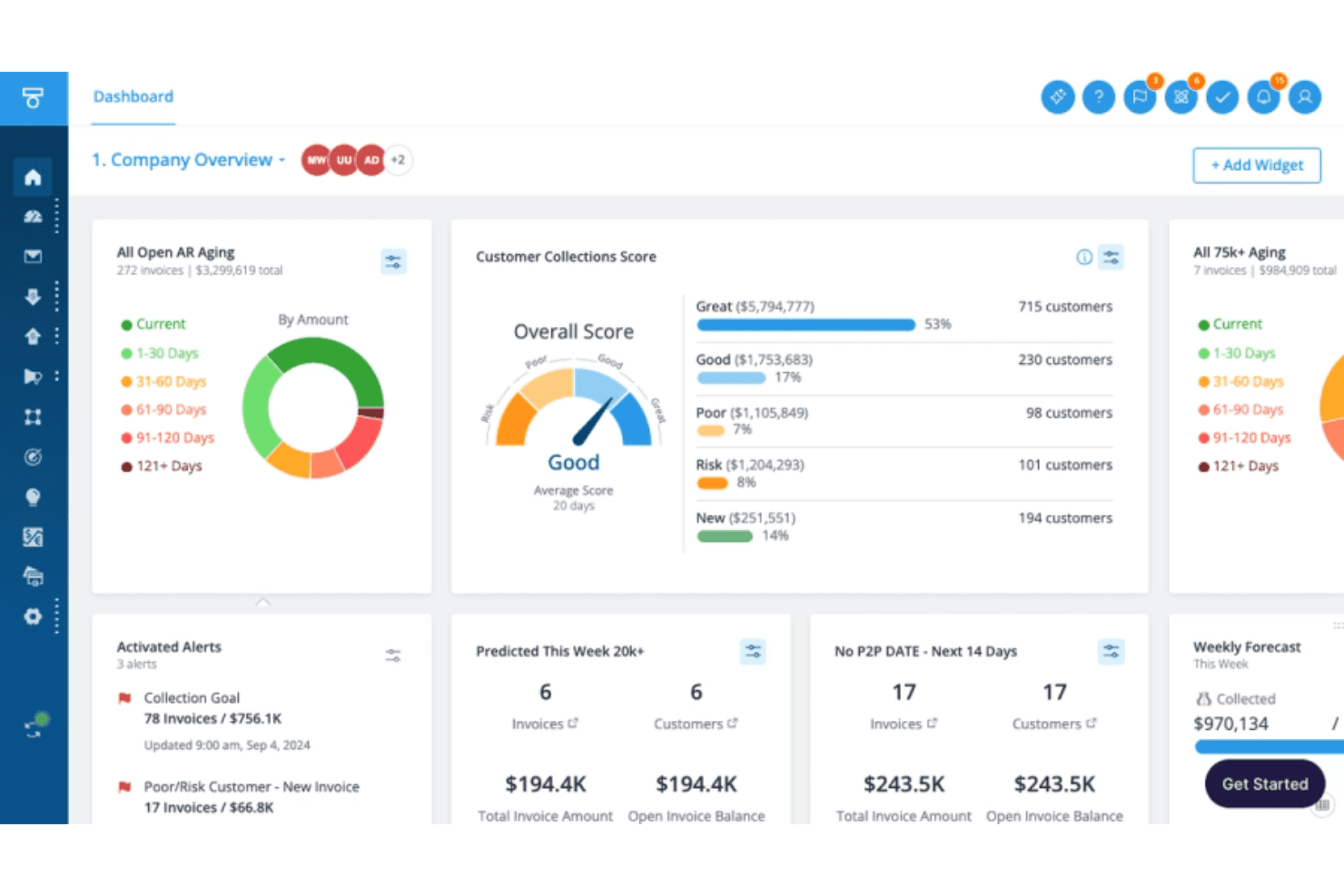
Tesorio's company overview dashboard tracks open receivables aging and customer collections scores. Tesorio is an AI-native accounts receivable platform that combines collections prioritization, automated dunning, cash application, payment forecasting, and supplier portal automation into a single order-to-cash workflow.
Who Is Tesorio Best For?
Tesorio is a strong fit for finance teams that manage high invoice volumes and need AI-driven collections prioritization alongside automated supplier portal workflows in a single platform.
Why I Picked Tesorio
I've included Tesorio in my top picks because its AI-native Collections Agent scores every open invoice in real time using payment history, customer risk, aging, and behavioral signals. This helps keep your team's worklist organized according to which invoices require the most attention. Its supplier portal automation is equally useful, with AI agents that log directly into Coupa and Ariba to submit invoices, monitor payment statuses, and retrieve remittance data without manual intervention.
Tesorio Key Features
- Automated dunning sequences: Configure multistep email campaigns segmented by aging, risk, balance, or customer tier, with live ERP data automatically removing paid or disputed invoices.
- Invoice-level payment forecasting: Machine learning models predict payment timing for individual invoices using payment history, seasonal patterns, and invoice terms, with rolling forecasts that adjust as invoice statuses change.
- Cash application with exception management: Unmatched payments are routed to an exceptions workspace, where AI-ranked match suggestions are presented by confidence score for staff review.
- Customer self-service payment portal: Customers can view invoices, make bulk or individual payments via ACH, card, or wire, and submit disputes or payment plan requests directly through a branded portal.
Tesorio Integrations
Tesorio lists more than 12 integrations, including NetSuite, Sage Intacct, Workday, Zuora, QuickBooks, Salesforce, Stripe, Coupa, and Ariba. It supports API and webhook connections for custom integrations and bidirectional ERP data synchronization.
Pros and Cons
Pros:
- Dunning excludes settled invoices
- Forecasts individual invoice payments
- Automates supplier portal submissions
Cons:
- Campaigns retain outdated contacts
- Dashboards offer limited filtering
Learn more about Tesorio: Best for buyer-network credit decisions
- Free demo available
- Pricing upon request
Visit WebsiteCustomer Rating:4.4/5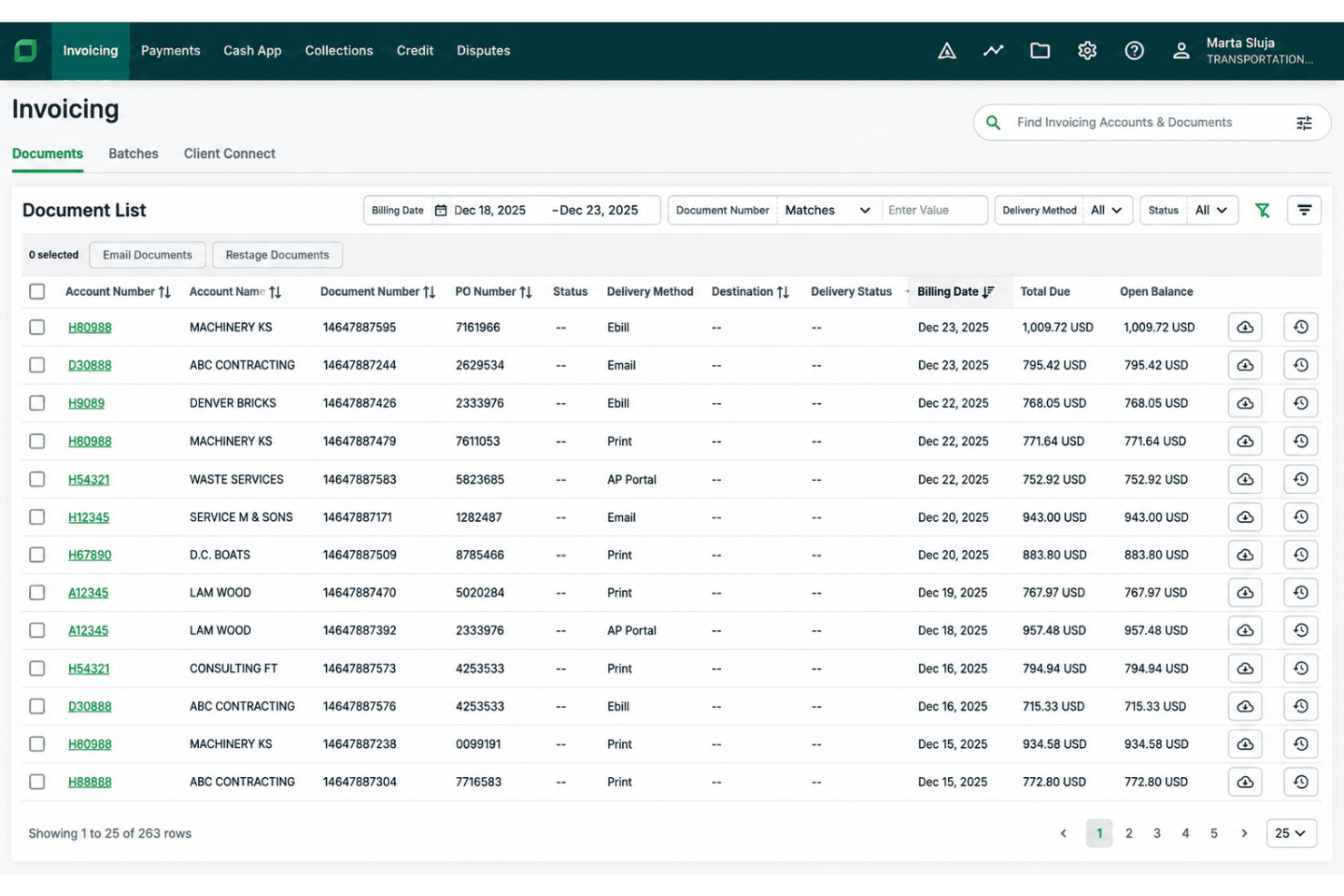
Billtrust invoicing module showing a document list with billing dates, delivery methods and open balances. Billtrust is an AI-powered accounts receivable platform that connects invoicing, cash application, collections, credit decision-making, and payments into a unified system for mid-market and enterprise B2B companies.
Who Is Billtrust Best For?
Billtrust is a strong fit for mid-market and enterprise B2B companies whose credit and collections teams manage large buyer portfolios and need AI-driven decision-making across the full AR cycle.
Why I Picked Billtrust
I picked Billtrust because of how its Agentic Credit Lines model works in practice. It continuously monitors buyer portfolios using more than 80 data points, including payment trends, dispute patterns, and credit utilization, then automatically adjusts credit allocations as risks change. This offers a different approach to credit decision-making compared with static credit bureau reports. I also like how this feeds directly into collections prioritization, where AI ranks delinquent accounts by their likelihood of payment rather than their outstanding balances alone.
Billtrust Key Features
- Automated cash application: Uses machine learning to match incoming payments to open invoices, including unstructured and split remittance data, with reported match rates above 95%.
- Multichannel invoice delivery: Delivers invoices through email, print, mail, and more than 260 AP portals, with automated formatting and payment-status tracking.
- Self-service buyer payment portal: Gives buyers 24/7 access to view invoices, make or schedule payments, set up autopay, and submit disputes directly.
- ERP connectivity: 200+ Connects to more than 200 ERPs, banks, and financial institutions through prebuilt connectors or custom integrations, with same-day ledger posting.
Billtrust Integrations
Billtrust offers more than 200 direct connectors to ERPs, banks, and financial institutions, including SAP, Oracle, Infor, Wells Fargo, and Bank of America. It also supports more than 260 AP portal integrations, such as Coupa and SAP Ariba. Public HTTP APIs and webhooks support custom integrations.
Pros and Cons
Pros:
- Supports extensive AP portals
- Handles fragmented remittance matching
- Buyer-network signals inform credit
Cons:
- Reporting requires spreadsheet workarounds
- Unstructured remittances require intervention
Learn more about Billtrust: Best for multi-ERP invoice-to-cash teams
- Free demo available
- Pricing upon request
Visit WebsiteCustomer Rating:4.5/5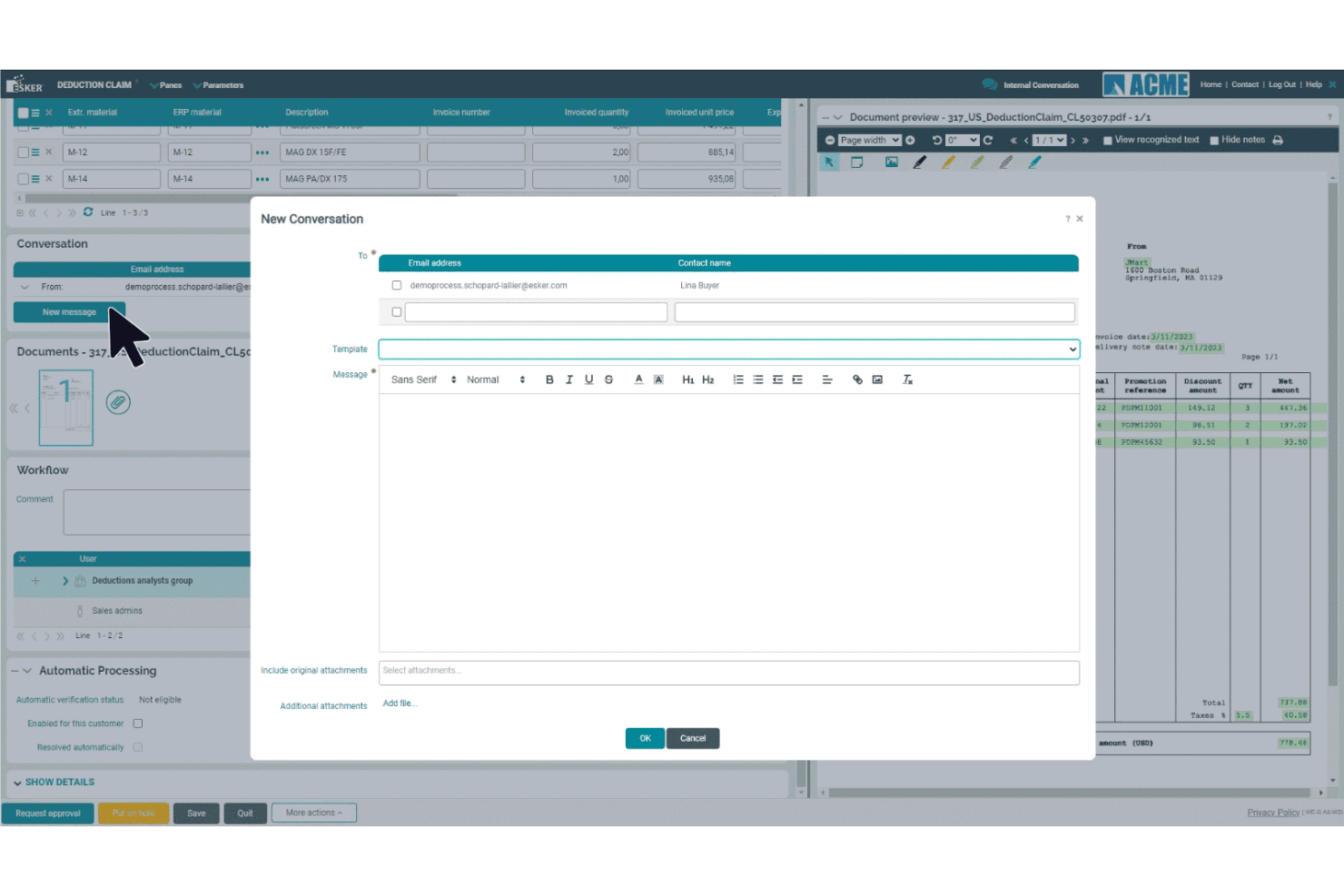
Esker's deduction claim workflow lets teams start a conversation by email directly from the claim. Esker is an AI-driven accounts receivable automation platform covering credit management, invoice delivery, cash application, collections prioritization, and claims and deductions management across multi-ERP environments.
Who Is Esker Best For?
Esker is a strong fit for mid-to-large finance teams using multiple ERP systems that need a single platform to connect credit, invoicing, cash application, and collections.
Why I Picked Esker
I picked Esker because it's designed for finance teams managing multiple ERP systems, where keeping credit data, invoice delivery, cash application, and collections synchronized across platforms can be an operational challenge. I particularly like how its AI-assisted cash application handles missing or incomplete remittance data by matching customer names, invoice numbers, and reference fields, helping reconcile payments even when the source data is inconsistent. Its collections prioritization uses live payment predictions and customer risk profiles to identify accounts that require immediate attention.
Esker Key Features
- Credit review recommendations: Uses scoring data, internal payment behavior, and sales history to recommend customer credit limits or risk categories.
- Customer self-service portal: Lets customers access invoices and statements, make online payments, submit disputes, and communicate directly with collections teams.
- Embedded analytics dashboards: Tracks DSO, DDO, CEI, overdue balances, collections forecasts, disputes, and team performance through customizable dashboards and reports.
- Dispute and deduction management: Extracts information from AR documents, routes claims for review, and supports task creation and team collaboration to resolve disputed invoices.
Esker Integrations
Esker reports more than 70 ERP and homegrown integrations, including prebuilt connections for SAP, Microsoft, Oracle, and Sage, along with partner-developed connectors for Oracle JD Edwards and NetSuite. It supports REST APIs and file exchange for custom connectivity.
Pros and Cons
Pros:
- Predictive scoring identifies priorities
- Reconciles incomplete payment references
- Supports multi-ERP financial operations
Cons:
- Promise-to-pay entries require repetition
- Format changes disrupt matching
Learn more about Esker: Best for linking collections and deductions
- Free demo available
- Pricing upon request
Visit WebsiteCustomer Rating:4.3/5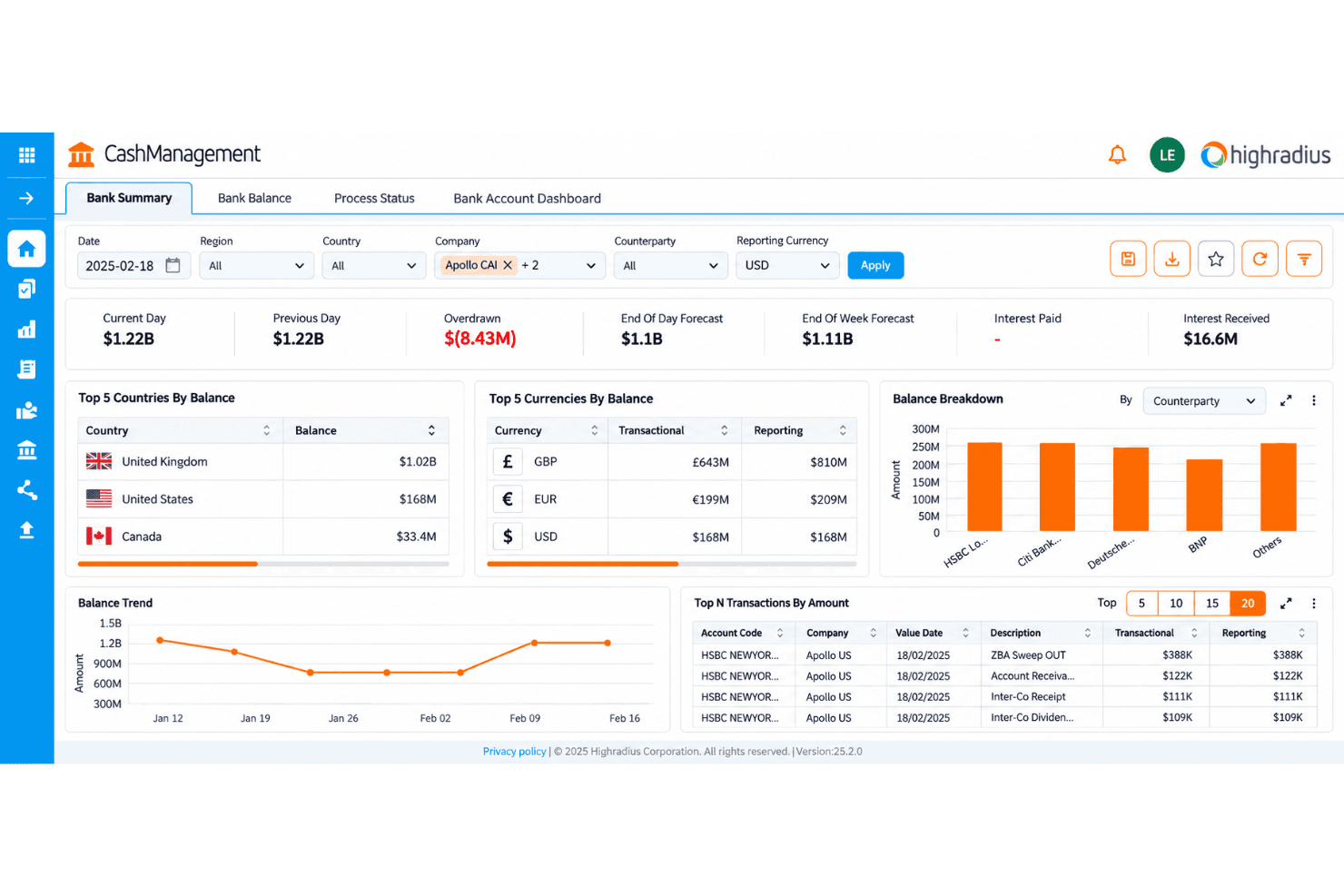
HighRadius CashManagement dashboard showing bank balances, forecasts, and top transactions by country and currency. HighRadius is an AI-driven accounts receivable platform that covers collections prioritization, automated cash application, deduction management, credit risk scoring, and electronic invoice presentment and payment.
Who Is HighRadius Best For?
HighRadius is a strong fit for enterprise AR teams managing high invoice volumes where collections and deductions need to work as connected workflows rather than separate processes.
Why I Picked HighRadius
I've included HighRadius in my top picks because it closely connects collections and deductions in a single workflow rather than treating them as separate processes. When a customer short-pays an invoice, the deduction management module automatically links claim documents, matches promotions, and validates disputes using an AI model trained on more than 20 variables. This reduces the need for collections teams to retrieve supporting files while managing overdue accounts. I also like how the AI continuously scores customers based on payment history, past-due amounts, and credit risk to generate prioritized worklists, helping collectors focus on accounts that need attention.
HighRadius Key Features
- Credit risk scoring: AI models retrieve more than 100 data points from over 35 credit agencies to continuously assess customer credit risk and suggest credit limits.
- Automated cash application: Captures remittance data from email, checks, and web sources and automatically matches payments to open invoices.
- Customer self-service portal: Allows customers to view invoices, make ACH or direct debit payments across multiple currencies, and submit and track disputes directly through the portal.
- Bankruptcy monitoring: An AI agent detects bankruptcy filings and can automatically freeze credit lines and place holds on pending orders.
HighRadius Integrations
HighRadius lists more than 50 ERP and accounting connectors, including documented two-way integrations with SAP, Microsoft Dynamics, NetSuite, and Workday. It also supports API integrations for Sage Intacct, QuickBooks, and Microsoft Business Central, along with HTTPS APIs and SFTP batch transfers.
Pros and Cons
Pros:
- Aggregates multiple credit agencies
- Bankruptcy monitoring freezes credit
- Connects deductions with evidence
Cons:
- Technical support responses lag
- Implementations require extended timelines
Learn more about HighRadius: Best for evidence-based deduction resolution
- Free demo available
- Pricing upon request
Visit WebsiteCustomer Rating:3.5/5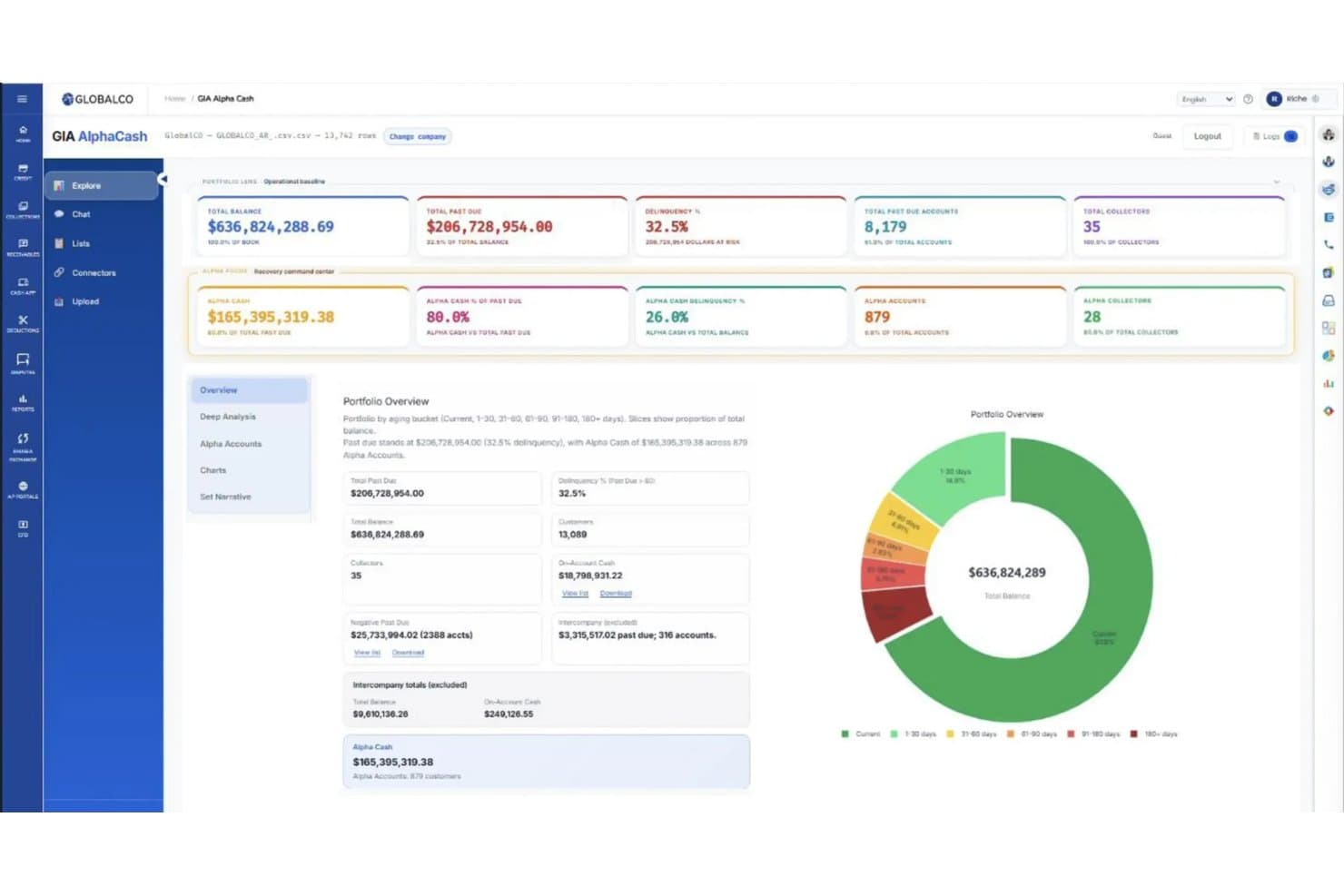
Emagia GIA AlphaCash portfolio overview dashboard tracking balances, past-due amounts, and delinquency by aging bucket. Emagia is an AI-native order-to-cash platform that covers credit management, invoicing, collections, deduction processing, cash application, and receivables analytics through a unified system.
Who Is Emagia Best For?
Emagia is a strong fit for large enterprises and shared-service centers that handle high volumes of retailer deductions and need AI-driven evidence gathering to resolve disputes.
Why I Picked Emagia
I picked Emagia because of its approach to deduction resolution. The Gia AI Deductions Agent retrieves claim evidence directly from retailer portals such as Walmart Retail Link and Target POL/Synergy, checks it against contracts, shipments, and ledger data, and automatically returns a confidence-scored assessment. Teams can set their own thresholds, allowing valid, low-value claims to be resolved automatically without manual intervention.
Emagia Key Features
- Predictive collections scoring: Scores and segments customers based on payment behavior and invoice aging to generate strategy-driven collector worklists.
- AI/ML cash application matching: Matches incoming payments to open invoices using machine learning, including payments with incomplete or inaccurate remittance data.
- Credit bureau integration: Retrieves reports from DnB, Experian, CreditSafe, Credit Risk Monitor, NACM, and ICTF to support credit scoring and customer risk decisions.
- Order-to-cash analytics dashboards: Provides more than 50 prebuilt dashboards covering credit, receivables, collections, deductions, and cash flow across subsidiaries, regions, and accounting periods.
Emagia Integrations
Emagia offers native integrations with more than 170 global and local banks and ERPs, including SAP, Oracle, Oracle NetSuite, Microsoft Dynamics, JD Edwards, Sage, Infor, and Epicor. It also connects to more than 100 retailer, distributor, marketplace, carrier, and freight portals, with API support for custom integrations.
Pros and Cons
Pros:
- Supports extensive analytics dashboards
- Confidence scores guide deductions
- Retailer portals supply evidence
Cons:
- Implementation requires extensive configuration
- Reporting lacks sufficient depth
Learn more about Emagia: Best for managing credit through cash application
- Free demo available
- Pricing upon request
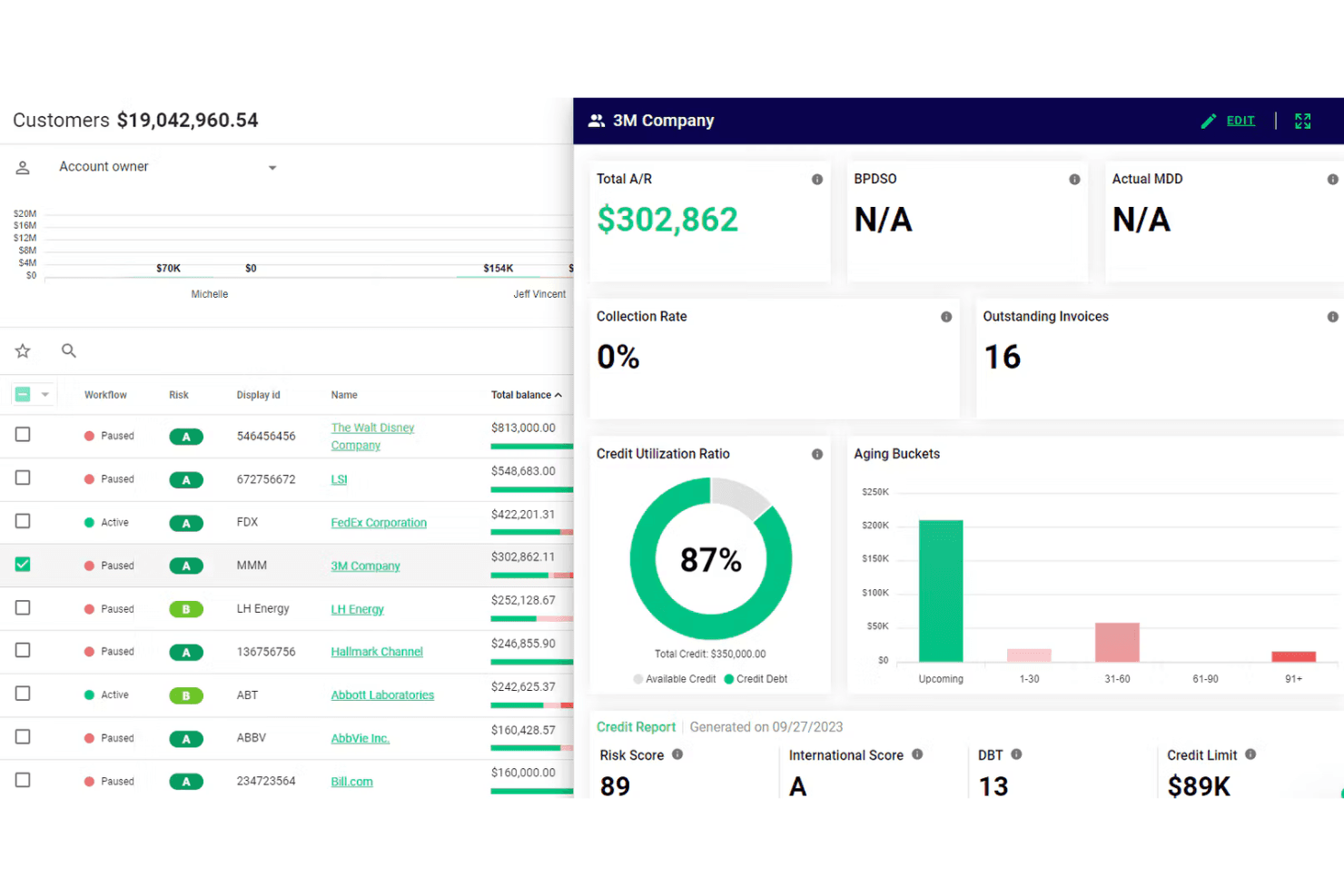
Gaviti-style receivables dashboard showing customer balances, credit utilization and aging buckets for a single account. Gaviti is an AI-powered invoice-to-cash platform that covers collections automation, cash application, credit management, dispute resolution, and a customer self-service payment portal.
Who Is Gaviti Best For?
Gaviti is a strong fit for B2B finance teams that need to connect credit risk decisions directly with their collections and cash application workflows in one platform.
Why I Picked Gaviti
I picked Gaviti because it connects credit risk decisions directly with active collections workflows. When a customer's credit profile changes, Gaviti can trigger alerts and automatically adjust credit limits through its Creditsafe integration, helping your collections team work with current risk data. I also like how its AI cash application captures remittance data across EDI, lockboxes, and the payer portal, then matches payments to open invoices without manual input.
Gaviti Key Features
- Configurable collections workflows: Set up multistep, automated collections strategies using triggers such as invoice aging, due dates, payment history, and credit terms.
- Customer self-service portal: Customers can view invoices, make payments via ACH or credit card, set up AutoPay, and initiate disputes in one place.
- Dispute and deduction management: Centralizes dispute records, routes claims to the appropriate team member, and tracks resolution history with a complete audit trail.
- A/R analytics dashboard: Monitors real-time KPIs, including DSO, collections rates, customer risk, and aging, through a customizable dashboard.
Gaviti Integrations
Gaviti supports direct connections with Oracle NetSuite, Priority ERP, QuickBooks, Sage, and Zoho Books, along with payment gateways Stripe and BlueSnap. It also accepts data through an HTTP endpoint/API, FTP/SFTP, email, or manual upload.
Pros and Cons
Pros:
- Disputes retain auditable histories
- Captures varied remittance formats
- Creditsafe triggers credit adjustments
Cons:
- Detailed analysis requires filtering
- Collection emails omit attachments
Learn more about Gaviti: Best for payment behavior-led collections
- Free demo available
- Pricing upon request
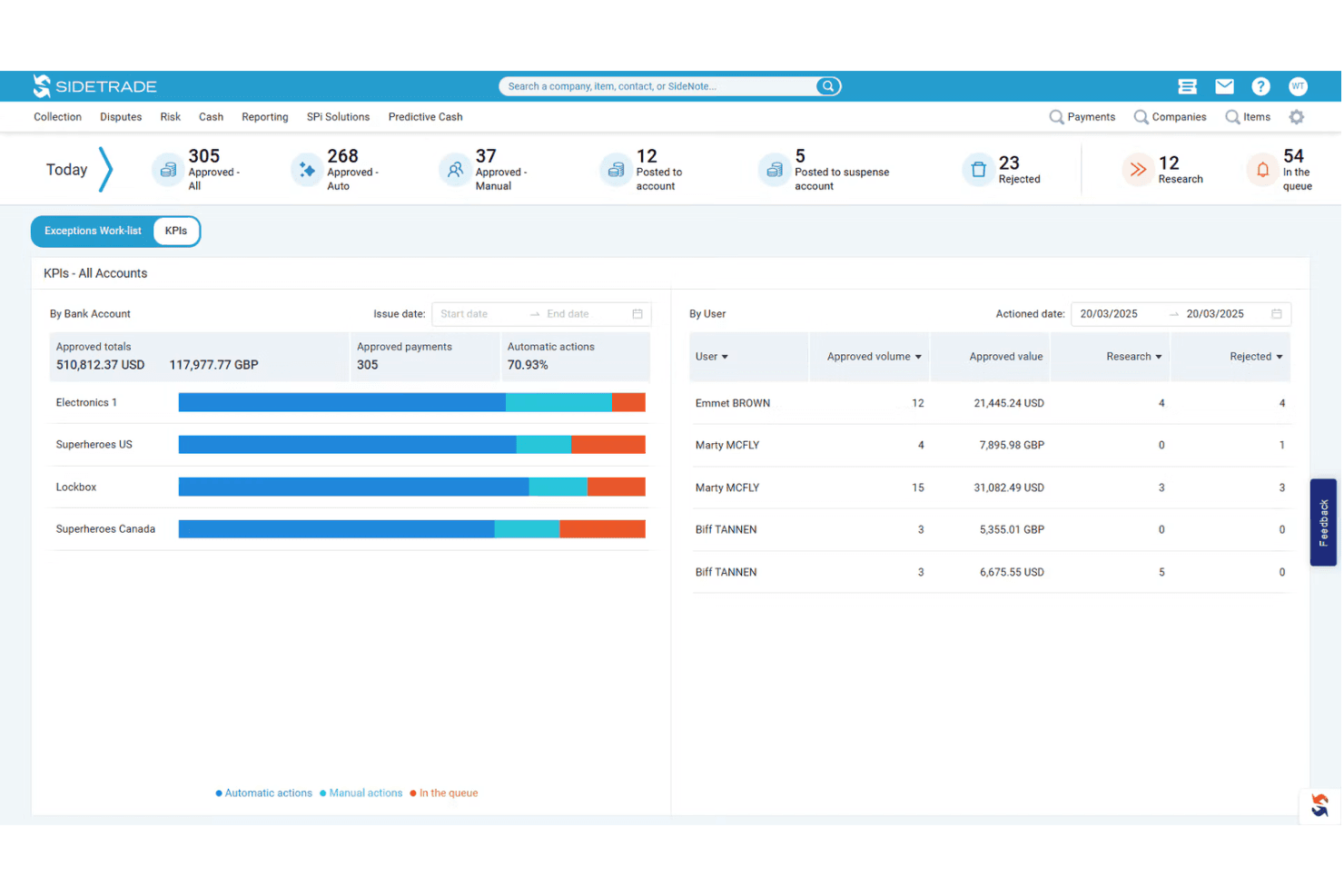
Sidetrade's exceptions work-list KPI dashboard tracking approved, rejected and queued payments by bank account and user. Sidetrade is an AI-native order-to-cash platform covering accounts receivable, collections prioritization, cash application, credit risk scoring, and dispute and deduction management.
Who Is Sidetrade Best For?
Sidetrade is a strong fit for mid-to-large enterprises whose collections teams need AI-driven prioritization based on buyer payment behavior data.
Why I Picked Sidetrade
I've included Sidetrade in my top picks because its AI collections engine, Aimie, goes beyond automating dunning. It scores each account using buyer payment behavior data to recommend the next best action for every invoice. I find the Sidetrade Payment Intelligence layer particularly useful because it predicts how many days a specific buyer is likely to take to pay. This allows collectors to time outreach around expected payment windows rather than relying solely on invoice aging. The vendor reports that approximately one in three successful collection actions in 2023 was AI-generated, indicating substantial adoption of its AI capabilities.
Sidetrade Key Features
- Credit Risk Expert: Combines internal payment behavior with data from more than 20 credit bureau and credit reference agency connectors to support credit decisions, with event-driven reviews triggered when risk indicators change.
- Digital Case management: Automatically matches incoming dispute emails to customer accounts, categorizes cases by type and priority, and routes them through structured resolution workflows with SLA monitoring.
- Customer Experience Center portal: Gives buyers self-service access to invoices, statements, and dispute submissions, with payment options embedded through Stripe and Worldpay across 34 languages.
- Embedded O2C analytics: Real-time dashboards cover DSO, CEI, aging balances, dispute rates, cash flow forecasts, and collection effectiveness, with threshold-based notifications included.
Sidetrade Integrations
Sidetrade's documented ERP integrations include SAP, with Cash App synchronizing payment, invoice, and reconciliation data. The vendor does not publish a complete integration count or detailed API specifications.
Pros and Cons
Pros:
- Supports multilingual customer portals
- Aimie recommends collection actions
- Predicts buyer payment timing
Cons:
- Operational deployment can lag
- Cash exceptions require intervention
Learn more about Sidetrade: Best for drafting AR actions from email replies
- Free demo available
- Pricing upon request
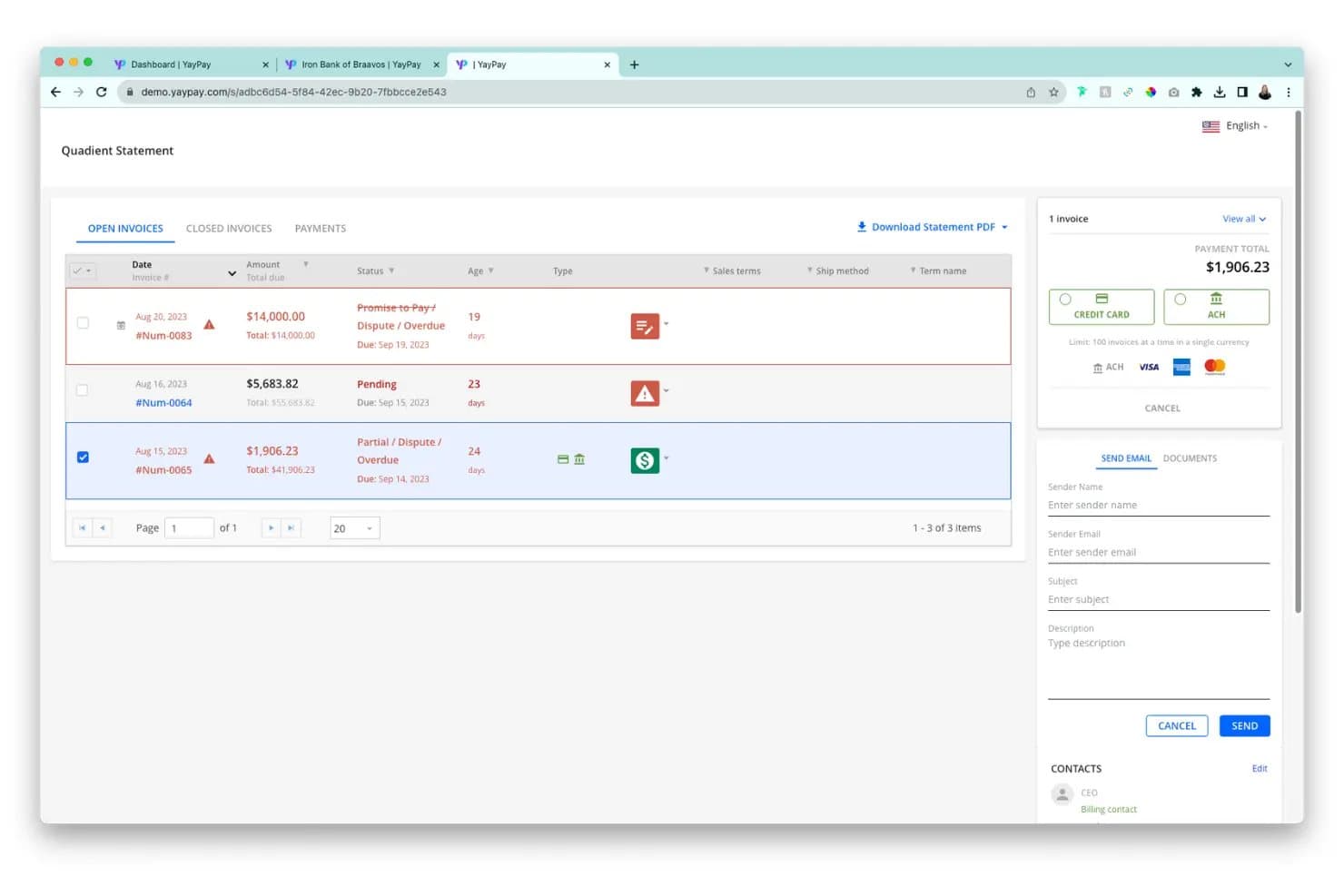
Quadient's customer statement portal lets buyers review open invoices and pay by card or ACH. Quadient AR Automation is an AI-driven accounts receivable platform that handles invoice delivery, collections prioritization, payment matching, credit risk scoring, and cash flow forecasting across a wide range of ERP and accounting integrations.
Who Is Quadient AR Automation Best For?
Quadient AR Automation is a strong fit for mid-market and enterprise finance teams managing complex collections workflows across multiple ERP systems.
Why I Picked Quadient AR Automation
I picked Quadient AR Automation because of how it handles incoming customer emails. Its AI reads incoming messages, identifies the appropriate AR action, and prepares a response for collector review before sending. I also like that its AI-driven collections prioritization scores accounts using payment history, invoice age, dispute patterns, and seasonality to rank worklists dynamically. Additionally, its Advanced Credit module combines Creditsafe and Dun & Bradstreet data with internal payer history to build credit scorecards that support credit limit adjustments.
Quadient AR Automation Key Features
- Customer payment portal: Gives customers 24/7 access to current and past invoices, outstanding balance updates, payment history, and payment options, including ACH, wire transfers, and credit cards.
- Advanced Credit module: Builds customer credit scorecards by combining Creditsafe and Dun & Bradstreet data with internal payer history to support credit limit adjustments.
- Automated payment matching and reconciliation: Automatically matches incoming payments to open invoices, with AI suggesting matches for unmatched payments for collector confirmation.
- Dispute tracking: Centralizes dispute tracking and team coordination, with AI detecting dispute-related language in communications and recommending routing to the appropriate collector.
Quadient AR Automation Integrations
Quadient AR Automation integrates with Acumatica, SAP, Microsoft Dynamics, Oracle NetSuite, Oracle E-Business Suite, Sage Intacct, QuickBooks, Salesforce, Infor, and Zuora. Specific data flows are documented for Acumatica.
Pros and Cons
Pros:
- Identifies dispute-related customer messages
- Combines external credit sources
- Drafts replies from emails
Cons:
- ERP synchronization experiences delays
- Aging reports lack flexibility
Learn more about Quadient AR Automation:
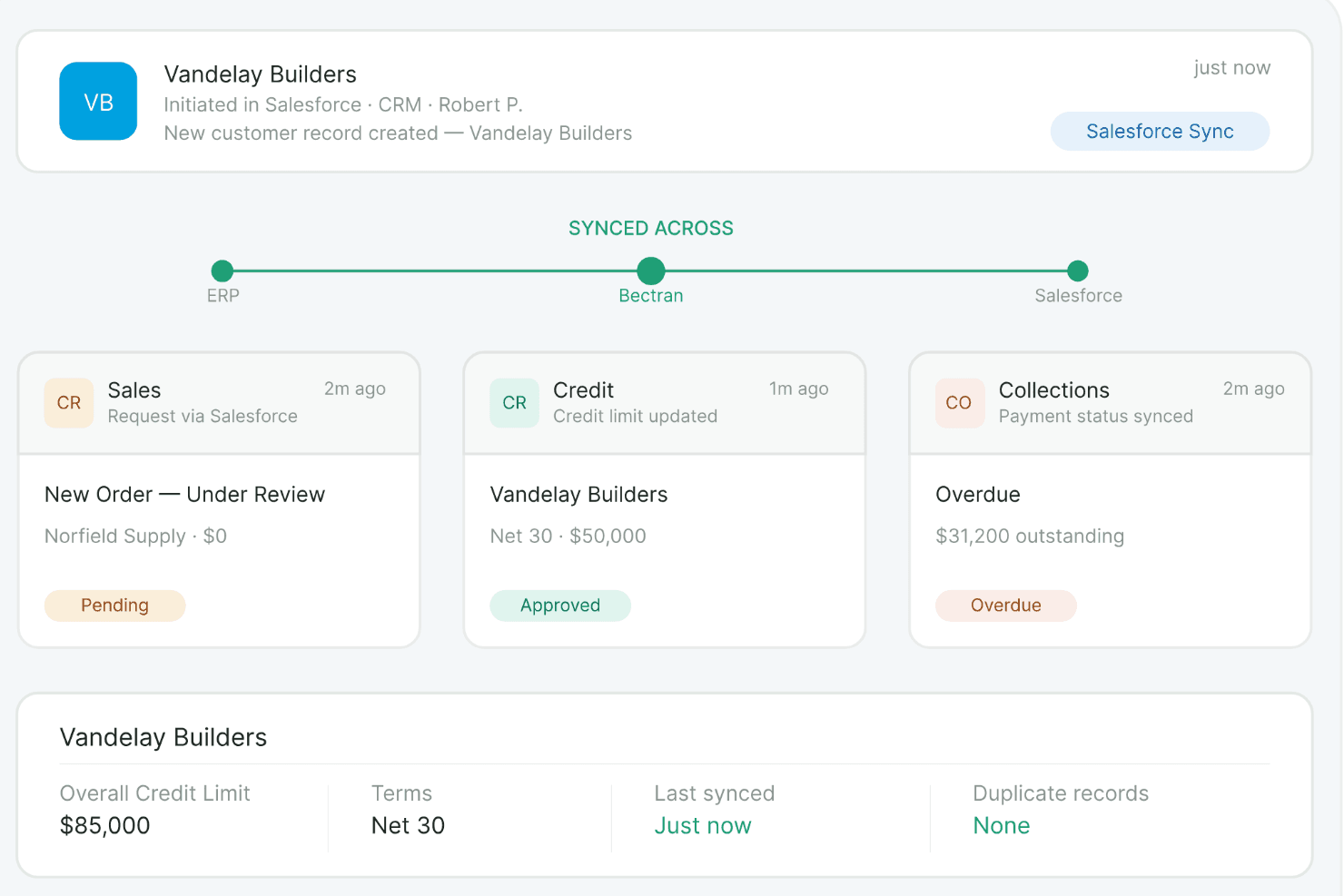
Bectran syncs a new customer record across ERP, Salesforce, credit and collections in real time. Bectran is an AI-powered order-to-cash platform that covers B2B credit management, collections, cash application, and accounts receivable, with extensive ERP and CRM integrations built into a single system.
Who Is Bectran Best For?
Bectran is a strong fit for B2B credit and collections teams that need a single platform connecting credit risk decisions, collections workflows, and cash application.
Why I Picked Bectran
I've included Bectran in my top picks because it connects credit risk decisions directly with collections workflows, reducing the need for your team to switch between systems when an account becomes delinquent. I particularly like the Universal Credit Management module, which consolidates credit bureau data, trade references, financial statements, and fraud alerts into a single, actionable scorecard. Predictive collections queues then rank those same accounts using factors such as credit limit utilization and dispute activity, helping collectors identify where to focus their efforts.
Bectran Key Features
- Collections Command Center: Centralizes collections activities with predefined strategies, branded dunning letters, and automated follow-up scheduling based on account risk scores.
- Customer payment portal: Lets customers view invoices, submit disputes, and pay via ACH, credit card, or EFT, with role-based access controls for Admin, Payment-Only, and Dispute-Only users.
- Bectran Intelligence Lab: Includes AI tools for customer risk alerts, dunning email revisions, financial statement analysis, and remittance data extraction.
- Multi-entity ERP sync: Integrates with SAP, Oracle NetSuite, Microsoft Dynamics, Workday, and other systems through APIs or webhooks, matching data across entities into a single customer record.
Bectran Integrations
Bectran lists more than 300 integrations, including SAP, Oracle NetSuite, Microsoft Dynamics, Workday, Salesforce, Stripe, Adyen, and Shopify. It supports REST APIs and webhooks for custom integrations, along with more than 3,000 native integrations across ERP, CRM, credit bureau, banking, and payment systems.
Pros and Cons
Pros:
- Role-based portals restrict permissions
- Risk-informed queues prioritize collections
- Centralizes bureau-based credit assessments
Cons:
- Payment exceptions require reconciliation
- Scheduled follow-ups generate duplicates
Learn more about Bectran: 10Best for collections through cash application
Upflow
- Free plan + free demo available
- Pricing upon request
Visit WebsiteCustomer Rating:4.5/5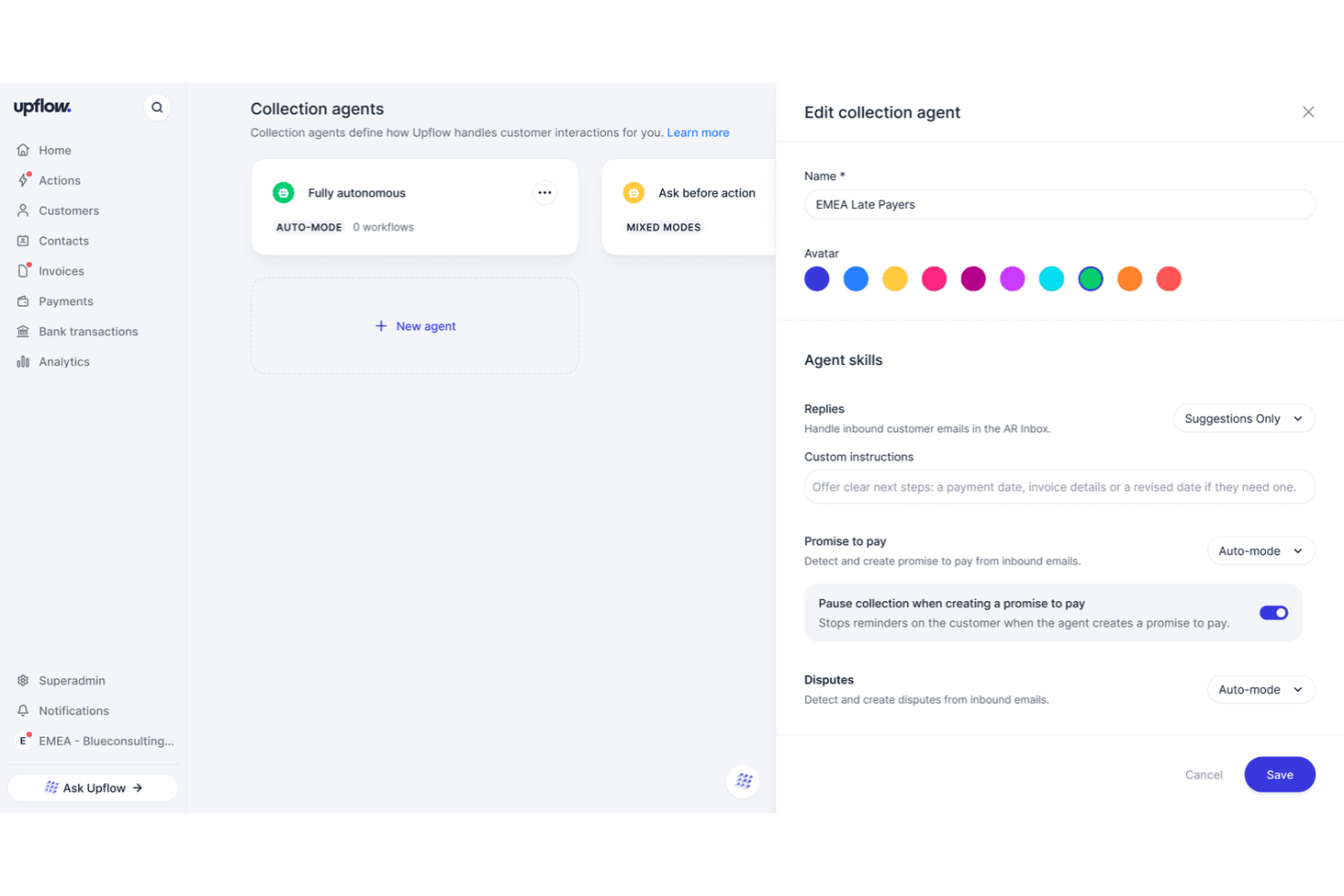
Upflow's collection agent settings, where teams configure replies, promise-to-pay handling and disputes automation. Upflow is an AI-powered accounts receivable platform for B2B finance teams that covers collections automation, cash application, AR analytics, and customer payment portals.
Who Is Upflow Best For?
Upflow is a strong fit for B2B finance teams that need to close the gap between collections automation and payment reconciliation through a single platform.
Why I Picked Upflow
I've included Upflow in my top picks because it connects collections automation directly with cash application in a single workflow. The Cash Application Agent automatically matches incoming payments to open invoices, handling partial, bulk, and multi-invoice payment scenarios. Meanwhile, the Collections Agent records promises to pay and flags disputes based on actual conversation context. I especially like that the Insights Agent identifies at-risk accounts using payment behavior signals, reducing the need for teams to manually determine which customers require follow-up.
Upflow Key Features
- Multichannel collection workflows: Automates outreach across email, SMS, calls, and letters, with sequences tailored to customer segments, payment behavior, and risk profiles.
- AR performance analytics: Provides more than 15 prebuilt widgets covering DSO, Best Possible DSO, CEI, aging balances, and payment mix across role-based dashboards.
- Smart Rules engine: Automatically assigns customers to tailored collection workflows using configured signals such as country, payment behavior, and account properties.
- Branded customer payment portal: Provides customers with a white-labeled portal to view invoices, download statements, make payments, and submit disputes directly.
Upflow Integrations
Upflow offers more than 14 native integrations, including NetSuite, Sage Intacct, QuickBooks Online, Xero, Salesforce, HubSpot, Gmail, Slack, Chargebee, and Stripe Billing. It also provides a REST API and MCP server for custom integrations and AI assistant connectivity.
Pros and Cons
Pros:
- Insights identify risky accounts
- Smart Rules personalize outreach
- Agents record payment promises
Cons:
- Sender identification affects deliverability
- Complex allocations need intervention
Learn more about Upflow:
Outros softwares de IA para contas a receber
Eis algumas opções adicionais que não entraram na minha lista restrita, mas que ainda vale a pena consultar:
- 11BlackLineBest for connecting collections and close
- 12VersapayBest for customer-led invoice resolution
- 13ChaserBest for invoice and customer risk decisions
- 14SerralaBest for ERP-led finance operations
- 15InvoicedBest for cross-border billing in 140 currencies
- 16PeakfloBest for Southeast Asian collection outreach
- 17KollenoBest for AI with adjustable human oversight
- 18GrowfinBest for linking collections to cash posting
- 19Sage AR AutomationBest for AR teams across 40+ ERPs
- 20CforiaBest for multi-currency customer hierarchies
Related Reviews
How I Evaluate AI Accounts Receivable Software
To make this list, a tool’s AI needs to handle accounts receivable work, like prioritizing at-risk accounts or matching payments to invoices. From there, I evaluate three things. Core functionality carries the most weight, like sending invoices and reminders and enabling customer payments. Then I look at standout features, like dispute management, and what a tool offers beyond its feature set, like implementation time.
Core Functionality (Table Stakes For This List)
When I'm selecting tools for my list, I score each one on a scale from 0 (does not offer the functionality) to 5 (excels in this area) for each core functionality listed below. I then convert the total into a percentage to help assess each tool's overall fit, with extra weight on any functionalities I’ve deemed essential.
- Collections Prioritization (Essential): I look for AI scores that reflect payment history and changing risk, so collectors can prioritize overdue accounts and promised payments.
- Automated Cash Application (Essential): I assess how well the tool matches partial or combined remittances to open invoices and flags uncertain matches for review.
- Invoicing & Dunning: I check whether invoice delivery and reminder sequences can follow due dates, customer segments, and collection triggers.
- Payment Prediction: I consider whether forecasts use account-level payment patterns and invoice details to estimate when customers will pay.
- Credit Risk Scoring: I evaluate how internal payment history and external credit data inform risk scores, credit limits, and payment terms.
- Customer Payment Portal: I look for self-service access to invoices and payment, plus ways for customers to ask questions or raise disputes.
Once I have a list of tools that meet the criteria, I consider what sets each platform apart.
Differentiating Factors (What Sets Vendors Apart)
Here's how I compare and contrast different vendors:
Standout Features
I evaluate how each tool handles dispute and deduction management, since short-pays left unresolved quietly erode cash. I look for built-in workflows that capture backup documents and route disputes to the right reviewer alongside open collection items. Customer risk alerts also matter—I check whether the tool flags shifts in payment behavior early enough to adjust terms or escalate outreach before an account goes delinquent. Finally, I consider multi-entity and multi-currency support, which is essential if your AR team bills across legal entities or jurisdictions.
Beyond Features
I check whether a vendor's AI scoring is explainable—collectors won't trust a priority list if they can't see why an account was flagged. I also evaluate onboarding timelines, since AI models need historical payment data to calibrate, and vendors with pre-built ERP connectors tend to deliver measurable wins like reduced manual matching within weeks rather than months. SOC 2 Type II compliance and audit trail depth matter too, especially for multi-entity teams where controllers need clean evidence for external audits.
Como escolher software de IA para contas a receber
Escolha um sistema testando se as suas decisões sobre contas a receber estão alinhadas com as suas prioridades de tesouraria, os dados do ERP e os requisitos de controlo.
| Se a sua prioridade for | Procure |
|---|---|
| Se a sua prioridade forDar prioridade às contas vencidas | ProcurePontuações de risco associadas ao histórico de pagamentos, com justificações visíveis |
| Se a sua prioridade forReduzir os recebimentos não aplicados | ProcureCorrespondência para remessas parciais e combinadas, com correspondências incertas assinaladas |
| Se a sua prioridade forResolver deduções | ProcureFluxos de trabalho que conservem os documentos comprovativos e atribuam revisores |
| Se a sua prioridade forMelhorar as previsões de tesouraria | ProcureEstimativas de pagamento baseadas no comportamento da conta e nos detalhes da fatura |
Como avaliar a sua lista restrita
- Teste as prioridades de cobrança: Durante um período de teste, analise 10 contas assinaladas em comparação com o histórico de pagamentos e registe se cada recomendação tem uma justificação clara.
- Execute uma tarefa de aplicação de recebimentos: Envie 20 remessas de exemplo, incluindo pagamentos parciais, e compare as correspondências propostas com o registo de recebimentos aprovado.
- Rastreie os documentos comprovativos das deduções: Selecione cinco faturas contestadas e peça ao fornecedor que apresente o histórico documental, o revisor atribuído e o histórico de estados de cada uma.
- Confirme o tratamento dos dados do ERP: Solicite um documento escrito de correspondência de campos e identifique como são corrigidos os registos de clientes, faturas e pagamentos quando as correspondências falham.
- Defina deliberadamente o âmbito: Utilize um memorando de decisão de uma página para ponderar os controlos de risco de um sistema orientado para o crédito face à cobertura de cobranças, deduções e aplicação de recebimentos proporcionada por um fluxo de trabalho focado desde a fatura até ao recebimento.
O que é o software de IA para contas a receber?
O software de contas a receber com IA utiliza inteligência artificial e automatização para apoiar o trabalho de gestão de faturas e pagamentos de clientes. Pode ajudar as equipas a dar prioridade às cobranças, associar pagamentos a faturas, avaliar o risco de crédito, enviar lembretes e gerir contestações. As equipas financeiras devem verificar de que forma o software explica as suas recomendações e mantém registos para revisão.
Funcionalidades
Eis as principais funcionalidades que procuro num software de contas a receber com IA:
- Priorização de cobranças: Classifica as contas em atraso utilizando o histórico de pagamentos, os detalhes das faturas e sinais de risco em mudança. Os cobradores podem utilizar estas classificações para identificar primeiro as contas que necessitam de atenção.
- Aplicação automática de recebimentos: Associa os pagamentos recebidos e os detalhes das remessas às faturas em aberto, incluindo pagamentos parciais ou combinados. Deve sinalizar as associações incertas para revisão antes do registo.
- Faturação e cobrança: Envia faturas e agenda lembretes de pagamento com base nas datas de vencimento, nos segmentos de clientes ou nas regras de cobrança. As equipas podem acompanhar a entrega e as atividades de acompanhamento.
- Previsão de pagamentos: Estima quando é provável que os clientes paguem, analisando o comportamento das contas e os dados das faturas. As equipas financeiras podem utilizar estas estimativas ao rever os recebimentos de caixa previstos.
- Classificação do risco de crédito: Avalia o histórico de pagamentos dos clientes e, quando disponível, os dados de crédito externos para identificar riscos. As equipas podem utilizar estas classificações para rever limites de crédito ou condições de pagamento.
- Portal de pagamentos para clientes: Dá aos clientes acesso a faturas e opções de pagamento num único local. Dependendo da ferramenta, os clientes também podem colocar questões ou comunicar problemas relacionados com faturas.
- Gestão de contestações e deduções: Regista pagamentos inferiores ao devido, faturas contestadas, documentos comprovativos e estados de revisão. Isto ajuda as equipas a acompanhar a responsabilidade pelos casos e os elementos de prova que sustentam cada resolução.
Vantagens
Eis algumas vantagens que pode esperar de um software de contas a receber com IA:
- Prioridades de cobrança mais claras: As classificações da IA, baseadas no histórico de pagamentos e em sinais de risco em mudança, ajudam os cobradores a decidir a que contas em atraso ou pagamentos prometidos devem dar prioridade.
- Menos recebimentos não aplicados: A aplicação automática de recebimentos associa remessas parciais ou combinadas às faturas em aberto e sinaliza as associações incertas para revisão antes do registo.
- Acompanhamento consistente das faturas: A entrega de faturas e os lembretes agendados podem seguir as datas de vencimento, os segmentos de clientes e os acionadores de cobrança.
- Previsões de tesouraria mais informadas: As previsões de pagamentos baseadas no comportamento das contas e nos detalhes das faturas fornecem às equipas financeiras informações adicionais ao estimarem os recebimentos previstos.
- Revisão mais antecipada do risco de crédito: As classificações baseadas no histórico interno de pagamentos e, quando disponível, nos dados de crédito externos podem levar as equipas a rever os limites de crédito ou as condições de pagamento.
- Resolução de contestações mais rastreável: Os fluxos de trabalho de contestação que conservam documentos comprovativos, atribuem revisores e acompanham os estados ajudam as equipas a resolver pagamentos inferiores ao devido com elementos de prova documentados.
Preços
Os preços variam consoante as funcionalidades, o modelo de faturação e a dimensão da empresa. Muitos fornecedores apresentam orçamentos personalizados para planos empresariais, mas estes intervalos oferecem uma orientação geral sobre os custos do software de contas a receber com IA.
Tabela de comparação de planos para software de contas a receber com IA
| Tipo de plano | Preço médio | Funcionalidades comuns |
|---|---|---|
| Tipo de planoPlano gratuito | Preço médio$0 | Funcionalidades comunsFaturação básica, acompanhamento manual de pagamentos, registos de clientes limitados e um pequeno número de lembretes. |
| Tipo de planoPlano pessoal | Preço médio$10–$50/utilizador/mês | Funcionalidades comunsCriação de faturas, lembretes de pagamento, registos de clientes e acompanhamento básico de pagamentos. |
| Tipo de planoPlano empresarial | Preço médio$100–$500/month | Funcionalidades comunsFaturação automatizada, fluxos de trabalho de cobrança, aplicação de recebimentos, relatórios de pagamentos e portais para clientes. |
| Tipo de planoPlano empresarial de grande dimensão | Preço médio$500–$2,000+/month | Funcionalidades comunsPriorização de cobranças orientada por IA, aplicação avançada de recebimentos, gestão de contestações, integrações com ERP e controlos personalizados. |
Perguntas frequentes
Respostas a perguntas frequentes sobre software de contas a receber com IA:
O software de contas a receber com IA pode funcionar com o meu ERP atual?
Sim, muitas plataformas ligam-se a sistemas ERP, mas os conectores disponíveis e os fluxos de dados variam consoante o fornecedor. Pergunte se a ligação sincroniza os registos de clientes, faturas, pagamentos e remessas, e com que frequência os atualiza. Solicite um documento de mapeamento de campos antes de efetuar a compra. Depois, teste casos-limite, como clientes duplicados ou pagamentos não aplicados, numa área de testes ou num projeto-piloto. Confirme qual é o sistema responsável por cada registo, para que as correções não criem dados contraditórios.
De quantos dados históricos precisa o software de contas a receber com IA?
Não existe um mínimo universal; a quantidade depende dos modelos do fornecedor e da qualidade dos seus dados. Pergunte de que dados históricos a ferramenta precisa para avaliar contas ou prever os prazos de pagamento e se consegue trabalhar com registos incompletos. Verifique como lida com novos clientes com históricos de pagamentos limitados. Antes de confiar nas suas recomendações, compare-as com resultados conhecidos das contas durante um projeto-piloto. Registe previsões ou prioridades incorretas e, em seguida, pergunte como o modelo lida com as correções.
A IA deve enviar mensagens de cobrança sem que uma pessoa as reveja?
Depende da mensagem e dos seus controlos internos. Normalmente, pode definir regras para lembretes de rotina, mantendo a revisão humana para contas sensíveis, litígios ou comportamentos de pagamento invulgares. Pergunte se o sistema suporta etapas de aprovação, modelos de mensagens, segmentação de clientes e regras de escalamento. Teste os lembretes com contas de exemplo antes de ativar o envio automático. Confirme também se o software regista o que envia e quando, para que a sua equipa possa investigar questões dos clientes ou rever posteriormente as atividades de cobrança.