

O software de faturação para serviços profissionais é desenvolvido especificamente para ajudar as empresas a criar faturas, registar horas faturáveis e gerir pagamentos relativos ao trabalho realizado para clientes.
Se pretende faturar os clientes com precisão, receber pagamentos mais rapidamente e manter registos financeiros claros, escolher a ferramenta certa é indispensável. Com as exigências rigorosas dos clientes e projetos complexos, precisa de um software que se adapte à forma como regista o tempo e gere os projetos — sem acrescentar trabalho extra.
Apresentamos abaixo opções avaliadas por especialistas, concebidas para equipas de serviços profissionais que pretendem simplificar a faturação, evitar erros manuais e estar preparadas para auditorias. Encontre os detalhes de que precisa para comparar as opções e tomar uma decisão fundamentada.
Why Trust Our Software Recommendations
6,700+
Reviews
20
Industry experts
16+
Evaluation factors
14
Years
Our team has been testing and reviewing software since 2012. As finance leaders ourselves, we know how difficult—and important—it is to choose the right software.
For this guide, we evaluated tools using hands-on testing and independent research, scoring tools using our selection criteria.
Our reviews reflect our human editorial judgment, not a sales pitch.
Tabela comparativa: software de faturação para serviços profissionais
Esta tabela comparativa resume os detalhes dos preços das minhas principais escolhas de software de faturação para serviços profissionais.
Sorted by: Default
| Tool | Starting Price | Website | |
|---|---|---|---|
Best end-to-end work management features | 4.5 out of 5 | $17/user/month 14-day free trial | Book Demo |
Best forecasting for staffing and finance | 4.6 out of 5 | $17/user/month 21-day free trial + free demo available | Website |
Best cross-project visibility for growing agencies | Not rated | $9/user/month 14-day free trial + free demo available | Website |
Best margin tracking for agency projects | 4.6 out of 5 | $10/user/month 14-day free trial + demo available | Book Demo |
Best for project-based time tracking workflows | 4.5 out of 5 | $20/user/month Free demo available | Website |
Best international billing support for firms | 4.5 out of 5 | Pricing upon request 10-day free trial + demo available | Website |
Best built-in analytics for project profitability | 3.9 out of 5 | Pricing upon request Free demo available | Website |
Best workflow automation for IT service providers | 3.9 out of 5 | Pricing upon request Free demo available | Website |
Best with accounting ledger compliance | Not rated | $49/user/month 14-day free trial | Website |
Best native Salesforce integration option | Not rated | Pricing upon request Free demo available | Website |


Análises do melhor software de faturação para serviços profissionais
Seguem-se os meus resumos detalhados do melhor software de faturação para serviços profissionais que integrou a minha seleção. As minhas análises apresentam uma visão detalhada das funcionalidades, dos casos de utilização mais adequados e das integrações de cada software, para o ajudar a encontrar a melhor opção para si.
 Best end-to-end work management features
- 14-day free trial
- From $17/user/month
Visit WebsiteCustomer Rating:4.5/5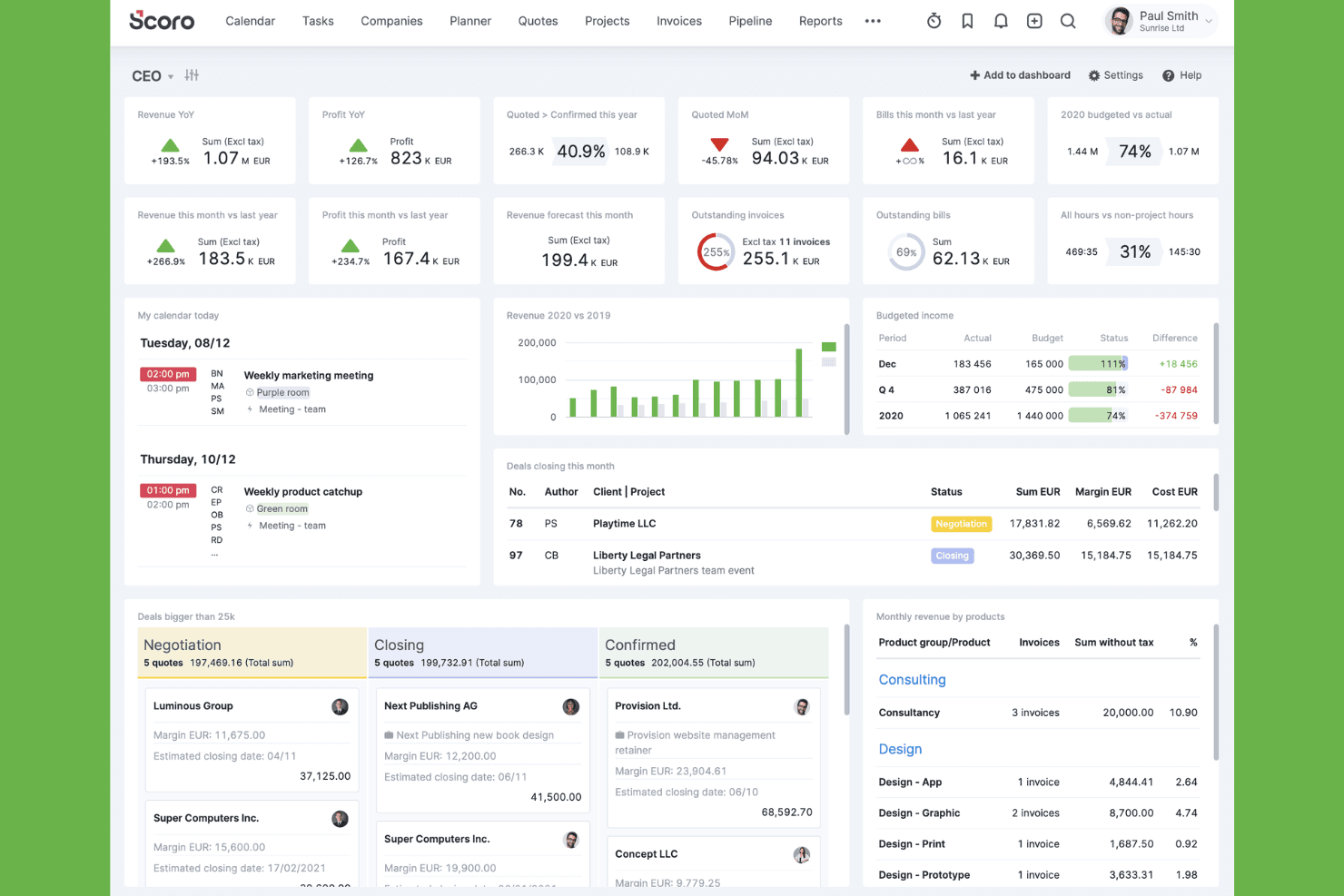
Scoro offers a comprehensive CEO dashboard displaying real-time KPIs, revenue metrics, deal pipelines, and budgeted income in a single view. Scoro gives professional services firms a centralized way to manage day-to-day operations and keep project performance tied closely to financial results. Its connected workflows help teams maintain visibility into workloads, budgets, utilization, and profitability as client work progresses.
Who Is Scoro Best For?
Scoro is a strong fit for growing professional services firms that want one platform to manage projects, people, and finances without stitching together separate tools.
Why I Picked Scoro
Scoro earns its spot as one of the best on my shortlist because it genuinely covers the full billing workflow without needing companion tools. I like that quotes convert directly into projects, and approved time entries flow straight into invoices, keeping the billing cycle tight. The retainer management module tracks used vs. remaining hours per period, which I find especially useful for teams billing on recurring contracts.
Scoro Key Features
- Multi-currency invoicing: Generate invoices in different currencies with automatic exchange rate handling for international client billing.
- Billable vs. non-billable time tracking: Log hours against projects and flag each entry as billable or non-billable to keep revenue recognition accurate.
- Project budget tracking: Set cost and revenue budgets per project and monitor actuals against them in real time.
- Customizable financial dashboards: Build real-time views of revenue, utilization, and project profitability across your portfolio.
Scoro Integrations
Scoro offers native integrations with Xero, QuickBooks, Sage Intacct, Exact Online, Salesforce, HubSpot, Jira, Slack, Google Calendar, and Dropbox, among others. It also connects with Zapier and provides an API for custom integrations.
Pros and Cons
Pros:
- Retainer billing with hour balance monitoring
- Real-time margin tracking per project
- Quotes convert directly into project invoices
Cons:
- No built-in team chat or messaging
- Multi-line quote revenue splitting is limited
 Best forecasting for staffing and finance
- 21-day free trial + free demo available
- From $17/user/month (billed annually)
Visit WebsiteCustomer Rating:4.6/5
Projectworks is a PSA platform improving time, resources, and finances. Projectworks is a professional services automation (PSA) platform that combines time tracking, resource management, invoicing, and financial forecasting for consulting firms. It also supports project planning, budgeting, and reporting to help businesses improve operational efficiency and financial performance.
Who Is Projectworks Best For?
Projectworks is a strong fit for mid-sized consulting and professional services firms that bill by the hour and need visibility across project margins and staff utilization.
Why I Picked Projectworks
I picked Projectworks as one of the best because its forecasting model connects staffing data directly to financial projections in a way most tools don't. When you adjust resourcing on a project, the financial forecast updates in real time, giving me a live view of projected revenue and margin based on actual capacity. I also like the capacity heatmaps, which surface overbooking and underutilization before they hit your bottom line. That loop between staffing decisions and revenue visibility is where Projectworks really earns its place on this list.
Projectworks Key Features
- Timesheet approvals: Review and approve submitted timesheets before time flows into invoicing or project financials.
- Invoice generation: Create invoices directly from approved time and expenses, with support for fixed-fee and time-and-materials billing.
- Expense tracking: Log and categorize project expenses against budgets for accurate cost reporting.
- Project budget monitoring: Set project budgets and track spend in real time against estimated hours and costs.
Projectworks Integrations
Projectworks offers native integrations with Xero, QuickBooks, MYOB, Jira, Azure DevOps, HubSpot, Salesforce, 12d Synergy, Employment Hero, Microsoft Teams, BambooHR, and Microsoft Outlook. It also connects with Zapier and provides an API for custom integrations.
Pros and Cons
Pros:
- Invoices auto-populate from approved time entries
- Resource heatmaps flag utilization imbalances early
- Real-time financial forecasts update
Cons:
- Historical data import needs manual cleanup
- Limited expense ID linking in reports
Learn more about Projectworks: Best cross-project visibility for growing agencies
- 14-day free trial + free demo available
- From $9/user/month (billed annually)

Birdview PSA unifies project management, resources, time tracking, and billing. Birdview PSA is a professional services automation platform that brings together project management, resource planning, time tracking, client billing, and reporting in one centralized system, helping teams manage projects more efficiently from start to finish.
Who Is Birdview PSA Best For?
Birdview PSA is a strong fit for mid-sized agencies and professional services firms managing multiple concurrent client projects.
Why I Picked Birdview PSA
Birdview PSA earns its spot on my shortlist because of how well it handles visibility across active client engagements. I particularly like the portfolio-level dashboards, which surface budget status, resource utilization, and project health across every account at once. My team can track billable hours against project budgets in real time, so nothing slips through the cracks before invoicing.
Birdview PSA Key Features
- Invoice generation: Create and send client invoices directly from logged project time and approved expenses.
- Expense tracking: Log and categorize project expenses to keep client billing accurate and audit-ready.
- Client portal: Share project updates, files, and billing details with clients through a dedicated access point.
- Capacity planning: View team availability across upcoming projects to allocate billable resources before gaps occur.
Birdview PSA Integrations
Birdview PSA offers native integrations across the Microsoft ecosystem, including Microsoft 365, Microsoft Teams, SharePoint, OneDrive, MS Outlook, and MS Project, along with Jira, ServiceNow, QuickBooks, Adobe Creative Cloud, and Tim
Pros and Cons
Pros:
- Segmented spaces for confidential client work
- Built for service-based project workflows
- Cross-project budget and resource tracking
Cons:
- Adding time entries has a learning curve
- Reported slow loading and screen lag
Learn more about Birdview PSA: Best margin tracking for agency projects
- 14-day free trial + demo available
- From $10/user/month
Visit WebsiteCustomer Rating:4.6/5
Productive connects project delivery and financial oversight for services firms. Productive is a project management and billing platform built specifically for agencies, consultancies, and other professional services firms that need to connect project delivery with financial oversight in a single workspace.
Who Is Productive Best For?
Productive is purpose-built for digital and creative agencies that bill clients by the hour, retainer, or fixed fee and need tight control over project margins.
Why I Picked Productive
I've included Productive in my top picks because its margin tracking goes deeper than most billing tools in this space. I like that it factors in overhead costs and salary expenses alongside billable hours, so the margin figure I see per project reflects actual profitability, not just revenue. The profitability report breaks down budget spent, cost, and margin in real time, which means I can catch a slipping project before it closes in the red.
Productive Key Features
- Automated retainer invoicing: Productive auto-generates invoices for recurring budgets, so you can finalize and send them without rebuilding them each billing cycle.
- Multi-phase budget splitting: Break large, long-term projects into separate budget phases, each tracked independently for spend and remaining amounts.
- Budget overrun alerts: Set custom thresholds so Productive notifies you before a project burns through its estimate, not after.
- Multi-currency invoicing: Create invoices and track expenses in different currencies, with support for multiple subsidiaries within a single account.
Productive Integrations
Productive offers native integrations with Jira, HubSpot, Xero, QuickBooks, Sage, Slack, Gmail, Microsoft Outlook, Google Calendar, and BambooHR, along with accounting-specific connectors for Fortnox, Visma e-conomic, Exact, and Twinfield. It also connects with Zapier and provides an open API for custom integrations.
Pros and Cons
Pros:
- Retainer and fixed-fee budget tracking built in
- Invoices pull directly from tracked time
- Real-time margin visibility per project
Cons:
- Reporting insights can feel limited
- Reported bugs in timesheets and invoicing
Learn more about Productive: Best for project-based time tracking workflows
- Free demo available
- From $20/user/month
Visit WebsiteCustomer Rating:4.5/5
BigTime manages projects, time, billing, invoicing, and quoting. BigTime is a professional services automation (PSA) platform that covers time and expense tracking, project billing, resource management, invoicing, and quoting in a single system built around your general ledger.
Who Is BigTime Best For?
BigTime is a strong fit for mid-sized professional services firms—think consultancies, engineering, and IT firms—that bill clients by project or hourly engagement.
Why I Picked BigTime
BigTime is one of my top picks because I love how it connects time tracking directly to project billing. Its auto-generated timesheets pull logged hours straight into invoices, so your team spends less time on admin and more time on billable work. I also like the project financial health dashboard, which surfaces budget burn, resource usage, and underbilled time in one view, so you catch revenue leakage before it hits your margins.
BigTime Key Features
- Customizable invoice templates: Build invoices with your own branding, line-item structures, and billing rate configurations for each client.
- Expense tracking: Log, categorize, and attach receipts to project expenses that feed directly into client billing.
- Approval workflows: Route timesheets and invoices through multi-step approval chains before they reach the client.
- Revenue recognition: Recognize revenue by project milestone, completion percentage, or billing schedule.
BigTime Integrations
BigTime offers native integrations with QuickBooks, Sage Intacct, Xero, NetSuite, Salesforce, HubSpot, Jira, Google Calendar, Lacerte, and BambooHR, along with enterprise connectors for Smartsheet, Microsoft Project, Microsoft Dynamics GP, and Zendesk. It also connects with Zapier and provides a REST-based API for custom integrations.
Pros and Cons
Pros:
- Built-in project budget and profitability reporting
- Flexible billing models for varied engagements
- Tracks billable time tied to project budgets
Cons:
- Report customization can feel restrictive
- Mobile app lacks full desktop functionality
Learn more about BigTime: Best international billing support for firms
- 10-day free trial + demo available
- Pricing upon request
Visit WebsiteCustomer Rating:4.5/5
TimeSolv tracks time, billing, trust accounting, and projects for law firms. TimeSolv is a legal time tracking and billing platform that covers time entry, invoicing, trust accounting, online payments, project management, and CRM, built for law firms and professional services firms billing across multiple clients and matters.
Who Is TimeSolv Best For?
TimeSolv is a strong fit for mid-sized law firms and professional services practices billing clients across multiple currencies or international jurisdictions.
Why I Picked TimeSolv
I've included TimeSolv in my top picks because it handles international billing in a way most legal billing tools simply don't. You can select the billing currency at the invoice level, so firms working with clients across different countries can issue invoices in local currencies with accurate exchange rate conversions. I also like that TimeSolv supports built-in LEDES billing, which is standard for firms billing corporate clients globally, and multiple billing rate structures per matter.
TimeSolv Key Features
- Trust accounting: Track client funds held in trust separately from operating accounts, with built-in reconciliation tools.
- Matter budgets: Set spending limits per matter and monitor time and expense totals against those limits in real time.
- Batch billing: Generate and send multiple invoices in a single action across selected clients or matters.
- Mobile time entry: Log billable time from any device, including offline, with automatic syncing when reconnected.
TimeSolv Integrations
TimeSolv offers native integrations with QuickBooks, Xero, Microsoft 365 (including Outlook and OneDrive), Dropbox, NetDocuments, LawPay, AccountEdge, and LexShare/LexSign. Zapier is not currently supported, but an API is available for custom integrations.
Pros and Cons
Pros:
- Responsive and knowledgeable customer support team
- Advanced matter management tracking
- Multi-currency invoicing for global clients
Cons:
- Invoice corrections require extra manual steps
- Mobile app lacks full web feature parity
Learn more about TimeSolv: Best built-in analytics for project profitability
- Free demo available
- Pricing upon request
Visit WebsiteCustomer Rating:3.9/5
Deltek Vantagepoint offers a Resource View dashboard that displays scheduled utilization percentages, utilization targets, and period-by-period breakdowns for each team member. Deltek Vantagepoint is a project-based ERP built specifically for professional services firms, combining project accounting, resource planning, time and expense tracking, billing, and financial reporting in a single platform.
Who Is Deltek Vantagepoint Best For?
Deltek Vantagepoint is a strong fit for architecture, engineering, and consulting firms that need project-based accounting with government contract compliance built in.
Why I Picked Deltek Vantagepoint
I picked Deltek Vantagepoint because no other tool on this list gives you project profitability analytics that are this deeply tied to the financial engine behind them. I especially like the built-in Dela AI, which monitors project health in real time and surfaces alerts when budgets, margins, or utilization metrics start moving in the wrong direction. Vantagepoint's project-specific KPIs let you track financial performance at the phase and task level, not just the project level, so you can pinpoint exactly where cost overruns are happening before they compound.
Deltek Vantagepoint Key Features
- Automated billing and invoicing: Automates the billing cycle, including invoice generation, so your team spends less time on manual billing tasks.
- Multi-company financial management: Manages financials across multiple entities, currencies, and cost structures from a single accounting environment.
- CRM and pipeline management: Tracks client relationships, pursuits, and proposal activity alongside project financials in one system.
- Vantagepoint Payments: Automates accounts receivable and accounts payable processes directly within the platform to accelerate cash collection.
Deltek Vantagepoint Integrations
Deltek Vantagepoint offers native integrations with Microsoft Outlook, UKG, Deltek PIM, Deltek ArchiSnapper, Deltek GovWin IQ, and QuickBooks Online, along with marketplace partners like EleVia Software, Vena Solutions, and ClientPay. It also provides a RESTful API for custom integrations and supports pre-built connectors for iPaaS platforms.
Pros and Cons
Pros:
- Promotes cross-functional data accessibility
- Supports localized currency management
- Automated revenue recognition tied to milestones
Cons:
- Higher cost relative to delivered value
- Slow page loading and clunky interface
Learn more about Deltek Vantagepoint: Best workflow automation for IT service providers
- Free demo available
- Pricing upon request
Visit WebsiteCustomer Rating:3.9/5
ConnectWise PSA manages MSP service, time, billing, and sales in one system. ConnectWise PSA is a professional services automation platform built for managed service providers (MSPs) that covers service management, time tracking, project delivery, billing automation, and sales pipeline management in one connected system.
Who Is ConnectWise PSA Best For?
ConnectWise PSA is purpose-built for managed service providers (MSPs) and IT service firms that need to manage recurring contracts, service tickets, and client billing in one system.
Why I Picked ConnectWise PSA
I picked ConnectWise PSA as one of the best because of how its workflow engine connects service delivery directly to billing. I like that automated ticket intake, SLA tracking, and billing reconciliation all run on the same workflow layer, so nothing slips through unbilled. The Agreement tie-back feature is particularly useful, automatically reconciling vendor and service data to active agreements so every billable moment gets captured without manual checking.
ConnectWise PSA Key Features
- Time and expense tracking: Log billable hours and expenses directly against service tickets, projects, or agreements.
- Procurement management: Create and track purchase orders, manage vendor costs, and tie procurement to client invoices.
- Project billing milestones: Set project phases with individual billing triggers to invoice clients at defined delivery points.
- Reporting dashboards: View real-time financial and operational data across clients, agreements, and technician activity.
ConnectWise PSA Integrations
ConnectWise PSA integrates with a marketplace of 458+ partners across cybersecurity, finance, and productivity. Key integrations include QuickBooks Online, Xero, and Zapier. An SDK and open API are available for custom integrations.
Pros and Cons
Pros:
- Automated dispatch and ticket billing triggers
- Agreement-level gross profit visibility per client
- Time entries auto-link to billing records
Cons:
- Requires dedicated admin oversight
- Custom report building requires extra effort
Learn more about ConnectWise PSA:

Bill4Time handles legal time tracking, billing, and trust accounting. Bill4Time is a legal time tracking and billing platform that combines time entry, invoicing, trust accounting, online payments, expense tracking, and matter management in one solution. Built around matter-based billing workflows, it helps legal professionals stay organized, simplify billing processes, and manage client work more efficiently.
Who Is Bill4time Best For?
Bill4time is a natural fit for solo attorneys and small law firms that need trust accounting compliance built into their billing workflow.
Why I Picked Bill4time
Bill4time earns its spot on my shortlist because its trust accounting compliance features are built into the billing workflow itself, not bolted on as an afterthought. I particularly like how it automatically separates earned funds from retainer funds, links trust deposits directly to individual matters, and generates trust ledger reports ready for audits. The built-in safeguards against overdrafts and commingling give solo attorneys and small firms real confidence that every transaction stays within IOLTA and ABA guidelines.
Bill4time Key Features
- Batch invoicing: Review, finalize, and send multiple invoices simultaneously from pre-bill drafts compiled from logged time and expenses.
- One-click time timers: Start, pause, stop, or resume timers that sync directly to specific matters and invoices across desktop and mobile.
- Automated payment reminders: Track overdue invoices and send automated reminder emails to reduce late payments without manual follow-up.
- Client portal: Give clients secure, 24/7 access to invoices, billing history, and online payment options directly from their portal.
Bill4time Integrations
Bill4time offers a smaller set of native integrations, including QuickBooks, Box, Google Calendar, Outlook Calendar, NetDocuments, and LawPay. An API is available for custom integrations, though Zapier support is not clearly documented.
Pros and Cons
Pros:
- Responsive and knowledgeable customer support team
- Matter-based billing tracks per-client details
- Simplifies user training protocols
Cons:
- Client and matter setup require repetitive steps
- Lacks automated dark mode settings
Learn more about Bill4time: Best native Salesforce integration option
- Free demo available
- Pricing upon request

Certinia PS Cloud unifies project, resource, billing, and financial management. Certinia PS Cloud is a professional services automation (PSA) platform built natively on Salesforce that covers project management, resource planning, billing, revenue recognition, and financial reporting in a single system.
Who Is Certinia PS Cloud Best For?
Certinia PS Cloud is a natural fit for mid-to-large professional services firms that already run Salesforce as their CRM and want their PSA and billing data in the same ecosystem.
Why I Picked Certinia PS Cloud
I picked Certinia PS Cloud because no other PSA tool on this list runs directly inside Salesforce the way this one does. That means your CRM opportunity data, project billing, and revenue recognition all live on the same record, with no syncing required. I especially like how it connects sales and services early, letting resource managers see staffing demand during the sales cycle so billing can start without delays once a project kicks off. It also handles T&M, fixed-fee, milestone, and subscription billing models within the same platform.
Certinia PS Cloud Key Features
- Revenue recognition automation: Automates revenue recognition from opportunity through delivery, reducing manual billing cycles and revenue leakage.
- Einstein analytics: Uses Salesforce Einstein to run real-time, multidimensional analysis across project actuals, margins, and resource costs.
- Customer and partner communities: Built-in communities give clients and partners secure access to project plans, reports, and billing inquiries in one place.
- Skills-based resource matching: Matches staff to opportunities based on geography, skills, certifications, and experience before a project starts.
Certinia PS Cloud Integrations
Certinia PS Cloud is built natively on Salesforce, integrating with the full Salesforce ecosystem. It offers 25+ additional integrations, including Avalara, SAP Concur, Jira, DocuSign, Expensify, Outlook, Plaid, Conga, MuleSoft, and Xactly. RESTful and SOAP-based APIs are available for custom integrations.
Pros and Cons
Pros:
- Organization-wide consultant time visibility
- Handles fixed-fee and T&M project types
- Simplifies complex financial reporting
Cons:
- Lacks tiered entry-level options
- High learning curve for new users
Learn more about Certinia PS Cloud:
Outro software de faturação para serviços profissionais
Eis algumas opções adicionais de software de faturação para serviços profissionais que não integraram a minha seleção, mas que continuam a merecer a sua atenção:
- 11AcceloBest automated client billing for services firms
- 12KantataBest resource management insights for teams
- 13AvazaBest integrated quoting and invoicing
- 14FreshBooksBest mobile invoicing for small businesses
- 15CanopyBest all-in-one tools for accounting firms
- 16PSOhubBest automated project-to-invoice workflow
- 17RocketlaneBest client onboarding for services teams
- 18Clio ManageBest compliance tools for legal professionals
- 19HarvestBest time tracking for remote teams
- 20Time59Best solo practitioner billing simplicity
How I Evaluate Billing Software for Professional Services
I split my evaluation into two layers: the baseline capabilities a tool needs—like converting approved timesheets into client invoices—and the differentiators that separate one vendor from another.
Core Functionality (Table Stakes for This List)
When I'm selecting tools for my list, I rank each one on a scale from 0 (does not offer the functionality) to 5 (excels in this area) for each core functionality listed below. Then, I calculate the tool's total score as a percentage. Each tool needs to achieve a minimum total score of 65% to be considered for inclusion.
- Time and expense billing: I look for tools that let consultants log billable hours and tag reimbursable expenses to specific clients or matters, then auto-generate draft invoices from those entries.
- Flexible fee structures: A tool should handle hourly, fixed-fee, retainer, milestone, and capped-fee arrangements so firms can bill each engagement on its own terms without workarounds.
- Project and engagement tracking: WIP dashboards and budget-versus-actual reporting at the project level are what I evaluate here, since spotting unbilled work early protects margin.
- Client invoicing and AR: From branded invoice templates and online payment portals to automated reminders and AR aging reports, I check how well each tool manages the full invoice-to-cash cycle.
- Rate and approval management: Multi-tiered rate tables that vary by staff level, client agreement, or matter type matter a lot, and I also look for structured pre-bill review and approval workflows.
- Accounting and revenue integration: Two-way sync with general ledger platforms is a baseline. I also evaluate support for revenue recognition standards and trust accounting, where applicable.
Once I have a list of tools that meet this criteria, I consider what sets each platform apart.
Differentiating Factors (What Sets Vendors Apart)
Here's how I compare and contrast different vendors:
Standout Features
WIP and pre-bill review workflows are a big differentiator. I look for tools where a billing manager can write down, transfer, or defer time entries before an invoice is finalized. Retainer and trust accounting also matters, especially for law firms that need segregated escrow ledgers with replenishment alerts. A client billing portal adds real value when clients can view invoices, dispute line items, and pay online without back-and-forth emails. I also evaluate each tool's multi-rate engine to see if it handles rate overrides by client, role, or matter with effective date tracking.
Beyond Features
Industry-specific fit is something I always evaluate. A law firm needs LEDES e-billing support, while an architecture firm may need AIA progress billing—generic tools rarely cover both. I also check how well each tool syncs with accounting platforms like QuickBooks, Xero, or Sage Intacct, since a reliable two-way GL connection saves hours during close. For firms billing across multiple offices or geographies, multi-currency invoicing and localized tax handling are worth confirming before you commit.
Como escolher software de faturação para serviços profissionais
É fácil perder-se em listas extensas de funcionalidades e estruturas de preços complexas. Para o ajudar a manter o foco enquanto conduz o seu processo específico de seleção de software, apresentamos uma lista de fatores a ter em conta:
| Fator | O que considerar |
| Escalabilidade | A ferramenta suportará o volume de clientes, o número de utilizadores e a complexidade do seu modelo de faturação à medida que a empresa cresce? |
| Integrações | Estabelece uma ligação fluida ao seu sistema de contabilidade, CRM e conjunto de ferramentas de gestão da prática? |
| Personalização | Pode adaptar os modelos de faturas, as tabelas de preços e os fluxos de trabalho de aprovação aos processos da sua empresa? |
| Facilidade de utilização | A sua equipa de faturação e os profissionais considerarão a interface acessível ou será necessária uma formação intensiva? |
| Implementação e integração inicial | De que recursos precisará para migrar dados, configurar fluxos de trabalho e formar os colaboradores? Está disponível integração inicial e migração conduzidas pelo fornecedor? |
| Custo | Os preços são adequados ao seu volume de faturação e número de utilizadores? Esteja atento aos custos associados a funcionalidades, utilização ou integrações. |
| Medidas de segurança | A plataforma oferece SOC 2, conformidade com o RGPD, registos de auditoria e permissões robustas baseadas em funções para dados financeiros sensíveis? |
| Requisitos de conformidade | A ferramenta ajudá-lo-á a cumprir as normas de faturação do setor, as regras fiscais locais ou diretrizes dos clientes, como LEDES ou ASC 606? |
O que é o software de faturação para serviços profissionais?
O software de faturação para serviços profissionais é uma solução digital que ajuda as empresas a registar horas faturáveis, gerir despesas e gerar faturas para clientes relativas a projetos e contratos contínuos. Este tipo de software apoia os processos de faturação, permite gerir estruturas de honorários complexas e melhora a precisão e a transparência da faturação aos clientes em vários setores baseados na prestação de serviços.
Funcionalidades do software de faturação para serviços profissionais
Ao selecionar software de faturação para serviços profissionais, esteja atento às seguintes funcionalidades principais:
- Integração do controlo de tempos: Regista as horas faturáveis por cliente, projeto ou tarefa, permitindo aos profissionais converter diretamente os registos de tempo em faturas sem cálculos manuais ou nova introdução de dados.
- Faturação com várias tarifas: Suporta estruturas de tarifas complexas, como tarifas diferentes por utilizador, função, cliente, projeto ou serviço, ajustando-se automaticamente aos seus acordos contratuais.
- Gestão de despesas: Permite aos utilizadores registar, categorizar e faturar diretamente as despesas relacionadas com clientes, com um fluxo de trabalho para anexar recibos e obter aprovações dos gestores.
- Faturação automatizada: Gera faturas preliminares e finais com base no tempo registado, nas despesas e nos marcos do projeto, libertando as equipas das rotinas de faturação manual.
- Contabilidade de avenças e fundos fiduciários: Gere estruturas de pagamento antecipado, acompanha os saldos das avenças dos clientes, solicita reforços e garante a conformidade com os regulamentos relativos a fundos fiduciários.
- Revisão do trabalho em curso (WIP): Disponibiliza painéis de controlo para os gestores reverem, editarem, aumentarem ou reduzirem e aprovarem os registos faturáveis antes da finalização da fatura.
- Portal de faturação para clientes: Permite aos clientes consultar faturas, descarregar documentos comprovativos, contestar itens discriminados e pagar online, criando um processo de pagamento mais transparente e eficiente.
- Relatórios e análises: Fornece informações em tempo real sobre receitas, utilização faturável, faturas pendentes e eficiência da faturação através de painéis de controlo e relatórios personalizáveis.
- Gestão de várias moedas e impostos: Suporta a faturação em várias moedas e aplica as taxas de imposto corretas ao trabalho realizado para clientes internacionais ou em várias jurisdições.
- Capacidades de integração: Liga-se a software de contabilidade, ferramentas de gestão de projetos, gateways de pagamento e sistemas de CRM para manter os dados sincronizados e minimizar a intervenção manual.
Benefícios do software de faturação para serviços profissionais
A implementação de software de faturação para serviços profissionais proporciona várias vantagens à sua equipa e à sua empresa. Eis algumas das que pode esperar:
- Maior precisão na faturação: O registo automatizado do tempo e o acompanhamento das despesas reduzem os erros manuais e contribuem para uma faturação clara e pronta para auditoria.
- Ciclos de pagamento mais rápidos: Os portais online para clientes e os lembretes automatizados ajudam a acelerar as cobranças e a reduzir o tempo despendido com valores a receber pendentes.
- Conformidade simplificada: Os controlos incorporados e os registos de auditoria ajudam a garantir que os seus processos estão alinhados com as regras fiscais, os acordos com clientes e as normas do setor.
- Modelos de honorários adaptáveis: As estruturas de tarifas e os modelos de faturação flexíveis permitem responder às necessidades específicas de clientes ou projetos sem recorrer a soluções manuais alternativas.
- Visibilidade financeira abrangente: Os relatórios em tempo real fornecem aos responsáveis financeiros informações sobre receitas, rentabilidade e trabalho em curso, permitindo tomar decisões fundamentadas.
- Maior satisfação dos clientes: As faturas transparentes e detalhadas e as opções de pagamento flexíveis proporcionam aos clientes clareza e controlo sobre as suas interações de faturação.
- Fluxos de trabalho operacionais mais fluidos: Os sistemas integrados reduzem a introdução manual de dados e sincronizam as informações entre as equipas financeira, de faturação e de projetos.
Custos e preços do software de faturação para serviços profissionais
A seleção de software de faturação para serviços profissionais exige uma compreensão dos vários modelos e planos de preços disponíveis. Os custos variam consoante as funcionalidades, o tamanho da equipa, os complementos e outros fatores. A tabela abaixo resume os planos comuns, os respetivos preços médios e as funcionalidades normalmente incluídas nas soluções de software de faturação para serviços profissionais:
Tabela de comparação de planos para software de faturação para serviços profissionais
| Tipo de plano | Preço médio | Funcionalidades comuns |
| Plano gratuito | $0 | Controlo básico do tempo, faturação simples, gestão limitada de clientes e suporte por e-mail. |
| Plano pessoal | $10–$25/utilizador/mês | Clientes ilimitados, modelos de fatura personalizados, controlo de despesas, integrações de pagamento e relatórios básicos. |
| Plano empresarial | $30–$60/utilizador/mês | Fluxos de trabalho de faturação automatizados, suporte para várias tarifas, orçamentos de projetos, integração com ferramentas de contabilidade e análises. |
| Plano empresarial avançado | $70–$150/utilizador/mês | Controlos de conformidade avançados, permissões personalizadas, registos de auditoria, suporte para várias entidades e integração prioritária. |
Perguntas frequentes sobre software de faturação para serviços profissionais
Eis algumas respostas a perguntas comuns sobre software de faturação para serviços profissionais:
O software de faturação pode lidar com faturação à hora e com honorários fixos?
Sim, a maioria dos softwares de faturação para serviços profissionais e das soluções modernas de faturação permitem-lhe configurar acordos de faturação à hora e de honorários fixos. Isto dá à sua empresa e a quaisquer profissionais independentes contratados a flexibilidade para faturar aos clientes de acordo com os termos do contrato, sem necessidade de cálculos manuais ou de folhas de cálculo adicionais.
Como é que o software de faturação apoia o reembolso de despesas?
O software de faturação inclui normalmente funcionalidades de gestão de despesas que lhe permitem acompanhar, categorizar e anexar recibos relativos a despesas faturáveis ao cliente, melhorando a sua contabilidade geral. Pode rever e aprovar as despesas antes de as adicionar às faturas dos clientes, garantindo um reembolso transparente, um fluxo de caixa mais estável e uma gestão precisa do inventário quando estão envolvidos ativos físicos.
Que integrações devo procurar num software de faturação?
Procure integrações com as suas plataformas de contabilidade, CRM e ferramentas utilizadas para a gestão de tarefas. A ligação destes sistemas minimiza a introdução duplicada de dados, reduz os erros e ajuda a manter registos financeiros precisos durante a gestão do processamento de pagamentos.
Quão seguros estão os dados num software de faturação baseado na nuvem?
As soluções baseadas na nuvem utilizam frequentemente encriptação, autenticação multifator e auditorias de segurança regulares. Pergunte aos fornecedores sobre as certificações de conformidade para garantir que as informações da sua empresa permanecem protegidas, especialmente se lidar com funcionalidades sujeitas a requisitos rigorosos de conformidade, como a faturação eletrónica.
A integração e o suporte estão incluídos na maioria dos planos de software de faturação?
A maioria dos fornecedores oferece integração e apoio ao cliente, embora o nível de assistência varie consoante o plano. Os planos de nível superior ou empresariais podem incluir gestores de conta dedicados, sessões de formação e suporte prioritário. Verifique sempre o que está incluído antes de subscrever.