

O software do pedido ao recebimento automatiza e liga cada etapa, desde as encomendas dos clientes até à cobrança das faturas, ajudando a sua equipa a manter as contas a receber sob controlo e a minimizar erros manuais. Se está à procura de soluções para o processo do pedido ao recebimento, é provável que enfrente volumes elevados, prazos apertados e a necessidade de melhorar a visibilidade do seu processo de contas a receber. Escolher a ferramenta certa é importante, porque atrasos, erros ou pagamentos em falta podem afetar o fluxo de caixa e os relatórios. Aqui encontrará uma análise clara das principais opções, dos elementos que distinguem cada uma e informações práticas para o ajudar a escolher a solução mais adequada ao seu fluxo de trabalho do pedido ao recebimento.
Why Trust Our Software Recommendations
6,700+
Reviews
20
Industry experts
16+
Evaluation factors
14
Years
Our team has been testing and reviewing software since 2012. As finance leaders ourselves, we know how difficult—and important—it is to choose the right software.
For this guide, we evaluated tools using hands-on testing and independent research, scoring tools using our selection criteria.
Our reviews reflect our human editorial judgment, not a sales pitch.
Tabela comparativa de software do pedido ao recebimento
Esta tabela comparativa apresenta os detalhes de preços das minhas principais escolhas de software do pedido ao recebimento.
Sorted by: Default
| Tool | Starting Price | Website | |
|---|---|---|---|
Best for ERP-native AR and cash automation | 4.5 out of 5 | Pricing upon request Free demo available | Website |
Best for proactive cash flow forecasting | 4.7 out of 5 | Pricing upon request Free demo available | Website |
Best for AI-led email and voice collections | 4.5 out of 5 | Pricing upon request Free demo available | Website |
Best for flexible billing automation setups | Not rated | Pricing upon request Free demo available | Website |
Best for real-time customer collaboration | Not rated | Pricing upon request Free demo available | Website |
Best for B2B payment portal integration | 4.4 out of 5 | Pricing upon request Free demo available | Website |
Best for end-to-end workflow automation | 4.5 out of 5 | Pricing upon request Free demo available | Website |
Best for AI-driven cash application efficiency | Not rated | Pricing upon request Free demo available | Website |
Best for global compliance and e-invoicing | Not rated | Pricing upon request Free demo available | Website |
Best for predictive analytics in receivables | Not rated | Pricing upon request Free demo available | Website |


Avaliações do melhor software do pedido ao recebimento
Seguem-se os meus resumos detalhados do melhor software do pedido ao recebimento que entrou na minha lista restrita. As minhas avaliações analisam detalhadamente as funcionalidades, integrações e melhores casos de utilização de cada plataforma, para o ajudar a encontrar a solução mais adequada às suas necessidades.
 Best for ERP-native AR and cash automation
- Free demo available
- Pricing upon request
Visit WebsiteCustomer Rating:4.5/5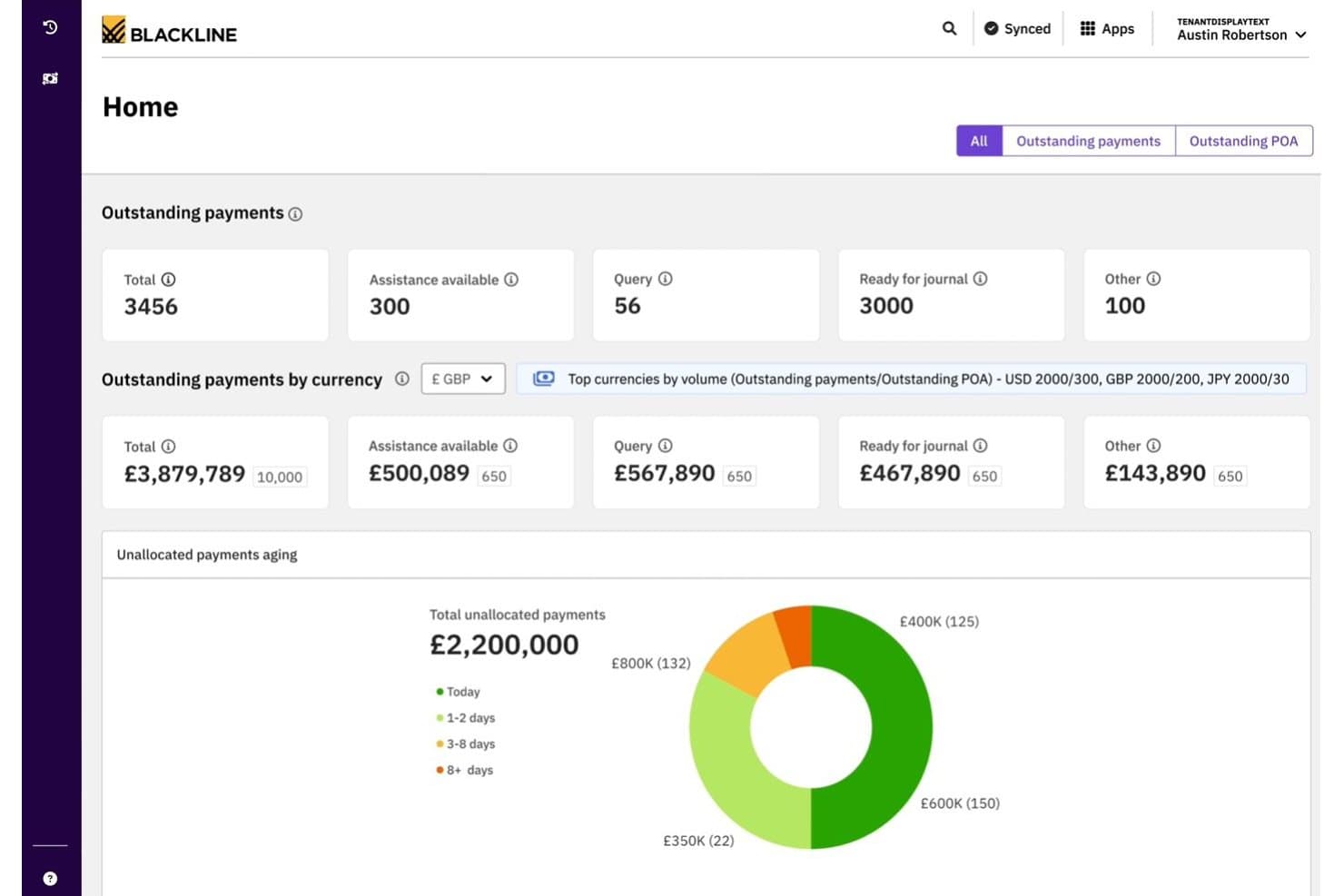
BlackLine offers a centralized cash application dashboard displaying outstanding payments, currency breakdowns, and unallocated payment aging for CFO-level visibility. BlackLine Invoice-to-Cash is an AR automation suite that covers e-invoicing, AI-powered cash application, collections management, credit and risk management, and dispute resolution across multiple ERPs and banking systems.
Who Is BlackLine Best For?
BlackLine is a strong fit for enterprise finance teams managing high-volume AR across multiple ERPs, currencies, and regions.
Why I Picked BlackLine
BlackLine earns its spot on my shortlist because of how tightly its Cash Application module connects to your existing ERP stack. Verity Remit captures remittance data across multiple formats automatically, which means unapplied cash stops accumulating at period-end close. I also like Verity Collect, which drives collection outreach based on predicted customer payment behavior, not just static aging buckets.
BlackLine Key Features
- E-invoicing and payments: Issue electronic invoices, handle compliance checks, and provide a customer self-service payments portal.
- Credit and risk management: Track customer credit using integrated third-party bureau data within a unified dashboard.
- Dispute and deduction workflows: Automate the assignment, coding, and analysis of invoice-related disputes and deductions.
- AR intelligence dashboard: Consolidate aging, forecasting, and collector workload metrics across multiple business units and regions.
BlackLine Integrations
BlackLine offers native integrations with SAP, Oracle, NetSuite, Microsoft Dynamics, Acumatica, Sage, and Workday, and provides an API for custom integrations.
Pros and Cons
Pros:
- AI-powered dispute and deduction management
- Global e-invoicing with real-time compliance checks
- ERP-native cash application and reconciliation
Cons:
- Complex implementation for non-ERP environments
- No order management or order entry features
Learn more about BlackLine: Best for proactive cash flow forecasting
- Free demo available
- Pricing upon request
Visit WebsiteCustomer Rating:4.7/5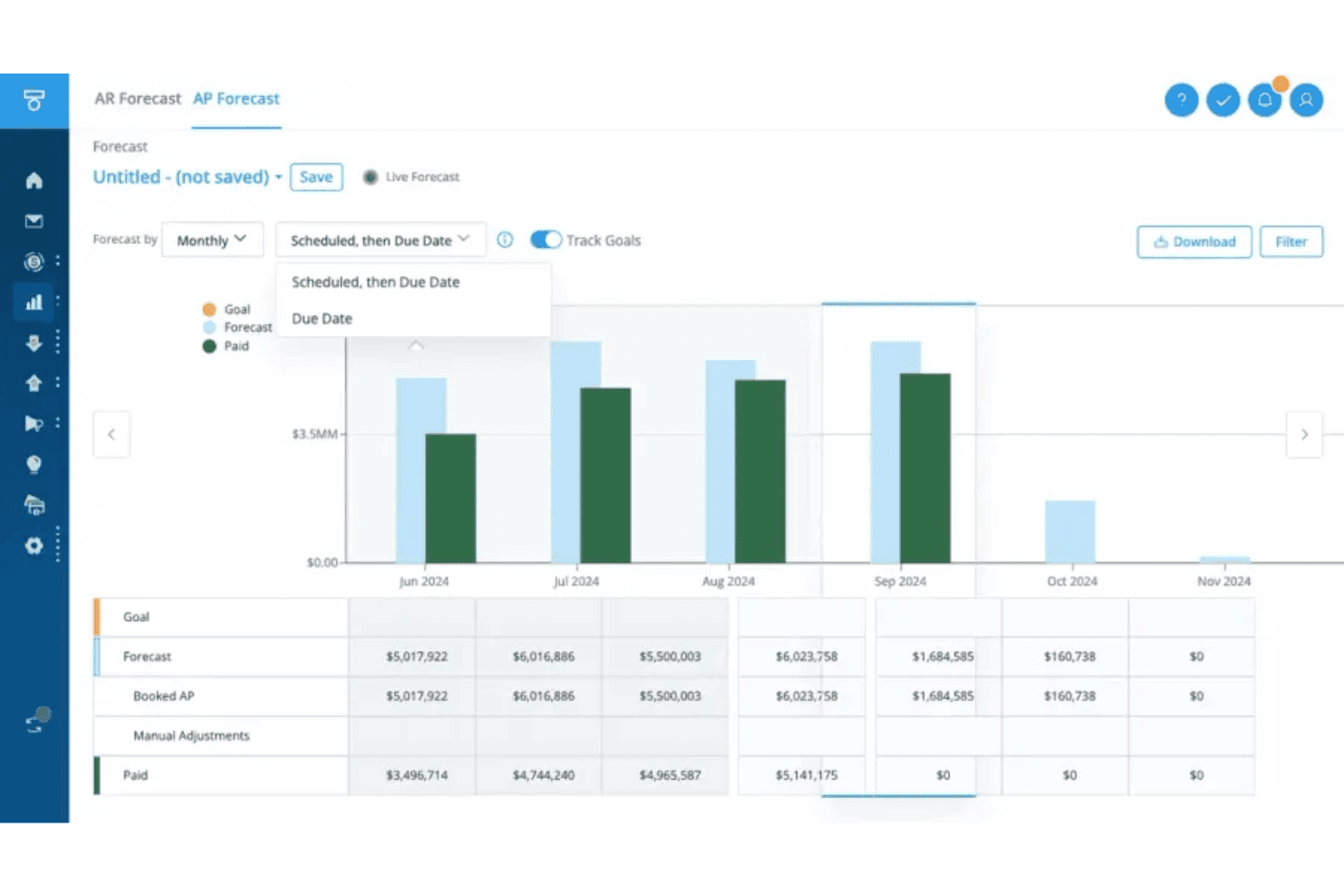
Tesorio offers an AP Forecast dashboard with monthly bar charts and detailed tables showing forecast, booked AP, and paid amounts. Tesorio is an AI-driven AR automation platform that combines collections management, automated cash application, and machine learning-based cash flow forecasting within a connected financial operations workflow.
Who Is Tesorio Best For?
Tesorio is a strong fit for mid-market and enterprise finance teams managing high-volume AR across multiple ERPs or business units.
Why I Picked Tesorio
I picked Tesorio as one of the best because its AR Forecast uses ML trained on your actual customer payment history to predict cash inflows, not generic assumptions. When combined with the Cash Application Agent's 95%+ auto-match rate, your cash position stays current and your forecasts are grounded in real payment data. I especially like how the Collections Agent extracts payment promises directly from customer email replies, feeding that commitment data back into the forecast in real time.
Tesorio Key Features
- Supplier portal agent: Submits invoices into platforms like Coupa and Ariba and tracks remittance status.
- No-code workflow automation: Lets you build custom dunning and escalation rules without developer input.
- ERP and CRM integrations: Connects directly to NetSuite, QuickBooks, Salesforce, and Sage Intacct for live AR data sync.
- Role-based controls and audit trails: Enforces SOC 1 and SOC 2 standards with granular permissions and activity logging.
Tesorio Integrations
Tesorio offers native integrations with NetSuite, Sage Intacct, QuickBooks, Workday, Zuora, Salesforce, Stripe, Plaid, Gmail, Outlook, Coupa, and Ariba. An API is also available for custom integrations.
Pros and Cons
Pros:
- Auto-matches cash receipts with high accuracy
- Collections workflow includes AI-driven email parsing
- Predictive AR forecasting based on actual payment history
Cons:
- Lacks dedicated credit or dispute modules
- No functionality for order management
Learn more about Tesorio: 3Best for AI-led email and voice collections
Monk
- Free demo available
- Pricing upon request
Visit WebsiteCustomer Rating:4.5/5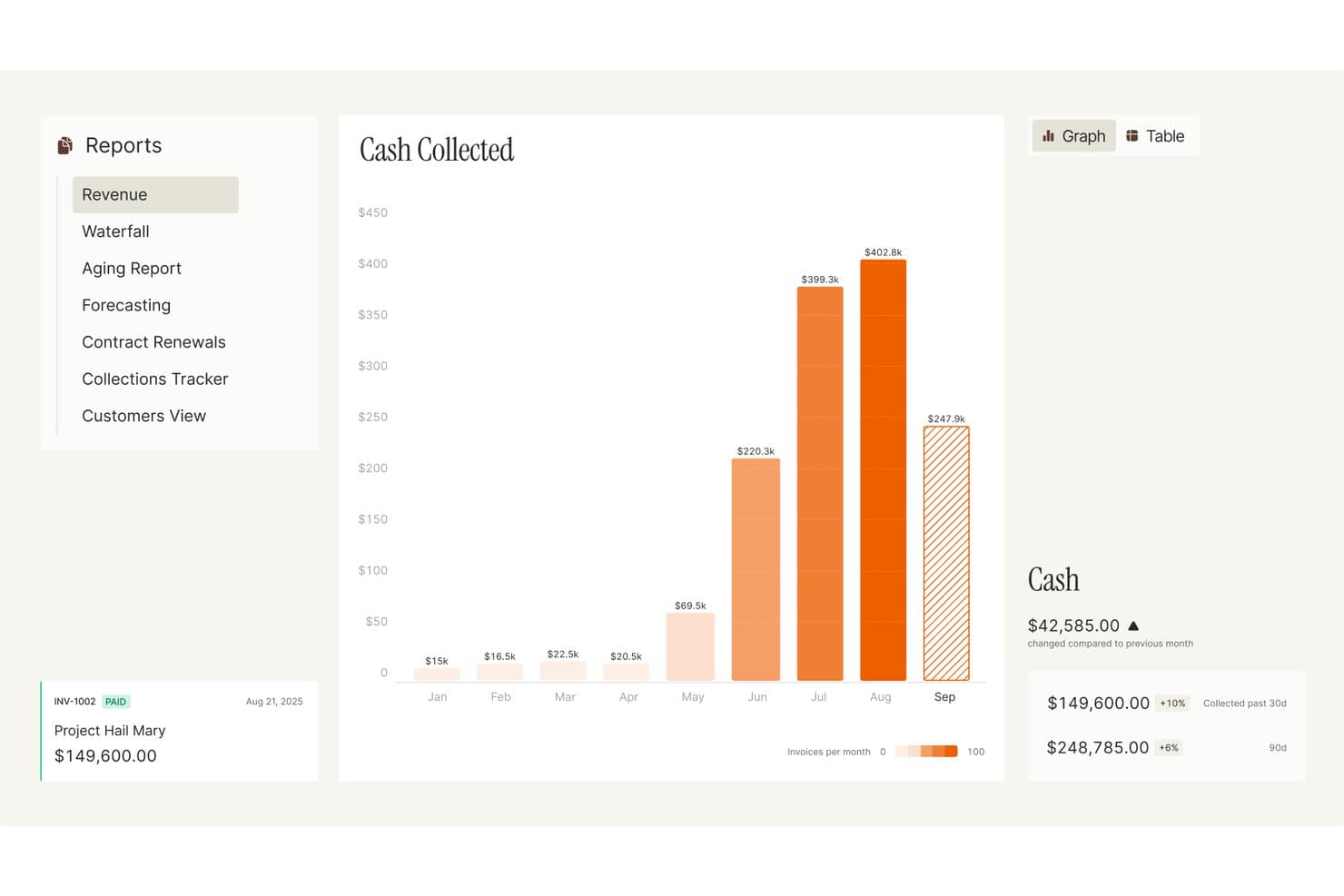
Monk visualizes monthly cash collected with trends and invoice volume. Monk is an AI-native accounts receivable platform that handles collections, cash application, dispute and deduction management, credit monitoring, and cash forecasting.
Who Is Monk Best For?
Monk is a strong fit for AR and collections teams that want AI agents handling outreach, follow-ups, and cash application without heavy manual intervention.
Why I Picked Monk
I've included Monk in my top picks because its AI-native collections agents, Julia and Ryan, handle both email and voice outreach autonomously, reading invoice history, payment behavior, and prior conversations to write contextual follow-ups or place outbound calls without human prompting. I particularly like how the adaptive follow-up layer adjusts tone by customer segment and escalates to a human only when judgment is genuinely needed. That combination makes Monk a strong fit for AR teams drowning in manual chasing across large customer portfolios.
Monk Key Features
- Collections playbooks: Lets your team set outreach tone, cadence, and escalation rules by customer segment or individual account.
- Short-pay and deduction handling: Flags short pays at posting, retrieves remittance and backup from retailer portals, codes reasons, and routes items to an owner.
- 13-week cash forecast: Combines collections signals, payment signals, and risk projections to project cash flow across a rolling 13-week window.
- Customer payment portal: Gives customers a self-service hub to view invoices, check in-transit payments, and pay by ACH, wire, check, or card.
Monk Integrations
Monk offers native integrations with NetSuite, QuickBooks, SAP S/4HANA, Microsoft Dynamics 365, Salesforce, HubSpot, Stripe, Gmail, and Microsoft 365. It also supports 600+ corporate AP portals, 12,000+ banks, an HTTP API, webhooks, and MCP access.
Pros and Cons
Pros:
- Collections continue on undisputed invoices
- Matches partial and multi-invoice payments
- Automated follow-ups reduce manual invoice chasing
Cons:
- AI agents need tuning for sensitive cases
- Invoice drafts don’t replace a billing engine
Learn more about Monk: Best for flexible billing automation setups
- Free demo available
- Pricing upon request
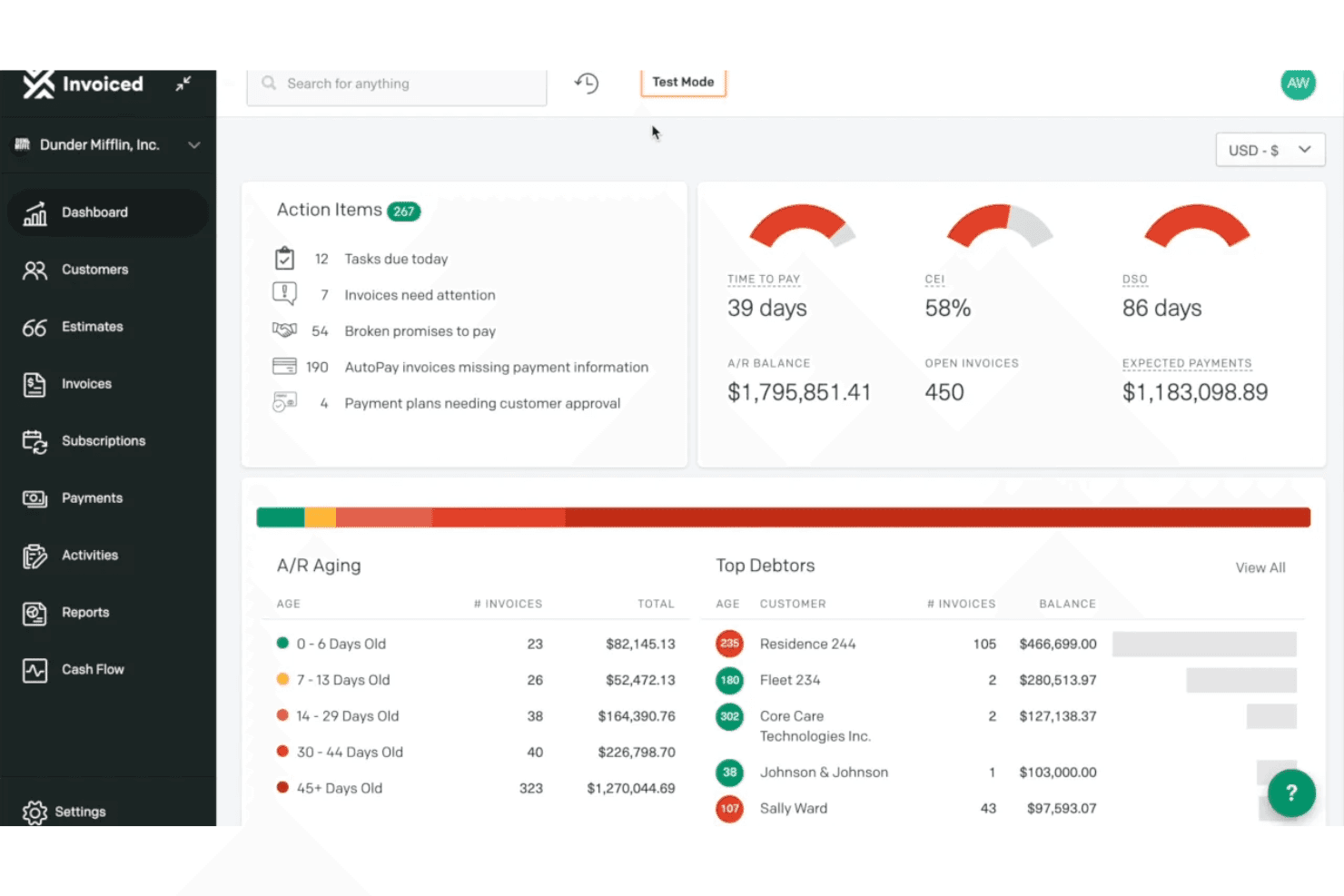
Invoiced provides an accounts receivable dashboard with action items, A/R aging breakdown, top debtors, and key metrics like DSO and CEI. Invoiced is an accounts receivable automation platform that handles invoicing, recurring billing, collections workflows, cash application, and payment processing across the invoice-to-cash cycle.
Who Is Invoiced Best For?
Invoiced suits finance teams at mid-market and enterprise companies managing high invoice volumes with complex billing models or recurring revenue structures.
Why I Picked Invoiced
I picked Invoiced as one of the best because its Automation Builder lets you design billing workflows around your actual billing logic, not a preset template. You can trigger actions based on scheduled dates or real-time events, covering everything from subscription billing to payment plan management. I particularly like how Smart Chasing lets me configure outreach cadences at the account or invoice level, so collections follow the same custom rules as the billing setup itself.
Invoiced Key Features
- A/R inbox and task management: Manage customer conversations, internal notes, and follow-up tasks in one place linked to invoices and accounts.
- Customer self-service portal: Give customers access to pay invoices, enroll in AutoPay, and download statements online.
- Multi-entity and multi-currency support: Handle billing and reporting across multiple business units and international currencies.
- Real-time analytics dashboard: Monitor invoice-to-cash KPIs, aging reports, and cash forecasting within a unified analytics suite.
Invoiced Integrations
Invoiced offers native integrations with NetSuite, Sage Intacct, QuickBooks, Microsoft Dynamics, Xero, and Salesforce. An API and ERP Connect app are available for custom integrations.
Pros and Cons
Pros:
- Multi-entity and multi-currency billing support
- Strong self-service portal for payors
- Highly customizable billing and collections workflows
Cons:
- Lacks built-in credit risk assessment tools
- No native order management functionality
Learn more about Invoiced: Best for real-time customer collaboration
- Free demo available
- Pricing upon request
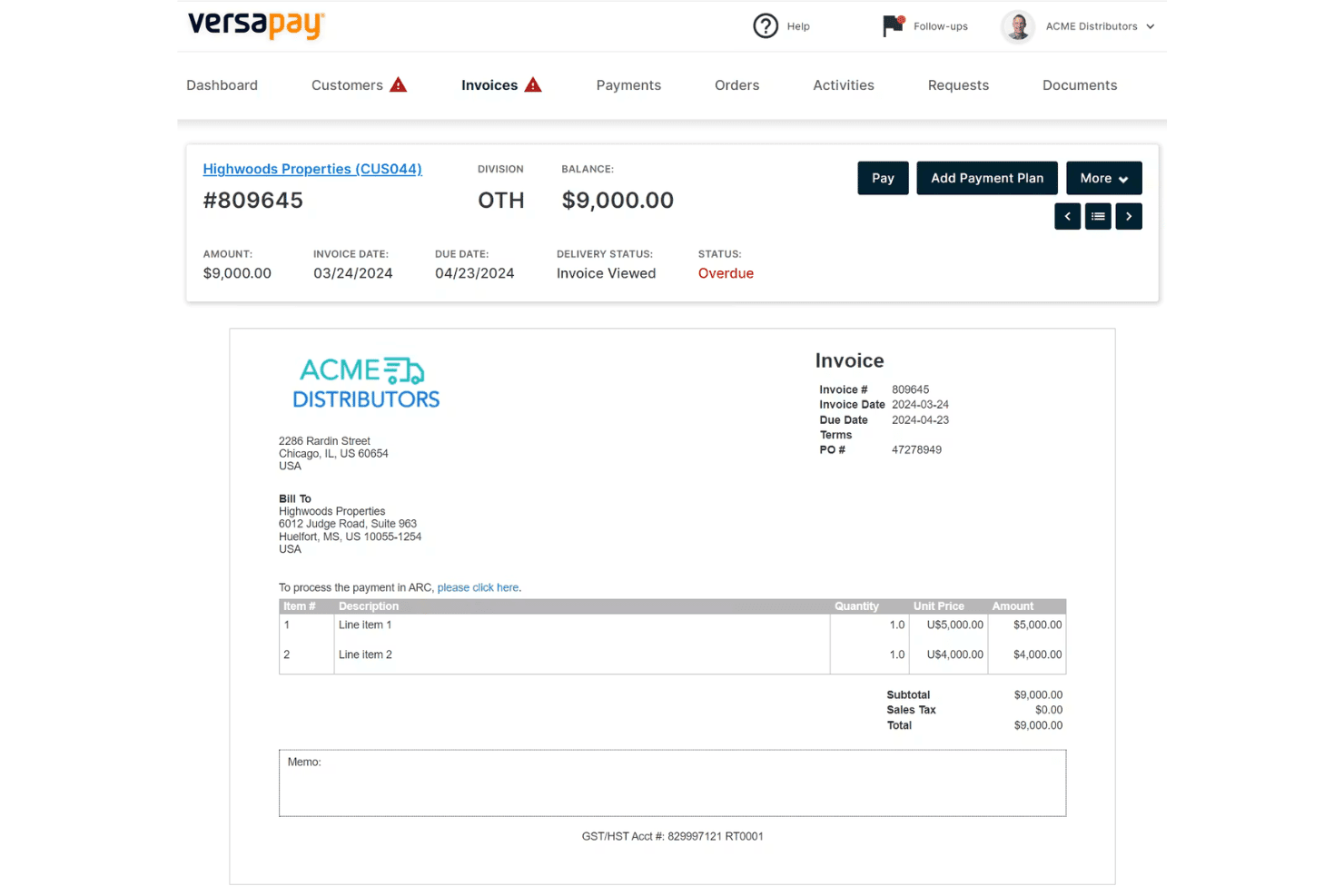
Versapay displays a detailed invoice view with payment options, line items, and overdue status tracking for accounts receivable management. Versapay is an accounts receivable automation platform that covers digital invoicing, cash application, collections management, and B2B payment processing through a collaborative customer-facing portal.
Who Is Versapay Best For?
Versapay is a strong fit for mid-market B2B finance teams whose AR departments manage high invoice volumes and need customers to self-serve on payments and disputes.
Why I Picked Versapay
Versapay earns its spot on my shortlist because of how it handles customer collaboration on live invoices. Instead of back-and-forth emails, my team can resolve disputes directly on the invoice inside the customer portal, with both sides seeing the same data in real time. I also like that customers can self-serve on payment history and raise short-pay disputes without contacting AR directly, which cuts down the manual touchpoints in the collections cycle.
Versapay Key Features
- ERP integration connectors: Pre-built integrations with leading ERPs like NetSuite, Sage Intacct, and Microsoft Dynamics 365.
- Automated invoicing: Digital invoice creation and delivery with support for multi-currency transactions.
- AR reporting dashboards: Visualize key accounts receivable metrics and payment trends for real-time portfolio tracking.
- Integrated B2B payment options: Accepts ACH, credit cards, wires, and checks through a unified payments platform.
Versapay Integrations
Versapay offers native integrations with Oracle NetSuite, Sage Intacct, Microsoft Dynamics 365 Business Central, and Microsoft Dynamics 365 Finance. An API is available for custom integrations.
Pros and Cons
Pros:
- Digital payment acceptance for B2B transactions
- Automatic cash application across multiple payment types
- Customer portal enables invoice-level communication
Cons:
- Lacks native order management capabilities
- No credit management or scoring tools
Learn more about Versapay: Best for B2B payment portal integration
- Free demo available
- Pricing upon request
Visit WebsiteCustomer Rating:4.4/5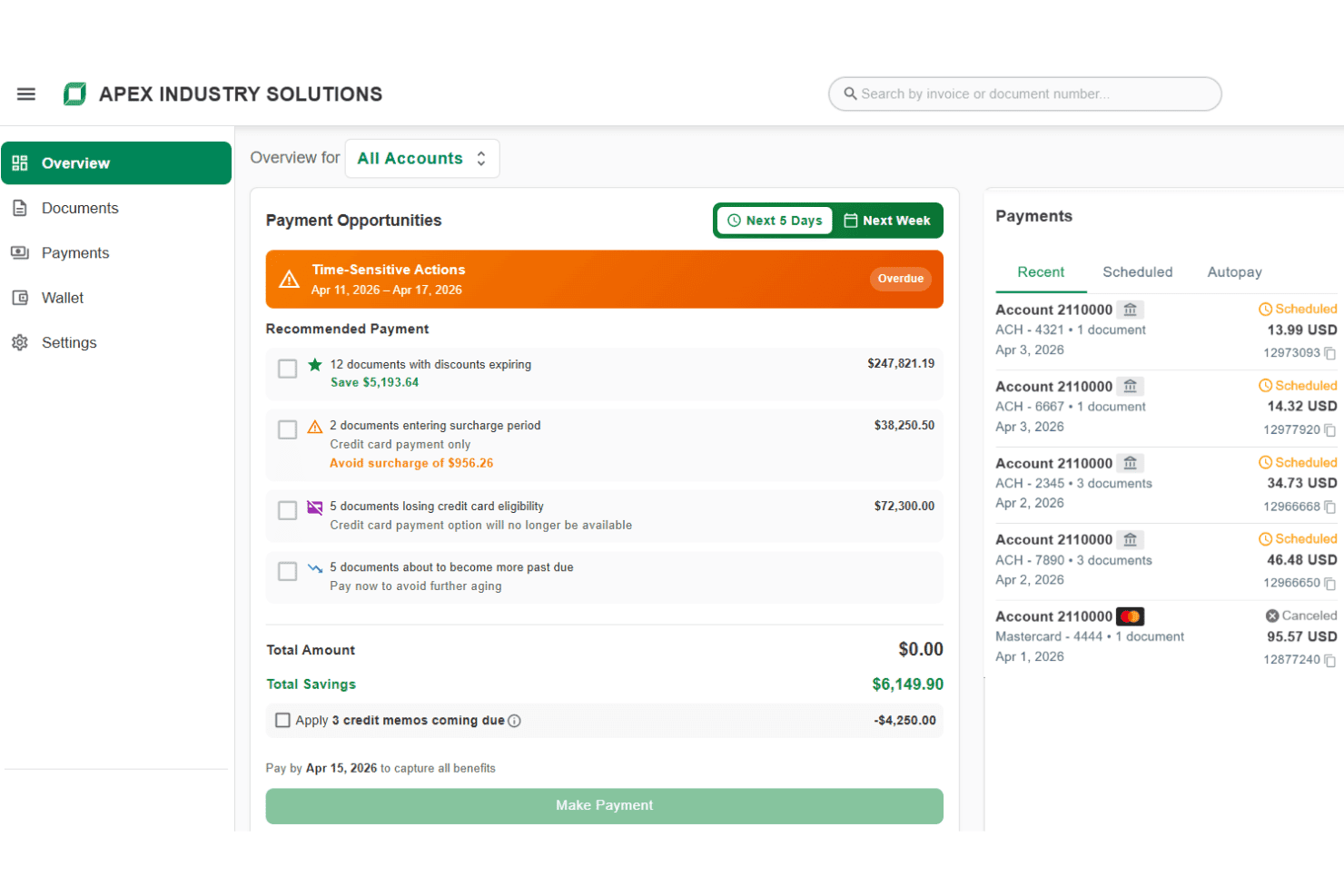
Billtrust displays a payment opportunities dashboard with time-sensitive actions, recommended payments, and recent scheduled payment history. Billtrust is a B2B order-to-cash platform that covers multi-channel invoicing, payment processing, AI-driven cash application, credit management, and collections automation.
Who Is Billtrust Best For?
It's a strong fit for mid-market and enterprise B2B suppliers managing high invoice volumes across complex payment networks.
Why I Picked Billtrust
Billtrust earns its spot as one of the best on my shortlist because of how it handles AP portal delivery at scale. I love that it connects to 260+ AP portals, including Ariba, Coupa, and Tungsten, without requiring manual uploads or logins for each one. The Digital Lockbox feature is also something I find genuinely useful: it automatically processes emailed virtual cards rather than requiring any manual handling.
Billtrust Key Features
- AI-powered credit risk monitoring: Continuously evaluates customer financial health using 80+ data points and predictive scoring.
- Automated multi-channel invoicing: Sends electronic invoices across email, print, and 260+ AP portals with full audit tracking.
- Agentic collections automation: Uses AI to prioritize delinquent accounts and streamline follow-up with automated email and VoIP tools.
- AR cash forecasting dashboard: Projects a 13-week cash flow forecast based on payment activity, invoice data, and AR balances.
Billtrust Integrations
Billtrust offers native integrations with ERPs, banks, and financial institutions, plus native connectivity to multiple AP portals including Ariba, Coupa, Tungsten, and Basware. An API is available for custom integrations.
Pros and Cons
Pros:
- Predictive credit risk analytics and monitoring
- Fast cash application with machine learning
- Handles complex AP portal invoice delivery
Cons:
- No native order entry or tracking module
- Limited deductions and dispute resolution features
Learn more about Billtrust: Best for end-to-end workflow automation
- Free demo available
- Pricing upon request
Visit WebsiteCustomer Rating:4.5/5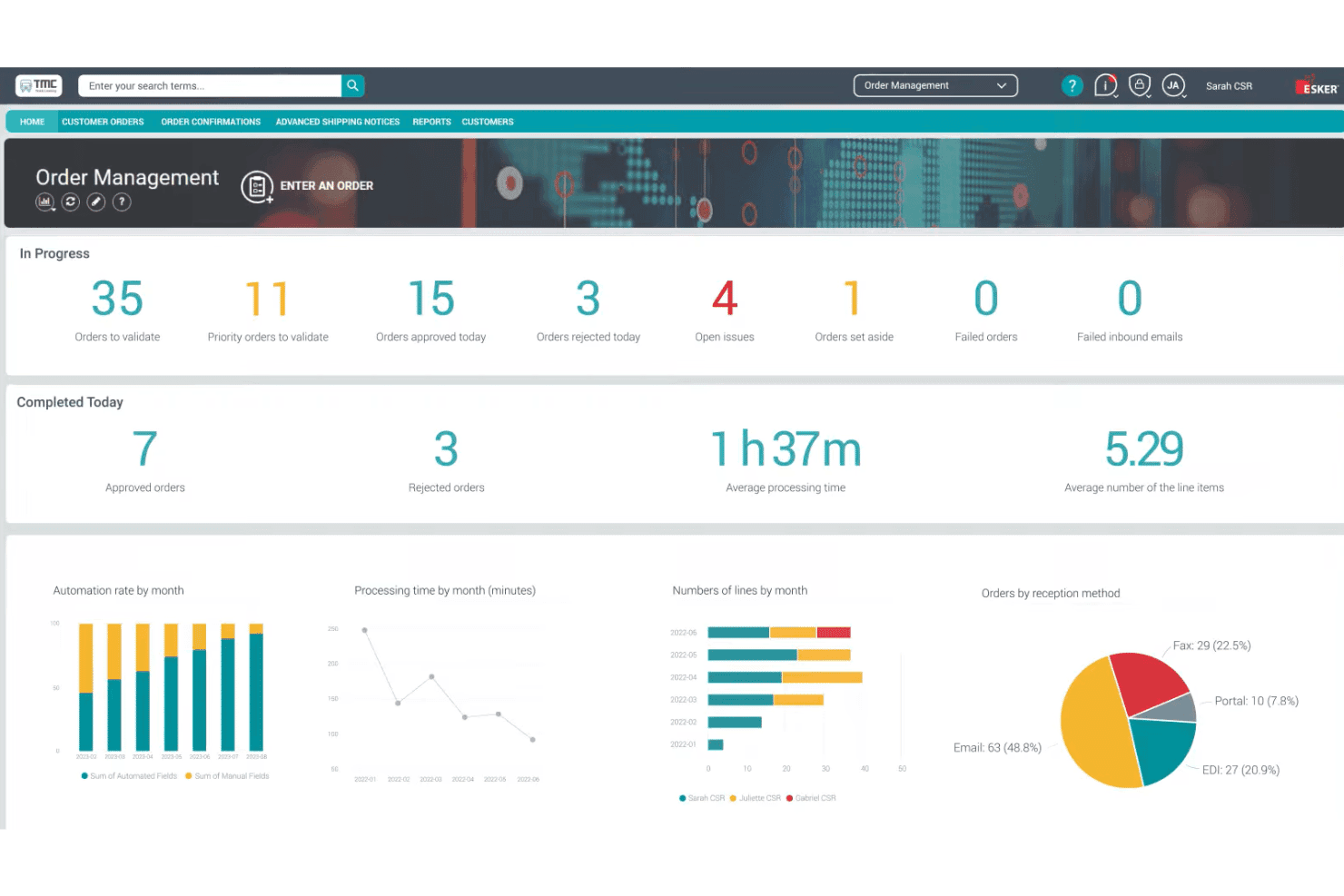
Esker's Order Management dashboard displays real-time order processing metrics, automation rates, and reception method breakdowns for CSR teams. Esker is a cloud-based order-to-cash platform that covers order management, invoice delivery, cash application, collections, credit management, and deductions management across the full customer revenue cycle.
Who Is Esker Best For?
Esker is a strong fit for mid-to-large enterprises running SAP, Oracle, or Microsoft Dynamics that need to automate the full O2C cycle under a single platform.
Why I Picked Esker
I've included Esker in my top picks because the automation runs across every stage of the O2C cycle, not just one or two modules. I love how the AI-driven order validation catches exceptions before they reach the ERP, and the cash application module uses self-learning matching to push teams toward near-touchless reconciliation. The collections layer goes further, with AI that prioritizes accounts by cash flow impact and a customer self-service portal that accepts payments directly.
Esker Key Features
- Credit management automation: Screens and monitors customer credit risk, automating reviews and approvals within a centralized workflow.
- Customer inquiry management: Triages, classifies, and routes incoming customer requests, supporting automated answers and escalation.
- ERP-native integrations: Connects directly to SAP, Oracle, and Microsoft Dynamics with native multi-ERP environment support.
- Reporting and dashboards: Delivers real-time AR aging, KPI tracking, and process analytics for finance and revenue teams.
Esker Integrations
Esker offers native integrations with SAP, Oracle, and Microsoft Dynamics, and supports multi-ERP environments. An API is available for custom integrations.
Pros and Cons
Pros:
- Multi-channel order capture and validation
- AI-driven prioritization for collections activities
- Covers full O2C cycle in one platform
Cons:
- Implementation timeline can be lengthy
- Deduction management less advanced for CPG/retail
Learn more about Esker: Best for AI-driven cash application efficiency
- Free demo available
- Pricing upon request
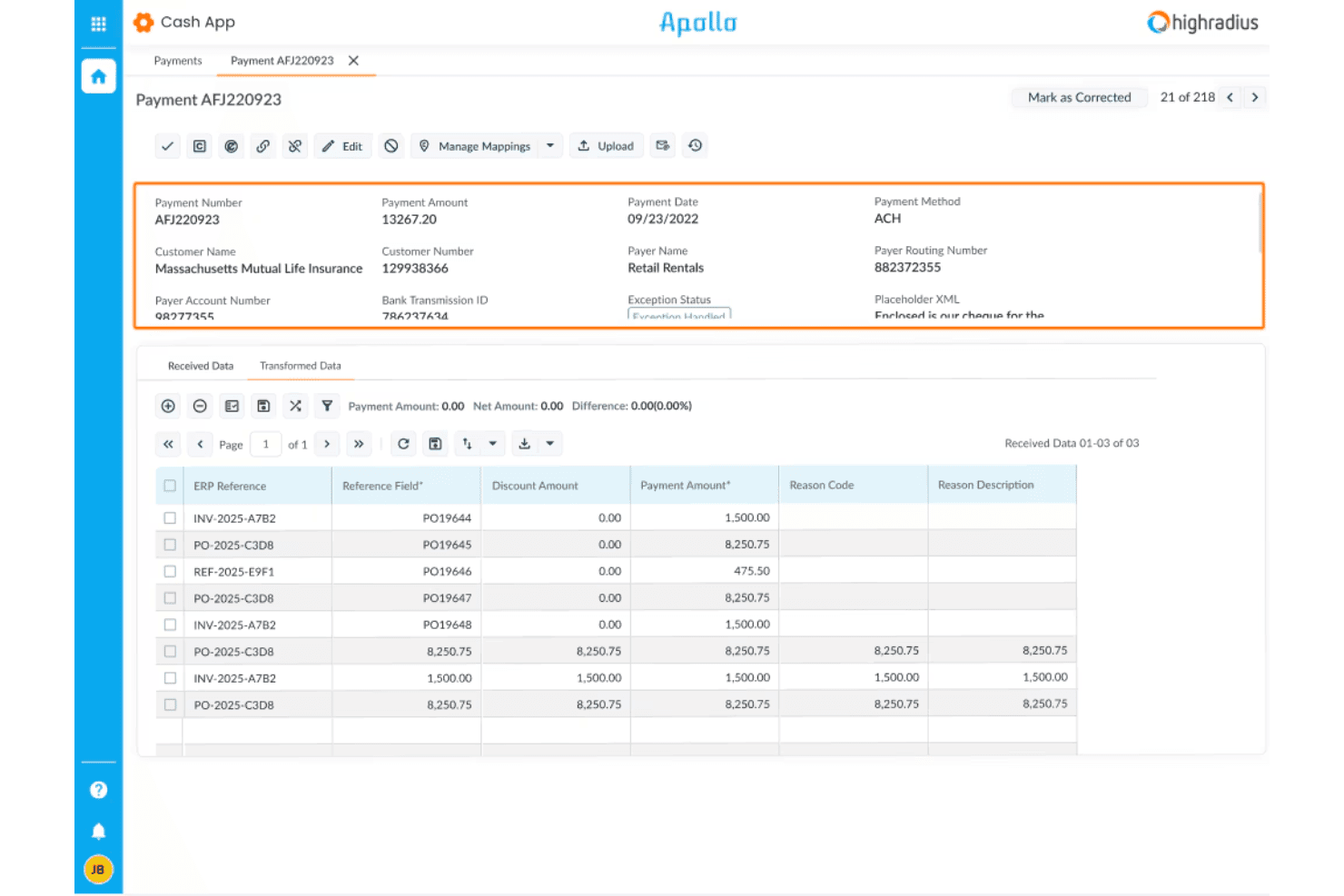
HighRadius offers a Cash App module with detailed payment processing views, including remittance data, ERP references, and exception handling for incoming ACH payments. HighRadius is an autonomous finance platform that covers the full order-to-cash cycle, including credit management, e-invoicing, AI-driven cash application, collections, and deductions management.
Who Is HighRadius Best For?
HighRadius is a strong fit for large enterprises with high transaction volumes, complex ERP environments, and dedicated AR teams managing multi-entity O2C operations.
Why I Picked HighRadius
HighRadius earns its spot on my shortlist because its Cash Application Cloud handles remittance data in a way most platforms can't match. It captures remittance from emails, AP portals, and bank files, then auto-matches at the item level with a 90%+ hit rate. I also like the 95% no-touch posting rate for checks, ACH, and wires, which means my team isn't manually reconciling high-volume payment batches line by line.
HighRadius Key Features
- Credit Cloud: Automates customer onboarding, proactive bankruptcy monitoring, and real-time credit scoring.
- Deductions Cloud: Codes deductions, aggregates backup documentation, and routes claims for fast resolution.
- dotOne Analytics: Offers AR aging reports, DSO metrics, and O2C benchmarking dashboards for finance visibility.
- ERP integration: Connects natively to systems like SAP, Oracle, and NetSuite for bi-directional order and invoice sync.
HighRadius Integrations
HighRadius offers native integrations with SAP, Oracle, Microsoft Dynamics, and NetSuite, plus connects to a wide range of banks and credit agencies. An API is available for custom integrations.
Pros and Cons
Pros:
- Automated deduction coding and claims workflow
- Enterprise-scale AR aging and DSO analytics
- Leading AI-powered remittance auto-matching performance
Cons:
- Lengthy implementation for complex ERPs
- No omnichannel native order entry module
Learn more about HighRadius: Best for global compliance and e-invoicing
- Free demo available
- Pricing upon request
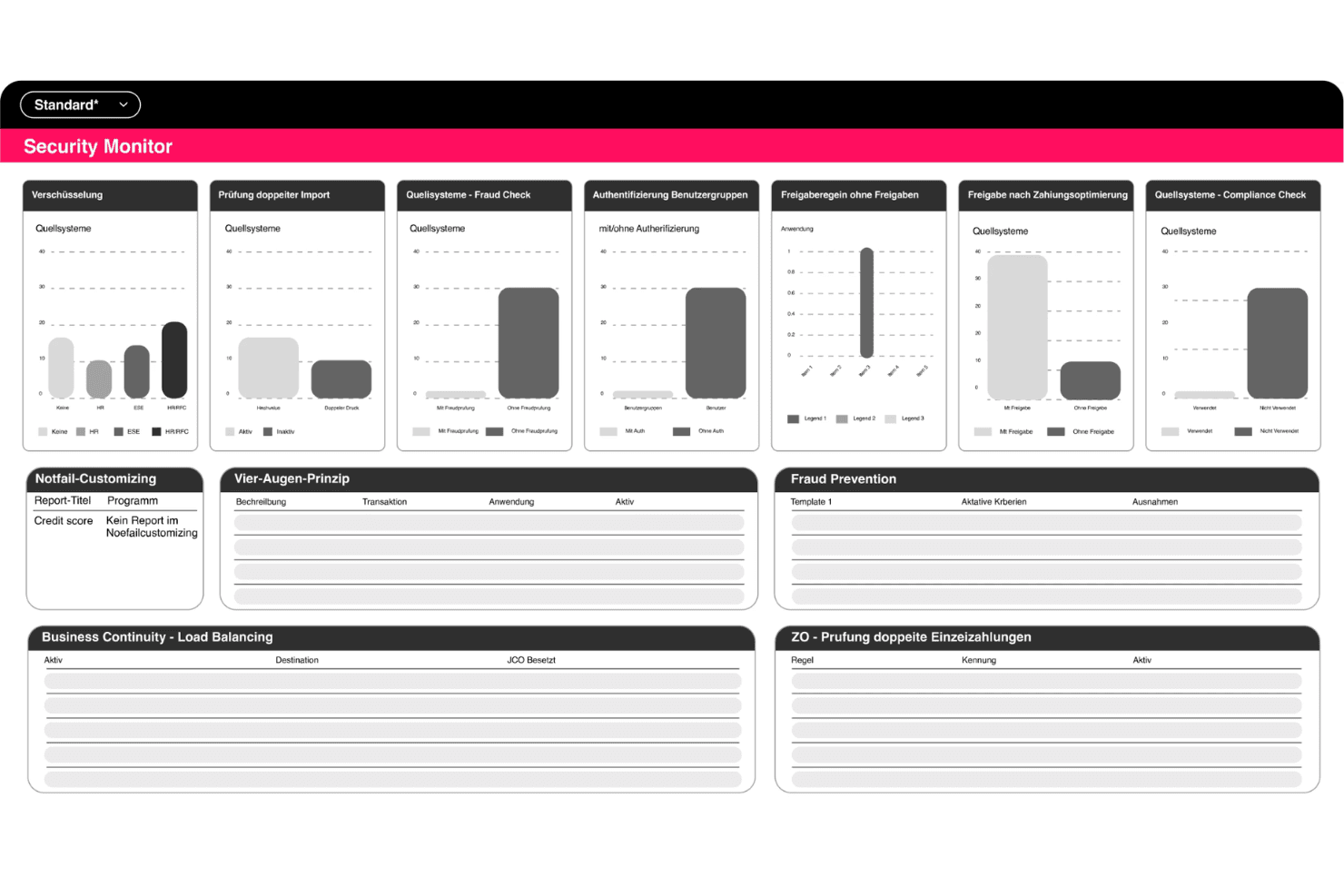
Serrala offers a Security Monitor dashboard with bar charts and data tables covering encryption, fraud checks, compliance, and payment controls. Serrala is an enterprise order-to-cash suite covering e-invoicing, cash application, credit management, collections, and dispute resolution, built around deep SAP and S/4HANA integration with compliance support across 60+ countries.
Who Is Serrala Best For?
Serrala is a strong fit for large, multinational enterprises running SAP that need to manage receivables across multiple jurisdictions and currencies.
Why I Picked Serrala
I picked Serrala as one of the best because its e-invoicing compliance covers 60+ countries, which I think is genuinely rare for a single platform. I also like the Alevate Cash Application module, which uses Agentic AI to target a 99% auto-match rate across incoming payment types. The RTP bill presentment feature goes further, pushing invoice payment links directly to customers' devices to cut the gap between invoice delivery and actual payment receipt.
Serrala Key Features
- Customer self-service portal: Lets customers view, download, and pay invoices through a secure online portal.
- Credit management module: Offers agentic AI-driven scoring, real-time limit tracking, and approval workflow support.
- Collections management workflows: Supports AI-prioritized worklists, automated dunning, and promise-to-pay tracking.
- Dispute and deduction handling: Provides workflow-based case management with assignment, categorization, and resolution tracking.
Serrala Integrations
Serrala offers native integrations with SAP, NetSuite, Microsoft Dynamics, Workday, Infor, Sage, and more, and provides an API for custom integrations.
Pros and Cons
Pros:
- AI-driven cash application and credit scoring
- Deep SAP and S/4HANA integration
- E-invoicing compliance for 60+ countries
Cons:
- Initial configuration can be complex
- No native order management functionality
Learn more about Serrala: Best for predictive analytics in receivables
- Free demo available
- Pricing upon request
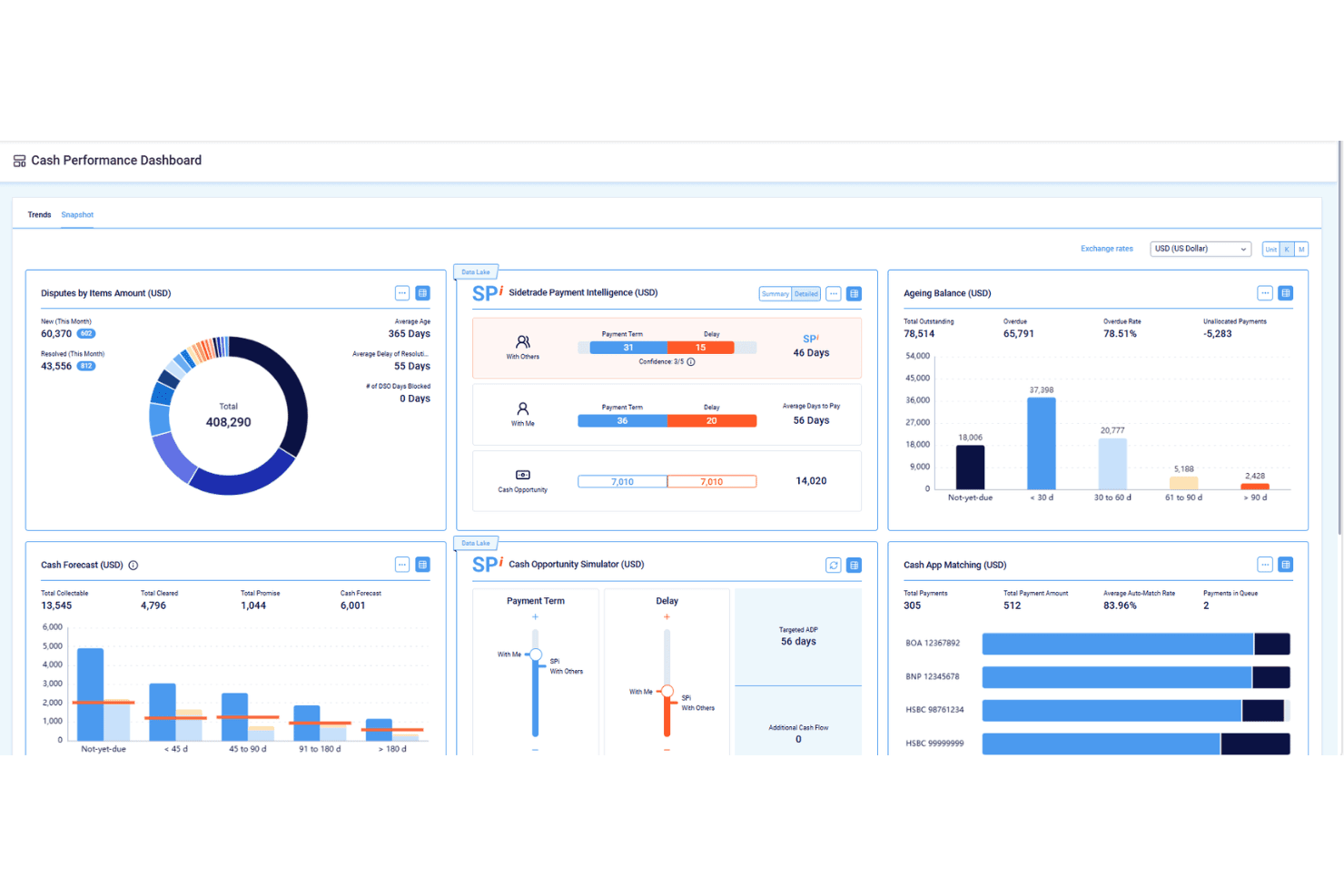
Sidetrade features a Cash Performance Dashboard with tools for tracking disputes, payment intelligence, ageing balances, cash forecasting, and cash app matching. Sidetrade is an AI-driven Order-to-Cash platform covering credit management, e-invoicing, collections, dispute resolution, and cash application, with agentic AI agents and a proprietary payment data lake at its core.
Who Is Sidetrade Best For?
Sidetrade is a strong fit for enterprise and upper mid-market finance teams running complex ERP environments like SAP, Oracle, or Microsoft Dynamics.
Why I Picked Sidetrade
I picked Sidetrade as one of the best because the predictive depth behind its Aimie AI is genuinely hard to replicate. It's built on a proprietary O2C Data Lake covering 1 billion+ payment experiences and 42 million buyers, so collection prioritization and cash application matching draw on real payment behavior, not generic rules. The autonomous Voice Collections Agent executes outbound calls in 29 languages and updates cases without human input.
Sidetrade Key Features
- E-invoicing compliance: Supports country-specific e-invoicing mandates and multi-currency invoice generation.
- DigitalCase for disputes: Centralizes dispute intake, categorization, and workflow assignment across AR teams.
- Unlimited-user licensing: Enables organization-wide access without per-seat constraints.
- ERP-native integration: Connects deeply with SAP, Oracle, and Microsoft Dynamics for synchronized data flows.
Sidetrade Integrations
Sidetrade offers native integrations with SAP, Oracle, and more. An API is available for custom integrations.
Pros and Cons
Pros:
- AI-driven cash application with high auto-match rates
- Advanced e-invoicing compliance for global operations
- Predictive collections queue based on real payment data
Cons:
- Dispute resolution features less advanced than rivals
- Limited native order management capabilities
Learn more about Sidetrade:
Outro software do pedido ao recebimento
Eis algumas opções adicionais de software do pedido ao recebimento que não entraram na minha lista restrita, mas que ainda vale a pena conhecer:
- 11EmagiaBest for unified AR and credit risk insights
- 12GavitiBest for small and mid-sized collections teams
- 13Quadient Accounts Receivable AutomationBest for rapid AR process digitization
- 14MaxioBest for SaaS and usage-based revenue management
- 15ZuoraBest for subscription billing integration
- 16ChaserBest for automated invoice reminders
- 17UpflowBest for visualizing AR metrics by customer
- 18KollenoBest for unified receivables workflow management
- 19GrowfinBest for collaboration between finance and sales
- 20BilendoBest for workflow automation tailored to Germany
How I Evaluate Order to Cash Software
I split my evaluation into baseline functionality—like cash application and collections—and the differentiators, like AI matching or ERP depth, that separate good tools from great ones.
Core Functionality (Table Stakes For This List)
When I'm selecting tools for my list, I rank each one on a scale from 0 (does not offer the functionality) to 5 (excels in this area) for each core functionality listed below. Then, I calculate the tool's total score into a percentage. Each tool needs to achieve a minimum total score of 75% to be considered for inclusion.
- Order Management: I check whether the platform captures orders across channels and syncs them to your ERP, so sales data flows into AR without rekeying.
- Invoicing & Billing: Multi-currency support and e-invoicing matter here. I look for automated delivery options and compliance with regional mandates.
- Cash Application: This is where I evaluate AI matching capabilities. The best tools auto-match remittances to open invoices across ACH, wire, and check payments.
- Collections Management: I look for prioritized worklists and automated dunning sequences that let collectors focus on high-risk accounts instead of chasing every balance.
- Credit Management: Automated scoring with bureau data pulls from providers like D&B or Experian shows maturity. I evaluate approval workflows and dynamic limit setting.
- Deductions & Disputes: Dispute categorization and routing are key. I look for tools that track root causes so your team can address recurring short-pays and chargebacks.
Once I have a list of tools that meet the criteria, I consider what sets each platform apart.
Differentiating Factors (What Sets Vendors Apart)
Here's how I compare and contrast different vendors:
Standout Features
AI-powered cash application is a big differentiator. I look for self-learning models that improve match rates over time across payment types, not just static rules. Customer self-service portals also matter because they let buyers view invoices, raise disputes, and pay online, which cuts back-and-forth emails to your AR team. Cash forecasting dashboards round out the picture. Drill-downs into DSO, aging, and collection effectiveness by customer or region give CFOs the visibility they need to act on trends early.
Beyond Features
ERP integration depth is a major differentiator. I evaluate whether a platform offers pre-built connectors to ERPs like SAP, Oracle, or NetSuite with bi-directional sync, not just flat-file imports. Scope of O2C coverage also varies widely. Some platforms handle the full cycle from order capture to deductions, while others focus on AR automation alone. For teams operating across borders, I check for compliance certifications like SOC 2 and support for regional e-invoicing mandates, since gaps here can stall a rollout.
Como escolher software do pedido ao recebimento
É fácil perder-se em listas extensas de funcionalidades e estruturas de preços complexas. Para o ajudar a manter o foco enquanto analisa o seu processo específico de seleção de software, apresentamos uma lista de verificação dos fatores a ter em conta:
| Fator | O que deve considerar |
|---|---|
| FatorEscalabilidade | O que deve considerarA plataforma conseguirá acompanhar o crescimento esperado do volume de transações, do número de utilizadores ou das unidades de negócio ao longo do tempo? Planeie um futuro com várias entidades e regiões. |
| FatorIntegrações | O que deve considerarO software sincroniza em tempo real com o seu ERP, CRM, sistemas de pagamentos ou motores fiscais? Dê prioridade a conectores diretos em vez de simples exportações/importações. |
| FatorPossibilidade de personalização | O que deve considerarPode adaptar os fluxos de trabalho, as cadeias de aprovação e os relatórios aos seus processos internos e modelo de negócio específicos? |
| FatorFacilidade de utilização | O que deve considerarA sua equipa de contas a receber, a equipa de vendas e as restantes partes interessadas adaptar-se-ão rapidamente ou as interfaces pouco intuitivas exigirão formação adicional e atrasarão a adoção? |
| FatorImplementação e integração inicial | O que deve considerarQuanto tempo demora normalmente a implementação e o que é necessário da sua equipa para disponibilizar dados, integrações e processos? |
| FatorCusto | O que deve considerarPara além das subscrições, que serviços, complementos ou taxas por transação poderão surgir? Analise o custo total de propriedade ao longo de vários anos. |
| FatorMedidas de segurança | O que deve considerarA plataforma disponibiliza controlos sólidos de acesso dos utilizadores, registos de auditoria e proteção de dados? Valide as certificações relevantes para o seu setor. |
| FatorRequisitos de conformidade | O que deve considerarO software ajudá-lo-á a estar preparado para auditorias e a cumprir os requisitos de faturação eletrónica, privacidade dos dados e eventuais alterações regulamentares futuras? |
O que é o software do pedido ao recebimento?
O software de automatização do pedido ao recebimento é uma plataforma que automatiza e liga cada etapa, desde o registo da encomenda do cliente até à faturação, cobrança e aplicação dos recebimentos. Ajuda as equipas financeiras a reduzir o trabalho manual, melhorar a precisão e obter visibilidade sobre todo o processo de contas a receber através do processamento automatizado de faturas e da gestão de fluxos de trabalho. Ao normalizar os fluxos de trabalho e integrar-se com ERP e CRM, o software do pedido ao recebimento contribui para um fluxo de caixa mais rápido, reforça a gestão do risco de crédito, simplifica o tratamento de exceções e pode ligar-se a processos empresariais relacionados, como a gestão de inventário.
Funcionalidades do software de pedido ao recebimento
Ao selecionar software de pedido ao recebimento, esteja atento às seguintes funcionalidades principais:
- Gestão de encomendas: Centraliza a captura, o acompanhamento e a validação das encomendas dos clientes, simplificando os registos em vários canais e integrando-se diretamente com o seu ERP ou CRM.
- Faturação: Gera, envia e armazena faturas em vários formatos e moedas, ajudando a uniformizar os ciclos de faturação e a suportar a faturação eletrónica.
- Aplicação de recebimentos: Faz corresponder os pagamentos recebidos às faturas em aberto utilizando avisos de pagamento ou referências de pagamento, reduzindo a reconciliação manual e os recebimentos não aplicados.
- Gestão de cobranças: Estrutura fluxos de trabalho para contas vencidas, automatiza os calendários de acompanhamento e suporta as comunicações com os clientes para ajudar a reduzir os dias de vendas pendentes.
- Gestão de crédito: Define e monitoriza os limites de crédito dos clientes, realiza avaliações de crédito e gere fluxos de trabalho de análise e aprovação para controlar a exposição e apoiar um fluxo de caixa saudável.
- Acompanhamento de deduções e litígios: Regista, categoriza e ajuda a resolver litígios relacionados com faturas e pagamentos inferiores ao devido, proporcionando às equipas visibilidade e ferramentas para abordar as causas principais.
- Portal do cliente: Disponibiliza um espaço seguro para os compradores acederem às faturas, efetuarem pagamentos e enviarem questões ou litígios relacionados com a faturação sem a intervenção direta da equipa de contas a receber.
- Relatórios e análises: Disponibiliza painéis para a antiguidade das contas a receber, o DSO e as tendências de pagamento, permitindo que as equipas financeiras monitorizem o desempenho e fundamentem decisões.
- Suporte multientidade: Gere recebimentos, fluxos de trabalho e relatórios consolidados em diferentes regiões, moedas ou entidades jurídicas num ambiente unificado.
Funcionalidades comuns de IA do software de pedido ao recebimento
Para além das funcionalidades padrão do software de pedido ao recebimento indicadas acima, muitas destas soluções estão a incorporar IA com funcionalidades como:
- Previsão preditiva de fluxo de caixa: Utiliza dados históricos de pagamentos e o comportamento dos clientes para projetar futuras entradas de caixa, ajudando as equipas financeiras a antecipar défices ou excedentes.
- Correspondência automatizada de pagamentos: Aplica aprendizagem automática para fazer corresponder os pagamentos às faturas em aberto, mesmo quando os dados dos avisos de pagamento estão incompletos ou são inconsistentes.
- Priorização inteligente das cobranças: Analisa o risco do cliente, o histórico de pagamentos e os saldos pendentes para recomendar em que contas os cobradores devem concentrar-se primeiro.
- Análise da causa principal dos litígios: Identifica padrões em deduções e litígios, revelando os problemas subjacentes para que as equipas possam resolver problemas recorrentes e reduzir futuros litígios.
- Avaliação dinâmica do crédito: Atualiza continuamente as pontuações de crédito dos clientes utilizando dados em tempo real de fontes internas e externas, permitindo ajustes proativos dos limites de crédito.
Benefícios do software de pedido ao recebimento
A implementação de software de pedido ao recebimento proporciona vários benefícios à sua equipa e à sua empresa. Eis alguns dos benefícios que pode esperar:
- Fluxo de caixa acelerado: A faturação, as cobranças e a aplicação de recebimentos automatizadas reduzem o DSO e ajudam o dinheiro a chegar mais rapidamente às suas contas.
- Maior eficiência dos processos: Os fluxos de trabalho de ponta a ponta minimizam a introdução manual de dados e o retrabalho, libertando as equipas financeiras para tarefas de maior valor.
- Maior visibilidade das contas a receber: Os painéis, relatórios e análises em tempo real colocam a antiguidade das contas a receber e as tendências de pagamento ao alcance da sua mão.
- Experiência do cliente melhorada: Os portais de autosserviço e a gestão simplificada de litígios facilitam aos clientes o pagamento, a consulta de faturas e a resolução de problemas.
- Melhor controlo do risco de crédito: A avaliação e a monitorização automatizadas do crédito permitem definir limites de crédito mais adequados e reduzir a exposição a dívidas incobráveis.
- Integração perfeita: Os conectores nativos para ERPs, CRMs e sistemas de pagamento eliminam os silos de dados e suportam operações unificadas.
- Maior conformidade e controlo: Os registos de auditoria integrados, as salvaguardas de segurança e o suporte à conformidade ajudam a cumprir os requisitos regulamentares e a reduzir o risco.
Custos e preços do software de pedido ao recebimento
A seleção de software de pedido ao recebimento exige uma compreensão dos vários modelos de preços e planos disponíveis. Os custos variam consoante as funcionalidades, o tamanho da equipa, os complementos, entre outros fatores. A tabela abaixo resume os planos comuns, os respetivos preços médios e as funcionalidades normalmente incluídas nas soluções de software de pedido ao recebimento:
Tabela de comparação de planos de software de pedido ao recebimento
| Tipo de plano | Preço médio | Funcionalidades comuns |
|---|---|---|
| Tipo de planoPlano gratuito | Preço médio$0 | Funcionalidades comunsGestão básica de encomendas, faturação limitada e relatórios simples. |
| Tipo de planoPlano pessoal | Preço médio$25–$75/por utilizador/mês | Funcionalidades comunsFaturação principal, fluxos de trabalho manuais de cobrança, relatórios padrão e integrações limitadas. |
| Tipo de planoPlano empresarial | Preço médio$75–$200/por utilizador/mês | Funcionalidades comunsAplicação automatizada de recebimentos, portais de clientes, análise avançada, integrações com ERP e CRM e permissões de utilizador. |
| Tipo de planoPlano empresarial de grande escala | Preço médio$200+/por utilizador/mês | Funcionalidades comunsSuporte para múltiplas entidades, funcionalidades de IA, conformidade global, fluxos de trabalho personalizados, suporte dedicado e armazenamento de dados. |
Perguntas frequentes sobre o software do pedido ao recebimento
Eis algumas respostas a perguntas frequentes sobre o software do pedido ao recebimento:
Como funciona o software do pedido ao recebimento com o meu ERP atual?
O software do pedido ao recebimento (O2C) integra-se normalmente diretamente com os sistemas ERP através de conectores pré-configurados ou APIs. Isto permite sincronizar automaticamente os dados de clientes, faturas, pagamentos e do razão geral, reduzindo a introdução manual de dados e mantendo os registos contabilísticos alinhados.
O software do pedido ao recebimento consegue gerir operações com múltiplas entidades e moedas?
Sim, muitas soluções suportam várias entidades jurídicas, moedas e idiomas. Isto ajuda as empresas globais a centralizar a cobrança de pagamentos, melhorar o fundo de maneio e assegurar a conformidade com as práticas contabilísticas locais.
Qual é o tempo de implementação habitual do software do pedido ao recebimento?
Os tempos de implementação variam. As soluções baseadas na nuvem podem ser lançadas em poucas semanas se os seus dados estiverem prontos, enquanto as personalizações mais profundas, as integrações com ERP ou as implementações empresariais de grande escala podem demorar alguns meses. Muitos fornecedores utilizam também inteligência artificial para acelerar a configuração e automatizar partes do processo de integração.
Que tipos de empresas beneficiam mais do software do pedido ao recebimento?
As empresas com grandes volumes de faturas, processos de cobrança complexos ou modelos de receitas recorrentes são frequentemente as que obtêm mais valor. Estas plataformas também podem apoiar o cumprimento de encomendas, as verificações de crédito e o reconhecimento de receitas, ajudando as equipas financeiras a reduzir o trabalho manual e a melhorar a visibilidade.
O software do pedido ao recebimento ajuda a assegurar a conformidade com a faturação eletrónica?
Sim, muitas plataformas disponibilizam a criação de faturas eletrónicas e suporte para os requisitos obrigatórios de vários países. Isto mantém o seu processo de faturação em conformidade com os requisitos das autoridades governamentais e fiscais locais. Algumas soluções também se integram com fluxos de trabalho de compras ao pagamento para melhorar as operações financeiras em toda a empresa.