

Software-ul pentru gestionarea cheltuielilor la nivel de întreprindere vă ajută să controlați, urmăriți și analizați într-un singur loc cheltuielile companiei. Dacă sunteți în căutarea celui mai bun software pentru gestionarea cheltuielilor la nivel de întreprindere, probabil doriți să consolidați controalele, să îmbunătățiți conformitatea și să obțineți vizibilitate în timp real asupra cheltuielilor din toate departamentele și regiunile. Având în vedere lanțurile complexe de aprobare, operațiunile globale și cerințele stricte de audit, alegerea platformei potrivite poate influența decisiv procesele dumneavoastră financiare. În acest ghid veți găsi o prezentare clară și practică a instrumentelor de top, astfel încât să puteți alege cu încredere soluția care corespunde nevoilor companiei dumneavoastră în 2026.
Why Trust Our Software Recommendations
6,700+
Reviews
20
Industry experts
16+
Evaluation factors
14
Years
Our team has been testing and reviewing software since 2012. As finance leaders ourselves, we know how difficult—and important—it is to choose the right software.
For this guide, we evaluated tools using hands-on testing and independent research, scoring tools using our selection criteria.
Our reviews reflect our human editorial judgment, not a sales pitch.
Tabel comparativ al soluțiilor software pentru gestionarea cheltuielilor la nivel de întreprindere
Acest tabel comparativ rezumă detaliile privind prețurile pentru selecțiile mele de top de software pentru gestionarea cheltuielilor la nivel de întreprindere:
Sorted by: Default
| Tool | Starting Price | Website | |
|---|---|---|---|
Best for policy-controlled PunchOut buying | 4.8 out of 5 | $499/month Free demo available | Website |
Best for simplified invoice digitization | 4.5 out of 5 | $49/user/month Free plan available | Book Demo |
Best for AI-powered spend data normalization | Not rated | Pricing upon request Free demo available | Website |
Best for real-time spend approvals | 4.7 out of 5 | Pricing upon request Free demo available | Website |
Best for integrated travel and expense tracking | 4.7 out of 5 | $15/user/month Free plan + Free demo available | Website |
Best for custom approval hierarchies | 4.5 out of 5 | $4/user/month 14-day free trial | Website |
Best for compliance with international payment rules | 4.5 out of 5 | $99/month Free demo available | Website |
Best with automated card controls | 4.5 out of 5 | $12/user/month Free plan + demo available | Website |
Best for telecom invoice reconciliation | 5.0 out of 5 | Pricing upon request Free demo available | Website |
Best for global policy enforcement at scale | 4.2 out of 5 | Pricing upon request Free plan + 30-day free trial + free demo available | Website |


Recenzii ale celor mai bune soluții software pentru gestionarea cheltuielilor la nivel de întreprindere
Mai jos sunt prezentările mele detaliate ale soluțiilor software pentru gestionarea cheltuielilor la nivel de întreprindere care au ajuns pe lista mea scurtă. Recenziile mele oferă o perspectivă detaliată asupra funcțiilor, celor mai potrivite cazuri de utilizare și integrărilor fiecărei platforme, pentru a vă ajuta să o găsiți pe cea mai potrivită pentru dumneavoastră.
 Best for policy-controlled PunchOut buying
- Free demo available
- From $499/month (billed annually)
Visit WebsiteCustomer Rating:4.8/5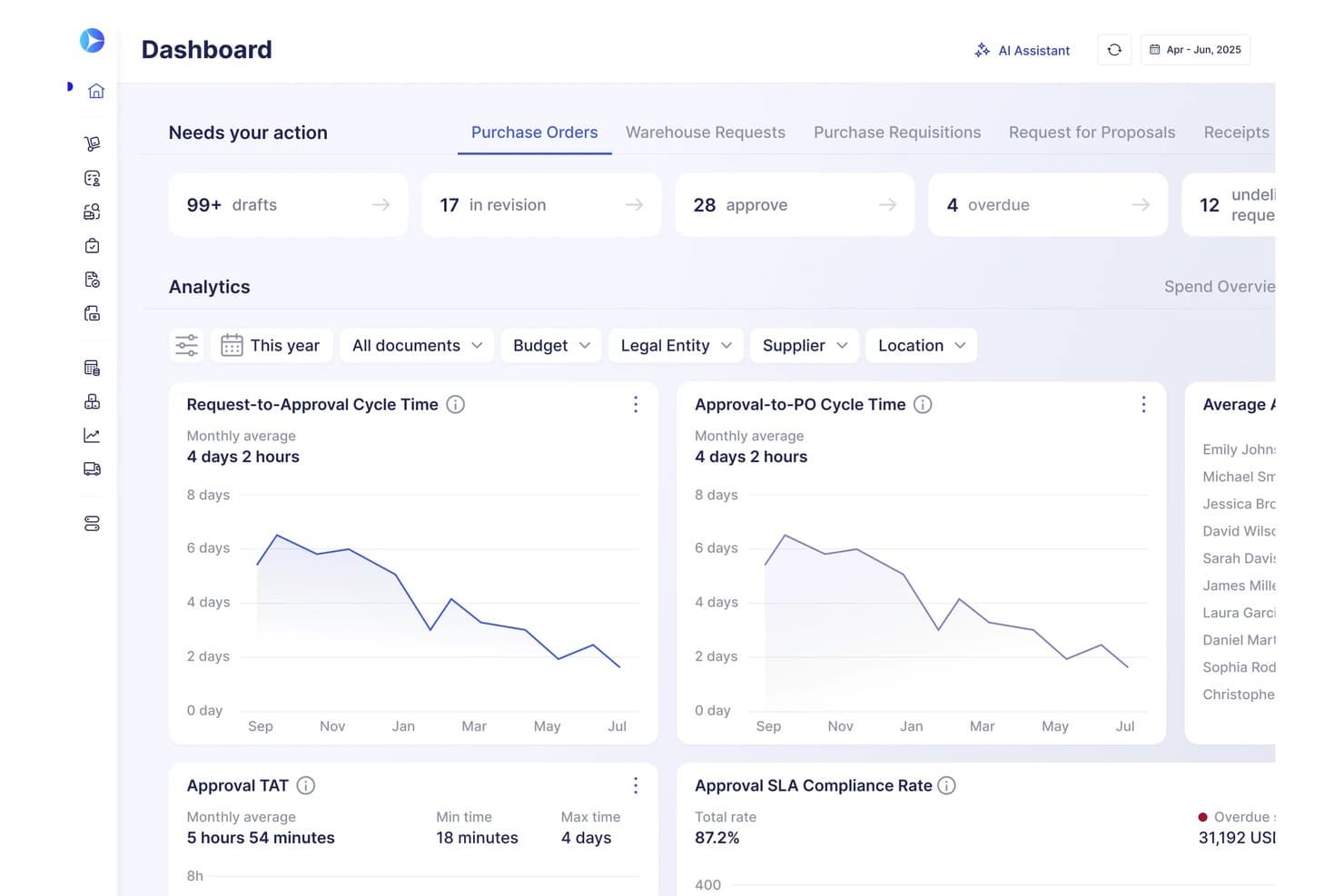
Precoro tracks approval cycle times and procurement analytics in one dashboard. Precoro is a procure-to-pay and AP automation platform that covers purchase requests, approvals, supplier management, PunchOut catalogs, invoice capture, and multi-entity spend reporting.
Who Is Precoro Best For?
Precoro is a strong fit for mid-sized companies with multiple entities that need to bring purchase requests, approvals, supplier catalogs, and invoice processing under one roof.
Why I Picked Precoro
Precoro earns its spot on my shortlist because of how well it handles policy-controlled PunchOut buying, letting procurement teams shop directly on supplier sites like Amazon Business, Grainger, or McMaster-Carr while keeping every order inside Precoro's approval and budget guardrails. I particularly like that its Universal PunchOut Connector extends this to suppliers beyond the official catalog, so you're not locked into a fixed list. Pair that with configurable budget-blocking rules and a full audit trail, and you get tight spend control without sacrificing buying flexibility.
Precoro Key Features
- Intelligent AP automation: Captures invoice data via AI-powered OCR, matches documents to purchase orders, flags discrepancies, and routes finalized invoices through approval workflows.
- Multi-entity management: Organizes legal entities within one account with entity-specific users, suppliers, contracts, currencies, and tax settings.
- Real-time budget tracking: Tracks spend against budgeted amounts across periods, departments, locations, and projects, and displays available funds during requests and approvals.
- Supplier Portal: Provides a shared workspace where suppliers and internal teams collaborate on RFPs, purchase orders, and invoices.
Precoro Integrations
Precoro offers dozens of native integrations, including NetSuite, QuickBooks Online, Xero, BILL, Power BI, Amazon Business, and Microsoft Teams. Its API supports custom integrations, while Multi-Entity Management is documented for NetSuite but not QuickBooks Online or Xero.
Pros and Cons
Pros:
- Budget views span subsidiaries and departments
- Invoice matching reduces manual AP entry
- PunchOut buying keeps policy approvals in scope
Cons:
- Report views can require Excel exports
- Entity-specific approval workflows aren’t available
Learn more about Precoro: 2Best for simplified invoice digitization
BILL
- Free plan available
- From $49/user/month
Visit WebsiteCustomer Rating:4.5/5
BILL invoice summary view showing invoice actions, customer details, amount due, and payment status tracking within the platform’s enterprise spend management system. BILL is a spend management platform that combines AP automation, corporate card controls, expense tracking, and budget management in one place. Built for finance teams, BILL is a spend management platform covering AP automation, expense reporting, corporate card issuance, and payment processing. An AP automation and spend management platform, BILL brings together invoice processing, corporate cards, expense tracking, and multi-step approval workflows.
Who Is BILL Best For?
BILL is a good fit for small to midsize businesses with finance teams looking to centralize AP, expenses, and card spend without managing multiple disconnected tools.
Why I Picked BILL
I've included BILL in my top picks because its AI-powered invoice digitization is genuinely one of the most hands-off I've used. When a vendor emails an invoice to your dedicated AP address, BILL's OCR reads it, extracts the key fields, and auto-codes multi-line items—with great accuracy on field capture and a claimed significant reduction in manual coding time. I also like that it handles 2- and 3-way matching automatically, flagging duplicate POs and mismatches before they become payment errors.
BILL Key Features
- Multi-step approval workflows: Set up sequential or parallel approval chains for invoices and payments based on amount, department, or vendor.
- Corporate card spend controls: Issue virtual or physical BILL Divvy cards with preset spending limits and category restrictions per employee.
- Real-time budget tracking: Monitor spend against department or project budgets as transactions occur across cards and AP.
- Vendor management portal: Store vendor payment details, W-9s, and contact information in a centralized vendor directory.
BILL Integrations
BILL offers native two-way sync with QuickBooks Online, QuickBooks Pro/Premier, QuickBooks Enterprise, Xero, Oracle NetSuite, Sage Intacct, and Microsoft Dynamics. It also supports data integration with additional ERPs like Blackbaud, Acumatica, Sage 50, Sage 100, and FreshBooks through customizable file import/export templates. Beyond accounting syncs, BILL integrates with HR platforms, Slack, and offers an API platform for building custom integrations. Zapier support is not clearly documented as a native connection.
Pros and Cons
Pros:
- Real-time mobile receipt capture after transactions
- Automates invoice capture, approvals, and payments
- Supports ACH, wire, check, and card payments
Cons:
- Long support response times on complex issues
- Lacks a reliable three-way match process
Learn more about BILL: Best for AI-powered spend data normalization
- Free demo available
- Pricing upon request
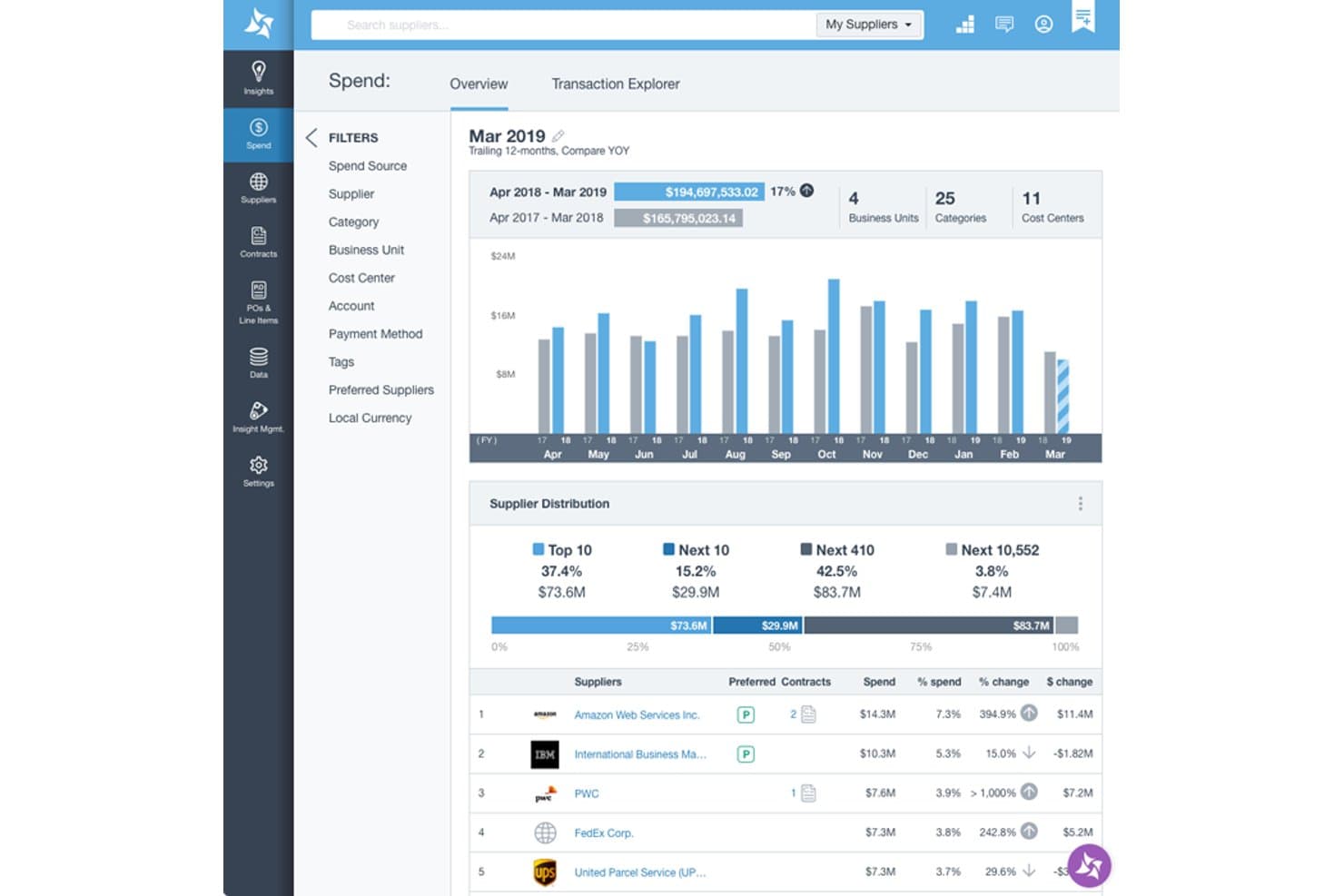
Suplari provides a spend overview dashboard with supplier distribution, YOY spend comparison, and top supplier rankings by spend percentage. Suplari is a procurement intelligence platform that uses AI to normalize, classify, and analyze spend data pulled from ERP, P2P, accounts payable, and expense systems across the enterprise.
Who Is Suplari Best For?
Suplari is a strong fit for procurement leaders at large enterprises managing complex, multi-source spend data across multiple ERPs or P2P systems.
Why I Picked Suplari
I picked Suplari because no other tool on my shortlist handles messy, multi-source spend data as cleanly. Its AI automatically classifies spend against UNSPSC or custom taxonomies and deduplicates suppliers into normalized parent-child hierarchies, without requiring an upfront data cleansing project. I like that it ingests data from multiple ERPs, P2P systems, and AP tools simultaneously, giving procurement teams a single, accurate view of spend within 90 days.
Suplari Key Features
- Contract Intelligence software: Extracts and centralizes key terms, dates, and obligations from contract documents for analysis and alerting.
- Procurement savings tracking: Monitors and quantifies realized versus projected savings on a per-project and category basis.
- Supplier risk monitor: Continuously checks supplier data for risk signals, compliance issues, and performance trends.
- No-code dashboard creation: Lets users build custom spend, supplier, or risk dashboards without requiring IT or developer resources.
Suplari Integrations
Suplari offers native integrations with SAP, Oracle, Workday, Coupa, Ariba, Snowflake, Microsoft Dynamics, and Databricks. An API is available for custom integrations.
Pros and Cons
Pros:
- Handles messy multi-source data well
- Fast time-to-value for spend visibility
- AI spend classification is highly accurate
Cons:
- Weak native AP automation capabilities
- Not a full procure-to-pay platform
Learn more about Suplari: Best for real-time spend approvals
- Free demo available
- Pricing upon request
Visit WebsiteCustomer Rating:4.7/5
Spendesk combines cards, expenses, invoices, approvals, and tracking. Spendesk is an enterprise spend management platform that combines company cards, invoice processing, expense tracking, approval workflows, and real-time spend monitoring in one system.
Who Is Spendesk Best For?
Spendesk is a good fit for finance teams at mid-sized companies that need centralized control over employee spending.
Why I Picked Spendesk
I picked Spendesk as one of the best because I can set up real-time spend approvals that notify managers instantly when a purchase request is made. My team uses the platform’s virtual and physical cards to control spending at the point of purchase, and I rely on its automated approval workflows to keep spend within policy without slowing down operations. I also like that I can track every transaction as it happens, which helps me stay on top of company-wide expenses.
Spendesk Key Features
- Invoice management: Upload, process, and match invoices directly in the platform.
- Receipt capture: Snap and attach receipts to transactions using the mobile app.
- Spending analytics dashboard: View categorized spend data and trends in real time.
- Multi-entity support: Manage spend across multiple subsidiaries or business units.
Spendesk Integrations
Spendesk offers native integrations with Xero, NetSuite, QuickBooks, Slack, Workday, SAP SuccessFactors, HiBob, BambooHR, Personio, and Google Workspace.
Pros and Cons
Pros:
- Multi-entity support for global organizations
- Virtual and physical cards for controlled spending
- Real-time spend approval notifications for managers
Cons:
- Limited approval workflow customization
- Reporting exports can be limited in format
Learn more about Spendesk: Best for integrated travel and expense tracking
- Free plan + Free demo available
- From $15/user/month
Visit WebsiteCustomer Rating:4.7/5
Navan Expense offers a transaction dashboard with merchant spend tracking. Navan is an enterprise spend management platform that combines expense tracking, travel booking, policy controls, and real-time reporting in a single system.
Who Is Navan Best For?
Navan is a good fit for finance teams at mid-size and large companies that manage frequent employee travel and expense reporting.
Why I Picked Navan
I picked Navan as one of the best because I can manage both travel bookings and expense tracking in one place, which is rare among spend management tools. I use its real-time policy controls to enforce travel and expense rules automatically, and my team relies on its mobile app to capture receipts and submit expenses while on the go. I also like that Navan syncs travel itineraries directly with expense reports, so reconciliation is much faster for us.
Navan Key Features
- Virtual cards: Issue single-use or recurring virtual cards for employee purchases.
- Automated expense categorization: Expenses are automatically sorted into predefined categories.
- Custom approval workflows: Set up multi-level approval processes for spend requests.
- Real-time analytics dashboard: Monitor spend data and trends with up-to-date visual reports.
Navan Integrations
Navan offers native integrations with NetSuite, QuickBooks, Xero, Workday, and Oracle.
Pros and Cons
Pros:
- AI-powered fraud detection and spend insights
- Automated receipt capture from travel bookings
- Integrated travel booking and expense management
Cons:
- Travel focus may not suit non-travel-heavy companies
- Limited customization for complex approval workflows
Learn more about Navan: Best for custom approval hierarchies
- 14-day free trial
- From $4/user/month
Visit WebsiteCustomer Rating:4.5/5
Zoho Expense offers an admin dashboard with spend summaries. Zoho Expense is an enterprise spend management platform that offers automated expense reporting, policy controls, multi-level approvals, and integrations with accounting and ERP systems.
Who Is Zoho Expense Best For?
Zoho Expense is a strong fit for finance teams at mid-sized and large organizations that need detailed control over expense approvals.
Why I Picked Zoho Expense
I picked Zoho Expense as one of the best because I can build custom, multi-level approval hierarchies that match our organization’s structure. My team uses its advanced workflow engine to set up conditional routing based on department, amount, or project. I also rely on its granular policy controls to enforce compliance at every approval stage.
Zoho Expense Key Features
- Corporate card management: Issue, track, and reconcile company card transactions within the platform.
- Mileage and per diem tracking: Capture and manage mileage and per diem expenses for employees.
- Multi-currency support: Submit and process expenses in multiple currencies for global teams.
- Audit trail: Maintain a detailed log of all expense actions and changes for compliance.
Zoho Expense Integrations
Zoho Expense offers native integrations with Zoho Books, Zoho CRM, QuickBooks Online, Xero, Sage Accounting, Oracle, and Microsoft 365.
Pros and Cons
Pros:
- Automated receipt scanning and expense categorization
- Strong policy enforcement and audit trails
- Custom approval workflows for complex hierarchies
Cons:
- Per diem and mileage rules are rigid
- Reimbursement process can be slow
Learn more about Zoho Expense: Best for compliance with international payment rules
- Free demo available
- From $99/month
Visit WebsiteCustomer Rating:4.5/5
Tipalti offers a centralized expense management dashboard. Tipalti is an enterprise spend management platform that centralizes expense processing, automates global payments, manages supplier onboarding, and enforces compliance with tax and regulatory requirements.
Who Is Tipalti Best For?
Tipalti is a strong fit for finance teams at multinational companies that need to manage complex global payment compliance.
Why I Picked Tipalti
I picked Tipalti as one of the best because I can automate global payments while staying compliant with local tax and regulatory requirements. My team uses its built-in tax form collection and validation to reduce risk when paying international vendors. I also rely on its payment screening and sanctions checks to help us avoid regulatory issues across multiple countries.
Tipalti Key Features
- Multi-entity management: Lets you manage expenses and payments across multiple subsidiaries or business units.
- Automated invoice capture: Extracts data from invoices and matches them to purchase orders.
- Custom approval workflows: Allows you to set up multi-level approval chains for expense reports.
- Real-time payment status tracking: Provides visibility into payment progress and settlement for each transaction.
Tipalti Integrations
Tipalti offers native integrations with NetSuite, QuickBooks Online, Sage Intacct, Xero, and Oracle.
Pros and Cons
Pros:
- Multi-entity and subsidiary management
- Automated tax compliance and validation tools
- Supports global payments in 190+ countries
Cons:
- Approval workflow options are basic
- Mobile app lacks advanced functionality
Learn more about Tipalti: 8Best with automated card controls
Brex
- Free plan + demo available
- From $12/user/month
Visit WebsiteCustomer Rating:4.5/5
Brex offers a compliance report dashboard with spend tracking. Brex is an enterprise spend management platform that offers corporate cards, automated expense tracking, spend controls, and real-time reporting in a unified system.
Who Is Brex Best For?
Brex is a strong fit for finance teams at fast-growing startups and tech companies that need automated card controls and centralized spend management.
Why I Picked Brex
I picked Brex as one of the best because I can set granular, automated card controls for every team and project, which helps me enforce spend policies without manual review. I use Brex to issue virtual and physical cards instantly, each with custom limits and merchant restrictions. My team relies on real-time transaction monitoring and automated receipt matching, so we catch out-of-policy spend right away.
Brex Key Features
- Expense policy automation: Set and enforce company-wide expense policies automatically.
- Multi-entity management: Manage spend across multiple subsidiaries or business units in one platform.
- ERP integrations: Sync transactions and expense data directly with accounting systems like NetSuite and QuickBooks.
- Mobile receipt capture: Upload and match receipts to transactions using the Brex mobile app.
Brex Integrations
Brex offers native integrations with NetSuite, QuickBooks, Xero, Sage Intacct, Oracle Fusion Cloud, Workday, SAP Concur, Slack, Google Workspace, and Zapier.
Pros and Cons
Pros:
- Multi-entity and subsidiary management
- Fast virtual and physical card issuance
- Automated card controls for every team
Cons:
- No built-in travel booking platform
- Limited international card acceptance
 Best for telecom invoice reconciliation
- Free demo available
- Pricing upon request
Visit WebsiteCustomer Rating:5/5
Lightyear offers a month-to-month telecom spend dashboard. Lightyear is a telecom expense management platform designed for enterprises to automate invoice processing, audit telecom bills, manage contracts, and centralize telecom vendor data.
Who Is Lightyear Best For?
Lightyear is a strong fit for telecom, IT, and finance teams at large enterprises managing high volumes of telecom invoices and vendor contracts.
Why I Picked Lightyear
I picked Lightyear as one of the best because I can automate telecom invoice reconciliation at scale, which is a pain point for large enterprises. I like that my team can audit telecom bills line by line, flag discrepancies, and centralize contract data for all telecom vendors. In practice, that means we can process high volumes of invoices and catch billing errors before they hit our GL.
Lightyear Key Features
- Automated GL coding: Assigns telecom expenses to the correct general ledger accounts automatically.
- Multi-currency support: Handles invoices and payments in multiple currencies for global operations.
- User permissions management: Lets you control access and approval rights for different team members.
- Document storage: Stores contracts, invoices, and supporting documents in a centralized digital repository.
Lightyear Integrations
Native integrations are not clearly documented.
Pros and Cons
Pros:
- Centralizes telecom contract management
- Flags billing discrepancies for review
- Automates telecom invoice data extraction
Cons:
- No automated payment processing feature
- Lacks built-in analytics dashboards
Learn more about Lightyear: 10Best for global policy enforcement at scale
Coupa
- Free plan + 30-day free trial + free demo available
- Pricing upon request
Visit WebsiteCustomer Rating:4.2/5
Coupa offers an AI-powered insights dashboard displaying spend metrics, savings opportunities, and prescriptive recommendations for enterprise spend management. Coupa is an enterprise spend management platform designed for large organizations that need to manage procurement, expenses, invoicing, supplier relationships, and contract compliance in one unified system.
Who Is Coupa Best For?
Coupa is a good fit for large enterprises with complex global operations and strict policy requirements.
Why I Picked Coupa
I picked Coupa as one of the best because I can set up global policy controls that apply consistently across every business unit. I use its policy enforcement engine to automate compliance checks and approvals for complex, multi-country spend. The platform’s audit trails and configurable workflows let my team manage risk and enforce standards at scale.
Coupa Key Features
- Supplier management: Centralizes supplier onboarding, risk assessment, and performance tracking.
- Contract repository: Stores and organizes contracts for easy access and compliance monitoring.
- Expense reporting: Automates expense capture, categorization, and policy validation.
- Budget tracking: Provides real-time visibility into budget consumption and remaining spend.
Coupa Integrations
Coupa offers native integrations with SAP, Oracle, NetSuite, Workday, Salesforce, and has native integrations across the Microsoft ecosystem, including Microsoft 365 and Azure.
Pros and Cons
Pros:
- Real-time budget visibility and alerts
- Advanced audit trails for compliance tracking
- Global policy enforcement across multiple entities
Cons:
- Integration setup may require technical support
- Implementation process can be lengthy
Learn more about Coupa:
Alte soluții software pentru gestionarea cheltuielilor la nivel de întreprindere
Iată câteva opțiuni suplimentare de software pentru gestionarea cheltuielilor la nivel de întreprindere care nu au ajuns pe lista mea scurtă, dar care merită totuși analizate:
- 11TradeshiftBest for supplier collaboration workflows
- 12ControlHubBest for procurement automation in tech companies
- 13ExpensePointBest for multi-currency expense processing
- 14FraxionBest for audit-ready spend documentation
- 15PaylocityBest for payroll-linked expense reimbursement
- 16ProcurifyBest for spend requests with built-in budget visibility
- 17PleoBest for managing multi-entity business expenses
- 18SageBest for HR and payroll system integration
- 19RampBest with AI-powered spend insights
- 20PayhawkBest for ERP and accounting platform integrations
- 21EmburseBest for policy-driven expense automation
- 22SAP Concur ExpenseBest for mobile receipt capture and reporting
How I Evaluate Enterprise Spend Management Software
I evaluate each platform across two layers: core capabilities like 3-way invoice matching and multi-entity approvals, and the differentiators that separate the strongest options.
Core Functionality (Table Stakes For This List)
When I'm selecting tools for my list, I rank each one on a scale from 0 (does not offer the functionality) to 5 (excels in this area) for each core functionality listed below. Then, I calculate the tool's total score into a percentage. Each tool needs to achieve a minimum total score of 65% to be considered for inclusion.
- Procure-to-Pay Automation: I look at whether the platform covers the full lifecycle from requisition through PO creation, approval routing, and payment in a single connected workflow.
- AP & Invoice Processing: How invoices are captured, coded, and matched matters. I check for OCR, automated GL coding, and 2-way or 3-way matching against POs and receipts.
- Expense & Card Management: I evaluate whether the tool handles both corporate/virtual card issuance and employee expense reimbursements with built-in policy enforcement at submission.
- Budget Controls & Approvals: Multi-level approval chains tied to real-time budget checks are what I look for here, especially routing by cost center, department, or GL account.
- Spend Analytics & Reporting: Dashboards should consolidate PO, invoice, card, and expense data in one view. I check for drill-down capability across spend categories and entities.
- ERP & Financial System Integrations: The platform needs native, bi-directional connectors to major ERPs like NetSuite, SAP, Oracle, Workday, or Microsoft Dynamics for GL sync.
Once I have a list of tools that meet the criteria, I consider what sets each platform apart.
Differentiating Factors (What Sets Vendors Apart)
Here's how I compare and contrast different vendors:
Standout Features
AI-driven anomaly detection is a big differentiator. I look for tools that flag duplicate invoices, out-of-policy charges, and unusual spend patterns before payment goes out. For multinational organizations, global payment rails with built-in FX handling save the treasury team from juggling third-party services. Contract lifecycle management also adds real value—linking contracts to POs and invoices gives controllers direct visibility into spend-under-contract and upcoming renewals.
Beyond Features
Compliance certifications matter when your finance team handles sensitive payment data. I check for SOC 1 and SOC 2 Type II reports, audit trail depth, and segregation of duties controls—especially for SOX-regulated organizations. Pricing transparency is another factor I weigh carefully, since some vendors bundle card interchange revenue into their model while others charge per user or per transaction. I also evaluate implementation timelines, because a multi-entity rollout with ERP migration can stretch months if the vendor lacks structured onboarding support.
Cum să alegeți software-ul pentru gestionarea cheltuielilor la nivel de întreprindere
Este ușor să vă pierdeți în liste lungi de funcții și structuri complexe de prețuri. Pentru a vă menține concentrarea în timp ce parcurgeți procesul unic de selecție a software-ului, iată o listă de factori de care trebuie să țineți cont:
| Factor | Aspecte de luat în considerare |
| Scalabilitate | Va putea software-ul să gestioneze volumele actuale și estimate de tranzacții, entități și utilizatori pe măsură ce compania dumneavoastră se dezvoltă? |
| Integrări | Se conectează nativ la sistemele dumneavoastră ERP, de contabilitate, de resurse umane și bancare sau veți avea nevoie de lucrări personalizate prin API ori de un middleware? |
| Posibilitatea de personalizare | Puteți adapta fluxurile de lucru, lanțurile de aprobare și rapoartele pentru a corespunde politicilor și structurii organizației dumneavoastră fără un sprijin IT semnificativ? |
| Ușurință în utilizare | Vor putea utilizatorii din departamentele financiar și non-financiar să navigheze rapid în sistem sau vă veți confrunta cu rezistență și veți avea nevoie de instruire continuă? |
| Implementare și integrare inițială | Cât timp va dura să puneți sistemul în funcțiune și de ce resurse — interne sau furnizate de furnizor — este nevoie pentru o lansare reușită? |
| Cost | Sunt nivelurile de preț transparente și se aliniază cu tiparele dumneavoastră de utilizare, numărul de utilizatori și rentabilitatea estimată a investiției? |
| Măsuri de securitate | Platforma îndeplinește cerințele organizației dumneavoastră privind confidențialitatea datelor, controlul accesului și auditul, în special pentru datele financiare sensibile? |
| Disponibilitatea serviciului de asistență | Veți avea acces la asistență promptă în timpul programului dumneavoastră de lucru și există o persoană de contact dedicată pentru problemele urgente? |
Ce este software-ul pentru gestionarea cheltuielilor la nivel de întreprindere?
Software-ul pentru gestionarea cheltuielilor la nivel de întreprindere este o platformă digitală care ajută organizațiile să controleze, să urmărească și să analizeze cheltuielile companiei, achizițiile și plățile către furnizori. Aceste sisteme centralizează datele privind cheltuielile, automatizează fluxurile de aprobare și impun respectarea politicilor. Echipele financiare le folosesc pentru a optimiza vizibilitatea, a reduce erorile manuale și a sprijini luarea deciziilor strategice în mai multe departamente și unități de afaceri.
Funcții
Iată funcțiile de bază pe care ar trebui să le aibă orice software performant pentru gestionarea cheltuielilor la nivel de întreprindere:
- Procesarea automatizată a facturilor: Digitalizează și extrage date din facturi, le asociază cu comenzile de achiziție și le direcționează pentru aprobare, reducând introducerea manuală a datelor și erorile.
- Aplicarea politicii privind cheltuielile: Aplică automat regulile companiei privind cheltuielile, semnalând tranzacțiile care nu respectă politica și solicitând aprobări sau documente suplimentare atunci când este necesar.
- Analiza cheltuielilor în timp real: Oferă tablouri de bord și rapoarte care prezintă cheltuielile curente și istorice după categorie, departament, furnizor sau proiect, pentru decizii mai bune.
- Suport pentru mai multe entități și valute: Gestionează cheltuielile între filiale, unități de afaceri și valute, consolidând datele pentru organizațiile globale.
- Integrarea cu sistemele ERP și de contabilitate: Se conectează direct la platformele financiare principale pentru a sincroniza tranzacțiile, codurile registrului general și datele furnizorilor, fără încărcări manuale.
- Controale de acces bazate pe roluri: Vă permite să setați permisiuni pentru utilizatori în funcție de rolurile lor, asigurând că datele financiare sensibile sunt accesibile doar personalului autorizat.
- Capturarea mobilă a chitanțelor: Le permite angajaților să fotografieze chitanțele și să trimită cheltuielile de pe smartphone-uri, accelerând rambursarea și reducând documentele pierdute.
- Fluxuri de aprobare automatizate: Direcționează solicitările de cheltuieli și facturile prin lanțuri de aprobare personalizabile, asigurând conformitatea și procesarea la timp.
- Jurnal de audit și urmărirea conformității: Înregistrează fiecare acțiune efectuată în sistem, sprijinind auditurile interne și conformitatea cu reglementările prin evidențe detaliate.
- Instrumente de gestionare a furnizorilor: Centralizează contractele furnizorilor, condițiile de plată și datele privind performanța, pentru a vă ajuta să negociați tarife mai bune și să monitorizați relațiile cu furnizorii.
Beneficii
Implementarea unui software de gestionare a cheltuielilor pentru întreprinderi oferă mai multe beneficii pentru echipa și compania dumneavoastră. Iată câteva dintre avantajele de care vă puteți bucura:
- Vizibilitate financiară mai bună: Tablourile de bord centralizate și analizele în timp real vă oferă o imagine clară asupra cheltuielilor din toate departamentele, proiectele și entitățile.
- Conformitate îmbunătățită cu politicile: Aplicarea automatizată a politicilor privind cheltuielile și a fluxurilor de aprobare contribuie la asigurarea faptului că fiecare tranzacție respectă regulile companiei.
- Procesarea mai rapidă a facturilor și cheltuielilor: Extragerea automatizată a datelor, capturarea mobilă a chitanțelor și aprobările digitale reduc munca manuală și accelerează ciclurile de rambursare.
- Reducerea riscului de erori și fraudă: Jurnalele de audit, accesul bazat pe roluri și verificările automatizate contribuie la prevenirea plăților duplicate, a cheltuielilor neautorizate și a problemelor de conformitate.
- Gestionarea simplificată a mai multor entități: Suportul pentru mai multe valute și entități facilitează gestionarea cheltuielilor pentru operațiunile globale și consolidarea datelor financiare.
- Relații mai bune cu furnizorii: Instrumentele centralizate de gestionare a furnizorilor vă ajută să urmăriți contractele, să monitorizați performanța și să negociați condiții mai avantajoase.
- Pregătire mai bună pentru audit: Jurnalele detaliate și urmărirea conformității facilitează pregătirea pentru auditurile interne și externe.
Costuri și prețuri
Selectarea unui software de gestionare a cheltuielilor pentru întreprinderi necesită înțelegerea diferitelor modele și planuri de tarifare disponibile. Costurile variază în funcție de funcții, dimensiunea echipei, modulele suplimentare și alți factori. Tabelul de mai jos prezintă pe scurt planurile obișnuite, prețurile medii ale acestora și funcțiile incluse de regulă în soluțiile software de gestionare a cheltuielilor pentru întreprinderi:
Tabel comparativ al planurilor pentru software-ul de gestionare a cheltuielilor pentru întreprinderi
| Tipul planului | Preț mediu | Funcții comune |
| Plan gratuit | $0 | Urmărirea de bază a cheltuielilor, număr limitat de utilizatori, introducerea manuală a datelor și asistență prin e-mail. |
| Plan personal | $5-$15/utilizator/lună | Rapoarte individuale de cheltuieli, capturarea mobilă a chitanțelor, fluxuri de aprobare de bază și analize simple. |
| Plan pentru companii | $20-$40/utilizator/lună | Procesarea automatizată a facturilor, aplicarea politicilor, integrări cu sistemele de contabilitate și acces pentru mai mulți utilizatori. |
| Plan pentru întreprinderi | $50-$100/utilizator/lună | Analize avansate, suport pentru mai multe entități și valute, fluxuri de lucru personalizate, asistență dedicată și jurnale de audit. |
Întrebări frecvente
Iată câteva răspunsuri la întrebările frecvente despre software-ul de gestionare a cheltuielilor pentru companii:
Cum ajută software-ul de gestionare a cheltuielilor pentru companii la asigurarea conformității?
O soluție completă de gestionare a cheltuielilor aplică automat politicile companiei și păstrează jurnale de audit detaliate. Acest lucru vă ajută echipa să respecte controalele interne și reglementările externe prin semnalarea excepțiilor de la limitele de cheltuieli, prevenirea cheltuielilor excesive și furnizarea documentației necesare pentru audituri.
Pot aceste sisteme să gestioneze mai multe monede și entități?
Da, majoritatea soluțiilor de gestionare a cheltuielilor pentru companii acceptă gestionarea mai multor monede și entități. Acest lucru este esențial pentru liderii departamentelor financiare din organizațiile globale care trebuie să consolideze cheltuielile și rapoartele diferitelor filiale, menținând în același timp o vizibilitate completă asupra cheltuielilor de-a lungul întregului lanț de aprovizionare.
Ce integrări ar trebui să caut într-un software de gestionare a cheltuielilor pentru companii?
Căutați integrări cu sistemul ERP și instrumentele de automatizare a proceselor de contabilitate a furnizorilor (AP) pentru a crea un flux de lucru complet, de la achiziție la plată. Aceste conexiuni reduc introducerea manuală a datelor, ajută la gestionarea abonamentelor recurente și oferă o sursă unică de adevăr care îi permite directorului financiar să acceseze date în timp real pentru previziuni exacte.
Cât durează implementarea software-ului de gestionare a cheltuielilor pentru companii?
Durata implementării variază, însă majoritatea soluțiilor de gestionare a cheltuielilor pentru companii necesită de la câteva săptămâni până la câteva luni. Printre factorii implicați se numără migrarea datelor, identificarea strategică a informațiilor despre furnizori și complexitatea funcțiilor bazate pe IA, care ajută la compararea cu datele istorice.
Ce tip de asistență este disponibil pentru utilizatorii din companii?
Planurile pentru companii oferă de obicei manageri de cont dedicați și asistență prioritară pentru a asigura economii semnificative prin adoptarea eficientă a instrumentului. Unii furnizori oferă, de asemenea, asistență la integrare pentru a ajuta la activitățile de identificare a surselor și sesiuni de instruire personalizate pentru echipele care gestionează sarcini complexe de achiziții.