

Programele de salarizare pentru contabili sunt un tip de platformă care le permite firmelor să gestioneze salariile, să automatizeze depunerile fiscale și să administreze în siguranță serviciile de salarizare pentru mai mulți clienți, într-un singur loc. Dacă trebuie să asigurați procesarea corectă a salariilor pentru mai mulți clienți, să țineți pasul cu modificările privind conformitatea sau să integrați datele de salarizare direct în registrul general, găsirea soluției potrivite este importantă.
Programul de salarizare potrivit pentru contabili vă va ajuta să evitați erorile, să vă extindeți serviciile pentru clienți și să consolidați valoarea firmei. Acest ghid compară cele mai bune opțiuni, astfel încât să puteți vedea rapid ce platforme corespund nevoilor dumneavoastră și să preluați controlul asupra operațiunilor de salarizare.
Why Trust Our Software Recommendations
6,700+
Reviews
20
Industry experts
16+
Evaluation factors
14
Years
Our team has been testing and reviewing software since 2012. As finance leaders ourselves, we know how difficult—and important—it is to choose the right software.
For this guide, we evaluated tools using hands-on testing and independent research, scoring tools using our selection criteria.
Our reviews reflect our human editorial judgment, not a sales pitch.
Tabel comparativ al programelor de salarizare pentru contabili
Acest tabel comparativ rezumă detaliile privind prețurile pentru selecția mea de programe de salarizare pentru contabili:
Score legend (out of 5)
- Excellent4.5–5
- Good4–4.4
- Average3–3.9
- Below average2–2.9
- Poor1–1.9
Sorted by: Default
| Tool | Starting Price | Website | |||||||||||
|---|---|---|---|---|---|---|---|---|---|---|---|---|---|
Best for multi-state tax setup and notices | Not rated | 4 | 4 | 3 | 4 | 3 | 5 | Not rated | Not rated | Not rated | Not rated | $35/user/month + $89/month platform fee Free demo available | Website |
Best for growing a CAS practice at scale | Not rated | Not rated | 3 | 4 | Not rated | Not rated | Not rated | 4 | 4 | 4 | 5 | $49/month Free demo available | Book Demo |
Best for multi-client payroll with GL auto-sync | Not rated | Not rated | 5 | 5 | Not rated | Not rated | Not rated | 4 | 5 | 5 | 5 | $8/user/month 14-day free trial + free demo available | Website |
Best for white-label global payroll delivery | Not rated | Not rated | 4 | 4 | Not rated | Not rated | Not rated | 5 | 5 | 4 | 4 | $29/user/month Free demo available | Website |
Best for IRS-certified multi-client payroll filing | Not rated | Not rated | 3 | 4 | Not rated | Not rated | Not rated | 4 | 4 | 4 | 4 | $79/user/month Free demo available | Website |
Best for white-label payroll as a firm service | Not rated | Not rated | 4 | 4 | Not rated | Not rated | Not rated | 5 | 3 | 5 | 4 | $20/month Not available | Website |
Best for affordable multi-client payroll at scale | Not rated | Not rated | 4 | 4 | Not rated | Not rated | Not rated | 4 | 3 | 5 | 4 | $17/month 30-day free trial + free demo available | Website |
Best for multi-client batch payroll at CPA firms | Not rated | Not rated | 5 | 5 | Not rated | Not rated | Not rated | 1 | 3 | 5 | 5 | Pricing upon request Free demo available | Website |
Best for GL sync across client books | Not rated | Not rated | 5 | 3 | Not rated | Not rated | Not rated | 4 | 5 | 5 | 5 | Pricing upon request Free demo available | Website |
Best for firms earning revenue share on client payroll | Not rated | Not rated | 4 | 3 | Not rated | Not rated | Not rated | 5 | 4 | 4 | 4 | Pricing upon request Free demo available | Website |


Recenzii ale celor mai bune programe de salarizare pentru contabili
Mai jos sunt rezumatele mele detaliate ale celor mai bune programe de salarizare pentru contabili care au ajuns pe lista mea scurtă. Recenziile mele oferă o privire detaliată asupra funcțiilor, cazurilor de utilizare optime și integrărilor fiecărei platforme, pentru a vă ajuta să o găsiți pe cea mai potrivită pentru dumneavoastră.
 1Best for multi-state tax setup and notices
Warp
- Free demo available
- From $35/user/month + $89/month platform fee
Visit WebsiteCustomer Rating:4.4/5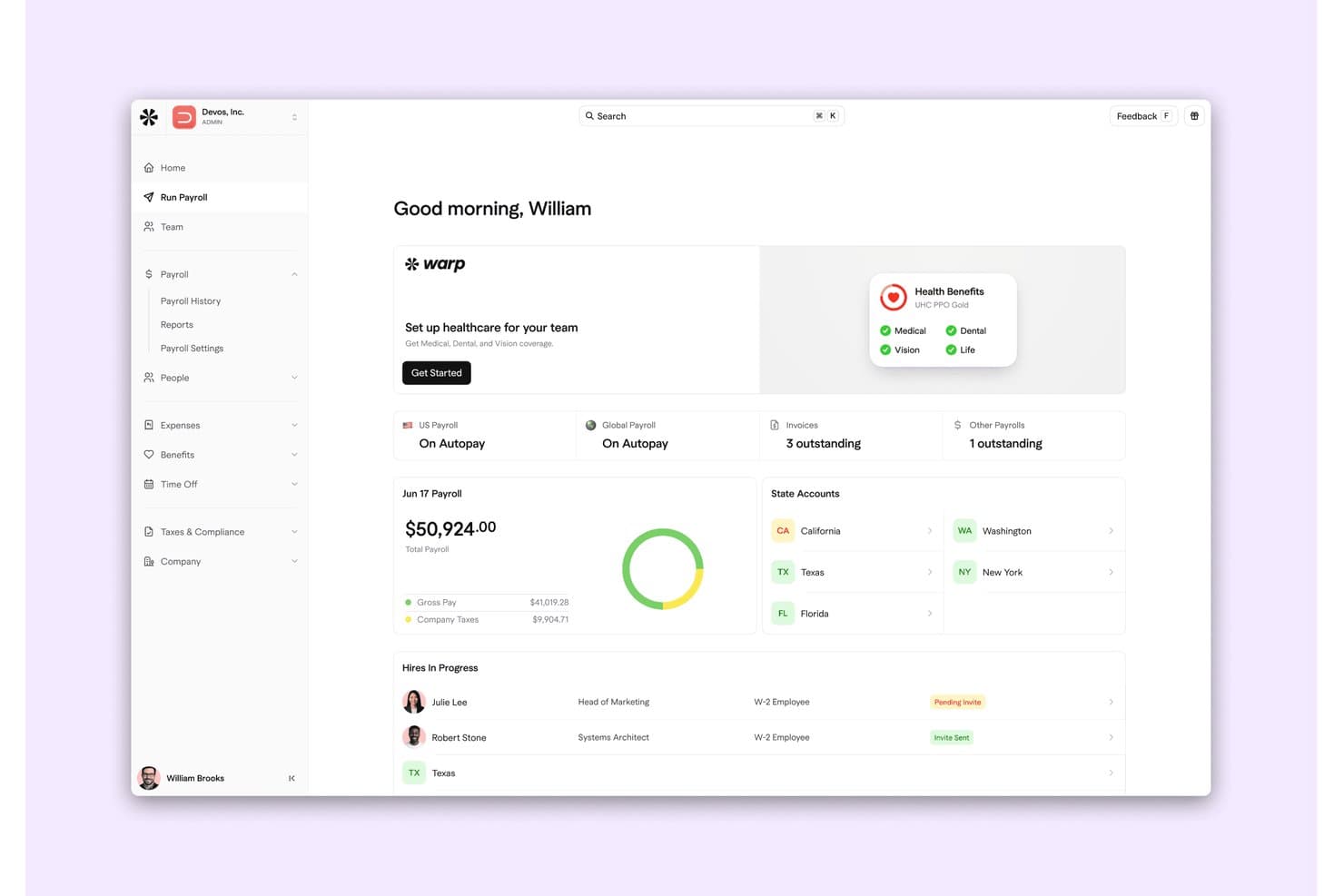
Here's where you can see total payroll, state tax accounts, and hires in progress in Warp. Warp is a full-service payroll platform that automates tax registrations, multi-state filings, and compliance, with built-in accounting integrations, HR tools, and contractor payments across 200+ countries.
Who Is Warp Best For?
Warp is a strong fit for bookkeepers and accountants who manage multi-state payroll compliance and want tax registrations, filings, and notice resolution handled automatically.
Why I Picked Warp
Warp earns its spot on my shortlist because of how thoroughly it handles multi-state tax compliance, which is where payroll gets genuinely painful. When a client hires in a new state, Warp's AI agents identify the required agencies, submit the registrations, and store the credentials in your dashboard automatically. On the Pro plan, it also monitors incoming tax notices and resolves them directly with agencies, so you're not chasing down correspondence on your clients' behalf.
Warp Key Features
- Accounting integrations: Connects natively with QuickBooks, Xero, NetSuite, and Rillet to post itemized payroll journal entries automatically after each run.
- Professional Administrator roles: Lets employers designate bookkeepers or accountants as administrators with permissions to process and approve payroll.
- Global contractor payments: Supports contractor payments across 200+ countries directly within the payroll platform.
- Built-in benefits administration: Includes medical, dental, vision, 401(k), commuter, and wellness benefits with employee self-service enrollment at onboarding.
Warp Integrations
Warp offers native integrations with QuickBooks, Xero, NetSuite, and Rillet for automated payroll journal entries and real-time accounting sync. It also supports REST, CLI, MCP, webhooks, and TypeScript, Python, and Go SDKs for custom integrations.
Pros and Cons
Pros:
- Reviewers praise responsive support and quick setup
- Accountants can approve payroll as administrators
- Automates multi-state registrations and tax notices
Cons:
- Some reviewers report limited benefits-provider choices
- Client-level access boundaries remain undocumented
Learn more about Warp: Best for growing a CAS practice at scale
- Free demo available
- From $49/month
Visit WebsiteCustomer Rating:4.6/5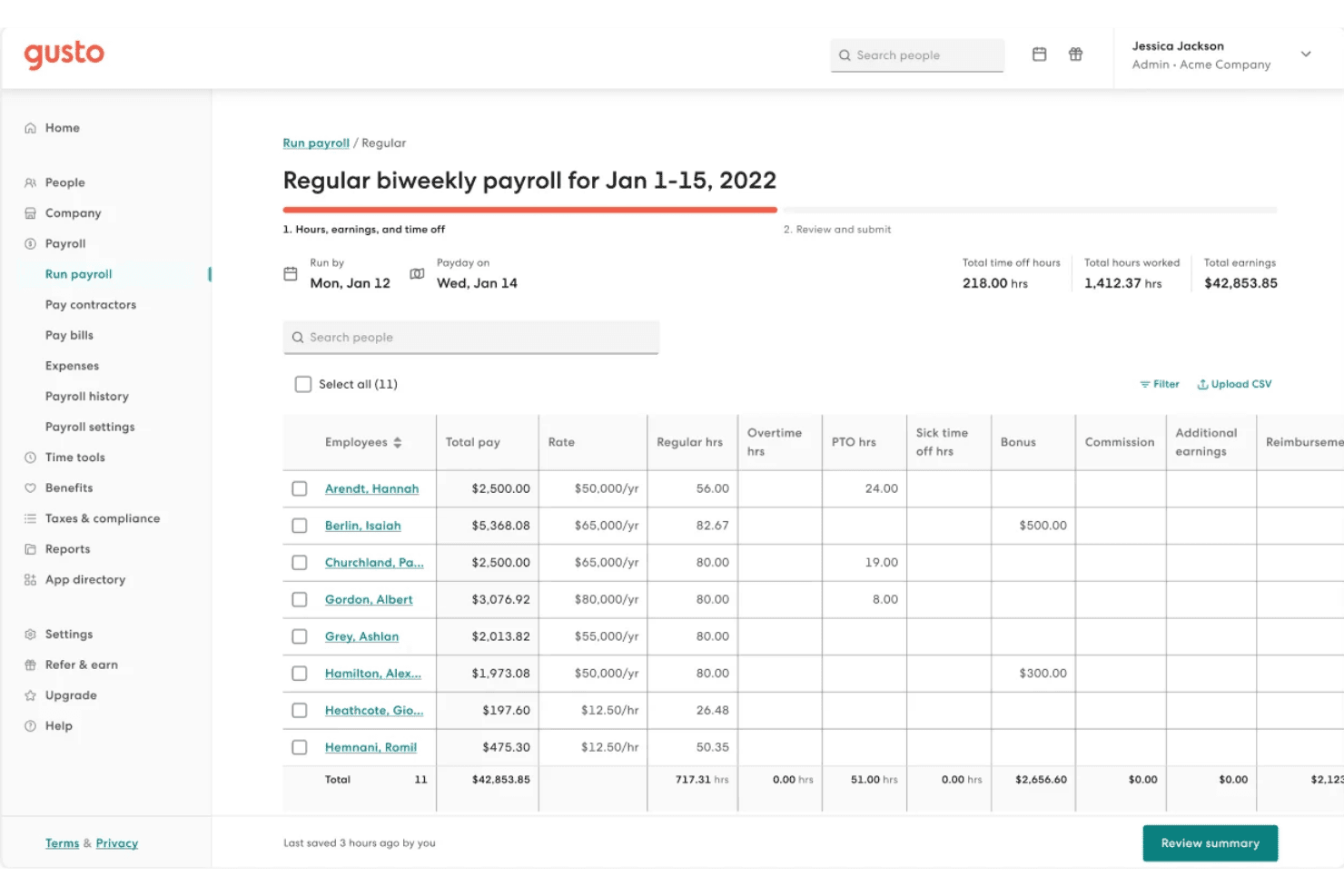
Gusto lets users review and manage employee payroll hours and earnings. Gusto is a payroll platform for accountants that combines multi-client payroll processing, automated tax filing across all 50 states, W-2 and 1099 management, and HR and benefits administration under a single firm dashboard called Gusto Pro.
Who Is Gusto Best For?
Gusto is a strong fit for accounting firms building or expanding a client accounting services practice around payroll, HR, and benefits for small business clients.
Why I Picked Gusto
Gusto Pro is one of my top picks because I love what it does for firms actively building out a CAS practice: it gives you a single free dashboard to manage payroll, HR, and benefits across your entire client book, plus three billing models (including a firm-billed option where you set your own rate) that let you package payroll as a real revenue line. The AutoPilot feature quietly handles recurring salaried payrolls on its own, and the up-to-20% revenue share compounds as you add clients.
Gusto Key Features
- AutoPilot payroll: Automatically runs recurring payroll for salaried employees each pay period without manual intervention.
- Global contractor payments: Pay contractors in 120+ countries directly through the platform as an add-on.
- Native time tracking with payroll sync: Employees clock in and out via browser or mobile app, with hours feeding directly into payroll runs on Plus and Premium plans.
- Three-billing-model flexibility: Choose client-billed with revenue share, client-billed with discount, or firm-billed arrangements on a per-client basis.
Gusto Integrations
Gusto offers native integrations with QuickBooks Online, Xero, FreshBooks, Aplos, ZipBooks, Autobooks, and Expensify; QuickBooks Desktop uses manual exports. The Gusto Embedded Payroll API supports custom payroll integrations.
Pros and Cons
Pros:
- Automated tax filing in all 50 states
- Flexible billing options for CAS practices
- Multi-client dashboard for firm-wide oversight
Cons:
- Reporting customization limited on lower tiers
- No white-label client portal option
 Best for multi-client payroll with GL auto-sync
- 14-day free trial + free demo available
- From $8/user/month (billed annually)
Visit WebsiteCustomer Rating:4.9/5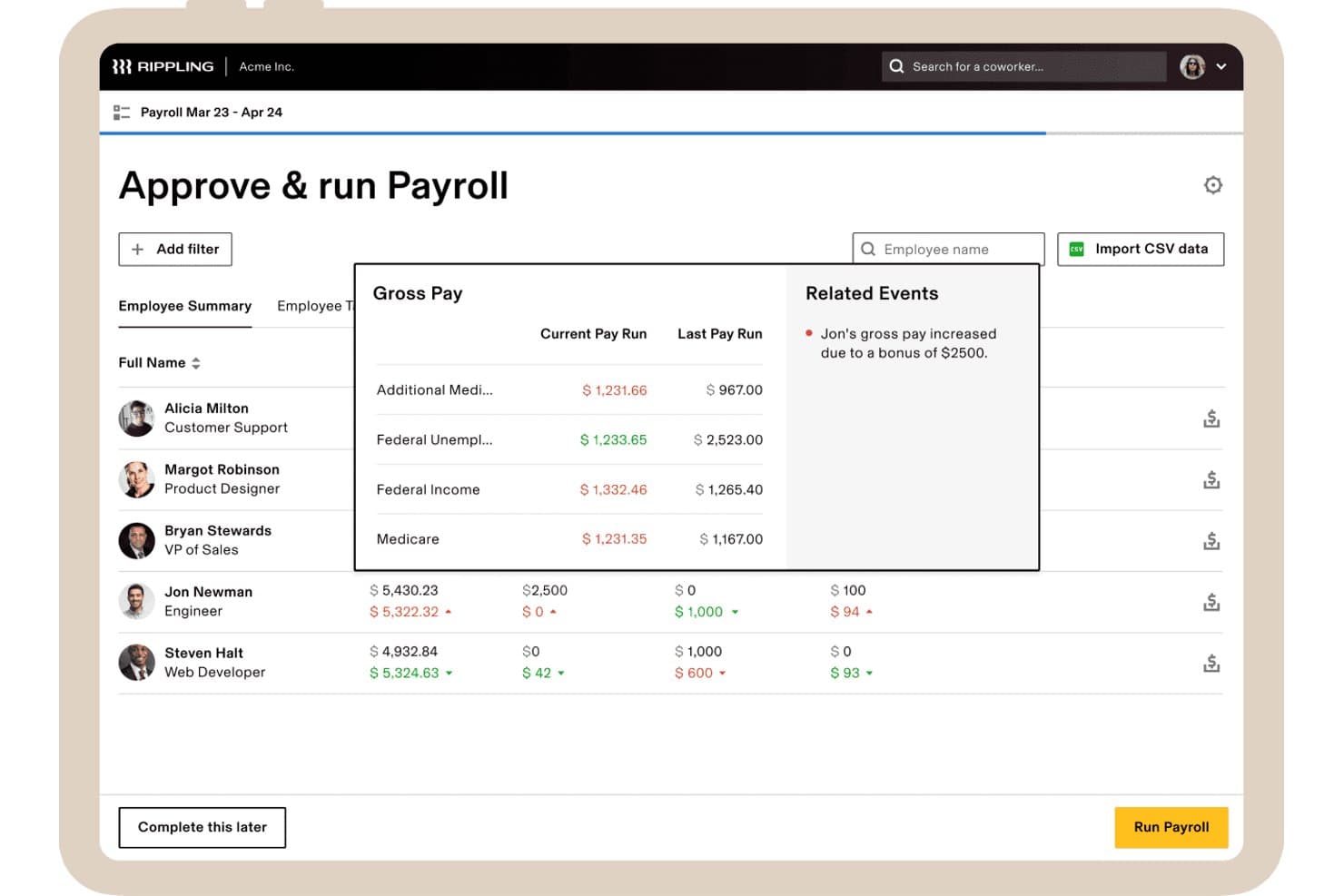
Rippling flags payroll anomalies with gross pay comparisons and alerts. Rippling is a payroll and HR platform built for accounting firms that need to run, manage, and reconcile payroll across multiple client companies—with native GL sync to QuickBooks Online, Xero, NetSuite, and Sage Intacct, automated multi-state tax filing, and a centralized Client Command Center for managing all clients from a single login.
Who Is Rippling Best For?
Rippling is a strong fit for accounting firms running payroll across multiple client companies that need automatic GL sync to QuickBooks Online, Xero, NetSuite, or Sage Intacct.
Why I Picked Rippling
I picked Rippling as one of the best because its Client Command Center is purpose-built for running payroll across an entire client book from a single login, with native GL auto-sync to QuickBooks Online, Xero, NetSuite, and Sage Intacct. After each payroll run, journal entries push automatically with customizable sub-department and class/location mapping already applied. I also like the 100% tax filing accuracy guarantee, which covers federal, state, and local filings across all 50 states.
Rippling Key Features
- Auto-pilot payroll: Changes in HR, benefits, and time tracking flow automatically into each pay cycle, reducing manual data entry before each run.
- Unlimited off-cycle payroll runs: Run bonus, correction, or adjustment payrolls at any time with no extra charge.
- Workflow Studio: A no-code automation builder for creating custom approval chains, pay code triggers, and compliance alerts across client accounts.
- Role-based permissions: Granular access controls let you delegate specific payroll tasks and approvals across your team with appropriate segregation of duties.
Rippling Integrations
Rippling offers native integrations with QuickBooks Online, Xero, NetSuite, and Sage Intacct, plus 650+ app integrations. An API supports custom integrations through developer.rippling.com.
Pros and Cons
Pros:
- Deep GL sync with class/location mapping
- Auto-pilot payroll reduces manual work
- Multi-client payroll from centralized dashboard
Cons:
- No white-label firm branding options
- Payroll requires full HRIS subscription
 Best for white-label global payroll delivery
- Free demo available
- From $29/user/month
Visit WebsiteCustomer Rating:4.8/5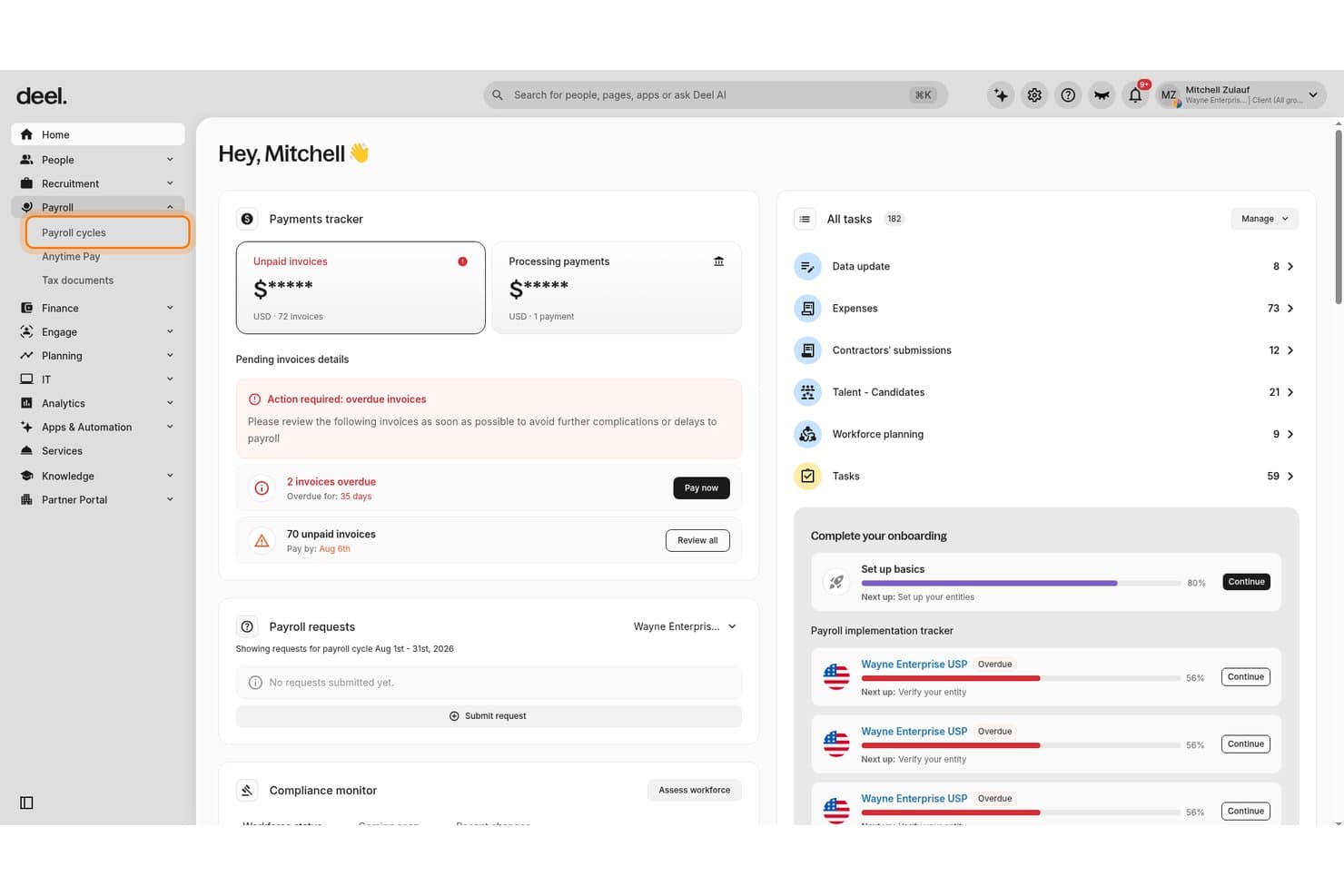
Deel Payroll centralizes invoice tracking and payroll cycle management for accountants. Deel is a global payroll platform that handles contractor payments, W-2 employee payroll, EOR, and PEO across 150+ countries, with a dedicated Partner Portal and white-label tools built for accounting firms managing multi-client payroll.
Who Is Deel Payroll Best For?
Accounting firms that manage payroll for clients with international contractors, EOR employees, or globally distributed workforces will get the most out of Deel.
Why I Picked Deel Payroll
I've included Deel Payroll in my top picks because the white-label program lets accounting firms deliver payroll under their own branding, which is a genuine practice-builder for CAS offerings. The Partner Portal supports three client relationship types (referral, child org, and partner org), so you can manage dozens of clients without separate logins. I also like that the Managed Payroll tier assigns a dedicated Deel Payroll Manager to complex clients, covering multi-state and hourly worker scenarios without adding internal headcount.
Deel Payroll Key Features
- Compliance Hub: Monitors regulatory updates in real time and flags payroll anomalies with AI before each approval cycle.
- Off-cycle payroll runs: Processes bonuses, corrections, and last-minute payments outside the standard schedule at no additional charge.
- GL Sync plugin: Maps payroll line items to specific GL accounts and tracking categories, then posts journal entries directly to QuickBooks, Xero, NetSuite, Sage, SAP, or Microsoft Dynamics Finance.
- Mixed workforce support: Manages W-2 employees, 1099 contractors, EOR workers, and PEO employees within a single platform.
Deel Payroll Integrations
Deel offers 8 documented accounting integrations, including QuickBooks, Xero, NetSuite, Sage, SAP, and Microsoft Dynamics Finance, plus marketplace integrations with Acumatica and TRES Finance. Its open API supports custom integrations.
Pros and Cons
Pros:
- Partner Portal supports multi-client switching
- Manages employees, contractors, EOR, and PEO together
- White-label payroll lets firms use their branding
Cons:
- GL Sync setup and triggering are manual
- Frequent issues reported with US payroll reliability
Learn more about Deel Payroll: Best for IRS-certified multi-client payroll filing
- Free demo available
- From $79/user/month
Visit WebsiteCustomer Rating:4.6/5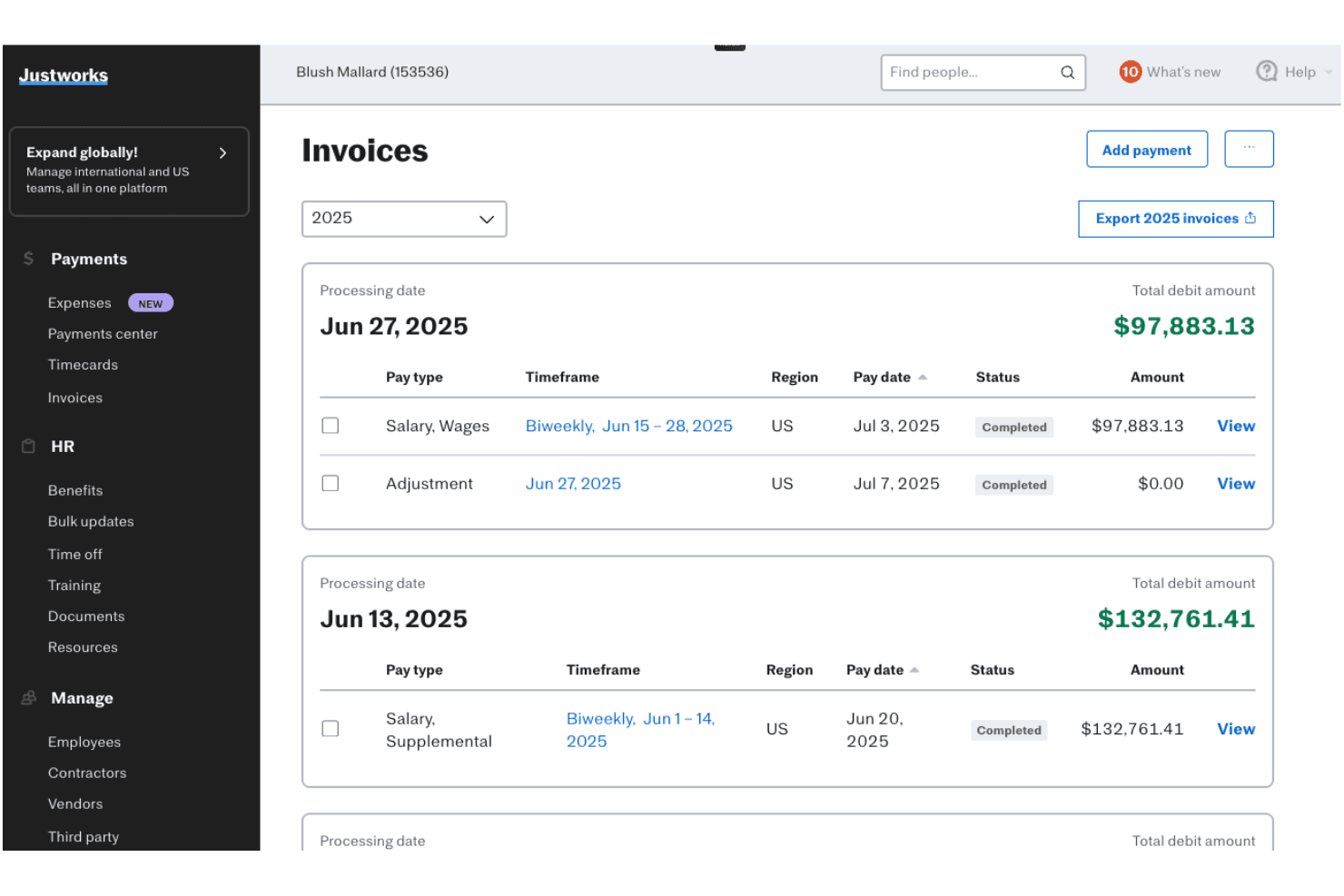
Justworks displays a detailed Invoices page showing payroll processing dates, pay types, timeframes, statuses, and debit amounts. Justworks is a payroll and PEO platform built for accounting firms to manage multi-client payroll processing, automated tax filings, and GL integrations across QuickBooks, Xero, NetSuite, and Sage Intacct from a single Advisor Dashboard.
Who Is Justworks Best For?
Justworks works best for accounting firms managing payroll across a portfolio of small business clients who need IRS-certified tax filing and GL sync in one place.
Why I Picked Justworks
I've included Justworks in my top picks because its IRS Certified PEO (CPEO) status is something I don't see often—it means Justworks takes on direct federal payroll tax liability for your clients, not just filing on their behalf. In practice, that covers automated 940, 941, W-2, and 1099 filings across all 50 states and 4,000+ tax localities, which is a real differentiator when you're managing payroll compliance across a varied client portfolio. The Advisor Dashboard ties it together with single sign-in access, role-based team permissions, and client switching across both PEO and standalone payroll accounts.
Justworks Key Features
- Accountant Partner Program: A formal partner program that gives your firm a dedicated relationship manager, a partner relationship management tool for tracking referrals, and revenue-share or client rebate options.
- Role-based team permissions: Assign specific firm members to individual client accounts with granular access controls directly within the Advisor Dashboard.
- Multi-state payroll filing: Handles direct deposit, state withholding, and unemployment filings across all 50 states and 4,000+ tax localities for every client on your roster.
- Time tracking add-on: A native time tracking module that syncs directly into payroll runs at $8/month per employee, eliminating manual data entry between systems.
Justworks Integrations
Justworks offers four native accounting integrations: QuickBooks Online, Xero, NetSuite, and Sage Intacct. QuickBooks Online and Xero support Payroll and PEO plans, while NetSuite and Sage Intacct require PEO plans.
Pros and Cons
Pros:
- Native time tracking syncs directly to payroll
- Advisor Dashboard manages multiple client accounts
- IRS CPEO status shifts tax liability
Cons:
- No white-label or firm-branded client experience
- No cross-client batch payroll runs
Learn more about Justworks: Best for white-label payroll as a firm service
- Not available
- From $20/month
Visit WebsiteCustomer Rating:4.2/5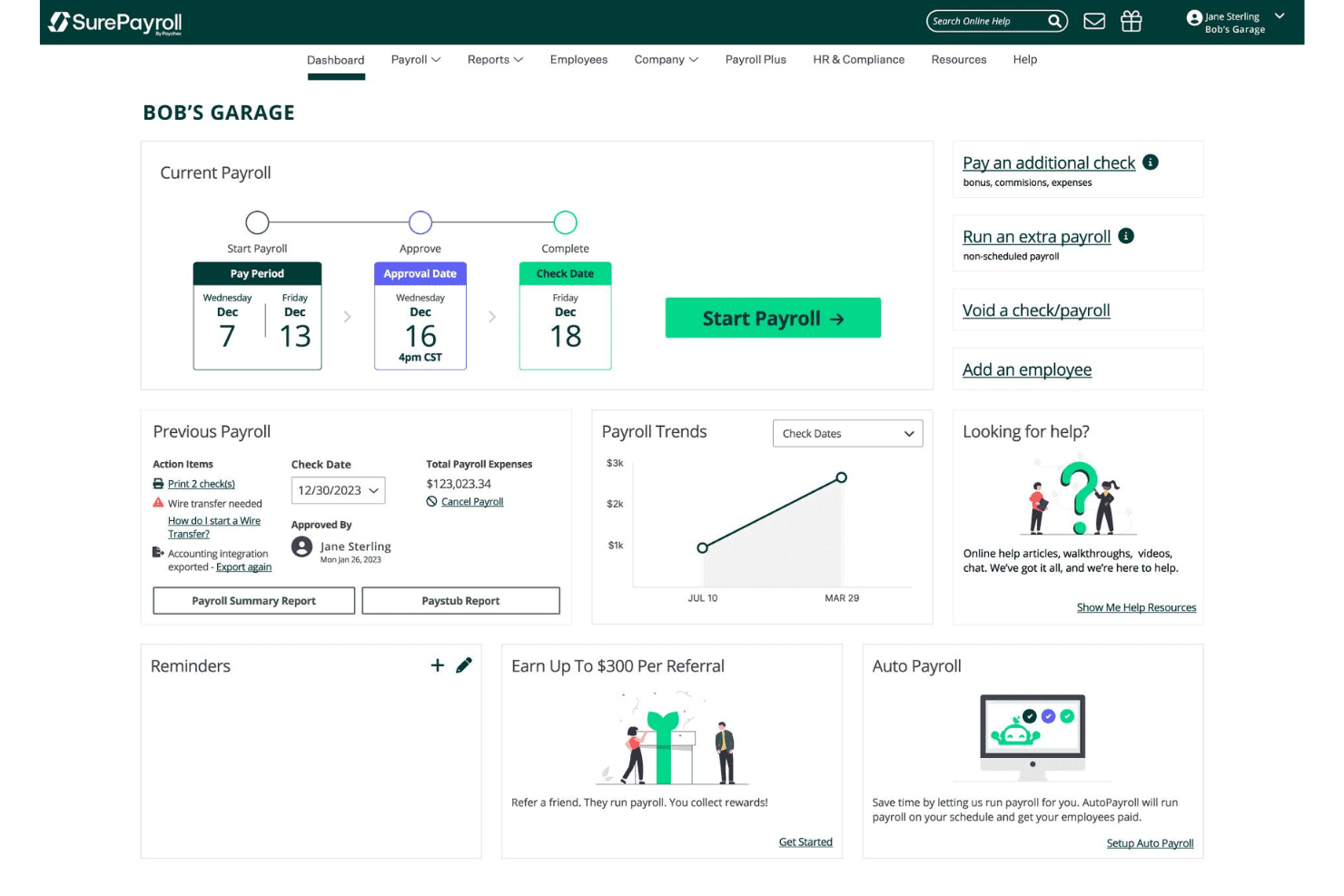
SurePayroll's dashboard lets users manage and start payroll runs easily. SurePayroll is a full-service payroll platform built for accounting firms, offering multi-client management, automated tax filing, white-label client portals, and integrations with QuickBooks Online, Xero, and Sage.
Who Is SurePayroll Best For?
SurePayroll is a strong fit for accounting firms that want to offer payroll under their own brand without building a payroll infrastructure from scratch.
Why I Picked SurePayroll
I've included SurePayroll in my top picks because its white-label reseller program lets accounting firms offer payroll under their own brand, with no SurePayroll branding visible to clients. I love that firms get wholesale volume pricing they can mark up independently, plus a dedicated Accountant Care Team. The Tax Penalty Guarantee, which covers fines caused by SurePayroll's own filing errors, is a specific accountability feature firms can communicate directly to clients.
SurePayroll Key Features
- AutoPayroll scheduling: Set recurring payroll runs on a fixed schedule, with automated reminders and deadline alerts sent before each processing date.
- Multi-state payroll add-on: Run payroll across any number of states for a flat $9.99/month fee, regardless of how many states are involved.
- Employee self-service portal: Employees access pay stubs, W-2s, and direct deposit settings through web and mobile apps without contacting your firm.
- Role-based staff access: Assign firm employees specific permission levels within the partner dashboard to control what each team member can view or edit.
SurePayroll Integrations
SurePayroll offers 12 documented integrations, including QuickBooks Online, Xero, Sage Intacct, Sage 50, AccountEdge, Less Accounting, Homebase, Buddy Punch, StratusTime, and Novatime. Accounting and time-tracking integrations are paid add-ons.
Pros and Cons
Pros:
- Flat multi-state payroll fee for all clients
- Tax penalty guarantee covers payroll filing errors
- White-label payroll for firm-branded client experience
Cons:
- Year-end W-2 and 1099 filing fees apply
- General ledger integration requires paid add-on
Learn more about SurePayroll: Best for affordable multi-client payroll at scale
- 30-day free trial + free demo available
- From $17/month
Visit WebsiteCustomer Rating:5/5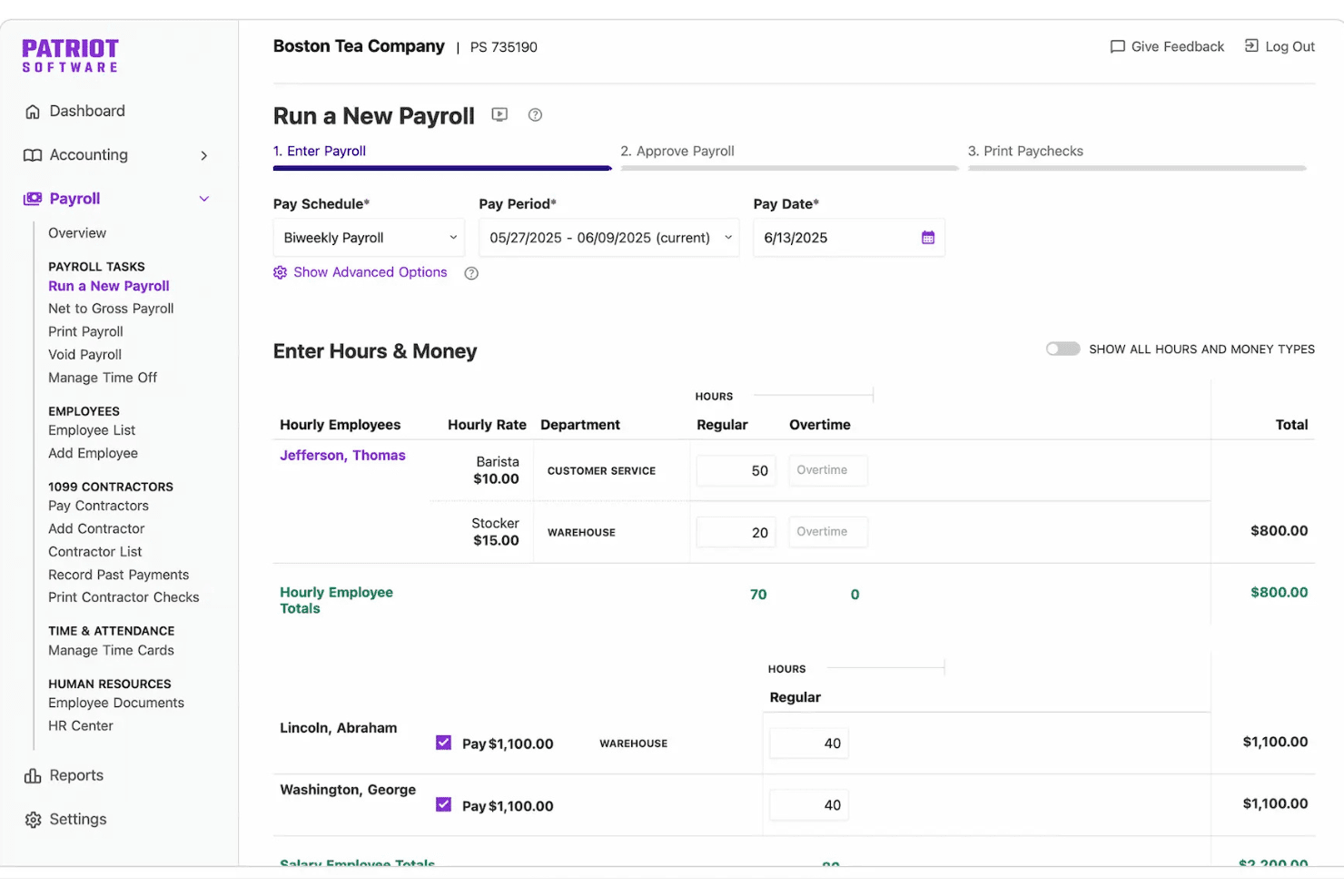
Patriot Software lets users enter employee hours and wages to run payroll. Patriot Software is a US-based payroll platform built for accounting firms, offering multi-client payroll processing, automated tax filing across all 50 states, and a dedicated accountant partner program with tiered discounts and consolidated billing.
Who Is Patriot Software Best For?
Patriot Software is a strong fit for small to mid-sized accounting firms managing payroll for a growing book of small business clients on a tight budget.
Why I Picked Patriot Software
I picked Patriot Software as one of the best because it's built to grow with your book of clients without growing your costs at the same rate. The tiered Accountant Partner Program scales discounts up to 30% as you add clients, and firms managing six or more clients get their own payroll and accounting software free. I particularly like the Umbrella Login, which lets me switch between client accounts instantly, and Auto Payroll, which automates recurring salaried runs and sends advance notifications before each scheduled run so I can catch anything unusual.
Patriot Software Key Features
- Full-service tax filing guarantee: Patriot automatically files federal, state, and local payroll taxes across all 50 states and covers any penalties caused by a filing error on its end.
- Consolidated billing with custom client rates: Your firm receives a single monthly bill for all clients, and you set your own pricing when invoicing clients directly.
- SOC 2 Type II compliance: Patriot meets enterprise-grade data security standards, including encryption, MFA, and role-based permissions across all client accounts.
- Employee self-onboarding portal: Employees complete their own W-4, direct deposit setup, and personal information directly in the platform, reducing manual data entry for your team.
Patriot Software Integrations
Patriot Software has six documented native integrations, including Patriot Accounting, QuickBooks Online, QuickBooks Desktop, SimplyInsured, Vestwell, and ERGO NEXT. It also supports an API for custom integrations and third-party time tracking with QuickBooks Time, Buddy Punch, and TimeRack.
Pros and Cons
Pros:
- Auto Payroll handles recurring salaried runs
- Automated tax filing penalty guarantee included
- Consolidated billing for all client accounts
Cons:
- Does not support garnishments or child support
- No white-label portal or branding options
Learn more about Patriot Software: Best for multi-client batch payroll at CPA firms
- Free demo available
- Pricing upon request
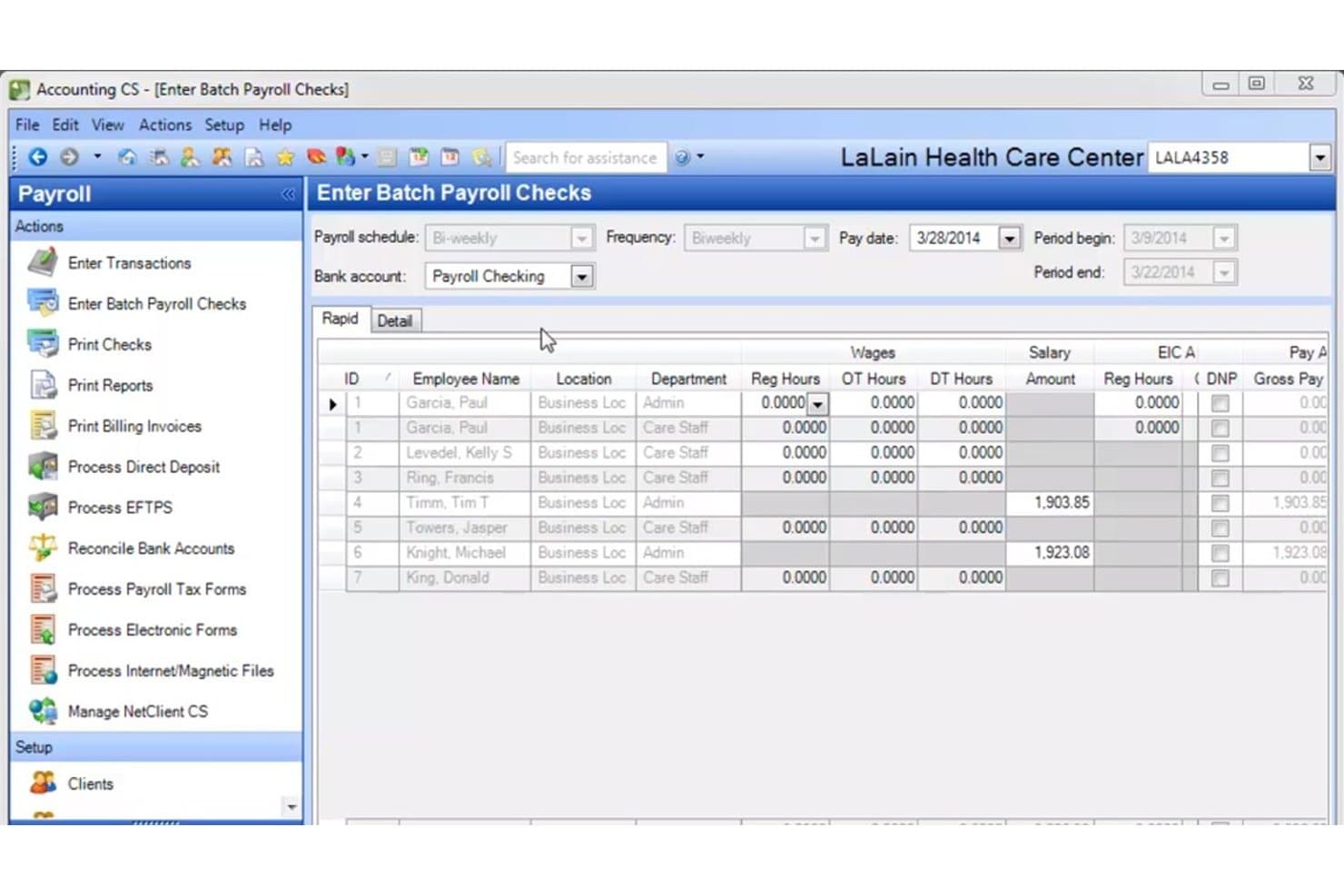
Accounting CS Payroll lets users enter batch payroll checks efficiently. Accounting CS Payroll is a payroll module within Thomson Reuters' CS Professional Suite, built specifically for CPA firms to handle multi-client payroll processing, automated tax form filing, direct deposit, employee self-service, and compliance management across all 50 states.
Who Is Accounting CS Payroll Best For?
Accounting CS Payroll is built for mid-to-large CPA firms that manage payroll on behalf of many clients and need to run batch processing across all of them without switching between systems.
Why I Picked Accounting CS Payroll
Accounting CS Payroll earns its spot on my shortlist because it's one of the few payroll platforms built from the ground up for CPA firms running payroll across dozens of clients. I love that batch processing lets my team run payroll for multiple clients simultaneously, with several staff members working on different client files at the same time. The tax form library is also genuinely deep, covering W-2s, 940/941/943/944/945 series, and 20-plus 1099 variants with automated federal, state, and local e-filing across all 50 states.
Accounting CS Payroll Key Features
- Multi-state employee withholding: Set up individual employees for tax withholding calculations across multiple states within a single payroll record.
- NetClient CS employee self-service portal: Employees access pay stubs, W-2s, and 1099-NECs and submit W-4 updates directly through a secure, client-branded portal.
- Fee calculation and client invoicing: Calculate payroll service fees and generate client invoices from within the same platform you use to run payroll.
- InsurePay workers' compensation integration: Automatically calculate and collect pay-as-you-go workers' comp premiums each pay cycle based on live payroll data.
Accounting CS Payroll Integrations
Accounting CS Payroll has native integrations with UltraTax CS, GoSystem Tax RS, Practice CS, QuickBooks Desktop and Online, Timerack, InsurePay, Kotapay, and NetClient CS. Its strongest connectivity is within the Thomson Reuters CS Professional Suite.
Pros and Cons
Pros:
- Automated compliance with new payroll legislation
- Customizable client portals for firms and employees
- Processes payroll across multiple clients simultaneously
Cons:
- No formal partner program with revenue sharing
- No direct email of reports to clients
Learn more about Accounting CS Payroll: Best for GL sync across client books
- Free demo available
- Pricing upon request
Visit WebsiteCustomer Rating:4.3/5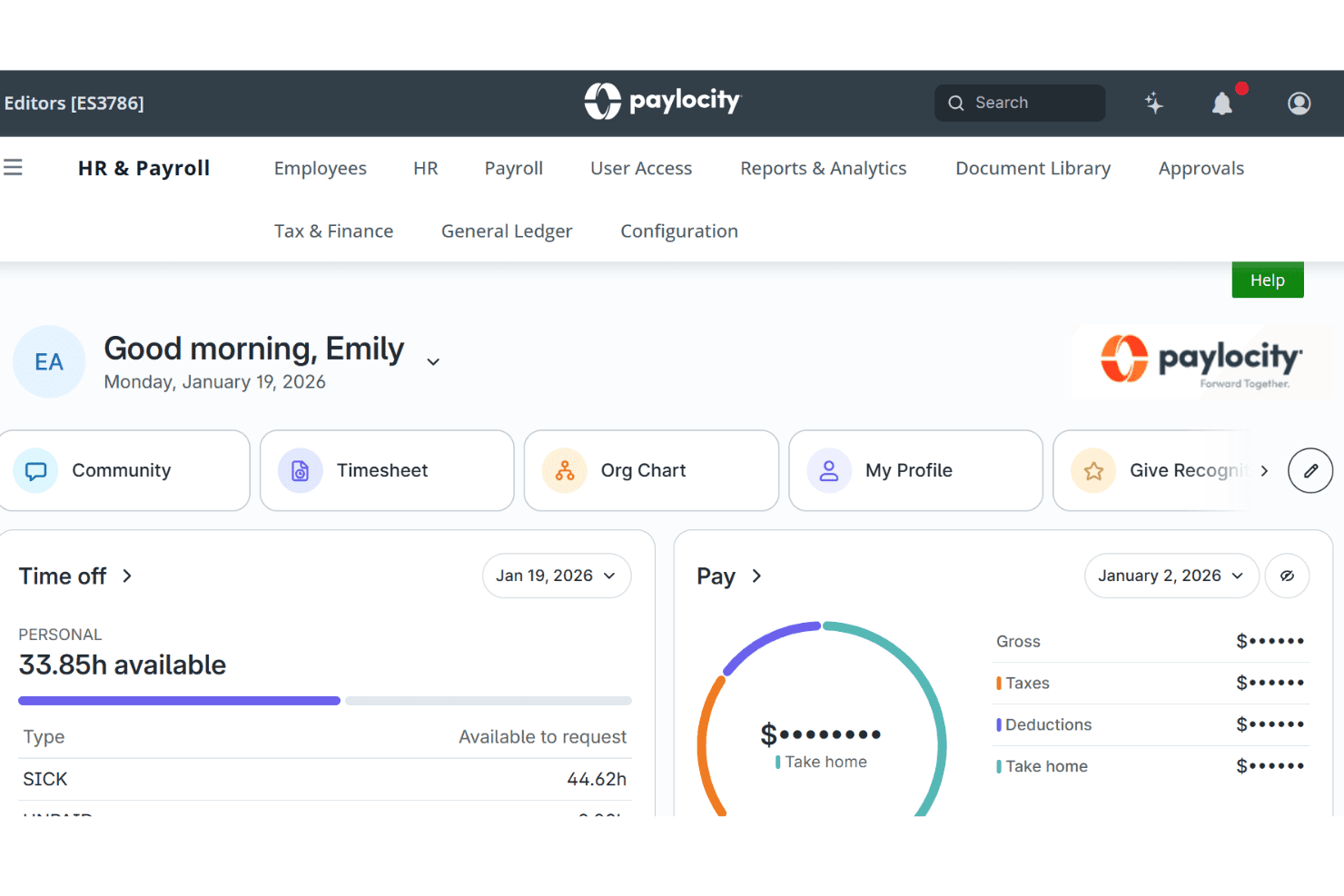
Paylocity lets employees track time off and pay summaries in one dashboard. Paylocity is an HCM-based payroll platform for accounting firms that combines full-service payroll processing, automated tax filing across all 50 states, multi-client reporting, and native GL integrations with QuickBooks Online and NetSuite.
Who Is Paylocity Best For?
Paylocity is a strong fit for accounting firms managing mid-market clients who need automated GL sync into QuickBooks Online or NetSuite alongside full-service payroll and tax filing.
Why I Picked Paylocity
I've included Paylocity in my top picks because its native GL sync into QuickBooks Online and NetSuite is genuinely one of the strongest I've seen in this category. The June 2025 update added guided GL mapping, real-time validation, and dynamic journal entry rules that pull department, location, and cost center data automatically. I also rely on its 30+ automated payroll audits and the Payroll Readiness Dashboard to catch errors before filing, which matters when you're managing multiple client books at once.
Paylocity Key Features
- Accountant Advantage Program: A dedicated partner program that gives accounting firms access to a partner portal, revenue-share or reseller arrangements, and CPE-eligible training through Wolters Kluwer.
- Ignite AI anomaly detection: An AI layer that flags unexpected pay changes and compliance issues before payroll is processed, with citations pulled from tax and regulatory sources.
- Multi-state tax geolocation: Automatically verifies employee tax jurisdiction accuracy across all 50 states, Puerto Rico, the Virgin Islands, and Guam.
- On-demand pay: Lets employees access earned wages before payday with no impact on employer cash flow, managed directly within the payroll platform.
Paylocity Integrations
Paylocity offers native integrations with QuickBooks Online and Oracle NetSuite, plus marketplace integrations with Xero, Sage, and SAP Concur. Its 350+ marketplace integrations and REST API, EDI, and SFTP support connect additional client systems.
Pros and Cons
Pros:
- 30+ automated payroll audit checks
- Dedicated partner support for accounting firms
- Native GL sync with QuickBooks and NetSuite
Cons:
- No white-label branding for firm delivery
- No batch payroll across multiple clients
Learn more about Paylocity: Best for firms earning revenue share on client payroll
- Free demo available
- Pricing upon request
Visit WebsiteCustomer Rating:4.2/5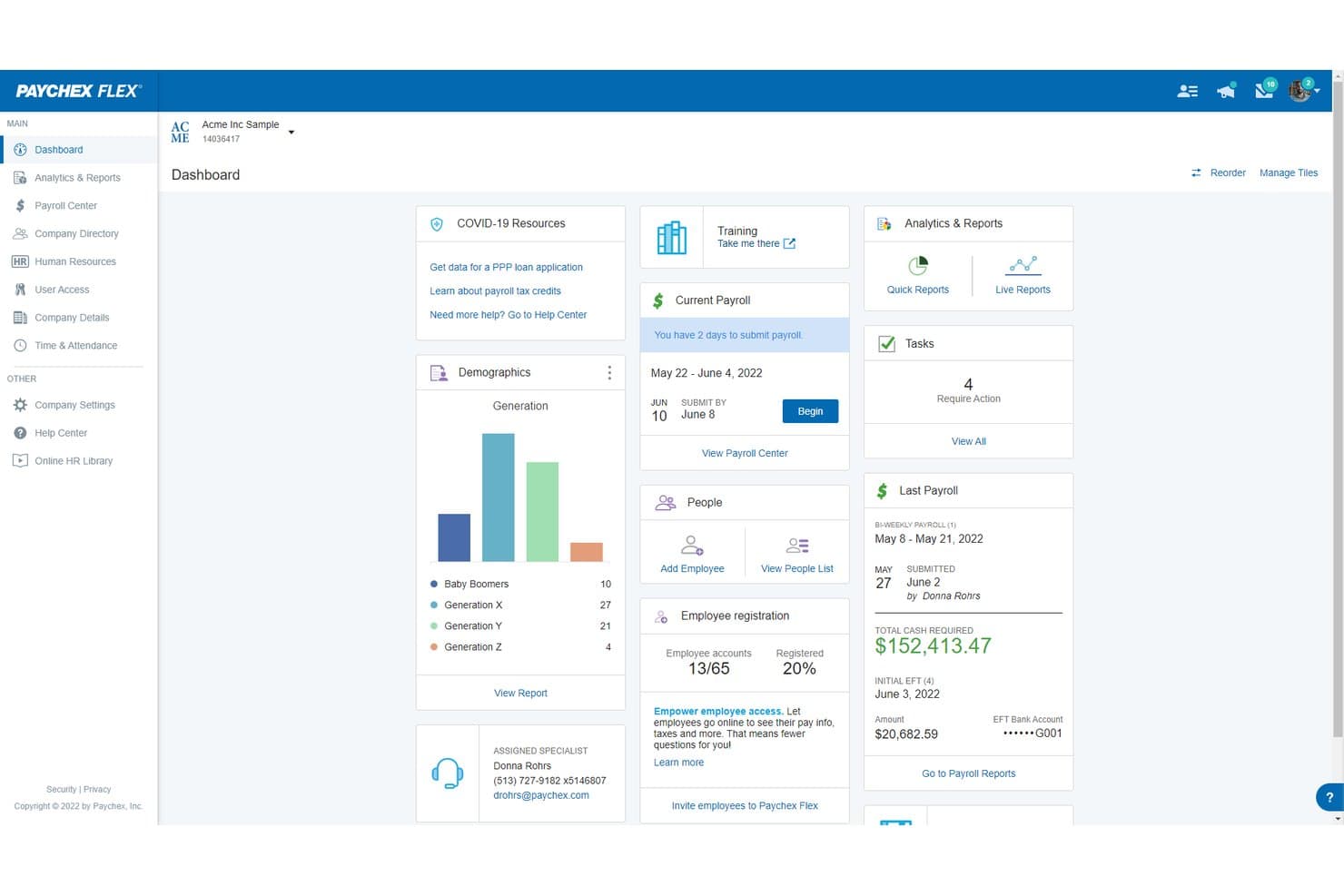
Paychex Flex centralizes payroll, HR, and workforce data in one dashboard. Paychex Flex is a full-service payroll platform for accounting firms that combines multi-client payroll processing, automated tax filing via Taxpay®, GL sync with QuickBooks Online, Xero, Sage Intacct, and NetSuite, and a tiered accountant partner program with revenue share options.
Who Is Paychex Flex Best For?
Paychex Flex is a strong fit for accounting firms that want to earn recurring revenue by referring clients to a full-service payroll provider backed by AICPA endorsement.
Why I Picked Paychex Flex
I picked Paychex Flex because its three-tier Accountant Benefits Program is the most structured revenue-share model I've seen in this category, paying up to 50% on new client sales plus 10% residuals over three years. What I find genuinely compelling is the Acquisition Program: if your firm wants to exit payroll processing entirely, Paychex will buy your book of business and return a valuation within 48 hours. Its AICPA/CPA.com preferred-partner status adds institutional credibility that matters when positioning payroll services to clients.
Paychex Flex Key Features
- Taxpay automated tax filing: Automatically calculates, files, and remits federal, state, and local payroll taxes across all client accounts, plus handles W-2 and 1099 generation at year-end.
- Paychex WISE AI compliance monitoring: Continuously scans regulatory changes across every state where your clients operate and flags compliance risks before payroll is submitted.
- Paychex Pre-check: Lets employees review their paychecks before payday, reducing correction requests and off-cycle adjustments for your team.
- Paychex Partner Pro dashboard: A centralized portal where you can search clients, receive proactive alerts for missing tax IDs or missed payroll dates, and manage referrals in one place.
Paychex Flex Integrations
Paychex Flex offers native GL integrations with QuickBooks Online, Xero, Sage Intacct, Oracle NetSuite, and Jirav. Its marketplace includes additional integrations, and its developer API supports custom connections.
Pros and Cons
Pros:
- AI-powered compliance and error flagging tools
- Includes white-label payroll option for firms
- Offers three-tier accountant revenue share program
Cons:
- No documented batch payroll run capability
- Limits dashboard pinning to five clients
Learn more about Paychex Flex:
Alte programe de salarizare pentru contabili
Iată câteva opțiuni suplimentare de programe de salarizare pentru contabili care nu au ajuns pe lista mea scurtă, dar care merită totuși analizate:
- 11QuickBooks PayrollBest for QBO-native payroll with tax penalty cover
- 12OnPayBest for flat-rate multi-client tax filing
- 13RUN Powered by ADPBest for tax penalty protection at scale
- 14PaycorBest for mid-market clients needing HCM beyond payroll
- 15FingercheckBest for hourly and construction client payroll
- 16XeroBest for Xero-native payroll-to-GL sync
- 17ApspayrollBest for white-label payroll reselling
- 18ConnectPayBest for outsourced payroll with client oversight
- 19Drake AccountingBest for flat-rate multi-client payroll filing
How I Evaluate Payroll Software for Accountants
I split my evaluation into baseline requirements—multi-client dashboards, automated tax filing, GL sync—and the differentiators, like partner program economics and white-label options, that separate good tools from the right ones.
Core Functionality (Table Stakes for This List)
When I'm selecting tools for my list, I rank each one on a scale from 0 (does not offer the functionality) to 5 (excels in this area) for each core functionality listed below. I then calculate the tool's total score into a percentage, using 65% as a benchmark to help assess its overall fit for the list.
- Multi-client management: I evaluate how each platform handles client switching, batch actions, and cross-client visibility from a single login—like running payroll for dozens of entities without toggling between separate accounts.
- Automated payroll tax filing: Each tool gets checked for its ability to calculate, file, and remit taxes across jurisdictions, plus generate year-end W-2s and 1099s without manual intervention.
- General ledger integration: I look for native sync with major accounting platforms like QuickBooks, Xero, and Sage, and whether the tool supports per-client GL mapping so journal entries land in the right accounts automatically.
- Full-service payroll processing: The platform should handle direct deposits, contractor payments, multi-state payroll, deductions, and off-cycle runs end to end—not just calculate pay and leave the rest to you.
- Accountant partner program: I check whether the vendor offers a dedicated partner portal with options like wholesale pricing, revenue sharing, or white-label branding—features that let firms offer payroll as their own service.
- Compliance and reporting: Audit-ready reports, customizable payroll registers, and compliance alerts all factor into my evaluation, especially the ability to pull per-client reports during tax season or an audit.
Once I have a list of tools that meet the criteria, I consider what sets each platform apart.
Differentiating Factors (What Sets Vendors Apart)
Here's how I compare and contrast different vendors:
Standout Features
Batch payroll runs matter when you're managing dozens of clients each cycle. I check whether a platform lets you process multiple clients in one workflow or forces you to run each separately. Real-time GL sync is equally important—I look for per-client chart-of-accounts mapping with class and location tracking so journal entries land correctly in QuickBooks Online, Xero, or NetSuite without manual adjustments. White-label branding is a differentiator for firms packaging payroll as their own service, since client-facing portals and pay stubs carry your firm's identity.
Beyond Features
Partner program economics matter—I check whether a vendor offers revenue sharing, wholesale pricing, or firm-billed options, since how you package payroll fees directly affects your margins as you scale clients. Tax penalty guarantees are equally worth evaluating, especially whether the platform reimburses your clients for filing errors it caused. I also look at onboarding support, like bulk migration tools that let you move an entire client book at once instead of setting up each entity one by one. Security credentials round things out; SOC 1 and SOC 2 attestations, role-based permissions, and client data isolation are non-negotiable when you're handling sensitive payroll data across dozens of businesses.
Cum să alegeți un program de salarizare pentru contabili
Folosiți tabelul de mai jos pentru a selecta un instrument de salarizare care să gestioneze complexitatea mai multor clienți, să automatizeze depunerile fiscale și să susțină dezvoltarea serviciilor de consultanță, fără soluții manuale riscante:
| Dacă prioritatea dumneavoastră este... | Căutați... |
|---|---|
| Dacă prioritatea dumneavoastră este...Extinderea operațiunilor pentru mai mulți clienți | Căutați...Procesarea în bloc a salariilor și un tablou de bord unificat pentru parteneri |
| Dacă prioritatea dumneavoastră este...Protejarea clienților împotriva riscurilor de neconformitate fiscală | Căutați...Depunere electronică automată, rambursarea erorilor și urmărirea notificărilor |
| Dacă prioritatea dumneavoastră este...Reducerea introducerii duble a datelor în instrumentele de contabilitate | Căutați...Integrări native cu registrul general și mapare la nivel de client |
| Dacă prioritatea dumneavoastră este...Oferirea serviciului de salarizare sub propriul brand | Căutați...Opțiuni sub marcă proprie și personalizarea brandului portalului |
Cum să vă evaluați lista scurtă
- Testați fluxurile de lucru în bloc: Finalizați rulări de salarizare pentru doi sau mai mulți clienți într-o singură sesiune, în timpul unei demonstrații oferite de furnizor.
- Confirmați garanțiile privind depunerile fiscale: Solicitați politica de rambursare a erorilor sau o clauză contractuală care să precizeze răspunderea furnizorului pentru greșelile fiscale.
- Validați maparea sincronizării cu registrul general: Configurați conturile reale ale clienților într-o perioadă de testare de 14 zile, exportând înregistrările contabile de salarizare pentru două platforme de contabilitate.
- Verificați capacitățile de utilizare sub marcă proprie: Solicitați un exemplu de portal destinat clienților sau de fluturaș de salariu cu brandul firmei dumneavoastră, nu cu cel al furnizorului.
- Decideți între asistență directă și utilizarea reală sub marcă proprie: Analizați dacă doriți ca clienții să contacteze furnizorul sau să apeleze exclusiv la firma dumneavoastră pentru ajutor privind salarizarea.
Ce este un program de salarizare pentru contabili?
Programul de salarizare pentru contabili este o platformă digitală care le permite profesioniștilor din contabilitate să gestioneze procesarea salariilor, să automatizeze depunerile fiscale și să sprijine mai mulți clienți printr-un tablou de bord unificat. Acesta conectează datele de salarizare la sistemele registrului general și oferă rapoarte pregătite pentru audit, pentru a ajuta firmele să reducă munca manuală și să îmbunătățească acuratețea. Aceste instrumente sunt concepute pentru firmele care gestionează cerințe complexe de salarizare pentru mai mulți clienți, asigurând conformitatea și eficiența operațiunilor de salarizare.
Funcțiile programelor de salarizare pentru contabili
Atunci când selectați un program de salarizare pentru contabili, urmăriți următoarele funcții esențiale:
- Gestionarea mai multor clienți: Vă permite să procesați salariile, să comutați între clienți și să organizați mai multe companii dintr-un singur tablou de bord. Acest lucru este deosebit de util dacă gestionați salarizarea pentru zeci de clienți și doriți să evitați autentificarea și deconectarea constantă din conturi separate pe parcursul zilei.
- Depunerea automată a declarațiilor privind taxele salariale: Calculează, depune și achită taxele salariale la nivel local, regional și național pentru fiecare client. Acest lucru vă ajută să respectați cerințele legale și reduce munca manuală legată de taxe în perioadele aglomerate.
- Integrarea cu registrul general: Sincronizează datele salariale direct cu principalele platforme de contabilitate, precum QuickBooks Online, Xero sau Sage. Acest lucru reduce introducerea duplicată a datelor și asigură asocierea cheltuielilor salariale cu conturile corecte din registrul general.
- Procesarea în serie a salariilor: Vă permite să procesați salariile pentru mai mulți clienți sau entități simultan, în loc să rulați salarizarea individual pentru fiecare dintre aceștia. Acest lucru accelerează fluxul de lucru în timpul ciclurilor de salarizare și devine esențial pe măsură ce lista de clienți se extinde.
- Program pentru parteneri și opțiuni de branding: Oferă prețuri angro, portaluri sub marca proprie sau partajarea veniturilor, astfel încât firma dumneavoastră să poată oferi servicii de salarizare sub propriul brand și să controleze relațiile cu clienții.
- Conformitate și rapoarte pregătite pentru audit: Oferă rapoarte salariale personalizabile, pregătite pentru audit, și alerte de conformitate în timp real. Acest lucru face ca auditurile, perioada fiscală și solicitările clienților să fie mai rapide și mai ușor de gestionat.
- Depunere directă și plăți către contractori: Acceptă depunerea directă a plăților către angajați și contractori, gestionează deducerile și poate procesa rulări în afara ciclului sau rambursări. Acest lucru oferă flexibilitate pentru diferitele nevoi de salarizare ale clienților.
- Roluri și permisiuni pentru utilizatori: Vă permite să definiți cine din firma dumneavoastră sau din cadrul clientului are acces la informațiile salariale, prin controale granulare, bazate pe roluri, pentru protejarea datelor salariale sensibile.
- Generarea formularelor de sfârșit de an: Pregătește și distribuie automat W-2, 1099 și alte documente fiscale obligatorii de sfârșit de an pentru fiecare client, ajutându-vă să încheiați fără probleme obligațiile privind taxele salariale.
- Integrarea în serie a clienților: Oferă instrumente pentru importarea și configurarea rapidă a mai multor clienți simultan, economisind ore față de configurarea manuală și ajutând firma dumneavoastră să își extindă mai rapid operațiunile de salarizare.
Beneficiile software-ului de salarizare pentru contabili
Implementarea unui software de salarizare pentru contabili oferă mai multe beneficii pentru echipa și compania dumneavoastră. Iată câteva dintre avantajele de care vă puteți bucura:
- Gestionarea mai multor clienți: Gestionați salarizarea pentru zeci de clienți dintr-un singur tablou de bord, comutați rapid între clienți și reduceți timpul petrecut pentru autentificarea și deconectarea din conturi separate.
- Depunerea automată a declarațiilor privind taxele salariale: Automatizați calculele, depunerile și plățile taxelor în diferite jurisdicții, inclusiv generarea formularelor de sfârșit de an, reducând erorile manuale și problemele legate de conformitate.
- Integrarea cu registrul general: Sincronizați datele salariale direct cu platforme de contabilitate precum QuickBooks Online, Xero sau Sage pentru a elimina introducerea duplicată a datelor și a menține evidențele financiare actualizate prin mapare pentru fiecare client.
- Procesarea în serie a salariilor: Rulați salarizarea pentru mai mulți clienți sau entități simultan, simplificând sarcinile repetitive și făcând întregul ciclu de salarizare mai eficient pe măsură ce lista de clienți crește.
- Branding personalizat și programe pentru parteneri: Utilizați portaluri sub marca proprie și prețuri angro pentru a oferi servicii de salarizare sub brandul firmei dumneavoastră, a menține relațiile cu clienții și a controla întreaga experiență de salarizare.
- Conformitate și raportare pregătite pentru audit: Accesați rapoarte salariale personalizabile, alerte de conformitate și piste de audit pentru a răspunde rapid întrebărilor clienților, auditurilor și cerințelor din perioada fiscală.
- Roluri și permisiuni granulare pentru utilizatori: Setați accesul bazat pe roluri pentru a proteja datele salariale sensibile și a oferi persoanelor potrivite din firma dumneavoastră sau din organizațiile clienților accesul corespunzător.
Costurile și prețurile software-ului de salarizare pentru contabili
Alegerea unui software de salarizare pentru contabili necesită înțelegerea diferitelor modele de preț și planuri disponibile. Costurile variază în funcție de caracteristici, dimensiunea echipei, suplimente și alți factori. Tabelul de mai jos prezintă pe scurt planurile obișnuite, prețurile medii ale acestora și caracteristicile incluse de obicei în soluțiile software de salarizare pentru contabili:
Tabel comparativ al planurilor
| Tipul planului | Preț mediu | Caracteristici comune |
|---|---|---|
| Tipul planuluiPlan gratuit | Preț mediu$0 | Caracteristici comuneCalcule salariale de bază, asistență limitată pentru clienți, raportare de bază și asistență prin e-mail. |
| Tipul planuluiPlan personal | Preț mediu$30-$50/lună | Caracteristici comuneProcesarea salariilor pentru un singur client, depunerea declarațiilor fiscale pentru o entitate, depunere directă și asistență standard. |
| Tipul planuluiPlan pentru companii | Preț mediu$90-$200/lună | Caracteristici comuneGestionarea mai multor clienți, depunerea automată a declarațiilor fiscale, integrarea cu registrul general, rulări de salarii în serie și raportare pregătită pentru audit. |
| Tipul planuluiPlan pentru întreprinderi | Preț mediu$300-$700/lună | Caracteristici comunePermisiuni avansate pentru utilizatori, branding sub marca proprie, integrarea în serie a clienților, manager de cont dedicat și asistență prioritară. |
Întrebări frecvente despre software-ul de salarizare pentru contabili
Iată câteva răspunsuri la întrebările frecvente despre software-ul de salarizare pentru contabili:
Poate software-ul de salarizare pentru contabili să gestioneze salarizarea clienților din mai multe state?
Da, majoritatea programelor de salarizare pentru contabili acceptă procesarea salariilor în mai multe state. Acest lucru înseamnă că puteți calcula și depune taxele salariale pentru clienții care au angajați în state diferite, fără calcule manuale. Ar trebui să verificați dacă furnizorul gestionează automat formularele specifice fiecărui stat, cotele de impozitare și termenele de depunere, astfel încât firma dumneavoastră să nu fie nevoită să urmărească separat aceste reguli.
Cum funcționează integrarea cu registrul general în software-ul de salarizare pentru contabili?
Integrarea cu registrul general sincronizează datele salariale direct din software-ul dumneavoastră de salarizare cu platforme de contabilitate precum QuickBooks Online, Xero sau Sage. Puteți asocia cheltuielile salariale, taxele și deducerile cu conturi specifice pentru fiecare client, ceea ce menține evidențele financiare organizate și reduce riscul înregistrărilor duble sau al erorilor de înregistrare manuală.
Pot utiliza software-ul de salarizare sub marca firmei mele?
Da, unele platforme de salarizare oferă opțiuni de personalizare sub marca firmei, astfel încât brandingul firmei dumneavoastră să apară în portalurile clienților și pe fluturașii de salariu. Acest lucru vă permite să controlați experiența clientului și să prezentați salarizarea ca pe un serviciu al firmei dumneavoastră. Solicitați un exemplu în timpul evaluării pentru a vedea dacă opțiunile de branding corespund nevoilor dumneavoastră.
Ce tip de asistență este disponibil pentru contabilii care utilizează aceste platforme?
Majoritatea furnizorilor oferă asistență dedicată partenerilor prin manageri de cont, linii telefonice sau chat live. Planurile superioare includ uneori asistență prioritară și ajutor pentru integrarea în masă a clienților. Verificați dacă beneficiați de resurse pentru integrare, acces direct la asistența pentru produs sau portaluri speciale pentru parteneri, astfel încât să rezolvați rapid problemele de salarizare ale clienților dumneavoastră.
Sunt incluse garanții privind depunerea declarațiilor fiscale în software-ul de salarizare pentru contabili?
Unii furnizori de servicii de salarizare oferă garanții pentru penalitățile fiscale, ceea ce înseamnă că acoperă penalitățile dacă apare o eroare de depunere din partea lor. Consultați întotdeauna termenii, deoarece garanțiile se pot aplica doar dacă firma dumneavoastră furnizează informații corecte și la timp. Solicitați o copie a politicii privind rambursarea sau răspunderea înainte de a lua o decizie.
Cum pot migra mai mulți clienți către un software de salarizare nou?
Căutați platforme cu instrumente pentru integrarea în masă a clienților. Aceste instrumente vă permit să importați datele clienților, evidențele angajaților și istoricul salarizării din foi de calcul sau prin integrări, astfel încât să nu fie nevoie să configurați manual fiecare client. Întrebați furnizorii despre asistența pentru integrare și termenele de migrare în timpul evaluării.
Ce măsuri de securitate sunt standard în software-ul de salarizare pentru contabili?
Software-ul de salarizare de încredere utilizează certificări SOC 1 sau SOC 2, controale de acces bazate pe roluri și criptarea datelor pentru a proteja datele salariale sensibile. Asigurați-vă că permisiunile utilizatorilor pot fi stabilite atât la nivelul firmei, cât și la nivelul clientului. Acest lucru previne accesul neautorizat și ajută firma dumneavoastră să respecte cerințele stricte privind securitatea datelor.