

Asset Panda Review: Pros, Cons, Features, and Pricing
Asset Panda excels with its intuitive interface and insightful reporting, making it a top choice for efficiently managing resources.

We review tools independently, and commissions help fund our testing. See our transparency policy, our methodology, or suggest a tool.
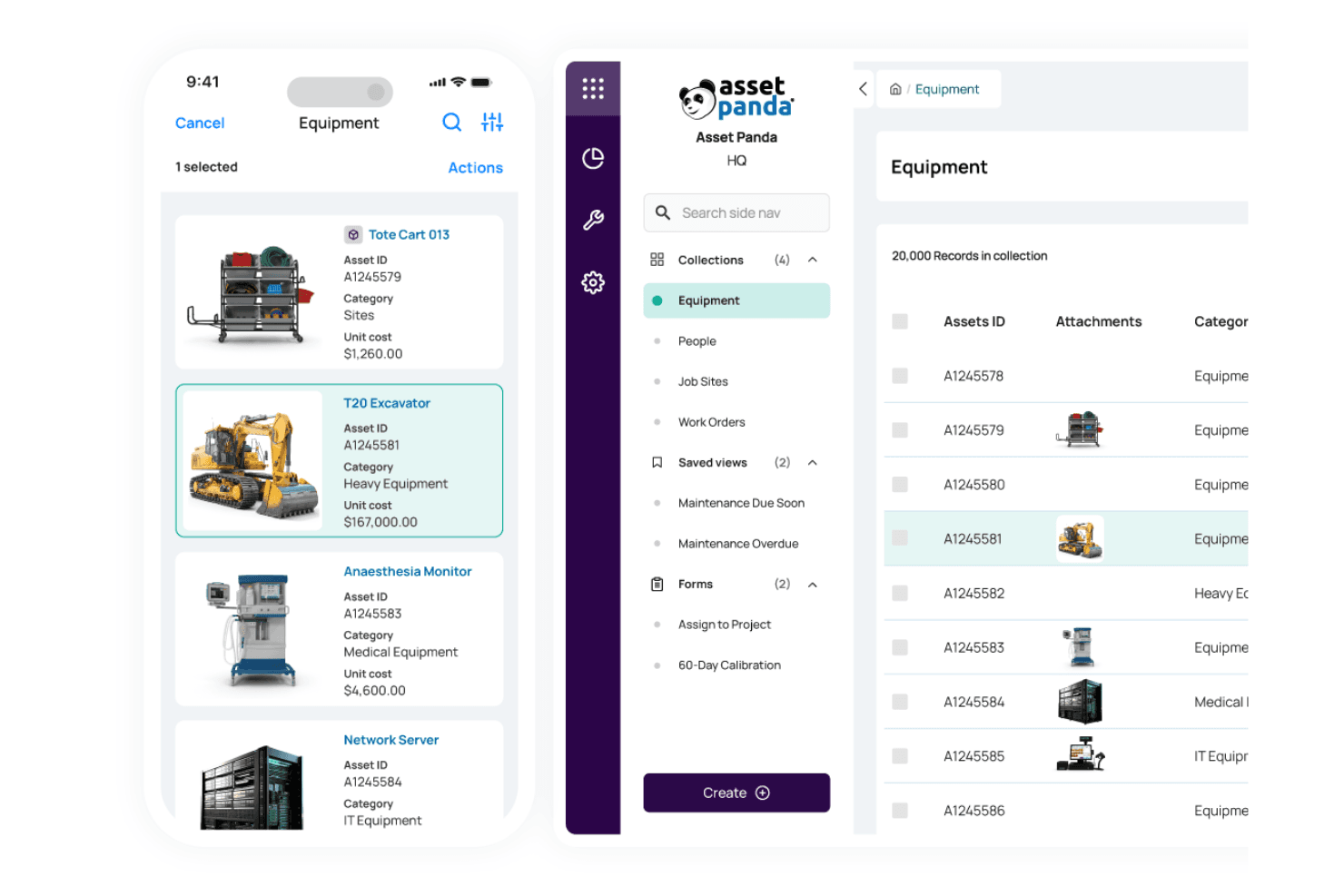
Asset Panda is an enterprise asset management software for teams that need to track, audit, and manage physical assets across multiple locations. I'd choose it over a platform like IBM Maximo if configuration flexibility and faster deployment matter more to your team than deep maintenance management. Asset Panda lets you build custom workflows, set up audit trails, and give field teams mobile access without the implementation overhead that comes with heavier tools.
Asset Panda Evaluation Summary
4.6/5
- Pricing upon request
- 7-day free trial
Why Trust Our Software Recommendations
6,700+
Reviews
20
Industry experts
16+
Evaluation factors
14
Years
Our team has been testing and reviewing software since 2012. As finance leaders ourselves, we know how difficult—and important—it is to choose the right software.
For this guide, we evaluated tools using hands-on testing and independent research, scoring tools using our selection criteria.
Our reviews reflect our human editorial judgment, not a sales pitch.
Asset Panda Overview
In my opinion, Asset Panda is a solid choice for asset management, particularly for teams that require robust asset tracking. Its intuitive interface and customizable features make it stand out, although its pricing could be more competitive. Compared to other tools, it excels in ease of use and support, but may fall short if you're looking for extensive integration options. It's ideal for companies with a large number of assets in industries such as manufacturing or logistics. If you're deciding on a tool that prioritizes asset management and ease of use, Asset Panda deserves consideration.
Pros
- You can customize it to fit your team's specific needs.
- The interface is easy for your team to navigate.
- It offers detailed reporting that enhances your asset tracking.
Cons
- It may not offer the integration depth some users want.
- Some users find the setup process lengthy.
- Advanced features can mean a steep learning curve for your team.
Is Asset Panda Right For Your Needs?
Who Would be a Good Fit for Asset Panda?
Asset Panda is perfect for businesses in asset-heavy industries like manufacturing and logistics. If your team needs detailed asset tracking and easy-to-use reporting tools, this software shines. It allows you to customize features to match your specific needs, making it ideal for finance departments that need tailored solutions to manage resources. Its intuitive interface also makes onboarding smoother for teams that might struggle with more complex systems.
- Manufacturing CompaniesAsset Panda's detailed tracking helps you manage asset records of equipment and machinery efficiently.
- Logistics FirmsYour team can benefit from its easy asset tracking for vehicles and shipping containers.
- Finance DepartmentsIt offers customizable asset management software reporting that fits your specific financial tracking needs.
- IT Asset ManagementYou can track hardware and software assets across multiple locations.
- Educational InstitutionsIt's great for managing asset data inventory like computers and lab equipment.
- Facility ManagementYour team can efficiently track and optimize maintenance schedules and asset locations.
Who Would be a Bad Fit for Asset Panda?
Asset Panda might not be ideal for small businesses or startups that need basic asset tracking without the need for customization. If your team relies heavily on integrations with other advanced software, you might find Asset Panda lacking. It can also be a poor fit for industries that don't have extensive asset management needs, as its features may be excessive and unnecessary for your work.
- Small StartupsYour team might find its features too complex for basic asset tracking needs.
- Retail BusinessesYou may not need its detailed features to track assets if your focus isn't on asset-heavy operations.
- Freelancers or SolopreneursAsset Panda's capabilities can be overwhelming for individual asset management.
- Marketing AgenciesIf your work doesn't involve managing physical assets, its features may not add value.
- Legal DepartmentsYour focus on document management might not align with Asset Panda's asset tracking.
- Event PlanningIf your work doesn't involve extensive equipment or inventory, you might not benefit from its functionalities.
How We Test & Score Tools
We’ve spent years building, refining, and improving our software testing and scoring system. The rubric is designed to capture the nuances of software selection and what makes a tool effective, focusing on critical aspects of the decision-making process.
Below, you can see exactly how our testing and scoring works across seven criteria. It allows us to provide an unbiased evaluation of the software based on core functionality, standout features, ease of use, onboarding, customer support, integrations, customer reviews, and value for money.
Core Functionality (25% of final scoring)
The starting point of our evaluation is always the core functionality of the tool. Does it have the basic features and functions that a user would expect to see? Are any of those core features locked to higher-tiered pricing plans? At its core, we expect a tool to stand up against the baseline capabilities of its competitors.
Standout Features (25% of final scoring)
Next, we evaluate uncommon standout features that go above and beyond the core functionality typically found in tools of its kind. A high score reflects specialized or unique features that make the product faster, more efficient, or offer additional value to the user.
We also evaluate how easy it is to integrate with other tools typically found in the tech stack to expand the functionality and utility of the software. Tools offering plentiful native integrations, 3rd party connections, and API access to build custom integrations score best.
Ease of Use (10% of final scoring)
We consider how quick and easy it is to execute the tasks defined in the core functionality using the tool. High scoring software is well designed, intuitive to use, offers mobile apps, provides templates, and makes relatively complex tasks seem simple.
Onboarding (10% of final scoring)
We know how important rapid team adoption is for a new platform, so we evaluate how easy it is to learn and use a tool with minimal training. We evaluate how quickly a team member can get set up and start using the tool with no experience. High scoring solutions indicate little or no support is required.
Customer Support (10% of final scoring)
We review how quick and easy it is to get unstuck and find help by phone, live chat, or knowledge base. Tools and companies that provide real-time support score best, while chatbots score worst.
Customer Reviews (10% of final scoring)
Beyond our own testing and evaluation, we consider the net promoter score from current and past customers. We review their likelihood, given the option, to choose the tool again for the core functionality. A high scoring software reflects a high net promoter score from current or past customers.
Value for Money (10% of final scoring)
Lastly, in consideration of all the other criteria, we review the average price of entry level plans against the core features and consider the value of the other evaluation criteria. Software that delivers more, for less, will score higher.
Core Features
Asset Tracking
Asset Panda allows you to track your assets in real-time, ensuring you always know their location and status. This feature helps you minimize losses through more efficient asset lifecycle management.
Customizable Reporting
You can create tailored reports to fit your team's specific needs. This makes it easier to analyze data and make informed decisions through custom reports.
Inventory Management
Manage your inventory with precision and ease. Asset Panda lets you keep tabs on stock levels and reorder when necessary.
Maintenance Management
Schedule and track maintenance tasks to extend the life of your assets. This feature helps you avoid unexpected downtime and costly repairs.
Check-In and Check-Out
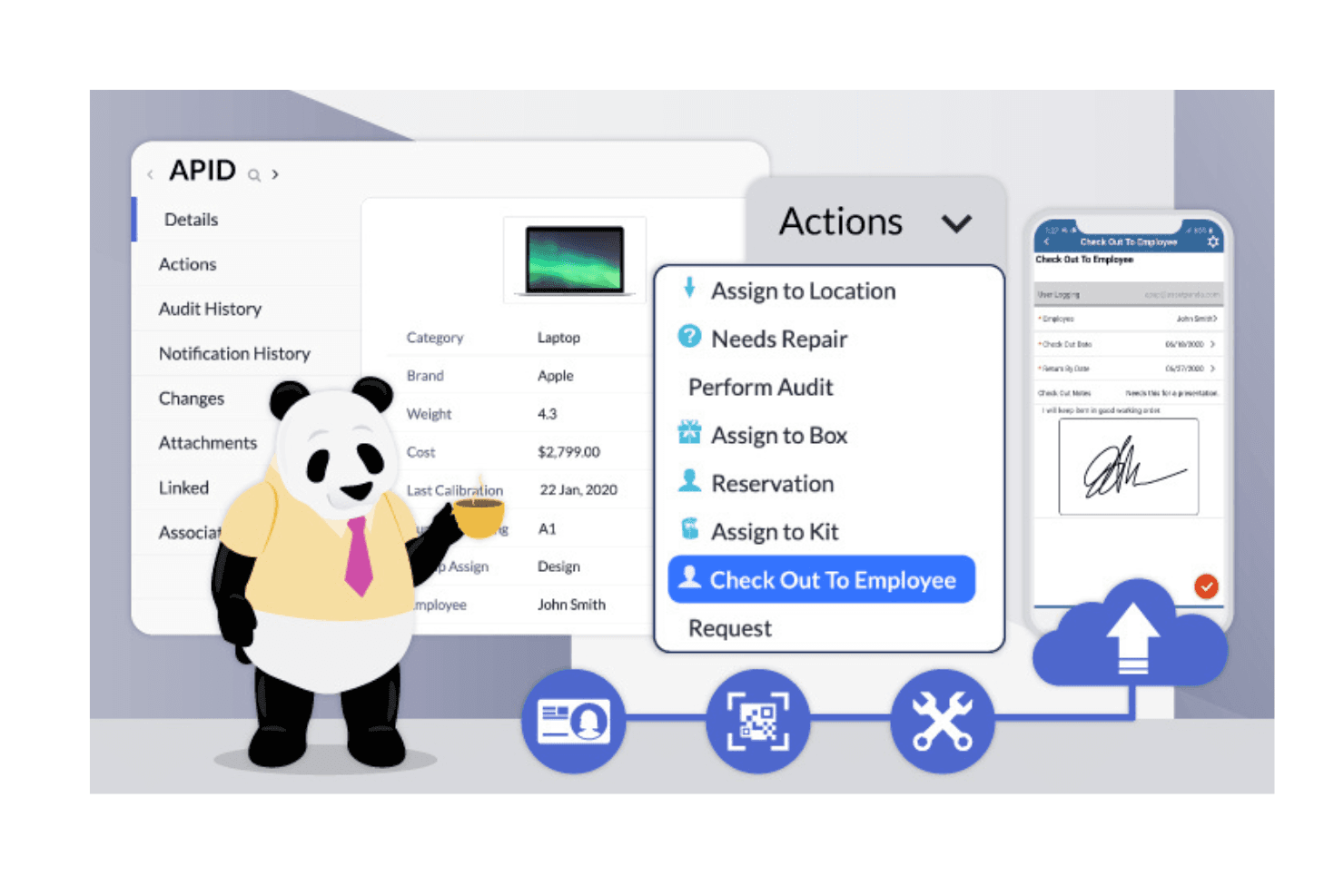
Easily monitor asset usage with the check-in and check-out feature. It ensures accountability and keeps your team informed about asset availability.
Audit Trails
Maintain a detailed history of all asset interactions without the need for extensive spreadsheets. This provides transparency and helps you maintain compliance with industry regulations.
Ease of Use
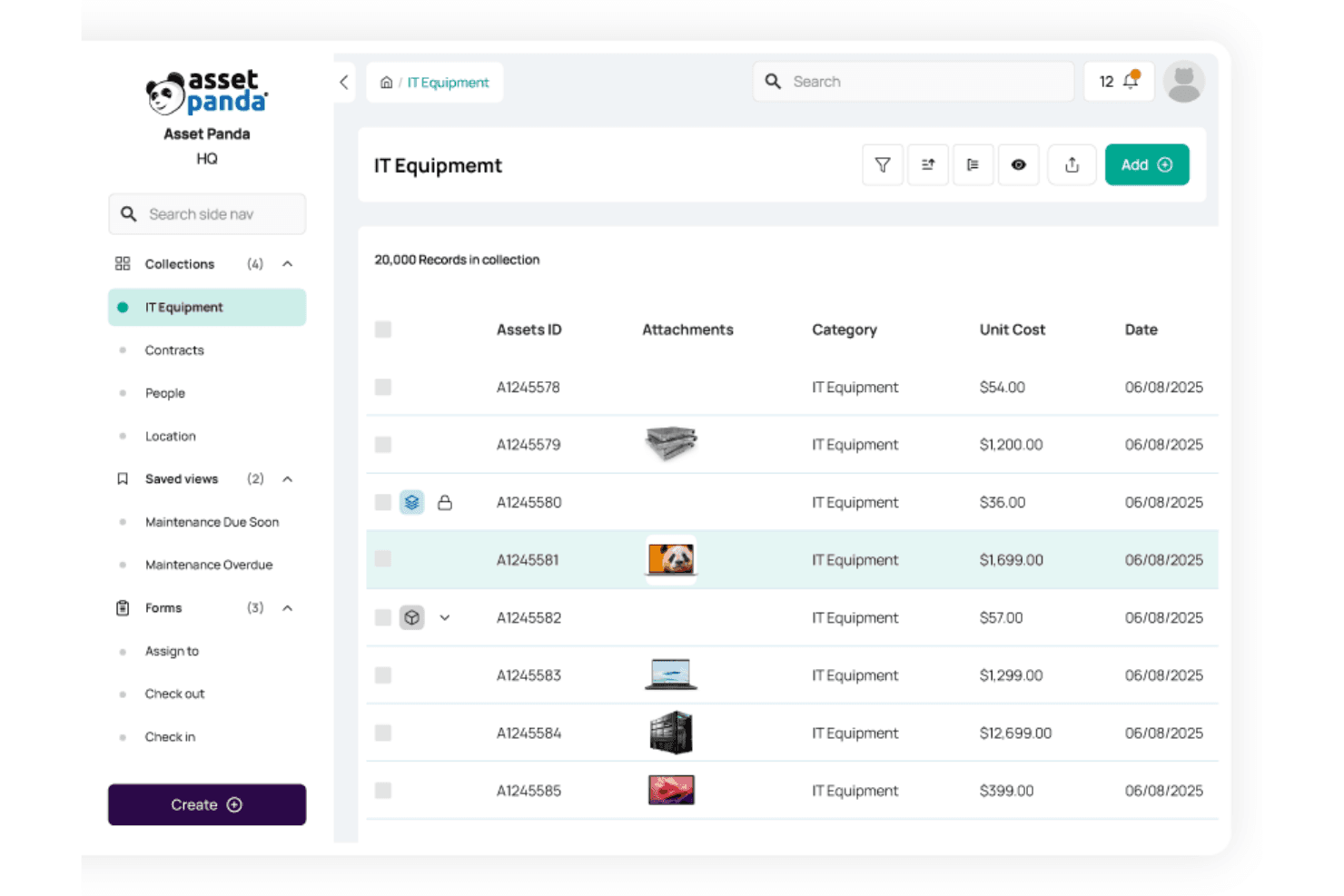
Asset Panda stands out for its user-friendly interface, making it easy for your team to navigate and manage assets. Its intuitive design allows you to quickly access essential features like asset tracking and reporting without hassle. Users appreciate the straightforward setup and customizable options that let you tailor the software to fit your specific needs. Compared to other tools, Asset Panda's ease of use helps reduce the learning curve, allowing your team to become efficient faster.
Integrations
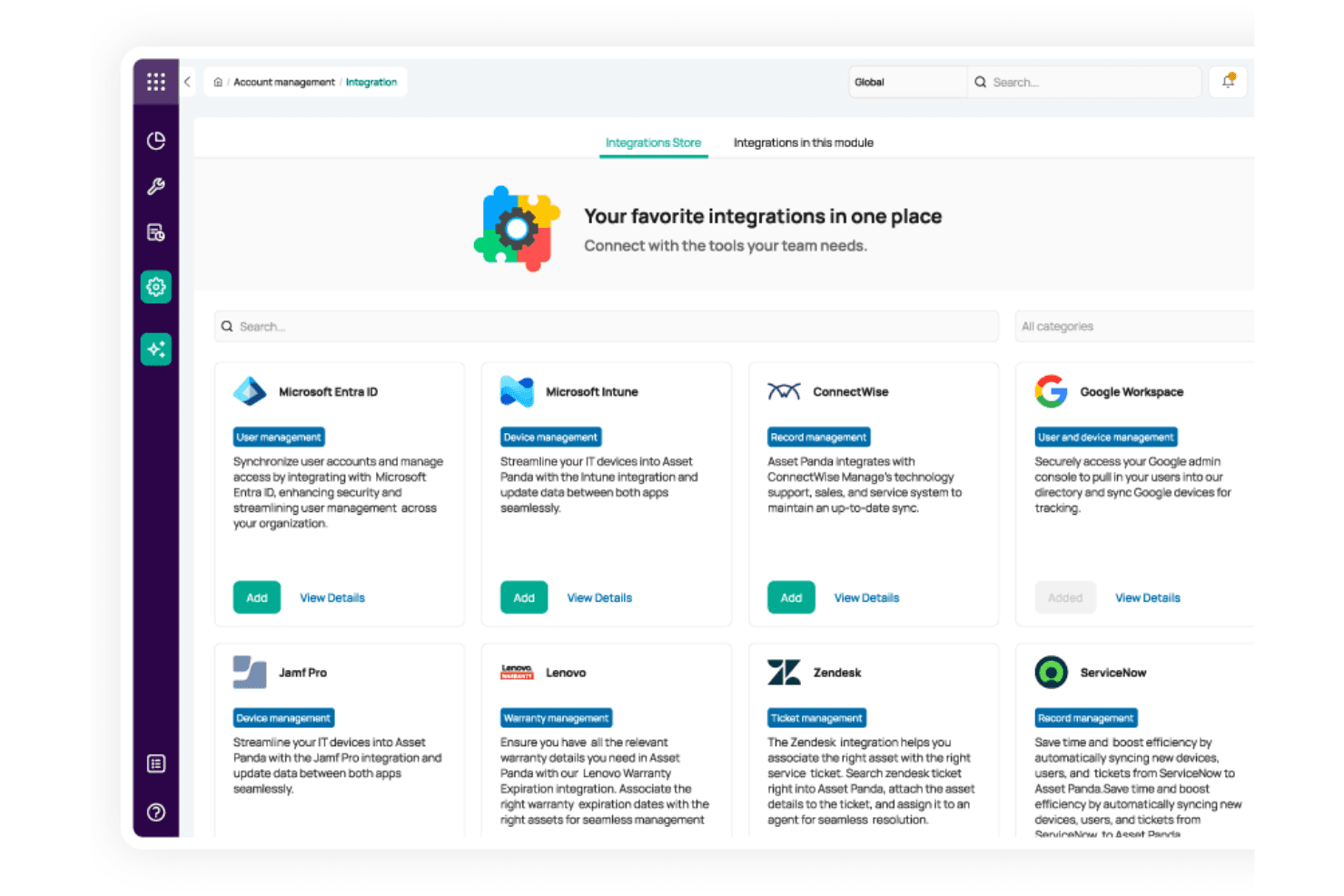
Asset Panda integrates with Apple Business Manager, QuickBooks, Freshservice, Zendesk, ServiceNow, Google Workspace, Kandji, and Microsoft Entra ID. Asset Panda also offers an API for custom integrations and connects with third-party integration tools. You can request a demo of its platform.
Asset Panda Specs
- API: Yes
- Calendar Management: Yes
- Data Export: Yes
- Data Import: Yes
- External Integrations: No
- Inventory Tracking: No
- Multi-User: Yes
- Notifications: Yes
- Project Management: No
- Scheduling: No
- Supplier Management: No
- Task Scheduling/Tracking: No

