

A strong Hubstaff alternative offers reliable time tracking, productivity monitoring, and team management features that fit your business’s unique workflows. If you’re searching for the best alternatives to Hubstaff, you’re likely looking for tools that match or exceed Hubstaff’s capabilities—whether you need better reporting, more flexible integrations, or a different approach to employee oversight.
With so many options available, it’s essential to find a solution that aligns with your compliance needs, supports your team’s productivity, and adapts to your operational requirements. This list will help you compare top Hubstaff alternatives for 2026 so you can make an informed decision for your organization.
What is Hubstaff?
Hubstaff is a time tracking and workforce management platform designed to monitor employee productivity, track work hours, and manage remote or distributed teams. It offers features like activity monitoring, automated timesheets, GPS tracking, and project-based reporting. Businesses use Hubstaff to improve visibility into team performance, ensure accurate payroll, and support compliance with labor regulations. Hubstaff is popular among organizations with remote, hybrid, or field-based teams.
Hubstaff Alternatives Comparison Table
This comparison table summarizes pricing details for my top hubstaff alternative selections:
| Tool | Best For | Trial Info | Price | ||
|---|---|---|---|---|---|
| 1 | Best for workforce analytics and insights | Free demo + 14-day free trial available | From $10/user/month (billed annually) | Website | |
| 2 | Best for customizable reporting tools | 30-day free trial + free demo available | From $50/month | Website | |
| 3 | Best for budget-friendly time tracking | Free plan + 7-day free trial available | From $4.99/user/month | Website | |
| 4 | Best for biometric time clock features | Free plan + free demo available | Pricing upon request | Website | |
| 5 | Best for automatic time tracking integration | 14-day free trial + free plan + free demo available | From $3.99/user/month (billed annually) | Website | |
| 6 | Best for detailed time and activity reports | 14-day free trial | Pricing upon request | Website | |
| 7 | Best for managing distributed teams | 14-day free trial | From $5/user/month | Website | |
| 8 | Best for managing global employment contracts | Free demo available | From $599/user/month | Website | |
| 9 | Best for automated time mapping by project | Free demo + 7-day free trial available | From $8/user/month (billed annually) | Website | |
| 10 | Best for simple manual time entry | Free plan + 30-day free trial + free demo available | From $9/user/month (billed annually) | Website |


Why Trust Our Software Recommendations
6,700+
Reviews
20
Industry experts
16+
Evaluation factors
14
Years
Our team has been testing and reviewing software since 2012. As finance leaders ourselves, we know how difficult—and important—it is to choose the right software.
For this guide, we evaluated tools using hands-on testing and independent research, scoring tools using our selection criteria.
Our reviews reflect our human editorial judgment, not a sales pitch.
Hubstaff Alternatives Reviews
Below are my detailed summaries of the best Hubstaff alternatives that made it onto my shortlist. My reviews offer a detailed look at the features, best use cases, and integrations of each platform to help you find the best one for you.
 Best for workforce analytics and insights
- Free demo + 14-day free trial available
- From $10/user/month (billed annually)
Visit WebsiteCustomer Rating:4.5/5
The ActivTrak dashboard shows team pulse, productivity charts, top users, and app usage. ActivTrak is designed for organizations that want to go beyond time tracking and understand workforce productivity at a deeper level. Unlike Hubstaff, it emphasizes analytics and insights, helping operations leaders and HR teams spot trends, measure engagement, and identify workflow bottlenecks. This makes it especially useful for businesses focused on optimizing team performance and supporting data-driven management decisions.
Why ActivTrak Is a Good Hubstaff Alternative
If you’re looking for more than just time tracking, ActivTrak stands out for its workforce analytics and insights. I picked ActivTrak because it gives you dashboards that visualize productivity trends, employee engagement, and workload balance across teams. The platform also offers activity classification and benchmarking, so you can compare performance and spot areas for improvement. These analytics-focused features make ActivTrak a strong choice for leaders who want to drive decisions with real workforce data.
ActivTrak Key Features
I also found several features in ActivTrak that help teams manage productivity and compliance needs:
- Real-Time User Activity Monitoring: View live activity data for individuals or teams as work happens.
- Automated Alerts: Set up custom alerts for specific behaviors, such as accessing restricted websites or exceeding break limits.
- USB Device Detection: Track when external devices are connected to monitored computers.
- Remote Agent Installation: Deploy monitoring agents to multiple devices remotely from a central dashboard.
ActivTrak Integrations
Integrations include Microsoft Outlook, Google Calendar, Microsoft Entra ID, Workday, HiBob, Paycor, Dayforce, ADO, Okta, and more.
Pros and Cons
Pros:
- Automated alerts flag unusual or risky behavior
- Real-time activity monitoring supports live oversight
- Workforce analytics dashboards reveal productivity patterns
Cons:
- No screenshot capture for activity verification
- Limited project and task management functionality
Learn more about ActivTrak: Best for customizable reporting tools
- 30-day free trial + free demo available
- From $50/month
Visit WebsiteCustomer Rating:4.5/5
TimeTrex shows a detailed summary report in a centralized dashboard. TimeTrex is an all-in-one workforce management platform designed for finance and operations teams who need advanced tracking, payroll, and compliance tools. If you’re looking to replace manual time, attendance, and payroll processes with a unified solution, TimeTrex is worth considering.
Who Is TimeTrex Best For?
Controllers and financial analysts who need on-demand time, attendance, and payroll reports tailored to detailed operational or audit requirements.
Why TimeTrex Is a Good CFO Hubstaff Alternative
What sets TimeTrex apart for reporting is how much control you have over what gets included in each report and how it's structured. I like that the report designer lets my team filter by department, pay period, job code, or employee group without relying on pre-built templates. In practice, that means I can pull a labor cost breakdown by cost center mid-month without waiting on an IT request. For finance teams who need audit-ready exports or board-level summaries on a tight deadline, that flexibility makes a real difference.
TimeTrex Key Features
- Accrual tracking: Automatically calculate and track vacation, sick, and other leave balances based on configurable accrual rules.
- Geofencing: Restrict employee clock-ins to approved physical locations using GPS-based boundaries.
- Wage and hour compliance: Apply jurisdiction-specific overtime, break, and minimum wage rules to time records automatically.
- Employee self-service portal: Let employees view pay stubs, request time off, and update personal information without HR involvement.
TimeTrex Integrations
TimeTrex offers native integrations with QuickBooks, Sage, ADP, Paychex, Ceridian, and can export data to CSV for custom workflows. An API is available for custom integrations.
Pros and Cons
Pros:
- Automates payroll with tax filing support
- Tracks and manages employee absences
- Offers biometric time capture
Cons:
- Configuration setup can be time-intensive
- Outdated interface design compared to peers
Learn more about TimeTrex: Best for budget-friendly time tracking
- Free plan + 7-day free trial available
- From $4.99/user/month
Visit WebsiteCustomer Rating:4.8/5
Clockify shows time tracking, project timers, breaks, and detailed entries. Clockify stands out for teams that need a time tracking solution with no limits on users or projects. It’s a strong fit for growing businesses, agencies, or organizations managing multiple clients or departments. Unlike Hubstaff, Clockify lets you scale your time tracking across as many people and projects as you need without extra cost or complexity.
Why Clockify Is a Good Hubstaff Alternative
I selected Clockify as a Hubstaff alternative because it delivers essential time-tracking tools without forcing teams onto expensive enterprise tiers. Operations leads can onboard entire project groups to log hours and manage timesheets while maintaining strict control over platform overhead. This makes it ideal for managers who need reliable proof of work, clear project progress, and cost-effective scalability.
Clockify Key Features
Some other features in Clockify can help you manage time and resources more efficiently:
- Timesheet Approvals: Submit and review timesheets for manager approval within the platform.
- Expense Tracking: Log and categorize expenses alongside tracked time for each project.
- Kiosk Mode: Set up a shared device for on-site teams to clock in and out using a PIN.
- Customizable Reports: Generate and export detailed reports on time usage, billable hours, and project progress.
Clockify Integrations
Integrations include Asana, Trello, Jira, QuickBooks, Google Calendar, Outlook, GitHub, GitLab, Notion, and Monday.
Pros and Cons
Pros:
- Customizable reports offer flexible data insights
- Timesheet approvals improve tracking accountability
- Free for up to five users
Cons:
- Limited payroll-related functionality
- No screenshot or activity monitoring features
Learn more about Clockify: Best for biometric time clock features
- Free plan + free demo available
- Pricing upon request
Visit WebsiteCustomer Rating:4.8/5
The Jibble dashboard shows tracked hours, team status, holidays, and clock-in/out times. Jibble offers biometric time clock features that help teams verify attendance with facial recognition or mobile device check-ins. It’s a strong choice for businesses with on-site staff, like retail, manufacturing, or field services, where buddy punching and time theft are concerns. Unlike Hubstaff, Jibble puts a focus on secure, accurate clock-ins using biometric data.
Why Jibble Is a Good Hubstaff Alternative
For teams that need secure and reliable attendance tracking, Jibble’s biometric time clock features offer a clear advantage over Hubstaff. I picked Jibble because it uses facial recognition and geolocation to verify each clock-in, which helps prevent buddy punching and time fraud. The platform also supports kiosk mode, letting multiple employees clock in from a shared device using biometric verification. These features make Jibble especially useful for businesses with on-site staff who need to ensure accurate, tamper-proof attendance records.
Jibble Key Features
Some other features in Jibble can help you manage workforce attendance and compliance:
- Automated Timesheets: Generate timesheets automatically from clock-in and clock-out data.
- Overtime Calculations: Track and calculate overtime hours based on your company’s policies.
- Leave Management: Submit, approve, and track employee leave requests within the platform.
- Customizable Work Schedules: Set up different work shifts and schedules for teams or individuals.
Jibble Integrations
Integrations include Xero, QuickBooks Online, Deel, Google Workspace, Slack, Microsoft Teams, BambooHR, Sage, ADP, and monday.com.
Pros and Cons
Pros:
- Overtime and leave tracking are built into the platform
- Kiosk mode supports shared device clock-ins
- Facial recognition improves attendance accuracy
Cons:
- The mobile app may experience occasional sync delay
- Limited project budgeting and cost tracking features
Learn more about Jibble: Best for automatic time tracking integration
- 14-day free trial + free plan + free demo available
- From $3.99/user/month (billed annually)
Visit WebsiteCustomer Rating:4.7/5
TimeCamp’s timesheet shows daily activities, start/end times, and project tracking. If you’re searching for a time tracking tool that works quietly in the background, TimeCamp offers automatic time tracking with deep integration options. It’s especially useful for teams and professionals who want to capture work hours across multiple apps without manual input. Unlike Hubstaff, TimeCamp’s automatic tracking and integration features help you connect time data directly to your existing workflows.
Why TimeCamp Is a Good Hubstaff Alternative
For teams that want to automate time tracking across their tech stack, TimeCamp is a strong choice. I picked TimeCamp because its automatic time tracking feature logs work hours based on app and website usage, so you don’t have to start and stop timers manually. The tool also assigns time entries to specific projects or tasks using keyword-based rules. This level of automation helps you capture accurate data with less effort compared to Hubstaff’s more manual approach.
TimeCamp Key Features
Some other features in TimeCamp can help you manage time and projects more precisely:
- Attendance Tracking: Monitor employee attendance and absences directly within the platform.
- Billable Hours Calculation: Automatically calculate billable hours for client projects and export them for invoicing.
- Detailed Reporting Suite: Generate customizable reports on productivity, project progress, and time allocation.
- Mobile App: Track time and manage tasks on the go with dedicated iOS and Android apps.
TimeCamp Integrations
Integrations include Asana, Trello, Jira, monday.com, ClickUp, Notion, Slack, Google Calendar, QuickBooks, and Xero.
Pros and Cons
Pros:
- Detailed reports support productivity and project analysis
- Keyword-based rules assign time to projects accurately
- Automatic tracking captures time without manual timers
Cons:
- Mobile app lacks some desktop-level functionality
- No screenshot monitoring for activity verification
Learn more about TimeCamp: Best for detailed time and activity reports
- 14-day free trial
- Pricing upon request
Visit WebsiteCustomer Rating:4.5/5
Time Doctor dashboard shows tracked time, productivity levels, idle minutes, and timelines. Time Doctor gives teams and managers a way to dig deep into how work hours are spent across projects and tasks. If you need more granular time and activity reporting than Hubstaff offers, this tool stands out with its detailed breakdowns and distraction alerts. It’s a strong fit for businesses that want to analyze productivity patterns and identify workflow bottlenecks.
Why Time Doctor Is a Good Hubstaff Alternative
For teams that need more than basic time tracking, Time Doctor offers detailed time and activity reports that go beyond what Hubstaff provides. I picked Time Doctor because it breaks down work hours by project, task, and even website or app usage, giving you a clear picture of how time is spent. The tool also includes distraction alerts and optional screenshot capture to help managers address productivity issues as they happen. These features make Time Doctor a strong choice for businesses that want to analyze and improve team performance with data-driven insights.
Time Doctor Key Features
Some other features in Time Doctor help teams manage remote workforces and compliance needs:
- Automated Timesheets: Generate timesheets automatically based on tracked hours for easier payroll processing.
- Client Access Portal: Give clients access to view project progress and reports directly.
- Offline Time Tracking: Track work hours even when users are not connected to the internet.
- Work Schedule Management: Set and monitor employee work schedules within the platform.
Time Doctor Integrations
Integrations include Asana, Trello, Jira, monday.com, ClickUp, Salesforce, HubSpot, Bamboo HR, PayPal, and ADP.
Pros and Cons
Pros:
- Automated timesheets simplify time and payroll tracking
- Distraction alerts help maintain focus during work hours
- Detailed app and website usage tracking improves visibility
Cons:
- Mobile functionality is more limited than the desktop version
- Screenshot monitoring may raise employee privacy concerns
Learn more about Time Doctor: Best for managing distributed teams
- 14-day free trial
- From $5/user/month
Visit WebsiteCustomer Rating:4.4/5
HiveDesk timesheet view showing team hours by project with date range filters UI. If you’re managing a distributed or remote team, HiveDesk offers a focused way to track productivity and attendance. It’s designed for businesses that need to coordinate work across multiple locations, with features like automated timesheets and screenshot capture to help verify activity. Unlike Hubstaff, HiveDesk emphasizes simple team oversight and project-based tracking, making it easier to manage remote workflows without extra complexity.
Why HiveDesk Is a Good Hubstaff Alternative
When you need to manage distributed teams, HiveDesk gives you tools to monitor productivity and attendance across locations. I picked HiveDesk because it lets you assign projects, track time by project, and capture random screenshots to verify remote work. The automated timesheet feature helps you keep accurate records without manual input from employees. These capabilities make HiveDesk a strong choice if you want to coordinate and oversee remote teams with less administrative hassle than Hubstaff.
HiveDesk Key Features
Some other features in HiveDesk can help you manage distributed teams more efficiently:
- Activity Reports: Generate detailed reports on employee activity for any selected time period.
- Project-Based Time Tracking: Track hours worked on specific projects to monitor progress and resource allocation.
- Manual Time Entry: Allow team members to add time manually when needed, with admin approval.
- Client Access: Provide clients with limited access to view project progress and reports.
HiveDesk Integrations
Integrations include Asana. More custom integrations are available through HiveDesk REST API.
Pros and Cons
Pros:
- Client access improves transparency on project progress
- Project-based tracking supports multi-client workflows
- Automated timesheets reduce manual tracking errors
Cons:
- Reporting features are basic compared to alternatives
- No mobile app for tracking on the go
Learn more about HiveDesk: Best for managing global employment contracts
- Free demo available
- From $599/user/month
Visit WebsiteCustomer Rating:4.8/5
Deel HR’s employee dashboard showing payroll, payslips, compliance tasks, and payment management tools for managing global teams and contractors. Deel HR gives finance leaders and HR teams a unified platform to manage global hiring, payroll, and compliance. You can handle international employment, complex contracts, and sensitive data requirements with built-in controls for cross-border teams.
Who Is Deel HR Best For?
Global finance and HR teams managing international employment contracts across multiple countries and currencies.
Why Deel is a good Hubstaff alternative
I picked Deel HR for this spot because it solves a problem Hubstaff simply wasn't built for: managing legally compliant employment contracts across multiple countries. When my team hires in a new country, Deel HR generates localized contracts that already reflect local labor laws—no external legal review required. I also appreciate the built-in worker classification tools, which flag misclassification risks before a contract is finalized. For finance leaders managing cross-border headcount, that kind of proactive compliance protection is hard to find in one place.
- Global payroll automation: Run payroll across multiple countries from one dashboard, with tax deductions and filings handled automatically.
- People analytics and dashboards: View headcount, turnover, and workforce data in visual dashboards to support financial planning.
- Roles, permissions, and approvals: Set granular access controls and approval workflows across your HR and finance teams.
- AI help and insights: Get AI-generated guidance and alerts on workforce data, compliance changes, and HR tasks directly in the platform.
Deel HR Integrations
Deel HR offers native integrations with platforms like QuickBooks, Xero, Netsuite, BambooHR, Greenhouse, and Slack. An API is available for custom integrations.
Pros and Cons
Pros:
- Transparent employer cost calculations before hiring
- Supports international payroll and contractor payments
- Automates localized employment contract generation
Cons:
- Benefits administration varies by country
- No native time tracking or activity monitoring
Learn more about Deel HR: Best for automated time mapping by project
- Free demo + 7-day free trial available
- From $8/user/month (billed annually)
Visit WebsiteCustomer Rating:4.8/5
Insightful shows employee projects, tracked hours, activity time, and cost stats. If your team needs precise, automated time tracking by project, Insightful is worth a close look. It’s built for project-based businesses and agencies that want to map work hours directly to specific tasks and clients without manual input. This approach helps you get accurate project costing and resource allocation, setting it apart from Hubstaff and other alternatives that focus more on general time tracking.
Why Insightful Is a Good Hubstaff Alternative
Unlike many time tracking tools, Insightful automatically maps time to projects and tasks without requiring manual input from users. I picked Insightful because it uses intelligent activity recognition to assign work hours to the right projects, which is especially useful for teams juggling multiple clients or deliverables. The platform also provides detailed project-based reports, so you can see exactly where time is spent and identify areas for improvement. This level of automation and granularity makes Insightful a strong choice for businesses that need accurate project costing and resource tracking.
Insightful Key Features
Some other features in Insightful can help your team manage productivity and compliance:
- Automated Screenshots: Capture periodic screenshots to verify activity and support compliance needs.
- Real-Time Employee Monitoring: View live activity data for individuals or teams as work happens.
- App and Website Usage Tracking: Track which applications and websites are being used during work hours.
- Stealth Mode Option: Monitor devices discreetly without visible indicators to users.
Insightful Integrations
Integrations include BigQuery, ADP Workforce Now, Aha!, Asana, Basecamp, Bamboo HR, ClickUp, Deel, Gusto, HiBob, HR Cloud, and more.
Pros and Cons
Pros:
- App and website tracking shows detailed usage behavior
- Real-time monitoring provides visibility into team activity
- Automatic time mapping assigns work to projects accurately
Cons:
- Limited offline tracking capabilities for remote work
- No task management or workflow coordination features
Learn more about Insightful: 10Best for simple manual time entry
Toggl
- Free plan + 30-day free trial + free demo available
- From $9/user/month (billed annually)
Visit WebsiteCustomer Rating:4.7/5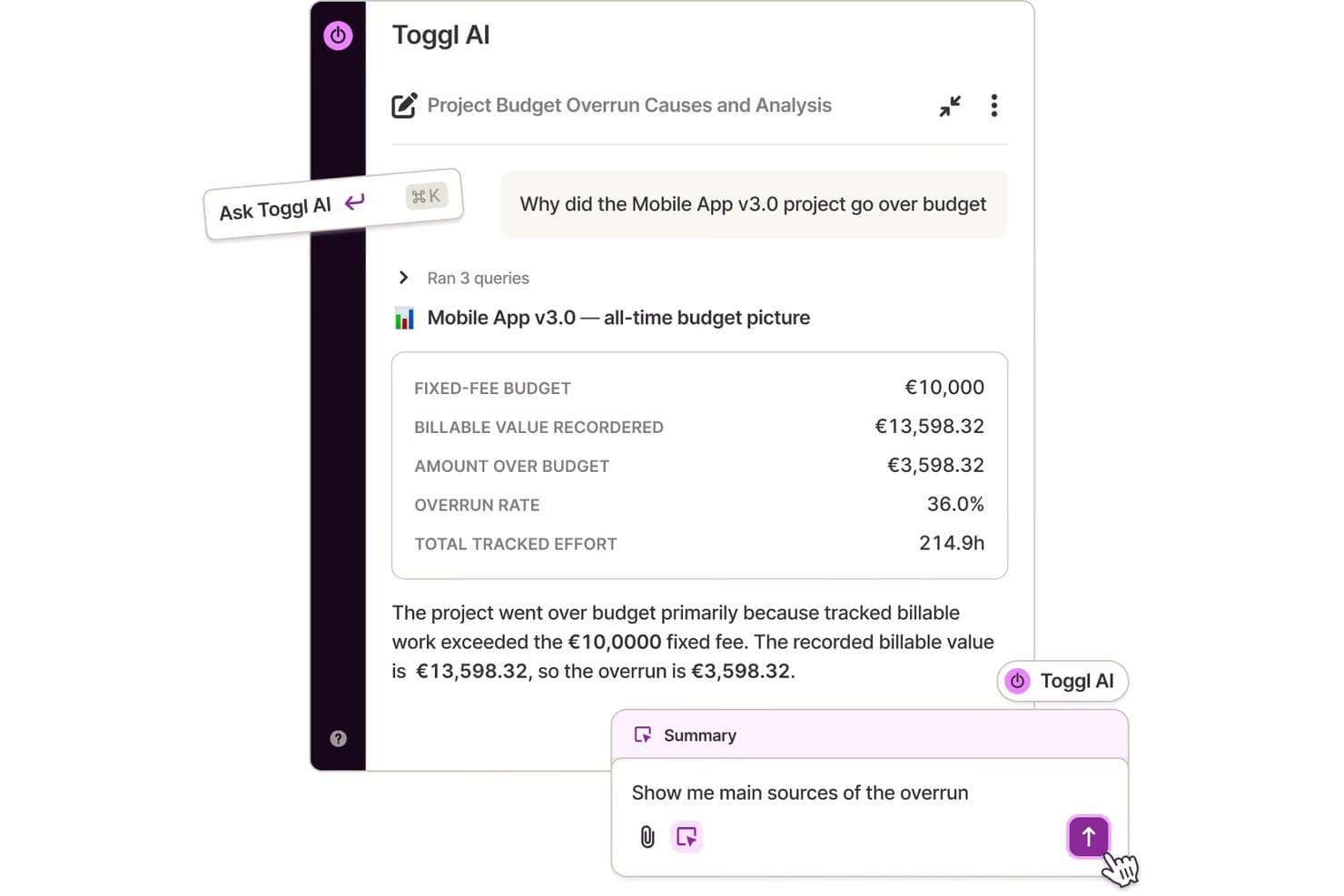
Toggl's AI analyzes project budget overruns with natural language queries. If you’re looking for a time tracking tool that keeps things simple, Toggl is worth considering. It’s designed for professionals and teams who want fast, manual time entry without the complexity of monitoring or surveillance features. Unlike Hubstaff, Toggl focuses on flexible, user-driven tracking that fits project-based work and creative environments.
Why Toggl Is a Good Hubstaff Alternative
Unlike Hubstaff, Toggl puts manual time entry front and center, making it a strong fit for teams that don’t need automated tracking or monitoring. I picked Toggl Track because it lets users start, stop, and edit timers or log hours after the fact, which is ideal for project-based work or creative professionals who value flexibility. The platform also supports bulk editing of time entries and tagging for easy organization. These features help teams track billable hours accurately without feeling micromanaged.
Toggl Key Features
Some other features in Toggl Track can help you manage time tracking and reporting across your team:
- Project and Client Tracking: Assign tracked time to specific projects and clients for organized reporting.
- Billable Rates: Set different billable rates for users, projects, or clients to support accurate invoicing.
- Detailed Reporting: Generate summary, detailed, and weekly reports to analyze time allocation.
- Calendar Integration: Sync with Google Calendar and Outlook to view tracked time alongside scheduled events.
Toggl Integrations
Integrations include Asana, Jira, Google Calendar, Outlook, QuickBooks Online, Salesforce, Slack, Toggl Plan, iCal, and Trello.
Pros and Cons
Pros:
- The tagging system organizes tasks and projects clearly
- Bulk editing speeds up time entry corrections
- Manual time entry supports flexible work tracking
Cons:
- Limited idle detection for passive tracking
- No employee monitoring or activity tracking features
Learn more about Toggl:
Other Hubstaff Alternatives
Here are some additional Hubstaff alternatives that didn’t make it onto my shortlist, but are still worth checking out:
- 11MonitaskBest for screenshot-based activity tracking
- 12ApployeBest for tracking remote employee productivity
- 13DeskTimeBest for real-time attendance monitoring
- 14IntelogosBest for AI-driven performance analysis
- 15PaymoBest for task and billing management
- 16Buddy PunchBest for customizable punch-in rules
- 17QuickBooks TimeBest for payroll integration
- 18ClockSharkBest for GPS-enabled mobile workforce
- 19DeputyBest for shift scheduling automation
- 20TimelyBest for automatic time tracking by AI
- 21My HoursBest for client-based time tracking
How I Evaluate Hubstaff Alternatives
I evaluate in two layers: the baseline features a time tracker must have—like billable rates and payroll integrations—and the differentiators that matter most for finance teams.
Core Functionality (Table Stakes For This List)
When I'm selecting tools for my list, I rank each one on a scale from 0 (does not offer the functionality) to 5 (excels in this area) for each core functionality listed below. Then, I calculate the tool's total score into a percentage. Each tool needs to achieve a minimum total score of 65% to be considered for inclusion.
- Time Tracking: I look for automated timers, manual entry, and task-level logging—like tracking hours against a specific client's monthly close or tax filing engagement.
- Client & Project Billing: Each tool should support billable rate configuration and project-level hour assignment so teams can tie logged time to client invoices.
- Payroll Integration: I check whether a tool connects with payroll platforms like Gusto or ADP and handles pay rate rules, including overtime calculations.
- Productivity & Activity Monitoring: Tools should offer activity-level insights such as app tracking, idle detection, or screenshots for managing remote accounting staff.
- Accounting Software Integrations: I evaluate native connections with tools like QuickBooks, Xero, and Sage to confirm time and cost data flows into your GL without manual re-entry.
- Reporting & Audit Trails: Finance teams need exportable, filterable reports—think billable hours by client or labor cost breakdowns—that hold up during audits or reviews.
Once I have a list of tools that meet this criteria, I consider what sets each platform apart.
Differentiating Factors (What Sets Vendors Apart)
Here's how I compare and contrast different vendors:
Standout Features
Budget and forecasting alerts are a big one—I look for tools that notify managers when a client engagement nears its hour or cost cap before margins shrink. Configurable approval workflows also matter for finance teams that need multi-level timesheet sign-offs to maintain segregation of duties. I evaluate utilization dashboards closely because seeing billable vs. non-billable hours at a practice level helps accounting firm partners spot underperforming engagements fast.
Beyond Features
Compliance and data security carry real weight here—I check for SOC 2 certification and role-based access controls, since these tools often touch payroll and client financial data. Pricing structure matters too, especially for accounting firms that scale headcount during busy season and need per-user plans that flex without locking them into annual enterprise commitments. I also evaluate workforce privacy controls, like the ability to disable monitoring outside work hours, which is important for distributed teams operating across multiple regulatory environments.
Why Look For a Hubstaff Alternative?
While Hubstaff is a good choice in terms of time tracking software and project management tools, there are a number of reasons why some users seek out alternative solutions. You might be looking for a Hubstaff alternative because…
- You want time tracking without employee monitoring
- You need more flexible manual time entry options
- You require advanced features for project budgeting tools
- You need better integration with your payroll system
- You want a solution that is better suited to freelancers and small teams
- You need support for international compliance requirements
If any of these sound like you, you’ve come to the right place. My list contains several Hubstaff alternatives that are better suited for teams facing these challenges with Hubstaff and looking for alternative solutions.
Features
Here are some of the key features of Hubstaff, to help you contrast and compare what alternative solutions offer:
- Automated time tracking with start/stop timers
- Screenshot capture for activity monitoring
- GPS location tracking for mobile teams
- Online timesheets and attendance management
- Payroll integration with major providers
- Project budgeting and cost tracking
- Productivity measurement with activity levels
- Invoicing tools for billable hours
- Task and project assignment features
- Detailed reporting and analytics dashboards