

Why Trust Our Software Recommendations
6,700+
Reviews
20
Industry experts
16+
Evaluation factors
14
Years
Our team has been testing and reviewing software since 2012. As finance leaders ourselves, we know how difficult—and important—it is to choose the right software.
For this guide, we evaluated tools using hands-on testing and independent research, scoring tools using our selection criteria.
Our reviews reflect our human editorial judgment, not a sales pitch.
IT spend management software gives you real-time oversight of every dollar spent on SaaS, cloud, and IT assets—across sanctioned contracts and shadow IT. If you’re a finance leader tasked with maximizing your technology budget, these platforms let you spot hidden waste, control software renewals, and get procurement right without messy spreadsheets or workflow gaps.
Choosing the right tool means you’ll have the clarity to align spend with business priorities, plug unnecessary leaks, and work in sync with IT and procurement. Here’s how the best IT spend management platforms can help you take charge of your tech costs.
IT Spend Management Software Comparison Table
This comparison table summarizes pricing details for my top IT spend management software selections:
| Tool | Best For | Trial Info | Price | ||
|---|---|---|---|---|---|
| 1 | Best for AI-driven spend tied to HR data | Free demo available | Pricing upon request | Website | |
| 2 | Best for SaaS shadow IT discovery at scale | Free demo available | Pricing upon request | Website | |
| 3 | Best for SaaS spend with finance team controls | Free demo available | From $75/month | Website | |
| 4 | Best for enterprise procurement and contract oversight | Free demo available | Pricing upon request | Website | |
| 5 | Best for IT license governance in large enterprises | Free demo available | Pricing upon request | Website | |
| 6 | Best for SaaS spend backed by human negotiators | Free demo available | Pricing upon request | Website | |
| 7 | Best for AI-driven SaaS and cloud spend control | Free trial + free demo available | Pricing upon request | Website | |
| 8 | Best for procurement backed by benchmark data | Free demo available | From €12.5K/year (billed annually) | Website | |
| 9 | Best for enterprise-wide IT asset and spend visibility | Free demo available | Pricing upon request | Website | |
| 10 | Best for SaaS spend backed by AI and benchmarks | Free demo available | Pricing upon request | Website |


Best IT Spend Management Software Reviews
Below are my detailed summaries of the best IT spend management software that made it onto my shortlist. My reviews offer a detailed look at the features, capabilities, and best use cases of each platform to help you find the best one for you.
 Best for AI-driven spend tied to HR data
- Free demo available
- Pricing upon request
Visit WebsiteCustomer Rating:4.8/5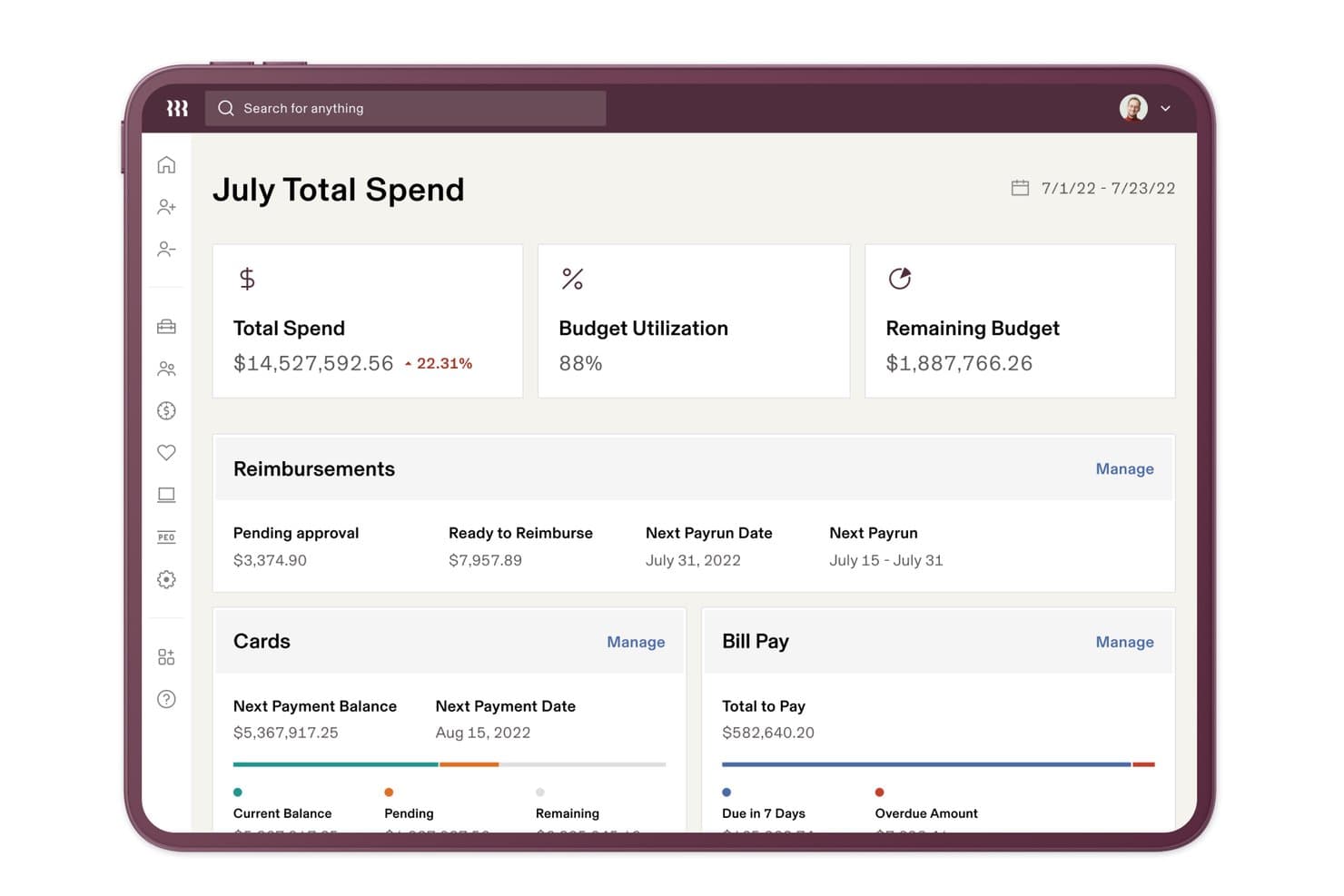
Rippling Spend centralizes budget, cards, and reimbursements in one dashboard. Rippling Spend is a modular spend management platform that unifies corporate cards, expense reimbursements, bill pay, procurement, and AI tool cost tracking across a single, HR-connected data model.
Who Is Rippling Spend Best For?
Rippling Spend is a strong fit for mid-market finance teams that already use—or plan to use—Rippling for HR and payroll, and want spend controls tied directly to employee data.
Why I Picked Rippling Spend
I picked Rippling Spend as one of the best because it's the only tool I've seen that ties spend controls directly to your HR data model. When a new engineer joins, Rippling automatically assigns the right card limits and software access based on their role and department. I also love the AI Spend Console, which maps AI tool costs (Cursor, OpenAI, Anthropic) to team-level outputs like pull requests, so you can actually justify AI budgets with business evidence.
Rippling Spend Key Features
- Renewal Manager AI: Sends automated alerts 30, 60, and 90 days before vendor contract renewals, with full vendor history and pricing context attached.
- Attribute-driven card controls: Enforces spend limits and vendor category restrictions at the point of transaction based on employee role, department, and seniority.
- Contract Reviewer AI: Scans uploaded vendor contracts for auto-renewal clauses, pricing inconsistencies, and legal red flags before you sign.
- Multi-currency expense reimbursement: Supports expense submissions and receipt translation across 185+ countries, with automatic currency conversion built in.
Rippling Spend Integrations
Rippling Spend offers 600+ native integrations, including NetSuite, QuickBooks Online, Xero, Sage Intacct, Workday, BambooHR, ADP, Okta, Azure AD, Jira, GitHub, Cursor, OpenAI, and Anthropic. It also provides API access for custom integrations.
Pros and Cons
Pros:
- AI-driven contract and renewal management
- Real-time unified dashboard for all spend
- Automated policies linked to employee attributes
Cons:
- Full SaaS discovery requires buying extra module
- Cloud spend visibility features not included
Learn more about Rippling Spend: Best for SaaS shadow IT discovery at scale
- Free demo available
- Pricing upon request
Visit WebsiteCustomer Rating:4.9/5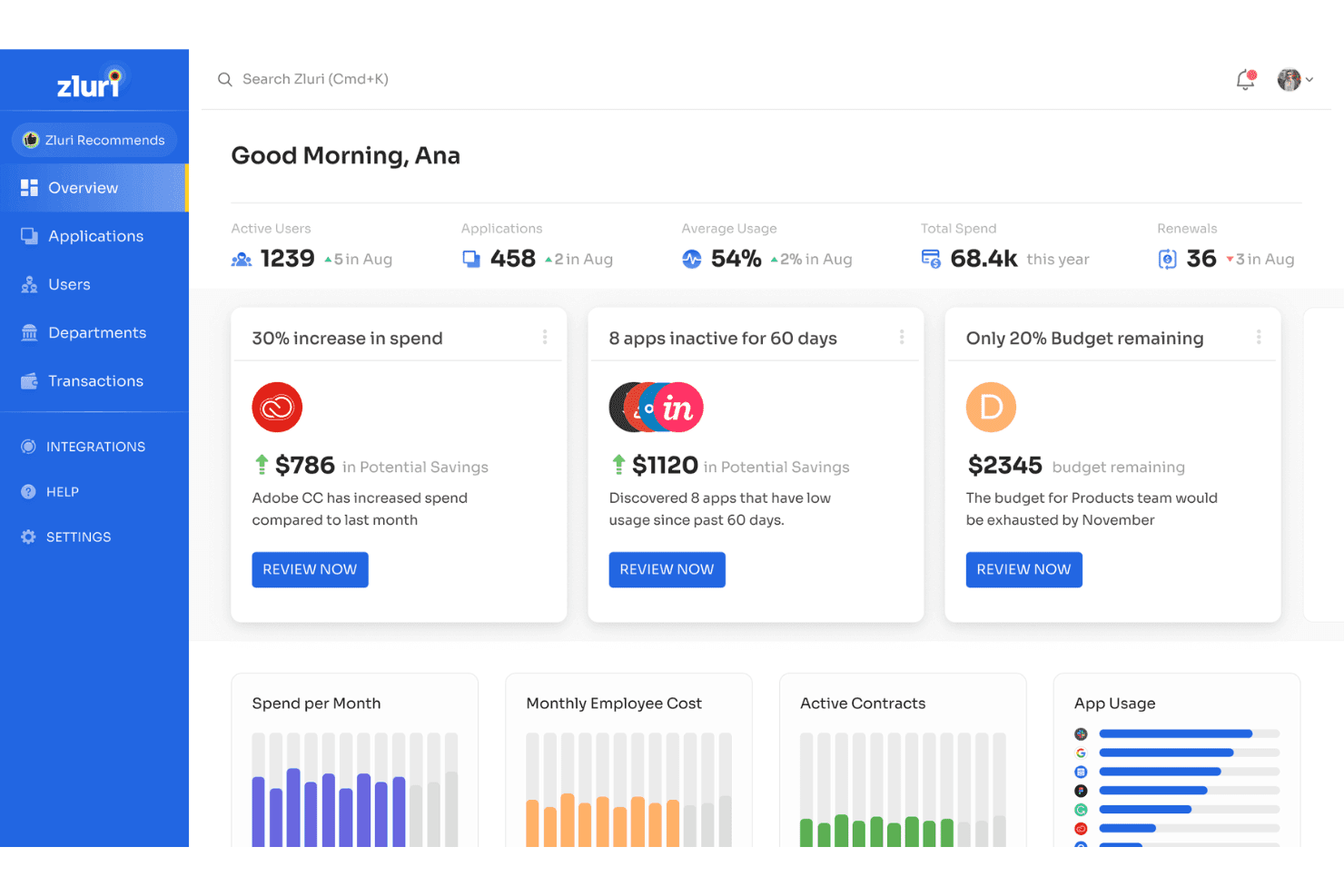
Zluri's dashboard surfaces spend insights and savings opportunities at a glance. Zluri is a SaaS management platform that uses a patented discovery engine to surface managed, unmanaged, and shadow IT applications across your SaaS and AI app ecosystem, with contract tracking, license optimization, and usage monitoring built in.
Who Is Zluri Best For?
Zluri is a strong fit for IT and finance teams at mid-to-large enterprises that need to get a handle on sprawling SaaS portfolios, especially where shadow IT is making spend visibility difficult.
Why I Picked Zluri
I picked Zluri as one of the best because its patented discovery engine does something most IT spend tools don't: it classifies every app across your environment as managed, unmanaged, or shadow IT, pulling from a catalog of 239K+ apps. That means when an employee signs up for an AI tool like DeepSeek or Claude without IT's knowledge, Zluri flags it instantly. I also like the automated license reclaim feature, which triggers downgrades or removals based on actual usage thresholds rather than manual audits.
Zluri Key Features
- Gen AI app governance: Monitor activity across AI apps like ChatGPT and Claude, then enforce security policies that restrict access to authorized users only.
- Contract and renewal management: Track all SaaS contracts, renewal dates, and vendor details in one place, with automated renewal alerts and license utilization data for negotiations.
- 300+ direct API integrations: Connect Zluri to your existing SaaS stack via native API integrations, an iPaaS engine, and SDKs across cloud and hybrid environments.
- Compliance support: Map your SaaS environment against frameworks including SOC 2, ISO 27001, HIPAA, SOX ITGC, and PCI DSS to support audit readiness.
Zluri Integrations
Zluri offers 300+ direct API integrations, including Google Workspace, Microsoft 365, Slack, Okta, Azure AD, Workday, BambooHR, Jira, Zoom, and Zendesk, plus a native iPaaS engine and SDKs for connecting cloud and hybrid apps. An open API is available for custom integrations.
Pros and Cons
Pros:
- Tracks renewals and contract terms in one view
- Offers automated license downgrades based on usage
- Flags shadow IT and unmanaged SaaS instantly
Cons:
- Advanced analytics limited without professional services
- Custom app detection setup takes extra time
Learn more about Zluri: Best for SaaS spend with finance team controls
- Free demo available
- From $75/month
Visit WebsiteCustomer Rating:4.6/5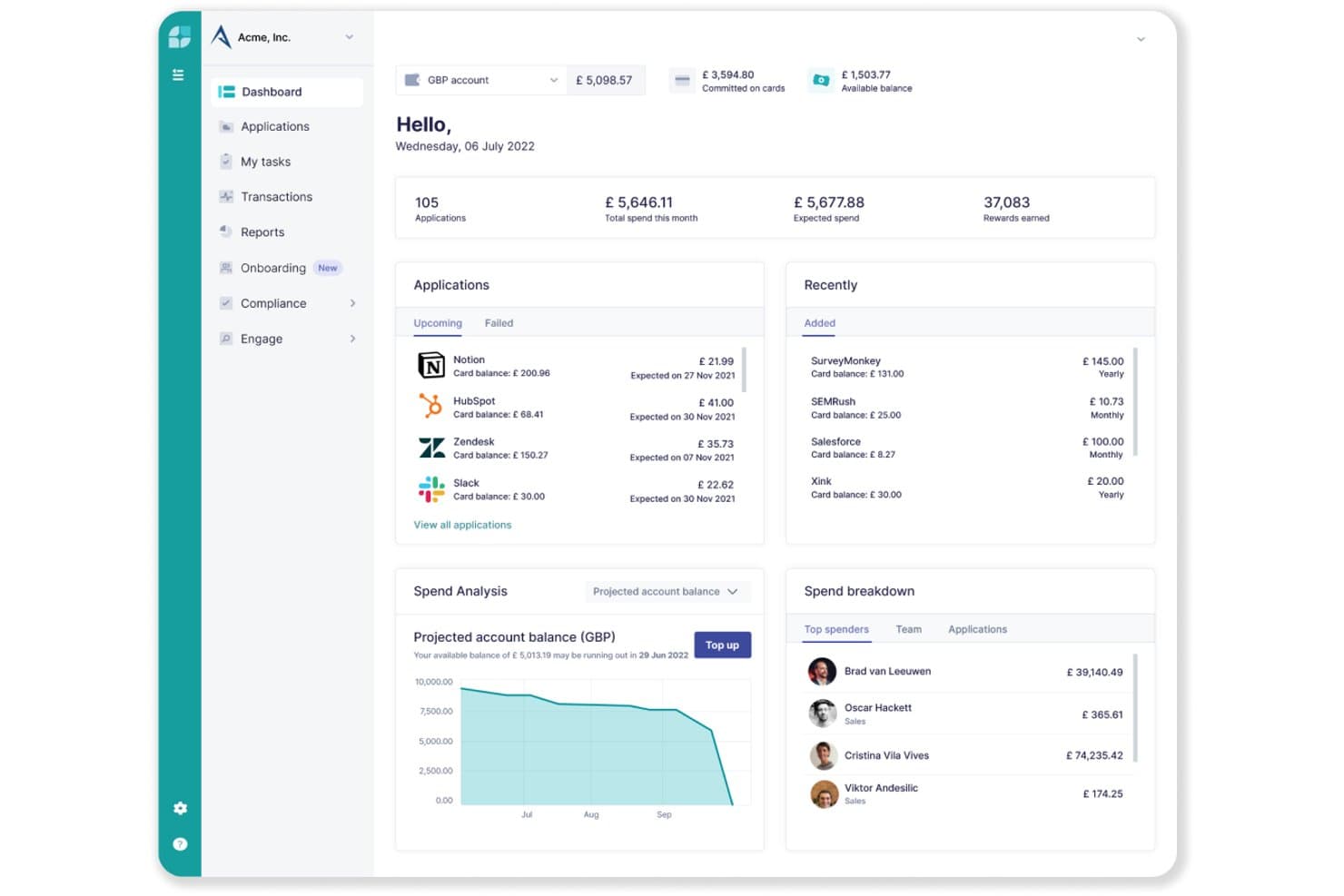
Cledara centralizes SaaS spend, balances, and top spenders in one dashboard. Cledara is a SaaS spend management platform that gives finance teams virtual cards per software tool, approval workflows, automated invoice capture, accounting reconciliation, and real-time spend reporting across a company's entire software stack.
Who Is Cledara Best For?
Cledara is a strong fit for finance teams at mid-sized companies that need structured controls over a growing, decentralized SaaS stack.
Why I Picked Cledara
I've included Cledara in my top picks because it gives finance teams something most spend management tools don't: a dedicated virtual card per software tool, so every SaaS charge is isolated, trackable, and cancellable at the source. I really like that approval workflows tie directly into the renewal cycle, meaning my team can review usage data before automatically greenlighting another year of a tool. The automated invoice capture and reconciliation against accounting systems like Xero and NetSuite cuts out the manual matching that makes SaaS bookkeeping so tedious.
Cledara Key Features
- Spend limits per tool: Set a maximum spend amount on each software's virtual card to block overages before they happen.
- Price change alerts: Cledara flags unexpected charges and price increases on individual subscriptions so your team can act before the next billing cycle.
- Employee reimbursements: Employees submit out-of-pocket software expenses with receipt capture directly in Cledara for finance-managed approval and repayment.
- Budgeting and forecasting: Access real-time and historical SaaS spend data to build forecasts and track software budgets across departments.
Cledara Integrations
Cledara offers native integrations with Xero, QuickBooks, NetSuite, Tripletex, Gmail, Microsoft 365, Slack, Okta, Google SSO, and connects to HR systems like BambooHR, HiBob, and Personio. An open API is available for custom integrations on every plan.
Pros and Cons
Pros:
- Supports automated invoice capture and reconciliation
- Virtual cards issued for each SaaS subscription
- Approval workflows connect directly to renewals
Cons:
- May require hands-on onboarding for full setup
- No public pricing for budget planning
Learn more about Cledara: Best for enterprise procurement and contract oversight
- Free demo available
- Pricing upon request
Visit WebsiteCustomer Rating:4.2/5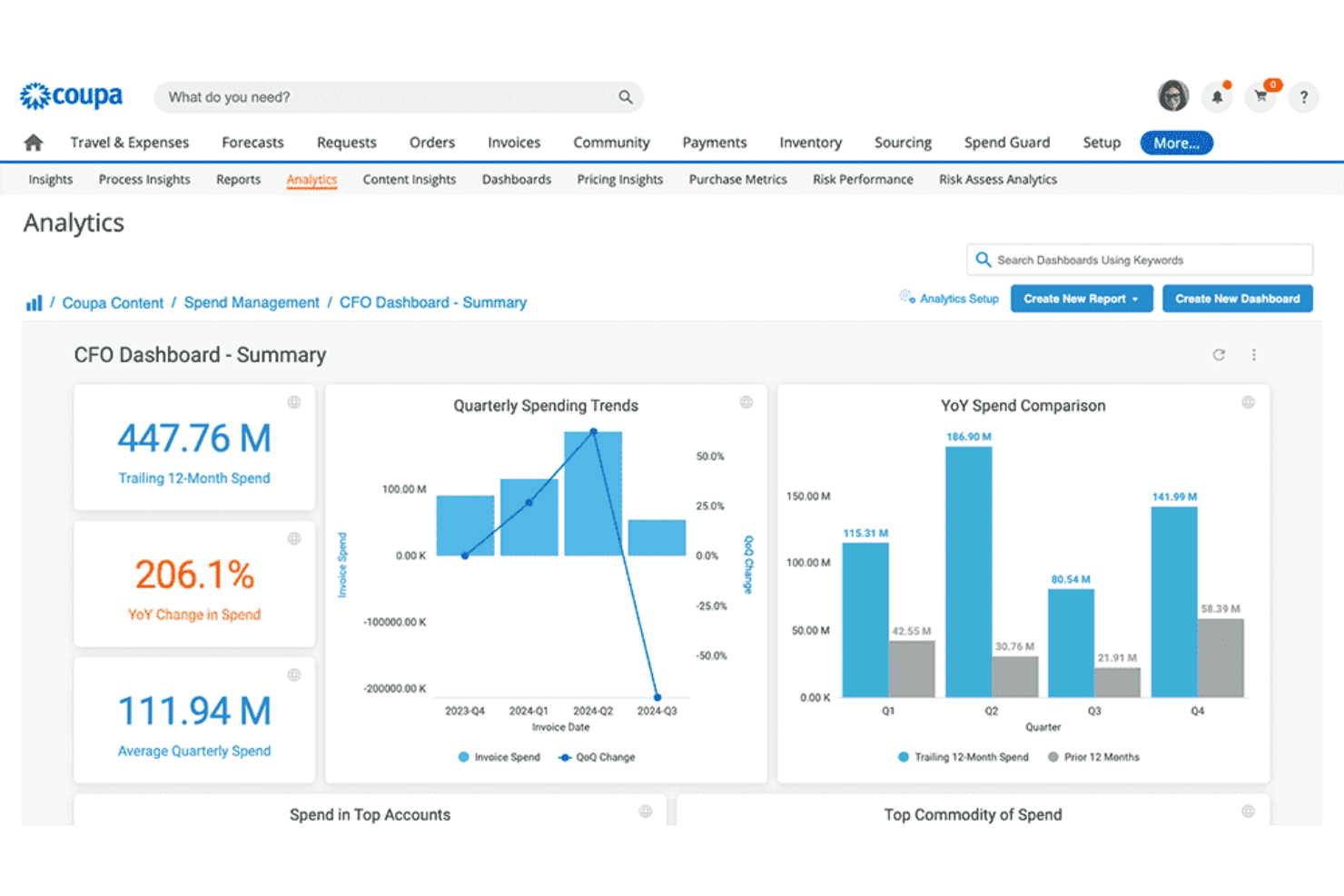
Coupa offers a CFO Dashboard with analytics including quarterly spending trends, YoY spend comparison, and key financial KPIs. Coupa is an AI-powered total spend management platform covering source-to-contract, procure-to-order, invoice-to-pay, and direct spend management across procurement, finance, and supply chain.
Who Is Coupa Best For?
Coupa is built for large enterprises—particularly those in the Fortune 500—that need centralized oversight across procurement, contracts, and supplier relationships at global scale.
Why I Picked Coupa
Coupa earns its spot as one of the best on my shortlist because of how tightly it connects contract management to live purchasing workflows. I love that Coupa's central contract repository enforces pre-negotiated rates and discounts at the point of purchase, so buying stays on-contract without relying on employees to self-police. On top of that, its AI-driven guided buying uses SpendGuard to detect off-contract and high-risk spend in real time, flagging issues before they become audit problems across thousands of transactions.
Coupa Key Features
- AP automation: Coupa matches purchase orders to invoices automatically, reducing manual processing across high-volume payables.
- Expense management: Employees submit expense reports directly in the platform, with automated policy checks applied before reimbursement.
- Supplier risk management: Coupa centralizes supplier information, compliance documentation, and risk scoring in a single supplier record.
- Spend analysis: Built-in analytics give you visibility into spending patterns across categories, suppliers, and business units.
Coupa Integrations
Coupa connects to up to 160 ERPs through its App Marketplace and pre-built connectors, including NetSuite, Oracle E-Business Suite, Oracle Fusion, SAP, and SAP S/4HANA. An open API is available for custom integrations across finance, procurement, and payment systems.
Pros and Cons
Pros:
- Centralizes supplier risk and compliance data
- AI flags risky or off-contract purchases
- Enforces negotiated contract terms during procurement
Cons:
- Approval workflows can feel rigid for teams
- Complex reporting setup for multi-entity organizations
Learn more about Coupa: Best for IT license governance in large enterprises
- Free demo available
- Pricing upon request
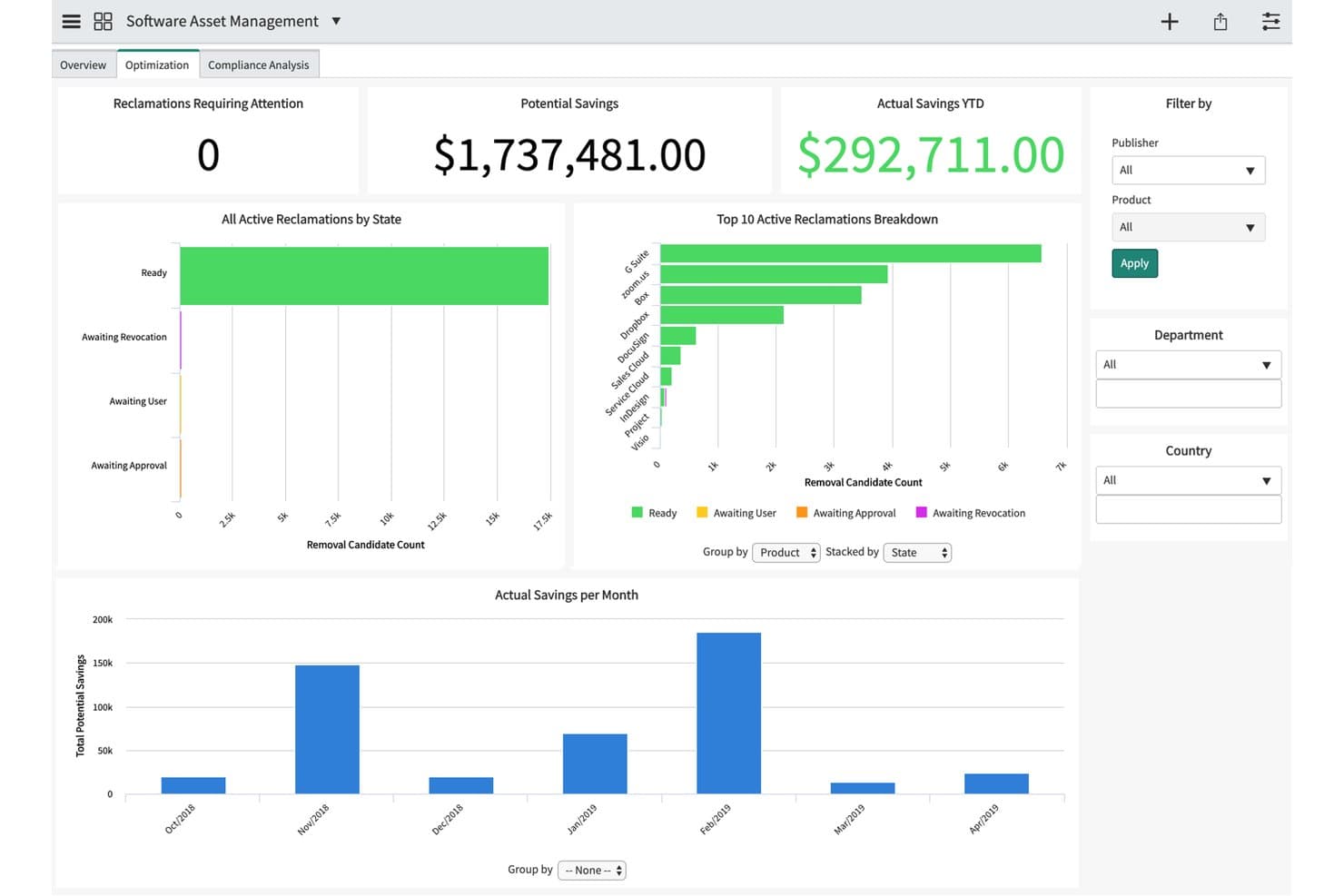
ServiceNow SAM tracks software reclamations and actual savings by month. ServiceNow SAM is an IT asset management platform that tracks software licenses, monitors compliance, manages SaaS subscriptions, and audits software usage across the enterprise.
Who Is ServiceNow Software Asset Management (SAM) Best For?
ServiceNow SAM is built for large enterprises with complex IT environments that need centralized license governance, compliance tracking, and SaaS spend visibility across thousands of software assets.
Why I Picked ServiceNow Software Asset Management (SAM)
ServiceNow SAM earns its spot on my list because it treats license governance as a first-class discipline, not an afterthought. I like how the overlapping software detection flags redundant SaaS spend across tools with similar functionality, which matters when you're managing hundreds of subscriptions. The SaaS detection feature tracks URLs accessed from endpoint devices to surface shadow IT before it becomes a compliance liability.
ServiceNow Software Asset Management (SAM) Key Features
- Software normalization: Machine learning standardizes discovered software titles and versions so your license data stays accurate and consistent.
- License reconciliation: Compares installed software against your entitlements to surface shortfalls or overage before an audit catches them.
- Publisher packs: Pre-built configurations for major software vendors give you a faster path to compliance tracking without starting from scratch.
- License and cloud cost simulator: Calculates the cost impact of migrating on-premises software licenses to the cloud before you commit to changes.
ServiceNow Software Asset Management (SAM) Integrations
ServiceNow SAM offers native integrations with Microsoft 365, Adobe Creative Cloud, Salesforce, Zoom, Cisco Webex, Zendesk, Asana, Adobe Workfront, Aha!, and Microsoft SCCM. It also offers REST APIs so you can build custom integration profiles for any SaaS app with a public API.
Pros and Cons
Pros:
- Flags redundant SaaS spend across departments
- Tracks and reports on software compliance risk
- Designed for complex enterprise IT environments
Cons:
- Reporting customization can be limited for finance teams
- Implementation often requires significant IT resources
Learn more about ServiceNow Software Asset Management (SAM): Best for SaaS spend backed by human negotiators
- Free demo available
- Pricing upon request
Visit WebsiteCustomer Rating:4.6/5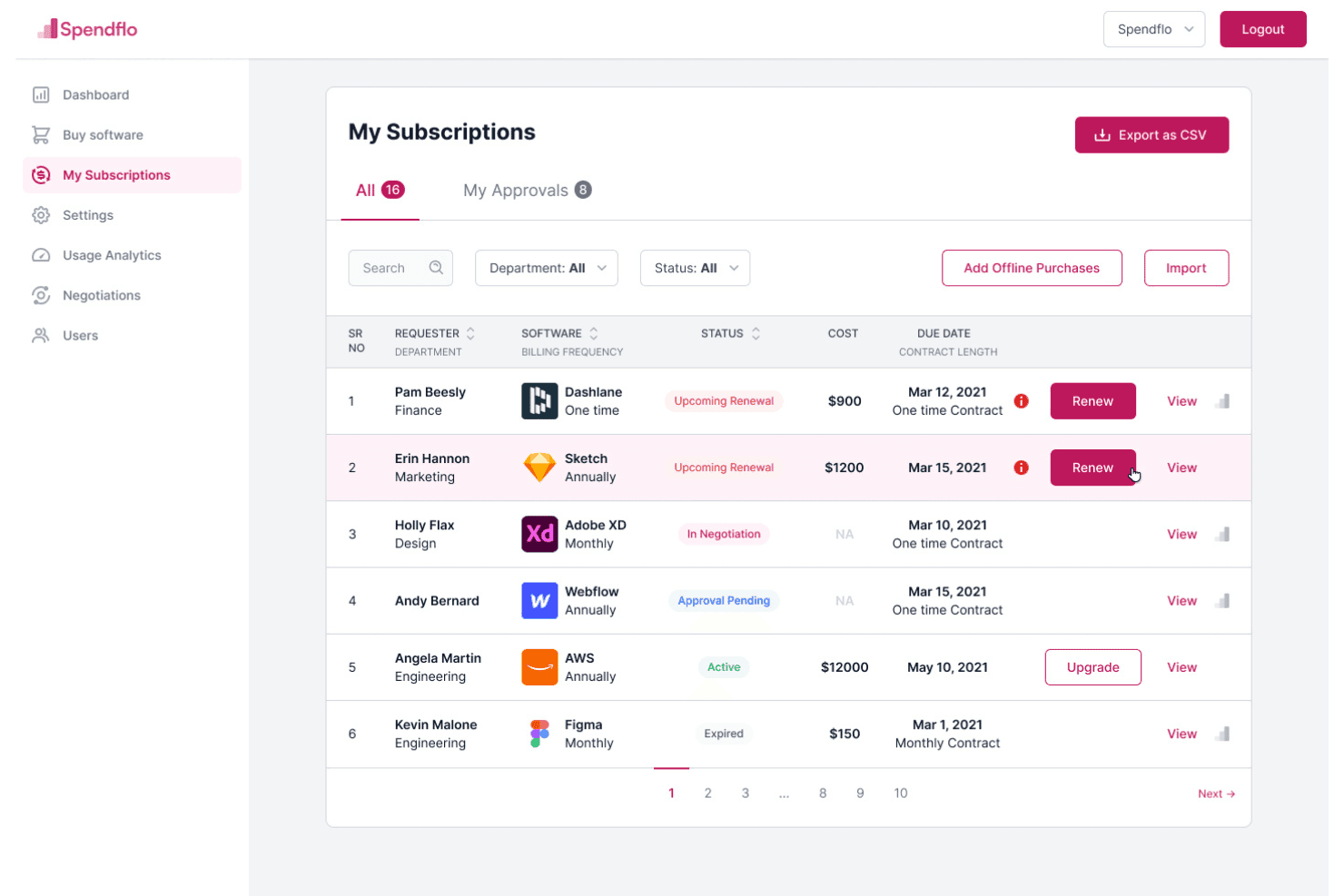
Spendflo centralizes all software subscriptions with renewal tracking. Spendflo is an AI-driven SaaS procurement and spend management platform that covers the full procurement lifecycle—from intake and supplier onboarding to accounts payable, contract management, and spend reporting—with built-in managed procurement support from human negotiators.
Who Is Spendflo Best For?
Spendflo is a strong fit for mid-market companies managing a large SaaS stack who want procurement support from real negotiators, not just automation.
Why I Picked Spendflo
I picked Spendflo as one of the best because it pairs AI procurement automation with a managed procurement team that actually negotiates on your behalf. What I find compelling is the pricing benchmarks feature, which pulls real contract data to show what comparable companies pay, giving your negotiators concrete leverage. On top of that, Spendflo flags auto-renew clauses 60 days out, so you're never caught scrambling at renewal time.
Spendflo Key Features
- Third-party risk management: Automatically validates vendor credentials, runs security assessments, and flags compliance gaps before contracts move forward.
- Accounts payable automation: Matches invoices to purchase orders line by line and flags two-way match failures for immediate review.
- Self-service vendor portal: Guides suppliers through documentation collection—tax forms, certifications, and banking details—without manual follow-up from your team.
- Usage analytics: Tracks SaaS license usage across your stack so you can identify underutilized subscriptions before renewal.
Spendflo Integrations
Spendflo offers 40+ native integrations across ERP, CLM, ITSM, IAM, HRIS, and productivity systems, including NetSuite, Coupa, Sage, DocuSign, Ironclad, ServiceNow, Jira, Okta, Workday, and Slack. It also connects to usage-tracking sources like Salesforce, GitHub, Zoom, and HubSpot for license optimization, and an API is available for custom integrations.
Pros and Cons
Pros:
- Tracks SaaS usage to reduce shelfware
- Dashboard flags renewal risks before contract lapses
- Negotiation support from real procurement experts
Cons:
- May over-focus on SaaS versus other spend
- No transparent or published pricing tiers
Learn more about Spendflo: Best for AI-driven SaaS and cloud spend control
- Free trial + free demo available
- Pricing upon request
Visit WebsiteCustomer Rating:4.6/5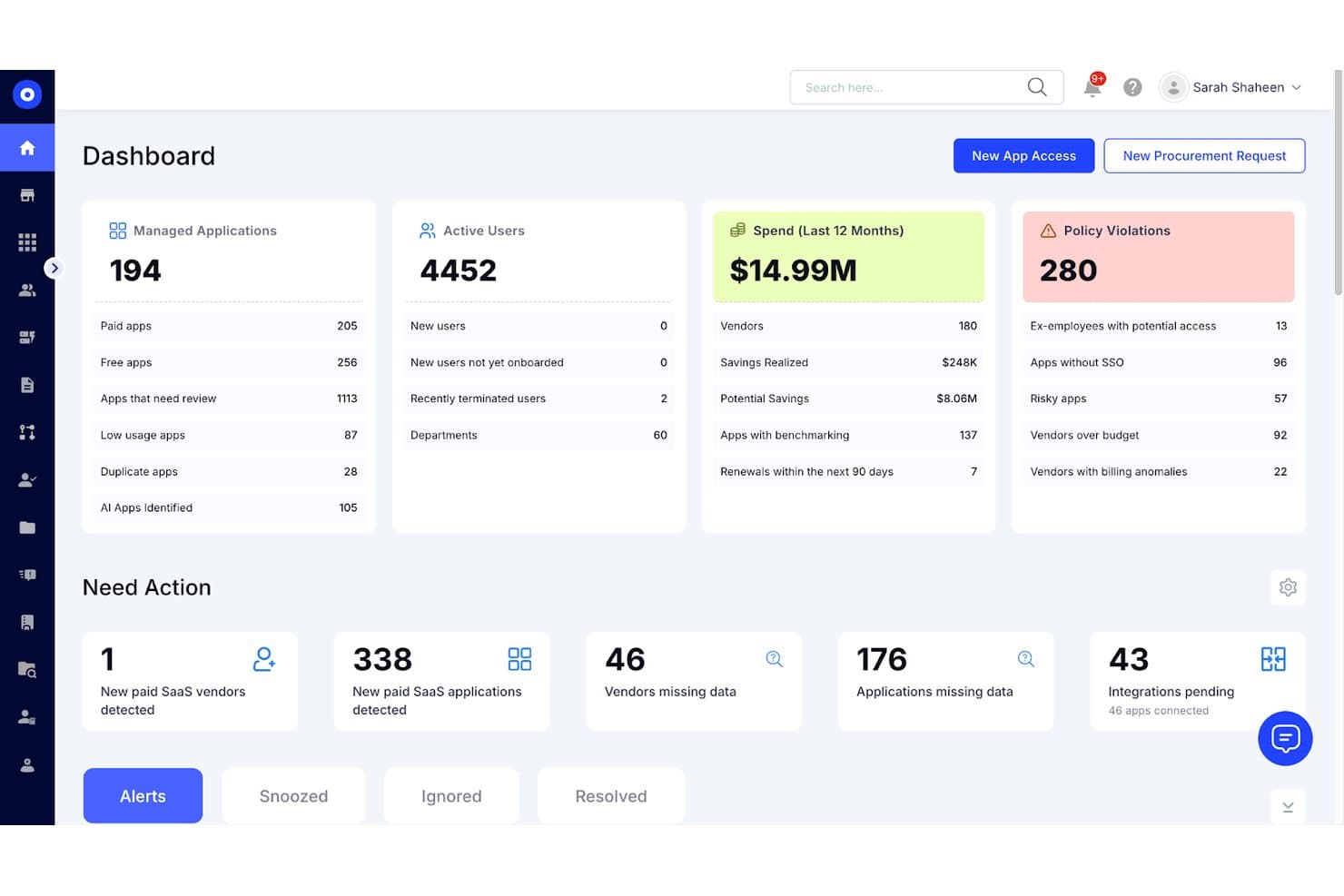
CloudEagle.ai centralizes IT spend, app usage, and policy violations in one dashboard. CloudEagle.ai is an AI-powered SaaS and cloud spend management platform that gives finance teams real-time visibility into software spending, license usage, AI tool costs, and renewals across the entire SaaS portfolio.
Who Is CloudEagle.ai Best For?
CloudEagle.ai is a strong fit for finance and FP&A teams at mid-to-large enterprises that need granular, real-time visibility into SaaS and AI tool spend across departments.
Why I Picked CloudEagle.ai
I picked CloudEagle.ai as one of the best because its AI spend tracking goes deeper than most tools in this category. It breaks down token usage and cost by AI model, user, and department across services like ChatGPT, Copilot, Cursor, and Claude, so you can set budgets and caps before spend gets out of hand. I also like its duplicate charge and price creep detection, which catches billing discrepancies across cycles before the next invoice arrives.
CloudEagle.ai Key Features
- Chargeback allocation: Splits the cost of shared SaaS tools across departments based on actual usage or custom rules, so every team is accountable for what they spend.
- SaaS portfolio rationalization: Flags redundant apps, unused licenses, and overlapping tools across the portfolio, including access left open for former employees.
- Renewal tracking: Surfaces upcoming renewal dates alongside live usage and spend data, so you're never caught off guard by an auto-renewing contract.
- FP&A system integration: Feeds real-time license, usage, and spend data directly into your existing forecasting and planning tools without replacing them.
CloudEagle.ai Integrations
CloudEagle.ai offers 500+ integrations across SaaS, AI, and identity ecosystems, including ChatGPT, Claude, Cursor, Copilot, Zoom, UiPath, AWS, Microsoft Azure, and more. Custom integrations are supported through API.
Pros and Cons
Pros:
- Allocates shared costs to departments accurately
- Detects duplicate SaaS charges automatically
- Breaks down AI tool spend by model
Cons:
- Free trial limited to scheduled demo only
- No upfront pricing transparency
Learn more about CloudEagle.ai: Best for procurement backed by benchmark data
- Free demo available
- From €12.5K/year (billed annually)
Visit WebsiteCustomer Rating:4.6/5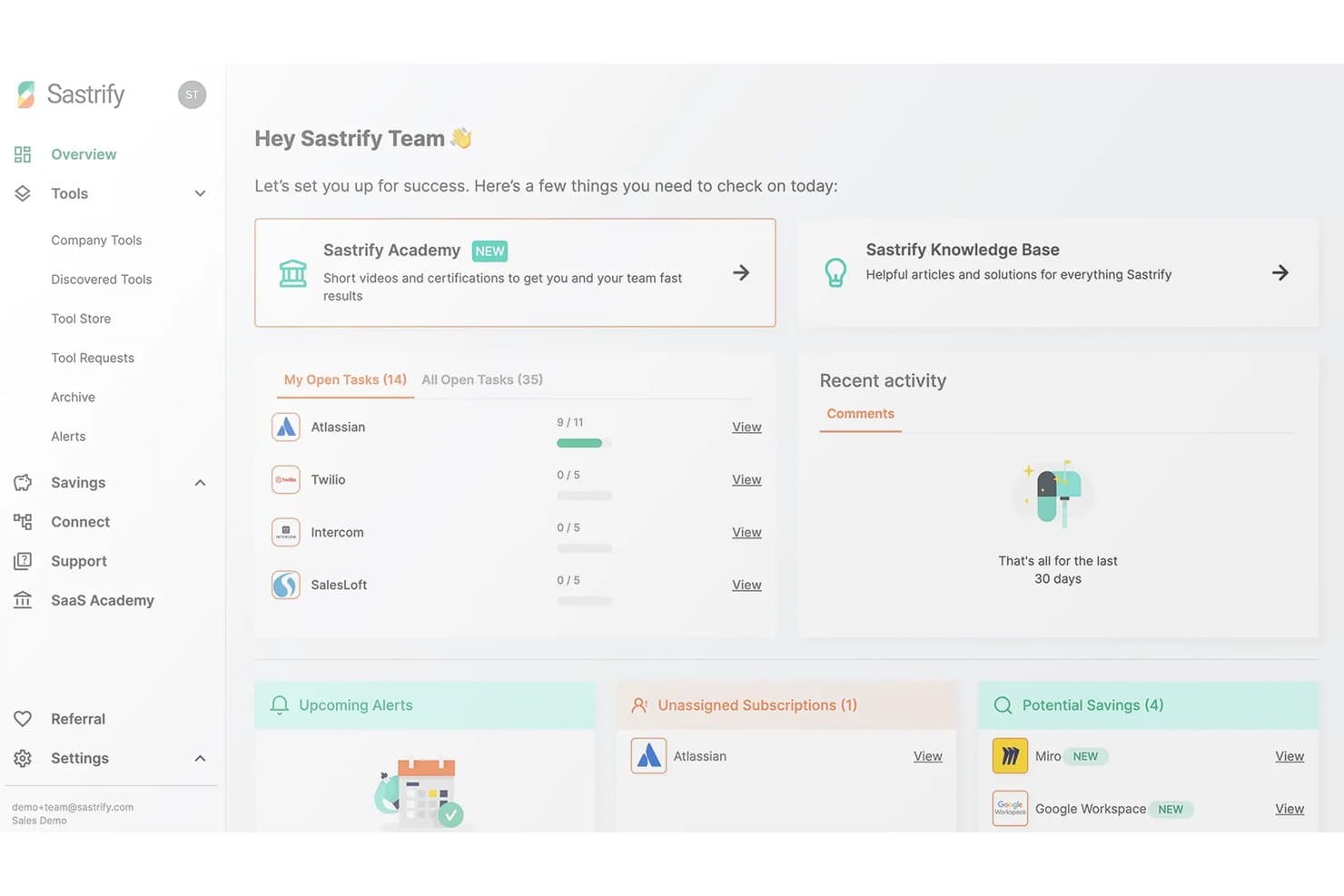
Sastrify centralizes SaaS spend, tasks, and savings in one dashboard. Sastrify is an IT spend management platform that gives finance teams visibility into SaaS contracts, license usage, and vendor costs, with AI-powered benchmarking, renewal tracking, and procurement workflow automation.
Who Is Sastrify Best For?
Sastrify is a strong fit for finance and procurement teams that need vendor pricing benchmarks to negotiate SaaS contracts with confidence.
Why I Picked Sastrify
Sastrify earns its spot on my shortlist because of how it backs procurement decisions with real pricing intelligence. Its AI benchmarks your contracts against data from 15,000+ vendors, so when you're heading into a renewal negotiation, you're not guessing what a fair price looks like. I also like the AI-powered rightsizing feature, which maps every license to actual usage, giving you concrete data to justify downgrades or cuts before a contract auto-renews.
Sastrify Key Features
- Automated spend alerts: Sastrify monitors your SaaS spend in real time and flags anomalies when costs spike or usage drops unexpectedly.
- Predictive forecasting: A built-in forecasting dashboard projects renewal timelines and spend trends months ahead so your team can plan accurately.
- Board-ready reporting: Sastrify generates auditable ROI reports that translate optimization results into financial impact you can present to leadership.
- Shadow IT detection: The platform scans your software ecosystem for unauthorized tools, giving finance teams visibility into unsanctioned spend across departments.
Sastrify Integrations
Sastrify offers 40+ native integrations across categories like SSO, accounting/ERP, procurement, HRIS, ticketing, and cloud, including Okta, Microsoft Entra ID, Google Workspace, NetSuite, QuickBooks, Xero, Workday, BambooHR, and Slack. An open API is available for custom integrations.
Pros and Cons
Pros:
- Procurement backed by live pricing benchmarks
- Contract renewal timelines forecasted with AI
- Real-time SaaS spend anomaly detection
Cons:
- Limited controls for direct contract execution
- Benchmarking most useful for larger portfolios
Learn more about Sastrify: Best for enterprise-wide IT asset and spend visibility
- Free demo available
- Pricing upon request
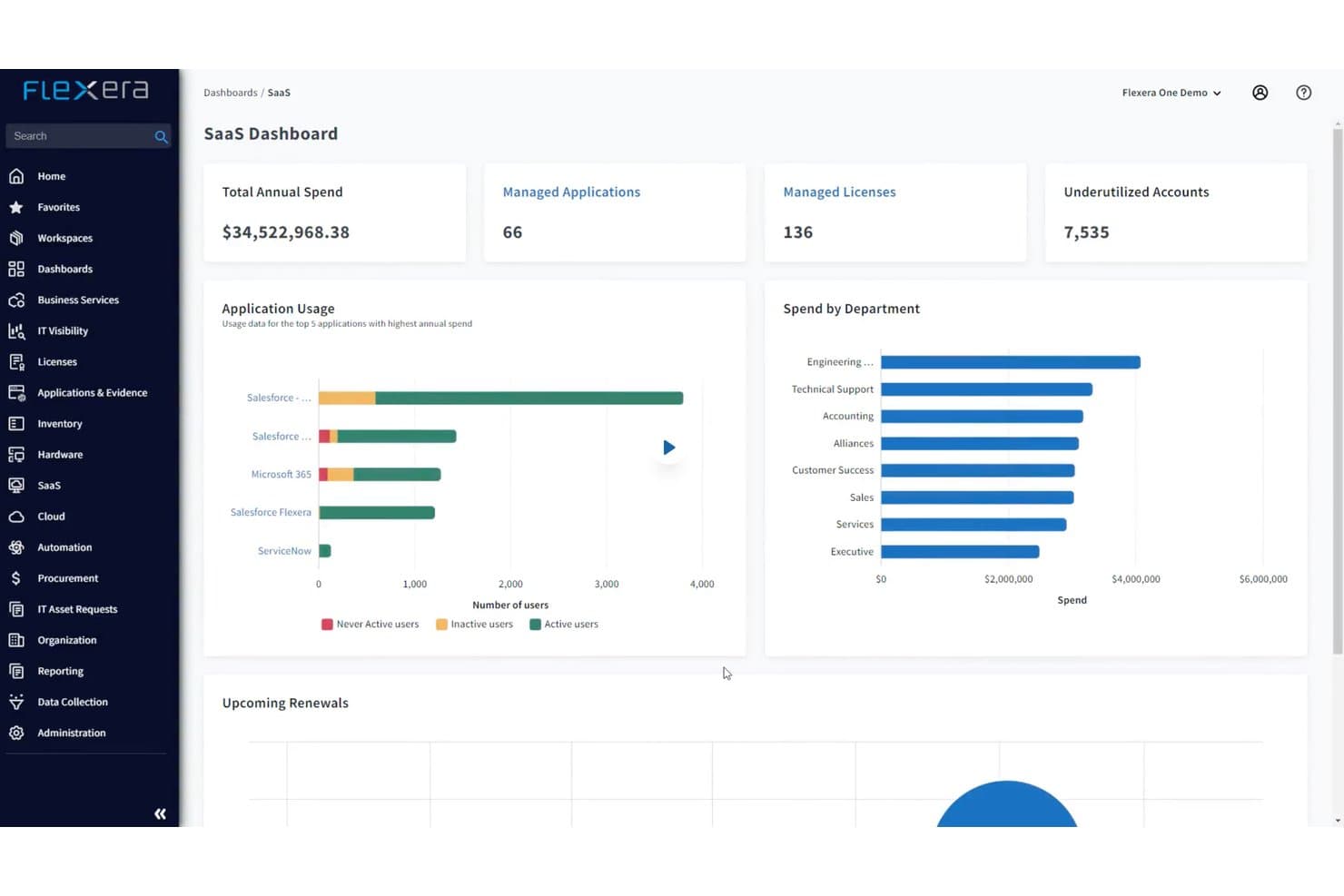
Flexera tracks SaaS spend, usage, and renewals across departments. Flexera is an IT asset and SaaS spend management platform that gives enterprises unified visibility into their full SaaS portfolio—covering SaaS discovery across sanctioned and shadow IT, usage-based license optimization, renewal management, and automated offboarding workflows.
Who Is Flexera Best For?
Flexera is a strong fit for large enterprises that need a single platform to manage both traditional IT assets and SaaS licenses across complex, multi-department environments.
Why I Picked Flexera
Flexera earns its spot on my shortlist because it covers the full IT asset picture, not just SaaS in isolation. I like how its multi-source SaaS discovery pulls from API connectors, SSO data, financial records, and browser extensions simultaneously, catching shadow IT apps that single-source tools miss entirely. Its usage-based license optimization lets you track active, inactive, and never-active users by name, so you can reclaim seats before the next renewal cycle rather than negotiating blind.
Flexera Key Features
- Renewal management dashboard: Centralizes all SaaS renewal dates in one view and sends automated alerts before contracts auto-renew or cancellation windows close.
- Automated offboarding workflows: Triggers license reclamation automatically when employees leave, so unused seats are recovered without manual follow-up.
- Vendor-specific spend dashboards: Delivers deep-dive usage and spend views for major SaaS vendors like Salesforce, Microsoft 365, and Adobe.
- Hybrid IT asset visibility: Combines SaaS management with on-premises software and hardware asset data, giving your team a single view across the full technology estate.
Flexera Integrations
Flexera provides integrations for 25,000+ SaaS apps and offers native connectors including Salesforce, ServiceNow, Okta, Adobe Creative Cloud, Box, Dropbox, DocuSign, Atlassian (Jira, Confluence, Trello), Google Workspace, and Slack. It also includes a Universal Connector and API for custom integrations.
Pros and Cons
Pros:
- Automates offboarding and license reclamation
- Catches shadow IT via multi-source discovery
- Unifies SaaS and on-premises asset tracking
Cons:
- Reporting customization can be limited
- Complex interface requires configuration effort
Learn more about Flexera:
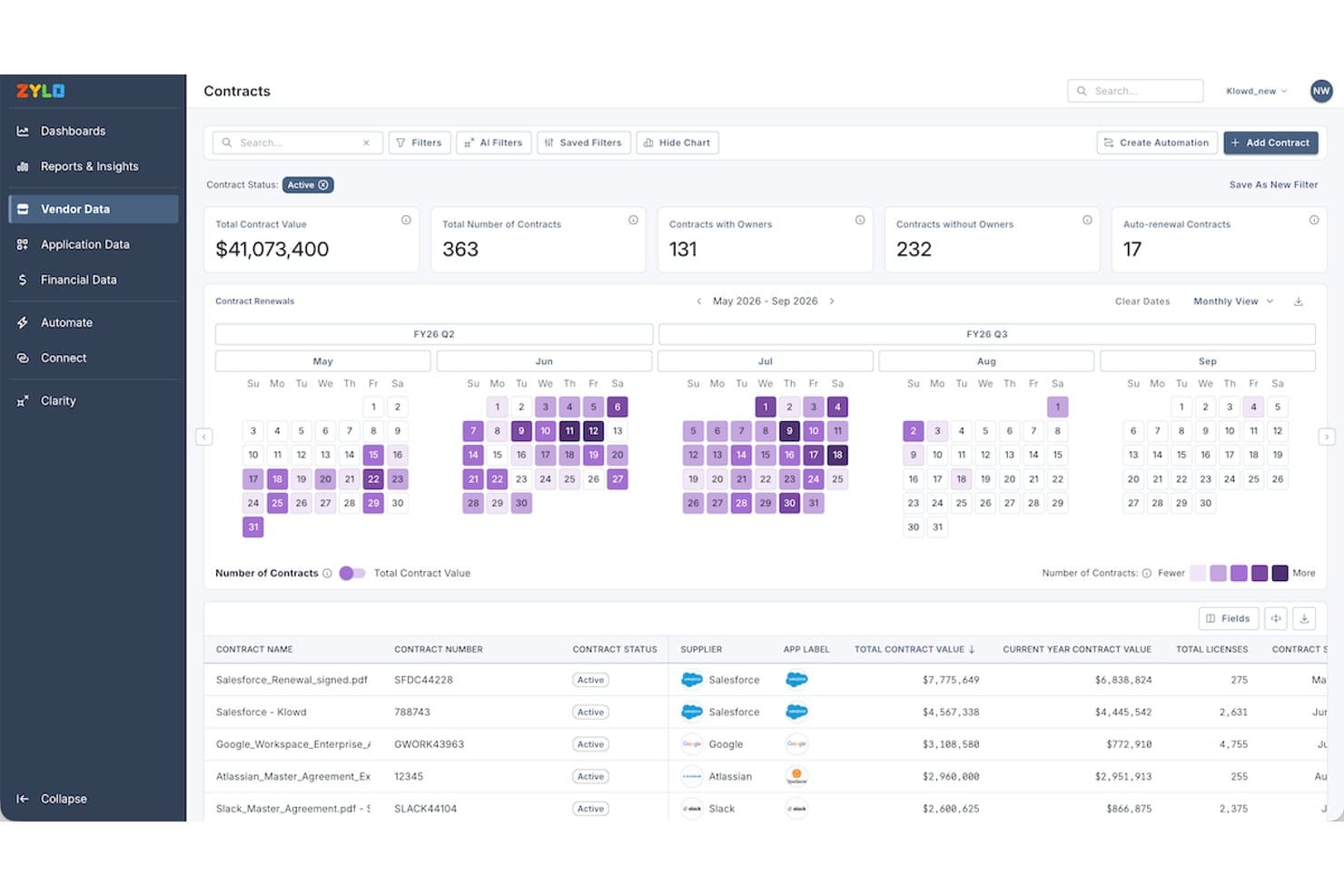
Zylo centralizes contract tracking, values, and renewal dates in one view. Zylo is a SaaS and AI spend management platform that gives enterprises a centralized system of record for software spend, usage, and contract data—combining AI-powered insights with benchmarking data to support renewal prioritization, license optimization, and shadow IT discovery.
Who Is Zylo Best For?
Zylo is a strong fit for large enterprises where finance and IT teams need to collaborate on SaaS portfolio visibility, contract governance, and license rightsizing.
Why I Picked Zylo
I picked Zylo as one of the best because its benchmarking dataset, backed by over $75B in SaaS and cloud spend data, gives your procurement and finance teams real market context when negotiating renewals. I love how Zylo Clarity AI surfaces actionable savings opportunities directly within the platform, rather than leaving you to interpret raw spend data on your own. It also flags AI app usage running outside of IT visibility, which is increasingly where unplanned spend hides.
Zylo Key Features
- Contract ingestion: AI automatically extracts and structures key data from uploaded contracts, giving you a centralized record of entitlements, terms, and renewal dates.
- License reclamation automation: Zylo identifies unused or underutilized licenses and automates the reclamation workflow so your team can right-size subscriptions before renewal.
- True-up forecasting: The platform monitors AI and software consumption in real time to flag projected overages before they hit your budget.
- Application redundancy detection: Zylo maps your full software portfolio to surface overlapping tools across business units, supporting consolidation decisions.
Zylo Integrations
Zylo offers native integrations with Salesforce, Microsoft 365, Microsoft Entra, Okta, OneLogin, Google SSO, NetSuite, Sage Intacct, Workday, ServiceNow, and more. It also provides a REST API for custom integrations, a no-code Usage Connect option, and a Model Context Protocol (MCP) server for connecting SaaS spend data to AI tools.
Pros and Cons
Pros:
- Automated license reclamation saves manual effort
- Benchmark data supports smarter negotiations
- AI flags hidden SaaS and AI spend
Cons:
- Contract management can feel complex
- Best suited for large organizations
Learn more about Zylo:
Other IT Spend Management Software
Here are some additional IT spend management software options that didn’t make it onto my shortlist, but are still worth checking out:
- 11ToriiBest for license reclamation and renewals
- 12TropicBest for SaaS negotiation and renewal savings
- 13SpendHoundBest for mid-market SaaS renewal negotiation
- 14JosysBest for IT-led SaaS spend and access control
- 15RampBest for finance-led IT spend control
- 16SetylBest for IT asset and SaaS spend in one view
- 17BetterCloudBest for SaaS license reclamation workflows
- 18ZipBest for procurement-led IT spend control
How I Evaluate IT Spend Management Software
I split my evaluation into baseline functionality every tool must cover—think real-time spend visibility and license tracking—and the differentiators, like renewal intelligence and shadow IT discovery depth, that separate good from great.
Core Functionality (Table Stakes For This List)
When I'm selecting tools for my list, I rank each one on a scale from 0 (does not offer the functionality) to 5 (excels in this area) for each core functionality listed below. I then calculate the tool's total score into a percentage, using 75% as a benchmark to help assess its overall fit for the list.
- IT Spend Visibility: I evaluate whether a tool consolidates SaaS, cloud, hardware, and vendor spend into a single dashboard with drill-down reporting and anomaly flags.
- SaaS & License Management: Shadow IT discovery depth matters here—I look for automated app detection, usage tracking, and reclamation workflows across hundreds of integrations.
- Vendor & Contract Management: I check for centralized contract storage, renewal alerts, and benchmarking or negotiation insights that help finance teams act before deadlines hit.
- Budgeting & Forecasting: Tools should support cost allocation by department or cost center, with variance reporting and forward-looking forecasts beyond static budget fields.
- Purchase Request & Approvals: I look for configurable multi-step approval routing with policy logic, so new software requests follow your organization's procurement rules automatically.
- Integrations & Data Sources: Broad connectivity with SSO providers, ERP/accounting systems, HRIS, and expense tools determines how much manual data wrangling your team can skip.
Once I have a list of tools that meet the criteria, I consider what sets each platform apart.
Differentiating Factors (What Sets Vendors Apart)
Here's how I compare and contrast different vendors:
Standout Features
Shadow IT discovery is where I see the biggest gaps between tools. I check whether detection goes beyond SSO logs to include expense report parsing, browser signals, and finance system scans—because unsanctioned apps hiding in credit card statements won't show up in Okta alone. Renewal intelligence is equally telling: I look for benchmark pricing data and automated calendars that surface leverage points well before contract expiration, giving your team time to negotiate rather than scramble. I also evaluate unit economics reporting—cost-per-user and cost-per-transaction metrics that translate raw IT spend into KPIs your FP&A team can actually act on.
Beyond Features
I evaluate how quickly a platform ingests SaaS and vendor data—some tools complete discovery in days, while others need months of custom integration work, which matters when you're reporting to the board next quarter. Pricing model fit is just as important: a tool that scales by employee count can punish a lean org with heavy SaaS sprawl, so I check whether costs track spend under management, app count, or headcount. I also look at ERP sync depth—bi-directional connections with systems like NetSuite or SAP that produce GL-coded, audit-ready records beat one-way CSV exports every time.
How to Choose an IT Spend Management Software
Which IT spend management platform deserves a place in your finance tech stack comes down to matching the software’s controls, coverage, and integrations with your visibility and compliance priorities:
| If your priority is... | Look for... |
|---|---|
| If your priority is...Getting real-time SaaS and cloud visibility | Look for...Live dashboards with transaction-level change logs |
| If your priority is...Preventing contract overspend | Look for...Automated renewal calendars plus benchmark negotiation data |
| If your priority is...Cutting shadow IT and duplicate tools | Look for...Detection that analyzes finance records and expense feeds |
| If your priority is...Enforcing financial controls | Look for...Approval routing connected to ERP and GL coding |
| If your priority is...Fast time-to-value | Look for...Tools that auto-discover apps without manual upload or config |
How to Vet Your Shortlist
- Test data ingestion speed: Ask vendors to complete a live trial—upload 12 months of SaaS invoices and measure time to spent-summary dashboard.
- Confirm procurement workflow fit: Request a demo showing a software purchase routed through your actual approval and GL-coding process.
- Validate shadow IT detection: Submit 3 anonymized real expense reports and track whether the platform identifies out-of-policy software spend.
- Check ERP integration depth: Obtain documentation on bi-directional sync with your ERP (NetSuite, SAP, or Oracle), including supported fields.
- Core tradeoff—depth vs. breadth: Decide if deep SaaS discovery or full IT/procurement coverage is most urgent, as few tools lead in both.
What is IT Spend Management Software?
IT spend management software is a category of tools that help finance and IT teams monitor, control, and analyze technology-related expenses across SaaS, cloud, and hardware. These platforms automatically track contracts, licenses, and payments, so you can gain transparency into spend, spot savings opportunities, and enforce compliance with procurement policies. IT spend management software matters because it helps align technology investments with business strategy and reduces waste from shadow IT or duplicate subscriptions.
Features
When selecting IT spend management software, keep an eye out for the following key features:
- Spend visibility dashboard: Presents all SaaS, cloud, hardware, and vendor spend in one place, offering filters and drill-down options so you can trace every dollar and catch anomalies quickly.
- SaaS and license management: Automates discovery of applications in use, monitors license utilization, and identifies underused or redundant subscriptions so you can reclaim or reassign them before renewal.
- Vendor and contract repository: Stores supplier contracts, terms, renewal dates, and provides proactive alerts, helping you manage deadlines, avoid auto-renewals, and keep negotiation leverage.
- Renewal and procurement workflow: Routes purchase requests and renewals for approval according to your organization’s rules, ensuring every spend follows policy and gets the right financial coding.
- Budgeting and forecasting tools: Allocates spend by department or project, tracks actuals against budget, and provides variance analysis and forward-looking forecasts to support better financial planning.
- Expense and transaction integration: Connects to ERP, expense management, and SSO platforms to automatically ingest data, reducing manual entry and ensuring up-to-date, accurate spend records.
- Shadow IT detection: Identifies unsanctioned software purchases or usage by scanning expense records and browser activity, surfacing hidden risks and spend outside of IT’s purview.
- Benchmark and pricing insights: Delivers market price benchmarks and cost-per-user analysis for your contracts, helping you validate vendor quotes and support cost-saving negotiations.
- Audit-ready reporting: Generates standardized, exportable reports with detailed audit trails, tying every transaction to contracts and approvals for compliance and review.
Benefits
Implementing IT spend management software provides several benefits for your team and your business. Here are a few you can look forward to:
- Real-time spend visibility: See all SaaS, cloud, hardware, and vendor expenses in a single dashboard, so you can trace every dollar and catch anomalies quickly.
- Control over renewals and contracts: Centralize contracts and set up proactive renewal alerts, helping you avoid auto-renewals and maintain negotiation leverage.
- Shadow IT and duplicate spend detection: Identify unsanctioned software and duplicate subscriptions by analyzing data from SSO, expense records, and finance systems.
- Tighter financial controls: Route software requests and renewals through configurable approval workflows, ensuring spend aligns with your policies and correct GL coding.
- Accurate budgeting and forecasting: Allocate costs by department or project with variance analysis and forecasting tools, so you can plan with more confidence.
- Optimized license and asset management: Automate the discovery and monitoring of application usage, letting you reclaim or reassign underused licenses before renewals.
- Audit-ready, compliant reporting: Generate standardized, exportable reports with detailed audit trails, ensuring every transaction is compliant and easy to review.
Costs and Pricing
Selecting IT spend management software requires an understanding of the various pricing models and plans available. Costs vary based on features, team size, add-ons, and more. The table below summarizes common plans, their average prices, and typical features included in IT spend management software solutions:
Plan Comparison Table for IT Spend Management Software
| Plan Type | Average Price | Common Features |
|---|---|---|
| Plan TypeFree Plan | Average Price$0 | Common FeaturesBasic spend dashboard, limited SaaS tracking, and community support. |
| Plan TypePersonal Plan | Average Price$10–$25/user/month | Common FeaturesSingle-user access, spend reporting, simple app discovery, and standard reporting tools. |
| Plan TypeBusiness Plan | Average Price$25–$50/user/month | Common FeaturesMulti-user support, vendor and contract management, budgeting tools, approval workflows, and integrations. |
| Plan TypeEnterprise Plan | Average Price$50–$100/user/month | Common FeaturesAdvanced SaaS discovery, custom integrations, ERP sync, role-based access, and audit-ready reporting. |
IT Spend Management Software FAQs
Here are some answers to common questions about IT spend management software:
How do IT spend management tools help reduce shadow IT?
IT spend management tools help reduce shadow IT by automatically detecting unsanctioned software and services in your organization. They analyze expense records, SSO logs, and credit card transactions to spot apps purchased outside of IT or procurement workflows. This helps you uncover risks, control hidden costs, and bring rogue spending back under policy.
Can IT spend management software integrate with ERP and finance systems?
Yes, most IT spend management platforms offer integrations with popular ERP and finance systems like NetSuite, SAP, and Oracle. These integrations let you sync spend data, automate GL coding, and close the gap between procurement, finance, and IT records. Always check the depth of integration—some tools offer true bi-directional syncing, while others may rely on one-way data exports.
What’s the difference between SaaS management and broader IT spend management platforms?
SaaS management tools focus heavily on discovering, tracking, and optimizing SaaS applications and licenses. Broader IT spend management platforms go further by handling all IT spend—including hardware, cloud, vendors, contracts, and procurement workflows—in one place. If you need end-to-end coverage for all technology spend, look for solutions that include both SaaS and non-SaaS controls.
How quickly can you expect results after deploying IT spend management software?
You should expect a noticeable improvement in spend visibility within days or weeks if the platform offers strong data ingestion and automated discovery. Some tools allow you to upload past invoices or connect integrations right away, giving you immediate dashboards. If a tool requires a lot of manual setup or custom integration, results may take longer—sometimes several weeks or months.
What’s the best way to measure ROI from IT spend management tools?
The best way to measure ROI is to track spend reductions from eliminated duplicate apps, underused licenses, or missed renewal deadlines. Compare technology spending before and after implementation, factoring in savings from negotiation leverage, reduced shadow IT, and improved procurement controls. Reporting features that highlight cost avoidance or contract savings make ROI measurement much easier.