

Legal spend management software centralizes, tracks, and analyzes legal department expenses so you can control costs and make data-driven decisions. For CFOs facing pressure to optimize legal spend, these tools provide needed visibility, enforce firm-specific billing rules, and handle complex approval workflows. In this guide, you’ll find practical insights to help you compare leading solutions and choose the best fit for your organization’s legal, finance, and compliance needs.
Why Trust Our Software Recommendations
6,700+
Reviews
20
Industry experts
16+
Evaluation factors
14
Years
Our team has been testing and reviewing software since 2012. As finance leaders ourselves, we know how difficult—and important—it is to choose the right software.
For this guide, we evaluated tools using hands-on testing and independent research, scoring tools using our selection criteria.
Our reviews reflect our human editorial judgment, not a sales pitch.
Legal Spend Management Software Comparison Table
This comparison table summarizes pricing details for my top legal spend management software.
| Tool | Best For | Trial Info | Price | ||
|---|---|---|---|---|---|
| 1 | Best for unified legal matter tracking | Free demo available | Pricing upon request | Website | |
| 2 | Best for custom billing guideline enforcement | Free demo available | Pricing upon request | Website | |
| 3 | Best for no-code workflow automation | Free demo available | Pricing upon request | Website | |
| 4 | Best for integrated matter and spend analytics | Free demo available | Pricing upon request | Website | |
| 5 | Best for secure European data residency | Free demo available | Pricing upon request | Website | |
| 6 | Best for global enterprise spend visibility | Free demo available | Pricing upon request | Website | |
| 7 | Best for AI-driven invoice review automation | Free demo available | Pricing upon request | Website | |
| 8 | Best for intuitive accrual management | Free demo available | Pricing upon request | Website | |
| 9 | Best for extensive workflow customization | Not available | Pricing upon request | Website | |
| 10 | Best for advanced rate benchmarking | Free demo available | Pricing upon request | Website |


Legal Spend Management Software Reviews
Below are my detailed summaries of the best legal spend management software that made it onto my shortlist. My reviews offer a detailed look at the features, integrations, and best use cases of each platform to help you find the best one for you.
 Best for unified legal matter tracking
- Free demo available
- Pricing upon request
Visit WebsiteCustomer Rating:4.5/5
LawVu organizes matter details, tasks, files, and team conversations in one place for efficient legal work tracking. LawVu is a legal workspace platform that unifies matter management, contract lifecycle management, and spend management — including e-billing, invoice review, outside counsel collaboration, and AI-powered billing guideline enforcement — in a single system for in-house legal teams.
Who Is LawVu Best For?
LawVu is a strong fit for mid-market legal operations teams that manage outside counsel spend alongside contracts and matters from a single platform.
Why I Picked LawVu
I picked LawVu as one of the best because matter tracking and spend management share the same data layer here. When I review an invoice, the matter context, budget status, and billing guidelines are all visible in one place. LawVu's AI-powered Billing Guideline Review flags non-compliant charges in real time, cutting back-and-forth with outside counsel. My team can also pull spend data tied directly to active matters, which makes accrual reporting at month-end much less manual.
LawVu Key Features
- E-billing module: Supports electronic invoice submission and review through a centralized platform.
- Configurable approval workflows: Enables multi-tiered invoice approval chains based on matter, amount, or entity.
- Rate card enforcement: Maintains and applies negotiated outside counsel rates at the invoice review stage.
- Spend analytics dashboards: Delivers interactive dashboards for monitoring legal expenditures and identifying trends.
LawVu Integrations
Native integrations are not clearly documented. LawVu provides an API for custom integrations.
Pros and Cons
Pros:
- Phase-level budget tracking with real-time variance
- Consolidates matter intake forms
- Spend and matter data tracked in one place
Cons:
- Restricts custom matter template creation
- Reporting customization options are limited
Learn more about LawVu: Best for custom billing guideline enforcement
- Free demo available
- Pricing upon request
Visit WebsiteCustomer Rating:3.6/5
TyMetrix 360° features a detailed invoice summary with vendor information, invoice totals, adjustments, and review status for legal spend management. TyMetrix 360° is a SaaS-based enterprise legal management platform that combines e-billing, matter management, invoice approval workflows, billing guideline enforcement, and spend analytics for corporate legal departments.
Who Is TyMetrix 360° Best For?
TyMetrix 360° suits mid-to-large enterprises and insurance organizations managing high volumes of outside counsel invoices across multiple law firms.
Why I Picked TyMetrix 360°
I picked TyMetrix 360° as one of the best because its billing guideline enforcement goes well beyond basic flagging. The Timekeeper Rate Management module enforces negotiated rate cards at the line-item level, so a firm can't bill above agreed rates without an automatic rejection. The Invoice Appeals module then creates a structured workflow for outside counsel to dispute those rejections, keeping the process documented and auditable. AI-powered auditing also catches overcharges and misallocations automatically, with clients reporting 5-10% ROI from enforcement alone.
TyMetrix 360° Key Features
- Power BI analytics integration: Pull reports and dashboards directly from Microsoft Power BI to analyze legal spend data.
- LegalVIEW benchmarking: Compare matter costs and performance against the industry's largest legal spend dataset.
- Accrual review module: Automate the tracking and capture of monthly legal accruals for financial reporting.
- Panel management tools: Centralize management of preferred law firms, including vendor profiles and diversity tracking.
TyMetrix 360° Integrations
TyMetrix 360° offers native integrations with SAP, Oracle, NetSuite, and Microsoft Power BI, and provides an API for custom integrations.
Pros and Cons
Pros:
- LegalVIEW benchmarks against thousands of law firms
- Custom billing rule builder with appeal workflow
- AI flags duplicate charges before human review
Cons:
- Limits automated task assignment options
- Limited custom internal user roles
Learn more about TyMetrix 360°: Best for no-code workflow automation
- Free demo available
- Pricing upon request
Visit WebsiteCustomer Rating:4.5/5
OnitX ELM organizes invoices, matters, and action items within a single legal operations workspace. OnitX ELM is an enterprise legal management platform that combines matter management, eBilling, AI-powered invoice review, billing guideline enforcement, and spend analytics for corporate legal departments.
Who Is OnitX ELM Best For?
OnitX ELM is a strong fit for enterprise legal departments that manage high volumes of outside counsel spend across multiple business units or geographies.
Why I Picked OnitX ELM
OnitX ELM earns its spot on my shortlist because of the depth of workflow customization built into its no-code Apptitude platform. I can configure multi-tier invoice approval routing by matter type, spend threshold, or business unit without writing a single line of code. The platform ships with 200+ pre-built workflow applications covering billing guideline enforcement and legal service requests, which my team adapts directly rather than building from scratch.
OnitX ELM Key Features
- LEDES invoice validation: Supports multiple LEDES e-billing formats for standardized invoice processing and compliance.
- Timekeeper rate enforcement: Applies approved timekeeper rates to submitted invoices and flags discrepancies automatically.
- Real-time spend analytics: Offers configurable dashboards and reports for matter-level financial tracking and insights.
- Vendor portal (BillingPoint): Allows outside counsel to submit, track, and manage invoices with clear status updates and feedback.
OnitX ELM Integrations
OnitX ELM offers native integrations with SAP, Oracle, NetSuite, Workday, and Microsoft 365 for syncing legal spend, invoice, and accrual data, and provides an API for custom integrations.
Pros and Cons
Pros:
- Provides external firm billing portals
- Ships with 200+ pre-built workflow applications
- Syncs multi-currency conversions
Cons:
- Not well suited for small in-house teams
- Requires dedicated internal administrative oversight
Learn more about OnitX ELM: Best for integrated matter and spend analytics
- Free demo available
- Pricing upon request
Visit WebsiteCustomer Rating:3.5/5
Wolters Kluwer Passport manages legal invoices with timekeeper summaries and totals. Wolters Kluwer Passport is an enterprise legal management platform that combines matter management, e-billing, billing guideline enforcement, and spend analytics into a single system for corporate legal departments.
Who Is Wolters Kluwer Passport Best For?
Passport suits large enterprise legal departments managing high volumes of outside counsel invoices and complex, multi-matter spend across global operations.
Why I Picked Wolters Kluwer Passport
Passport earns its spot on my shortlist because of how tightly it connects matter management and spend analytics into one system. I particularly like LegalVIEW Analytics, which benchmarks your spend against more than $230 billion in real invoices across 225 practice areas, giving legal ops and finance teams real context around whether they're overpaying. Paired with LegalVIEW BillAnalyzer's AI-powered line-item review, I can flag non-compliant charges before they ever reach approval.
Wolters Kluwer Passport Key Features
- Configurable invoice approval workflows: Route legal invoices through multi-tier approval chains with conditional logic based on matter or invoice value.
- Panel and vendor management: Track outside counsel relationships, enforce rate cards, and manage diversity and performance data in one system.
- Accrual and financial reporting: Generate accruals, export spend data, and synchronize with ERP or finance platforms for accurate month-end close.
- Microsoft Office integration: Access matter files, invoices, and workflows directly within Outlook, Word, and Excel via the Office Companion.
Wolters Kluwer Passport Integrations
Passport offers native integrations with SAP, Oracle, NetSuite, and Workday, and has native integrations across the Microsoft ecosystem, including Microsoft 365 and Azure. An API is available for custom integrations.
Pros and Cons
Pros:
- Real-time matter budget and accrual tracking
- AI-powered line-item review reduces manual auditing
- LegalVIEW benchmarking spans 200+ practice areas
Cons:
- Dated interface compared to newer competitors
- Limited granular custom user roles
Learn more about Wolters Kluwer Passport: Best for secure European data residency
- Free demo available
- Pricing upon request

Ascent ELM by DiliTrust maps total legal spend, matter counts, and spending by practice group and matter name through its Spend SmartView. Ascent ELM by DiliTrust is an enterprise legal management platform that combines eBilling, matter budget tracking, billing guideline enforcement, invoice approval workflows, and legal spend reporting with ERP integrations.
Who Is Ascent ELM by DiliTrust Best For?
Ascent ELM is a strong fit for multinational legal and finance teams that need legally compliant, sovereignty-conscious data hosting alongside enterprise-grade legal spend controls.
Why I Picked Ascent ELM by DiliTrust
I've included Ascent ELM by DiliTrust in my top picks because its sovereign hosting infrastructure directly addresses data residency requirements in regulated European markets. I rely on Smart Invoice Review to flag non-compliant billing lines against custom guidelines, and the Spend Transparency dashboards show real-time spend by matter, department, or firm. ISO 27001 and SOC 2 Type II certifications back up the residency claims with verifiable security standards.
Ascent ELM by DiliTrust Key Features
- Matter management dashboard: View teams, vendors, budgets, tasks, and appointments in one central location.
- Report Builder drag-and-drop analytics: Create custom legal spend and accrual reports without coding.
- Workflow automation: Automate matter intake, vendor onboarding, accrual processes, and budgeting tasks.
- Microsoft Office SmartLink integration: Manage tasks from within Outlook, Word, Excel, and PowerPoint.
Ascent ELM by DiliTrust Integrations
Ascent ELM by DiliTrust offers native integrations with NetSuite, SAP, Workday, JD Edwards, Microsoft Dynamics, PeopleSoft, and Sage 500 for ERP connectivity. An API is available for custom integrations.
Pros and Cons
Pros:
- Automates legal matter intake workflows
- Configurable billing guideline rules with auto-reject capability
- European data sovereignty meets strict GDPR residency requirements
Cons:
- Smaller global support footprint than US-headquartered ELM vendors
- Limited custom external vendor portals
Learn more about Ascent ELM by DiliTrust: Best for global enterprise spend visibility
- Free demo available
- Pricing upon request
Visit WebsiteCustomer Rating:4.6/5
Thomson Reuters Legal Tracker presents Rate Management Insights with bar charts comparing rate increases by timekeeper classification across five firms and industry benchmarks. Thomson Reuters Legal Tracker is an enterprise legal spend management platform combining e-billing, matter management, AI-powered invoice auditing, and benchmarking analytics backed by a library of $310B in corporate legal spend data.
Who Is Thomson Reuters Legal Tracker Best For?
Legal Tracker is a strong fit for large multinational corporations managing outside counsel spend across multiple jurisdictions, currencies, and legal entities.
Why I Picked Thomson Reuters Legal Tracker
Legal Tracker earns its spot on my shortlist because of how it handles spend visibility at a genuinely global scale. The platform supports multiple currencies and languages natively, so I can track invoices and matter budgets across dozens of jurisdictions without manual reconciliation. What I find especially useful is the benchmarking engine, which pulls from $310B in corporate legal spend data to compare matter costs and timekeeper rates directly against industry norms.
Thomson Reuters Legal Tracker Key Features
- LEDES invoice validation: Supports multiple LEDES formats and automatically checks invoices for compliance with standard rules.
- Configurable approval routing: Allows multi-level, rules-based invoice approval workflows tailored to organization or spend thresholds.
- Automated accrual reporting: Captures and reports accrual data for month-end close with integrations to finance systems.
- Centralized rate card repository: Maintains timekeeper-level rate details, enforces approved rates, and applies them during invoice review.
Thomson Reuters Legal Tracker Integrations
Legal Tracker offers native integrations with SAP, Oracle, NetSuite, and Workday for ERP and AP connectivity. An API is available for custom integrations.
Pros and Cons
Pros:
- Supports multi-currency, multi-entity billing globally
- AI flags non-compliant invoice line items automatically
- Validates corporate legal spend automatically
Cons:
- Lacks built-in contract management
- Long enterprise implementation timelines
Learn more about Thomson Reuters Legal Tracker: Best for AI-driven invoice review automation
- Free demo available
- Pricing upon request
Visit WebsiteCustomer Rating:4.6/5
Brightflag lets users review, flag, and approve legal invoices with AI insights. Brightflag is an AI-powered enterprise legal management platform that combines e-billing, matter management, vendor management, and spend analytics into a single system for corporate legal departments.
Who Is Brightflag Best For?
Brightflag is a strong fit for mid-to-large corporate legal departments that manage significant outside counsel spend and need finance-grade controls over legal billing.
Why I Picked Brightflag
I picked Brightflag as one of the best because its AI reviews every single invoice line, catching billing guideline violations and resourcing anomalies automatically. I also like how the AI feeds into vendor profiles and spend forecasts, so the value goes beyond catching bad charges. The controlled approval workflows and complete audit trails give me a clear record of every invoice decision, from submission to payment.
Brightflag Key Features
- LEDES format support: Accepts law firm invoice submissions in LEDES 1998B, 1998BI, and XML standards.
- Matter budget tracking: Lets you set, monitor, and report on matter, phase, and task-level budgets with real-time variance alerts.
- Timekeeper rate management: Centralizes negotiated rate cards and enforces timekeeper-level rates during invoice review.
- ERP and AP system integrations: Connects directly with SAP, Oracle, NetSuite, Workday, and other finance systems for payment sync.
Brightflag Integrations
Brightflag offers native integrations with SAP S/4HANA, Oracle Fusion, NetSuite, Workday, Sage Intacct, QuickBooks, Coupa, Concur, Ariba, Bill, and Ramp. An API is available for custom integrations.
Pros and Cons
Pros:
- Accrual data syncs with finance close cycles
- Outside counsel benchmarking across firms and matters
- AI flags billing violations before human review
Cons:
- Lacks automated firm scorecard generation
- Limits custom reporting field additions
Learn more about Brightflag: Best for intuitive accrual management
- Free demo available
- Pricing upon request
Visit WebsiteCustomer Rating:4.5/5
Onit SimpleLegal’s Spend Dashboard covers top vendor rankings, practice area breakdowns, billed fees, expenses, and discount tracking for legal spend oversight. Onit SimpleLegal is an enterprise legal management platform for in-house legal teams that combines eBilling, matter management, outside counsel vendor tracking, and accrual reporting with ERP and AP system integrations.
Who Is Onit SimpleLegal Best For?
It's a strong fit for mid-market corporate legal departments that manage high volumes of outside counsel invoices and need tighter finance-side controls without a full enterprise ELM implementation.
Why I Picked Onit SimpleLegal
I picked Onit SimpleLegal as one of the best because of how it handles accruals at month-end close. It automatically tracks four distinct accrual types: unbilled estimates, pending invoices, invoices with missing information, and rejected invoices. That level of categorization gives finance clean, structured data instead of a rough lump-sum estimate from legal. I also like the rules-based invoice review, which flags non-compliant line items before they ever reach the approval queue.
Onit SimpleLegal Key Features
- LEDES format support: Accepts and validates multiple industry-standard LEDES invoice formats for accurate intake of law firm invoices.
- Configurable approval workflows: Provides multi-tier, rules-based invoice routing tailored to different matter types or spend thresholds.
- Centralized vendor management: Maintains detailed outside counsel profiles, including rate cards and timekeeper data, for enforcement during invoice review.
- ERP and AP integrations: Connects directly to systems like SAP, NetSuite, or Oracle for bi-directional financial data sync and payment processing.
Onit SimpleLegal Integrations
Onit SimpleLegal offers native integrations with SAP, Oracle, NetSuite, and Workday for ERP and accounts payable workflows, and provides an API for custom integrations.
Pros and Cons
Pros:
- Categorizes month-end accruals automatically
- Structured invoice audit trail supports regulated industry compliance
- Automated accrual categorization reduces month-end manual work
Cons:
- Limited bulk historical data imports
- Limited advanced custom role permissions
Learn more about Onit SimpleLegal: Best for extensive workflow customization
- Not available
- Pricing upon request
Visit WebsiteCustomer Rating:4.7/5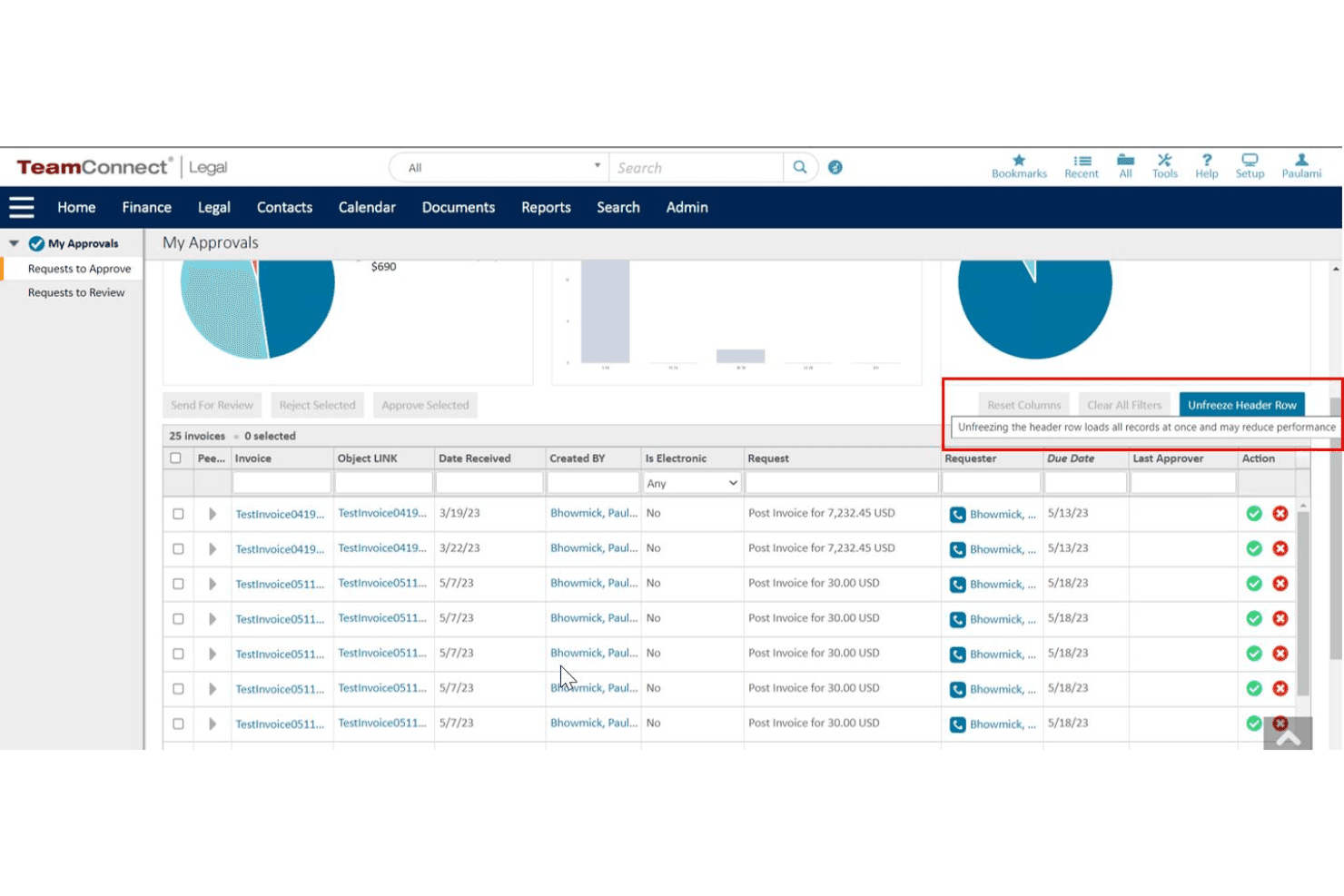
TeamConnect lets users review and approve invoices from a centralized queue. Mitratech TeamConnect is an enterprise legal management platform that combines matter management, e-billing, billing guideline enforcement, invoice approval workflows, and spend analytics for corporate legal departments.
Who Is Mitratech TeamConnect Best For?
TeamConnect is a natural fit for enterprise legal departments managing high invoice volumes, complex matter portfolios, and multiple outside counsel relationships simultaneously.
Why I Picked Mitratech TeamConnect
I've included Mitratech TeamConnect in my top picks because the TAP drag-and-drop workflow builder lets legal ops teams design their own invoice approval logic, conditional routing, and escalation rules without writing a single line of code. I like that billing guidelines are configurable at the rule level, so non-compliant line items get flagged or auto-rejected against your specific outside counsel agreements. The ARIES™ AI matter and spend agent layers on top, surfacing anomalies and answering spend questions in natural language.
Mitratech TeamConnect Key Features
- LEDES format compatibility: Accepts LEDES 1998B, 1998BI, and XML e-billing formats from outside counsel.
- Matter budget tracking: Lets users set and monitor budgets at the matter, phase, and task level.
- Rate card enforcement: Centralizes timekeeper rate approvals and ensures negotiated rates are applied.
- Accrual and financial reporting: Generates legal spend reports and accrual data for ERP and finance systems.
Mitratech TeamConnect Integrations
TeamConnect offers native integrations with SAP, Oracle, NetSuite, Salesforce, and Microsoft 365, and provides an API for custom integrations.
Pros and Cons
Pros:
- Deep matter-level budget and accrual reporting
- Provides role-based access
- Highly configurable invoice approval routing rules
Cons:
- Outside counsel onboarding requires significant change management
- Long enterprise implementation timeline before go-live
Learn more about Mitratech TeamConnect: Best for advanced rate benchmarking
- Free demo available
- Pricing upon request
Visit WebsiteCustomer Rating:3.8/5
LexisNexis CounselLink+ tracks Partner, Associate, and Paralegal hourly rates across multiple percentiles alongside custom company data. LexisNexis CounselLink+ is an enterprise legal management platform that combines e-billing, AI-powered invoice review, matter budget tracking, billing guideline enforcement, and outside counsel rate benchmarking for corporate legal departments.
Who Is LexisNexis CounselLink+ Best For?
CounselLink+ is well suited to mid-to-large corporate legal departments that manage high volumes of outside counsel invoices and need structured spend controls across multiple business units.
Why I Picked LexisNexis CounselLink+
CounselLink+ earns its spot on my shortlist because of the depth behind its rate benchmarking capability. The benchmarking database is built on $75B+ in actual invoice data, so when I'm negotiating timekeeper rates with outside counsel, I'm comparing against real market rates rather than estimates. I also like that those negotiated rate cards are enforced directly at invoice review, so any billing above agreed rates gets flagged automatically.
LexisNexis CounselLink+ Key Features
- AI-powered invoice audit: Uses machine learning to automatically scan invoices for billing guideline violations and flag issues before human review.
- Multi-currency support: Handles invoices in several currencies with built-in tax calculations and currency conversion.
- Matter lifecycle management: Tracks legal matters from intake through resolution with integrated documents and communication history.
- Configurable approval workflows: Allows you to set up custom, multi-stage invoice and payment approval paths based on company processes.
LexisNexis CounselLink+ Integrations
LexisNexis CounselLink+ offers native integrations with SAP, Oracle, NetSuite, and Workday for ERP and accounts payable workflows. An API is available for custom integrations.
Pros and Cons
Pros:
- Calculates international currency taxes natively
- Tracks outside counsel diversity
- Benchmarking database built on real invoice data
Cons:
- Lacks integrated document redlining tools
- Lacks automated document generation tools
Learn more about LexisNexis CounselLink+:
Other Legal Spend Management Software
Here are some additional legal spend management software options that didn’t make it onto my shortlist, but are still worth checking out:
- 11PERSUITBest for RFP-driven outside counsel engagement
- 12Mitratech Legal Spend ManagementBest for AI-powered firm performance benchmarking
- 13LitifyBest for Salesforce-based matter collaboration
- 14XakiaBest for fast implementation with small teams
- 15LawcadiaBest for rules-driven spend approval automation
- 16DazychainBest for configurable compliance workflows
How I Evaluate Legal Spend Management Software
I evaluate legal spend tools across two layers: baseline capabilities like LEDES intake and billing guideline enforcement, and the differentiators that set leading platforms apart.
Core Functionality (Table Stakes For This List)
When I'm selecting tools for my list, I rank each one on a scale from 0 (does not offer the functionality) to 5 (excels in this area) for each core functionality listed below. I then calculate the tool's total score as a percentage, using 65% as a benchmark to help assess its overall fit for the list.
- E-Billing and LEDES Support: I check whether the platform ingests LEDES 98B, 1998BI, and XML formats, and whether it validates submissions or requires manual cleanup from your AP team.
- Billing Guideline Enforcement: Automated rule engines that flag block billing, excessive charges, or unapproved task codes keep invoice reviews from becoming a manual bottleneck.
- Matter Budget Tracking: I look for phase- and task-level budget monitoring with variance alerts, so legal ops can catch overruns mid-matter rather than at final invoice.
- Invoice Approval Workflows: Configurable multi-tier routing matters here, especially when approval chains differ by spend threshold, entity, or matter type across your organization.
- Accrual and Financial Reporting: I evaluate how well each platform generates accrual data and syncs with ERP systems like SAP or Oracle to support month-end close cycles.
- Vendor and Rate Management: Rate card enforcement at the timekeeper level is what I look for, including the ability to lock in negotiated rates and flag unapproved increases.
Once I have a list of tools that meet the criteria, I consider what sets each platform apart.
Differentiating Factors (What Sets Vendors Apart)
Here's how I compare and contrast different vendors:
Standout Features
AI-powered invoice review is a key differentiator. Platforms with strong ML models catch block billing, duplicate charges, and guideline violations before your team opens the invoice, which saves hours during review cycles. Outside counsel benchmarking also matters—comparing your firm's effective rates and cycle times against industry baselines gives you real leverage during rate negotiations. I look for rate card management that enforces approved timekeeper rates automatically, so unapproved increases don't slip through unnoticed.
Beyond Features
ERP connectivity is one of the first things I evaluate. If invoices can't flow into SAP, Oracle, or Workday without manual intervention, your AP team absorbs the friction during every close cycle. Pricing models vary widely too. Some vendors charge per user while others price based on spend under management, so I check whether outside counsel firms face submission fees that could hurt adoption. Data residency and compliance certifications like SOC 2 Type II also carry weight, especially for global organizations handling privileged legal data across jurisdictions.
How to Choose a Legal Spend Management Software
Which vendor addresses the specific pressure points your legal and finance teams face managing outside counsel spend, invoice reviews, and matter-level budgets?
| If your priority is... | Look for... |
|---|---|
| If your priority is...Real-time visibility on legal spend | Look for...Dashboards with drill-down to matter/phase |
| If your priority is...Fewer invoice disputes | Look for...Automated billing guideline enforcement |
| If your priority is...Quick ERP integration | Look for...Prebuilt SAP, Oracle, or Workday connectors |
| If your priority is...Controlling rate creep | Look for...Rate card enforcement at timekeeper level |
| If your priority is...Fast onboarding for law firms | Look for...Vendor-side portal and implementation managers |
How to Vet Your Shortlist
- Request a sample LEDES error report: Ask for a recent system-generated error log to confirm advanced invoice validation in live environments.
- Run a workflow configuration live demo: Set up a multi-step approval chain during your demo and require a working prototype in under 48 hours.
- Ask for an ERP export artifact: Get a sample file of expense exports in your ERP’s required format to validate plug-and-play connectivity.
- Review a billing guideline violation audit trail: Secure a redacted invoice with system-flagged rule breach notes and action history to verify enforcement granularity.
- Tradeoff alert — rules engine vs. open workflow: Decide whether automatic rejection (less manual review, higher firm pushback) or open routing (more flexibility, more errors) matches your risk tolerance.
What Is Legal Spend Management Software?
Legal spend management software centralizes legal invoice intake, reviews outside counsel bills for compliance, and tracks law firm fees against matter budgets. These platforms help finance and legal teams automate approval workflows, enforce custom billing guidelines, and generate spend analytics for forecasting and accruals. With built-in support for industry-standard formats like LEDES, your team can manage multi-firm legal costs more predictably, accurately, and in sync with your broader financial processes.
Features of Legal Spend Management Software
When selecting legal spend management software, keep an eye out for the following key features:
- E-billing and LEDES support: Accepts and validates invoices in LEDES and other industry-standard formats, reducing manual entry and ensuring data consistency.
- Billing guideline enforcement: Applies custom rules to flag or reject non-compliant charges, block billing, or unauthorized expenses, helping maintain strict cost controls.
- Matter budget tracking: Monitors real-time spend against budgets at the matter, phase, and task level, alerting you to potential overruns before they escalate.
- Multi-tier invoice approval workflows: Routes invoices through configurable review and approval chains, supporting complex organizational hierarchies and compliance requirements.
- Accrual and spend reporting: Automates financial reporting for accruals, forecasts, and historical trends, making it easier for finance teams to support monthly close.
- Vendor and rate management: Maintains a searchable repository of outside counsel and their negotiated rate cards, enforcing agreed rates at the invoice review stage.
- AI-powered invoice auditing: Uses machine learning to detect duplicate entries, pattern violations, and potential billing errors before human review.
- ERP and AP integrations: Connects directly to enterprise accounting systems like SAP, Oracle, or Workday, improving payment processing and expense tracking.
- Role-based access controls: Grants varying permissions to users based on function or department, supporting information security and auditability.
- Law firm collaboration portal: Provides outside counsel with a user-friendly portal to submit invoices, share documents, and view matter status, increasing transparency and reducing communication bottlenecks.
Benefits of Legal Spend Management Software
Implementing legal spend management software provides several benefits for your team and your business. Here are a few you can look forward to:
- Reduced manual effort: Automated invoice reviews and guideline enforcement cut down on hours spent auditing bills and reconciling errors.
- Greater budget control: Real-time tracking and alerts around matter, phase, and task budgets help your team avoid costly overruns.
- Improved compliance: Configurable approval workflows, rate card enforcement, and violation audit trails make it easier to uphold financial and legal policies.
- Faster financial close: Direct ERP integrations and automated accrual reporting ensure legal spend data always flows into your finance systems, speeding month-end close.
- Enhanced vendor management: Having centralized vendor profiles with enforceable rates lets you negotiate, monitor, and benchmark law firm performance more effectively.
- Forecast-ready analytics: Access to granular spend analytics and benchmarking tools helps you plan accruals, forecast spending, and identify opportunities for cost savings.
- Better collaboration: Collaboration portals give law firms and your team transparency into invoice status, matter progress, and compliance expectations.
Costs and Pricing of Legal Spend Management Software
Selecting legal spend management software requires an understanding of the various pricing models and plans available. Costs vary based on features, team size, add-ons, and more. The table below summarizes common plans, their average prices, and typical features included in legal spend management software solutions:
Plan Comparison Table for Legal Spend Management Software
| Plan Type | Average Price | Common Features |
|---|---|---|
| Plan TypeFree Plan | Average Price$0 | Common FeaturesLimited invoice uploads, basic spend tracking, and single-user access. |
| Plan TypePersonal Plan | Average Price$20-$50/user/month | Common FeaturesLEDES support, manual invoice review, simple budget tracking, and email-based support. |
| Plan TypeBusiness Plan | Average Price$60-$150/user/month | Common FeaturesConfigurable approval workflows, billing guideline enforcement, phase/task budgeting, and ERP export. |
| Plan TypeEnterprise Plan | Average Price$200-$500/user/month | Common FeaturesAI-powered invoice auditing, advanced analytics, timekeeper rate management, integrations, and SSO. |
Legal Spend Management Software FAQs
Here are some answers to common questions about legal spend management software:
What LEDES formats are typically supported?
Most legal technology platforms support LEDES 1998B, 1998BI, and 2000 formats, enabling automated invoice intake from law firms. Using standard formats helps in-house counsel accurately track legal expenses and identify key spending trends.
Can you automate billing guideline compliance with these tools?
Yes, using automated workflows, these solutions apply your guidelines during intake to flag non-compliant charges, block billing, and catch unapproved hourly rates. This reduces manual review time while enforcing better billing practices. Some teams also pair this with a managed bill review service for extra oversight.
How do these tools integrate with ERP and accounting systems?
Vendors usually offer direct integrations or file exports for SAP, Oracle, Workday, and other ERPs, allowing seamless transfer of approved invoice data for payment.
How do matter budgets work within legal spend management software?
You can set matter, phase, and task budgets and receive live alerts when spend approaches or exceeds thresholds, helping avoid overruns.
Are law firms charged to submit invoices through these platforms?
Some platforms charge law firms submission fees while others do not, so check the vendor’s pricing structure if firm cooperation is important to you.