

10 Best Purchase Requisition Software Reviewed in 2026

Best Purchase Requisition Software Shortlist


As a CFO, you face constant challenges in managing budgets, delivering cost savings, and ensuring that your team's spending aligns with company goals. Purchase requisition software can help you control expenses and improve procurement efficiency. It automates the approval process, reducing errors and saving time.
I've spent years reviewing financial software, and I know what works. In this article, I'll share my top picks for purchase requisition software. Each option is independently tested, ensuring you get an unbiased view.
You'll find insights into features, pricing, and unique benefits tailored to your needs. My goal is to help you make informed decisions, so your team can focus on what matters most.
Why Trust Our Software Recommendations
Our team has been testing and reviewing software since 2012. As finance leaders ourselves, we know how difficult—and important—it is to choose the right software.
For this guide, we evaluated tools using hands-on testing and independent research, scoring tools using our selection criteria.
Our reviews reflect our human editorial judgment, not a sales pitch.
Best Purchase Requisition Software Summary
This comparison chart summarizes pricing details for my top purchase requisition software selections to help you find the best one for your budget and business needs.
| Tool | Best For | Trial Info | Price | ||
|---|---|---|---|---|---|
| 1 | Best for automated contract compliance | 30-day free trial | Pricing upon request | Website | |
| 2 | Best for customizable procurement workflows | Free trial + free demo available | From $225/user/month (billed annually) | Website | |
| 3 | Best for AI-driven purchasing recommendations | Free demo available | From $699/month | Website | |
| 4 | Best for simple requisitions with quick approvals | Free 14-day trial + demo available | Pricing upon request | Website | |
| 5 | Best for multi-user collaborative purchasing | Free 14-day trial + demo available | From $250/month | Website | |
| 6 | Best for centralized purchasing and vendor control | Free demo available | From $598/month | Website | |
| 7 | Best for hardware sourcing | Free trial available | From $249/month | Website | |
| 8 | Best for in-depth spend and trend analytics | Free demo available | Pricing upon request | Website | |
| 9 | Best for tool and asset management | Free demo available | Pricing upon request | Website | |
| 10 | Best for policy-driven budget tracking | Free demo + 14-day trial available | From $499/month (billed annually) | Website |
Best Purchase Requisition Software Review
Below are my detailed summaries of the best purchase requisition software that made it onto my shortlist. My reviews offer a detailed look at the key features, pros and cons, integrations, and ideal use cases of each tool to help you find the best one for you.
Best for automated contract compliance

CobbleStone Software is a contract management solution tailored for businesses that need precise contract compliance. It serves legal and procurement teams by refining contract lifecycle management and ensuring adherence to compliance standards.
Why I picked CobbleStone Software: Its advanced contract compliance features help your team maintain regulatory standards. The platform provides automated notifications and alerts for contract renewals, ensuring timely actions. It includes detailed audit trails that provide your team with transparency and accountability. CobbleStone's focus on compliance helps mitigate risks associated with contract management.
Standout features and integrations:
Features include a user-friendly dashboard that gives your team a clear view of contract statuses. It offers customizable templates for contract creation, which simplify the drafting process. Additionally, the software supports electronic signatures, making contract execution efficient.
Integrations include Salesforce, Microsoft Dynamics 365, HubSpot, Sage Intacct, and more.
Pros and Cons
Pros:
- Customizable contract templates
- Detailed audit trails
- Advanced contract compliance features and alerts
Cons:
- Requires significant implementation and customization time
- Extensive functionality may be overwhelming for smaller teams

Best for customizable procurement workflows

Tradogram is a purchase requisition software designed for businesses that need flexible procurement solutions. It caters to teams seeking customizable workflows to manage purchasing, supplier, and stakeholder relationships effectively.
Why I picked Tradogram: It offers adaptable workflow settings to allow your team to tailor procurement processes to specific needs. The software supports detailed supplier management, helping you maintain strong vendor relationships. With budget control features, your team can keep track of spending with precision. Tradogram's focus on customization ensures it merges into your existing workflows.
Standout features and integrations:
Features include multi-currency support to enable your team to handle international transactions with ease. The platform provides detailed reporting tools, giving you insights into procurement trends. Additionally, its contract management capabilities help you manage agreements efficiently.
Integrations include QuickBooks, Xero, NetSuite, Sage Intacct, Microsoft Dynamics, and more.
Pros and Cons
Pros:
- Multi-currency support
- Detailed supplier management
- Customizable approval workflows
Cons:
- Limited mobile app functionality
- Reporting lacks advanced analytics

Zapro
Best for AI-driven purchasing recommendations

Zapro is a procurement software solution designed for businesses looking to leverage AI-driven insights in their purchasing processes. It caters to procurement teams by automating data analysis and enhancing decision-making capabilities.
Why I picked Zapro: It excels in providing AI-driven insights that help your team make informed purchasing decisions. The platform's predictive analytics offer foresight into market trends and assist in strategic planning. Real-time data visualization allows you to track procurement metrics effortlessly. Zapro's focus on AI-driven insights enables your team to optimize its procurement strategies.
Standout features and integrations:
Features include customizable dashboards that let your team tailor data views to specific needs. The platform supports advanced reporting tools, providing detailed insights into procurement activities. Additionally, it offers supplier performance tracking, helping you maintain strong vendor relationships.
Integrations include SAP, Oracle, Microsoft Dynamics 365, Salesforce, QuickBooks, Xero, NetSuite, Slack, and more.
Pros and Cons
Pros:
- Real-time data visualization
- Predictive analytics capabilities
- Refined procurement and AP automation
Cons:
- Limited contract authoring functionality
- Advanced features can be hard to navigate

Best for simple requisitions with quick approvals

eRequisition is a purchase order approval system tailored for businesses of all sizes, focusing on efficient procurement management. It serves various industries by automating workflows and enhancing financial controls through defined user roles and permissions.
Why I picked eRequisition: The tool simplifies the requisition process with automated approval workflows, ensuring quick approvals. It integrates with ERP systems, such as QuickBooks, reducing manual entry errors for requesters. The platform offers real-time tracking, providing approvers and the broader team with valuable insights for better decision-making. Its focus on rapid approvals helps maintain efficiency throughout the entire process of procurement.
Standout features and integrations:
Features include master data management, which allows your team to organize and maintain essential business data. Requisition management simplifies the creation and tracking of purchase requests. The platform also supports purchase order receiving to ensure accurate order fulfillment.
Integrations include QuickBooks Online, QuickBooks Desktop, and NetSuite.
Pros and Cons
Pros:
- Automates and centralizes procurement processes
- Real-time requisition tracking capabilities
- Automated approval workflows
Cons:
- Limited advanced purchasing features
- Some reporting capabilities are basic

Best for multi-user collaborative purchasing

Team Procure is a procurement management software aimed at businesses looking to enhance collaboration in purchasing. It helps procurement teams manage purchase requests, approvals, and supplier relationships efficiently.
Why I picked Team Procure: It excels in facilitating collaborative purchasing with features such as custom approval workflows, enabling your team to tailor processes to fit your needs. Real-time tracking of purchase requests helps maintain transparency and accountability. The software also supports managing multiple warehouses and delivery schedules, which ensures smooth operations. Team Procure's focus on collaboration helps manage the flow of procurement activities across departments.
Standout features and integrations:
Features include advanced eAuction tools, allowing your team to optimize procurement costs. The platform supports detailed spend analysis and provides insights into purchasing patterns. Additionally, its AI-powered reporting tools support enhanced decision-making capabilities.
Integrations include QuickBooks.
Pros and Cons
Pros:
- Advanced eAuction tools
- Centralized vendor and order management
- Facilitates collaborative purchasing
Cons:
- Reporting and analytics may lack depth
- Limited financial system integrations


ProcureDesk is a procurement management solution designed for mid-sized businesses. It focuses on efficient purchasing and cost control to help finance and procurement teams automate their buying processes and manage supplier relationships effectively.
Why I picked ProcureDesk: It offers tailored solutions for mid-sized businesses, with such features as budget management and customized approval workflows. It enables you to track spending in real-time, ensuring financial control across departments. The platform's reporting tools allow your team to analyze procurement data and make informed decisions. ProcureDesk can automate the purchase requisition process for mid-sized businesses that have outgrown spreadsheets.
Standout features and integrations:
Features include purchase order automation to improve the efficiency of your team's buying process. The platform's vendor management tools can help you maintain strong supplier relationships. Additionally, ProcureDesk offers spend analytics that give insights into procurement trends and help you optimize costs.
Integrations include QuickBooks, Xero, Sage Intacct, NetSuite, Microsoft Business Central, and more.
Pros and Cons
Pros:
- Effective vendor management
- Real-time spend tracking
- Tailored for mid-sized businesses
Cons:
- Limited native support for ERPs
- Initial setup can seem complex

Best for hardware sourcing

ControlHub is a procurement management software tailored for businesses focusing on hardware acquisition and inventory management. It serves operations and procurement teams by automating purchase requests, approvals, and inventory tracking.
Why I picked ControlHub: It specializes in hardware procurement, with features such as automated purchase order creation and inventory management. Your team can benefit from real-time stock level monitoring, ensuring you never run out of essential hardware. The software's approval workflows organize decision-making and reduce delays in procurement processes. ControlHub's focus on hardware procurement makes it an ideal choice for businesses that rely heavily on physical inventory.
Standout features and integrations:
Features include detailed vendor management tools that allow your team to maintain strong supplier relationships. The platform supports budget tracking, helping you control spending effectively. Additionally, it offers advanced reporting capabilities and provides insights into procurement trends and performance.
Integrations include QuickBooks, Slack, and more.
Pros and Cons
Pros:
- Detailed vendor management tools
- Real-time stock level monitoring
- Focused on hardware procurement
Cons:
- Reporting and analytics may be basic
- Limited ERP integration coverage


Fraxion is a spend management solution designed for businesses seeking enhanced visibility into their procurement processes. It serves finance teams by providing tools to control expenses and monitor spending patterns effectively.
Why I picked Fraxion: It offers real-time spend visibility, helping your team stay on top of budget management. The software includes built-in compliance features to ensure purchasing aligns with company policies. With its intuitive dashboard, you can quickly access key financial data, while Fraxion's focus on spend visibility supports informed financial decisions.
Standout features and integrations:
Features include customizable approval workflows that allow your team to define purchasing protocols. The platform supports detailed reporting, giving insights into spending trends and budget performance. Additionally, mobile access enables you to manage approvals and track expenses on the go.
Integrations include QuickBooks, Xero, NetSuite, Microsoft Dynamics 365, Sage Intacct, Oracle, and more.
Pros and Cons
Pros:
- Customizable approval workflows
- Advanced mobile apps
- AI-powered spend analytics
Cons:
- Some invoice adjustment limitations
- Too many features for small businesses


TDM Systems is a tool management software designed for manufacturing companies seeking to track and organize production tool information. It helps production teams optimize tool usage, reduce tool-related costs, and improve production planning.
Why I picked TDM Systems: It offers extensive tool management features that enhance operational efficiency in manufacturing settings. The software provides detailed tool tracking, helping your team maintain optimal inventory levels. Its integration with CAD/CAM systems simplifies tool data transfer and setup. TDM Systems' focus on tool management ensures your production processes run smoothly and efficiently.
Standout features and integrations:
Features include advanced tool lifecycle management, enabling your team to track tool usage and maintenance schedules. The platform supports detailed reporting, providing insights into tool performance and usage patterns. Additionally, it offers customizable tool catalogs, allowing you to manage tool data effectively.
Integrations include Siemens NX, Autodesk Inventor, SolidWorks, Mastercam, Edgecam, TopSolid, and more.
Pros and Cons
Pros:
- Centralized tool data repository
- Integration with CAD/CAM systems
- Extensive tool and asset management features
Cons:
- Complex for smaller businesses
- Requires initial investment in planning, setup, and training

Precoro
Best for policy-driven budget tracking
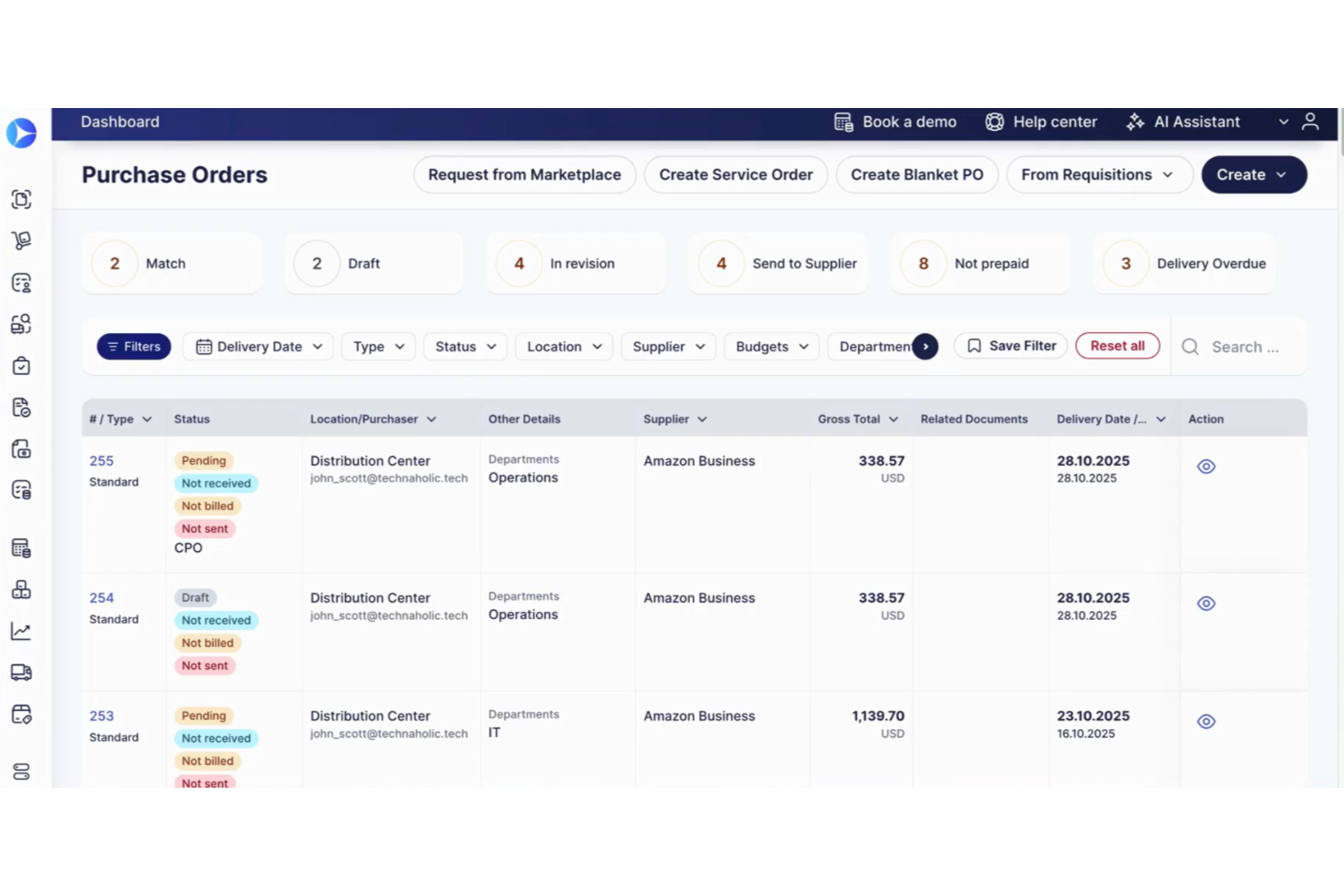
Precoro is a purchase requisition software designed for businesses focused on effective budget management. It serves finance teams by automating purchasing processes and enhancing financial oversight.
Why I picked Precoro: It simplifies budget tracking with real-time spend visibility to ensure your team stays within financial thresholds. The software offers complete purchase order management, allowing you to oversee each step of the procure-to-pay process. With automated approval workflows, your team can reduce manual data entry errors and speed up approvals. Its focus on budget tracking helps maintain financial control across different departments.
Standout features and integrations:
Features include detailed reporting capabilities, customizable purchase order templates, and supplier management tools. Your team can generate reports that provide insights into spending trends. The software supports supplier relationship management, enhancing procurement efficiency.
Integrations include QuickBooks Online, Xero, NetSuite, Microsoft Dynamics 365, Google Workspace, Slack, Amazon Business, and more.
Pros and Cons
Pros:
- Flexible approval workflows
- Automated purchase orders
- Real-time budget insights
Cons:
- Automation depth varies by integration
- Limited advanced analytics and customization options
New Product Updates from Precoro

Precoro Adds Virtual Cards for Business Spending
Precoro adds virtual cards with configurable spend limits, digital wallet support, and transaction matching. This gives teams a controlled way to pay for online and local purchases while tracking spend in Precoro. For more information, visit Precoro’s official site.
 .
.Other Purchase Requisition Software
Here are some additional purchase requisition software options that didn’t make it onto my shortlist, but are still worth checking out:
- Procurify
For fast setup with minimal training overhead
- SAP Ariba
For global supplier networks
- Coupa
For spend management analytics and insights
- Nutrient SDK
For integration flexibility


Related Reviews
How I Evaluate Purchase Requisition Software
I split my evaluation into two layers: the baseline capabilities—like approval workflows and budget enforcement—every tool must have, and the differentiators that set the best options apart.
Core Functionality (Table Stakes For This List)
When I'm selecting tools for my list, I rank each one on a scale from 0 (does not offer the functionality) to 5 (excels in this area) for each core functionality listed below. Then, I calculate the tool's total score into a percentage. Each tool needs to achieve a minimum total score of 65% to be considered for inclusion.
- Requisition Creation & Catalogs: I check whether requesters can submit structured purchase requests with item catalogs, vendor details, and pricing rather than relying on email or spreadsheet workarounds.
- Configurable Approval Workflows: Approval routing should adapt to real-world rules like amount thresholds, department, or GL code so a $500 office supply request and a $50,000 software contract follow different paths.
- Budget & Policy Controls: I look for tools that enforce spending limits and procurement policies at the point of request, flagging or blocking requisitions that exceed a department's remaining budget.
- PO Conversion & Tracking: Approved requisitions should automatically generate purchase orders with status tracking through fulfillment, so finance teams aren't manually re-keying data into a separate system.
- ERP & Accounting Integrations: I evaluate how well each tool syncs with platforms like NetSuite, SAP, QuickBooks, or Sage Intacct to keep GL codes, vendor records, and financial data aligned.
- Audit Trail & Reporting: Every requisition action—submission, approval, rejection, edit—should be logged and reportable, giving controllers clear visibility into cycle times and spend patterns.
Once I have a list of tools that meet this criteria, I consider what sets each platform apart.
Differentiating Factors (What Sets Vendors Apart)
Here's how I compare and contrast different vendors:
Standout Features
Mobile approvals matter when a department head is traveling and a time-sensitive requisition stalls in the queue—one-click approval from a phone keeps things moving. I also evaluate whether a tool offers OCR invoice matching, which lets AP teams auto-match incoming invoices against the original requisition and PO without manual lookups. AI spend insights are another differentiator, especially for controllers who want duplicate spend or vendor consolidation opportunities surfaced automatically rather than discovered in a quarterly review.
Beyond Features
Compliance matters here because requisition data touches sensitive financial records. I check for SOC 2 Type II certification and role-based access controls that support segregation of duties. User adoption is another factor I weigh, since the whole point breaks down if non-finance requesters avoid the tool and revert to email. Slack or Teams integrations tend to drive higher adoption. I also consider pricing models, particularly whether per-user fees penalize organizations that need every employee to submit requests.
How To Choose Purchase Requisition Software
It’s easy to get bogged down in long feature lists and complex pricing structures. To help you stay focused as you work through your unique software selection process, here’s a checklist of factors to keep in mind:
| Factor | What to Consider |
|---|---|
| Scalability | Can the software grow with your business? Look for options that accommodate increased users and transactions without extra costs or complexity. |
| Integrations | Does it connect with your existing systems? Check compatibility with your ERP, accounting software, and other essential tools. |
| Customizability | How adaptable is it to your workflows? Ensure you can tailor processes to match your team's needs without requiring developer support. |
| Ease of use | Is the interface intuitive for all users? Test the demo to ensure it's straightforward, minimizing training time for your team. |
| Implementation and onboarding | How quickly can your team start using it? Look for clear timelines, available support, and training resources to ensure a smooth transition. |
| Cost | How does pricing align with your budget? Consider total cost of ownership, including hidden fees, and compare subscription models. |
| Security safeguards | What protections are in place for your data? Verify the software complies with industry standards and offers encryption and regular updates. |
| Vendor transparency | How open is the vendor about their practices? Look for clear communication on features, updates, and customer support commitments. |
What Is Purchase Requisition Software?
Purchase requisition software is a tool that automates the process of requesting, approving, and tracking purchases within an organization. Professionals, such as procurement managers, finance teams, and department heads, use these tools to maintain control over spending and ensure budget compliance.
Automated workflows, approval tracking, and real-time reporting features help with efficient procurement management and decision-making. Overall, these tools save time and reduce errors in the purchasing process.
Features
When selecting purchase requisition software, keep an eye out for the following key features:
- Automated workflows: Refine the approval process, reduce manual errors, and speed up decision-making.
- Real-time reporting: Provides insights into spending patterns to help teams make informed procurement decisions.
- Budget tracking: Monitors spending against budgets, ensuring financial control and compliance.
- Supplier management: Maintains detailed records of suppliers to facilitate strong relationships and efficient procurement.
- Customizable templates: Allow users to tailor purchase orders and requisitions to fit their specific needs.
- Mobile access: Enables users to manage requests and approvals on the go, increasing flexibility.
- Integration capabilities: Connect with existing systems, such as ERP and accounting software, to ensure efficient data flow.
- Security safeguards: Protect sensitive data with encryption and compliance with industry standards.
- User-friendly interface: Ensures ease of use, minimizing training time and enhancing user adoption.
- Spend analytics: Offer detailed analysis of procurement activities to support strategic planning and cost optimization.
Benefits
Implementing purchase requisition software provides several benefits for your team and your business. Here are a few you can look forward to:
- Improved efficiency: Automated workflows reduce manual tasks, speed up the approval process, and free up your team's time.
- Better budget control: Real-time budget tracking helps monitor spending, keeping your finances in check and avoiding overspending.
- Enhanced decision-making: Access to real-time reporting and spend analytics offers insights that guide informed procurement decisions.
- Stronger supplier relationships: Supplier management features ensure accurate records that foster better communication and collaboration with vendors.
- Increased flexibility: Mobile access allows team members to manage requests and approvals from anywhere, boosting productivity.
- Data integration: Easy integration with existing systems ensures consistent and accurate data flow across your organization.
- Security assurance: Security safeguards protect sensitive procurement data, ensure compliance with industry standards, and deliver peace of mind.
Costs and Pricing
Selecting purchase requisition software requires an understanding of the various pricing models and plans available. Costs vary based on features, team size, add-ons, and more. The table below summarizes common plans, their average prices, and typical features included in purchase requisition software solutions:
Plan Comparison Table for Purchase Requisition Software
| Plan Type | Average Price | Common Features |
|---|---|---|
| Free Plan | $0/user/month | Basic purchase order creation, limited supplier management, and basic reporting. |
| Personal Plan | $50-$100/user/month | Purchase order tracking, budget alerts, and email support. |
| Business Plan | $200-$500/user/month | Advanced reporting, customizable workflows, and mobile access. |
| Enterprise Plan | $300-$1000/user/month | Full integration with ERP, advanced analytics, and dedicated account management. |
Purchase Requisition Software FAQs
Here are some answers to common questions about purchase requisition software:
How long does it typically take to implement purchase requisition software?
Implementation timelines vary by vendor, data complexity, and how standardized your current processes are. Small teams with simple workflows can often go live in a few weeks, while multi-entity organizations may need several months for integrations, testing, and training. A phased rollout by department usually reduces risk and disruption significantly.
How does purchase requisition software reduce maverick spend?
Purchase requisition software reduces maverick spend by forcing all requests through standardized workflows and budget checks before orders are placed. Employees are guided to preferred vendors and negotiated prices via role-based permissions and a buying catalog. Real-time visibility into pending and approved requests helps finance teams spot exceptions and address policy gaps quickly.
What data should be prepared before rolling out purchase requisition software?
Before implementation, you should clean and standardize core data, such as suppliers, cost centers, GL codes, products, tax rules, and approval hierarchies. Remove duplicates, confirm active vendors, and align naming conventions with your ERP. Defining clear category owners and budget owners upfront makes configuration smoother and reduces rework and confusion after go-live.
How can CFOs measure the ROI of purchase requisition software?
To measure ROI, track metrics, such as cycle time from request to purchase order, percentage of spend under management, on-contract versus off-contract spend, and approval bottlenecks eliminated. Compare early-year baselines to post-implementation results. Include savings from avoided over-budget purchases, negotiated discounts through better visibility, and time saved by automation and control.
How does purchase requisition software support audits and compliance reviews?
Purchase requisition software supports audits by centralizing all requests, approvals, and supporting documents in one system with time-stamped logs. Auditors can trace each transaction from request to invoice, seeing who approved what and when. Standardized workflows reduce policy deviations and simplify producing evidence for rapid internal, external, and regulatory reviews.
What’s Next:
If you're in the process of researching purchase requisition software, connect with a SoftwareSelect advisor for free recommendations.
You fill out a form and have a quick chat where they get into the specifics of your needs. Then you'll get a shortlist of software to review. They'll even support you through the entire buying process, including price negotiations.
Related Reviews