The best procurement software empowers high-growth CFOs to reduce costs, eliminate purchasing inefficiencies, and maintain financial agility as their organizations rapidly scale.
Managing procurement manually can quickly become a bottleneck, driving up costs and draining your team's time. In my experience working with fast-growing tech companies, I've seen firsthand how the right procurement solution can significantly impact profitability and operational speed.
After thorough evaluation and testing, I've highlighted the top procurement software that addresses your primary concerns, like cost control and efficiency, so you can make informed decisions quickly and confidently.
Why Trust Our Software Recommendations
6,700+
Reviews
20
Industry experts
16+
Evaluation factors
14
Years
Our team has been testing and reviewing software since 2012. As finance leaders ourselves, we know how difficult—and important—it is to choose the right software.
For this guide, we evaluated tools using hands-on testing and independent research, scoring tools using our selection criteria.
Our reviews reflect our human editorial judgment, not a sales pitch.
Procurement Software Comparison Table
This comparison table summarizes pricing details for my top procurement software selections:
| Tool | Best For | Trial Info | Price | ||
|---|---|---|---|---|---|
| 1 | Best for multi-level approvals | Free demo + 14-day trial available | From $499/month (billed annually) | Website | |
| 2 | Best for vendor performance tracking | Free demo available | Pricing upon request | Website | |
| 3 | Best for mobile purchase approvals | Free demo available | Pricing upon request | Website | |
| 4 | Best for automated procurement data cleanup | Free demo available | Pricing upon request | Website | |
| 5 | Best for AI-managed SaaS procurement | Free demo available | Pricing upon request | Website | |
| 6 | Best for finance automation integration | Free demo available | From $99/month | Website | |
| 7 | Best for customizable workflows | Free trial + free demo available | From $225/user/month (billed annually) | Website | |
| 8 | Best for unified source-to-pay processes | Not available | Pricing upon request | Website | |
| 9 | Best for rapid workflow processing | Free demo available | From $1500/month | Website | |
| 10 | Best for EDI compliance | Discovery call available | Pricing upon request | Website |


Best Procurement Software Reviews
Below are my detailed summaries of the best procurement software that made it onto my shortlist. My reviews offer a detailed look at the key features, pros & cons, integrations, and ideal use cases of each tool to help you find the best one for you.
 Best for multi-level approvals
- Free demo + 14-day trial available
- From $499/month (billed annually)
Visit WebsiteCustomer Rating:4.8/5
Precoro's dashboard displays procurement data, including total spending, purchase requisitions, invoices, and expenses. For those seeking a procurement solution that enhances control over purchasing processes, Precoro offers a versatile option. Tailored to meet the needs of organizations across various industries, it provides tools that address challenges in budget management, compliance, and vendor coordination. With features like vendor management and invoice approval, Precoro is designed to improve procurement workflows, making it an attractive choice for businesses aiming to refine their purchasing strategies.
Why I Picked Precoro
I picked Precoro for its standout capability in managing multi-level approvals, a critical need for businesses seeking structured procurement workflows. With its no-code configuration, you can easily set up tailored approval paths based on department, budget thresholds, or requester, ensuring that each purchase aligns with your organizational policies. This feature directly addresses the challenges of maintaining compliance and oversight in large teams or multi-department setups. Additionally, Precoro’s real-time budget tracking and automated invoice processing streamline your procurement processes, helping you prevent bottlenecks and ensure timely approvals.
Precoro Key Features
In addition to its strength in multi-level approvals, Precoro offers several key features that enhance its value as a procurement software.
- Purchase Requisitions: This feature allows your team to submit purchase requests with ease, ensuring all necessary details are captured for seamless order processing.
- Vendor Management: With this tool, you can organize and track vendor information, facilitating better relationships and streamlined communications with suppliers.
- RFP Management: Precoro supports the management of Requests for Proposals, enabling you to handle bidding processes efficiently and select the best suppliers.
- Mobile App Access: You can manage procurement tasks on the go with Precoro's mobile application, providing flexibility and real-time updates wherever your team is located.
Precoro Integrations
Integrations include NetSuite, QuickBooks Online, QuickBooks Desktop, Xero, Sage Intacct, Sage 300, Microsoft Dynamics 365 Business Central, Sage 50 UK, Power BI, and Slack.
Pros and Cons
Pros:
- Three-way matching reduces errors in payments
- Comprehensive supplier management centralizes vendor information
- Customizable approval workflows enhance control over spending
Cons:
- Mobile app could be improved
- Limited native ERP integrations
Learn more about Precoro: Best for vendor performance tracking
- Free demo available
- Pricing upon request
Visit WebsiteCustomer Rating:4.5/5
Gatekeeper's reports show detailed analytics and insights on vendor and contract performance to aid procurement decision-making. For those seeking procurement software, Gatekeeper addresses your needs by refining vendor management, contract lifecycle, and spend management processes. It's an attractive option for procurement teams and organizations aiming to improve operations with features such as vendor compliance tracking and automated contract renewals. By integrating with your existing applications, Gatekeeper allows you to manage procurement needs, enhancing efficiency and reducing costs.
Why I Picked Gatekeeper
I picked Gatekeeper because it excels in vendor performance tracking, a critical component for procurement teams aiming to optimize vendor relationships. The platform automates performance monitoring, saving you significant time by eliminating up to 40 hours of manual work and providing continuous risk intelligence. With features like automated scorecards and 24/7 risk monitoring, Gatekeeper ensures that you have real-time insights into vendor performance, allowing for proactive management and informed decision-making. Its ability to unify risk, contract, and spend data into a single source of truth empowers your team to maintain compliance and enhance vendor value effectively.
Gatekeeper Key Features
In addition to vendor performance tracking, Gatekeeper offers a suite of features that enhance your procurement capabilities:
- Vendor Compliance & Risk Management: This feature streamlines the onboarding process and tracks vendor performance to ensure compliance and readiness for audits.
- Contract Management: Facilitates contract requests, negotiations, approvals, and e-signatures, making it easier to manage contract lifecycles.
- Unified Data Layer: Provides a comprehensive view of vendor intelligence by centralizing all relevant data into one accessible system.
- Workflow & Automation: Custom workflows and automation tools are available to improve efficiency and enforce procurement processes.
Gatekeeper Integrations
Integrations include Microsoft Dynamics 365 CRM, Google Sheets, Slack, Microsoft Teams, Gmail, Microsoft Outlook, Xero, DocuSign, HubSpot, Microsoft Excel, and Jira Software Cloud.
Pros and Cons
Pros:
- Customizable workflows
- Secure storage for sensitive documents
- Integrated vendor management features
Cons:
- Complex workflows can be challenging to set up
- Pricing may be high for small businesses
Learn more about Gatekeeper: Best for mobile purchase approvals
- Free demo available
- Pricing upon request
Visit WebsiteCustomer Rating:4.6/5
Procurify's procure-to-pay process provides a comprehensive view of budget, pending requests, and financial insights. If you're looking to enhance your procurement processes, Procurify might be the solution for you. Designed for mid-market businesses across industries like technology, healthcare, and education, it offers an integrated platform that improves budget management and vendor relations. With features such as automated workflows and mobile access, Procurify provides real-time spend visibility, helping your team make informed decisions and optimize operations.
Why I Picked Procurify
I picked Procurify for its standout mobile purchase approval capabilities, which are essential for teams needing flexibility in procurement processes. With its mobile app, you can manage purchase requests and approvals directly from your smartphone, ensuring you never miss critical spending decisions while on the move. The app provides real-time notifications and allows you to upload receipts, making it easier to keep track of expenses and approvals. This feature is particularly valuable for dynamic teams who require instant access and control over procurement activities, ensuring compliance and efficient decision-making from anywhere.
Procurify Key Features
In addition to its mobile purchase approval capabilities, Procurify offers a range of features that cater to the diverse needs of procurement teams:
- Procurement Management: Streamlined tools for managing purchase requests, order management, and vendor management, ensuring efficient procurement processes.
- Accounts Payable Automation: Efficient handling of invoice processing and bill payments, reducing administrative workload and increasing accuracy.
- Expense Management: Simplified expense reporting with mobile access, allowing your team to manage expenses seamlessly from anywhere.
- Contract and Budget Management: Centralized contract storage and real-time budget tracking, helping your team maintain compliance and financial oversight.
Procurify Integrations
Integrations include QuickBooks Online, QuickBooks Desktop, Netsuite, Sage Intacct, and Microsoft Dynamics 365.
Pros and Cons
Pros:
- Offers customizable reporting
- Mobile app support allows for approvals and requests on the go.
- Real-time budget tracking
Cons:
- Could use more advanced analytics features
- Editing purchase order requests can be cumbersome
Learn more about Procurify: Best for automated procurement data cleanup
- Free demo available
- Pricing upon request
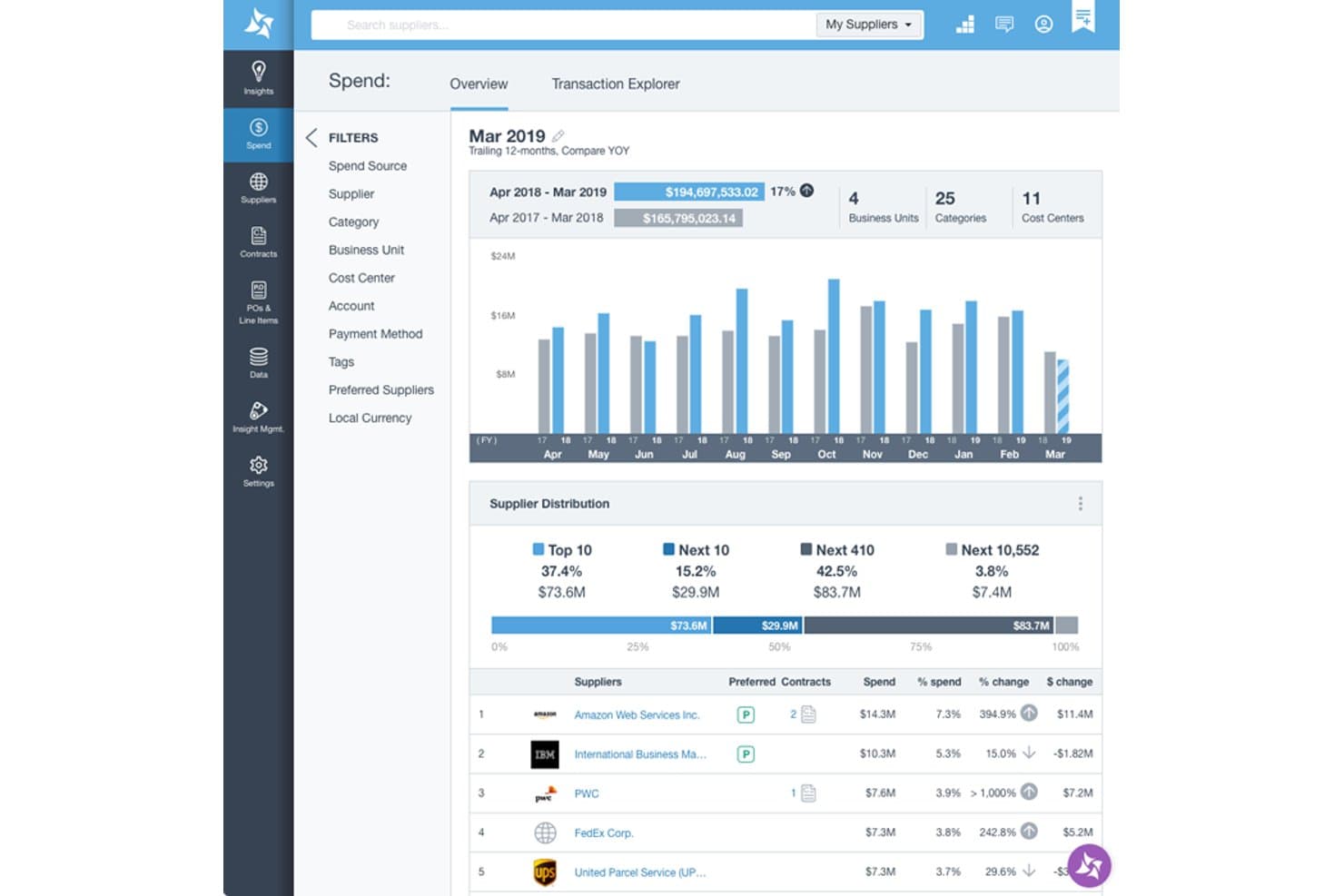
Suplari provides a spend overview dashboard with supplier distribution, YOY spend comparison, and top supplier rankings by spend percentage. Suplari is a procurement intelligence platform that uses AI to ingest, clean, classify, and analyze spend, supplier, and contract data pulled from ERP, P2P, and AP systems.
Who Is Suplari Best For?
Suplari is built for mid-market and enterprise procurement teams managing fragmented spend data across multiple ERP and source-to-pay systems.
Why I Picked Suplari
Suplari earns its spot on my shortlist because it treats messy procurement data as the starting point, not a blocker. I picked it specifically for its Suplari Data Assistant, which automatically reads raw files (Excel, CSV, PDF), detects when source system connectors drift, and patches gaps like missing business unit codes or broken PO-invoice link identifiers without manual intervention. That increases spend classification accuracy, compared to the typical of legacy tools.
Suplari Key Features
- AI-powered spend analytics: Uses machine learning to classify and analyze spend across categories, vendors, and business units.
- Supplier risk monitoring: Continuously monitors suppliers for risk signals using external and internal data sources.
- Contract intelligence: Validates compliance by matching invoiced terms with agreed contract terms and flags exceptions.
- Savings tracking dashboard: Tracks savings opportunities from identification to realization with audit-ready reporting.
Suplari Integrations
Suplari offers native integrations with SAP, Oracle, Coupa, Workday, NetSuite, Microsoft Dynamics, and Ariba, and provides an API for custom integrations.
Pros and Cons
Pros:
- AI surfaces savings opportunities within existing data
- High accuracy spend categorization from day one
- Spend data classification across multiple sources
Cons:
- Requires existing procurement systems to function well
- Limited native purchasing or PO creation tools
Learn more about Suplari: Best for AI-managed SaaS procurement
- Free demo available
- Pricing upon request
Visit WebsiteCustomer Rating:4.6/5
The executive dashboard in Spendflo provides insights into spending patterns and helps in decision-making. For businesses aiming to optimize their procurement processes, Spendflo offers an AI-powered solution that centralizes and simplifies the management of SaaS purchases and vendor contracts. It caters to organizations looking to enhance efficiency and reduce costs by providing insights into vendor performance and spending patterns. With features like workflow orchestration and expert negotiation services, Spendflo empowers your team to make data-driven decisions and maximize ROI.
Why I Picked Spendflo
I picked Spendflo for its AI-managed SaaS procurement capabilities that efficiently oversee your software purchasing process. By leveraging advanced analytics and automation, Spendflo centralizes SaaS spend data, allowing your team to track usage and eliminate hidden costs. Its dynamic license management and vendor intelligence features ensure you can reclaim unused licenses and negotiate better vendor terms, ultimately maximizing your ROI. Spendflo's ability to integrate with over 100 tools further simplifies the procurement process, making it an excellent choice for organizations looking to optimize their software expenses.
Spendflo Key Features
In addition to its AI-managed procurement capabilities, Spendflo offers a range of features that enhance your procurement processes.
- Automated Vendor Management: Streamlines vendor selection, evaluation, and approvals, ensuring consistent decision-making.
- Budget Optimization: Centralizes visibility of spending, enabling effective budget tracking and identification of underutilized resources.
- Enhanced Collaboration: Connects finance, procurement, and department heads on a common platform, reducing delays and costly mistakes.
- Data-Driven Insights: Provides real-time analytics on spending, vendor performance, and contract utilization to inform future decisions.
Spendflo Integrations
Integrations include NetSuite, Adobe, Asana, BambooHR, Figma, FreeAgent, Freshdesk, GitHub, Google, HiBob, HubSpot, and Jira.
Pros and Cons
Pros:
- Intake and renewal management
- Good vendor management features
- Comprehensive spend visibility
Cons:
- Could have more customization options for specific business needs
- The initial setup and configuration can be time-consuming
Learn more about Spendflo: Best for finance automation integration
- Free demo available
- From $99/month
Visit WebsiteCustomer Rating:4.5/5
Tipalti automates payments, accounts payable, and expense management for businesses. Tipalti offers an advanced payment automation solution tailored for growing businesses, focusing on simplifying accounts payable, mass payments, procurement, and expense management.
Why I picked Tipalti: Tipalti automates invoice processing and manages global payments across more than 120 currencies. It integrates efficiently with popular accounting software like Oracle NetSuite, QuickBooks, and Microsoft Dynamics, enabling finance teams to focus on growth. The platform also includes AI-driven approval workflows and advanced purchase order management. Additionally, the Tipalti Card offers enhanced control over corporate spending.
Standout features & integrations:
Features include automated invoice processing, AI-driven approval processes, and global payment capabilities in 120 currencies. You can also manage supplier information and automate purchase order matching. The platform offers a self-billing module to ensure compliance.
Integrations include NetSuite, QuickBooks, Microsoft Dynamics, Xero, Sage Intacct, SAP, BlackLine, Bill.com, Expensify, and Zoho Books.
Pros and Cons
Pros:
- Scalable mass payments
- Global payment capabilities
- AI-driven approval processes
Cons:
- Complexity for small businesses
- Learning curve
Learn more about Tipalti: Best for customizable workflows
- Free trial + free demo available
- From $225/user/month (billed annually)
Visit WebsiteCustomer Rating:4.5/5
Tradogram streamlines purchasing and improves spend visibility for various industries. Tradogram is an all-in-one procurement management software that streamlines purchasing processes and improves spend visibility. It serves industries such as education, healthcare, and manufacturing.
Why I picked Tradogram: Tradogram offers supplier management, budget tracking, and customizable purchase orders to streamline procurement activities. It enables control over inventory and enforcement of budget policies directly within the platform. Plus, the intuitive interface promotes efficient collaboration between teams and suppliers.
Standout features & integrations:
Features include supplier management, budget tracking, and customizable purchase orders. You can control inventory and manage budgets within the platform. The software also supports procure-to-pay and strategic sourcing.
Integrations include QuickBooks, Xero, SAP, Microsoft Dynamics, NetSuite, Dropbox, Box, Google Drive, and OneDrive.
Pros and Cons
Pros:
- Customizable purchase orders
- Supplier management tools
- Budget tracking
Cons:
- Limited advanced features
- No mobile app
Learn more about Tradogram: Best for unified source-to-pay processes
- Not available
- Pricing upon request
Visit WebsiteCustomer Rating:4.4/5
GEP SMART offers AI-powered supply chain solutions and advanced analytics tools. GEP SMART is a global provider of AI-powered procurement and supply chain solutions, serving industries such as automotive, life sciences, and retail. Its key offerings include procurement management, supply chain management with GEP NEXXE, and advanced analytics powered by GEP QUANTUM.
Why I picked GEP SMART: GEP SMART offers integrated solutions combining strategy, software, and managed services, tailored to meet unique business needs. Its tools are designed to enhance operational efficiency and profitability. The software also emphasizes customer-centric solutions that promote resilience and sustainability in supply chains, leveraging deep industry expertise to support strategic and financial objectives.
Standout features & integrations:
Features include tools for procurement management, supply chain management, and advanced analytics. With GEP SMART, you can manage procurement more efficiently. GEP NEXXE helps you streamline your supply chain operations, and GEP QUANTUM offers advanced analytics to support decision-making.
Integrations include SAP, Microsoft Dynamics, Coupa, Ariba, Workday, NetSuite, Salesforce, JD Edwards, and Infor.
Pros and Cons
Pros:
- AI-driven solutions
- Industry-specific expertise
- Comprehensive toolset
Cons:
- Complex implementation
- Limited user community
Learn more about GEP SMART: Best for rapid workflow processing
- Free demo available
- From $1500/month
Visit WebsiteCustomer Rating:4.2/5
Kissflow Procurement Cloud offers source-to-pay, supplier management, contract management, and analytics. Kissflow Procurement Cloud is a flexible source-to-pay platform that adapts to unique business needs. It provides strategic sourcing, procure-to-pay, supplier management, contract management, inventory management, invoice automation, and spend analytics.
Why I picked Kissflow Procurement Cloud: Kissflow Procurement Cloud uses low-code and no-code tools for easy customization and rapid deployment. It automates procurement processes, enhancing visibility and operational efficiency. With its user-friendly interface and reliable customer support, it’s a preferred choice for many organizations. Plus, the platform can be fully implemented within eight weeks, enabling faster adoption.
Standout features & integrations:
Features include strategic sourcing, procure-to-pay, supplier management, contract management, inventory management, invoice automation, and spend analytics. You can also customize workflows to fit your specific needs using low-code and no-code tools.
Integrations include SAP, Oracle, Microsoft Dynamics, QuickBooks, Xero, NetSuite, Salesforce, Zoho CRM, HubSpot, and Slack.
Pros and Cons
Pros:
- Flexible customization
- Rapid deployment
- Comprehensive spend analytics
Cons:
- Initial setup complexity
- Limited offline access
Learn more about Kissflow Procurement Cloud: Best for EDI compliance
- Discovery call available
- Pricing upon request
Visit WebsiteCustomer Rating:4.2/5
SPS Commerce Fulfillment’s Supply Chain Performance suite provides real-time analytics to help optimize procurement and supplier management. Source: SPS Commerce SPS Commerce Fulfillment is a procurement software solution designed to enhance retail operations through strong EDI compliance and seamless partner onboarding. It supports a wide range of industries, offering a robust platform for managing transactions, maintaining compliance, and ensuring smooth, efficient supply chain operations.
Why I picked SPS Commerce: I chose SPS Commerce for its extensive EDI capabilities, which are essential for modern procurement management. With more than 200 prebuilt EDI integrations, the platform enables effortless connections with trading partners, ensuring procurement processes remain compliant and efficient across complex supply chains.
Another major advantage is its comprehensive order management functionality. The platform’s Order Central tool consolidates order processing into a single, real-time dashboard, allowing teams to make informed, data-driven decisions that strengthen procurement strategies and boost supply chain performance.
Standout features & integrations:
Features include the Assortment feature for maintaining accurate product information across channels, ensuring procurement teams always have reliable data. The Supply Chain Performance suite delivers insights and analytics to help optimize retail supply chains, while the e-invoicing capability simplifies compliance and transaction management.
Integrations include Oracle NetSuite, Microsoft Dynamics 365, QuickBooks, SAP, Shopify, Sage, Infor CloudSuite, Sage 500, Sage X3, Deposco, Acctivate, and Acumatica.
Pros and Cons
Pros:
- Strong supply chain analytics tools
- Centralized real-time order management
- Extensive EDI integration network
Cons:
- Requires active partner coordination
- Limited customization flexibility
Learn more about SPS Commerce Fulfillment:
Other Procurement Software
Here are some additional procurement software options that didn’t make it onto my shortlist, but are still worth checking out:
- 11CoupaBest for AI-driven spend management
- 12MediusBest for AP and procurement integration
- 13BaswareBest for e-invoicing and AP automation
- 14JaggaerBest for comprehensive supplier management
- 15BonfireBest for public sector procurement
- 16IvaluaBest for strategic sourcing
- 17ProcolBest for procurement analytics
- 18FraxionBest for spending visibility and control
- 19ProcbayBest for AI-driven request creation
How I Evaluate Procurement Software
I evaluate procurement tools across two layers: baseline must-haves like PO approval workflows and 3-way matching, and the differentiators that separate genuinely useful platforms from the rest.
Core Functionality (Table Stakes For This List)
When I'm selecting tools for my list, I rank each one on a scale from 0 (does not offer the functionality) to 5 (excels in this area) for each core functionality listed below. Then, I calculate the tool's total score into a percentage. Each tool needs to achieve a minimum total score of 75% to be considered for inclusion.
- Requisition & PO Workflows: I evaluate how each tool handles multi-step approvals—like routing a purchase request from a department head to finance to the CFO based on spend thresholds.
- Supplier & Vendor Management: A strong vendor directory stores tax documents, compliance certificates, and contracts in one place, so I check for centralized supplier profiles and onboarding capabilities.
- Invoice Matching & AP Integration: I look at whether matching goes beyond basic 2-way to include 3-way matching against POs and goods receipts, plus how cleanly data flows into ERPs like NetSuite or SAP.
- Budget & Spend Controls: Real-time enforcement matters here—I check whether the system flags or blocks a requisition that would push a cost center past its approved budget.
- Spend Analytics & Reporting: Dashboards should break down spend by vendor, category, and department at a minimum, so I evaluate filtering depth and whether commitment-level data is included.
- Catalog & Contract Compliance: I look for internal catalogs or punch-out support that steers buyers toward pre-negotiated pricing instead of letting them submit free-text requests for off-contract items.
Once I have a list of tools that meet this criteria, I consider what sets each platform apart.
Differentiating Factors (What Sets Vendors Apart)
Here's how I compare and contrast different vendors:
Standout Features
AI-driven automation is a major differentiator I look for—tools that auto-code GL entries or flag duplicate invoices save finance teams hours during month-end close. Intake portals also matter. Guided request forms that route across procurement, legal, and IT make adoption far easier for non-finance employees submitting requests. I check for virtual card issuance tied to approved POs too, since it closes the loop between approval and payment without leaving the platform.
Beyond Features
ERP integration depth is one of the first things I evaluate. A procurement tool that syncs GL codes, cost centers, and vendor records bi-directionally with systems like NetSuite or SAP prevents double-entry and reconciliation headaches. Compliance also weighs heavily—I check for SOC 2 Type II certification, audit trails, and segregation of duties controls that support SOX readiness. Pricing transparency rounds out my assessment, since some vendors charge per transaction or gate key modules behind higher tiers, which can quickly inflate total cost of ownership.
How to Choose Procurement Software
It’s easy to get bogged down in long feature lists and complex pricing structures. To help you stay focused as you work through your unique software selection process, here’s a checklist of factors to keep in mind:
| Factor | What to Consider? |
| Scalability | Will the software grow with your business? |
| Integrations | Does it integrate with your existing systems? |
| Customizability | Can you tailor the software to meet your specific needs? |
| Ease of Use | How quickly can your team learn to use the software? |
| Budget | Does the software fit within your financial constraints? |
| Security Safeguards | Does it offer robust security features to protect your data? |
| Vendor Support | What kind of customer support does the vendor provide? |
| Reporting | Does it offer comprehensive reporting and analytics |
Use this checklist to keep your software selection process organized and focused.
Trends In Procurement Software
In my research, I sourced countless product updates, press releases, and release logs from different procurement software vendors. Here are some of the emerging trends I’m keeping an eye on:
- Artificial Intelligence (AI) and Machine Learning: These technologies are increasingly used to automate routine tasks and support more informed decision-making. For instance, AI can improve demand forecasting through predictive analytics.
- Sustainability Focus: There is a growing focus on sustainable procurement practices, including the use of software to track and report sustainability metrics. Vendors are developing tools that help companies ensure their suppliers meet environmental and social standards.
- Advanced Analytics: Procurement software is utilizing big data to deliver deeper insights into spending patterns and supplier performance. Platforms like GEP SMART provide advanced analytics to help companies optimize their procurement strategies.
- Blockchain Technology: Blockchain is being used to enhance transparency and security in supply chains, as it helps verify the authenticity of goods and ensures compliance with contracts.
- Risk Management: Amid increasing global uncertainties, risk management features are becoming increasingly critical. Many procurement software solutions now include tools for assessing and mitigating supplier risks. SAP Ariba, for example, offers strong risk management capabilities within its platform.
What Is Procurement Software?
Procurement software is a tool that helps businesses efficiently manage purchasing, control costs, and optimize supplier relationships.
Used primarily by CFOs, procurement managers, and finance teams, these solutions streamline operations, reduce procurement cycle times, and enhance spending visibility. Key functionalities include purchase order automation, vendor management, spend analytics, and compliance assurance, ensuring smoother and more profitable procurement operations across the four key types of procurement.
Features
Here are the core features any great procurement software should have:
- Purchase order management: Handle the entire lifecycle of purchase orders, from creating and sending POs to tracking approvals and deliveries. This streamlines your ordering process and helps you avoid lost paperwork.
- Supplier management: Store and organize all your supplier details in one place. This feature lets you easily compare vendor performance, manage contacts, and negotiate better terms.
- Invoice processing: Digitize and automate invoice receipt, approval, and payment. This not only reduces manual errors but also helps you keep track of spending and avoid late fees.
- Spend analysis: Get detailed breakdowns of company procurement activities. By analyzing spending data, you can spot trends, find savings opportunities, and make smarter purchasing decisions.
- Contract management: Store, organize, and track supplier contracts so you never miss renewal or expiry dates. This keeps you compliant and ensures you maintain strong supplier relationships.
- Approval workflows: Set up custom rules for purchase approvals. You can control who needs to sign off on purchases, making sure everything is authorized and aligned with company policies.
- Catalog management: Access and manage a digital catalog of approved goods and services. This helps your team buy the right items and stick to preferred suppliers.
- Reporting and analytics: Pull up real-time reports on procurement performance and KPIs. This makes it easy to measure success, prove compliance, and plan strategically.
Common Procurement Software AI Features
Beyond the standard procurement software features listed above, many of these solutions now include AI capabilities also found in AI-powered purchasing software, such as:
- Intelligent spend forecasting: AI analyzes past spending data and market trends to forecast future procurement needs. This helps you avoid stockouts and manage budgets with greater confidence.
- Automated invoice matching: AI-powered tools automatically match invoices to purchase orders and receipts, flagging discrepancies and reducing manual checks. You save time and catch errors before they become costly.
- Supplier risk assessment: AI evaluates supplier data, performance patterns, and even external news sources to assess risk levels. It empowers you to make safer sourcing decisions and anticipate issues.
- Dynamic pricing insights: AI continuously reviews supplier and market pricing, alerting you to changes and bargaining opportunities. This puts you in a stronger position to negotiate the best deals.
- Smart contract review: AI scans contracts for compliance, missing terms, and potential risks. This makes the legal review process much faster and more thorough.
Benefits
Implementing procurement software provides several benefits for your team and your business. Here are a few you can look forward to:
- Time Savings: Automates repetitive tasks like purchase order creation and approval workflows.
- Cost Reduction: Identifies cost-saving opportunities by analyzing spending patterns and supplier performance.
- Improved Accuracy: Reduces errors by standardizing procurement processes and minimizing manual data entry.
- Better Supplier Management: Centralizes supplier information, making it easier to track performance and manage relationships.
- Enhanced Compliance: Ensures adherence to procurement policies and regulatory requirements through automated checks and balances.
- Increased Visibility: Provides real-time insights into procurement activities, helping you make informed decisions.
- Simplified Reporting: Generates detailed reports on procurement metrics and KPIs, aiding in performance evaluation and strategic planning.
Costs and Pricing
Selecting procurement software requires an understanding of the various pricing models and plans available. Costs vary based on features, team size, add-ons, and more. The table below summarizes common plans, their average prices, and typical features included in procurement software solutions:
Plan Comparison Table for Procurement Software
| Plan Type | Average Price | Common Features |
| Free Plan | $0/user/month | Basic procurement, limited integrations, and basic reporting |
| Personal Plan | $5-$25/user/month | Advanced procurement, custom integrations, enhanced reporting, and email support |
| Business Plan | $30-$75/user/month | Comprehensive procurement, workflow automation, premium integrations, and support |
| Enterprise Plan | $80-$150/user/month | Full procurement suite, advanced analytics, dedicated support, and custom SLAs |
A breakdown of procurement software plan types and their costs and features.
FAQs
Here are some answers to common questions about procurement software:
How does procurement software integrate with existing ERP systems?
Most procurement software integrates directly with ERP systems using APIs or pre-built connectors. You can map procurement data to accounting, inventory, and finance modules for seamless data flow. Ask vendors about integration for your specific platforms to reduce manual work and errors.
What kind of support can we expect from procurement software vendors?
You usually get a mix of email, chat, phone support, onboarding, and training resources. Some vendors provide a dedicated account manager or offer premium enterprise support. These services help resolve issues fast and ensure your team gets the most out of the tool.
Can procurement software handle multi-currency and multi-language requirements?
Yes, many procurement tools support multi-currency and multi-language needs so you can manage global suppliers and purchasing. Look for solutions with dynamic currency conversion, tax rules, and localized interfaces if you work internationally.
How customizable is procurement software for unique business processes?
The best procurement software lets you customize approval flows, user roles, and reporting to fit your business. You can automate tasks, set granular permissions, and adjust as your processes evolve.
What are the common security features in procurement software?
With procurement software solutions, you’ll typically get the following:
- Role-based access controls
- Encryption
- Audit logs
- Two-factor authentication
rnThese features guard your organization’s financial and supplier data.
How can procurement software improve business efficiency?
Procurement management software automates purchase requests, approvals, and supplier tracking. This cuts manual work, reduces errors, and speeds up procurement cycles. Better visibility helps you find savings and make smarter spending decisions.
What KPIs or ROI metrics should I track when using procurement software?
Track metrics like purchase order cycle time, savings from negotiated contracts, supplier performance, spend under management, and compliance rates. Analyzing these KPIs helps prove the ROI and guides your team on where to optimize.
How long does it take to implement procurement software?
Implementation can take anywhere from a few weeks to several months, depending on your organization’s size, software complexity, and integration needs. Plan for training, data migration, and custom setup to ensure a smooth rollout.