

SaaS spend management software lets your team track, control, and optimize every dollar spent across your cloud software stack. If you’re like most finance leaders, you know that unmonitored SaaS subscriptions, lack of contract benchmarks, and unclear renewal terms can quietly drain your budget and muddy your financial reporting.
In this guide, I’ll help you compare top SaaS spend management tools that surface hidden costs, offer board-ready savings insights, guarantee ROI, and give you real negotiating leverage. You’ll see exactly which solutions can unify your SaaS spend, make shadow IT visible, and keep your financial planning sharp, audit-ready, and confidently presented at the leadership table.
Why Trust Our Software Recommendations
6,700+
Reviews
20
Industry experts
16+
Evaluation factors
14
Years
Our team has been testing and reviewing software since 2012. As finance leaders ourselves, we know how difficult—and important—it is to choose the right software.
For this guide, we evaluated tools using hands-on testing and independent research, scoring tools using our selection criteria.
Our reviews reflect our human editorial judgment, not a sales pitch.
SaaS Spend Management Software Comparison Table
This comparison table summarizes pricing details for my top SaaS spend management software selections:
| Tool | Best For | Trial Info | Price | ||
|---|---|---|---|---|---|
| 1 | Best for AI token spend visibility by team | 14-day free trial | From $2.99/month (billed annually) | Website | |
| 2 | Best for SaaS renewal negotiation benchmarks | Free demo available | Pricing upon request | Website | |
| 3 | Best for finance-led SaaS renewal negotiation | Free demo available | From $75/month | Website | |
| 4 | Best for board-ready SaaS savings with ROI guarantee | Free demo available | From €12.5K/year (billed annually) | Website | |
| 5 | Best for SaaS discovery with Shadow AI detection | Free plan + free demo available | From €3/user/month (billed annually) | Website | |
| 6 | Best for SaaS cost vs. spend discrepancy tracking | Free demo available | Pricing upon request | Website | |
| 7 | Best for guaranteed savings on vendor contracts | Free demo available | Pricing upon request | Website | |
| 8 | Best for benchmarked renewal negotiations | Free trial + free demo available | Pricing upon request | Website | |
| 9 | Best for embedded SaaS ops and renewals management | Free demo available | Pricing upon request | Website | |
| 10 | Best for peer-benchmarked renewal negotiations | Free demo available | Pricing upon request | Website |


Best SaaS Spend Management Software Reviews
Below are my detailed summaries of the best SaaS spend management software that made it onto my shortlist. My reviews offer a detailed look at the features, capabilities, and best use cases of each platform to help you find the best one for you.
 Best for AI token spend visibility by team
- 14-day free trial
- From $2.99/month (billed annually)
Visit WebsiteCustomer Rating:4.7/5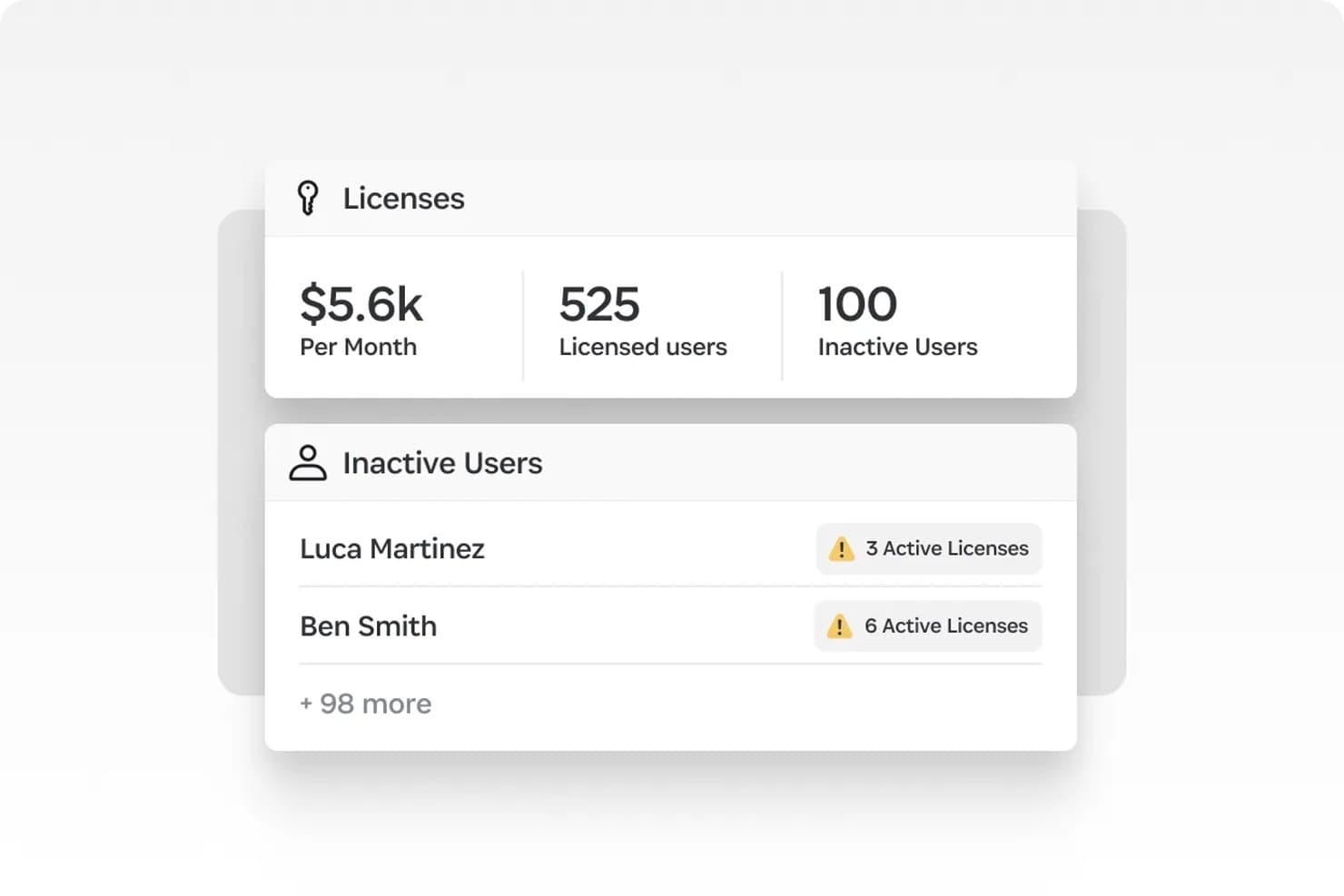
1Password tracks inactive users with active licenses to cut SaaS waste. 1Password SaaS Manager is a SaaS management platform that combines multi-source app discovery, license usage tracking, automated lifecycle workflows, and AI token spend attribution across tools like OpenAI, Anthropic, and Cursor.
Who Is 1Password Best For?
1Password SaaS Manager is a strong fit for IT and FinOps teams that need to manage both traditional SaaS licenses and AI tool spend across a growing, distributed app stack.
Why I Picked 1Password
I picked 1Password SaaS Manager as one of the best because its AI token spend attribution is something I haven't seen matched elsewhere: it breaks down Cursor, OpenAI, and Anthropic costs by user, team, and model, with daily burn-rate updates and budget alerts before prepaid balances run out. Pair that with multi-source shadow AI discovery across IdP, finance systems, device agents, and browser extensions, and you get a clear picture of what your teams are actually spending on AI tools versus what's approved.
1Password Key Features
- 40,000+ app profile library: Auto-classifies discovered apps with built-in context including compliance certifications, app categories, and similar tool suggestions.
- No-code lifecycle workflow builder: Creates automated onboarding, offboarding, and license reclamation workflows without engineering support, triggered by HRIS events or app discovery signals.
- Granular deprovisioning actions: Lets you suspend, deactivate, or delete user licenses individually, with content transfer where APIs support it.
- Slack and Teams approval bots: Embeds access request approvals directly into Slack, Microsoft Teams, and Discord so approvers can act without leaving their existing tools.
1Password Integrations
1Password SaaS Manager offers 400+ integrations via direct APIs, including Okta, Microsoft Entra ID, Workday, Coupa, Jira Service Management, Slack, Microsoft Teams, and Splunk. Custom app connectors are available for apps with open APIs.
Pros and Cons
Pros:
- Slack and Teams-native approval workflows
- Multi-source shadow IT and SaaS discovery
- AI token spend tracked by user and team
Cons:
- Lacks ERP or GL integration for finance teams
- No vendor negotiation or price benchmarking
Learn more about 1Password: Best for SaaS renewal negotiation benchmarks
- Free demo available
- Pricing upon request
Visit WebsiteCustomer Rating:4.6/5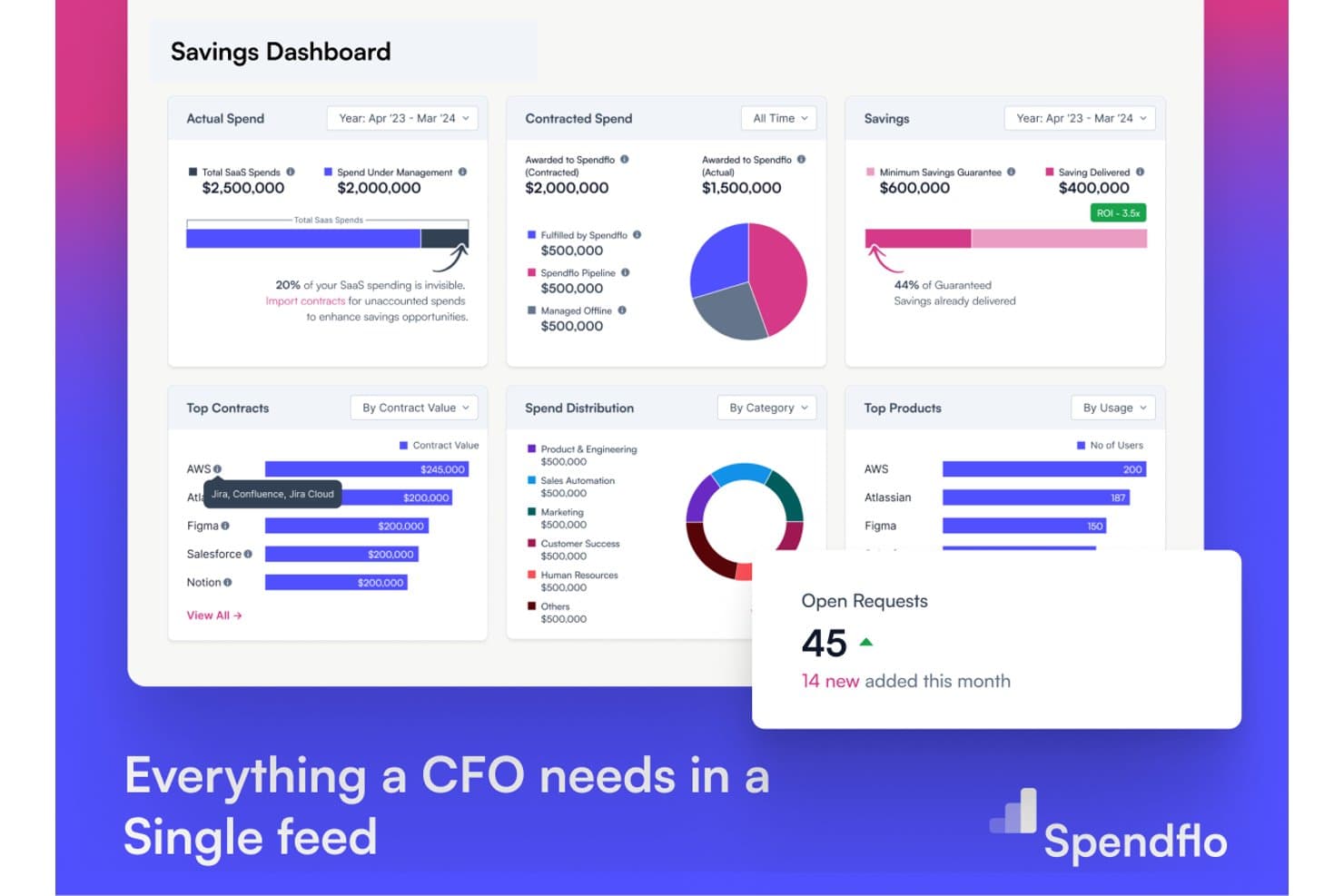
Spendflo gives CFOs a unified savings dashboard for SaaS spend. Spendflo is a SaaS spend management platform that combines contract repository management, AI-driven renewal tracking, vendor price benchmarking, procurement intake workflows, and third-party risk scoring.
Who Is Spendflo Best For?
Spendflo is a strong fit for mid-market procurement and finance teams that need data-backed leverage at SaaS contract renewal time.
Why I Picked Spendflo
I picked Spendflo as one of the best because its vendor price benchmarking database, built from 10,000+ real SaaS contracts, gives your team defensible data at renewal time rather than gut-feel negotiating. I especially like how AI auto-renewal detection flags contracts 60–90 days out and pairs each alert with market rate comparisons, so you're never caught unprepared. Spendflo also offers managed negotiation services, meaning expert human negotiators back your team when the stakes are high.
Spendflo Key Features
- AI contract ingestion: AI OCR automatically extracts metadata from MSAs, order forms, SOWs, and invoices uploaded via email or bulk upload.
- No-code workflow studio: Build multi-level, parallel, and conditional approval workflows by spend threshold or cost center without writing any code.
- Third-party risk scoring: Automated vendor risk scoring across financial, cybersecurity, operational, and compliance dimensions with risk-based approval routing.
- Slack and Gmail-native approvals: Approvers can review and action procurement requests directly inside Slack or Gmail without logging into the platform.
Spendflo Integrations
Spendflo offers integrations with NetSuite, Coupa, Sage, Workday Financials, Okta, Slack, Vanta, OneTrust, DocuSign, and Ironclad. Enterprise plans support custom connectors for additional systems.
Pros and Cons
Pros:
- Managed negotiation services with expert support
- Vendor price benchmarking from 10,000+ contracts
- AI-driven contract ingestion and clause detection
Cons:
- No browser extension for shadow IT discovery
- Reporting features lack advanced analytics capabilities
Learn more about Spendflo: Best for finance-led SaaS renewal negotiation
- Free demo available
- From $75/month
Visit WebsiteCustomer Rating:4.6/5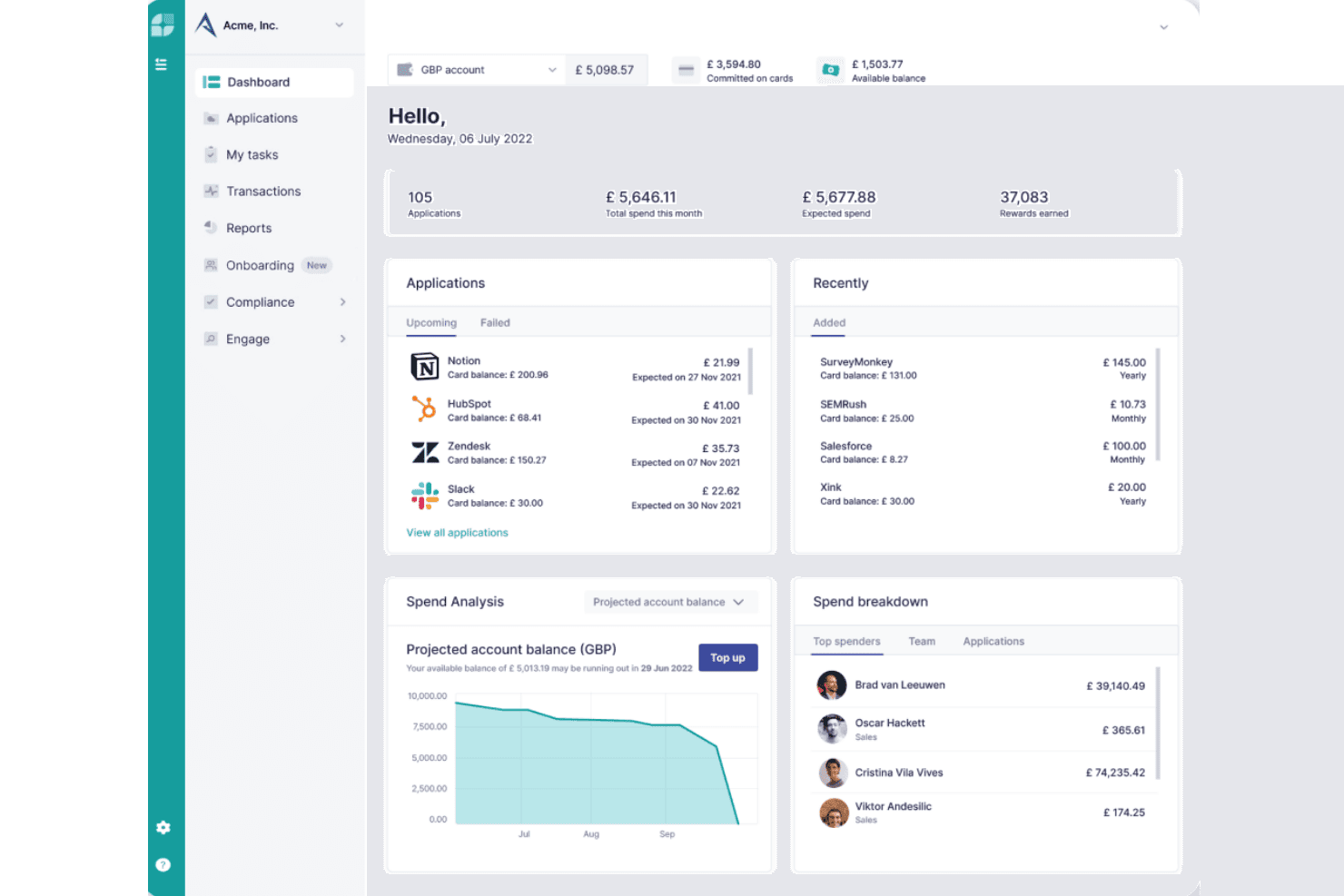
Cledara centralizes SaaS spend, subscriptions, and team budgets in one dashboard. Cledara is a SaaS spend management platform that combines virtual card payment controls, subscription tracking, shadow IT discovery, and AI-powered renewal negotiation into a single finance-led system.
Who Is Cledara Best For?
Cledara is a strong fit for finance teams at SMB and mid-market companies that want direct payment control over SaaS spend alongside renewal tracking and negotiation tools.
Why I Picked Cledara
I picked Cledara as one of the best because its AI Negotiation Copilot genuinely sets it apart for finance teams handling SaaS renewals. The Copilot drafts vendor emails automatically and backs every suggestion with pricing data from 250,000+ real SaaS transactions, so you're negotiating from actual benchmarks rather than guesswork. Pair that with per-subscription virtual cards that enforce spend limits and enable one-click cancellation, and your finance team has direct payment control that most discovery-only tools simply don't offer.
Cledara Key Features
- Application Directory: A centralized system of record that displays each subscription's costs, budgets, assigned owners, renewal dates, compliance status, and payment history in one interface.
- Vendor compliance scoring: Checks vendor ISO 27001 and SOC 2 certification status and supports customizable compliance questionnaire templates that can be delegated to internal stakeholders or external vendors.
- Accounting automation: Automatically captures invoices for every software payment, matches them to transactions, and syncs data in real time to Xero, QuickBooks, NetSuite, and Tripletex.
- Multi-step approval workflows: Routes new software purchase requests through configurable approval chains with intake forms, stakeholder notifications via Slack, and delegated compliance questionnaires.
Cledara Integrations
Cledara offers 35+ HRIS integrations, including Workday, BambooHR, HiBob, Personio, and Gusto, plus Xero, QuickBooks Online, NetSuite, Tripletex, Okta, Google, Slack, Gmail, and Microsoft 365. An open REST API supports custom integrations.
Pros and Cons
Pros:
- Browser extension uncovers shadow IT applications
- Per-subscription virtual cards enable direct payment control
- AI Copilot sources pricing from 250,000+ renewals
Cons:
- Microsoft Teams integration is not supported
- Automated license reclamation is not included
Learn more about Cledara: Best for board-ready SaaS savings with ROI guarantee
- Free demo available
- From €12.5K/year (billed annually)
Visit WebsiteCustomer Rating:4.6/5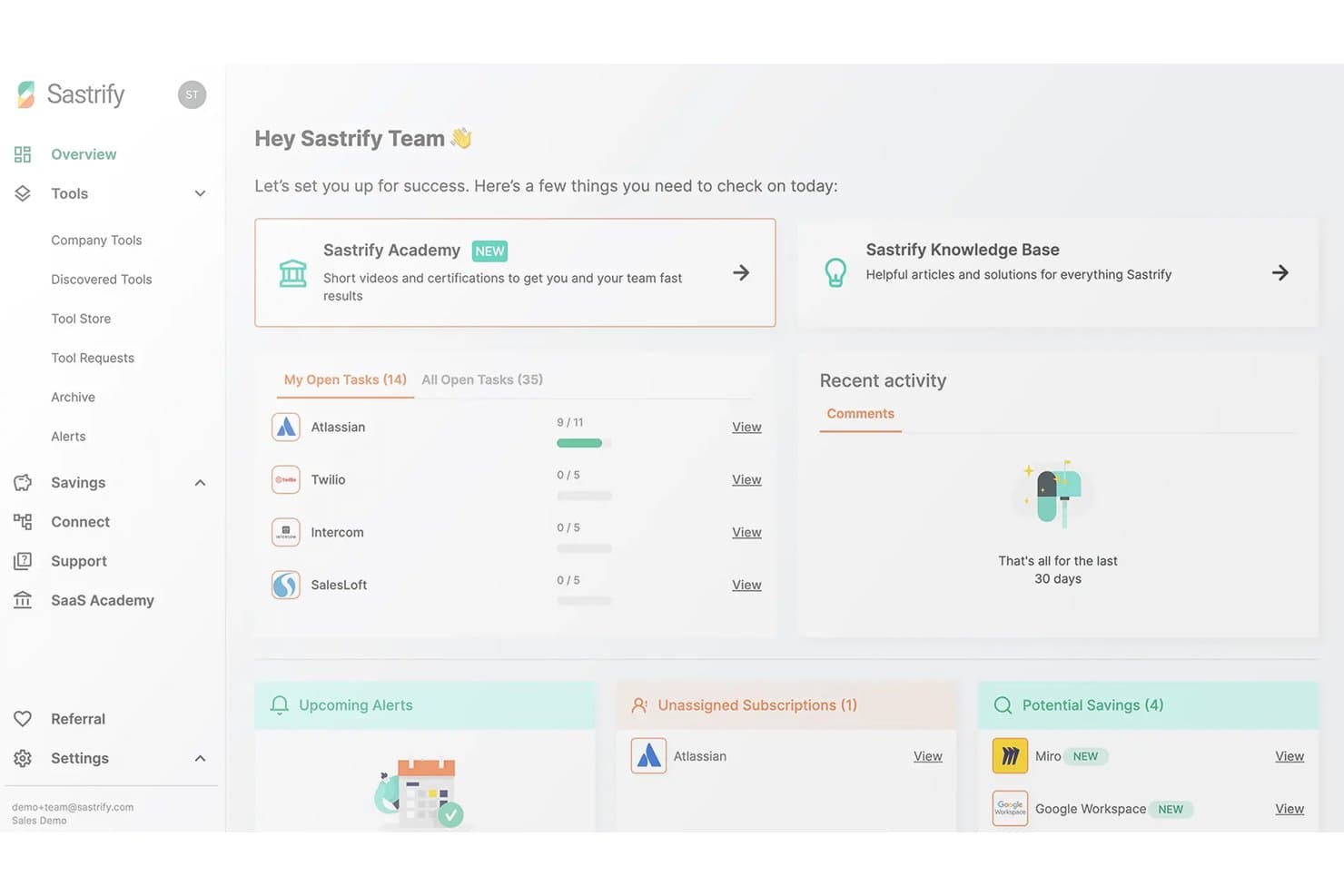
Sastrify centralizes SaaS task tracking, alerts, and savings opportunities for CFOs. Sastrify is a SaaS spend management platform that combines automated software discovery, license usage tracking, renewal management, vendor benchmarking, and procurement workflows—including an optional fully managed procurement service.
Who Is Sastrify Best For?
Sastrify is a strong fit for mid-market finance and procurement teams in Europe that need board-ready SaaS spend visibility and want the option to outsource vendor negotiations entirely.
Why I Picked Sastrify
I picked Sastrify as one of the best because it's the only platform I've seen that combines board-ready savings reporting with an explicit ROI guarantee backed by $6B+ in real benchmark data. In practice, that means my team can walk into a board meeting with auditable savings numbers, not estimates. The vendor benchmarking feature surfaces specific negotiation levers per vendor, and the optional managed procurement service lets certified experts handle negotiations entirely on your behalf.
Sastrify Key Features
- Shadow IT and shadow AI detection: The browser extension monitors endpoints in real time to surface unauthorized apps and hidden generative AI tools across your organization.
- No-code workflow builder: Build intake forms, conditional approval chains, and license provisioning workflows using a drag-and-drop editor without writing any code.
- SastriMarket software marketplace: Access pre-negotiated discounts on popular SaaS tools—including Salesforce, Microsoft 365, and Google Workspace—directly through the platform.
- Compliance intelligence tracking: Automated monitoring of vendor certifications against frameworks like DORA, NIS2, and the EU AI Act flags expiring attestations and missing compliance documents.
Sastrify Integrations
Sastrify offers native integrations with Microsoft Entra ID, Okta, NetSuite, SAP, Workday, QuickBooks, Ramp, Brex, ServiceNow, and Jira. Its Open API supports custom connections.
Pros and Cons
Pros:
- AI-driven shadow IT and shadow AI detection
- Certified procurement experts for full vendor negotiation
- Board-ready SaaS savings reporting with ROI guarantee
Cons:
- Primarily focused on mid-market and European companies
- No free trial or free plan available
Learn more about Sastrify: Best for SaaS discovery with Shadow AI detection
- Free plan + free demo available
- From €3/user/month (billed annually)
Visit WebsiteCustomer Rating:4.9/5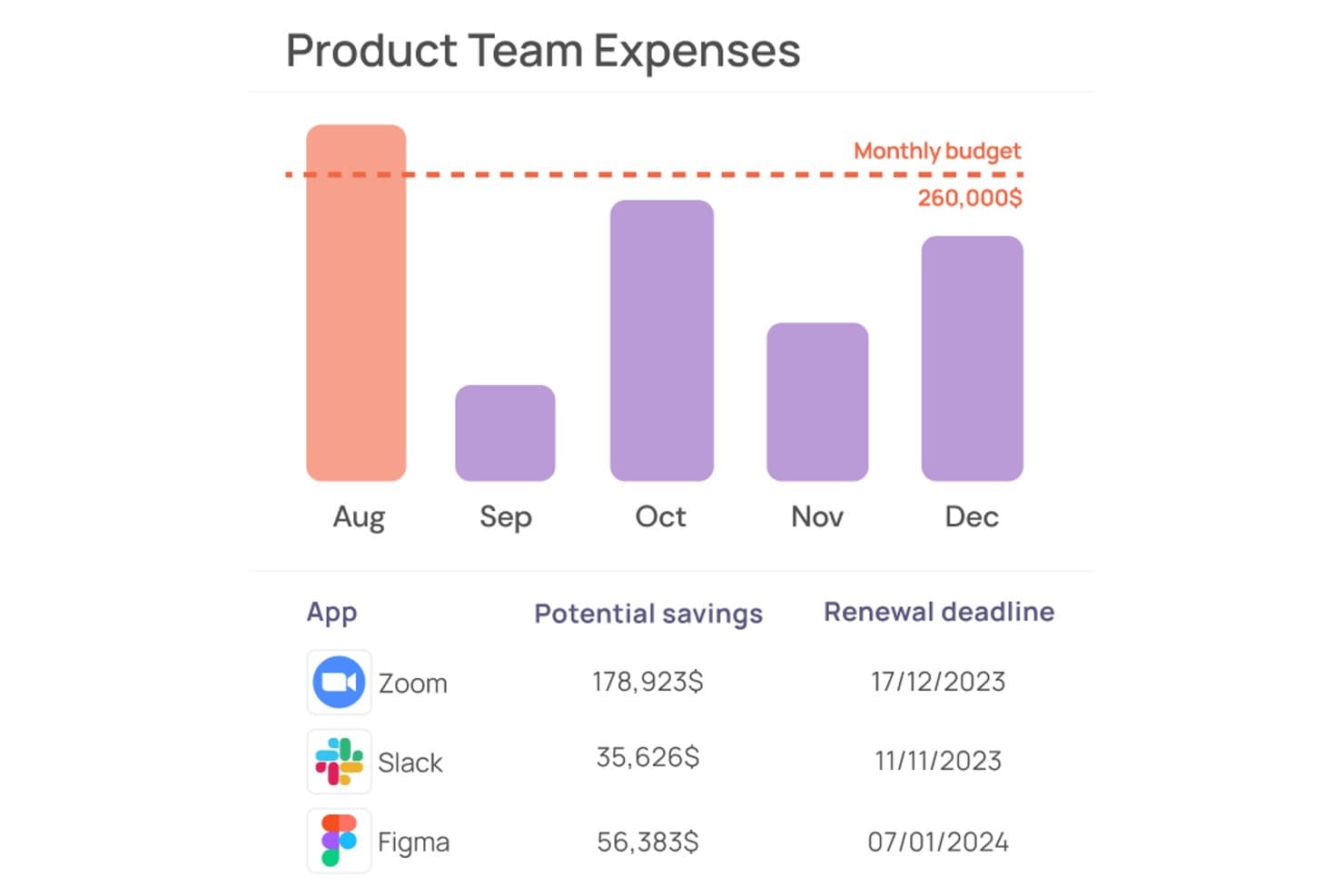
Corma tracks team app expenses and flags potential savings by renewal date. Corma is a SaaS management platform that combines multi-source app discovery, license usage tracking, contract management, and access governance with automated provisioning and approval workflows.
Who Is Corma Best For?
Corma is a strong fit for IT and finance teams at mid-market companies with 50–500 employees that need to get SaaS spend and access under control without deploying an enterprise-grade platform.
Why I Picked Corma
I picked Corma as one of the best because its proprietary Extractor Agent catches SaaS apps that no other discovery method would surface, including Shadow AI tools like ChatGPT and Claude, within minutes of deployment. Most platforms stop at SSO and finance data; Corma's browser-automation agent pulls admin-panel data directly from apps with no API support at all. That means your app inventory is genuinely complete, not just a best guess.
Corma Key Features
- Renewal calendar: Tracks upcoming SaaS renewal dates and sends automated alerts so your team can act before auto-renewals hit.
- Self-service employee app store: Employees request access to sanctioned apps through a branded portal, with multi-step approval routing via Slack, Teams, or your ITSM tool.
- OCR-based contract ingestion: Upload invoices and contracts and Corma auto-extracts supplier details, license counts, pricing tiers, and renewal dates without manual data entry.
- No-code workflow builder: Build custom automation sequences with a drag-and-drop interface, triggered by joiner/mover/leaver events, inactivity alerts, or upcoming renewals.
Corma Integrations
Corma offers 200+ integrations, including Google Workspace, Microsoft Entra ID, Okta, BambooHR, QuickBooks Online, Spendesk, Jira, Slack, Microsoft Teams, and AWS. Enterprise plans support custom integrations and an SDK.
Pros and Cons
Pros:
- OCR contract upload eliminates manual entry
- Unified IAM and SAM for app governance
- Detects Shadow IT and AI apps rapidly
Cons:
- No native ERP or AP system integration
- Lacks vendor negotiation benchmarking tools
Learn more about Corma: Best for SaaS cost vs. spend discrepancy tracking
- Free demo available
- Pricing upon request
Visit WebsiteCustomer Rating:4.9/5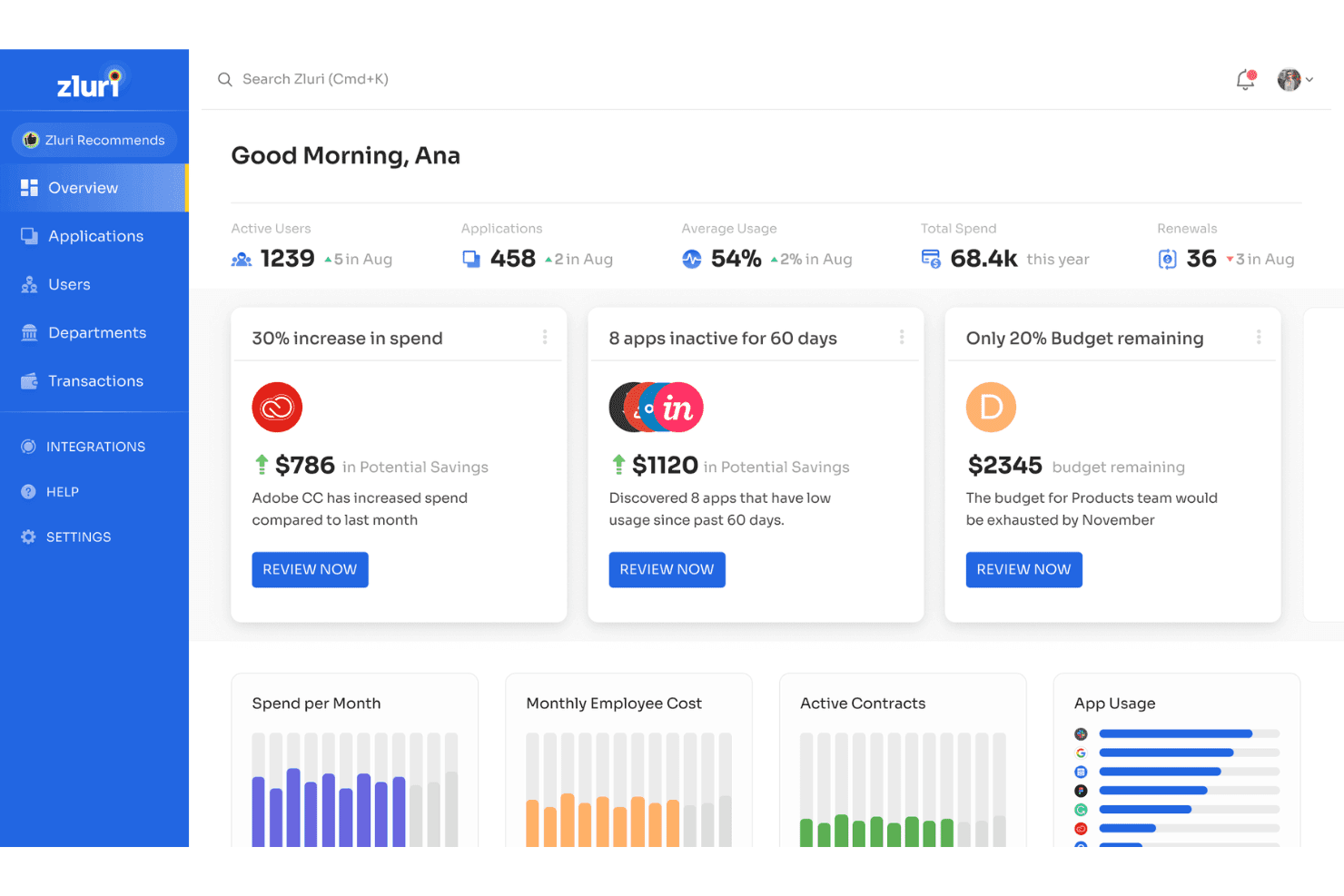
Zluri surfaces spend alerts and savings opportunities for CFOs. Zluri is a SaaS management platform that combines multi-source app discovery, license usage tracking, contract management, spend analytics, and procurement workflow automation.
Who Is Zluri Best For?
Zluri is a strong fit for finance and IT teams at mid-market and enterprise companies that need to reconcile what they're contracted to pay for SaaS against what they're actually being billed.
Why I Picked Zluri
I picked Zluri because it's the only platform I've used that separates contractual cost from actual billed spend, surfacing discrepancies that other tools miss entirely. Its Zluri Mapping AI automatically reconciles unmatched transactions, and the cost center chargeback module attributes spend by department and application without manual effort. When a vendor overbills mid-cycle, Zluri catches it.
Zluri Key Features
- Multi-source SaaS discovery: AuthKnox identifies apps across up to nine independent sources—SSO, finance systems, browser extensions, desktop agents, HRIS, CASB, and MDM—covering 239,000+ apps including shadow AI tools.
- AI-assisted contract ingestion: Automatically extracts pricing tiers, renewal windows, and liability terms from uploaded contracts, distinguishing between subscriptions, perpetuals, and fixed-term agreements.
- Automated license reclamation workflows: Detects unassigned or inactive seats and triggers employee consent prompts before revoking access, then syncs updated counts directly with vendor APIs.
- Vendor price benchmarking: Surfaces market-standard pricing data per vendor so your team enters renewal negotiations with comparable peer pricing on hand.
Zluri Integrations
Zluri offers 300+ direct API integrations, including NetSuite, QuickBooks, Zoho Books, Workday, Okta, Jira Service Management, Slack, and Microsoft Teams. It also supports webhooks, SAML, SCIM, and custom integrations through its Universal Identity Connector.
Pros and Cons
Pros:
- Automated chargeback by department and app
- Slack-based approval and access request workflow
- Surfaced SaaS cost vs. spend discrepancies
Cons:
- Implementation takes up to several months
- Custom pricing only available after demo
Learn more about Zluri: Best for guaranteed savings on vendor contracts
- Free demo available
- Pricing upon request
Visit WebsiteCustomer Rating:4.6/5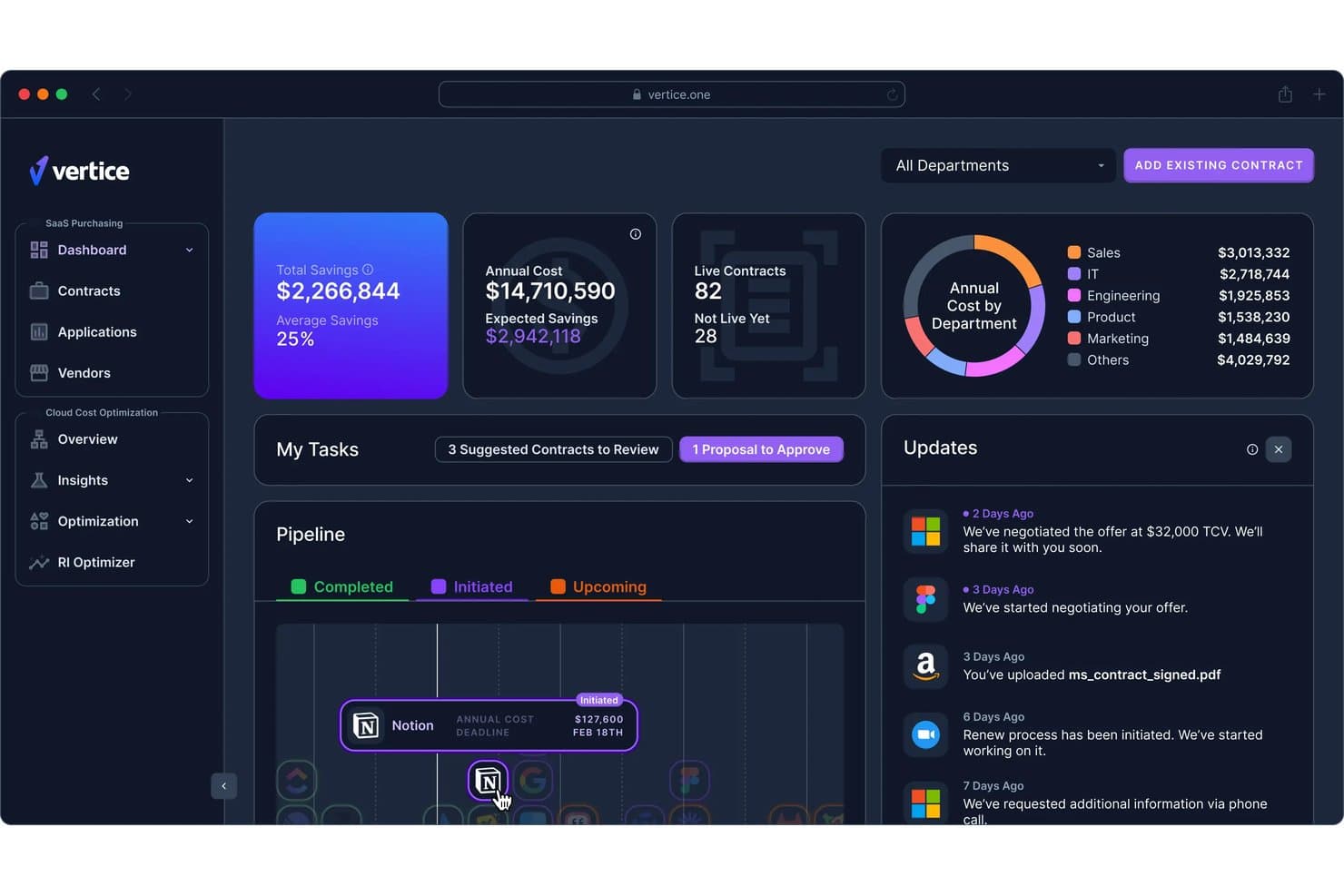
Vertice centralizes SaaS spend, savings, and contract data for CFOs. Vertice is a SaaS spend management platform that combines contract repository, license usage tracking, renewal management, procurement workflows, and AI-driven vendor negotiation into a single system.
Who Is Vertice Best For?
Vertice is a strong fit for finance and procurement teams at mid-market to enterprise companies that want a managed negotiation service alongside their SaaS spend management platform.
Why I Picked Vertice
Vertice earns its spot on my shortlist because it's one of the only SaaS spend management platforms that contractually guarantees a minimum 20% savings on vendor contracts. I love that it backs this up with a proprietary benchmark database covering 32,000+ vendors and 2 million+ real-world pricing points, so your team walks into every renewal negotiation with hard data. On top of that, Vertice's expert buying team negotiates directly with vendors on your behalf using detailed vendor playbooks, which is something I haven't seen matched elsewhere in this category.
Vertice Key Features
- Intake-to-Procure workflow builder: A no-code, drag-and-drop tool for building multi-step approval workflows with conditional routing logic for new software purchase requests.
- Insights Hub spend analytics: A centralized dashboard that aggregates vendor spend, tracks budget variance, flags anomalies, and models chargeback/showback by department via HRIS mapping.
- SSO-based shadow IT detection: Connects to identity providers like Okta, Entra ID, and Google Workspace to surface unauthorized SaaS applications across your environment.
- AI negotiation agent (Ana): An autonomous agent that conducts multi-round vendor negotiations over email under human-defined guardrails, without requiring manual outreach from your team.
Vertice Integrations
Vertice offers integrations with NetSuite, Coupa, SAP Ariba, Workday, Sage Intacct, Google Workspace, Okta, Slack, Microsoft Teams, and Anaplan. It also connects with HRIS, contract lifecycle management, and third-party risk management platforms.
Pros and Cons
Pros:
- Contract and vendor data benchmarked against market
- Managed negotiation service led by procurement experts
- Guarantees 20% minimum savings on contracts
Cons:
- No free trial or public pricing available
- Implementation and workflow setup can be lengthy
Learn more about Vertice: Best for benchmarked renewal negotiations
- Free trial + free demo available
- Pricing upon request
Visit WebsiteCustomer Rating:4.6/5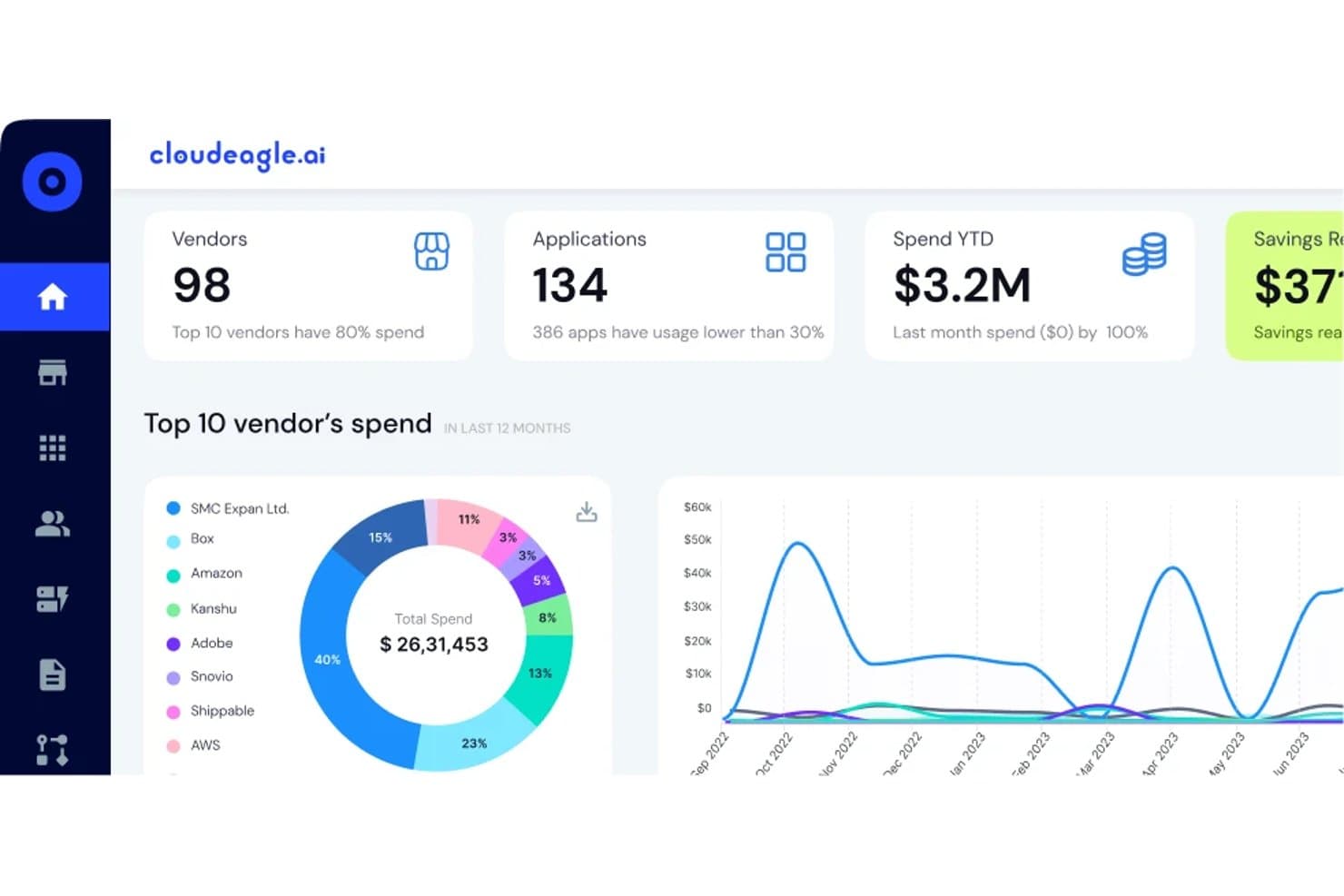
CloudEagle.ai tracks vendor spend and app usage across your SaaS stack. CloudEagle.ai is a SaaS spend management platform that combines multi-source app discovery, contract and renewal management, license usage tracking, and procurement approval workflows with built-in vendor price benchmarking.
Who Is CloudEagle.ai Best For?
CloudEagle.ai is a strong fit for mid-market and enterprise procurement and finance teams who need data-backed leverage when renegotiating SaaS contracts.
Why I Picked CloudEagle.ai
I've included CloudEagle.ai in my top picks because its vendor price benchmarking feature gives procurement and finance teams real negotiating leverage at renewal time. Instead of guessing at fair pricing, you get anonymized peer data showing what comparable companies actually pay per seat. Pair that with the Assisted Buying team, who negotiates on your behalf, and you have a credible path to outcomes like Sapphire Ventures' 30% renewal savings.
CloudEagle.ai Key Features
- Shadow IT and shadow AI detection: Surfaces unsanctioned apps purchased outside formal procurement by pulling data from browser agents, firewall feeds, and expense platforms.
- Automated license reclamation workflows: Detects inactive users and triggers deprovisioning or seat downgrades directly in the connected SaaS app without manual intervention.
- Slack-native intake and approval bots: Lets employees request new software and approvers review requests without leaving Slack.
- AI spend tracking: Monitors AI tool usage and cost by model, user, and department across tools like Claude, Cursor, ChatGPT, Copilot, and Gemini.
CloudEagle.ai Integrations
CloudEagle.ai supports 500+ direct integrations, including Okta, Azure Active Directory, Google Workspace, Coupa, Zip, Jira, ServiceNow, Slack, Workday HCM, Zscaler, and CrowdStrike. It also connects with finance systems, HRIS platforms, expense feeds, and cloud marketplaces.
Pros and Cons
Pros:
- Slack-native intake and approval for procurements
- Automated license reclamation triggers direct in apps
- Peer price benchmarks inform renewal negotiations
Cons:
- English-only interface limits global usability
- Advanced workflows require significant upfront configuration
Learn more about CloudEagle.ai:
Zylo centralizes SaaS app spending and usage data for CFO visibility. Zylo is a SaaS spend management platform built on financial transaction data—pulling from accounts payable, expense systems, and reseller feeds—to give finance and IT teams a unified view of software discovery, license tracking, contract management, and renewal optimization.
Who Is Zylo Best For?
Zylo is a strong fit for enterprise finance and IT teams that need SaaS spend visibility rooted in financial transaction data rather than browser-based discovery.
Why I Picked Zylo
Zylo earns its spot on my shortlist because of its SaaS Operations managed service, which embeds a dedicated SaaS expert directly into your team to run governance, renewal lifecycle management, and license tracking on your behalf. I particularly like the structured 120/90/60/30-day renewal lifecycle framework, which turns renewals from reactive scrambles into a systematic process backed by real vendor pricing benchmarks from $75B+ in transaction data. The SaaS Negotiator add-on goes even further, handling end-to-end vendor negotiations with a 100% ROI guarantee.
Zylo Key Features
- AI-powered contract ingestion: The Contract Assist Agent extracts structured metadata from uploaded contracts and flags missing data with confidence warnings.
- Zylo Clarity AI natural language querying: Ask questions about your software portfolio in plain language and get prioritized savings opportunities and license positions instantly.
- Showback and chargeback reporting: Automatically attribute SaaS costs to departments, cost centers, and business units using financial, contract, and usage data.
- AI spend monitoring: Track consumption-based pricing for AI tools like OpenAI, Anthropic, Databricks, and Snowflake alongside your traditional SaaS subscriptions.
Zylo Integrations
Zylo offers 18+ native integrations, including Microsoft 365, Okta, Microsoft Entra, Salesforce, NetSuite, SAP Concur, ServiceNow, Jira, Slack, and Snowflake. Usage Connect and a RESTful API support custom usage data.
Pros and Cons
Pros:
- AI contract assistant highlights missing metadata
- Embedded SaaS expert runs renewals for you
- Discovers SaaS spend using financial transaction data
Cons:
- Onboarding takes longer than many competitors
- No public pricing available for buyers
Learn more about Zylo:
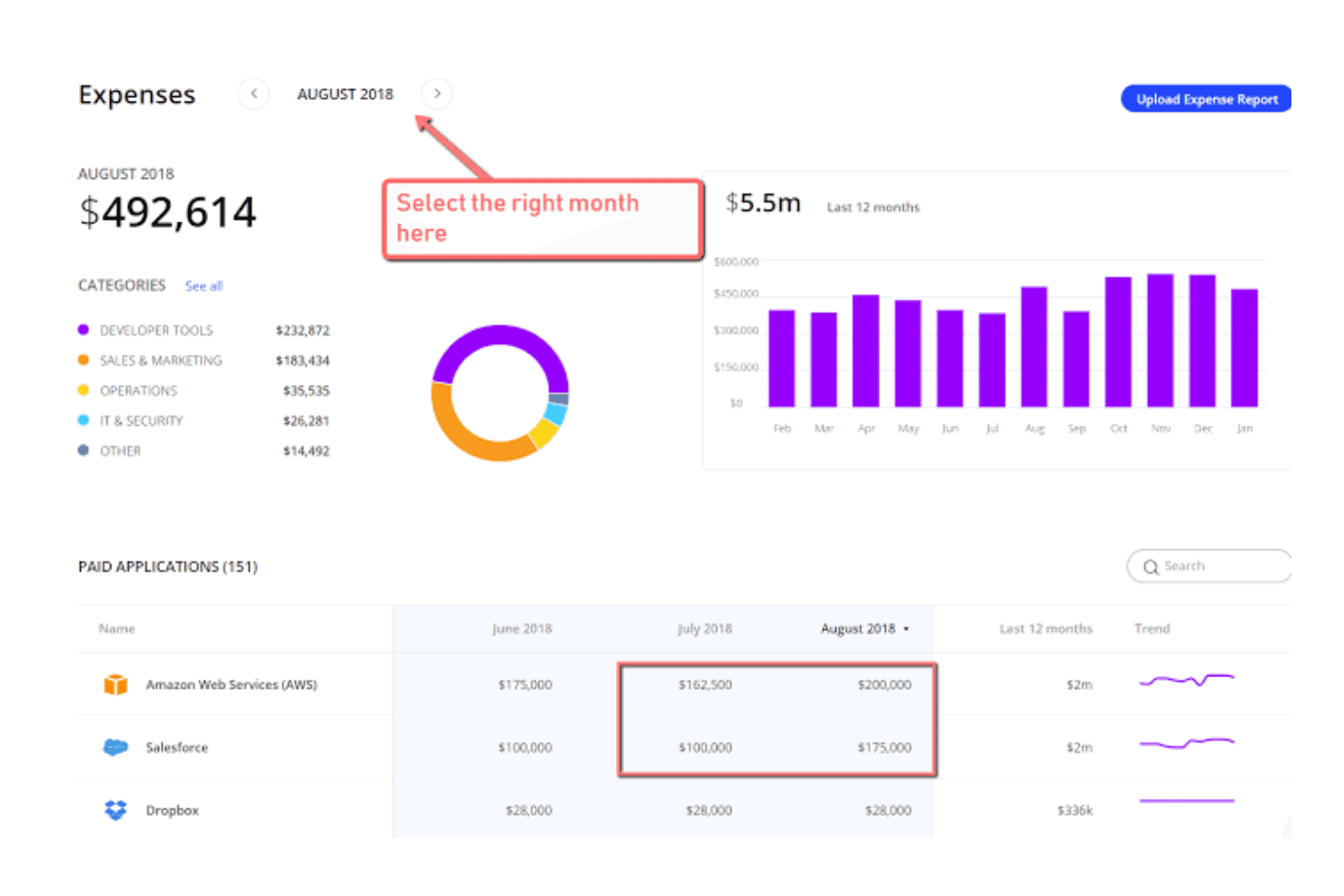
Torii tracks monthly SaaS expenses by category and application for CFOs. Torii is a SaaS management platform that centralizes app discovery, contract management, license usage tracking, and renewal workflows across IT, finance, and procurement teams.
Who Is Torii Best For?
Torii is a strong fit for mid-market and enterprise IT and procurement teams that need peer benchmarking data to negotiate SaaS renewals with confidence.
Why I Picked Torii
I picked Torii as one of the best because its vendor price benchmarking is genuinely hard to replicate manually. Torii aggregates anonymized spend data from its customer base to surface median pricing, 25th and 75th percentile ranges, and typical discount rates per SKU, so I can walk into a renewal negotiation knowing exactly whether I'm overpaying relative to peers. Pair that with AI-powered guided negotiation playbooks that pull seat counts, usage data, and contract dates into one view, and renewal conversations shift from gut-feel to evidence-backed.
Torii Key Features
- Multi-source SaaS discovery: Torii pulls app data from seven-plus sources—including SSO, HRMS, finance systems, MDM, OAuth grants, and a browser extension—to surface both managed and shadow IT apps continuously.
- AI-powered contract ingestion: Upload contracts directly or email up to 10 at once to have AI automatically extract line items, pricing tiers, cancellation windows, and auto-renewal clauses.
- Automated license reclamation workflows: No-code workflows detect inactive users and trigger seat downgrades or deprovisioning directly within source applications when inactivity thresholds are met.
- AI spend monitoring dashboard: Track foundation model token consumption, AI tool usage by user and department, overlapping AI tools, and ROI of custom AI projects from a dedicated dashboard.
Torii Integrations
Torii offers hundreds of integrations, including NetSuite, Sage Intacct, Oracle Financials Cloud, Workday, Ramp, Brex, Coupa, Okta, Microsoft Entra ID, and Ironclad. It also supports custom connections through its REST API, CSV imports, and custom AI builder.
Pros and Cons
Pros:
- Cross-functional dashboards for IT, finance, procurement
- AI-powered contract ingestion and renewal alerts
- Peer-benchmarked vendor price negotiation insights
Cons:
- Pricing transparency is limited for most plans
- Reporting lacks advanced analytics customization options
Learn more about Torii:
Other SaaS Spend Management Software
Here are some additional SaaS spend management software options that didn’t make it onto my shortlist, but are still worth checking out:
- 11BetterCloudBest for benchmarked SaaS renewal negotiations
- 12TropicBest for benchmarked SaaS negotiations
- 13JosysBest for IT-led SaaS license reclamation workflows
- 14RampBest for finance ops with peer spend benchmarking
- 15LumosBest for identity-led SaaS license reclamation
- 16SpendHoundBest for SaaS spend with a savings guarantee
- 17Flexera One SaaS ManagementBest for unified SaaS and IT asset spend oversight
- 18ServiceNow SAM ProBest for enterprise SAM and SaaS license governance
How I Evaluate SaaS Spend Management Software
I split my evaluation into baseline capabilities every tool must cover, and differentiators that separate a capable platform from one a CFO can actually build strategy around.
Core Functionality (Table Stakes for This List)
When I'm selecting tools for my list, I rank each one on a scale from 0 (does not offer the functionality) to 5 (excels in this area) for each core functionality listed below. I then calculate the tool's total score into a percentage, using 65% as a benchmark to help assess its overall fit for the list.
- SaaS Discovery: I check how many discovery sources a platform connects to, from SSO and expense systems to browser agents, and whether it flags shadow IT automatically rather than relying on manual imports.
- Contract Repository: A centralized record of every vendor contract, renewal date, and owner matters here. Platforms like Zylo and Tropic offer structured metadata and contract parsing, which I evaluate against basic list-only approaches.
- License Usage Tracking: I look for integrations that pull actual login and activity data across apps so you can spot inactive seats and act on reclamation opportunities before renewal deadlines hit.
- Renewal Management: The best tools pair a renewal calendar with configurable alerts, task assignments, and negotiation prep workflows. I evaluate whether a platform can surface benchmarking data alongside upcoming renewals to strengthen your position.
- Spend Analytics & Reporting: I evaluate dashboard depth, specifically whether a tool supports cost center mapping, budget vs. actual comparisons, and trend analysis that finance teams can present directly to the board.
- Procurement & Approval Workflows: Intake forms and single-approver routing are table stakes, but I look for multi-step approval chains, Slack or Teams integration, and policy enforcement that connects back to your ERP or AP system.
Once I have a list of tools that meet the criteria, I consider what sets each platform apart.
Differentiating Factors (What Sets Vendors Apart)
Here's how I compare and contrast different vendors:
Standout Features
Vendor price benchmarking is where I spend the most time. I look for platforms that surface anonymized peer pricing so your team walks into a renewal knowing what similar companies pay per seat. Automated license reclamation also matters. Tools like Zylo and BetterCloud can detect inactive users and trigger deprovisioning directly in the source app, turning usage data into real savings without manual intervention. I also evaluate vendor risk and compliance scoring, since platforms that bundle SOC 2, ISO, and GDPR profiles into the procurement workflow save finance and IT from chasing documentation separately.
Beyond Features
I look for native ERP and expense platform connectors, since a tool that syncs directly with your GL, AP, and corporate card feeds means spend data flows into cost centers without manual reconciliation. Savings guarantees and time-to-value matter too. Vendors like Sastrify and Vertice offer success-based pricing or documented ROI timelines, which makes internal cost justification far easier. I also check for SOC 2 Type II compliance and role-based access controls, because any platform handling contract and pricing data needs to satisfy SOX and internal audit requirements out of the box.
How to Choose a SaaS Spend Management Software
The key to finding the right SaaS spend management software is matching platform features with your team’s process challenges, visibility needs, and compliance expectations:
| If your priority is… | Look for… |
|---|---|
| If your priority is…Strong contract renewal leverage | Look for…Peer pricing benchmarks and automated renewal workflows |
| If your priority is…Quick finance reporting | Look for…Board-ready dashboard exports and cost center segmentation |
| If your priority is…Actionable license management | Look for…Direct integrations for seat usage and auto-reclamation |
| If your priority is…Reducing shadow IT | Look for…Discovery via SSO, card feeds, and browser extensions |
| If your priority is…Audit-ready compliance | Look for…SOC 2 Type II docs, approval trails, and ERP connectors |
How to Vet Your Shortlist
- Test discovery depth: Connect at least two discovery sources in a trial and confirm automated flagging of shadow IT within one week.
- Verify board reporting: Export a spend report in your preferred format, with cost center mapping, after completing one platform walkthrough.
- Audit renewal workflows: Create a renewal event and confirm the system surfaces peer benchmarks and sends alerts at defined intervals.
- Request compliance proof: Ask for a current SOC 2 Type II report and in-app download of approval audit trails before signing.
- Cost and control tradeoff: Decide if guaranteed savings and negotiation support are worth higher vendor involvement, or if you need maximum in-house control for data and workflows.
What is SaaS Spend Management Software?
SaaS spend management software is a platform that helps finance and operations teams track, analyze, and control their organization’s software as a service (SaaS) expenses. These tools centralize subscription data, surface unused or duplicate licenses, monitor renewals, and enable clear reporting on costs. Using SaaS spend management software helps ensure accurate budgeting, prevents unplanned renewals, and supports better contract negotiations across your company’s software stack.
Features
Here are the core features any great SaaS spend management software should have:
- SaaS discovery: Identifies and inventories every cloud application in use—across expense feeds, SSO, and browser extensions—so you see exactly what your business is paying for, including shadow IT.
- Contract repository: Centralizes all vendor contracts, renewal dates, and ownership metadata for easy access and better oversight of upcoming financial obligations and negotiations.
- License usage tracking: Monitors seat activity and login data to reveal unused or underutilized licenses, helping you right-size subscriptions ahead of renewals.
- Renewal management: Provides automated calendars, alerts, and workflow tools so you never miss a renewal deadline and can prepare for negotiations with enough lead time.
- Spend analytics and reporting: Delivers dashboards that break down software spend by cost center, usage trends, and vendor, making it easier to report results to management and the board.
- Procurement and approval workflows: Offers intake forms and multi-level approval chains connected to policies and financial systems, tightening control over all new purchases and renewals.
- Peer price benchmarking: Surfaces real-world pricing data from similar companies so you have negotiation leverage and can avoid overpaying for software.
- Vendor risk and compliance scoring: Evaluates and flags key compliance requirements—like SOC 2 Type II or GDPR—so you can manage supplier risks and satisfy audit needs more easily.
- ERP and financial system integrations: Connects directly with your general ledger, AP, and expense management tools so all spend data is automatically reconciled across systems.
- Automated license reclamation: Detects inactive users and triggers seat removal or deprovisioning within the source app, directly linking usage data to cost control without extra manual work.
Benefits
Implementing SaaS spend management software provides several benefits for your team and your business. Here are a few you can look forward to:
- Full visibility into SaaS usage: Identify every SaaS application in use—including shadow IT—by leveraging integrations with SSO, card feeds, and browser extensions.
- Contract and renewal control: Track every vendor contract, assign ownership, and receive timely alerts ahead of renewal deadlines to reduce unplanned spend.
- Accurate license management: Monitor login and usage data across all tools so you can spot inactive seats and reclaim licenses before they create unnecessary costs.
- Peer pricing benchmarks: Benchmark what your business pays per seat against anonymized peer data, giving you leverage for contract negotiations and renewals.
- Audit-ready compliance oversight: Document approval workflows, maintain SOC 2 Type II compliance, and generate audit trails to support your organization’s regulatory requirements.
- Automated spend reporting: Break down software spend by vendor, cost center, and time period with dashboards and exports that make board-level reporting easy.
- Streamlined procurement workflows: Centralize intake, connect approvals to policies, and integrate new purchases with your ERP or financial systems to increase process control.
Costs and Pricing
Selecting SaaS spend management software requires an understanding of the various pricing models and plans available. Costs vary based on features, team size, add-ons, and more. The table below summarizes common plans, their average prices, and typical features included in SaaS spend management software solutions:
Plan Comparison Table for SaaS Spend Management Software
| Plan Type | Average Price | Common Features |
|---|---|---|
| Plan TypeFree Plan | Average Price$0 | Common FeaturesBasic spend tracking, limited app discovery, restricted contract repository access, and basic reporting. |
| Plan TypePersonal Plan | Average Price$10-$25/user/month | Common FeaturesApp discovery, contract storage, license usage tracking, limited spend analytics, and single approval workflow. |
| Plan TypeBusiness Plan | Average Price$25-$60/user/month | Common FeaturesAdvanced spend analytics, renewal management, multi-level approval workflows, ERP integrations, and alerts. |
| Plan TypeEnterprise Plan | Average Price$60-$120/user/month | Common FeaturesCustom integrations, peer price benchmarking, automated license reclamation, vendor risk scoring, and SOC 2 compliance. |
FAQs
Here are some answers to common questions about SaaS spend management software:
How can I ensure accurate license data when using SaaS spend management software?
You should connect the software directly to your identity provider, SSO, or app APIs whenever possible. This approach pulls real login and usage data, instead of relying only on manual entry or spreadsheets. It helps you spot inactive seats, catch duplicate subscriptions, and act early to reclaim unused licenses before renewals.
What types of integrations should I look for?
Look for integrations with your ERP, accounting system, identity provider (like Okta or Azure AD), and expense management tools. Direct integrations let you reconcile spend faster, map expenses to cost centers, and see every SaaS app in use—including shadow IT subscriptions that don’t go through formal channels.
How do I manage renewal risk with saas spend management software?
Create a centralized calendar and set up automated renewal alerts for each contract. Good tools also surface contract owners and peer pricing benchmarks well before renewals. Building negotiation prep into your renewal workflow lets you avoid surprise renewals and drive better pricing outcomes.
Is it possible to automate SaaS procurement approvals?
Yes, many platforms offer customizable intake forms, multi-step approval chains, and policy integration. This makes it easy to enforce spend controls, route approvals through the right stakeholders, and tie every SaaS purchase back to your finance system.
What compliance features should I expect from leading platforms?
Expect SOC 2 Type II compliance documentation, downloadable audit trails, and role-based access controls. These features demonstrate that the platform can help you meet SOX requirements, audit needs, and internal control standards for software spend and approvals.