

The best Spendesk alternatives give you real-time expense visibility, automated controls, and reliable integrations that fit the size and needs of your finance team. If you're searching for Spendesk alternatives, you're probably looking for solutions that close gaps in policy enforcement, offer flexible approval workflows, or handle global spend complexity. In this guide, I’ll walk you through top-rated platforms that cover all the essentials—from prepaid cards to granular reporting—so you can pick a spend management system that supports your unique finance processes and business goals.
What Is Spendesk?
Spendesk is a spend management platform for businesses to control, track, and automate company spending. It combines prepaid cards, invoice management, approvals, and real-time reporting in one system. Finance teams use Spendesk to centralize expense processes, set custom permissions, and simplify employee purchasing. The platform helps businesses enforce policy, reduce manual work, and improve visibility across all company payments.
Spendesk Alternatives Comparison Table
This comparison table summarizes pricing details for my top Spendesk alternative selections:
| Tool | Best For | Trial Info | Price | ||
|---|---|---|---|---|---|
| 1 | Best for integrated travel and expense | Free plan available | Pricing upon request | Website | |
| 2 | Best for automated global supplier payments | Free demo available | From $99/month | Website | |
| 3 | Best for procurement-driven spend controls | Free demo available | Pricing upon request | Website | |
| 4 | Best for multicurrency payments and expenses | Free demo available | Pricing upon request | Website | |
| 5 | Best for payroll-linked expense management | Free demo available | Pricing upon request | Website | |
| 6 | Best for automated receipt capture | Free trial available | From £9.5/month | Website | |
| 7 | Best for startup and scaleup card controls | Free plan available | From $12/user/month | Website | |
| 8 | Best for AP and card spend in one platform | Free to use | Free to use | Website | |
| 9 | Best for advanced accounting integrations | 30-day free trial | From $15/user/month | Website | |
| 10 | Best for global enterprise compliance | Free demo available | Pricing upon request | Website |


Why Trust Our Software Recommendations
6,700+
Reviews
20
Industry experts
16+
Evaluation factors
14
Years
Our team has been testing and reviewing software since 2012. As finance leaders ourselves, we know how difficult—and important—it is to choose the right software.
For this guide, we evaluated tools using hands-on testing and independent research, scoring tools using our selection criteria.
Our reviews reflect our human editorial judgment, not a sales pitch.
Best Spendesk Alternatives Reviews
Below are my detailed summaries of the best Spendesk alternatives that made it onto my shortlist. My reviews offer a detailed look at the features, best use cases, and integrations of each platform to help you find the best one for you.
 Best for integrated travel and expense
- Free plan available
- Pricing upon request
Visit WebsiteCustomer Rating:4.7/5
Navan offers a detailed trip itinerary page with flight details, passenger info, and trip management options. Navan is a travel and expense platform that combines corporate card management, automated expense reconciliation, and business travel booking in one place—making it a strong pick for finance teams who need unified visibility across both T&E and card spend.
Who Is Navan Best For?
Navan is a natural fit for growing companies where employees travel frequently, and finance teams need expense controls without managing separate tools.
Why Navan Is a Good Spendesk Alternative
I've included Navan in my top picks because it's the only platform on this list that combines business travel booking with expense management in a single workflow. When a traveler books a flight or hotel through Navan, that transaction flows directly into expense reconciliation, no manual entry required. I also appreciate Navan Rewards, which incentivizes employees to book under budget by letting them keep a portion of the savings, giving finance teams a built-in cost-control mechanism that Spendesk simply doesn't offer.
Navan Key Features
- AI-powered travel assistant: Ava, the virtual assistant, helps automate itinerary changes and policy enforcement for travelers.
- Customizable approval workflows: Build multi-level, conditional approvals for expenses and travel bookings across teams.
- ERP and HRIS integrations: Native connections with systems like NetSuite, Sage Intacct, Xero, Workday, and BambooHR for synced data.
- Policy-driven spend controls: Enforce real-time spend limits and category rules for all card, travel, and expense activity.
Navan Integrations
Navan offers native integrations with NetSuite, Sage Intacct, Xero, QuickBooks, Workday, and BambooHR. An API is available for custom integrations.
Pros and Cons
Pros:
- Receipt capture auto-populates expense fields
- Booking auto-flows into expense reconciliation
- Incentivizes travelers to book under budget
Cons:
- Cost controls can be difficult to configure
- Loyalty status integration is inconsistent
Learn more about Navan: Best for automated global supplier payments
- Free demo available
- From $99/month
Visit WebsiteCustomer Rating:4.5/5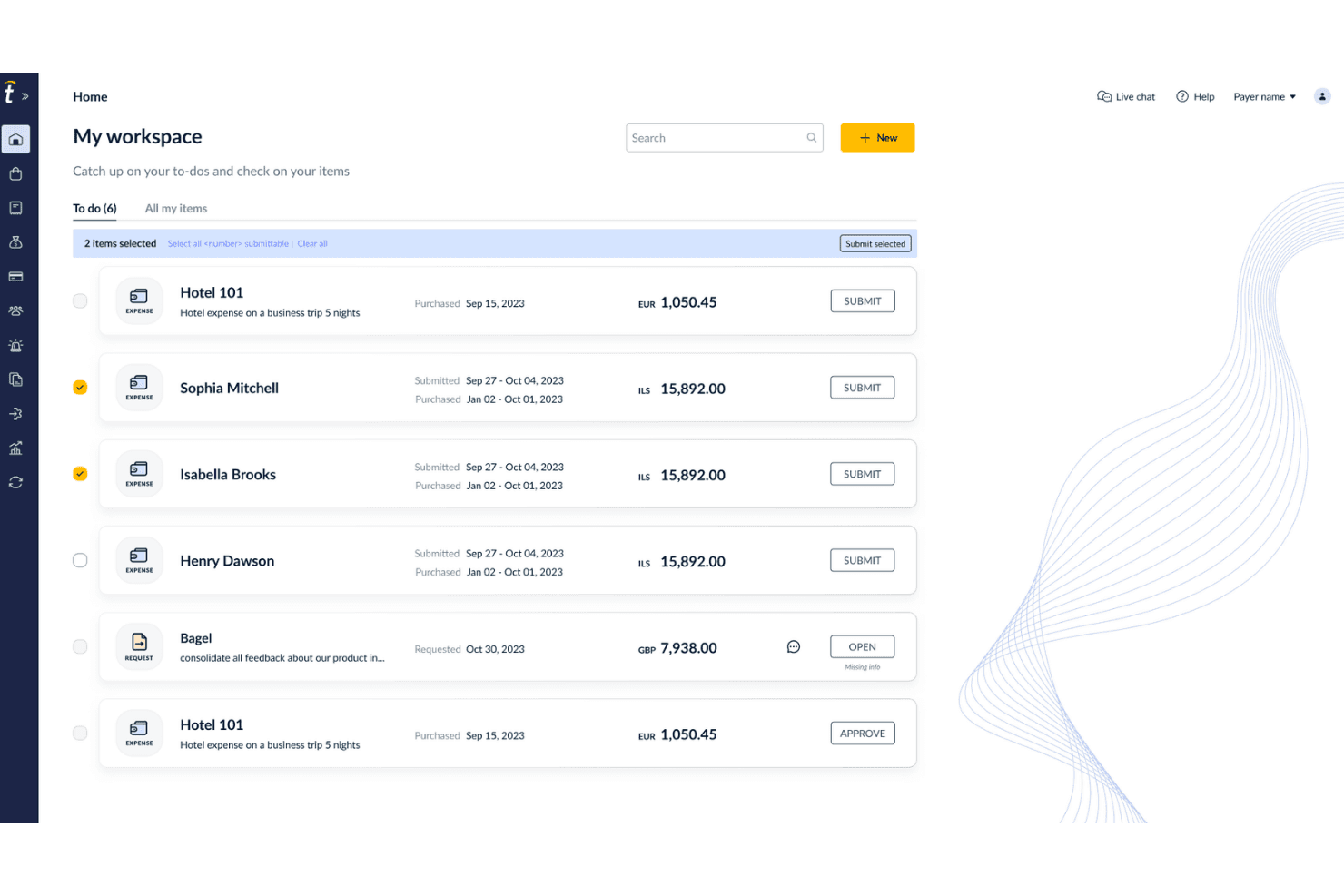
Tipalti offers a 'My Workspace' dashboard where users can manage, select, and submit multiple expense items with to-do tracking. Tipalti is an AP automation and global payments platform built for finance teams that need to manage supplier onboarding, invoice processing, and cross-border payments at scale across multiple entities and currencies.
Who Is Tipalti Best For?
Tipalti is a strong fit for mid-market companies that pay large volumes of international suppliers, contractors, or partners and need compliance and tax documentation handled automatically.
Why Tipalti Is a Good Spendesk Alternative
I've included Tipalti in my top picks because it handles global supplier payments at a scale that Spendesk simply wasn't built for. I especially like the self-service supplier portal. It collects W-8 and W-9 tax forms automatically and validates them against rules across 62 countries before payment goes out. The mass payouts engine supports 200+ countries and territories across 120 currencies, with local payment rails built in.
Tipalti Key Features
- Multi-entity management: View and control AP operations across multiple subsidiaries, currencies, and entities from a single dashboard.
- AI-driven invoice processing: Use AI to extract, validate, and code invoice data in 146 languages with automated PO matching.
- Deep ERP integrations: Connect directly with ERP systems like NetSuite, QuickBooks, Xero, and Microsoft Dynamics 365 for real-time data sync.
- Fraud detection and compliance controls: Run AML, OFAC, and VAT checks automatically to reduce the risk of error and fraud during payouts.
Tipalti Integrations
Tipalti offers native integrations with NetSuite, Sage Intacct, QuickBooks Online, Xero, Microsoft Dynamics 365 Business Central, and SAP Business One. An API is available for custom integrations.
Pros and Cons
Pros:
- Automated tax form collection and validation
- Self-service supplier onboarding reduces AP team workload
- Handles payments across 200+ countries and territories
Cons:
- Limited expense management for employee spend
- No corporate card issuance for employees
Learn more about Tipalti: Best for procurement-driven spend controls
- Free demo available
- Pricing upon request
Visit WebsiteCustomer Rating:4.2/5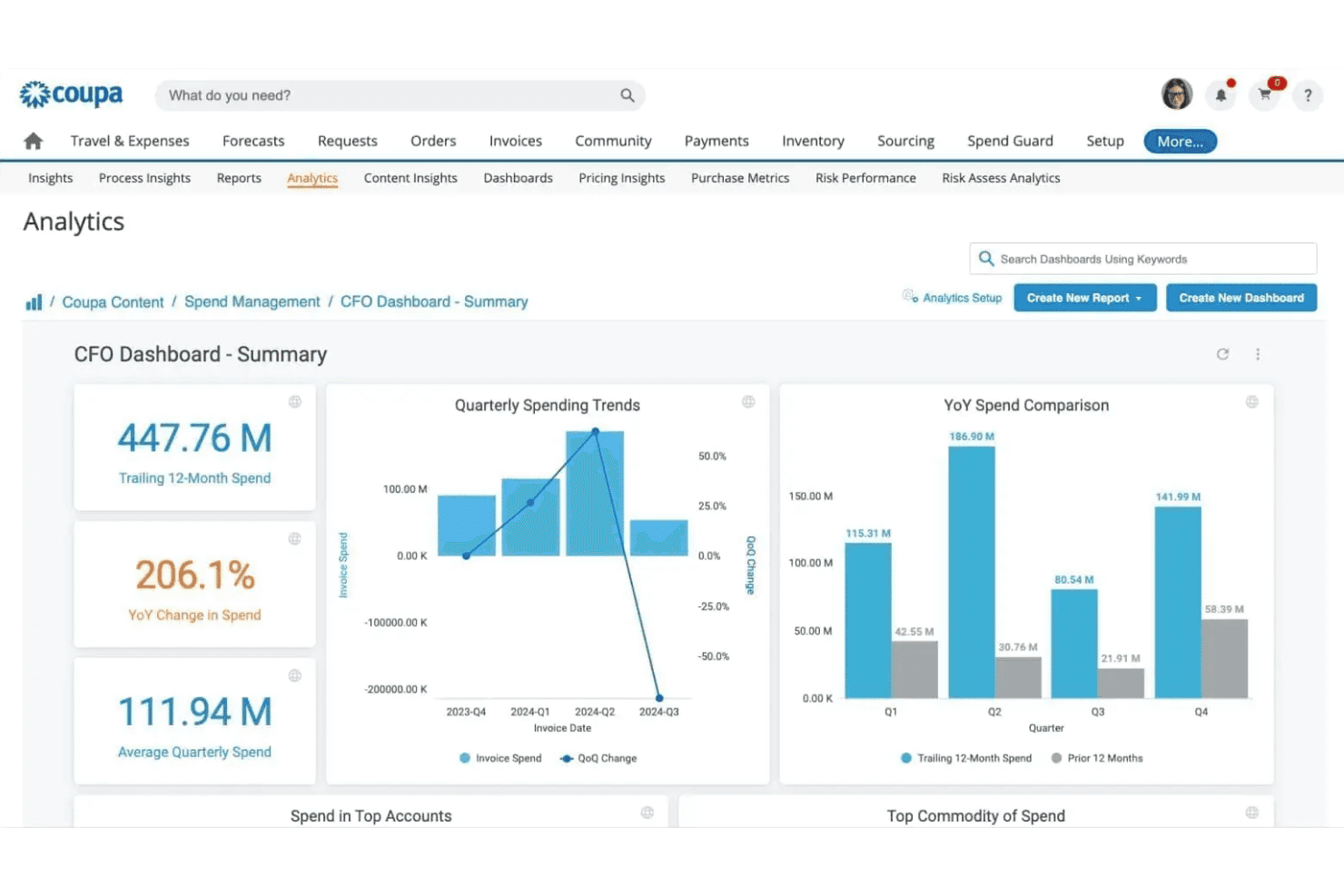
Coupa offers a CFO Dashboard with analytics including quarterly spending trends, YoY spend comparison, and key financial metrics. Coupa is an enterprise spend management platform built for mid-market and large organizations that need to unify procurement, AP automation, expense management, and supplier controls across complex, multi-team financial operations.
Who Is Coupa Best For?
Coupa suits procurement leads and finance controllers at mid-market and enterprise organizations managing high-volume supplier relationships and complex approval hierarchies.
Why Coupa Is a Good Spendesk Alternative
I picked Coupa as one of the best because its spend controls go deeper than Spendesk's policy layer. Pre-approval rules tie directly to category budgets and supplier contracts, so purchases get validated against sourcing agreements before a PO is ever issued. I also appreciate the 3-way PO matching in AP automation, which flags invoice discrepancies against both the purchase order and receipt in real time.
Coupa Key Features
- Multi-entity spend management: Manage spend across subsidiaries and currencies from a unified dashboard.
- Supplier risk and information management: Centralize compliance documents, monitor supplier risk scores, and automate onboarding.
- Contract lifecycle management: Create, store, and track procurement contracts with automated version control.
- Category-based spend analysis: Analyze spend by category to identify savings opportunities and optimize sourcing strategies.
Coupa Integrations
Coupa offers native integrations with NetSuite, SAP, Oracle, Microsoft Dynamics 365, Workday, and Salesforce. An API is available for custom integrations.
Pros and Cons
Pros:
- Granular pre-approval rules by category and team
- Strong supplier risk and compliance management
- Deep procurement controls with contract-linked POs
Cons:
- Not suited for small or early-stage teams
- Implementation is lengthy and resource-intensive
Learn more about Coupa: Best for multicurrency payments and expenses
- Free demo available
- Pricing upon request
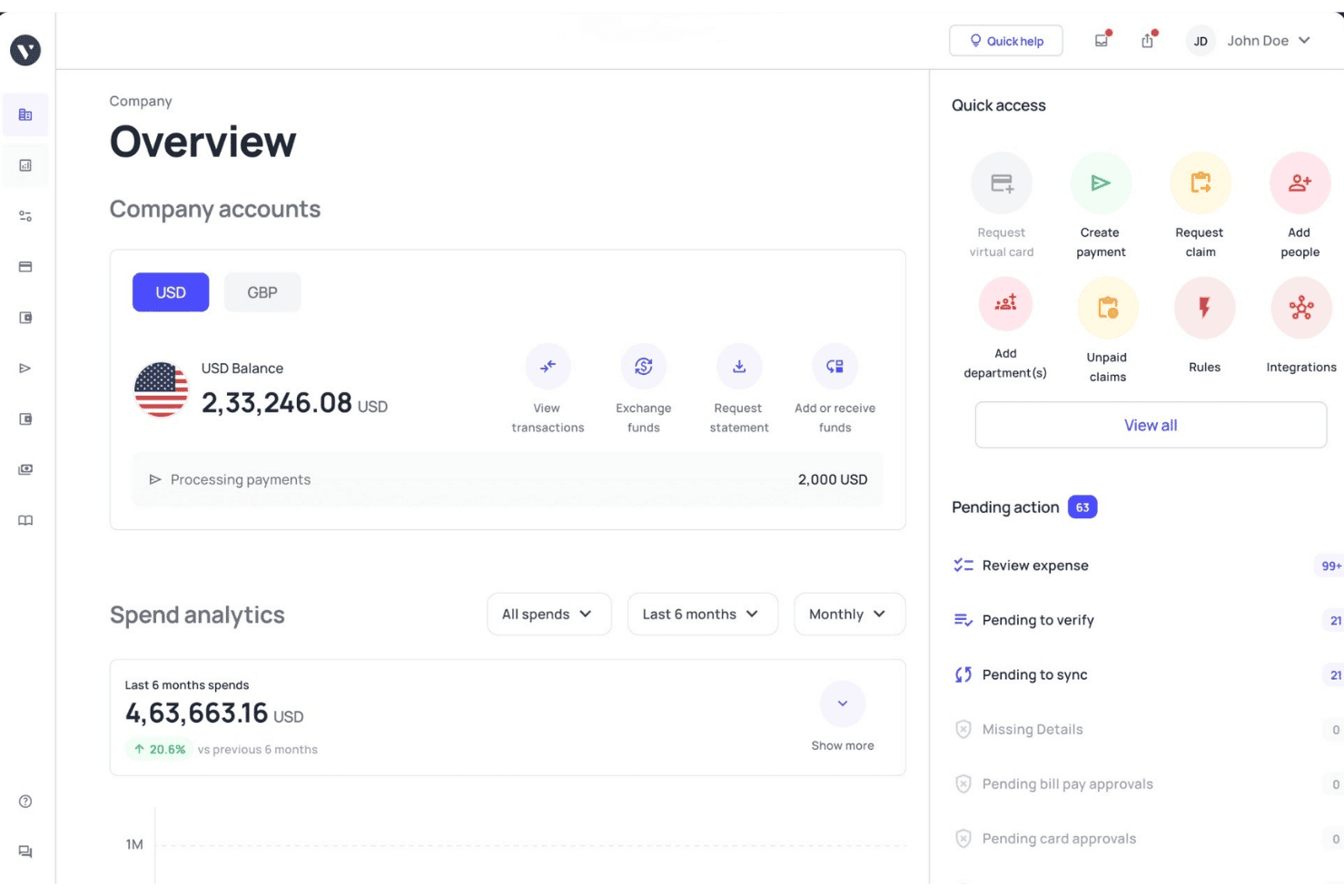
Volopay offers a company financial overview dashboard with account balances, spend analytics, quick access actions, and pending approvals. Volopay is a spend management platform built for finance teams that need to issue corporate cards, automate AP workflows, and manage vendor payments across multiple currencies and international entities.
Who Is Volopay Best For?
Volopay is a strong fit for SMBs and scaling companies operating across APAC or managing cross-border payments in multiple currencies.
Why Volopay Is a Good Spendesk Alternative
I picked Volopay for this list because of how it handles cross-border spend in ways Spendesk doesn't. Multi-currency wallets supporting 11 currencies, combined with vendor payments to 130+ countries via SWIFT and non-SWIFT rails, mean finance teams running international operations aren't stitching together a separate FX tool alongside their expense platform. The competitive exchange rates on corporate card transactions are a genuine differentiator I appreciate for high-volume forex spend.
Volopay Key Features
- Multi-level approval workflows: Set up custom approval chains with up to five approvers for any expense or payment.
- Mobile expense capture: Employees can submit claims, receipts, and categorize expenses directly from the Volopay mobile app.
- Automated accounting sync: Integrate transactions and categories with platforms like Xero, NetSuite, QuickBooks, and more.
- Vendor and subscription management: Track supplier details and recurring SaaS payments to avoid duplicate costs or surprise renewals.
Volopay Integrations
Volopay offers native integrations with Xero, NetSuite, QuickBooks, Tally, MYOB, Deskera, and Zoho Books, and provides an API for custom integrations.
Pros and Cons
Pros:
- Receipt upload and categorization via mobile app
- Cards work across 130+ countries via SWIFT
- Cashback on foreign currency card transactions
Cons:
- Virtual and physical cards aren't linked to a single profile
- Custom reporting requires manual export to spreadsheets
Learn more about Volopay: Best for payroll-linked expense management
- Free demo available
- Pricing upon request
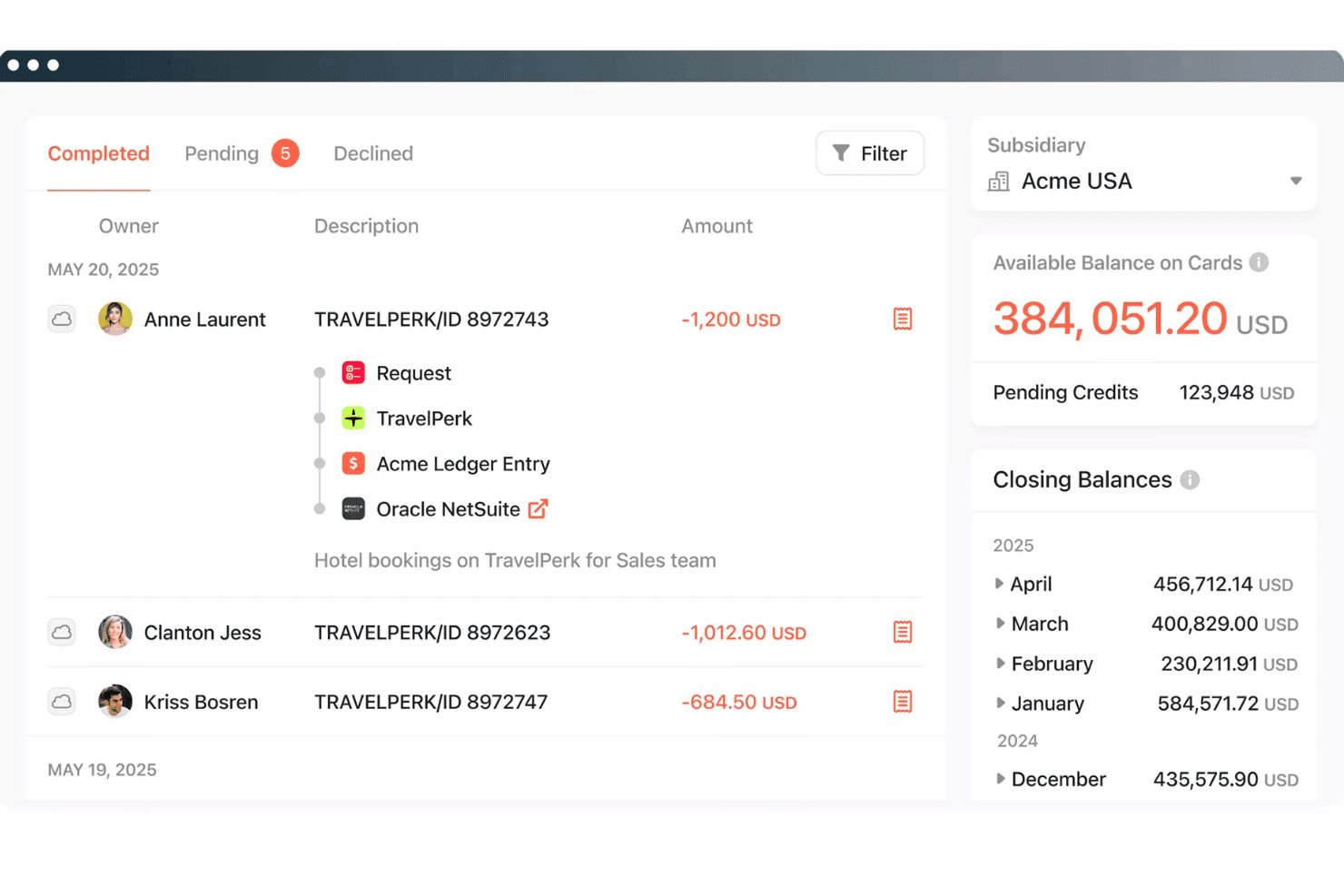
Paylocity for Finance offers a transaction management dashboard with completed, pending, and declined tabs. Paylocity for Finance (formerly Airbase) is a spend management platform built for mid-market finance teams who need to manage payroll and non-payroll spend—cards, expenses, AP, and procurement—on a single connected employee record.
Who Is Paylocity for Finance Best For?
It fits mid-market companies (100–5,000 employees) that run HR and payroll on Paylocity and want spend management built into the same platform.
Why Paylocity for Finance Is a Good Spendesk Alternative
I picked Paylocity for Finance because no other spend management tool ties expense data directly to the employee record the way this one does. When a reimbursement is processed, it syncs against the same record tracking salary and headcount, giving finance controllers a complete view of total labor cost. I also like the per-vendor virtual card model: each approved expense generates a single-use card number for that specific vendor, which tightens policy enforcement considerably.
Paylocity for Finance Key Features
- Automated AP workflows: Supplier invoices are ingested, routed for multi-level approval, and paid out directly from the platform.
- Guided procurement module: Users can request purchases, track requisitions, and follow procurement workflows all in one place.
- ERP sync for transactions: Spend and invoice data sync automatically with NetSuite, Sage Intacct, and QuickBooks.
- Real-time budget insights: Finance teams can see live spend against budgets, with alerts when thresholds are approached.
Paylocity for Finance Integrations
Paylocity for Finance offers native integrations with NetSuite, QuickBooks, and Sage Intacct. An API is available for custom integrations.
Pros and Cons
Pros:
- Strong mid-market AP approval workflow depth
- Per-vendor virtual cards tighten spend control
- Payroll and spend data on one record
Cons:
- Card controls weaker than dedicated spend platforms
- Not built for multi-entity global businesses
Learn more about Paylocity for Finance: 6Best for automated receipt capture
Pleo
- Free trial available
- From £9.5/month
Visit WebsiteCustomer Rating:4.8/5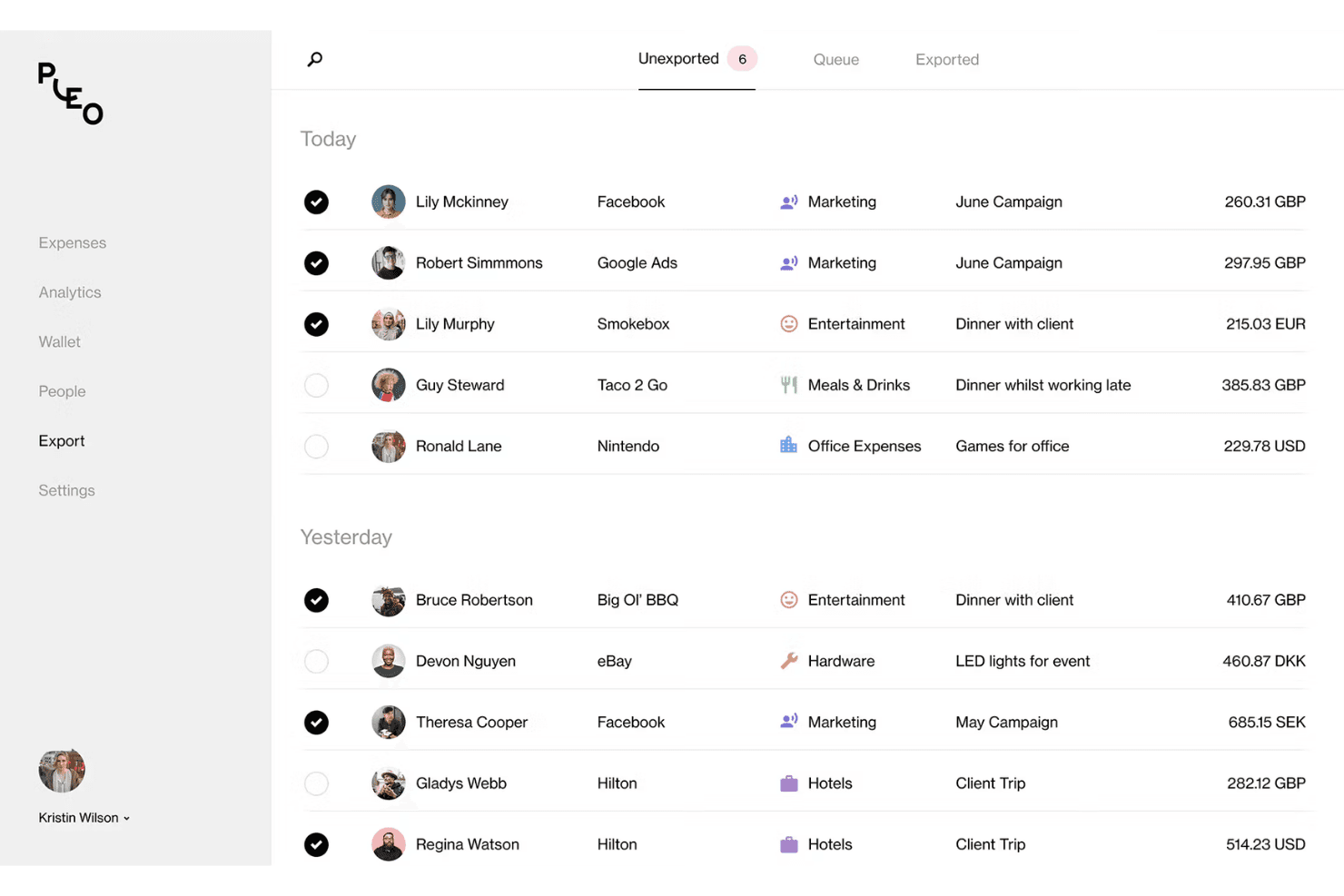
Pleo offers an export dashboard that displays categorized employee expenses with merchant details, categories, and multi-currency amounts. Pleo is a card-first spend management platform built for European SMBs that want to replace manual expense workflows with automated receipt capture, real-time spend visibility, and built-in AP controls.
Who Is Pleo Best For?
Pleo is a strong fit for finance teams at growing SMBs who need corporate card controls and automated expense workflows without enterprise-level complexity.
Why Pleo Is a Good Spendesk Alternative
I picked Pleo as one of the best because its receipt capture goes well beyond a standard upload button. The Fetch feature lets employees forward email receipts directly to a dedicated Pleo address, where they're auto-matched to the corresponding card transaction. On top of that, Pleo's OCR engine pulls merchant name, amount, and VAT data automatically, cutting the manual categorization work my team would otherwise carry into close.
Pleo Key Features
- Vendor card issuing: Create dedicated virtual cards for individual vendors to track recurring payments and control spend by supplier.
- Advanced approval workflows: Set up multi-level expense and invoice approvals with specific routing by amount, category, or team.
- Custom accounting exports: Map expense categories, VAT codes, and dimensions to your accounting system for smoother reconciliation.
- Multi-entity management: Manage spend, users, and controls across multiple subsidiaries or legal entities in one admin dashboard.
Pleo Integrations
Pleo offers native integrations with Xero, QuickBooks Online, DATEV, NetSuite, Sage, Microsoft Dynamics 365 Business Central, Fortnox, E-conomic, and Visma.net. An API is available for custom integrations.
Pros and Cons
Pros:
- Team budget visibility updated in real time
- Mileage tracking built into the mobile expense flow
- Wallet support across European entities
Cons:
- Card issuance restricted to European market
- Approval workflow customization is limited
Learn more about Pleo: 7Best for startup and scaleup card controls
Brex
- Free plan available
- From $12/user/month
Visit WebsiteCustomer Rating:4.5/5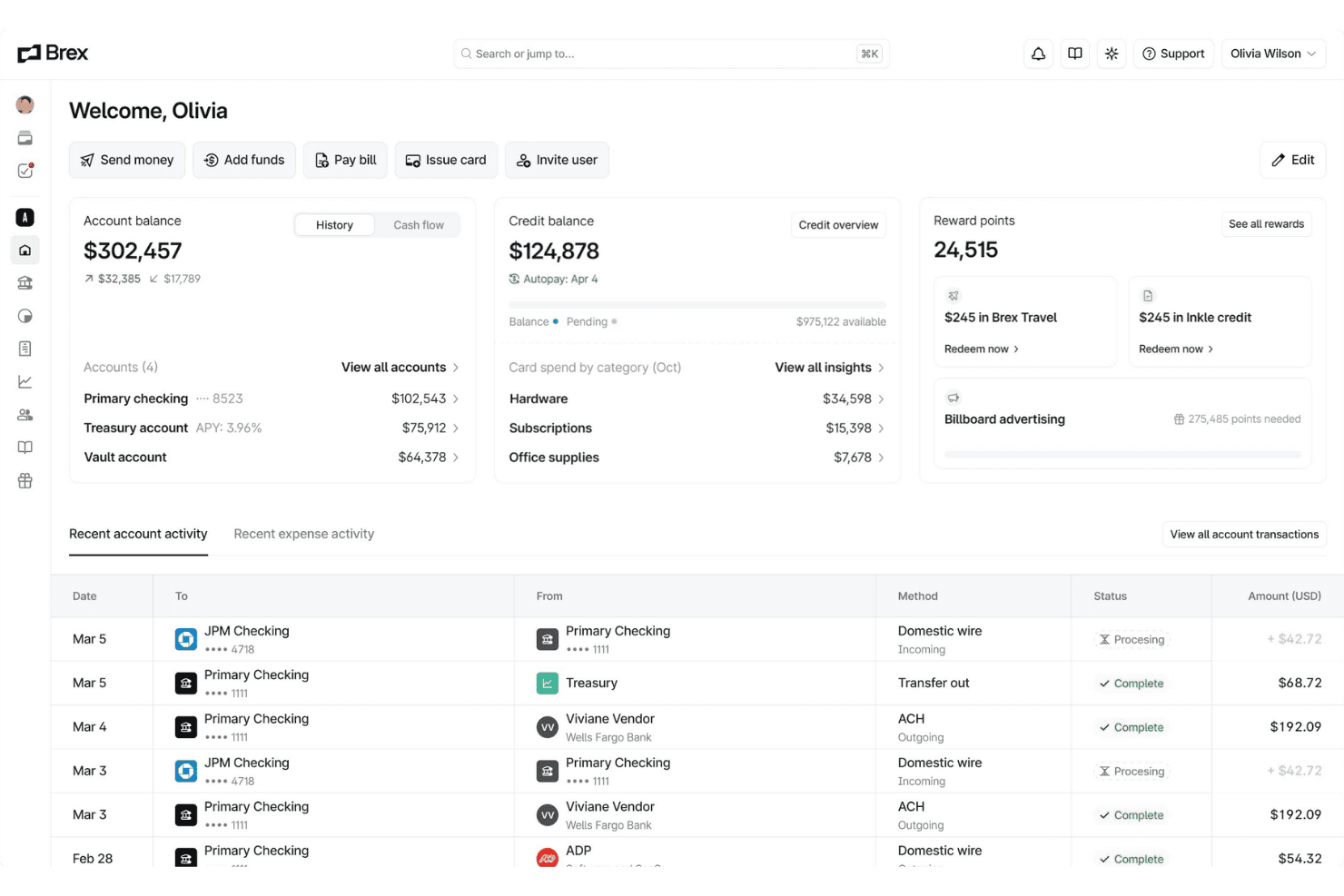
Brex offers a unified financial dashboard displaying account balances, credit balances, reward points, and recent transaction activity in one place. Brex is a unified spend management platform combining corporate cards, expense management, bill pay, and banking—built for startups and fast-scaling companies that need real-time spend controls without prefunding card accounts.
Who Is Brex Best For?
Brex is a strong fit for finance teams at venture-backed startups and high-growth companies that need scalable spend controls from seed stage through Series C and beyond.
Why Brex Is a Good Spendesk Alternative
Brex earns its spot on my shortlist because no other platform handles the transition from startup to scaleup card controls as naturally. I love that cards come with AI-powered custom rules baked in, so I can enforce merchant-category restrictions and per-card limits without prefunding accounts the way Spendesk requires. At scale, dynamic Spend Limit approval chains let my team route card requests automatically based on amount or role, keeping controls tight as headcount grows.
Brex Key Features
- Multi-entity consolidation: Manage global subsidiaries, currencies, and policies from a single dashboard.
- AI-native accounting API: Automate real-time, bi-directional ERP sync and custom mapping for faster close.
- Integrated bill pay: Process invoices, automate entry, and execute vendor payments within one unified platform.
- Embedded travel booking: Book and manage global travel in-app, keeping expenses and controls connected.
Brex Integrations
Brex offers native integrations with NetSuite, QuickBooks Online, Xero, Sage Intacct, Oracle Fusion, Microsoft Dynamics 365, Workday, Rillet, and Campfire. An API is available for custom integrations.
Pros and Cons
Pros:
- Handles multi-entity spend from one dashboard
- AI-powered rules enforce spend policies automatically
- No prefunding required for corporate cards
Cons:
- Customer support response times can lag
- Bill pay restricted to US only

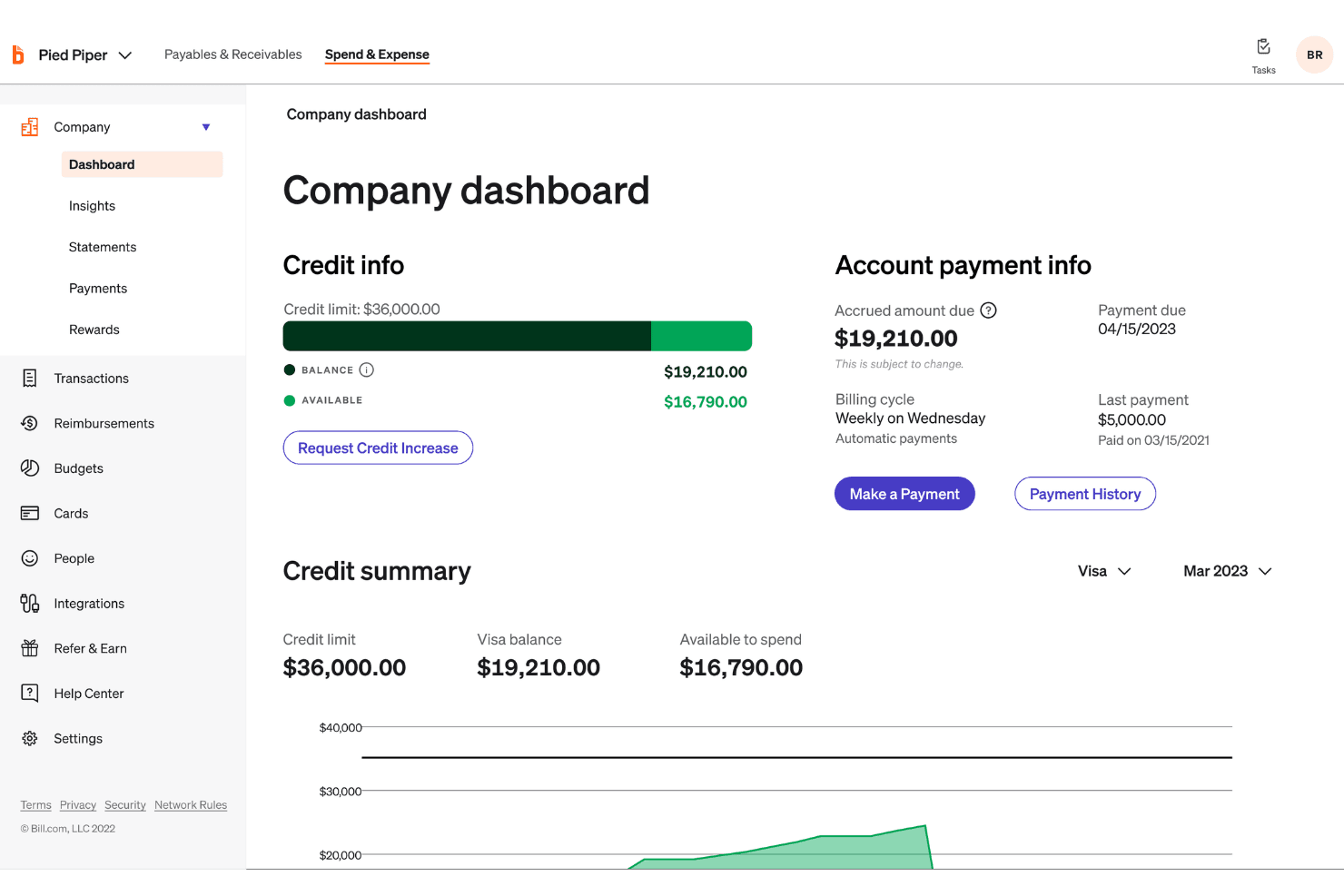
BILL Spend & Expense offers a company dashboard with credit info, available balance, and account payment details in one centralized view. BILL Spend & Expense is a spend management platform for SMBs that combines corporate card issuance, expense automation, and AP workflows in a single free-software solution synced to major accounting systems.
Who Is BILL Spend & Expense Best For?
BILL Spend & Expense fits finance controllers and AP managers at small to midsize businesses who need a unified view of card spend and vendor invoice payments.
Why BILL Spend & Expense Is a Good Spendesk Alternative
I've included BILL Spend & Expense in my top picks because it's one of the few platforms that genuinely connects corporate card spend and AP invoice payments in the same system. I like that when my team issues a virtual card for a vendor, that transaction flows directly into the same approval and reconciliation pipeline as a supplier invoice. The AI-powered receipt matching and automatic transaction coding (claiming 95% day-one accuracy) cut down the manual cleanup that typically drags out month-end close.
BILL Spend & Expense Key Features
- Multi-level approval workflows: Create custom approval routes for spend requests and invoices with conditional logic by amount, team, or category.
- Team and category budgets: Set granular budget controls for departments, projects, or individual users to manage spend allocation proactively.
- Two-way sync with major accounting systems: Connect directly with QuickBooks, NetSuite, Sage Intacct, Xero, and Microsoft Dynamics to automate transaction coding and reconciliation.
- Physical and virtual card issuance: Instantly issue and manage both physical and virtual cards for employees, each with individual spend rules and card controls.
BILL Spend & Expense Integrations
BILL Spend & Expense offers native integrations with QuickBooks (Online and Desktop), Xero, NetSuite, Sage Intacct, Microsoft Dynamics (365 BC, GP, AX, NAV, SL, F&O), and Acumatica. An API is available for custom integrations.
Pros and Cons
Pros:
- Virtual card creation and freeze controls
- Real-time transaction alerts
- Free software tier covers expense management
Cons:
- BILL Spend & Expense and BILL AP run as separate systems
- Reimbursement reporting is less developed
Learn more about BILL Spend & Expense:
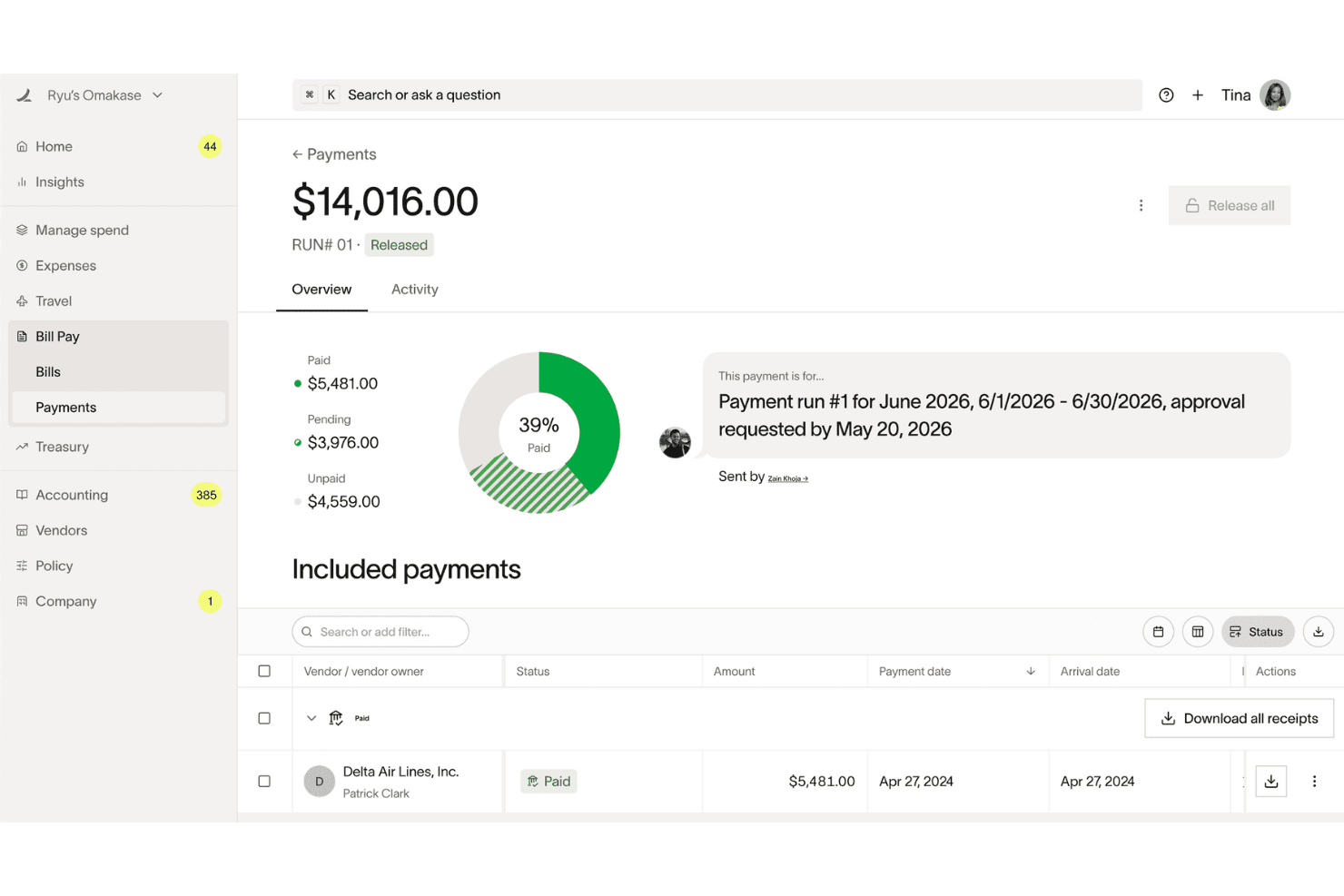
Ramp offers a Bill Pay payments dashboard with donut chart breakdowns showing paid, pending, and unpaid vendor payment statuses. Ramp is a corporate card and spend management platform built for finance teams that want to automate expense reporting, control company-wide spending, and reduce the manual work that slows down month-end close.
Who Is Ramp Best For?
Ramp is a strong fit for US-based startups and scale-ups with a dedicated finance function that needs deep accounting integrations alongside card and expense controls.
Why Ramp Is a Good Spendesk Alternative
I picked Ramp as one of the best because its accounting integration depth genuinely goes beyond what Spendesk offers. Where Spendesk covers the basics, Ramp gives you bi-directional sync with NetSuite, Sage Intacct, Workday, and Oracle Fusion, with AI-powered GL coding applied to every transaction field and custom field mapping baked in. I also appreciate that automated accruals, amortization, and reconciliation run without manual input, which meaningfully compresses close cycles.
Ramp Key Features
- Real-time spend controls: Set granular limits and enforce policies per card, vendor, or department to manage budgets proactively.
- Automated card issuance: Instantly issue and revoke unlimited virtual or physical cards with role-based permissions.
- Multi-entity management: Centralize spend oversight, billing, and reporting across multiple subsidiaries or business units.
- Integrated travel booking: Book flights, hotels, and cars directly within Ramp and match expenses to travel bookings automatically.
Ramp Integrations
Ramp offers native integrations with QuickBooks, Xero, NetSuite, Sage Intacct, Acumatica, Microsoft Dynamics 365 Business Central, Oracle Fusion Cloud, Workday, and Slack. An API is available for custom integrations.
Pros and Cons
Pros:
- Real-time budget alerts before overspending occurs
- Unlimited virtual cards with granular controls
- AI-powered GL coding on every transaction
Cons:
- AP automation less mature than dedicated tools
- US-only card issuance excludes global teams
Learn more about Ramp: Best for global enterprise compliance
- Free demo available
- Pricing upon request
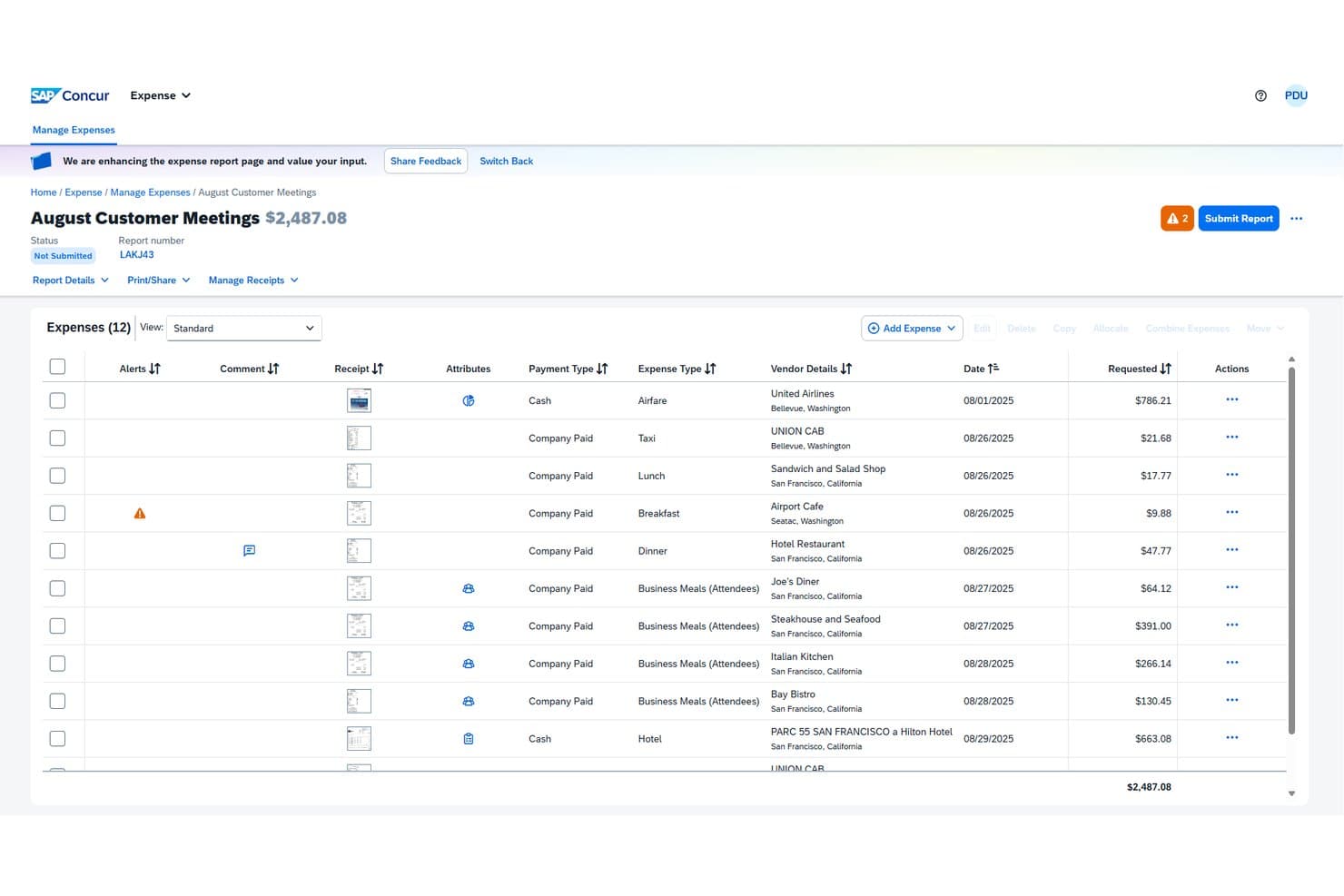
SAP Concur offers a detailed expense report view where users can manage, review, and submit itemized business expenses with vendor details, payment types, and receipt attachments. SAP Concur is an enterprise-grade spend management platform that unifies travel booking, expense reporting, and AP automation for mid-market and large organizations managing complex, multi-currency spend across global teams.
Who Is SAP Concur Best For?
Finance controllers and AP managers at large enterprises with multi-country operations who need centralized policy enforcement and VAT/tax compliance across business units.
Why SAP Concur Is a Good Spendesk Alternative
I've included SAP Concur in my top picks because its global compliance capabilities go well beyond what Spendesk offers. The configurable policy engine enforces spend rules by country, category, and employee group in real time, flagging out-of-policy transactions before they're approved. I especially appreciate the built-in VAT reclaim processing and multi-currency expense handling, which remove a layer of manual reconciliation that my team would otherwise manage separately.
SAP Concur Key Features
- Multi-entity expense management: Track, separate, and allocate expenses across subsidiaries and business units from a unified platform.
- ERP and accounting system integrations: Connect directly with SAP, NetSuite, Xero, QuickBooks, and Sage for automated transaction syncing.
- Fully configurable approval workflows: Set up conditional, multi-level approval rules for spend requests, expenses, and invoices.
- International payment capabilities: Route and execute vendor payments across currencies and geographies with built-in compliance support.
SAP Concur Integrations
SAP Concur offers native integrations with SAP, NetSuite, QuickBooks, Xero, and Sage, supports single sign-on with Azure Active Directory, and provides an API for custom integrations.
Pros and Cons
Pros:
- Handles multi-currency expense reconciliation
- Policy enforcement configurable by country
- Built-in VAT reclaim across multiple countries
Cons:
- Mobile app experience lags behind newer rivals
- Implementation takes significantly longer
Learn more about SAP Concur:
Other Spendesk Alternatives
Here are some additional Spendesk alternative options that didn’t make it onto my shortlist, but are still worth checking out:
- 11Rippling SpendBest for unified HR and spend workflows
- 12PayhawkBest for multi-entity spend management
- 13PrecoroBest for PO and invoice automation
- 14Zoho ExpenseBest for integrated travel expense automation
- 15AirwallexBest for multi-currency corporate cards
- 16SpendfloBest for SaaS subscription spend management
- 17PayEmBest for customizable approval workflows
- 18Mesh PaymentsBest for granular card control and budgets
How I Evaluate Spendesk Alternatives
I split my evaluation into three parts. First—and this carries the most weight—I check whether a tool can issue corporate cards with real spending controls and route spend through configurable approval workflows before money leaves the business. Second, I look for standout capabilities like policy-driven virtual cards or embedded supplier payments. Third, I consider pricing transparency and onboarding speed.
Core Functionality (Table Stakes For This List)
When I'm selecting tools for my list, I score each one on a scale from 0 (does not offer the functionality) to 5 (excels in this area) for each core functionality listed below. I then convert the total into a percentage to help assess each tool's overall fit, with extra weight on any functionalities I’ve deemed essential.
- Corporate Cards (Essential): I look for physical and virtual cards with adjustable limits and controls, such as restricting purchases by merchant or spending category.
- Spend Approvals (Essential): I assess configurable approval routes and pre-spend checks, such as routing a request to a budget owner before a purchase.
- Expense Automation: Receipt capture, expense categorization, policy checks, and reimbursement workflows show how much manual review expense claims still require.
- Invoice & AP: I consider invoice capture, approval routing, and payment initiation, including how a team can track a bill from receipt through payment.
- Accounting Sync: I check how transactions and coding sync with accounting or ERP systems, and whether reconciliation supports accurate close and reporting.
- Spend Visibility: I look for timely, consolidated views of card, expense, and invoice activity to compare committed spend with actuals.
Once I have a list of tools that meet the criteria, I consider what sets each platform apart.
Differentiating Factors (What Sets Vendors Apart)
Here's how I compare and contrast different vendors:
Standout Features
Policy-driven virtual cards are a big deal for me. I check whether a platform can generate single-use or merchant-locked cards tied to specific subscriptions, because that's how you stop unauthorized renewals from quietly draining budget. Embedded supplier payments also matter—I look for tools that let you pay international vendors directly inside the same platform you use for employee spend, rather than toggling to a separate banking portal. Finally, I evaluate prepaid versus pay-later funding flexibility, since the right model depends on your cash position and treasury strategy.
Beyond Features
I check whether pricing scales per user, per card, or by tier, because a platform that looks affordable at 20 employees can get expensive at 200. Funding model matters too—prepaid cards suit teams that want hard spend limits, while credit lines work better when cash timing is tight. I also evaluate onboarding speed; vendors like Yokoy or Payhawk offer pre-built approval templates that cut setup time, which is valuable when you're migrating from a legacy process mid-quarter. Finally, I look at regional compliance coverage, including SOC 2, PCI-DSS, and data residency, since multi-entity teams operating across borders need that baseline in place.
Why Look For A Spendesk Alternative?
While Spendesk is a good choice of spend management platform, there are a number of reasons why some users seek out alternative solutions. You might be looking for a Spendesk alternative because…
- Needing better multi-entity or multi-currency support
- Wanting deeper native accounting or ERP integrations
- Handling global card issuance or regional compliance needs
- Requiring more advanced AP automation or subscription management
- Needing a simpler, more scalable pricing structure
- Wanting dedicated onboarding or higher-touch customer support
If any of these sound like you, you’ve come to the right place. My list contains several spend management platform options that are better suited for teams facing these challenges with Spendesk and looking for alternative solutions.
Spendesk Key Features
Here are some of the key features of Spendesk, to help you contrast and compare what alternative solutions offer:
- Virtual and physical company cards: Issue secure virtual and physical company cards to employees, set per-card limits, and restrict merchants to control business purchases in real time.
- Expense receipt capture: Upload or snap receipts via mobile, leveraging receipt scanning technology that automatically extracts, matches, and categorizes spend—eliminating manual data entry for easier reconciliation.
- Automated approval workflows: Route purchases, employee expenses, and invoices for approval based on your rules—set up multi-step flows to match your company policies.
- AP and invoice automation: Receive, capture, and route supplier invoices for approval, then pay them directly from the platform with a clear audit trail.
- Real-time budget tracking: Monitor spend against live budgets by team, project, or department, with alerts and visibility before overspending occurs through expense tracking.
- Accounting integrations: Sync transactions and categorized expense data natively to accounting or ERP systems like Xero, Sage, NetSuite, or QuickBooks.
- Policy enforcement and spend controls: Create pre-approval rules, restrict card usage, set category budgets, and enforce company-wide spending policies at the point of purchase using centralized spend management software.
- Subscription and vendor management: Track recurring software subscriptions and vendor contracts, flag unused licenses, and monitor renewal dates to control SaaS spend.
- Multi-entity management: Consolidate and oversee spend across multiple subsidiaries, legal entities, and currencies from one dashboard using a scalable expense management platform.
- Automated reimbursement processing: Quickly review, approve, and handle expense reimbursement for out-of-pocket purchases, ensuring employees are paid back on time with minimal manual steps.