

Una alternativa sólida a Smartsheet ofrece a tu equipo un seguimiento flexible de proyectos, colaboración en tiempo real y flujos de trabajo personalizables, todo ello en una plataforma de software de gestión de proyectos basada en la nube. Si buscas alternativas disponibles a Smartsheet, probablemente estés buscando herramientas capaces de gestionar tareas complejas, facilitar la colaboración entre equipos y adaptarse a los procesos únicos de tu organización. Muchas plataformas también ofrecen acceso a API, funciones de previsión y una combinación de planes de pago u opciones de código abierto, según tus necesidades técnicas y presupuesto. Con tantas opciones disponibles, es esencial encontrar un software que se adapte a tus necesidades de generación de informes, se integre con tus sistemas actuales y mantenga tus proyectos en marcha sin interrupciones. Esta lista te ayudará a comparar las principales alternativas para que puedas elegir con confianza la solución adecuada para los desafíos de gestión del trabajo de tu equipo en 2026.
¿Qué es Smartsheet?
Smartsheet es una plataforma de gestión del trabajo basada en la nube, diseñada para el seguimiento de proyectos, la colaboración y la automatización de flujos de trabajo. Ayuda a los equipos a organizar tareas, gestionar recursos y compartir actualizaciones en tiempo real desde un único espacio centralizado. Smartsheet admite plantillas personalizables, generación de informes e integraciones con herramientas empresariales populares. Los profesionales de las finanzas suelen utilizarla para coordinar proyectos, supervisar plazos y mantener la visibilidad sobre varias iniciativas, lo que la convierte en una opción popular para las organizaciones que necesitan una gestión del trabajo flexible y escalable.
Por qué confiar en nuestras recomendaciones de software
6,700+
Reviews
20
Industry experts
16+
Evaluation factors
14
Years
Nuestras reseñas reflejan nuestro criterio independiente, no un discurso de ventas. Descubra cómo mantenemos la transparencia.
Para esta guía, evaluamos las herramientas mediante pruebas prácticas e investigación independiente, puntuando las herramientas según nuestros criterios de selección.
Nuestras reseñas reflejan nuestro criterio editorial humano, no un discurso de ventas.
Tabla comparativa de alternativas a Smartsheet
Esta tabla comparativa destaca los precios y las opciones de prueba gratuita de mis principales alternativas a Smartsheet para ayudarte a encontrar la opción adecuada para tu presupuesto y las necesidades de tu empresa.
| Tool | Best For | Trial Info | Price | ||
|---|---|---|---|---|---|
| 1 | La mejor opción para la organización sencilla de tareas | Plan gratuito disponible | Desde $5/usuario/mes (facturado anualmente) | Website | |
| 2 | Ideal para combinar notas, bases de datos y planificación de proyectos | Plan gratuito + demostración gratis disponible | Desde $10/usuario/mes (facturado anualmente) | Website | |
| 3 | La mejor opción para la gestión de proyectos orientados al cliente | Prueba gratuita + demo gratuita disponible | Desde $9.99/usuario/mes (facturado anualmente) | Website | |
| 4 | Ideal para compartir archivos en la nube de forma segura | Plan gratuito + demo gratis disponible | Desde $8/usuario/mes | Website | |
| 5 | Ideal para la comunicación centralizada del equipo | Prueba gratuita de 30 días + demostración gratuita disponible | Desde $25/mes (facturado anualmente) | Website | |
| 6 | Ideal para seguimiento de proyectos en tiempo real | Prueba gratuita de 30 días + demo gratis disponible | Desde $15/usuario/mes (facturado anualmente) | Website | |
| 7 | Ideal para gestionar tareas y proyectos con vistas de cronograma | Plan gratuito disponible | Desde $10.99/usuario/mes (facturado anualmente) | Website | |
| 8 | Ideal para seguimiento avanzado de incidencias y proyectos | Plan gratuito + prueba gratis de 14 días disponible | Desde $7.91/usuario/mes (facturado anualmente) | Website | |
| 9 | Ideal para mensajería en equipo con integraciones de herramientas de proyectos | Plan gratuito + demo gratis disponible | Desde $7.25/usuario/mes (facturado anualmente) | Website | |
| 10 | Ideal para la automatización de flujos de trabajo financieros impulsada por IA | Prueba gratuita de 14 días | Desde $9/usuario/mes (facturado anualmente) | Website |


Análisis de alternativas a Smartsheet
\u003cspan style=’font-weight: 400;’\u003eA continuación encontrarás mis resúmenes detallados de las alternativas a Smartsheet que llegaron a mi lista final. Mis análisis ofrecen una visión detallada de las funciones, integraciones y mejores casos de uso de cada plataforma para ayudarte a encontrar la más adecuada para ti.\u003c/span\u003e
 La mejor opción para la organización sencilla de tareas
- Plan gratuito disponible
- Desde $5/usuario/mes (facturado anualmente)
Visit WebsiteCustomer Rating:4.5/5
Trello organiza tareas y flujos de trabajo con una interfaz visual e intuitiva de arrastrar y soltar. Los equipos que buscan un enfoque altamente visual, basado en tarjetas para gestionar el trabajo, suelen recurrir a Trello. Sus tableros de estilo Kanban y su interfaz de arrastrar y soltar lo hacen especialmente atractivo para equipos pequeños, equipos de marketing, agencias creativas y empresas que necesitan flujos de trabajo flexibles. A diferencia de Smartsheet, Trello destaca por su interfaz de usuario intuitiva y la capacidad de automatizar tareas repetitivas con reglas y disparadores sin código. También ofrece una versión gratuita para el seguimiento básico de proyectos. Si bien no dispone de funciones avanzadas como bases de datos relacionales que se encuentran en plataformas más complejas, su simplicidad significa que los nuevos usuarios prácticamente no tienen curva de aprendizaje.
Por qué Trello es una buena alternativa a Smartsheet
Si buscas una forma más visual de organizar proyectos, los tableros Kanban de Trello ofrecen una clara alternativa a herramientas de estilo hoja de cálculo como Smartsheet. Elegí Trello porque su sistema basado en tarjetas te permite visualizar flujos de trabajo, asignar tareas y ver el progreso de un vistazo. También puedes automatizar acciones repetitivas usando reglas y disparadores integrados, lo cual ayuda a que los equipos mantengan el trabajo avanzando sin actualizaciones manuales. Para quienes prefieren la gestión visual de proyectos y la automatización flexible de flujos de trabajo, Trello aporta un enfoque diferente a la gestión de trabajo en la nube.
Funciones clave de Trello
Otras funciones de Trello que pueden ser útiles para la gestión del trabajo incluyen:
- Campos personalizados: Añade datos adicionales a las tarjetas para el seguimiento de información específica del proyecto.
- Vista de calendario: Visualiza tareas y fechas límite en un calendario compartido.
- Listas de verificación en tarjetas: Divide las tareas en pasos más pequeños y concretos dentro de cada tarjeta.
- Mercado de Power-Ups: Amplía la funcionalidad del tablero con complementos para informes, comunicación y más.
Integraciones de Trello
Las integraciones incluyen Slack, Jira Cloud, Miro, Dropbox, Clockify, Twitter y más.
Pros and Cons
Pros:
- Los Power-Ups añaden calendario e informes
- Los archivos adjuntos en tarjetas facilitan el intercambio de documentos
- Los campos personalizados permiten seguir los datos de proyectos
Cons:
- La generación de informes es limitada sin Power-Ups
- Las dependencias de tareas requieren complementos
Learn more about Trello: Ideal para combinar notas, bases de datos y planificación de proyectos
- Plan gratuito + demostración gratis disponible
- Desde $10/usuario/mes (facturado anualmente)
Visit WebsiteCustomer Rating:4.6/5
Notion centraliza notas, tareas y proyectos para una colaboración flexible en equipo. Notion reúne documentos, gestión de proyectos y bases de datos en un único espacio de trabajo flexible. Es una opción sólida para equipos que desean combinar el seguimiento estructurado de proyectos con el intercambio de conocimiento no estructurado, como agencias creativas, equipos de producto y startups. A diferencia de Smartsheet, Notion te permite crear flujos de trabajo personalizados y bases de conocimiento en paralelo, para que gestiones proyectos y documentación sin cambiar de herramienta.
Por Qué Notion Es una Buena Alternativa a Smartsheet
Si buscas un espacio de trabajo que combine gestión de proyectos con documentación flexible, Notion destaca como una opción fuerte. He elegido Notion porque te permite crear bases de datos personalizadas, wikis y tableros de proyectos en un solo lugar, para que gestiones trabajos estructurados y no estructurados juntos. Su editor de páginas de arrastrar y soltar y bases de datos vinculadas facilitan el diseño de flujos de trabajo que se adaptan a las necesidades únicas de tu equipo. Para equipos que necesitan más que hojas de cálculo, el enfoque todo en uno de Notion ofrece un nivel de personalización y gestión del conocimiento que Smartsheet no iguala.
Funciones Clave de Notion
Otras funciones de Notion que pueden ser útiles para la gestión del trabajo incluyen:
- Colaboración en Tiempo Real: Varios usuarios pueden editar páginas y bases de datos al mismo tiempo.
- Control de Permisos y Compartición: Configura niveles de acceso granulares para páginas, bases de datos y espacios de trabajo.
- Galería de Plantillas: Accede a una biblioteca de plantillas predefinidas para gestión de proyectos, notas de reuniones y más.
- Historial de Versiones: Haz seguimiento a los cambios y restaura versiones anteriores de cualquier página o base de datos.
Integraciones de Notion
Las integraciones incluyen Box, Outlook, Slack, VibeFlow, Dropbox, GitHub, GitLab, Loom, Lucidchart y más.
Pros and Cons
Pros:
- Las bases de datos vinculadas conectan información entre páginas
- El texto enriquecido permite insertar imágenes y medios
- La colaboración en tiempo real permite edición simultánea
Cons:
- Las vistas de diagrama de Gantt son menos avanzadas
- Los permisos son complejos para equipos grandes
Learn more about Notion: La mejor opción para la gestión de proyectos orientados al cliente
- Prueba gratuita + demo gratuita disponible
- Desde $9.99/usuario/mes (facturado anualmente)
Visit WebsiteCustomer Rating:4.4/5
Teamwork.com mejora la entrega de proyectos y la colaboración con clientes para equipos de servicios. Si tu equipo gestiona proyectos para clientes y necesita herramientas de facturación integradas, Teamwork.com merece una mirada de cerca. Las agencias, consultoras y equipos financieros que rastrean horas facturables o gestionan la facturación de clientes encontrarán especialmente útiles sus avanzadas funciones de seguimiento de tiempo y facturación. A diferencia de Smartsheet, Teamwork.com reúne la gestión de proyectos y las finanzas de clientes en una sola plataforma.
Por Qué Teamwork.com Es una Buena Alternativa a Smartsheet
A diferencia de muchas herramientas de gestión de trabajo, Teamwork.com está desarrollada con la entrega de proyectos orientada al cliente en mente. Elegí Teamwork.com porque combina seguimiento de tiempo avanzado con facturación e invoicing integrados, lo cual es algo que Smartsheet no ofrece de forma nativa. Puedes registrar horas facturables directamente en las tareas, generar facturas desde el tiempo registrado y gestionar presupuestos de clientes todo dentro de la misma plataforma. Para los equipos que necesitan conectar el trabajo del proyecto con las finanzas del cliente, Teamwork.com reúne estos flujos de trabajo de una manera difícil de encontrar en otros lugares.
Funciones Clave de Teamwork.com
Otras funciones de Teamwork.com que pueden ser útiles para equipos basados en proyectos incluyen:
- Vista de Portafolio: Visualiza el progreso y el estado de varios proyectos en un solo lugar.
- Dependencias de Tareas: Establece y gestiona relaciones entre tareas para controlar el flujo del proyecto.
- Gestión de Documentos: Almacena, comparte y colabora en archivos directamente dentro de los proyectos.
- Planificador de Carga de Trabajo: Visualiza la capacidad del equipo y asigna recursos en base a la disponibilidad.
Integraciones de Teamwork.com
Las integraciones incluyen Harvest, Slack, ChatGPT, Whid, BugHerd, Xero, Stripe y más.
Pros and Cons
Pros:
- La vista de portafolio gestiona múltiples proyectos
- Las dependencias de tareas permiten una programación detallada
- El planificador de carga de trabajo muestra la capacidad del equipo
Cons:
- Las opciones de personalización de notificaciones son limitadas
- La vista Gantt es menos interactiva que Smartsheet
Learn more about Teamwork.com: 4Ideal para compartir archivos en la nube de forma segura
Box
- Plan gratuito + demo gratis disponible
- Desde $8/usuario/mes
Visit WebsiteCustomer Rating:4.3/5
Box protege el almacenamiento y el intercambio de archivos en la nube para respaldar la colaboración empresarial. Si tu empresa necesita una gestión de contenido segura y centralizada con controles avanzados de colaboración, Box es una opción a considerar. Box está diseñado para organizaciones que manejan documentos sensibles y requieren un cumplimiento estricto, por lo que es una excelente opción para equipos de finanzas, legales y empresariales. A diferencia de Smartsheet, Box destaca por sus permisos granulares sobre archivos, flujos de trabajo automatizados e integraciones con herramientas de edición de documentos y firmas electrónicas.
Por Qué Box Es una Buena Alternativa a Smartsheet
Cuando la gestión segura de contenido es tu principal prioridad, Box ofrece un enfoque diferente al de las herramientas de gestión basadas en hojas de cálculo. Elegí Box porque proporciona cifrado de archivos de nivel empresarial, configuraciones granulares de permisos y registros de auditoría detallados, esenciales para equipos que trabajan con información sensible o regulada. La plataforma también soporta flujos de trabajo documentales automatizados e integraciones con herramientas de firma electrónica, facilitando la gestión de contratos y aprobaciones en un solo lugar. Si tu organización necesita controlar el acceso y mantener el cumplimiento mientras colabora en la nube, Box ofrece funciones que van más allá de lo que ofrece Smartsheet.
Características Clave de Box
Otras funciones de Box que pueden ser útiles para la gestión del trabajo incluyen:
- Box Notes: Colabora en notas de reuniones, planes de proyectos y documentos en tiempo real.
- Historial de Versiones: Haz seguimiento y recupera versiones anteriores de los archivos para evitar la pérdida de datos.
- Asignación de Tareas: Asigna tareas a los miembros del equipo directamente dentro de los archivos y carpetas.
- Acceso Móvil: Accede, edita y comparte archivos de forma segura desde dispositivos móviles.
Integraciones de Box
Las integraciones incluyen ServiceNow, Slack, Adobe, Salesforce, ChatGPT y más.
Pros and Cons
Pros:
- Las certificaciones de cumplimiento apoyan a industrias reguladas
- El historial de versiones realiza seguimiento a los cambios en los archivos
- Las firmas electrónicas nativas simplifican la gestión de contratos
Cons:
- No hay cuadrícula tipo hoja de cálculo para datos
- La colaboración se centra en los documentos
Learn more about Box: Ideal para la comunicación centralizada del equipo
- Prueba gratuita de 30 días + demostración gratuita disponible
- Desde $25/mes (facturado anualmente)
Visit WebsiteCustomer Rating:4.2/5
Basecamp simplifica la organización de proyectos y la comunicación del equipo en una sola plataforma. Basecamp ofrece un espacio unificado para la comunicación de proyectos, el seguimiento de tareas y el intercambio de archivos. Es especialmente útil para equipos que quieren mantener todas las conversaciones, los documentos y los calendarios de los proyectos en un solo lugar sin depender del correo electrónico ni de herramientas dispersas. A diferencia de Smartsheet, Basecamp hace hincapié en la mensajería centralizada y la visibilidad del equipo, por lo que es una opción adecuada para agencias, consultorías y grupos multifuncionales que necesitan mantenerse coordinados. Su interfaz fácil de usar y su facilidad general de uso ayudan a los equipos a adoptarlo rápidamente, mientras que las integraciones de terceros y las funciones avanzadas permiten gestionar flujos de trabajo más complejos a medida que crecen los proyectos.
Por qué Basecamp es una buena alternativa a Smartsheet
Para los equipos que quieren centralizar la comunicación y la gestión de tareas de los proyectos, Basecamp ofrece un enfoque específico diferente al de las herramientas basadas en hojas de cálculo. Elegí Basecamp porque reúne tableros de mensajes, listas de tareas pendientes y almacenamiento de archivos en un solo espacio de trabajo, para que tu equipo pueda mantener organizados todos los detalles y las conversaciones del proyecto. El chat grupal integrado y los controles automáticos ayudan a que todos estén al día sin depender de correos electrónicos dispersos o aplicaciones de chat externas. Si buscas una alternativa a Smartsheet que priorice la visibilidad y la comunicación del equipo, la estructura de Basecamp facilita que todos estén informados.
Funciones principales de Basecamp
Otras funciones de Basecamp que pueden ser útiles para gestionar el trabajo incluyen:
- Herramienta de calendario: Crea y comparte calendarios de proyectos con fechas clave e hitos.
- Almacenamiento de documentos y archivos: Sube, organiza y comparte archivos directamente dentro de cada proyecto.
- Acceso de clientes: Invita a clientes a proyectos específicos con permisos personalizables.
- Gráficos de avance: Visualiza el progreso del proyecto con una herramienta gráfica única para hacer seguimiento de las etapas del trabajo.
Integraciones de Basecamp
Las integraciones no están disponibles públicamente.
Pros and Cons
Pros:
- Las listas de tareas pendientes realizan un seguimiento de las tareas asignadas
- Los gráficos de avance visualizan el progreso del proyecto
- El acceso de clientes permite compartir proyectos externamente
Cons:
- No incluye dependencias de tareas ni automatización
- No ofrece una vista de cuadrícula de hoja de cálculo
Learn more about Basecamp: Ideal para seguimiento de proyectos en tiempo real
- Prueba gratuita de 30 días + demo gratis disponible
- Desde $15/usuario/mes (facturado anualmente)
Visit WebsiteCustomer Rating:4.2/5
ProjectManager gestiona la planificación de proyectos, seguimiento del tiempo, administración de recursos y colaboración. ProjectManager ofrece seguimiento de proyectos en tiempo real y gestión de recursos diseñada para equipos que necesitan visibilidad al minuto a través de múltiples proyectos. Es una excelente opción para profesionales de finanzas y líderes de proyectos que gestionan equipos distribuidos o flujos de trabajo complejos. Como una solución integral de gestión de proyectos, proporciona informes detallados, paneles en vivo y una fácil asignación de recursos, con planes que admiten usuarios ilimitados para entornos colaborativos.
Por Qué ProjectManager Es una Buena Alternativa a Smartsheet
ProjectManager destaca para equipos que requieren seguimiento de proyectos y gestión de recursos en tiempo real, lo que lo convierte en una sólida alternativa a Smartsheet. Lo seleccioné porque sus paneles en vivo permiten monitorear el progreso del proyecto y la asignación de recursos a medida que ocurren los cambios, lo cual es esencial para los equipos de finanzas y operaciones que trabajan a gran velocidad. Las herramientas de gestión de cargas de trabajo de la plataforma te ayudan a equilibrar las tareas y evitar cuellos de botella en múltiples proyectos. Si buscas una solución que mantenga a todos alineados con datos actualizados, ProjectManager cumple con ese objetivo.
Características Clave de ProjectManager
Otras funciones de ProjectManager que pueden interesar a los equipos de finanzas y operaciones incluyen:
- Diagramas de Gantt: Crea y ajusta cronogramas de proyectos de forma visual para mapear dependencias y hacer seguimiento de hitos.
- Hojas de tiempo: Registra y aprueba entradas de tiempo directamente en la plataforma para una estimación precisa de costos de proyecto.
- Gestión de documentos: Almacena, comparte y colabora en archivos del proyecto dentro de un lugar seguro y centralizado.
- Gestión de cartera: Visualiza y gestiona múltiples proyectos a la vez para priorizar recursos y alinearte con los objetivos del negocio.
Integraciones de ProjectManager
Las integraciones incluyen Microsoft Teams, Slack, Power BI, Jira, Azure DevOps, Trello y más.
Pros and Cons
Pros:
- Los paneles en tiempo real muestran el estado del proyecto
- Las herramientas de recursos equilibran la carga de trabajo
- Los diagramas de Gantt integrados ayudan a la planificación
Cons:
- Los reportes personalizados son menos flexibles
- Los archivos grandes de proyectos cargan lento
Learn more about ProjectManager: Ideal para gestionar tareas y proyectos con vistas de cronograma
- Plan gratuito disponible
- Desde $10.99/usuario/mes (facturado anualmente)

Asana coordina tareas, sigue el progreso y mejora la productividad del equipo. Diseñado para equipos que desean claridad y responsabilidad, Asana ofrece un enfoque visual para gestionar proyectos y tareas. Es especialmente útil para equipos interfuncionales, departamentos de marketing y organizaciones que necesitan coordinar el trabajo en varios proyectos. A diferencia de Smartsheet, Asana enfatiza el seguimiento intuitivo de tareas, vistas de proyectos flexibles y herramientas de colaboración integradas que ayudan a los equipos a mantenerse alineados sin depender de hojas de cálculo.
Por qué Asana es una buena alternativa a Smartsheet
Para los equipos que buscan una forma más visual y colaborativa de gestionar el trabajo, Asana ofrece una clara ventaja sobre las herramientas basadas en hojas de cálculo. Elegí Asana porque sus funciones de gestión de tareas y proyectos están diseñadas para la transparencia y la responsabilidad, lo que facilita asignar tareas, fijar plazos y seguir el progreso. Las vistas de tablero, lista y cronograma de la plataforma permiten organizar los proyectos de la manera que mejor se adapte a la dinámica de tu equipo. Si buscas una alternativa a Smartsheet que destaque por un seguimiento de tareas intuitivo y colaboración entre equipos, Asana merece ser considerada.
Características clave de Asana
Otras características de Asana que pueden ayudar a gestionar el trabajo incluyen:
- Campos personalizados: Añade datos específicos a las tareas para su seguimiento e informes.
- Gestión de carga de trabajo: Visualiza la capacidad del equipo y equilibra la asignación de tareas entre proyectos.
- Reglas automatizadas: Crea desencadenantes y acciones para automatizar actualizaciones rutinarias de tareas.
- Plantillas de proyectos: Usa plantillas prediseñadas para lanzar rápidamente nuevos proyectos con estructuras recomendadas.
Integraciones de Asana
Las integraciones incluyen Microsoft Teams, Okta, Claude, Salesforce, Power BI, Zapier, Looker, ServiceNow, Outlook y más.
Pros and Cons
Pros:
- Las múltiples vistas permiten usar lista y tablero
- Las reglas de automatización reducen actualizaciones repetitivas
- Los comentarios y archivos centralizan la comunicación
Cons:
- La edición tipo hoja de cálculo es limitada
- Los informes carecen de personalización avanzada
Learn more about Asana: 8Ideal para seguimiento avanzado de incidencias y proyectos
Jira
- Plan gratuito + prueba gratis de 14 días disponible
- Desde $7.91/usuario/mes (facturado anualmente)
Visit WebsiteCustomer Rating:4.3/5
Jira permite la planificación ágil de proyectos, seguimiento de errores y gestión de lanzamientos para equipos de desarrollo. Jira está diseñado específicamente para equipos que necesitan un seguimiento avanzado de incidencias y gestión ágil de proyectos en un entorno basado en la nube. Es especialmente adecuado para equipos de desarrollo de software, TI y productos que requieren gestionar backlogs complejos, sprints y lanzamientos. A diferencia de Smartsheet, Jira ofrece un soporte profundo para metodologías ágiles, flujos de trabajo personalizados y un seguimiento minucioso de incidencias que puede manejar incluso los proyectos más técnicos.
Por Qué Jira Es una Buena Alternativa a Smartsheet
Para los equipos que necesitan algo más que el seguimiento de proyectos basado en hojas de cálculo, las funciones avanzadas de Jira para el seguimiento de incidencias y la gestión ágil de proyectos ofrecen una clara ventaja. He elegido Jira porque te permite crear flujos de trabajo personalizados, gestionar backlogs detallados y seguir incidencias con campos y estados adaptados a tu proceso. Sus tableros ágiles soportan Scrum y Kanban, lo que facilita planificar sprints, asignar tareas y monitorizar el avance en tiempo real. Si tus proyectos requieren un seguimiento detallado y soporte para metodologías ágiles, Jira es una alternativa sólida a Smartsheet.
Funciones Clave de Jira
Otras funciones de Jira que pueden ser valiosas para la gestión de trabajo incluyen:
- Informes avanzados: Genera informes detallados sobre el progreso del proyecto, el rendimiento del equipo y la resolución de incidencias.
- Tipos de incidencias personalizados: Define y configura tipos de incidencias únicos para adaptarse al flujo de trabajo de tu equipo.
- Reglas de automatización: Configura acciones automáticas para tareas repetitivas, notificaciones y cambios de estado.
- Gestión de permisos: Controla el acceso de usuarios y la visibilidad de los proyectos con ajustes detallados de permisos.
Integraciones de Jira
Las integraciones incluyen Slack, Google Calendar, Confluence y más.
Pros and Cons
Pros:
- Los tableros ágiles soportan Scrum y Kanban
- Los tipos de incidencias personalizados se adaptan a proyectos complejos
- Las reglas de automatización reducen actualizaciones manuales
Cons:
- Los permisos son complejos para administradores sin perfil técnico
- La interfaz resulta abrumadora para quienes no son desarrolladores
Learn more about Jira: Ideal para mensajería en equipo con integraciones de herramientas de proyectos
- Plan gratuito + demo gratis disponible
- Desde $7.25/usuario/mes (facturado anualmente)
Visit WebsiteCustomer Rating:4.6/5
Slack mejora la colaboración del equipo con mensajería en tiempo real, canales y uso compartido de archivos. Para los equipos que necesitan una comunicación rápida y organizada entre proyectos, Slack ofrece una plataforma de mensajería flexible diseñada para la colaboración en tiempo real. Slack es especialmente útil para equipos distribuidos, profesionales de finanzas y organizaciones que dependen de la toma de decisiones rápidas y actualizaciones frecuentes. A diferencia de Smartsheet, Slack destaca por su mensajería basada en canales, amplias integraciones con aplicaciones y la capacidad de centralizar conversaciones, archivos y notificaciones en un solo lugar.
Por qué Slack es una buena alternativa a Smartsheet
Si tu equipo depende de una comunicación rápida y continua para mantener los proyectos avanzando, Slack ofrece un enfoque diferente al de la gestión del trabajo basada en hojas de cálculo. Elegí Slack porque su mensajería en tiempo real, canales organizados y mensajes directos ayudan a los equipos a mantenerse alineados y responder rápidamente a los cambios. Puedes crear canales dedicados para proyectos, departamentos o temas, lo que facilita separar las conversaciones y reducir el ruido. Para organizaciones que necesitan centralizar discusiones, compartir archivos al instante y mantener a todos informados, Slack proporciona un nivel de inmediatez y colaboración en el que Smartsheet no se enfoca.
Funciones clave de Slack
Otras funciones de Slack que pueden ser útiles para gestionar el trabajo incluyen:
- Workflow Builder: Automatiza tareas rutinarias y procesos con flujos de trabajo personalizados dentro de Slack.
- Búsqueda de mensajes: Busca rápidamente conversaciones, archivos o decisiones pasadas usando filtros de búsqueda avanzados.
- Elementos fijados: Fija mensajes o archivos importantes en los canales para un fácil acceso por parte del equipo.
- Acceso de invitados: Invita a socios externos o clientes a canales específicos sin darles acceso completo al espacio de trabajo.
Integraciones de Slack
Las integraciones incluyen ChatGPT, Claude, Cursor, DocuSign, Loom, Donut, Zoom, Google Drive, Zapier, Outlook y más.
Pros and Cons
Pros:
- La mensajería por canales organiza las discusiones de los proyectos
- Las notificaciones en tiempo real aceleran las respuestas del equipo
- La automatización de flujos de trabajo reduce seguimientos manuales
Cons:
- No hay cronogramas visuales ni dependencias
- El alto volumen de mensajes oculta decisiones
Learn more about Slack: Ideal para la automatización de flujos de trabajo financieros impulsada por IA
- Prueba gratuita de 14 días
- Desde $9/usuario/mes (facturado anualmente)
Visit WebsiteCustomer Rating:4.6/5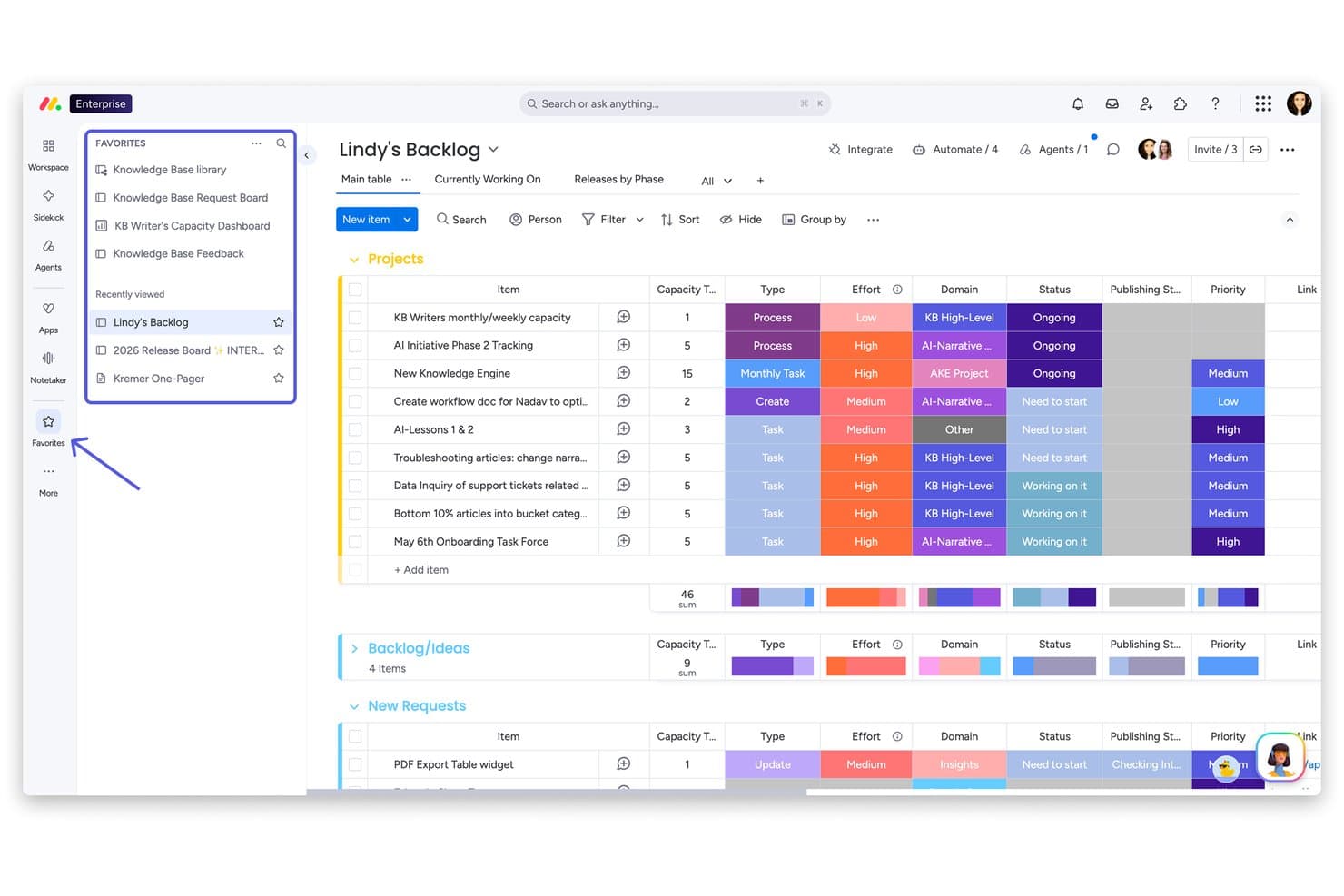
monday AI Workspace ofrece un tablero de tareas pendientes de proyectos con elementos agrupados, seguimiento del esfuerzo, columnas de estado, etiquetas de prioridad y una barra lateral de favoritos para una navegación rápida. monday AI Workspace es una plataforma de gestión del trabajo impulsada por IA que combina el seguimiento de proyectos, la automatización de flujos de trabajo, documentos colaborativos y paneles de control con múltiples vistas en tableros diseñados para equipos multifuncionales.
¿Para quién es más adecuado monday AI Workspace?
Es una opción excelente para equipos financieros de PYMES y empresas del mercado medio que necesitan automatizar aprobaciones, flujos de trabajo de cierre e informes multifuncionales sin depender de hojas de cálculo.
Por qué elegí monday AI Workspace
monday AI Workspace merece estar en mi lista de opciones principales por la forma en que sus agentes de IA y su creador de flujos de trabajo de IA gestionan la automatización financiera de maneras que Smartsheet sencillamente no iguala. Me gusta que los agentes de IA puedan enrutar de forma autónoma las solicitudes de aprobación, actualizar los estados de los tableros y marcar las tareas de cierre atrasadas sin activadores manuales. El creador de flujos de trabajo de IA me permite configurar una lógica de ramificación condicional en procesos de varios pasos, como las aprobaciones en cascada de cierre de fin de mes, sin escribir una sola línea de código.
Funciones principales de monday AI Workspace
- Paneles de proyectos con múltiples vistas: Consulta los proyectos en modos de cuadrícula, Gantt, Kanban, cronología y calendario para realizar un seguimiento flexible de los proyectos financieros.
- Controles de permisos granulares: Asigna permisos basados en roles y a nivel de tablero para gestionar quién puede ver, editar o aprobar datos financieros confidenciales.
- Documentos colaborativos en tiempo real: Crea y actualiza documentación financiera y listas de comprobación directamente dentro de la plataforma con colaboración activa del equipo.
- Integración nativa con QuickBooks: Conecta los tableros directamente con QuickBooks para sincronizar transacciones y datos contables sin herramientas de terceros.
Integraciones de monday AI Workspace
monday AI Workspace ofrece integraciones nativas con QuickBooks, Salesforce, HubSpot, Slack, Gmail, Google Drive, Microsoft Teams, OneDrive, Trello, Asana y Zapier. Hay una API disponible para integraciones personalizadas.
Pros and Cons
Pros:
- Automatización de flujos de trabajo financieros impulsada por IA
- Tableros con múltiples vistas para ciclos de cierre e informes
- Cadenas de aprobación personalizables para controles financieros
Cons:
- Complejidad limitada de las fórmulas de hojas de cálculo en comparación con Excel
- Los registros de auditoría no están disponibles en los planes más económicos
Learn more about monday AI Workspace:
Otras alternativas a Smartsheet
\u003cspan style=’font-weight: 400;’\u003eEstas son algunas alternativas adicionales a Smartsheet que no llegaron a mi lista final, pero que merece la pena considerar: \u003c/span\u003e
- 11ClickUpIdeal para un espacio de trabajo todo en uno
- 12WrikeIdeal para flujos de trabajo personalizables
- 13ProProfs ProjectMejor para la gestión de proyectos sencilla con registro de tiempo
Wie ich Smartsheet-Alternativen bewerte
Ich teile meine Bewertung in grundlegende Anforderungen – wie Tabellenansichten, Workflow-Automatisierung und ERP-Integrationen – sowie die Unterscheidungsmerkmale, die ein Tool für Finanzteams besonders machen.
Kernfunktionen (Mindestanforderungen für diese Liste)
Bei der Auswahl der Tools für meine Liste bewerte ich jedes einzelne auf einer Skala von 0 (bietet die Funktionalität nicht) bis 5 (überzeugt in diesem Bereich) hinsichtlich jeder der unten aufgeführten Kernfunktionen. Anschließend rechne ich die Gesamtpunktzahl des Tools in einen Prozentsatz um. Jedes Tool muss eine Mindestgesamtpunktzahl von 65 % erreichen, um in die engere Auswahl zu kommen.
- Tabellen-Ansicht im Spreadsheet-Stil: Ich achte auf eine vertraute Tabellenoberfläche mit Formeln, bedingter Formatierung und bereichsübergreifenden Bezügen, sodass Finanzteams leicht von Excel umsteigen können.
- Workflow-Automatisierung: Automatisierungen für wiederkehrende Aufgaben sind wichtig – zum Beispiel Freigabeketten für Budgetanfragen, Erinnerungen für Abschlussaufgaben oder Status-Updates, die durch Fälligkeitsdaten ausgelöst werden.
- Projektverfolgung in mehreren Ansichten: Ich prüfe, ob Gantt-, Kanban-, Kalender- und Dashboard-Ansichten vorhanden sind, damit Teams Prüfungszeitpläne oder Monatsabschluss-Zyklen auf ihre bevorzugte Weise managen können.
- Integration von Finanzdaten: Native Schnittstellen zu Plattformen wie QuickBooks, NetSuite, Xero oder Power BI zeigen mir, dass ein Tool in bestehende Finanztechnologie-Stacks passt.
- Berichte & Dashboards: Ich bewerte, ob benutzerdefinierte Dashboards mit Echtzeit-Datenübersichten, Abweichungsanalysen und Drilldowns erstellt werden können, statt sich auf statische Exporte zu verlassen.
- Berechtigungen & Prüfkontrollen: Feingranulare, rollenbasierte Zugriffsrechte, Zellensperrungen und Versionshistorie sind für mich ausschlaggebend, um zu bestätigen, dass ein Tool auch sensible Finanzdaten verarbeiten kann.
Nachdem ich eine Liste der Tools erstellt habe, die diese Kriterien erfüllen, schaue ich mir an, was jede Plattform besonders macht.
Differenzierende Faktoren (Was Anbieter unterscheidet)
So vergleiche und bewerte ich unterschiedliche Anbieter:
Herausragende Funktionen
Eine leistungsstarke Formelsprache macht einen echten Unterschied. Tools mit bereichsübergreifenden Bezügen und SUMIF-Logik ermöglichen es FP&A-Teams, rollierende Forecasts zu erstellen, ohne nach Excel exportieren zu müssen. Außerdem prüfe ich Freigabe-Workflows, da mehrstufige Freigaben bei Buchungsbelegen oder Budgetanfragen nachvollziehbare Prüfpfade schaffen. Auch KI-gestützte Analysen werden immer wichtiger: Anomalie-Erkennung bei Ausgabedaten oder automatische Kategorisierung von Transaktionen können stundenlange manuelle Prüfungen im Abschlussprozess einsparen.
Über Funktionen hinaus
Compliance- und Sicherheitsstandards sind mein Ausgangspunkt. Finanzteams, die mit sensiblen Daten arbeiten, benötigen mindestens eine SOC 2 Type II-Zertifizierung und SOX-konforme Prüfpfade. Auch die Preisstruktur ist relevant – ich achte auf Unterschiede zwischen Lese- und Bearbeitungsrechten, da bei vielen Finanzprozessen Beteiligte involviert sind, die meist nur Dashboards anschauen, aber keine Tabellen bearbeiten müssen. Skalierbarkeit ist ein weiterer Faktor: Ein Tool, das die Abschluss-Checkliste eines fünfköpfigen Buchhaltungsteams abdeckt, sollte auch die Konsolidierung mehrerer Einheiten unterstützen können, wenn das Unternehmen wächst.
¿Por qué buscar una alternativa a Smartsheet?
Aunque Smartsheet es una buena opción de software de gestión del trabajo basada en la nube, hay varios motivos por los que algunos usuarios buscan soluciones alternativas. Es posible que busques una alternativa a Smartsheet porque…
- Necesitas herramientas de automatización o de flujos de trabajo más avanzadas
- Tu equipo prefiere funciones de colaboración basadas en chat o en tiempo real
- Quieres una visualización de proyectos integrada que vaya más allá de las vistas de cuadrícula y de Gantt
- Necesitas integraciones más profundas con software específico de tu sector
- Consideras restrictivos los precios o los límites de usuarios de Smartsheet
- Necesitas una solución con funciones móviles más completas
Si alguna de estas situaciones te resulta familiar, has llegado al lugar adecuado. Mi lista incluye varias opciones de software de gestión del trabajo basada en la nube más adecuadas para los equipos que afrontan estos desafíos con Smartsheet y buscan soluciones alternativas.
Funciones principales de Smartsheet
Estas son algunas de las funciones principales de Smartsheet, que te ayudarán a contrastar y comparar lo que ofrecen las soluciones alternativas:
- Vistas de proyectos en cuadrícula, Gantt, tarjetas y calendario
- Flujos de trabajo automatizados y procesos de aprobación
- Herramientas de gestión y asignación de recursos
- Colaboración y comentarios en tiempo real
- Archivos adjuntos y uso compartido de documentos
- Paneles y generación de informes personalizables
- Fórmulas a nivel de celda y formato condicional
- Integración con Microsoft, Google y otras aplicaciones empresariales
- Registros de actividad y pistas de auditoría para el cumplimiento normativo
- Permisos basados en roles y controles de acceso de usuarios