

Bonsai reúne la facturación, los contratos, el seguimiento del tiempo y la gestión de proyectos en una sola plataforma, pero no será la opción adecuada para todas las empresas. Es posible que necesites una facturación más flexible, informes financieros más completos, mejores integraciones contables o una plataforma capaz de satisfacer necesidades más complejas a medida que crece tu empresa.
Al evaluar alternativas a Bonsai, presto especial atención a los flujos de trabajo financieros y administrativos que pueden volverse rápidamente engorrosos a medida que una empresa crece. La facturación y los pagos, el tiempo y los gastos facturables, los informes y las integraciones contables son importantes, pero también lo son los contratos, la gestión de clientes y las herramientas de flujo de trabajo que permiten que las operaciones diarias funcionen sin problemas.
En esta guía, he comparado las mejores alternativas a Bonsai en estas áreas para ayudarte a encontrar una plataforma que ofrezca el equilibrio adecuado entre control financiero, gestión de clientes y flexibilidad operativa.
¿Qué es Bonsai?
Bonsai es un software de gestión empresarial para autónomos diseñado para ayudar a autónomos y propietarios de pequeñas empresas a gestionar sus proyectos, facturas y contratos. Es habitual entre profesionales creativos, consultores y contratistas independientes que necesitan mantener organizadas las operaciones de su negocio. Funciones como el seguimiento del tiempo, la facturación y la gestión de contratos ayudan a simplificar las tareas administrativas, lo que te permite centrarte en tu trabajo. En general, Bonsai ofrece una plataforma centralizada para gestionar las operaciones de tu negocio como autónomo.
Tabla comparativa de alternativas a Bonsai
Esta tabla comparativa destaca los precios y las opciones de prueba gratuita de mis principales alternativas a Bonsai para ayudarte a encontrar una solución que se ajuste a tu presupuesto y a las necesidades de tu empresa.
| Tool | Best For | Trial Info | Price | ||
|---|---|---|---|---|---|
| 1 | Ideal para herramientas gratuitas de facturación | Plan gratuito disponible | Desde $11.67/mes (facturado anualmente) | Website | |
| 2 | La mejor opción para la productividad todo en uno | Plan gratuito disponible | Desde $7/usuario/mes (facturado anualmente) | Website | |
| 3 | Ideal para agilizar la gestión documental | Prueba gratuita de 14 días | Desde $19/usuario/mes (facturado anualmente) | Website | |
| 4 | Ideal para la gestión de negocios creativos | Prueba gratuita + demostración gratuita disponibles | Desde $35/mes | Website | |
| 5 | Ideal para la gestión de servicios todo en uno | Prueba gratuita + demostración gratuita disponibles | Desde $29/mes | Website | |
| 6 | Ideal para la gestión operativa de agencias | Prueba gratuita disponible | Desde $39/mes (facturado anualmente) | Website | |
| 7 | Ideal para la automatización de empresas de servicios | Demostración gratuita disponible | Precios disponibles previa solicitud | Website | |
| 8 | Ideal para profesionales independientes | Prueba gratuita disponible | Desde $29/mes (facturado anualmente) | Website | |
| 9 | La mejor opción para la eficiencia laboral impulsada por IA | Prueba gratuita de 14 días + plan gratuito disponible | Desde $9/usuario/mes (facturado anualmente) | Website | |
| 10 | Ideal para la gestión flexible de bases de datos | Plan gratuito + demostración gratuita disponible | Desde $20/usuario/mes (facturado anualmente) | Website |


Por qué confiar en nuestras recomendaciones de software
6,700+
Reviews
20
Industry experts
16+
Evaluation factors
14
Years
Nuestras reseñas reflejan nuestro criterio independiente, no un discurso de ventas. Descubra cómo mantenemos la transparencia.
Para esta guía, evaluamos las herramientas mediante pruebas prácticas e investigación independiente, puntuando las herramientas según nuestros criterios de selección.
Nuestras reseñas reflejan nuestro criterio editorial humano, no un discurso de ventas.
Opiniones sobre las mejores alternativas a Bonsai
A continuación encontrarás mis análisis detallados de las mejores alternativas a Bonsai que han entrado en mi lista breve. Mis reseñas ofrecen una visión detallada de las funciones principales, las ventajas y desventajas, las integraciones y los casos de uso ideales de cada herramienta para ayudarte a encontrar la mejor opción para ti.
 Ideal para herramientas gratuitas de facturación
- Plan gratuito disponible
- Desde $11.67/mes (facturado anualmente)
Visit WebsiteCustomer Rating:4.7/5
Invoice Ninja es una herramienta de facturación y cobro para que los trabajadores autónomos gestionen facturas, gastos y pagos. Invoice Ninja es un software de facturación y cobro diseñado para trabajadores autónomos y pequeñas empresas. Ofrece herramientas para crear facturas, realizar un seguimiento de los gastos y gestionar los pagos.
Por qué es una buena alternativa a Bonsai: Invoice Ninja se diferencia por sus herramientas gratuitas de facturación, ideales para trabajadores autónomos que buscan reducir costes. Puedes crear facturas profesionales fácilmente y realizar un seguimiento de los gastos sin costes adicionales. La plataforma admite múltiples pasarelas de pago, lo que ofrece flexibilidad para gestionar los pagos. La interfaz fácil de usar de Invoice Ninja facilita el inicio y la gestión de los procesos de facturación.
Funciones e integraciones destacadas:
Las funciones incluyen plantillas de facturas personalizables para adaptarlas a tu marca, seguimiento del tiempo para garantizar una facturación precisa y gestión de gastos para mantener las finanzas organizadas.
Las integraciones incluyen Stripe, PayPal, Authorize.Net, WePay, Braintree, Slack, Zapier, Xero, QuickBooks y Google Wallet.
Pros and Cons
Pros:
- Funciones gratuitas de facturación
- Admite múltiples pasarelas de pago
- Plantillas de facturas personalizables y adaptables a la marca
Cons:
- La contabilidad está limitada a usuarios de nivel empresarial
- La atención al cliente está limitada a los niveles de pago
Learn more about Invoice Ninja: La mejor opción para la productividad todo en uno
- Plan gratuito disponible
- Desde $7/usuario/mes (facturado anualmente)
Visit WebsiteCustomer Rating:4.7/5
ClickUp es una plataforma de productividad para gestionar tareas, documentos, objetivos y el seguimiento del tiempo. ClickUp es una herramienta de productividad y gestión de proyectos diseñada para equipos de todos los tamaños. Ayuda a los usuarios a gestionar tareas, documentos, objetivos y el seguimiento del tiempo.
Por qué es una buena alternativa a Bonsai: ClickUp ofrece una plataforma todo en uno que combina la gestión de tareas con la colaboración en documentos y el seguimiento del tiempo. Sus funciones personalizables se adaptan a las diversas necesidades de los equipos y mejoran la productividad. Puedes gestionar varios proyectos desde una sola interfaz, reduciendo la necesidad de utilizar múltiples herramientas. Las vistas flexibles y las capacidades de automatización de ClickUp también favorecen unos flujos de trabajo eficientes para los equipos.
Características destacadas e integraciones:
Características incluyen el seguimiento de objetivos para mantener a tu equipo concentrado, paneles personalizados para visualizar tus proyectos y el seguimiento del tiempo para supervisar la productividad.
Integraciones incluyen Slack, Google Drive, Dropbox, Microsoft Teams, Outlook, Zoom, GitHub, Salesforce, HubSpot y Evernote.
Pros and Cons
Pros:
- Herramientas de colaboración en tiempo real
- Admite el seguimiento de objetivos
- Suite integral de gestión de proyectos y tareas
Cons:
- La interfaz móvil carece de pantallas clave
- Exceso de notificaciones debido al gran volumen de datos
Learn more about ClickUp: Ideal para agilizar la gestión documental
- Prueba gratuita de 14 días
- Desde $19/usuario/mes (facturado anualmente)
Visit WebsiteCustomer Rating:4.5/5
PandaDoc es un software de automatización de documentos para crear y gestionar flujos de trabajo simplificados. PandaDoc es un software de automatización de documentos dirigido a empresas que necesitan crear y gestionar documentos de manera eficiente. Está diseñado para equipos de ventas, departamentos de recursos humanos y cualquier persona que necesite flujos de trabajo documentales eficientes.
Por qué es una buena alternativa a Bonsai: PandaDoc destaca por agilizar los procesos de gestión documental con sus funciones de automatización. Puedes crear, enviar y firmar documentos electrónicamente rápidamente, reduciendo el tiempo dedicado al papeleo. Sus análisis integrados ofrecen información sobre el rendimiento de los documentos y te ayudan a entender qué funciona mejor. Las plantillas y herramientas de edición del software aumentan aún más la eficiencia, lo que lo convierte en una opción sólida para tus necesidades documentales.
Funciones e integraciones destacadas:
Las funciones incluyen una biblioteca de plantillas personalizables para adaptarse a las necesidades de tu empresa, seguimiento en tiempo real para supervisar el estado de los documentos y capacidades de firma electrónica para finalizar contratos más rápidamente.
Las integraciones incluyen Salesforce, HubSpot, Zoho CRM, Pipedrive, Microsoft Dynamics, Slack, Google Drive, Dropbox, Stripe y QuickBooks.
Pros and Cons
Pros:
- Informes y análisis avanzados de la actividad
- Seguimiento de documentos integrado
- Cifrado de extremo a extremo y alojamiento seguro
Cons:
- Carece de herramientas esenciales de edición y formato
- Las funciones avanzadas están restringidas a los niveles superiores
Learn more about PandaDoc: Ideal para la gestión de negocios creativos
- Prueba gratuita + demostración gratuita disponibles
- Desde $35/mes

Dubsado es una herramienta de gestión empresarial para que los trabajadores independientes gestionen clientes, proyectos y facturación. Dubsado es una solución de gestión empresarial creada para emprendedores creativos y trabajadores independientes. Ayuda a los usuarios a gestionar las relaciones con los clientes, los proyectos y los procesos de facturación.
Por qué es una buena alternativa a Bonsai: Dubsado ofrece funciones de gestión empresarial creativa que se adaptan a las necesidades específicas de los trabajadores independientes. Sus flujos de trabajo personalizables permiten adaptar los procesos a tus requisitos concretos. Puedes automatizar las comunicaciones con los clientes y gestionar los proyectos de manera eficiente con su conjunto de herramientas. Las funciones de facturación y gestión de contratos de Dubsado también fortalecen las operaciones de tu negocio, lo que lo convierte en una opción versátil.
Funciones e integraciones destacadas:
Las funciones incluyen flujos de trabajo personalizables para adaptarse a tu modelo de negocio, comunicación automatizada con los clientes para ahorrar tiempo y herramientas completas de gestión de proyectos para mantener todo organizado.
Las integraciones incluyen QuickBooks, Xero, Stripe, Square, Zapier, Google Calendar, Gmail, Mailchimp, Zoom y Slack.
Pros and Cons
Pros:
- Plantillas de contratos personalizables y legalmente vinculantes
- Portales de clientes para clientes recurrentes
- Paneles con listas dinámicas de tareas pendientes
Cons:
- Informes básicos sin análisis avanzados
- No admite varias monedas en la facturación
Learn more about Dubsado: Ideal para la gestión de servicios todo en uno
- Prueba gratuita + demostración gratuita disponibles
- Desde $29/mes
Visit WebsiteCustomer Rating:4.7/5
OneSuite es una plataforma todo en uno para que las agencias gestionen clientes, proyectos, facturación y documentos. OneSuite es una plataforma todo en uno diseñada para empresas basadas en servicios, especialmente agencias, que buscan mejorar la gestión de clientes y la eficiencia operativa. Proporciona herramientas para la gestión de proyectos, CRM, facturación y gestión de documentos.
Por qué es una buena alternativa a Bonsai: OneSuite ofrece una gestión integral de servicios con funciones adaptadas a las necesidades de las agencias. Su portal del cliente fomenta la transparencia y mejora las interacciones con los clientes. El sistema de facturación de la plataforma admite pagos en línea, lo que garantiza transacciones financieras más fluidas. Además, las herramientas de gestión de proyectos de OneSuite ayudan a simplificar las operaciones desde la incorporación hasta la desvinculación, lo que la convierte en una opción versátil para las agencias.
Funciones e integraciones destacadas:
Funciones incluyen facturación personalizable para facilitar la gestión financiera, un centro de documentos para gestionar contratos y propuestas, y un portal del cliente para una colaboración segura.
Integraciones incluyen Stripe, PayPal, QuickBooks, Google Calendar, Zapier, Slack, Zoom, Mailchimp, Microsoft Teams y HubSpot.
Pros and Cons
Pros:
- Almacenamiento y uso compartido seguros de archivos
- Capacidades de autoservicio del cliente
- Compatibilidad con múltiples pasarelas de pago
Cons:
- La aplicación móvil carece de todas las funciones de escritorio
- Funciones limitadas de automatización de flujos de trabajo
Learn more about Onesuite: Ideal para la gestión operativa de agencias
- Prueba gratuita disponible
- Desde $39/mes (facturado anualmente)

ManyRequests es una plataforma de portal de clientes para que las agencias gestionen proyectos, clientes y facturación. ManyRequests es una plataforma diseñada para que las agencias gestionen clientes, proyectos y facturación. Está dirigida principalmente a empresas de servicios, como agencias de diseño, marketing y desarrollo. Sus funciones principales incluyen un portal de clientes con marca propia, gestión de proyectos y facturación.
Por qué es una buena alternativa a Bonsai: ManyRequests ofrece un portal de clientes con marca propia, seguimiento del tiempo y funciones de CRM que respaldan la gestión operativa de las agencias. Puedes gestionar eficazmente las solicitudes de los clientes y realizar un seguimiento del progreso de los proyectos. Las funciones de facturación de la plataforma permiten sincronizar los pagos y la gestión de proyectos en un solo lugar, sin necesidad de herramientas adicionales. Sus herramientas de informes proporcionan información valiosa sobre la satisfacción de los clientes y las estadísticas financieras.
Características e integraciones destacadas:
Las características incluyen un portal de clientes para centralizar la interacción con ellos, seguimiento del tiempo para una facturación precisa y herramientas de gestión de proyectos para mantener todo organizado.
Las integraciones incluyen Zapier, Calendly, HiBob, Xero, Stripe, Google Calendar, Slack, QuickBooks, Asana y HubSpot.
Pros and Cons
Pros:
- Portal de clientes y dominios con marca personalizada
- Facturación integrada con la gestión de cobros
- Asistencia multilingüe para clientes
Cons:
- Funciones limitadas de generación de informes y recopilación de datos
- No permite jerarquías de tareas ni delegación de subtareas
Learn more about ManyRequests: Ideal para la automatización de empresas de servicios
- Demostración gratuita disponible
- Precios disponibles previa solicitud
Visit WebsiteCustomer Rating:4.4/5
Accelo es una plataforma en la nube que automatiza el trabajo con clientes y aumenta la productividad de los equipos de servicios. Accelo es una plataforma de automatización de operaciones de servicios basada en la nube, diseñada para empresas de servicios. Ayuda a gestionar el trabajo con clientes, centralizar las operaciones y mejorar la productividad del equipo.
Por qué es una buena alternativa a Bonsai: Accelo ofrece automatización para empresas de servicios con funciones como gestión de proyectos, seguimiento de clientes y facturación. Sus flujos de trabajo automatizados garantizan una gestión eficiente de las tareas y reducen el trabajo manual. Los informes en tiempo real de la plataforma proporcionan información sobre el rendimiento de tu empresa, lo que te ayuda a tomar decisiones fundamentadas. El portal de clientes de Accelo mejora la comunicación, convirtiéndolo en una solución completa para las necesidades de tu empresa de servicios.
Funciones e integraciones destacadas:
Las funciones incluyen flujos de trabajo automatizados para ahorrar tiempo, informes en tiempo real para tomar mejores decisiones y un portal de clientes para mejorar la comunicación.
Las integraciones incluyen QuickBooks, Xero, Slack, Google Workspace, Office 365, Salesforce, HubSpot, Mailchimp, Stripe y PayPal.
Pros and Cons
Pros:
- Gestión de proyectos integrada con la facturación
- Informes en tiempo real
- Herramientas de gestión de recursos
Cons:
- Funcionalidad limitada de la aplicación móvil
- Los datos de los proyectos están aislados y fragmentados
 Ideal para profesionales independientes
- Prueba gratuita disponible
- Desde $29/mes (facturado anualmente)
Visit WebsiteCustomer Rating:5/5
HoneyBook es una plataforma de AI para gestionar proyectos, pagos y el crecimiento empresarial. HoneyBook es una plataforma de relaciones con clientes impulsada por AI, diseñada para profesionales independientes en EE. UU. y Canadá. Ofrece herramientas para gestionar clientes, proyectos, pagos y el crecimiento empresarial.
Por qué es una buena alternativa a Bonsai: HoneyBook proporciona un sistema completo de gestión de relaciones con clientes que atiende específicamente a profesionales independientes. Sus herramientas de AI aumentan la productividad al automatizar tareas como propuestas, programación y facturación. Las capacidades de CRM de la plataforma te ayudan a gestionar las interacciones con los clientes de manera eficiente. Además, el enfoque de HoneyBook en la gestión de proyectos y finanzas respalda el crecimiento y la organización empresarial.
Funciones e integraciones destacadas:
Las funciones incluyen herramientas de gestión de proyectos para mantener tu trabajo organizado, automatizaciones impulsadas por AI para ahorrarte tiempo y una plataforma centralizada para contratos y facturas. La Academia de HoneyBook, que ofrece una amplia biblioteca de clases magistrales, seminarios web y tutoriales, es una ventaja adicional.
Las integraciones incluyen QuickBooks, Google Calendar, Zapier, Mailchimp, Gmail, Square, Slack, Zoom, Outlook y Stripe.
Pros and Cons
Pros:
- Herramientas de CRM impulsadas por AI
- Acceso a las herramientas de aprendizaje de la Academia de HoneyBook
- Automatización de flujos de trabajo personalizable
Cons:
- Limitado a EE. UU. y Canadá
- El precio puede aumentar con los complementos
Learn more about HoneyBook: La mejor opción para la eficiencia laboral impulsada por IA
- Prueba gratuita de 14 días + plan gratuito disponible
- Desde $9/usuario/mes (facturado anualmente)
Visit WebsiteCustomer Rating:5/5
La Gestión del trabajo de monday.com es una plataforma flexible para que los equipos planifiquen, realicen un seguimiento y gestionen proyectos de manera eficiente. La plataforma de Gestión del trabajo de monday.com está diseñada para la colaboración en equipo y la gestión de proyectos. Presta servicio a empresas de todos los tamaños al ofrecer herramientas para planificar, realizar un seguimiento y entregar el trabajo de manera eficiente.
Por qué es una buena alternativa a Bonsai: el software de gestión del trabajo de monday.com proporciona herramientas impulsadas por IA que aumentan la eficiencia y la colaboración en el trabajo. Sus paneles personalizables permiten adaptar las vistas según las necesidades de tu equipo. Las funciones de automatización reducen las tareas manuales, liberando tiempo para trabajos más importantes. Las líneas de tiempo visuales y el seguimiento del progreso de la plataforma mantienen a todos alineados y dentro del calendario previsto.
Características e integraciones destacadas:
Las características incluyen automatización para reducir las tareas repetitivas, líneas de tiempo visuales para el seguimiento de proyectos y paneles personalizables que se adaptan a tus necesidades específicas.
Las integraciones incluyen Slack, Microsoft Teams, Google Calendar, Dropbox, Zoom, Excel, Outlook, Jira, Salesforce y Trello.
Pros and Cons
Pros:
- Líneas de tiempo visuales de proyectos y paneles personalizables
- Herramientas de colaboración interfuncional
- Seguimiento de carteras y actualizaciones de proyectos
Cons:
- Las herramientas de administración están bloqueadas en los planes prémium
- Las funciones avanzadas requieren configuración
Learn more about monday.com: 10Ideal para la gestión flexible de bases de datos
Airtable
- Plan gratuito + demostración gratuita disponible
- Desde $20/usuario/mes (facturado anualmente)
Visit WebsiteCustomer Rating:4.6/5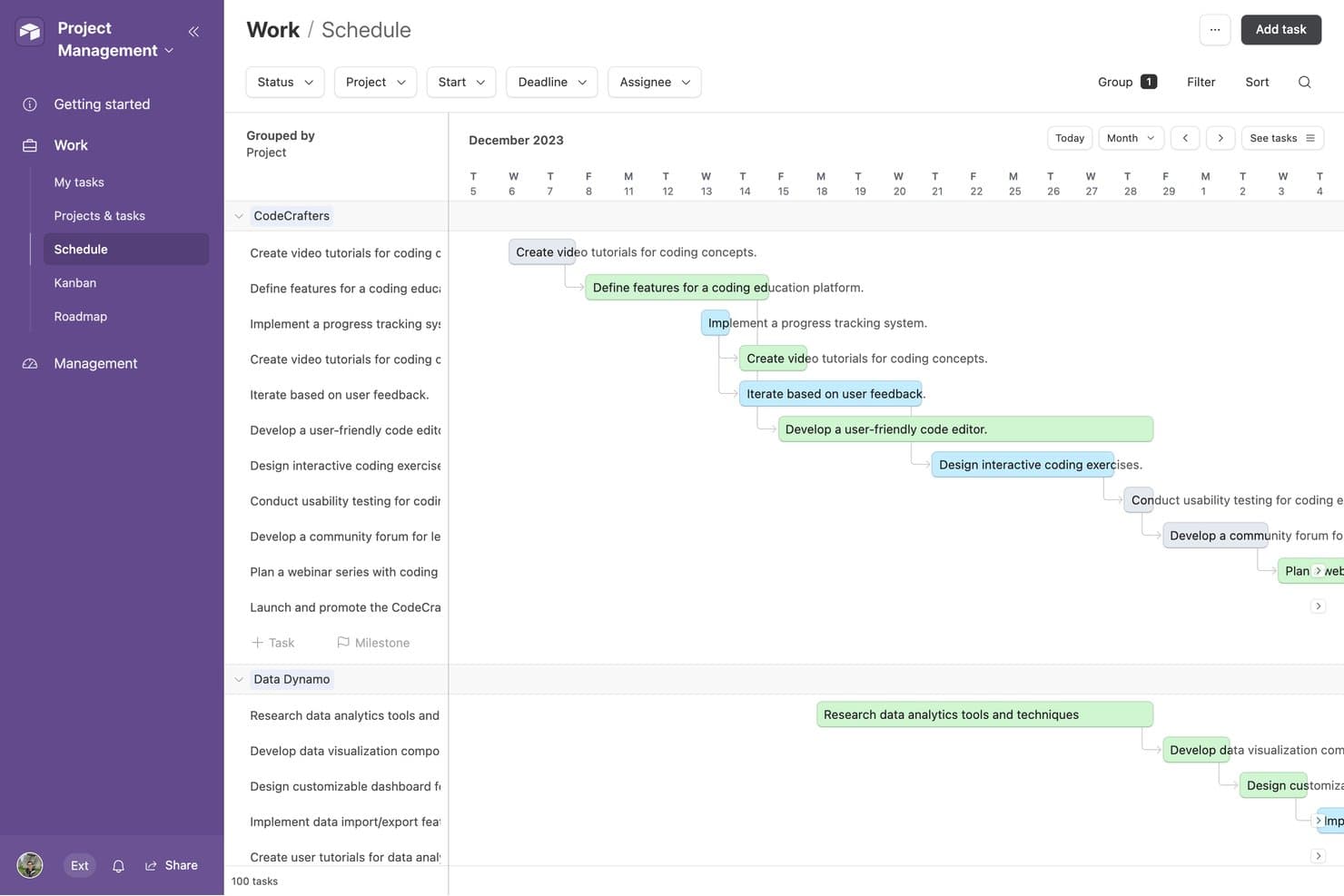
Airtable ofrece una vista de programación que muestra las tareas del proyecto agrupadas por proyecto, con flechas de dependencia y cronogramas codificados por colores en un diseño de calendario mensual. Airtable es una plataforma de bases de datos relacionales sin código diseñada para autónomos, agencias y equipos de operaciones. Ofrece herramientas para crear flujos de trabajo personalizados, realizar un seguimiento de clientes y proyectos, y organizar datos conectados sin necesidad de conocimientos de programación.
Por qué es una buena alternativa a Bonsai: Airtable ofrece un enfoque flexible para la gestión de clientes, proyectos y flujos de trabajo mediante su modelo de base de datos relacional. Puedes vincular registros de clientes, proyectos y entregables en todo tu espacio de trabajo, lo que lo hace más adaptable que una hoja de cálculo estándar. Sus más de 40 tipos de campos, incluidos los de duración, moneda y códigos de barras, ayudan a los equipos a estructurar los datos en función de sus procesos específicos. Las herramientas visuales, como las vistas de Gantt y de cronograma, también facilitan la planificación de proyectos y la gestión de flujos de trabajo operativos.
Funciones e integraciones destacadas:
Entre sus funciones se incluyen formularios personalizables para recopilar información de clientes y proyectos, controles detallados de permisos para gestionar el acceso de los colaboradores, así como un historial de cambios y registros de auditoría para realizar un seguimiento de las ediciones y restaurar versiones anteriores. Airtable también ofrece varias vistas visuales, incluidas las vistas de Gantt y de cronograma, para gestionar proyectos y flujos de trabajo.
Integraciones: incluyen Google Workspace, Slack, Salesforce, Jira, GitHub, Dropbox y Zapier. Airtable también proporciona una API para crear integraciones personalizadas.
Pros and Cons
Pros:
- Estructura de base de datos relacional muy flexible
- Varias vistas para organizar los datos de los clientes
- Las automatizaciones reducen las tareas administrativas repetitivas
Cons:
- No incluye herramientas nativas de facturación o cobro
- Los informes financieros requieren una configuración manual considerable
Learn more about Airtable:
Otras alternativas a Bonsai
Estas son algunas alternativas adicionales a Bonsai que no entraron en mi lista breve, pero que siguen mereciendo la pena:
- 11TogglIdeal para el seguimiento sencillo del tiempo
- 12Brain LinkIdeal para tomar notas y colaborar
Cómo evalúo las alternativas a Bonsai
Evalúo cada herramienta en función de requisitos básicos—facturación, firmas electrónicas, control de tiempo—y luego busco factores diferenciadores como automatización de impuestos y portales para clientes.
Funcionalidad principal (Los requisitos mínimos para esta lista)
Cuando selecciono herramientas para mi lista, califico cada una en una escala de 0 (no ofrece la funcionalidad) a 5 (destaca en esta área) para cada funcionalidad principal que se enumera a continuación. Luego, calculo la puntuación total de la herramienta en porcentaje. Cada herramienta necesita alcanzar una puntuación total mínima del 65% para ser considerada para su inclusión.
- Facturación y pagos: Verifico si puedes crear facturas con tu marca, configurar ciclos de facturación recurrentes y cobrar pagos a través de múltiples pasarelas como Stripe o PayPal.
- Propuestas y contratos: Cada herramienta debe permitirte redactar propuestas, adjuntar contratos y capturar firmas electrónicas para que los clientes puedan aprobar y firmar sin salir de la plataforma.
- Seguimiento de tiempo y gastos: Busco un temporizador integrado, asignación de tarifas facturables por cliente o proyecto, y registro de gastos que se vinculen directamente a las facturas.
- Gestión de clientes y proyectos: Aquí importa una base de datos centralizada de clientes junto con el seguimiento de proyectos—organizar entregables, plazos y archivos por compromiso.
- Informes financieros y contabilidad: Evalúo si la herramienta genera resúmenes de ganancias y pérdidas, rastrea ingresos y gastos por categoría, y produce informes listos para impuestos.
- Automatización de tareas y flujos de trabajo: Los disparadores automáticos para cosas como enviar recordatorios de facturas, incorporar nuevos clientes o crear tareas de seguimiento realmente ahorran horas administrativas.
Una vez que tengo una lista de herramientas que cumplen con este criterio, considero qué hace destacar a cada plataforma.
Factores diferenciadores (Qué distingue a los proveedores)
Así es como comparo y contrasto los diferentes proveedores:
Características destacadas
La automatización fiscal es un gran factor diferenciador—busco herramientas que manejen estimaciones trimestrales, seguimiento de deducciones y la generación de formularios 1099 sin necesidad de usar una plataforma aparte. El portal para clientes también es importante, especialmente para contadores que gestionan varios compromisos donde los clientes deben revisar facturas o cargar documentos por su cuenta. También evalúo qué tan bien cada herramienta se integra con software de contabilidad como QuickBooks o Xero, ya que la duplicación de datos entre sistemas desconectados genera verdaderos dolores de cabeza para la conciliación.
Más allá de las características
La estructura de precios es importante en esta categoría. Evalúo si una herramienta escala de manera razonable a medida que agregas clientes o miembros al equipo, ya que muchos freelancers y dueños de pequeñas firmas comienzan solos y crecen con el tiempo. La seguridad es otro factor que valoro—al manejar datos financieros sensibles, reviso los estándares de cifrado, el acceso basado en roles y las certificaciones de cumplimiento. También considero la experiencia de incorporación, porque un contador independiente sin soporte IT necesita una guía para la configuración y rutas de migración desde herramientas como Bonsai, no un proceso de implementación de varias semanas.
¿Por qué buscar una alternativa a Bonsai?
Aunque Bonsai es una buena opción de software de gestión empresarial para autónomos, hay varios motivos por los que algunos usuarios buscan soluciones alternativas. Es posible que estés buscando una alternativa a Bonsai porque…
- Necesitas más opciones de personalización
- Tu equipo es más grande de lo que Bonsai admite
- Necesitas cumplir requisitos específicos de tu sector
- Buscas mejores capacidades de integración
- Necesitas compatibilidad con varias divisas
- Te encuentras fuera de la zona geográfica en la que está disponible Bonsai
Si alguna de estas situaciones te resulta familiar, has llegado al lugar adecuado. Mi lista incluye varias opciones de software de gestión empresarial para autónomos más adecuadas para equipos que se enfrentan a estos desafíos con Bonsai y buscan soluciones alternativas.
Funciones principales de Bonsai
Estas son algunas de las funciones principales de Bonsai, para ayudarte a contrastar y comparar lo que ofrecen las soluciones alternativas:
- Automatización: Automatiza la gestión de tareas, la facturación y los flujos de trabajo de proyectos para mejorar la productividad.
- Herramientas de colaboración: Ofrece espacios de trabajo compartidos para la colaboración del equipo y la interacción con los clientes.
- Control de acceso: Proporciona gestión de permisos y roles de usuario personalizados para la seguridad de los datos.
- Interfaz fácil de usar: Cuenta con una navegación intuitiva y un diseño adaptable para facilitar su uso en distintos dispositivos.
- Gestión de facturas: Permite personalizar la numeración de las facturas y realizar incrementos automáticos para mantener organizados los registros financieros.
- Integración de pagos: Admite múltiples pasarelas y opciones de pago para realizar transacciones seguras.
- Facturas personalizables: Permiten crear diseños de facturas adaptados y gestionar las partidas de forma flexible.
- Flujos de trabajo personalizados: Facilita la creación de flujos de trabajo personalizados y activadores de automatización para ofrecer un servicio uniforme.
- Portal de pagos para clientes: Ofrece un portal en línea seguro para que los clientes gestionen sus pagos y facturas.
- Ciclos de facturación flexibles: Permite personalizar los calendarios de facturación y automatizar los procesos de facturación.