

Reseña de Intuit Enterprise Suite: Características Clave, Ventajas, Desventajas y Detalles de Precios
Una hoja de cálculo está abierta en una pestaña, un informe financiero en otra y aún queda combinar cifras de distintas entidades antes de que termine el día. A medida que su empresa crece, gestionar las finanzas entre subsidiarias, predecir el rendimiento y mantener los flujos de trabajo organizados puede volverse complicado sin el software ERP adecuado. Ahí es donde entran plataformas como Intuit Enterprise Suite […]

Revisamos las herramientas de forma independiente, y las comisiones ayudan a financiar nuestras pruebas. Consulta nuestra política de transparencia, nuestra metodología o sugiere una herramienta.
Una hoja de cálculo está abierta en una pestaña, un informe financiero en otra y los números de diferentes entidades aún deben combinarse antes de que termine el día.
A medida que tu empresa crece, gestionar las finanzas entre filiales, pronosticar el rendimiento y mantener los flujos de trabajo organizados puede volverse rápidamente complicado sin el software ERP adecuado.
Ahí es donde entran plataformas como Intuit Enterprise Suite.
En esta guía, desgloso sus características, precios, puntos fuertes y mejores casos de uso para que puedas entender cómo funciona y decidir si se ajusta a las necesidades de gestión financiera de tu organización.
Intuit Enterprise Suite Evaluation Summary

4.6/5
- Pricing upon request
- Free demo available
Por qué confiar en nuestras recomendaciones de software
6,700+
Reviews
20
Industry experts
16+
Evaluation factors
14
Years
Nuestras reseñas reflejan nuestro criterio independiente, no un discurso de ventas. Descubra cómo mantenemos la transparencia.
Para esta guía, evaluamos las herramientas mediante pruebas prácticas e investigación independiente, puntuando las herramientas según nuestros criterios de selección.
Nuestras reseñas reflejan nuestro criterio editorial humano, no un discurso de ventas.
Intuit Enterprise Suite Overview
Pros
- Multi-entity management supports complex organizational structures.
- AI-powered forecasting and insights help businesses analyze financial data.
- Built-in migration tools support transitions from QuickBooks Desktop and Advanced.
Cons
- The platform lacks sufficient training for new releases.
- Features can feel overwhelming.
- Reports take longer than expected to load.
Is Intuit Enterprise Suite Right For Your Needs?
Who Would be a Good Fit for Intuit Enterprise Suite?
Intuit Enterprise Suite is best suited for growing or mid-sized organizations that need advanced financial management capabilities. Businesses managing multiple entities, relying on forecasting, or handling structured financial workflows can benefit from its automation, reporting, and consolidated visibility tools.
It’s particularly valuable for data-driven teams, product-based companies managing inventory, and organizations that need detailed financial tracking across departments, locations, or projects.
- Multi-Entity BusinessesCompanies managing multiple subsidiaries, brands, or locations that need consolidated financial visibility while maintaining separate books.
- Finance Teams Focused on ForecastingOrganizations that rely on financial planning and projections to guide budgeting, expansion, and strategic decisions.
- Businesses With Structured Financial WorkflowsCompanies with complex approval processes that want to automate financial workflows and improve internal controls.
- Growing Service BusinessesService businesses needing project profitability tracking, workforce management, and consolidated financial planning across departments benefit significantly.
- Product-Based BusinessesCompanies that manage inventory and sales orders and need accounting, inventory, and order workflows connected in one system.
- Construction FirmsConstruction companies tracking job costing, project budgets, and multi-entity structures gain stronger operational visibility.
Who Would be a Bad Fit for Intuit Enterprise Suite?
Intuit Enterprise Suite may not be the best choice for businesses with simple financial needs or limited operational complexity. Freelancers, very small businesses, or organizations without a dedicated accounting staff may find the platform more advanced than necessary.
Companies looking for lightweight bookkeeping tools or those that rarely rely on forecasting, reporting, or multi-entity management may be better served by simpler accounting solutions.
- Freelancers and Independent ContractorsIndividuals managing basic income and expenses typically don’t need the platform’s multi-entity management, forecasting tools, or workflow automation.
- Very Small BusinessesBusinesses that only need basic accounting features, such as invoicing and expense tracking, may find the platform unnecessarily complex.
- Businesses Without Dedicated Accounting StaffOrganizations without internal finance teams may struggle to manage a platform designed for structured financial processes and reporting.
- Inventory-Heavy ManufacturersManufacturers needing advanced inventory controls like serial numbers, bins, builds, or barcode workflows may struggle.
- Businesses Looking for Lightweight Accounting ToolsCompanies seeking a simple bookkeeping solution may be better served by smaller accounting platforms rather than a full financial management suite.
- Early-Stage StartupsStartups without operational complexity or financial teams gain minimal benefit from enterprise-level accounting features.
Cómo probamos y puntuamos las herramientas
Hemos dedicado años a construir, perfeccionar y mejorar nuestro sistema de evaluación y puntuación de software. La rúbrica está diseñada para capturar los matices de la selección de software y lo que hace que una herramienta sea efectiva, enfocándose en los aspectos críticos del proceso de toma de decisiones. A continuación, puedes ver exactamente cómo funcionan nuestras pruebas y puntuación en siete criterios. Esto nos permite proporcionar una evaluación imparcial del software basada en la funcionalidad principal, características destacadas, facilidad de uso, onboarding, atención al cliente, integraciones, opiniones de clientes y relación calidad-precio.
Funcionalidad principal (25% de la puntuación final)
Nuestro punto de partida siempre es la funcionalidad principal de la herramienta. ¿Tiene las funciones básicas que un usuario esperaría ver? ¿Alguna de estas características principales está limitada a planes de precios superiores? En esencia, esperamos que una herramienta esté a la altura de las capacidades básicas de sus competidores.
Características destacadas (25% de la puntuación final)
A continuación, evaluamos las características únicas y sobresalientes que van más allá de la funcionalidad principal normalmente encontrada en herramientas de este tipo. Una puntuación alta refleja funciones especializadas o únicas que hacen el producto más rápido, eficiente o que aportan valor adicional al usuario. También evaluamos lo fácil que es integrarse con otras herramientas que normalmente forman parte del stack tecnológico para ampliar la funcionalidad y utilidad del software. Las herramientas que ofrecen numerosas integraciones nativas, conexiones con terceros y acceso API para crear integraciones personalizadas obtienen la mejor puntuación.
Facilidad de uso (10% de la puntuación final)
Consideramos cuán rápido y fácil es ejecutar las tareas definidas en la funcionalidad principal usando la herramienta. El software que obtiene la puntuación más alta está bien diseñado, es intuitivo, ofrece aplicaciones móviles, proporciona plantillas y hace que tareas relativamente complejas parezcan simples.
Onboarding (10% de la puntuación final)
Sabemos lo importante que es una adopción rápida del equipo para una nueva plataforma, por lo que evaluamos cuán sencillo es aprender y utilizar una herramienta con una formación mínima. Analizamos lo rápido que un miembro del equipo puede configurarse y empezar a usar la herramienta sin experiencia previa. Las soluciones con alta puntuación indican que se requiere poco o ningún soporte.
Atención al cliente (10% de la puntuación final)
Revisamos cuán rápido y sencillo es salir de un atasco y encontrar ayuda por teléfono, chat en vivo o base de conocimiento. Las herramientas y empresas que proporcionan soporte en tiempo real obtienen la mejor puntuación, mientras que los chatbots obtienen la peor.
Opiniones de clientes (10% de la puntuación final)
Además de nuestras propias pruebas y evaluaciones, consideramos el net promoter score de clientes actuales y anteriores. Revisamos la probabilidad de que, de tener la opción, elijan nuevamente la herramienta por su funcionalidad principal. Un software con alta puntuación refleja un alto net promoter score de clientes presentes o pasados.
Relación calidad-precio (10% de la puntuación final)
Por último, considerando todos los demás criterios, revisamos el precio medio de los planes de entrada frente a las funciones principales y analizamos el valor de los demás criterios de evaluación. El software que ofrece más por menos obtiene una puntuación superior.
Core Features
Multi-Entity Financial Management
Manage multiple subsidiaries or business units in one platform with consolidated financial reporting and cross-entity visibility.
Workflow Automation
Automate financial approvals and operational workflows to reduce manual tasks and improve internal controls across your organization.
Business Intelligence and Reporting
Generate customizable financial reports, dashboards, and KPIs to monitor company performance and analyze financial data in real time.
Inventory and Order Management
Track inventory, manage sales orders, and connect operational workflows with accounting data to streamline order-to-cash processes.
Dimension Enhancements
Assign dimensions to transactions to track financial performance across departments, projects, or locations, with options for faster and bulk assignment.
Industry-Specific Business Modules
Intuit Enterprise Suite includes capabilities designed for industries like construction and professional services, helping businesses manage project budgets, proposals, and operational workflows.

Standout Features
AI-Powered Financial Forecasting
Intuit Enterprise Suite uses AI-powered forecasting to analyze historical data and generate financial projections up to three years ahead.
Real-Time Consolidated Financial Reporting
Intuit Enterprise Suite allows finance teams to generate consolidated financial reports across multiple entities, giving organizations a unified view of financial performance without manually combining data from separate systems.

Ease of Use
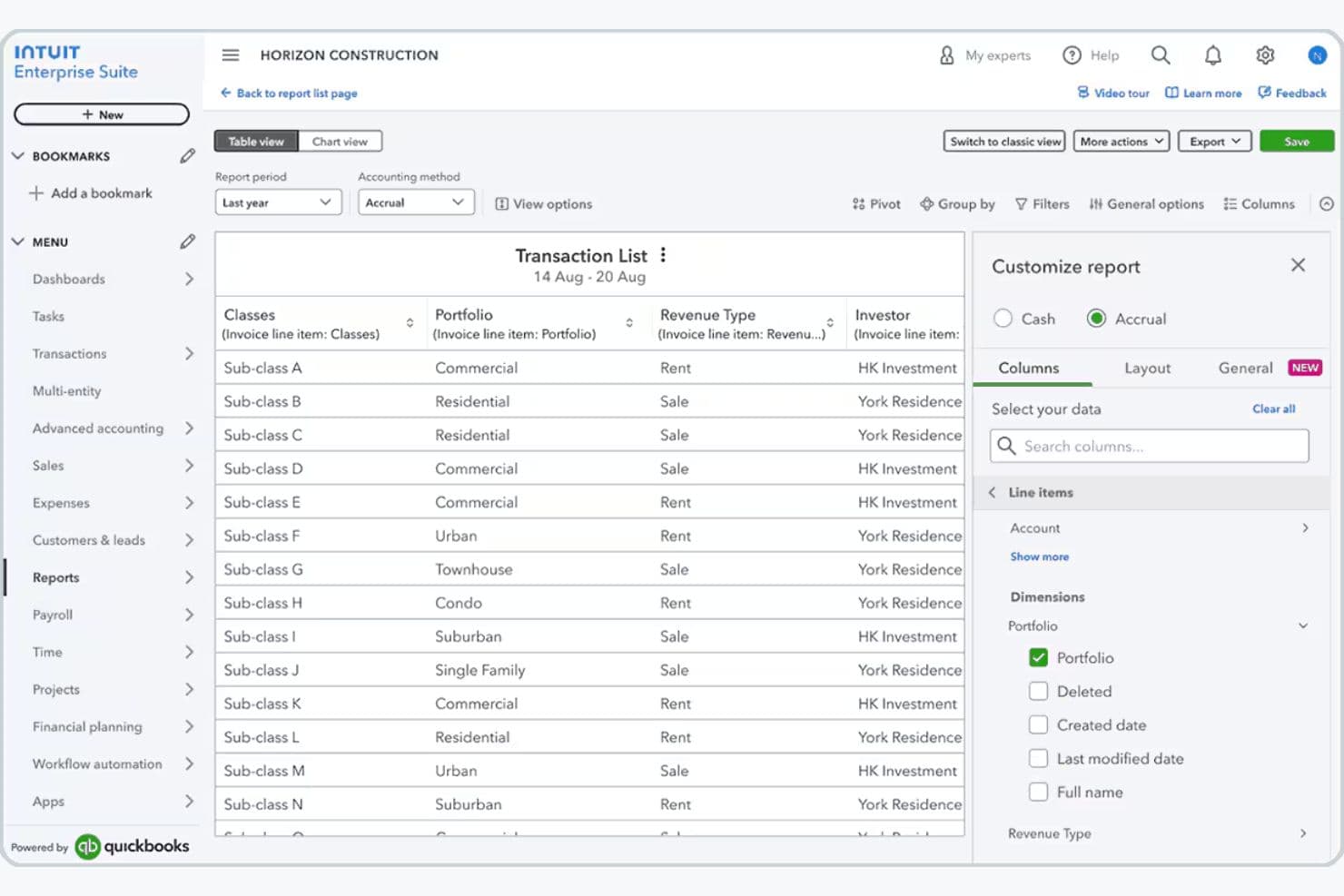
Intuit Enterprise Suite is generally easy to use, especially if you already use QuickBooks, since the interface follows familiar design patterns that shorten your learning curve.
You can manage accounting, payroll, reporting, and multiple entities in one cloud platform, making it easier to collaborate, access data anywhere, and reduce manual work. Most users find the interface intuitive and time-saving, though the advanced features—like multi-entity management and dimensional reporting—can feel overwhelming if you’re new to ERP accounting systems.
Onboarding
Intuit Enterprise Suite offers guided onboarding through a dedicated Customer Success Manager who helps businesses configure the platform, migrate data, and train their teams.
Companies transitioning from QuickBooks or other systems receive migration support from Intuit’s implementation team, while professional services and training resources help organizations adopt the platform more quickly.
This structured onboarding approach allows you to move to the platform with minimal disruption while ensuring your workflows, financial structures, and integrations are properly configured.
Customer Support
Intuit Enterprise Suite provides several customer support options to help businesses adopt and maintain the platform. Customers typically work with a dedicated Customer Success Manager who serves as a primary contact for onboarding, platform configuration, and ongoing guidance.
Additional support is available through phone assistance with Intuit product experts, a searchable knowledge base of help articles, and community forums where users can share solutions and best practices.
Together, these support channels provide both direct assistance and self-service resources for troubleshooting and platform optimization.

Integrations
With Intuit Enterprise Suite, you can connect the platform to hundreds of third-party apps through the broader QuickBooks ecosystem. For example, you can connect Mailchimp for marketing, QuickBooks Payroll and QuickBooks Time for workforce management, and various CRM, project management, and ecommerce apps available through the QuickBooks App Store, helping you keep financial and operational data synced across systems.
If you need deeper customization, you can also use the QuickBooks Online API, which works with Intuit Enterprise Suite out of the box and lets developers build custom integrations or connect internal tools—though if you manage multiple entities, you currently need to connect integrations to each entity individually.

Value for Money
Because pricing is tailored to each business, you’ll need to schedule a consultation with Intuit to receive a quote and determine the appropriate configuration for their needs. This approach allows companies to scale the platform as they grow while paying only for the capabilities and operational scope relevant to their organization.
The final cost depends on factors such as the number of entities, users, modules required, and the complexity of the organization’s financial structure.

Intuit Enterprise Suite Specs
- Accounts Payable: Yes
- Accounts Receivable: Yes
- API: Yes
- Batch Permissions & Access: No
- Budgeting: Yes
- Calendar Management: No
- Customer Management: No
- Dashboard: Yes
- Data Export: Yes
- Data Import: Yes
- Data Visualization: Yes
- Expense Tracking: Yes
- External Integrations: Yes
- Forecasting: Yes
- General Account Ledger: Yes
- Inventory Tracking: Yes
- Lead Management: No
- Lead Scoring: No
- Marketing Automation: No
- Multi-User: Yes
- Notifications: Yes
- Password & Access Management: No
- Payroll: Yes
- Project Management: Yes
- Scheduling: No
- Supplier Management: Yes
- Tax Management: Yes
- Third-Party Plugins/Add-Ons: Yes
- Travel Management: No
Intuit Enterprise Suite FAQs
Intuit Enterprise Suite Company Overview & History
Intuit Enterprise Suite is part of Intuit, a global financial technology company headquartered in Mountain View, California. Intuit is known for building widely used financial software, including QuickBooks, TurboTax, Mailchimp, and Credit Karma.
The platform combines financial management, payroll, payments, automation, and business intelligence tools in a single system to help companies streamline operations and scale efficiently.
Intuit Enterprise Suite Major Milestones
- 1983: Intuit Inc. was founded in Palo Alto, California.
- 2024: Intuit launches Intuit Enterprise Suite, an AI-powered financial management platform designed for growing mid-market businesses.
- 2025: Intuit continues expanding the platform with updates focused on automation, reporting, and operational efficiency.