

Reseña de OpenEMR: Ventajas, Desventajas, Funciones y Precios Explicados
OpenEMR destaca como una solución flexible y de código abierto para la facturación médica, ofreciendo funciones sólidas y personalización sin costo de licencia.

Revisamos las herramientas de forma independiente, y las comisiones ayudan a financiar nuestras pruebas. Consulta nuestra política de transparencia, nuestra metodología o sugiere una herramienta.
OpenEMR is an open-source medical invoicing software built for healthcare practices that need to handle billing, claims processing, and patient records in one place—without paying per-seat licensing fees. I'd consider it if your practice has the IT resources to manage a self-hosted setup and wants full control over its billing configuration. Compared to a paid platform like Kareo, OpenEMR gives you more flexibility to customize workflows and removes recurring subscription costs, making it a practical option for cost-conscious practices willing to invest in the setup.
OpenEMR Evaluation Summary
3.9/5
- Pricing upon request
- Free demo available
Por qué confiar en nuestras recomendaciones de software
6,700+
Reviews
20
Industry experts
16+
Evaluation factors
14
Years
Nuestras reseñas reflejan nuestro criterio independiente, no un discurso de ventas. Descubra cómo mantenemos la transparencia.
Para esta guía, evaluamos las herramientas mediante pruebas prácticas e investigación independiente, puntuando las herramientas según nuestros criterios de selección.
Nuestras reseñas reflejan nuestro criterio editorial humano, no un discurso de ventas.
OpenEMR Overview
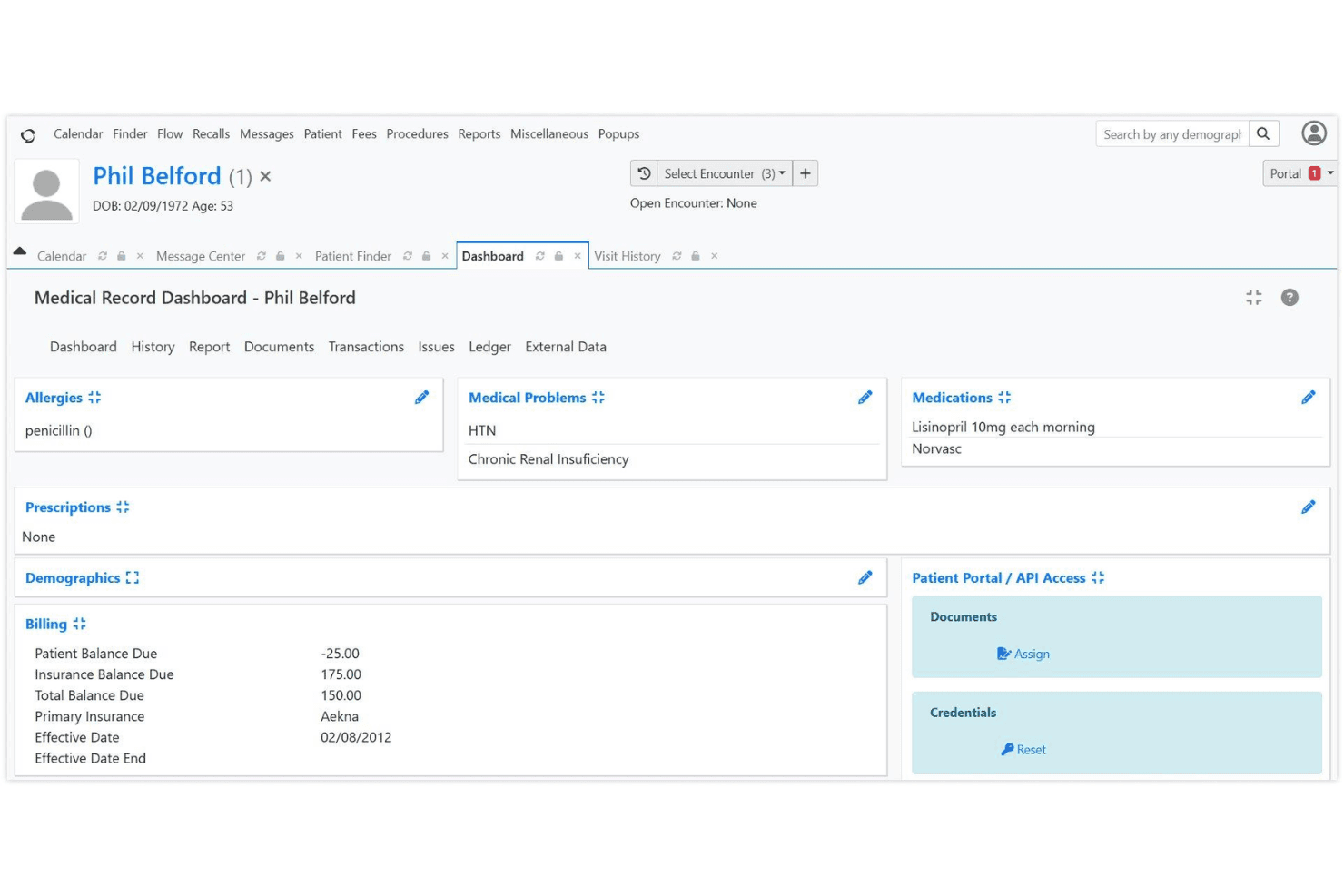
If you’re judging medical invoicing software by flexibility and cost, OpenEMR is hard to beat. Its open-source model means no licensing fees, and you can tailor workflows or reports to your needs. While the interface feels dated and onboarding takes effort, the feature set—claims, scheduling, patient records, and billing—rivals pricier options. Support relies on community forums, so I think it’s best for tech-savvy teams or clinics with IT resources. If you’re comparing options and want control over customization and budget, OpenEMR deserves a close look.
Pros
- No licensing fees for software or updates
- Supports electronic and paper claims billing
- Customizable billing workflows and reporting
Cons
- Billing features are basic for complex needs
- Requires strong IT support for setup and maintenance
- Limited official customer support beyond community forums
Is OpenEMR Right For Your Needs?
Who Would be a Good Fit for OpenEMR?
OpenEMR is a strong choice for organizations that want control over their billing processes, need customizable workflows, and have the technical resources to manage open-source software. It’s especially well-suited for smaller clinics, specialty practices, and nonprofits that want to avoid licensing fees and tailor their invoicing to unique requirements. If your team values flexibility and can handle some IT overhead, OpenEMR’s feature set and cost structure make it a compelling option.
- Small PracticesOpenEMR’s no-cost licensing and customizable billing suit small budgets.
- Community Health CentersThe open-source model supports grant-funded clinics with limited resources.
- Behavioral Health ProvidersCustomizable templates and billing workflows fit specialized documentation needs.
- Rural ClinicsOffline access and local hosting options help clinics with unreliable internet.
- Medical Billing DepartmentsDetailed reporting and claims management support in-house billing teams.
- Nonprofit Healthcare OrganizationsCost savings and open-source flexibility align with nonprofit priorities.
Who Would be a Bad Fit for OpenEMR?
OpenEMR isn’t ideal for organizations that need advanced billing automation, premium support, or seamless integration with a wide range of third-party systems. Large enterprises, hospital networks, and teams without dedicated IT support may find the platform’s setup and maintenance requirements too demanding. If you need out-of-the-box automation or extensive vendor support, OpenEMR may not meet your needs.
- Large Hospital NetworksComplex billing and compliance needs exceed OpenEMR’s core capabilities.
- Multi-Specialty GroupsLacks advanced automation for high-volume, multi-specialty billing.
- Enterprise Healthcare SystemsLimited integration options hinder large-scale interoperability.
- Solo Practitioners Without ITSetup and maintenance require technical skills solo providers may lack.
- Dental PracticesOpenEMR’s billing features are not tailored for dental coding.
- Urgent Care ChainsFast-paced, multi-location operations need more automation and support.
Cómo probamos y puntuamos las herramientas
Hemos dedicado años a construir, perfeccionar y mejorar nuestro sistema de evaluación y puntuación de software. La rúbrica está diseñada para capturar los matices de la selección de software y lo que hace que una herramienta sea efectiva, enfocándose en los aspectos críticos del proceso de toma de decisiones. A continuación, puedes ver exactamente cómo funcionan nuestras pruebas y puntuación en siete criterios. Esto nos permite proporcionar una evaluación imparcial del software basada en la funcionalidad principal, características destacadas, facilidad de uso, onboarding, atención al cliente, integraciones, opiniones de clientes y relación calidad-precio.
Funcionalidad principal (25% de la puntuación final)
Nuestro punto de partida siempre es la funcionalidad principal de la herramienta. ¿Tiene las funciones básicas que un usuario esperaría ver? ¿Alguna de estas características principales está limitada a planes de precios superiores? En esencia, esperamos que una herramienta esté a la altura de las capacidades básicas de sus competidores.
Características destacadas (25% de la puntuación final)
A continuación, evaluamos las características únicas y sobresalientes que van más allá de la funcionalidad principal normalmente encontrada en herramientas de este tipo. Una puntuación alta refleja funciones especializadas o únicas que hacen el producto más rápido, eficiente o que aportan valor adicional al usuario. También evaluamos lo fácil que es integrarse con otras herramientas que normalmente forman parte del stack tecnológico para ampliar la funcionalidad y utilidad del software. Las herramientas que ofrecen numerosas integraciones nativas, conexiones con terceros y acceso API para crear integraciones personalizadas obtienen la mejor puntuación.
Facilidad de uso (10% de la puntuación final)
Consideramos cuán rápido y fácil es ejecutar las tareas definidas en la funcionalidad principal usando la herramienta. El software que obtiene la puntuación más alta está bien diseñado, es intuitivo, ofrece aplicaciones móviles, proporciona plantillas y hace que tareas relativamente complejas parezcan simples.
Onboarding (10% de la puntuación final)
Sabemos lo importante que es una adopción rápida del equipo para una nueva plataforma, por lo que evaluamos cuán sencillo es aprender y utilizar una herramienta con una formación mínima. Analizamos lo rápido que un miembro del equipo puede configurarse y empezar a usar la herramienta sin experiencia previa. Las soluciones con alta puntuación indican que se requiere poco o ningún soporte.
Atención al cliente (10% de la puntuación final)
Revisamos cuán rápido y sencillo es salir de un atasco y encontrar ayuda por teléfono, chat en vivo o base de conocimiento. Las herramientas y empresas que proporcionan soporte en tiempo real obtienen la mejor puntuación, mientras que los chatbots obtienen la peor.
Opiniones de clientes (10% de la puntuación final)
Además de nuestras propias pruebas y evaluaciones, consideramos el net promoter score de clientes actuales y anteriores. Revisamos la probabilidad de que, de tener la opción, elijan nuevamente la herramienta por su funcionalidad principal. Un software con alta puntuación refleja un alto net promoter score de clientes presentes o pasados.
Relación calidad-precio (10% de la puntuación final)
Por último, considerando todos los demás criterios, revisamos el precio medio de los planes de entrada frente a las funciones principales y analizamos el valor de los demás criterios de evaluación. El software que ofrece más por menos obtiene una puntuación superior.
Core Features
Integrated Medical Billing
OpenEMR supports HIPAA-compliant electronic and paper claims billing. Users can manage claims, payments, and remittances from a single dashboard.
Advanced Scheduling
Create repeating appointments, automate check-in workflows, and send patient reminders. This helps reduce no-shows and keeps billing aligned with visit schedules.
CMS Reporting
Generate compliance and financial reports with a few clicks. These reports help track billing performance and meet regulatory requirements.
Customizable Billing Workflows
Tailor billing processes to fit your clinic’s needs, including custom codes and templates. This flexibility supports unique payer or specialty requirements.
Patient Statements and Invoices
Produce detailed patient statements and invoices directly from the platform. This feature streamlines communication and payment collection.
Security and Access Controls
HIPAA-friendly access controls and password hashing protect sensitive billing data. You can assign permissions by user role to limit access to financial information.
Ease of Use
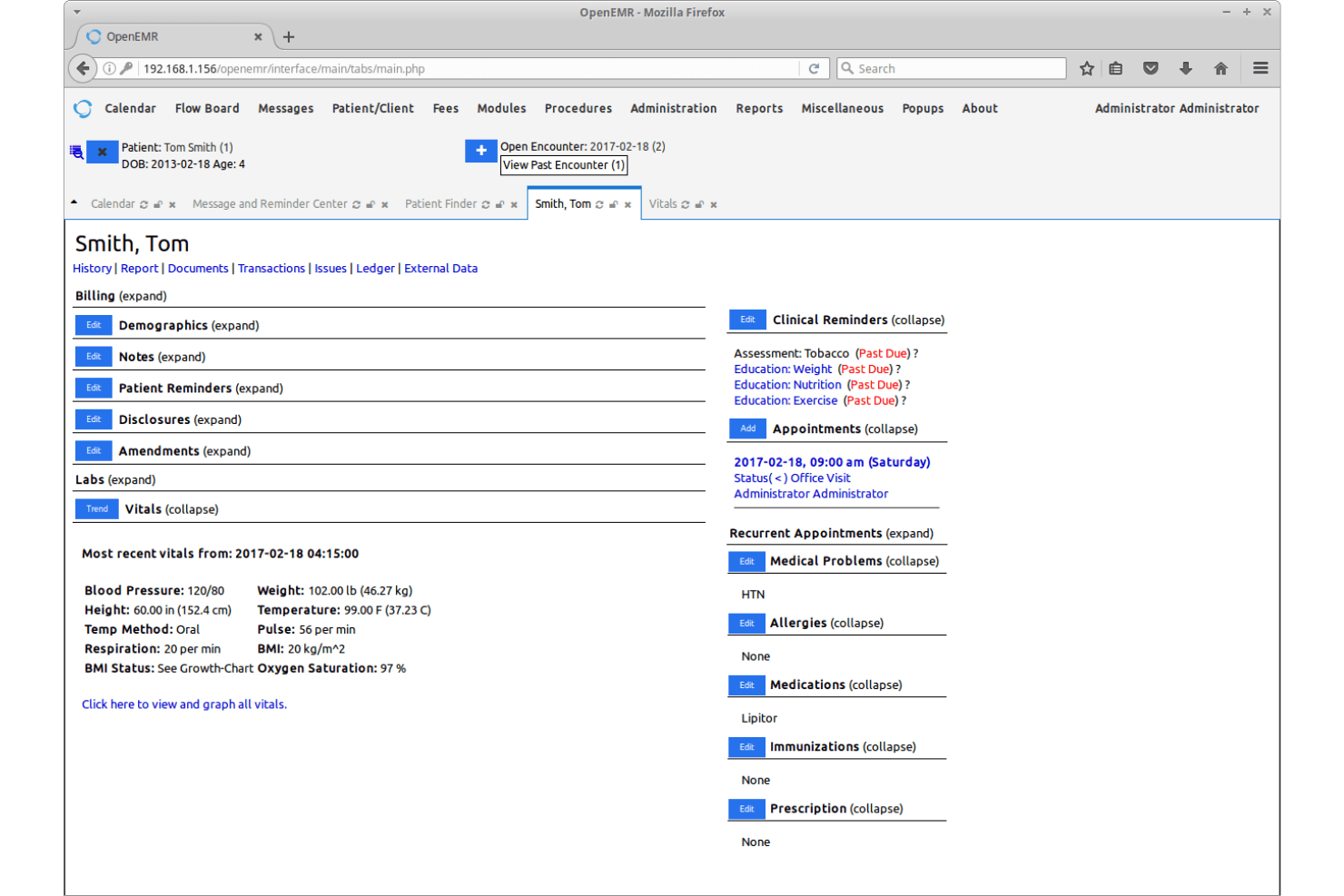
OpenEMR’s user interface feels dated and can be overwhelming for new users, especially compared to more modern medical invoicing software. Many users mention that setup and navigation require a bit of a learning curve, and documentation can be dense. However, once configured, the workflows are logical and customizable, letting experienced teams manage billing efficiently. If your team is comfortable with open-source EMR platforms and values flexibility over user-friendly aesthetics, you’ll find OpenEMR’s usability acceptable for daily invoicing tasks.
Integrations
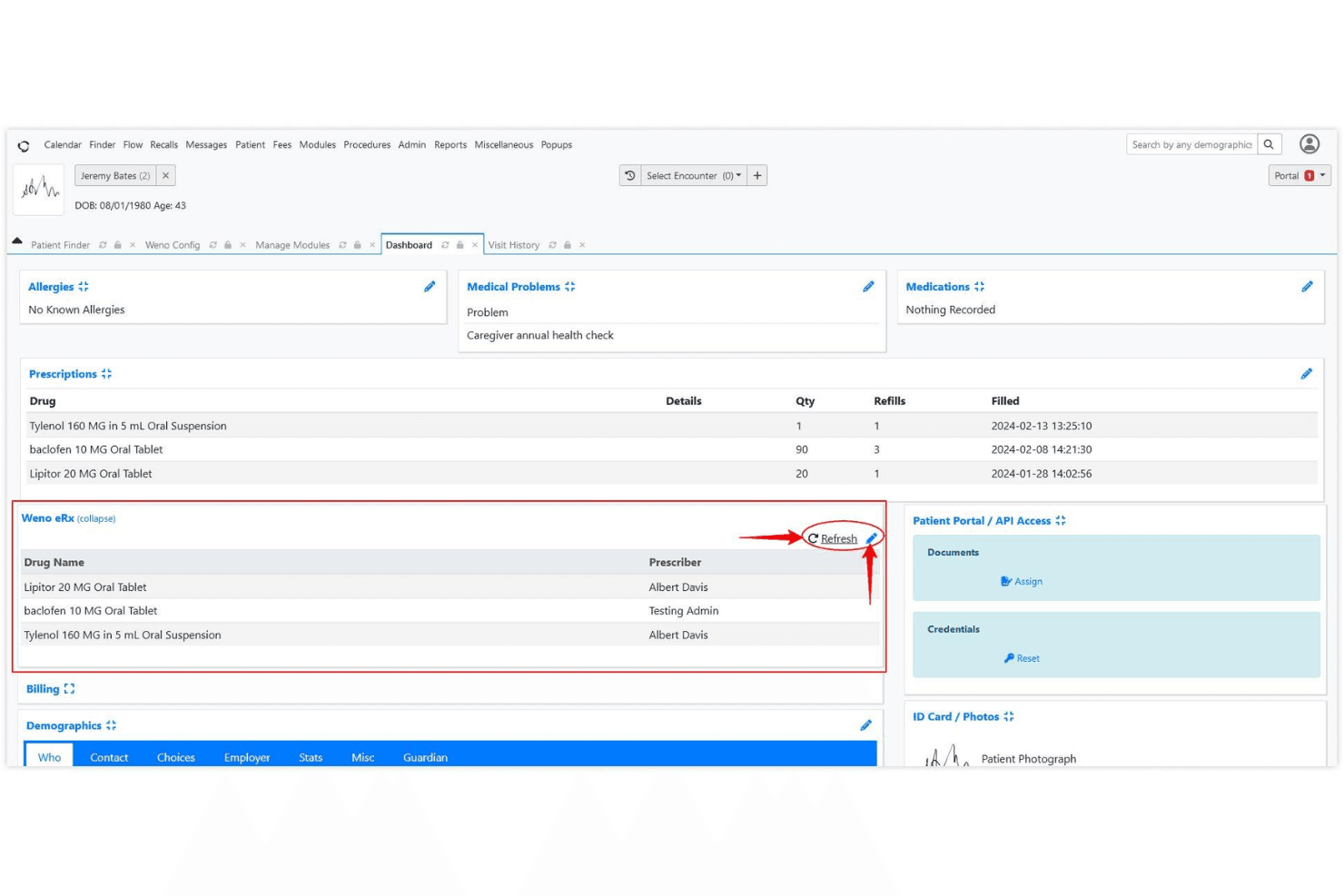
OpenEMR integrates with e-prescribing tools like NewCrop, Weno Exchange, and Allscripts, and can connect to labs such as Quest Diagnostics and LabCorp through third-party interfaces. These integrations often require additional setup and are not always available out of the box.
OpenEMR also offers REST and FHIR APIs, allowing custom integrations and extended functionality.
OpenEMR Specs
- API: Yes
- Appointment Scheduling: Yes
- Athlete Management: No
- Audit Management: Yes
- Calendar Management: No
- Compliance Tracking: Yes
- Customer Management: Yes
- Dashboard: No
- Data Export: Yes
- Data Import: Yes
- Data Visualization: No
- Electronic Prescribing: Yes
- External Integrations: Yes
- File Sharing: No
- File Transfer: No
- Health Management: No
- HIPAA Compliance: Yes
- Inventory Tracking: No
- Multi-User: Yes
- Notifications: Yes
- Organization Management: No
- Patient Management: Yes
- Project Management: No
- Regulatory Alerts: Yes
- Risk Assessment: Yes
- Scheduling: No
- Supplier Management: No


