

Reseña de TaxDome: Ventajas, Desventajas, Funcionalidades y Precios
TaxDome sobresale al ayudar a las firmas de contabilidad a centralizar todas sus operaciones en una sola plataforma, automatizando gran parte del trabajo administrativo y garantizando una experiencia consistente para el cliente en todos los niveles.

Revisamos las herramientas de forma independiente, y las comisiones ayudan a financiar nuestras pruebas. Consulta nuestra política de transparencia, nuestra metodología o sugiere una herramienta.
TaxDome is a financial compliance software built for tax and accounting firms that need to run their entire practice from one place; client portals, document collection, e-signatures, billing, and workflow management included. If you're weighing it against Canopy, TaxDome's edge is its depth of built-in features. Canopy handles core practice management well, but TaxDome brings CRM tools, client messaging, and invoicing into the same system without requiring additional integrations or upgrades.
TaxDome Evaluation Summary
4.7/5
- From $700/seat/year
- Free demo available
Por qué confiar en nuestras recomendaciones de software
6,700+
Reviews
20
Industry experts
16+
Evaluation factors
14
Years
Nuestras reseñas reflejan nuestro criterio independiente, no un discurso de ventas. Descubra cómo mantenemos la transparencia.
Para esta guía, evaluamos las herramientas mediante pruebas prácticas e investigación independiente, puntuando las herramientas según nuestros criterios de selección.
Nuestras reseñas reflejan nuestro criterio editorial humano, no un discurso de ventas.
TaxDome Overview
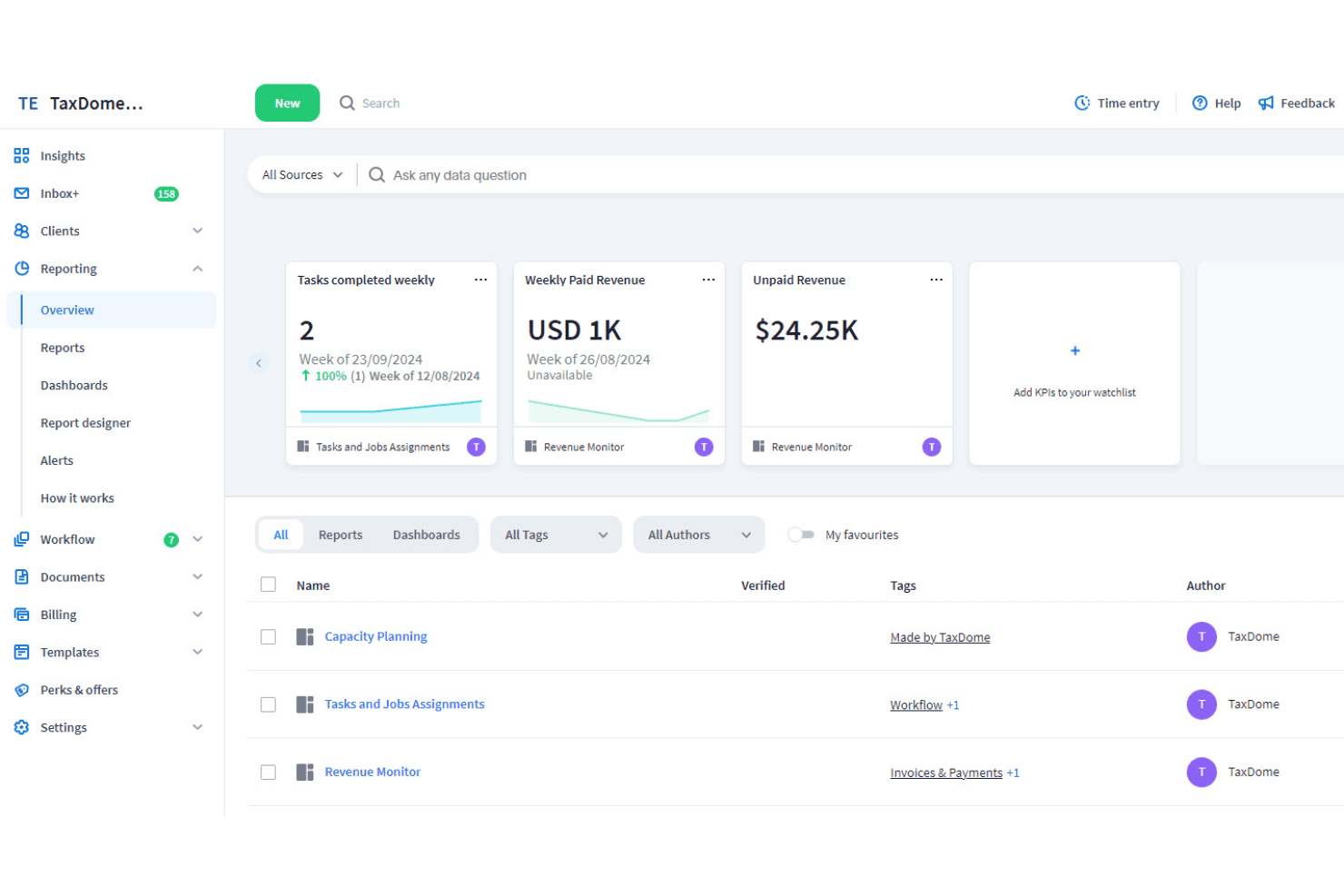
TaxDome is an end-to-end practice management platform built for accounting, tax, and bookkeeping firms. Its product suite covers everything from CRM and document management with e-signatures and organizers to team collaboration, time and billing, proposals and engagement letters, invoicing, and AI-powered reporting. Full tax and bookkeeping workflows are also set to be released inside the platform soon, extending its reach even further.
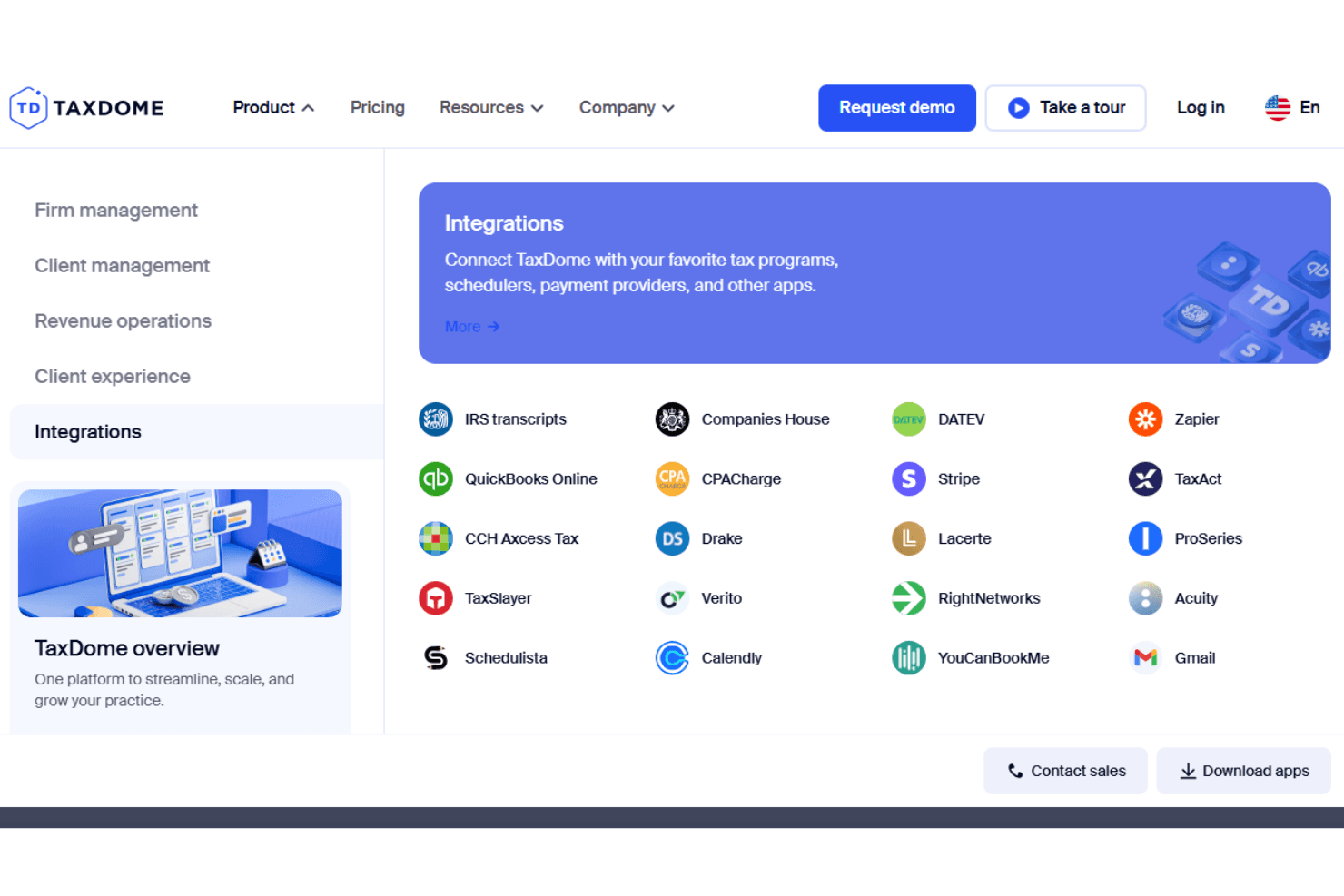
TaxDome integrates with major tax software, the IRS, QuickBooks Online, payment processors like CPACharge and Stripe, and other tools through Zapier, making it flexible for a range of firm setups. Overall, its pricing is competitive and offers solid value for the depth of features provided. But considering the range of capabilities and level of customization available, the initial setup can take time.
Pros
- Secure client portal
- Admin and client follow-up automation
- Comprehensive Firm Management Tools
Cons
- Learning curve for advanced features
- Initial setup requires time and planning
Is TaxDome Right For Your Needs?
Who Would be a Good Fit for TaxDome?
TaxDome is ideal for small- to mid-sized accounting, bookkeeping, and tax firms. If your team requires robust client management tools and efficient workflow automation, TaxDome is a suitable fit. Its user-friendly interface and client portal enhance communication and document sharing, making it perfect for firms focused on client interaction and task management. Teams seeking a straightforward and organized approach to managing client tasks will find it beneficial.
- Small accounting firmsTaxDome offers workflow automation and client portals that streamline your daily tasks and client communications.
- Tax professionalsIts document sharing and client management features simplify how you handle client interactions and tax preparation.
- Freelance accountantsThe platform's ease of use and automation enable you to manage multiple clients efficiently without requiring a large team.
- Boutique CPA firmsTaxDome's client portal and task management features keep your client interactions organized and efficient.
- Finance teamsIts automation tools save your team time on repetitive tasks, allowing focus on more complex financial work.
- Consulting firmsTaxDome's task management and communication features ensure you keep client projects on track and transparent.
Who Would be a Bad Fit for TaxDome?
TaxDome may not be suitable for large enterprises or corporations that require extensive integrations and customization. If your team relies on complex financial systems or requires advanced features beyond client management and task automation, TaxDome might fall short. It lacks the depth needed for businesses that need tailored solutions or have specific industry requirements.
- Large corporationsTaxDome's limited customization and integration capabilities might not meet your complex operational needs.
- Enterprise finance teamsIts lack of advanced features and integrations could hinder your work if you require more comprehensive financial tools.
- Custom software needsIf you need highly tailored solutions, TaxDome's standard offerings may not support your unique requirements.
- Global companiesTaxDome may not be able to handle the complexities of your international operations with its current feature set.
- Tech-savvy teamsTeams seeking cutting-edge technology and extensive integrations might find TaxDome's tools insufficient.
- Industries with specific regulationsIf your industry has unique compliance requirements, TaxDome may not offer the specialized features you need.
Cómo probamos y puntuamos las herramientas
Hemos dedicado años a construir, perfeccionar y mejorar nuestro sistema de evaluación y puntuación de software. La rúbrica está diseñada para capturar los matices de la selección de software y lo que hace que una herramienta sea efectiva, enfocándose en los aspectos críticos del proceso de toma de decisiones. A continuación, puedes ver exactamente cómo funcionan nuestras pruebas y puntuación en siete criterios. Esto nos permite proporcionar una evaluación imparcial del software basada en la funcionalidad principal, características destacadas, facilidad de uso, onboarding, atención al cliente, integraciones, opiniones de clientes y relación calidad-precio.
Funcionalidad principal (25% de la puntuación final)
Nuestro punto de partida siempre es la funcionalidad principal de la herramienta. ¿Tiene las funciones básicas que un usuario esperaría ver? ¿Alguna de estas características principales está limitada a planes de precios superiores? En esencia, esperamos que una herramienta esté a la altura de las capacidades básicas de sus competidores.
Características destacadas (25% de la puntuación final)
A continuación, evaluamos las características únicas y sobresalientes que van más allá de la funcionalidad principal normalmente encontrada en herramientas de este tipo. Una puntuación alta refleja funciones especializadas o únicas que hacen el producto más rápido, eficiente o que aportan valor adicional al usuario. También evaluamos lo fácil que es integrarse con otras herramientas que normalmente forman parte del stack tecnológico para ampliar la funcionalidad y utilidad del software. Las herramientas que ofrecen numerosas integraciones nativas, conexiones con terceros y acceso API para crear integraciones personalizadas obtienen la mejor puntuación.
Facilidad de uso (10% de la puntuación final)
Consideramos cuán rápido y fácil es ejecutar las tareas definidas en la funcionalidad principal usando la herramienta. El software que obtiene la puntuación más alta está bien diseñado, es intuitivo, ofrece aplicaciones móviles, proporciona plantillas y hace que tareas relativamente complejas parezcan simples.
Onboarding (10% de la puntuación final)
Sabemos lo importante que es una adopción rápida del equipo para una nueva plataforma, por lo que evaluamos cuán sencillo es aprender y utilizar una herramienta con una formación mínima. Analizamos lo rápido que un miembro del equipo puede configurarse y empezar a usar la herramienta sin experiencia previa. Las soluciones con alta puntuación indican que se requiere poco o ningún soporte.
Atención al cliente (10% de la puntuación final)
Revisamos cuán rápido y sencillo es salir de un atasco y encontrar ayuda por teléfono, chat en vivo o base de conocimiento. Las herramientas y empresas que proporcionan soporte en tiempo real obtienen la mejor puntuación, mientras que los chatbots obtienen la peor.
Opiniones de clientes (10% de la puntuación final)
Además de nuestras propias pruebas y evaluaciones, consideramos el net promoter score de clientes actuales y anteriores. Revisamos la probabilidad de que, de tener la opción, elijan nuevamente la herramienta por su funcionalidad principal. Un software con alta puntuación refleja un alto net promoter score de clientes presentes o pasados.
Relación calidad-precio (10% de la puntuación final)
Por último, considerando todos los demás criterios, revisamos el precio medio de los planes de entrada frente a las funciones principales y analizamos el valor de los demás criterios de evaluación. El software que ofrece más por menos obtiene una puntuación superior.
Core Features
Workflow automation: Automate repetitive steps like sending organizers, reminders, and follow-ups to reduce manual work.
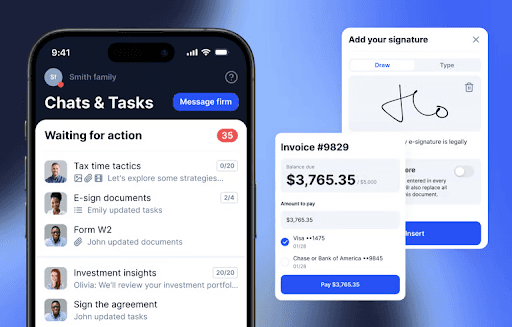
Client portal: Give clients a secure space to scan and upload documents, sign forms, make payments, and message your team.
CRM: Keep all client information, notes, and communication in one place for quick access and better visibility across your team.
Document management: Upload, organize, and share documents securely, with built-in e-signatures and customizable organizers.
Project management: Assign work, track progress, and control user access to keep projects on schedule and responsibilities clear.
Billing and payments: Create invoices, track time, and process payments in one place.
Ease of Use
TaxDome offers a user-friendly interface that's intuitive for most of your team, making it easy to navigate and manage tasks. Its layout simplifies finding and using key features like client portals and task management. While some users report that the initial setup can be a bit challenging, the platform overall feels accessible, even for those less tech-savvy.

Integrations
TaxDome integrates with QuickBooks Online, the IRS, Zapier, Right Networks, Calendly, Acuity, Youcanbookme, Schedulista, CPACharge, and Stripe.
However, TaxDome does not have a public API but connects with third-party integration tools like Zapier to enable integrations with other applications.
TaxDome Specs
- Accounts Payable: Yes
- Accounts Receivable: No
- Analytics: No
- API: No
- Billing/Invoicing: Yes
- Customer Management: Yes
- Dashboard: Yes
- Data Export: No
- Data Import: Yes
- Data Visualization: No
- Email Integration: Yes
- External Integrations: No
- Mobile App: Yes
- Multi-User: Yes
- Process Modeling: No
- Process Reporting: Yes
- Project Management: Yes
- Task Scheduling/Tracking: Yes
- Time Management: Yes
- Workflow Management: Yes

