

Myyntisaamisten hallintaohjelmisto auttaa automatisoimaan, hallinnoimaan ja seuraamaan laskutusta, perintää ja maksujen kohdistamista. Jos johdat taloushallintoa kasvavassa yrityksessä, oikean työkalun löytäminen voi ratkaista, kärsitäänkö kassavirtaongelmista vai saavutetaanko selkeä taloudenhallinta.
Tämä opas ohittaa yleisluontoiset ominaisuudet ja keskittyy talousjohtajien kannalta tärkeimpiin asioihin – automaatioon, reaaliaikaiseen näkyvyyteen, vaatimustenmukaisuuteen ja integrointiin nykyiseen teknologia- ja järjestelmäkokonaisuuteesi. Näet, mitkä ratkaisut soveltuvat parhaiten strategisen kasvun tukemiseen ja myyntisaamisten hallinnan käytännön haasteiden käsittelyyn, jotta voit tehdä valintasi luottavaisin mielin.
Miksi luottaa ohjelmistosuosituksiimme
6,700+
Reviews
20
Industry experts
16+
Evaluation factors
14
Years
Tiimimme on testannut ja arvioinut ohjelmistoja vuodesta 2012 lähtien. Talousjohtajina tiedämme itse, kuinka vaikeaa — ja tärkeää — oikean ohjelmiston valitseminen on.
Tätä opasta varten arvioimme työkaluja käytännön testauksen ja itsenäisen tutkimuksen avulla, pisteyttäen työkalut valintakriteeriemme perusteella.
Arvostelumme perustuvat inhimilliseen toimitukselliseen harkintaamme, eivät myyntipuheeseen.
Myyntisaamisten hallintaohjelmistojen vertailutaulukko
Tässä vertailutaulukossa esitetään yhteenveto valitsemieni parhaiden myyntisaamisten hallintaohjelmistojen hinnoittelutiedoista:
| Tool | Best For | Trial Info | Price | ||
|---|---|---|---|---|---|
| 1 | Best for real-time cash flow forecasting | Free demo available | Pricing upon request | Website | |
| 2 | Best for fast AR automation deployment | Free demo available | Pricing upon request | Website | |
| 3 | Best for AI-based order-to-cash process automation | Free demo available | Pricing upon request | Website | |
| 4 | Best for enterprise cash management integration | Free demo available | Pricing upon request | Website | |
| 5 | Best for mid-market dunning process automation | Free demo available | Pricing upon request | Website | |
| 6 | Best for B2B invoice-to-cash digitization | Free demo available | Pricing upon request | Website | |
| 7 | Best for global e-invoicing compliance | Free demo available | Pricing upon request | Website | |
| 8 | Best for AI-powered payment matching automation | Free demo available | Pricing upon request | Website | |
| 9 | Best for collaborative AR with customer portals | Free demo available | Pricing upon request | Website | |
| 10 | Best for ERP-integrated AR automation | Free demo available | Pricing upon request | Website |


Myyntisaamisten hallintaohjelmistojen arviot
Alla ovat yksityiskohtaiset yhteenvedot parhaista myyntisaamisten hallintaohjelmistoista, jotka pääsivät valikoimaani. Arvioni tarjoavat yksityiskohtaisen katsauksen kunkin alustan ominaisuuksiin, integraatioihin ja parhaisiin käyttötapauksiin, jotta löydät itsellesi parhaiten sopivan vaihtoehdon.
 Best for real-time cash flow forecasting
- Free demo available
- Pricing upon request
Visit WebsiteCustomer Rating:4.7/5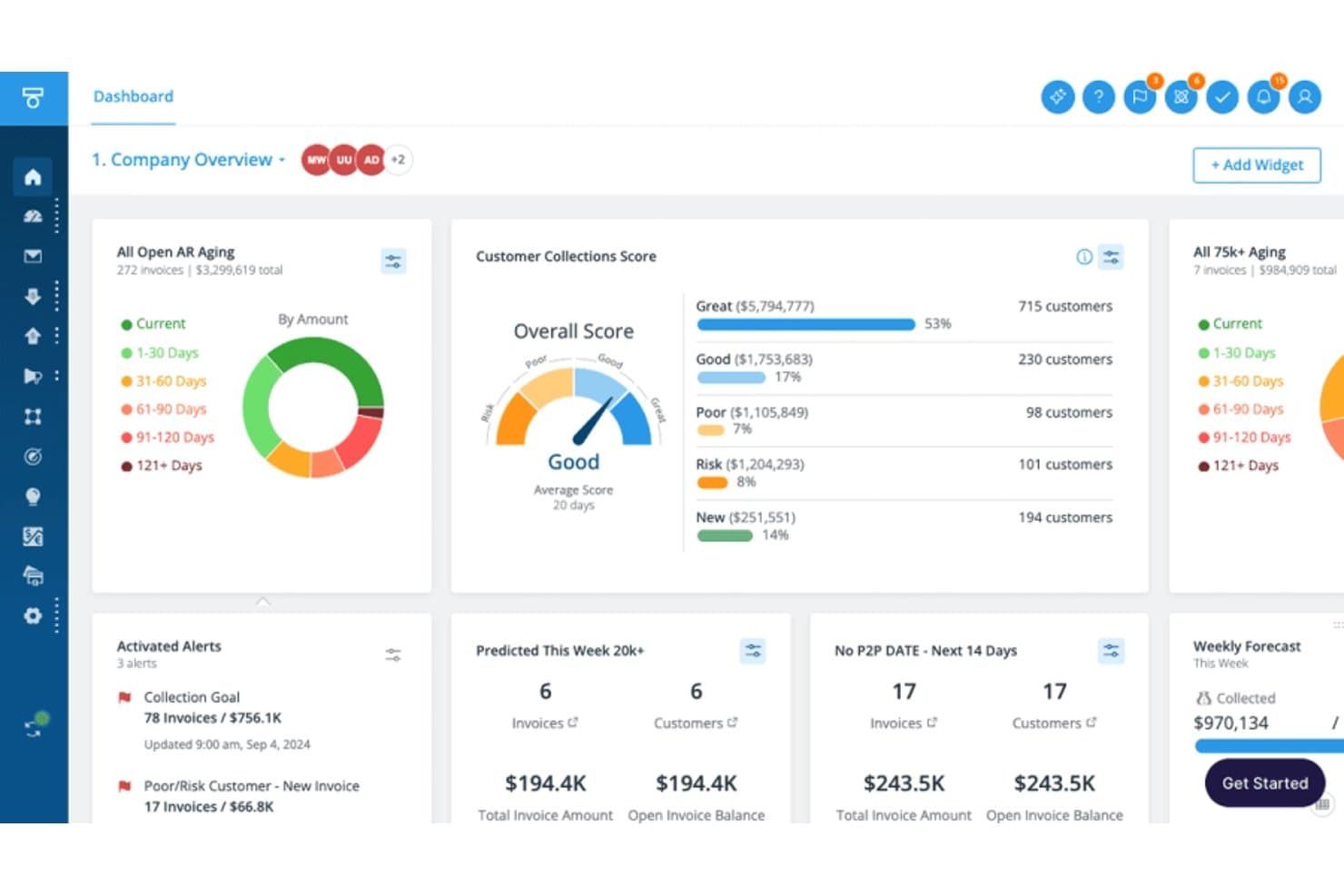
Tesorio tracks AR aging, collections scores, and weekly forecasts. Tesorio is an AI-driven accounts receivable platform that combines collections automation, cash application, automated dunning, and ML-powered cash flow forecasting into a connected financial operations system.
Who Is Tesorio Best For?
Tesorio is a strong fit for mid-market and enterprise finance teams where controllers and AR managers need real-time cash visibility alongside automated collections at scale.
Why I Picked Tesorio
Tesorio earns its spot on my shortlist because its ML-powered AR forecast is built on live ERP data, not stale batch exports. I like that the 13-week cash forecast pulls directly from real-time collections activity, so when my team logs a payment promise or closes out a payment match, the forecast reflects it immediately. That tight connection between collections workflows and cash forecasting is what separates Tesorio from tools that treat those two problems independently.
Tesorio Key Features
- Collections Agent: Drafts personalized email follow-ups and manages payment promise tracking from customer replies.
- Supplier portal integration: Connects directly with Coupa and Ariba for invoice submission and remittance download.
- Automated dunning engine: Runs multi-step, rule-based reminder campaigns with escalation and segmentation.
- ERP bidirectional sync: Writes notes, payments, and actions directly back to NetSuite, Sage Intacct, QuickBooks, and more.
Tesorio Integrations
Tesorio offers native integrations with NetSuite, Sage Intacct, QuickBooks, Workday, Zuora, Salesforce, Coupa, and Ariba, and provides an API for custom integrations.
Pros and Cons
Pros:
- Collector workload prioritization built into the platform
- ML-driven payment prediction flags at-risk accounts
- Live cash flow forecast tied to AR activity
Cons:
- Requires custom flat-file file transfers for non-standard ERP connections
- Limits automated payment matching capabilities
Learn more about Tesorio:
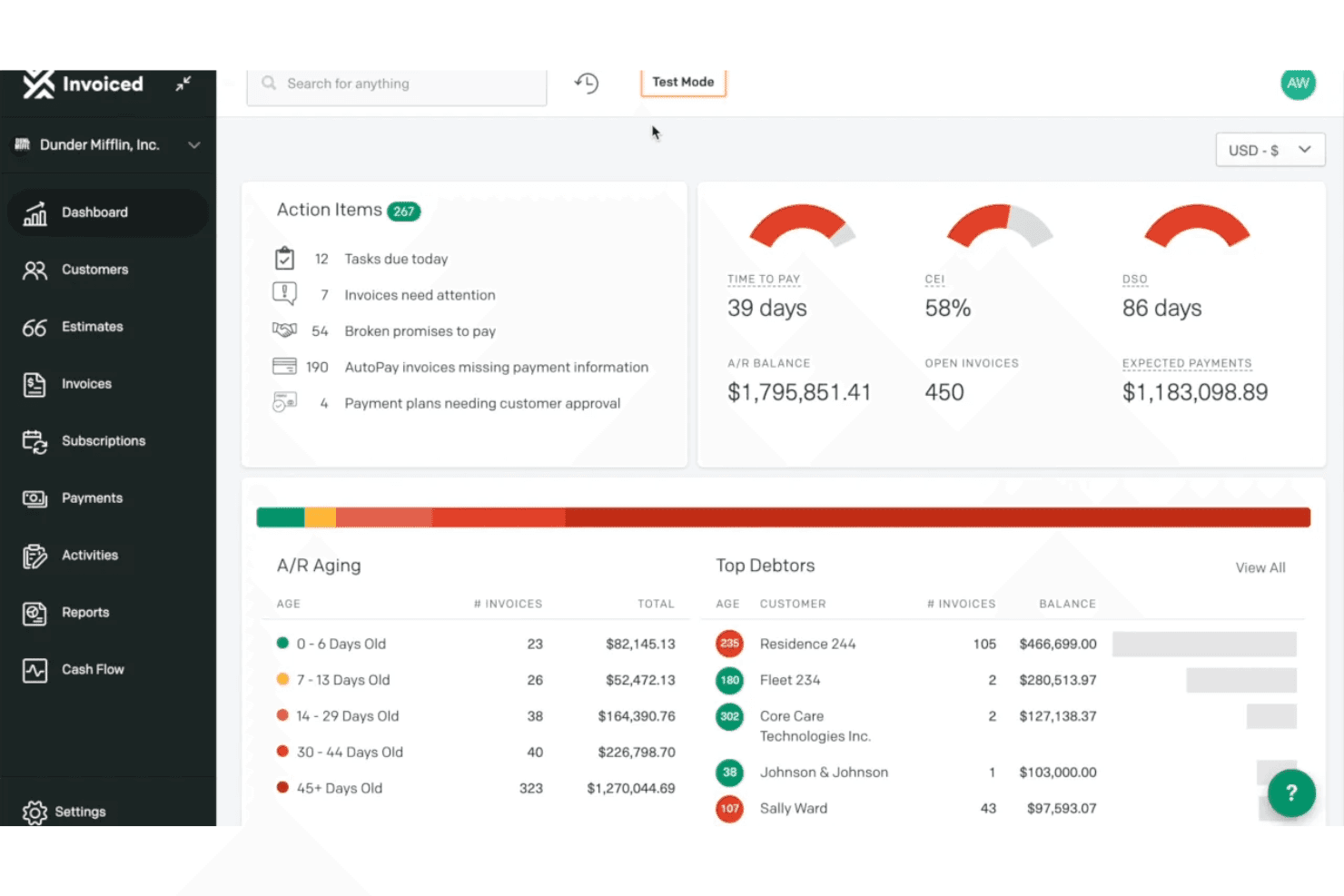
Invoiced provides an accounts receivable dashboard with action items, A/R aging breakdown, top debtors, and key metrics like DSO and CEI. Invoiced is an AI-native accounts receivable platform that covers invoice automation, cash application, collections workflows, payment processing, and AR analytics for B2B finance teams.
Who Is Invoiced Best For?
It's a strong fit for mid-market finance teams that need to scale AR transaction volume without growing headcount.
Why I Picked Invoiced
I've included Invoiced in my top picks because its multi-agent AI architecture gets AR automation running faster than most platforms I've tested. Smart Chasing adapts dunning cadences to each customer's actual payment history rather than fixed schedules, and Cashmatch AI handles cash application even when remittance details are missing or a single wire covers multiple invoices. Neither feature requires heavy configuration to go live, which is the core of its fast deployment advantage.
Invoiced Key Features
- Customer portal: Customers can view invoices, download statements, dispute charges, and make payments online.
- Subscription billing: Automate recurring invoice schedules, billing cycles, and renewal management for subscription customers.
- Integration studio: Connect Invoiced to 1,000+ apps and ERP systems with no-code workflows and real-time sync.
- Custom workflow automation: Build tailored internal processes for tasks like reminder scheduling and invoice status changes using an automation studio.
Invoiced Integrations
Invoiced offers native integrations with NetSuite, Sage Intacct, Microsoft Dynamics 365, QuickBooks, Xero, Workday, and Salesforce, and provides an API for custom integrations.
Pros and Cons
Pros:
- Fast deployment compared to enterprise AR platforms
- Collections prioritization adapts to payment behavior
- AI cash application handles unstructured remittance data
Cons:
- Enforces strict user and invoice monthly plan quotas
- Limits phone support access to higher subscription tiers
Learn more about Invoiced: Best for AI-based order-to-cash process automation
- Free demo available
- Pricing upon request
Visit WebsiteCustomer Rating:3.5/5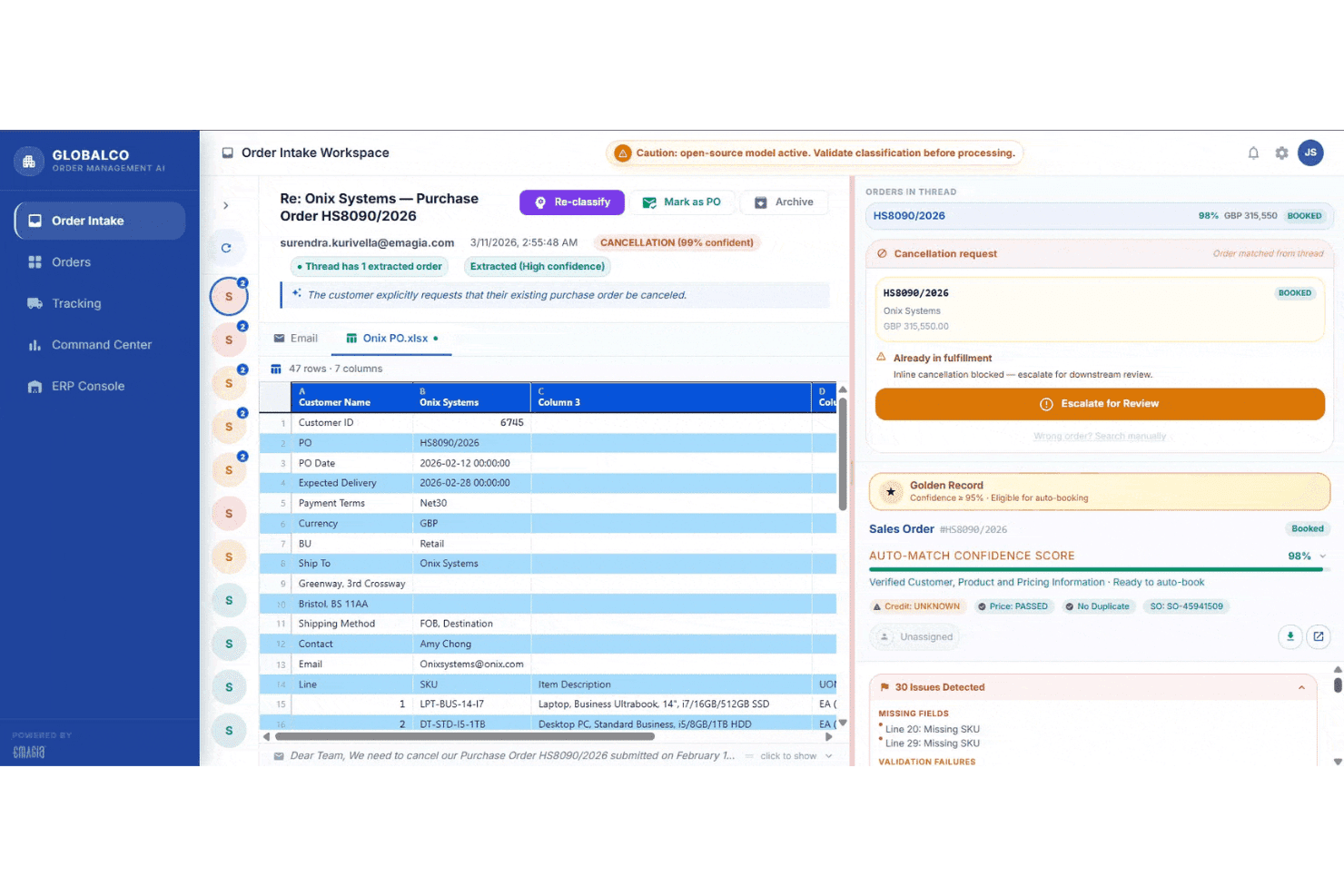
Emagia's Order Intake Workspace displays AI-powered purchase order classification, cancellation detection, and auto-match confidence scoring for streamlined order-to-cash processing. Emagia is an AI-native order-to-cash platform that covers credit management, invoicing, cash application, collections, deductions management, and AR analytics through a suite of autonomous AI agents.
Who Is Emagia Best For?
Emagia is built for mid-to-large enterprises managing high-volume, multi-ERP receivables operations across multiple geographies and currencies.
Why I Picked Emagia
Emagia earns its spot as one of the best on my shortlist because no other platform I've evaluated pushes O2C automation this far end-to-end. I'm particularly impressed by Gia Collect, which conducts AI-powered outbound collection calls autonomously, complete with real-time sentiment analysis and promise-to-pay capture, without any human agent involvement. I also like the Cash App Agent's 95%-plus straight-through posting rate, which means my team isn't manually reconciling remittance files every day.
Emagia Key Features
- Customer self-service portal: Lets customers view invoices, download statements, dispute charges, and make payments in a secure online portal.
- Automated dunning workflows: Supports multi-step reminder sequences and escalations tailored by customer segment and invoice age.
- Deductions and dispute management: Centralizes tracking and resolution of short-pays and disputes with documentation support.
- ERP connectivity: Offers native integration with SAP, Oracle, NetSuite, JD Edwards, PeopleSoft, Microsoft Dynamics, and more.
Emagia Integrations
Emagia offers native integrations with SAP, Oracle, NetSuite, JD Edwards, PeopleSoft, Microsoft Dynamics, Sage, and Workday, and also provides an API for custom integrations.
Pros and Cons
Pros:
- Covers full order-to-cash cycle in one platform
- Cash application matching rates exceed 95% straight-through
- Autonomous AI agents handle collections outreach end-to-end
Cons:
- Configuration updates frequently depend on vendor support teams
- Third-party AP portal invoice delivery lacks native support
Learn more about Emagia: Best for enterprise cash management integration
- Free demo available
- Pricing upon request
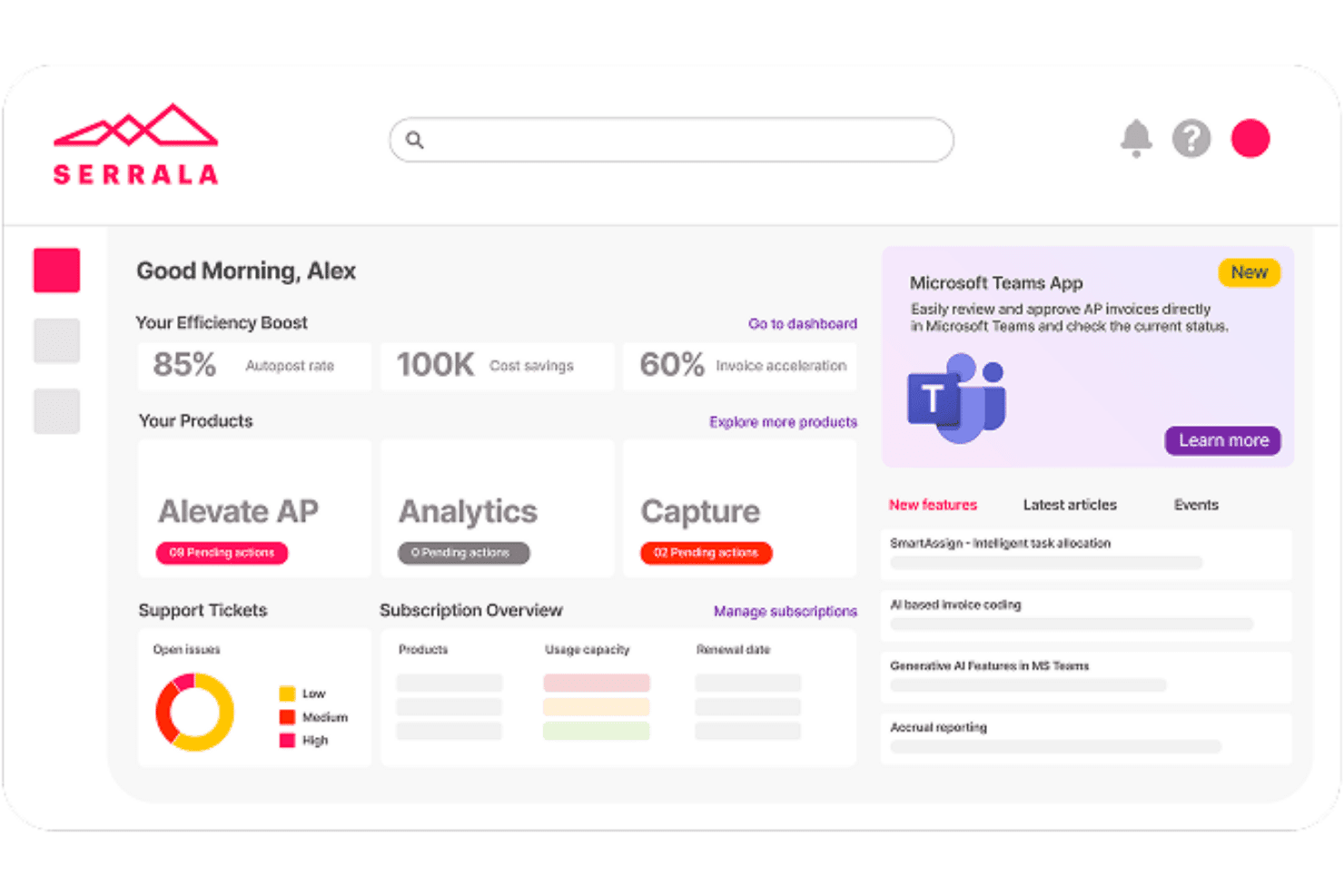
Serrala centralizes AP automation, analytics, and invoice tracking in one dashboard. Serrala is an enterprise order-to-cash automation platform that covers cash application, collections management, credit and risk management, bill presentment, and payment processing across SAP and other major ERP environments.
Who Is Serrala Best For?
Serrala is a strong fit for large enterprises running SAP or complex multi-ERP environments that need end-to-end AR automation at scale.
Why I Picked Serrala
Serrala earns its spot as one of the best on my shortlist because its cash application engine automates up to 99% of payment matching using AI that improves with every transaction. What I particularly like is how Serrala connects AR directly to treasury and payments, giving my team real-time cash visibility across the full O2C cycle in one place. The lockbox integration and remittance parsing mean we're not manually chasing unidentified payments at month-end.
Serrala Key Features
- Invoice automation across multiple channels: Generate and deliver electronic invoices via email, customer portal, or EDI with real-time tracking.
- Automated dunning workflows: Configure and trigger multi-step payment reminders based on customer risk or invoice status.
- Customer self-service portal: Allow customers to view statements, download invoices, dispute charges, and pay online.
- ERP integration flexibility: Sync customer, invoice, and payment data with SAP, Oracle, Microsoft Dynamics, and other leading ERPs in real time.
Serrala Integrations
Serrala offers native integrations with SAP, Oracle, Microsoft Dynamics, NetSuite, Infor, Sage, Epicor, and more, and provides an API for custom integrations.
Pros and Cons
Pros:
- Collections prioritization adapts to customer payment behavior
- Deep SAP integration supports large-scale AR operations
- Ensures global mandate compliance for e-invoicing
Cons:
- Depends on separate licenses for full analytics
- Demands distinct modules for complete O2C coverage
Learn more about Serrala: Best for mid-market dunning process automation
- Free demo available
- Pricing upon request
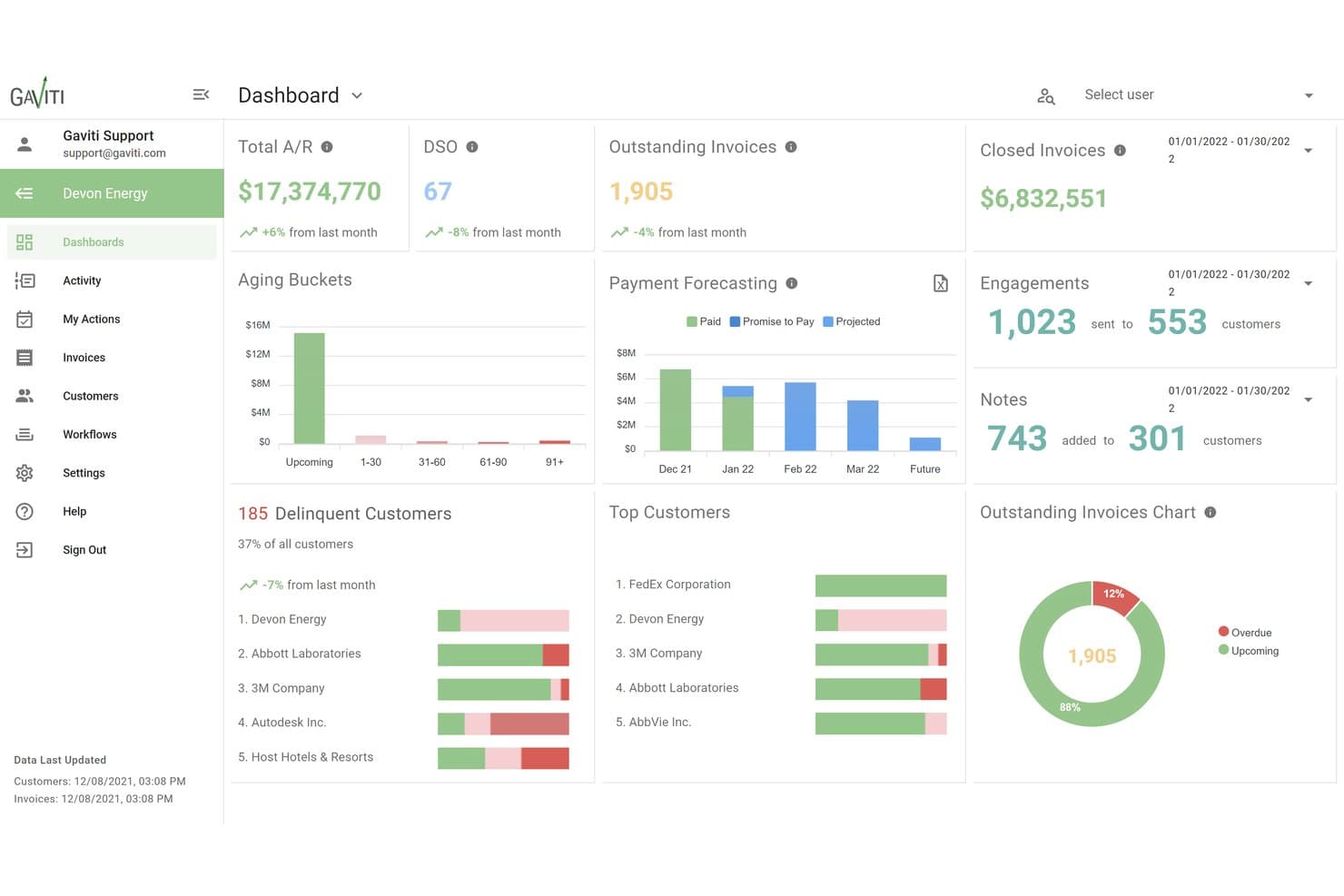
Gaviti centralizes A/R metrics like DSO, aging, and forecasting in one dashboard. Gaviti is an AI-powered accounts receivable platform that combines dunning automation, cash application, credit management, dispute tracking, and a B2B payer portal into a single invoice-to-cash workflow.
Who Is Gaviti Best For?
Gaviti is a strong fit for mid-market B2B finance teams managing high invoice volumes who need structured, automated collections without the complexity of enterprise AR platforms.
Why I Picked Gaviti
Gaviti earns its spot on my shortlist because its dunning engine uses AI to optimize follow-up timing per customer, rather than sending the same reminder on day 30 to everyone. I like that I can build no-code workflow variations for different customer segments, so a high-value account gets a different escalation path than a habitual late payer. The built-in B2B payer portal with zero-fee ACH gives customers a direct path to pay from within the dunning flow itself, which keeps the entire cycle contained in one place.
Gaviti Key Features
- AI assistant for AR teams: Chat-enabled AI helps automate tasks, generate workflows, and optimize communications internally.
- Real-time AR aging dashboards: Monitor invoice aging, DSO metrics, and collector activity with live, customizable dashboards.
- Credit risk management tools: Set enforceable credit limits, track credit utilization, and receive automated alerts of changes in customer credit status.
- Dispute management module: Track, log, and resolve customer payment disputes with full activity and payment documentation in one place.
Gaviti Integrations
Gaviti offers over 20 native integrations with ERP and accounting systems, including NetSuite, SAP, SAP Business One, and FreshBooks. An API is available for custom integrations.
Pros and Cons
Pros:
- Self-service payer portal with ACH payment support
- AI-optimized follow-up timing per account
- Dunning workflows configurable by customer segment
Cons:
- Lacks native out-of-the-box AP portal payment submission features
- Restricts premium automation features to Pro and Expert tiers
Learn more about Gaviti: Best for B2B invoice-to-cash digitization
- Free demo available
- Pricing upon request
Visit WebsiteCustomer Rating:4.4/5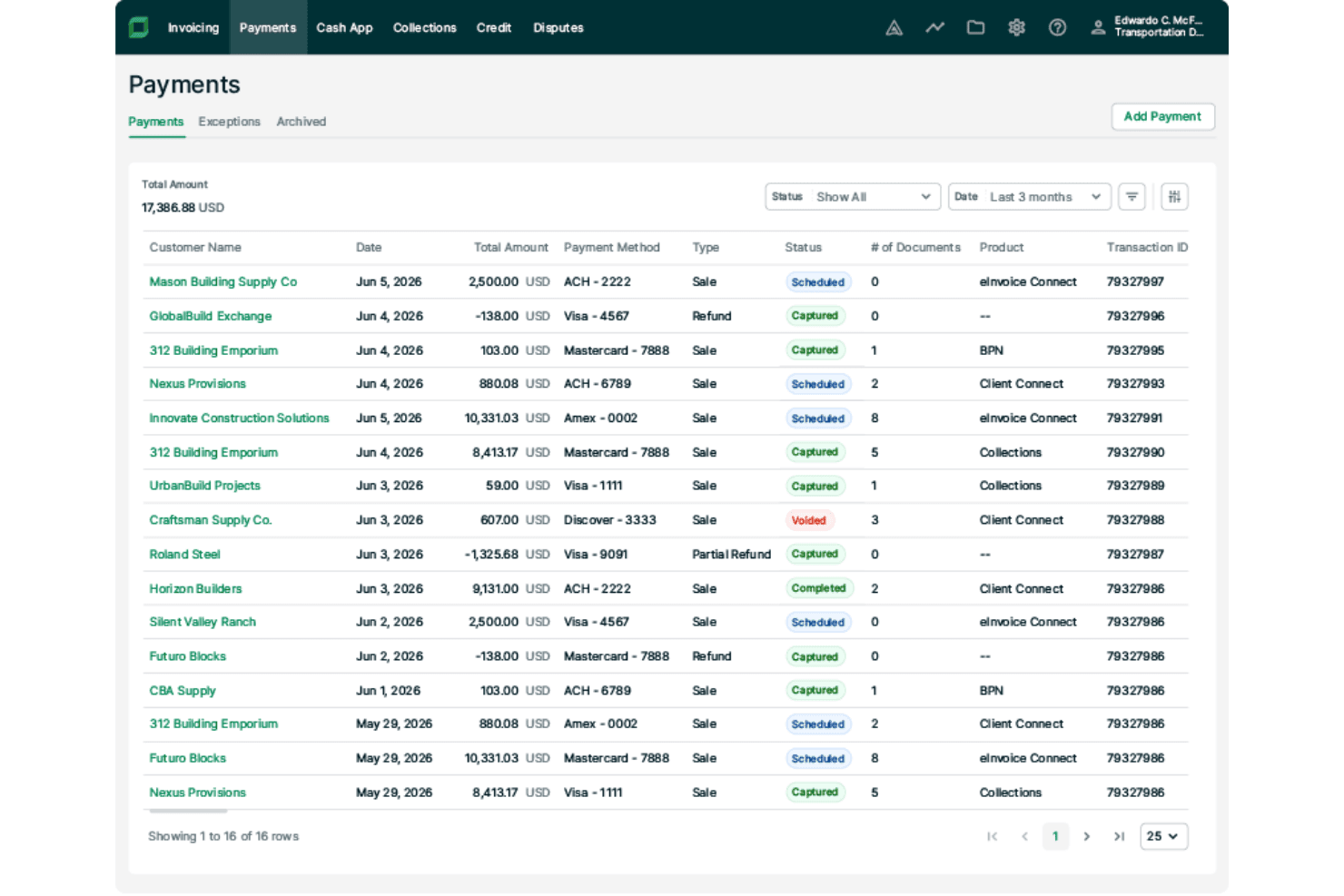
Billtrust lets users track and manage payment transactions in one place. Billtrust is a B2B accounts receivable platform that covers the full invoice-to-cash cycle, including multi-channel invoicing, payment processing, AI-driven cash application, credit management, and collections workflow automation.
Who Is Billtrust Best For?
It's a strong fit for mid-market and enterprise B2B companies in manufacturing, distribution, and business services that handle high invoice volumes across multiple customer payment channels.
Why I Picked Billtrust
Billtrust earns its spot as one of the best on my shortlist because no other AR platform matches its depth of B2B invoice delivery infrastructure. I particularly like its connections to 260+ AP portals, including Ariba, Coupa, and Tungsten, which means invoices reach buyers through the exact channels they already use. Its ML-driven cash application consistently hits 95%+ straight-through processing rates, which cuts the manual matching work my team would otherwise spend hours on each week.
Billtrust Key Features
- Customer self-service portal: Lets customers view invoices, download statements, dispute charges, and pay online via multiple payment methods.
- Automated dunning workflows: Supports configurable reminder sequences with escalation rules based on customer segment and invoice behavior.
- ERP and accounting system integration: Offers pre-built, bidirectional connectors for NetSuite, SAP, Oracle, Microsoft Dynamics, and more.
- Multi-currency and entity support: Handles invoicing and payments for multiple currencies and subsidiaries within a single platform.
Billtrust Integrations
Billtrust offers native integrations with NetSuite, Oracle, SAP, Microsoft Dynamics 365, Coupa, Ariba, and Basware, and provides an API for custom integrations.
Pros and Cons
Pros:
- Deductions and dispute workflows are fully centralized
- Automates credit scoring decisions and personalized collections
- ML cash application hits 95%+ auto-match rates
Cons:
- Lacks out-of-the-box self-service onboarding for small businesses
- Requires separate transaction and processing fees
Learn more about Billtrust: Best for global e-invoicing compliance
- Free demo available
- Pricing upon request
Visit WebsiteCustomer Rating:4.5/5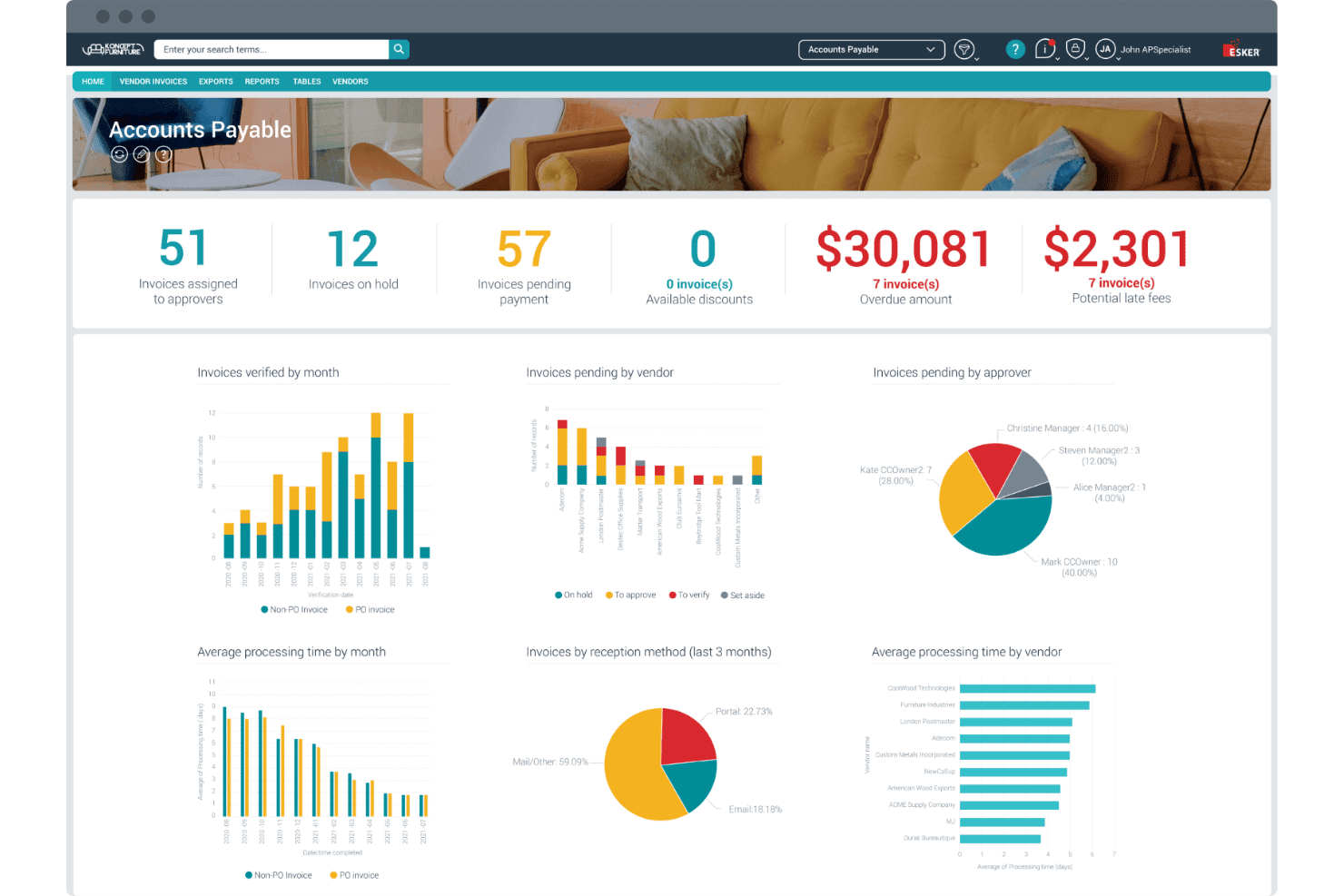
Esker's AP dashboard centralizes invoice tracking, approvals, and overdue amounts. Esker is a cloud-based accounts receivable platform with modular, AI-driven tools spanning credit management, invoice delivery, cash application, collections, and deductions management — built to handle cross-border invoicing across 60+ countries.
Who Is Esker Best For?
Esker suits mid-market and enterprise finance teams operating across multiple countries with complex cross-border invoicing and regulatory compliance requirements.
Why I Picked Esker
Esker earns its spot as one of the best on my shortlist because of how it handles cross-border e-invoicing compliance at scale. The Invoice Delivery module supports regulation-ready compliance across 60+ countries, covering mandates like Peppol, EU ViDA, and LATAM CFDI without requiring separate tools or manual workarounds. I also like that Esker Synergy AI handles cash application with AI-driven payment matching and remittance parsing built directly into the same platform.
Esker Key Features
- Configurable dunning workflows: Set up custom, automated reminder sequences and escalation rules for overdue accounts.
- Customer self-service portal: Give customers direct access to invoices, statements, and online payment options in 40+ countries.
- Real-time AR analytics dashboards: Track AR aging, DSO, collection performance, and dispute status with customizable reports.
- Multi-ERP integration suite: Connect bidirectionally to SAP, Oracle, Microsoft Dynamics, Sage, and over 70 other ERP platforms.
Esker Integrations
Esker offers native integrations with SAP, Oracle, Microsoft Dynamics 365, NetSuite, Sage, QAD, Epicor, Infor, Salesforce, and Coupa. An API is also available for custom integrations.
Pros and Cons
Pros:
- Resolves trade and non-trade deductions via AI workflows
- AI-driven cash application with high matching rates
- E-invoicing compliance across 60+ countries
Cons:
- Non-integrated ERPs require custom flat-file file transfers
- Split into five separate modules for full capability
Learn more about Esker: Best for AI-powered payment matching automation
- Free demo available
- Pricing upon request
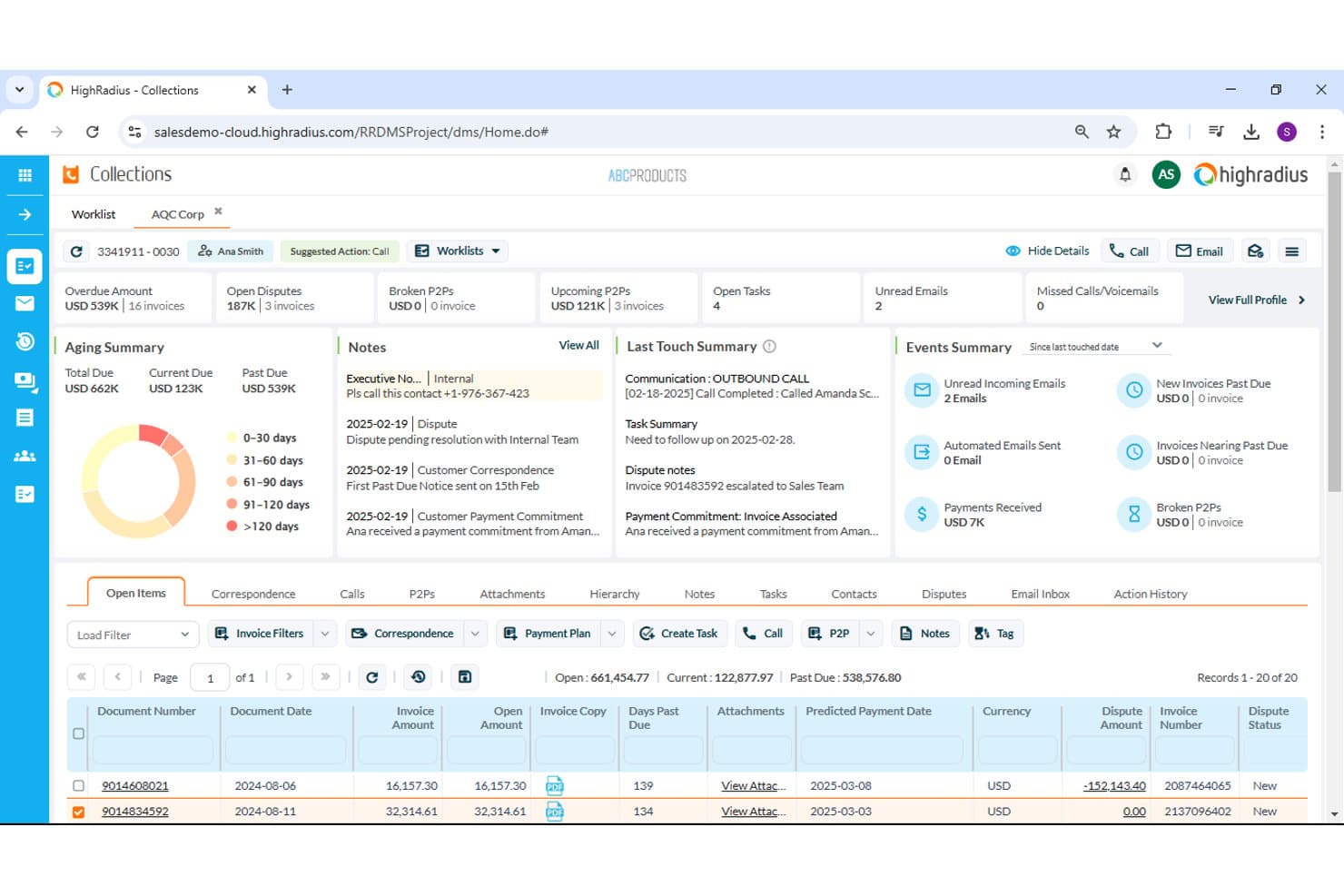
HighRadius offers a collections dashboard with aging and dispute tracking. HighRadius is an AI-native accounts receivable platform that covers cash application, collections management, credit decisioning, deductions workflows, and e-invoicing across a single integrated suite.
Who Is HighRadius Best For?
HighRadius is a strong fit for enterprise and upper-mid-market finance teams managing high invoice volumes across multiple business units or ERP environments.
Why I Picked HighRadius
I picked HighRadius as one of the best because its AI-driven cash application module delivers up to 95% no-touch posting rates across checks, ACH, and wires. The system parses remittance data from multiple formats automatically, so my team isn't manually chasing down payment details. It also includes a bank reconciliation add-in that ties matched payments back to open invoices without any manual intervention required.
HighRadius Key Features
- Automated dunning workflows: Set up multi-sequence reminders and dynamic escalation rules for overdue accounts.
- Customer self-service portal: Let customers view invoices, pay online, and dispute charges using a branded web portal.
- Deductions and dispute management: Centralize short-pay research, documentation, coding, and resolution routing.
- Predictive collections analytics: Forecast payment patterns and prioritize worklists using customer history and behavioral insights.
HighRadius Integrations
HighRadius offers native integrations with SAP, Oracle, NetSuite, Microsoft Dynamics, Sage Intacct, and Workday, and provides an API for custom integrations.
Pros and Cons
Pros:
- Self-service portal reduces inbound customer inquiries
- Predictive collections flags high-risk accounts automatically
- AI cash application hits near-perfect match rates
Cons:
- Reporting customization requires vendor support
- Long implementation timelines for enterprise deployments
Learn more about HighRadius: Best for collaborative AR with customer portals
- Free demo available
- Pricing upon request
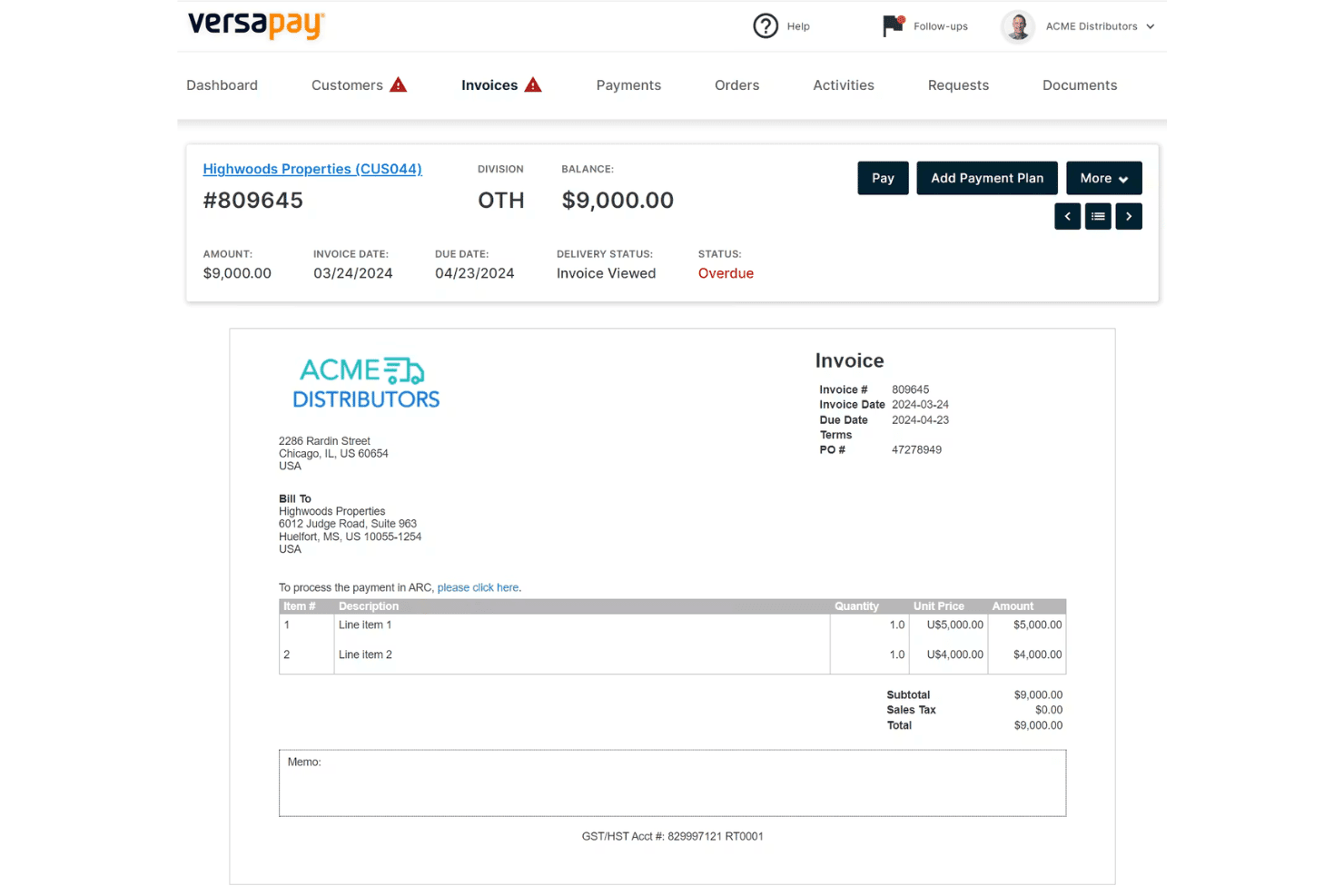
Versapay displays a detailed invoice view with payment options, line items, and overdue status tracking for accounts receivable management. Versapay is a collaborative accounts receivable platform that automates invoice delivery, payment collection, cash application, and collections management through a shared customer-facing portal and native ERP integrations.
Who Is Versapay Best For?
Versapay is a strong fit for mid-market B2B companies whose AR teams need to manage high invoice volumes across a large customer base.
Why I Picked Versapay
Versapay earns its spot on my shortlist because of how it handles buyer-seller collaboration directly inside the AR workflow. I love that customers can log into a shared portal to view invoices, flag disputes, and exchange messages with my team, all without a single email chain. Versapay's Collections Automation module also predicts which accounts are at risk of going delinquent, so my team can prioritize outreach before a payment is missed rather than chasing it after the fact.
Versapay Key Features
- AI-powered cash application: Uses machine learning to match payments to invoices and parse remittance data across formats.
- Automated dunning workflows: Allows you to configure multi-stage reminder sequences triggered by invoice aging and customer payment habits.
- Branded customer self-service portal: Lets customers view invoices, pay online, dispute charges, and download statements in one place.
- Native ERP integrations: Supports real-time bidirectional data sync with NetSuite, Sage Intacct, and Microsoft Dynamics 365.
Versapay Integrations
Versapay offers native integrations with NetSuite, Sage Intacct, and Microsoft Dynamics 365. An API is available for custom integrations.
Pros and Cons
Pros:
- ML-driven cash application handles multiple remittance formats
- Customer portal reduces inbound payment status inquiries
- Dispute resolution happens directly within invoices
Cons:
- Requires manual workflow setup for custom collections triggers
- Imposes platform processing fees with standard acquiring charges
Learn more about Versapay: Best for ERP-integrated AR automation
- Free demo available
- Pricing upon request
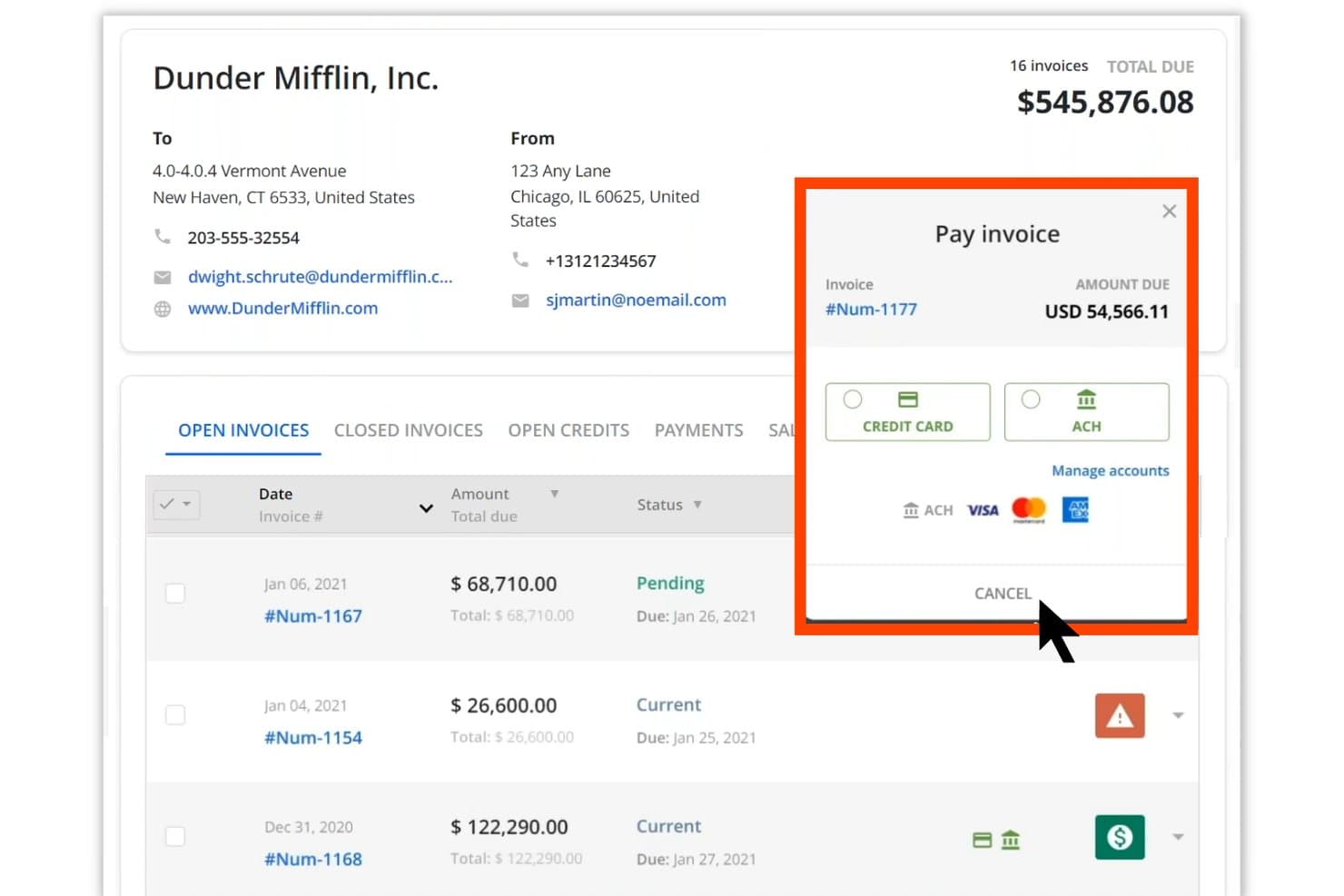
Quadient AR Automation offers a pay invoice modal with ACH and credit card options. Quadient AR Automation is a B2B accounts receivable platform that covers credit management, collections workflows, dispute tracking, cash application, and AI-driven payment forecasting within a single credit-to-cash system.
Who Is Quadient AR Automation Best For?
It's a strong fit for mid-market and enterprise B2B finance teams running complex ERP environments who need a unified system across collections, cash application, and credit management.
Why I Picked Quadient AR Automation
Quadient AR Automation earns its spot on my shortlist because of how deeply it connects to ERP systems. It ships with pre-built, bidirectional connectors for 10+ platforms, including NetSuite, SAP, Microsoft Dynamics, and Acumatica, so customer records, invoice data, and payment status stay in sync without manual exports. I also rely on the AI-driven cash forecasting module, which pulls directly from that live ERP data to project incoming collections with up to 94% accuracy.
Quadient AR Automation Key Features
- Customer self-service payment portal: Lets customers view invoices, download statements, and pay online using preferred payment methods.
- Automated dunning workflows: Enables customizable, multi-stage sequences for reminders and escalations tied to invoice status or customer segment.
- Dispute and deductions management: Provides centralized tools to log, research, and resolve invoice disputes or short pays with documentation trails.
- Real-time AR aging dashboards: Displays aging buckets, DSO metrics, and payment trends with live data for cash flow visibility.
Quadient AR Automation Integrations
Quadient AR Automation has native integrations with NetSuite, Sage Intacct, Sage X3, Sage 300, SAP, SAP Business One, Microsoft Dynamics, Acumatica, QuickBooks, Xero, Salesforce, and Zuora. An API is also available for custom integrations.
Pros and Cons
Pros:
- Dispute resolution centralizes documentation and approvals
- Provides self-service customer portal with payment options
- AI cash application handles complex remittance formats
Cons:
- Limits advanced BI reporting module to tiers
- Requires additional setup for custom ERP fields
Learn more about Quadient AR Automation:
Muut myyntisaamisten hallintaohjelmistot
Tässä on joitakin muita myyntisaamisten hallintaohjelmistoja, jotka eivät päässeet valikoimaani mutta joihin kannattaa silti tutustua:
- 11SidetradeBest for predictive collections using analytics
- 12BlackLine Invoice-to-CashBest for finance-first cash application workflows
- 13ChaserBest for automated follow-up scheduling
- 14UpflowBest for cash collection team collaboration
- 15Paystand Best for no-fee digital payment acceptance
- 16KollenoBest for centralized communication and payments
- 17GrowfinBest for unified workflow management and analytics
- 18CorcentricBest for B2B transaction processing compliance
- 19BILL ARBest for integrated invoicing and payment tracking
- 20Centime AR AutomationBest for AR, AP, and cash flow in one platform
How I Evaluate Accounts Receivable Software
When I evaluate AR software, I look for a baseline of core capabilities—cash application, dunning, ERP integration—then assess the differentiators that make one platform the right fit.
Core Functionality (Table Stakes For This List)
When I'm selecting tools for my list, I rank each one on a scale from 0 (does not offer the functionality) to 5 (excels in this area) for each core functionality listed below. I then calculate the tool's total score into a percentage, using 65% as a benchmark to help assess its overall fit for the list.
- Invoice Automation: I look for multi-channel delivery options—email, portal, EDI—plus multi-currency support for teams billing customers across regions.
- Payment Processing: The platform should accept ACH, card, wire, and check payments with gateway integration so customers can pay how they prefer.
- Cash Application: Matching payments to open invoices manually is a grind. I evaluate how well each tool auto-matches using remittance data and AI.
- Collections Management: Automated dunning sequences, overdue account prioritization, and dispute tracking help teams focus on high-risk balances first.
- AR Aging & Reporting: Real-time aging reports and DSO dashboards are table stakes. I check for drill-down capability and predictive cash forecasting.
- ERP/Accounting Integration: Bidirectional sync with systems like NetSuite, SAP, or Microsoft Dynamics keeps invoice and payment data aligned with the GL.
Once I have a list of tools that meet the criteria, I consider what sets each platform apart.
Differentiating Factors (What Sets Vendors Apart)
Here's how I compare and contrast different vendors:
Standout Features
AI-powered cash application is a major differentiator. I look for platforms that auto-match payments across lockbox files, ACH, and emailed remittances—not just simple one-to-one matching. Predictive collections analytics also separates top-tier tools from the pack, giving collectors prioritized worklists based on actual payment behavior rather than static aging buckets. Customer self-service portals matter too, especially when your buyers want to pull invoices, raise disputes, and pay without calling your AR team.
Beyond Features
Implementation timelines vary widely—some platforms deploy in weeks with self-serve onboarding, while enterprise tools can take months and require dedicated project managers for data migration. I also evaluate pricing models closely, since some vendors charge by invoice volume and others by user seats or entities, which changes the math fast as you scale. Compliance readiness matters too. I check for SOC 1 and SOC 2 Type II certifications, audit trails, and role-based access controls that support segregation of duties during external audits.
Näin valitset myyntisaamisten hallintaohjelmiston
Yritätkö varmistaa, että seuraava myyntisaamisten hallintaratkaisusi todella nopeuttaa kassavirtaa, yksinkertaistaa täsmäytystä ja tukee ainutlaatuisia laskutustarpeitasi?
| Jos ensisijainen tavoitteesi on... | Etsi... |
|---|---|
| Jos ensisijainen tavoitteesi on...Monikanavaisen laskujen toimituksen automatisointi | Etsi...Sisäänrakennettu tuki sähköpostille, EDI:lle ja asiakasportaaleille |
| Jos ensisijainen tavoitteesi on...Maksujen kohdistamiseen käytettävän manuaalisen työmäärän vähentäminen | Etsi...Tekoälypohjainen maksujen täsmäytys ja maksutietojen automaattinen kerääminen |
| Jos ensisijainen tavoitteesi on...Perinnän hallinta maailmanlaajuisesti toimivissa yrityksissä | Etsi...Monivaluuttainen maksumuistutusten hallinta ja alueelliset vaatimustenmukaisuustyökalut |
| Jos ensisijainen tavoitteesi on...Kassavirran luotettava ennustaminen | Etsi...Reaaliaikainen myyntisaamisten ikäanalyysi, DSO-seuranta ja ennakoiva analytiikka |
| Jos ensisijainen tavoitteesi on...Tiivis integrointi ERP- tai pääkirjajärjestelmään | Etsi...Valmiiksi rakennettu kaksisuuntainen synkronointi taloushallinnon järjestelmään |
Näin arvioit valikoimasi vaihtoehdot
- Testaa portaalin ominaisuudet: Pyydä tiimin jäsentä suorittamaan esimerkkimaksu ja riita-asiaan liittyvä tehtävä asiakkaan itsepalveluportaalissa 24 tunnin kuluessa.
- Vahvista integraatiota koskevat väitteet: Pyydä tosielämän tiedonkulkua esittelevä esittely, joka näyttää laskujen ja maksujen synkronoinnin myyntisaamisten hallintatyökalun ja ERP-järjestelmäsi välillä käyttäen reaaliaikaisia tai anonymisoituja tietoja.
- Varmista työnkulkujen joustavuus: Luo ja suorita mukautettu maksumuistutusprosessi, joka sisältää vähintään kaksi laskun ikään perustuvaa eskalointisääntöä kokeiluympäristössä tai hiekkalaatikossa.
- Pyydä todisteet vaatimustenmukaisuudesta: Pyydä dokumentaatio SOC 2 Type II -sertifioinnista ja esimerkkejä auditointipolun viennistä.
- Punnitse kompromissi: Päätä, ovatko syvä ERP-integraatio ja pankkitason vaatimustenmukaisuus niiden monimutkaisuuden ja resurssitarpeen arvoisia verrattuna nopeasti käyttöönotettaviin, tarkasti kohdennettuihin myyntisaamisten hallintatyökaluihin.
Mitä myyntisaamisohjelmisto on?
Myyntisaamisohjelmisto on taloushallinnon alustojen luokka, joka automatisoi laskujen toimituksen, maksujen keräämisen ja täsmäytyksen yritysten välisissä liiketoimissa. Näiden työkalujen avulla voit hallita perintäprosesseja, seurata myyntisaamisten ikääntymistä, luoda raportteja kassavirran ennustamista varten ja synkronoida tietoja toiminnanohjaus- tai kirjanpitojärjestelmäsi kanssa. Keskittämällä ja automatisoimalla myyntisaamisten keskeiset tehtävät ohjelmisto parantaa näkyvyyttä, vähentää manuaalista työtä ja tukee vaatimustenmukaisuutta tilauksesta kassasuoritukseen etenevän prosessin aikana.
Myyntisaamisohjelmiston ominaisuudet
Kun valitset myyntisaamisohjelmistoa, kiinnitä huomiota seuraaviin keskeisiin ominaisuuksiin:
- Laskutuksen automatisointi: Luo, lähetä ja seuraa sähköisiä laskuja automaattisesti, mikä vähentää manuaalista työtä ja varmistaa, että asiakkaat saavat tarkan laskutuksen myyntisaamisten automatisointiohjelmiston avulla.
- Maksujen käsittely useilla menetelmillä: Ota vastaan ja kirjaa maksuja pankkisiirrolla, luottokortilla, sekillä tai tilisiirrolla. Jotkin alustat tukevat myös automaattisia maksuja ja toistuvaa laskutusta.
- Kassasuoritusten kohdistaminen: Kohdista saapuvat maksut avoimiin laskuihin, mukaan lukien osamaksut, ja käsittele maksutietoja tarkan täsmäytyksen varmistamiseksi.
- Automatisoidut maksumuistutusprosessit: Aikatauluta ja lähetä maksumuistutuksia sekä eskalointi-ilmoituksia, jotka auttavat vähentämään erääntyneitä saldoja ja luottotappioita sekä tukevat perintätiimejä.
- Asiakkaiden itsepalveluportaali: Tarjoa asiakkaille turvallinen verkkokeskus laskujen tarkastelua, lataamista ja maksamista varten, tiliotteiden tarkistamiseen sekä riitojen hallintaan ilman henkilöstön suoraa osallistumista.
- Myyntisaamisten ikääntymisen ja DSO:n raportointi: Tarjoa reaaliaikainen seuranta ja koontinäytöt avoimista myyntisaamisista, ikäjakaumista ja myyntisaamisten kiertoaikaa (DSO) koskevista mittareista kassavirran hallinnan ja talousraportoinnin parantamiseksi.
- Luoton ja perinnän hallinta: Hallitse luottoehtoja, seuraa luottolimiittejä ja priorisoi perintätoimia riskin ja tilin tilanteen perusteella.
- Riitojen seuranta ja ratkaiseminen: Kirjaa, seuraa ja ratkaise maksuihin liittyviä riitoja dokumentoimalla yhteydenotot, tilanteen ja lopputulokset.
- Toiminnanohjaus- ja kirjanpitointegraatio: Synkronoi asiakkaat, laskut ja maksutiedot kaksisuuntaisesti pääasiallisen kirjanpitojärjestelmäsi kanssa, mikä poistaa manuaalisen tietojen uudelleensyötön.
- Tarkastusketjut ja käyttäjäoikeuksien hallinta: Säilytä selkeä kirja käyttäjien toimista, muutoksista ja hyväksynnöistä, mikä tukee vaatimustenmukaisuutta ja helpottaa auditointeja.
Myyntisaamisohjelmistojen yleiset tekoälyominaisuudet
Edellä lueteltujen myyntisaamisohjelmistojen vakiotoimintojen lisäksi monet näistä ratkaisuista sisältävät tekoälyä esimerkiksi seuraavilla ominaisuuksilla:
- Tekoälypohjainen kassasuoritusten kohdistaminen: Hyödyntää koneoppimista maksujen automaattiseen kohdistamiseen laskuihin useissa eri maksutietomuodoissa, mikä vähentää manuaalista täsmäytystä ja virheitä.
- Ennakoiva perintäanalytiikka: Analysoi asiakkaan maksuhistoriaa ja käyttäytymistä ennustaakseen maksupäiviä, tunnistaakseen korkean riskin tilit ja priorisoidakseen perijöiden työlistat.
- Automatisoitu riitojen ratkaiseminen: Hyödyntää tekoälyä maksuihin liittyvien riitojen luokitteluun, ohjaamiseen ja ratkaisuehdotusten tekemiseen, mikä nopeuttaa prosessia ja parantaa tarkkuutta.
- Dynaaminen maksumuistutusten optimointi: Hienosäätää jatkuvasti muistutusten ajoitusta, viestintää ja eskalointipolkuja asiakkaiden reagointialttiuden ja maksukäyttäytymisen perusteella.
- Maksujen poikkeamien tunnistaminen: Tunnistaa epätavallisen maksutoiminnan tai poikkeamat reaaliajassa ja auttaa tiimejä havaitsemaan virheet tai mahdolliset petokset ennen kuin ne vaikuttavat kassavirtaan.
Myyntisaamisohjelmiston hyödyt
Myyntisaamisohjelmiston käyttöönotto tarjoaa useita hyötyjä tiimillesi ja yrityksellesi. Tässä muutamia hyötyjä, joita voit odottaa:
- Nopeutunut kassavirta: Automatisoidut laskut, maksujen käsittely ja perintä nopeuttavat maksujen saapumista ja lyhentävät myyntisaamisten kiertoaikaa.
- Manuaalisen työmäärän väheneminen: Kassasuoritusten kohdistamisen ja automatisoitujen maksumuistutusprosessien kaltaiset ominaisuudet säästävät tiimiltäsi tuntikausia manuaalista tietojen syöttämistä ja täsmäytystä.
- Parantunut näkyvyys: Reaaliaikainen myyntisaamisten ikäjakauma, DSO-mittarit ja mukautettavat koontinäytöt antavat selkeämmän kuvan avoimista saldoista ja kassavirtaennusteista.
- Parantunut asiakaskokemus: Itsepalveluportaalit ja useat maksuvaihtoehdot helpottavat asiakkaiden maksamista, laskujen tarkastelua ja riitojen ratkaisemista.
- Vahvempi vaatimustenmukaisuus ja tarkastusjälki: Suojatut integraatiot, roolipohjaiset käyttäjäoikeudet ja yksityiskohtaiset lokit auttavat yritystäsi pysymään valmiina tarkastuksiin ja täyttämään sääntelyvaatimukset.
- Skaalautuvuus kasvua varten: Tuki useille liiketoimintayksiköille, valuutoille ja suurille laskutusmäärille mukautuu toimintasi laajentuessa tai monimutkaistuessa.
- Parempi riskienhallinta: Ennakoiva analytiikka ja automatisoidut hälytykset auttavat tiimiäsi tunnistamaan korkean riskin asiakkuudet ja ratkaisemaan riidat ennen ongelmien kärjistymistä.
Myyntisaamisohjelmiston kustannukset ja hinnoittelu
Myyntisaamisohjelmiston valinta edellyttää saatavilla olevien hinnoittelumallien ja palvelupakettien ymmärtämistä. Kustannukset vaihtelevat ominaisuuksien, tiimin koon, lisäosien ja muiden tekijöiden perusteella. Alla oleva taulukko sisältää yhteenvedon myyntisaamisohjelmistoratkaisujen yleisistä palvelupaketeista, niiden keskimääräisistä hinnoista ja tyypillisistä ominaisuuksista:
Myyntisaamisohjelmiston palvelupakettien vertailutaulukko
| Palvelupaketin tyyppi | Keskimääräinen hinta | Yleiset ominaisuudet |
|---|---|---|
| Palvelupaketin tyyppiIlmainen palvelupaketti | Keskimääräinen hinta$0 | Yleiset ominaisuudetPeruslaskutus, rajoitettu maksujen seuranta ja yksinkertainen raportointi. |
| Palvelupaketin tyyppiHenkilökohtainen palvelupaketti | Keskimääräinen hinta$10–$30/käyttäjä/kuukausi | Yleiset ominaisuudetAutomatisoidut laskut, useiden maksutapojen hyväksyminen, myyntisaamisten perusikäjakauma ja sähköpostituki. |
| Palvelupaketin tyyppiYrityspalvelupaketti | Keskimääräinen hinta$40–$75/käyttäjä/kuukausi | Yleiset ominaisuudetKassasuoritusten kohdistaminen, automatisoidut maksumuistutukset, itsepalveluportaalit, ERP-integraatio ja mukautettava raportointi. |
| Palvelupaketin tyyppiYritystason palvelupaketti | Keskimääräinen hinta$100–$200/käyttäjä/kuukausi | Yleiset ominaisuudetTuki useille liiketoimintayksiköille, edistynyt työnkulkujen automatisointi, ennakoiva analytiikka, henkilökohtainen käyttöönotto ja kattavat tarkastusjäljet. |
Myyntisaamisohjelmiston usein kysytyt kysymykset
Tässä on vastauksia yleisiin myyntisaamisohjelmistoa koskeviin kysymyksiin:
Miten myyntisaamisohjelmisto integroidaan ERP- ja kirjanpitoalustoihin?
Useimmat ratkaisut tarjoavat valmiit liitännät esimerkiksi NetSuiteen, QuickBooksiin, Sage Intacctiin ja Microsoft Dynamicsiin. Näiden integraatioiden avulla voit synkronoida laskut, asiakkaat, maksut ja hyvityslaskut usein reaaliaikaisesti tai ajastettujen eräpäivitysten avulla.
Voiko myyntisaamisohjelmisto käsitellä useita valuuttoja ja liiketoimintayksiköitä?
Kyllä, monet alustat tukevat usean valuutan tapahtumia ja usean liiketoimintayksikön laskutusta. Tämä on olennaista, jos hallinnoit myyntisaamisia eri maissa, tytäryhtiöissä tai liiketoimintayksiköissä.
Mitä tietoturva- ja vaatimustenmukaisuusstandardeja kannattaa etsiä?
Kannattaa etsiä toimittajia, joilla on SOC 1- tai SOC 2 Type II -sertifiointi, maksutietojen käsittelyyn liittyvä PCI DSS -vaatimustenmukaisuus ja sisäänrakennetut tarkastusjäljet. Ne auttavat tiimiäsi ylläpitämään taloudellista eheyttä ja täyttämään ulkoisten tarkastusten vaatimukset.
Miten automatisoidut maksumuistutusprosessit käytännössä toimivat?
Automatisoidut maksumuistutusprosessit käyttävät sääntöpohjaisia laukaisimia muistutussähköpostien lähettämiseen, maksamattomien laskujen eskalointiin tai seurantatoimien ajoittamiseen. Voit yleensä mukauttaa ajoituksen ja eskalointisäännöt asiakassegmentin tai laskun iän perusteella.
Kuinka nopeasti myyntisaamisohjelmiston voi ottaa käyttöön?
Käyttöönoton aikataulu riippuu alustasta ja ympäristöstäsi, mutta pienille ja keskisuurille yrityksille suunnatut työkalut voidaan ottaa käyttöön muutamassa viikossa, kun taas yritystason käyttöönotot voivat tietojen siirron ja mukautettujen integraatiotarpeiden vuoksi kestää useita kuukausia.