

La gestione delle spese può essere un grattacapo per i CFO. Bisogna gestire ricevute, approvazioni e rimborsi, cercando al contempo di rispettare le normative e rimanere entro il budget. I software per la gestione delle spese dovrebbero aiutare, ma forse Expensify non soddisfa le tue esigenze.
In base alla mia esperienza, è importante trovare una soluzione che risponda ai requisiti specifici del tuo team. Che si tratti di una migliore integrazione, di interfacce intuitive o di report più completi, esiste un'alternativa adatta a te.
Ho esaminato e testato attentamente diverse opzioni per offrirti le migliori alternative a Expensify. In questo articolo ti guiderò attraverso le mie scelte principali, fornendoti informazioni chiare su ciò che offre ciascuna soluzione. Troviamo la soluzione più adatta alle esigenze del tuo team nella gestione delle spese.
Che cos'è Expensify?
Expensify è un software per la gestione delle spese progettato per semplificare il monitoraggio e la gestione delle spese aziendali. Viene comunemente utilizzato da professionisti della finanza e titolari di aziende che necessitano di un modo affidabile per gestire ricevute, approvazioni e rimborsi. Funzionalità come la scansione delle ricevute, la rendicontazione delle spese e i flussi di lavoro per le approvazioni aiutano a rendere più efficiente la gestione delle spese. Nel complesso, Expensify offre una soluzione pratica per gestire le spese e mantenere il controllo finanziario.
Tabella di confronto delle alternative a Expensify
| Tool | Best For | Trial Info | Price | ||
|---|---|---|---|---|---|
| 1 | Ideale per il monitoraggio delle spese con integrazioni e-mail | Demo gratuita disponibile | Da $11.99/utente/mese (con fatturazione annuale) | Website | |
| 2 | Ideale per nessun costo di piattaforma e analisi avanzate | Piano gratuito + demo gratuita disponibile | Prezzo su richiesta | Website | |
| 3 | Ideale per l'automazione e la conformità | Prova gratuita di 14 giorni | A partire da $3/utente/mese (fatturato annualmente) | Website | |
| 4 | Ideale per strumenti finanziari integrati | Piano gratuito + demo gratuita disponibile | A partire da $12/utente/mese | Website | |
| 5 | Ideale per aziende canadesi | Prova gratuita di 30 giorni | Da $7/utente/mese | Website | |
| 6 | Ideale per aziende che vogliono passare dal semplice monitoraggio delle spese alla gestione completa dei costi | Demo gratuita disponibile | Prezzi su richiesta | Website | |
| 7 | Ideale per operazioni finanziarie complete | Piano gratuito disponibile | A partire da $49/utente/mese | Website | |
| 8 | Ideale per viaggi e spese integrati | Demo gratuita disponibile | Prezzo su richiesta | Website | |
| 9 | Ideale per la rendicontazione delle spese intuitiva | Demo gratuita disponibile | Prezzi su richiesta | Website | |
| 10 | Ideale per esperienza utente e sicurezza | Prova gratuita di 30 giorni disponibile | Da $8/utente/mese | Website |


Perché fidarsi dei nostri consigli sui software
6,700+
Reviews
20
Industry experts
16+
Evaluation factors
14
Years
Le nostre recensioni riflettono il nostro giudizio indipendente, non un discorso di vendita. Scopri come manteniamo la trasparenza.
Per questa guida, abbiamo valutato gli strumenti attraverso test pratici e ricerche indipendenti, assegnando un punteggio agli strumenti in base ai nostri criteri di selezione.
Le nostre recensioni riflettono il nostro giudizio editoriale umano, non un discorso di vendita.
Recensioni delle migliori alternative a Expensify
Di seguito trovi i miei riepiloghi dettagliati delle migliori alternative a Expensify incluse nel mio elenco. Le mie recensioni offrono una panoramica dettagliata delle funzionalità principali, dei pro e dei contro, delle integrazioni e dei casi d’uso ideali di ogni strumento, per aiutarti a trovare quello più adatto a te.
 Ideale per il monitoraggio delle spese con integrazioni e-mail
- Demo gratuita disponibile
- Da $11.99/utente/mese (con fatturazione annuale)
Visit WebsiteCustomer Rating:4.6/5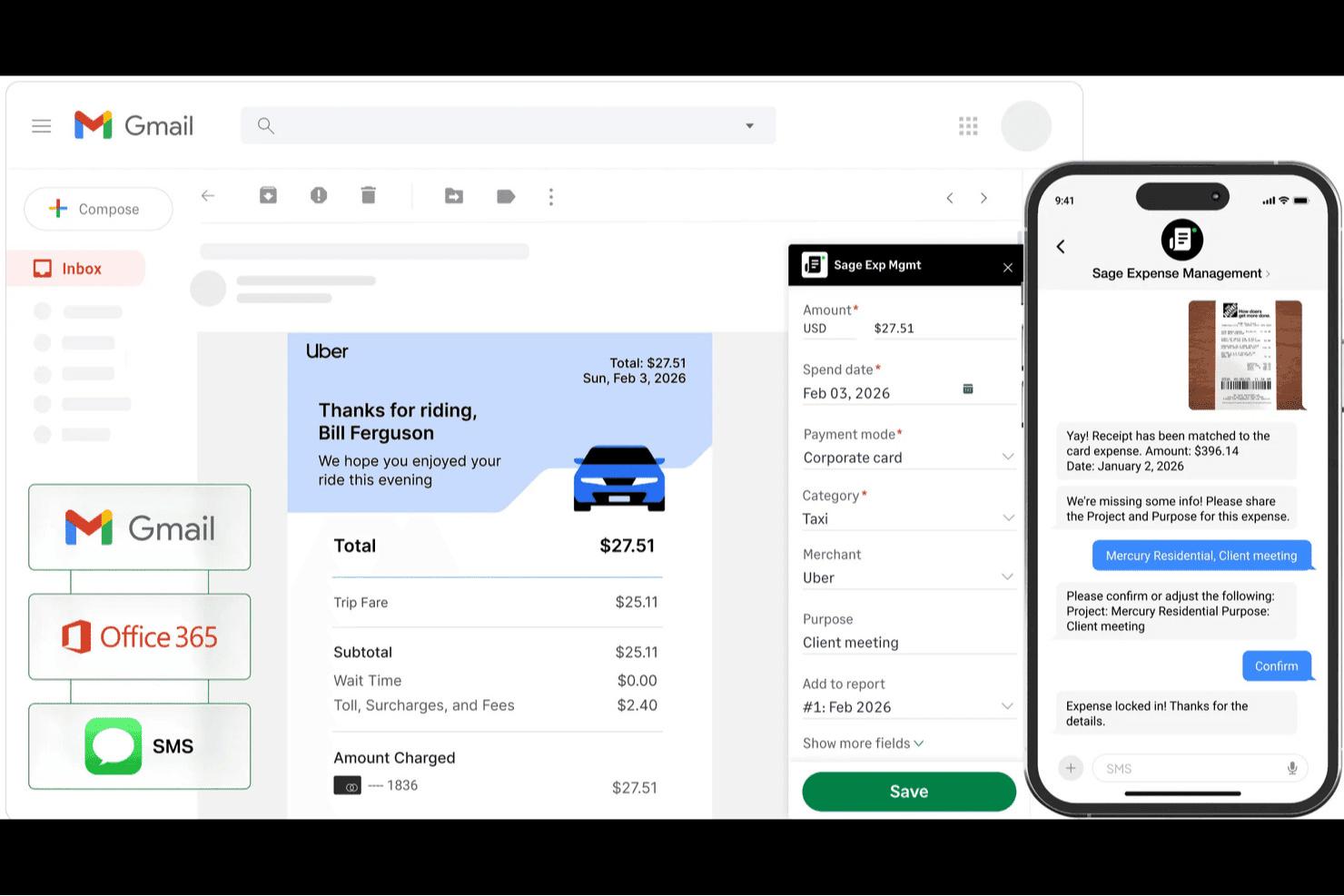
Sage Expense Management acquisisce automaticamente le ricevute da Gmail e dagli SMS nei rendiconti delle spese. Sage Expense Management (in precedenza Fyle) aiuta i team finanziari a sostituire Expensify e a gestire le spese dei dipendenti senza dover cambiare le carte.
Per chi è più adatto Sage Expense Management (in precedenza Fyle)?
Sage Expense Management è adatto ai team finanziari che hanno bisogno di monitorare le spese tramite e-mail e desiderano mantenere le carte aziendali esistenti.
Perché ho scelto Sage Expense Management (in precedenza Fyle)
Ho scelto Sage Expense Management (in precedenza Fyle), la soluzione più adatta per il monitoraggio delle spese con integrazioni e-mail, come alternativa a Expensify che non obbliga a cambiare carta. I dipendenti possono inoltrare le ricevute elettroniche da Gmail o Outlook e il sistema estrae i dettagli delle ricevute, abbinandoli alle transazioni delle carte. Il tuo team può mantenere le carte aziendali esistenti durante la revisione delle spese.
Funzionalità principali di Sage Expense Management
- Controlli delle politiche in tempo reale: Segnala le spese duplicate e il superamento dei limiti di spesa prima dell'invio.
- Flussi di approvazione: Consente agli approvatori di esaminare le spese tramite Slack, Gmail, Outlook o l'app mobile.
- Chilometraggio e diaria: Calcola il chilometraggio con Google Maps e applica le tariffe giornaliere in base alla politica e alla località.
- Sincronizzazione contabile: Sincronizza i dati delle spese con Sage, QuickBooks e Xero.
Integrazioni di Sage Expense Management
Sage Expense Management offre integrazioni contabili bidirezionali con QuickBooks Online, QuickBooks Desktop, Sage Intacct, Sage 300 CRE, Sage 50 e Xero. Si collega inoltre a Gmail, Outlook e Perk e supporta le carte aziendali esistenti, quindi non è necessario cambiare carta.
Pros and Cons
Pros:
- Possibilità di mantenere le carte aziendali esistenti
- Le ricevute inoltrate tramite e-mail riducono l'inserimento manuale
- I controlli delle politiche in tempo reale segnalano tempestivamente le violazioni
Cons:
- Le discrepanze tra le ricevute possono richiedere una correzione manuale
- Gli utenti segnalano problemi di sincronizzazione e arresti anomali occasionali
Learn more about Sage Expense Management (formerly Fyle): Ideale per nessun costo di piattaforma e analisi avanzate
- Piano gratuito + demo gratuita disponibile
- Prezzo su richiesta
Visit WebsiteCustomer Rating:4.7/5
Navan offre un piano di gestione viaggi gratuito con analisi per un controllo intelligente delle spese. Navan è una piattaforma completa per la gestione di viaggi e spese, pensata per aziende di tutte le dimensioni. È ideale per team di contabilità, responsabili dei viaggi e dirigenti, con un focus sulla gestione dei programmi di viaggio, il monitoraggio delle spese e le soluzioni di pagamento.
Perché Navan è una valida alternativa a Expensify: Navan è una soluzione conveniente per la gestione delle spese di viaggio. Offre analisi avanzate che consentono di ottenere informazioni sulle spese di viaggio e ottimizzare il budget. Funzionalità come la gestione automatica degli itinerari e la visibilità in tempo reale delle spese garantiscono il pieno controllo sui programmi di viaggio. L’attenzione di Navan all’autonomia degli utenti e al risparmio dei costi la rende un forte concorrente di Expensify.
Funzionalità e integrazioni principali:
Le funzionalità includono la gestione automatica degli itinerari, il monitoraggio delle spese in tempo reale e i premi fedeltà. Questi strumenti aiutano a organizzare i piani di viaggio e a tenere sotto controllo le spese. La piattaforma offre inoltre analisi avanzate per fornire informazioni sui modelli di spesa e aiutare a prendere decisioni informate.
Le integrazioni includono QuickBooks, Xero, NetSuite, Workday, Sage Intacct, Salesforce, Slack e altre ancora.
Pros and Cons
Pros:
- Nessun costo di piattaforma
- Analisi avanzate
- Dati sulle spese in tempo reale
Cons:
- Funzionalità limitate per esigenze non legate ai viaggi
- Potrebbe non essere adatto a utenti non corporate
Learn more about Navan: Ideale per l'automazione e la conformità
- Prova gratuita di 14 giorni
- A partire da $3/utente/mese (fatturato annualmente)
Visit WebsiteCustomer Rating:4.5/5
Zoho Expense automatizza la rendicontazione e la conformità alle policy grazie all'analisi delle spese. Zoho Expense è una soluzione per la gestione delle spese progettata per aziende di qualsiasi dimensione. È pensata per i team finanziari e i titolari d'azienda, con particolare attenzione all'automazione della rendicontazione delle spese, alla conformità e alla semplificazione dei flussi di approvazione.
Perché Zoho Expense è una buona alternativa a Expensify: Zoho Expense offre funzionalità avanzate di automazione, riducendo il lavoro manuale e accelerando il processo di rendicontazione delle spese. L'applicazione automatica delle policy garantisce la conformità alle politiche di spesa della tua azienda. Gli strumenti di analisi forniscono informazioni sulle tendenze di spesa, aiutandoti a prendere decisioni consapevoli. L'attenzione di Zoho Expense all'automazione e alla conformità lo rende una valida alternativa a Expensify.
Funzionalità e integrazioni principali:
Le funzionalità includono il monitoraggio automatico delle ricevute, il supporto multi-valuta e il monitoraggio dei chilometri. Questi strumenti ti aiutano a gestire le spese e a mantenere il controllo sulle transazioni internazionali. La piattaforma offre inoltre flussi di approvazione personalizzabili per adattarsi alle esigenze del tuo team.
Le integrazioni includono QuickBooks, Xero, Slack, Zoho CRM, Google Drive, Dropbox e altro ancora.
Pros and Cons
Pros:
- Solidi strumenti per la conformità
- Supporta i pagamenti ACH
- Supporto multi-valuta
Cons:
- Opzioni di personalizzazione limitate
- Curva di apprendimento per i nuovi utenti
Learn more about Zoho Expense: 4Ideale per strumenti finanziari integrati
Brex
- Piano gratuito + demo gratuita disponibile
- A partire da $12/utente/mese
Visit WebsiteCustomer Rating:4.5/5
Brex offre strumenti finanziari integrati per un controllo chiaro e in tempo reale della spesa. Brex è una piattaforma di gestione finanziaria adatta a startup, aziende di medie dimensioni e grandi imprese. Il software si concentra sulla gestione delle spese e sulle carte aziendali. È molto popolare tra le aziende tecnologiche che necessitano di un approccio integrato per gestire spese, flusso di cassa e spese aziendali.
Perché Brex è una valida alternativa a Expensify: Brex offre strumenti contabili integrati che includono carte di credito aziendali, gestione della liquidità e tracciamento delle spese. Con funzionalità come il monitoraggio in tempo reale delle spese e la corrispondenza automatica delle ricevute, è facile controllare e monitorare le spese. L'accento posto da Brex sull'integrazione aiuta il tuo team a gestire le finanze in modo più efficiente.
Funzionalità principali e integrazioni:
Funzionalità includono tracciamento delle spese in tempo reale, corrispondenza automatica delle ricevute e emissione di carte aziendali. Queste funzionalità ti rendono semplice tenere traccia delle tue spese e assicurare la conformità. La funzionalità di gestione della liquidità della piattaforma permette un controllo sul flusso di cassa, consentendoti di prendere decisioni finanziarie informate.
Integrazioni includono QuickBooks, Xero, NetSuite, Gusto, Slack, SAP Concur, Workday e altro ancora.
Pros and Cons
Pros:
- Monitoraggio delle spese in tempo reale
- Integrazioni ERP personalizzabili
- Piattaforma finanziaria centralizzata
Cons:
- Supporto internazionale limitato
- Richiede solidità creditizia per l'approvazione
 Ideale per aziende canadesi
- Prova gratuita di 30 giorni
- Da $7/utente/mese
Visit WebsiteCustomer Rating:4.4/5
Float offre la gestione delle spese con carte CAD/USD e spese automatizzate. Float è una piattaforma finanziaria che offre carte aziendali, pagamenti di fatture e gestione delle spese. Si concentra sull'automazione dei processi finanziari e fornisce strumenti per la gestione delle spese, del flusso di cassa e delle spese aziendali.
Perché Float è una buona alternativa a Expensify: Float è pensata per le aziende canadesi, offrendo carte in CAD e USD senza garanzie personali. Fornisce una gestione automatizzata delle spese, che aiuta a chiudere i conti più rapidamente e a gestire le spese del team. Conti ad alto rendimento con interessi fino al 4% aggiungono valore alle tue operazioni finanziarie.
Funzionalità di rilievo e integrazioni:
Le funzionalità includono acquisizione e abbinamento automatico delle ricevute, approfondimenti in tempo reale sulle spese e creazione di carte virtuali. Queste funzionalità aiutano a gestire le spese in modo efficiente e a mantenere il controllo sulle spese aziendali. La piattaforma offre anche credito non garantito con limiti elevati per una maggiore flessibilità finanziaria.
Le integrazioni includono QuickBooks, Xero, NetSuite, Slack, BambooHR e altro ancora.
Pros and Cons
Pros:
- Gestione automatizzata delle spese
- Carte aziendali CAD e USD
- Nessuna garanzia personale richiesta
Cons:
- Potrebbe non essere adatto agli utenti non canadesi
- Capacità offline limitate
Learn more about Float: Ideale per aziende che vogliono passare dal semplice monitoraggio delle spese alla gestione completa dei costi
- Demo gratuita disponibile
- Prezzi su richiesta
Visit WebsiteCustomer Rating:4.2/5
Coupa offre approfondimenti dettagliati sulla spesa con analisi annua, trimestrale e su dodici mesi consecutivi. Coupa è una piattaforma di gestione della spesa aziendale progettata per le organizzazioni che desiderano una gestione delle spese integrata in una strategia più ampia di procure-to-pay. È utilizzata da team di finanza, approvvigionamento e supply chain per gestire acquisti, fatturazione, rapporti con i fornitori e controlli di spesa all'interno di un unico sistema.
Perché Coupa è una valida alternativa a Expensify: Coupa è una scelta solida per le organizzazioni che necessitano di più della semplice rendicontazione delle spese. Mentre Expensify si concentra principalmente sulle spese dei dipendenti, Coupa estende il controllo della spesa a procurement, gestione fornitori e acquisti basati su contratto. La visibilità in tempo reale della spesa e l'applicazione delle policy aiutano i team finanziari a monitorare i costi tra i diversi reparti e fornitori, rendendo Coupa più adatto per imprese che vogliono centralizzare e governare tutta la spesa aziendale, non solo i rimborsi.
Caratteristiche e integrazioni principali:
Le funzionalità includono analisi avanzata della spesa per monitorare la performance su base annua, trimestrale e su dodici mesi consecutivi, strumenti di collaborazione con i fornitori per gestire i rapporti con i vendor e gestione del ciclo di vita dei contratti per garantire prezzi e condizioni negoziati. Dashboard personalizzabili offrono ai responsabili finanziari una visione consolidata dei modelli di spesa, della conformità e delle performance negli acquisti a livello aziendale.
Le integrazioni includono SAP, Oracle, NetSuite, Microsoft Dynamics, QuickBooks, Xero, Salesforce, Workday, Gusto e Slack.
Pros and Cons
Pros:
- Funzionalità di procurement estese
- Visibilità in tempo reale sulla spesa
- Strumenti per la gestione dei fornitori
Cons:
- Processo di configurazione complesso
- Può richiedere formazione aggiuntiva
Learn more about Coupa: Ideale per operazioni finanziarie complete
- Piano gratuito disponibile
- A partire da $49/utente/mese

BILL Spend & Expense fornisce analisi dei gruppi di budget e dei principali spendaccioni. BILL Spend & Expense è una piattaforma di operazioni finanziarie basata su cloud progettata per aziende di tutte le dimensioni. Serve i team finanziari e i titolari d'azienda automatizzando i processi di contabilità fornitori e clienti, migliorando la gestione del flusso di cassa e semplificando i flussi di pagamento.
Perché BILL Spend & Expense è una valida alternativa a Expensify: Il software offre funzionalità complete per le operazioni finanziarie, andando oltre le semplici esigenze di gestione delle spese. BILL Spend & Expense automatizza l'elaborazione delle fatture, aiutando a risparmiare tempo e a ridurre gli errori nei flussi finanziari. Con funzionalità come la pianificazione automatica dei pagamenti e la previsione del flusso di cassa, puoi avere un maggiore controllo sulle tue operazioni finanziarie.
Caratteristiche salienti e integrazioni:
Caratteristiche includono la rilevazione automatica delle fatture, la pianificazione dei pagamenti e i flussi di lavoro di approvazione. Questi strumenti aiutano a gestire efficacemente le operazioni finanziarie e garantiscono pagamenti tempestivi. La piattaforma offre anche la previsione del flusso di cassa per fornire una visione della salute finanziaria.
Integrazioni includono QuickBooks, Xero, Sage HR, NetSuite, Microsoft Dynamics, Gusto e altre.
Pros and Cons
Pros:
- Funzionalità di pianificazione dei pagamenti
- Strumenti di previsione del flusso di cassa
- Flussi di approvazione fluidi
Cons:
- Credito e rimborso possono risultare confusi
- I livelli di controllo gerarchico sono meno flessibili rispetto ad alcune opzioni concorrenti
Learn more about BILL Spend & Expense: Ideale per viaggi e spese integrati
- Demo gratuita disponibile
- Prezzo su richiesta

SAP Concur fornisce analisi con tendenze di spesa, ratei e approfondimenti sulle politiche. SAP Concur è una soluzione per la gestione delle spese e dei viaggi progettata per aziende di tutte le dimensioni. Si rivolge ai team finanziari, ai responsabili dei viaggi e ai viaggiatori d'affari, concentrandosi sull'automazione delle prenotazioni di viaggio, della rendicontazione delle spese e della gestione della conformità.
Perché SAP Concur è una valida alternativa a Expensify: SAP Concur offre una gestione integrata di viaggi e spese. Mette a disposizione strumenti per la prenotazione dei viaggi, la gestione degli itinerari e la registrazione delle spese in un'unica piattaforma. Le funzionalità automatizzate di conformità e audit aiutano a rispettare regolamenti e politiche aziendali. L'approccio end-to-end di SAP Concur assicura una piattaforma unificata per gestire in modo efficiente viaggi e spese.
Funzionalità e integrazioni principali:
Le funzionalità includono cattura automatica delle ricevute, prenotazione dei viaggi e gestione della conformità. Queste funzioni aiutano nella pianificazione dei viaggi e garantiscono il rispetto delle politiche. La piattaforma offre inoltre strumenti dettagliati di reportistica finanziaria per fornire approfondimenti sulle tendenze di viaggio e di spesa.
Le integrazioni includono QuickBooks, Xero, NetSuite, Microsoft Dynamics, Sage Intacct e molte altre.
Pros and Cons
Pros:
- Gestione integrata di viaggi e spese
- Funzionalità di conformità automatizzate
- Strumenti di reportistica dettagliati
Cons:
- Implementazione e gestione amministrativa impegnative
- Costoso per team di medie dimensioni
Learn more about SAP Concur: Ideale per la rendicontazione delle spese intuitiva
- Demo gratuita disponibile
- Prezzi su richiesta

ExpensePoint offre una facile rendicontazione delle spese con approvazioni automatizzate. ExpensePoint è un software di gestione delle spese progettato per aziende di tutte le dimensioni. Aiuta i team finanziari e i titolari di azienda a semplificare la rendicontazione delle spese, i flussi di lavoro di approvazione e il monitoraggio delle spese.
Perché ExpensePoint è una buona alternativa a Expensify: ExpensePoint è conosciuto per le sue funzionalità intuitive di rendicontazione delle spese, che rendono facile per il tuo team inviare e gestire le spese. I flussi di lavoro di approvazione automatizzati semplificano il processo, riducendo il tempo dedicato alle approvazioni manuali. Le funzionalità di gestione delle ricevute garantiscono che tutte le spese siano documentate e facilmente accessibili.
Funzionalità principali e integrazioni:
Le funzionalità includono categorie di spesa personalizzabili, reportistica in tempo reale e integrazione con carte di credito. Questi strumenti ti aiutano a categorizzare efficacemente le spese e ad avere una panoramica dei modelli di spesa. La piattaforma offre anche accesso da mobile, consentendo di gestire le spese in mobilità.
Le integrazioni includono QuickBooks, Oracle, Microsoft Dynamics 365, NetSuite, Sage Intacct e altri.
Pros and Cons
Pros:
- Interfaccia intuitiva
- Gestione delle ricevute
- Categorie di spesa personalizzabili
Cons:
- Visibilità limitata sui report eliminati
- Alcuni componenti aggiuntivi per la reportistica hanno un costo aggiuntivo
Learn more about ExpensePoint: Ideale per esperienza utente e sicurezza
- Prova gratuita di 30 giorni disponibile
- Da $8/utente/mese

Emburse Spend offre una gestione sicura delle spese con visibilità in tempo reale. Emburse Spend è una piattaforma progettata per aziende di tutte le dimensioni, con un focus su funzionalità di gestione delle spese, elaborazione delle fatture e soluzioni per carte aziendali. Serve team finanziari e dirigenti d’azienda, fornendo strumenti per la gestione delle spese, il rispetto della conformità e una maggiore visibilità finanziaria.
Perché Emburse Spend è una valida alternativa a Expensify: Emburse Spend offre un’interfaccia utente intuitiva, facilitando la gestione delle spese e dei pagamenti ai fornitori per il tuo team. Le sue avanzate funzionalità di sicurezza offrono tranquillità proteggendo i dati finanziari sensibili. Grazie alla visibilità in tempo reale delle spese, puoi prendere decisioni informate e mantenere il controllo sulle finanze aziendali. La particolare attenzione di Emburse Spend all’esperienza utente e alla sicurezza lo rende una valida alternativa a Expensify.
Funzionalità e integrazioni principali:
Le funzionalità includono flussi di approvazione personalizzati, analisi dettagliate e applicazione delle policy. Questi strumenti aiutano a mantenere il controllo sulle spese e assicurare la conformità alle politiche aziendali. L’app mobile della piattaforma permette di gestire le spese in mobilità, offrendo maggiore comodità al tuo team.
Le integrazioni includono QuickBooks, NetSuite, Sage Intacct, Salesforce, Slack e altri.
Pros and Cons
Pros:
- Interfaccia intuitiva
- Funzionalità di sicurezza avanzate
- Flussi di approvazione personalizzati
Cons:
- La personalizzazione può complicare la sincronizzazione
- Prestazioni a volte incoerenti dell'app mobile
Learn more about Emburse Spend:
Altre alternative a Expensify
Ecco alcune ulteriori alternative a Expensify che non sono state incluse nel mio elenco, ma che vale comunque la pena prendere in considerazione:
Related Reviews
Come Valuto le Alternative a Expensify
Divido la mia valutazione in due livelli: la base che ogni strumento deve soddisfare—acquisizione delle ricevute, flussi di approvazione, sincronizzazione contabile—e i fattori che differenziano la soluzione ideale dalle altre.
Funzionalità Chiave (Requisiti Minimi per Questa Lista)
Quando seleziono gli strumenti per la mia lista, valuto ciascuno su una scala da 0 (funzionalità assente) a 5 (eccellenza in quest’area) per ogni funzionalità chiave elencata di seguito. Calcolo poi il punteggio totale dello strumento come percentuale. Ogni strumento deve raggiungere un punteggio minimo totale del 75% per essere preso in considerazione.
- Acquisizione Ricevute & OCR: Valuto quanto bene ogni strumento estrae nomi dei commercianti, importi, date e voci da una foto—specialmente di scontrini taxi stropicciati o ricevute di ristoranti sbiadite.
- Flussi di Lavoro dei Report Spesa: Qui conta l’instradamento delle approvazioni su più livelli. Cerco regole configurabili, come l’invio automatico dei report sopra una certa soglia al direttore finanziario invece che al responsabile diretto.
- Gestione Carte Aziendali: Che la piattaforma emetta carte proprie o importi i feed da grandi banche, verifico la visibilità in tempo reale delle transazioni e la possibilità di impostare limiti di spesa per dipendente o per categoria.
- Rimborsi ai Dipendenti: Analizzo come ogni strumento gestisce i pagamenti diretti per spese fuori tasca, inclusi i rimborsi in valute multiple per team distribuiti.
- Integrazioni Contabili & ERP: Mi concentro sulla sincronizzazione con piattaforme come QuickBooks, Xero, NetSuite o Sage—soprattutto sulla possibilità di mappare codici GL personalizzati e sull’invio automatico delle scritture contabili.
- Controlli di Policy & Conformità: Valuto le capacità di ciascuna piattaforma nel segnalare le spese fuori policy alla presentazione, mantenere tracce di audit e supportare le regole di conservazione delle ricevute conformi ai controlli fiscali.
Dopo aver individuato gli strumenti che soddisfano questi criteri, considero cosa distingue ciascuna piattaforma.
Fattori di Differenziazione (Cosa Distingue i Fornitori)
Ecco come confronto e metto a confronto i diversi fornitori:
Funzionalità Distintive
La categorizzazione guidata dall’IA è un forte elemento di differenziazione. Strumenti come Brex e Ramp usano il machine learning per codificare automaticamente le spese nei corretti conti GL, risparmiando ore durante la chiusura mensile. Guardo anche se una piattaforma offre funzioni di pagamento fornitori e automazione AP, poiché la possibilità di gestire fatture fornitori e spese dipendenti in un unico luogo semplifica la riconciliazione. L’integrazione con strumenti di prenotazione viaggi è importante per i team che viaggiano spesso e beneficiano dall’importazione automatica degli itinerari nei report spesa.
Oltre le Funzionalità
Il modello di prezzo è molto rilevante. Alcune piattaforme come Brex e Ramp compensano i costi SaaS tramite le commissioni sulle carte, mentre altre applicano un costo per utente—che pesa diversamente in aziende da 50 rispetto a 500 dipendenti. Valuto anche la scalabilità: uno strumento adatto a una startup può essere insufficiente quando si aggiungono società controllate o team internazionali. Certificazioni di sicurezza come SOC 2 Type II e PCI DSS sono da verificare, soprattutto quando la piattaforma memorizza immagini delle ricevute e gestisce dati bancari per i rimborsi.
Perché cercare un'alternativa a Expensify?
Sebbene Expensify sia una buona scelta per la gestione delle spese, esistono diversi motivi per cui alcuni utenti cercano soluzioni alternative. Potresti essere alla ricerca di un'alternativa a Expensify perché:
- Hai bisogno di maggiori opzioni di personalizzazione
- Il tuo team necessita di migliori capacità di integrazione
- Cerchi prezzi più competitivi
- Hai bisogno di funzionalità di report più avanzate
- La tua azienda richiede supporto internazionale
- Desideri tempi di risposta più rapidi da parte dell'assistenza clienti
Se ti riconosci in una di queste situazioni, sei nel posto giusto. Il mio elenco contiene diverse opzioni di software per la gestione delle spese che potrebbero essere più adatte ai team alla ricerca di soluzioni alternative.
Funzionalità principali di Expensify
Ecco alcune delle funzionalità principali di Expensify, che ti aiuteranno a mettere a confronto ciò che offrono le soluzioni alternative:
- Gestione delle spese: automatizza la creazione, l'invio, l'approvazione e il rimborso delle spese, semplificando la gestione dei flussi di lavoro finanziari.
- Prenotazione dei viaggi: consente al tuo team di prenotare voli, hotel e auto, sincronizzando tutte le prenotazioni con le spese per la gestione dei viaggi.
- Carta Expensify: una carta aziendale che offre rimborsi in denaro e contribuisce a ridurre le fatture Expensify durante la gestione delle spese aziendali.
- Scansione delle ricevute: gli utenti possono scansionare facilmente le ricevute tramite foto, e-mail o messaggio di testo per l'elaborazione automatica, risparmiando tempo e riducendo gli errori.
- Importazione delle carte di credito: collega le carte aziendali per importare e riconciliare automaticamente le transazioni, aiutandoti a gestire le spese in modo efficiente.
- Rimborsi globali: facilita i rimborsi nelle valute locali in tutto il mondo, rendendola ideale per il tuo team internazionale.
- Carte virtuali: fornisce carte virtuali illimitate per dipendenti e progetti, offrendo soluzioni di spesa flessibili.
- Note spese: semplifica il processo di invio e approvazione delle spese, garantendo rimborsi agevoli e puntuali.
- Automazione basata sull'intelligenza artificiale: utilizza l'intelligenza artificiale per categorizzare le spese, segnalare le violazioni e ridurre al minimo gli errori, migliorando la precisione.
- Monitoraggio delle spese: acquisisce e categorizza diverse spese, comprese ricevute e chilometraggio, per offrirti informazioni finanziarie dettagliate.