

Gestire le finanze della propria azienda può essere piuttosto impegnativo, soprattutto quando si tratta di fatturazione ed emissione di fatture. Se ti occupi di questioni finanziarie, in particolare di fatturazione ed emissione di fatture, conosci bene la frustrazione di dover sollecitare i pagamenti in ritardo e gestire cicli di fatturazione complessi. È proprio qui che il software giusto può fare una grande differenza.
In base alla mia esperienza, i migliori strumenti di fatturazione ed emissione di fatture semplificano questi processi, lasciando a te e al tuo team più tempo da dedicare alle iniziative strategiche. Queste soluzioni possono ridurre al minimo gli errori e migliorare il flusso di cassa, rendendo più semplice il tuo lavoro.
In questo articolo condividerò le mie migliori scelte di software per la fatturazione e l'emissione di fatture. L'elenco include strumenti dedicati all'emissione di fatture, oltre a piattaforme più ampie per la fatturazione, i pagamenti e i ricavi, nelle quali l'emissione di fatture rappresenta un flusso di lavoro fondamentale. Alcuni strumenti sono più adatti a liberi professionisti e piccoli team, mentre altri supportano le operazioni finanziarie aziendali. Ho supportato ogni scelta con ricerche approfondite e informazioni pratiche, per aiutarti a trovare la soluzione più adatta alle esigenze del tuo team.
Perché fidarsi dei nostri consigli sui software
6,700+
Reviews
20
Industry experts
16+
Evaluation factors
14
Years
Le nostre recensioni riflettono il nostro giudizio indipendente, non un discorso di vendita. Scopri come manteniamo la trasparenza.
Per questa guida, abbiamo valutato gli strumenti attraverso test pratici e ricerche indipendenti, assegnando un punteggio agli strumenti in base ai nostri criteri di selezione.
Le nostre recensioni riflettono il nostro giudizio editoriale umano, non un discorso di vendita.
Tabella comparativa dei software di fatturazione ed emissione di fatture
La tabella seguente confronta i dettagli sui prezzi delle mie migliori selezioni di software per la fatturazione e l’emissione di fatture.
| Tool | Best For | Trial Info | Price | ||
|---|---|---|---|---|---|
| 1 | Ideale per l'automazione AP e AR basata su intelligenza artificiale | Piano gratuito + demo gratuita disponibili | Prezzo su richiesta | Website | |
| 2 | Ideale per la gestione di contratti complessi | Demo gratuita disponibile | Prezzi su richiesta | Website | |
| 3 | Ideale per l’automazione di flussi di trattative complessi | Demo gratuita disponibile | Prezzo su richiesta | Website | |
| 4 | Ideale per le opzioni open-source | Piano gratuito disponibile | Da $14/mese | Website | |
| 5 | Ideale per l'elaborazione dei pagamenti online | Piano gratuito + demo gratuita disponibile | Da $0.30/transazione | Website | |
| 6 | Ideale per l'integrazione ERP | Demo gratuita disponibile | Prezzo su richiesta | Website | |
| 7 | Ideale per l’integrazione contabile | Prova gratuita di 30 giorni | Da $30/mese | Website | |
| 8 | Ideale per soluzioni di fatturazione semplici | Piano gratuito disponibile | Da $9.99/mese | Website | |
| 9 | Ideale per freelance e startup | Piano gratuito disponibile | Da $19/mese | Website | |
| 10 | Ideale per la gestione automatizzata delle spese | Prova gratuita di 14 giorni | Da $7/azienda/mese + $0.15/documento aggiuntivo | Website |


Recensione dei migliori software di fatturazione ed emissione di fatture
Di seguito trovi i miei riepiloghi dettagliati dei migliori software di fatturazione ed emissione di fatture inclusi nel mio elenco. Le mie recensioni offrono un’analisi approfondita delle funzionalità principali, dei vantaggi e degli svantaggi, delle integrazioni e dei casi d’uso ideali di ogni strumento, per aiutarti a trovare quello più adatto a te.
 Ideale per l'automazione AP e AR basata su intelligenza artificiale
- Piano gratuito + demo gratuita disponibili
- Prezzo su richiesta
Visit WebsiteCustomer Rating:4.5/5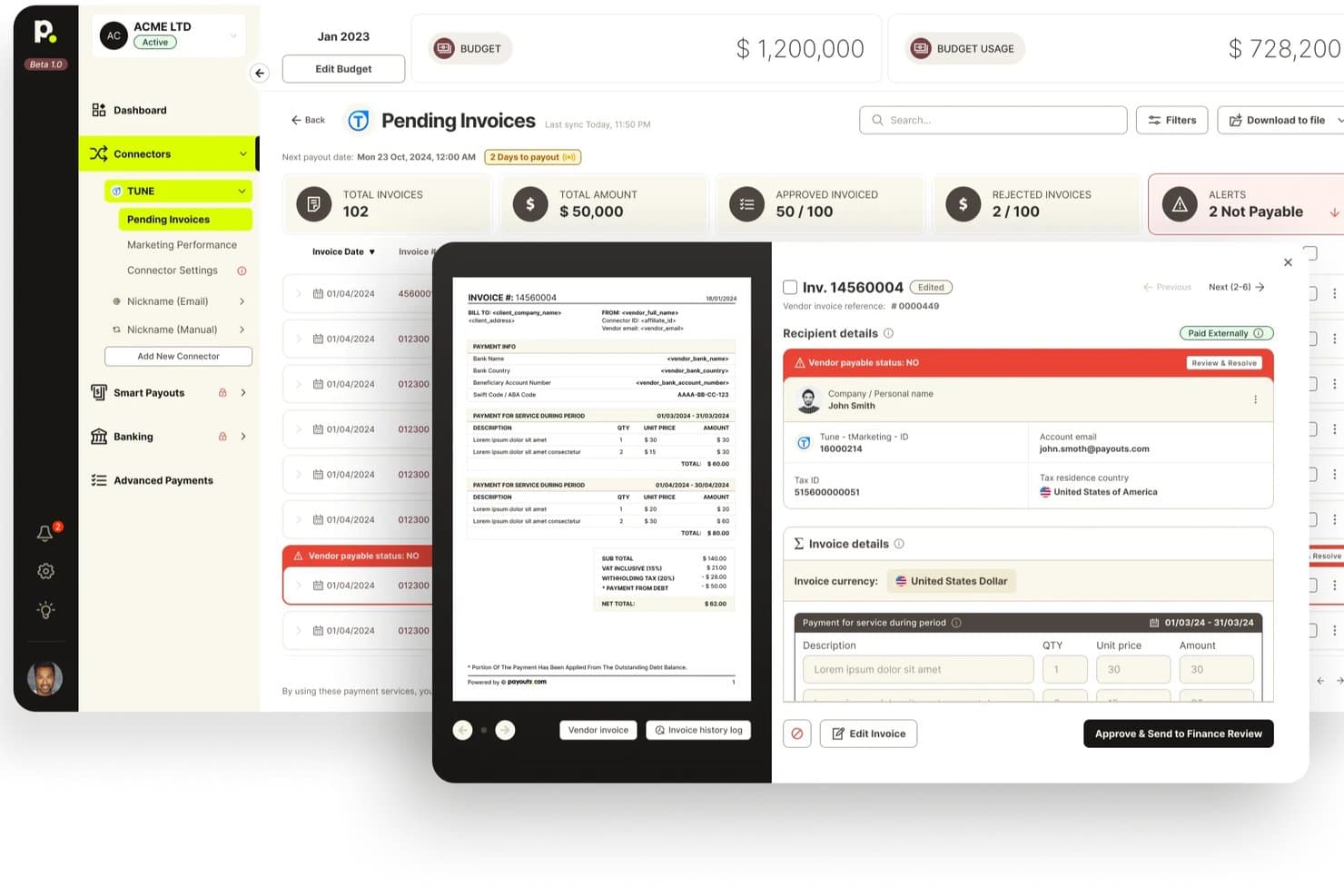
Payouts offre una dashboard delle fatture in sospeso con anteprime, avvisi sullo stato dei fornitori e flussi di approvazione per la gestione della fatturazione. Payouts è una piattaforma di automazione AP e AR che combina l'elaborazione delle fatture guidata dall'intelligenza artificiale, l'erogazione di pagamenti globali, solleciti automatici, conformità fiscale e riconciliazione in un unico sistema.
Per chi è ideale Payouts?
Payouts è adatto a team finanziari di medie dimensioni che gestiscono pagamenti a fornitori con elevato volume e transfrontalieri insieme alle operazioni di contabilità clienti.
Perché ho scelto Payouts
Payouts si guadagna un posto nella mia shortlist perché l'automazione AI che applica sia ai processi AP che AR è davvero innovativa. L'ho scelto specificamente per la funzione AI Digital Employees, che sollecita documenti mancanti e segue i pagamenti bloccati tramite email, WhatsApp e voce. Sul lato AR, apprezzo che il sollecito automatico funzioni insieme all'applicazione dei pagamenti, così le fatture scadute vengono seguite e abbinate nello stesso flusso di lavoro.
Caratteristiche principali di Payouts
- Acquisizione fatture OCR: Le fatture possono essere importate via email, sincronizzazione inbox, inserimento manuale o API, con estrazione automatica dei dati.
- Abbinamento ordini di acquisto a tre vie: Il sistema abbina ordini di acquisto, fatture e ricevute per prevenire errori di pagamento.
- Supporto globale ai pagamenti multi-rail: Consente pagamenti in oltre 135 valute in più di 190 paesi utilizzando oltre 40 sistemi di pagamento.
- Verifica in tempo reale del codice fiscale: Controlla istantaneamente i numeri di identificazione fiscale con i registri IRS e supporta la raccolta dei moduli fiscali.
Integrazioni di Payouts
Payouts offre integrazioni native con NetSuite, Priority ERP, PayPal, Venmo, Everflow, Outlook, Awin, Outbrain e fornisce un'API per integrazioni personalizzate.
Pros and Cons
Pros:
- Agenti AI sollecitano autonomamente le fatture scadute
- Supporta pagamenti transfrontalieri in oltre 135 valute
- Automatizza la verifica del codice fiscale su larga scala
Cons:
- Non ideale per liberi professionisti o piccoli team
- La configurazione richiede un significativo supporto all'onboarding
Learn more about Payouts: Ideale per la gestione di contratti complessi
- Demo gratuita disponibile
- Prezzi su richiesta
Visit WebsiteCustomer Rating:4.2/5
Younium automatizza la fatturazione degli abbonamenti, l’emissione delle fatture e la gestione dei ricavi. Younium è una piattaforma di fatturazione e gestione degli abbonamenti progettata per aziende B2B con modelli di ricavi ricorrenti. Combina fatturazione automatizzata, gestione degli abbonamenti, riconoscimento dei ricavi e gestione del ciclo di vita dei contratti in un unico sistema.
Per chi è ideale Younium?
Younium è particolarmente indicato per aziende SaaS di medie e grandi dimensioni che gestiscono abbonamenti ricorrenti, strutture di prezzo complesse e un elevato volume di fatturazione legata a contratti.
Perché ho scelto Younium
Ho scelto Younium perché gestisce le modifiche ai contratti senza creare lavoro aggiuntivo per i team finanziari. Quando i clienti effettuano upgrade, aggiungono prodotti o apportano modifiche durante il periodo di validità del contratto, la piattaforma aggiorna automaticamente calendari di fatturazione, fatture e registrazioni di riconoscimento dei ricavi. Inoltre apprezzo il fatto che ogni modifica contrattuale sia tracciata tramite un dettagliato audit trail, facilitando la precisione e il rispetto dei requisiti di conformità man mano che le aziende in abbonamento crescono.
Funzionalità principali
- Sincronizzazione fatturazione e ricavi: Aggiorna automaticamente fatture, calendari di fatturazione e registrazioni di riconoscimento dei ricavi quando avvengono cambiamenti negli abbonamenti.
- Gestione degli abbonamenti: Supporta modelli di fatturazione ricorrente, modifiche contrattuali, rinnovi e strutture di prezzo basate sull’uso.
- Riconoscimento dei ricavi: Aiuta i team finanziari a rispettare i requisiti ASC 606 e IFRS 15 tramite il monitoraggio automatizzato dei ricavi.
- Gestione del ciclo di vita dei contratti: Tiene traccia delle versioni dei contratti, delle modifiche e delle variazioni da parte del cliente durante tutto il ciclo di vita dell'abbonamento.
Integrazioni
Younium si integra con Salesforce, HubSpot, NetSuite, QuickBooks, Xero, Stripe, Microsoft Dynamics 365, Avalara, Fortnox, Exact Online e Slack. Supporta inoltre Zapier, webhook e una REST API per integrazioni personalizzate.
Pros and Cons
Pros:
- Monitora metriche MRR, ARR e churn
- Conformità integrata a ASC 606 e IFRS 15
- Supporta la fatturazione di abbonamenti multi-azienda
Cons:
- Non è possibile accreditare la stessa fattura due volte
- I piani di pagamento richiedono una configurazione dettagliata
Learn more about Younium: Ideale per l’automazione di flussi di trattative complessi
- Demo gratuita disponibile
- Prezzo su richiesta
Visit WebsiteCustomer Rating:4.7/5
DealHub AI offre un’interfaccia guidata in cui i commerciali possono selezionare soluzioni e definire la durata del progetto. DealHub AI è una piattaforma quote-to-revenue che riunisce CPQ, gestione dei contratti, gestione degli abbonamenti e fatturazione automatizzata in un unico workflow potenziato dall’IA.
Per chi è più adatto DealHub AI?
DealHub AI è particolarmente indicato per i team di vendita B2B e le operazioni di revenue in aziende di medie e grandi dimensioni che gestiscono cicli di trattative ad alto volume o elevata complessità.
Perché ho scelto DealHub AI
Ho scelto DealHub AI tra i migliori per come gestisce tutte le fasi di una trattativa complessa senza interruzioni tra una fase e l’altra. Trovo particolarmente utile il motore di workflow di approvazione automatica: le approvazioni parallele avvengono simultaneamente, così una trattativa che richiede il consenso di legale, finanza e direzione vendite non passa attraverso una coda sequenziale. Per quanto riguarda la fatturazione, ogni modifica a ciclo in corso, come un upsell o un co-termine, aggiorna automaticamente il calendario dei pagamenti a partire dalla data di effettività, senza necessità di ticket manuali al reparto finanza.
Caratteristiche principali di DealHub AI
- Schedulatore di fatturazione in abbonamento: Automatizza la fatturazione ricorrente su base mensile, annuale, a consumo o su tappe intermedie.
- Fatturazione multivaluta: Genera fatture nelle valute locali e gestisce i tassi di cambio per accordi internazionali.
- Riconoscimento dei ricavi: Collega gli eventi di fatturazione ai ricavi riconosciuti per supportare la conformità con ASC 606 e IFRS 15.
- DealRoom: Uno spazio di lavoro digitale condiviso dove acquirenti e venditori tracciano traguardi, documenti e approvazioni relativi alla trattativa.
Integrazioni di DealHub AI
DealHub AI si integra con Salesforce, Microsoft Dynamics, HubSpot e SugarCRM, oltre che con Stripe e Avalara per la fatturazione e la conformità fiscale.
Pros and Cons
Pros:
- Supporta modelli di prezzo a consumo, a scaglioni e fissi
- Consolida tutta la pricing in un unico documento
- Include il riconoscimento dei ricavi ASC 606/IFRS 15
Cons:
- Le opzioni di personalizzazione avanzata sono piuttosto limitate
- Frequenti bug nell’interfaccia utente richiedono il refresh della pagina
Learn more about DealHub AI: Ideale per le opzioni open-source
- Piano gratuito disponibile
- Da $14/mese
Visit WebsiteCustomer Rating:4.7/5
Invoice Ninja offre soluzioni per fatturazione, monitoraggio del tempo e spese Invoice Ninja è una piattaforma di fatturazione e gestione delle spese estremamente flessibile, ideale per freelance e piccole imprese attente al budget. Offre tracciamento delle fatture e gestione delle spese personalizzabili a un costo contenuto.
Perché ho scelto Invoice Ninja: Invoice Ninja si distingue per le sue opzioni open-source, che la rendono altamente personalizzabile per utenti esperti di tecnologia. La funzionalità di fatturazione supporta più valute e lingue, perfetta per clienti internazionali. Il monitoraggio del tempo è integrato, permettendo una fatturazione accurata, mentre la gestione delle spese aiuta a mantenere i costi sotto controllo.
Funzionalità e integrazioni principali:
Funzionalità comprendono modelli di fattura personalizzabili per allinearli all’identità del tuo marchio. Il portale clienti permette ai tuoi clienti di visualizzare le fatture e pagare con carta (credito o debito) o bonifico bancario. La fatturazione automatica per pagamenti ricorrenti ti fa risparmiare tempo.
Integrazioni includono Zapier, Slack, Stripe, PayPal, Authorize.net, WePay, Mailchimp, Google Analytics, QuickBooks Online, Xero e altro ancora.
Pros and Cons
Pros:
- Opzioni open-source altamente personalizzabili
- Piano gratuito generoso
- Supporta più valute
Cons:
- Richiede competenze tecniche per la personalizzazione
- Opzioni di assistenza clienti limitate
Learn more about Invoice Ninja: Ideale per l'elaborazione dei pagamenti online
- Piano gratuito + demo gratuita disponibile
- Da $0.30/transazione
Visit WebsiteCustomer Rating:4.6/5
PayPal supporta metodi di pagamento online, fatturazione e gestione delle transazioni PayPal è una piattaforma di elaborazione dei pagamenti online ampiamente utilizzata che serve sia privati che aziende di ogni dimensione. Facilita le transazioni online, la fatturazione e la raccolta dei pagamenti, rendendo semplice la gestione delle operazioni finanziarie.
Perché ho scelto PayPal: PayPal eccelle nell'elaborazione dei pagamenti online, offrendo un metodo affidabile e sicuro per gestire le transazioni. La funzione di fatturazione consente di inviare rapidamente fatture professionali e ricevere pagamenti online, inoltre supporta più valute, ideale per le aziende con clienti internazionali. La protezione acquirente e venditore di PayPal garantisce che le tue transazioni siano sicure e protette.
Funzionalità e integrazioni principali:
Funzionalità includono la possibilità di impostare pagamenti ricorrenti utilizzando fatture personalizzate con il tuo marchio, utile per servizi in abbonamento. È possibile gestire le transazioni ovunque ci si trovi tramite dispositivo mobile, offrendo flessibilità e comodità.
Integrazioni includono Shopify, WooCommerce, BigCommerce, Xero, QuickBooks, Adobe Commerce, Squarespace, Wix, Salesforce, HubSpot e altro ancora.
Pros and Cons
Pros:
- Accettazione globale
- Protezione sicura per acquirenti e venditori
- App mobile per le transazioni
Cons:
- Commissioni di transazione elevate
- Risoluzione delle controversie complessa
Learn more about PayPal: Ideale per l'integrazione ERP
- Demo gratuita disponibile
- Prezzo su richiesta
Visit WebsiteCustomer Rating:4/5
NetSuite gestisce finanza, fatturazione e ordini in un unico sistema NetSuite è un software di pianificazione delle risorse aziendali (ERP) basato su cloud che si rivolge a medie e grandi imprese. Copre la gestione finanziaria, la fatturazione e la gestione degli ordini, offrendo una piattaforma unica per le operazioni aziendali.
Perché ho scelto NetSuite: NetSuite si distingue per l'integrazione ERP, offrendo soluzioni complete per le aziende che necessitano di una gestione unificata delle operazioni. La funzione di fatturazione automatizza l'emissione delle fatture e l'elaborazione dei pagamenti, riducendo il lavoro manuale. Gli strumenti di gestione finanziaria forniscono una panoramica in tempo reale della tua situazione finanziaria, aiutandoti a prendere le decisioni corrette. La gestione degli ordini garantisce un'elaborazione e una consegna efficienti, migliorando l'efficienza operativa.
Funzionalità e integrazioni principali:
Funzionalità includono reportistica finanziaria avanzata che offre approfondimenti sulle prestazioni economiche. Puoi gestire l'intero processo order-to-cash all'interno della piattaforma, semplificando le operazioni. I cruscotti personalizzabili forniscono dati in tempo reale, aiutandoti a monitorare efficacemente i principali indicatori di prestazione.
Integrazioni includono Salesforce, Shopify, Adobe Commerce, HubSpot, Expensify, Avalara, Concur, Adaptive Insights, Docusign, PayPal e altri ancora.
Pros and Cons
Pros:
- Solida integrazione ERP
- Cruscotti dati in tempo reale
- Gestione efficiente degli ordini
Cons:
- Processo di implementazione complesso
- Costoso per le piccole imprese
 Ideale per l’integrazione contabile
- Prova gratuita di 30 giorni
- Da $30/mese
Visit WebsiteCustomer Rating:4.4/5
QuickBooks aiuta le PMI a integrare fatturazione, paghe e spese QuickBooks è una soluzione completa di software di contabilità progettata per piccole e medie imprese. Gestisce fatturazione, paghe e monitoraggio delle spese, permettendoti di concentrarti sulla crescita della tua attività.
Perché ho scelto QuickBooks: QuickBooks eccelle nell’integrazione contabile, rendendolo la scelta principale per le PMI che necessitano una gestione finanziaria senza interruzioni. La funzione di fatturazione è semplice, ti permette di creare e inviare fatture rapidamente, mentre uno strumento di monitoraggio delle spese tiene sotto controllo i tuoi costi, assicurandoti di rispettare il budget. Il sistema di gestione delle paghe semplifica i pagamenti ai dipendenti e si integra agevolmente con i tuoi conti esistenti.
Funzionalità principali e integrazioni:
Funzionalità includono la possibilità di generare report finanziari dettagliati, consentendoti di ottenere informazioni sulle performance della tua azienda, e di gestire efficacemente il flusso di cassa grazie agli strumenti di budgeting. La funzione per la preparazione delle tasse ti aiuta ad affrontare la stagione fiscale con meno stress.
Integrazioni includono PayPal, Shopify, Amazon, Square, TSheets, BILL, Expensify, HubSpot, Salesforce, Mailchimp e altri.
Pros and Cons
Pros:
- Potenti funzionalità di gestione finanziaria
- Strumenti per la preparazione delle tasse
- Ampie capacità di reportistica
Cons:
- Funzionalità di settore limitate
- Curva di apprendimento ripida
 Ideale per soluzioni di fatturazione semplici
- Piano gratuito disponibile
- Da $9.99/mese
Visit WebsiteCustomer Rating:4.6/5
Invoicely aiuta piccoli team a gestire fatturazione, spese e monitoraggio delle ore Invoicely è un software di fatturazione online progettato per piccole imprese e liberi professionisti. Offre fatturazione, monitoraggio delle spese e gestione del tempo, rendendo più semplice la gestione delle tue necessità di fatturazione.
Perché ho scelto Invoicely: Invoicely fornisce soluzioni di fatturazione semplici, facili da usare ed efficienti per le piccole imprese. La funzione di fatturazione ti permette di creare e inviare fatture con pochi clic, mentre il monitoraggio delle spese tiene sotto controllo i tuoi costi, assicurandoti di rimanere nel budget. Il monitoraggio del tempo si integra in modo fluido, consentendoti di fatturare i clienti accuratamente per le ore lavorate.
Funzionalità e integrazioni principali:
Funzionalità includono generazione delle fatture e monitoraggio del tempo per tracciare le ore fatturabili e garantire una fatturazione accurata ai clienti. Gli strumenti di reportistica offrono una panoramica dello stato finanziario della tua azienda, aiutandoti a prendere decisioni informate.
Integrazioni includono PayPal, Stripe, Mollie, Authorize.net, WePay, Dropbox e altri.
Pros and Cons
Pros:
- Procedura di configurazione semplice
- Integrazione completa dei pagamenti
- Intuitivo per le piccole imprese
Cons:
- Funzionalità avanzate limitate
- Nessuna app mobile
Learn more about Invoicely: 9Ideale per freelance e startup
Wave
- Piano gratuito disponibile
- Da $19/mese
Visit WebsiteCustomer Rating:4.4/5
Wave aiuta freelance e startup a gestire fatturazione, contabilità e ricevute Wave è una suite di software finanziari progettata per liberi professionisti, imprenditori e piccole startup. Gestisce la fatturazione, la contabilità e la scansione delle ricevute, rendendo la gestione finanziaria semplice ed efficiente.
Perché ho scelto Wave: Wave è pensato su misura per freelance e startup che necessitano di una soluzione di gestione finanziaria semplice ma efficace. La funzione di fatturazione permette di generare facilmente fatture, mentre la scansione delle ricevute aiuta a tenere traccia delle spese. Il modulo di contabilità offre una visione completa delle tue finanze in un unico posto.
Funzionalità e integrazioni principali:
Funzionalità includono modelli di fattura personalizzabili per rafforzare l'identità del marchio. Il monitoraggio dei pagamenti e dei ricavi ti aiuta a comprendere meglio i flussi di cassa, mentre gli strumenti di reportistica offrono dettagli sullo stato di salute finanziaria dell'attività, guidando così le decisioni di business.
Integrazioni includono PayPal, Etsy, Zapier, Google Sheets, Slack, Mailchimp, Stripe, Shopify, HubSpot e altri ancora.
Pros and Cons
Pros:
- Pensato per le piccole imprese
- Generatore di fatture semplice
- Software di fatturazione gratuito
Cons:
- Funzionalità avanzate limitate
- Problemi di sincronizzazione occasionali
Learn more about Wave: 10Ideale per la gestione automatizzata delle spese
Envoice
- Prova gratuita di 14 giorni
- Da $7/azienda/mese + $0.15/documento aggiuntivo
Visit WebsiteCustomer Rating:4.7/5
Envoice automatizza l'acquisizione delle fatture, l'elaborazione delle spese e la gestione delle ricevute Envoice è uno strumento di automazione finanziaria focalizzato sulla fatturazione e sulla gestione delle spese, progettato per le aziende che necessitano di elaborare fatture in entrata, tenere traccia delle spese e gestire le ricevute con il minimo sforzo manuale. È ideale per i team che gestiscono grandi volumi di fatture da fornitori e desiderano una migliore visibilità sui pagamenti da effettuare.
Perché ho scelto Envoice: Envoice si distingue in particolare per l'automazione nell'acquisizione delle fatture e nella documentazione delle spese. I suoi strumenti di elaborazione delle fatture estraggono dati da fatture caricate o ricevute via email, riducendo l'inserimento manuale dei dati e accelerando i processi di approvazione. L'acquisizione delle ricevute permette ai team di digitalizzare e archiviare i giustificativi di spesa in un unico luogo, mentre i report consolidati sulle spese facilitano il monitoraggio dei costi tra fornitori e reparti. Per i team finanziari che desiderano controllare i costi in entrata più che la fatturazione ai clienti, Envoice aiuta a mantenere organizzata e tracciabile la gestione dei pagamenti in uscita.
Funzionalità e integrazioni principali:
Funzionalità includono l'estrazione automatica dei dati dalle fatture per velocizzare i flussi di lavoro di contabilità fornitori, categorie di spesa personalizzabili per un monitoraggio più chiaro dei costi e flussi di approvazione per indirizzare fatture e spese alla revisione prima del pagamento. La dashboard offre una visualizzazione in tempo reale delle fatture in sospeso, delle spese approvate e delle spese totali, aiutando i team a evitare pagamenti mancati o ritardati.
Integrazioni includono Xero, QuickBooks, Sage, FreshBooks, Microsoft Dynamics, NetSuite, SAP, Oracle, Dropbox, Google Drive, OneDrive e altri ancora.
Pros and Cons
Pros:
- Acquisizione automatica delle fatture ed estrazione dei dati
- Gestione centralizzata di ricevute e spese
- Flussi di approvazione per il controllo di fatture e spese
Cons:
- Supporto limitato per la fatturazione ai clienti in uscita
- Non adatto a scenari di fatturazione complessi (ad es. abbonamenti o fatturazione in base all'utilizzo)
Learn more about Envoice:
Altri software di fatturazione ed emissione di fatture
Ecco alcune opzioni aggiuntive di software per la fatturazione e l’emissione di fatture che non sono state incluse nel mio elenco, ma che vale comunque la pena prendere in considerazione:
- 11Zoho InvoiceIdeale per la fatturazione globale
- 12Zoho BillingIdeale per la gestione degli abbonamenti
- 13Bill4timeIdeale per i professionisti legali
- 14FlexpriceIdeale per infrastrutture di fatturazione on-premise
- 15SquareIdeale per piccole attività al dettaglio
Come Valuto i Software di Fatturazione e Fatturazione Elettronica
La mia valutazione si basa su due livelli: il requisito base che ogni strumento di fatturazione deve soddisfare—come la fatturazione ricorrente e il supporto ai gateway di pagamento—e i fattori che distinguono le migliori opzioni.
Funzionalità di Base (Requisiti Fondamentali per Questa Lista)
Quando seleziono gli strumenti per il mio elenco, valuto ciascuno su una scala da 0 (non offre la funzionalità) a 5 (eccelle in quest'area) per ogni funzionalità di base elencata di seguito. Successivamente, calcolo il punteggio totale dello strumento come percentuale. Ogni strumento deve ottenere un punteggio minimo complessivo del 75% per essere considerato per l'inclusione.
- Creazione e Personalizzazione delle Fatture: Verifico se è possibile creare fatture professionali e brandizzate con modelli flessibili, supporto multi-valuta e voci configurabili per diversi tipi di clienti.
- Fatturazione Ricorrente e Automatica: Le piattaforme devono gestire cicli di fatturazione programmati per acconti, abbonamenti o contratti a intervallo fisso con invio automatico e opzioni di frequenza regolabili.
- Elaborazione Pagamenti Online: Valuto quali gateway di pagamento supporta ciascuno strumento e se i clienti possono pagare direttamente dalla fattura tramite carta di credito, ACH o altri metodi.
- Monitoraggio dei Crediti: Conta molto lo stato in tempo reale della fattura (inviata, visualizzata, scaduta), insieme a sequenze di promemoria automatici che riducono i solleciti manuali per i pagamenti in sospeso.
- Calcolo delle Tasse e Conformità: Cerco una logica fiscale automatica che gestisca IVA, GST e imposta sulle vendite in diverse giurisdizioni, invece di dover inserire manualmente le aliquote su ogni fattura.
- Integrazione con Sistemi Contabili: Ogni strumento dovrebbe sincronizzare fatture, pagamenti e anagrafiche clienti con piattaforme come QuickBooks, Xero o NetSuite per evitare doppi inserimenti e problemi di riconciliazione.
Una volta che ho un elenco di strumenti che soddisfano questi criteri, valuto ciò che distingue ogni piattaforma.
Fattori Differenzianti (Cosa Distingue i Fornitori)
Ecco come confronto e metto a confronto fornitori diversi:
Funzionalità Distintive
Un portale self-service per i clienti è un grande elemento distintivo—permette ai clienti di visualizzare fatture, scaricare ricevute e aggiornare in autonomia i dettagli di pagamento, riducendo lo scambio di comunicazioni per i team contabili. Valuto anche la gestione multi-azienda, in particolare per realtà che fatturano tramite più filiali e necessitano di reportistica consolidata. Un altro aspetto che considero è la presenza di monitoraggio integrato di tempo e spese, perché agenzie e studi professionali beneficiano dalla conversione diretta delle ore fatturabili in fatture senza dover passare tra diversi strumenti.
Oltre le Funzionalità
La struttura dei prezzi è importante—valuto se un fornitore addebita per utente, per fattura o con tariffa fissa, e come tali costi crescano con l'aumentare del volume. La conformità è un altro fattore chiave; i team finanziari necessitano di SOC 2, PCI DSS e controlli di accesso basati sui ruoli per proteggere i dati di pagamento sensibili. Considero anche l'adattamento al settore, perché uno strumento pensato per la fatturazione di abbonamenti SaaS gestisce flussi di lavoro molto diversi rispetto a uno progettato per studi professionali che fatturano a ore.
Come scegliere un software di fatturazione ed emissione di fatture
È facile perdersi in lunghi elenchi di funzionalità e strutture tariffarie complesse. Per aiutarti a rimanere concentrato mentre porti avanti il tuo processo di selezione del software, unico per le tue esigenze, ecco una lista di fattori da tenere a mente:
| Fattore | Cosa considerare |
|---|---|
| FattoreScalabilità | Cosa considerareIl software crescerà insieme alla tua azienda? Valuta se è in grado di gestire più clienti, transazioni e utenti durante l'espansione. Cerca piani flessibili. |
| FattoreIntegrazioni | Cosa considerareVerifica la compatibilità con gli strumenti che già utilizzi. Assicurati che si colleghi ai sistemi di contabilità, CRM e pagamento per evitare silos di dati. |
| FattorePersonalizzazione | Cosa considerarePuoi adattare il software ai tuoi flussi di lavoro? Cerca opzioni per modificare i modelli e automatizzare le attività in base alle tue esigenze. |
| FattoreSemplicità d'uso | Cosa considerareL'interfaccia è intuitiva? Il tuo team dovrebbe poterla utilizzare senza una formazione approfondita. Provala personalmente per verificarne la facilità d'uso. |
| FattoreImplementazione e introduzione | Cosa considerareQuanto tempo richiede la configurazione? Cerca strumenti con tutorial guidati o assistenza durante l'introduzione, per ridurre al minimo le interruzioni. |
| FattoreCosto | Cosa considerareIl prezzo rientra nel tuo budget? Confronta i piani e verifica la presenza di costi nascosti. Assicurati di ottenere un valore adeguato a ciò che paghi. |
| FattoreMisure di sicurezza | Cosa considerareSono presenti misure per la protezione dei dati? Verifica la crittografia e la conformità alle normative sui dati per proteggere le informazioni sensibili. |
| FattoreDisponibilità dell'assistenza | Cosa considerareQuali opzioni di assistenza sono disponibili? Assicurati di poter ricevere aiuto tempestivo tramite chat, e-mail o telefono, soprattutto nei momenti critici. |
Che cos'è un software di fatturazione ed emissione di fatture?
Il software per la fatturazione e l'emissione di fatture è uno strumento che automatizza il processo di creazione e invio delle fatture, monitoraggio dei pagamenti e gestione dei cicli di fatturazione. Commercialisti, professionisti della finanza e titolari di piccole imprese utilizzano comunemente questi strumenti per garantire una fatturazione accurata e una riscossione efficiente dei pagamenti.
La fatturazione automatizzata, il monitoraggio dei pagamenti e i modelli personalizzabili aiutano a ridurre gli errori, risparmiare tempo e mantenere un aspetto professionale. Nel complesso, questi strumenti semplificano la gestione finanziaria e migliorano il flusso di cassa.
Funzionalità
Quando selezioni un software per la fatturazione e l'emissione di fatture, presta attenzione alle seguenti funzionalità chiave:
- Fatturazione automatizzata: genera e invia automaticamente le fatture, risparmiando tempo e riducendo gli errori manuali.
- Monitoraggio dei pagamenti: monitora i pagamenti e i saldi insoluti per garantire riscossioni puntuali e mantenere il flusso di cassa.
- Modelli personalizzabili: crea fatture in linea con il tuo marchio, migliorando la professionalità e il riconoscimento da parte dei clienti.
- Fatturazione ricorrente: imposta cicli di fatturazione automatizzati per i servizi in abbonamento, garantendo flussi di entrate costanti.
- Monitoraggio delle spese: registra le spese aziendali per gestire i budget e migliorare la pianificazione finanziaria.
- Supporto per più valute: gestisce le transazioni in valute diverse, risultando vantaggioso per le aziende con clienti internazionali.
- Portale clienti: fornisce ai clienti una piattaforma per visualizzare le fatture, effettuare pagamenti e gestire i propri conti bancari.
- Rendicontazione finanziaria: genera report per comprendere l'andamento finanziario, favorendo il processo decisionale.
- Monitoraggio del tempo: registra con precisione le ore fatturabili per garantire una fatturazione accurata ai clienti e ottimizzare l'allocazione delle risorse.
- Misure di sicurezza: protegge i dati finanziari sensibili mediante la crittografia e il rispetto delle normative sulla protezione dei dati.
Vantaggi
L'implementazione di un software per la fatturazione e l'emissione di fatture offre diversi vantaggi al tuo team e alla tua azienda. Ecco alcuni dei vantaggi di cui potrai usufruire:
- Risparmio di tempo: la fatturazione automatica e il monitoraggio dei pagamenti liberano tempo prezioso, consentendo al tuo team di concentrarsi su altre attività.
- Accuratezza: riduce gli errori manuali nella fatturazione e nella rendicontazione finanziaria, garantendo registri finanziari precisi.
- Gestione del flusso di cassa: monitora i pagamenti insoluti e tiene traccia delle spese per mantenere un flusso di cassa sano.
- Immagine professionale: i modelli di fattura personalizzati riflettono il tuo marchio, valorizzando l'immagine della tua azienda.
- Praticità per i clienti: i portali clienti consentono ai clienti di visualizzare e pagare le fatture, migliorando la loro esperienza e soddisfazione.
- Scalabilità: l'aumento delle transazioni e dei clienti viene gestito facilmente grazie ai processi automatizzati.
- Sicurezza dei dati: le solide misure di sicurezza e la conformità alle normative garantiscono che le informazioni finanziarie sensibili siano adeguatamente protette.
Costi e prezzi
La scelta di un software per la fatturazione e l'emissione di fatture richiede la comprensione dei vari modelli e piani tariffari disponibili. I costi variano in base alle funzionalità, alle dimensioni del team, ai componenti aggiuntivi e ad altri fattori. La tabella seguente riassume i piani più comuni, i relativi prezzi medi e le funzionalità generalmente incluse nelle soluzioni software per la fatturazione e l'emissione di fatture:
Tabella comparativa dei piani per il software di fatturazione e di emissione di fatture
| Tipo di piano | Prezzo medio | Funzionalità comuni |
|---|---|---|
| Tipo di pianoPiano gratuito | Prezzo medio$0 | Funzionalità comuniFatturazione di base, monitoraggio dei pagamenti e gestione limitata dei clienti. |
| Tipo di pianoPiano personale | Prezzo medio$5-$25/utente/mese | Funzionalità comuniFatture personalizzabili, monitoraggio delle spese e rendicontazione di base. |
| Tipo di pianoPiano aziendale | Prezzo medio$30-$60/utente/mese | Funzionalità comuniFatturazione automatizzata, supporto per più valute e rendicontazione avanzata. |
| Tipo di pianoPiano per grandi aziende | Prezzo medio$70-$150/utente/mese | Funzionalità comuniAnalisi complete, integrazioni personalizzate e supporto dedicato. |
Domande frequenti sul software di fatturazione e gestione delle fatture
Ecco alcune risposte alle domande comuni sul software di fatturazione e gestione delle fatture:
In che modo il software di fatturazione e gestione delle fatture può contribuire a ridurre gli errori manuali nei processi finanziari?
Il software di fatturazione e gestione delle fatture riduce al minimo gli errori manuali automatizzando attività di routine come l’inserimento dei dati e i calcoli. Questo si traduce in un minor numero di errori nelle fatture e in un processo di riconciliazione più semplice. L’automazione impone inoltre la standardizzazione, aiutandoti a mantenere la coerenza in tutti i documenti finanziari.
Il software di fatturazione e gestione delle fatture è in grado di gestire transazioni in più valute o internazionali?
Sì, molte piattaforme di fatturazione elaborano fatture in più valute e supportano la tassazione internazionale. Puoi impostare i tassi di cambio, gestire le regole fiscali in base alla regione e assicurarti che la tua attività globale rimanga organizzata e precisa oltre i confini nazionali.
Con quale frequenza devono essere riconciliati i dati finanziari quando si utilizzano piattaforme di fatturazione e gestione delle fatture?
Dovresti riconciliare i dati finanziari almeno mensilmente; tuttavia, molti CFO scelgono una riconciliazione settimanale o giornaliera quando gestiscono volumi di transazioni più elevati. Una riconciliazione frequente consente di individuare più rapidamente le discrepanze, garantendo che i tuoi dati siano aggiornati per gli audit e la reportistica.