

En app for kvitteringsskanning er et mobilt eller stasjonært verktøy som registrerer, digitaliserer og organiserer kvitteringer, slik at det blir enklere å følge opp og rapportere utgifter. Hvis du leter etter de beste appene for kvitteringsskanning, ønsker du sannsynligvis å redusere manuell dataregistrering, forbedre nøyaktigheten og holde økonomiske oppføringer klare for revisjon.
Med så mange tilgjengelige alternativer er det viktig å finne en løsning som passer arbeidsflyten din, integreres med regnskapsverktøyene dine og håndterer mengden og typene kvitteringer virksomheten din behandler. Denne listen hjelper deg med å sammenligne de beste appene for 2026, slik at du kan velge den rette for å forenkle utgiftshåndteringen og holde fokus på de økonomiske målene dine.
Hvorfor du kan stole på våre programvareanbefalinger
6,700+
Reviews
20
Industry experts
16+
Evaluation factors
14
Years
Teamet vårt har testet og anmeldt programvare siden 2012. Vi er selv økonomiledere, så vi vet hvor vanskelig og hvor viktig det er å velge riktig programvare.
I denne guiden har vi vurdert verktøyene gjennom praktisk testing og uavhengig research og gitt dem poeng ut fra våre utvelgelseskriterier.
Anmeldelsene våre bygger på vår egen redaksjonelle vurdering. De er ikke et salgsargument.
Sammenligningstabell for apper for kvitteringsskanning
Denne sammenligningstabellen oppsummerer prisopplysningene for utvalget mitt av de beste appene for kvitteringsskanning:
| Tool | Best For | Trial Info | Price | ||
|---|---|---|---|---|---|
| 1 | Best for real-time card transaction reconciliation | Free demo available | From $11.99/user/month (billed annually) | Website | |
| 2 | Best for policy-based expense automation | 14-day free trial | From $3/user/month (billed annually) | Website | |
| 3 | Best for direct integration with bookkeeping | 30-day free trial | From $38/month | Website | |
| 4 | Best for physical receipt mail-in service | 30-day free trial + free demo available | From $97/year (billed annually) | Website | |
| 5 | Best for automatic syncing with accounting tools | Free plan available | From $19/month | Website | |
| 6 | Best for multi-currency document processing | 14-day free trial + free demo available | From $20.80/client/month (billed annually) | Website | |
| 7 | Best for line item extraction from receipts | Free trial + free demo available | From $13/month (VAT excluded) | Website | |
| 8 | Best for organizing receipts with expense categorization | 14-day free trial available | From $200 (billed annually) | Website | |
| 9 | Best for real-time data extraction from receipts | 14-day free trial + free plan + free demo available | From $500+/month | Website | |
| 10 | Best for scanning receipts with OCR on mobile devices | Free download available | Pricing upon request | Website |


Anmeldelser av apper for kvitteringsskanning
Nedenfor finner du mine detaljerte sammendrag av appene for kvitteringsskanning som kom med på kortlisten min. Anmeldelsene mine gir en detaljert oversikt over funksjonene, de beste bruksområdene og integrasjonene til hvert verktøy, slik at du kan finne det beste alternativet for deg.
 Best for real-time card transaction reconciliation
- Free demo available
- From $11.99/user/month (billed annually)
Visit WebsiteCustomer Rating:4.6/5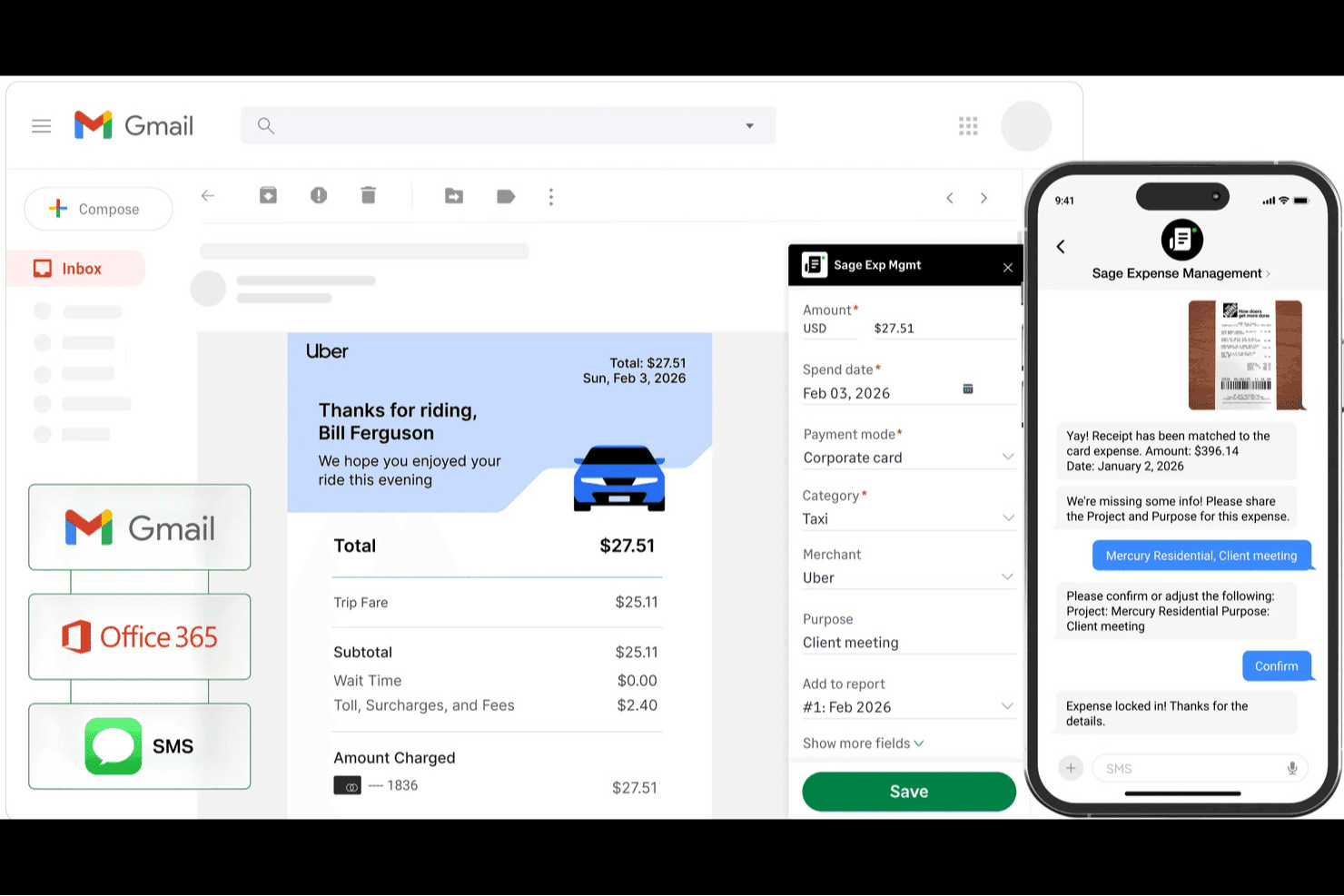
Sage Expense Management is an expense management and receipt scanning tool that captures receipts via text message, mobile camera, email forwarding, and Gmail and Outlook plugins, with real-time card feed matching across Visa, Mastercard, and American Express.
Who Is Sage Expense Management Best For?
Sage Expense Management is a strong fit for finance and accounting teams at small-to-midsize businesses that rely on corporate cards and need expense reconciliation without switching card providers.
Why I Picked Sage Expense Management
I picked Sage Expense Management as one of the best because its real-time card feed matching is what sets it apart from most receipt scanners. When a card charge hits, it sends a text alert instantly, and you just reply with a photo of the receipt to match it on the spot. I also like that it works with your existing Visa, Mastercard, or American Express cards, so there's no need to issue new cards or restructure how your team spends.
Sage Expense Management Key Features
- Multi-channel receipt capture: Submit receipts via text message, mobile camera, email forwarding, or Gmail and Outlook plugins.
- Mileage tracking: Log business travel by GPS or manual entry, with Google Maps calculating the distance automatically.
- Duplicate detection: The system flags potential duplicate expenses in real time before you submit them.
- Approval workflows: Route expenses through single-stage or multi-stage approval chains, with reminders sent via email or Outlook.
Sage Expense Management Integrations
Sage Expense Management offers native integrations with QuickBooks Online, Xero, Sage 50, Sage Intacct, Sage 300 CRE, QuickBooks Desktop, Perk, and Google Maps. It also provides API access for custom integrations.
Pros and Cons
Pros:
- Offline mobile capture syncs later
- Text receipts match existing card charges
- Card alerts surface missing receipts immediately
Cons:
- No documented line-item receipt extraction
- Receipt matching sometimes needs manual correction
Learn more about Sage Expense Management (formerly Fyle): Best for policy-based expense automation
- 14-day free trial
- From $3/user/month (billed annually)
Visit WebsiteCustomer Rating:4.5/5
Zoho Expense dashboard shows spend summary, trips, and reimbursement reports. If your team needs a receipt scanner app that fits into a larger business expense management workflow, Zoho Expense is worth considering. The platform is designed for organizations that want to automate expense capture, approval, and compliance. It appeals to finance teams and business travelers who need to manage receipts, track spending, and simplify reimbursement processes.
Who Is Zoho Expense Best For?
Zoho Expense is a good fit for mid-sized businesses and finance teams that need automated expense policy enforcement and streamlined receipt management.
Why I Picked Zoho Expense
What stands out about Zoho Expense is its strong focus on policy-based automation for expense management. I picked this tool because it lets you set up detailed expense policies, automate approval workflows, and flag out-of-policy receipts right at the point of capture. The app also supports custom rules for receipt validation, which helps finance teams enforce compliance without manual review. For organizations that need to ensure every scanned receipt aligns with internal policies, Zoho Expense offers a level of control that’s hard to match.
Zoho Expense Key Features
Some other features that make Zoho Expense useful for receipt management include:
- Multi-currency support: The app automatically converts and records expenses in different currencies for global teams.
- Mobile receipt capture: Users can snap photos of receipts on the go using the mobile app.
- Corporate card reconciliation: The platform matches scanned receipts to corporate card transactions for easier reconciliation.
- Automated expense report generation: Zoho Expense compiles scanned receipts into organized expense reports with minimal manual input.
Zoho Expense Integrations
Integrations include QuickBooks Online, Xero, Sage Accounting, Zoho Books, Zoho Invoice, and Lyft.
Pros and Cons
Pros:
- Generates audit-ready expense reports instantly
- Offers mobile receipt capture and upload
- Links scanned receipts to corporate cards
Cons:
- Bulk receipt upload not always reliable
- Custom fields require admin setup
Learn more about Zoho Expense: Best for direct integration with bookkeeping
- 30-day free trial
- From $38/month
Visit WebsiteCustomer Rating:4.4/5
QuickBooks captures receipts and links them to expense records for review. QuickBooks offers a receipt capture feature built directly into its accounting platform, making it a practical choice for small businesses and accountants who want to keep expense documentation tied to their books. The tool appeals to users who need to digitize, categorize, and store receipts alongside their financial transactions. It helps reduce manual entry and supports audit readiness by keeping receipts organized within the same system as your accounting records.
Who Is QuickBooks Best For?
QuickBooks is a good fit for small businesses and accountants who want to manage receipts and expenses directly within their accounting software.
Why I Picked QuickBooks
What makes QuickBooks a strong choice for receipt scanning is its direct integration with bookkeeping features. I picked this tool because it lets you capture and upload receipts straight into your accounting records, automatically matching them to transactions and categorizing expenses. This tight connection between receipt management and your general ledger reduces the risk of lost documentation and manual entry errors. For finance teams that want to keep expense tracking and accounting in one place, QuickBooks offers a seamless workflow from receipt capture to reconciliation.
QuickBooks Key Features
Some other features that make QuickBooks useful for receipt management include:
- Mobile receipt capture: Snap photos of receipts using the QuickBooks mobile app for instant upload.
- Automatic receipt data extraction: The system reads and fills in receipt details using OCR technology.
- Receipt attachment to transactions: Attach digital receipts directly to specific expenses or bills for easy reference.
- Audit log tracking: Track all changes and uploads to receipts for compliance and audit purposes.
QuickBooks Integrations
Integrations include Amazon Business, PayPal, Square, Etsy, Amazon Seller, eBay, and Gusto.
Pros and Cons
Pros:
- Attaches receipt images to invoices
- Organizes expenses for easy tax prep
- Matches receipts to bank transactions
Cons:
- Overkill if you just need a scanner
- Mobile app experiences frequent bugs
 Best for physical receipt mail-in service
- 30-day free trial + free demo available
- From $97/year (billed annually)
Visit WebsiteCustomer Rating:4.4/5
Shoeboxed dashboard organizing scanned receipts for expense tracking and reports. Shoeboxed offers a unique approach for businesses and professionals who deal with large volumes of paper receipts. The platform lets you mail in physical business receipts, which are then scanned, digitized, and organized for you. This service is especially useful for those who want to outsource manual receipt management and ensure their records are audit-ready.
Who Is Shoeboxed Best For?
Shoeboxed is a good fit for small business owners, accountants, and consultants who need to digitize and organize large quantities of physical receipts.
Why I Picked Shoeboxed
I picked Shoeboxed because it’s the only receipt scanner app that lets you physically mail in your paper receipts for digitization. This approach is especially valuable for businesses or professionals who accumulate stacks of receipts and want to avoid manual scanning. Shoeboxed’s Magic Envelope service handles the sorting, scanning, and data extraction, so you receive organized digital records without lifting a finger. I also appreciate that the platform verifies receipts for IRS compliance, which helps users stay audit-ready.
Shoeboxed Key Features
Some other features that make Shoeboxed useful for receipt management include:
- Business card scanning: Digitize business cards and automatically extract contact information for easy reference.
- Expense report generation: Create and export detailed expense reports with receipt images and categorized data.
- Mileage tracking: Log and track mileage for business trips using the mobile app’s built-in GPS.
- Cloud document storage: Store and access all scanned receipts and documents securely in the cloud.
Shoeboxed Integrations
Integrations include QuickBooks, Xero, Evernote, WorkingPoint, Bench, GetMyInvoices, and HP.
Pros and Cons
Pros:
- Includes mileage tracking for expense reports
- Exports data to QuickBooks and Xero
- Batch upload receipts via mobile app
Cons:
- Annual billing required for all plans
- Occasional delays with mail-in processing
Learn more about Shoeboxed:

Wave mobile app scans receipts and organizes expense records for tracking. Wave offers a receipt scanning solution designed for small business owners and freelancers who want to keep their finances organized. The platform lets you capture, categorize, and store receipts directly from your mobile device. It’s especially useful for those who want their expense records to sync automatically with their accounting data.
Who Is Wave Best For?
Wave is a good fit for freelancers and small business owners who want integrated receipt scanning and accounting in one platform.
Why I Picked Wave
I picked Wave because it’s one of the few receipt scanner apps that automatically syncs scanned receipts with your accounting records in real time. This direct connection means you don’t have to manually transfer expense data or worry about mismatches between your receipts and your books. I also like that Wave lets you capture receipts from your phone and instantly categorize them, so your expense tracking stays up to date. For anyone who wants to minimize manual entry and keep their accounting organized, Wave’s automatic syncing stands out.
Wave Key Features
Some other features that make Wave useful for receipt management include:
- Multi-currency support: Capture and store receipts in multiple currencies for international transactions.
- Automatic receipt image enhancement: The app automatically sharpens and crops receipt images for better readability.
- Cloud-based document storage: All scanned receipts are securely stored and accessible from any device.
- Audit-ready export options: Export receipt data and images in formats suitable for audits or sharing with accountants.
Wave Integrations
Native integrations are not currently listed by Wave.
Pros and Cons
Pros:
- Good for freelancers and solos
- Unlimited receipt cloud storage
- Auto-extracts receipt details
Cons:
- Customer support is very slow
- OCR scanner can make mistakes
Learn more about Wave: 6Best for multi-currency document processing
Dext
- 14-day free trial + free demo available
- From $20.80/client/month (billed annually)

Dext dashboard reviewing extracted invoice data and expense document details. Dext offers a document capture solution designed for accountants, bookkeepers, and finance teams who need to manage receipts and invoices efficiently. The platform appeals to businesses handling diverse document types and looking to automate data entry. Its focus on accuracy and automation helps reduce manual workload and supports smoother financial workflows.
Who Is Dext Best For?
Dext is a good fit for accountants and finance teams in businesses that process receipts and invoices in multiple currencies.
Why I Picked Dext
I chose Dext because it stands out for businesses that need to process receipts and invoices in multiple currencies. The platform automatically detects and converts foreign currencies, which helps finance teams manage international transactions without manual calculations. I also appreciate that Dext captures and organizes supporting documents for cross-border expenses, making reconciliation much easier. These features make Dext especially useful for companies with global operations or frequent international purchases.
Dext Key Features
Some other features that make Dext useful for receipt management include:
- Automated line item extraction: The tool captures individual line items from receipts and invoices for detailed recordkeeping.
- Mobile receipt capture: Users can snap photos of receipts using the Dext mobile app for instant upload.
- Duplicate detection: Dext flags duplicate receipts and invoices to help prevent double entries.
- Cloud document storage: All scanned documents are stored securely in the cloud and can be accessed from any device.
Dext Integrations
Integrations include Xero, QuickBooks, Sage, PayPal, Shopify, KashFlow, Twinfield, and MYOB.
Pros and Cons
Pros:
- Flags duplicate receipts automatically
- Extracts line items from complex invoices
- Handles receipts in over 30 currencies
Cons:
- Limited customization for export formats
- Pricing details not shown on website
Learn more about Dext: Best for line item extraction from receipts
- Free trial + free demo available
- From $13/month (VAT excluded)
Visit WebsiteCustomer Rating:3.7/5
AutoEntry captures receipt data and fills accounting fields automatically. AutoEntry is designed for finance teams and accountants who need to digitize and organize receipts quickly. The platform automates data capture from receipts and invoices, helping businesses reduce manual entry and errors. It’s especially useful for those managing high volumes of paperwork and looking to streamline expense documentation.
Who Is AutoEntry Best For?
AutoEntry is a good fit for accountants and finance teams in small to mid-sized businesses that process large volumes of receipts and invoices.
Why I Picked AutoEntry
What drew me to AutoEntry is its ability to extract detailed line items from receipts, which is something many other apps miss. This feature lets you capture individual products, quantities, and prices directly from scanned receipts, making expense tracking much more granular. I also appreciate that AutoEntry can handle both digital and paper receipts, so you’re not limited by format. For finance teams that need precise data for expense analysis or audit trails, AutoEntry’s line item extraction stands out.
AutoEntry Key Features
Some other features that make AutoEntry useful for receipt scanning include:
- Mobile receipt capture: Snap photos of receipts using the mobile app for instant upload and processing.
- Automatic data categorization: The system assigns receipts to the correct expense categories based on your accounting setup.
- Duplicate detection: AutoEntry flags duplicate receipts to help prevent double entries in your records.
- Cloud document storage: All scanned receipts are stored securely in the cloud and can be accessed from any device.
AutoEntry Integrations
Integrations include Sage, Xero, QuickBooks, FreeAgent, KashFlow, SortMyBooks, ClearBooks, and AccountsPrep.
Pros and Cons
Pros:
- Integrates with major accounting platforms
- Flags duplicate receipts during processing
- Mobile app uploads receipts instantly
Cons:
- Manual review needed for low-quality scans
- Limited offline functionality in the mobile app
Learn more about AutoEntry: 8Best for organizing receipts with expense categorization
Neat
- 14-day free trial available
- From $200 (billed annually)

Neat Scan Utility interface capturing receipts for digital expense records. Neat offers a digital receipt management platform designed for small businesses and self-employed professionals who need to keep financial records organized. The tool helps users capture, store, and manage receipts digitally, reducing paper clutter and manual data entry. Neat is especially useful for those who want to track expenses and prepare for tax season with clear, categorized records.
Who Is Neat Best For?
Neat is a good fit for small business owners and self-employed professionals who need to organize and categorize receipts for expense tracking.
Why I Picked Neat
I chose Neat because it offers a focused approach to organizing receipts with built-in expense categorization. The platform automatically reads and sorts receipt data into IRS-accepted categories, which helps users keep their records audit-ready and organized for tax time. I also like that Neat lets you create custom categories, so you can tailor your expense tracking to your business needs. This makes Neat especially useful for anyone who wants to move beyond basic receipt storage and gain more control over how expenses are tracked and reported.
Neat Key Features
Some other features that make Neat useful for receipt management include:
- Mobile receipt capture: Snap photos of receipts using the Neat mobile app for instant upload and processing.
- Bank and credit card syncing: Connect financial accounts to automatically import and match transactions with receipts.
- Document search and filtering: Use keyword search and filters to quickly locate specific receipts or documents in your digital archive.
- Export to accounting software: Export organized receipt data directly to QuickBooks or download reports in multiple formats.
Neat Integrations
Integrations include QuickBooks, TurboTax, H&R Block, Quicken, Microsoft Outlook, and Constant Contact.
Pros and Cons
Pros:
- Searches receipts by keyword or filter
- Allows custom expense categories for tracking
- Exports data directly to QuickBooks and TurboTax
Cons:
- Limited reporting options for advanced analysis
- Occasional errors with faded or unclear receipts
Learn more about Neat: Best for real-time data extraction from receipts
- 14-day free trial + free plan + free demo available
- From $500+/month

Veryfi mobile app capturing receipts and organizing extracted expense data. Veryfi offers a specialized receipt scanner app designed for finance teams and professionals who need fast, accurate data capture. The platform uses advanced OCR and AI to digitize receipts and extract key information for expense management. It’s a strong fit for businesses that process high volumes of receipts and want to minimize manual entry.
Who Is Veryfi Best For?
Veryfi is a good fit for finance teams and accountants in small to midsize businesses that need fast, automated receipt data extraction.
Why I Picked Veryfi
I picked Veryfi because its real-time data extraction capabilities set it apart from other receipt scanner apps. The platform uses advanced OCR and machine learning to instantly capture and categorize receipt details, which helps reduce manual entry and speeds up expense processing. I also appreciate that Veryfi can extract line items and vendor information as soon as a receipt is scanned. This makes it especially useful for finance professionals who need accurate, up-to-date expense data without delays.
Veryfi Key Features
Some other features I found useful in Veryfi include:
- Multi-language support: The app can process receipts in multiple languages, making it suitable for international teams.
- Mobile receipt capture: Users can snap photos of receipts directly from their smartphones for instant upload.
- Expense report generation: Veryfi automatically compiles scanned receipts into organized expense reports.
- Cloud-based document storage: All scanned receipts are securely stored and accessible from any device with an internet connection.
Veryfi Integrations
Integrations include QuickBooks Online, QuickBooks Desktop, Xero, Saasu, Dropbox, and Slack.
Pros and Cons
Pros:
- Secure cloud storage for all scanned receipts
- Exports data to major accounting platforms
- Mobile app captures receipts instantly
Cons:
- No built-in approval workflow for expenses
- Occasional misreads on handwritten receipts
Learn more about Veryfi: 10Best for scanning receipts with OCR on mobile devices
iScanner
- Free download available
- Pricing upon request

iScanner mobile app captures documents and extracts text using OCR scanning. If you need a mobile-first solution for digitizing receipts, iScanner is worth considering. The app is designed for professionals and small businesses that want to capture, organize, and store receipts directly from their smartphones. Its focus on mobile scanning and document management helps users keep expense records accurate and accessible on the go.
Who Is iScanner Best For?
iScanner is a good fit for professionals and small business owners who need to scan and manage receipts directly from their mobile devices.
Why I Picked iScanner
What makes iScanner stand out for me is its strong focus on mobile OCR scanning, which is essential for users who need to digitize receipts on the go. The app uses built-in OCR technology to extract text and numbers from receipt images, making it easy to capture expense details directly from your phone. I also like that iScanner supports batch scanning, so you can process multiple receipts in one session. For anyone who relies on their mobile device for expense tracking, these features make iScanner a practical choice.
iScanner Key Features
Some other features that make iScanner useful for receipt management include:
- Document edge detection: The app automatically detects and crops the edges of receipts for cleaner scans.
- Cloud storage integration: You can save scanned receipts directly to Google Drive, Dropbox, or other cloud services.
- PDF and image export options: Export scanned receipts as PDFs or image files for easy sharing or archiving.
- Document folder organization: Organize receipts into folders within the app to keep expense records sorted and accessible.
iScanner Integrations
Integrations include Box, Dropbox, Google Drive, OneDrive, and Apple Files.
Pros and Cons
Pros:
- Auto-names files for easy searching
- Secures files with PIN and Face ID
- Removes shadows and fingers from scans
Cons:
- Scanning process can sometimes be slow
- Lacks direct accounting integrations
Learn more about iScanner:
Andre apper for kvitteringsskanning
Her er noen flere alternativer for apper for kvitteringsskanning som ikke kom med på kortlisten min, men som likevel er verdt å undersøke:
- 11Smart ReceiptsBest for customizable receipt templates
- 12FreshBooksBest for freelancers needing expense tracking
- 13RampBest for automated policy enforcement
- 14Emburse Best with customizable approval workflows
How I Evaluate Receipt Scanner Apps
I evaluate receipt scanners on two layers: core criteria every tool must clear—like OCR accuracy, mobile capture, and accounting sync—and differentiators like approval workflows and fraud detection.
Core Functionality (Table Stakes For This List)
When I'm selecting tools for my list, I rank each one on a scale from 0 (does not offer the functionality) to 5 (excels in this area) for each core functionality listed below. Then, I calculate the tool's total score into a percentage. Each tool needs to achieve a minimum total score of 65% to be considered for inclusion.
- Receipt OCR Capture: I evaluate how many fields the scanner reliably extracts—vendor name, date, line items, tax—and whether it handles faded thermal paper or crumpled receipts.
- Mobile Scanning: A native iOS/Android app with auto-crop and edge detection matters, especially for field staff snapping photos of fuel or meal receipts between stops.
- Accounting Software Integration: I check for native sync with platforms like QuickBooks, Xero, and Sage, and whether receipt data flows in with GL codes already mapped.
- Expense Categorization: The best tools auto-assign categories like meals, travel, or office supplies and let you create custom rules that match your chart of accounts.
- Cloud Storage & Search: I look for searchable, tax-compliant receipt archives where you can filter by vendor, date range, or amount during audit prep or year-end close.
- Multi-Format Import: Beyond camera capture, I evaluate whether the app accepts email-forwarded receipts, PDF uploads, and cloud drive imports to cover digital purchases.
Once I have a list of tools that meet this criteria, I consider what sets each platform apart.
Differentiating Factors (What Sets Vendors Apart)
Here's how I compare and contrast different vendors:
Standout Features
Corporate card reconciliation is a big differentiator—I look for tools that auto-match scanned receipts to card transactions so your AP team isn't chasing down missing documentation at month-end. Duplicate and fraud detection also matters, especially for teams processing high volumes where a repeated submission can slip through unnoticed. For organizations with traveling employees, multi-currency support saves hours of manual conversion when receipts arrive from different countries.
Beyond Features
Data accuracy matters more than speed—I evaluate whether a tool offers human-verified extraction or relies solely on OCR, since a misread total on a vendor invoice can cascade into reconciliation headaches. Compliance and audit readiness is another factor I weigh, particularly whether receipts are stored with immutable audit trails that hold up during a tax authority review. I also consider pricing structure, checking whether scan volume caps or per-user fees make sense for a solo bookkeeper versus a growing AP department.
Slik velger du en app for kvitteringsskanning
Det er lett å gå seg vill i lange funksjonslister og kompliserte prismodeller. For å hjelpe deg med å holde fokus når du går gjennom den unike prosessen din for valg av programvare, får du her en sjekkliste over faktorer du bør ha i bakhodet:
| Faktor | Hva du bør vurdere |
|---|---|
| FaktorSkalerbarhet | Hva du bør vurdereVil verktøyet håndtere dagens og fremtidens mengde kvitteringer etter hvert som virksomheten vokser eller endrer seg? |
| FaktorIntegrasjoner | Hva du bør vurdereKan appen kobles direkte til regnskaps-, utgifts- eller ERP-systemene dine for å unngå manuelt arbeid? |
| FaktorTilpasningsmuligheter | Hva du bør vurdereKan du tilpasse kategorier, arbeidsflyter eller godkjenningsregler slik at de samsvarer med prosessene i organisasjonen din? |
| FaktorBrukervennlighet | Hva du bør vurdereVil teamet ditt ta i bruk verktøyet raskt, eller vil grensesnittet og arbeidsflytene gjøre arbeidet langsommere? |
| FaktorImplementering og opplæring | Hva du bør vurdereHvor lang tid vil det ta å komme i gang, og hvilke ressurser eller hvilken opplæring trenger teamet ditt? |
| FaktorKostnad | Hva du bør vurdereEr prisnivåene tydelige, og samsvarer de med bruksmønstrene og budsjettbegrensningene dine? |
| FaktorSikkerhetstiltak | Hva du bør vurdereTilbyr leverandøren kryptering, tilgangskontroller og revisjonslogger for å beskytte sensitive data? |
| FaktorEtterlevelseskrav | Hva du bør vurdereVil appen hjelpe deg med å oppfylle bransje- eller regionale standarder for dokumentlagring og revisjonsspor? |
Hva er en app for kvitteringsskanning?
En app for kvitteringsskanning er et digitalt verktøy som registrerer, leser og lagrer bilder av papirkvitteringer for utgiftsoppfølging og dokumentasjon. Disse appene bruker optisk tegngjenkjenning (OCR) til å hente ut viktige opplysninger som dato, beløp og leverandør fra skannede kvitteringer. Økonomiteam og privatpersoner bruker apper for kvitteringsskanning til å redusere manuell dataregistrering, organisere utgiftsdokumentasjon og støtte krav til revisjon og etterlevelse.
Funksjoner i apper for kvitteringsskanning
Når du velger en app for kvitteringsskanning, bør du se etter følgende viktige funksjoner:
- Mobil registrering: Lar brukere ta bilder av kvitteringer med en smarttelefon eller et nettbrett, noe som gjør det enkelt å registrere utgifter på farten.
- Optisk tegngjenkjenning (OCR): Leser og konverterer trykte kvitteringsdetaljer til digital tekst, noe som reduserer behovet for manuell dataregistrering.
- Opplasting i flere formater: Støtter opplasting av kvitteringer i ulike formater, som jpg, png eller pdf, for fleksibel dokumentasjon.
- Kategorisering av utgifter: Tildeler automatisk kvitteringer til relevante utgiftskategorier, noe som gjør det enklere å organisere og følge med på forbruket.
- Skylagring: Lagrer digitale kopier av kvitteringer sikkert på nettet, slik at dokumentene er tilgjengelige og beskyttet mot tap.
- Sammenkobling av kvitteringer og transaksjoner: Kobler skannede kvitteringer til bestemte transaksjoner eller utgiftsrapporter for nøyaktig dokumentasjon.
- Revisjonsspor: Opprettholder en logg over alle opplastinger, redigeringer og slettinger av kvitteringer for å støtte etterlevelse og internkontroll.
- Eksport og rapportering: Gjør det mulig for brukere å eksportere kvitteringsdata eller generere rapporter for regnskap, revisjoner eller refusjonsprosesser.
- Tilgang for flere brukere: Gjør det mulig for flere teammedlemmer å laste opp og administrere kvitteringer i en delt konto eller arbeidsområde.
Vanlige AI-funksjoner i kvitteringsskannerapper
I tillegg til standardfunksjonene i kvitteringsskannerapper som er nevnt ovenfor, tar mange av disse løsningene i bruk kunstig intelligens med funksjoner som:
- Smart klassifisering av kvitteringer: Bruker kunstig intelligens til automatisk å identifisere og sortere kvitteringer etter type, leverandør eller prosjekt, noe som reduserer behovet for manuell sortering og gir bedre organisering.
- Oppdagelse av duplikater: Benytter algoritmer for kunstig intelligens til å markere og forhindre dupliserte opplastinger av kvitteringer, noe som bidrar til å opprettholde ryddige og nøyaktige registre.
- Avviksdeteksjon: Bruker kunstig intelligens til å oppdage uvanlige forbruksmønstre eller avvikende utgifter, noe som støtter forebygging av svindel og etterlevelse av retningslinjer.
- Kontekstuell datautvidelse: Forbedrer kvitteringsdata ved å hente inn relatert informasjon, for eksempel ved å matche leverandørdetaljer eller kategorisere uklare utgifter basert på historiske mønstre.
- Automatisk valutaomregning: Bruker kunstig intelligens til å gjenkjenne utenlandske kvitteringer og benytte valutakurser i sanntid, noe som forenkler håndteringen av internasjonale utgifter.
Fordeler med en kvitteringsskannerapp
Implementering av en kvitteringsskannerapp gir flere fordeler for teamet og virksomheten din. Her er noen av fordelene du kan se frem til:
- Mindre manuell dataregistrering: Automatisert OCR og funksjoner basert på kunstig intelligens henter ut kvitteringsdetaljer, slik at tiden som brukes på manuell registrering, reduseres.
- Bedre nøyaktighet i utgiftsregistreringen: Ved å koble kvitteringer til transaksjoner og bruke revisjonsspor blir det enklere å sikre at registreringene er fullstendige og feilfrie.
- Raskere refusjonsprosesser: Rask registrering og kategorisering av kvitteringer gjør rapportering og godkjenning av utgifter raskere.
- Bedre etterlevelse: Sikker lagring, revisjonslogger og funksjoner for håndheving av retningslinjer støtter revisjonsberedskap og regulatoriske krav.
- Sentralisert dokumenthåndtering: Skylagring og tilgang for flere brukere holder alle kvitteringer organisert og tilgjengelige på ett sted.
- Forebygging av svindel: Avviksdeteksjon og oppdagelse av duplikater basert på kunstig intelligens bidrar til å identifisere mistenkelige utgifter eller utgifter som ikke følger retningslinjene.
- Bedre økonomisk oversikt: Verktøy for eksport og rapportering gir tydelig innsikt i forbruksmønstre og støtter informerte beslutninger.
Kostnader og priser for en kvitteringsskannerapp
Ved valg av en kvitteringsskannerapp er det nødvendig å forstå de ulike prismodellene og abonnementene som er tilgjengelige. Kostnadene varierer basert på funksjoner, teamstørrelse, tillegg og mer. Tabellen nedenfor oppsummerer vanlige abonnementer, gjennomsnittsprisene deres og typiske funksjoner som er inkludert i løsninger for kvitteringsskannerapper:
Sammenligningstabell for abonnementer for kvitteringsskannerapper
| Abonnementstype | Gjennomsnittlig pris | Vanlige funksjoner |
|---|---|---|
| AbonnementstypeGratisabonnement | Gjennomsnittlig pris$0 | Vanlige funksjonerGrunnleggende registrering av kvitteringer, begrenset antall skanninger per måned, skylagring og manuell dataeksport. |
| AbonnementstypePersonlig abonnement | Gjennomsnittlig pris$4-$19/user/month | Vanlige funksjonerUbegrenset antall skanninger, uttrekking av OCR-data, kategorisering av utgifter, sikkerhetskopiering i skyen og kundestøtte via e-post. |
| AbonnementstypeBedriftsabonnement | Gjennomsnittlig pris$6-$38/user/month | Vanlige funksjonerTilgang for flere brukere, integrasjon med regnskapsprogramvare, arbeidsflyter for godkjenning, revisjonsspor og rapporteringsverktøy. |
| AbonnementstypeStorbedriftsabonnement | Gjennomsnittlig pris$57+/user/month | Vanlige funksjonerSkreddersydde integrasjoner, avansert sikkerhet, egen kundeansvarlig, funksjoner for overholdelse av regelverk og prioritert kundestøtte. |
Vanlige spørsmål om kvitteringsskannerapper
Her er noen svar på vanlige spørsmål om kvitteringsskannerapper:
Kan kvitteringsskannerapper håndtere kvitteringer i flere valutaer?
Ja, de fleste kvitteringsskannerapper kan behandle kvitteringer i flere valutaer. Mange løsninger oppdager valutaen automatisk og konverterer beløp basert på gjeldende valutakurser, noe som er spesielt nyttig for team med internasjonale utgifter.
Er skannede kvitteringer juridisk gyldige ved revisjon og i skattesammenheng?
Ja, digitale kopier av kvitteringer godtas vanligvis av revisorer og skattemyndigheter hvis de er tydelige, uendrede og lagres på en sikker måte. Sjekk alltid lokale regler, siden kravene til digital dokumentasjon kan variere fra land til land eller mellom bransjer.
Hvor sikre er dataene som lagres i en kvitteringsskannerapp?
De fleste kvitteringsskannerapper bruker kryptering, tilgangskontroller og sikker skylagring for å beskytte sensitive økonomiske data. Se etter løsninger som tilbyr revisjonslogger og samsvarssertifiseringer for å sikre at informasjonen din er beskyttet.
Kan jeg integrere en kvitteringsskannerapp med regnskapsprogramvaren min?
Ja, mange kvitteringsskannerapper tilbyr direkte integrasjoner med populære plattformer for regnskap, ERP og utgiftsstyring. Dette reduserer manuell dataregistrering og bidrar til å holde økonomiske poster synkronisert.
Hva skjer hvis en kvittering er uleselig eller skadet?
Hvis en kvittering er uleselig, vil de fleste apper merke den for manuell gjennomgang eller la deg registrere opplysningene manuelt. Noen løsninger bruker kunstig intelligens til å rekonstruere manglende informasjon, men nøyaktigheten avhenger av kvaliteten på originalbildet.