

I motsetning til tradisjonelle verktøy registrerer AI-regnskapsprogramvare ikke bare data – den hjelper deg med å oppdage mønstre, fange opp feil og automatisere det kjedelige. Med så mange alternativer på markedet kan det imidlertid føles som et sjansespill å velge det riktige.
Som ekspert på digital programvare har jeg prøvd mange verktøy for å finne ut hva som faktisk fungerer i det daglige økonomiarbeidet. Jeg har samlet mine beste anbefalinger, som sparer tid, reduserer feil og gjør jobben enklere. Dette er verktøy jeg vil anbefale til alle team som ønsker å jobbe smartere, ikke hardere.
Hvorfor du kan stole på våre programvareanbefalinger
6,700+
Reviews
20
Industry experts
16+
Evaluation factors
14
Years
Teamet vårt har testet og anmeldt programvare siden 2012. Vi er selv økonomiledere, så vi vet hvor vanskelig og hvor viktig det er å velge riktig programvare.
I denne guiden har vi vurdert verktøyene gjennom praktisk testing og uavhengig research og gitt dem poeng ut fra våre utvelgelseskriterier.
Anmeldelsene våre bygger på vår egen redaksjonelle vurdering. De er ikke et salgsargument.
Sammenligningstabell for AI-regnskapsprogramvare
Denne sammenligningstabellen oppsummerer prisdetaljene for mine beste utvalgte AI-regnskapsprogrammer:
| Tool | Best For | Trial Info | Price | ||
|---|---|---|---|---|---|
| 1 | Best for accounts payable automation | Free plan available | Pricing upon request | Website | |
| 2 | Best for multi-software accounting integrations | Free trial available | From $25.21/month (billed annually) | Website | |
| 3 | Best for automated bank matching | Free demo available | Pricing upon request | Website | |
| 4 | Best for AI-driven invoice data extraction | Free demo available | Pricing upon request | Website | |
| 5 | Best for auto-generating purchase orders | Free plan available; 30-day free trial | From $15/user/month | Website | |
| 6 | Best for tax practice management | Free demo available | From $58.33/user/month (billed annually) | Website | |
| 7 | Best for user-friendly interface | Not available | From $27/month | Website | |
| 8 | Best for simple accounting solutions | 14-day free trial | Pricing upon request | Website | |
| 9 | Best for practice management for firms | 15-day free trial | From $22/user/month | Website | |
| 10 | Best for automated bookkeeping for firms | Free plan available | From $69/license/month | Website |


Anmeldelser av den beste AI-regnskapsprogramvaren
Her går vi gjennom detaljene. Jeg tar deg gjennom hver AI-regnskapsprogramvare – hva den gjør bra, hvor den kan ha svakheter, og når den passer best. Se på det som en vennlig veiledning som hjelper deg med å finne ut hvilket verktøy som faktisk gjør hverdagen enklere.
 Best for accounts payable automation
- Free plan available
- Pricing upon request
Visit WebsiteCustomer Rating:4.5/5
Payouts' dashboard facilitates the management of pending invoices, allowing users to keep track of outstanding payments and manage cash flow. Payouts is an AI-driven accounts payable (AP) automation platform designed to help digital economy businesses handle invoice processing, vendor payments, and compliance tasks.
Why I picked Payouts: Payouts employs AI and OCR technologies to automate invoice processing. It captures data from various invoice formats, such as PDFs and scanned images, and converts them into digital files. This automation reduces manual data entry and speeds up the payment process, allowing your accounting team to focus on more strategic tasks. The platform also offers customizable approval workflows, allowing you to set up approvals based on criteria like amount, vendor, or department.
Standout features & integrations:
Features include real-time dashboards and custom reporting tools that offer visibility into your spending and cash flow. Additionally, the collaborative vendor portal enhances communication and transparency between your business and its vendors.
Integrations include Everflow, CJ Affiliate, Awin, PayPal, Venmo, Payoneer, NetSuite, Priority, Workday, Skrill, and Tune.
Pros and Cons
Pros:
- Comprehensive automation of accounts payable processes
- Multiple payout methods
- Supports scaling operations
Cons:
- Potential challenges integrating with existing systems
- Mostly geared towards digital economy businesses
Learn more about Payouts: 2Best for multi-software accounting integrations
Dext
- Free trial available
- From $25.21/month (billed annually)
Visit WebsiteCustomer Rating:4.5/5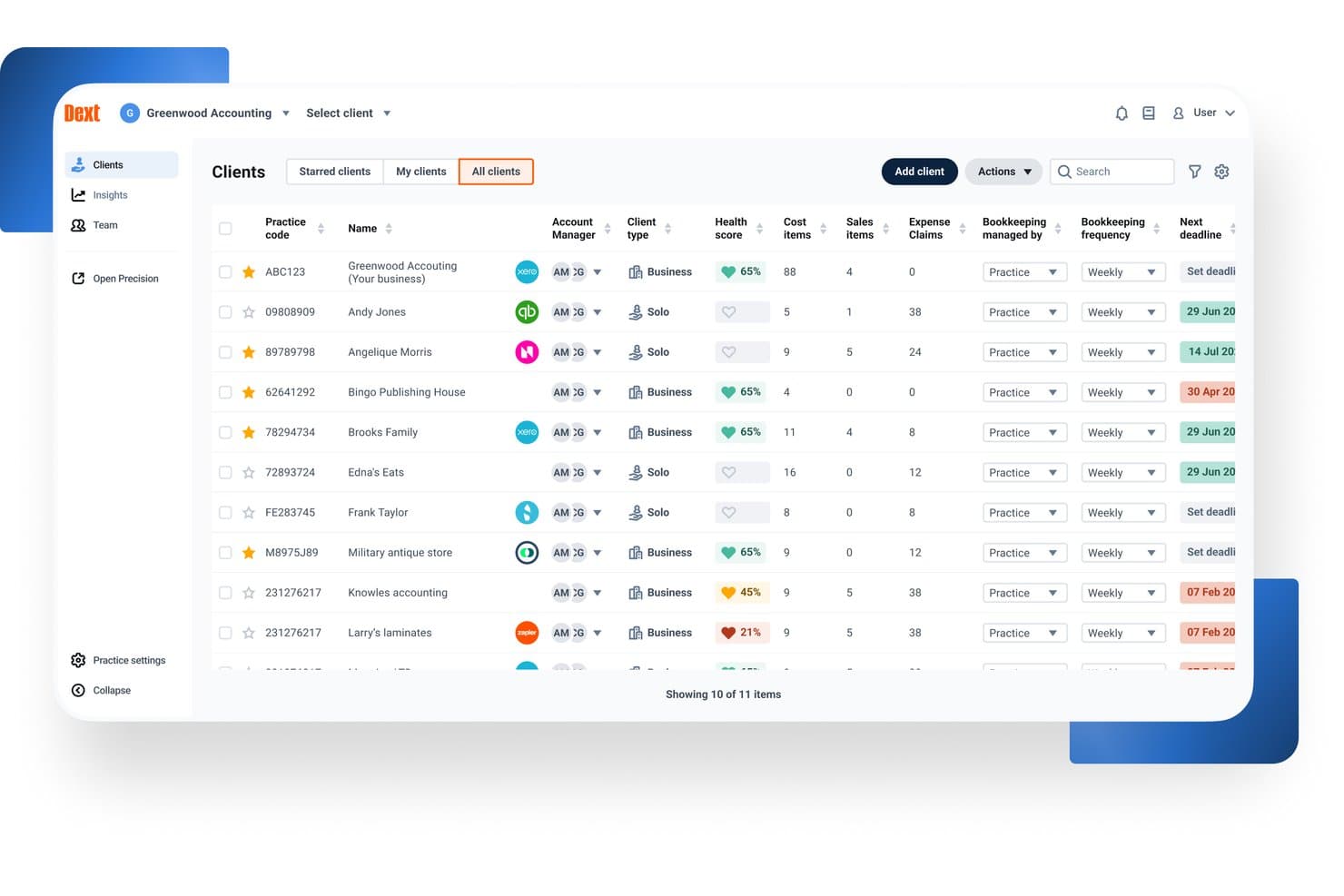
Dext offers a centralized client management dashboard where accountants can view health scores, cost items, deadlines, and bookkeeping frequency across all clients. Dext is an AI-powered pre-accounting automation platform that captures financial documents, extracts data from receipts, invoices, and bank statements, and syncs that data to your accounting software via automated categorization and reconciliation.
Who Is Dext Best For?
Dext is a strong fit for bookkeepers and staff accountants at accounting firms managing high document volumes across multiple clients and accounting platforms.
Why I Picked Dext
I picked Dext as one of the best because no other pre-accounting tool matches its integration depth. It syncs bi-directionally with 30+ accounting platforms, including Xero, QuickBooks, Sage, and NetSuite, so my team doesn't have to recode data when clients switch GLs mid-year. I especially like the auto-publish feature, which pushes extracted, coded documents directly to the correct ledger without a manual review step in between.
Dext Key Features
- AI document extraction: Captures and processes receipts, invoices, and bank statements from mobile, email, or direct upload.
- Supplier statement reconciliation: Matches supplier statements to transactions to help identify missing or mismatched records.
- Data health checks: Flags duplicate contacts, uncoded transactions, and out-of-date reconciliations in client accounting data.
- Practice insights dashboard: Provides client-level and practice-wide metrics to surface bookkeeping issues and track data cleanup.
Dext Integrations
Dext offers native integrations with Xero, QuickBooks Online, Sage Accounting, FreeAgent, NetSuite, and FreshBooks. An API is available for custom integrations.
Pros and Cons
Pros:
- Mobile capture app works reliably
- Handles high client document volumes well
- High-accuracy OCR across document types
Cons:
- Reporting features are basic and limited
- No native general ledger included
Learn more about Dext: Best for automated bank matching
- Free demo available
- Pricing upon request
Visit WebsiteCustomer Rating:4.9/5
DualEntry provides a real-time dashboard view of revenue, cash flow, and performance. DualEntry is an AI-native ERP platform designed to automate and optimize core financial operations for mid-market businesses. It offers a full suite of accounting tools, including general ledger, accounts payable, revenue recognition, and multi-entity management, all powered by AI.
Why I picked DualEntry: Its accounting intelligence tools automate tasks like bank matching, transaction categorization, and document processing. For example, the platform uses AI to automatically create and match transactions, allowing for faster reconciliation with just a few clicks. It also offers OCR technology that reads and logs documents such as bills and invoices, reducing manual data entry. Additionally, DualEntry's AI copilot provides tailored recommendations for handling transactions, offering instant insights and data-driven suggestions.
Standout features & integrations:
Features include multi-entity consolidation, enabling businesses to manage unlimited subsidiaries and automate intercompany transactions. It also offers automated journal entries with smart approval workflows that verify threshold amounts and approval limits, helping to centralize management and ensure compliance.
Integrations include BambooHR, Bill.com, Brex, Deel, Google SSO, Gusto, HubSpot, Ramp, Rippling, Salesforce, Stripe Billing, and Stripe Invoicing.
Pros and Cons
Pros:
- Advanced AI features help with complex accounting tasks
- Supports multi-entity and multi-currency operations
- Automated revenue recognition ensures compliance with standards
Cons:
- Initial data migration could be complex depending on existing systems
- No option to try the system before buying
Learn more about DualEntry: Best for AI-driven invoice data extraction
- Free demo available
- Pricing upon request
Visit WebsiteCustomer Rating:4.8/5
DOKKA Close automates expense reconciliation and suggests journal entries. DOKKA is an AI-powered document management and accounts payable automation platform built to streamline the bookkeeping lifecycle. It serves finance departments and accounting firms seeking to eliminate manual data entry and reduce processing errors. By leveraging advanced machine learning algorithms, the platform successfully tackles the challenge of digitizing, categorizing, and organizing high volumes of financial paperwork.
Who Is DOKKA Best For?
It is best suited for mid-sized enterprises and busy accounting practices that handle extensive daily invoice volumes across multiple client accounts.
Why I Picked DOKKA
I selected this platform because its optical character recognition capabilities are remarkably accurate right out of the box. It easily earns its title as the best for AI-driven invoice data extraction due to its ability to learn from user corrections over time. Furthermore, its side-by-side verification screen makes reviewing and approving parsed financial data incredibly efficient for busy controllers.
DOKKA Key Features
- Digital Filing Cabinet: Securely stores all financial documents in a centralized, cloud-based archive with easily searchable tags.
- Custom Workflow Routing: Facilitates multi-step rules based on specific amount thresholds or departments for authorizing vendor payments.
- Automated General Ledger Sync: Pushes approved transactions and their source documents directly to major accounting ERPs without manual export.
- Month-End Reconciliation: Generates automated working papers and suggests additional journal entries to speed up the financial close process.
DOKKA Integrations
Integrations include Xero, QuickBooks Online, NetSuite, SAP Business One, Acumatica, and Priority Software.
Pros and Cons
Pros:
- Smart learning algorithms improve
- Speeds up month-end reconciliation
- Eliminates manual data entry
Cons:
- Complex invoices can cause delays
- Initial setup requires data mapping
Learn more about DOKKA: 5Best for auto-generating purchase orders
Ramp
- Free plan available; 30-day free trial
- From $15/user/month
Visit WebsiteCustomer Rating:4.8/5
Ramp provides an automated accounting dashboard that categorizes transactions, syncs expenses, and flags missing memos for review. Ramp is a financial management platform that uses artificial intelligence to automate spend tracking, approvals, reimbursements, and vendor payments. It supports accounts payable, procurement, and expense workflows, making it a strong complement to existing accounting systems.
Why I picked Ramp: I picked Ramp because of how it simplifies key finance functions using automation and AI. You can auto-generate purchase orders, forward invoices for auto-processing, and approve payments with minimal manual effort. The platform’s AI flags potential issues in real time—helping you control costs before they happen. Ramp also stood out for its automatic coding of receipts and accounting entries, which helps speed up month-end close and reduces errors.
Standout features & integrations:
Features include AI-powered invoice processing, automatic expense categorization, policy-based spend controls, and purchase approval workflows. Ramp also offers built-in corporate cards with pre-approved limits and real-time tracking of spend, plus integrations with your ERP to sync bills and vendor records automatically.
Integrations include NetSuite, Sage, Xero, QuickBooks, Microsoft Dynamics Business Central, Acumatica, Uber, Lyft, Okta, Google, Rippling, and Gmail.
Pros and Cons
Pros:
- Automated expense reporting and receipt matching
- Ability to issue multiple virtual cards with customizable controls
- Comprehensive reporting features
Cons:
- Could offer more advanced accounting features
- Mostly focuses on accounts payable and spend management
 Best for tax practice management
- Free demo available
- From $58.33/user/month (billed annually)
Visit WebsiteCustomer Rating:4.7/5
TaxDome manages tax practices with workflows, client portals, and automation. TaxDome is an all-in-one platform designed for managing tax firms, providing tools for automating workflows, organizing client communications, and streamlining document management. It’s ideal for tax professionals looking to manage their entire operation in one place, from client onboarding to tax preparation and filing.
Why I picked TaxDome: TaxDome offers features like a customizable client portal, automated reminders, and task management that help your team keep everything on track. You can also manage secure document storage and e-signatures within the platform, reducing manual paperwork. Its workflow automation allows your team to handle repetitive tasks more efficiently, giving you more time to focus on client needs.
Standout features & integrations:
Features include built-in time tracking and invoicing tools, so you can manage billing without switching platforms. It also helps organize client information and track progress across jobs, while integrated email syncing keeps all communication in one place.
Integrations include QuickBooks, Zapier, Stripe, PayPal, Calendly, Google Drive, Dropbox, Docusign, Microsoft Outlook, and Slack.
Pros and Cons
Pros:
- Access to one-on-one setup support
- Highly customizable workflows
- Centralized platform for client management
Cons:
- Few advanced AI integrations for emails
- High upfront cost for smaller firms


Xero supports expense tracking and payroll with an easy-to-use interface. Xero is a cloud-based accounting software designed to simplify financial management for businesses. It helps users manage key tasks and is suitable for small to mid-sized businesses that need an easy-to-navigate system.
Why I picked Xero: Xero’s user-friendly interface allows you to quickly get up to speed with its features, making financial management straightforward. You can manage invoices, track expenses, and view real-time cash flow all in one place.
Xero also provides customizable financial reports, so your team can generate insights tailored to your business needs. The software supports automatic bank transaction imports, reducing manual data entry and letting your team focus on more critical tasks.
Standout features & integrations:
Features include multi-currency support, which is great if your business operates across different countries. Xero also supports payroll management, helping your team keep employee payments and taxes organized.
Integrations include PayPal, Stripe, HubSpot, Gusto, Square, Shopify, Mailchimp, GoCardless, WooCommerce, and Microsoft Dynamics 365.
Pros and Cons
Pros:
- Detailed financial reporting tools
- Strong recurring invoicing features
- Simplifies audit trails for tracking
Cons:
- Project tracking is limited to top plans
- Bulk reconciliation requires higher-tier plans
Learn more about Xero: Best for simple accounting solutions
- 14-day free trial
- Pricing upon request
Visit WebsiteCustomer Rating:4.5/5
Kashoo provides simple accounting for small businesses with real-time tracking. Kashoo is an easy-to-use accounting platform designed for small businesses, offering tools for managing financial tasks. It simplifies accounting processes by providing a user-friendly interface that helps businesses maintain accurate financial records with minimal effort.
Why I picked Kashoo: Kashoo offers straightforward accounting features that make it ideal for small business owners who need a simple solution. You can quickly generate invoices and track expenses in real time, ensuring that your financials are always up to date.
The platform also provides one-click reporting, which allows your team to produce financial statements with ease. Its simplicity and automation features help streamline your accounting without the need for complex setups or extensive training.
Standout Features & Integrations:
Features include real-time transaction tracking, which helps your team stay updated on all business expenses and income. The platform also offers automatic categorization of transactions, simplifying the bookkeeping process.
Integrations include Stripe, PayPal, Square, FreshBooks, Hubdoc, Google Workspace, BluePay, Plaid, Plooto, Wise, and RBC Banking.
Pros and Cons
Pros:
- Simplifies vendor management with automatic contact creation
- Offers advanced income and expense reporting
- Real-time bank feeds for quick updates
Cons:
- Lacks integration with certain invoicing tools
- No built-in payroll functionality
Learn more about Kashoo: Best for practice management for firms
- 15-day free trial
- From $22/user/month
Visit WebsiteCustomer Rating:4.6/5
Canopy enhances practice management with client communication and task tracking. Canopy is a cloud-based software designed to help accounting firms manage their day-to-day operations more effectively.
Why I picked Canopy: Canopy offers a full suite of practice management tools that allow your team to manage client communications, deadlines, and document storage all in one place. It helps automate tasks like client onboarding and billing, so your team can focus on more strategic work.
The platform also provides detailed reporting and time tracking, giving you better visibility into how your firm is performing. With built-in features for secure document sharing and e-signatures, Canopy simplifies compliance and client collaboration, making it an ideal solution for firms looking to optimize their workflows.
Standout features & integrations:
Features include AI-powered email generation, which helps your team craft and rephrase client communications efficiently. Canopy also offers a secure document management system, enabling your firm to store, organize, and share files seamlessly.
Integrations include QuickBooks, Zapier, Google Drive, Microsoft Outlook, Stripe, and FreshBooks.
Pros and Cons
Pros:
- Organizes tax resolution processes
- Customizable client communications and file sharing
- Provides real-time IRS transcript access
Cons:
- Lacks advanced reporting features
- Workflow regeneration can be unintuitive
Learn more about Canopy: Best for automated bookkeeping for firms
- Free plan available
- From $69/license/month
Visit WebsiteCustomer Rating:4.4/5
Botkeeper automates bookkeeping, transaction coding, and bank reconciliations. Botkeeper is a cloud-based platform that automates bookkeeping tasks for accounting firms, allowing them to manage finances without manual data entry. It is designed to support accounting professionals and firms by providing automated transaction classification, reconciliations, and financial reporting, making it easier to oversee financial workflows.
Why I picked Botkeeper: Botkeeper automates key bookkeeping tasks like transaction coding and bank reconciliations, saving your team time on manual data entry. Its real-time reporting capabilities let you track your financials as they happen, giving you better insights.
Additionally, the platform’s AI learns from user inputs, continuously improving accuracy over time. With automated workflows, your team can focus on higher-level tasks while Botkeeper handles routine bookkeeping.
Standout features & integrations:
Features include role-based access controls, so you can manage who sees what across your team. Its customizable dashboards make it easy to monitor the metrics that matter most to your firm. The platform also offers consolidated reporting for multi-entity businesses, streamlining insights across multiple locations or clients.
Integrations include QuickBooks, Xero, Sage, FreshBooks, BILL, Gusto, Expensify, PayPal, Stripe, and HubSpot.
Pros and Cons
Pros:
- Allows customization for financial reports
- Provides real-time transaction updates
- Automates manual bookkeeping tasks
Cons:
- Initial onboarding can be time-consuming
- AI sometimes needs manual correction
Learn more about Botkeeper:
Andre AI-regnskapsprogrammer på kortlisten
Her er noen flere alternativer innen AI-regnskapsprogramvare som ikke kom med på kortlisten min, men som likevel er verdt å se nærmere på:
- 11HighRadiusBest for large-scale reconciliation processing
- 12CertiniaBest for integrated financial and operational data
- 13FulfilBest for AI-driven workflow automation
- 14PuzzleBest for real-time financial insights
- 15ClickUpBest for all-in-one productivity
- 16Vic.aiBest for autonomous invoice processing
- 17ZeniBest for AI-driven financial management
- 18TrullionBest for AI-powered lease accounting
- 19QuickBooks OnlineBest for complete financial management
- 20Zoho BooksBest for small business invoicing
How I Evaluate AI Accounting Software
Every tool on this list has to deliver AI that actually saves time—auto-coding transactions, catching duplicate invoices, or speeding up reconciliations—not just surface-level branding. I split my evaluation into two layers: the core functionality a tool needs to qualify and the differentiating factors that separate one option from another.
Core Functionality (Table Stakes For This List)
When I'm selecting tools for my list, I rank each one on a scale from 0 (does not offer the functionality) to 5 (excels in this area) for each core functionality listed below. Then, I calculate the tool's total score into a percentage. Each tool needs to achieve a minimum total score of 65% to be considered for inclusion.
- AI Transaction Categorization: I look for ML that learns from corrections and auto-codes expenses, revenue, and transfers to the right GL accounts over time.
- Intelligent Document Capture: The tool should extract line-item detail from invoices, receipts, and bills with minimal manual cleanup before posting.
- Automated Reconciliation: I evaluate how well AI matches bank feed transactions against sub-ledger and GL entries, especially around month-end volume spikes.
- Anomaly & Error Detection: Flagging duplicate vendor payments or unusual posting patterns matters here—I check whether alerts include context, not just raw flags.
- Core Accounting Functions: Whether native or through deep integration, the platform needs to support GL, AP, AR, and standard financial statement generation.
- AI-Driven Reporting & Insights: I look for AI that goes beyond dashboards—tools that surface variance explanations, cash flow trends, or forecast adjustments proactively.
Once I have a list of tools that meet this criteria, I consider what sets each platform apart.
Differentiating Factors (What Sets Vendors Apart)
Here's how I compare and contrast different vendors:
Standout Features
Audit trail explainability is one of the first things I check—when AI auto-codes a transaction or flags an anomaly, your team and auditors need to see exactly why it made that call. A natural language copilot adds real value too, especially for controllers pulling ad hoc reports mid-close without building custom views. I also evaluate predictive cash flow forecasting, which helps CFOs model runway and working capital from live transaction data rather than static spreadsheets.
Beyond Features
AI model transparency matters a lot in this space—I look at whether vendors disclose how they handle your financial data and if it's used to train their models. Integration depth is equally important; a tool that doesn't sync bi-directionally with your ERP or bank feeds creates more manual work than it saves. I also evaluate time-to-value, specifically whether AI models come pre-trained or require months of transaction history before categorization accuracy becomes reliable.
Slik velger du AI-regnskapsprogramvare
Det er lett å gå seg vill i endeløse funksjoner og forvirrende prisplaner. For å gjøre det litt enklere å finne ut hva som fungerer best for teamet ditt, får du her en enkel sjekkliste som hjelper deg med å holde oversikten:
| Faktor | Hva bør du vurdere? |
| Skalerbarhet | Vil programvaren vokse med virksomheten din og regnskapsbehovene som utvikler seg? |
| Integrasjoner | Integreres den sømløst med de eksisterende systemene og verktøyene dine (f.eks. ERP-systemer og CRM-systemer)? |
| Tilpasningsmuligheter | Kan du tilpasse programvaren til teamets spesifikke arbeidsflyter for regnskap? |
| Brukervennlighet | Hvor raskt kan teamet ditt ta i bruk programvaren og bruke den effektivt? |
| Budsjett | Passer programvaren innenfor de økonomiske rammene dine uten at du må ofre viktige funksjoner? |
| Sikkerhetstiltak | Finnes det gode tiltak for å beskytte økonomidataene dine? |
Trender innen AI-regnskapsprogramvare
Mens jeg undersøkte det nyeste innen leverandører av AI-regnskapsprogramvare, gikk jeg gjennom mengder av produktoppdateringer, pressemeldinger og lanseringsnotater. Det skjer mye på dette området, men noen få trender skilte seg virkelig ut for meg. Her er det jeg følger med på:
- Prediktiv analyse for økonomiske prognoser: Mange leverandører legger til AI-verktøy som bruker historiske data til å forutsi fremtidige økonomiske trender, slik at virksomheter kan ta bedre beslutninger om budsjettering, pengebruk og ressursfordeling.
- Overvåking av regelverksetterlevelse: Med stadig flere reguleringer utstyres AI-regnskapsverktøy med funksjoner som automatisk overvåker overholdelsen av skattelovgivning og økonomiske reguleringer, noe som reduserer risikoen for menneskelige feil og bøter.
- Avviksdeteksjon i sanntid: AI brukes nå til å flagge uvanlige transaksjoner i sanntid, slik at virksomheter raskere kan oppdage mulig svindel eller feil. Denne trenden er spesielt nyttig i miljøer med store transaksjonsvolumer.
- Selvlærende algoritmer: Enkelte AI-regnskapsplattformer tar i bruk maskinlæringsalgoritmer som forbedrer nøyaktigheten over tid ved å lære av brukeratferd, noe som gjør kategorisering av transaksjoner og andre oppgaver mer presise og effektive.
- Naturlig språkbehandling for rapportering: Leverandører begynner å integrere AI som kan generere lett forståelige økonomiske rapporter ved hjelp av naturlig språkbehandling, slik at økonomiske data blir mer tilgjengelige for ikke-eksperter i virksomheter.
Hva er AI-regnskapsprogramvare?
AI-regnskapsprogramvare er en type AI-teknologi som automatiserer og forbedrer oppgaver innen økonomistyring ved hjelp av kunstig intelligens. Regnskapsførere, økonomiteam og virksomhetseiere bruker vanligvis disse verktøyene for å spare tid på manuelle prosesser, redusere feil og få dypere innsikt i økonomiske data.
Automatisert dataregistrering, avviksdeteksjon i sanntid og prediktiv analyse hjelper med oppgaver som transaksjonskategorisering, svindeloppdagelse og økonomiske prognoser. Samlet sett gir disse verktøyene for regnskapsautomatisering virksomheter større nøyaktighet og effektivitet i økonomistyringen.
Funksjoner i AI-regnskapsprogramvare
Når du ser nærmere på AI-regnskapsprogramvare, er det nyttig å vite hva som virkelig betyr noe. Her er noen viktige funksjoner du bør følge med på, som kan gjøre en stor forskjell i hverdagen.
- Automatisert dataregistrering: Registrerer transaksjoner automatisk for å spare tid og redusere manuelle feil.
- Prediktiv analyse: Gir innsikt i fremtidige økonomiske trender for å bidra til budsjettering og planlegging.
- Avviksdeteksjon: Flagger uvanlige transaksjoner i sanntid og bidrar til å forhindre svindel og oppdage feil tidlig.
- Overvåking av regelverksetterlevelse: Sikrer at den økonomiske driften følger relevante skatte- og økonomiske reguleringer.
- Tilpassbar rapportering: Gjør det mulig for brukere å opprette skreddersydde økonomiske rapporter som dekker virksomhetens spesifikke behov.
- Maskinlæringsalgoritmer: Forbedrer kontinuerlig nøyaktigheten ved å lære av brukerinndata og transaksjonsmønstre.
- Sanntidsdashbord: Gir en omfattende oversikt over den økonomiske situasjonen med oppdaterte data og visualiseringer.
- Naturlig språkbehandling: Genererer lettleste økonomiske rapporter, slik at data blir mer tilgjengelige for ikke-eksperter.
- Utgiftssporing: Kategoriserer og sporer utgifter automatisk, slik at økonomiske oppføringer blir nøyaktige.
- Revisjonsspor: Oppbevarer en oversikt over alle økonomiske aktiviteter for enklere revisjon og kontroll av regelverksetterlevelse.
Fordeler med AI-regnskapsprogramvare
Å ta i bruk AI i regnskapsverktøyene dine kan gjøre en stor forskjell – for deg, teamet ditt og måten dere arbeider på. Her er noen fordeler du kan se frem til når du bytter:
- Økt nøyaktighet: Automatiserer dataregistrering og beregninger, noe som reduserer risikoen for menneskelige feil i de økonomiske oppføringene dine.
- Tidsbesparelser: Automatiserer repetitive oppgaver som transaksjonskategorisering, prosesser for leverandørgjeld og utgiftssporing, slik at du får mer tid til strategisk arbeid.
- Forbedret regelverksetterlevelse: Overvåker endringer i regelverket og sikrer at de økonomiske prosessene dine fortsatt er i tråd med lovkravene.
- Bedre beslutningstaking: Gir innsikt i sanntid og prediktiv analyse for å hjelpe deg med å ta velinformerte økonomiske beslutninger.
- Forebygging av svindel: Oppdager avvik i transaksjoner tidlig, slik at mulig svindel eller feil kan identifiseres raskere.
- Skalerbarhet: Tilpasser seg virksomheter i vekst ved å håndtere større datamengder uten ekstra manuell registrering.
- Forbedret rapportering: Genererer tilpassede økonomiske rapporter raskt, slik at du får en rask oversikt over virksomhetens økonomiske situasjon.
Kostnader og priser for AI-regnskapsprogramvare
Å velge riktig AI-regnskapsprogramvare innebærer å se forbi funksjonene og også sette seg inn i prisene. Planene kan variere mye avhengig av hva du trenger – teamstørrelse, avanserte verktøy eller ekstra tillegg kan alle påvirke kostnaden. For å gjøre det enklere har jeg satt sammen en kort tabell som viser de vanligste prismodellene, gjennomsnittlige kostnader og hva du vanligvis får med hver plan.
Sammenligningstabell for planer for AI-regnskapsprogramvare
| Plantype | Gjennomsnittspris | Vanlige funksjoner |
| Gratisplan | $0 | Grunnleggende fakturering, enkel utgiftssporing og begrenset rapportering. |
| Personlig plan | $5-$25/bruker/måned | Automatisert fakturering, grunnleggende økonomirapporter, bankavstemming og registrering av kvitteringer. |
| Forretningsplan | $25-$75/bruker/måned | Avansert økonomirapportering, automatiserte arbeidsflyter, støtte for flere valutaer og revisjonsspor. |
| Virksomhetsplan | $75+/bruker/måned | Tilpasset rapportering, sanntidsanalyse, AI-drevet prognostisering og dedikert kundestøtte. |
Vanlige spørsmål om AI-regnskapsprogramvare
Her er noen svar på vanlige spørsmål om AI-regnskapsprogramvare:
Hvordan forbedrer AI svindeloppdagelsen innen regnskap?
AI bruker avanserte algoritmer til å overvåke transaksjoner og økonomiske data for uvanlige mønstre. Ved å oppdage avvik eller uoverensstemmelser i sanntid bidrar AI til å identifisere mulig svindel raskere enn tradisjonelle metoder, slik at teamet ditt kan handle raskt og redusere økonomisk risiko.
Kan AI-regnskapsprogramvare håndtere flere valutaer?
Ja, mange AI-regnskapsplattformer støtter transaksjoner i flere valutaer. Denne funksjonen er spesielt nyttig for virksomheter som opererer globalt, siden den automatiserer valutaomregning, følger valutakurser og forenkler internasjonal økonomirapportering.
Hvilken rolle spiller AI i økonomisk prognostisering?
AI analyserer historiske økonomiske data, markedstrender og økonomiske indikatorer for å generere nøyaktige økonomiske prognoser. Dette hjelper virksomheten med å planlegge budsjetter, forutsi kontantstrøm og ta informerte beslutninger om ressursfordeling basert på datadrevet innsikt.
Hvor sikker er AI-regnskapsprogramvare?
De fleste AI-regnskapssystemer har sterke sikkerhetstiltak som kryptering, flerfaktorautentisering og samsvar med bransjestandarder som SOC 2. Disse sikkerhetstiltakene bidrar til å beskytte sensitive økonomiske data mot datainnbrudd eller uautorisert tilgang.
Kan AI-regnskapsprogramvare tilpasses ulike bransjer?
Ja, AI-regnskapsverktøy er svært tilpasningsbare og kan skreddersys for å dekke de spesifikke behovene i ulike bransjer. Enten du arbeider innen detaljhandel, helsevesen eller produksjon, kan programvaren tilpasse arbeidsflyter, rapportering og sporing av samsvar slik at det passer til bransjen din.
Hvordan hjelper AI med forberedelser til revisjon?
AI forenkler revisjonsforberedelsene ved å opprettholde detaljerte revisjonsspor og automatisere kategorisering og dokumentasjon av økonomiske transaksjoner. Dette sikrer ikke bare samsvar, men hjelper også teamet ditt med raskt å generere nøyaktige rapporter til revisorene.