

De beste alternativene til Zoho Books hjelper bedrifter med å administrere økonomien nøyaktig og effektivt – uten begrensningene, de manglende funksjonene eller hullene i arbeidsflyten som kan holde team tilbake. Enten du har prøvd Zoho Books og opplevd at det ikke strakk til, eller du fortsatt vurderer alternativene dine, bør riktig regnskapsprogramvare dekke dine unike behov og vokse sammen med bedriften din.
Med mer enn 15 års erfaring innen økonomistyring og digital programvare har jeg vurdert og testet et bredt utvalg av regnskapsplattformer for å finne løsninger som virkelig leverer. Det riktige verktøyet håndterer ikke bare fakturaer og utgifter – det effektiviserer driften, forbedrer rapporteringen og støtter bedre økonomiske beslutninger.
For å hjelpe deg med å velge med trygghet har jeg vurdert de beste alternativene til Zoho Books på markedet, og gått gjennom fordeler og ulemper, ideelle bruksområder, priser, integrasjoner og mer. Her er plattformene som tilbyr større fleksibilitet, bedre funksjonalitet og en smidigere opplevelse innen økonomistyring.
Hva er Zoho Books?
Zoho Books er en regnskapsprogramvare som hjelper deg med å håndtere fakturaer, utgifter og andre økonomiske oppgaver. Den brukes av småbedriftseiere, regnskapsførere og økonomiteam på grunn av automatisert fakturering, kostnadssporing, overholdelse av skatteregler, brukervennlighet og kostnadseffektivitet, noe som forenkler økonomistyringen. Alt i alt tilbyr Zoho Books en brukervennlig løsning for effektiv håndtering av bedriftens økonomiske behov.
Sammenligningstabell for alternativer til Zoho Books
Denne sammenligningstabellen oppsummerer prisdetaljene for mine beste utvalgte alternativer til Zoho Books:
| Tool | Best For | Trial Info | Price | ||
|---|---|---|---|---|---|
| 1 | Best for unlimited customers and invoices | 30-day free trial + free demo available | From $20/month | Website | |
| 2 | Best for automated financial processes | Free demo available | Pricing upon request | Website | |
| 3 | Best for HMRC-compliant payroll | Free plan + 30-day free trial + demo available | From £10/month | Website | |
| 4 | Best for user-friendly bookkeeping | 14-day free trial | From $30/month | Website | |
| 5 | Best for project accounting | Free demo available | From £1,200/month | Website | |
| 6 | Best for small business invoicing | Free plan + 30-day free trial available | From $19/month | Website | |
| 7 | Best for real-time multi-entity consolidation | Free demo available | Pricing upon request | Website | |
| 8 | Best for accountant-focused features | Free demo available | Pricing upon request | Website | |
| 9 | Best for AI-driven expense management | 14-day free trial + free demo available | From $10/month | Website | |
| 10 | Best for diverse business sizes | 14-day free trial available | From A$315/year (billed annually) | Website |


Hvorfor du kan stole på våre programvareanbefalinger
6,700+
Reviews
20
Industry experts
16+
Evaluation factors
14
Years
Teamet vårt har testet og anmeldt programvare siden 2012. Vi er selv økonomiledere, så vi vet hvor vanskelig og hvor viktig det er å velge riktig programvare.
I denne guiden har vi vurdert verktøyene gjennom praktisk testing og uavhengig research og gitt dem poeng ut fra våre utvelgelseskriterier.
Anmeldelsene våre bygger på vår egen redaksjonelle vurdering. De er ikke et salgsargument.
Anmeldelser av de beste alternativene til Zoho Books
Nedenfor finner du mine detaljerte sammendrag av de beste alternativene til Zoho Books i kortlisten min. I anmeldelsene ser jeg på de viktigste funksjonene, fordeler og ulemper, integrasjoner og ideelle bruksområder for å hjelpe deg med å finne det beste alternativet.
 Best for unlimited customers and invoices
- 30-day free trial + free demo available
- From $20/month
Visit WebsiteCustomer Rating:4.8/5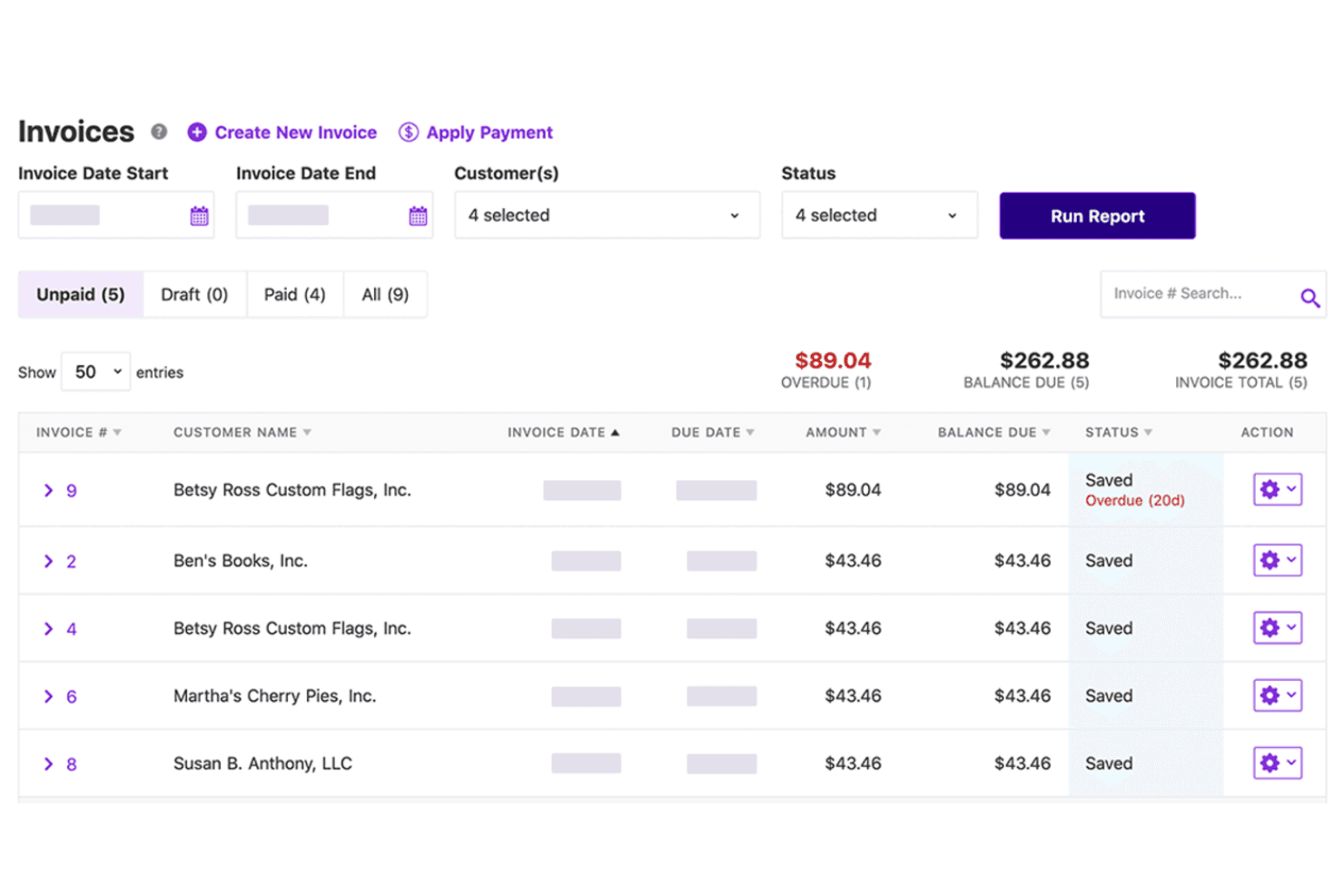
Patriot Accounting lets users track unpaid invoices and overdue balances at a glance. Patriot Accounting is online accounting software built for U.S. small businesses that want an affordable, no-fuss way to manage invoicing, track income and expenses, and reconcile accounts without the complexity of enterprise-grade tools.
Who Is Patriot Accounting Best For?
Patriot Accounting is a strong fit for U.S. small business owners who want straightforward invoicing and bookkeeping at a low monthly cost.
Why I Picked Patriot Accounting
I picked Patriot Accounting as one of the best because it genuinely removes the ceiling on invoicing volume that frustrates growing small businesses on other platforms. With unlimited customers and invoices across both plans, you can send a single invoice or manage hundreds of recurring billing schedules without hitting a paywall. I also like that Patriot Smart Suggestion uses AI to auto-categorize imported bank transactions, which keeps your books tidy without manual reclassification every month.
Patriot Accounting Key Features
- Dual-ledger reporting: Switch between cash- and accrual-basis views on financial reports without maintaining two separate sets of books.
- Account reconciliation: Compare your recorded transactions against monthly bank statements and generate an Account Reconciliation report showing matched and outstanding items.
- Contractor self-service portal: Give 1099 contractors their own portal to update personal and banking details, view payment history, and download 1099 forms.
- Estimates and customer statements: Create and send estimates from Accounting Premium, convert them directly to invoices, and generate customer statements showing open items or full account activity.
Patriot Accounting Integrations
Patriot Accounting offers three documented native integrations: Stripe for invoice payments, Plaid for bank imports, and Patriot Payroll for payroll data and journal entries. A public API or broader marketplace isn’t documented.
Pros and Cons
Pros:
- Reviewers praise helpful customer support
- Cash- and accrual-basis reporting views
- Unlimited customers and invoice volume
Cons:
- Vendor bills require manual entry and payment recording
- Reports offer less drill-down than Zoho Books
Learn more about Patriot Accounting: Best for automated financial processes
- Free demo available
- Pricing upon request
Visit WebsiteCustomer Rating:4.5/5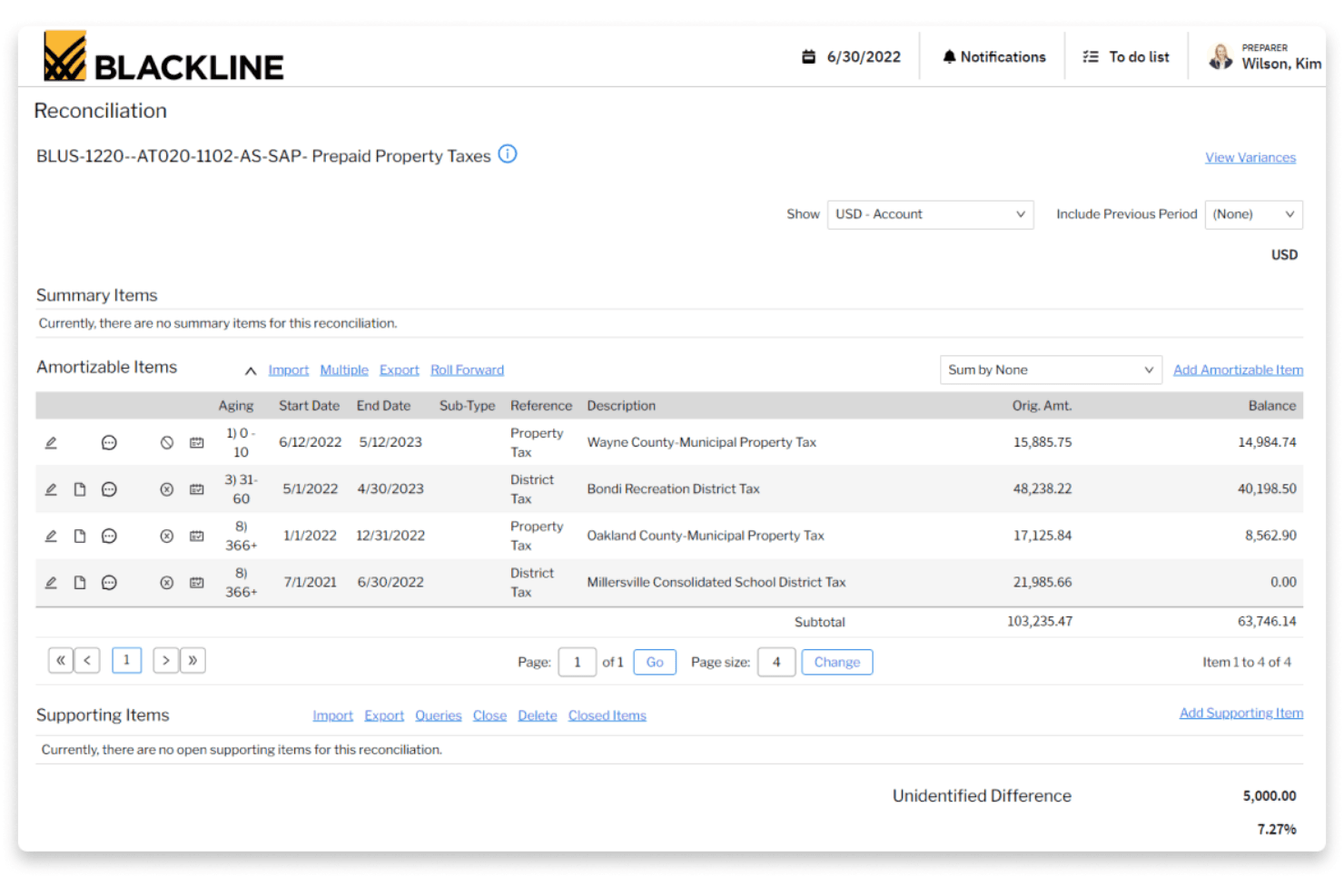
BlackLine streamlines prepaid property tax account reconciliation. BlackLine is a financial close and consolidation platform built for midsize and enterprise finance teams that need to automate reconciliations, journal entries, and close workflows across complex, multi-entity organizations.
Who Is BlackLine Best For?
BlackLine is a strong fit for controllers and finance leaders at midsize-to-enterprise organizations managing complex, multi-entity close processes.
Why I Picked BlackLine
I picked BlackLine as one of the best because it automates the financial close processes that eat up the most time for accounting teams at complex, multi-entity organizations. I especially like how Transaction Matching ingests bank and ERP data, applies configurable rules, and hands reconciling items directly to Account Reconciliations, cutting out the manual spreadsheet work. The Journals Risk Analyser also stands out to me, using AI to flag anomalies across journal entries before they become audit issues.
BlackLine Key Features
- Account reconciliations: Automates loading, standardizing, and reconciling supporting items using reusable templates and auto-reconciliation rules.
- Consolidation automation: Aggregates balances, calculates ownership interests, and eliminates intercompany transactions across entities.
- Task management: Assigns and tracks close tasks through configurable workflows with real-time dashboards that flag bottlenecks and overdue items.
- Compliance and control testing: Centralizes risk management tasks, control testing, and audit documentation in a shared workspace with role-based permissions.
BlackLine Integrations
BlackLine integrates with 30+ ERP systems, including Microsoft Dynamics 365, NetSuite, Oracle, SAP, and Workday. Its API supports custom integrations, but API access is limited to BlackLine customers.
Pros and Cons
Pros:
- Audit trails support traceable approvals
- Centralized close tasks clarify remaining work
- Automated reconciliations cut spreadsheet work
Cons:
- No invoicing, expense, or vendor-bill workflows
- Setup and configuration can take substantial effort
Learn more about BlackLine: Best for HMRC-compliant payroll
- Free plan + 30-day free trial + demo available
- From £10/month
Visit WebsiteCustomer Rating:4.4/5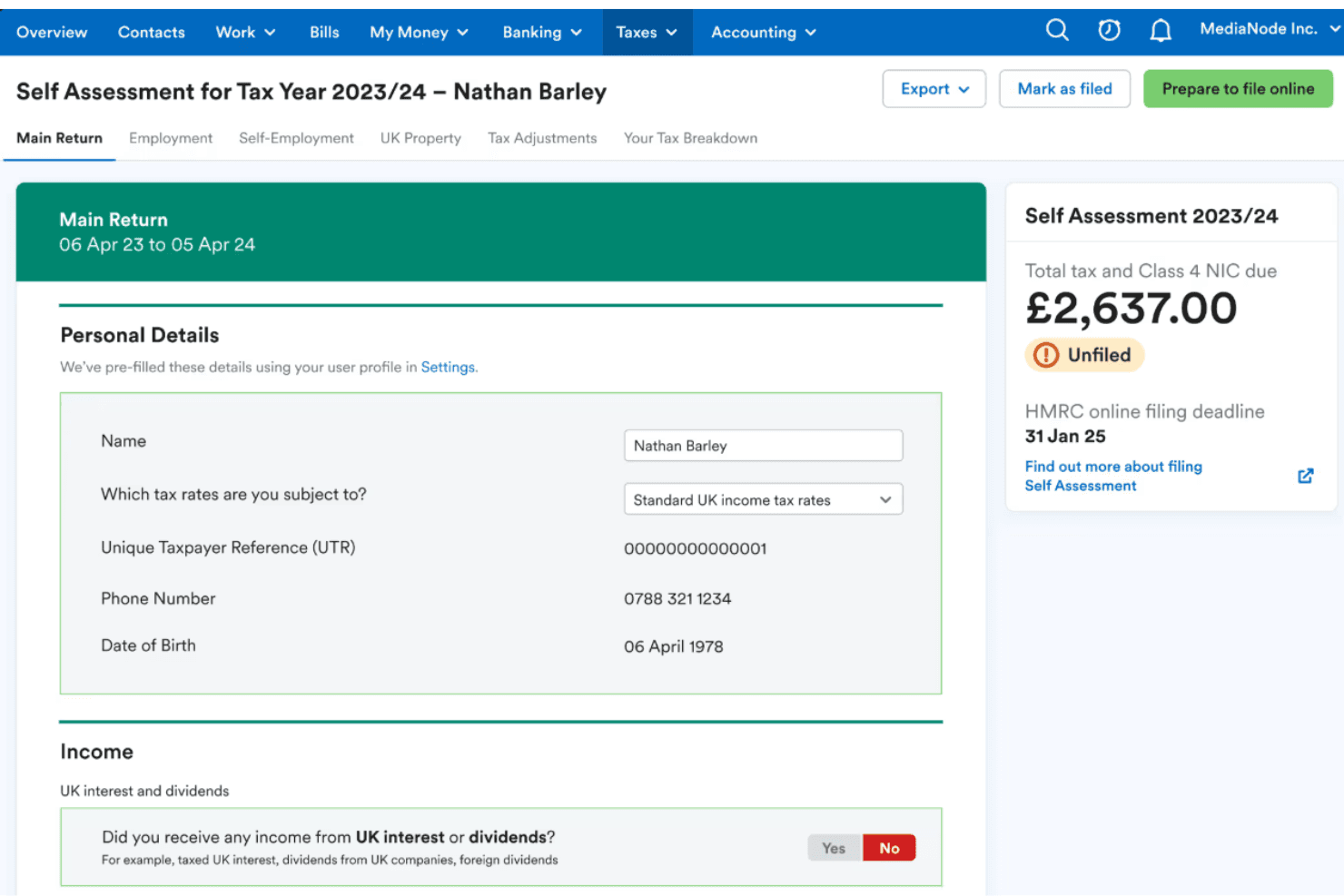
FreeAgent simplifies Self Assessment tax filing with pre-filled personal details. FreeAgent is UK-focused accounting software built for small businesses, sole traders, freelancers, and landlords who need invoicing, expense tracking, bank reconciliation, and HMRC tax compliance in a single platform.
Who Is FreeAgent Best For?
FreeAgent is a strong fit for UK-based small businesses, sole traders, and freelancers who need built-in HMRC compliance without piecing together separate tools.
Why I Picked FreeAgent
I picked FreeAgent as one of the best Zoho Books alternatives because of how well it handles HMRC-compliant payroll directly within the platform. I particularly appreciate that it calculates PAYE and National Insurance, generates payslips and P60s, and submits Real Time Information payroll straight to HMRC, all without needing a separate payroll tool. I've also found the built-in MTD for Income Tax support genuinely useful, letting sole traders submit quarterly updates and final declarations to HMRC from the same place they manage invoices and bank feeds.
FreeAgent Key Features
- Smart Capture: Uses AI to extract data from receipt and bill images, suggest expense categories, and match files to bank transactions.
- 90-day cashflow forecast: Automatically projects cashflow based on bank balances, invoices, bills, and tax liabilities, with scenario planning tools.
- MTD for Income Tax submissions: Lets sole traders submit quarterly updates and final declarations directly to HMRC from within the platform.
- Management Reports: Generates Profit & Loss, Balance Sheet, Aged Debtors, and Aged Creditors reports, exportable as PDF or XLSX.
FreeAgent Integrations
FreeAgent offers marketplace integrations with Stripe, PayPal, GoCardless, WooCommerce, HubSpot, Fathom, and Zapier. Its REST API supports OAuth 2.0 with XML and JSON responses for custom integrations.
Pros and Cons
Pros:
- Bank feeds reduce manual transaction entry
- Zoho switchers praise clearer labels
- Built-in HMRC payroll and tax submissions
Cons:
- Payroll suits simple, monthly runs best
- Reporting may fall short for complex needs

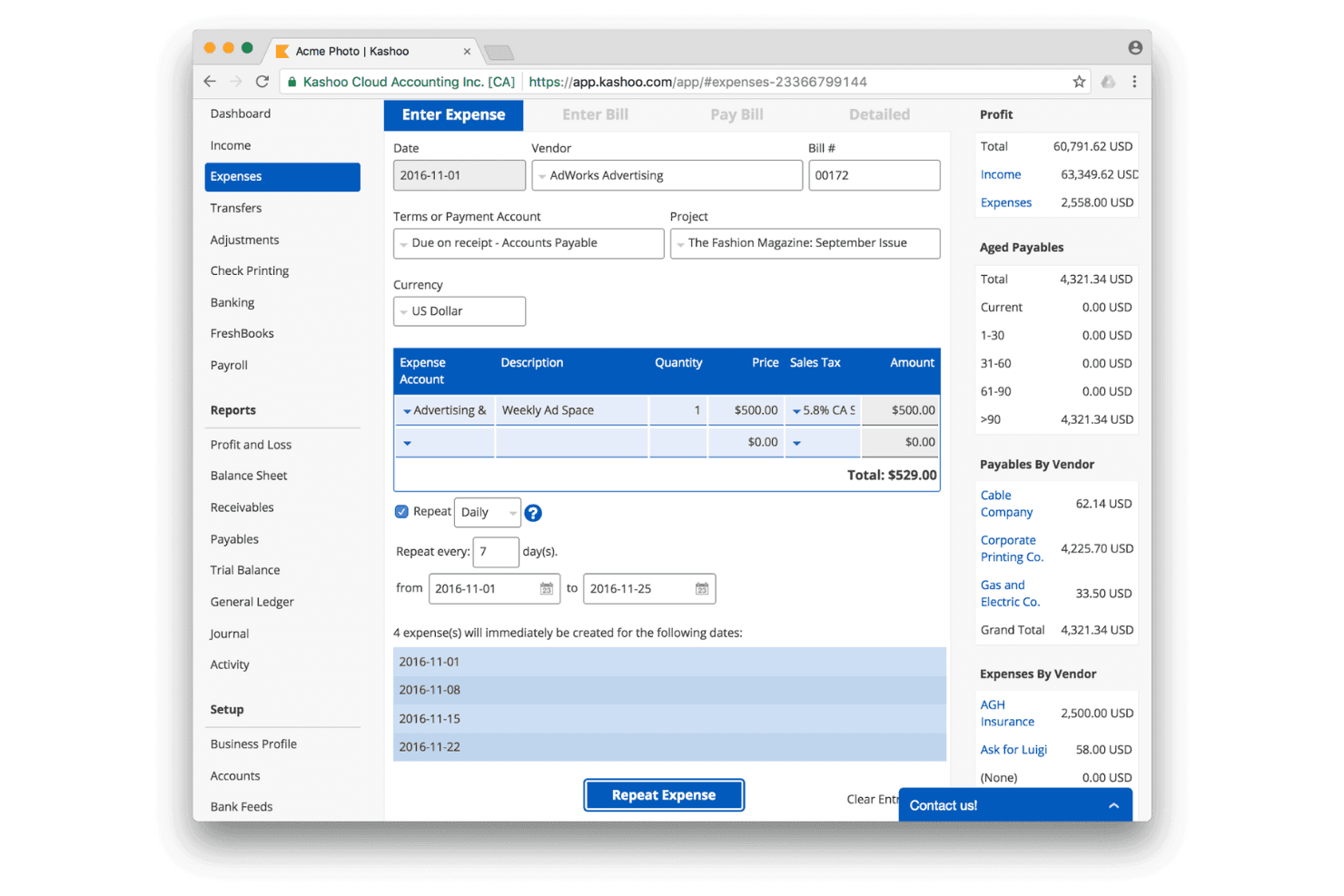
Kashoo lets users set up recurring expenses on a scheduled interval. Kashoo is online accounting software built for small business owners who want to handle invoicing, expense tracking, bank reconciliation, and financial reporting without a steep learning curve.
Who Is Kashoo Best For?
Kashoo is a good fit for small business owners who want a straightforward, all-in-one bookkeeping tool without a steep learning curve or a complex pricing structure.
Why I Picked Kashoo
I picked Kashoo as one of the best because it handles the full bookkeeping loop, invoicing, expense tracking, and bank reconciliation, without requiring any accounting background to get started. I appreciate how the bank feed connects to more than 5,000 banks and surfaces suggested matches during reconciliation, so categorizing imported transactions takes minutes rather than a manual deep-dive. The income statement filters by project, client, or account, which means I can slice a P&L by client in seconds and hand it straight to an accountant.
Kashoo Key Features
- Sales tax configuration: Set up custom tax names, rates, registration numbers, and effective dates, and apply them directly to income and expense transactions.
- Period locking: Lock specific timeframes to prevent accidental changes to finalized records.
- Multi-currency support: Record transactions in multiple currencies across your chart of accounts.
- Role-based user access: Assign one of four predefined roles to invited users, controlling what they can view, edit, or export.
Kashoo Integrations
Kashoo has seven documented native integrations, including Plaid, Stripe, Square, PaymentEvolution, Paychex, SurePayroll, and 1Password. It also offers an HTTP API with OAuth2 and connects to more than 5,000 banks and credit unions.
Pros and Cons
Pros:
- Accountant access supports shared month-end review
- Invoice and P&L records stay together
- Simple setup helps small teams start bookkeeping
Cons:
- Report layouts and selection frustrate deeper analysis
- Bank feeds can duplicate transactions during reconciliation
Learn more about Kashoo:
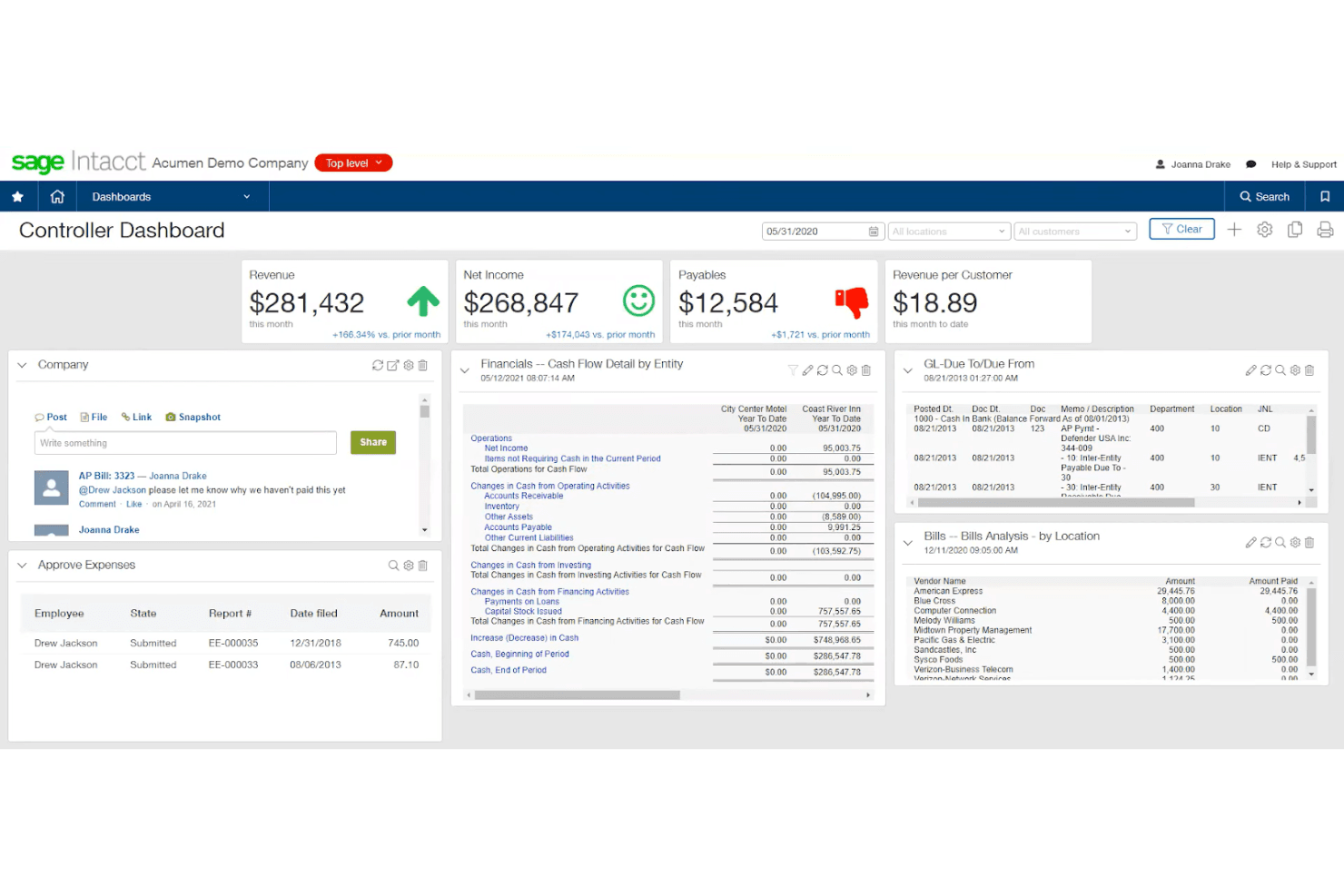
Sage Intacct centralizes financial KPIs and cash flow data in one dashboard. Sage Intacct is a cloud-based financial management platform built for mid-sized and growing organizations that need multi-entity accounting, real-time consolidation across currencies, and AI-assisted AP automation and close management.
Who Is Sage Intacct Best For?
Sage Intacct is a strong fit for mid-sized finance teams managing multiple entities, currencies, or projects who've outgrown their current accounting platform.
Why I Picked Sage Intacct
I picked Sage Intacct as one of the best because it handles project accounting in a way that most general-ledger tools simply can't match. I love how project costing and billing connect directly to the general ledger in real time, so I can track budget versus actuals at the task level and bill clients without reconciling data across separate systems. The AI-powered Time agent pulls hours from calendars and emails to populate timesheets automatically, which keeps project costs accurate without chasing down manual entries.
Sage Intacct Key Features
- Multi-entity consolidation: Consolidates financials across hundreds of entities and more than 200 currencies in real time, with drill-down reporting by country, currency, and region.
- AP automation agent: Extracts vendor, amount, and line-item data from uploaded or emailed bills, matches them to purchase orders, and flags duplicate invoices before routing for approval.
- Financial Assurance agent: Checks journal entries for anomalies, duplicates, and unusual transactions as they're posted to the general ledger.
- Customer Payments Portal: A self-service portal that accepts payments around the clock, automatically matching them to open invoices and syncing back to Sage Intacct in real time.
Sage Intacct Integrations
Sage Intacct connects with over 100 apps and business tools, with marketplace integrations including Salesforce, Ramp, Tipalti, AvidXchange, and Sage Expense Management. It supports REST and Web Services APIs for custom integrations.
Pros and Cons
Pros:
- Automates bill capture and duplicate checks
- Consolidates entities across currencies in real time
- Project costs flow into the general ledger
Cons:
- Implementation and configuration can demand consultants
- Custom reports can require trial and error
Learn more about Sage Intacct: 6Best for small business invoicing
Wave
- Free plan + 30-day free trial available
- From $19/month
Visit WebsiteCustomer Rating:4.4/5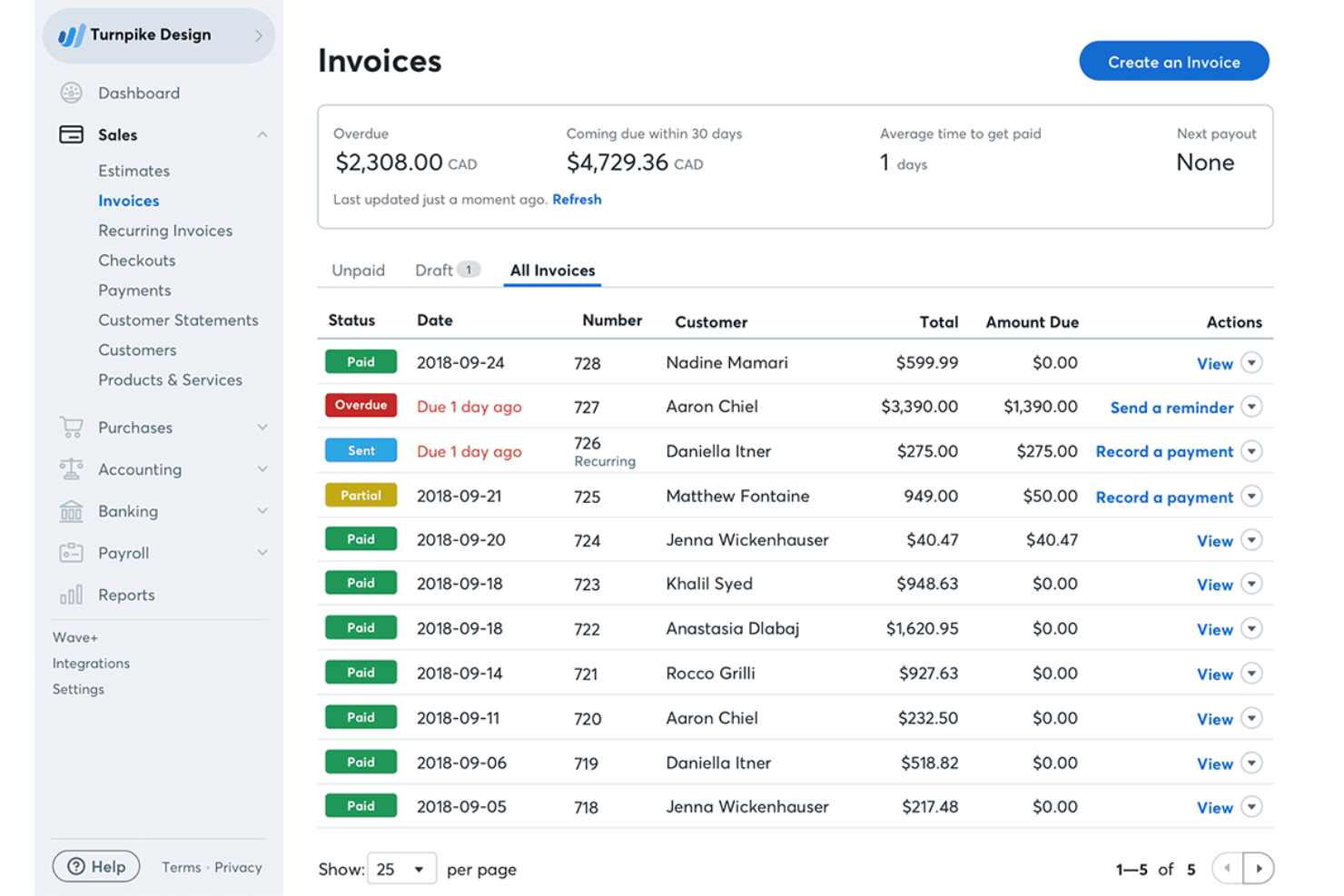
Wave lets users track and manage invoices with payment statuses at a glance. Wave is a free-to-low-cost accounting platform built for small business owners and freelancers who need invoicing, expense tracking, and bookkeeping without the complexity or price tag of larger accounting tools.
Who Is Wave Best For?
Wave is a strong fit for freelancers and small business owners who need straightforward invoicing and bookkeeping without paying for features they'll never use.
Why I Picked Wave
I picked Wave as one of the best Zoho Books alternatives because it covers the full invoicing lifecycle in a single place. I appreciate how you can build a branded invoice, schedule it on a recurring basis (daily, weekly, quarterly, or semiannual), and have Wave automatically send late-payment reminders without any manual follow-up. The ability to accept credit card and bank payments directly from the invoice, with Apple Pay also supported, means your clients can pay the moment they open it.
Wave Key Features
- Double-entry bookkeeping: Wave records all business transactions in a full double-entry ledger with a standard chart of accounts and support for manual journal entries.
- Sales tax calculation: Wave calculates sales tax on invoices and estimates and generates tax-ready financial records for year-end reporting.
- Role-based collaborator access: Business owners can invite accountants, bookkeepers, and team members with Admin, Editor, Viewer, or Payroll Manager roles (Pro Plan required for most roles).
- Financial statements: Wave generates profit-and-loss, balance-sheet, and cash-flow reports, exportable as CSV or PDF directly from the web app.
Wave Integrations
Wave lists 13+ app integrations, including native Google Sheets, Amazon, Etsy, and Taxomate connections, plus Make.com workflows. It offers GraphQL and webhooks APIs for custom integrations, with existing Zapier connections also supported.
Pros and Cons
Pros:
- Routine bookkeeping and billing share one ledger
- Mobile invoicing suits solo operators
- Recurring invoices and reminders reduce follow-up
Cons:
- Bank-feed delays complicate reconciliation
- Limited report depth frustrates complex close reviews
Learn more about Wave: Best for real-time multi-entity consolidation
- Free demo available
- Pricing upon request
Visit WebsiteCustomer Rating:4.5/5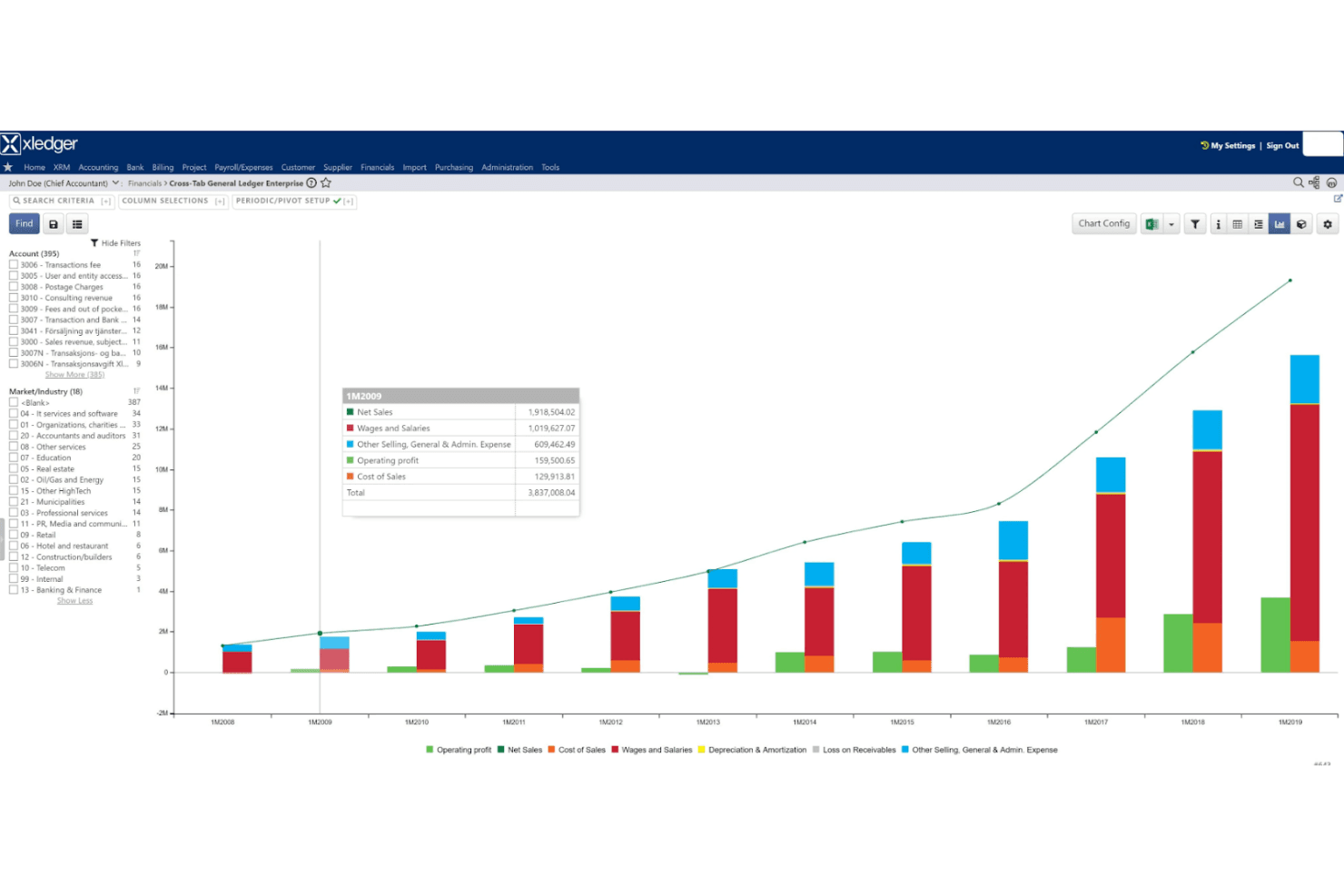
Xledger visualizes financial trends with interactive stacked bar charts. Xledger is a cloud accounting platform built for growing mid-market organizations that need multi-entity consolidation, automated AP/AR workflows, and real-time financial reporting across complex structures.
Who Is Xledger Best For?
Xledger is a strong fit for finance teams at growing mid-market organizations managing multiple entities, complex approval workflows, and consolidated reporting across business units.
Why I Picked Xledger
I picked Xledger because it's built to grow with mid-sized organizations in a way that Zoho Books simply isn't. When a business starts consolidating results across multiple entities in real time, with currency translation and eliminations handled automatically, Xledger earns its place. I also appreciate that adding new entities or users requires no additional implementation, so scaling the structure doesn't mean restarting the setup process from scratch.
Xledger Key Features
- OCR-based invoice capture: Automatically scans and extracts data from supplier invoices, reducing manual data entry in the accounts payable process.
- Driver-based budgeting: Lets finance teams build budgets using operational drivers, with support for scenario analysis and multiple budget versions.
- Role-based approval workflows: Routes bills, purchase orders, expense claims, and journal entries through configurable approval chains by role, threshold, and dimension.
- Project accounting with time tracking: Captures time and expenses at the project, task, and activity level, with automated invoicing for hours, travel, and fixed-price engagements.
Xledger Integrations
Xledger offers native integrations with JPMorgan Chase Bank, Wells Fargo, and Bank of America, plus integrations with Salesforce, Microsoft Dynamics CRM, and Google Maps. It provides an open API for custom integrations and supports Zapier.
Pros and Cons
Pros:
- Audit trails support controlled financial reviews
- Automated reconciliation reduces routine finance work
- Real-time consolidation across multiple entities
Cons:
- Smaller teams may face unnecessary complexity
- Report setup can require accounting expertise
Learn more about Xledger: Best for accountant-focused features
- Free demo available
- Pricing upon request
Visit WebsiteCustomer Rating:4.3/5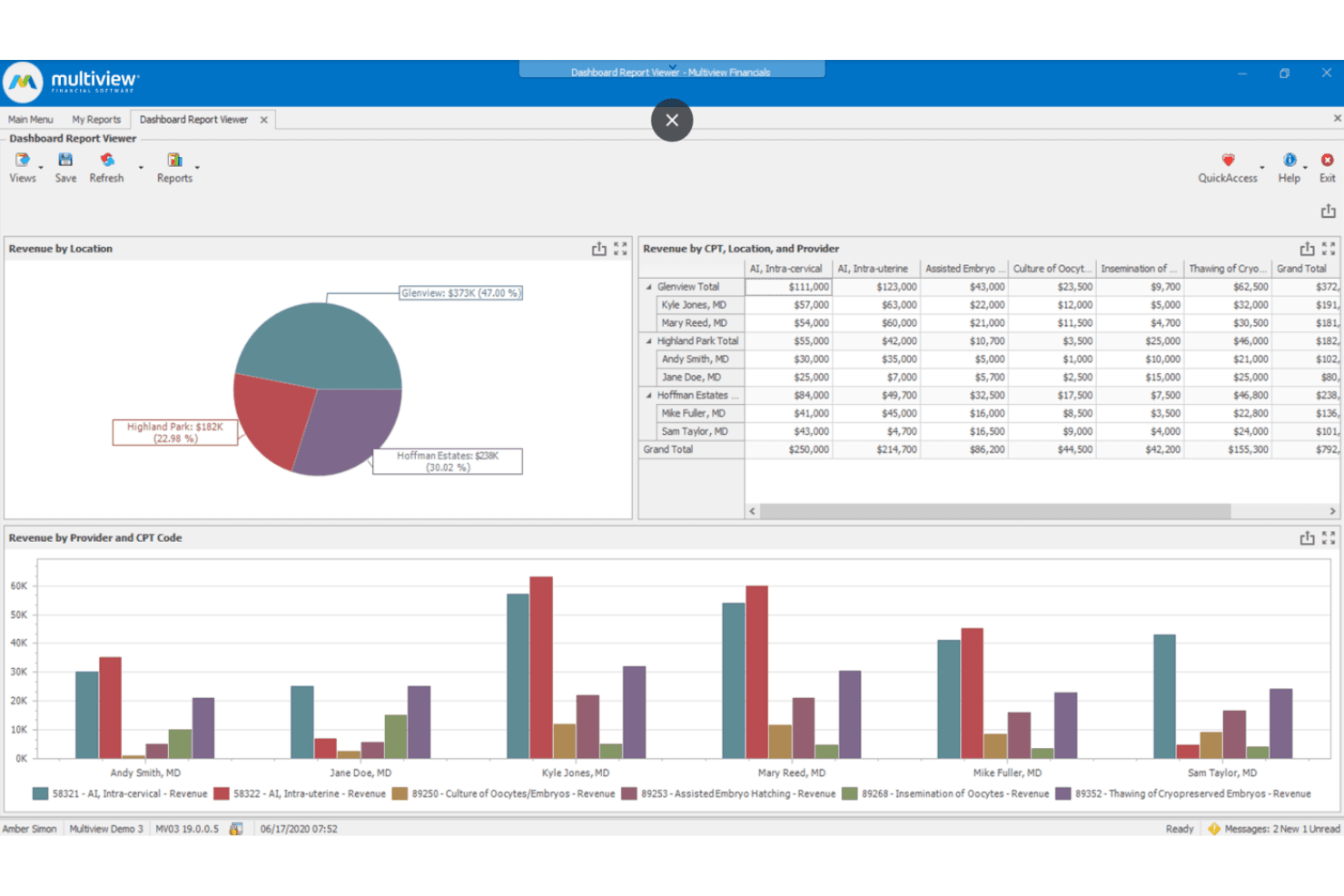
Multiview ERP visualizes revenue by location, provider, and CPT code. Multiview ERP is a healthcare-focused financial management platform built for CFOs, controllers, and finance directors who need multi-entity accounting, intercompany consolidation, and deep reporting across complex organizational structures.
Who Is Multiview ERP Best For?
Multiview ERP is built for CFOs, controllers, and finance directors in healthcare organizations managing multi-entity accounting and complex financial consolidation.
Why I Picked Multiview ERP
I picked Multiview ERP because its accountant-focused depth goes well beyond what Zoho Books offers for finance teams managing multi-entity structures. I particularly like its General Ledger's intercompany functionality, where you can create entries across multiple entities in one step, post intercompany settlements, and auto-translate balances across currencies for consolidation. Its Intelligent Capture tool also stands out, using AI to extract line-item details from invoices, assign confidence scores, and flag exceptions before anything posts to the ledger.
Multiview ERP Key Features
- Role-based access controls: Restricts General Ledger access and editing rights by role, department, or cost center, with posting approvals and closed-period locks.
- ViewPoint Analytics drag-and-drop report builder: Lets finance teams build, filter, and share reports without technical skills, with drill-down to transaction-level detail.
- 1099 form processing: Tracks qualifying Miscellaneous and Non-Employee Compensation payments and generates required 1099 forms directly within accounts payable.
- What-if scenario modeling: Models the real-time budget impact of changes to staffing, supply costs, or reimbursement rates without exporting to spreadsheets.
Multiview ERP Integrations
Documented integrations include Epic, Juno Health, MEDITECH, Oracle Health, PointClickCare, TruBridge, Avalara, MDI Solutions, and Paylocity. API availability and an integration marketplace are not publicly documented.
Pros and Cons
Pros:
- Multi-entity ledger consolidates cross-company finances
- AP workflows support month-end close automation
- Drill-down reporting traces balances to transactions
Cons:
- Banking imports trail QuickBooks in polish
- Custom report building can take considerable work
Learn more about Multiview ERP: Best for AI-driven expense management
- 14-day free trial + free demo available
- From $10/month
Visit WebsiteCustomer Rating:4.6/5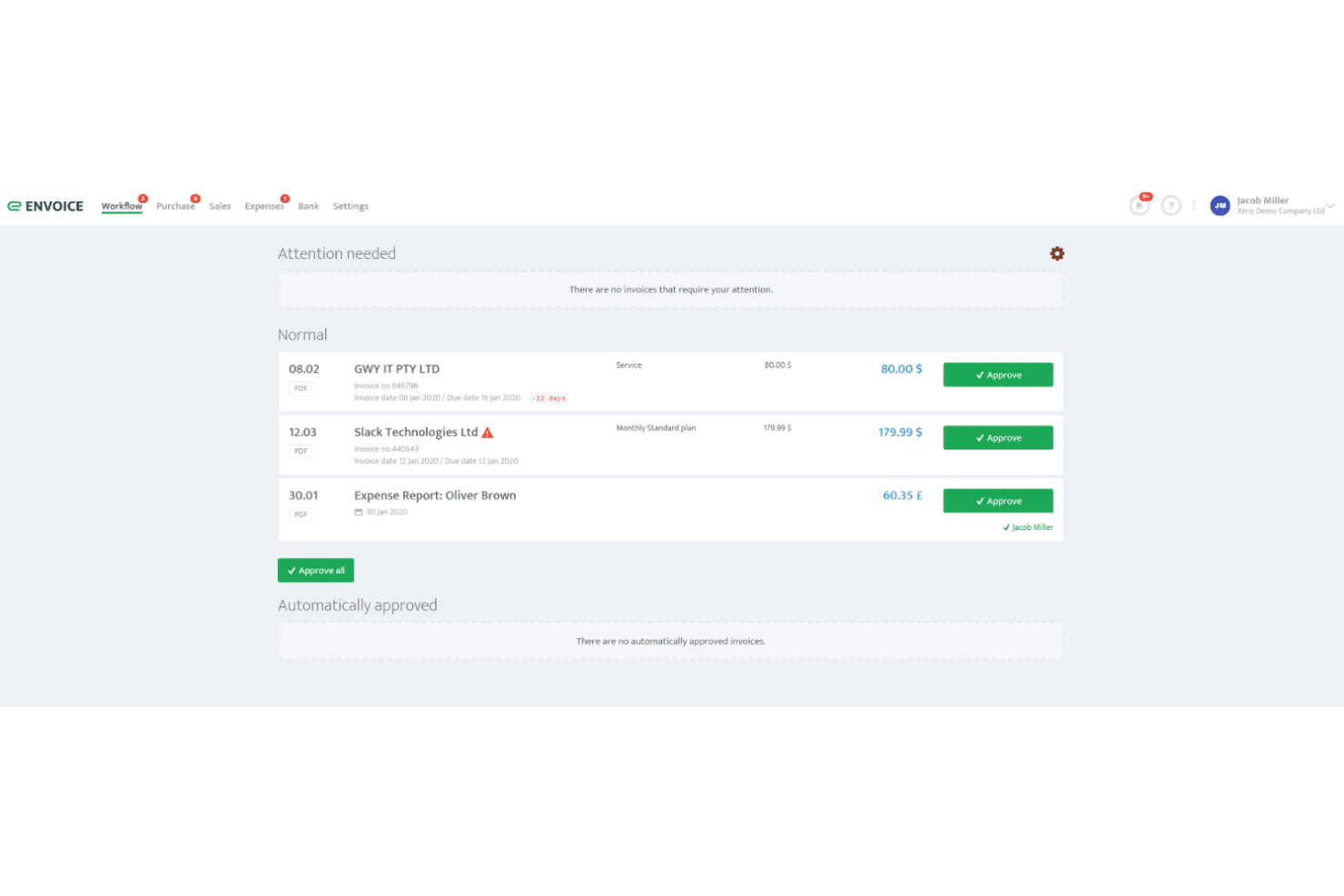
Envoice lets users approve invoices and expense reports from a workflow dashboard. Envoice is an AI-powered bill and expense management platform that fits best as a pre-accounting layer for accounting firms and finance teams that need automated document capture, approval workflows, and clean data export into their existing accounting software.
Who Is Envoice Best For?
Envoice fits accounting and bookkeeping firms that want to automate document capture and approval workflows before syncing clean data to their primary accounting software.
Why I Picked Envoice
I picked Envoice because it handles the messy front end of accounting that most general ledger tools ignore. Its SmartExtract AI pulls vendor names, amounts, tax codes, and due dates from invoices and receipts in seconds, and SmartRecord learns your coding patterns over time to suggest GL codes and cost centers automatically. I especially like the multi-level approval workflows, where you can route bills by supplier, set approval limits, and delegate sign-offs when someone is out of office, all before a single entry hits your accounting software.
Envoice Key Features
- SmartRecord AI coding: Learns your categorization habits over time and auto-suggests GL codes, tax rates, and cost centers based on supplier history and your chart of accounts.
- ExactExtract human verification: Routes documents through a human-reviewed extraction layer, with the vendor claiming 99.9% accuracy for verified data.
- Granular role-based permissions: Assigns users to predefined roles—Administrator, Accountant, Approver, Reviewer, Auditor, and more—with permissions scoped to a specific company account.
- Accounting software sync: Publishes categorized bills and expense reports directly to connected platforms like Xero, QuickBooks Online, and Sage Business Cloud Accounting.
Envoice Integrations
Envoice offers 20+ integrations, including native connections with Xero, QuickBooks Online, Sage Business Cloud Accounting, and Microsoft Dynamics 365 Business Central. It also connects with ERPLY Books, Briox, Directo, Standard Books, Dropbox, and OneDrive, and provides an API for custom integrations.
Pros and Cons
Pros:
- Approval routing handles departmental sign-offs
- Mobile receipt capture cuts document entry
- AI extraction reduces invoice recoding
Cons:
- Reviewers report recurring sales invoices are missing
- No documented general ledger or financial statements
Learn more about Envoice: 10Best for diverse business sizes
MYOB
- 14-day free trial available
- From A$315/year (billed annually)
Visit WebsiteCustomer Rating:3.9/5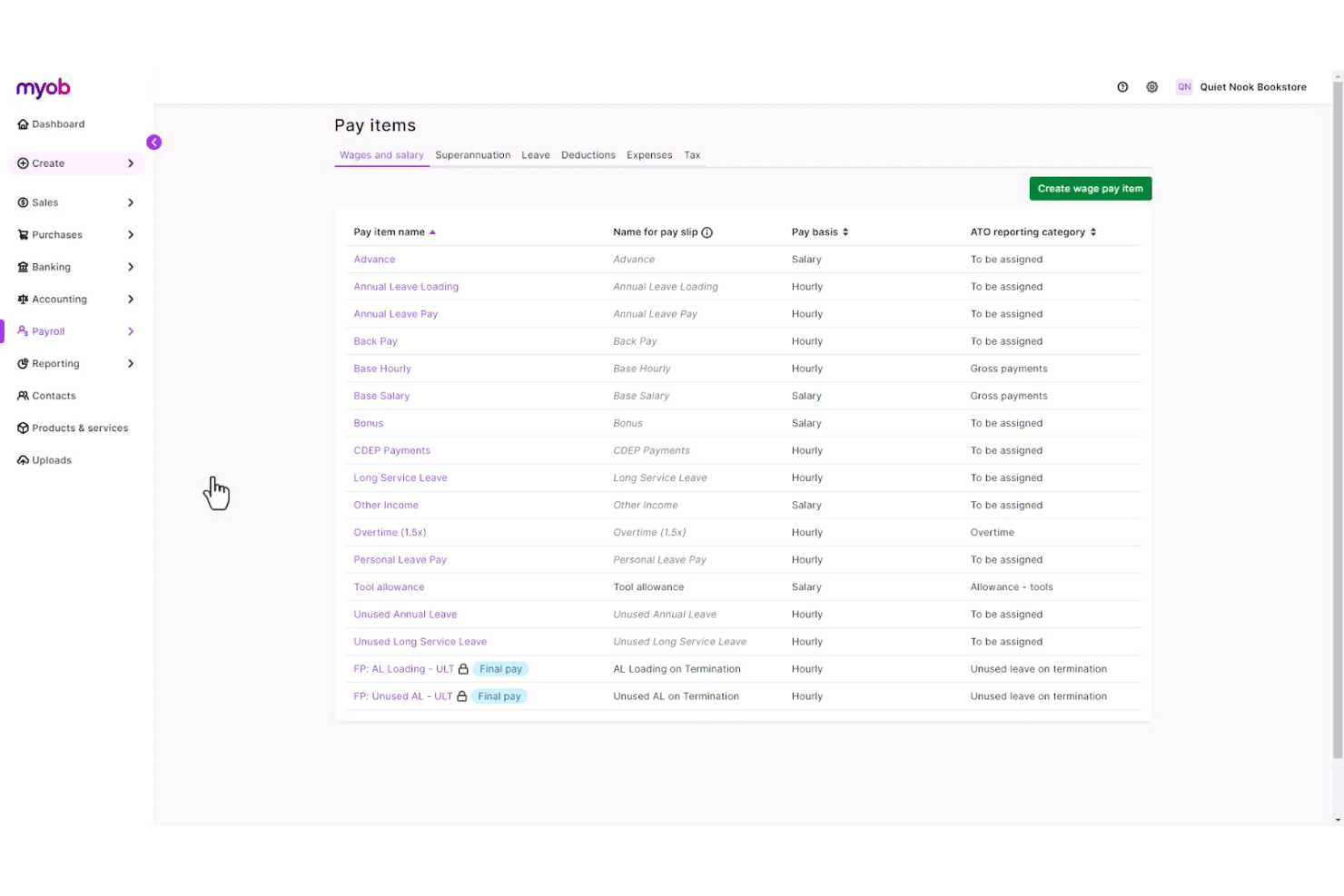
MYOB lets users configure and manage payroll pay items by category. MYOB Business is accounting software built for Australian sole traders and SMBs that handles invoicing, GST tracking, BAS lodgement, payroll, and bank reconciliation in one place.
Who Is MYOB Best For?
MYOB Business suits Australian sole traders, SMBs, and their accountants who need built-in GST tracking, BAS lodgement, and STP payroll in one place.
Why I Picked MYOB
I've included MYOB in my top picks because it covers the full range of Australian business sizes, from sole traders on the Lite plan to growing businesses on AccountRight Premier with multi-currency and multiple warehouse locations. I particularly like its built-in GST tracking and BAS lodgement, which let you prepare and lodge directly with the ATO without a third-party add-on. Its Single Touch Payroll reporting also sends salary, tax, and super data to the ATO automatically after each pay run.
MYOB Key Features
- Smart Reconciliation: An AI feature that automatically matches bank transactions to invoices, bills, and categories for your review before finalizing.
- Role-based user access: Assign roles like Sales, Purchases, Payroll, or Banking to control exactly what each user can see and do in your account.
- Receipt capture and storage: Scan, upload, or email supplier bills and receipts into MYOB to store as records or convert into bills.
- App Marketplace integrations: Connect MYOB to 350+ third-party apps, including Square, Shopify, Salesforce, and accounts-receivable tools.
MYOB Integrations
MYOB offers marketplace integrations with 350+ apps, including Square, Amaka, Shopify by Amaka, ezyCollect, and Salesforce. It also provides a REST API for custom integrations.
Pros and Cons
Pros:
- Bank feeds connect reconciliation with expense records
- Scales from sole traders to larger businesses
- Australian GST, BAS, and STP compliance
Cons:
- Reviewers report difficulty producing basic reports
- No direct Zoho Books migration path
Learn more about MYOB:
Andre alternativer til Zoho Books
Her er noen flere alternativer til Zoho Books som ikke kom med på kortlisten min, men som likevel er verdt å undersøke:
- 11PuzzleBest for real-time financial insights
- 12AkauntingBest for free open-source accounting
- 13Iris KashflowBest for end-to-end UK tax compliance
- 14QuickBooks OnlineBest for freelancers needing tax support
- 15AcumaticaBest for cloud ERP integration
- 16HurdlrBest for real-time tax calculations
- 17BenchBest for bookkeeping service add-ons
- 18Odoo AccountingBest for modular business apps
- 19CertiniaBest for project-based financial management
- 20XeroBest for integration with third-party apps
- 21BrightbookBest for freelancers with simple needs
- 22NetSuite Cloud AccountingBest for scalable enterprise solutions
- 23Less AccountingBest for minimalistic accounting tools
- 24PandleBest for expense tracking for small businesses
Related Reviews
How I Evaluate Zoho Books Alternatives
I split my evaluation into baseline must-haves—like bank reconciliation and tax compliance—and differentiators like pricing tiers that separate good tools from the right one.
Core Functionality (Table Stakes For This List)
When I'm selecting tools for my list, I rank each one on a scale from 0 (does not offer the functionality) to 5 (excels in this area) for each core functionality listed below. Then, I calculate the tool's total score into a percentage. Each tool needs to achieve a minimum total score of 75% to be considered for inclusion.
- General Ledger & Bookkeeping: I check for full double-entry accounting with a customizable chart of accounts, automated journal entries, and recurring transaction support for month-end workflows.
- Invoicing & Receivables Management: Each tool should let you create branded invoices, set up automated payment reminders, and accept online payments to keep cash flow moving.
- Expense & Payables Tracking: I look at how each platform handles vendor bills, receipt capture, and expense categorization—especially whether it supports approval workflows for growing teams.
- Bank Reconciliation: Automatic bank feed imports and rule-based transaction matching are key here, since manual CSV uploads slow down close cycles considerably.
- Financial Reporting: The tool should generate standard statements like P&L, balance sheet, and cash flow—plus offer filtering and date-range controls for board-ready reporting.
- Tax Management & Compliance: I evaluate whether each platform calculates sales tax, VAT, or GST on transactions and generate the reports you need for regional filing requirements.
Once I have a list of tools that meet this criteria, I consider what sets each platform apart.
Differentiating Factors (What Sets Vendors Apart)
Here's how I compare and contrast different vendors:
Standout Features
Multi-currency support matters if you invoice clients abroad—I look for automatic exchange rate updates and the ability to hold balances in different currencies. For service-based businesses, project accounting is a big differentiator, since it ties billable hours and expenses directly to client profitability. I also evaluate inventory management for product-based businesses that need stock tracking and COGS calculations built into their accounting tool rather than bolted on through a separate app.
Beyond Features
Integration ecosystem is a major consideration—I check whether each tool connects natively to payment gateways, CRMs, and ecommerce platforms your business already relies on. Data migration also deserves attention, especially if you're moving years of transaction history out of Zoho Books. I look for guided import tools or dedicated migration support that won't leave you manually re-entering records. Pricing structure matters too, since some platforms charge per user while others cap transactions, and the right fit depends on how your business plans to grow.
Hvorfor se etter et alternativ til Zoho Books?
Selv om Zoho Books er et populært og godt valg av regnskapsprogramvare, er det flere grunner til at noen brukere ser etter alternative løsninger. Det kan hende du ser etter et alternativ til Zoho Books fordi …
- Du trenger mer avanserte rapporteringsfunksjoner
- Teamet ditt trenger støtte for flere valutaer
- Du ser etter bedre kundeservice
- Bedriften din trenger bransjespesifikke funksjoner
- Du ønsker programvare med bedre integrasjonsmuligheter
Hvis noe av dette høres kjent ut, har du kommet til rett sted. Listen min inneholder flere regnskapsprogrammer som passer bedre for team som møter disse utfordringene med Zoho Books og ser etter alternative løsninger.
Viktige funksjoner i Zoho Books
Her er noen av de viktigste funksjonene i Zoho Books, slik at du kan sammenligne hva alternative regnskapsløsninger tilbyr:
- Fakturering: Lar deg opprette og sende profesjonelle fakturaer, slik at du får raskere betalt og forbedrer likviditeten.
- Utgiftssporing: Forenkler håndteringen av virksomhetens økonomi og gjør det enkelt å kategorisere og rapportere.
- Bankavstemming: Automatiserer samsvaret mellom transaksjoner for å sikre nøyaktighet mellom kontoutskriftene dine og regnskapsregistrene.
- Lagerstyring: Tilbyr verktøy for håndtering av lagerbeholdning og ordreoppfyllelse, slik at du aldri går tom for nødvendige produkter.
- Skatteoverholdelse: Forenkler sporing og rapportering av merverdiavgift, slik at du overholder skattereglene.
- Prosjektstyring: Tilbyr samarbeids- og sporingsverktøy for å håndtere prosjekter og følge med på tiden som brukes på oppgaver.
- Integrasjon med lønnssystem: Integrerer lønnsbehandling med regnskapsdataene dine for å håndtere utbetalinger til ansatte og skatter.
- Rapportering: Gir deg tilgang til tilpassbare rapporter som gir innsikt i virksomhetens økonomiske resultater.
- Arbeidsflytautomatisering: Automatiserer repetitive oppgaver, sparer deg for tid og reduserer risikoen for feil.
- Støtte for flere valutaer: Håndterer transaksjoner i flere valutaer, noe som gjør løsningen ideell for virksomheter med internasjonale kunder.