

Å håndtere kontantstrøm er et krevende ansvar du har som økonomidirektør. Å opprettholde en tydelig oversikt over inn- og utgående kontantstrøm, forutse underskudd og planlegge for uventede utgifter krever nøyaktig og oppdatert informasjon. Programvare for kontantstrøm sentraliserer dette arbeidet ved å koble sammen økonomiske data, generere pålitelige prognoser og gi et tydeligere bilde av likviditeten.
I denne veiledningen har jeg brukt min erfaring med økonomi og programvare til å vurdere en rekke ledende verktøy for kontantstrøm og evaluere dem basert på faktorene som er viktigst for økonomiteam. Målet mitt er å hjelpe deg med å forstå hvordan hvert alternativ støtter prognoser, scenarioplanlegging og den daglige håndteringen av kontantstrøm, slik at du kan velge riktig plattform for organisasjonens behov.
Hvorfor du kan stole på våre programvareanbefalinger
6,700+
Reviews
20
Industry experts
16+
Evaluation factors
14
Years
Teamet vårt har testet og anmeldt programvare siden 2012. Vi er selv økonomiledere, så vi vet hvor vanskelig og hvor viktig det er å velge riktig programvare.
I denne guiden har vi vurdert verktøyene gjennom praktisk testing og uavhengig research og gitt dem poeng ut fra våre utvelgelseskriterier.
Anmeldelsene våre bygger på vår egen redaksjonelle vurdering. De er ikke et salgsargument.
Sammenligningstabell for programvare for kontantstrøm
Denne sammenligningstabellen oppsummerer prisdetaljene for mine beste utvalgte programmer for kontantstrøm:
| Tool | Best For | Trial Info | Price | ||
|---|---|---|---|---|---|
| 1 | Best for custom AI agents tailored to teams | Free plan available | Pricing upon request | Website | |
| 2 | Best for deep accounting integrations | Free plan + free demo available | From $16/user/month (billed annually) | Website | |
| 3 | Best for automating cash management | Free demo available | Pricing upon request | Website | |
| 4 | Best for visual planning | Free demo available | From $15/month (billed annually) | Website | |
| 5 | Best for prediction and tracking | 1-month free trial available | From $27/month | Website | |
| 6 | Best for enterprise-level projections | Free demo available | Pricing upon request | Website | |
| 7 | Best for scalable planning solutions | Free demo available | Pricing upon request | Website | |
| 8 | Best for flexible management and analytics | Free demo available | Price upon request | Website | |
| 9 | Best for AI-powered cash management | Free demo available | Pricing upon request | Website | |
| 10 | Best for Excel-native integrated financial planning | Free demo available | Pricing upon request | Website |


Anmeldelse av den beste programvaren for kontantstrøm
Nedenfor finner du mine detaljerte sammendrag av den beste programvaren for kontantstrøm på kortlisten min. Anmeldelsene mine gir en grundig gjennomgang av de viktigste funksjonene, fordelene & ulempene, integrasjonene og ideelle bruksområdene for hvert verktøy, slik at du kan finne det beste alternativet for deg.
 Best for custom AI agents tailored to teams
- Free plan available
- Pricing upon request
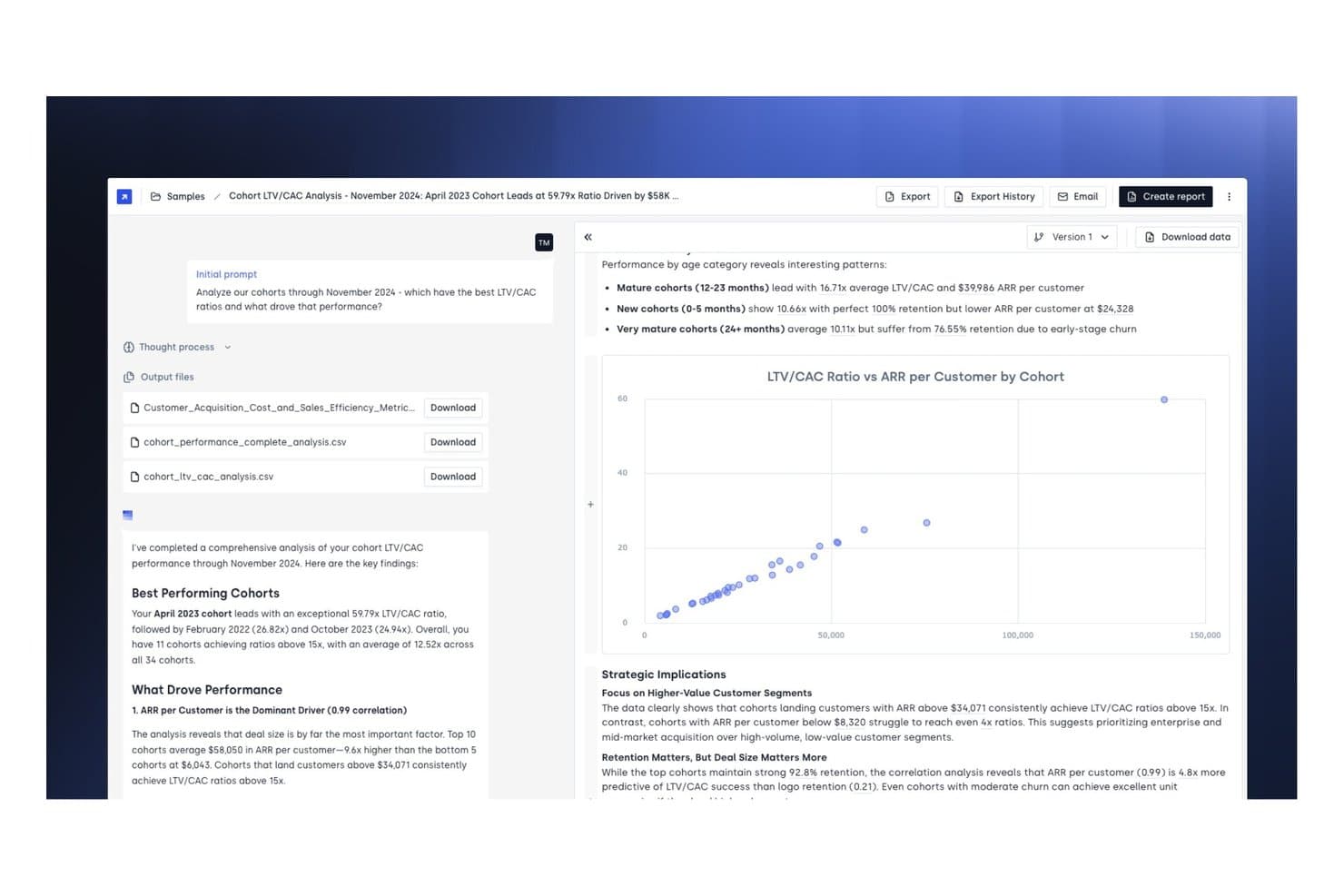
Concourse offers cohort LTV/CAC analysis with detailed performance metrics, scatter chart visualizations, and strategic insights to help teams evaluate customer acquisition efficiency. Concourse is an AI agent platform built for enterprise finance teams that handles cash flow forecasting, treasury liquidity management, variance analysis, and AR/AP tracking through fully customizable, auditable agents.
Who Is Concourse Best For?
Concourse suits mid-market and enterprise finance teams—particularly CFOs, FP&A leads, and treasurers—who need AI-driven workflows without rebuilding their existing tech stack.
Why I Picked Concourse
I've included Concourse in my top picks because no other tool on this list lets you build cash flow agents around your own business logic rather than a vendor's fixed template. I use the Forecast Agent for rolling liquidity projections and the Flux & Variance Agent to auto-draft variance commentary, and every output traces back to its source SQL so I can defend the numbers. The persistent context layer retains my team's definitions and forecasting drivers across every run.
Concourse Key Features
- Model orchestration: Runs multiple AI models and deterministic code to ensure calculation accuracy and efficient processing.
- Auditable outputs: Traces every workflow and number back to its data source, preserving a full audit trail.
- Role-based permissions: Lets you control user access and data scope at both the agent and dataset level.
- Multi-surface delivery: Shares analysis and reports directly in Excel, Slack, Teams, PowerPoint, Sheets, ChatGPT, and email.
Concourse Integrations
Concourse offers native integrations with Oracle, SAP, NetSuite, QuickBooks, Workday, Sage, Xero, Salesforce, Snowflake, BigQuery, and Databricks. An API is also available for custom integrations.
Pros and Cons
Pros:
- Auto-generates variance commentary from actuals
- Auditable outputs trace every number to source
- Custom agents built around your business logic
Cons:
- Limited publicly available user reviews
- Requires technical setup for agent configuration
Learn more about Concourse: Best for deep accounting integrations
- Free plan + free demo available
- From $16/user/month (billed annually)
Visit WebsiteCustomer Rating:4.6/5
Fathom offers financial reporting and cash flow insights for growing businesses. Fathom is a financial analysis and management reporting tool designed for small to medium-sized businesses and accounting professionals. It provides detailed insights into financial performance and liquidity through cash flow forecasting.
Why I picked Fathom: Fathom brings together fast, three-way cash flow forecasting, flexible management reporting, and multi-entity consolidation in a single tool. This is great for businesses that need insight across entities and scenarios. Its tight integrations with top accounting platforms also ensure you’re working with live data, rather than outdated spreadsheets.
Standout features & integrations:
Features include budget variance analysis to track financial goals, customizable management reports for tailored insights, and KPI tracking to monitor business performance.
Integrations include QuickBooks Online & Desktop, Xero, MYOB (cloud & desktop), Excel import, Google Sheets, and more via Zapier for extended connectivity.
Pros and Cons
Pros:
- Intuitive dashboard
- Customizable reports
- Easy integration with accounting platforms
Cons:
- Some advanced features require learning
- Not ideal for very large enterprises
Learn more about Fathom: Best for automating cash management
- Free demo available
- Pricing upon request
Visit WebsiteCustomer Rating:4.8/5
Drivetrain automates cash flow tracking and improves financial efficiency for businesses. Drivetrain is a financial management tool designed to automate and optimize cash management processes for businesses. It provides solutions to simplify cash flow statements and enhance efficiency.
Why I picked Drivetrain: Drivetrain is perfect for autonomous FP&A (Financial Planning and Analysis). It automates manual steps in data consolidation, modelling, and forecasting so that finance teams can focus on decision-making. Its deep integration network and AI-driven modelling give it an edge for teams scaling up or handling complex cash-flow requirements.
Standout features & integrations:
Features include automated cash flow tracking to minimize manual tasks, optimization tools to identify inefficiencies, and real-time analytics for financial insights.
Integrations include 800+ native connectors spanning ERPs, CRMs, HRIS, and other business systems.
Pros and Cons
Pros:
- Supports financial decision-making
- Provides real-time analytics
- Automates cash flow tasks
Cons:
- May need training for effective use
- Requires initial setup time
Learn more about Drivetrain: Best for visual planning
- Free demo available
- From $15/month (billed annually)
Visit WebsiteCustomer Rating:4.5/5
LivePlan helps small businesses create visual cash flow plans and financial forecasts. LivePlan is a business planning and cash flow management software designed for entrepreneurs and small business owners. It helps create visual cash flow plans and detailed reports to support financial decision-making.
Why I picked LivePlan: LivePlan combines business planning and forecasting into a single tool that pulls live accounting data from QuickBooks Online or Xero. Its intuitive interface makes complex financials easier to understand, while the scenario planning and cash flow forecasting features help business owners stay ahead of cash flow issues and make growth decisions.
Standout features & integrations:
Features include a drag-and-drop interface for effortless plan creation. This dashboard offers a clear view of financial health and forecasting tools that let you experiment with different scenarios.
Integrations include QuickBooks Online, Xero, and Excel.
Pros and Cons
Pros:
- Provides a clear financial health view
- Intuitive drag-and-drop interface
- Supports detailed financial reporting
Cons:
- Focuses mainly on SMB use cases
- Limited advanced forecasting options
Learn more about LivePlan: 5Best for prediction and tracking
Xero
- 1-month free trial available
- From $27/month
Visit WebsiteCustomer Rating:4.4/5
Xero helps small businesses manage and predict cash flow with real-time insights. Xero is an accounting software solution tailored for small businesses, providing cash flow forecasting and tracking to support financial management. It allows companies to manage their finances and make informed decisions.
Why I picked Xero: Xero is an all-in-one accounting platform that provides a real-time view of cash flow and financial health, and integrates with a wide range of apps to automate workflows. Its cash-flow forecasting features are built right into the platform, making it simple for small and growing companies to stay ahead of cash-shortage risks with minimal setup.
Standout features & integrations:
Features include a dashboard that offers a clear financial overview, invoicing tools to manage payments, and real-time financial reporting from connected bank accounts.
Integrations include PayPal, Stripe, Square, HubSpot, Shopify, Gusto, Expensify, Vend, and Mailchimp.
Pros and Cons
Pros:
- Customizable reports
- Supports multiple currencies
- Real-time financial updates
Cons:
- Advanced features need learning
- Limited offline functionality
Learn more about Xero: Best for enterprise-level projections
- Free demo available
- Pricing upon request
Visit WebsiteCustomer Rating:4.4/5
Workday Adaptive Planning supports enterprise budgeting and forecasting for smarter decisions. Workday Adaptive Planning is a financial planning and analysis tool designed for large enterprises. It helps with cash flow projections, budgeting, and forecasting to support strategic financial decisions.
Why I picked Workday Adaptive Planning: Workday Adaptive Planning is an enterprise-grade planning platform that brings operational, workforce, and financial planning into one place. The tool’s flexible modelling engine, real-time data integration, and scenario capability allow companies to respond to change and align multiple departments with the overall strategy. With its ability to scale and integrate, it stands out for organizations seeking beyond standard cash-flow forecasting.
Standout features & integrations:
Features include advanced modeling for complex scenarios, a dashboard for financial insights, and collaborative planning to enhance team coordination.
Integrations include ERP/GL systems (e.g., SAP ERP, Oracle E‑Business Suite, Microsoft Dynamics 365), CRM systems, HCM/headcount platforms, and cloud data warehouses.
Pros and Cons
Pros:
- Customizable dashboards
- Collaborative planning features
- Supports complex financial modeling
Cons:
- Complex role permissions structure
- Requires consistent cloud connectivity
Learn more about Workday Adaptive Planning: Best for scalable planning solutions
- Free demo available
- Pricing upon request
Visit WebsiteCustomer Rating:4.2/5
Planful provides scalable cash flow planning with real-time insights for growth. Planful is a financial planning and analysis platform designed for growing enterprises. It offers scalable cash flow planning solutions that adapt to the needs of expanding businesses.
Why I picked Planful: Planful offers a scalable financial performance platform that brings budgeting, forecasting, and cash-flow planning together in a single application. Its intuitive drag-and-drop interface, combined with broad system support, makes it a strong fit for organizations seeking greater planning maturity and fewer siloed tools.
Standout features & integrations:
Features include dynamic planning to adjust forecasts, real-time reporting for immediate insights, and collaborative tools to enhance team efforts in financial planning.
Integrations include QuickBooks, Sage Intacct, Xero, NetSuite, Microsoft Dynamics, SAP, Oracle, Salesforce, Workday, and FreshBooks.
Pros and Cons
Pros:
- Adaptable to changing business needs
- Real-time financial insights
- Offers dynamic planning tools
Cons:
- Limited flexibility in lower tiers
- May require training for new users
Learn more about Planful: Best for flexible management and analytics
- Free demo available
- Price upon request

Cube offers flexible cash flow management and analytics for smarter financial planning. Cube is a financial planning and analysis platform designed for finance teams and mid-sized businesses. It offers flexible cash flow management and advanced analytics to support financial decision-making.
Why I picked Cube: Cube unifies disparate financial and operational data into a single planning engine that supports driver-based modelling, scenario planning, and cash flow reporting. Its integration toolkit enables finance teams to plug in existing systems, making it an adaptable solution for mid-market organizations.
Standout features & integrations:
Features include real-time data updates to keep your information current, custom reporting for tailored financial insights, and advanced analytics to support complex decision-making.
Integrations include NetSuite, Sage Intacct, Salesforce, plus custom integrations via Cube’s API.
Pros and Cons
Pros:
- Real-time data updates
- Customizable reporting options
- Supports detailed financial analysis
Cons:
- Limited prebuilt report templates
- Initial setup can be complex
Learn more about Cube Software:

HighRadius improves cash flow management with AI automation for enterprise finance teams. HighRadius is a financial technology platform aimed at enterprises seeking to improve cash flow management using AI-driven tools. It serves finance teams by automating processes and providing insights for better control over cash flow.
Why I picked HighRadius: HighRadius handles not only forecasting but also the broader cash-cycle and treasury automation, such as working capital and payments. For organizations that need enterprise-scale cash flow visibility and automation across the financial operations chain, HighRadius offers a comprehensive solution.
Standout features & integrations:
Features include AI-driven cash flow predictions to enhance decision-making, automation tools to reduce manual tasks, and analytics for an informative overview of financial health.
Integrations include SAP, Oracle, Microsoft Dynamics, QuickBooks, NetSuite, Salesforce, Workday, Sage, Xero, and Google Workspace.
Pros and Cons
Pros:
- Enhances cash flow control
- Supports strategic financial planning
- AI-driven cash flow predictions
Cons:
- May require dedicated IT support
- Requires initial setup time
Learn more about HighRadius: Best for Excel-native integrated financial planning
- Free demo available
- Pricing upon request

Vena Solutions supports integrated financial planning and cash flow management. Vena Solutions is a financial planning and analysis tool aimed at mid-sized to large enterprises. It facilitates integrated financial planning and cash flow management, helping organizations improve their financial processes and decision-making.
Why I picked Vena Solutions: Vena Solutions bridges familiar Excel-based workflows with a scalable FP&A engine built for modern finance teams. With real-time data connectivity, audit-ready processes, and a helpful integration framework, it delivers full cash flow and financial planning capabilities in a single platform. Its emphasis on collaboration, streamlined reporting, and scalability for mid-to-large organizations ensures it is more than just a forecasting tool.
Standout features & integrations:
Features include scenario modeling to plan for different financial outcomes, workflow management to enhance team collaboration, and a familiar Excel interface for ease of use.
Integrations include ERP, GL, HRIS, and CRM systems such as Oracle ERP, NetSuite, SAP, Salesforce, HubSpot, and Microsoft Dynamics 365, plus native Excel and Microsoft 365 support (Excel, Power BI, PowerPoint) via the Vena platform.
Pros and Cons
Pros:
- Enhances cross-department collaboration
- Scalable for large enterprises
- Excel-based interface
Cons:
- May need dedicated IT support
- High cost for small teams
Learn more about Vena Solutions:
Annen programvare for kontantstrøm
Her er noen flere alternativer for programvare for kontantstrøm som ikke kom med på kortlisten min, men som likevel er verdt å se nærmere på:
- 11Cash Flow FrogBest for small businesses
- 12MosaicBest for collaborative forecasting
- 13Float.comBest for real-time forecasting
- 14CentageBest for mid-market forecasting needs
- 15ProphixBest for reporting
- 16CausalBest for scenario-based modeling
- 17AbacumBest for collaborative FP&A and insights
- 18SageBest for multi-branch and multi-currency cash management
- 19AgicapBest for real-time tracking
Related Reviews
How I Evaluate Cash Flow Software
Whether a tool can pull live bank balances and run a 13-week forecast is table stakes—I evaluate vendors on two levels: core cash flow functionality and the differentiators that matter most.
Core Functionality (Table Stakes For This List)
When I'm selecting tools for my list, I rank each one on a scale from 0 (does not offer the functionality) to 5 (excels in this area) for each core functionality listed below. Then, I calculate the tool's total score into a percentage. Each tool needs to achieve a minimum total score of 65% to be considered for inclusion.
- Cash Flow Forecasting: I check whether a tool supports both short-term (13-week) and long-term forecasting horizons, and whether it offers direct, indirect, or driver-based methods.
- Bank & Financial Data Integration: Each tool's native connectors to banks, ERPs, and accounting systems matter—I look for automated syncs rather than manual CSV uploads.
- Scenario Planning & Modeling: I evaluate how many what-if scenarios you can build and compare side by side, like modeling the cash impact of a delayed product launch.
- Cash Position Reporting & Dashboards: Real-time visibility into cash across accounts, entities, and currencies is key—I look at how granular the drill-down gets.
- AR/AP Cash Flow Tracking: The tool should pull receivables and payables data to project when cash actually lands or leaves, not just when invoices are issued.
- Variance & Actuals Analysis: I look for automated comparisons of forecasted vs. actual cash flow, with the ability to drill into specific categories driving the gap.
Once I have a list of tools that meet this criteria, I consider what sets each platform apart.
Differentiating Factors (What Sets Vendors Apart)
Here's how I compare and contrast different vendors:
Standout Features
AI-powered forecasting is a major differentiator—I look for tools that learn from historical payment patterns and seasonality to sharpen predictions over time. Multi-entity consolidation also matters, especially for teams managing cash across subsidiaries and currencies. I evaluate whether a platform lets you roll up group-level views without exporting data into spreadsheets. Collaborative workflows round it out; tools that let FP&A teams tag department heads for input or route forecasts for approval keep the process moving.
Beyond Features
ERP and accounting stack integration is one of the first things I check. A tool that natively connects to your ERP—whether that's NetSuite, SAP, or Xero—saves your team from manual data wrangling every close cycle. I also evaluate how quickly a platform gets you to a usable forecast; some vendors offer pre-built templates that cut weeks off implementation. Security matters too, especially for publicly traded companies—I look for SOC 2 Type II compliance, role-based access controls, and audit trails that hold up under scrutiny.
Slik velger du programvare for kontantstrøm
Det er lett å gå seg vill i lange funksjonslister og kompliserte prisstrukturer. For å hjelpe deg med å holde fokus mens du går gjennom den unike prosessen med å velge programvare, får du her en sjekkliste over faktorer du bør ha i mente:
| Faktor | Hva du bør vurdere |
| Skalerbarhet | Vurder om programvaren kan vokse sammen med virksomheten din. Ta hensyn til dagens bruk og fremtidige behov. Se etter verktøy som tilbyr fleksible abonnementer eller muligheten til å legge til moduler etter hvert som virksomheten utvides. |
| Integrasjoner | Kontroller at programvaren kan kobles til de eksisterende systemene dine. Sjekk kompatibiliteten med regnskapsprogramvaren og andre viktige verktøy. Unngå verktøy som krever manuell dataoverføring. |
| Tilpasningsmuligheter | Finn ut hvor mye du kan tilpasse programvaren til arbeidsflytene dine. Se etter alternativer for å justere instrumentpaneler, rapporter og varsler slik at de passer teamets behov. |
| Brukervennlighet | Vurder brukergrensesnittet og navigasjonen. Verktøyet bør være intuitivt og kreve minimalt med opplæring. Vurder å gjennomføre en prøveperiode med teamet for å måle brukervennligheten. |
| Implementering og oppstart | Undersøk oppsettprosessen og tilgjengelige ressurser. Se etter plattformer med veiledet oppstart, opplæringsmateriell og dedikert støtte under implementeringen. Unngå lange og kompliserte oppsett. |
| Kostnad | Sammenlign prisene med budsjettet ditt. Ta hensyn til både innledende kostnader og løpende gebyrer. Se etter skjulte kostnader, og kontroller at abonnementet inkluderer nødvendige funksjoner uten tillegg. |
| Sikkerhetstiltak | Kontroller programvarens tiltak for databeskyttelse. Sørg for at den overholder relevante standarder og tilbyr kryptering, tilgangskontroller og regelmessige oppdateringer for å beskytte informasjonen din. |
Hva er programvare for kontantstrøm?
Programvare for kontantstrøm er et verktøy som er utviklet for å hjelpe virksomheter med å håndtere og følge med på inn- og utgående kontantstrøm. Økonomifagfolk, som økonomidirektører og regnskapsførere, bruker vanligvis disse verktøyene for å få innsikt i virksomhetens økonomiske helse og ta informerte beslutninger. Prognoser, sporing i sanntid og integrasjonsmuligheter bidrar til planlegging, nøyaktighet og effektivitet. Samlet sett gir disse verktøyene verdifull støtte til å opprettholde en sunn kontantstrøm og sikre økonomisk stabilitet.
Funksjoner
Når du velger programvare for kontantstrøm, bør du se etter følgende viktige funksjoner:
- Prognoser: Gir prognoser for fremtidig kontantstrøm for å hjelpe med å planlegge finansielle strategier og forutse kontantbehov.
- Sporing i sanntid: Overvåker inn- og utbetalinger umiddelbart og sikrer oppdatert finansiell informasjon.
- Integrasjonsmuligheter: Kobler seg til eksisterende regnskaps- og finanssystemer for dataoverføring og konsistens.
- Scenarioplanlegging: Gjør det mulig for brukere å teste ulike finansielle scenarier for å forberede seg på forskjellige mulige utfall.
- Tilpassbare oversikter: Tilbyr tilpassede visninger av finansielle data som ivaretar individuelle brukerbehov og preferanser.
- Automatiserte varsler: Sender varsler om viktige finansielle hendelser og hjelper brukerne med å holde seg informert og i forkant.
- Støtte for flere valutaer: Håndterer kontantstrøm på tvers av ulike valutaer, noe som er nyttig for virksomheter som opererer internasjonalt.
- Sikkerhetstiltak: Beskytter sensitive finansielle data med kryptering og tilgangskontroller for å sikre informasjonen.
- Brukervennlig grensesnitt: Tilbyr en intuitiv utforming som reduserer læringskurven og forbedrer brukeropplevelsen.
- Samarbeidsverktøy: Tilrettelegger for teamarbeid ved å la flere brukere samarbeide om finansiell planlegging og analyse.
Fordeler
Implementering av programvare for kontantstrøm gir flere fordeler for teamet og virksomheten din. Her er noen av fordelene du kan se frem til:
- Større tillit til prognosene: Automatiserte datauthentinger reduserer manuelle feil og bidrar til å utarbeide mer pålitelige fremoverskuende kontantstrømprognoser.
- Raskere månedsavslutning og planleggingssykluser: Integrerte data og innebygd modellering reduserer regnearkarbeidet og fremskynder rapporterings- og budsjetteringsoppgaver.
- Tydeligere innsikt i kortsiktig likviditet: Kontantstrømverktøy fremhever kommende likviditetsbegrensninger eller overskudd, slik at teamene kan handle tidligere og håndtere arbeidskapitalen bedre.
- Mer strategisk beslutningsstøtte: Scenariomodellering hjelper ledere med å sammenligne beslutninger om ansettelser, investeringer eller kostnader med et tydelig bilde av påvirkningen på kontantstrømmen.
- Bedre samordning på tvers av avdelinger: Økonomiavdelingen kan samle informasjon fra salg, drift og HR i ett planleggingsmiljø, noe som forbedrer samarbeidet uten å være avhengig av separate regneark.
Mulighet til å skalere prosessene i takt med virksomhetens vekst: Planleggingsfunksjoner for flere enheter, flere valutaer og driverbasert planlegging støtter økt kompleksitet når organisasjoner ekspanderer. - Tidlig varsling av finansiell risiko: Avviksoppfølging og trendanalyse hjelper økonomiteamene med å identifisere problemer før de utvikler seg til kontantstrømproblemer.
Kostnader & priser
Valg av programvare for kontantstrøm krever en forståelse av de ulike prismodellene og tilgjengelige abonnementene. Kostnadene varierer basert på funksjoner, teamstørrelse, tillegg og mer. Tabellen nedenfor oppsummerer vanlige abonnementer, gjennomsnittsprisene deres og typiske funksjoner som er inkludert i løsninger for kontantstrøm:
Sammenligningstabell for abonnementer på programvare for kontantstrøm
| Abonnementstype | Gjennomsnittspris | Vanlige funksjoner |
| Startnivå | $20–$53/måned | Grunnleggende prognoser, enkle oversikter og kjerneintegrasjoner med regnskapssystemer. |
| Abonnementer for mellomstore virksomheter | $53–$280/måned eller tilpasset pris | Rapportering for flere enheter, avanserte oversikter og bredere integrasjoner med CRM- eller HRIS-systemer. |
| Abonnement for store virksomheter | Fra $1,750/måned eller tilpasset pris | Driverbasert modellering, integrasjoner på virksomhetsnivå, konsolideringer og rollebaserte kontroller. |
Vanlige spørsmål om kontantstrømprogramvare
Her er noen svar på vanlige spørsmål om programvare for kontantstrøm:
Hva er hovedformålet med programvare for kontantstrøm?
Programvare for kontantstrøm hjelper virksomheter med å spore, administrere og prognostisere inn- og utgående kontantstrømmer, inkludert innbetalinger og samlet kontantbeholdning. Den gir sanntidsinnsikt i den økonomiske helsen, slik at du kan ta velinformerte forretningsbeslutninger. Ved å automatisere kontantstrømdata og redusere manuell dataregistrering kan teamet effektivisere rutinearbeid og planlegge for fremtidige behov for kontantstrøm.
Hvordan integreres programvare for kontantstrøm med andre verktøy?
Det meste av programvaren for kontantstrøm integreres med regnskaps- og økonomiverktøy som QuickBooks, Xero og annen regnskapsprogramvare. Disse tilkoblingene støtter skybaserte arbeidsflyter og gjør det mulig for team å gå i dybden i dashbord og Excel-eksporter etter behov. Før du kjøper, bør du kontrollere om plattformen støtter systemene interessentene dine allerede er avhengige av, for å sikre smidig kontantstrømstyring.
Kan små bedrifter dra nytte av programvare for kontantstrøm?
Ja, små bedrifter kan dra nytte av programvare for kontantstrøm. Den bidrar til å administrere begrensede ressurser effektivt ved å gi bedre oversikt over tilgjengelige kontanter og kontantstrømprognoser. Selv grunnleggende abonnementer tilbyr verktøy for å spore og beregne fremtidig kontantstrøm, noe som støtter bedre økonomisk planlegging og reduserer risikoen for likviditetsmangel.
Hva bør jeg vurdere når jeg velger programvare for kontantstrøm?
Vurder virksomhetens størrelse, kompleksiteten i de økonomiske prosessene og behovene for integrasjon. Se etter alternativer som er enkle å bruke og tilbyr skalerbare, skybaserte funksjoner etter hvert som virksomheten vokser. Vurder om verktøyet støtter regnskapsplattformene du bruker i dag, tilbyr tydelige dashbord og hjelper teamet med å tilpasse seg raskt uten å tilføre unødvendig kompleksitet for interessentene.