

Et godt alternativ til SAP Concur tilbyr pålitelige funksjoner for utgiftsstyring, fleksible policykontroller og sømløs integrasjon med de eksisterende økonomisystemene dine. Hvis du leter etter alternativer til SAP Concur, ser du sannsynligvis etter verktøy som forenkler sporing av utgifter, automatiserer godkjenninger og hjelper teamet ditt med å overholde reglene – uten at det går på bekostning av brukervennlighet eller oversikt.
Med så mange tilgjengelige alternativer er det viktig å finne en løsning som passer til virksomhetens arbeidsflyt, rapporteringsbehov og vekstplaner. Denne listen hjelper deg med å sammenligne ledende plattformer for utgiftsstyring, slik at du kan ta en informert beslutning for økonomiteamet ditt.
Hva er SAP Concur?
SAP Concur er en programvare for utgiftsstyring som hjelper virksomheter med å automatisere utgiftsrapportering, administrere reiseutgifter og bestillinger samt håndheve regler for pengebruk. Den samler utgiftsdata på ett sted, effektiviserer godkjenninger og integreres med regnskapssystemer for å støtte nøyaktig økonomirapportering. Økonomiteam bruker SAP Concur til å forbedre etterlevelsen, få bedre oversikt over virksomhetens pengebruk og redusere manuell dataregistrering.
Sammenligningstabell for alternativer til SAP Concur
Denne sammenligningstabellen oppsummerer prisdetaljene for mine beste utvalgte alternativer til SAP Concur:
| Tool | Best For | Trial Info | Price | ||
|---|---|---|---|---|---|
| 1 | Best for automatic expense policy compliance | Free demo available | From $11.99/user/month (billed annually) | Website | |
| 2 | Best for AI-powered unified travel and expense management | Free plan available | Pricing upon request | Website | |
| 3 | Best for automated expense reporting | 14-day free trial | From $3/user/month (billed annually) | Website | |
| 4 | Best for corporate cards with built-in expense tracking | Free plan available | From $12/user/month | Website | |
| 5 | Best for customizable expense workflows | Free demo available | From $8.50 to $12/active user | Website | |
| 6 | Best for real-time expense management with global compliance | Free demo available | From $8/user/month (billed annually) | Website | |
| 7 | Best for unified spend management with advanced analytics | Free demo available | Pricing upon request | Website | |
| 8 | Best for automated receipt scanning and expense reporting for teams | Not available | From $5/user/month | Website | |
| 9 | Best for unified corporate card and expense management | Free demo available | From 1%/foreign currency transfer | Website | |
| 10 | Best for corporate cards with automated expense controls | 30-day free trial | From $15/user/month | Website |


Hvorfor du kan stole på våre programvareanbefalinger
6,700+
Reviews
20
Industry experts
16+
Evaluation factors
14
Years
Teamet vårt har testet og anmeldt programvare siden 2012. Vi er selv økonomiledere, så vi vet hvor vanskelig og hvor viktig det er å velge riktig programvare.
I denne guiden har vi vurdert verktøyene gjennom praktisk testing og uavhengig research og gitt dem poeng ut fra våre utvelgelseskriterier.
Anmeldelsene våre bygger på vår egen redaksjonelle vurdering. De er ikke et salgsargument.
Anmeldelser av alternativer til SAP Concur
Nedenfor finner du mine detaljerte sammendrag av alternativene til SAP Concur som kom med på kortlisten min. Anmeldelsene mine gir et detaljert innblikk i funksjonene, integrasjonene og prisene til hver plattform for utgiftsstyring, slik at du kan finne den som passer best for deg.
 Best for automatic expense policy compliance
- Free demo available
- From $11.99/user/month (billed annually)
Visit WebsiteCustomer Rating:4.6/5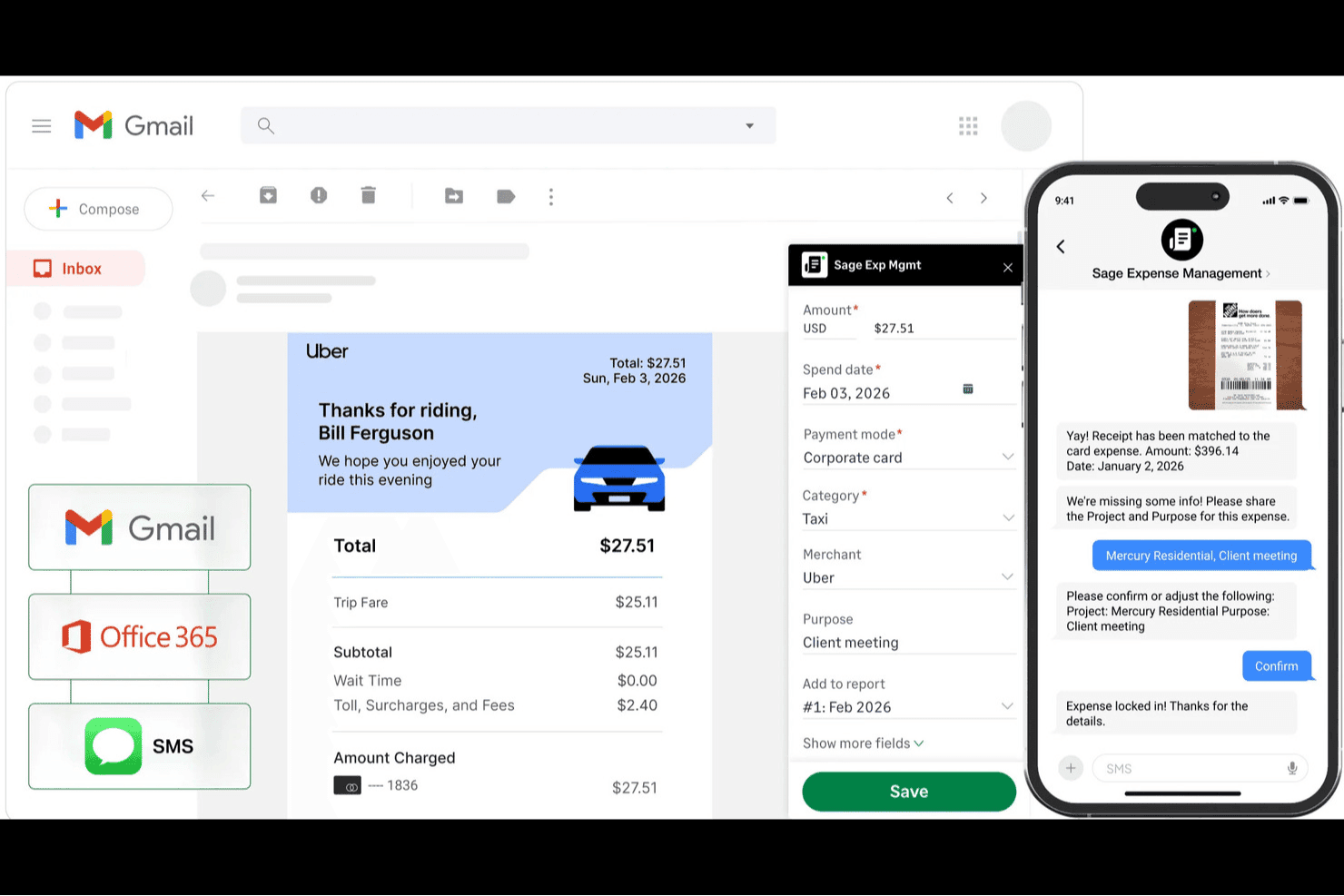
Sage Expense Management (formerly Fyle) helps teams capture receipts through Gmail, Office 365, and SMS, automatically match transactions, and track expense details. Sage Expense Management (formerly Fyle) is an expense management platform for businesses seeking a SAP Concur alternative that works with their existing credit cards, helping finance teams manage employee spend without replacing their card program.
Who Is Sage Expense Management Best For?
Finance teams that need expense-policy checks without replacing their existing corporate cards will find Sage Expense Management a practical fit.
Why I Picked Sage Expense Management (Formerly Fyle)
I picked Sage Expense Management (formerly Fyle) as a SAP Concur alternative because it supports automatic expense policy compliance without requiring you to replace your existing corporate cards. Its policy engine checks expenses against rules by category, employee, or project in real time. Text alerts let employees send receipt photos for transaction matching, helping finance catch missing documentation before month-end.
Sage Expense Management (Formerly Fyle) Key Features
- Accounting integrations: Sync expense data with Sage, QuickBooks, and Xero.
- Mileage tracking: Log trips with Google Maps and calculate mileage reimbursements.
- Approval workflows: Set up custom, multi-stage expense approval chains.
- Per diem calculations: Calculate employee per diem expenses in the mobile app.
Sage Expense Management (Formerly Fyle) Integrations
Sage Expense Management offers direct, two-way integrations with six accounting products: QuickBooks Online, QuickBooks Desktop, Sage Intacct, Sage 300 CRE, Sage 50, and Xero. It also connects with Gmail, Outlook, and Perk.
Pros and Cons
Pros:
- Texted receipts match card transactions
- Flags policy violations before submission
- Works with your existing corporate cards
Cons:
- Email receipts sometimes fail to sync
- Receipt-scanning OCR can glitch after updates
Learn more about Sage Expense Management (formerly Fyle): Best for AI-powered unified travel and expense management
- Free plan available
- Pricing upon request
Visit WebsiteCustomer Rating:4.7/5
Navan expense policy dashboard showing discretionary spending rules by role. Navan offers expense management software that combines travel booking and expense tracking in one platform. It’s a strong fit for companies that want to manage business travel and expenses together, especially those with frequent travelers or distributed teams. If you’re looking to simplify policy enforcement and automate reconciliation for both travel and non-travel spend, Navan is worth considering.
Who Is Navan Best For?
Navan suits mid-sized to large organizations with frequent business travel and a need for unified expense and travel management.
Why Navan Is a Good SAP Concur Alternative
What sets Navan apart as a SAP Concur alternative is its unified approach to travel and expense management, powered by AI-driven automation. I picked Navan because it lets you book travel and manage expenses in a single workflow, eliminating the need to juggle multiple systems. The platform uses AI to automatically categorize expenses and flag policy violations, which helps finance teams maintain compliance without manual review. If you want to centralize travel booking, expense capture, and policy compliance, Navan offers a tightly integrated solution.
Navan Key Features
Some other features in Navan that may interest finance teams include:
- Real-Time Spend Analytics: Access up-to-date dashboards that break down spend by category, department, or employee.
- Mobile Receipt Capture: Snap and upload receipts directly from the mobile app for faster expense submission.
- Custom Policy Controls: Set granular rules for spend limits, approval flows, and travel preferences across teams or locations.
- Corporate Card Integration: Issue and manage physical or virtual cards with built-in controls for expense tracking.
Navan Integrations
Integrations include NetSuite, QuickBooks Online, Xero, Sage Intacct, and Microsoft Azure.
Pros and Cons
Pros:
- Integrates with major ERP and HR systems
- Real-time spend analytics and reporting tools
- Mobile app supports receipt capture and approvals
Cons:
- Some users report slow customer support response
- Requires separate setup for corporate card program
Learn more about Navan: Best for automated expense reporting
- 14-day free trial
- From $3/user/month (billed annually)
Visit WebsiteCustomer Rating:4.5/5
Zoho Expense dashboard showing spend summary, reports, and reimbursement data. Zoho Expense is a cloud-based expense management platform designed for businesses that want to automate and control employee spending. It’s a strong fit for organizations seeking granular policy enforcement and customizable approval workflows. If you need a solution that helps reduce manual entry and improves compliance, Zoho Expense is worth a closer look.
Who Is Zoho Expense Best For?
Zoho Expense fits small to mid-sized businesses that need automated expense reporting and strict policy controls.
Why Zoho Expense Is a Good SAP Concur Alternative
What sets Zoho Expense apart as a SAP Concur alternative is its automated expense reporting paired with deep policy controls. I picked Zoho Expense because it lets you create highly detailed approval workflows and enforce custom spending rules at multiple levels. The platform also supports automated receipt scanning and policy violation alerts, which help finance teams maintain compliance without manual oversight. If your business needs granular control over expense policies and automated compliance checks, Zoho Expense delivers focused solutions in these areas.
Zoho Expense Key Features
Some other features in Zoho Expense that may interest finance teams include:
- Multi-currency support: Manage and reimburse expenses in multiple currencies for global teams.
- Corporate card reconciliation: Automatically match card transactions with submitted expenses for faster month-end close.
- Per diem management: Set up and enforce per diem rates for business travel based on location and employee role.
- Mileage tracking: Employees can log mileage using built-in GPS or manual entry for accurate reimbursement.
Zoho Expense Integrations
Integrations include QuickBooks Online, Xero, Sage Accounting, Zoho Books, Zoho People, Uber for Business, Lyft, Slack, Office 365, and G Suite.
Pros and Cons
Pros:
- Very affordable pricing tiers
- Strong mileage tracking tools
- Highly intuitive mobile app
Cons:
- Setup is complex for big teams
- UI feels cluttered sometimes
Learn more about Zoho Expense: 4Best for corporate cards with built-in expense tracking
Brex
- Free plan available
- From $12/user/month
Visit WebsiteCustomer Rating:4.5/5
Brex reports dashboard shows spend trends, department breakdown and vendors list. Brex offers expense management software designed for fast-growing companies and finance teams that want more control over corporate spending. Its platform appeals to businesses looking for integrated card issuing, real-time expense tracking, and automated policy enforcement. If you need a solution that combines spend management with flexible controls and modern integrations, Brex is worth considering.
Who Is Brex Best For?
Brex suits finance teams at startups and mid-sized companies that need integrated expense management and corporate card solutions.
Why Brex Is a Good SAP Concur Alternative
Brex stands out for its corporate cards that come with built-in expense tracking and policy controls. I picked Brex because it lets you issue physical and virtual cards to employees, automatically categorizing and tracking spend as transactions happen. The platform enforces custom spending rules at the card level, reducing manual review and helping your team stay compliant. These features make Brex a strong choice if you want to manage expenses and control spending in one unified system.
Brex Key Features
Some other features in Brex that may interest finance teams include:
- Automated Receipt Matching: The platform automatically matches uploaded receipts to transactions, reducing manual reconciliation work.
- Real-Time Spend Insights: Brex provides dashboards and analytics that show up-to-date spending by team, category, or project.
- Multi-Entity Support: Manage expenses and cards across multiple subsidiaries or business units from a single account.
- ERP Integrations: Brex connects with accounting systems like NetSuite and QuickBooks to sync expense data directly into your financial workflows.
Brex Integrations
Integrations include NetSuite, QuickBooks Online, Xero, Sage Intacct, and BambooHR.
Pros and Cons
Pros:
- Customizable spend controls at card level
- Direct ERP and HRIS integrations
- Multi-entity and subsidiary management
Cons:
- Limited international currency support
- No mileage or travel booking management
 Best for customizable expense workflows
- Free demo available
- From $8.50 to $12/active user
Visit WebsiteCustomer Rating:4.4/5
Webexpenses dashboard showing claims, expense categories, and travel heat map. Webexpenses offers expense management software designed for organizations that want to automate and control business spending. It’s a strong choice for finance teams in mid-sized to large companies that need configurable workflows and policy enforcement. If you’re looking to reduce manual errors and improve compliance compared to traditional expense tools, Webexpenses is worth a closer look.
Who Is Webexpenses Best For?
Webexpenses fits mid-sized to large businesses that need configurable expense management and policy controls across multiple departments or locations.
Why Webexpenses Is a Good SAP Concur Alternative
What sets Webexpenses apart as a SAP Concur alternative is its unified spend management and advanced analytics capabilities. I picked Webexpenses because it brings expense, invoice, and procurement management together in one platform, making it easier to track and control all business spend. The analytics dashboard provides real-time insights into spending patterns, helping finance teams identify trends and compliance risks quickly. For organizations that want more than basic expense tracking, Webexpenses offers a centralized solution for managing and analyzing company-wide spend.
Webexpenses Key Features
Some other features in Webexpenses that may interest finance teams include:
- Mobile Receipt Capture: Users can photograph and upload receipts directly from their mobile devices for faster expense submission.
- Automated Policy Enforcement: The system flags out-of-policy expenses and routes them for additional review before approval.
- Multi-Currency Support: Webexpenses handles expenses in multiple currencies, making it suitable for global teams.
- Audit Trail and Compliance Tracking: Every action is logged, supporting audit readiness and regulatory compliance.
Webexpenses Integrations
Integrations include NetSuite, Sage Intacct, Oracle, Microsoft Dynamics, and Amazon.
Pros and Cons
Pros:
- Very responsive customer support
- Highly customizable approval flows
- Great ERP/accounting integrations
Cons:
- Can be pricey for small businesses
- Occasional app syncing glitches
Learn more about Webexpenses: Best for real-time expense management with global compliance
- Free demo available
- From $8/user/month (billed annually)
Visit WebsiteCustomer Rating:4.4/5
Rydoo exports page displaying expense report templates and export options. Rydoo is a cloud-based expense management platform designed for companies with international operations and distributed teams. It appeals to finance professionals who need real-time expense tracking and compliance across multiple countries. If your business struggles with manual processes or cross-border policy enforcement, Rydoo addresses these challenges with automation and global coverage.
Who Is Rydoo Best For?
Rydoo suits mid-sized to large businesses with global operations that need real-time expense management and compliance across multiple countries.
Why Rydoo Is a Good SAP Concur Alternative
Rydoo stands out for its real-time expense management and strong global compliance capabilities. I picked Rydoo because it lets finance teams monitor and approve expenses as they happen, reducing delays and improving visibility. The platform also supports country-specific tax rules and per diem rates, which helps multinational organizations stay compliant with local regulations. If your business needs to manage expenses across borders with up-to-date policy enforcement, Rydoo offers focused solutions in these areas.
Rydoo Key Features
Some other features in Rydoo that may interest finance teams include:
- Mobile receipt scanning: Employees can capture and submit receipts instantly using the mobile app.
- Corporate card integration: Syncs transactions from company cards directly into expense reports for faster reconciliation.
- Custom approval workflows: Configure multi-level approval chains to match your organization’s policies.
- Integration with ERP and accounting systems: Connects natively with platforms like NetSuite, SAP, and Xero for streamlined data transfer.
Rydoo Integrations
Integrations include SAP S/4HANA, NetSuite, QuickBooks, Xero, Sage, and Uber.
Pros and Cons
Pros:
- Real-time expense approvals
- Integrates well with ERPs
- Good mileage tracking tools
Cons:
- Occasional app crashing bugs
- Limited custom reporting tools
Learn more about Rydoo: Best for unified spend management with advanced analytics
- Free demo available
- Pricing upon request
Visit WebsiteCustomer Rating:4.2/5
Coupa analytics dashboard showing CFO spend trends and year-over-year spend data. Coupa offers expense management software designed for organizations that want to unify spend control across departments and subsidiaries. It’s a strong fit for finance teams in larger enterprises or global businesses that need advanced visibility and compliance features. If you’re looking to centralize expense policies and gain actionable insights into company-wide spending, Coupa is worth considering.
Who Is Coupa Best For?
Coupa suits large enterprises and multinational organizations that need centralized control and visibility over global expense management.
Why Coupa Is a Good SAP Concur Alternative
I chose Coupa as a SAP Concur alternative because it brings unified spend management and advanced analytics into one platform. Coupa’s expense management solution connects expense, invoice, and procurement data, giving finance teams an end-to-end view of company spend. I also appreciate the platform’s built-in analytics tools, which help identify savings opportunities and compliance risks in real time. For organizations that want to move beyond basic expense tracking and gain actionable insights across all spend categories, Coupa offers a compelling option.
Coupa Key Features
Some other features in Coupa that may interest finance teams include:
- Mobile Receipt Capture: Users can upload receipts and submit expenses directly from their mobile devices.
- Policy Enforcement Engine: The platform automatically flags out-of-policy expenses for review before approval.
- Multi-Currency and Multi-Language Support: Coupa accommodates global teams with support for multiple currencies and languages.
- Audit Trail and Compliance Tracking: Every expense action is logged for audit readiness and regulatory compliance.
Coupa Integrations
Integrations include NetSuite, Oracle, SAP, Workday, and Slack.
Pros and Cons
Pros:
- Advanced analytics for spend optimization
- Automated policy enforcement for global compliance
- Real-time spend visibility across all business units
Cons:
- Custom reporting options are limited
- Implementation process can be lengthy
Learn more about Coupa: Best for automated receipt scanning and expense reporting for teams
- Not available
- From $5/user/month
Visit WebsiteCustomer Rating:4.5/5
Expensify reports dashboard showing expenses, receipts, categories and approvals. Expensify offers expense management software designed for businesses that want to automate receipt capture and reporting. It’s a strong fit for teams looking to simplify expense submission and approval without complex setup. If you need a tool that helps reduce manual entry and speeds up reimbursement, Expensify is worth a look.
Who Is Expensify Best For?
Expensify fits small to mid-sized businesses and finance teams that want to automate expense reimbursement and tracking, and simplify receipt management.
Why Expensify Is a Good SAP Concur Alternative
I picked Expensify as a SAP Concur alternative because it automates receipt scanning and expense reporting in a way that’s accessible for teams of any size. The SmartScan feature lets users snap photos of receipts, which are then automatically coded and matched to expenses. I also appreciate that Expensify can auto-generate expense reports and route them for approval without manual intervention. If you want to reduce time spent on data entry and streamline expense workflows, Expensify’s automation stands out.
Expensify Key Features
Some other features in Expensify that may interest finance teams include:
- Corporate Card Management: Issue and manage Expensify Cards with built-in spend controls and real-time transaction tracking.
- Multi-Level Approval Workflows: Set up custom approval chains to match your organization’s expense policy and hierarchy.
- Automatic Reimbursement: Enable direct deposit reimbursements to employees’ bank accounts once expenses are approved.
- Policy Enforcement Tools: Configure rules to flag out-of-policy expenses and require additional documentation or justification.
Expensify Integrations
Integrations include QuickBooks, Xero, NetSuite, Sage Intacct, and TravelPerk.
Pros and Cons
Pros:
- Mobile app supports on-the-go expense capture
- Multi-level approval workflows for expense policies
- Expensify Card offers real-time spend controls
Cons:
- Occasional syncing issues with accounting software
- Reporting customization options are restricted
 9Best for unified corporate card and expense management
Rho
- Free demo available
- From 1%/foreign currency transfer
Visit WebsiteCustomer Rating:5/5
Rho accounts payable dashboard showing bills, aging report, and approvals. Rho offers an integrated expense management and corporate card platform designed for finance teams seeking tighter control over company spending. It appeals to businesses that want to unify card issuance, expense tracking, and policy enforcement in one place. If your organization needs real-time visibility and automated controls for employee expenses, Rho addresses these needs directly.
Who Is Rho Best For?
Rho fits mid-sized to large businesses that want unified expense management and corporate card controls within a single platform.
Why Rho Is a Good SAP Concur Alternative
Rho stands out for combining corporate card issuance and expense management in a single platform. I picked Rho because it lets finance teams issue physical and virtual cards, set granular spending controls, and track expenses in real time—all from one dashboard. This unified approach reduces the need for multiple tools and manual reconciliation between card and expense data. If you want to centralize spend management and policy enforcement, Rho offers a focused solution that’s different from traditional expense platforms.
Rho Key Features
Some other features in Rho that may interest finance teams include:
- Automated receipt matching: Rho automatically matches uploaded receipts to transactions, reducing manual entry and reconciliation work.
- Custom approval workflows: Set up multi-level approval chains to align with your organization’s expense policies.
- Real-time spend analytics: Access dashboards and reports that break down spending by department, cardholder, or category.
- ACH and wire payment support: Initiate ACH and wire transfers directly from the platform for vendor payments and reimbursements.
Rho Integrations
Integrations include QuickBooks, Xero, NetSuite, Sage Intacct, BambooHR, and SAP Concur.
Pros and Cons
Pros:
- Strong corporate card with cashback
- Fast highly responsive support
- Zero platform ACH or user fees
Cons:
- Lacks a native payroll system
- Bill pay features can feel clunky
Learn more about Rho:

Ramp transactions dashboard showing flagged expenses and actions needed. Ramp offers expense management software designed for finance teams that want to automate spend controls and gain deeper visibility into company expenses. It’s a strong fit for mid-sized and growing businesses looking to replace manual processes with real-time policy enforcement and analytics. If you need a solution that combines corporate cards with automated workflows, Ramp is worth a closer look.
Who Is Ramp Best For?
Ramp fits mid-sized and enterprise finance teams that need automated expense controls and real-time spend visibility.
Why Ramp Is a Good SAP Concur Alternative
Ramp is a strong SAP Concur alternative because it combines corporate cards with automated expense controls and real-time insights. I picked Ramp for its ability to automatically enforce spend policies at the point of purchase, which helps finance teams reduce out-of-policy expenses. The platform also provides detailed analytics on company spending, making it easier to spot trends and optimize budgets. If you want a solution that tightly links card usage with expense management, Ramp delivers a unified approach.
Ramp Key Features
Some other features in Ramp that may interest finance teams include:
- Automated Receipt Collection: Ramp automatically requests and matches receipts to transactions, reducing manual follow-up.
- Multi-Level Approval Workflows: Set up custom approval chains for expenses based on amount, department, or policy.
- Real-Time Accounting Sync: Sync transactions directly with accounting platforms like NetSuite and QuickBooks for up-to-date books.
- Vendor Management Dashboard: Track and manage vendor spend, contracts, and renewal dates in one place.
Ramp Integrations
Integrations include NetSuite, QuickBooks Online, Xero, Sage Intacct, Slack, and Workday.
Pros and Cons
Pros:
- Customizable approval workflows for expenses
- Automated receipt capture and matching
- Corporate cards with real-time spend controls
Cons:
- No mileage tracking or per diem management
- Expense reporting less detailed than SAP Concur
Learn more about Ramp:
Andre alternativer til SAP Concur
Her er noen flere alternativer til SAP Concur som ikke kom med på kortlisten min, men som likevel er verdt å ta en titt på:
- 11PayhawkBest for global expense management with built-in payments
- 12SpendeskBest for all-in-one spend management for teams
- 13PleoBest for smart company cards with automated expense tracking
- 14TipaltiBest for global payables automation and expense management
- 15BILL Spend & ExpenseBest for corporate cards and expense management for SMBs
- 16YokoyBest for AI-driven spend management and automation
How I Evaluate SAP Concur Alternatives
I split my evaluation into baseline criteria every tool must clear—expense capture, travel booking, AP automation—and differentiators that separate the best fit from the rest.
Core Functionality (Table Stakes For This List)
When I'm selecting tools for my list, I rank each one on a scale from 0 (does not offer the functionality) to 5 (excels in this area) for each core functionality listed below. Then, I calculate the tool's total score into a percentage. Each tool needs to achieve a minimum total score of 75% to be considered for inclusion.
- Expense Report Management: I check whether employees can scan receipts on their phone, submit reports, and move them through multi-tier approvals without chasing managers over email.
- Travel Booking & Management: The tool should let employees book flights, hotels, and rentals within the platform while surfacing policy guardrails before they confirm a trip.
- Invoice & AP Automation: I look for OCR invoice capture, coding, and approval routing that replaces the cycle of forwarding PDFs between AP clerks and department heads for sign-off.
- Corporate Card Integration: Real-time transaction feeds and auto-matching to expense lines matter here, whether the platform issues its own cards or syncs with providers like Visa or Mastercard.
- Policy & Approval Controls: I evaluate how granularly admins can set spend limits, flag out-of-policy items, and build conditional approval chains based on amount, category, or department.
- Accounting System Integration: Native connections with platforms like QuickBooks, NetSuite, Xero, and Sage Intacct should sync expense and AP data to the general ledger without manual re-entry.
Once I have a list of tools that meet this criteria, I consider what sets each platform apart.
Differentiating Factors (What Sets Vendors Apart)
Here's how I compare and contrast different vendors:
Standout Features
AI-powered anomaly detection is a big differentiator. I look for tools that catch duplicate receipts or suspicious patterns before they land in an approver's queue. Real-time spend analytics also matter because a controller reviewing quarterly travel costs needs drill-down dashboards by department or vendor, not static CSV exports. Virtual card issuing is another feature I evaluate closely, since finance teams that can spin up a card with preset limits for a specific vendor or project gain much tighter control over discretionary spend.
Beyond Features
Implementation speed matters a lot when you're migrating off Concur. I check whether a platform can get a mid-size team live in weeks rather than months, including pre-built ERP connectors and policy templates. Compliance is another area I evaluate closely, especially SOC 2 Type II certification and built-in audit trails that satisfy internal controls during year-end reviews. I also consider how pricing scales with headcount, since a tool that works for a 50-person team shouldn't become cost-prohibitive when the company grows to 500.
Hvorfor se etter et alternativ til SAP Concur?
SAP Concur er et godt valg av programvare for utgiftsstyring, men det finnes flere grunner til at noen brukere ser etter alternative løsninger. Det kan hende du ser etter et alternativ til SAP Concur fordi …
- Du ønsker et enklere og mer moderne brukergrensesnitt
- Du trenger raskere implementering og opplæring
- Du trenger mer fleksible godkjenningsprosesser
- Du ønsker bedre integrasjon med regnskapssystemet ditt
- Du trenger mer transparente eller forutsigbare priser
- Du opererer i regioner der støtten for SAP Concur er begrenset
Hvis noe av dette høres kjent ut, har du kommet til rett sted. Listen min inneholder flere alternativer innen programvare for utgiftsstyring som er bedre egnet for team som møter disse utfordringene med SAP Concur og ser etter alternative løsninger.
Viktige funksjoner i SAP Concur
Her er noen av de viktigste funksjonene i SAP Concur, slik at du kan sammenligne hva alternative løsninger tilbyr:
- Automatisert registrering av utgifter: SAP Concur bruker OCR og mobilapper til automatisk å hente ut data fra kvitteringer og fylle ut utgiftsrapporter, noe som reduserer manuell registrering.
- Integrasjon for reisbestilling: Bestill flyreiser, hoteller og leiebiler direkte på plattformen, og synkroniser reiseplaner med utgiftsregistreringen.
- Håndheving av retningslinjer: Konfigurer egendefinerte retningslinjer for utgifter som automatisk flagger eller blokkerer utgifter som ikke følger retningslinjene, for gjennomgang eller avvisning.
- Støtte for flere valutaer: Administrer utgifter og refusjoner i flere valutaer, med automatisk valutaomregning og sporing av etterlevelse.
- Arbeidsflyter for godkjenning: Sett opp tilpassbare godkjenningskjeder på flere nivåer som samsvarer med organisasjonens prosess for godkjenning av utgifter.
- Mobilapp: Send inn, gjennomgå og godkjenn utgifter mens du er på farten ved hjelp av SAP Concurs dedikerte mobilapplikasjon.
- Integrasjoner med ERP- og regnskapssystemer: Koble SAP Concur til ledende ERP- og regnskapssystemer for å synkronisere utgiftsdata og effektivisere avstemmingen.
- Verktøy for revisjon og etterlevelse: Bruk innebygde revisjonsspor, kontroller av etterlevelse og rapportering for å støtte regulatoriske krav og interne kontroller.
- Rapportering og analyse: Få tilgang til oversikter og tilpassbare rapporter for å analysere utgiftsmønstre, identifisere muligheter for besparelser og overvåke etterlevelse.
- Integrasjon med firmakort: Koble firmakredittkort for automatisk å importere og avstemme transaksjoner med innsendte utgifter.