

Programvare for kontantstrømanalyse hjelper deg med å spore, prognostisere og analysere pengestrømmen inn og ut av virksomheten din. Hvis du leter etter den beste programvaren for kontantstrømanalyse, trenger du sannsynligvis bedre økonomisk oversikt, støtte for nøyaktig rapportering og raskere, datadrevne beslutninger.
Med så mange tilgjengelige alternativer kan det være vanskelig å vite hvilke verktøy som passer for forretningsmodellen, rapporteringsbehovene og integrasjonskravene dine. Denne listen hjelper deg med å sammenligne ledende løsninger for 2026, slik at du kan velge riktig programvare for å håndtere kontantstrømmen, redusere risiko og holde organisasjonen på rett spor.
Hvorfor du kan stole på våre programvareanbefalinger
6,700+
Reviews
20
Industry experts
16+
Evaluation factors
14
Years
Teamet vårt har testet og anmeldt programvare siden 2012. Vi er selv økonomiledere, så vi vet hvor vanskelig og hvor viktig det er å velge riktig programvare.
I denne guiden har vi vurdert verktøyene gjennom praktisk testing og uavhengig research og gitt dem poeng ut fra våre utvelgelseskriterier.
Anmeldelsene våre bygger på vår egen redaksjonelle vurdering. De er ikke et salgsargument.
Sammenligningstabell for programvare for kontantstrømanalyse
Denne sammenligningstabellen oppsummerer prisdetaljene for mine beste utvalgte programmer for kontantstrømanalyse.
| Tool | Best For | Trial Info | Price | ||
|---|---|---|---|---|---|
| 1 | Best with custom AI agents for finance teams | Free plan available | Pricing upon request | Website | |
| 2 | Best for visual performance metrics and KPIs | Free plan + free demo available | From $16/user/month (billed annually) | Website | |
| 3 | Best for embedded ledger automation | 30-day free trial | From $38/month | Website | |
| 4 | Best for customizable planning automation | Free demo available | Pricing upon request | Website | |
| 5 | Best for integrated enterprise planning workflows | Free demo available | Pricing upon request | Website | |
| 6 | Best for multi-bank real-time tracking | Free demo available | From $24,000/year | Website | |
| 7 | Best for multi-source tool stack syncing | Free demo available | Pricing upon request | Website | |
| 8 | Best for multi-year budgeting and projections | 14-day free trial + free demo available | From $83/user/month (billed annually) | Website | |
| 9 | Best for treasury and cash management operations | Free demo available | Pricing upon request | Website | |
| 10 | Best for Excel-native modeling workflows | Free demo available | Pricing upon request | Website |


Anmeldelser av den beste programvaren for kontantstrømanalyse
Nedenfor finner du mine detaljerte sammendrag av den beste programvaren for kontantstrømanalyse som kom med på kortlisten min. Anmeldelsene mine gir en detaljert gjennomgang av funksjonene, integrasjonene og de beste bruksområdene for hver plattform, slik at du kan finne den som passer best for deg.
 Best with custom AI agents for finance teams
- Free plan available
- Pricing upon request
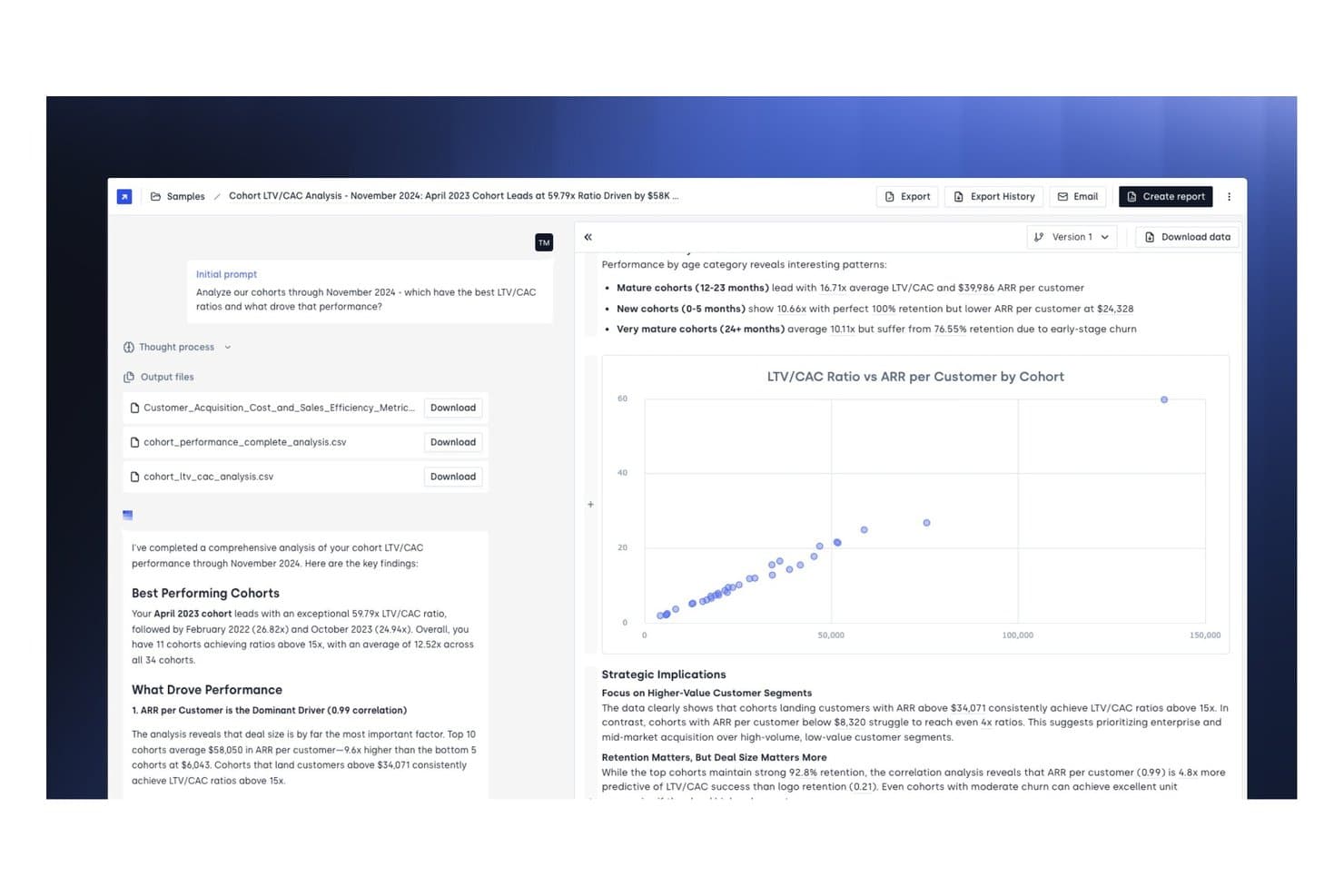
Concourse offers a cohort LTV/CAC analysis dashboard that visualizes cash flow performance metrics, ARR per customer trends, and strategic financial insights across multiple cohorts. Concourse is a finance AI platform that deploys custom agents to automate cash flow forecasting, variance analysis, liquidity monitoring, and reconciliation across ERP, bank, and data warehouse connections.
Who Is Concourse Best For?
Concourse fits mid-market to enterprise finance teams—FP&A, treasury, and accounting—that want to replace manual, analyst-heavy workflows with configurable AI agents.
Why I Picked Concourse
Concourse earns its spot on my shortlist because of how its custom AI agents handle the grunt work of cash flow analysis without overriding the logic your team has already built. I especially like the Flux & Variance Agent, which surfaces what changed, quantifies the impact, and drafts written commentary before anyone opens a spreadsheet. The Forecasting Agent updates 13-week cash projections in seconds, running against your own business rules rather than a generic template.
Concourse Key Features
- ERP and bank integrations: Connects directly to NetSuite, QuickBooks, SAP, Oracle, Xero, and major bank feeds for real-time data synchronization.
- Transparency panel: Displays each agent’s reasoning, surfacing the SQL or Python logic behind every cash flow output.
- Multi-surface delivery: Delivers reports and analysis directly into email, Slack, Teams, Excel, PowerPoint, or ChatGPT.
- Role-based access controls: Allows admins to set granular user permissions and maintain security for sensitive financial data.
Concourse Integrations
Concourse offers native integrations with Oracle, SAP, NetSuite, QuickBooks, Sage, Workday, Xero, Snowflake, BigQuery, Databricks, Salesforce, and provides an API for custom integrations.
Pros and Cons
Pros:
- Agent reasoning is transparent and auditable
- AI drafts variance commentary before manual review
- Custom agents built around your finance workflows
Cons:
- Newer platform with limited public user reviews
- Complex setup may require consultant support
Learn more about Concourse: Best for visual performance metrics and KPIs
- Free plan + free demo available
- From $16/user/month (billed annually)
Visit WebsiteCustomer Rating:4.6/5
Fathom provides a waterfall chart showing revenue and expense cash flow. Fathom is a financial reporting and analysis platform that combines cash flow forecasting, KPI tracking, management reporting, and consolidated financial statements into a single tool.
Who Is Fathom Best For?
Fathom is a strong fit for accountants and financial advisors who manage reporting and performance analysis across multiple small to mid-sized business clients.
Why I Picked Fathom
Fathom earns its spot on my shortlist because of how it handles KPI visualization. You can choose from 50+ built-in financial KPIs or build your own using a formula builder, then organize them into scorecards that show performance at a glance. I particularly like the group benchmarking feature, which lets you rank and visually compare multiple entities side by side across those same KPIs. That's genuinely useful if you're managing reporting across several business units or client accounts at once.
Fathom Key Features
- Three-way forecasting: Build forecasts that cover your profit & loss, balance sheet, and cash flow statement together in a single model, up to 36 months out.
- Variance reporting: Compare actuals against budget or prior-period data to flag where performance is deviating from plan.
- Consolidated financial reporting: Aggregate financial statements across up to 300 entities, including multi-currency translation across 95+ currencies.
- Scheduled reports: Automate the creation and delivery of reports on a set schedule so stakeholders always receive up-to-date financials.
Fathom Integrations
Fathom offers native integrations with QuickBooks Online, QuickBooks Desktop, Xero, MYOB, Sage Accounting, FreeAgent, and Access Financials UK, along with data imports via Excel and Google Sheets.
Pros and Cons
Pros:
- Consolidated reporting for multi-entity groups
- Scenario modelling supports strategic planning
- Visual dashboards simplify cash flow analysis
Cons:
- No daily cash flow forecasting option
- Limited customization for report layouts
Learn more about Fathom: Best for embedded ledger automation
- 30-day free trial
- From $38/month
Visit WebsiteCustomer Rating:4.4/5
QuickBooks Chart of Accounts for automated ledger management. QuickBooks is an accounting and financial management platform that covers bookkeeping, invoicing, expense tracking, payroll, and cash flow reporting within a single ledger-based system.
Who Is QuickBooks Best For?
QuickBooks is a strong fit for small to mid-sized businesses that need cash flow visibility built directly into their day-to-day accounting workflows.
Why I Picked QuickBooks
QuickBooks earns its spot on my shortlist because the ledger does the heavy lifting automatically. Bank feeds pull in transactions daily, categorize them, and reconcile against your books without manual intervention. I also like how the cash flow statement regenerates instantly when a bill is marked paid or an invoice is cleared, so you're always looking at a current picture, not last week's snapshot.
QuickBooks Key Features
- Cash Flow Planner: Projects your cash position up to 90 days out using live bank data and scheduled transactions.
- GST/HST tracking: Automatically calculates and records sales tax on transactions for Canadian compliance.
- Profit and loss report: Generates a real-time income statement broken down by income and expense category.
- Invoice payment status: Flags sent, viewed, and overdue invoices so you can track incoming cash by status.
QuickBooks Integrations
QuickBooks integrates with over 800 popular business apps, including Shopify, PayPal, Square, Gusto, Mailchimp, Stripe, Amazon Business, Etsy, eBay, and Fathom. It's also available on Zapier and has an API for custom integrations.
Pros and Cons
Pros:
- Auto-imports and categorizes bank transactions daily
- AI-driven late payment prediction on invoices
- Rolling cash flow forecasts up to 13 weeks
Cons:
- Forecasts rely only on entered transaction data
- Limited multi-entity cash flow consolidation
 Best for customizable planning automation
- Free demo available
- Pricing upon request
Visit WebsiteCustomer Rating:4.8/5
Drivetrain features a dashboard with runway charts and scenario forecasting. Drivetrain is an AI-native business planning platform for FP&A teams that covers cash flow forecasting, financial consolidation, revenue planning, headcount planning, and 3-statement reporting in one connected system.
Who Is Drivetrain Best For?
Drivetrain is a strong fit for mid-market and enterprise FP&A teams that need to automate complex, multi-driver planning models without relying on spreadsheets.
Why I Picked Drivetrain
I picked Drivetrain as one of the best because its planning automation goes deeper than most tools in this space. What I find most compelling is the driver-based planning engine: you write plain-English formulas to define your own cash flow drivers, and Drivetrain recalculates everything automatically as inputs change, no manual model rebuilding required. I also like that you can run top-down, bottom-up, zero-based, or hybrid budgeting models from the same platform, which means your planning structure adapts to the business rather than the other way around. The unlimited scenario modeling with what-if analysis is another feature I rely on for stress-testing cash positions against changing assumptions.
Drivetrain Key Features
- Multi-entity consolidation: Consolidate data across multiple ERPs simultaneously, with built-in multi-currency conversion and intercompany eliminations.
- Real-time budget vs. actuals tracking: Monitor variances between your budget and actuals in real time, with drill-down to transaction-level data.
- 3-statement reporting: Build connected P&L, cash flow, and balance sheet reports that update automatically as actuals come in.
- Multi-level approval workflows: Route headcount and budget requests through configurable approval chains before they're finalized.
Drivetrain Integrations
Drivetrain offers native integrations with NetSuite, QuickBooks, Sage Intacct, Xero, Salesforce, HubSpot, BambooHR, Stripe, Snowflake, and Google Sheets. An API is available for custom integrations.
Pros and Cons
Pros:
- Automated data sync with ERP and CRM systems
- Role-based permissions manage sensitive financial data
- Multi-user workflows support collaborative cash flow planning
Cons:
- No direct integration with banking platforms
- Implementation can require vendor-led onboarding
Learn more about Drivetrain: Best for integrated enterprise planning workflows
- Free demo available
- Pricing upon request
Visit WebsiteCustomer Rating:4.4/5
Workday Adaptive Planning balance sheet for enterprise financial planning. Workday Adaptive Planning is an enterprise performance management (EPM) platform that connects financial, workforce, and operational planning with AI-driven budgeting, scenario modeling, and close and consolidation tools.
Who Is Workday Adaptive Planning Best For?
Workday Adaptive Planning is a natural fit for enterprise FP&A teams that need to align financial planning across finance, HR, and operations in one connected model.
Why I Picked Workday Adaptive Planning
I've included Workday Adaptive Planning in my top picks because of how it connects financial, workforce, and operational planning inside a single model. What I like most is the AI-driven scenario planning layer, which flags financial impacts as plans shift across departments. My team can run a full forecast cycle faster because the continuous planning engine pulls live data across every function, so there's no version mismatch between finance and HR headcount assumptions.
Workday Adaptive Planning Key Features
- Driver-based modeling: Link cash flow projections directly to operational inputs like headcount, revenue, or unit volume.
- Rolling forecasts: Extend forecast windows automatically as each planning period closes.
- Pre-built dashboards: View cash positions, variances, and KPIs across business units in one place.
- Indirect cash flow statements: Map P&L and balance sheet changes to cash flow outputs automatically.
Workday Adaptive Planning Integrations
Workday Adaptive Planning connects with over 300 unique source systems, including Oracle, SAP, and NetSuite, as well as Salesforce and Workday HCM as direct data sources. The platform uses a purpose-built integration framework that supports ERP, CRM, HR, and other data sources, and a REST API is available for custom integrations.
Pros and Cons
Pros:
- Scenario modelling for complex cash flow forecasting
- Real-time data refresh for up-to-date analysis
- Handles multi-entity and multi-currency planning
Cons:
- Requires IT support for initial implementation
- Needs extensive user training
Learn more about Workday Adaptive Planning: Best for multi-bank real-time tracking
- Free demo available
- From $24,000/year
Visit WebsiteCustomer Rating:4.4/5
Trovata features a daily dashboard for tracking bank balances and trends. Trovata is a treasury and cash reporting platform that aggregates balances and transactions across banks, entities, and currencies, with real-time reporting, transaction tagging, and automated forecasting built for treasury teams.
Who Is Trovata Best For?
Trovata is a strong fit for mid-market and enterprise treasury teams managing cash across multiple banking relationships and legal entities.
Why I Picked Trovata
Trovata earns its spot on my shortlist because of how it handles cash visibility across dozens of bank accounts at once. My team is able to pull real-time and prior-day balances across all banks, entities, and currencies in seconds, with no manual file consolidation. I also like the transaction tagging feature, which auto-classifies inflows and outflows like payroll or customer receipts, so it's immediately clear what's moving cash and where.
Trovata Key Features
- Scenario modeling: Test the impact of timing shifts, rate changes, or funding strategies on your liquidity position before conditions change.
- Live Excel connection: Link Trovata directly to Excel so balances refresh automatically inside your existing spreadsheet workflows.
- Forecast-to-actual reconciliation: Compare forecasted activity against real bank statements daily to confirm balances and current-day positions.
- Multi-horizon liquidity planning: Connect short-term cash forecasting with long-term liquidity planning across multiple time horizons in one model.
Trovata Integrations
Trovata integrates with ERPs like SAP, Oracle, and NetSuite, and connects to thousands of banks through direct API and SWIFT connections. It also supports file-based (SFTP) connectivity for legacy systems and offers a developer API for custom integrations.
Pros and Cons
Pros:
- Automated cash flow forecasting from transaction data
- Multi-entity consolidation for group cash visibility
- Direct bank feeds update cash positions instantly
Cons:
- No scenario modelling for what-if analysis
- Annual contract required for all plans
Learn more about Trovata: 7Best for multi-source tool stack syncing
Cube
- Free demo available
- Pricing upon request
Visit WebsiteCustomer Rating:4.6/5
Cube dashboard syncing financial data across connected business tools. Cube is an FP&A platform built for cash flow reporting, forecasting, and scenario analysis, pulling data from multiple source systems into a centralized model you can work with directly in your existing spreadsheet tools.
Who Is Cube Best For?
Cube is a strong fit for FP&A teams at mid-market companies that pull cash flow data from multiple disconnected systems and need a single consolidated view.
Why I Picked Cube
I picked Cube as one of the best because its Universal Spreadsheet Connector pulls data from multiple source systems directly into Excel or Google Sheets without replacing your existing models. Where most FP&A tools force you into a proprietary interface, Cube lets my team map real-time data from disparate ERPs, CRMs, and HR systems into one centralized cash flow model. I can generate direct and indirect cash flow statements automatically by compiling actuals from sales, expenses, investments, and financing activities across all connected sources.
Cube Key Features
- Scenario modeling: Build and compare multiple cash flow scenarios by adjusting assumptions and inputs across planning periods.
- Variance analysis: Track budget vs. actuals across cash flow line items to identify and investigate discrepancies.
- Audit trail: Log every data change with timestamps and user attribution for version-controlled financial models.
- Pre-built cash flow templates: Access ready-to-use direct and indirect cash flow statement templates to accelerate reporting setup.
Cube Integrations
Cube offers native integrations across accounting, HR, billing, CRM, and BI categories, including NetSuite, QuickBooks, Sage Intacct, Xero, Salesforce, HubSpot, ADP, Workday, Snowflake, and Power BI. It also provides an API and custom connectors for source systems that don't have a standard integration available.
Pros and Cons
Pros:
- Multi-currency consolidation for global cash flow
- Real-time sync with Excel and Google Sheets
- Implementation is typically completed in under two weeks
Cons:
- API access only available on higher tiers
- No built-in scenario modelling templates
Learn more about Cube: Best for multi-year budgeting and projections
- 14-day free trial + free demo available
- From $83/user/month (billed annually)
Visit WebsiteCustomer Rating:4.2/5
PlanGuru displays budget, revenue forecasts, and cash flow metrics. Built for long-range financial planning, PlanGuru combines multi-year cash flow projections, scenario analysis, and 20+ forecasting methods into a single budgeting platform.
Who Is PlanGuru Best For?
PlanGuru works well for accounting firms and CFOs managing financial planning for multiple small business clients who need structured, long-horizon cash flow projections.
Why I Picked PlanGuru
I've included PlanGuru in my top picks because it's one of the few cash flow analysis tools that projects all three financial statements (income statement, balance sheet, and cash flow) simultaneously for up to 10 years. I really like the 20+ built-in forecasting methods, which let you model everything from simple trend lines to custom business drivers using non-financial data. The scenario analysis tool is also genuinely useful: you can stress-test specific decisions and immediately see their projected impact on cash across your full 10-year horizon.
PlanGuru Key Features
- Rolling forecast updates: Adjust your forecast on a rolling basis as new actuals come in, without rebuilding your model from scratch.
- Budget vs. actual reporting: Compare projected figures against real performance data side by side within the platform.
- KPI tracking dashboard: Monitor key financial metrics across your projection period from a centralized reporting view.
- Multi-entity support: Manage and consolidate projections across multiple business entities within one account.
PlanGuru Integrations
PlanGuru offers a small set of native integrations with QuickBooks Online, QuickBooks Desktop, Xero, and Excel for importing historical financial data. It also includes an embedded integration with Reach Reporting for dashboards and visual reports.
Pros and Cons
Pros:
- Scenario tools allow quick assumption testing
- Built-in financial ratios aid cash analysis
- Multi-year forecasting supports long-term planning
Cons:
- Consolidation features require a separate add-on purchase
- No mobile app for on-the-go access
Learn more about PlanGuru: Best for treasury and cash management operations
- Free demo available
- Pricing upon request
Visit WebsiteCustomer Rating:4.3/5
HighRadius dashboard shows net cash flow, variance, and forecasting trends. HighRadius is an AI-powered platform for the office of the CFO that spans treasury management, cash forecasting, order-to-cash, accounts payable, financial close, and consolidation.
Who Is HighRadius Best For?
HighRadius is well-suited for large, multinational enterprises with complex treasury structures, high transaction volumes, and dedicated finance operations teams.
Why I Picked HighRadius
I picked HighRadius because it goes deeper into treasury operations than most cash flow tools on this list. The Treasury & Risk module covers daily cash positioning, financial instrument management, multi-bank connectivity, and cash flow scenario analysis, all within one connected suite. I especially like the cash flow tagging automation, which categorizes transactions at 98% accuracy and feeds directly into forecasting models that HighRadius claims hit 95% accuracy.
HighRadius Key Features
- Working capital analytics: Track AR aging, DSO, and AP metrics to see how working capital movements affect overall cash position.
- FX exposure management: Identify, measure, and manage foreign currency exposures directly within the treasury module.
- Debt and investment tracking: Monitor short-term investments and debt schedules alongside daily cash balances in one dashboard.
- Financial close automation: Run period-end reconciliations and journal entry postings within the financial close module.
HighRadius Integrations
HighRadius offers native integrations with SAP, Oracle, NetSuite, Sage Intacct, Microsoft Dynamics 365, Workday, QuickBooks Online, Acumatica, and Infor. An API is available for custom integrations.
Pros and Cons
Pros:
- Exception handling flags unusual cash movements
- Automated data aggregation reduces manual entry
- AI-driven forecasts improve cash flow accuracy
Cons:
- Training is needed for advanced feature use
- Limited flexibility for small business workflows
Learn more about HighRadius: Best for Excel-native modeling workflows
- Free demo available
- Pricing upon request

Vena Solutions offers a dashboard for tracking cash flow and budget variance. Vena Solutions is a corporate performance management platform that runs natively inside Excel, bringing budgeting, forecasting, cash flow modeling, and financial reporting into a centralized, database-backed environment.
Who Is Vena Solutions Best For?
Vena Solutions is a strong fit for mid-market finance teams that already run their models in Excel and want to add workflow controls and audit trails without rebuilding their templates.
Why I Picked Vena Solutions
I picked Vena Solutions as one of the best because it keeps your existing Excel cash flow templates intact while adding version control, approval workflows, and a centralized data model behind them. My team can lock cell ranges, assign contributors, and track every change without converting models to a proprietary format. The built-in template library also includes pre-built cash flow structures you can adapt rather than build from scratch.
Vena Solutions Key Features
- What-if scenario modeling: Model unlimited scenarios by flexing drivers and making bottom-up or top-down adjustments directly in Excel.
- CubeFLEX OLAP database: A purpose-built database that centralizes data from your ERP, CRM, and HRIS as a single source of truth for planning.
- Ad-hoc reporting: Build on-demand reports inside Excel and track KPIs through interactive dashboards without leaving your spreadsheet environment.
- Rolling forecast templates: Access pre-built rolling forecast templates from Vena's template library to update forward-looking cash flow projections as periods close.
Vena Solutions Integrations
Vena Solutions offers native integrations with Microsoft Excel, Microsoft 365, NetSuite, QuickBooks Online, Sage Intacct, Dynamics 365, BambooHR, Oracle ERP, SAP, Salesforce, HubSpot, Workday, and Deltek. An API is available for custom integrations.
Pros and Cons
Pros:
- Audit trails for all cash flow changes
- Workflow automation for cash flow approvals
- Maintains Excel formulas and formatting integrity
Cons:
- Requires Excel desktop for full functionality
- Dependent on the Excel environment
Learn more about Vena Solutions:
Annen programvare for kontantstrømanalyse
Her er noen flere alternativer for programvare for kontantstrømanalyse som ikke kom med på kortlisten min, men som likevel er verdt å undersøke:
- 11Cash Flow FrogBest for automated forecasting scenarios
- 12MosaicBest for dynamic financial dashboards
- 13Float Cash Flow ForecastingBest for daily cash position visibility
- 14ScoroBest for project-driven financial oversight
- 15PulseBest for real-time client payment tracking
How I Evaluate Cash Flow Analysis Software
I split my evaluation into baseline functionality—like rolling forecasts and multi-entity visibility—and differentiators that separate purpose-built tools from general accounting platforms.
Core Functionality (Table Stakes For This List)
When I'm selecting tools for my list, I rank each one on a scale from 0 (does not offer the functionality) to 5 (excels in this area) for each core functionality listed below. Then, I calculate the tool's total score into a percentage. Each tool needs to achieve a minimum total score of 65% to be considered for inclusion.
- Cash Flow Forecasting: I look for configurable time horizons—daily, weekly, monthly—so teams can match forecasts to their cash cycle, not just a single static view.
- Scenario & Sensitivity Analysis: The ability to model best-case and worst-case outcomes matters, especially when planning around delayed receivables or seasonal dips.
- Bank & ERP Integrations: I check whether the tool pulls actuals from bank feeds and accounting systems automatically rather than relying on manual CSV uploads.
- Cash Position Visibility: Multi-account, multi-currency consolidation is what I evaluate here—finance teams managing global entities need a single real-time view.
- Variance & Actuals Tracking: Forecast-to-actual comparison should surface where projections went wrong, like a missed collection or an unplanned capital expense.
- Cash Flow Reporting & Dashboards: I look for exportable cash flow statements and KPI dashboards that a controller can hand directly to a CFO or board.
Once I have a list of tools that meet this criteria, I consider what sets each platform apart.
Differentiating Factors (What Sets Vendors Apart)
Here's how I compare and contrast different vendors:
Standout Features
AI-powered predictions are a major differentiator. I look for tools that use historical transaction patterns to auto-generate forecasts and flag anomalies rather than relying on manual inputs alone. AR/AP aging integration also matters because tying customer payment behavior directly into projections gives you a more realistic picture of when cash will actually arrive. I evaluate whether a tool supports both direct and indirect cash flow methods, since controllers often need the indirect view for board reporting while treasury teams prefer direct visibility into receipts and disbursements.
Beyond Features
Integrations shape how useful a tool actually is day to day. I check whether a platform connects natively to your ERP and bank accounts or forces you into manual workarounds and CSV uploads. Security matters just as much—I look for SOC 2 Type II certification and role-based access controls, since these tools sit on top of sensitive banking data. Scalability also factors into my evaluation. A tool that works well for a single entity can break down once you add subsidiaries, new currencies, or higher transaction volumes.
Slik velger du programvare for kontantstrømanalyse
Det er lett å gå seg vill i lange funksjonslister og komplekse prisstrukturer. For å holde fokus mens du arbeider deg gjennom den unike prosessen med å velge programvare, finner du her en sjekkliste over faktorer du bør huske på:
| Faktor | Hva bør du vurdere? |
|---|---|
| FaktorSkalerbarhet | Hva bør du vurdere?Vil verktøyet kunne håndtere fremtidig vekst, nye enheter og flere valutaer etter hvert som selskapet utvider eller omstrukturerer? |
| FaktorIntegrasjoner | Hva bør du vurdere?Kan programvaren kobles direkte til ERP-, regnskaps- og banksystemene dine, eller må du importere data manuelt? |
| FaktorTilpasningsmuligheter | Hva bør du vurdere?Gjør den det mulig å tilpasse arbeidsflyter, rapportering og godkjenningskjeder slik at de samsvarer med de interne prosessene dine? |
| FaktorBrukervennlighet | Hva bør du vurdere?Er grensesnittet intuitivt nok til at ikke-tekniske brukere kan bygge prognoser, scenarioer og rapporter uten hjelp fra IT? |
| FaktorImplementering og opplæring | Hva bør du vurdere?Hva er den realistiske tidsplanen for utrulling, og hvilke ressurser – interne eller eksterne – trenger du for å støtte innføringen? |
| FaktorKostnad | Hva bør du vurdere?Er prisnivåene tydelige når det gjelder brukerstøtte, datagrenser og nødvendige moduler? Hva er de totale eierkostnadene over tid? |
| FaktorSikkerhetstiltak | Hva bør du vurdere?Har leverandøren sertifiseringer fra tredjeparter og tilbyr rollebasert tilgang for å beskytte sensitive bankdata? |
| FaktorTilgjengelig brukerstøtte | Hva bør du vurdere?Hvilke støttekanaler finnes, og er responstidene og dekningsnivåene egnet for økonomiteamets behov? |
Hva er programvare for kontantstrømanalyse?
Programvare for kontantstrømanalyse er et økonomistyringsverktøy som hjelper deg med å prognostisere, spore og analysere organisasjonens inn- og utbetalinger. Den samler bank- og regnskapsdata i sanntid, støtter scenarioplanlegging og gir handlingsrettet innsikt i likviditeten. Økonomiteam bruker den for å få bedre oversikt, håndtere risiko og forbedre kontantbeholdningen på tvers av enheter, valutaer og rapporteringsperioder.
Funksjoner i programvare for kontantstrømanalyse
Når du velger programvare for kontantstrømanalyse, bør du se etter følgende viktige funksjoner:
- Prognoser for kontantstrøm: Generer prognoser for innbetalinger og utbetalinger basert på historiske data, aktuelle trender og modellering av fremtidige scenarier for å forutse likviditetsgap eller overskudd.
- Scenarioplanlegging: Modeller beste, verste og tilpassede økonomiske scenarier slik at du kan forberede svar på en rekke forretningsmiljøer eller hendelser.
- Dataintegrasjon i sanntid: Synkroniser aktive data fra banker og regnskapssystemer for å holde prognosene nøyaktige og oppdaterte uten manuelle opplastinger.
- Oppfølging av kundefordringer og leverandørgjeld: Følg med på utestående fakturaer og kommende betalinger for å få bedre oversikt over tidspunktet for og effekten av kontantbevegelser.
- Støtte for flere enheter og valutaer: Konsolider kontantbeholdninger på tvers av datterselskaper og valutaer, slik at globale økonomiteam kan håndtere komplekse organisasjonsstrukturer.
- Automatisert avviksanalyse: Identifiser hvor den faktiske kontantstrømmen avviker fra prognosene, ved å flagge avvik og uventede transaksjoner for gjennomgang.
- Kontroller for brukertilgang: Begrens data og funksjonalitet basert på brukerroller for å støtte revisjonsspor, samsvar og behov for informasjonssikkerhet.
- Tilpassbare dashbord og rapporter: Tilpass visualiseringer og eksporterbare rapporter for ulike interessenter, fra økonomiteam til ledere, slik at beslutningstakingen blir bedre.
- Revisjonslogg og historikksporing: Oppretthold en sporbar oversikt over alle endringer, godkjenninger og brukeraktiviteter for å støtte krav til samsvar og styring.
- Samarbeidsbaserte arbeidsflyter: Gjør det mulig for flere teammedlemmer å kommentere, gjennomgå og godkjenne prognoser, slik at prosessen med løpende oppdateringer og innspill fra avdelingene blir enklere.
Fordeler med programvare for kontantstrømanalyse
Implementering av programvare for kontantstrømanalyse gir flere fordeler for teamet og virksomheten din. Her er noen av fordelene du kan se frem til:
- Raskere og mer nøyaktige prognoser: Automatisk datasynkronisering og scenarioplanlegging hjelper økonomiteam med å utarbeide prognoser raskt og tilpasse dem til endringer i sanntid.
- Bedre risikostyring: Kontantoversikt i sanntid og automatiserte avviksvarsler gjør det enklere å oppdage potensielle likviditetsmangler før de blir kritiske.
- Bedre samarbeid: Arbeidsflyter for flere brukere og kommentering holder avdelingene samkjørte og legger til rette for felles ansvar for løpende prognoser og oppdateringer.
- Bedre kontroll over arbeidskapitalen: Integrert oppfølging av kundefordringer og leverandørgjeld gir et tydelig bilde av hva som driver kontantstrømmen, slik at du kan optimalisere innbetalinger og betalinger.
- Bedre samsvar og revisjonsspor: Kontroller for brukertilgang, detaljerte endringslogger og sikkerhetssertifiseringer beskytter økonomiske data og støtter regulatoriske krav.
- Forenklet håndtering av flere enheter: Funksjoner for konsolidering av valutaer og enheter eliminerer manuelt konsolideringsarbeid og reduserer feil ved håndtering av globale operasjoner.
- Bedre og mer handlingsrettet rapportering: Tilpassede dashbord og eksporterbare rapporter gir ledere innsikt som legger grunnlaget for trygge og velinformerte beslutninger.
Kostnader og priser for programvare for kontantstrømanalyse
Ved valg av programvare for kontantstrømanalyse må du forstå de ulike prismodellene og abonnementene som er tilgjengelige. Kostnadene varierer basert på funksjoner, teamstørrelse, tillegg og mer. Tabellen nedenfor oppsummerer vanlige abonnementer, gjennomsnittsprisene deres og typiske funksjoner som er inkludert i programvareløsninger for kontantstrømanalyse:
Sammenligningstabell for abonnementer for programvare for kontantstrømanalyse
| Abonnementstype | Gjennomsnittspris | Vanlige funksjoner |
|---|---|---|
| AbonnementstypeGratisabonnement | Gjennomsnittspris$0 | Vanlige funksjonerInkluderer grunnleggende oppfølging av kontantstrøm, begrenset rapportering, manuell dataimport og brukerstøtte fra fellesskapet. |
| AbonnementstypePersonlig abonnement | Gjennomsnittspris$10–$25/bruker/måned | Vanlige funksjonerTilbyr automatisk banksynkronisering, enkel prognostisering, tilgang for én bruker og grunnleggende eksport av rapporter. |
| AbonnementstypeBedriftsabonnement | Gjennomsnittspris$40–$90/bruker/måned | Vanlige funksjonerTilbyr scenariomodellering, oppfølging av kundefordringer og leverandørgjeld, samarbeid for flere brukere og avanserte integrasjoner med regnskapsverktøy. |
| AbonnementstypeAbonnement for større virksomheter | Gjennomsnittspris$100–$250/bruker/måned | Vanlige funksjonerStøtter konsolidering av flere enheter, flere valutaer, tilpassede arbeidsflyter, prioritert brukerstøtte, revisjonslogger og sikkerhetskontroller. |
Vanlige spørsmål om programvare for kontantstrømanalyse
Her er noen svar på vanlige spørsmål om programvare for kontantstrømanalyse:
Hvordan kobler programvare for kontantstrømanalyse seg til de eksisterende regnskapssystemene mine?
De fleste plattformer kobler seg til populære regnskapsplattformer gjennom direkte integrasjoner eller API-tilkoblinger. Dette gjør at programvaren for kontantstrømprognoser automatisk kan importere transaksjonsdata, noe som reduserer manuell registrering og holder kontantstrømstyringen oppdatert. Dette automatiserte systemet forbedrer den generelle brukeropplevelsen ved å sikre at dataene dine alltid er korrekte.
Kan jeg bruke programvare for kontantstrømanalyse for flere virksomheter eller valutaer?
Ja, mange løsninger støtter styring av flere virksomheter og valutaer. Dette er spesielt nyttig for virksomheter som opererer i ulike regioner eller har datterselskaper, siden det gjør det mulig å optimalisere oppfølgingen og konsolidere arbeidskapitalen på tvers av alle virksomhetene på ett sted ved hjelp av ett enkelt kontantstrømverktøy.
Hvilke typer rapporter kan jeg generere med programvare for kontantstrømanalyse?
Du kan vanligvis generere kontantstrømoppstillinger, prognoser, scenariosammenligninger og trendanalyser. Mange prognoseverktøy lar deg også tilpasse den økonomiske rapporteringen etter tidsperiode, avdeling eller forretningsenhet. Dette hjelper team med å gjennomføre hva-hvis-scenarier og undersøke kundefordringer nærmere for å ta informerte beslutninger som beskytter lønnsomheten.
Er de økonomiske dataene mine sikre i programvaren for kontantstrømanalyse?
Ja, anerkjente leverandører bruker kryptering, brukertillatelser og samsvar med standarder som SOC 2 eller GDPR for å beskytte kontantstyringsdataene dine. Sikkerhet er en kritisk del av å gjøre disse plattformene brukervennlige og pålitelige, men du bør alltid gjennomgå leverandørens sikkerhetstiltak før du kjøper.
Hvor lang tid tar det å implementere programvare for kontantstrømanalyse?
Implementeringstiden varierer, men de fleste skybaserte løsninger kan settes opp i løpet av noen dager for å hjelpe deg med å forhindre uventet kontantmangel. Faktorer som datamigrering, kompleksiteten i integrasjonene og opplæring av brukere kan påvirke tidsplanen, så be leverandørene om et realistisk estimat basert på de konkrete økonomiske beslutningene dine.