

O software de análise de fluxos de caixa ajuda a acompanhar, prever e analisar o movimento de dinheiro para dentro e para fora da sua empresa. Se está à procura do melhor software de análise de fluxos de caixa, é provável que precise de melhorar a visibilidade financeira, apoiar a elaboração de relatórios precisos e tomar decisões mais rápidas baseadas em dados.
Com tantas opções disponíveis, é difícil saber quais as ferramentas que se adequam ao seu modelo de negócio, às suas necessidades de elaboração de relatórios e aos seus requisitos de integração. Esta lista ajudá-lo-á a comparar as principais soluções para 2026, para que possa escolher o software certo para gerir o fluxo de caixa, reduzir o risco e manter a sua organização no caminho certo.
Why Trust Our Software Recommendations
6,700+
Reviews
20
Industry experts
16+
Evaluation factors
14
Years
Our team has been testing and reviewing software since 2012. As finance leaders ourselves, we know how difficult—and important—it is to choose the right software.
For this guide, we evaluated tools using hands-on testing and independent research, scoring tools using our selection criteria.
Our reviews reflect our human editorial judgment, not a sales pitch.
Tabela de comparação de software de análise de fluxos de caixa
Esta tabela de comparação resume os detalhes de preços das minhas principais seleções de software de análise de fluxos de caixa.
| Tool | Best For | Trial Info | Price | ||
|---|---|---|---|---|---|
| 1 | Best with custom AI agents for finance teams | Free plan available | Pricing upon request | Website | |
| 2 | Best for visual performance metrics and KPIs | 7-day free trial + free demo available | From $15/month | Website | |
| 3 | Best for embedded ledger automation | 30-day free trial | From $38/month | Website | |
| 4 | Best for customizable planning automation | Free demo available | Pricing upon request | Website | |
| 5 | Best for integrated enterprise planning workflows | Free demo available | Pricing upon request | Website | |
| 6 | Best for multi-bank real-time tracking | Free demo available | From $24,000/year | Website | |
| 7 | Best for multi-source tool stack syncing | Free demo available | Pricing upon request | Website | |
| 8 | Best for multi-year budgeting and projections | 14-day free trial + free demo available | From $83/user/month (billed annually) | Website | |
| 9 | Best for treasury and cash management operations | Free demo available | Pricing upon request | Website | |
| 10 | Best for Excel-native modeling workflows | Free demo available | Pricing upon request | Website |


Avaliações do melhor software de análise de fluxos de caixa
Apresentamos abaixo os meus resumos detalhados do melhor software de análise de fluxos de caixa que integrou a minha lista de opções. As minhas avaliações oferecem uma análise detalhada das funcionalidades, integrações e melhores casos de utilização de cada plataforma, para ajudá-lo a encontrar a melhor opção para si.
 Best with custom AI agents for finance teams
- Free plan available
- Pricing upon request
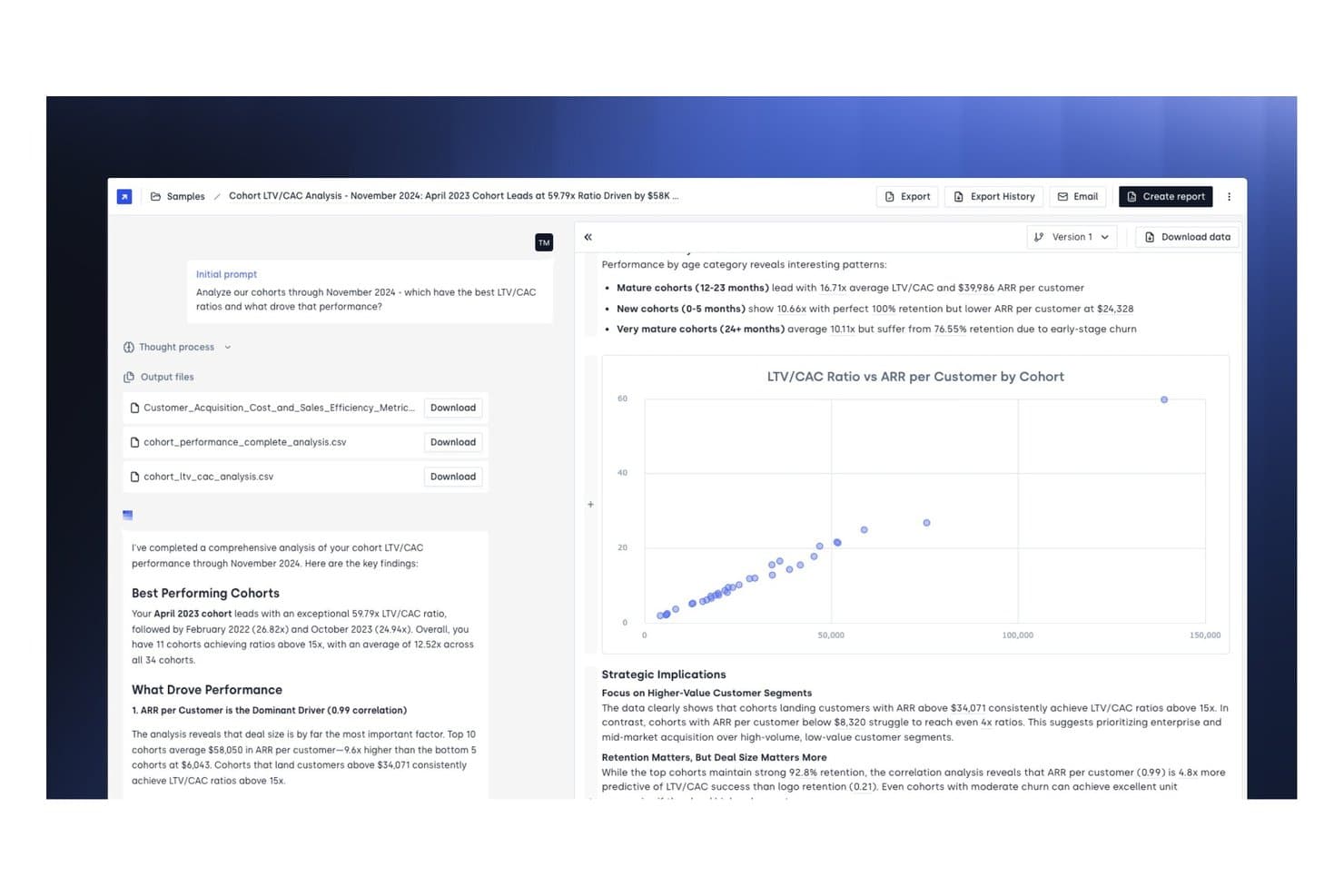
Concourse offers a cohort LTV/CAC analysis dashboard that visualizes cash flow performance metrics, ARR per customer trends, and strategic financial insights across multiple cohorts. Concourse is a finance AI platform that deploys custom agents to automate cash flow forecasting, variance analysis, liquidity monitoring, and reconciliation across ERP, bank, and data warehouse connections.
Who Is Concourse Best For?
Concourse fits mid-market to enterprise finance teams—FP&A, treasury, and accounting—that want to replace manual, analyst-heavy workflows with configurable AI agents.
Why I Picked Concourse
Concourse earns its spot on my shortlist because of how its custom AI agents handle the grunt work of cash flow analysis without overriding the logic your team has already built. I especially like the Flux & Variance Agent, which surfaces what changed, quantifies the impact, and drafts written commentary before anyone opens a spreadsheet. The Forecasting Agent updates 13-week cash projections in seconds, running against your own business rules rather than a generic template.
Concourse Key Features
- ERP and bank integrations: Connects directly to NetSuite, QuickBooks, SAP, Oracle, Xero, and major bank feeds for real-time data synchronization.
- Transparency panel: Displays each agent’s reasoning, surfacing the SQL or Python logic behind every cash flow output.
- Multi-surface delivery: Delivers reports and analysis directly into email, Slack, Teams, Excel, PowerPoint, or ChatGPT.
- Role-based access controls: Allows admins to set granular user permissions and maintain security for sensitive financial data.
Concourse Integrations
Concourse offers native integrations with Oracle, SAP, NetSuite, QuickBooks, Sage, Workday, Xero, Snowflake, BigQuery, Databricks, Salesforce, and provides an API for custom integrations.
Pros and Cons
Pros:
- Agent reasoning is transparent and auditable
- AI drafts variance commentary before manual review
- Custom agents built around your finance workflows
Cons:
- Newer platform with limited public user reviews
- Complex setup may require consultant support
Learn more about Concourse: Best for visual performance metrics and KPIs
- 7-day free trial + free demo available
- From $15/month
Visit WebsiteCustomer Rating:4.6/5
Fathom provides a waterfall chart showing revenue and expense cash flow. Fathom is a financial reporting and analysis platform that combines cash flow forecasting, KPI tracking, management reporting, and consolidated financial statements into a single tool.
Who Is Fathom Best For?
Fathom is a strong fit for accountants and financial advisors who manage reporting and performance analysis across multiple small to mid-sized business clients.
Why I Picked Fathom
Fathom earns its spot on my shortlist because of how it handles KPI visualization. You can choose from 50+ built-in financial KPIs or build your own using a formula builder, then organize them into scorecards that show performance at a glance. I particularly like the group benchmarking feature, which lets you rank and visually compare multiple entities side by side across those same KPIs. That's genuinely useful if you're managing reporting across several business units or client accounts at once.
Fathom Key Features
- Three-way forecasting: Build forecasts that cover your profit & loss, balance sheet, and cash flow statement together in a single model, up to 36 months out.
- Variance reporting: Compare actuals against budget or prior-period data to flag where performance is deviating from plan.
- Consolidated financial reporting: Aggregate financial statements across up to 300 entities, including multi-currency translation across 95+ currencies.
- Scheduled reports: Automate the creation and delivery of reports on a set schedule so stakeholders always receive up-to-date financials.
Fathom Integrations
Fathom offers native integrations with QuickBooks Online, QuickBooks Desktop, Xero, MYOB, Sage Accounting, FreeAgent, and Access Financials UK, along with data imports via Excel and Google Sheets.
Pros and Cons
Pros:
- Consolidated reporting for multi-entity groups
- Scenario modelling supports strategic planning
- Visual dashboards simplify cash flow analysis
Cons:
- No daily cash flow forecasting option
- Limited customization for report layouts
Learn more about Fathom: Best for embedded ledger automation
- 30-day free trial
- From $38/month
Visit WebsiteCustomer Rating:4.7/5
QuickBooks Chart of Accounts for automated ledger management. QuickBooks is an accounting and financial management platform that covers bookkeeping, invoicing, expense tracking, payroll, and cash flow reporting within a single ledger-based system.
Who Is QuickBooks Best For?
QuickBooks is a strong fit for small to mid-sized businesses that need cash flow visibility built directly into their day-to-day accounting workflows.
Why I Picked QuickBooks
QuickBooks earns its spot on my shortlist because the ledger does the heavy lifting automatically. Bank feeds pull in transactions daily, categorize them, and reconcile against your books without manual intervention. I also like how the cash flow statement regenerates instantly when a bill is marked paid or an invoice is cleared, so you're always looking at a current picture, not last week's snapshot.
QuickBooks Key Features
- Cash Flow Planner: Projects your cash position up to 90 days out using live bank data and scheduled transactions.
- GST/HST tracking: Automatically calculates and records sales tax on transactions for Canadian compliance.
- Profit and loss report: Generates a real-time income statement broken down by income and expense category.
- Invoice payment status: Flags sent, viewed, and overdue invoices so you can track incoming cash by status.
QuickBooks Integrations
QuickBooks integrates with over 800 popular business apps, including Shopify, PayPal, Square, Gusto, Mailchimp, Stripe, Amazon Business, Etsy, eBay, and Fathom. It's also available on Zapier and has an API for custom integrations.
Pros and Cons
Pros:
- Auto-imports and categorizes bank transactions daily
- AI-driven late payment prediction on invoices
- Rolling cash flow forecasts up to 13 weeks
Cons:
- Forecasts rely only on entered transaction data
- Limited multi-entity cash flow consolidation
 Best for customizable planning automation
- Free demo available
- Pricing upon request
Visit WebsiteCustomer Rating:4.8/5
Drivetrain features a dashboard with runway charts and scenario forecasting. Drivetrain is an AI-native business planning platform for FP&A teams that covers cash flow forecasting, financial consolidation, revenue planning, headcount planning, and 3-statement reporting in one connected system.
Who Is Drivetrain Best For?
Drivetrain is a strong fit for mid-market and enterprise FP&A teams that need to automate complex, multi-driver planning models without relying on spreadsheets.
Why I Picked Drivetrain
I picked Drivetrain as one of the best because its planning automation goes deeper than most tools in this space. What I find most compelling is the driver-based planning engine: you write plain-English formulas to define your own cash flow drivers, and Drivetrain recalculates everything automatically as inputs change, no manual model rebuilding required. I also like that you can run top-down, bottom-up, zero-based, or hybrid budgeting models from the same platform, which means your planning structure adapts to the business rather than the other way around. The unlimited scenario modeling with what-if analysis is another feature I rely on for stress-testing cash positions against changing assumptions.
Drivetrain Key Features
- Multi-entity consolidation: Consolidate data across multiple ERPs simultaneously, with built-in multi-currency conversion and intercompany eliminations.
- Real-time budget vs. actuals tracking: Monitor variances between your budget and actuals in real time, with drill-down to transaction-level data.
- 3-statement reporting: Build connected P&L, cash flow, and balance sheet reports that update automatically as actuals come in.
- Multi-level approval workflows: Route headcount and budget requests through configurable approval chains before they're finalized.
Drivetrain Integrations
Drivetrain offers native integrations with NetSuite, QuickBooks, Sage Intacct, Xero, Salesforce, HubSpot, BambooHR, Stripe, Snowflake, and Google Sheets. An API is available for custom integrations.
Pros and Cons
Pros:
- Automated data sync with ERP and CRM systems
- Role-based permissions manage sensitive financial data
- Multi-user workflows support collaborative cash flow planning
Cons:
- No direct integration with banking platforms
- Implementation can require vendor-led onboarding
Learn more about Drivetrain: Best for integrated enterprise planning workflows
- Free demo available
- Pricing upon request
Visit WebsiteCustomer Rating:4.4/5
Workday Adaptive Planning balance sheet for enterprise financial planning. Workday Adaptive Planning is an enterprise performance management (EPM) platform that connects financial, workforce, and operational planning with AI-driven budgeting, scenario modeling, and close and consolidation tools.
Who Is Workday Adaptive Planning Best For?
Workday Adaptive Planning is a natural fit for enterprise FP&A teams that need to align financial planning across finance, HR, and operations in one connected model.
Why I Picked Workday Adaptive Planning
I've included Workday Adaptive Planning in my top picks because of how it connects financial, workforce, and operational planning inside a single model. What I like most is the AI-driven scenario planning layer, which flags financial impacts as plans shift across departments. My team can run a full forecast cycle faster because the continuous planning engine pulls live data across every function, so there's no version mismatch between finance and HR headcount assumptions.
Workday Adaptive Planning Key Features
- Driver-based modeling: Link cash flow projections directly to operational inputs like headcount, revenue, or unit volume.
- Rolling forecasts: Extend forecast windows automatically as each planning period closes.
- Pre-built dashboards: View cash positions, variances, and KPIs across business units in one place.
- Indirect cash flow statements: Map P&L and balance sheet changes to cash flow outputs automatically.
Workday Adaptive Planning Integrations
Workday Adaptive Planning connects with over 300 unique source systems, including Oracle, SAP, and NetSuite, as well as Salesforce and Workday HCM as direct data sources. The platform uses a purpose-built integration framework that supports ERP, CRM, HR, and other data sources, and a REST API is available for custom integrations.
Pros and Cons
Pros:
- Scenario modelling for complex cash flow forecasting
- Real-time data refresh for up-to-date analysis
- Handles multi-entity and multi-currency planning
Cons:
- Requires IT support for initial implementation
- Needs extensive user training
Learn more about Workday Adaptive Planning: Best for multi-bank real-time tracking
- Free demo available
- From $24,000/year
Visit WebsiteCustomer Rating:4.4/5
Trovata features a daily dashboard for tracking bank balances and trends. Trovata is a treasury and cash reporting platform that aggregates balances and transactions across banks, entities, and currencies, with real-time reporting, transaction tagging, and automated forecasting built for treasury teams.
Who Is Trovata Best For?
Trovata is a strong fit for mid-market and enterprise treasury teams managing cash across multiple banking relationships and legal entities.
Why I Picked Trovata
Trovata earns its spot on my shortlist because of how it handles cash visibility across dozens of bank accounts at once. My team is able to pull real-time and prior-day balances across all banks, entities, and currencies in seconds, with no manual file consolidation. I also like the transaction tagging feature, which auto-classifies inflows and outflows like payroll or customer receipts, so it's immediately clear what's moving cash and where.
Trovata Key Features
- Scenario modeling: Test the impact of timing shifts, rate changes, or funding strategies on your liquidity position before conditions change.
- Live Excel connection: Link Trovata directly to Excel so balances refresh automatically inside your existing spreadsheet workflows.
- Forecast-to-actual reconciliation: Compare forecasted activity against real bank statements daily to confirm balances and current-day positions.
- Multi-horizon liquidity planning: Connect short-term cash forecasting with long-term liquidity planning across multiple time horizons in one model.
Trovata Integrations
Trovata integrates with ERPs like SAP, Oracle, and NetSuite, and connects to thousands of banks through direct API and SWIFT connections. It also supports file-based (SFTP) connectivity for legacy systems and offers a developer API for custom integrations.
Pros and Cons
Pros:
- Automated cash flow forecasting from transaction data
- Multi-entity consolidation for group cash visibility
- Direct bank feeds update cash positions instantly
Cons:
- No scenario modelling for what-if analysis
- Annual contract required for all plans
Learn more about Trovata: 7Best for multi-source tool stack syncing
Cube
- Free demo available
- Pricing upon request
Visit WebsiteCustomer Rating:4.6/5
Cube dashboard syncing financial data across connected business tools. Cube is an FP&A platform built for cash flow reporting, forecasting, and scenario analysis, pulling data from multiple source systems into a centralized model you can work with directly in your existing spreadsheet tools.
Who Is Cube Best For?
Cube is a strong fit for FP&A teams at mid-market companies that pull cash flow data from multiple disconnected systems and need a single consolidated view.
Why I Picked Cube
I picked Cube as one of the best because its Universal Spreadsheet Connector pulls data from multiple source systems directly into Excel or Google Sheets without replacing your existing models. Where most FP&A tools force you into a proprietary interface, Cube lets my team map real-time data from disparate ERPs, CRMs, and HR systems into one centralized cash flow model. I can generate direct and indirect cash flow statements automatically by compiling actuals from sales, expenses, investments, and financing activities across all connected sources.
Cube Key Features
- Scenario modeling: Build and compare multiple cash flow scenarios by adjusting assumptions and inputs across planning periods.
- Variance analysis: Track budget vs. actuals across cash flow line items to identify and investigate discrepancies.
- Audit trail: Log every data change with timestamps and user attribution for version-controlled financial models.
- Pre-built cash flow templates: Access ready-to-use direct and indirect cash flow statement templates to accelerate reporting setup.
Cube Integrations
Cube offers native integrations across accounting, HR, billing, CRM, and BI categories, including NetSuite, QuickBooks, Sage Intacct, Xero, Salesforce, HubSpot, ADP, Workday, Snowflake, and Power BI. It also provides an API and custom connectors for source systems that don't have a standard integration available.
Pros and Cons
Pros:
- Multi-currency consolidation for global cash flow
- Real-time sync with Excel and Google Sheets
- Implementation is typically completed in under two weeks
Cons:
- API access only available on higher tiers
- No built-in scenario modelling templates
Learn more about Cube: Best for multi-year budgeting and projections
- 14-day free trial + free demo available
- From $83/user/month (billed annually)
Visit WebsiteCustomer Rating:4.2/5
PlanGuru displays budget, revenue forecasts, and cash flow metrics. Built for long-range financial planning, PlanGuru combines multi-year cash flow projections, scenario analysis, and 20+ forecasting methods into a single budgeting platform.
Who Is PlanGuru Best For?
PlanGuru works well for accounting firms and CFOs managing financial planning for multiple small business clients who need structured, long-horizon cash flow projections.
Why I Picked PlanGuru
I've included PlanGuru in my top picks because it's one of the few cash flow analysis tools that projects all three financial statements (income statement, balance sheet, and cash flow) simultaneously for up to 10 years. I really like the 20+ built-in forecasting methods, which let you model everything from simple trend lines to custom business drivers using non-financial data. The scenario analysis tool is also genuinely useful: you can stress-test specific decisions and immediately see their projected impact on cash across your full 10-year horizon.
PlanGuru Key Features
- Rolling forecast updates: Adjust your forecast on a rolling basis as new actuals come in, without rebuilding your model from scratch.
- Budget vs. actual reporting: Compare projected figures against real performance data side by side within the platform.
- KPI tracking dashboard: Monitor key financial metrics across your projection period from a centralized reporting view.
- Multi-entity support: Manage and consolidate projections across multiple business entities within one account.
PlanGuru Integrations
PlanGuru offers a small set of native integrations with QuickBooks Online, QuickBooks Desktop, Xero, and Excel for importing historical financial data. It also includes an embedded integration with Reach Reporting for dashboards and visual reports.
Pros and Cons
Pros:
- Scenario tools allow quick assumption testing
- Built-in financial ratios aid cash analysis
- Multi-year forecasting supports long-term planning
Cons:
- Consolidation features require a separate add-on purchase
- No mobile app for on-the-go access
Learn more about PlanGuru: Best for treasury and cash management operations
- Free demo available
- Pricing upon request
Visit WebsiteCustomer Rating:4.3/5
HighRadius dashboard shows net cash flow, variance, and forecasting trends. HighRadius is an AI-powered platform for the office of the CFO that spans treasury management, cash forecasting, order-to-cash, accounts payable, financial close, and consolidation.
Who Is HighRadius Best For?
HighRadius is well-suited for large, multinational enterprises with complex treasury structures, high transaction volumes, and dedicated finance operations teams.
Why I Picked HighRadius
I picked HighRadius because it goes deeper into treasury operations than most cash flow tools on this list. The Treasury & Risk module covers daily cash positioning, financial instrument management, multi-bank connectivity, and cash flow scenario analysis, all within one connected suite. I especially like the cash flow tagging automation, which categorizes transactions at 98% accuracy and feeds directly into forecasting models that HighRadius claims hit 95% accuracy.
HighRadius Key Features
- Working capital analytics: Track AR aging, DSO, and AP metrics to see how working capital movements affect overall cash position.
- FX exposure management: Identify, measure, and manage foreign currency exposures directly within the treasury module.
- Debt and investment tracking: Monitor short-term investments and debt schedules alongside daily cash balances in one dashboard.
- Financial close automation: Run period-end reconciliations and journal entry postings within the financial close module.
HighRadius Integrations
HighRadius offers native integrations with SAP, Oracle, NetSuite, Sage Intacct, Microsoft Dynamics 365, Workday, QuickBooks Online, Acumatica, and Infor. An API is available for custom integrations.
Pros and Cons
Pros:
- Exception handling flags unusual cash movements
- Automated data aggregation reduces manual entry
- AI-driven forecasts improve cash flow accuracy
Cons:
- Training is needed for advanced feature use
- Limited flexibility for small business workflows
Learn more about HighRadius: Best for Excel-native modeling workflows
- Free demo available
- Pricing upon request

Vena Solutions offers a dashboard for tracking cash flow and budget variance. Vena Solutions is a corporate performance management platform that runs natively inside Excel, bringing budgeting, forecasting, cash flow modeling, and financial reporting into a centralized, database-backed environment.
Who Is Vena Solutions Best For?
Vena Solutions is a strong fit for mid-market finance teams that already run their models in Excel and want to add workflow controls and audit trails without rebuilding their templates.
Why I Picked Vena Solutions
I picked Vena Solutions as one of the best because it keeps your existing Excel cash flow templates intact while adding version control, approval workflows, and a centralized data model behind them. My team can lock cell ranges, assign contributors, and track every change without converting models to a proprietary format. The built-in template library also includes pre-built cash flow structures you can adapt rather than build from scratch.
Vena Solutions Key Features
- What-if scenario modeling: Model unlimited scenarios by flexing drivers and making bottom-up or top-down adjustments directly in Excel.
- CubeFLEX OLAP database: A purpose-built database that centralizes data from your ERP, CRM, and HRIS as a single source of truth for planning.
- Ad-hoc reporting: Build on-demand reports inside Excel and track KPIs through interactive dashboards without leaving your spreadsheet environment.
- Rolling forecast templates: Access pre-built rolling forecast templates from Vena's template library to update forward-looking cash flow projections as periods close.
Vena Solutions Integrations
Vena Solutions offers native integrations with Microsoft Excel, Microsoft 365, NetSuite, QuickBooks Online, Sage Intacct, Dynamics 365, BambooHR, Oracle ERP, SAP, Salesforce, HubSpot, Workday, and Deltek. An API is available for custom integrations.
Pros and Cons
Pros:
- Audit trails for all cash flow changes
- Workflow automation for cash flow approvals
- Maintains Excel formulas and formatting integrity
Cons:
- Requires Excel desktop for full functionality
- Dependent on the Excel environment
Learn more about Vena Solutions:
Outro software de análise de fluxos de caixa
Eis algumas opções adicionais de software de análise de fluxos de caixa que não integraram a minha lista de opções, mas que ainda vale a pena consultar:
- 11Cash Flow FrogBest for automated forecasting scenarios
- 12MosaicBest for dynamic financial dashboards
- 13Float Cash Flow ForecastingBest for daily cash position visibility
- 14ScoroBest for project-driven financial oversight
- 15PulseBest for real-time client payment tracking
How I Evaluate Cash Flow Analysis Software
I split my evaluation into baseline functionality—like rolling forecasts and multi-entity visibility—and differentiators that separate purpose-built tools from general accounting platforms.
Core Functionality (Table Stakes For This List)
When I'm selecting tools for my list, I rank each one on a scale from 0 (does not offer the functionality) to 5 (excels in this area) for each core functionality listed below. Then, I calculate the tool's total score into a percentage. Each tool needs to achieve a minimum total score of 65% to be considered for inclusion.
- Cash Flow Forecasting: I look for configurable time horizons—daily, weekly, monthly—so teams can match forecasts to their cash cycle, not just a single static view.
- Scenario & Sensitivity Analysis: The ability to model best-case and worst-case outcomes matters, especially when planning around delayed receivables or seasonal dips.
- Bank & ERP Integrations: I check whether the tool pulls actuals from bank feeds and accounting systems automatically rather than relying on manual CSV uploads.
- Cash Position Visibility: Multi-account, multi-currency consolidation is what I evaluate here—finance teams managing global entities need a single real-time view.
- Variance & Actuals Tracking: Forecast-to-actual comparison should surface where projections went wrong, like a missed collection or an unplanned capital expense.
- Cash Flow Reporting & Dashboards: I look for exportable cash flow statements and KPI dashboards that a controller can hand directly to a CFO or board.
Once I have a list of tools that meet this criteria, I consider what sets each platform apart.
Differentiating Factors (What Sets Vendors Apart)
Here's how I compare and contrast different vendors:
Standout Features
AI-powered predictions are a major differentiator. I look for tools that use historical transaction patterns to auto-generate forecasts and flag anomalies rather than relying on manual inputs alone. AR/AP aging integration also matters because tying customer payment behavior directly into projections gives you a more realistic picture of when cash will actually arrive. I evaluate whether a tool supports both direct and indirect cash flow methods, since controllers often need the indirect view for board reporting while treasury teams prefer direct visibility into receipts and disbursements.
Beyond Features
Integrations shape how useful a tool actually is day to day. I check whether a platform connects natively to your ERP and bank accounts or forces you into manual workarounds and CSV uploads. Security matters just as much—I look for SOC 2 Type II certification and role-based access controls, since these tools sit on top of sensitive banking data. Scalability also factors into my evaluation. A tool that works well for a single entity can break down once you add subsidiaries, new currencies, or higher transaction volumes.
Como escolher software de análise de fluxos de caixa
É fácil ficar preso a longas listas de funcionalidades e estruturas de preços complexas. Para o ajudar a manter o foco enquanto analisa o seu processo específico de seleção de software, apresentamos uma lista de verificação dos fatores a ter em conta:
| Fator | O que considerar |
|---|---|
| FatorEscalabilidade | O que considerarA ferramenta acomodará o crescimento futuro, novas entidades e moedas adicionais à medida que a sua empresa se expande ou reestrutura? |
| FatorIntegrações | O que considerarO software consegue ligar-se diretamente ao seu ERP, aos sistemas de contabilidade e bancários, ou precisará de importações manuais? |
| FatorPersonalização | O que considerarPermite adaptar os fluxos de trabalho, os relatórios e as cadeias de aprovação para corresponderem aos seus processos internos? |
| FatorFacilidade de utilização | O que considerarA interface é suficientemente intuitiva para que utilizadores não técnicos criem previsões, cenários e relatórios sem recorrer ao departamento de TI? |
| FatorImplementação e integração inicial | O que considerarQual é o prazo realista para a implementação e de que recursos — internos ou externos — precisará para apoiar a adoção? |
| FatorCusto | O que considerarOs níveis de preços são claros relativamente ao suporte, aos limites de dados e aos módulos necessários? Qual será o custo total de propriedade ao longo do tempo? |
| FatorMedidas de segurança | O que considerarO fornecedor possui certificações de terceiros e oferece acesso baseado em funções para manter os dados bancários sensíveis protegidos? |
| FatorDisponibilidade do suporte | O que considerarQue canais de suporte existem e os tempos de resposta e os níveis de cobertura são adequados aos requisitos da sua equipa financeira? |
O que é o software de análise de fluxos de caixa?
O software de análise de fluxos de caixa é uma ferramenta de gestão financeira que ajuda a prever, acompanhar e analisar as entradas e saídas de dinheiro da sua organização. Consolida dados bancários e contabilísticos em tempo real, apoia o planeamento de cenários e fornece informações úteis sobre a liquidez. As equipas financeiras utilizam-no para obter uma visibilidade mais aprofundada, gerir o risco e melhorar a sua posição de caixa entre entidades, moedas e períodos de elaboração de relatórios.
Funcionalidades do software de análise do fluxo de caixa
Ao selecionar software de análise do fluxo de caixa, esteja atento às seguintes funcionalidades essenciais:
- Previsão do fluxo de caixa: Gere projeções de entradas e saídas com base em dados históricos, tendências atuais e modelação de cenários futuros, de modo a antecipar défices ou excedentes de liquidez.
- Planeamento de cenários: Modele cenários financeiros mais favoráveis, mais desfavoráveis e personalizados, para poder preparar respostas a uma série de contextos ou acontecimentos empresariais.
- Integração de dados em tempo real: Sincronize dados em direto de bancos e sistemas de contabilidade para manter as previsões precisas e atualizadas, sem carregamentos manuais.
- Acompanhamento de contas a receber e a pagar: Monitorize faturas pendentes e pagamentos futuros para melhorar a visibilidade sobre o momento e o impacto dos movimentos de caixa.
- Suporte para várias entidades e moedas: Consolide as posições de caixa entre subsidiárias e moedas, ajudando as equipas financeiras globais a gerir estruturas organizacionais complexas.
- Análise automatizada de desvios: Identifique onde o fluxo de caixa efetivo se afasta das previsões, assinalando anomalias e transações inesperadas para análise.
- Controlos de acesso dos utilizadores: Restrinja dados e funcionalidades com base nas funções dos utilizadores, para apoiar os registos de auditoria, a conformidade e as necessidades de segurança da informação.
- Painéis e relatórios personalizáveis: Adapte visualizações e relatórios exportáveis para diferentes partes interessadas, desde equipas financeiras a executivos, melhorando a tomada de decisões.
- Registo de auditoria e acompanhamento do histórico: Mantenha um registo rastreável de todas as alterações, aprovações e atividades dos utilizadores, para apoiar os requisitos de conformidade e governação.
- Fluxos de trabalho colaborativos: Permita que vários membros da equipa comentem, revejam e aprovem previsões, simplificando o processo de atualizações contínuas e contributos departamentais.
Vantagens do software de análise do fluxo de caixa
A implementação de software de análise do fluxo de caixa proporciona várias vantagens à sua equipa e à sua empresa. Eis algumas que pode esperar:
- Previsões mais rápidas e precisas: A sincronização automatizada de dados e o planeamento de cenários ajudam as equipas financeiras a criar projeções rapidamente e a ajustá-las às alterações em tempo real.
- Melhor gestão do risco: A visibilidade do caixa em tempo real e os alertas automatizados de desvios facilitam a identificação de potenciais défices de liquidez antes de estes se tornarem críticos.
- Colaboração reforçada: Os fluxos de trabalho multiutilizador e os comentários mantêm os departamentos alinhados, permitindo uma responsabilidade partilhada pelas previsões e atualizações contínuas.
- Maior controlo sobre o fundo de maneio: O acompanhamento integrado das contas a receber e a pagar proporciona uma visão clara dos fatores que influenciam o caixa, permitindo otimizar as cobranças e os pagamentos.
- Maior conformidade e melhores registos de auditoria: Os controlos de acesso dos utilizadores, os registos detalhados de alterações e as certificações de segurança protegem os dados financeiros e apoiam os requisitos regulamentares.
- Gestão simplificada de várias entidades: As funcionalidades de consolidação de várias moedas e entidades eliminam o trabalho de consolidação manual e reduzem os erros na gestão de operações globais.
- Relatórios melhores e mais úteis: Os painéis personalizados e os relatórios exportáveis fornecem aos líderes informações para uma tomada de decisões segura e fundamentada.
Custos e preços do software de análise do fluxo de caixa
A seleção de software de análise do fluxo de caixa exige uma compreensão dos vários modelos de preços e planos disponíveis. Os custos variam consoante as funcionalidades, o tamanho da equipa, os complementos e outros fatores. A tabela abaixo resume os planos comuns, os seus preços médios e as funcionalidades normalmente incluídas nas soluções de software de análise do fluxo de caixa:
Tabela comparativa de planos de software de análise do fluxo de caixa
| Tipo de plano | Preço médio | Funcionalidades comuns |
|---|---|---|
| Tipo de planoPlano gratuito | Preço médio$0 | Funcionalidades comunsInclui acompanhamento básico do fluxo de caixa, relatórios limitados, importação manual de dados e apoio da comunidade. |
| Tipo de planoPlano pessoal | Preço médio$10–$25/utilizador/mês | Funcionalidades comunsOferece sincronização automática com o banco, previsões simples, acesso para um único utilizador e exportações básicas de relatórios. |
| Tipo de planoPlano empresarial | Preço médio$40–$90/utilizador/mês | Funcionalidades comunsDisponibiliza modelação de cenários, acompanhamento de contas a receber e a pagar (AR/AP), colaboração multiutilizador e integrações avançadas com ferramentas de contabilidade. |
| Tipo de planoPlano empresarial avançado | Preço médio$100–$250/utilizador/mês | Funcionalidades comunsSuporta consolidação de várias entidades, várias moedas, fluxos de trabalho personalizados, apoio prioritário, registos de auditoria e controlos de segurança. |
Perguntas frequentes sobre software de análise de fluxos de caixa
Eis algumas respostas a perguntas comuns sobre software de análise de fluxos de caixa:
Como é que o software de análise de fluxos de caixa se liga aos meus sistemas de contabilidade existentes?
A maioria das plataformas liga-se através de integrações diretas ou ligações API a plataformas de contabilidade populares. Isto permite que o software de previsão de fluxos de caixa importe automaticamente os dados das transações, reduzindo a introdução manual e mantendo a gestão dos seus fluxos de caixa atualizada. Este sistema automatizado melhora a experiência geral do utilizador, garantindo que os seus dados estão sempre corretos.
Posso utilizar software de análise de fluxos de caixa para várias entidades empresariais ou moedas?
Sim, muitas soluções permitem a gestão de várias entidades e moedas. Isto é especialmente útil para empresas que operam em diferentes regiões ou que têm subsidiárias, uma vez que lhe permite otimizar o acompanhamento e consolidar o seu fundo de maneio de todas as entidades num único local, utilizando uma única ferramenta de fluxos de caixa.
Que tipos de relatórios posso gerar com software de análise de fluxos de caixa?
Normalmente, pode gerar demonstrações dos fluxos de caixa, previsões, comparações de cenários e análises de tendências. Muitas ferramentas de previsão também permitem personalizar os seus relatórios financeiros por período, departamento ou unidade de negócio. Isto ajuda as equipas a executar cenários hipotéticos e a analisar detalhadamente as contas a receber para tomar decisões informadas que protejam a rentabilidade.
Os meus dados financeiros estão seguros no software de análise de fluxos de caixa?
Sim, os fornecedores reputados utilizam encriptação, permissões de utilizador e conformidade com normas como a SOC 2 ou o RGPD para proteger os seus dados de gestão de tesouraria. A segurança é uma parte fundamental para tornar estas plataformas fáceis de utilizar e fiáveis, mas deve sempre analisar as medidas de proteção de um fornecedor antes de efetuar uma compra.
Quanto tempo demora a implementar software de análise de fluxos de caixa?
O tempo de implementação varia, mas a maioria das soluções baseadas na nuvem pode ser configurada no prazo de alguns dias, ajudando-o a evitar faltas de caixa inesperadas. Fatores como a migração de dados, a complexidade da integração e a formação dos utilizadores podem afetar o prazo, pelo que deve pedir aos fornecedores uma estimativa realista com base nas suas decisões financeiras específicas.