

Software-ul de analiză a fluxului de numerar vă ajută să urmăriți, să prognozați și să analizați circulația banilor în și din compania dumneavoastră. Dacă sunteți în căutarea celui mai bun software de analiză a fluxului de numerar, probabil că trebuie să îmbunătățiți vizibilitatea financiară, să susțineți raportarea exactă și să luați decizii mai rapide, bazate pe date.
Având la dispoziție atât de multe opțiuni, este dificil să știți care instrumente se potrivesc modelului dumneavoastră de afaceri, nevoilor de raportare și cerințelor de integrare. Această listă vă va ajuta să comparați soluțiile de top pentru 2026, astfel încât să puteți alege software-ul potrivit pentru a gestiona fluxul de numerar, a reduce riscurile și a menține organizația pe drumul cel bun.
Why Trust Our Software Recommendations
6,700+
Reviews
20
Industry experts
16+
Evaluation factors
14
Years
Our team has been testing and reviewing software since 2012. As finance leaders ourselves, we know how difficult—and important—it is to choose the right software.
For this guide, we evaluated tools using hands-on testing and independent research, scoring tools using our selection criteria.
Our reviews reflect our human editorial judgment, not a sales pitch.
Tabel comparativ al software-urilor de analiză a fluxului de numerar
Acest tabel comparativ rezumă detaliile privind prețurile pentru selecțiile mele de top de software-uri de analiză a fluxului de numerar.
Sorted by: Default
| Tool | Starting Price | Website | |
|---|---|---|---|
Best with custom AI agents for finance teams | Not rated | Pricing upon request Free plan available | Website |
Best for embedded ledger automation | 4.7 out of 5 | $38/month 30-day free trial | Website |
Best for visual performance metrics and KPIs | 4.6 out of 5 | $15/month 7-day free trial + free demo available | Website |
Best for customizable planning automation | 4.8 out of 5 | Pricing upon request Free demo available | Website |
Best for integrated enterprise planning workflows | 4.4 out of 5 | Pricing upon request Free demo available | Website |
Best for multi-bank real-time tracking | 4.4 out of 5 | $24,000/year Free demo available | Website |
Best for multi-source tool stack syncing | 4.6 out of 5 | Pricing upon request Free trial available | Website |
Best for multi-year budgeting and projections | 4.2 out of 5 | $83/user/month 14-day free trial + free demo available | Website |
Best for treasury and cash management operations | 4.3 out of 5 | Pricing upon request Free demo available | Website |
Best for Excel-native modeling workflows | Not rated | Pricing upon request Free demo available | Website |


Recenzii ale celor mai bune software-uri de analiză a fluxului de numerar
Mai jos sunt prezentate rezumatele mele detaliate ale celor mai bune software-uri de analiză a fluxului de numerar care au ajuns pe lista mea scurtă. Recenziile mele oferă o privire detaliată asupra funcțiilor, integrărilor și celor mai potrivite cazuri de utilizare pentru fiecare platformă, pentru a vă ajuta să o găsiți pe cea mai potrivită pentru dumneavoastră.
 Best with custom AI agents for finance teams
- Free plan available
- Pricing upon request
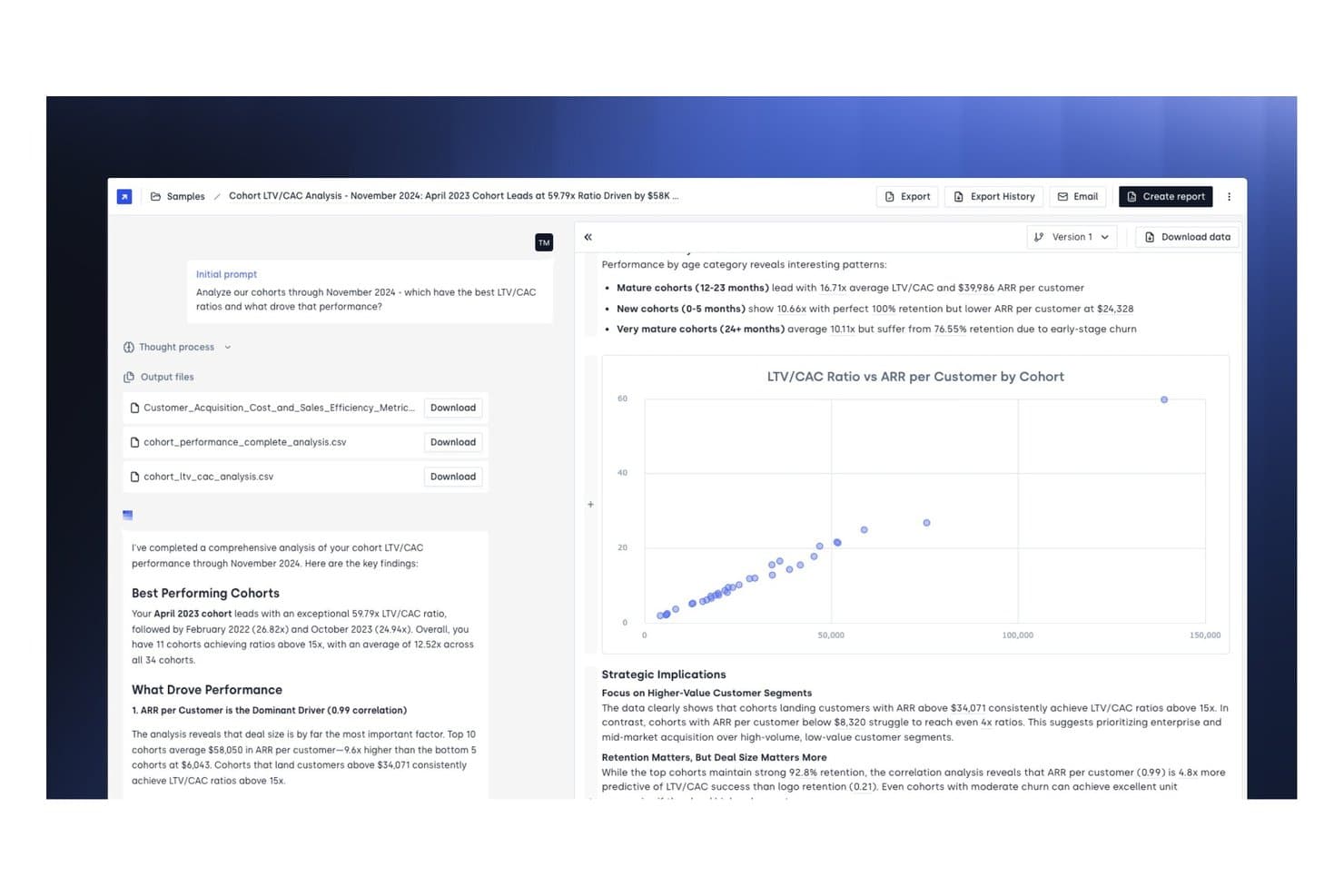
Concourse offers a cohort LTV/CAC analysis dashboard that visualizes cash flow performance metrics, ARR per customer trends, and strategic financial insights across multiple cohorts. Concourse is a finance AI platform that deploys custom agents to automate cash flow forecasting, variance analysis, liquidity monitoring, and reconciliation across ERP, bank, and data warehouse connections.
Who Is Concourse Best For?
Concourse fits mid-market to enterprise finance teams—FP&A, treasury, and accounting—that want to replace manual, analyst-heavy workflows with configurable AI agents.
Why I Picked Concourse
Concourse earns its spot on my shortlist because of how its custom AI agents handle the grunt work of cash flow analysis without overriding the logic your team has already built. I especially like the Flux & Variance Agent, which surfaces what changed, quantifies the impact, and drafts written commentary before anyone opens a spreadsheet. The Forecasting Agent updates 13-week cash projections in seconds, running against your own business rules rather than a generic template.
Concourse Key Features
- ERP and bank integrations: Connects directly to NetSuite, QuickBooks, SAP, Oracle, Xero, and major bank feeds for real-time data synchronization.
- Transparency panel: Displays each agent’s reasoning, surfacing the SQL or Python logic behind every cash flow output.
- Multi-surface delivery: Delivers reports and analysis directly into email, Slack, Teams, Excel, PowerPoint, or ChatGPT.
- Role-based access controls: Allows admins to set granular user permissions and maintain security for sensitive financial data.
Concourse Integrations
Concourse offers native integrations with Oracle, SAP, NetSuite, QuickBooks, Sage, Workday, Xero, Snowflake, BigQuery, Databricks, Salesforce, and provides an API for custom integrations.
Pros and Cons
Pros:
- Agent reasoning is transparent and auditable
- AI drafts variance commentary before manual review
- Custom agents built around your finance workflows
Cons:
- Newer platform with limited public user reviews
- Complex setup may require consultant support
Learn more about Concourse: Best for embedded ledger automation
- 30-day free trial
- From $38/month
Visit WebsiteCustomer Rating:4.7/5
QuickBooks Chart of Accounts for automated ledger management. QuickBooks is an accounting and financial management platform that covers bookkeeping, invoicing, expense tracking, payroll, and cash flow reporting within a single ledger-based system.
Who Is QuickBooks Best For?
QuickBooks is a strong fit for small to mid-sized businesses that need cash flow visibility built directly into their day-to-day accounting workflows.
Why I Picked QuickBooks
QuickBooks earns its spot on my shortlist because the ledger does the heavy lifting automatically. Bank feeds pull in transactions daily, categorize them, and reconcile against your books without manual intervention. I also like how the cash flow statement regenerates instantly when a bill is marked paid or an invoice is cleared, so you're always looking at a current picture, not last week's snapshot.
QuickBooks Key Features
- Cash Flow Planner: Projects your cash position up to 90 days out using live bank data and scheduled transactions.
- GST/HST tracking: Automatically calculates and records sales tax on transactions for Canadian compliance.
- Profit and loss report: Generates a real-time income statement broken down by income and expense category.
- Invoice payment status: Flags sent, viewed, and overdue invoices so you can track incoming cash by status.
QuickBooks Integrations
QuickBooks integrates with over 800 popular business apps, including Shopify, PayPal, Square, Gusto, Mailchimp, Stripe, Amazon Business, Etsy, eBay, and Fathom. It's also available on Zapier and has an API for custom integrations.
Pros and Cons
Pros:
- Auto-imports and categorizes bank transactions daily
- AI-driven late payment prediction on invoices
- Rolling cash flow forecasts up to 13 weeks
Cons:
- Forecasts rely only on entered transaction data
- Limited multi-entity cash flow consolidation
 Best for visual performance metrics and KPIs
- 7-day free trial + free demo available
- From $15/month
Visit WebsiteCustomer Rating:4.6/5
Fathom provides a waterfall chart showing revenue and expense cash flow. Fathom is a financial reporting and analysis platform that combines cash flow forecasting, KPI tracking, management reporting, and consolidated financial statements into a single tool.
Who Is Fathom Best For?
Fathom is a strong fit for accountants and financial advisors who manage reporting and performance analysis across multiple small to mid-sized business clients.
Why I Picked Fathom
Fathom earns its spot on my shortlist because of how it handles KPI visualization. You can choose from 50+ built-in financial KPIs or build your own using a formula builder, then organize them into scorecards that show performance at a glance. I particularly like the group benchmarking feature, which lets you rank and visually compare multiple entities side by side across those same KPIs. That's genuinely useful if you're managing reporting across several business units or client accounts at once.
Fathom Key Features
- Three-way forecasting: Build forecasts that cover your profit & loss, balance sheet, and cash flow statement together in a single model, up to 36 months out.
- Variance reporting: Compare actuals against budget or prior-period data to flag where performance is deviating from plan.
- Consolidated financial reporting: Aggregate financial statements across up to 300 entities, including multi-currency translation across 95+ currencies.
- Scheduled reports: Automate the creation and delivery of reports on a set schedule so stakeholders always receive up-to-date financials.
Fathom Integrations
Fathom offers native integrations with QuickBooks Online, QuickBooks Desktop, Xero, MYOB, Sage Accounting, FreeAgent, and Access Financials UK, along with data imports via Excel and Google Sheets.
Pros and Cons
Pros:
- Consolidated reporting for multi-entity groups
- Scenario modelling supports strategic planning
- Visual dashboards simplify cash flow analysis
Cons:
- No daily cash flow forecasting option
- Limited customization for report layouts
Learn more about Fathom: Best for customizable planning automation
- Free demo available
- Pricing upon request
Visit WebsiteCustomer Rating:4.8/5
Drivetrain features a dashboard with runway charts and scenario forecasting. Drivetrain is an AI-native business planning platform for FP&A teams that covers cash flow forecasting, financial consolidation, revenue planning, headcount planning, and 3-statement reporting in one connected system.
Who Is Drivetrain Best For?
Drivetrain is a strong fit for mid-market and enterprise FP&A teams that need to automate complex, multi-driver planning models without relying on spreadsheets.
Why I Picked Drivetrain
I picked Drivetrain as one of the best because its planning automation goes deeper than most tools in this space. What I find most compelling is the driver-based planning engine: you write plain-English formulas to define your own cash flow drivers, and Drivetrain recalculates everything automatically as inputs change, no manual model rebuilding required. I also like that you can run top-down, bottom-up, zero-based, or hybrid budgeting models from the same platform, which means your planning structure adapts to the business rather than the other way around. The unlimited scenario modeling with what-if analysis is another feature I rely on for stress-testing cash positions against changing assumptions.
Drivetrain Key Features
- Multi-entity consolidation: Consolidate data across multiple ERPs simultaneously, with built-in multi-currency conversion and intercompany eliminations.
- Real-time budget vs. actuals tracking: Monitor variances between your budget and actuals in real time, with drill-down to transaction-level data.
- 3-statement reporting: Build connected P&L, cash flow, and balance sheet reports that update automatically as actuals come in.
- Multi-level approval workflows: Route headcount and budget requests through configurable approval chains before they're finalized.
Drivetrain Integrations
Drivetrain offers native integrations with NetSuite, QuickBooks, Sage Intacct, Xero, Salesforce, HubSpot, BambooHR, Stripe, Snowflake, and Google Sheets. An API is available for custom integrations.
Pros and Cons
Pros:
- Automated data sync with ERP and CRM systems
- Role-based permissions manage sensitive financial data
- Multi-user workflows support collaborative cash flow planning
Cons:
- No direct integration with banking platforms
- Implementation can require vendor-led onboarding
Learn more about Drivetrain: Best for integrated enterprise planning workflows
- Free demo available
- Pricing upon request
Visit WebsiteCustomer Rating:4.4/5
Workday Adaptive Planning balance sheet for enterprise financial planning. Workday Adaptive Planning is an enterprise performance management (EPM) platform that connects financial, workforce, and operational planning with AI-driven budgeting, scenario modeling, and close and consolidation tools.
Who Is Workday Adaptive Planning Best For?
Workday Adaptive Planning is a natural fit for enterprise FP&A teams that need to align financial planning across finance, HR, and operations in one connected model.
Why I Picked Workday Adaptive Planning
I've included Workday Adaptive Planning in my top picks because of how it connects financial, workforce, and operational planning inside a single model. What I like most is the AI-driven scenario planning layer, which flags financial impacts as plans shift across departments. My team can run a full forecast cycle faster because the continuous planning engine pulls live data across every function, so there's no version mismatch between finance and HR headcount assumptions.
Workday Adaptive Planning Key Features
- Driver-based modeling: Link cash flow projections directly to operational inputs like headcount, revenue, or unit volume.
- Rolling forecasts: Extend forecast windows automatically as each planning period closes.
- Pre-built dashboards: View cash positions, variances, and KPIs across business units in one place.
- Indirect cash flow statements: Map P&L and balance sheet changes to cash flow outputs automatically.
Workday Adaptive Planning Integrations
Workday Adaptive Planning connects with over 300 unique source systems, including Oracle, SAP, and NetSuite, as well as Salesforce and Workday HCM as direct data sources. The platform uses a purpose-built integration framework that supports ERP, CRM, HR, and other data sources, and a REST API is available for custom integrations.
Pros and Cons
Pros:
- Scenario modelling for complex cash flow forecasting
- Real-time data refresh for up-to-date analysis
- Handles multi-entity and multi-currency planning
Cons:
- Requires IT support for initial implementation
- Needs extensive user training
Learn more about Workday Adaptive Planning: Best for multi-bank real-time tracking
- Free demo available
- From $24,000/year
Visit WebsiteCustomer Rating:4.4/5
Trovata features a daily dashboard for tracking bank balances and trends. Trovata is a treasury and cash reporting platform that aggregates balances and transactions across banks, entities, and currencies, with real-time reporting, transaction tagging, and automated forecasting built for treasury teams.
Who Is Trovata Best For?
Trovata is a strong fit for mid-market and enterprise treasury teams managing cash across multiple banking relationships and legal entities.
Why I Picked Trovata
Trovata earns its spot on my shortlist because of how it handles cash visibility across dozens of bank accounts at once. My team is able to pull real-time and prior-day balances across all banks, entities, and currencies in seconds, with no manual file consolidation. I also like the transaction tagging feature, which auto-classifies inflows and outflows like payroll or customer receipts, so it's immediately clear what's moving cash and where.
Trovata Key Features
- Scenario modeling: Test the impact of timing shifts, rate changes, or funding strategies on your liquidity position before conditions change.
- Live Excel connection: Link Trovata directly to Excel so balances refresh automatically inside your existing spreadsheet workflows.
- Forecast-to-actual reconciliation: Compare forecasted activity against real bank statements daily to confirm balances and current-day positions.
- Multi-horizon liquidity planning: Connect short-term cash forecasting with long-term liquidity planning across multiple time horizons in one model.
Trovata Integrations
Trovata integrates with ERPs like SAP, Oracle, and NetSuite, and connects to thousands of banks through direct API and SWIFT connections. It also supports file-based (SFTP) connectivity for legacy systems and offers a developer API for custom integrations.
Pros and Cons
Pros:
- Automated cash flow forecasting from transaction data
- Multi-entity consolidation for group cash visibility
- Direct bank feeds update cash positions instantly
Cons:
- No scenario modelling for what-if analysis
- Annual contract required for all plans
Learn more about Trovata: 7Best for multi-source tool stack syncing
Cube
- Free trial available
- Pricing upon request
Visit WebsiteCustomer Rating:4.6/5
Cube dashboard syncing financial data across connected business tools. Cube is an FP&A platform built for cash flow reporting, forecasting, and scenario analysis, pulling data from multiple source systems into a centralized model you can work with directly in your existing spreadsheet tools.
Who Is Cube Best For?
Cube is a strong fit for FP&A teams at mid-market companies that pull cash flow data from multiple disconnected systems and need a single consolidated view.
Why I Picked Cube
I picked Cube as one of the best because its Universal Spreadsheet Connector pulls data from multiple source systems directly into Excel or Google Sheets without replacing your existing models. Where most FP&A tools force you into a proprietary interface, Cube lets my team map real-time data from disparate ERPs, CRMs, and HR systems into one centralized cash flow model. I can generate direct and indirect cash flow statements automatically by compiling actuals from sales, expenses, investments, and financing activities across all connected sources.
Cube Key Features
- Scenario modeling: Build and compare multiple cash flow scenarios by adjusting assumptions and inputs across planning periods.
- Variance analysis: Track budget vs. actuals across cash flow line items to identify and investigate discrepancies.
- Audit trail: Log every data change with timestamps and user attribution for version-controlled financial models.
- Pre-built cash flow templates: Access ready-to-use direct and indirect cash flow statement templates to accelerate reporting setup.
Cube Integrations
Cube offers native integrations across accounting, HR, billing, CRM, and BI categories, including NetSuite, QuickBooks, Sage Intacct, Xero, Salesforce, HubSpot, ADP, Workday, Snowflake, and Power BI. It also provides an API and custom connectors for source systems that don't have a standard integration available.
Pros and Cons
Pros:
- Multi-currency consolidation for global cash flow
- Real-time sync with Excel and Google Sheets
- Implementation is typically completed in under two weeks
Cons:
- API access only available on higher tiers
- No built-in scenario modelling templates
Learn more about Cube: Best for multi-year budgeting and projections
- 14-day free trial + free demo available
- From $83/user/month (billed annually)
Visit WebsiteCustomer Rating:4.2/5
PlanGuru displays budget, revenue forecasts, and cash flow metrics. Built for long-range financial planning, PlanGuru combines multi-year cash flow projections, scenario analysis, and 20+ forecasting methods into a single budgeting platform.
Who Is PlanGuru Best For?
PlanGuru works well for accounting firms and CFOs managing financial planning for multiple small business clients who need structured, long-horizon cash flow projections.
Why I Picked PlanGuru
I've included PlanGuru in my top picks because it's one of the few cash flow analysis tools that projects all three financial statements (income statement, balance sheet, and cash flow) simultaneously for up to 10 years. I really like the 20+ built-in forecasting methods, which let you model everything from simple trend lines to custom business drivers using non-financial data. The scenario analysis tool is also genuinely useful: you can stress-test specific decisions and immediately see their projected impact on cash across your full 10-year horizon.
PlanGuru Key Features
- Rolling forecast updates: Adjust your forecast on a rolling basis as new actuals come in, without rebuilding your model from scratch.
- Budget vs. actual reporting: Compare projected figures against real performance data side by side within the platform.
- KPI tracking dashboard: Monitor key financial metrics across your projection period from a centralized reporting view.
- Multi-entity support: Manage and consolidate projections across multiple business entities within one account.
PlanGuru Integrations
PlanGuru offers a small set of native integrations with QuickBooks Online, QuickBooks Desktop, Xero, and Excel for importing historical financial data. It also includes an embedded integration with Reach Reporting for dashboards and visual reports.
Pros and Cons
Pros:
- Scenario tools allow quick assumption testing
- Built-in financial ratios aid cash analysis
- Multi-year forecasting supports long-term planning
Cons:
- Consolidation features require a separate add-on purchase
- No mobile app for on-the-go access
Learn more about PlanGuru: Best for treasury and cash management operations
- Free demo available
- Pricing upon request
Visit WebsiteCustomer Rating:4.3/5
HighRadius dashboard shows net cash flow, variance, and forecasting trends. HighRadius is an AI-powered platform for the office of the CFO that spans treasury management, cash forecasting, order-to-cash, accounts payable, financial close, and consolidation.
Who Is HighRadius Best For?
HighRadius is well-suited for large, multinational enterprises with complex treasury structures, high transaction volumes, and dedicated finance operations teams.
Why I Picked HighRadius
I picked HighRadius because it goes deeper into treasury operations than most cash flow tools on this list. The Treasury & Risk module covers daily cash positioning, financial instrument management, multi-bank connectivity, and cash flow scenario analysis, all within one connected suite. I especially like the cash flow tagging automation, which categorizes transactions at 98% accuracy and feeds directly into forecasting models that HighRadius claims hit 95% accuracy.
HighRadius Key Features
- Working capital analytics: Track AR aging, DSO, and AP metrics to see how working capital movements affect overall cash position.
- FX exposure management: Identify, measure, and manage foreign currency exposures directly within the treasury module.
- Debt and investment tracking: Monitor short-term investments and debt schedules alongside daily cash balances in one dashboard.
- Financial close automation: Run period-end reconciliations and journal entry postings within the financial close module.
HighRadius Integrations
HighRadius offers native integrations with SAP, Oracle, NetSuite, Sage Intacct, Microsoft Dynamics 365, Workday, QuickBooks Online, Acumatica, and Infor. An API is available for custom integrations.
Pros and Cons
Pros:
- Exception handling flags unusual cash movements
- Automated data aggregation reduces manual entry
- AI-driven forecasts improve cash flow accuracy
Cons:
- Training is needed for advanced feature use
- Limited flexibility for small business workflows
Learn more about HighRadius: Best for Excel-native modeling workflows
- Free demo available
- Pricing upon request

Vena Solutions offers a dashboard for tracking cash flow and budget variance. Vena Solutions is a corporate performance management platform that runs natively inside Excel, bringing budgeting, forecasting, cash flow modeling, and financial reporting into a centralized, database-backed environment.
Who Is Vena Solutions Best For?
Vena Solutions is a strong fit for mid-market finance teams that already run their models in Excel and want to add workflow controls and audit trails without rebuilding their templates.
Why I Picked Vena Solutions
I picked Vena Solutions as one of the best because it keeps your existing Excel cash flow templates intact while adding version control, approval workflows, and a centralized data model behind them. My team can lock cell ranges, assign contributors, and track every change without converting models to a proprietary format. The built-in template library also includes pre-built cash flow structures you can adapt rather than build from scratch.
Vena Solutions Key Features
- What-if scenario modeling: Model unlimited scenarios by flexing drivers and making bottom-up or top-down adjustments directly in Excel.
- CubeFLEX OLAP database: A purpose-built database that centralizes data from your ERP, CRM, and HRIS as a single source of truth for planning.
- Ad-hoc reporting: Build on-demand reports inside Excel and track KPIs through interactive dashboards without leaving your spreadsheet environment.
- Rolling forecast templates: Access pre-built rolling forecast templates from Vena's template library to update forward-looking cash flow projections as periods close.
Vena Solutions Integrations
Vena Solutions offers native integrations with Microsoft Excel, Microsoft 365, NetSuite, QuickBooks Online, Sage Intacct, Dynamics 365, BambooHR, Oracle ERP, SAP, Salesforce, HubSpot, Workday, and Deltek. An API is available for custom integrations.
Pros and Cons
Pros:
- Audit trails for all cash flow changes
- Workflow automation for cash flow approvals
- Maintains Excel formulas and formatting integrity
Cons:
- Requires Excel desktop for full functionality
- Dependent on the Excel environment
Learn more about Vena Solutions:
Alte software-uri de analiză a fluxului de numerar
Iată câteva opțiuni suplimentare de software pentru analiza fluxului de numerar care nu au ajuns pe lista mea scurtă, dar care merită totuși verificate:
- 11Cash Flow FrogBest for automated forecasting scenarios
- 12MosaicBest for dynamic financial dashboards
- 13Float Cash Flow ForecastingBest for daily cash position visibility
- 14ScoroBest for project-driven financial oversight
- 15PulseBest for real-time client payment tracking
How I Evaluate Cash Flow Analysis Software
I split my evaluation into baseline functionality—like rolling forecasts and multi-entity visibility—and differentiators that separate purpose-built tools from general accounting platforms.
Core Functionality (Table Stakes For This List)
When I'm selecting tools for my list, I rank each one on a scale from 0 (does not offer the functionality) to 5 (excels in this area) for each core functionality listed below. Then, I calculate the tool's total score into a percentage. Each tool needs to achieve a minimum total score of 65% to be considered for inclusion.
- Cash Flow Forecasting: I look for configurable time horizons—daily, weekly, monthly—so teams can match forecasts to their cash cycle, not just a single static view.
- Scenario & Sensitivity Analysis: The ability to model best-case and worst-case outcomes matters, especially when planning around delayed receivables or seasonal dips.
- Bank & ERP Integrations: I check whether the tool pulls actuals from bank feeds and accounting systems automatically rather than relying on manual CSV uploads.
- Cash Position Visibility: Multi-account, multi-currency consolidation is what I evaluate here—finance teams managing global entities need a single real-time view.
- Variance & Actuals Tracking: Forecast-to-actual comparison should surface where projections went wrong, like a missed collection or an unplanned capital expense.
- Cash Flow Reporting & Dashboards: I look for exportable cash flow statements and KPI dashboards that a controller can hand directly to a CFO or board.
Once I have a list of tools that meet this criteria, I consider what sets each platform apart.
Differentiating Factors (What Sets Vendors Apart)
Here's how I compare and contrast different vendors:
Standout Features
AI-powered predictions are a major differentiator. I look for tools that use historical transaction patterns to auto-generate forecasts and flag anomalies rather than relying on manual inputs alone. AR/AP aging integration also matters because tying customer payment behavior directly into projections gives you a more realistic picture of when cash will actually arrive. I evaluate whether a tool supports both direct and indirect cash flow methods, since controllers often need the indirect view for board reporting while treasury teams prefer direct visibility into receipts and disbursements.
Beyond Features
Integrations shape how useful a tool actually is day to day. I check whether a platform connects natively to your ERP and bank accounts or forces you into manual workarounds and CSV uploads. Security matters just as much—I look for SOC 2 Type II certification and role-based access controls, since these tools sit on top of sensitive banking data. Scalability also factors into my evaluation. A tool that works well for a single entity can break down once you add subsidiaries, new currencies, or higher transaction volumes.
Cum să alegeți software-ul de analiză a fluxului de numerar
Este ușor să vă pierdeți în liste lungi de funcții și structuri complexe de prețuri. Pentru a vă ajuta să rămâneți concentrați pe parcursul procesului de selecție a software-ului, iată o listă de verificare a factorilor de care trebuie să țineți cont:
| Criteriu | Aspecte de avut în vedere |
|---|---|
| CriteriuScalabilitate | Aspecte de avut în vedereVa putea instrumentul să susțină creșterea viitoare, entități noi și valute suplimentare pe măsură ce compania dumneavoastră se extinde sau se restructurează? |
| CriteriuIntegrări | Aspecte de avut în vedereSe poate conecta software-ul direct la sistemele dumneavoastră ERP, de contabilitate și bancare sau veți avea nevoie de importuri manuale? |
| CriteriuPosibilități de personalizare | Aspecte de avut în vedereVă permite să adaptați fluxurile de lucru, raportarea și lanțurile de aprobare pentru a corespunde proceselor interne? |
| CriteriuUșurință în utilizare | Aspecte de avut în vedereEste interfața suficient de intuitivă pentru ca utilizatorii fără cunoștințe tehnice să creeze prognoze, scenarii și rapoarte fără ajutorul departamentului IT? |
| CriteriuImplementare și integrare inițială | Aspecte de avut în vedereCare este calendarul realist pentru implementare și de ce resurse — interne sau externe — veți avea nevoie pentru a sprijini adoptarea? |
| CriteriuCost | Aspecte de avut în vedereSunt precizate clar nivelurile de preț și ce includ acestea? Care este costul total de proprietate în timp? |
| CriteriuMăsuri de securitate | Aspecte de avut în vedereDeține furnizorul certificări emise de terți și oferă acces bazat pe roluri pentru a proteja datele bancare sensibile? |
| CriteriuDisponibilitatea asistenței | Aspecte de avut în vedereCe canale de asistență există și sunt timpii de răspuns și nivelurile de acoperire potrivite pentru cerințele echipei dumneavoastră financiare? |
Ce este software-ul de analiză a fluxului de numerar?
Software-ul de analiză a fluxului de numerar este un instrument de management financiar care vă ajută să prognozați, să urmăriți și să analizați intrările și ieșirile de numerar ale organizației dumneavoastră. Acesta consolidează datele bancare și contabile în timp real, sprijină planificarea scenariilor și oferă informații utile despre lichiditate. Echipele financiare îl folosesc pentru a obține o vizibilitate mai bună, a gestiona riscurile și a-și îmbunătăți poziția de numerar în cadrul mai multor entități, valute și perioade de raportare.
Funcțiile software-ului de analiză a fluxului de numerar
Atunci când selectați un software de analiză a fluxului de numerar, urmăriți următoarele funcții esențiale:
- Prognozarea fluxului de numerar: Generați proiecții ale intrărilor și ieșirilor pe baza datelor istorice, a tendințelor actuale și a modelării scenariilor viitoare pentru a anticipa deficitele sau excedentele de lichiditate.
- Planificarea scenariilor: Modelați scenarii financiare optime, pesimiste și personalizate, astfel încât să puteți pregăti răspunsuri pentru o serie de contexte sau evenimente de afaceri.
- Integrarea datelor în timp real: Sincronizați datele în timp real din bănci și sisteme de contabilitate pentru a menține prognozele exacte și actualizate, fără încărcări manuale.
- Urmărirea creanțelor și datoriilor: Monitorizați facturile restante și plățile viitoare pentru a îmbunătăți vizibilitatea asupra momentului și impactului mișcărilor de numerar.
- Suport pentru mai multe entități și monede: Consolidați pozițiile de numerar ale filialelor și în diferite monede, ajutând echipele financiare globale să gestioneze structuri organizaționale complexe.
- Analiza automată a abaterilor: Identificați situațiile în care fluxul de numerar real diferă de prognoze, semnalând anomaliile și tranzacțiile neașteptate pentru analiză.
- Controale ale accesului utilizatorilor: Restricționați datele și funcționalitățile pe baza rolurilor utilizatorilor pentru a sprijini traseele de audit, conformitatea și cerințele de securitate a informațiilor.
- Tablouri de bord și rapoarte personalizabile: Adaptați vizualizările și rapoartele exportabile pentru diferite categorii de părți interesate, de la echipele financiare la directori, îmbunătățind procesul decizional.
- Jurnal de audit și urmărirea istoricului: Păstrați o evidență trasabilă a tuturor modificărilor, aprobărilor și activităților utilizatorilor pentru a sprijini cerințele de conformitate și guvernanță.
- Fluxuri de lucru colaborative: Permiteți mai multor membri ai echipei să comenteze, să revizuiască și să aprobe prognozele, simplificând procesul actualizărilor continue și al contribuțiilor departamentale.
Beneficiile software-ului pentru analiza fluxului de numerar
Implementarea software-ului pentru analiza fluxului de numerar oferă mai multe beneficii echipei și afacerii dumneavoastră. Iată câteva dintre acestea:
- Prognoze mai rapide și mai precise: Sincronizarea automată a datelor și planificarea scenariilor ajută echipele financiare să creeze rapid proiecții și să le ajusteze în funcție de modificările în timp real.
- Gestionarea îmbunătățită a riscurilor: Vizibilitatea în timp real asupra numerarului și alertele automate privind abaterile facilitează identificarea potențialelor deficite de lichiditate înainte ca acestea să devină critice.
- Colaborare îmbunătățită: Fluxurile de lucru pentru mai mulți utilizatori și comentariile mențin departamentele aliniate, permițând asumarea comună a prognozelor și actualizărilor continue.
- Control mai bun asupra capitalului circulant: Urmărirea integrată a creanțelor și datoriilor oferă o imagine clară a factorilor care influențează numerarul, permițând optimizarea încasărilor și plăților.
- Conformitate și trasee de audit mai solide: Controalele accesului utilizatorilor, jurnalele detaliate ale modificărilor și certificările de securitate protejează datele financiare și sprijină cerințele de reglementare.
- Gestionarea simplificată a mai multor entități: Funcțiile de consolidare pentru mai multe entități și monede elimină activitățile manuale de consolidare și reduc erorile la gestionarea operațiunilor globale.
- Rapoarte mai bune și mai utile: Tablourile de bord personalizate și rapoartele exportabile le oferă liderilor informații utile pentru luarea unor decizii sigure și bine fundamentate.
Costurile și prețurile software-ului pentru analiza fluxului de numerar
Selectarea software-ului pentru analiza fluxului de numerar necesită înțelegerea diverselor modele și planuri de preț disponibile. Costurile variază în funcție de funcții, dimensiunea echipei, suplimente și alți factori. Tabelul de mai jos rezumă planurile comune, prețurile lor medii și funcțiile tipice incluse în soluțiile software pentru analiza fluxului de numerar:
Tabel comparativ al planurilor pentru software-ul de analiză a fluxului de numerar
| Tipul planului | Preț mediu | Funcții comune |
|---|---|---|
| Tipul planuluiPlan gratuit | Preț mediu$0 | Funcții comuneInclude urmărirea de bază a fluxului de numerar, raportare limitată, import manual de date și asistență din partea comunității. |
| Tipul planuluiPlan personal | Preț mediu$10–$25/utilizator/lună | Funcții comuneOferă sincronizare automată cu banca, prognoze simple, acces pentru un singur utilizator și exporturi de bază ale rapoartelor. |
| Tipul planuluiPlan de afaceri | Preț mediu$40–$90/utilizator/lună | Funcții comuneOferă modelarea scenariilor, urmărirea AR/AP, colaborare între mai mulți utilizatori și integrări avansate cu instrumente de contabilitate. |
| Tipul planuluiPlan pentru întreprinderi | Preț mediu$100–$250/utilizator/lună | Funcții comuneAcceptă consolidarea mai multor entități, mai multe monede, fluxuri de lucru personalizate, asistență prioritară, jurnale de audit și controale de securitate. |
Întrebări frecvente despre software-ul de analiză a fluxului de numerar
Iată câteva răspunsuri la întrebările frecvente despre software-ul de analiză a fluxului de numerar:
Cum se conectează software-ul de analiză a fluxului de numerar la sistemele mele contabile existente?
Majoritatea platformelor se conectează prin integrări directe sau conexiuni API cu platformele contabile populare. Astfel, software-ul de prognoză a fluxului de numerar poate importa automat datele tranzacțiilor, reducând introducerea manuală a datelor și menținând gestionarea fluxului de numerar la zi. Acest sistem automatizat îmbunătățește experiența generală a utilizatorului, asigurând că datele dumneavoastră sunt întotdeauna corecte.
Pot folosi software-ul de analiză a fluxului de numerar pentru mai multe entități comerciale sau valute?
Da, multe soluții acceptă gestionarea mai multor entități și valute. Acest lucru este deosebit de util pentru companiile care operează în regiuni diferite sau au filiale, deoarece vă permite să optimizați monitorizarea și să consolidați capitalul circulant al tuturor entităților într-un singur loc, folosind un singur instrument pentru fluxul de numerar.
Ce tipuri de rapoarte pot genera cu software-ul de analiză a fluxului de numerar?
De obicei, puteți genera situații ale fluxurilor de numerar, prognoze, comparații între scenarii și analize ale tendințelor. Multe instrumente de prognoză vă permit, de asemenea, să personalizați raportarea financiară în funcție de perioadă, departament sau unitate comercială. Acest lucru ajută echipele să analizeze scenarii de tip „ce-ar fi dacă” și să examineze îndeaproape creanțele pentru a lua decizii informate care protejează profitabilitatea.
Datele mele financiare sunt securizate în software-ul de analiză a fluxului de numerar?
Da, furnizorii de renume folosesc criptarea, permisiunile utilizatorilor și conformitatea cu standarde precum SOC 2 sau GDPR pentru a vă proteja datele privind gestionarea numerarului. Securitatea este o parte esențială a asigurării caracterului ușor de utilizat și fiabil al acestor platforme, însă trebuie să verificați întotdeauna măsurile de protecție ale unui furnizor înainte de achiziție.
Cât durează implementarea software-ului de analiză a fluxului de numerar?
Durata implementării variază, însă majoritatea soluțiilor bazate pe cloud pot fi configurate în câteva zile pentru a vă ajuta să preveniți deficitele neașteptate de numerar. Factori precum migrarea datelor, complexitatea integrării și instruirea utilizatorilor pot influența durata, așa că solicitați furnizorilor o estimare realistă bazată pe deciziile dumneavoastră financiare specifice.