

Software-ul de facturare online pentru întreprinderile mici îi ajută pe antreprenori să creeze, să trimită și să urmărească facturile, astfel încât să poată gestiona facturarea și plățile cu mai puțin efort manual. Dacă sunteți în căutarea unei modalități de a reduce erorile, de a accelera ciclul de facturare sau de a păstra vizibilitatea asupra datoriilor și fluxului de numerar, soluția potrivită de facturare poate face o diferență reală. Această listă vă va ajuta să comparați cele mai bune opțiuni pentru 2026, evidențiind funcțiile, integrările și planurile tarifare, astfel încât să puteți alege soluția potrivită pentru afacerea dvs. și să vă concentrați asupra dezvoltării.
Why Trust Our Software Recommendations
6,700+
Reviews
20
Industry experts
16+
Evaluation factors
14
Years
Our team has been testing and reviewing software since 2012. As finance leaders ourselves, we know how difficult—and important—it is to choose the right software.
For this guide, we evaluated tools using hands-on testing and independent research, scoring tools using our selection criteria.
Our reviews reflect our human editorial judgment, not a sales pitch.
Tabel comparativ pentru software de facturare pentru întreprinderi mici
Acest tabel comparativ rezumă detaliile tarifare pentru selecțiile mele de top de software de facturare pentru întreprinderi mici:
Sorted by: Default
| Tool | Starting Price | Website | |
|---|---|---|---|
Best for project billing with budget context | Not rated | $12/user/month Free plan + 14-day trial + demo available | Website |
Best for accounting integration | 4.7 out of 5 | $38/month 30-day free trial | Website |
Best with integrated payment processing | 4.7 out of 5 | $49/month Free plan + free trial available | Website |
Best for automated recurring billing | 4.5 out of 5 | $23/month 30-day free trial + free demo available | Website |
Best for unlimited client management | 4.6 out of 5 | $9.99/month Free plan available | Website |
Best for SaaS subscription management | 4.7 out of 5 | Pricing upon request Not available | Website |
Best for customizable invoice templates | 4.5 out of 5 | Free to use Free plan available | Website |
Best for tracking billable hours | 4.4 out of 5 | $9/user/month Free trial + free plan available | Website |
Best for unlimited free invoicing | 4.4 out of 5 | $19/month Free plan + 30-day free trial available | Website |
Best for multi-currency support | 4.3 out of 5 | Pricing upon request Free demo available | Website |


Recenzii ale software-ului de facturare pentru întreprinderi mici
Mai jos sunt rezumatele mele detaliate ale soluțiilor de facturare pentru întreprinderi mici care au ajuns pe lista mea scurtă. Recenziile mele oferă o perspectivă detaliată asupra funcțiilor, tarifelor și integrărilor fiecărui software, pentru a vă ajuta să găsiți cea mai bună soluție pentru dvs.
 Best for project billing with budget context
- Free plan + 14-day trial + demo available
- From $12/user/month (billed annually)
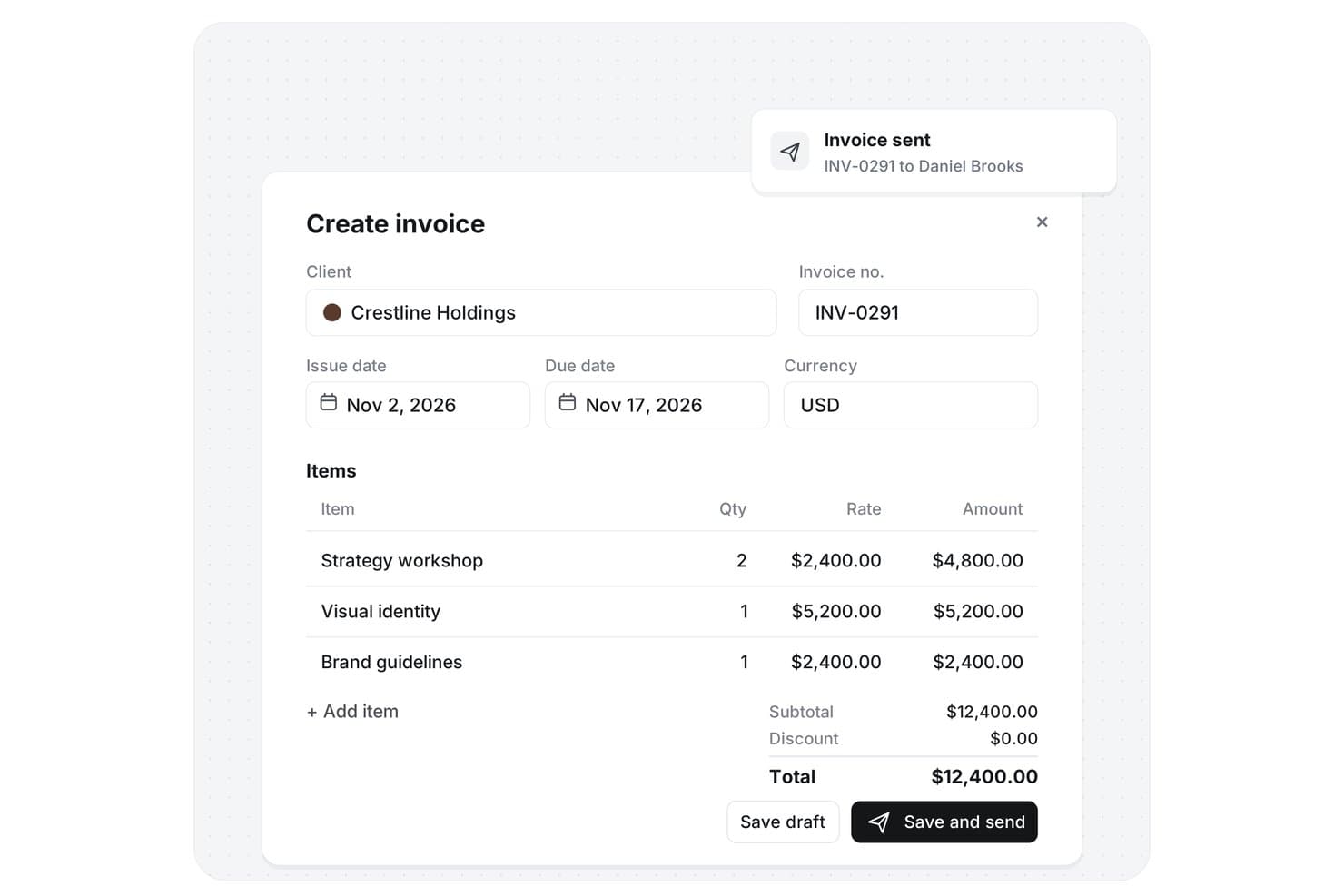
Olqan lets users create and send invoices with itemized billing. Olqan is a business operating system that brings invoicing, project billing, client management, recurring payments, and financial tracking together in a single platform.
Who Is Olqan Best For?
Olqan is a strong fit for small business owners and project-based teams who need to connect project budgets, time tracking, and client invoicing in one place.
Why I Picked Olqan
I picked Olqan as one of the best because it connects project budgets directly to billing in a way most invoicing tools don't. I can create invoices straight from time logs, pulling in the project, client, date range, and billable hours in one workflow. Olqan also tracks project profitability by comparing budgets to actuals, so I always know where a project stands before sending a final invoice.
Olqan Key Features
- Multi-currency invoicing: Create invoices in multiple currencies with automatic daily rate conversions applied to line items and expenses.
- Recurring billing schedules: Set up recurring invoices with daily, weekly, or monthly frequency, defined billing cycles, and a start date.
- Client portal: Give clients controlled access to project files, communication, and feedback through a branded portal included on paid plans.
- Role-based accountant access: Assign external accountants a restricted role with access to financial data only, without exposing other business information.
Olqan Integrations
Olqan documents integrations with QuickBooks, PayPal, and Stripe, while Xero and Square are listed without detailed data flows. API availability for custom integrations isn't stated.
Pros and Cons
Pros:
- Users report support for staged invoices
- Time logs support project-based invoicing
- Invoices tie project budgets to billing
Cons:
- Accounting sync details remain unclear
- No phone app for field invoicing
Learn more about Olqan:

QuickBooks offers invoicing, expense tracking, and payroll for financial management. If you’re looking for invoicing software that connects directly with your accounting, QuickBooks is a top choice. It’s designed for small businesses that want to manage invoicing, payments, and bookkeeping in one place. QuickBooks helps you keep your financial data organized and reduces manual entry by syncing invoices with your accounting records automatically.
Why I Picked QuickBooks
What sets QuickBooks apart for small business invoicing is its deep accounting integration. I picked QuickBooks because it lets you generate invoices that automatically sync with your general ledger and financial reports, reducing manual reconciliation. You can also track invoice status, payments, and outstanding balances right alongside your other accounting data. This level of integration is especially valuable for small businesses that want to keep invoicing and bookkeeping tightly connected without extra steps.
QuickBooks Key Features
Some other features that make QuickBooks useful for small business invoicing are:
- Recurring Invoices: Set up automatic recurring invoices for clients with ongoing services or subscriptions.
- Mobile Invoicing App: Create, send, and manage invoices directly from your mobile device.
- Online Payment Processing: Accept credit card and ACH payments through integrated payment gateways.
- Sales Tax Calculation: Automatically calculate and apply sales tax to invoices based on location.
QuickBooks Integrations
Integrations include Shopify, PayPal, Square, TSheets, HubSpot, Salesforce, Expensify, Gusto, and Receipt Bank.
Pros and Cons
Pros:
- Powerful reporting
- Great tax prep features
- Deep feature ecosystem
Cons:
- Confusing navigation
- Support can be unhelpful
 Best with integrated payment processing
- Free plan + free trial available
- From $49/month
Visit WebsiteCustomer Rating:4.7/5
Square Invoices simplifies payment processing and efficient transaction management. If your small business needs invoicing tightly connected to payment processing, Square Invoices is built for you. This tool is especially useful for service providers, retailers, and contractors who want to send invoices and accept payments in one place. With Square Invoices, you can automate reminders, track payment status, and let clients pay online using a variety of payment methods.
Why I Picked Square Invoices
What makes Square Invoices stand out is how it combines invoicing with built-in payment processing, which is a major advantage for small businesses that want to get paid quickly and reliably. I picked it because you can send invoices and accept credit card, ACH, or digital wallet payments without needing a separate payment gateway. The platform also lets you set up recurring invoices and automatic payment reminders, so you can reduce late payments and manual follow-up. For businesses that want a single solution for both billing and payments, Square Invoices offers a tightly integrated experience.
Square Invoices Key Features
In addition to integrated payment processing, I also found these features useful for small business invoicing needs:
- Customizable Invoice Templates: Create branded invoices with your logo, colors, and custom fields.
- Mobile Invoicing App: Send, manage, and track invoices directly from your phone or tablet.
- Itemized Billing: Add multiple products or services with descriptions, quantities, and taxes to each invoice.
- Digital Estimates: Generate and send estimates that clients can approve online before you convert them to invoices.
Square Invoices Integrations
Integrations include Square Payments, QuickBooks Online, Xero, Google Calendar, Mailchimp, TSheets, WooCommerce, BigCommerce, and Wix.
Pros and Cons
Pros:
- Great for retail spaces
- No monthly subscription
- Fast payment processing
Cons:
- No project management
- Limited customization
Learn more about Square Invoices: Best for automated recurring billing
- 30-day free trial + free demo available
- From $23/month
Visit WebsiteCustomer Rating:4.5/5
FreshBooks offers simple invoicing, expense tracking, and time management. If you need invoicing software that handles recurring billing with minimal manual work, FreshBooks is worth a look. This platform is designed for small businesses and freelancers who want to automate repeat invoices and payment reminders. It’s especially useful if you manage ongoing client relationships or subscription-based services and want to reduce time spent on repetitive billing tasks.
Why I Picked FreshBooks
FreshBooks stands out for small businesses that need to automate recurring billing and reduce manual follow-up. I picked it because its recurring invoice feature lets you set up schedules for repeat clients, so invoices go out automatically each billing cycle. You can also enable automatic payment reminders, which helps you stay on top of overdue accounts without extra effort. These features make FreshBooks a strong choice if you want to streamline ongoing billing and keep cash flow predictable.
FreshBooks Key Features
Some other features in FreshBooks can help small businesses manage invoicing and payments more efficiently:
- Expense Tracking: Capture and categorize business expenses directly in the platform for easier reconciliation.
- Customizable Invoice Templates: Personalize invoice layouts with your logo, colors, and custom fields to match your brand.
- Time Tracking: Log billable hours within projects and convert them into invoices with a few clicks.
- Client Portal: Give clients access to view, pay, and comment on invoices through a secure online portal.
FreshBooks Integrations
Integrations include Stripe, PayPal, G Suite, Shopify, HubSpot, Trello, Slack, Zoom, and Zapier.
Pros and Cons
Pros:
- Good expense management
- Built-in time tracking
- Intuitive mobile app
Cons:
- Bank syncing can glitch
- Add-ons cost extra
 Best for unlimited client management
- Free plan available
- From $9.99/month
Visit WebsiteCustomer Rating:4.6/5
Invoicely enables invoicing, expense tracking, and client management with ease. If you’re looking for invoicing software that lets you manage as many clients as your business needs, Invoicely is worth a closer look. It’s designed for small businesses and freelancers who handle a high volume of clients or projects at once. Invoicely helps you keep all your client records, invoices, and payments organized without hitting artificial limits.
Why I Picked Invoicely
Unlike many invoicing tools that cap the number of clients you can manage, Invoicely offers unlimited client management on all paid plans. I picked it because this flexibility is especially valuable for small businesses and freelancers who juggle dozens or even hundreds of clients at once. You can create detailed client profiles, track each client’s invoices and payments, and organize your client list without worrying about hitting a ceiling. For businesses that are growing or have a diverse client base, Invoicely removes the hassle of client limits from your invoicing process.
Invoicely Key Features
Some other features that make Invoicely appealing for small business invoicing are:
- Multi-Currency Invoicing: Send invoices and accept payments in over 160 currencies.
- Mileage and Expense Tracking: Record business expenses and mileage directly within the platform.
- Customizable Invoice Templates: Adjust invoice layouts, branding, and fields to match your business needs.
- Online Payment Integration: Accept payments through PayPal, Stripe, and other online payment gateways.
Invoicely Integrations
Integrations include Stripe, PayPal, Mollie, Authorize.net, and WePay.
Pros and Cons
Pros:
- Simple dashboard UI
- Built-in time tracking
- Easy multi-business setup
Cons:
- PayPal only on free tier
- Ads on free invoices
Learn more about Invoicely: Best for SaaS subscription management
- Not available
- Pricing upon request
Visit WebsiteCustomer Rating:4.7/5
Paddle provides billing, subscription management, and compliance for SaaS businesses. If you’re running a SaaS business and need to manage recurring billing, Paddle offers a unified platform for subscription management and payments. It’s designed for software companies that want to handle global payments, taxes, and compliance without piecing together multiple tools. Paddle helps you automate invoicing and revenue operations so you can focus on growing your subscription business.
Why I Picked Paddle
Managing SaaS subscriptions can get complicated fast, which is why Paddle’s all-in-one approach to subscription management stands out. I picked Paddle because it lets you automate recurring billing, handle upgrades and downgrades, and manage customer lifecycles without juggling multiple systems. The platform also takes care of global tax compliance and invoicing, so you don’t have to worry about the details as you scale. For small businesses offering software subscriptions, Paddle’s focus on simplifying these processes is a major advantage.
Paddle Key Features
Some other features that make Paddle useful for SaaS invoicing and payments are:
- Branded Checkout Pages: Customize checkout experiences to match your company’s branding and user flow.
- Dunning Management: Automate failed payment recovery with built-in dunning workflows.
- Real-Time Analytics Dashboard: Monitor revenue, churn, and subscription metrics in a single dashboard.
- Multi-Currency Support: Accept payments in multiple currencies for global customers.
Paddle Integrations
Integrations include Stripe, PayPal, Salesforce, HubSpot, Slack, QuickBooks, Xero, Google Analytics, Mailchimp, and Zendesk.
Pros and Cons
Pros:
- Reduces compliance risk
- Automates subscriptions
- Perfect for SaaS tools
Cons:
- Payouts can be delayed
- Strict approval process
Learn more about Paddle: Best for customizable invoice templates
- Free plan available
- Free to use
Visit WebsiteCustomer Rating:4.5/5
Invoice Home enables easy, customizable invoice creation and sending. If you want to create invoices that match your brand’s style, Invoice Home gives you a wide range of customizable templates to choose from. This tool is especially useful for small businesses and freelancers who want their invoices to stand out or reflect a specific look. With Invoice Home, you can quickly generate professional invoices that fit your business identity without needing design skills.
Why I Picked Invoice Home
What drew me to Invoice Home is its focus on giving small businesses a wide selection of customizable invoice templates. If you want your invoices to reflect your brand or stand out to clients, you can choose from over 100 professionally designed templates and adjust colors, logos, and layout details. I appreciate that you can save your favorite designs for quick reuse, making it easy to keep your invoicing consistent. For small businesses that care about presentation and branding, Invoice Home offers more creative control than most invoicing tools.
Invoice Home Key Features
Some other features that make Invoice Home useful for small businesses include:
- Payment Receipt Generation: Create and send payment receipts to clients directly from the platform.
- Multi-Currency Support: Issue invoices in a variety of currencies for international clients.
- Cloud-Based Document Storage: Store and access all invoices and receipts securely online.
- Mobile App Access: Generate and manage invoices from your phone or tablet.
Invoice Home Integrations
Integrations include PayPal, Stripe, and Authorize.net.
Pros and Cons
Pros:
- Add your own branding
- Works completely offline
- Good for one-off billing
Cons:
- Looks a bit outdated
- No inventory management
Learn more about Invoice Home: Best for tracking billable hours
- Free trial + free plan available
- From $9/user/month (billed annually)
Visit WebsiteCustomer Rating:4.4/5
Harvest manages time, expenses, and billing for end-to-end financial project management. For small businesses that need to track billable hours alongside invoicing, Harvest brings time tracking and billing together in one platform. This tool is especially useful for service-based businesses, agencies, and consultants who bill clients by the hour or project. With Harvest, you can capture time, convert it into invoices, and keep a close eye on project budgets all in one place.
Why I Picked Harvest
What sets Harvest apart for small businesses is its focus on tracking billable hours and turning them directly into invoices. If your business relies on hourly or project-based billing, you can use Harvest’s built-in timers and timesheets to capture every minute of work. I like that you can generate invoices straight from tracked time, which helps reduce manual entry and errors. For small teams that need to connect time tracking with client billing, Harvest offers a clear, purpose-built solution.
Harvest Key Features
Some other features that make Harvest useful for small business invoicing include:
- Expense Tracking: Record and categorize project expenses alongside billable hours.
- Automated Payment Reminders: Send scheduled reminders to clients for outstanding invoices.
- Project Budget Monitoring: Set and track project budgets to avoid overspending.
- Mobile App Access: Track time, log expenses, and manage invoices from your phone or tablet.
Harvest Integrations
Integrations include Asana, Trello, Basecamp, Slack, Jira, GitHub, QuickBooks, Xero, and Stripe.
Pros and Cons
Pros:
- Easy expense logging
- Tracks project budgets
- Integrates with Asana
Cons:
- Too complex for retail
- Limited invoice templates
Learn more about Harvest: 9Best for unlimited free invoicing
Wave
- Free plan + 30-day free trial available
- From $19/month
Visit WebsiteCustomer Rating:4.4/5
Wave offers invoicing, accounting, and receipt scanning for simple financial management. Wave gives small businesses and freelancers a way to send unlimited invoices without monthly fees. It’s especially appealing if you want to manage invoicing and payments without worrying about usage limits or hidden costs. Wave helps you keep billing simple and accessible, even as your client list grows.
Why I Picked Wave
Unlimited free invoicing is what makes Wave stand out for small businesses and freelancers. I picked Wave because you can send as many invoices as you need without ever hitting a cap or being asked to upgrade. The platform also lets you customize invoices and track their status, so you always know what’s been sent, viewed, or paid. For anyone who wants to avoid limits or extra charges as their business grows, Wave’s approach to invoicing is hard to match.
Wave Key Features
Some other features that make Wave appealing for small business invoicing are:
- Payment Processing Integration: Accept credit card and bank payments directly from your invoices.
- Automatic Payment Reminders: Send scheduled reminders to clients for unpaid invoices.
- Multi-Currency Invoicing: Create and send invoices in different currencies for international clients.
- Receipt Scanning: Upload and organize receipts to keep expense records alongside your invoicing.
Wave Integrations
Integrations include Zapier, Bluevine, Google Sheets, HubSpot, Mailchimp, and Square.
Pros and Cons
Pros:
- Built-in receipt scanner
- Clean modern interface
- Great for sole traders
Cons:
- Cannot manage inventory
- No time tracking built-in
Learn more about Wave: Best for multi-currency support
- Free demo available
- Pricing upon request
Visit WebsiteCustomer Rating:4.3/5
Sage Accounting offers invoicing, expense management, and compliance features. Sage Accounting is a strong fit for small businesses that invoice clients in multiple currencies or operate internationally. It’s especially useful for companies managing cross-border transactions, fluctuating exchange rates, and global customer bases. With Sage Accounting, you can send invoices, track payments, and manage finances in several currencies without manual conversions.
Why I Picked Sage Accounting
For small businesses that invoice clients around the world, Sage Accounting offers multi-currency support that’s hard to match. I picked it because you can create and send invoices in different currencies, and the software automatically handles real-time exchange rate calculations. This means you can track payments and outstanding balances in both your home currency and your client’s currency without extra manual work. If your business deals with international customers or suppliers, Sage Accounting helps you keep your invoicing accurate and up to date.
Sage Accounting Key Features
Some other features that make Sage Accounting useful for small business invoicing include:
- Automated Bank Feeds: Connect your bank accounts to automatically import and reconcile transactions.
- Customizable Invoice Templates: Personalize invoices with your business logo, colors, and custom fields.
- Recurring Invoices: Set up and schedule invoices to be sent automatically at regular intervals.
- Financial Reporting Dashboard: Access real-time financial reports and insights from a centralized dashboard.
Sage Accounting Integrations
Integrations include Stripe, AutoEntry, Zettle, PayPal, Shopify, Microsoft 365, and Square.
Pros and Cons
Pros:
- Scales well as you grow
- Solid tax compliance
- Good inventory tracking
Cons:
- Slower customer support
- Expensive higher tiers
Learn more about Sage Accounting:
Alte soluții de facturare pentru întreprinderi mici
Iată câteva opțiuni suplimentare de software de facturare pentru întreprinderi mici care nu au ajuns pe lista mea scurtă, dar care merită totuși analizate:
- 11HiveageBest for global payment gateway options
- 12InvoiceNinjaBest for open-source customization
- 13PaymoBest for project-based time tracking
- 14StripeBest with developer-friendly API access
- 15XeroBest for real-time financial reporting
- 16KeapBest for integrated CRM and invoicing
- 17HoneyBookBest for client workflow automation
- 18Zoho InvoiceBest for multilingual invoicing
- 19FloatBest for automated bill payments
- 20ThryvBest for appointment-based businesses
- 21Paystand Best for blockchain-based payment security
How I Evaluate Invoicing Software for Small Business
I split my evaluation into two layers: the baseline functionality—like invoice creation, online payments, and automated reminders—and the differentiators that separate the best options from the rest.
Core Functionality (Table Stakes for This List)
When I'm selecting tools for my list, I rank each one on a scale from 0 (does not offer the functionality) to 5 (excels in this area) for each core functionality listed below. Then, I calculate the tool's total score into a percentage. Each tool needs to achieve a minimum total score of 65% to be considered for inclusion.
- Invoice Creation & Customization: I look at how much control you get over templates, branding, and line-item detail—like adding custom fields for purchase orders or project codes.
- Online Payment Acceptance: Each tool should connect to major payment processors so clients can pay by card, ACH, or digital wallet right from the invoice.
- Recurring Invoicing & Automation: I check whether a tool can automate repeat billing cycles and send scheduled payment reminders, which matters for retainer-based or subscription billing.
- Accounts Receivable Tracking: Real-time invoice status (sent, viewed, overdue) and aging reports help you stay on top of outstanding balances without chasing clients manually.
- Tax & Multi-Currency Support: I evaluate whether the platform handles multiple tax rates and currencies—important if you invoice clients across different regions or jurisdictions.
- Client & Expense Management: A built-in client database paired with expense tracking lets you link billable costs directly to invoices, like reimbursable travel or materials.
Once I have a list of tools that meet the criteria, I consider what sets each platform apart.
Differentiating Factors (What Sets Vendors Apart)
Here's how I compare and contrast different vendors:
Standout Features
Estimate-to-invoice conversion is a big one for me. If you're a contractor or consultant sending proposals, turning an approved quote into an invoice with one click saves real time. I also look for a client portal where customers can view, pay, and download past invoices on their own. Mobile invoicing matters too, especially for field-based businesses that need to bill on-site right after completing a job.
Beyond Features
Pricing transparency matters a lot here. I check whether a tool offers a free or affordable entry tier, reasonable processing fees, and predictable costs as you add clients or users. Integration fit is equally important—your invoicing tool should sync with whatever accounting platform you already use, whether that's QuickBooks, Xero, or Wave. I also evaluate scalability, since a solo freelancer today might be a ten-person team next year and shouldn't need to migrate to a new platform just to add a second user or manage multiple businesses.
Cum să alegeți software-ul de facturare pentru întreprinderi mici
Este ușor să vă pierdeți în liste lungi de funcții și structuri tarifare complexe. Pentru a vă ajuta să rămâneți concentrat în timp ce parcurgeți procesul unic de selectare a software-ului, iată o listă de verificare a factorilor de care trebuie să țineți cont:
| Factor | Aspecte de luat în considerare |
|---|---|
| FactorScalabilitate | Aspecte de luat în considerareVa putea software-ul să gestioneze mai mulți clienți, facturi sau utilizatori pe măsură ce afacerea dvs. se dezvoltă? Verificați limitele de utilizatori, creșterile de preț sau blocajele fluxurilor de lucru. |
| FactorIntegrări | Aspecte de luat în considerareSe conectează la platformele dvs. de contabilitate, CRM sau plată? Confirmați existența integrărilor native și evitați să vă bazați exclusiv pe conectori terți. |
| FactorPosibilități de personalizare | Aspecte de luat în considerarePuteți adapta șabloanele de factură, brandingul și fluxurile de lucru la nevoile afacerii dvs.? Căutați setări flexibile, nu doar posibilitatea de a încărca sigle. |
| FactorUșurință în utilizare | Aspecte de luat în considerareCât de repede poate învăța echipa dvs. să folosească instrumentul? Testați interfața cu utilizatori fără cunoștințe tehnice și căutați o navigare clară și un număr minim de pași. |
| FactorImplementare și integrare inițială | Aspecte de luat în considerareCe resurse sunt disponibile pentru configurare și migrare? Luați în considerare timpul, asistența și instruirea necesare pentru a începe activitatea fără probleme. |
| FactorCost | Aspecte de luat în considerareSunt nivelurile tarifare transparente și previzibile pe măsură ce vă dezvoltați? Fiți atenți la taxele ascunse, costurile per factură sau suplimentele costisitoare. |
| FactorMăsuri de securitate | Aspecte de luat în considerareCum vă protejează furnizorul datele financiare și ale clienților? Căutați criptare, controale de acces și conformitate cu standardele relevante. |
| FactorDisponibilitatea asistenței | Aspecte de luat în considerareCând și cum puteți contacta asistența dacă apar probleme? Verificați existența opțiunilor de chat live, telefon sau e-mail și analizați programul de asistență și timpii de răspuns. |
Ce este software-ul de facturare pentru întreprinderi mici?
Un software dedicat pentru facturare este un instrument digital care ajută companiile să creeze, să trimită și să gestioneze facturi pentru produsele sau serviciile lor, în loc să se bazeze pe sisteme învechite. Aceste platforme automatizează sarcinile, urmăresc plățile și organizează informațiile despre clienți pentru a sprijini evidențe financiare exacte. Proprietarii întreprinderilor mici folosesc un generator de facturi pentru a economisi timp, a reduce erorile manuale și a menține o imagine profesională atunci când gestionează tranzacțiile cu clienții.
Funcțiile software-ului de facturare pentru întreprinderi mici
Atunci când alegeți un software de facturare pentru întreprinderi mici, urmăriți următoarele funcții esențiale:
- Crearea facturilor: Creați și personalizați facturi profesionale cu detaliile companiei, elementele de identitate vizuală și costurile detaliate pentru produse sau servicii.
- Urmărirea plăților: Monitorizați ce facturi au fost plătite, care sunt restante sau neachitate, astfel încât să puteți reveni către clienți după cum este necesar.
- Facturarea recurentă: Configurați facturi automate pentru clienții facturați conform unui program regulat, cum ar fi abonamentele sau onorariile lunare.
- Gestionarea cheltuielilor: Înregistrați și clasificați cheltuielile companiei, apoi asociați-le unor facturi sau proiecte specifice pentru facturare și raportare corecte.
- Gestionarea clienților: Stocați și organizați într-un singur loc informațiile de contact ale clienților, preferințele de facturare și istoricul tranzacțiilor, pentru acces facil.
- Procesarea plăților online: Permiteți clienților să plătească facturile direct prin intermediul platformelor de plată integrate, reducând întârzierile și procesarea manuală.
- Calcularea taxelor: Aplicați automat cotele corecte de impozitare pentru facturi, pe baza locației și cerințelor clienților, ajutându-vă să respectați reglementările.
- Asistență pentru mai multe valute: Emiteți facturi și acceptați plăți în valute diferite pentru a răspunde nevoilor clienților și tranzacțiilor internaționale.
- Raportare și analiză: Generați rapoarte privind vânzările, plățile, soldurile neachitate și alte valori financiare pentru a sprijini deciziile de afaceri.
- Acces mobil: Creați, trimiteți și gestionați facturi de pe telefon sau tabletă, astfel încât să puteți rezolva sarcinile de facturare oriunde v-ați afla.
Beneficiile software-ului de facturare pentru întreprinderile mici
Implementarea unui software de facturare pentru întreprinderile mici oferă mai multe beneficii echipei și companiei dumneavoastră. Iată câteva dintre acestea:
- Plăți mai rapide: Trimiterea automată a facturilor și opțiunile de plată online îi ajută pe clienți să vă plătească mai repede.
- Acuratețe îmbunătățită: Calculele fiscale integrate și urmărirea plăților reduc erorile manuale și plățile omise.
- Economie de timp: Facturarea recurentă automată și gestionarea cheltuielilor eliberează timp pentru alte sarcini ale companiei.
- Vizibilitate mai bună asupra fluxului de numerar: Rapoartele și analizele în timp real vă oferă o imagine clară asupra facturilor neachitate și a tendințelor veniturilor.
- Imagine profesională: Șabloanele de facturi și elementele de identitate vizuală personalizabile ajută compania să pară mai credibilă în fața clienților.
- Respectarea mai simplă a reglementărilor: Calculele fiscale automate și păstrarea evidențelor sprijină eforturile de a respecta reglementările locale.
- Gestionarea mai ușoară a clienților: Informațiile centralizate despre clienți și istoricul tranzacțiilor simplifică urmărirea comunicărilor și a stadiului facturării.
Costurile și prețurile software-ului de facturare pentru întreprinderile mici
Alegerea unui software de facturare pentru întreprinderile mici necesită înțelegerea diferitelor modele și planuri de tarifare disponibile. Unele programe de facturare sunt disponibile gratuit, în timp ce alte planuri percep taxe în funcție de caracteristici, dimensiunea echipei și suplimente. Tabelul de mai jos prezintă pe scurt planurile obișnuite, prețurile lor medii și caracteristicile incluse de regulă în soluțiile software de facturare pentru întreprinderile mici:
Tabel comparativ al planurilor pentru software-ul de facturare destinat întreprinderilor mici
| Tipul planului | Preț mediu | Caracteristici comune |
|---|---|---|
| Tipul planuluiPlan gratuit | Preț mediu$0 | Caracteristici comuneCrearea de bază a facturilor, gestionarea limitată a clienților, urmărirea simplă a plăților și raportare de bază. |
| Tipul planuluiPlan individual | Preț mediu$5-$30/utilizator/lună | Caracteristici comuneFacturi nelimitate, urmărirea cheltuielilor, integrarea plăților online și opțiuni de personalizare de bază. |
| Tipul planuluiPlan de afaceri | Preț mediu$15-$90/utilizator/lună | Caracteristici comuneAcces pentru mai mulți utilizatori, raportare avansată, facturare recurentă, integrări cu instrumente de contabilitate și șabloane personalizate cu elemente de identitate vizuală. |
| Tipul planuluiPlan pentru întreprinderi | Preț mediu$30-$200+/utilizator/lună | Caracteristici comuneFluxuri de lucru personalizate, asistență dedicată, controale avansate de securitate, acces API și asistență personalizată la configurarea inițială. |
Software de facturare pentru întreprinderi mici – întrebări frecvente
Iată câteva răspunsuri la întrebările frecvente despre software-ul de facturare pentru întreprinderile mici:
Poate software-ul de facturare să gestioneze mai multe monede și cote de impozitare?
Da, multe soluții software de facturare acceptă facturarea în mai multe monede și vă permit să aplicați cote de impozitare diferite în funcție de locația clientului. Acest lucru este deosebit de util dacă întreprinderea dumneavoastră deservește clienți internaționali sau operează în regiuni cu cerințe fiscale diferite.
Cât de sigur este software-ul de facturare pentru stocarea datelor despre clienți și a datelor financiare?
Majoritatea soluțiilor de renume de software pentru facturare utilizează criptarea, servere securizate și controale de acces pentru a vă proteja datele. Verificați întotdeauna conformitatea cu standarde precum GDPR sau SOC 2 și consultați documentația privind securitatea furnizorului înainte de a alege o soluție.
Este posibilă automatizarea facturilor recurente pentru clienții care folosesc abonamente?
Da, majoritatea soluțiilor software de facturare vă permit să configurați facturi recurente pentru clienții care plătesc conform unui program regulat. Această funcție ajută la reducerea muncii manuale și asigură facturarea la timp pentru servicii sau abonamente recurente.
Ce tipuri de integrări ar trebui să caut într-un software de facturare?
Căutați integrări cu software-ul dumneavoastră de contabilitate, porțile de plată, CRM-ul și instrumentele de gestionare a proiectelor. Aceste conexiuni contribuie la reducerea introducerii manuale a datelor și mențin evidențele financiare corecte și actualizate.
Cât timp durează implementarea unui software de facturare pentru o întreprindere mică?
Durata implementării variază, însă majoritatea întreprinderilor mici pot începe în câteva ore până la câteva zile. Factori precum migrarea datelor, instruirea echipei și configurarea integrărilor pot influența durata, așa că planificați în consecință.