

10 Best Free Invoicing Software for Small Business in 2026

10 Best Free Invoicing Software for Small Business Shortlist


Running a small business is no easy task, especially when it comes to managing finances. As a CFO, you're likely juggling tight budgets and looking for cost-effective solutions. That's where free online invoicing software comes in handy. It helps you track invoices without adding to your expenses.
In my experience, these bookkeeping tools can alleviate the stress of billing and cash flow management. They offer essential features to keep your business running smoothly without a hefty price tag.
In this article, I'll share my top picks for the best free invoicing software options available. You'll find unbiased reviews and insights to help you choose the right invoicing app for your team. Let's dive into solutions that make financial management easier.
Why Trust Our Software Recommendations
Our team has been testing and reviewing software since 2012. As finance leaders ourselves, we know how difficult—and important—it is to choose the right software.
For this guide, we evaluated tools using hands-on testing and independent research, scoring tools using our selection criteria.
Our reviews reflect our human editorial judgment, not a sales pitch.
Best Free Invoicing Software for Small Business Summary
While all of the invoicing software for small business options in my list have free offerings, most also have paid plans, should you wish to upgrade. Here are the base costs for each of the tools that made it onto my shortlist:
| Tool | Best For | Trial Info | Price | ||
|---|---|---|---|---|---|
| 1 | Best for inventory tracking | 30-day free trial available | From $9/user/month | Website | |
| 2 | Best for unlimited invoices | Free plan available | From $11.67/month (billed annually) | Website | |
| 3 | Best for freelancers | 30-day free trial | From $23/month | Website | |
| 4 | Best for growing businesses | 30-day free trial | From $38/month | Website | |
| 5 | Best for multiple currencies | Free plan available | From $9.99/month | Website | |
| 6 | Best for integrated accounting | 30-day free trial | From $40/month | Website | |
| 7 | Best for automation tools | Free demo available | Free forever plan | Website | |
| 8 | Best for mobile invoicing | Free plan available | From $35/month | Website | |
| 9 | Best for easy payments | Not available | Pricing upon request | Website | |
| 10 | Best for simple interface | Free trial + free plan available | From $150/year (billed annually) | Website |
Best Free Invoicing Software for Small Business Review
Below are my detailed summaries of the best free invoicing software for small businesses that made it onto my shortlist. My reviews offer a detailed look at the key features, pros and cons, integrations, and ideal use cases of each tool to help you find the best one for you. While some of these tools offer a completely free version, others offer a free trial period. I’ve added a note about what’s free in each of my reviews.

OneUp
Best for inventory tracking
OneUp is a business management software designed for small businesses, focusing on accounting, invoicing, and inventory management. Its tools help businesses oversee their operations and keep track of their financials and inventory.
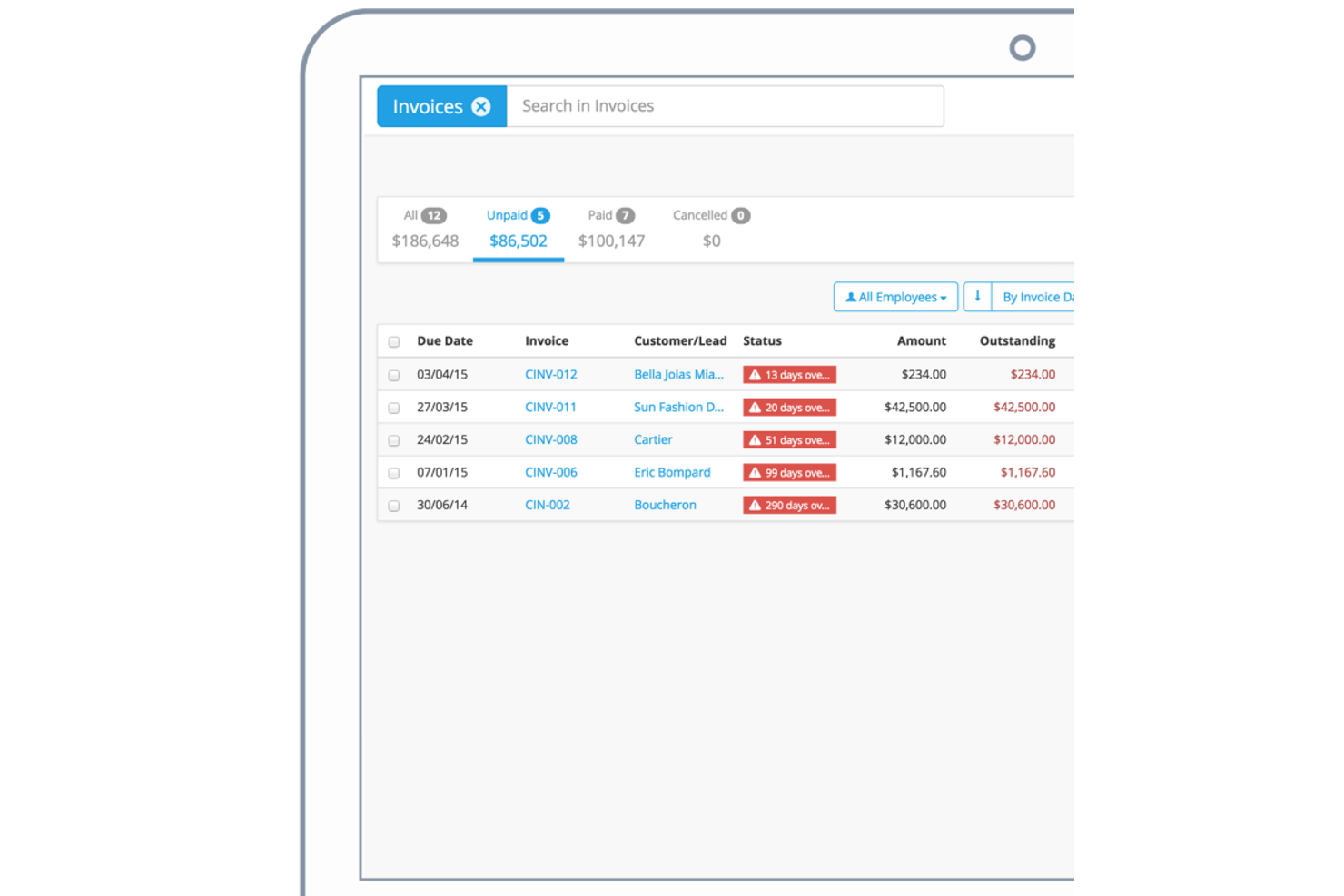
Why I picked OneUp: The free trial allows you to explore the inventory-tracking capabilities, which is ideal for businesses with physical products. You can manage stock levels and track inventory movements with ease. The software also offers invoicing features that integrate with inventory, ensuring accurate billing. There are filters for unpaid invoices, a search functionality, and clear overdue status indicators for tracking customer payments. With its focus on inventory management, it supports businesses aiming to optimize their stock control.
Standout Features and Integrations:
Features include automated bank reconciliation, which simplifies your accounting tasks. You can also generate detailed financial reports to gain insights into your business performance. Additionally, the tool offers CRM functionalities, helping you manage customer relationships effectively.
Integrations are not publicly listed.
What's free? OneUp's free trial grants access to all features, allowing you to explore its full capabilities before committing to a paid plan.
Pros and Cons
Pros:
- CRM functionalities included
- Automated bank reconciliation
- Strong inventory management features
Cons:
- Automates invoicing alongside built-in accounting
- Single payment gateway

Best for unlimited invoices
Invoice Ninja is a free invoicing software tailored for freelancers, service professionals, and small business owners. It offers essential features, such as expense management, invoicing, project management, and time tracking, that help users manage their finances efficiently and receive payments quickly.
Why I picked Invoice Ninja: The free offering includes unlimited invoices for up to five clients, which is a practical invoicing solution for freelancers and small teams managing a handful of customers. The platform's support for various payment methods offers utility for small businesses.
Standout Features and Integrations:
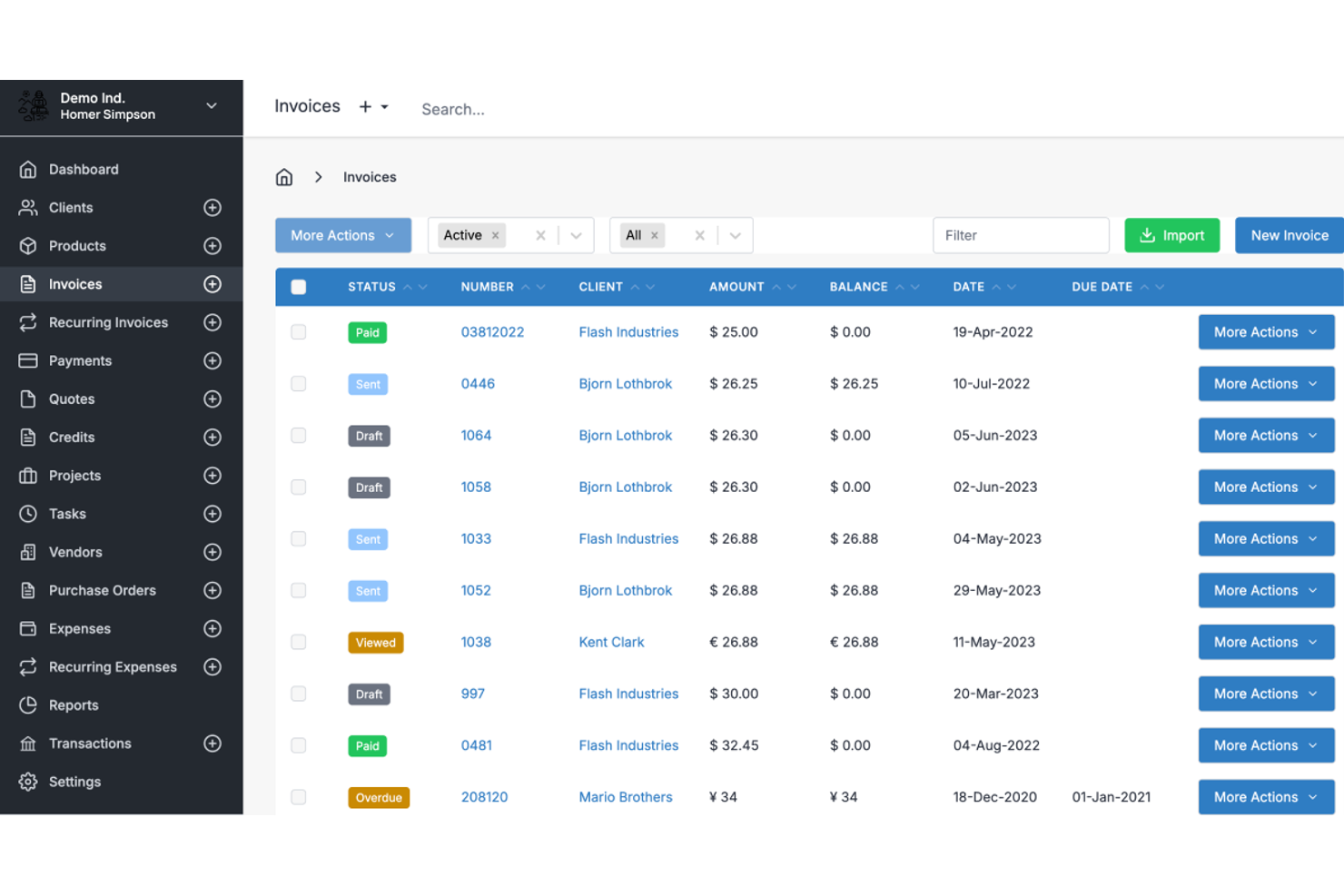
Features include project management tools that allow you to track time and expenses. The software's customizable invoice templates allow you to maintain your brand identity. The dashboard features sortable columns for status, number, client, amount, balance, date, and due date. Additionally, you can automate invoice reminders, making it easier to manage late payments.
Integrations include Zapier, Integrately, Make, and more.
What's Free? Invoice Ninja offers a free-forever plan with up to five active clients.
Pros and Cons
Pros:
- Mobile app access
- Supports multiple payment methods
- Supports automated recurring invoicing
Cons:
- Advanced features require paid plan
- No phone support

Best for freelancers
FreshBooks is an accounting and invoicing software designed primarily for freelancers and small business owners. Features such as expense tracking, time tracking, and invoicing make it a one-stop tool for managing finances.
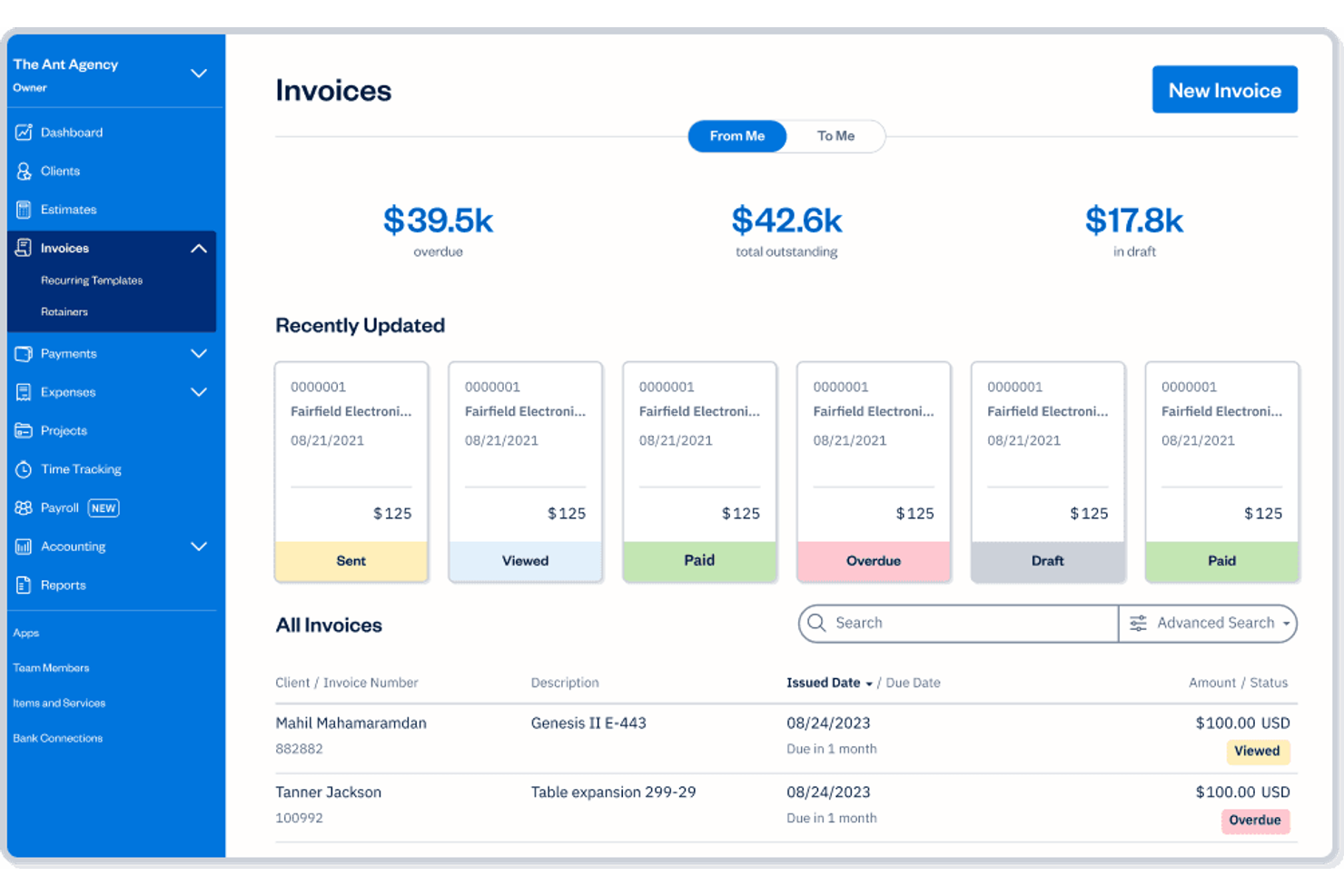
Why I picked FreshBooks: The free trial provides freelancers with an opportunity to explore the tool's invoicing capabilities, including its recently updated invoice cards and searchable invoice list. You can create professional invoices and track billable hours with ease. The software also allows you to manage expenses, which is helpful for freelancers juggling multiple projects. With a focus on simplicity, it integrates billing and accounting in one platform.
Standout Features and Integrations:
Features include customizable invoice templates that allow you to maintain your brand identity. The platform's automatic payment reminders help you get paid faster. Additionally, you can generate financial reports that provide insights into your business performance.
Integrations include Mailchimp, Zapier, HubSpot CRM, Gusto, and more.
What's Free? FreshBooks' free trial gives you access to all features, allowing you to explore its full capabilities before committing to a paid plan.
Pros and Cons
Pros:
- Automated payment reminders
- Easy expense management
- Ideal for freelancers
Cons:
- Trial limited to one user
- No phone support on trial

Best for growing businesses
QuickBooks is an accounting software solution aimed at small to medium businesses and freelancers. It offers a range of features, such as invoicing, expense tracking, and financial reporting, making it a suitable tool for managing business finances.
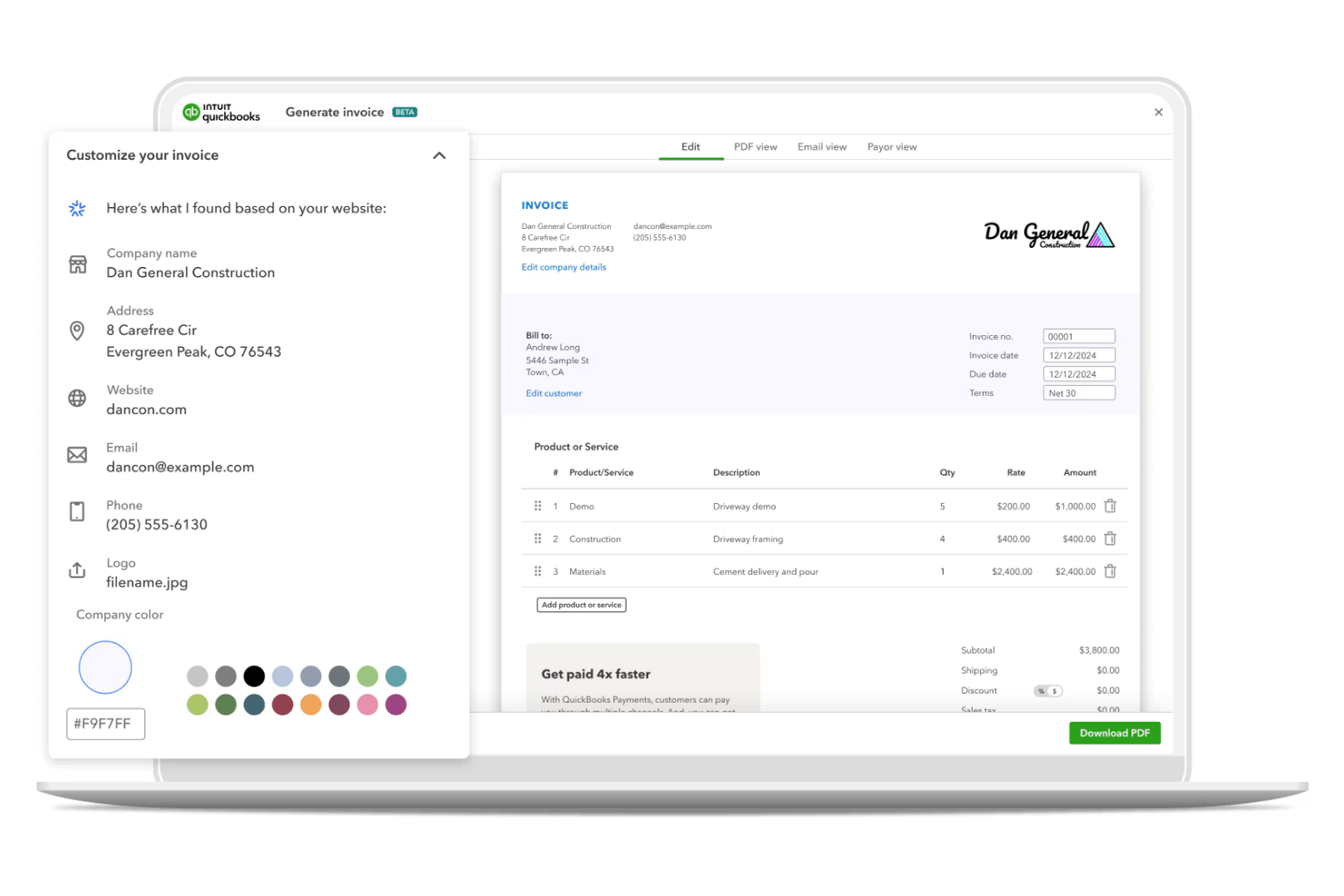
Why I picked QuickBooks: The free trial allows small businesses to experience the tool's full suite of accounting features. You can create and send professional invoices, track expenses, and generate detailed financial reports. The platform's user-friendly interface helps you manage your finances intuitively. With support for multiple users, it caters to small teams looking to organize their accounting processes as well as teams undergoing expansion.
Standout Features and Integrations:
Features include automated tax calculations, a time-saver during tax season. The software also offers cash flow management tools to help you monitor your business's financial health. Additionally, QuickBooks provides detailed expense categorization, allowing you to keep track of where your money is going.
Integrations include PayPal, Shopify, Square, Gusto, and more.
What's free? QuickBooks' free trial grants access to all features, allowing you to explore its capabilities before committing to a paid plan.
Pros and Cons
Pros:
- Expense categorization
- Automated tax calculations
- In-depth accounting features
Cons:
- Some features require technical knowledge
- Limited customer support on trial

Best for multiple currencies
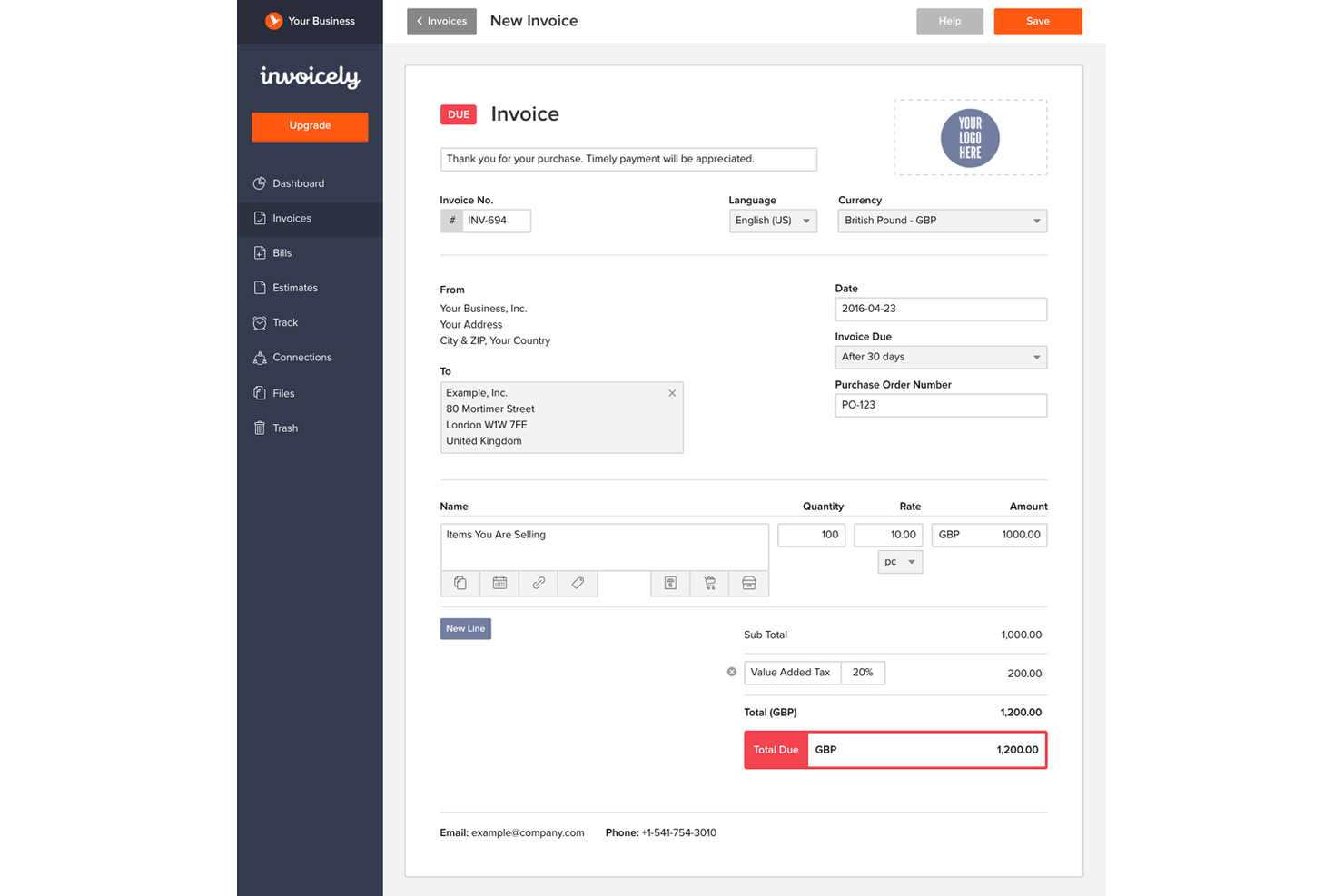
Invoicely is a versatile invoicing tool designed for freelancers and small businesses. It helps users manage billing, track expenses, and create invoices in various currencies, making it suitable for international business operations.
Why I picked Invoicely: The free version allows you to create and send five invoices a month in multiple currencies, which is ideal for small teams dealing with international clients. You can also track basic expenses and access essential reporting tools. The platform offers invoice customization options for client details, line items, tax calculations, and payment terms to help maintain your brand identity.
Standout Features and Integrations:
Features include detailed reporting tools that help you monitor your financial health. The platform also offers recurring billing, which saves time on repetitive tasks. Additionally, you can manage multiple businesses from a single account, providing flexibility for entrepreneurs.
Integrations include PayPal, Stripe, Authorize.net, Mollie, and more.
What's Free? Invoicely offers a free-forever plan supporting five monthly invoices and international clients, with limitations on some advanced features.
Pros and Cons
Pros:
- Manage multiple businesses
- Basic expense tracking
- Supports multiple currencies
Cons:
- Limited reporting capabilities
- Free plan has ads

Wave
Best for integrated accounting

Wave is a resource-rich financial management tool aimed at small businesses and freelancers. It provides invoicing, accounting, and receipt scanning, helping users manage their finances in one place.
Why I picked Wave: The free account includes integrated accounting features, making it ideal for those who want to keep their books in order at no extra cost. You can send unlimited invoices and track payments. Receipt scanning allows you to digitize and organize your expenses. With its user-friendly dashboard, you can monitor your financial health at a glance.
Standout Features and Integrations:
Features include invoicing options that let you customize templates to match your brand. You can also manage customer information and view payment histories in one location. Additionally, the platform offers cash flow tracking, profit and loss charts, and payable/owing summaries to provide insights into your business performance.
Integrations include Zapier and more.
What's Free? Wave offers a free-forever plan with no limitations on invoicing or accounting features.
Pros and Cons
Pros:
- Financial reporting tools
- User-friendly dashboard
- Integrated accounting with invoicing
Cons:
- Online payment processing fees
- No free integrations

Best for automation tools
Zoho Invoice is a cloud-based invoicing tool tailored for freelancers and small business owners. It offers automated billing, expense management, and time tracking for a simplified approach to financial tasks.
Why I picked Zoho Invoice: The free version includes automation tools that speed up your invoicing process. You can set up recurring invoices and automate payment reminders to save time and reduce manual work. Time tracking is useful for billing clients accurately. Its user-friendly interface caters to freelancers and small teams with a productivity focus.
Standout Features and Integrations:
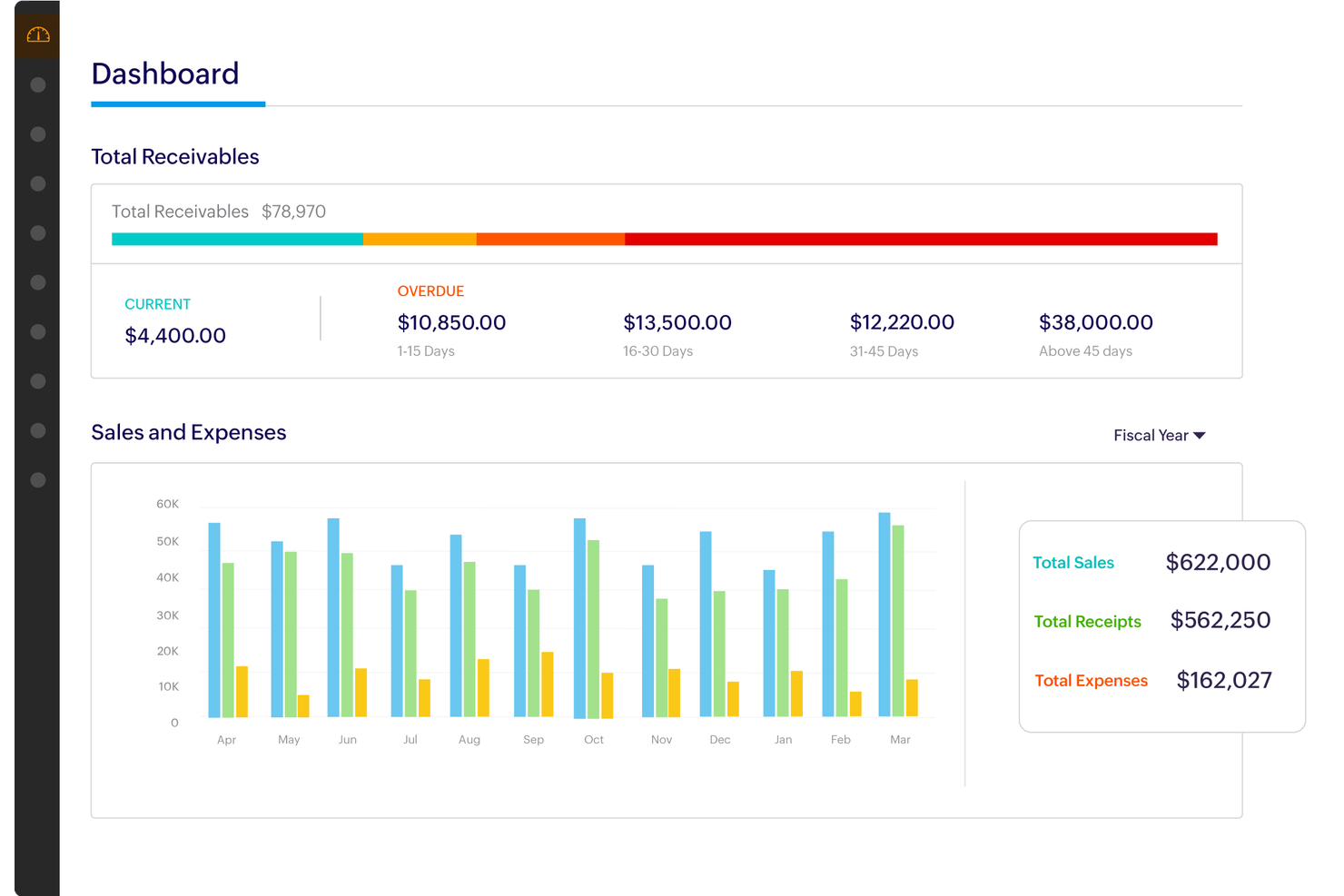
Features include detailed expense tracking, allowing you to conveniently categorize and manage your business expenses. It also displays total receivables by aging periods and a fiscal year sales and expenses comparison chart. The software also offers multi-currency support, making it suitable for international transactions. Additionally, it provides a client portal where your clients can view and pay invoices online.
Integrations include Zoho CRM, PayPal, Stripe, QuickBooks, Dropbox, WhatsApp, Slack, and more.
What's Free? Zoho Invoice offers a free-forever plan, which lets you create tax-compliant invoices and automate payment reminders.
Pros and Cons
Pros:
- Time tracking for accurate billing
- Client portal for easy payments
- Supports multi-currency transactions
Cons:
- Templates lack design flexibility
- No phone support

Square is an invoicing tool designed for small businesses and freelancers who need on-the-go billing software. It offers mobile invoicing, card payments, and ACH payment processing, making it convenient for users who require flexibility in their financial operations.
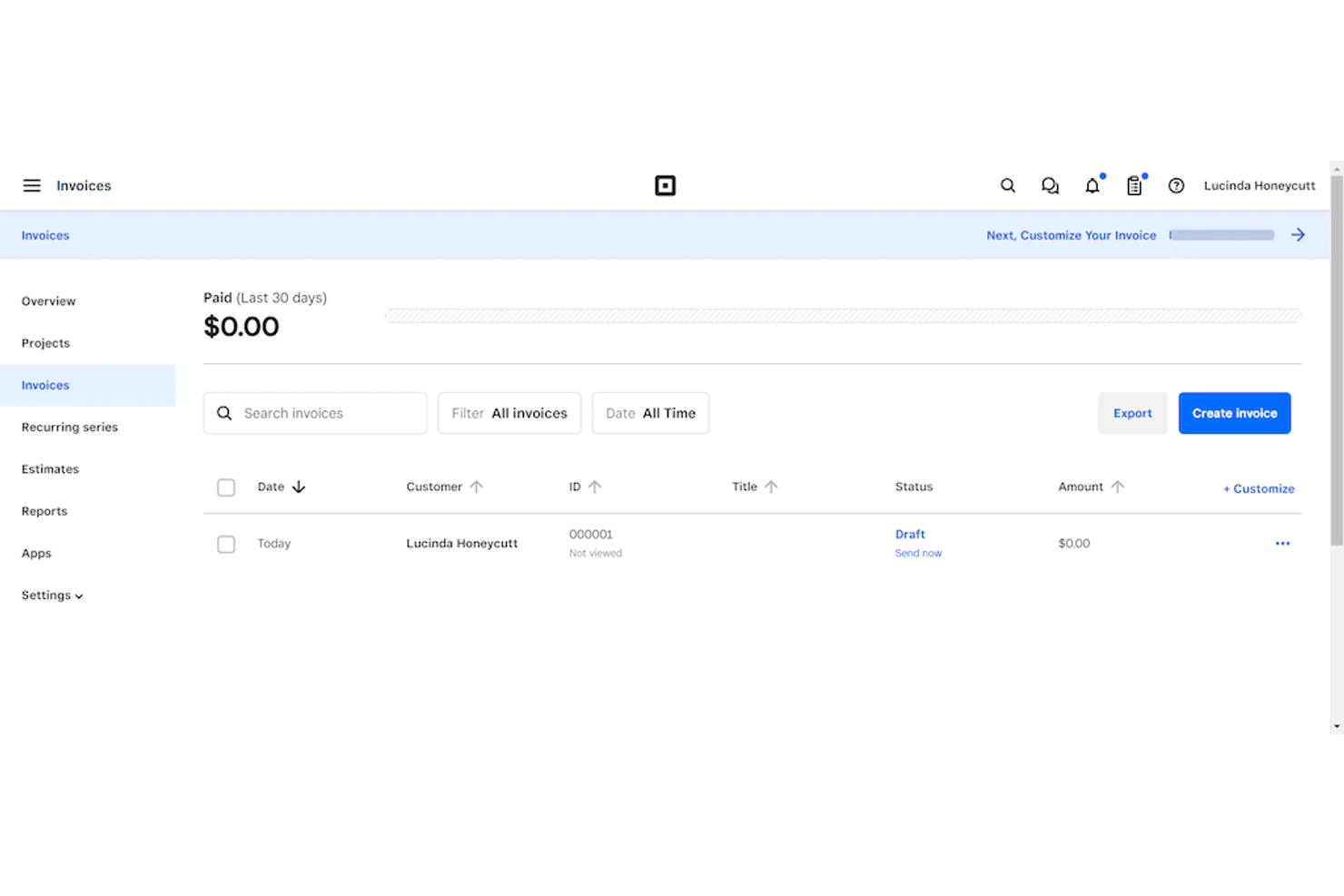
Why I picked Square: The free plan allows you to send invoices directly from your mobile device, which is perfect for those who are always on the move. You can accept payments through various online and POS methods, including credit cards and digital wallets. The platform provides real-time tracking of invoice statuses and filtering options so you always know where you stand. With no monthly fees, it's a practical option for businesses looking to keep costs down.
Standout Features and Integrations:
Features include the ability to create recurring invoices and save time on repetitive tasks. You can also customize invoice templates to match your brand. Additionally, the tool provides detailed sales reports, giving you insights into your business performance.
Integrations include QuickBooks, Xero, and more.
What's Free? Square offers a free-forever plan with no monthly fees, but transaction fees apply for payments processed through the platform.
Pros and Cons
Pros:
- Enables instant online invoice payments
- Real-time invoice tracking
- Mobile invoicing capability
Cons:
- Limited advanced features
- No customization on free plan

PayPal Open is a widely-used online payment platform that caters to individuals, freelancers, and small businesses. It facilitates easy and secure transactions, making it a popular choice for sending and receiving payments globally.
Why I picked PayPal Open: The ease of setting up and managing payments differentiates it from other invoicing tools. You can send invoices and receive payments conveniently through email, which is useful for small business owners. The platform supports multiple currencies, allowing you to transact internationally without hassle. It also accepts various payment methods, including debit cards, bank accounts, and digital wallets. With no setup fees, it's accessible for businesses looking to manage payments efficiently.
Standout Features and Integrations:
Features include the ability to set up subscription payments, which is ideal for businesses with recurring billing. You can also create and send invoices directly from your account, with options for customer details, itemized billing, and payment options. Additionally, PayPal Open provides fraud protection, ensuring your transactions remain secure.
Integrations include Zapier and more.
What's Free? PayPal Open offers a free-forever plan for basic invoicing and payment processing, with transaction fees applied to each payment received.
Pros and Cons
Pros:
- Subscription payment options
- Secure transactions with fraud protection
- Supports itemized billing
Cons:
- Limited advanced invoicing designs
- Transaction fees for payments
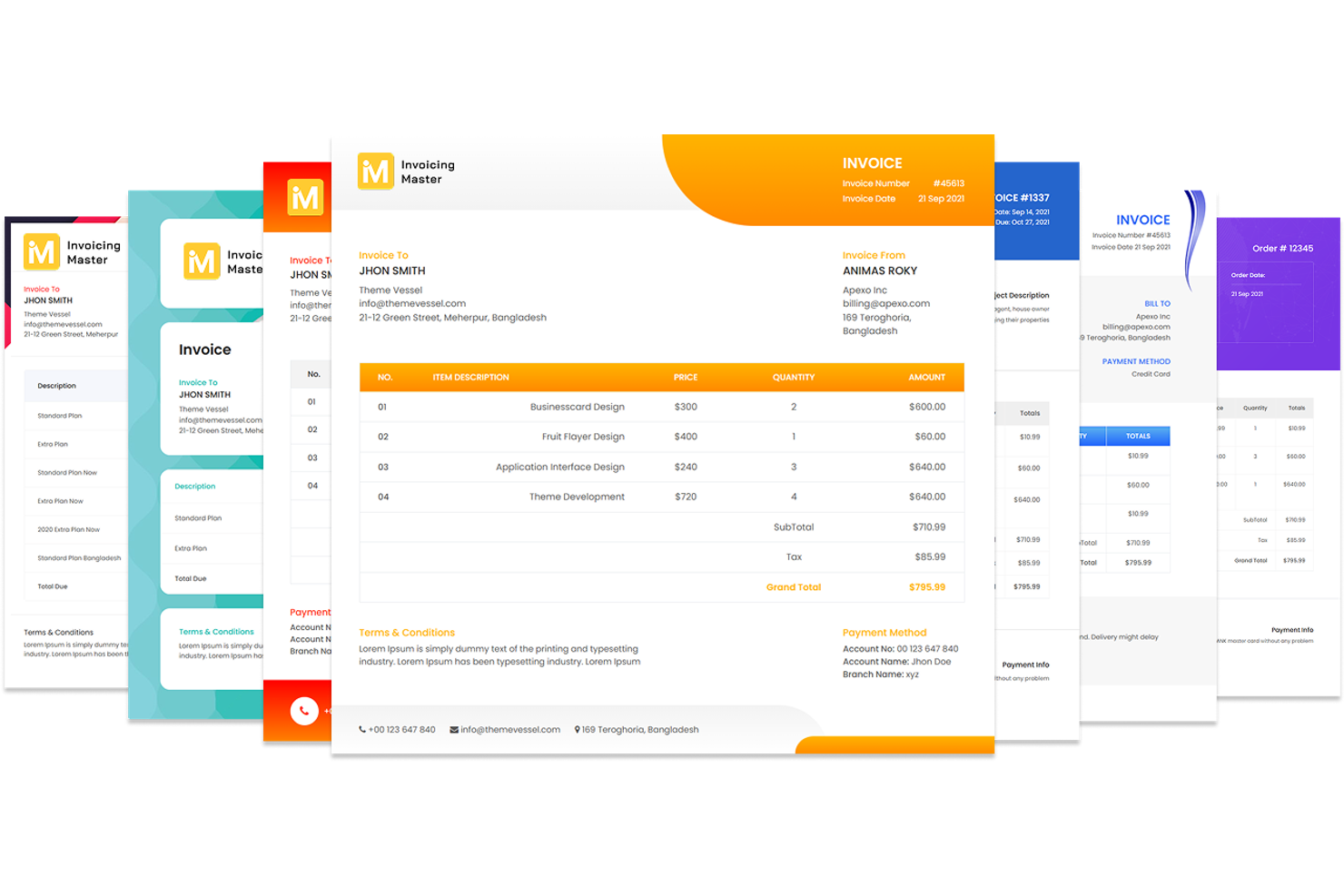
Invoice Master is a full-suite business management tool designed for small businesses, contractors, and freelancers. It offers invoicing, CRM, inventory management, and project tracking, providing users with an all-in-one approach to managing their operations.
Why I picked Invoice Master: The free plan focuses on providing a simple interface for easy navigation. You can create and send professional invoices with customizable templates, featuring itemized billing sections, payment methods, and company branding options. The platform supports multi-currency billing, which is ideal for international clients. With built-in project management features, it keeps your tasks organized without added complexity.
Standout Features and Integrations:
Features include a detailed analytics dashboard that provides insights into your financial performance. You can also manage inventory with detailed tracking and control. Additionally, the tool offers a complete CRM system to manage contacts and sales interactions.
Integrations include Stripe and more.
What's free? Invoice Master offers a free-forever plan with access to invoicing, CRM, and basic inventory features, with restrictions on advanced functionalities.
Pros and Cons
Pros:
- Built-in project management tools
- Supports automated recurring invoicing
- Multi-currency billing support
Cons:
- Limited customization for CRM
- Complex inventory management
Other Free Invoicing Software for Small Business
Here are some additional invoicing software for small business options that also offer free plans or trials. While these tools didn’t make it onto my shortlist, they’re still worth checking out:


How I Evaluate Free Invoicing Software
I look at free invoicing software in two layers: the core features a freelancer or SMB needs to invoice clients and collect payments, and the differentiators that set one tool apart from another.
Core Functionality (Table Stakes For This List)
When I'm selecting tools for my list, I rank each one on a scale from 0 (does not offer the functionality) to 5 (excels in this area) for each core functionality listed below. Then, I calculate the tool's total score into a percentage. Each tool needs to achieve a minimum total score of 65% to be considered for inclusion.
- Invoice Creation & Customization: I check whether you can add your logo, adjust line items, and apply discounts or taxes so invoices look professional and match your brand.
- Free Tier Availability: The tool needs a permanent free plan, not a trial. I look at whether it supports enough invoices and clients for a freelancer's real monthly volume.
- Payment Processing Integration: Getting paid faster matters, so I evaluate which gateways each tool connects to—Stripe, PayPal, Square—and whether clients can pay by card or bank transfer.
- Invoice Tracking & Status: I look for clear visibility into whether an invoice has been sent, viewed, or paid, the kind of detail that helps an AR clerk chase down overdue balances.
- Recurring Invoices & Reminders: For consultants billing retainers or subscription businesses, I check whether the tool can auto-generate invoices on a set schedule and nudge late payers.
- Tax & Multi-Currency Support: I evaluate how each tool handles tax rates like VAT or GST and whether you can invoice international clients in their local currency.
Once I have a list of tools that meet this criteria, I consider what sets each platform apart.
Differentiating Factors (What Sets Vendors Apart)
Here's how I compare and contrast different vendors:
Standout Features
Expense and time tracking matters for consultants and freelancers who bill by the hour. I look for tools that let you log time against a project and pull those entries onto an invoice. Quote-to-invoice conversion is worth evaluating too, since many small business owners start with an estimate. A one-click path from approved quote to finalized invoice saves real time. I also check whether a tool syncs with platforms like QuickBooks or Xero so invoice data flows into your general ledger without re-entry.
Beyond Features
Free plan transparency is the first thing I evaluate. Some tools gate essential features like PDF exports or payment acceptance behind paid tiers, which defeats the purpose. I also consider how well each platform fits into your existing stack—whether it connects to your CRM, project tools, or ecommerce platform through native integrations or Zapier. Security matters when invoices contain sensitive client and payment data. I check for PCI-DSS compliance and options like 2FA that protect your account even on a free plan.
How To Choose Free Invoicing Software for Small Business
Complex feature lists and pricing structures can make it hard to figure out what you're really getting from free invoicing software for small businesses. To help you stay focused as you work through your software selection process, here are some factors to keep in mind:
| Factor | What To Consider |
| Free Offer Scope | Check what's included in the free plan. Ensure it covers essential features, such as invoicing and payment tracking, without hidden limitations. |
| Scalability | Consider whether the software can grow with your business. Look for tools that offer affordable upgrade options as your invoicing needs expand. |
| Integrations | Ensure the software integrates with tools you already use, such as accounting or CRM systems. This will help consolidate your processes and save time. |
| Ease of Use | Choose software with a user-friendly interface. Test it with your team to ensure it's intuitive and reduces the learning curve for everyone. |
| Customer Support | Evaluate the level of support provided. Access to live chat or phone support can be urgent when you need quick assistance with invoicing issues. |
| Customization | Look for customization options, such as invoice templates. This helps maintain your brand identity and ensures your invoices meet your business's specific needs. |
| Security | Verify the software's security measures. Ensure it complies with data protection regulations to safeguard your and your clients' sensitive information. |
| Mobile Access | Consider whether the software offers a mobile app. This is useful for managing invoices on the go and ensures you can keep up with your business anywhere. |
What Is Free Invoicing Software for Small Business?
Free invoicing software for small businesses is a digital tool designed to help businesses create and manage invoices at no cost. These products typically offer free versions or trials that include basic invoicing and payment tracking features. Small business owners, freelancers, and accountants often use these tools for their affordability and efficiency. They provide value by simplifying the billing process, saving time, and improving cash flow management. Features such as customizable templates, payment reminders, and multi-currency support help users maintain professionalism, ensure timely payments, and manage international transactions.
Features of Free Invoicing Software for Small Business
Let's go over the features commonly found in invoicing software for small businesses, as well as which ones are usually included in free vs. paid plans.
Typically Free Invoicing Software for Small Business Features
- Invoice creation: Allows you to create and send professional invoices to clients, helping organize your billing process.
- Payment tracking: Helps you monitor received and outstanding payments, ensuring you stay on top of your cash flow.
- Client management: Stores client information for easy access, simplifying CRM.
- Customizable templates: Tailor forms to your brand, maintaining a professional appearance.
- Multi-currency support: Enables billing in various currencies, which is essential for businesses with international clients.
- Basic reporting: Provides insights into your financial data, helping you make informed business decisions.
- Mobile access: Allows you to manage invoices on the go, providing flexibility and convenience.
- Automated reminders: Send notifications to clients about due or overdue payments, helping improve cash collection.
Typically Paid Invoicing Software for Small Business Features
- Advanced reporting: Offers detailed analytics and insights, helping you understand your overall financial health.
- Integrated accounting: Combines invoicing with accounting tools, consolidating your financial management processes.
- Time tracking: Tracks billable hours, making it easier to invoice clients accurately for time-based services.
- Inventory management: Helps monitor and manage stock levels, which is fundamental for businesses selling physical products.
- CRM integration: Connects with CRM systems, supporting your ability to manage customer interactions.
- Automated tax features: Calculate taxes automatically, saving time and reducing errors during tax season.
- Subscription billing: Supports recurring payments for subscription-based services, simplifying the billing process for ongoing services.
- Multi-user access: Allows multiple team members to access and collaborate on invoicing, improving team efficiency.
Benefits of Free Invoicing Software for Small Business
Implementing free invoicing software for a small business provides several benefits for your team and your business. Here are a few you can look forward to:
- Cost savings: Free plans help you manage billing without adding to your expenses, making it ideal for budget-conscious businesses.
- Professional appearance: Customizable templates let you maintain a consistent brand image, strengthening your business's professionalism.
- Improved cash flow: Automated reminders ensure timely payments, helping you manage and improve your cash flow.
- Accessibility: Mobile access allows you to manage invoices anywhere, ensuring flexibility and convenience for your team.
- Time efficiency: Features such as invoice creation and payment tracking save time on administrative tasks, freeing up resources for other business activities.
- Global reach: Multi-currency support enables you to conveniently bill international clients, expanding your potential market.
- Data insights: Basic reporting provides valuable insights into your financial data, aiding in informed decision-making.
Costs and Pricing of Free Invoicing Software for Small Business
I realize you came to this article looking for freely available options for the best invoicing software for small businesses. However, since free plans only offer limited features, there's a good chance you'll need to scale your plan up in the future.
The table below summarizes common plans, their average prices, and typical features included in invoicing software for small business solutions:
Plan Comparison Table for Invoicing Software for Small Business
| Plan Type | Average Price | Common Features |
| Free Plan | $0 | Create invoices, track payments, manage clients, and view basic reports. |
| Personal Plan | $5-$20/user/month | Customizable templates, automated reminders, mobile access, and multi-currency support. |
| Business Plan | $20-$60/user/month | Advanced reporting, integrated accounting, time tracking, and CRM integration. |
| Enterprise Plan | $60-$150+/user/month | Subscription billing, inventory management, multi-user access, and dedicated support. |
Free Invoicing Software for Small Business FAQs
Here are some answers to common questions about free invoicing software for small businesses:
Can I use free invoicing software for international clients?
Absolutely, many free invoicing software options support multi-currency billing. This feature allows you to create invoices in different currencies, making it easier to work with international clients. It’s important to check if the software you’re considering includes this feature in its free plan.
What are the limitations of free invoicing software?
Free invoicing software often comes with limitations, such as a cap on the number of invoices you can send or the number of clients you can manage. Some features, such as advanced reporting or integrations, might also be restricted. Make sure to review the specific limitations of the free plan before choosing a tool.
How secure is free invoicing software?
Most reputable free invoicing software providers prioritize security and comply with data protection regulations. They use encryption to protect your data and offer secure payment processing options. It’s important to verify the security measures of any software you choose to ensure your information is safe.
Can I integrate free invoicing software with other tools?
Many free invoicing software solutions offer integrations with popular tools such as accounting software, payment gateways, and CRM systems. However, the availability of integrations may vary by provider and might be limited in free plans. Check the integration options to ensure they meet your business needs.
Will I need to upgrade from a free plan eventually?
Depending on your business growth and needs, you might eventually need to upgrade from a free plan. Free plans are great for startups or small operations, but as your invoicing requirements increase, you may need more advanced features available in paid plans. Consider your growth trajectory when choosing a solution.
What's Next:
If you're in the process of researching free invoicing software for a small business, connect with a SoftwareSelect advisor for free recommendations.
You fill out a form and have a quick chat where they get into the specifics of your needs. Then you'll get a shortlist of software to review. They'll even support you through the entire buying process, including price negotiations.