

10 Best Time Tracking and Invoicing Software in 2026

Best Time Tracking and Invoicing Software Shortlist


Tired of time tracking and invoicing software that feels like more work than it’s worth? Messy timesheets, invoice mistakes, and late payments don’t just slow you down—they hurt your bottom line. You need a tool that tracks hours effortlessly, automates invoicing, and keeps cash flow steady without the extra hassle.
I’ve spent years as a financial controller sorting through software that promises automation but ends up creating more stress. The best tools actually make life easier—saving you time, improving accuracy, and keeping billing frustration-free.
To make your search easier, I tested and reviewed the top time tracking and invoicing software out there. These picks will simplify tracking, speed up invoicing, and help you stay on top of your finances. Let’s find the right one for you!
Why Trust Our Software Recommendations
Our team has been testing and reviewing software since 2012. As finance leaders ourselves, we know how difficult—and important—it is to choose the right software.
For this guide, we evaluated tools using hands-on testing and independent research, scoring tools using our selection criteria.
Our reviews reflect our human editorial judgment, not a sales pitch.
Time Tracking and Invoicing Software Comparison Table
This comparison table summarizes pricing details for my top time tracking and invoicing software selections:
| Tool | Best For | Trial Info | Price | ||
|---|---|---|---|---|---|
| 1 | Best for billing across mixed client models | 14-day free trial | From $19.90/user/month (billed annually) | Website | |
| 2 | Best for real-time profitability tracking | 14-day free trial + free demo available | From $10/month (billed annually) | Website | |
| 3 | Best for visual labor cost reports | Free plan + 30-day free trial + free demo available | From $9/user/month (billed annually) | Website | |
| 4 | Best for built-in billing & invoicing tools | Free plan + 30-day free trial + free demo available | From $6/user/month (billed annually) | Website | |
| 5 | Best for customizable time-to-invoice tracking | Free plan available | From $4.99/user/month | Website | |
| 6 | Best for automatic time tracking | 14-day free trial + free plan + free demo available | From $3.99/user/month (billed annually) | Website | |
| 7 | Best for accounting firms | Free demo available | From $79/user/month | Website | |
| 8 | Best for detailed billing reports | Free plan available + 14-day free trial | From $5.83/user/month (billed annually) | Website | |
| 9 | Best for small business accounting | 30-day free trial available | From $2.50/month | Website | |
| 10 | Best for creative teams | Free demo available | From $10.50/user/month (billed annually) | Website |


Best Time Tracking and Invoicing Software Review
Below are my detailed summaries of the best time tracking and invoicing software that made it onto my shortlist. My reviews offer an in-depth look at the key features, pros & cons, integrations, and ideal use cases of each tool to help you find the best one for you.

Scoro
Best for billing across mixed client models
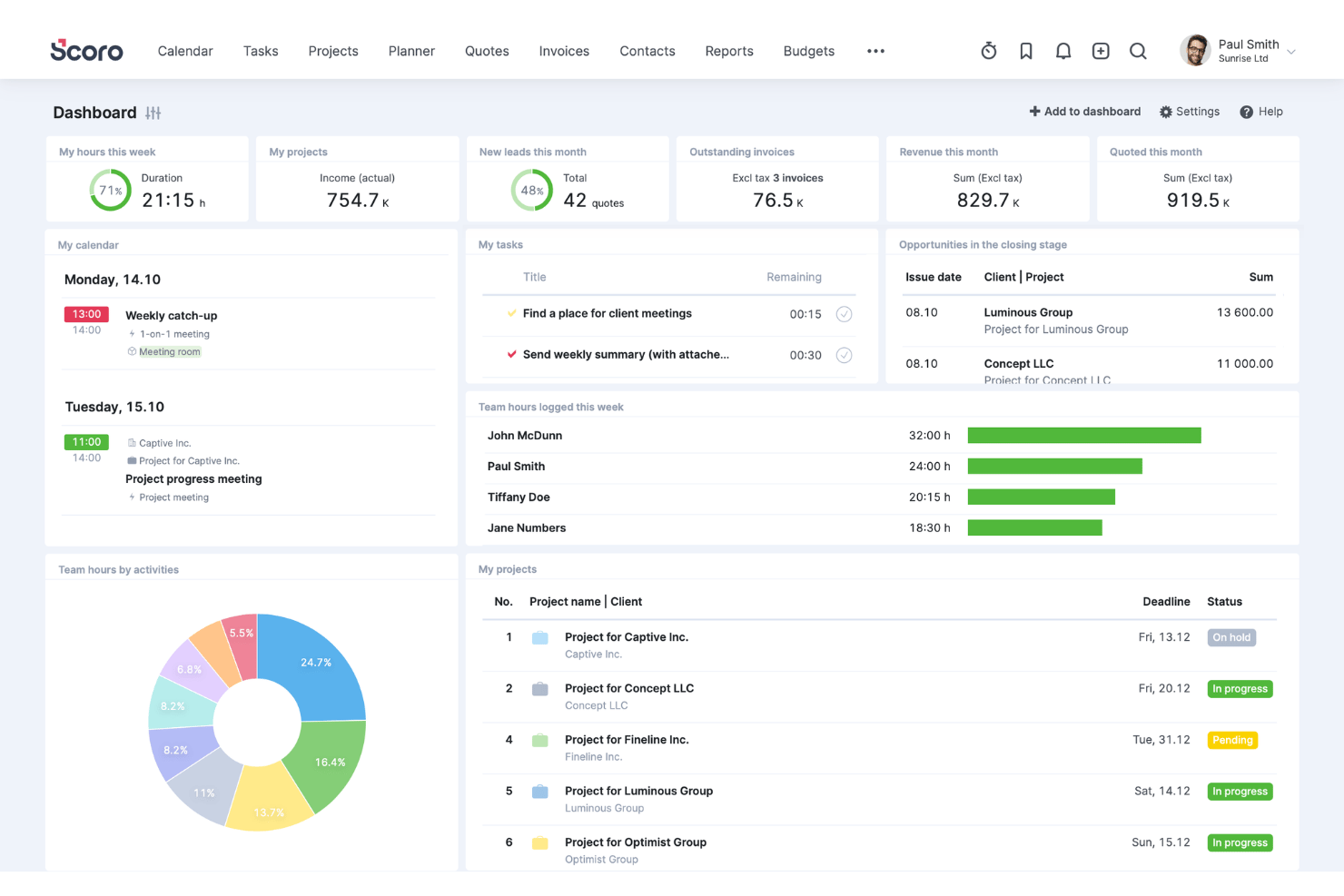
Scoro is a professional services automation platform that combines time tracking, invoicing, project budgeting, and billing management—supporting hourly, fixed-fee, retainer, and capped T&M arrangements within a single system.
Who Is Scoro Best For?
Scoro is a strong fit for fractional CFOs, controllers, and advisory firm teams managing clients across hourly, retainer, and fixed-fee billing arrangements simultaneously.
Why I Picked Scoro
I've included Scoro in my top picks because it handles mixed billing models better than almost anything else I've seen: hourly, fixed-fee, retainer, capped T&M, and milestone billing can all run within a single project without workarounds. What I find most valuable is how time entries flow directly into invoices at the correct rate, whether that's a role-based rate for one client or a flat retainer for another, without any manual re-entry between systems.
Scoro Key Features
- Timesheet approval workflows: Managers can review and approve submitted timesheets before hours flow into invoices, with automated reminders for unsubmitted entries covering up to the past eight weeks.
- Quote Estimation Matrix: Build proposals broken down by role, deliverable, and effort—with cost and margin visibility—before carrying those terms directly into project budgets and billing.
- Utilization dashboards: Real-time reports show billable versus non-billable hours and team productivity trends, helping you spot overservicing and manage capacity.
- Two-way accounting sync: Scoro connects bidirectionally with QuickBooks Online, Xero, Sage Intacct, and Exact Online to keep project financials and accounting records aligned without manual re-entry.
Scoro Integrations
Scoro offers native integrations with QuickBooks Online, Xero, Sage Intacct, Exact Online, and Stripe. It also connects with Salesforce, Google Calendar, Microsoft 365, Slack, and Jira, with a REST API, marketplace integrations, and Zapier support.
Pros and Cons
Pros:
- Direct time entry to invoice workflow
- Real-time project profitability tracking dashboards
- Handles mixed billing models in one project
Cons:
- No passive or automated time capture
- No client self-service or payment portal
New Product Updates from Scoro

Scoro Adds Time Mobile App and ELI Improvements
Scoro adds the Scoro Time mobile app for iOS/Android to track time anywhere and expands ELI with attachments, smarter filtering, and trigger-based actions. For more information, visit Scoro's official site.

Best for real-time profitability tracking

In the fast-paced world of business, Productive emerges as a versatile solution tailored for agencies, consultancies, and service-oriented businesses seeking to optimize their time tracking and invoicing processes. If you are looking to enhance operational efficiency and profitability, Productive offers real-time insights and centralized communication, addressing the critical need for seamless project and financial management. With its focus on industries like IT services, architecture, and accounting, Productive is designed to help you streamline operations and make informed decisions with confidence.
Why I Picked Productive
I picked Productive for its targeted approach to solving the intricate challenges of time tracking and invoicing. The platform stands out with its real-time profitability tracking, allowing you to monitor costs, revenue, and margins. Additionally, its invoicing features are tailored for multi-currency support and automated reminders for late payments, addressing the common need for efficient financial management. These features, combined with its seamless integration with accounting tools like Xero and QuickBooks, make Productive an ideal choice for businesses looking to simplify their billing and financial processes.
Productive Key Features
In addition to its standout invoicing capabilities, I also found several other features that enhance its utility as a time tracking and invoicing tool.
- Resource Planning: This feature helps you allocate resources effectively to avoid bottlenecks and optimize team schedules.
- Project Management: Track project progress and coordinate tasks seamlessly with built-in project management tools.
- Budgeting: Gain insights into your financial health with budgeting tools that allow you to plan and forecast with precision.
- Reporting: Access tailored reports for better visibility into business performance and profitability insights.
Productive Integrations
Integrations include Xero, Slack, QuickBooks, Google Calendar, Jira, Asana, Trello, Microsoft Teams, Dropbox, and HubSpot. An API is available for custom integrations.
Pros and Cons
Pros:
- Integrated time and billing
- Multi-currency invoicing support
- Real-time profitability visibility
Cons:
- Learning curve for small teams
- No free plan available
New Product Updates from Productive
Productive Adds Voice Dictation, Slack Connector, Proposals, and Overtime
Productive adds voice dictation, a Slack Connector, proposal controls, and overtime tracking. These updates support faster AI interactions, client proposals, and time management. For more information, visit Productive’s official site.
Toggl
Best for visual labor cost reports
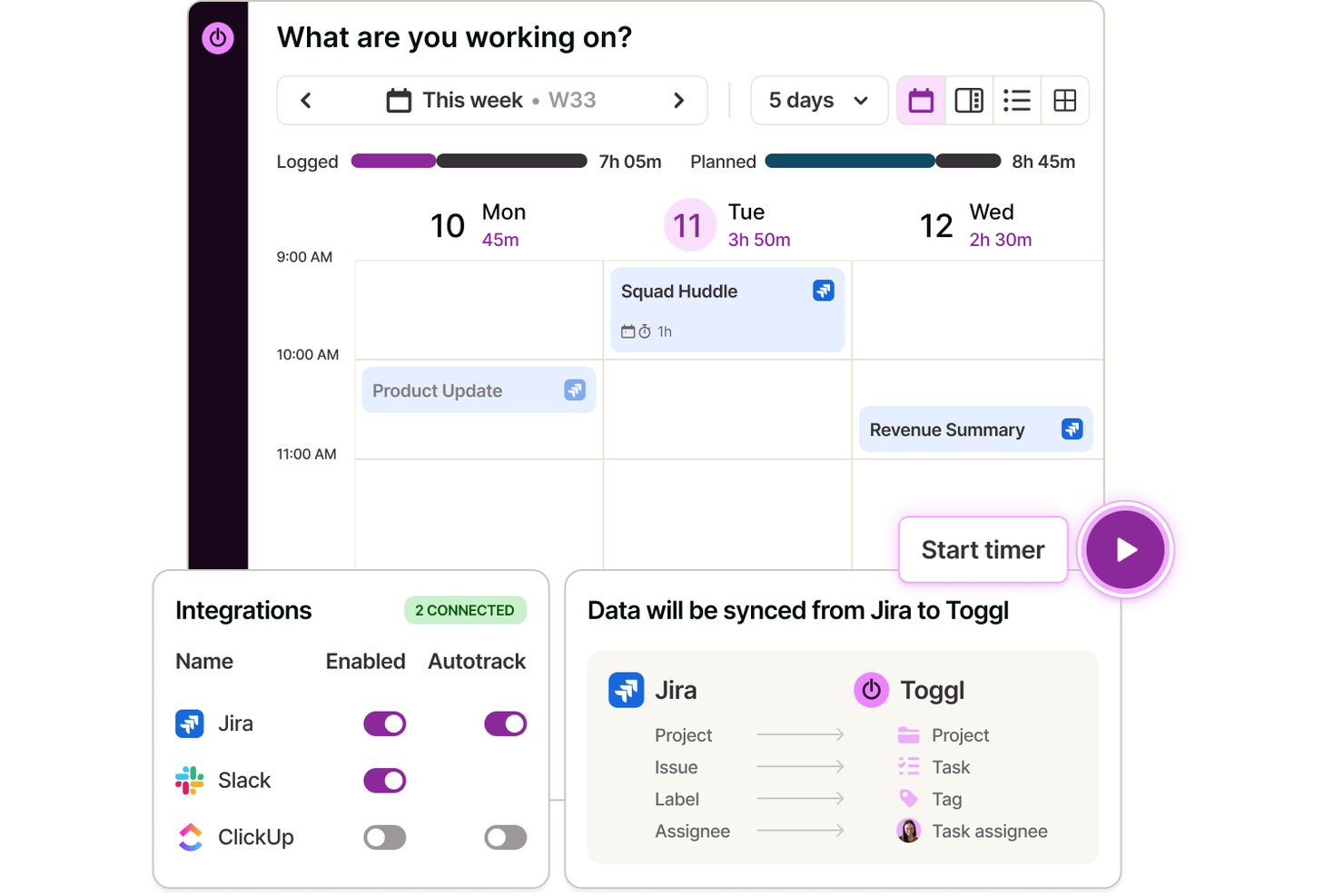
Toggl is a time tracking, capacity planning, and invoicing tool that lets you capture billable hours across clients and projects, assign billing rates, manage tasks visually, and analyze labor costs and team profitability.
Who Is Toggl Best For?
Toggl suits teams and freelancers who need a straightforward way to track billable hours, manage tasks and projects, and understand where project time and money are going.
Why I Picked Toggl
I picked Toggl as one of the best because its Premium reporting suite gives you a genuinely visual breakdown of where labor costs are landing across every project, client, and team member. I particularly like assigning a cost rate per team member and then viewing that data sliced in a pivot table or grouped bar chart, so I can immediately spot which engagements are eating into profit margins. You can also schedule these reports to send automatically as PDFs, which saves a real step when reporting on team utilization each month.
Toggl Key Features
- Project and client management: Organize tracked time by unlimited clients, projects, and sub-tasks with custom billing rates.
- Multi-platform time tracking: Track time on web, desktop, mobile, and browser extensions, all synced automatically.
- Billable rates and invoice creation: Apply billable or non-billable status to tracked hours and generate invoices from billable entries.
- Calendar integrations: Sync with Google and Outlook calendars to turn scheduled meetings into time entries.
Toggl Integrations
Toggl offers over 100 native integrations, including Jira, Asana, GitHub, Todoist, Google Calendar, Outlook, among others.
Pros and Cons
Pros:
- Auto-tracking time from desktop or browser
- Assign custom billing rates per project or client
- Visual labor cost and profitability reports
Cons:
- Recurring invoices and retainers not supported
- No built-in payment collection tools

actiTIME
Best for built-in billing & invoicing tools
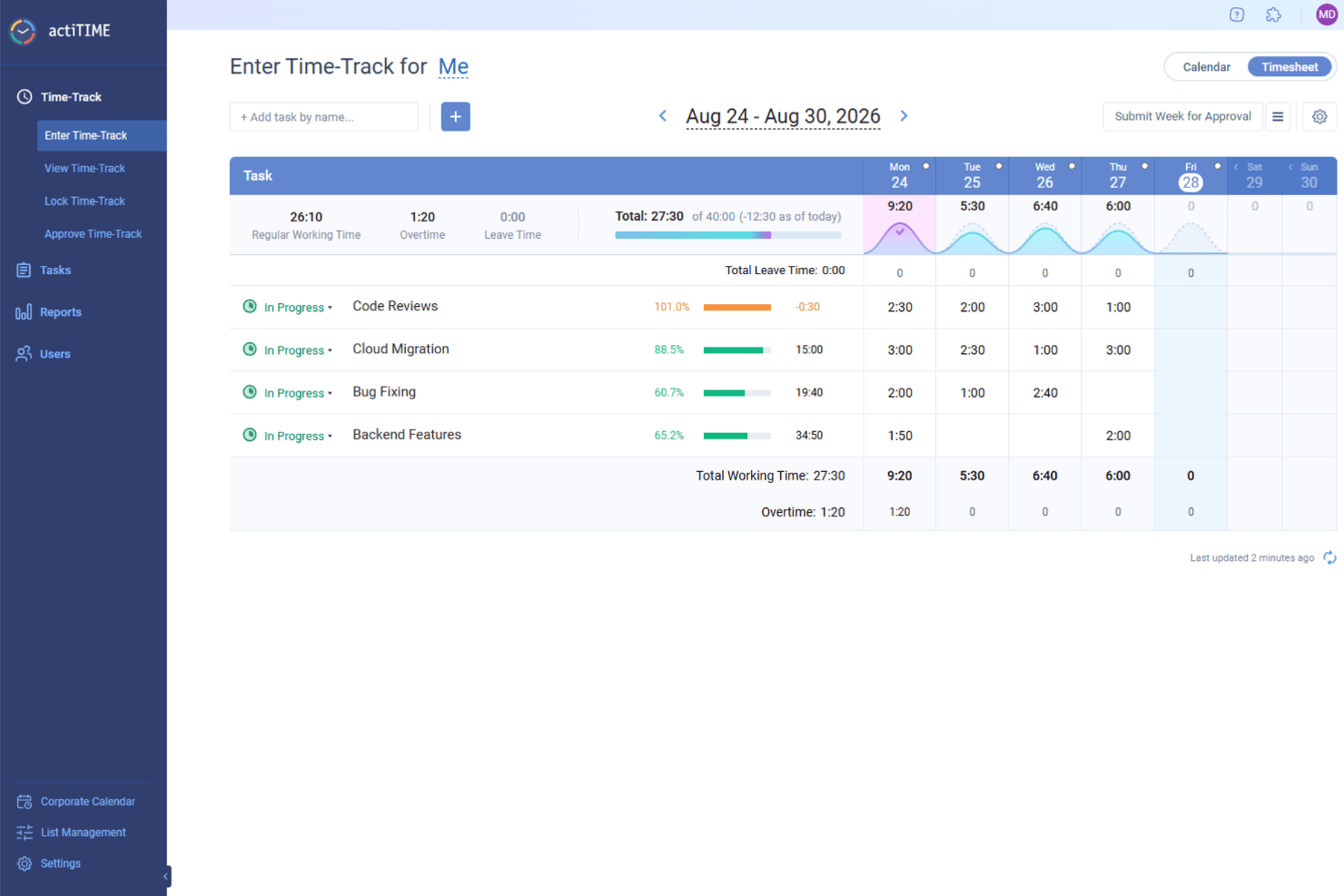
actiTIME is a versatile software that offers solutions for time tracking and invoicing, making it a valuable tool for businesses looking to manage their projects and finances. It's designed to cater to various industries, providing the necessary features to keep track of time and manage billing.
Why I Picked actiTIME: I picked actiTIME because it helps you track time accurately across tasks and projects, so you always know where your team’s efforts are going. You can log hours, manage workloads, and stay aligned with project timelines. The built-in billing and invoicing tools also make it easier to handle client payments and reduce manual work. I also like that you can track budgets and project progress in real time, which helps you avoid overspending and keep things moving smoothly. Plus, the customizable workflows let you tailor the system to match how your team works best.
Standout Features & Integrations:
Features include performance analytics, which provides insights into productivity trends and project profitability, helping you understand where improvements can be made. The leave management feature offers customizable leave policies and automated PTO tracking, ensuring that team resources are managed effectively without manual intervention. Billing and cost analysis generate billing reports and calculate payroll, streamlining the financial aspects of your projects and ensuring that you can focus on the work that matters.
Integrations include QuickBooks and Zapier.
Pros and Cons
Pros:
- Simple manual time entries
- Easy project setup
- Customizable billing rates
Cons:
- Limited advanced features
- Basic user interface
New Product Updates from actiTIME

actiTIME Visual Hour Indicator and Time-Track Report Redesign
actiTIME adds a wave-style hour indicator to the Timesheet and Calendar views and refreshes the Time-Track report for smoother navigation and clearer visuals. For more information, visit actiTIME's official site.

Clockify
Best for customizable time-to-invoice tracking

Clockify is a time tracking software that caters to businesses of all sizes, offering features that help manage time and billing. It allows teams to track work hours (billable and non-billable hours), manage projects, and generate detailed reports.
Why I picked Clockify: I selected Clockify because it simplifies your end-to-end billing pipeline by turning logged project hours into custom, itemized invoices. You can configure billable rates by role, client, or specific task, and enforce timesheet approvals before invoices are issued. This eliminates discrepancies between logged work and client billing, protecting your profit margins while saving your finance team hours of manual reconciliation.
Standout features & integrations:
Features include a visual timesheet that helps you see where time is going. The project dashboard gives you an overview of your team's activities and progress, while its customizable reports let you analyze data to improve productivity.
Integrations include Asana, Trello, Slack, Jira, monday.com, QuickBooks, Notion, Microsoft Teams, Todoist, and Google Calendar.
Pros and Cons
Pros:
- Customizable reports for insights
- Flexible for team growth
- Detailed project dashboard
Cons:
- Limited offline capabilities
- Learning curve for new users

TimeCamp
Best for automatic time tracking

TimeCamp is a time tracking and invoicing software aimed at freelancers and small businesses. It automates time tracking and helps manage billing, making it easier to keep track of work hours and invoices.
Why I picked TimeCamp: TimeCamp offers automatic time tracking, which minimizes manual input and saves you time. The platform’s main features allows you to track time spent on different tasks without having to start or stop the timer manually. It also generates detailed reports, providing insights into productivity and time usage. Plus, TimeCamp’s invoicing capabilities help you convert tracked hours into invoices effortlessly.
Standout features & integrations:
Features include a graphical timesheet that provides a visual overview of your work hours. The attendance tracking feature helps you monitor team presence and punctuality. TimeCamp also offers project budgeting, allowing you to keep track of costs and ensure projects stay within budget.
Integrations include Trello, Asana, Slack, QuickBooks, Xero, monday.com, Jira, GitHub, Evernote, and Google Calendar.
Pros and Cons
Pros:
- Attendance tracking for team monitoring
- Detailed productivity reports available
- Invoicing capabilities for tracked hours
Cons:
- Initial setup can be complex
- Occasional performance lags

Karbon
Best for accounting firms

Karbon is a practice management software designed for accounting firms and professional service teams. It helps manage workflows, tasks, and improve collaboration among team members.
Why I picked Karbon: Karbon is best for accounting firms offering features like email integration and task management. The email integration option allows you to manage client communications directly within the platform, which is important for maintaining organized correspondence. Additionally, its task management feature helps you assign and track tasks efficiently across your team.
Standout features & integrations:
Features include workflow automation, which reduces manual work and increases efficiency. The time tracking feature helps you monitor billable hours accurately. Karbon also offers detailed analytics, providing insights into team performance and project progress.
Integrations include QuickBooks Online, Xero, Slack, Microsoft 365, Google Workspace, Outlook, Gmail, Zapier, Practice Ignition, and TSheets.
Pros and Cons
Pros:
- Email integration for client communication
- Centralized platform for document sharing
- Task management for efficient workflow
Cons:
- Complex initial setup process
- Mobile app lacks full functionality
TMetric
Best for detailed billing reports

TMetric is a time tracking and billing software designed for freelancers and small to medium-sized businesses. It helps users track time, manage tasks, and generate detailed billing reports.
Why I picked TMetric: TMetric offers detailed billing reports, which are essential for accurate invoicing and financial management. The software’s time tracking feature allows you to log hours with precision, ensuring you bill clients accurately. It also provides project management capabilities, helping you keep tasks organized and on track.
Standout features & integrations:
Features include manual time entry, which allows you to add time entries for past work. The budgeting feature helps you set financial limits for projects to avoid overspending. TMetric also offers activity tracking, providing insights into how time is spent on tasks.
Integrations include Asana, Trello, Jira, Slack, QuickBooks, GitHub, Bitbucket, Freshdesk, Microsoft Outlook, and Google Calendar.
Pros and Cons
Pros:
- Detailed billing reports for accurate invoicing
- Manual time entry for flexibility
- Budgeting feature for project limits
Cons:
- Initial setup can be complex
- Learning curve for new users

Xero
Best for small business accounting

Xero is an accounting software designed for small businesses and sole traders. It handles bookkeeping, invoicing, and financial management, making it a valuable tool for those needing efficient accounting solutions.
Why I picked Xero: Xero’s particularly suited for small business accounting, offering features like automated bookkeeping and smart data insights. The software provides secure cloud storage, which is essential for businesses looking to protect their financial data. It also includes tools tailored to industries like construction and retail, giving you flexibility in managing your finances.
Standout features & integrations:
Features include automated bookkeeping, which saves you time by handling routine tasks. Xero’s smart data insights help you make financial decisions, while its secure cloud storage ensures your data is protected and accessible when you need it.
Integrations include Shopify, HubSpot, Square, Stripe, PayPal, Gusto, Mailchimp, Vend, WorkflowMax, and Expensify.
Pros and Cons
Pros:
- Smart insights for financial decisions
- Secure cloud storage for data protection
- Onboarding support and expert advisors
Cons:
- Limited customization options
- Learning curve for new users

FunctionFox
Best for creative teams

FunctionFox is a project management and time tracking tool designed for creative teams and agencies. It helps users manage projects, track time, and improve workflow efficiency.
Why I picked FunctionFox: FunctionFox caters specifically to creative teams, offering features like project tracking and task assignment. The project tracking feature lets you monitor deadlines and budgets, which is vital for creative projects. Its task assignment capabilities also allow you to delegate work easily within your team. Lastly, FunctionFox provides a simple interface that helps your team focus on creativity rather than administrative tasks.
Standout features & integrations:
Features include a project blog, which facilitates team communication and collaboration. The real-time reporting feature gives you insights into project progress and resource allocation. FunctionFox also offers a stopwatch timer, allowing you to track time spent on each task accurately.
Integrations include QuickBooks, Microsoft Excel, and Basecamp.
Pros and Cons
Pros:
- Simple interface for creative focus
- Project blog for team communication
- Real-time reporting for project insights
Cons:
- Mobile app lacks full functionality
- Some customization options are limited
Other Time Tracking and Invoicing Software
Here are some additional time tracking and invoicing software options that didn’t make it onto my shortlist, but are still worth checking out:
- Zoho Invoice
For invoicing automation
- Appolye
For remote team tracking
- Synerion
For workforce management
- Insightful
For automatic time mapping
- Monitask
For online timesheets
- Paymo
For project management integration
- Hubstaff
For custom invoicing
- Intelogos
With AI-driven workforce analytics
- Rippling
For employee management
- QuickBooks Online
For accounting integration
- Deltek Replicon Time
For enterprise time tracking
- Harvest
For project time tracking
- Clio
For legal practice management
- Teamwork
For team collaboration
- Keeper
For secure password protection


How I Evaluate Time Tracking and Invoicing Software
I evaluate tools on two layers: the baseline capabilities—billable time capture, invoicing, and AR tracking—every tool must have, and the differentiators that make one platform a better fit than another.
Core Functionality (Table Stakes For This List)
When I'm selecting tools for my list, I rank each one on a scale from 0 (does not offer the functionality) to 5 (excels in this area) for each core functionality listed below. Then, I calculate the tool's total score into a percentage. Each tool needs to achieve a minimum total score of 65% to be considered for inclusion.
- Billable Time Tracking: I look for timers and manual entry options that let you tag hours as billable to a specific client or engagement, like logging advisory work separately from tax prep for the same client.
- Invoice Generation: Each tool should convert approved time entries and expenses into customizable invoices with tax handling, so a bookkeeper can bill monthly hours without re-keying data.
- Client & Project Management: I check whether you can set up multiple clients with distinct billing rates per project, staff member, or service type, since most firms juggle varied rate structures.
- Online Payments & AR Tracking: Payment collection matters, so I evaluate whether a tool supports card and ACH payments, tracks invoice status, and provides AR aging views to flag overdue balances.
- Recurring & Retainer Billing: For firms on monthly retainers or subscription engagements, I look at how each platform handles automated recurring invoices and retainer balance drawdowns.
- Accounting & Financial Reporting: Strong tools sync with platforms like QuickBooks or Xero and offer reports on utilization, revenue, and AR aging that a fractional CFO can actually use during a close cycle.
Once I have a list of tools that meet the criteria, I consider what sets each platform apart.
Differentiating Factors (What Sets Vendors Apart)
Here's how I compare and contrast different vendors:
Standout Features
Time-to-billing automation is a big one. I look for tools that convert approved timesheets into draft invoices on a set cadence, so a firm billing 30 clients monthly doesn't create each invoice by hand. Profitability analytics also carry weight, especially dashboards that surface realization rates and write-offs by client or staff member. For firms that pass expenses through to clients, expense capture with mobile receipt scanning and markup that flows directly onto invoices cuts out a lot of manual re-entry.
Beyond Features
Accounting tech stack integrations matter a lot here. I check whether a tool offers two-way sync with platforms like QuickBooks or Xero, because one-way exports create reconciliation headaches during month-end close. Pricing structure also shapes fit—a solo bookkeeper and a 15-person CPA firm have very different needs, so I evaluate whether per-user pricing stays reasonable as you add seats. For tools handling sensitive client financials, I look at audit trails, role-based access controls, and PCI-DSS compliance for stored payment data.
How to Choose Time Tracking and Invoicing Software
It’s easy to get bogged down in long feature lists and complex pricing structures. To help you stay focused as you work through your unique software selection process, here’s a checklist of factors to keep in mind:
| Factor | What to Consider |
| Scalability | Ensure the software can grow with your business. Look for solutions that can handle increasing users and data without a drop in performance. |
| Integrations | Check if the software integrates with tools you already use, like accounting software, project management apps, and CRM systems, to have smoother workflows. |
| Customizability | Consider if you can tailor the software to fit your specific needs. Customizable templates and reports can be particularly useful for unique business requirements. |
| Ease of Use | Evaluate the software's interface for simplicity. Your team should be able to navigate it without extensive training, saving time and reducing frustration. |
| Budget | Compare the pricing plans against your budget. Look for transparent pricing and consider the cost per user, especially if you have a large team. |
| Security Safeguards | Prioritize software with robust security features like data encryption and two-factor authentication to protect sensitive information. |
| Support Options | Check for available support channels, such as live chat or phone support, to ensure you can get help when needed. |
| Reporting Capabilities | Look for software that offers detailed reporting features to help you analyze time and billing data effectively. |
Trends in Time Tracking and Invoicing Software
In my research, I sourced countless product updates, press releases, and release logs from different time tracking and invoicing software vendors. Here are some of the emerging trends I’m keeping an eye on:
- AI-Powered Insights: More tools are using AI to analyze time and billing data, providing insights into productivity patterns and helping teams make better decisions. This trend is useful for businesses looking to optimize their operations and reduce inefficiencies.
- Voice Command Capabilities: Some software now allows users to start and stop timers using voice commands. This is especially valuable for professionals who need to manage time tracking while multitasking.
- Blockchain for Security: A few vendors are exploring blockchain technology to enhance data security and transparency in transactions. This trend is particularly relevant for businesses that handle sensitive financial data and require an extra layer of protection.
- Real-Time Collaboration: Tools are increasingly offering features that facilitate real-time collaboration on invoices and projects, allowing multiple users to work together and make updates instantly.
- Subscription Billing Models: Vendors are incorporating subscription billing capabilities, enabling businesses to automate recurring invoices and manage subscriptions efficiently. This trend addresses the growing demand for subscription-based services across various industries.
What Is Time Tracking and Invoicing Software?
Time tracking and invoicing software is a tool that helps businesses manage work hours and billing processes efficiently. Professionals like freelancers, small business owners, and project managers generally use these tools to ensure accurate billing and effective time management.
These tools generally include key features like automatic time tracking, invoicing capabilities, and real-time collaboration to support productivity and help users manage their work and finances efficiently. Overall, time tracking and invoicing software offer significant value by simplifying administrative tasks and improving financial accuracy.
Features
Here are the core features any great time tracking and invoicing software should have:
- Automatic Time Tracking: Captures work hours without manual input, ensuring precise and streamlined billing and time management.
- Invoicing Capabilities: Creates invoices from tracked time, enhancing the billing process.
- Real-Time Collaboration: Allows multiple users to work together on invoices and projects, enhancing teamwork and efficiency.
- AI-Powered Insights: Analyzes data to provide productivity patterns and decision-making support.
- Customizable Templates: Enables the personalization of invoices and reports to match business branding.
- Subscription Billing: Automates recurring invoices, simplifying subscription management for businesses.
- Idle Detection: Alerts users when time tracking is inactive, ensuring accurate time logs.
- Voice Command Capabilities: Offers hands-free time management, useful for multitasking professionals.
- Security Safeguards: Protects sensitive data with encryption and access controls, ensuring information safety.
Benefits
Implementing time tracking and invoicing software provides several benefits for your team and your business. Here are a few you can look forward to:
- Accurate Billing: Automatic time tracking and invoicing capabilities ensure that all billable hours are accounted for, reducing errors in client billing.
- Improved Productivity: AI-powered insights and real-time collaboration help teams identify inefficiencies and work together more effectively.
- Time Savings: Features like voice command capabilities and idle detection minimize manual tasks, freeing up time for more important work.
- Better Financial Management: Project budgeting tools keep track of expenses, helping prevent overspending and optimizing resource allocation and profitability.
- Enhanced Security: Security safeguards protect sensitive data, ensuring compliance with privacy standards.
- Efficient Subscription Management: Subscription billing automates recurring invoices, making it easier to manage ongoing client relationships.
- Custom Branding: Customizable templates allow you to personalize and create invoices and reports, maintaining a consistent brand image.
Costs and Pricing
Selecting time tracking and invoicing software requires an understanding of the various pricing models and plans available, ranging from free options to custom costs. Costs vary based on features, team size, add-ons, and more. The table below summarizes common plans, their average prices, and typical features included in time tracking and invoicing software solutions:
Plan Comparison Table for Time Tracking and Invoicing Software
| Plan Type | Average Price | Common Features |
| Free Plan | $0 | Basic time tracking, invoicing capabilities, and limited reports. |
| Personal Plan | $5-$25 /user /month | Time tracking, invoicing, project management, and basic reporting. |
| Business Plan | $25-$50 /user /month | Advanced reporting, integrations, team collaboration, and project budgeting. |
| Enterprise Plan | $50-$100+/user /month | Customizable features, dedicated support, security enhancements, and scalability. |
FAQs
Here are some answers to common questions about time tracking and invoicing software:
What is the best time tracking for invoicing?
The best time tracking software for invoicing will depend on your specific needs, but popular options like Clockify offer comprehensive features for tracking and invoicing billable hours. Look for tools that automate invoices and integrate with your existing systems to make the process smoother.
What are the benefits of real-time tracking?
Real-time tracking provides up-to-date information on work progress, helping you manage projects more effectively. It allows for timely adjustments and enhances productivity by giving accurate insights into how resources are used. This feature is beneficial for teams looking to optimize their workflow.
What is the primary method for recording your time providing services for a client?
Timesheets are commonly used to record time spent on client services, especially in service-based industries. They provide a detailed breakdown of activities, ensuring accurate billing based on actual work completed. This method helps maintain transparency with clients and supports precise invoicing.
How can time tracking improve productivity?
Time tracking helps identify where time is being spent and highlights areas of inefficiency. By analyzing this data, you can make informed decisions to optimize workflows and allocate resources better. This leads to improved productivity and more effective project management for your team.