

Gestionarea finanțelor într-o întreprindere mică poate fi copleșitoare, mai ales atunci când trebuie să urmăriți numerele comenzilor de achiziție. Aveți nevoie de acuratețe, eficiență și transparență pentru a menține operațiunile în desfășurare fără probleme. Aici intervine software-ul pentru comenzi de achiziție.
Din experiența mea, aceste instrumente vă pot ajuta să urmăriți cheltuielile, să gestionați furnizorii și să îmbunătățiți fluxul de lucru al echipei. Am petrecut timp testând și evaluând diverse opțiuni pentru a găsi cele mai bune soluții pentru întreprinderi mici precum a dumneavoastră.
În acest articol, vă voi prezenta alegerile mele principale, concentrându-mă pe funcții, ușurința în utilizare și valoare. Indiferent dacă sunteți în căutarea unei soluții simple sau a uneia cu mai multe funcții, aici există o opțiune pentru dumneavoastră. Haideți să găsim instrumentul potrivit pentru a vă satisface nevoile și pentru a vă ușura munca.
Why Trust Our Software Recommendations
6,700+
Reviews
20
Industry experts
16+
Evaluation factors
14
Years
Our team has been testing and reviewing software since 2012. As finance leaders ourselves, we know how difficult—and important—it is to choose the right software.
For this guide, we evaluated tools using hands-on testing and independent research, scoring tools using our selection criteria.
Our reviews reflect our human editorial judgment, not a sales pitch.
Tabel comparativ al software-urilor pentru comenzi de achiziție pentru întreprinderi mici
Acest tabel comparativ rezumă detaliile de preț pentru selecțiile mele principale de software pentru comenzi de achiziție pentru întreprinderi mici:
Sorted by: Default
| Tool | Starting Price | Website | |
|---|---|---|---|
Best for live spend tracking against open POs | 4.8 out of 5 | $499/month Free demo available | Website |
Best for financial tracking | 4.7 out of 5 | $38/month 30-day free trial | Website |
Best for workflow automation | 4.8 out of 5 | $11/user/month 14-day free trial + free demo available | Website |
Best for process automation | 4.6 out of 5 | Pricing upon request Free plan + free demo available | Website |
Best for budget-focused teams | 4.7 out of 5 | $415/month Free trial + free demo available | Website |
Best for accounting integration | 4.4 out of 5 | $27/month 1-month free trial available | Website |
Best for supplier management | 4.5 out of 5 | $225/user/month Free trial + free demo available | Website |
Best for small to medium businesses | 4.3 out of 5 | Pricing upon request Free demo available | Website |
Best for AI-driven insights | 4.7 out of 5 | $699/month Free demo available | Website |
Best for approval workflows | Not rated | $598/month Free demo available | Website |


Recenzii ale celor mai bune software-uri pentru comenzi de achiziție pentru întreprinderi mici
Mai jos sunt prezentate rezumatele mele detaliate ale celor mai bune software-uri pentru comenzi de achiziție pentru întreprinderi mici care au ajuns pe lista mea scurtă. Recenziile mele oferă o privire detaliată asupra funcțiilor principale, avantajelor și dezavantajelor, integrărilor și cazurilor de utilizare ideale ale fiecărui instrument, pentru a vă ajuta să îl găsiți pe cel mai potrivit pentru dumneavoastră.
 Best for live spend tracking against open POs
- Free demo available
- From $499/month (billed annually)
Visit WebsiteCustomer Rating:4.8/5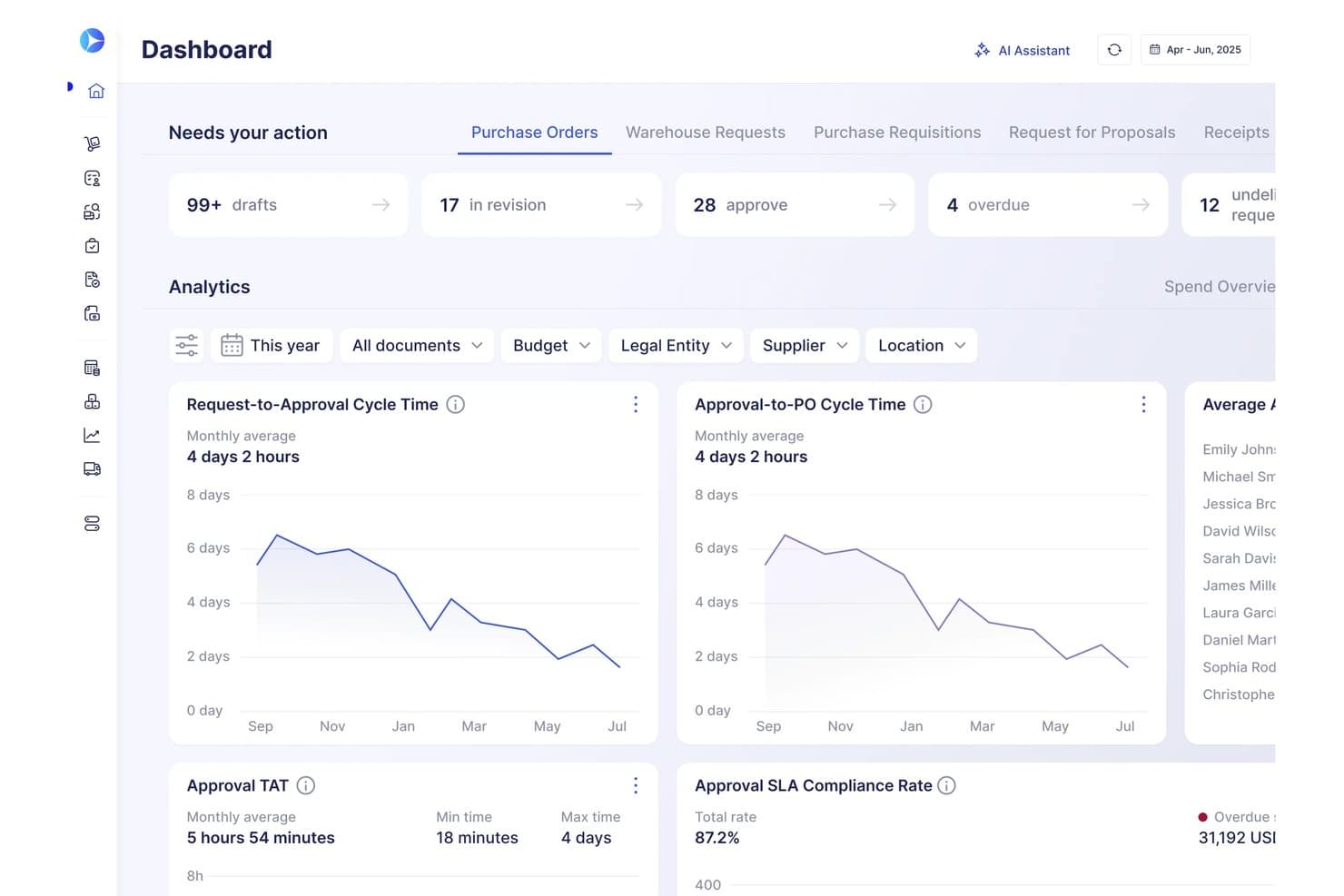
Precoro centralizes purchase order tracking and approval analytics in one dashboard. Precoro is a procurement and accounts payable platform that covers purchase requisitions, PO creation and sending, approval workflows, three-way matching, supplier management, and spend tracking.
Who Is Precoro Best For?
Precoro is a strong fit for procurement and accounts payable teams in growing small businesses that need real-time spend visibility tied directly to open purchase orders.
Why I Picked Precoro
I picked Precoro as one of the best because of how it ties live budget consumption directly to open purchase orders, so you can see exactly how much of your budget is committed before an invoice ever arrives. When a PO is created, Precoro deducts from the relevant budget line in real time, and capped lines will actually block a new document from being created if the budget is fully spent. I also like that dashboards surface actual versus planned spend by department, project, or location without requiring an export.
Precoro Key Features
- Approval workflow configuration: Teams can set up multi-step approval routing by department, location, spend threshold, or custom field.
- Three-way matching: Precoro matches invoices, POs, and receipts, flags discrepancies and duplicates, and supports tolerance limits.
- Mobile app: Users can create, approve, or reject POs and track document statuses from iOS or Android devices.
- Requisition-to-PO automation: Approved purchase requisitions can automatically generate a PO without manual intervention.
Precoro Integrations
Precoro offers dozens of native integrations, including QuickBooks Online, Xero, NetSuite, BILL, Slack, Microsoft Teams, Power BI, and Amazon Business. It also supports API and SFTP connectors for custom integrations.
Pros and Cons
Pros:
- Requisitions convert directly into purchase orders
- Flexible approvals with clear audit trails
- Live budget visibility against open purchase orders
Cons:
- Receipt workflows add steps and notifications
- Reporting filters can require spreadsheet exports
Learn more about Precoro:

QuickBooks helps small businesses manage invoicing, expenses, and reporting. QuickBooks is an accounting software platform designed for small businesses that need to manage their finances. It helps with tasks such as invoicing, expense tracking, and financial reporting.
Why I picked QuickBooks: It's ideal for financial tracking, offering tools that help you keep a close eye on your business's fiscal health. The platform provides real-time financial insights, giving you the information you need to make informed decisions. Its invoicing feature allows you to send professional invoices quickly and easily. QuickBooks also offers thorough expense tracking.
Standout features and integrations:
Features include automated bank reconciliation, which saves time by matching transactions with your bank accounts. The software's payroll function simplifies paying your employees and managing taxes. Budgeting tools help you plan and allocate resources effectively, keeping your business on track.
Integrations include PayPal, Square, Shopify, TSheets, HubSpot, Salesforce, BILL, Expensify, Mailchimp, Stripe, and more.
Pros and Cons
Pros:
- Detailed expense tracking
- Automated bank reconciliation
- Real-time financial insights
Cons:
- Minimal supplier-management tools
- Limited native PO system features
 Best for workflow automation
- 14-day free trial + free demo available
- From $11/user/month (billed annually)
Visit WebsiteCustomer Rating:4.8/5
Cflow automates workflows for SMBs to boost efficiency and reduce manual tasks. Cflow is a cloud-based workflow automation software designed for small to medium-sized businesses looking to improve operational efficiency. It enables users to automate repetitive tasks and manage their workflows.
Why I picked Cflow: It's a top choice for workflow automation, offering features that let you create and manage workflows with ease. The software provides customizable templates to help you get started quickly. With its drag-and-drop interface, you can build workflows without needing technical skills. Cflow also offers real-time tracking, ensuring you stay informed about the progress of your tasks.
Standout features and integrations:
Features include a visual workflow designer that makes creating processes, including your PO process, simple and intuitive. The software's reporting tools provide insights into workflow performance, helping you identify areas for improvement. Cflow's notification system keeps your team informed about task updates and deadlines.
Integrations include Google Workspace, Microsoft 365, Slack, Dropbox, Salesforce, QuickBooks, Zapier, DocuSign, Box, Trello, and more.
Pros and Cons
Pros:
- Effective notification system
- Real-time task tracking
- Easy drag-and-drop workflow design
Cons:
- No spend-tracking dashboard
- Weak vendor approval workflows
Learn more about Cflow: Best for process automation
- Free plan + free demo available
- Pricing upon request
Visit WebsiteCustomer Rating:4.6/5
Pipefy helps teams automate and optimize workflows. Pipefy is a workflow management tool designed for teams looking to automate their manual processes and improve efficiency. It helps businesses create, manage, and optimize workflows with ease.
Why I picked Pipefy: It's particularly effective for process automation, allowing you to automate repetitive tasks. The platform offers customizable workflows that adapt to your team's unique needs. Its drag-and-drop interface makes it easy to set up and modify processes without technical expertise. Pipefy also provides templates that help your team get started quickly, saving time on setup.
Standout features and integrations:
Features include task automation that aims to reduce manual work, increase productivity, and reduce bottlenecks. Customizable templates provide a starting point for creating workflows tailored to your business needs. The reporting tools offer insights into workflow performance, helping you identify areas for improvement.
Integrations include Slack, Google Drive, Dropbox, Salesforce, Zendesk, GitHub, Microsoft Teams, and more.
Pros and Cons
Pros:
- Quick setup process
- Effective task automation
- Customizable workflow templates
Cons:
- Less robust reporting and analytics than competitors
- Can be complex for beginners
Learn more about Pipefy: Best for budget-focused teams
- Free trial + free demo available
- From $415/month
Visit WebsiteCustomer Rating:4.7/5
ProcurementExpress.com simplifies purchasing for budget-focused teams. ProcurementExpress.com is a purchase order software designed for budget-conscious teams. It helps manage purchasing and ensure compliance with financial regulations.
Why I picked ProcurementExpress.com: This purchase order management software is ideal for budget-focused teams due to its cost-effective features. Real-time budget tracking helps you avoid overspending, while instant alerts notify your team before budget limits are exceeded. The software's audit-ready reporting saves time and reduces stress during compliance checks. Finally, the simple setup means you don't need extensive IT resources to get started.
Standout features and integrations:
Features include audit-ready reporting that simplifies compliance checks. Real-time budget tracking helps you stay on top of your financial limits. Automated alerts keep your team informed about budget status, preventing overspending and assisting your team with cost control.
Integrations include QuickBooks, Xero, Sage, Slack, Google Workspace, Microsoft 365, Dropbox, and more.
Pros and Cons
Pros:
- Audit-ready reporting
- Real-time budget alerts
- Simple setup process
Cons:
- Basic supplier-management tools
- Limited customization options
Learn more about ProcurementExpress.com: 6Best for accounting integration
Xero
- 1-month free trial available
- From $27/month
Visit WebsiteCustomer Rating:4.4/5
Xero helps businesses manage invoices, reconciliation, and financial reports. Xero is an accounting software platform designed for small businesses and their advisors. It helps with managing invoices, bank reconciliation, and financial reporting.
Why I picked Xero: This ERP system is particularly suited for accounting integration, making it a great choice for small businesses that need detailed financial oversight. The software offers real-time financial data that helps you make informed business decisions. Its intuitive dashboard allows you to track cash flow, expenses, and other key financial metrics. Xero's bank reconciliation feature simplifies the process of matching transactions, saving you time and effort.
Standout features and integrations:
Features include invoicing tools that let you customize and send invoices directly from the platform. Expense tracking helps you monitor spending and manage receipts to create audit trails. The software also offers a payroll function that simplifies paying your employees and managing taxes.
Integrations include PayPal, Stripe, Shopify, Square, HubSpot, Mailchimp, Vend, Gusto, Zapier, Microsoft 365, and more.
Pros and Cons
Pros:
- Thorough expense tracking
- Easy bank reconciliation
- Customizable invoicing
Cons:
- Lacks PO-specific reporting
- Limited PO approval workflows
Learn more about Xero: Best for supplier management
- Free trial + free demo available
- From $225/user/month (billed annually)
Visit WebsiteCustomer Rating:4.5/5
Tradogram offers tools for POs and supplier management. Tradogram is a cloud-based procurement software aimed at businesses looking to enhance supplier management and purchasing processes. It helps simplify procurement with features such as purchase orders, supplier management, and spend analysis.
Why I picked Tradogram: It's an end-to-end procurement system that is particularly effective for supplier management, offering tools that help you build and maintain strong supplier relationships. The platform allows you to track supplier performance, ensuring that your orders meet quality and time standards. Customizable supplier scorecards provide insights into supplier reliability and efficiency. Tradogram also offers detailed spend analysis, helping you make informed purchasing decisions.
Standout features and integrations:
Features include customizable order templates that help you create purchase orders quickly. Spend analysis tools provide insights into your purchasing habits, helping you make cost-effective decisions. Inventory management features monitor your stock levels, reducing over-ordering.
Integrations include QuickBooks, Xero, Sage, Microsoft Dynamics 365, SAP, Oracle, FreshBooks, NetSuite, Google Workspace, and more.
Pros and Cons
Pros:
- Effective inventory management
- Detailed spend analysis
- Strong supplier relationship tools
Cons:
- Basic PO customization options
- Once sent, purchase requests cannot be edited, requiring deletion to make corrections
Learn more about Tradogram: 8Best for small to medium businesses
Sage
- Free demo available
- Pricing upon request
Visit WebsiteCustomer Rating:4.3/5
Sage provides PO software for SMBs to facilitate purchasing. Sage offers a purchase order software solution designed for small to medium-sized businesses. It helps manage purchasing workflows and is designed to ensure financial accuracy.
Why I picked Sage: This product's features are tailored for small to medium businesses. Sage provides easy-to-use dashboards and reporting tools that help your team members stay on top of finances. Its automated purchase order creation and tracking aims to simplify the purchase order process. Its scalability allows your business to grow without needing to switch systems.
Standout features and integrations:
Features include sophisticated budgeting tools that assist you in planning and allocating resources effectively. Real-time analytics provide insights into spending patterns, helping you make informed decisions. You can also customize reports to fit your business's specific needs for data analysis.
Integrations include Salesforce, Microsoft 365, PayPal, Stripe, WooCommerce, QuickBooks, Square, and more.
Pros and Cons
Pros:
- Automated purchase order tracking
- Scalable for growing businesses
- Customizable reporting options
Cons:
- Fewer third-party integrations than some competitors
- Limited automation features
Learn more about Sage:

Zapro is aimed at companies' finance and procurement leaders. Zapro is a vendor management and procurement platform designed to enhance efficiency in purchasing processes. It caters to industries such as healthcare, technology, and finance, focusing on roles such as chief procurement officers and chief financial officers.
Why I picked Zapro: It's distinguished by its AI-driven insights, which provide valuable data to optimize procurement strategies. The platform offers strategic sourcing to help you find the best suppliers and negotiate favorable payment terms. Spend analytics give you a clear picture of where your money is going, enabling smarter financial decisions. With accounts payable automation, you can simplify payment processes and reduce manual errors.
Standout features and integrations:
Features include real-time inventory tracking that lets you see what you have in stock. Automated accounts payable reduces manual work and speeds up payment processes. Centralized contract management helps you keep all vendor agreements organized in one place for clear supply chain management.
Integrations include Microsoft 365, Slack, Salesforce, QuickBooks, SAP, Oracle, and more.
Pros and Cons
Pros:
- Centralized contract management
- Automated accounts payable
- AI-driven procurement insights
Cons:
- Limited small-biz customization options
- Complex vendor-onboarding flow
Learn more about Zapro:

ProcureDesk automates procurement and AP for growing teams. ProcureDesk is a procurement and accounts payable automation platform designed for growing companies in industries such as biotech, construction, and education. It helps manage purchase approvals and improves financial efficiency.
Why I picked ProcureDesk: It's great for approval workflows, ensuring that purchase orders go through the right channels. With features such as smart approval routing, your procurement team can automate processes and reduce manual errors. Real-time budget controls help your team stay within financial limits, and supplier catalog integration simplifies order management. The solution adapts to various organizational structures and procurement processes, making it versatile for different business needs.
Standout features and integrations:
Features include an approval history that lets you track decision-making processes. Monthly spend tracking helps you keep an eye on expenses over time. Supplier management tools keep all of your vendor information in one place to simplify the purchase requisition process.
Integrations include QuickBooks, Xero, NetSuite, Microsoft Dynamics 365, Sage, Intuit, SAP, Oracle, Zoho, and more.
Pros and Cons
Pros:
- Handles 100% of setup
- Real-time budget controls
- Smart approval routing
Cons:
- Occasional syncing/invoice errors
- Limited post-submission editing
Learn more about ProcureDesk:
Alte software-uri pentru comenzi de achiziție pentru întreprinderi mici
Iată câteva opțiuni suplimentare de software pentru comenzi de achiziție pentru întreprinderi mici care nu au ajuns pe lista mea scurtă, dar merită totuși analizate:
- 11Amazon BusinessBest for bulk purchasing
- 12ProcurifyBest for spending control
- 13KissflowBest for easy customization
- 14NetSuiteBest for global financial consolidation
- 15Zoho BooksBest for automated tax calculations
- 16Order.coBest for multi-location management
- 17DatamotoBest for customizable purchase orders
Related Reviews
How I Evaluate Purchase Order Software for Small Business
I split my evaluation into two layers: baseline capabilities a tool must have—like PO creation, approval workflows, and accounting sync—and the differentiators that set the best options apart.
Core Functionality (Table Stakes For This List)
When I'm selecting tools for my list, I rank each one on a scale from 0 (does not offer the functionality) to 5 (excels in this area) for each core functionality listed below. Then, I calculate the tool's total score into a percentage. Each tool needs to achieve a minimum total score of 65% to be considered for inclusion.
- PO Creation & Templates: I look for reusable templates with editable line items, tax fields, and pricing columns—so a five-person team can issue a branded PO to a new supplier in under two minutes.
- Approval Workflows: Configurable routing matters here, like setting a threshold where orders above a certain amount require the owner's sign-off while smaller ones auto-approve for a manager.
- Vendor & Catalog Management: I check whether you can store supplier payment terms, preferred items, and pricing in one place to speed up repeat ordering without digging through old emails.
- Three-Way Matching: Matching POs to delivery receipts and invoices before payment catches overcharges and short shipments. I evaluate how much of this process each tool automates vs. leaves manual.
- Budget & Spend Tracking: Small businesses need real-time visibility into committed spend by GL code or department. I look for tools that flag when a PO would push a category over budget before it's approved.
- Accounting Software Integration: A native sync with platforms like QuickBooks, Xero, or Sage is what I evaluate here—specifically whether POs, bills, and vendor records flow both ways without manual re-entry.
Once I have a list of tools that meet this criteria, I consider what sets each platform apart.
Differentiating Factors (What Sets Vendors Apart)
Here's how I compare and contrast different vendors:
Standout Features
Mobile approval access is a big one—small business owners aren't always at a desk, so I look for native apps that let you review and approve POs on the go. Requisition management also stands out when non-finance staff can submit purchase requests that route into the PO workflow, keeping spending controlled without creating bottlenecks. I also evaluate OCR invoice capture, which pulls data from scanned invoices and matches it to open POs automatically, saving AP teams hours of manual entry each month.
Beyond Features
Pricing transparency matters when you're working with a tight budget. I check whether plans are per-user or flat-rate, and whether scaling from five to twenty users triggers a steep cost jump. Implementation speed is another factor I weigh—small teams rarely have IT staff to manage a lengthy rollout, so I look for guided setup wizards and pre-built templates that get you issuing POs within days. I also evaluate audit trail depth and role-based access controls, since even small businesses face vendor audits and need clear records of who approved what.
Cum să alegeți software-ul pentru comenzi de achiziție pentru întreprinderi mici
Este ușor să vă pierdeți în liste lungi de funcții și structuri complexe de prețuri. Pentru a vă ajuta să rămâneți concentrat în timp ce parcurgeți procesul de selecție a software-ului, iată o listă de factori pe care trebuie să îi aveți în vedere:
| Factor | Ce trebuie luat în considerare |
|---|---|
| FactorScalabilitate | Ce trebuie luat în considerareVa crește software-ul odată cu întreprinderea dumneavoastră? Luați în considerare nevoile viitoare și dacă instrumentul poate gestiona un volum mai mare de comenzi sau mai mulți utilizatori fără costuri suplimentare. |
| FactorIntegrări | Ce trebuie luat în considerareSe integrează cu instrumentele pe care le utilizați deja? Căutați compatibilitate cu sistemele de contabilitate, ERP și alte software-uri pentru întreprinderi, pentru a asigura un flux de date fără probleme. |
| FactorPosibilitate de personalizare | Ce trebuie luat în considerarePuteți adapta software-ul la procesele dumneavoastră? Evaluați cât de ușor puteți modifica fluxurile de lucru, șabloanele și setările pentru a corespunde nevoilor întreprinderii. |
| FactorUșurință în utilizare | Ce trebuie luat în considerareEste software-ul ușor de utilizat? Luați în considerare curba de învățare pentru echipa dumneavoastră și dacă interfața este intuitivă, pentru a reduce la minimum timpul de instruire. |
| FactorImplementare și integrare inițială | Ce trebuie luat în considerareCât timp va dura să începeți? Evaluați procesul de configurare, disponibilitatea materialelor de instruire și asistența oferită în etapa de integrare inițială. |
| FactorCost | Ce trebuie luat în considerareSunt planurile tarifare transparente și se încadrează în buget? Comparați costurile cu funcțiile oferite și fiți atenți la taxele ascunse sau la costurile pentru utilizatori ori funcții suplimentare. |
| FactorMăsuri de securitate | Ce trebuie luat în considerareVă protejează software-ul datele? Asigurați-vă că dispune de măsuri de securitate solide, precum criptarea și controalele de acces, pentru a proteja informațiile sensibile. |
| FactorDisponibilitatea asistenței | Ce trebuie luat în considerareCe opțiuni de asistență sunt disponibile? Verificați existența asistenței 24/7, a mai multor canale, precum chatul sau telefonul, și promptitudinea echipei de asistență. |
Ce este software-ul pentru comenzi de achiziție pentru întreprinderi mici?
Software-ul pentru comenzi de achiziție pentru întreprinderi mici este un instrument digital care ajută la gestionarea și automatizarea procesului de achiziție. Este utilizat de obicei de responsabilii cu achizițiile, managerii financiari și proprietarii întreprinderilor mici pentru a simplifica urmărirea comenzilor, a gestiona relațiile cu furnizorii și a controla cheltuielile. Funcții precum crearea automată a comenzilor de achiziție, urmărirea în timp real și monitorizarea bugetului contribuie la eficiență, acuratețe și gestionarea costurilor. În general, aceste instrumente economisesc timp și reduc erorile, permițând întreprinderilor să se concentreze asupra creșterii.
Funcții
Atunci când selectați software pentru comenzi de achiziție pentru o întreprindere mică, urmăriți următoarele funcții principale:
- Crearea automată a comenzilor de achiziție: Simplifică procesul de comandare prin generarea automată a comenzilor de achiziție, reducând introducerea manuală a datelor și erorile.
- Urmărire în timp real: Vă permite să monitorizați starea comenzilor pe măsură ce acestea trec prin procesul de achiziție, asigurând livrări și actualizări la timp.
- Monitorizarea bugetului: Vă ajută să urmăriți cheltuielile în raport cu limitele bugetare, prevenind depășirea bugetului și permițând o planificare financiară mai bună.
- Gestionarea furnizorilor: Organizează și menține relațiile cu furnizorii, oferind o bază de date centralizată pentru informațiile despre furnizori și urmărirea performanței acestora.
- Fluxuri de lucru pentru aprobare: Personalizați procesele de aprobare pentru a vă asigura că toate achizițiile respectă politicile companiei, reducând cheltuielile neautorizate.
- Analiza cheltuielilor: Oferă informații despre tiparele de achiziție și cheltuieli, ajutându-vă să luați decizii informate și să identificați oportunități de reducere a costurilor.
- Șabloane personalizabile: Oferă șabloane flexibile pentru comenzile de achiziție și alte documente, permițându-vă să le adaptați la nevoile afacerii dumneavoastră.
- Acces mobil: Vă permite să gestionați comenzile de achiziție din mers, oferind flexibilitate și comoditate profesioniștilor ocupați.
- Capacități de integrare: Se conectează la instrumentele existente, precum sistemele de contabilitate și ERP, asigurând un flux uniform al datelor și reducând introducerea manuală a datelor.
Beneficii
Implementarea unui software pentru comenzile de achiziție într-o afacere mică oferă mai multe beneficii pentru echipa și afacerea dumneavoastră. Iată câteva dintre acestea:
- Eficiență sporită: Automatizarea comenzilor de achiziție și a aprobărilor reduce munca manuală, economisind timp și minimizând erorile.
- Control mai bun al bugetului: Urmărirea în timp real și monitorizarea bugetului ajută la prevenirea depășirii bugetului și la menținerea finanțelor sub control.
- Relații îmbunătățite cu furnizorii: Gestionarea centralizată a furnizorilor și urmărirea performanței îmbunătățesc comunicarea și consolidează relațiile cu furnizorii.
- Luarea mai eficientă a deciziilor: Analiza cheltuielilor oferă informații despre tiparele de achiziție, facilitând luarea unor decizii informate și identificarea oportunităților de reducere a costurilor.
- Flexibilitate sporită: Accesul mobil vă permite să gestionați comenzile de oriunde, oferind comoditate profesioniștilor ocupați.
- Fluxuri de lucru personalizabile: Procesele de aprobare și șabloanele adaptate asigură faptul că software-ul corespunde nevoilor unice ale afacerii dumneavoastră, sporind eficiența operațională generală.
Costuri și prețuri
Selectarea unui software pentru comenzile de achiziție destinat unei afaceri mici necesită înțelegerea diferitelor modele și planuri de preț disponibile. Costurile variază în funcție de caracteristici, dimensiunea echipei, suplimente și alți factori. Tabelul de mai jos prezintă planurile obișnuite, prețurile medii ale acestora și caracteristicile incluse de regulă în soluțiile software pentru comenzile de achiziție destinate afacerilor mici:
Tabel comparativ al planurilor pentru software-ul comenzilor de achiziție destinat afacerilor mici
| Tipul planului | Preț mediu | Caracteristici obișnuite |
|---|---|---|
| Tipul planuluiPlan gratuit | Preț mediu$0 | Caracteristici obișnuiteCrearea de bază a comenzilor de achiziție, urmărire limitată și raportare de bază. |
| Tipul planuluiPlan personal | Preț mediu$5-$25/utilizator/lună | Caracteristici obișnuiteUrmărire îmbunătățită a comenzilor, monitorizarea bugetului și gestionarea furnizorilor. |
| Tipul planuluiPlan pentru afaceri | Preț mediu$30-$60/utilizator/ lună | Caracteristici obișnuiteAnaliză avansată, fluxuri de lucru personalizabile și capacități de integrare. |
| Tipul planuluiPlan pentru întreprinderi | Preț mediu$70-$100/utilizator/ lună | Caracteristici obișnuiteAsistență cuprinzătoare, funcții avansate de securitate și utilizatori nelimitați. |
Întrebări frecvente despre software-ul comenzilor de achiziție pentru afaceri mici
Iată câteva răspunsuri la întrebările frecvente despre software-ul comenzilor de achiziție pentru afaceri mici:
Se poate integra software-ul comenzilor de achiziție cu sistemul meu de contabilitate existent?
Majoritatea programelor software pentru comenzile de achiziție se pot integra cu sisteme de contabilitate populare, precum QuickBooks, Xero sau Sage. Verificați capacitățile de integrare ale software-ului înainte de achiziție pentru a vă asigura că este compatibil cu sistemele dumneavoastră actuale. Această integrare facilitează fluxul datelor, reducând introducerea manuală și minimizând erorile. Dacă nu sunteți sigur, contactați furnizorul software-ului pentru confirmare.
Este sigur software-ul comenzilor de achiziție pentru gestionarea datelor comerciale sensibile?
Da, software-ul reputat pentru comenzile de achiziție include măsuri de securitate, precum criptarea și controalele de acces, pentru a vă proteja datele. Verificați întotdeauna funcțiile de securitate ale software-ului, cum ar fi criptarea datelor, autentificarea utilizatorilor și actualizările regulate de securitate. Este important să protejați informațiile sensibile, așa că alegeți un furnizor cu un istoric solid în materie de securitate și politici transparente.
La ce fel de asistență mă pot aștepta la implementarea software-ului comenzilor de achiziție?
Mulți furnizori oferă diverse opțiuni de asistență, inclusiv asistență prin chat, e-mail și telefon. Căutați software care oferă asistență la integrare, cum ar fi tutoriale, seminare web sau echipe de asistență dedicate. Această asistență vă poate ajuta pe dumneavoastră și echipa dumneavoastră să faceți tranziția fără probleme și să soluționați orice probleme tehnice. Verificați întotdeauna nivelul de asistență disponibil înainte de a lua o decizie.