

Spre deosebire de instrumentele tradiționale, software-ul de contabilitate cu IA nu doar înregistrează date, ci te ajută să identifici tipare, să detectezi erori și să automatizezi sarcinile monotone. Totuși, având atât de multe opțiuni disponibile, alegerea celei potrivite poate părea un pariu.
În calitate de expert în software digital, am testat multe instrumente pentru a descoperi ce funcționează cu adevărat în activitatea financiară de zi cu zi. Am reunit alegerile mele preferate, care economisesc timp, reduc erorile și îți ușurează munca. Acestea sunt instrumentele pe care le-aș recomanda oricărei echipe care dorește să lucreze mai inteligent, nu mai mult.
Why Trust Our Software Recommendations
6,700+
Reviews
20
Industry experts
16+
Evaluation factors
14
Years
Our team has been testing and reviewing software since 2012. As finance leaders ourselves, we know how difficult—and important—it is to choose the right software.
For this guide, we evaluated tools using hands-on testing and independent research, scoring tools using our selection criteria.
Our reviews reflect our human editorial judgment, not a sales pitch.
Tabel comparativ pentru software-ul de contabilitate cu IA
Acest tabel comparativ rezumă detaliile privind prețurile pentru selecțiile mele de top de software de contabilitate cu IA:
Sorted by: Default
| Tool | Starting Price | Website | |
|---|---|---|---|
Best for accounts payable automation | 4.5 out of 5 | Pricing upon request Free plan + free demo available | Website |
Best for multi-software accounting integrations | 4.5 out of 5 | $25.21/month Free trial available | Book Demo |
Best for automated bank matching | 4.9 out of 5 | Pricing upon request Free demo available | Website |
Best for AI-driven invoice data extraction | 4.8 out of 5 | Pricing upon request Free demo available | Website |
Best for auto-generating purchase orders | 4.8 out of 5 | $15/user/month Free plan available; 30-day free trial | Website |
Best for tax practice management | 4.7 out of 5 | $800/user/year Free demo available | Website |
Best for user-friendly interface | 4.4 out of 5 | $27/month 1-month free trial available | Website |
Best for simple accounting solutions | 4.5 out of 5 | $30/month 14-day free trial | Website |
Best for practice management for firms | 4.6 out of 5 | $22/user/month 15-day free trial | Website |
Best for automated bookkeeping for firms | 4.4 out of 5 | $149/month Not available | Website |


Recenzii ale celor mai bune software-uri de contabilitate cu IA
Aici analizăm lucrurile în detaliu. Îți voi prezenta fiecare software de contabilitate cu IA — ce face bine, unde ar putea avea limitări și când este alegerea potrivită. Gândește-te la aceasta ca la un ghid prietenos care te ajută să îți dai seama ce instrument îți ușurează cu adevărat munca.
 Best for accounts payable automation
- Free plan + free demo available
- Pricing upon request
Visit WebsiteCustomer Rating:4.5/5
Payouts' dashboard facilitates the management of pending invoices, allowing users to keep track of outstanding payments and manage cash flow. Payouts is an AI-driven accounts payable (AP) automation platform designed to help digital economy businesses handle invoice processing, vendor payments, and compliance tasks.
Why I picked Payouts: Payouts employs AI and OCR technologies to automate invoice processing. It captures data from various invoice formats, such as PDFs and scanned images, and converts them into digital files. This automation reduces manual data entry and speeds up the payment process, allowing your accounting team to focus on more strategic tasks. The platform also offers customizable approval workflows, allowing you to set up approvals based on criteria like amount, vendor, or department.
Standout features & integrations:
Features include real-time dashboards and custom reporting tools that offer visibility into your spending and cash flow. Additionally, the collaborative vendor portal enhances communication and transparency between your business and its vendors.
Integrations include Everflow, CJ Affiliate, Awin, PayPal, Venmo, Payoneer, NetSuite, Priority, Workday, Skrill, and Tune.
Pros and Cons
Pros:
- Comprehensive automation of accounts payable processes
- Multiple payout methods
- Supports scaling operations
Cons:
- Potential challenges integrating with existing systems
- Mostly geared towards digital economy businesses
Learn more about Payouts: 2Best for multi-software accounting integrations
Dext
- Free trial available
- From $25.21/month (billed annually)
Visit WebsiteCustomer Rating:4.5/5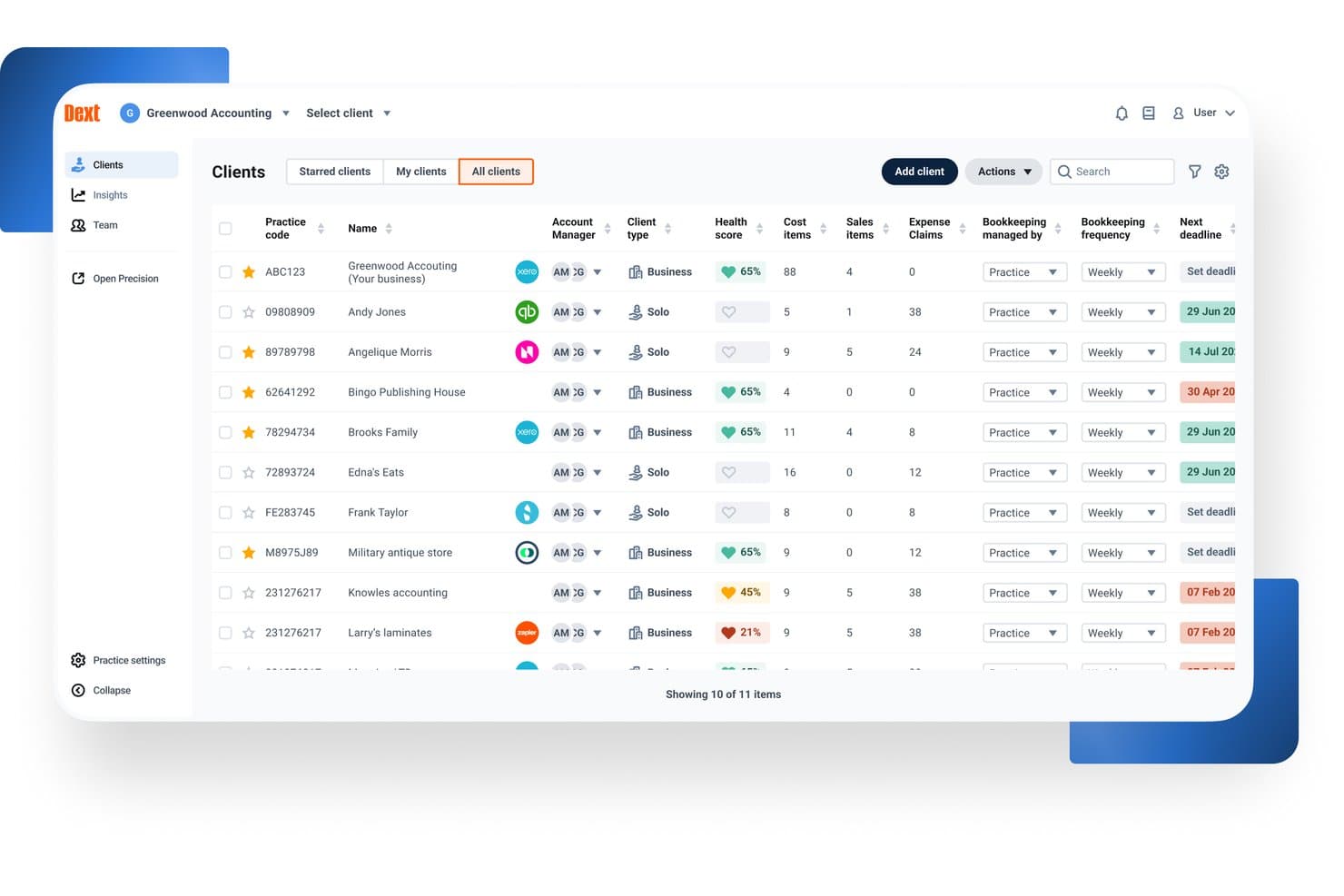
Dext offers a centralized client management dashboard where accountants can view health scores, cost items, deadlines, and bookkeeping frequency across all clients. Dext is an AI-powered pre-accounting automation platform that captures financial documents, extracts data from receipts, invoices, and bank statements, and syncs that data to your accounting software via automated categorization and reconciliation.
Who Is Dext Best For?
Dext is a strong fit for bookkeepers and staff accountants at accounting firms managing high document volumes across multiple clients and accounting platforms.
Why I Picked Dext
I picked Dext as one of the best because no other pre-accounting tool matches its integration depth. It syncs bi-directionally with 30+ accounting platforms, including Xero, QuickBooks, Sage, and NetSuite, so my team doesn't have to recode data when clients switch GLs mid-year. I especially like the auto-publish feature, which pushes extracted, coded documents directly to the correct ledger without a manual review step in between.
Dext Key Features
- AI document extraction: Captures and processes receipts, invoices, and bank statements from mobile, email, or direct upload.
- Supplier statement reconciliation: Matches supplier statements to transactions to help identify missing or mismatched records.
- Data health checks: Flags duplicate contacts, uncoded transactions, and out-of-date reconciliations in client accounting data.
- Practice insights dashboard: Provides client-level and practice-wide metrics to surface bookkeeping issues and track data cleanup.
Dext Integrations
Dext offers native integrations with Xero, QuickBooks Online, Sage Accounting, FreeAgent, NetSuite, and FreshBooks. An API is available for custom integrations.
Pros and Cons
Pros:
- Mobile capture app works reliably
- Handles high client document volumes well
- High-accuracy OCR across document types
Cons:
- Reporting features are basic and limited
- No native general ledger included
Learn more about Dext: Best for automated bank matching
- Free demo available
- Pricing upon request
Visit WebsiteCustomer Rating:4.9/5
DualEntry provides a real-time dashboard view of revenue, cash flow, and performance. DualEntry is an AI-native ERP platform designed to automate and optimize core financial operations for mid-market businesses. It offers a full suite of accounting tools, including general ledger, accounts payable, revenue recognition, and multi-entity management, all powered by AI.
Why I picked DualEntry: Its accounting intelligence tools automate tasks like bank matching, transaction categorization, and document processing. For example, the platform uses AI to automatically create and match transactions, allowing for faster reconciliation with just a few clicks. It also offers OCR technology that reads and logs documents such as bills and invoices, reducing manual data entry. Additionally, DualEntry's AI copilot provides tailored recommendations for handling transactions, offering instant insights and data-driven suggestions.
Standout features & integrations:
Features include multi-entity consolidation, enabling businesses to manage unlimited subsidiaries and automate intercompany transactions. It also offers automated journal entries with smart approval workflows that verify threshold amounts and approval limits, helping to centralize management and ensure compliance.
Integrations include BambooHR, Bill.com, Brex, Deel, Google SSO, Gusto, HubSpot, Ramp, Rippling, Salesforce, Stripe Billing, and Stripe Invoicing.
Pros and Cons
Pros:
- Advanced AI features help with complex accounting tasks
- Supports multi-entity and multi-currency operations
- Automated revenue recognition ensures compliance with standards
Cons:
- Initial data migration could be complex depending on existing systems
- No option to try the system before buying
Learn more about DualEntry: Best for AI-driven invoice data extraction
- Free demo available
- Pricing upon request
Visit WebsiteCustomer Rating:4.8/5
DOKKA Close automates expense reconciliation and suggests journal entries. DOKKA is an AI-powered document management and accounts payable automation platform built to streamline the bookkeeping lifecycle. It serves finance departments and accounting firms seeking to eliminate manual data entry and reduce processing errors. By leveraging advanced machine learning algorithms, the platform successfully tackles the challenge of digitizing, categorizing, and organizing high volumes of financial paperwork.
Who Is DOKKA Best For?
It is best suited for mid-sized enterprises and busy accounting practices that handle extensive daily invoice volumes across multiple client accounts.
Why I Picked DOKKA
I selected this platform because its optical character recognition capabilities are remarkably accurate right out of the box. It easily earns its title as the best for AI-driven invoice data extraction due to its ability to learn from user corrections over time. Furthermore, its side-by-side verification screen makes reviewing and approving parsed financial data incredibly efficient for busy controllers.
DOKKA Key Features
- Digital Filing Cabinet: Securely stores all financial documents in a centralized, cloud-based archive with easily searchable tags.
- Custom Workflow Routing: Facilitates multi-step rules based on specific amount thresholds or departments for authorizing vendor payments.
- Automated General Ledger Sync: Pushes approved transactions and their source documents directly to major accounting ERPs without manual export.
- Month-End Reconciliation: Generates automated working papers and suggests additional journal entries to speed up the financial close process.
DOKKA Integrations
Integrations include Xero, QuickBooks Online, NetSuite, SAP Business One, Acumatica, and Priority Software.
Pros and Cons
Pros:
- Smart learning algorithms improve
- Speeds up month-end reconciliation
- Eliminates manual data entry
Cons:
- Complex invoices can cause delays
- Initial setup requires data mapping
Learn more about DOKKA: 5Best for auto-generating purchase orders
Ramp
- Free plan available; 30-day free trial
- From $15/user/month
Visit WebsiteCustomer Rating:4.8/5
Ramp provides an automated accounting dashboard that categorizes transactions, syncs expenses, and flags missing memos for review. Ramp is a financial management platform that uses artificial intelligence to automate spend tracking, approvals, reimbursements, and vendor payments. It supports accounts payable, procurement, and expense workflows, making it a strong complement to existing accounting systems.
Why I picked Ramp: I picked Ramp because of how it simplifies key finance functions using automation and AI. You can auto-generate purchase orders, forward invoices for auto-processing, and approve payments with minimal manual effort. The platform’s AI flags potential issues in real time—helping you control costs before they happen. Ramp also stood out for its automatic coding of receipts and accounting entries, which helps speed up month-end close and reduces errors.
Standout features & integrations:
Features include AI-powered invoice processing, automatic expense categorization, policy-based spend controls, and purchase approval workflows. Ramp also offers built-in corporate cards with pre-approved limits and real-time tracking of spend, plus integrations with your ERP to sync bills and vendor records automatically.
Integrations include NetSuite, Sage, Xero, QuickBooks, Microsoft Dynamics Business Central, Acumatica, Uber, Lyft, Okta, Google, Rippling, and Gmail.
Pros and Cons
Pros:
- Automated expense reporting and receipt matching
- Ability to issue multiple virtual cards with customizable controls
- Comprehensive reporting features
Cons:
- Could offer more advanced accounting features
- Mostly focuses on accounts payable and spend management
 Best for tax practice management
- Free demo available
- From $800/user/year (billed annually)
Visit WebsiteCustomer Rating:4.7/5
TaxDome manages tax practices with workflows, client portals, and automation. TaxDome is an all-in-one platform designed for managing tax firms, providing tools for automating workflows, organizing client communications, and streamlining document management. It’s ideal for tax professionals looking to manage their entire operation in one place, from client onboarding to tax preparation and filing.
Why I picked TaxDome: TaxDome offers features like a customizable client portal, automated reminders, and task management that help your team keep everything on track. You can also manage secure document storage and e-signatures within the platform, reducing manual paperwork. Its workflow automation allows your team to handle repetitive tasks more efficiently, giving you more time to focus on client needs.
Standout features & integrations:
Features include built-in time tracking and invoicing tools, so you can manage billing without switching platforms. It also helps organize client information and track progress across jobs, while integrated email syncing keeps all communication in one place.
Integrations include QuickBooks, Zapier, Stripe, PayPal, Calendly, Google Drive, Dropbox, Docusign, Microsoft Outlook, and Slack.
Pros and Cons
Pros:
- Access to one-on-one setup support
- Highly customizable workflows
- Centralized platform for client management
Cons:
- Few advanced AI integrations for emails
- High upfront cost for smaller firms
 7Best for user-friendly interface
Xero
- 1-month free trial available
- From $27/month
Visit WebsiteCustomer Rating:4.4/5
Xero supports expense tracking and payroll with an easy-to-use interface. Xero is a cloud-based accounting software designed to simplify financial management for businesses. It helps users manage key tasks and is suitable for small to mid-sized businesses that need an easy-to-navigate system.
Why I picked Xero: Xero’s user-friendly interface allows you to quickly get up to speed with its features, making financial management straightforward. You can manage invoices, track expenses, and view real-time cash flow all in one place.
Xero also provides customizable financial reports, so your team can generate insights tailored to your business needs. The software supports automatic bank transaction imports, reducing manual data entry and letting your team focus on more critical tasks.
Standout features & integrations:
Features include multi-currency support, which is great if your business operates across different countries. Xero also supports payroll management, helping your team keep employee payments and taxes organized.
Integrations include PayPal, Stripe, HubSpot, Gusto, Square, Shopify, Mailchimp, GoCardless, WooCommerce, and Microsoft Dynamics 365.
Pros and Cons
Pros:
- Detailed financial reporting tools
- Strong recurring invoicing features
- Simplifies audit trails for tracking
Cons:
- Project tracking is limited to top plans
- Bulk reconciliation requires higher-tier plans
Learn more about Xero: Best for simple accounting solutions
- 14-day free trial
- From $30/month
Visit WebsiteCustomer Rating:4.5/5
Kashoo provides simple accounting for small businesses with real-time tracking. Kashoo is an easy-to-use accounting platform designed for small businesses, offering tools for managing financial tasks. It simplifies accounting processes by providing a user-friendly interface that helps businesses maintain accurate financial records with minimal effort.
Why I picked Kashoo: Kashoo offers straightforward accounting features that make it ideal for small business owners who need a simple solution. You can quickly generate invoices and track expenses in real time, ensuring that your financials are always up to date.
The platform also provides one-click reporting, which allows your team to produce financial statements with ease. Its simplicity and automation features help streamline your accounting without the need for complex setups or extensive training.
Standout Features & Integrations:
Features include real-time transaction tracking, which helps your team stay updated on all business expenses and income. The platform also offers automatic categorization of transactions, simplifying the bookkeeping process.
Integrations include Stripe, PayPal, Square, FreshBooks, Hubdoc, Google Workspace, BluePay, Plaid, Plooto, Wise, and RBC Banking.
Pros and Cons
Pros:
- Simplifies vendor management with automatic contact creation
- Offers advanced income and expense reporting
- Real-time bank feeds for quick updates
Cons:
- Lacks integration with certain invoicing tools
- No built-in payroll functionality
Learn more about Kashoo: Best for practice management for firms
- 15-day free trial
- From $22/user/month
Visit WebsiteCustomer Rating:4.6/5
Canopy enhances practice management with client communication and task tracking. Canopy is a cloud-based software designed to help accounting firms manage their day-to-day operations more effectively.
Why I picked Canopy: Canopy offers a full suite of practice management tools that allow your team to manage client communications, deadlines, and document storage all in one place. It helps automate tasks like client onboarding and billing, so your team can focus on more strategic work.
The platform also provides detailed reporting and time tracking, giving you better visibility into how your firm is performing. With built-in features for secure document sharing and e-signatures, Canopy simplifies compliance and client collaboration, making it an ideal solution for firms looking to optimize their workflows.
Standout features & integrations:
Features include AI-powered email generation, which helps your team craft and rephrase client communications efficiently. Canopy also offers a secure document management system, enabling your firm to store, organize, and share files seamlessly.
Integrations include QuickBooks, Zapier, Google Drive, Microsoft Outlook, Stripe, and FreshBooks.
Pros and Cons
Pros:
- Organizes tax resolution processes
- Customizable client communications and file sharing
- Provides real-time IRS transcript access
Cons:
- Lacks advanced reporting features
- Workflow regeneration can be unintuitive
Learn more about Canopy: Best for automated bookkeeping for firms
- Not available
- From $149/month
Visit WebsiteCustomer Rating:4.4/5
Botkeeper automates bookkeeping, transaction coding, and bank reconciliations. Botkeeper is a cloud-based platform that automates bookkeeping tasks for accounting firms, allowing them to manage finances without manual data entry. It is designed to support accounting professionals and firms by providing automated transaction classification, reconciliations, and financial reporting, making it easier to oversee financial workflows.
Why I picked Botkeeper: Botkeeper automates key bookkeeping tasks like transaction coding and bank reconciliations, saving your team time on manual data entry. Its real-time reporting capabilities let you track your financials as they happen, giving you better insights.
Additionally, the platform’s AI learns from user inputs, continuously improving accuracy over time. With automated workflows, your team can focus on higher-level tasks while Botkeeper handles routine bookkeeping.
Standout features & integrations:
Features include role-based access controls, so you can manage who sees what across your team. Its customizable dashboards make it easy to monitor the metrics that matter most to your firm. The platform also offers consolidated reporting for multi-entity businesses, streamlining insights across multiple locations or clients.
Integrations include QuickBooks, Xero, Sage, FreshBooks, BILL, Gusto, Expensify, PayPal, Stripe, and HubSpot.
Pros and Cons
Pros:
- Allows customization for financial reports
- Provides real-time transaction updates
- Automates manual bookkeeping tasks
Cons:
- Initial onboarding can be time-consuming
- AI sometimes needs manual correction
Learn more about Botkeeper:
Alte software-uri de contabilitate cu IA din lista scurtă
Iată câteva opțiuni suplimentare de software de contabilitate cu IA care nu au ajuns pe lista mea scurtă, dar merită totuși analizate:
- 11CertiniaBest for integrated financial and operational data
- 12FulfilBest for AI-driven workflow automation
- 13HighRadiusBest for large-scale reconciliation processing
- 14PuzzleBest for real-time financial insights
- 15ClickUpBest for all-in-one productivity
- 16Vic.aiBest for autonomous invoice processing
- 17ZeniBest for AI-driven financial management
- 18TrullionBest for AI-powered lease accounting
- 19QuickBooks OnlineBest for complete financial management
- 20Zoho BooksBest for small business invoicing
Related Reviews
Related Reviews
Related Reviews
Related Reviews
Related Reviews
Related Reviews
Related Reviews
How I Evaluate AI Accounting Software
Every tool on this list has to deliver AI that actually saves time—auto-coding transactions, catching duplicate invoices, or speeding up reconciliations—not just surface-level branding. I split my evaluation into two layers: the core functionality a tool needs to qualify and the differentiating factors that separate one option from another.
Core Functionality (Table Stakes For This List)
When I'm selecting tools for my list, I rank each one on a scale from 0 (does not offer the functionality) to 5 (excels in this area) for each core functionality listed below. Then, I calculate the tool's total score into a percentage. Each tool needs to achieve a minimum total score of 65% to be considered for inclusion.
- AI Transaction Categorization: I look for ML that learns from corrections and auto-codes expenses, revenue, and transfers to the right GL accounts over time.
- Intelligent Document Capture: The tool should extract line-item detail from invoices, receipts, and bills with minimal manual cleanup before posting.
- Automated Reconciliation: I evaluate how well AI matches bank feed transactions against sub-ledger and GL entries, especially around month-end volume spikes.
- Anomaly & Error Detection: Flagging duplicate vendor payments or unusual posting patterns matters here—I check whether alerts include context, not just raw flags.
- Core Accounting Functions: Whether native or through deep integration, the platform needs to support GL, AP, AR, and standard financial statement generation.
- AI-Driven Reporting & Insights: I look for AI that goes beyond dashboards—tools that surface variance explanations, cash flow trends, or forecast adjustments proactively.
Once I have a list of tools that meet this criteria, I consider what sets each platform apart.
Differentiating Factors (What Sets Vendors Apart)
Here's how I compare and contrast different vendors:
Standout Features
Audit trail explainability is one of the first things I check—when AI auto-codes a transaction or flags an anomaly, your team and auditors need to see exactly why it made that call. A natural language copilot adds real value too, especially for controllers pulling ad hoc reports mid-close without building custom views. I also evaluate predictive cash flow forecasting, which helps CFOs model runway and working capital from live transaction data rather than static spreadsheets.
Beyond Features
AI model transparency matters a lot in this space—I look at whether vendors disclose how they handle your financial data and if it's used to train their models. Integration depth is equally important; a tool that doesn't sync bi-directionally with your ERP or bank feeds creates more manual work than it saves. I also evaluate time-to-value, specifically whether AI models come pre-trained or require months of transaction history before categorization accuracy becomes reliable.
Cum să alegi un software de contabilitate cu IA
Este ușor să te pierzi printre funcții nesfârșite și planuri de prețuri confuze. Pentru a-ți ușura puțin munca în timp ce îți dai seama ce funcționează cel mai bine pentru echipa ta, iată o listă simplă de verificare care te ajută să rămâi pe drumul cel bun:
| Factor | Ce trebuie luat în considerare |
| Scalabilitate | Va crește software-ul odată cu afacerea ta și cu nevoile sale contabile în schimbare? |
| Integrări | Se integrează fără probleme cu sistemele și instrumentele existente (de exemplu, sistemele ERP și CRM-urile)? |
| Posibilitate de personalizare | Poți adapta software-ul pentru a răspunde fluxurilor de lucru contabile specifice echipei tale? |
| Ușurință în utilizare | Cât de repede poate echipa ta să adopte și să utilizeze eficient software-ul? |
| Buget | Se încadrează software-ul în limitele tale financiare fără a sacrifica funcțiile esențiale? |
| Măsuri de securitate | Există măsuri solide pentru protejarea datelor tale financiare? |
Tendințe în software-ul de contabilitate cu IA
În timp ce analizam cele mai recente noutăți de la furnizorii de software de contabilitate cu IA, am parcurs numeroase actualizări de produse, comunicate de presă și note de lansare. Se întâmplă multe în acest domeniu, dar câteva tendințe mi-au atras în mod deosebit atenția. Iată ce urmăresc:
- Analiză predictivă pentru prognoze financiare: Mulți furnizori adaugă instrumente de IA care folosesc date istorice pentru a prognoza tendințele financiare viitoare, ajutând companiile să ia decizii mai bune privind bugetarea, cheltuielile și alocarea resurselor.
- Monitorizarea conformității: Pe măsură ce reglementările devin tot mai numeroase, instrumentele de contabilitate cu IA sunt dotate cu funcții care monitorizează automat respectarea legislației fiscale și a reglementărilor financiare, reducând riscul erorilor umane și al sancțiunilor.
- Detectarea anomaliilor în timp real: IA este folosită acum pentru a semnala tranzacțiile neobișnuite în timp real, ajutând companiile să detecteze mai rapid posibile fraude sau erori. Această tendință este deosebit de utilă în mediile cu un volum mare de tranzacții.
- Algoritmi cu capacitate de autoînvățare: Unele platforme de contabilitate cu IA integrează algoritmi de învățare automată care își îmbunătățesc precizia în timp, învățând din comportamentul utilizatorilor, ceea ce face clasificarea tranzacțiilor și alte sarcini mai precise și mai eficiente.
- Procesarea limbajului natural pentru raportare: Furnizorii încep să integreze IA care poate genera rapoarte financiare ușor de înțeles folosind procesarea limbajului natural, făcând datele financiare mai accesibile persoanelor nespecializate din companii.
Ce este software-ul de contabilitate cu IA?
Software-ul de contabilitate cu IA este un tip de tehnologie bazată pe inteligență artificială care automatizează și îmbunătățește sarcinile de gestionare financiară. Contabilii, echipele financiare și proprietarii de afaceri folosesc de obicei aceste instrumente pentru a economisi timp la procesele manuale, a reduce erorile și a obține informații mai aprofundate despre datele lor financiare.
Introducerea automată a datelor, detectarea anomaliilor în timp real și analiza predictivă ajută la sarcini precum clasificarea tranzacțiilor, detectarea fraudelor și prognoza financiară. În general, aceste instrumente de automatizare contabilă oferă companiilor mai multă acuratețe și eficiență în gestionarea finanțelor.
Caracteristicile software-ului de contabilitate cu AI
Atunci când cauți un software de contabilitate cu AI, este util să știi ce contează cu adevărat. Iată câteva caracteristici esențiale cărora merită să le acorzi atenție, deoarece pot face o diferență semnificativă în activitatea ta de zi cu zi.
- Introducerea automată a datelor: Înregistrează automat tranzacțiile pentru a economisi timp și a reduce erorile manuale.
- Analiză predictivă: Oferă informații despre tendințele financiare viitoare pentru a ajuta la bugetare și planificare.
- Detectarea anomaliilor: Semnalează tranzacțiile neobișnuite în timp real, ajutând la prevenirea fraudelor și la identificarea timpurie a erorilor.
- Monitorizarea conformității: Se asigură că operațiunile financiare respectă reglementările fiscale și financiare relevante.
- Raportare personalizabilă: Permite utilizatorilor să creeze rapoarte financiare adaptate nevoilor specifice ale companiei lor.
- Algoritmi de învățare automată: Îmbunătățesc continuu acuratețea învățând din datele introduse de utilizatori și din tiparele tranzacțiilor.
- Tablou de bord în timp real: Oferă o imagine cuprinzătoare asupra situației financiare, folosind date și reprezentări vizuale actualizate.
- Procesarea limbajului natural: Generează rapoarte financiare ușor de citit, făcând datele mai accesibile persoanelor care nu sunt experți.
- Urmărirea cheltuielilor: Clasifică și urmărește automat cheltuielile, asigurând acuratețea înregistrărilor financiare.
- Jurnal de audit: Păstrează o evidență a tuturor activităților financiare pentru a facilita auditarea și verificarea conformității.
Beneficiile software-ului de contabilitate cu AI
Integrarea AI în instrumentele tale de contabilitate poate face o diferență semnificativă pentru tine, echipa ta și modul în care lucrezi. Iată câteva avantaje de care te poți bucura după ce faci schimbarea:
- Acuratețe sporită: Automatizează introducerea datelor și calculele, reducând riscul erorilor umane din înregistrările tale financiare.
- Economie de timp: Automatizează sarcini repetitive precum clasificarea tranzacțiilor, procesele pentru conturile de plătit și urmărirea cheltuielilor, eliberând timp pentru activități mai strategice.
- Conformitate îmbunătățită: Monitorizează modificările de reglementare și se asigură că procesele tale financiare rămân aliniate cerințelor legale.
- Luarea unor decizii mai bune: Oferă informații în timp real și analize predictive pentru a te ajuta să iei decizii financiare bine fundamentate.
- Prevenirea fraudelor: Detectează din timp anomaliile din tranzacții, permițând identificarea mai rapidă a fraudelor sau erorilor potențiale.
- Scalabilitate: Se adaptează companiilor în creștere prin gestionarea unor volume mai mari de date fără introduceri manuale suplimentare.
- Raportare îmbunătățită: Generează rapid rapoarte financiare personalizate, ajutându-te să înțelegi dintr-o privire situația financiară a companiei tale.
Costurile și prețurile software-ului de contabilitate cu AI
Alegerea software-ului potrivit de contabilitate cu AI înseamnă să privești dincolo de caracteristici și să analizezi și prețurile. Planurile pot varia considerabil în funcție de nevoile tale — dimensiunea echipei, instrumentele avansate sau funcționalitățile suplimentare pot schimba toate costul. Pentru a simplifica lucrurile, am pregătit un tabel succint care prezintă cele mai comune modele de tarifare, costurile medii și ceea ce primești de obicei cu fiecare plan.
Tabel comparativ al planurilor pentru software-ul de contabilitate cu AI
| Tipul planului | Preț mediu | Caracteristici comune |
| Plan gratuit | $0 | Facturare de bază, urmărirea simplă a cheltuielilor și raportare limitată. |
| Plan personal | $5-$25/utilizator/lună | Facturare automată, rapoarte financiare de bază, reconcilierea conturilor bancare și capturarea chitanțelor. |
| Plan pentru companii | $25-$75/utilizator/lună | Raportare financiară avansată, fluxuri de lucru automatizate, suport pentru mai multe valute și jurnale de audit. |
| Plan pentru întreprinderi | $75+/utilizator/lună | Raportare personalizată, analize în timp real, prognoză bazată pe AI și asistență dedicată pentru cont. |
Întrebări frecvente despre software-ul de contabilitate cu AI
Iată câteva răspunsuri la întrebările frecvente despre software-ul de contabilitate cu AI:
Cum îmbunătățește AI detectarea fraudelor în contabilitate?
AI utilizează algoritmi avansați pentru a monitoriza tranzacțiile și datele financiare în vederea identificării tiparelor neobișnuite. Prin detectarea în timp real a anomaliilor sau inconsecvențelor, AI ajută la identificarea mai rapidă a potențialelor fraude decât metodele tradiționale, permițând echipei dumneavoastră să acționeze rapid și să reducă riscul financiar.
Poate software-ul de contabilitate cu AI să gestioneze mai multe monede?
Da, multe platforme de contabilitate cu AI acceptă tranzacții în mai multe monede. Această funcție este deosebit de utilă pentru companiile care operează la nivel global, deoarece automatizează conversia valutară, monitorizează cursurile de schimb și simplifică raportarea financiară internațională.
Care este rolul AI în prognoza financiară?
AI analizează datele financiare istorice, tendințele pieței și indicatorii economici pentru a genera prognoze financiare precise. Acest lucru vă ajută compania să planifice bugetele, să anticipeze fluxul de numerar și să ia decizii informate privind alocarea resurselor, pe baza unor informații susținute de date.
Cât de sigur este software-ul de contabilitate cu AI?
Majoritatea sistemelor de contabilitate cu AI includ măsuri de securitate solide, precum criptarea, autentificarea multifactorială și conformitatea cu standarde din industrie, cum ar fi SOC 2. Aceste măsuri de protecție contribuie la securizarea datelor financiare sensibile împotriva breșelor sau accesului neautorizat.
Se poate adapta software-ul de contabilitate cu AI la diferite industrii?
Da, instrumentele de contabilitate cu AI sunt foarte personalizabile și pot fi adaptate pentru a răspunde nevoilor specifice ale diferitelor industrii. Indiferent dacă activați în comerțul cu amănuntul, în domeniul sănătății sau în producție, software-ul poate adapta fluxurile de lucru, raportarea și monitorizarea conformității pentru a corespunde sectorului dumneavoastră.
Cum ajută AI la pregătirea pentru audit?
AI simplifică pregătirea pentru audit prin păstrarea unor piste de audit detaliate și automatizarea clasificării și documentării tranzacțiilor financiare. Acest lucru nu numai că asigură conformitatea, ci ajută și echipa dumneavoastră să genereze rapid rapoarte precise pentru auditori.