

Expensify-recension: Fördelar, nackdelar, funktioner och priser
Expensify förenklar kostnadshanteringen med användarvänliga funktioner, vilket gör tjänsten till ett utmärkt val för team som söker effektivitet och enkelhet.

We review tools independently, and commissions help fund our testing. See our transparency policy, our methodology, or suggest a tool.
Expensify is an expense management software built for teams that need to capture receipts, submit expense reports, and process reimbursements without a lot of manual back-and-forth. I'd consider it if you want something faster to configure and easier for employees to adopt than SAP Concur, with SmartScan receipt capture and automated approval workflows that are genuinely accessible for mid-sized finance teams who don't need a full enterprise procurement suite.
Expensify Evaluation Summary
4.5/5
- From $5/user/month
- Not available
Varför du kan lita på våra programvarurekommendationer
6,700+
Reviews
20
Industry experts
16+
Evaluation factors
14
Years
Våra recensioner speglar vårt oberoende omdöme — inte ett säljbudskap. Läs mer om hur vi förblir transparenta.
För den här guiden utvärderade vi verktyg genom praktisk testning och oberoende research, och betygsatte verktygen enligt våra urvalskriterier.
Våra recensioner speglar vårt mänskliga redaktionella omdöme, inte ett säljbudskap.
Expensify Overview
Expensify is a solid choice for teams looking to automate expense management and reduce manual data entry. Its user-friendly interface and integration capabilities make it a favorite among small to midsize businesses. For organizations needing advanced controls, highly customized workflows, or heavy enterprise-grade features, the platform may feel limited. While advanced functionalities require you to switch to the paid plan, the software's ease of use and support options stand out. Expensify excels in simplifying expense reports and integrating with accounting tools, but it can lag in offering advanced features compared to competitors. It's best suited for companies that prioritize efficiency and straightforward expense tracking.
Pros
- Excellent mobile experience for fast receipt capture and reimbursements.
- Flexible expense automation with strong travel and card integrations.
- Concierge AI simplifies approvals, submissions, and expense management workflows.
Cons
- Chat-first support may frustrate teams wanting direct phone assistance.
- Collect plan charges for inactive users added to workspaces.
- Reporting customization feels limited for highly complex finance organizations.
Is Expensify Right For Your Needs?
Who Would be a Good Fit for Expensify?
Expensify is a strong fit for startups, small to midsize businesses, and distributed teams that want to simplify employee expense management without adding heavy administrative overhead. I think it works especially well for organizations with frequent travel, client meetings, or receipt-heavy workflows, since the platform makes it easy to capture expenses, automate approvals, and process reimbursements from virtually anywhere.
- Small BusinessesExpensify's simple setup and ease of use make it perfect for small businesses without a dedicated IT staff.
- Professional Services FirmsConsultants and service-based teams benefit from Expensify’s travel integrations, expense approvals, and client expense tracking capabilities.
- Travel-Heavy OrganizationsCompanies with frequent flights, hotels, rideshare, and business travel can streamline bookings, receipt matching, and reimbursements in one platform.
- StartupsGrowing startups benefit from Expensify’s fast employee adoption, flexible approvals, and scalable expense workflows as spending increases.
- Remote TeamsRemote teams appreciate Expensify's mobile app for on-the-go expense management and tracking.
- Sales TeamsSales organizations with frequent travel and client expenses can quickly capture receipts and automate reimbursement workflows on the go.
Who Would be a Bad Fit for Expensify?
Expensify might not be ideal for large corporations or organizations with complex expense policies and multi-layered approval processes. Its workflow limitations can make handling intricate expense structures challenging. If your team requires highly customized reporting or has unique compliance needs, Expensify's standard offerings may fall short. Additionally, companies needing extensive customer support might find response times slower than desired, which could impact their operations.
- Large EnterprisesExpensify's capabilities may not handle the complexity of large enterprises with intricate expense policies.
- Complex Approval ChainsOrganizations with multi-layered approval processes might find Expensify's workflow options too limited.
- Custom Reporting NeedsIf you need highly customized reports, Expensify's standard reporting might not meet your requirements.
- Regulated IndustriesIndustries with strict compliance needs might find Expensify lacking in necessary customization and support.
- Heavy Support DependenceCompanies requiring frequent support may experience delays, impacting their operations negatively.
- Non-Profit OrganizationsNon-profits with specific reporting needs might find Expensify's options insufficient for their detailed requirements.
Core Features
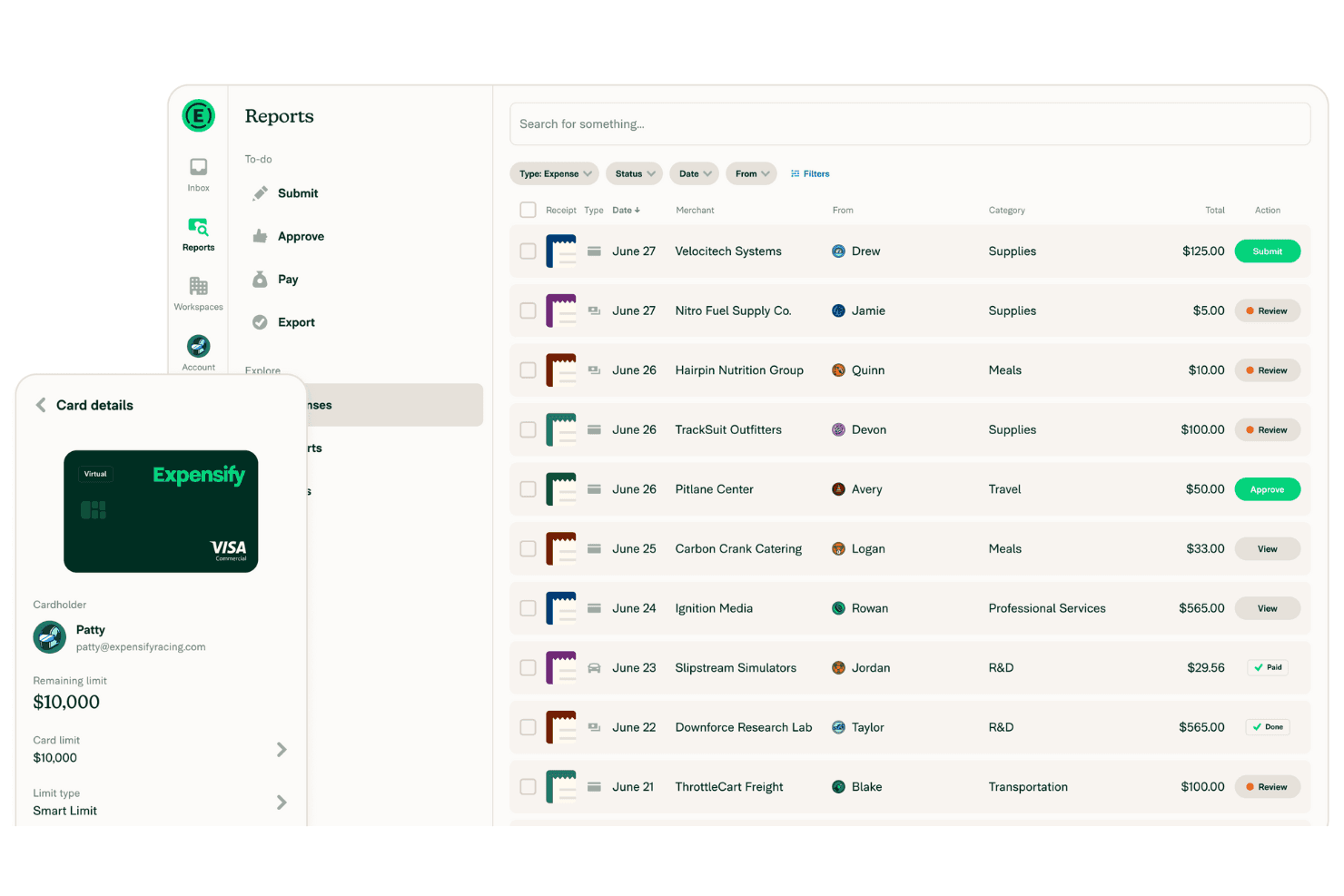
Receipt Capture & OCR: Expensify’s automatic receipt scanning captures and logs your expenses effortlessly. Simply snap a photo, and it handles the rest, saving you time while syncing everything across your accounting systems.
Expense Reporting: Create detailed expense reports with a few clicks. The intuitive interface makes it easy for your team to compile and submit expenses.
Real-Time Tracking: Monitor your expenses as they happen. This feature helps you keep your budget in check and avoid surprises.
Approval Workflow: Customize approval processes to fit your team’s needs. It streamlines expense approval, ensuring nothing slips through the cracks.
Mobile App: Manage expenses on the go with Expensify’s mobile app. It keeps your team connected and efficient, no matter where they are.
Compliance Management: Stay compliant with company policies using built-in checks. This feature minimizes errors and ensures your expenses align with guidelines.
Concierge: Expensify’s Concierge is its embedded AI that works like your personalized, built-in financial assistant. It powers everything from tech support to accounting workflows, using a combination of 24/7 human agents and AI automation.
.png&w=3840&q=75)
Ease of Use
Expensify shines in user-friendliness, making expense management straightforward for your team. Its intuitive interface and clear navigation ensure that even first-time users can easily create reports and track expenses. The automatic receipt scanning and real-time tracking features simplify tasks that typically consume time. With a well-designed mobile app, Expensify allows you to manage expenses anywhere, adding flexibility to your work routine. Overall, it offers a hassle-free experience that stands out in expense management.

Integrations
Expensify integrates with several finance, banking, HR, travel, and accounting software companies, including QuickBooks Online, NetSuite, Xero, Sage Intacct, Oracle, American Express, Chase, Gusto, Workday, Uber, Delta, and KAYAK for Business.
Expensify also offers an API for custom integrations and connects with third-party integration tools like Zapier to extend its functionality. In all, Expensify has over 45 official integrations, and you can also connect it to thousands of other apps to create your own custom workflows.

Expensify Specs
- 2-Factor Authentication: No
- 360 Degree Feedback: No
- API: Yes
- Application Tracking: No
- Attendance Tracking: No
- Batch Permissions & Access: No
- Compliance Tracking: No
- Dashboard: Yes
- Data Export: Yes
- Data Import: Yes
- Data Visualization: No
- Employee Database: No
- Employee Engagement: No
- Employee Incentive Management: No
- Employee Onboarding: No
- Employee Training: No
- Expense Tracking: Yes
- External Integrations: Yes
- Feedback Management: No
- Multi-User: Yes
- Notifications: Yes
- Payroll: No
- Performance Appraisal: No
- Scheduling: No
- Time Management: No
- Timesheets: No
- Travel Management: Yes
- Vacation & Absence Calendar: No


