

Cloud billing software automates subscription management, invoicing, and payment processing for businesses using digital services. If you're searching for the best cloud billing software, you’re likely facing complex pricing models, recurring billing cycles, or global tax requirements—all while aiming for accurate financial reporting and tighter controls.
In this guide, you’ll find targeted insight into today’s leading platforms, what sets them apart, and how to match the right tool to your business priorities. Whether your focus is scaling subscriptions or integrating your billing with finance operations, you’ll be able to make a confident, informed choice.
Why Trust Our Software Recommendations
6,700+
Reviews
20
Industry experts
16+
Evaluation factors
14
Years
Our team has been testing and reviewing software since 2012. As finance leaders ourselves, we know how difficult—and important—it is to choose the right software.
For this guide, we evaluated tools using hands-on testing and independent research, scoring tools using our selection criteria.
Our reviews reflect our human editorial judgment, not a sales pitch.
Cloud Billing Software Comparison Table
The table below compares pricing details for my top cloud billing software selections.
| Tool | Best For | Trial Info | Price | ||
|---|---|---|---|---|---|
| 1 | Best for global SaaS payments | Free trial available | Pricing upon request | Website | |
| 2 | Best for AI-powered financial reporting | Free demo available | From £1,200/month | Website | |
| 3 | Best for subscriber retention tools | 90-day free trial | From $249/month | Website | |
| 4 | Best for enterprise-grade billing automation | Free demo available | Pricing upon request | Website | |
| 5 | Best for open-source billing customization | Free demo available | Pricing upon request | Website | |
| 6 | Best for merchant of record billing worldwide | Free demo available | From $0.50 + 5% per transaction | Website | |
| 7 | Best for rapid pricing experiments at scale | Free plan available | Pricing upon request | Website | |
| 8 | Best for deep SaaS financial integrations | Free demo available | From $599/month | Website | |
| 9 | Best for complex quote-to-cash automation | Free demo available | Pricing upon request | Website | |
| 10 | Best for flexible hybrid pricing models | Not available | From $0.7% of billing volume per month | Website |


Best Cloud Billing Software Reviews
Below are my detailed summaries of the best cloud billing software that made it onto my shortlist. My reviews offer a detailed look at the features, pricing, and integrations of each platform to help you find the best one for you.
 Best for global SaaS payments
- Free trial available
- Pricing upon request
Visit WebsiteCustomer Rating:4.5/5
FastSpring offers a merchant dashboard displaying net sales, orders, MRR, refunds, and account balance in one unified view. FastSpring is a merchant-of-record platform for SaaS and digital software companies that combines subscription billing, localized checkout, global payment processing, and automated tax collection and remittance across multiple jurisdictions.
Who Is FastSpring Best For?
FastSpring is a strong fit for small to mid-sized SaaS and software companies that sell digital products across multiple countries and need to offload tax compliance.
Why I Picked FastSpring
FastSpring earns its spot on my shortlist because its Merchant of Record model handles VAT, GST, and sales tax collection and remittance across jurisdictions automatically. I picked it for SaaS finance teams who need to sell globally without registering for tax in every market they operate in. Its localized checkout adapts currency, language, and payment method per buyer region, and the subscription billing engine covers automated renewals, payment retries, and dunning.
FastSpring Key Features
- Branded checkout customization: Build fully branded, localized checkout flows using the Store Builder Library and embedded widgets.
- Affiliate management: Track referrals and manage commission payments for global affiliate campaigns directly through the platform.
- Interactive quotes (IQ): Create, send, and track personalized sales quotes that convert directly into purchases.
- REST API and webhooks: Connect billing data and trigger workflows programmatically with REST API access and real-time webhooks.
FastSpring Integrations
FastSpring offers native integrations with tools like Asana, Calendly, ClickUp, Constant Contact, Drip, Eventbrite, GitHub, Intercom, Jotform, and Google Analytics 360. An API and webhooks are available for custom integrations.
Pros and Cons
Pros:
- Handles subscription renewals and dunning automatically
- Localized checkout adapts currency and payment method
- Automatic global tax remittance across jurisdictions
Cons:
- Limited prebuilt ERP and accounting connectors
- No native ASC 606 revenue recognition support
Learn more about FastSpring: Best for AI-powered financial reporting
- Free demo available
- From £1,200/month
Visit WebsiteCustomer Rating:4.3/5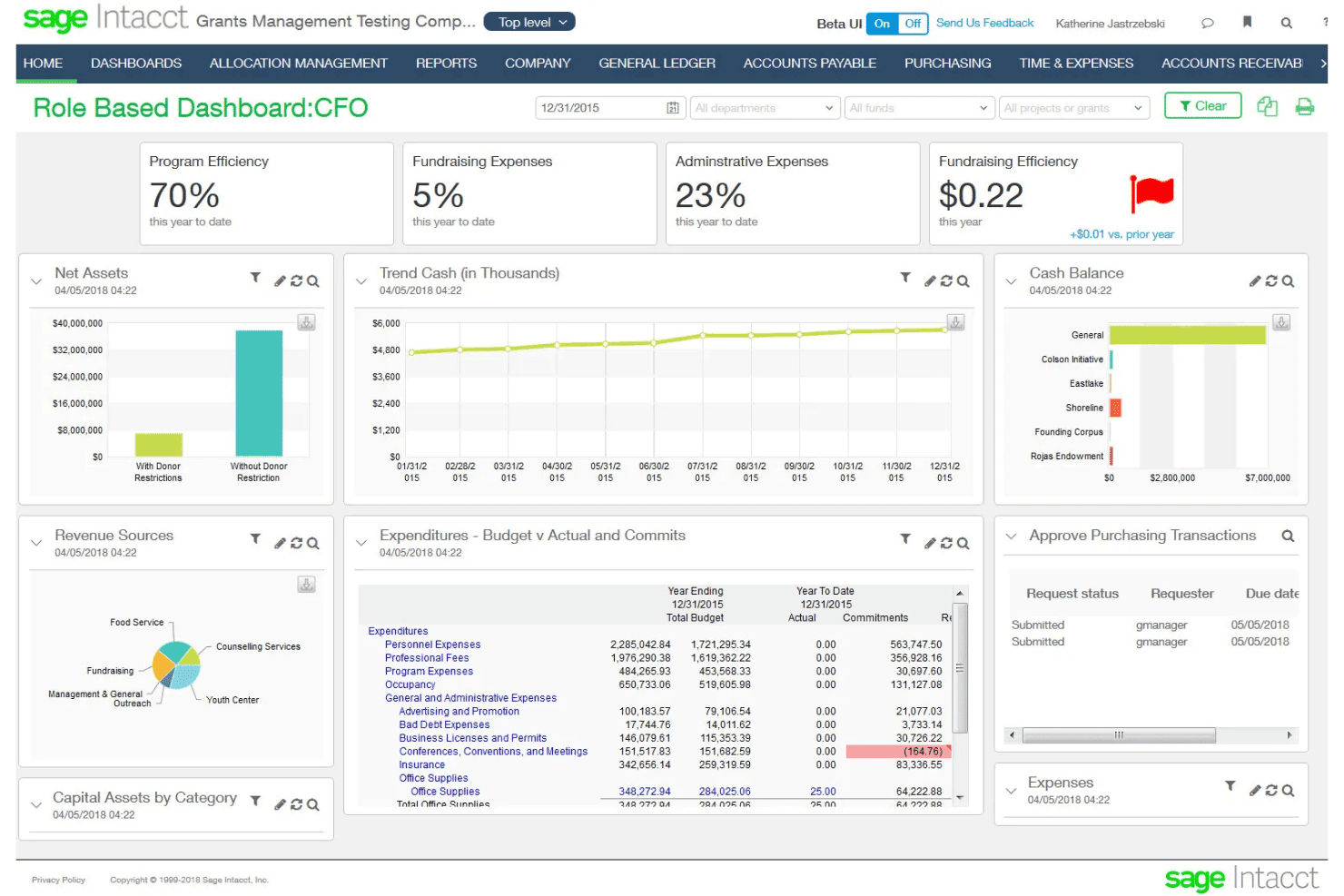
Sage Intacct offers a CFO role-based dashboard displaying key financial metrics including program efficiency, fundraising expenses, net assets, cash balance, and budget vs. actual expenditures. Sage Intacct is a cloud ERP and financial management platform built for subscription businesses, combining subscription billing, usage-based billing, multi-entity accounting, and native ASC 606/IFRS 15 revenue recognition.
Who Is Sage Intacct Best For?
It's a strong fit for mid-market SaaS and professional services finance teams managing complex billing, multi-entity structures, and revenue recognition requirements.
Why I Picked Sage Intacct
Sage Intacct earns its spot on my shortlist because of how well its AI agents work alongside billing and revenue data. The Financial Intelligence agent lets me query financial data in plain language, while the Financial Assurance agent flags unusual journal entries in real time. When a billing run closes, I can move straight into reporting without hunting for anomalies manually.
Sage Intacct Key Features
- Subscription billing automation: Automates contract-based recurring invoices, renewals, and usage charges.
- Multi-entity accounting: Supports consolidated financials and intercompany billing for organizations with multiple subsidiaries.
- ASC 606/IFRS 15 revenue recognition: Handles complex revenue schedules and contract modifications for compliance.
- Marketplace integrations: Connects directly with solutions like Salesforce, Avalara, ADP, Bill.com, and Workday HCM.
Sage Intacct Integrations
Sage Intacct offers 350+ marketplace integrations, including native integrations with Salesforce, Avalara, ADP, Rippling, Bill.com, and Workday HCM. An API is available for custom integrations.
Pros and Cons
Pros:
- AI agents surface anomalies in real time
- Consolidates multi-entity billing and financials natively
- Native ASC 606 revenue recognition built in
Cons:
- Custom report building requires configuration
- Implementation takes weeks
Learn more about Sage Intacct: Best for subscriber retention tools
- 90-day free trial
- From $249/month
Visit WebsiteCustomer Rating:4.3/5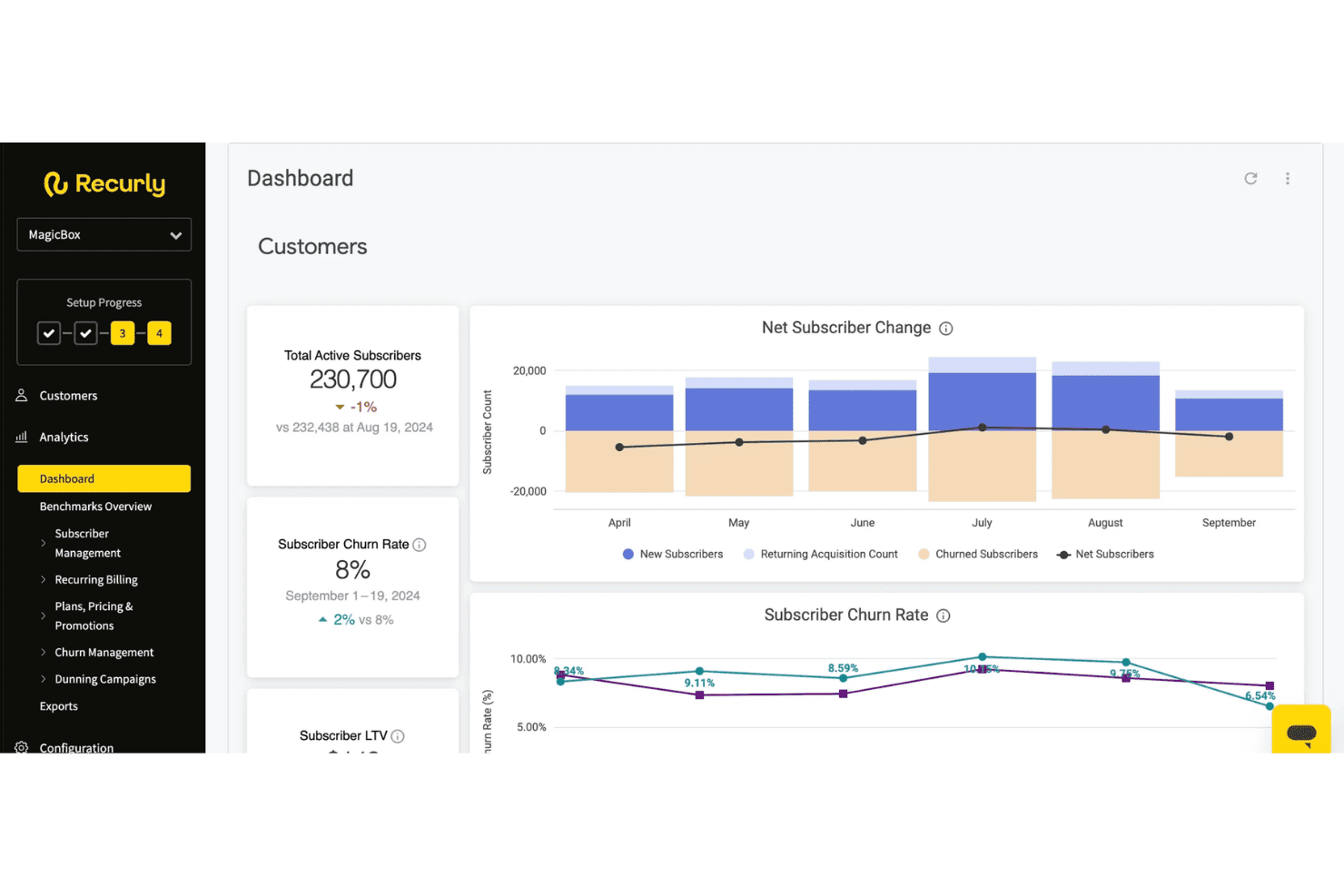
Recurly provides a dashboard displaying total active subscribers, churn rate, net subscriber changes, and subscriber LTV metrics. Recurly is a subscription management and billing platform that handles recurring billing automation, dunning, usage-based pricing, revenue recognition, payments orchestration, and subscriber lifecycle management across the full subscription cycle.
Who Is Recurly Best For?
Recurly is a strong fit for mid-market and enterprise subscription businesses in SaaS, media, and consumer services managing recurring revenue at scale.
Why I Picked Recurly
I've included Recurly in my top picks because its retention toolset goes well beyond standard dunning. The Engage module uses AI-powered propensity-to-churn modeling to trigger personalized cancel-save flows and win-back offers before a subscriber actually churns. I also like that these prompts connect directly to billing in real time, so a retention action taken in-app, like accepting a pause offer, is reflected in the billing system instantly without any manual intervention.
Recurly Key Features
- Revenue recognition automation: Handles ASC 606 and IFRS 15 compliance with automated contract modifications and audit-ready reporting.
- Multi-currency and tax support: Processes payments in 140+ currencies and integrates with Avalara or Vertex for jurisdiction-specific tax calculation.
- Payment gateway network: Connects to 20+ global payment gateways and supports card, ACH, and digital wallet methods.
- Self-service portal: Lets end customers manage subscriptions, update payment methods, and download invoices without contacting support.
Recurly Integrations
Recurly offers native integrations with Stripe, PayPal, Adyen, GoCardless, Avalara, Vertex, Zendesk, Snowflake, and ChartMogul. An API is available for custom integrations.
Pros and Cons
Pros:
- Supports hybrid and usage-based pricing models
- Automated ASC 606 rev rec reporting
- AI-powered cancel-save flows reduce churn
Cons:
- ERP sync depth lags some competitors
- Custom reporting options are limited
Learn more about Recurly: Best for enterprise-grade billing automation
- Free demo available
- Pricing upon request
Visit WebsiteCustomer Rating:4.8/5
BillingPlatform offers an AI-powered dashboard that surfaces unbilled usage and under-invoiced accounts with revenue exposure, AR aging, and overdue invoice queuing. BillingPlatform is an enterprise cloud billing and revenue management platform that handles subscription billing, usage-based rating, AR automation, payment processing, and ASC 606/IFRS 15 revenue recognition across complex, multi-model pricing structures.
Who Is BillingPlatform Best For?
It's a strong fit for large enterprises in telecom, SaaS, financial services, and media that manage high-volume, multi-model billing across multiple entities and currencies.
Why I Picked BillingPlatform
BillingPlatform earns its spot as one of the best on my shortlist because of how it handles billing complexity that most platforms simply can't configure. I particularly like its metadata-driven architecture, which lets billing teams define custom objects, pricing rules, and workflow logic without writing code. The built-in mediation layer also impresses me, ingesting and rating high-volume usage data across diverse sources when billing spans multiple consumption dimensions.
BillingPlatform Key Features
- Self-service customer portal: Lets customers view invoices, manage payment methods, and download tax documents online.
- Native dunning automation: Schedules retries, manages collections, and updates cards automatically for failed or overdue payments.
- ASC 606/IFRS 15 revenue recognition: Creates audit-ready revenue schedules, contract modifications, and detailed disclosure reports.
- Multi-currency and tax engine integration: Handles transactions in global currencies and calculates sales tax, VAT, and GST automatically via external providers.
BillingPlatform Integrations
BillingPlatform offers native integrations with Salesforce, Oracle NetSuite, and Microsoft Dynamics. An API is available for custom integrations, and tax engine connectivity is supported via providers like Avalara.
Pros and Cons
Pros:
- Multi-entity billing across separate legal entities
- Automated contract modification handling
- Configurable mediation engine
Cons:
- Requires professional services for initial setup
- Sandbox testing environment has limitations
Learn more about BillingPlatform:
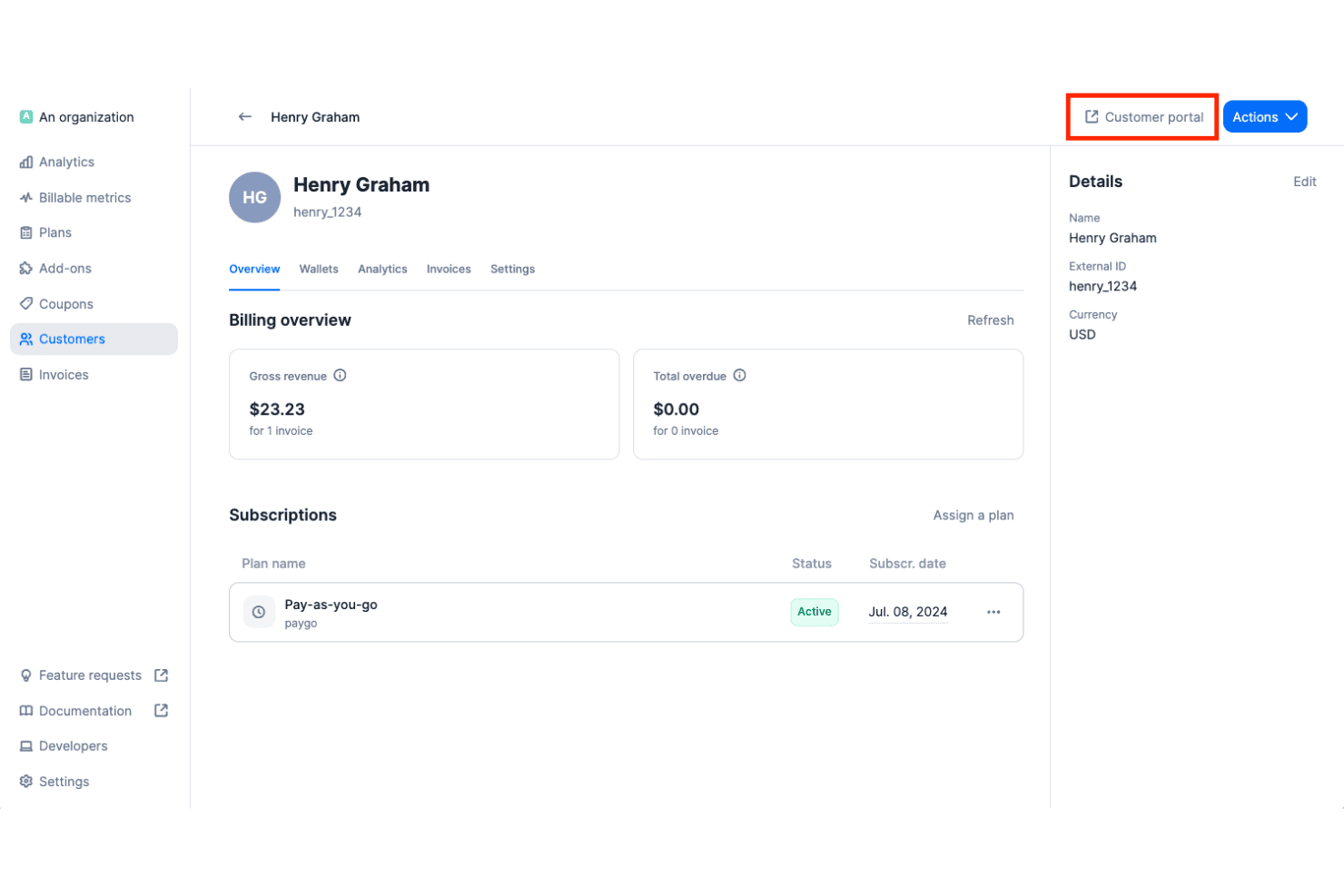
Lago offers a customer billing overview page showing gross revenue, overdue amounts, active subscriptions, and a customer portal access button. Lago is an open-source cloud billing platform that handles usage-based, subscription, and hybrid pricing models, with real-time event metering, automated invoicing, dunning workflows, and integrations across payment, tax, and accounting systems.
Who Is Lago Best For?
Lago is a strong fit for engineering-led SaaS and AI companies that need full control over their billing infrastructure, especially those with data sovereignty requirements or complex usage-based pricing.
Why I Picked Lago
Lago earns its spot on my shortlist because no other cloud billing platform gives you this level of access to the underlying billing logic. I can define custom billable metrics, build hybrid plans that mix subscriptions with consumption-based charges, and deploy the entire stack inside my own VPC. That matters when you're running AI workloads or handling GDPR-sensitive data and can't afford vendor lock-in on the billing layer.
Lago Key Features
- Multiple payment gateway integrations: Connects natively with Stripe, Adyen, GoCardless, and MoneyHash for global payments.
- Automated tax calculation: Integrates with Avalara and Anrok to handle sales tax, VAT, and GST across jurisdictions.
- Native NetSuite and Xero integration: Syncs invoices, payments, and customer data directly to leading accounting platforms.
- Customer-facing billing portal: Lets end customers view invoices, manage payment methods, and access billing history.
Lago Integrations
Lago offers native integrations with Stripe, Adyen, GoCardless, MoneyHash, Avalara, Anrok, NetSuite, Xero, HubSpot, Salesforce, and Zapier. An API is available for custom integrations.
Pros and Cons
Pros:
- Fully configurable billable metrics
- Real-time metering for high-volume event ingestion
- Fully self-hostable for data sovereignty needs
Cons:
- Missing native QuickBooks connectors
- No native ASC 606 revenue recognition
Learn more about Lago: Best for merchant of record billing worldwide
- Free demo available
- From $0.50 + 5% per transaction
Visit WebsiteCustomer Rating:4.6/5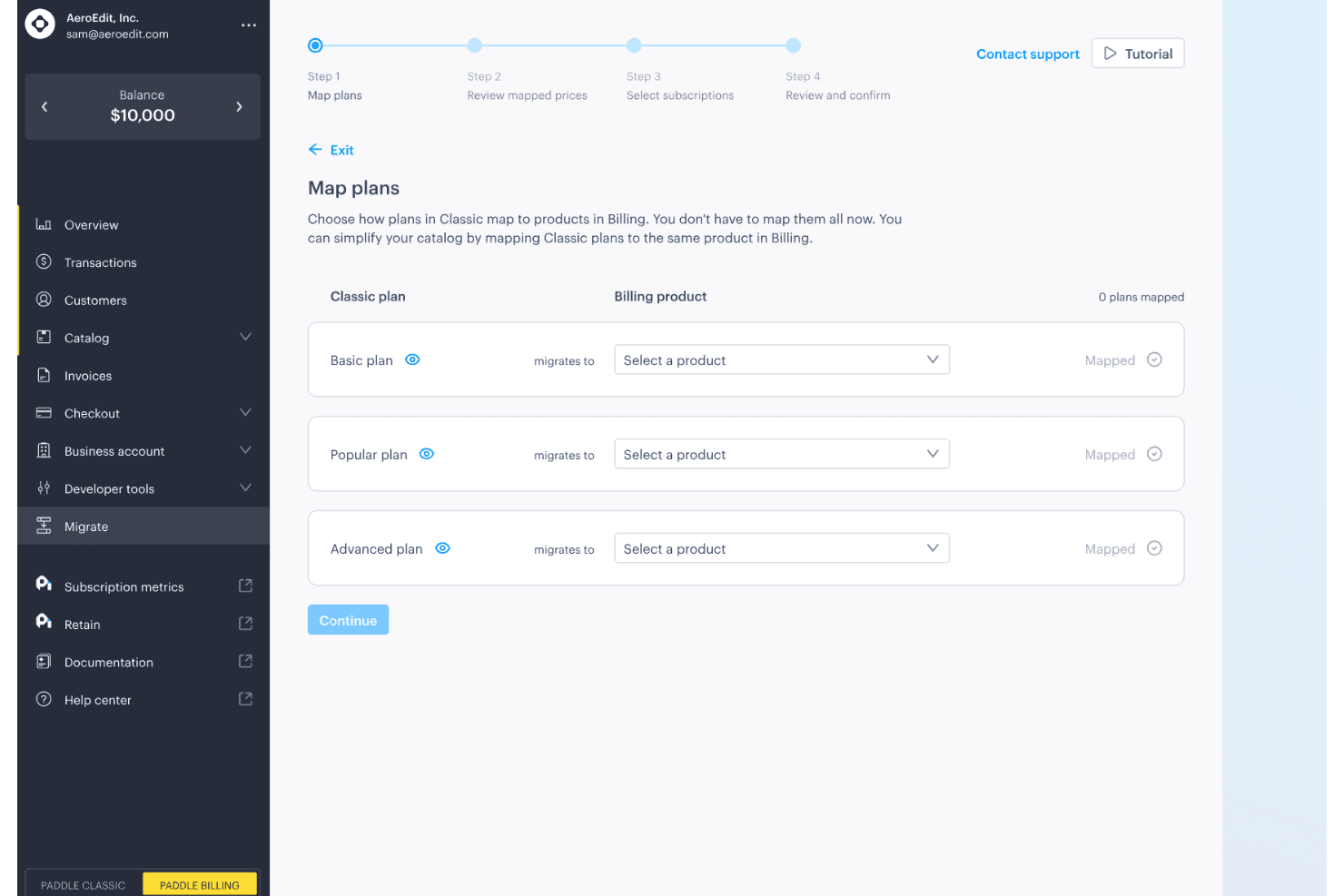
Paddle offers a guided migration flow that maps Classic plans to Billing products across Basic, Popular, and Advanced tiers. Paddle is a cloud billing platform for SaaS and digital product companies that combines subscription management, checkout, recurring billing, invoicing, and global tax compliance under a single merchant of record model.
Who Is Paddle Best For?
Paddle is a strong fit for growth-stage SaaS companies selling digital products across multiple countries who need tax compliance and billing handled without building in-house infrastructure.
Why I Picked Paddle
I picked Paddle as one of the best because no other cloud billing platform handles tax liability quite the same way. As the merchant of record, Paddle calculates, collects, files, and remits VAT and GST across 100+ jurisdictions automatically, so my team isn't managing a separate tax compliance stack on top of billing. I also use Paddle's Retain module to run dunning workflows, including smart payment retries and cancellation recovery flows, without any manual intervention.
Paddle Key Features
- Self-service customer portal: Customers can update payment methods and manage subscriptions without assistance.
- Multi-currency checkout: Paddle supports localized checkout in over 20 currencies.
- Automated invoicing: International and SaaS invoicing is built in, with taxes automatically applied.
- ProfitWell Metrics integration: Native analytics and SaaS metrics reporting connects directly to your financial data.
Paddle Integrations
Paddle offers native integrations with ProfitWell Metrics, HubSpot, Intercom, and Databox. An API is available for custom integrations.
Pros and Cons
Pros:
- Dunning workflows recover failed payments automatically
- Built-in merchant of record removes tax liability
- Handles global tax filing automatically across jurisdictions
Cons:
- Revenue recognition features lack ASC 606 depth
- No prebuilt ERP or accounting system connectors
Learn more about Paddle: Best for rapid pricing experiments at scale
- Free plan available
- Pricing upon request
Visit WebsiteCustomer Rating:4.4/5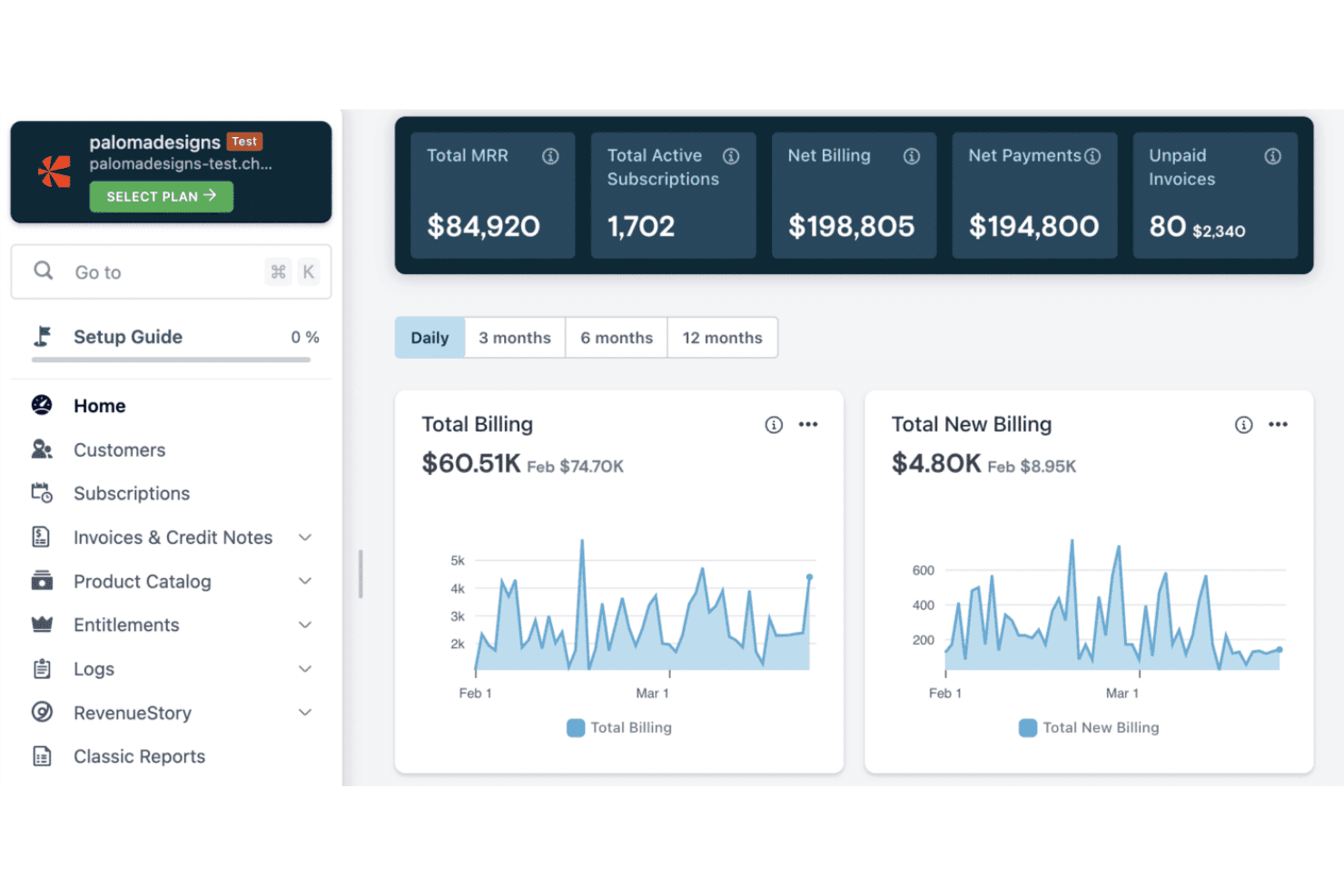
Chargebee features a billing dashboard with MRR, active subscriptions, net billing, payments, and unpaid invoices alongside daily billing trend charts. Chargebee is a cloud billing and revenue management platform that handles subscription billing, usage-based metering, CPQ, revenue recognition, and payment collection across 40+ gateways and 100+ currencies.
Who Is Chargebee Best For?
Chargebee is a strong fit for SaaS finance and revenue operations teams at growth-stage and mid-market companies managing subscription and usage-based billing.
Why I Picked Chargebee
Chargebee earns its spot on my shortlist because of how it handles pricing model iteration without pulling in engineering every time. The Price Book lets me manage tiered, usage-based, flat-fee, and hybrid pricing in one centralized catalog, so I can launch a new pricing tier and test it against existing segments without a code change. I also like the Growth module's AI-powered offer builder, which lets me run upgrade, upsell, and trial conversion experiments across subscriber cohorts.
Chargebee Key Features
- Dunning automation: Smart retry schedules and payment recovery workflows reduce failed transactions with minimal manual effort.
- Self-service customer portal: End customers can view invoices, update payment methods, and manage subscriptions independently.
- Multi-currency and tax engine: Supports 100+ currencies and automates VAT, GST, and sales tax calculation for global compliance.
- Native ERP and accounting integrations: Direct connectors to NetSuite, QuickBooks, and Xero sync billing and revenue data seamlessly.
Chargebee Integrations
Chargebee offers over 40 native payment gateway integrations, and has native integrations with Salesforce, HubSpot, NetSuite, QuickBooks Online, Xero, Apple App Store, and Google Play Store. An API is available for custom integrations.
Pros and Cons
Pros:
- Dunning handles failed payments with smart retries
- Customer self-service portal included natively
- ASC 606 revenue recognition fully automated
Cons:
- Advanced metering setup takes significant time
- Custom reporting requires workarounds
 Best for deep SaaS financial integrations
- Free demo available
- From $599/month
Visit WebsiteCustomer Rating:4.3/5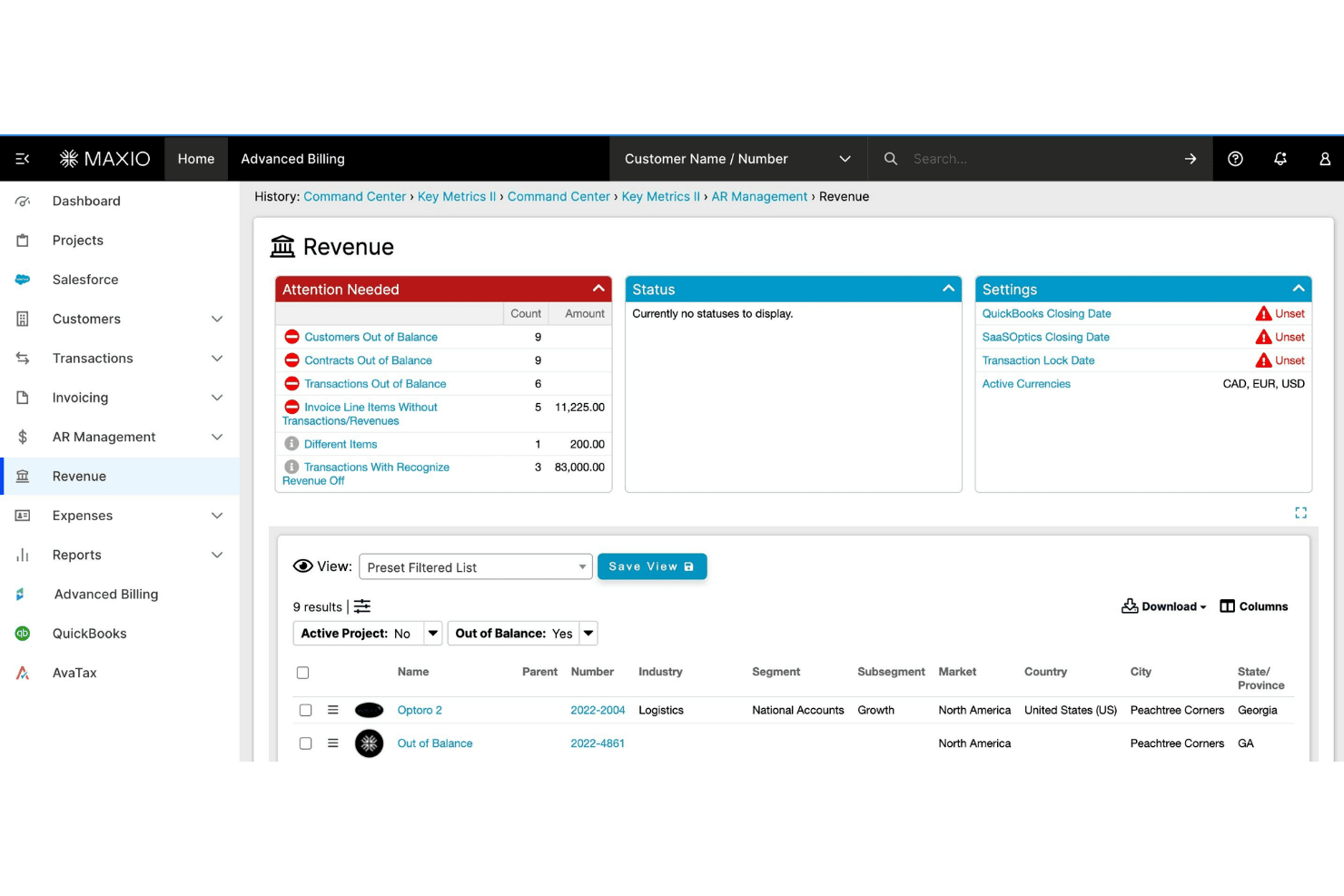
Maxio offers a Revenue management dashboard with attention-needed alerts, balance tracking, and customer filtering capabilities. Maxio is a subscription billing and financial operations platform built for B2B SaaS companies, covering usage-based billing, revenue recognition, A/R management, and SaaS metrics reporting.
Who Is Maxio Best For?
Maxio is a strong fit for finance and RevOps teams at B2B SaaS companies managing complex subscription contracts, usage-based pricing, or multi-entity billing structures.
Why I Picked Maxio
Maxio earns its spot on my shortlist because of how deeply it connects billing data to the financial systems SaaS teams already rely on. Native integrations with NetSuite, Sage Intacct, and QuickBooks include GL mapping and bidirectional sync, so close cycles don't require manual reconciliation. I also like the revenue recognition engine, which handles SSP allocation and contract modifications automatically under ASC 606 and IFRS 15.
Maxio Key Features
- Self-service customer portal: Lets customers view invoices, update payment methods, and manage subscriptions directly online.
- Configurable dunning automation: Enables you to set customized retry logic and automated recovery workflows for overdue accounts.
- Hybrid pricing model support: Allows combining flat-rate, per-seat, and usage-based charges on a single invoice.
- Multi-entity billing management: Supports separate catalogs, gateways, and reporting for subsidiaries or business units.
Maxio Integrations
Maxio offers 85+ native integrations, including NetSuite, QuickBooks Online, Xero, Sage Intacct, Salesforce, HubSpot, Pipedrive, Stripe, Avalara, and TaxJar. Zapier and an API are available for custom integrations.
Pros and Cons
Pros:
- Built-in investor-grade SaaS metrics reporting
- Strong ASC 606 revenue recognition automation
- Handles complex usage-based pricing natively
Cons:
- Steeper onboarding for smaller finance teams
- Implementation requires significant setup time
Learn more about Maxio: Best for complex quote-to-cash automation
- Free demo available
- Pricing upon request
Visit WebsiteCustomer Rating:3.8/5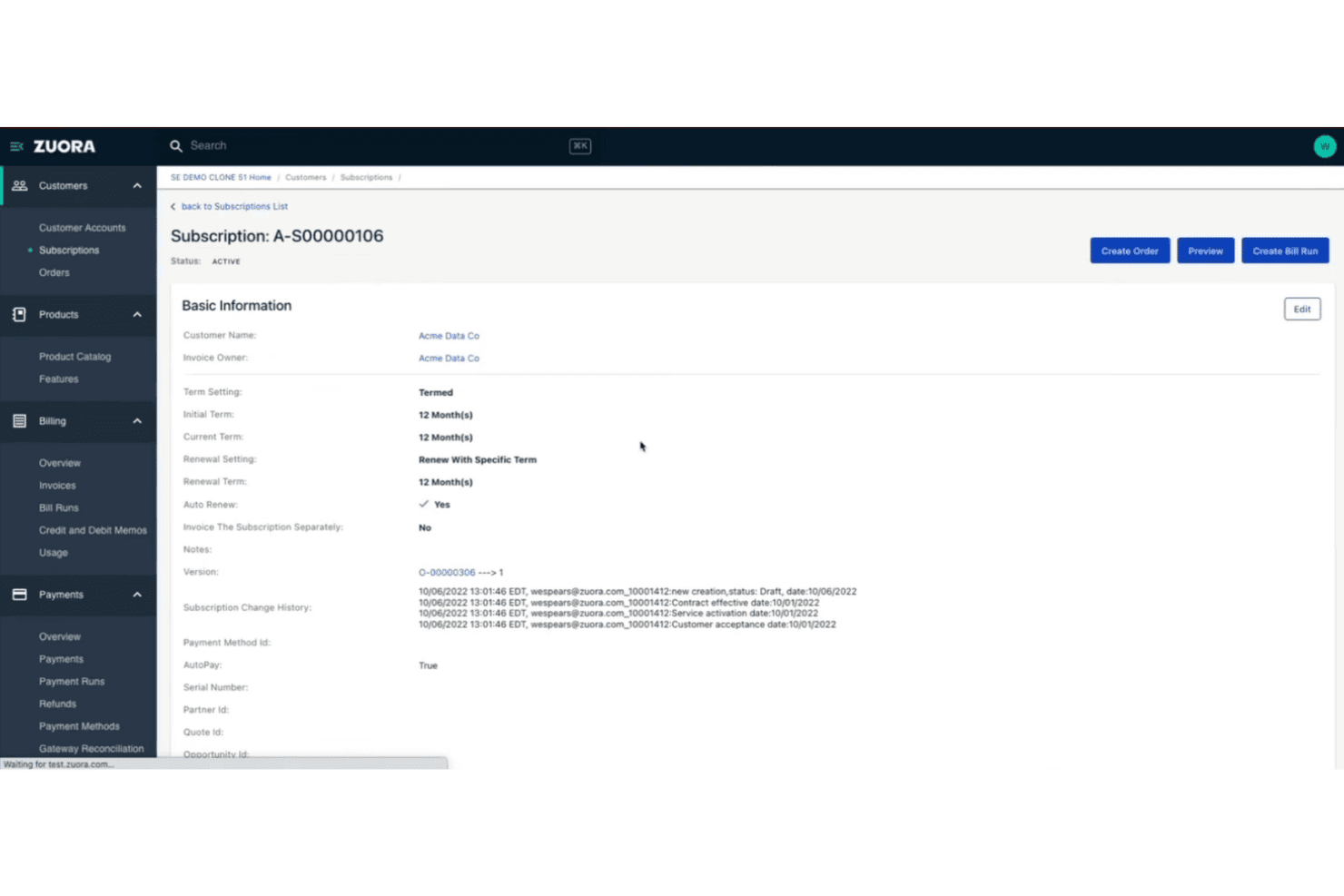
Zuora offers a detailed subscription management page with billing terms, renewal settings, and change history for a customer account. Zuora is an enterprise cloud billing platform built around subscription and usage-based monetization, covering quote-to-cash workflows, revenue recognition, payment processing, and AR automation.
Who Is Zuora Best For?
Zuora is a strong fit for enterprise finance and revenue operations teams at subscription businesses managing complex, high-volume billing across multiple products, pricing models, or markets.
Why I Picked Zuora
Zuora earns its spot as one of the best on my shortlist because of how tightly it connects the CPQ, billing, and revenue recognition layers into a single quote-to-cash workflow. I like that Zuora CPQ syncs directly with Zuora Billing, so pricing changes in a quote flow through to invoicing without manual reconciliation. The automated revenue recognition in Zuora Revenue handles contract modifications under ASC 606 and IFRS 15 without requiring custom workarounds.
Zuora Key Features
- Multi-currency and tax management: Supports global operations with multi-currency invoicing and automated tax calculation through integrated tax engines.
- Payment gateway integrations: Connects with 40+ payment gateways covering credit card, ACH, and regional payment methods.
- Self-service customer portal: Lets customers view invoices, manage payment methods, and handle subscription changes online.
- Customizable product catalog: Enables teams to manage complex product offerings, pricing experiments, add-ons, and bundling in one place.
Zuora Integrations
Zuora offers native integrations with Salesforce, NetSuite, and over 40 payment gateways including Stripe, Adyen, Braintree, and PayPal. An API is available for custom integrations.
Pros and Cons
Pros:
- Supports high-volume usage event ingestion
- Built-in ASC 606 and IFRS 15 compliance
- Handles complex subscription pricing models natively
Cons:
- Requires developer resources
- Long implementation timeline for enterprises
Learn more about Zuora: Best for flexible hybrid pricing models
- Not available
- From $0.7% of billing volume per month
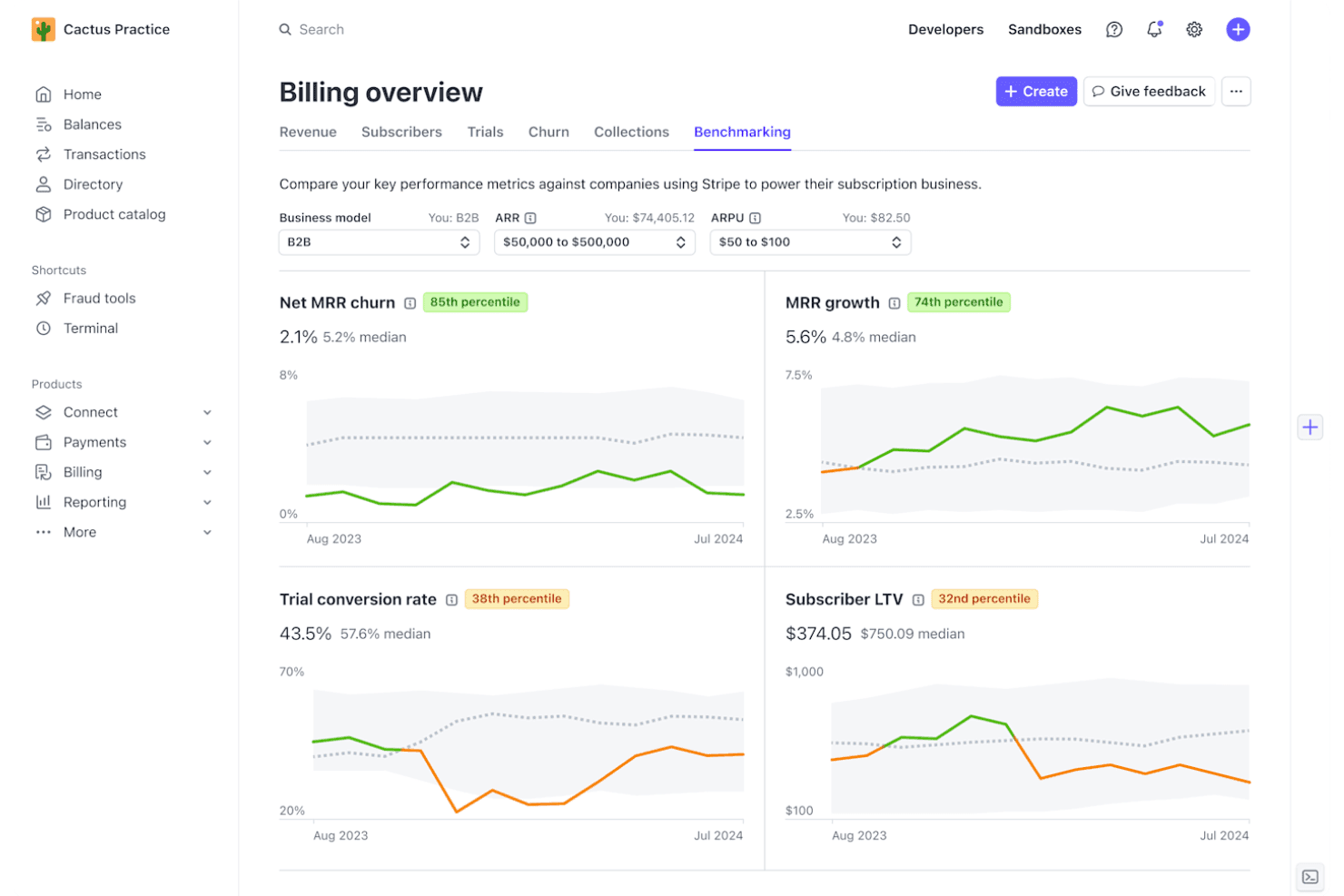
Stripe Billing offers a Benchmarking dashboard that compares key subscription metrics like Net MRR churn, MRR growth, trial conversion rate, and Subscriber LTV against industry peers. Stripe Billing is a cloud billing platform that handles subscription management, usage-based billing, invoicing, and payment collection across 15+ pricing models and 135+ currencies.
Who Is Stripe Billing Best For?
Stripe Billing is a strong fit for SaaS and technology companies that need to run multiple pricing models — subscriptions, metered usage, or both — within a single billing system.
Why I Picked Stripe Billing
I picked Stripe Billing as one of the best because it's the only platform I've used where you can genuinely mix subscription and consumption pricing within a single customer contract. That means setting a base recurring fee, layering metered usage charges on top, and configuring proration rules for mid-cycle plan changes, all within one system. The Meters API handles real-time event ingestion at up to 100,000 events per second, so metered charges stay accurate even at high transaction volumes.
Stripe Billing Key Features
- Self-service customer portal: Lets customers view invoices, update payment info, and manage subscriptions without contacting support.
- Automated tax calculation: Applies correct VAT, GST, or sales tax to invoices across 50+ countries.
- Integrated revenue recognition: Automatically generates ASC 606/IFRS 15-compliant revenue schedules and reports.
- Native NetSuite connector: Syncs invoices, payments, and reconciliation data directly with NetSuite accounts.
Stripe Billing Integrations
Stripe Billing offers native integrations with Salesforce, NetSuite, SAP Digital Payments Add-on, Snowflake, and Amazon Redshift. An API is available for custom integrations.
Pros and Cons
Pros:
- Real-time usage metering at massive scale
- Smart retry logic recovers failed payments
- Supports 15+ pricing models in one system
Cons:
- No native QuickBooks or Sage Intacct sync
- Revenue recognition lacks depth
Learn more about Stripe Billing:
Other Cloud Billing Software
Here are some additional cloud billing software options that didn’t make it onto my shortlist, but are still worth checking out:
- 11MetronomeBest for real-time usage-based billing
- 12OrbBest for dynamic revenue design flexibility
- 13OrdwayBest for multi-model billing and SaaS metrics
- 14ZenskarBest for AI-driven contract-to-cash automation
- 15Zoho BillingBest for built-in global tax and localization
- 16YouniumBest for centralized quote-to-revenue management
- 17Aria SystemsBest for high-volume real-time charging engines
- 18Agentforce Revenue ManagementBest for unified CRM billing experience
- 19ZoneBillingBest for billing automation inside NetSuite
- 20Oracle NetSuite SuiteBillingBest for native ERP subscription lifecycle control
How I Evaluate Cloud Billing Software
I split my evaluation into baseline requirements—recurring billing, usage rating, and rev rec compliance—and the differentiators that separate one platform from another for SaaS finance teams.
Core Functionality (Table Stakes for This List)
When I'm selecting tools for my list, I rank each one on a scale from 0 (does not offer the functionality) to 5 (excels in this area) for each core functionality listed below. Then, I calculate the tool's total score into a percentage. Each tool needs to achieve a minimum total score of 65% to be considered for inclusion.
- Recurring Billing Automation: I look for platforms that handle invoice generation, renewal logic, and dunning retries without manual touchpoints—like auto-prorating mid-cycle upgrades.
- Usage-Based Billing: Metered and consumption models need accurate rating engines. I evaluate how each tool ingests high-volume events like API calls or compute hours.
- Payment Gateway Integration: I check gateway breadth across cards, ACH, wallets, and direct debit. Tools like Stripe Billing and Chargebee differ in how many regional processors they support.
- Tax & Multi-Currency Support: Global billing means handling VAT, GST, and sales tax across dozens of jurisdictions. I look at whether tax is native or relies on integrations like Avalara.
- Accounting & ERP Integration: I evaluate sync depth with systems like NetSuite, QuickBooks, and Sage Intacct—especially bidirectional GL mapping that keeps billing and ledger data aligned.
- Revenue Recognition Compliance: ASC 606 and IFRS 15 schedules should automate contract modifications, SSP allocations, and deferred revenue waterfall reporting for month-end close.
Once I have a list of tools that meet the criteria, I consider what sets each platform apart.
Differentiating Factors (What Sets Vendors Apart)
Here's how I compare and contrast different vendors:
Standout Features
Dunning automation is a key differentiator. I look at how each platform handles retry logic, smart card updaters, and recovery workflows for failed payments. Usage-based metering matters for teams billing on API calls or compute hours—real-time event ingestion at scale separates strong tools from limited ones. Self-service customer portals are worth evaluating too, letting subscribers update payment methods, switch plans, and pull tax documents without filing a support ticket.
Beyond Features
Pricing model flexibility is a big one—I evaluate whether a platform can combine flat subscriptions, per-seat, and usage components on a single invoice without engineering rework. Integration ecosystem depth matters just as much, especially native connectors to ERPs like NetSuite and QuickBooks alongside REST APIs for data warehouse syncing. I also check pricing transparency, looking at how clearly vendors disclose platform fees, transaction costs, and implementation charges so you can forecast total cost of ownership.
How to Choose Cloud Billing Software
It’s easy to get bogged down in long feature lists and complex pricing structures. To help you stay focused as you work through your unique software selection process, here’s a checklist of factors to keep in mind:
| Factor | What to Consider |
|---|---|
| FactorScalability | What to ConsiderWill the platform handle usage spikes and business growth? Review transaction volume limits and billing model flexibility. |
| FactorIntegrations | What to ConsiderCan it connect cleanly to your ERP, CRM, and payment processors? Assess integration depth, not just existence. |
| FactorCustomizability | What to ConsiderCan you adapt billing workflows, tax logic, and invoice templates without developer help? Confirm how much you can tailor natively. |
| FactorEase of use | What to ConsiderHow quickly can finance and operations teams configure and manage billing? Look for simple approvals, plan setup, and reporting. |
| FactorImplementation and onboarding | What to ConsiderWhat’s the time and effort required to go live? Ask about data migration support, training, and access to a clear onboarding plan. |
| FactorCost | What to ConsiderAre platform, transaction, and overage fees transparent? Check for recurring charges and hidden expenses that could surprise you. |
| FactorSecurity safeguards | What to ConsiderDoes the vendor meet your needs for PCI DSS, SOC 2, GDPR, or data residency? Ask how security is managed and audited. |
| FactorInternational capabilities | What to ConsiderWill it support currencies, tax jurisdictions, and customer self-service needs if your business expands into new markets? |
What Is Cloud Billing Software?
Cloud billing software is a digital platform that automates invoicing, subscription management, and payment processing for recurring or usage-based business models. It simplifies handling multi-currency billing, global tax compliance, and integrations with accounting systems. Finance teams use these tools to streamline revenue operations, minimize manual work, and support audit-ready financial reporting across complex subscription and consumption-based offerings.
Features of Cloud Billing Software
When selecting cloud billing software, keep an eye out for the following key features:
- Recurring billing automation: Generates subscription invoices, manages renewals, and processes payments on a set schedule without manual input.
- Usage-based pricing: Tracks customer activity or consumption, calculates charges, and supports metered, tiered, or hybrid billing models.
- Payment gateway integration: Connects with multiple processors to accept payments via credit card, ACH, bank transfers, and regional payment methods.
- Global tax calculation: Manages sales tax, VAT, and GST compliance across countries using built-in engines or third-party integrations.
- Multi-currency support: Issues invoices and accepts payments in different currencies, automatically applying exchange rates.
- Dunning and collections workflows: Automates reminders, retries, and recovery steps for failed or overdue payments to help reduce revenue loss.
- Self-service customer portal: Gives customers the ability to view invoices, update payment methods, and manage their subscriptions online.
- Revenue recognition compliance: Supports ASC 606 and IFRS 15 requirements with automated schedules for recognizing revenue accurately and creating audit-ready reports.
- ERP and accounting integration: Syncs billing data with popular accounting and ERP platforms to ensure accurate financial records and streamlined close processes.
- Customizable invoicing: Allows finance teams to tailor invoice templates, branding, and line items to fit specific business requirements and customer expectations.
Benefits of Cloud Billing Software
Implementing cloud billing software provides several benefits for your team and your business. Here are a few you can look forward to:
- Faster invoicing cycles: Automated billing and renewals help your team get invoices out quickly with fewer manual steps.
- Accurate revenue recognition: Built-in compliance with ASC 606/IFRS 15 ensures your financials reflect real-time revenue schedules.
- Improved global reach: Multi-currency billing and tax automation make it easier to serve customers in new countries without extra overhead.
- Reduced payment failures: Dunning workflows and smart retries help recover revenue from failed or late payment attempts.
- Greater visibility and controls: Real-time dashboards, audit trails, and detailed reports provide the financial insight needed for decisive business management.
- Enhanced customer experience: Self-service portals let customers manage subscriptions, view invoices, and download payment records whenever they need.
Costs and Pricing of Cloud Billing Software
Selecting cloud billing software requires an understanding of the various pricing models and plans available. Costs vary based on features, team size, add-ons, and more. The table below summarizes common plans, their average prices, and typical features included in cloud billing software solutions:
Plan Comparison Table for Cloud Billing Software
| Plan Type | Average Price | Common Features |
|---|---|---|
| Plan TypeFree Plan | Average Price$0 | Common FeaturesBasic invoicing, limited payment integration, manual billing tasks, and entry-level customer support. |
| Plan TypePersonal Plan | Average Price$25–$75/month | Common FeaturesRecurring billing, simple usage-based pricing, multi-currency support, and basic integrations. |
| Plan TypeBusiness Plan | Average Price$200–$600/month | Common FeaturesAdvanced dunning, tax automation, revenue recognition, self-service portals, accounting integrations, and reporting. |
| Plan TypeEnterprise Plan | Average Price$1,000+/month | Common FeaturesCustom workflows, high-volume usage metering, premium support, compliance tools, API access, and deep ERP integrations. |
Cloud Billing Software FAQs
Here are some answers to common questions about cloud billing software:
How does cloud billing software handle usage-based billing?
Most platforms track API calls, compute hours, or other usage metrics using real-time data, then calculate charges automatically. This lets a SaaS business or software-as-a-service provider offer granular pricing models without relying on manual processes or complex spreadsheets. By eliminating manual input, modern cloud billing solutions help optimize your overall billing processes and ensure accurate invoice processing.
Can cloud billing software integrate with my accounting and ERP systems?
Yes, leading invoicing software offers integration capabilities with built-in connectors for ERPs like NetSuite and Sage Intacct, as well as accounting software such as QuickBooks and Xero. Sync depth varies, so check whether data flows one-way or bidirectionally and if custom mapping is available. Migrating away from rigid, legacy on-premise infrastructure to cloud-based billing software ensures your financial systems stay synchronized automatically.
What should I watch out for in terms of hidden costs?
Beyond basic pricing plans, look out for transaction fees, revenue-based charges, premium support, and add-on modules. You may also encounter additional costs for setup or specific features like recurring payments and automated notifications. Always ask for detailed cost breakdowns upfront and clarify what is included before you buy, especially if you operate on a subscription-based revenue model.
Is cloud billing software secure for handling payments?
Yes, most cloud-based products are PCI DSS compliant and provide encryption alongside role-based access controls. Securing multiple payment options—from credit cards to ACH—is critical for protecting customer data. It’s smart to verify certifications and understand how payment data is tokenized or protected in any solution you consider to protect your bottom line and build trust.
How quickly can we get up and running on these platforms?
Implementation can range from a few days for simple setups to multiple weeks for complex migrations, especially if you’re importing legacy billing data or need custom integrations. Detailed onboarding and migration support can make a big difference.