

Nakit uygulama yazılımı, gelen ödemeleri açık faturalarla eşleştirme sürecini otomatikleştirerek yüksek işlem hacimlerini yöneten finans ekipleri için mutabakatı hızlandırır. Manuel iş yükünü ortadan kaldıran, karmaşık ERP sistemleriyle çalışan ve operasyonlarınızla birlikte ölçeklenebilen araçlara ihtiyacınız varsa değerlendirmenizi önereceğim seçenekler bunlardır.
Yapay zekâ destekli eşleştirme, banka entegrasyonları ve gelişmiş raporlama sunduğunu iddia eden bu kadar çok seçenek varken, çözdüğünden daha fazla sorun yaratan bir yazılımla karşılaşmak kolaydır. Bu kılavuz, en iyi nakit uygulama araçlarını karşılaştırmanıza, satın alma sürecini güvenle yönetmenize ve ekibinizin özel ihtiyaçlarına uygun bir çözüm bulmanıza yardımcı olacaktır.
Why Trust Our Software Recommendations
6,700+
Reviews
20
Industry experts
16+
Evaluation factors
14
Years
Our team has been testing and reviewing software since 2012. As finance leaders ourselves, we know how difficult—and important—it is to choose the right software.
For this guide, we evaluated tools using hands-on testing and independent research, scoring tools using our selection criteria.
Our reviews reflect our human editorial judgment, not a sales pitch.
Karşılaştırma Tablosu: Nakit Uygulama Yazılımı
Bu karşılaştırma tablosu, en iyi nakit uygulama yazılımı seçimlerim için fiyatlandırma ayrıntılarını özetlemektedir.
Score legend (out of 5)
- Excellent4.5–5
- Good4–4.4
- Average3–3.9
- Below average2–2.9
- Poor1–1.9
Sorted by: Default
| Tool | Starting Price | Website | |||||||||||||
|---|---|---|---|---|---|---|---|---|---|---|---|---|---|---|---|
Best for AR teams linking cash to collections | Not rated | 4 | 4 | 2 | 4 | 3 | 4 | Not rated | Not rated | Not rated | Not rated | Not rated | Not rated | Pricing upon request Free plan + free demo available | Website |
Best for retailer portal deduction workflows | Not rated | 4 | 4 | 4 | 5 | 4 | 5 | Not rated | Not rated | Not rated | Not rated | Not rated | Not rated | Pricing upon request Free demo available | Website |
Best for multi-ERP enterprise environments | Not rated | Not rated | Not rated | Not rated | Not rated | Not rated | Not rated | 5 | 4 | 5 | 5 | 5 | 5 | Pricing upon request Free demo available | Website |
Best for mid-market AR teams | Not rated | Not rated | Not rated | Not rated | Not rated | Not rated | Not rated | 4 | 4 | 5 | 4 | 4 | 3 | Pricing upon request Free demo available | Website |
Best for AI matching | Not rated | Not rated | Not rated | Not rated | Not rated | Not rated | Not rated | 5 | 4 | 4 | 3 | 5 | 5 | Pricing upon request Free demo available | Website |
Best for end-to-end accounting closure | Not rated | Not rated | Not rated | Not rated | Not rated | Not rated | Not rated | 5 | 5 | 5 | 5 | 5 | 5 | Pricing upon request Free demo available | Website |
Best for advanced cash application reporting | Not rated | Not rated | Not rated | Not rated | Not rated | Not rated | Not rated | 5 | 5 | 5 | 5 | 5 | 4 | Pricing upon request Free demo available | Website |
Best for AI-driven explainable payment matching | Not rated | Not rated | Not rated | Not rated | Not rated | Not rated | Not rated | 5 | 5 | 5 | 5 | 5 | 4 | Pricing upon request Free demo available | Website |
Best for AI-driven enterprise automation | Not rated | Not rated | Not rated | Not rated | Not rated | Not rated | Not rated | 5 | 5 | 5 | 5 | 5 | 5 | Pricing upon request Free demo available | Website |
Best for native SAP ecosystem integration | Not rated | Not rated | Not rated | Not rated | Not rated | Not rated | Not rated | 5 | 5 | 5 | 4 | 5 | 5 | Pricing upon request Free demo available | Website |


Nakit Uygulama Yazılımı İncelemeleri
Aşağıda, kısa listeme giren en iyi nakit uygulama yazılımlarına ilişkin ayrıntılı özetlerimi bulabilirsiniz. İncelemelerimde, sizin için en uygun seçeneği bulmanıza yardımcı olmak amacıyla her yazılımın özelliklerine, en uygun kullanım alanlarına ve entegrasyonlarına ayrıntılı biçimde yer veriyorum.
 Best for AR teams linking cash to collections
- Free plan + free demo available
- Pricing upon request
Visit WebsiteCustomer Rating:4.5/5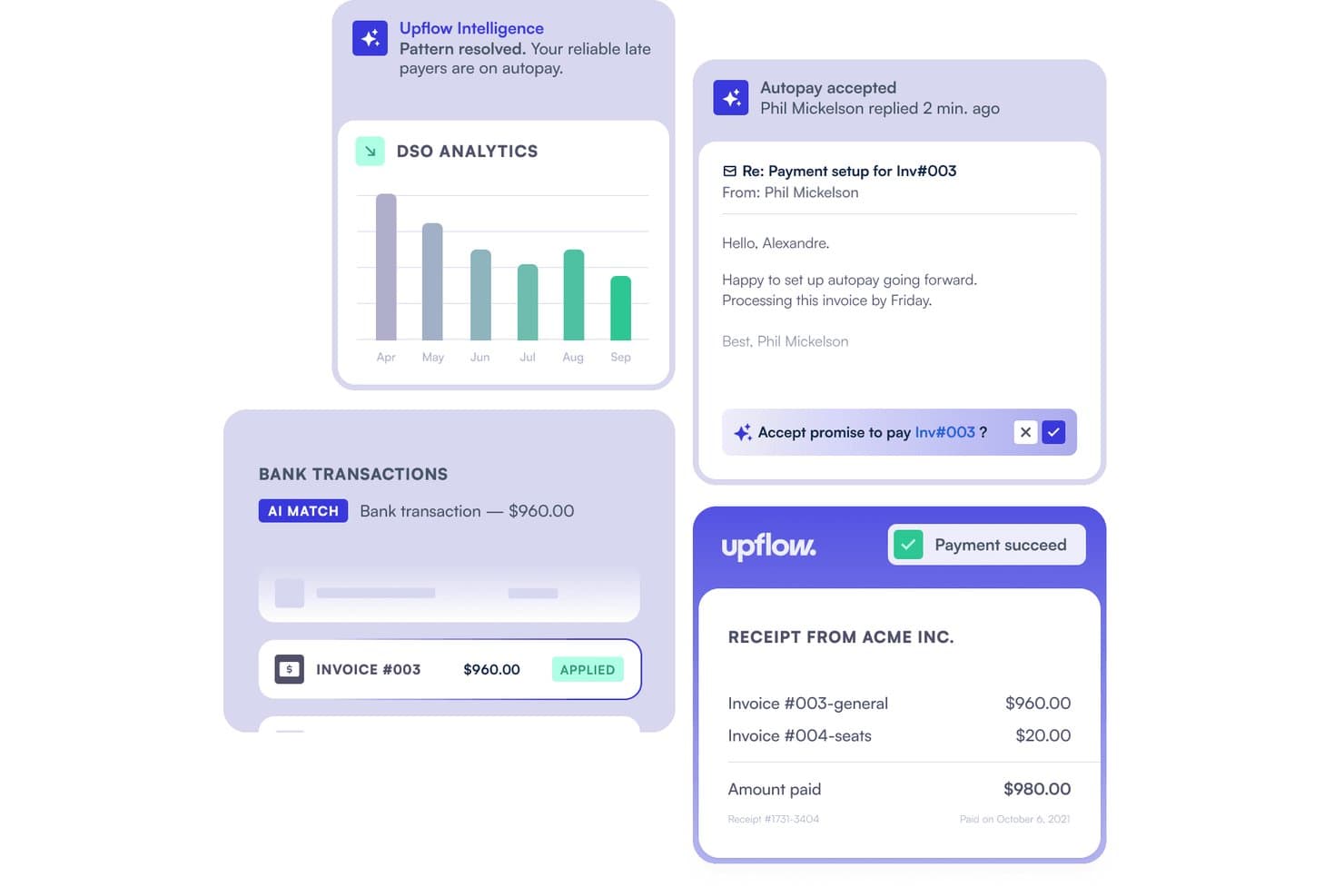
Upflow automates cash application by matching bank transactions to invoices. Upflow is a B2B accounts receivable platform that combines AI-powered cash application, automated collections, remittance capture, and ERP-connected payment matching across NetSuite, Sage Intacct, QuickBooks, SAP, and Dynamics 365.
Who Is Upflow Best For?
Upflow fits mid-market finance teams that want to connect cash application directly to collections, rather than treating them as separate workflows.
Why I Picked Upflow
I picked Upflow as one of the best because it's built around a principle most cash application tools ignore: applied cash should immediately inform what your collections team does next. The Cash App Agent posts confident matches automatically, and that reconciliation data feeds directly into AR aging and collections workflows, so there's no handoff lag between knowing a payment landed and acting on what's still outstanding. I also love that the AI surfaces bulk-payment combinations, grouping open invoices to match a single bank transfer when no invoice reference exists.
Upflow Key Features
- Exception workflow routing: Uncertain or unmatched transactions are sent to a built-in review queue where you can confirm, adjust, override, or unapply a match.
- Plaid-powered bank feeds: Upflow connects to 12,000+ financial institutions via Plaid, pulling transactions daily through a secure OAuth connection without storing your banking credentials.
- Six-month cash forecasting: The forecasting tool uses customer payment behavior, promise-to-pay dates, disputes, and upcoming billings to project expected cash inflows over the next six months.
- ERP write-back with audit trail: Matched payments sync to your ERP in real time, with auto-applied and manually applied transactions logged separately in a full audit trail.
Upflow Integrations
Upflow offers 14+ native integrations, including NetSuite, Sage Intacct, QuickBooks Online, Xero, SAP S/4HANA, and Microsoft Dynamics 365 Business Central. Its REST API, available from the Grow plan, supports custom integrations.
Pros and Cons
Pros:
- Collection workflows keep follow-ups visible
- Payment tracking clarifies invoice status
- Confident single-invoice matches auto-apply
Cons:
- Scanned and portal remittances aren’t documented
- Ambiguous matches still need manual review
Learn more about Upflow: 2Best for retailer portal deduction workflows
Monk
- Free demo available
- Pricing upon request
Visit WebsiteCustomer Rating:4.5/5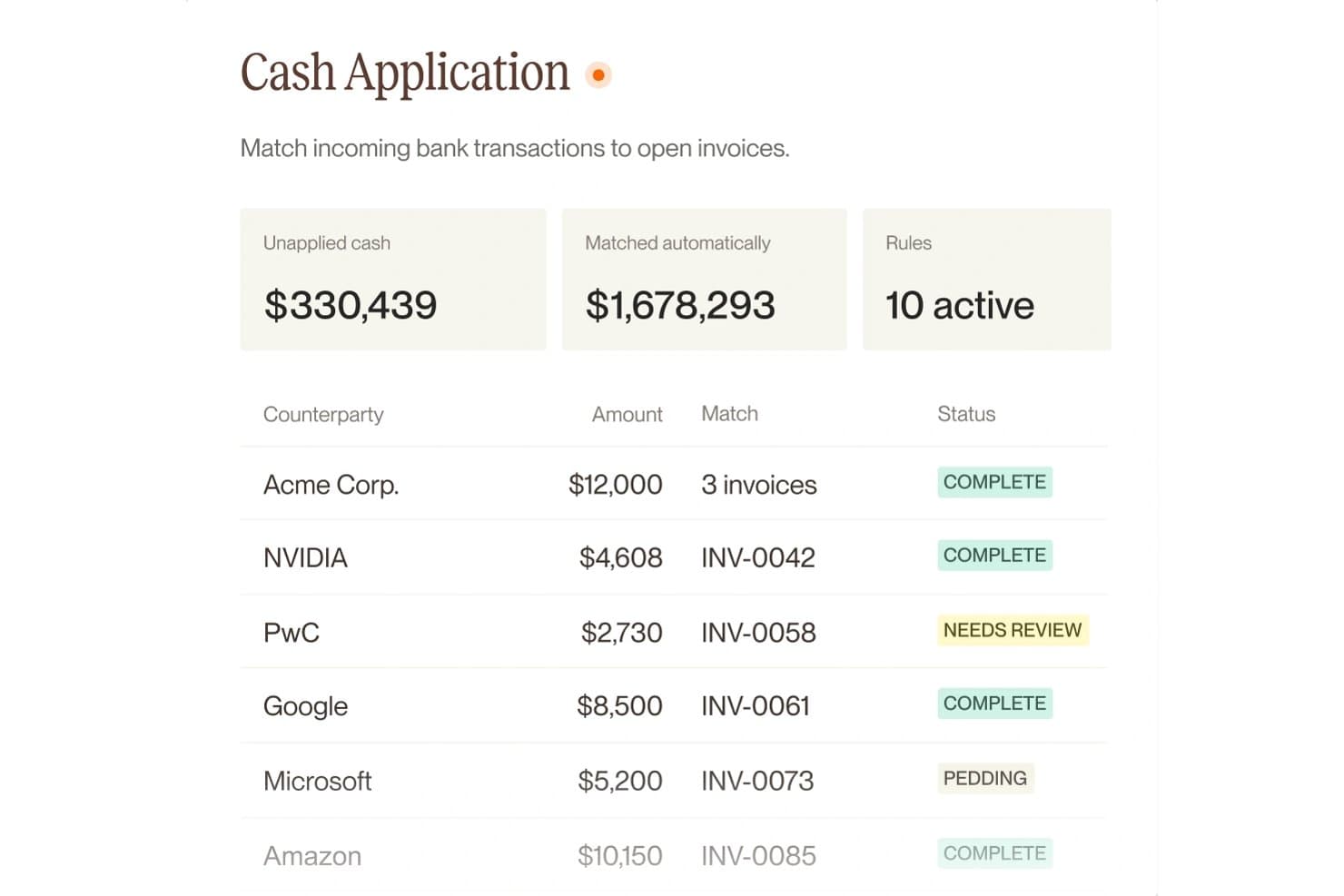
Monk automatically matches bank transactions to open invoices. Monk is an AI-native accounts receivable platform that covers cash application, payment matching, deduction management, and collections in a single invoice-to-cash workflow.
Who Is Monk Best For?
Monk is a strong fit for AR teams that sell through major retailers and spend significant time managing portal-based deductions across customers like Walmart, Target, or Amazon Vendor Central.
Why I Picked Monk
Monk earns its spot on my shortlist because of how it handles retailer portal deductions end to end. When a customer like Walmart or Target short-pays an invoice, Monk automatically pulls the remittance, reason codes, and claim documents straight from the retailer's portal, codes the deduction, and routes it for dispute filing without manual digging. I also like how its short-pay detection splits bulk payments down to the invoice line, so nothing gets buried in a lump sum.
Monk Key Features
- Confidence-based review queue: Routes payment matches below your set confidence threshold to a human review queue, while auto-applying high-confidence matches.
- ERP two-way sync: Posts matched payments back to NetSuite, QuickBooks, SAP, Sage Intacct, Xero, Dynamics, and more in both directions.
- 13-week cash forecast: Combines open invoice data, customer payment behavior, and risk signals into a rolling 13-week collections forecast.
- Customer payment portal: Gives customers a self-serve hub to view invoices, check in-transit payments, and pay by ACH, wire, check, or card.
Monk Integrations
Monk offers native integrations with NetSuite, QuickBooks, SAP S/4HANA, Oracle, Microsoft Dynamics 365, Sage Intacct, Xero, Stripe, Plaid, Mercury, and Atlar. It also provides a public API and supports MCP for custom integrations.
Pros and Cons
Pros:
- Confidence thresholds route uncertain matches for review
- Bulk payments split into invoice-line short pays
- Retailer portal remittances include claim backup
Cons:
- Rollout requires draft-mode tuning before full volume
- Uncertain matches still need human judgment
Learn more about Monk: Best for multi-ERP enterprise environments
- Free demo available
- Pricing upon request
Visit WebsiteCustomer Rating:3.5/5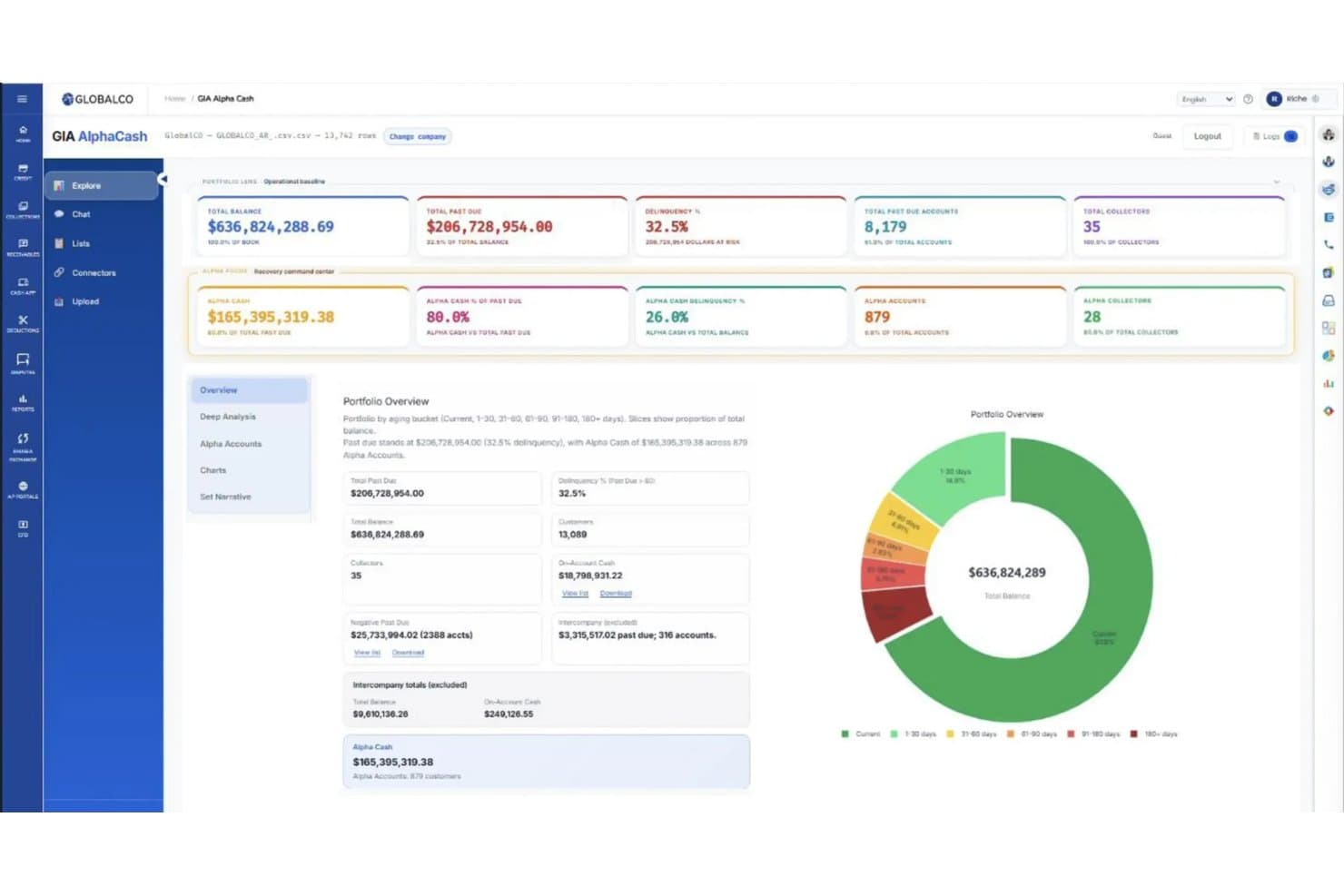
Emagia tracks past-due cash recovery across aging buckets in one view. Emagia is an AI-powered cash application platform that handles automated payment matching, remittance aggregation, deduction coding, and cash posting across 15+ ERP systems and 170+ global banking integrations.
Who Is Emagia Best For?
Emagia is a strong fit for large enterprises running multiple ERPs that need centralized cash application across complex, high-volume AR environments.
Why I Picked Emagia
I picked Emagia as one of the best because it's purpose-built to handle the exact complexity that breaks other cash application tools: running multiple ERPs at once. Its single-platform architecture supports 15+ ERP systems simultaneously, with AI managing the differences between them, so your team isn't manually reconciling data across SAP, Oracle, and NetSuite in parallel. I'm also impressed by the remittance auto-aggregation feature, which pulls remittance data from customer AP portals and logistics portals automatically, which is a real bottleneck in high-volume environments. ConvaTec processed $4B in receivables across 44 countries using Emagia, hitting over 95% automated cash application in 15 months.
Emagia Key Features
- Touchless data capture: Emagia automatically captures payment, remittance, and lockbox data from multiple sources and languages, covering over 97% of incoming items without manual input.
- Digital assistant Gia: An AI copilot that handles voice, chat, and email outreach to customers to collect missing remittance information directly.
- Intelligent exception handling: When a payment can't be matched automatically, Gia surfaces smart suggestions to help your team resolve exceptions and disputes faster.
- Multi-currency and multi-language support: Emagia processes payments across multiple currencies, languages, and lockboxes simultaneously within a single platform instance.
Emagia Integrations
Emagia offers pre-built native integrations with 15+ ERP systems, including SAP, Oracle, JD Edwards, PeopleSoft, Microsoft Dynamics, NetSuite, and Sage, plus connectivity to 170+ global and local banks through formats like Open Banking APIs, BAI2, MT940, CAMT.053, and EDI. It also connects with customer AP portals and logistics POD/BOL portals for remittance aggregation, and supports custom integrations through its API.
Pros and Cons
Pros:
- AI assistant manages unmatched payments outreach
- Automated remittance capture from customer portals
- Handles complex multi-ERP reconciliation workflows
Cons:
- Reporting dashboards lack advanced customization options
- Setup for highly custom ERP landscapes takes time
Learn more about Emagia: Best for mid-market AR teams
- Free demo available
- Pricing upon request
Visit WebsiteCustomer Rating:2.3/5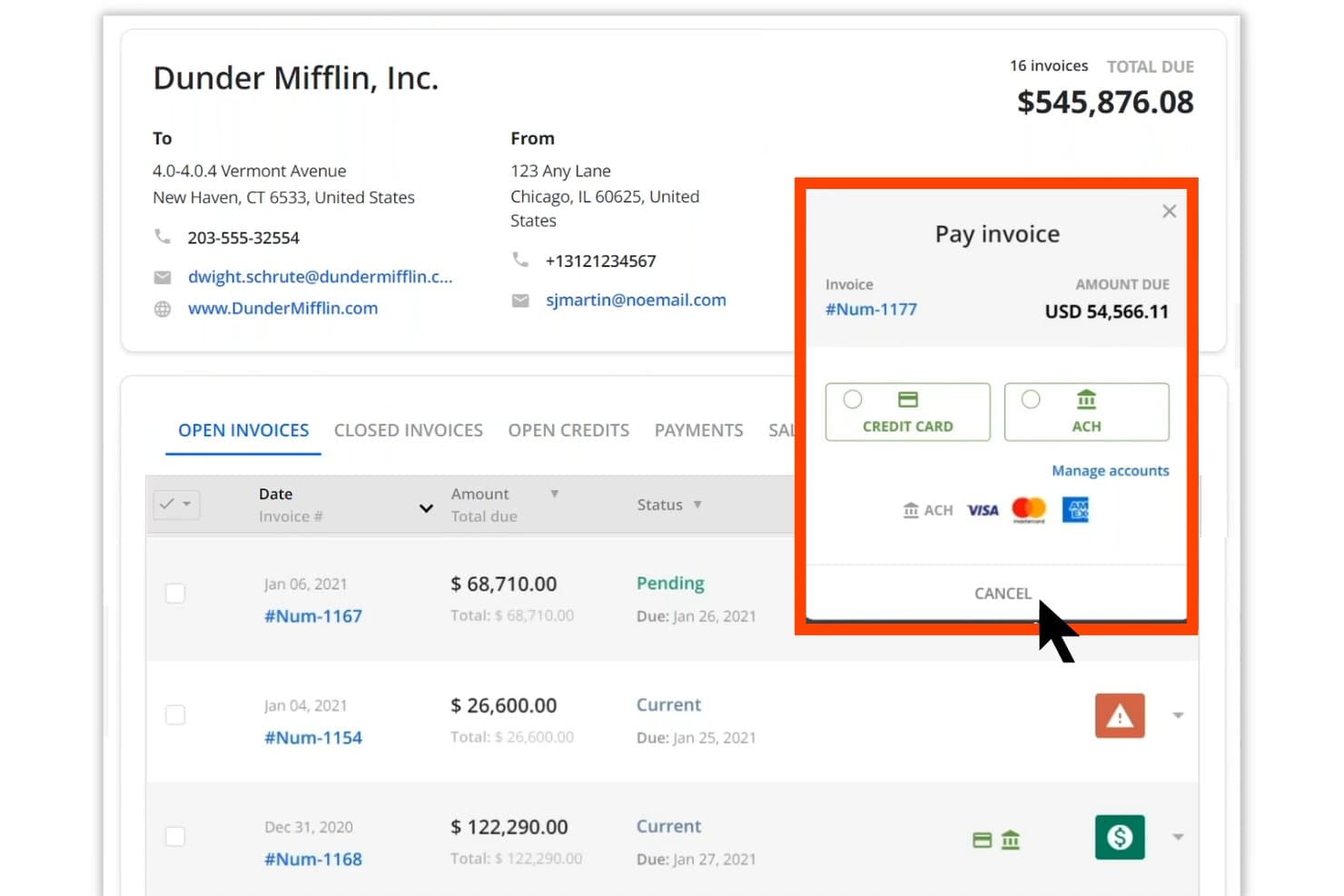
Quadient lets users pay invoices via credit card or ACH directly in the portal. Quadient AR Automation is an end-to-end accounts receivable platform that covers cash application, credit management, collections workflows, dispute management, and customer payment processing in one centralized system.
Who Is Quadient Best For?
Quadient AR is a strong fit for mid-market B2B finance teams that need a full order-to-cash platform with multi-ERP connectivity and structured collections workflows.
Why I Picked Quadient
Quadient AR earns its spot on my list because its AI-based cash application module handles one of the messiest parts of mid-market AR: matching payments when remittance data is incomplete. The machine learning engine analyzes payment type, amount, and any available remittance details to suggest a customer match, so your team reviews and approves rather than manually re-keys every transaction. Combined with collections workflows, dispute management, and credit controls in one platform, mid-market finance teams get full order-to-cash coverage without stitching together separate tools.
Quadient Key Features
- Customer self-service payment portal: Gives your customers a secure, branded portal to view invoices, schedule payments, and pay on their own timeline without contacting your team.
- Configurable rules engine: Lets you set automated reminder sequences and escalation triggers based on your own business rules, so follow-ups go out consistently without manual intervention.
- AI-powered payment behavior prediction: Analyzes historical payment data to flag at-risk accounts and surface collection priorities before invoices go overdue.
- Multi-ERP connectivity: Integrates natively with NetSuite, SAP, Microsoft Dynamics, Sage, QuickBooks, Acumatica, and Xero, so AR data syncs across your existing systems without manual exports.
Quadient Integrations
Quadient AR offers native integrations with major ERP and accounting systems, including NetSuite, SAP, Microsoft Dynamics, Sage Intacct, QuickBooks, Acumatica, and Xero. An API is available for custom integrations, and it connects to payment processors and banking data feeds to support cash application workflows.
Pros and Cons
Pros:
- Configurable workflows for mid-market requirements
- Full order-to-cash platform in one system
- AI-based payment matching reduces manual review
Cons:
- Dispute management features may lack depth
- Initial configuration can be time-consuming
Learn more about Quadient:
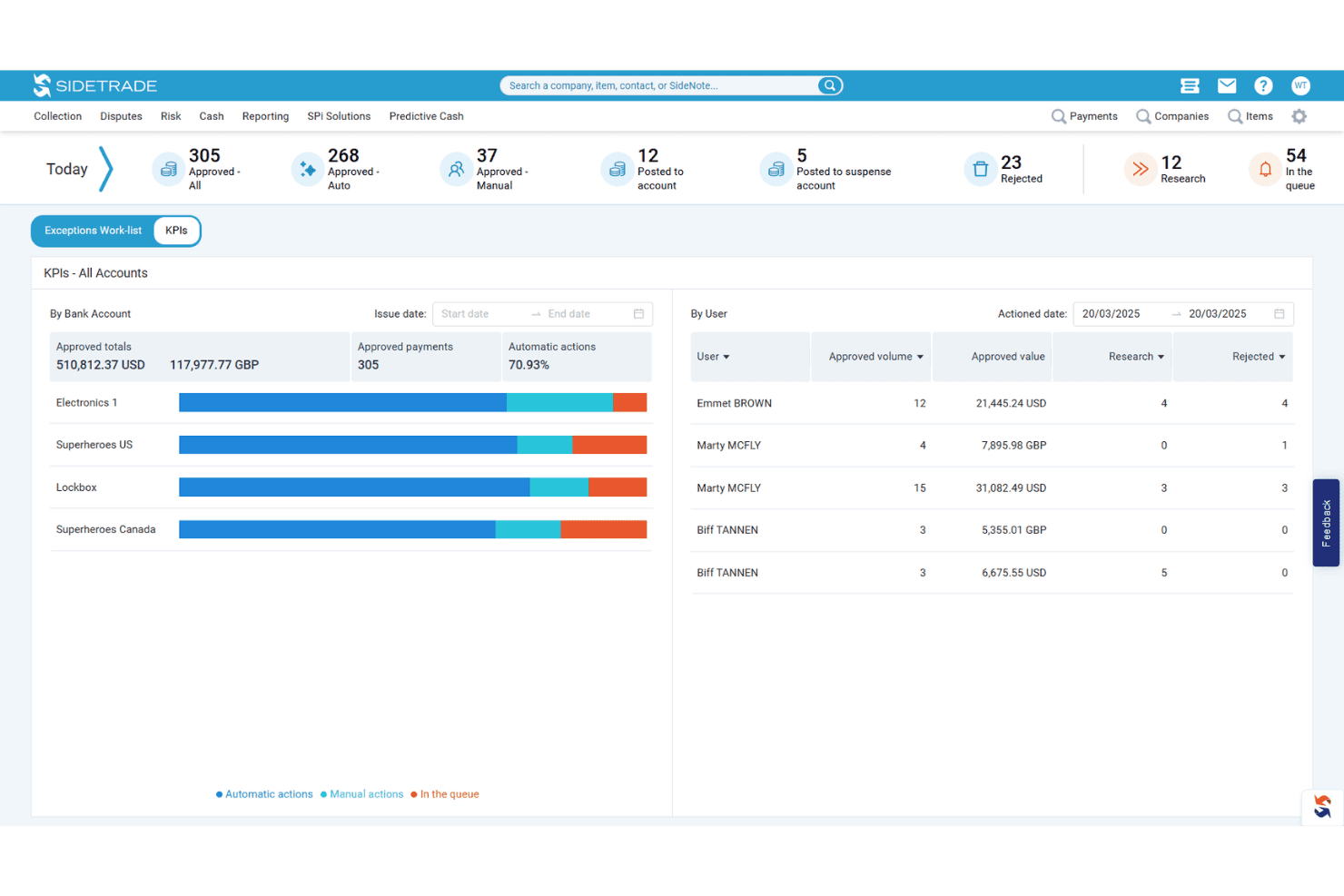
Sidetrade tracks daily cash application KPIs by user and bank account. Sidetrade Cash App is an AI-powered cash application platform that automates remittance consolidation, invoice matching, and payment posting directly to your ERP across multi-entity, multi-currency, and multi-channel payment environments.
Who Is Sidetrade Best For?
Sidetrade Cash App is a strong fit for mid-market and enterprise finance teams managing high payment volumes across multiple entities, currencies, and ERP systems.
Why I Picked Sidetrade
Sidetrade Cash App earns its spot on my list because its AI matching engine genuinely sets it apart from rules-based systems. The AI handles remittance data from virtually any source, including banks, email, portals, and EDI, without requiring template setup, then matches payments across partial, multi-currency, and multi-entity scenarios at 90%+ accuracy. I also like that the system continuously learns from historical match data, so it gets sharper over time rather than plateauing at a fixed hit rate.
Sidetrade Key Features
- Same-day ERP posting: Payments post directly to your ERP in real time, without manual data entry, enabling same-day cash application.
- Exception management workflow: Unmatched payments are flagged automatically and routed into guided workflows that surface contextual insights and suggested matches for resolution.
- Real-time dashboards: Built-in dashboards give your team live visibility into posted amounts, unapplied cash balances, and open exceptions across all entities.
- Audit trail tracking: The system maintains a complete audit trail across both automated and manually resolved transactions, supporting process controls and compliance.
Sidetrade Integrations
Sidetrade Cash App integrates with major ERP systems, including SAP, Oracle, NetSuite, Microsoft Dynamics, Workday, and Sage, through prebuilt bi-directional connectors, and it ingests remittance data from banks, AP portals, email, EDI, and PDF sources without template setup. A REST API is available for custom integrations.
Pros and Cons
Pros:
- Guided exception workflows speed up resolution
- Handles multi-entity, multi-currency environments reliably
- AI matches payments with minimal manual work
Cons:
- Dashboards could be more customizable
- Requires upfront configuration for exception routing
Learn more about Sidetrade: Best for end-to-end accounting closure
- Free demo available
- Pricing upon request
Visit WebsiteCustomer Rating:4.5/5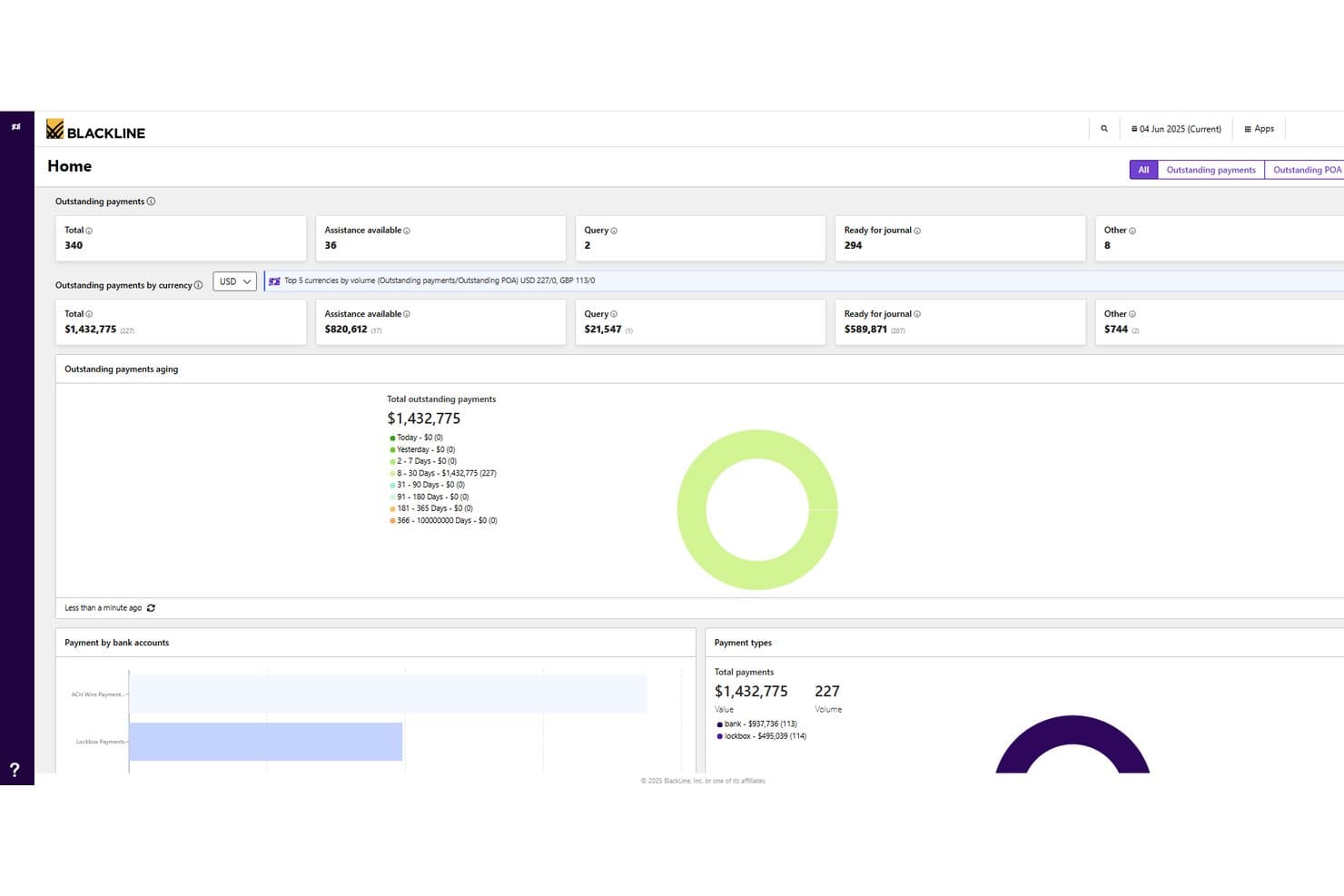
BlackLine tracks outstanding payments and aging across currencies in one dashboard. BlackLine is an AI-powered invoice-to-cash platform that covers cash application, collections management, disputes and deductions, credit and risk management, and AR intelligence across ERP, banking, and CRM systems.
Who Is BlackLine Best For?
BlackLine is a strong fit for enterprise finance teams that need to manage the full accounting close cycle, from cash application and collections to reconciliation and reporting, across multiple ERPs and systems.
Why I Picked BlackLine
BlackLine earns its spot on my shortlist because it covers the entire accounting close cycle, not just cash application in isolation. I'm particularly drawn to Verity AI, which automates remittance data capture and applies payments in real time by pulling banking and ERP data together, cutting unapplied cash by up to 99%. On top of that, the platform ties cash application directly into reconciliation, disputes, and AR intelligence, so my team isn't bouncing between disconnected tools at month-end.
BlackLine Key Features
- Verity Collect: Automates routine collections outreach based on customer payment behavior and risk data.
- Credit and risk management: Tracks real-time customer behavior changes using integrated external credit agency data.
- Self-service customer portal: Lets customers access invoices, statements, and make online payments through a dedicated portal.
- Dynamic task distribution: Automatically adjusts work assignments across your team based on staff availability and outstanding actions.
BlackLine Integrations
BlackLine offers native ERP connectors for SAP, Oracle, NetSuite, Microsoft Dynamics, Workday, Sage Intacct, and Acumatica, and it ingests bank files and remittance data to feed cash application and reconciliation workflows. An API is available for custom integrations, and Zapier support is not clearly documented.
Pros and Cons
Pros:
- Dynamic work assignment for high-volume teams
- AI remittance capture reduces unapplied cash
- Covers entire accounting close cycle
Cons:
- Full value realized mainly by large teams
- Requires ERP connectors for optimal results
Learn more about BlackLine: Best for advanced cash application reporting
- Free demo available
- Pricing upon request
Visit WebsiteCustomer Rating:4.4/5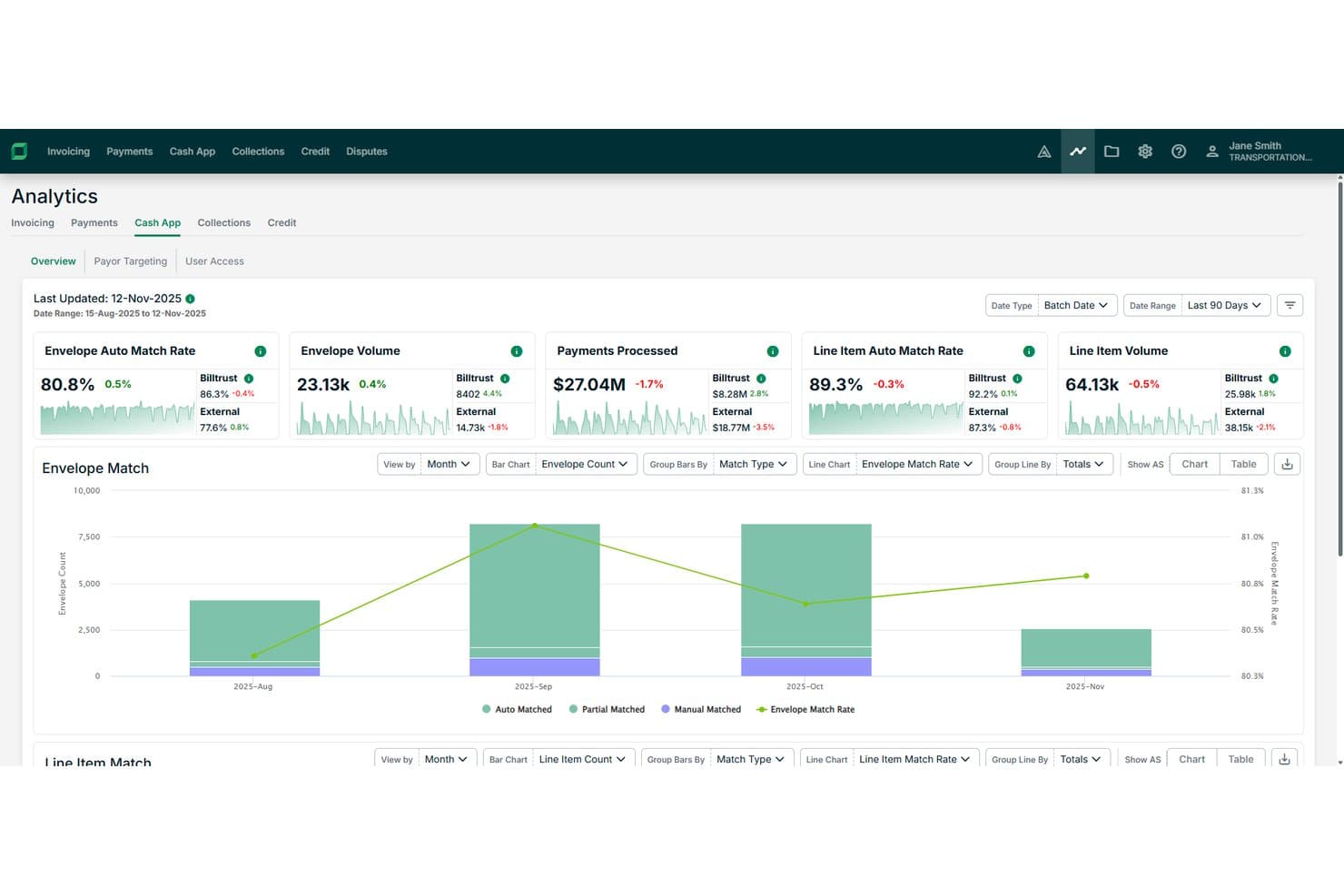
Billtrust tracks envelope and line item auto match rates across months. Billtrust is an AI-powered cash application platform that automates payment-to-invoice matching using confidence-based scoring, OCR, and machine learning, with built-in analytics that track KPIs like line-item match rates, exception volumes, and days to cash application.
Who Is Billtrust Best For?
Billtrust is a strong fit for mid-to-large finance teams that need detailed visibility into cash application performance across high transaction volumes.
Why I Picked Billtrust
I've included Billtrust in my top picks because its reporting capabilities go deeper than most cash application tools I've used. It tracks KPIs like line-item match rates, exception volumes, and days to cash application, giving finance teams a clear picture of where delays and errors are occurring. The confidence-based scoring engine also flags low-certainty matches before they hit the ledger, so your team isn't flying blind on high-volume days.
Billtrust Key Features
- Multi-format payment matching: Billtrust matches payments across ACH, wire, credit card, check, and AP portal payments to the correct invoice or account.
- OCR-based remittance capture: The platform uses optical character recognition to read and extract remittance data from varying invoice and payment formats.
- Exception queue management: Billtrust automatically categorizes and routes exceptions so your team can resolve mismatches faster without manual triage.
- Payor targeting: The system flags specific customers who generate the highest volume of manual work, so you can prioritize outreach and fix upstream data issues.
Billtrust Integrations
Billtrust offers 40+ ERP connectors and integrates with SAP, Oracle (including JD Edwards, PeopleSoft, and E-Business Suite), Infor, Epicor, Microsoft Dynamics, NetSuite, Acumatica, QAD, Karmak, and Procede, plus direct connections to 200+ banks and lockboxes (including Wells Fargo, US Bank, PNC, and Bank of America) and 260+ AP portals like SAP Ariba, Coupa, and Taulia. It also connects to Anthropic Claude and Microsoft Copilot through an MCP server, and supports custom integrations for ERPs not covered by ready-made connectors.
Pros and Cons
Pros:
- Flags customers driving high exception volume
- Tracks line-item match rates for KPIs
- Exception queue auto-routing reduces manual intervention
Cons:
- Confidence scoring may require manual review
- Detailed analytics can overwhelm new users
Learn more about Billtrust: Best for AI-driven explainable payment matching
- Free demo available
- Pricing upon request
Visit WebsiteCustomer Rating:4.5/5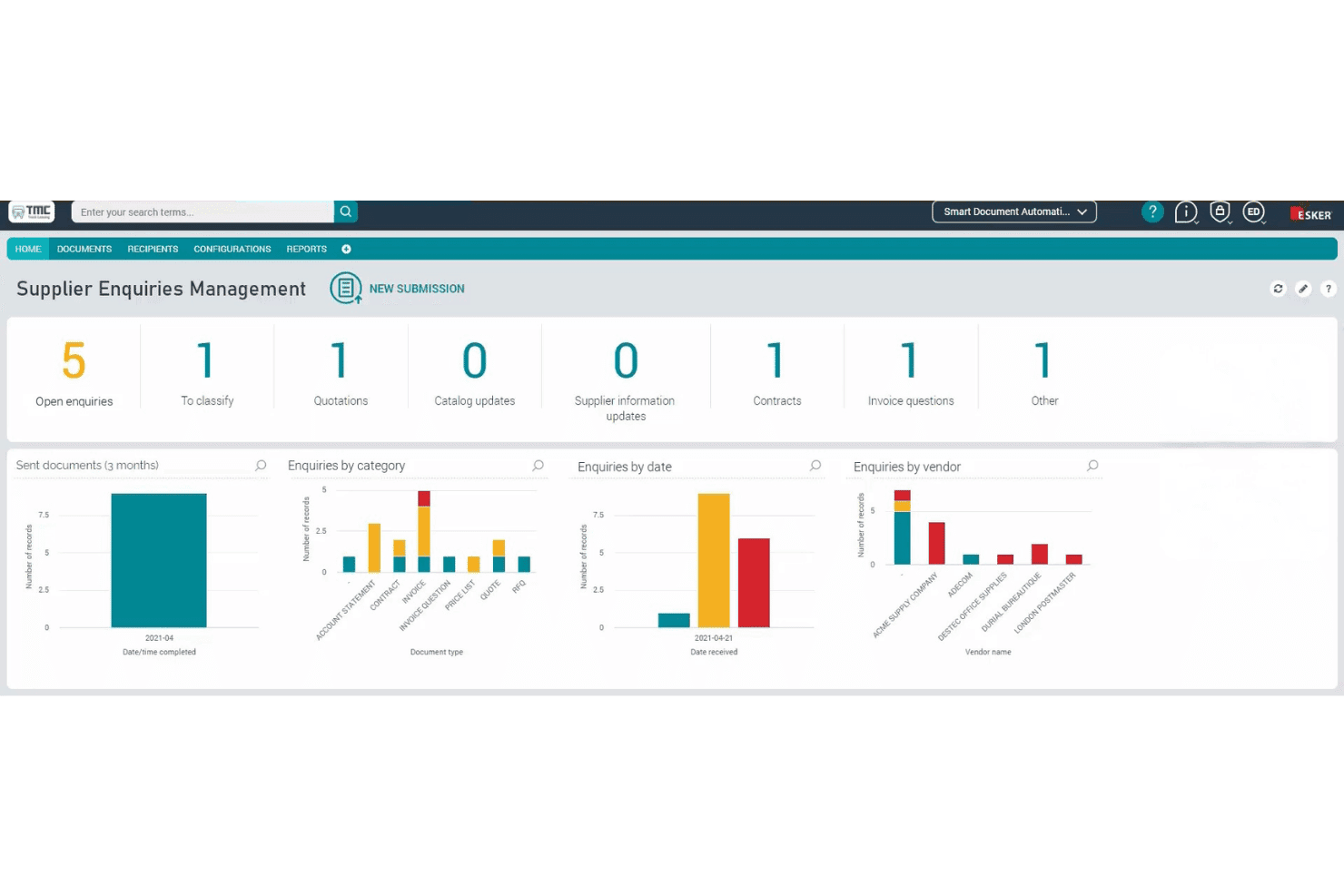
Esker organizes supplier enquiries with categorized dashboards and analytics. Esker is a cash application platform that automates remittance capture, payment matching, and exception handling using its Synergy AI engine, with built-in ERP reconciliation and a guided exception workspace for human-in-the-loop validation.
Who Is Esker Best For?
Esker is a strong fit for mid-to-large enterprises managing high payment volumes across multiple ERPs or customer payment channels.
Why I Picked Esker
I've included Esker in my top picks because its Synergy AI engine doesn't just match payments—it explains why it made each match, which makes exception review far faster and more auditable. I particularly like the guided exception workspace, where the AI surfaces intelligent suggestions so your team can resolve short payments, deductions, and multi-currency allocations without digging through raw remittance data. The real-time ERP reconciliation, including a prebuilt SAP connector, means matched payments post directly to customer accounts without manual rekeying.
Esker Key Features
- Centralized payment data capture: Pulls payment and remittance data from all incoming channels into a single, unified workflow for processing.
- Configurable automation rules: Handles discounts, short payments, cross-company allocations, and multi-currency scenarios through flexible, rule-based settings.
- Deductions management integration: Automatically extracts deductions from remittance data and triggers dedicated deduction workflows within the Esker AR suite.
- Customizable KPI dashboards: Tracks automation performance and receivables metrics in real time so your team can monitor touchless rates and unapplied cash at a glance.
Esker Integrations
Esker offers 100+ prebuilt ERP and back-end integrations, including native connectors for SAP, Microsoft Dynamics 365, Oracle, and Sage, plus partner-built integrations with QAD, Sage X3, Oracle JD Edwards, Oracle NetSuite, and Epicor Prophet 21. REST APIs and Esker File Exchange are available for custom integrations and legacy system connectivity.
Pros and Cons
Pros:
- Handles multi-currency and high payment volumes
- Offers guided exception workspace for faster review
- Explains payment matches with transparent AI logic
Cons:
- Some exception cases may still need manual input
- Demo required before seeing full functionality
Learn more about Esker: Best for AI-driven enterprise automation
- Free demo available
- Pricing upon request
Visit WebsiteCustomer Rating:4.3/5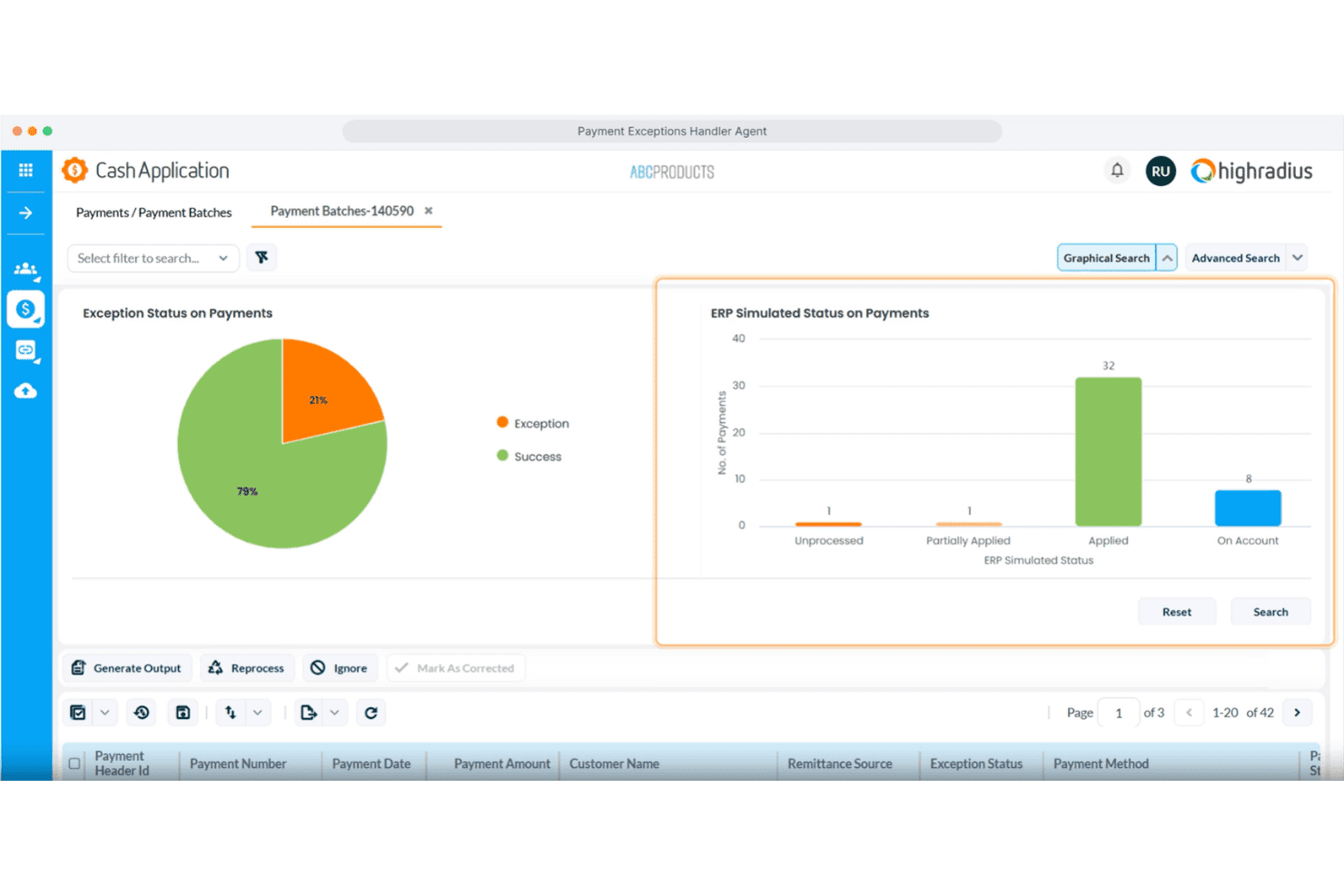
HighRadius visualizes payment exception statuses with charts and batch data. HighRadius is an AI-powered cash application platform that automates payment remittance aggregation, invoice matching, deductions coding, and exception handling across 300+ banks and ERP integrations.
Who Is HighRadius Best For?
HighRadius is built for large enterprises that need to automate high-volume cash application across multiple ERPs, banks, and payment channels.
Why I Picked HighRadius
HighRadius earns its spot on my shortlist because its AI-powered cash application goes beyond basic automation, deploying dedicated agents for each step of the process. I particularly like the AP Portal Remittance Capture agent, which pulls and parses remittance data from 500+ supplier portals automatically, and the Payment Invoice Matching agent, which resolves 87% of remittances that would otherwise require manual intervention. The Deductions Coding agent is also impressive, detecting short payments and mapping them directly to ERP reason codes without analyst involvement.
HighRadius Key Features
- Email remittance capture: Uses machine learning and NLP to extract invoice data from email bodies and attachments in PDF, Word, and Excel formats.
- Payment exceptions handler: Identifies missing remittances based on payment patterns and automatically sends information request emails to resolve gaps.
- EDI remittance processing: Parses and processes EDI remittance files directly, reducing manual handling for high-volume electronic payment formats.
- ERP and bank connectivity: Connects to 50+ ERP systems, 100+ banks, and 10+ payment processors through pre-built integrations, covering check, ACH, wire, and card payments.
HighRadius Integrations
HighRadius offers native integrations with 50+ ERP systems, 100+ banks, and 10+ payment processors, including SAP, Oracle, Microsoft Dynamics, NetSuite, Workday, JD Edwards, Sage, Bank of America, JPMorgan Chase, and Citibank. An API is available for custom integrations.
Pros and Cons
Pros:
- Handles high-volume email and EDI remittances
- Supports 300+ banks and ERPs
- Resolves most remittance exceptions automatically
Cons:
- Manual intervention needed for rare payment types
- Setup is complex for smaller organizations
Learn more about HighRadius:
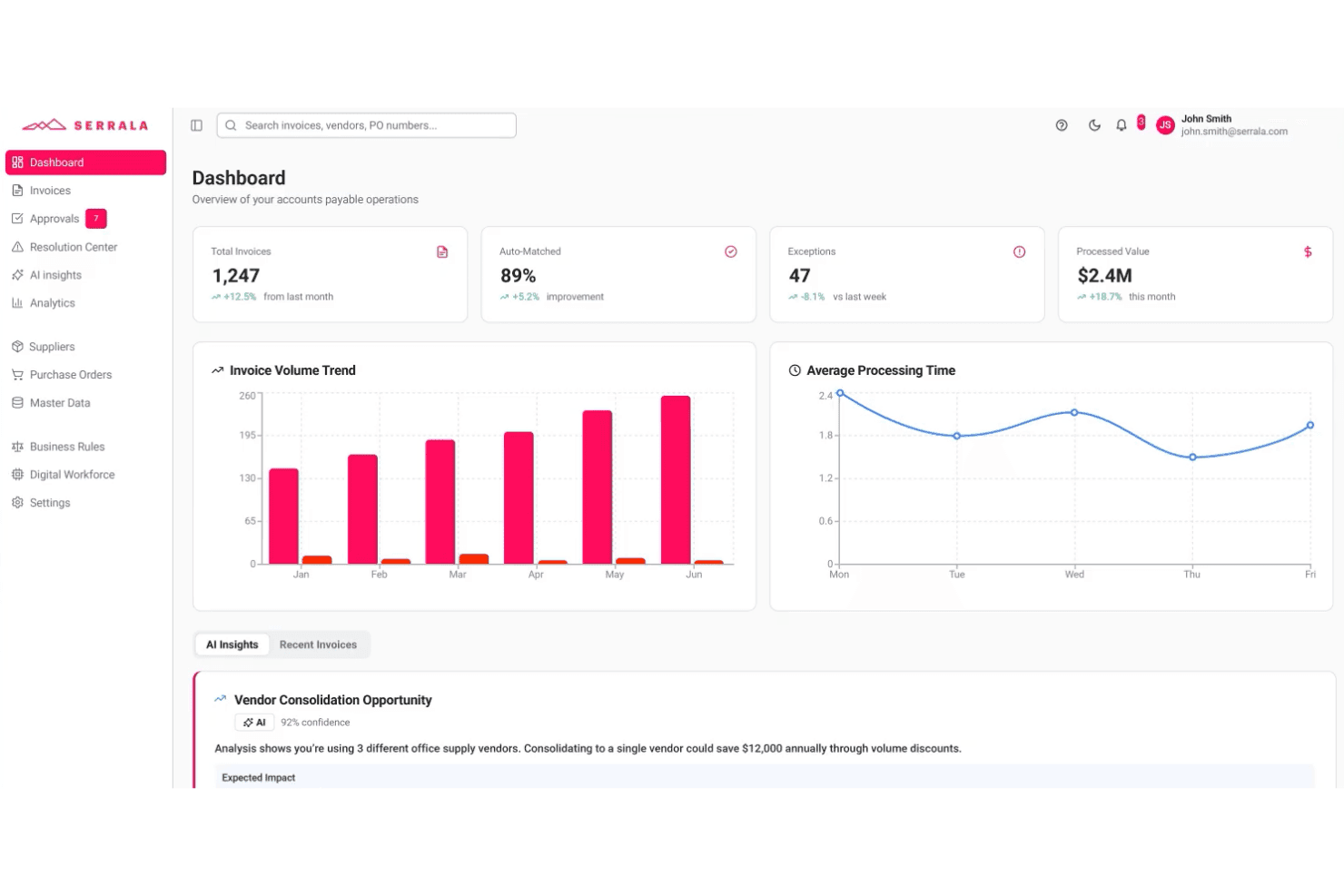
Serrala's dashboard gives AP teams real-time invoice and payment insights. Serrala is an AI-powered cash application platform that automates payment matching, remittance processing, and exception handling across bank file formats and ERP systems, with a native SAP-embedded deployment option.
Who Is Serrala Best For?
Serrala is a strong fit for large enterprises running SAP that need a cash application solution embedded directly in their ERP environment rather than bolted on.
Why I Picked Serrala
Serrala earns its spot on my shortlist because of how deeply it embeds into SAP rather than sitting alongside it as a separate layer. I like that the SAP-embedded deployment gives AR teams full native access to auto-matching and exception handling directly within the ERP, so there's no data handoff or reconciliation between systems. Serrala's smart data capture handles classification, extraction, and posting of payment data inside SAP, and real-time KPI monitoring surfaces cash application performance without leaving the environment your team already works in.
Serrala Key Features
- Multi-format payment support: Processes ACH, wire, and lockbox payment types across all bank file formats for payment identification and retrieval.
- Unapplied cash tracking: Surfaces real-time visibility into unmatched payment balances so your AR team can identify and resolve open items quickly.
- Compliance and audit controls: Built-in controls enforce accuracy and auditability at the payment posting level across all transactions.
- Customer self-service portal: Lets customers independently view invoices, check outstanding balances, and submit payments through a dedicated portal.
Serrala Integrations
Serrala integrates with major ERP systems, including SAP (with a native SAP-embedded deployment option), Microsoft Dynamics, Oracle NetSuite, and Sage, and it supports connectivity with all major bank file formats for payment retrieval. A Microsoft Teams app is also available, and Serrala can connect to additional systems through its cloud platform.
Pros and Cons
Pros:
- Built-in audit controls for compliance needs
- Real-time tracking of unapplied cash balances
- Native SAP-embedded deployment for AR teams
Cons:
- May be complex for smaller finance teams
- Initial SAP setup can require IT resources
Learn more about Serrala:
Diğer Nakit Uygulama Yazılımları
Kısa listeme giremeyen ancak yine de göz atmaya değer bazı ek nakit uygulama yazılımı seçenekleri şunlardır:
- 11CashbookBest for complex multi-ERP environments
- 12StuutBest for fast-deploying application
- 13Global PayEXBest for AI-driven multi-bank reconciliation
- 14VersapayBest for collaborative buyer-seller reconciliation
- 15TesorioBest for self-improving AR matching
- 16FlywireBest for cross-border B2B global payments
- 17PeakfloBest for growing APAC mid-markets
- 18KollenoBest for AI-native cash application across global AR
- 19GrowfinBest for NetSuite-anchored mid-market cash application
- 20CorcentricBest for guaranteed DSO results
How I Evaluate Cash Application Software
I split every evaluation into baseline criteria—the core capabilities a tool must cover, like multi-channel payment matching and ERP posting—and the differentiators that separate vendors worth recommending from those that just check boxes.
Core Functionality (Table Stakes for This List)
When I'm selecting tools for my list, I rank each one on a scale from 0 (does not offer the functionality) to 5 (excels in this area) for each core functionality listed below. I then calculate the tool's total score into a percentage, using 65% as a benchmark to help assess its overall fit for the list.
- Automated payment matching: I evaluate how well each tool handles one-to-one, one-to-many, and many-to-many invoice matching, including whether AI or ML models improve match rates over time.
- Remittance capture and processing: The tool should ingest remittance data from emails, PDFs, EDI feeds, lockbox files, and customer portals rather than relying on manual uploads or a single source.
- Multi-payment channel support: I check whether the platform reconciles across ACH, wire, check, lockbox, credit card, and virtual card payments, especially for teams handling multi-currency transactions.
- ERP and accounting integration: Pre-built connectors for systems like SAP, Oracle, NetSuite, and Microsoft Dynamics matter here, along with open API access for posting cash updates back to AR ledgers in real time.
- Deductions and exceptions management: I look at how each tool codes short pays, routes disputes to the right team members, and whether it offers root cause tracking to reduce repeat exceptions.
- Cash posting and AR reporting: Dashboards should cover match rates, AR aging, and exception volumes with drill-down capability, not just static exports that require manual cleanup before review.
Once I have a list of tools that meet the criteria, I consider what sets each platform apart.
Differentiating Factors (What Sets Vendors Apart)
Here's how I compare and contrast different vendors:
Standout Features
I check whether a tool's ML models actually learn from clerk decisions over time, improving match rates on recurring payment patterns without manual rule rewrites. Vendors like HighRadius and Versapay handle this differently, but the goal is the same: fewer exceptions each cycle. I also evaluate how well each platform scrapes remittance advice from buyer AP portals like Coupa or Ariba, since suppliers serving large retailers often lose days chasing ACH deposit details. Straight-through posting analytics round out my review—real-time dashboards that break down hit rates by clerk, customer, and payment channel help controllers spot exactly where unapplied cash is building up.
Beyond Features
I check whether a vendor holds SOC 1 Type II and SOC 2 Type II certifications, since any tool posting directly to your GL needs airtight audit trails and SOX-aligned role-based permissions. ERP connector depth matters just as much—certified, bi-directional integrations with your specific ERP determine posting reliability and how much manual reconciliation your team still carries. I also evaluate implementation timelines, because enterprise deployments with HighRadius or Serrala can run six to twelve months, while mid-market options like Versapay or Billtrust often go live in weeks.
Nakit Uygulama Yazılımı Nasıl Seçilir?
Doğru nakit uygulama yazılımını seçmek, temel operasyonel önceliklerinize ve finans sistemlerinizin karmaşıklığına bağlıdır:
| Önceliğiniz… | Şunları arayın… |
|---|---|
| Önceliğiniz…Küresel veya çok kuruluşlu operasyonlar | Şunları arayın…Hazır, çoklu ERP ve çoklu para birimi entegrasyonları |
| Önceliğiniz…Manuel ödeme eşleştirmeyi azaltmak | Şunları arayın…Yapay zekâ destekli mutabakat ve makine öğrenimi eşleştirme mantığı |
| Önceliğiniz…Defterleri hızlı kapatmak | Şunları arayın…Gerçek zamanlı nakit kaydı ve ticari alacak yaşlandırma panoları |
| Önceliğiniz…Yüksek ödeme ve havale bilgisi hacimlerini yönetmek | Şunları arayın…E-posta, EDI ve müşteri portallarından otomatik havale bilgisi yakalama |
| Önceliğiniz…Uyumluluğu ve denetim titizliğini yönetmek | Şunları arayın…SOC 1/SOC 2 sertifikasyonu ve ayrıntılı denetim kayıtları |
Kısa Listenizi Nasıl Değerlendirmelisiniz?
- Entegrasyon iddialarını test edin: ERP veya muhasebe sisteminize 2 örnek havale dosyasıyla canlı kayıt gösteren bir demo talep edin.
- Yapay zekâ eşleştirme oranlarını doğrulayın: Güncel müşteri eşleştirme oranı raporlarını isteyin veya 100'den fazla ödeme senaryosuyla hazırlanmış bir deneme çalıştırın.
- İstisna iş akışlarını inceleyin: Tedarikçilerden, araçlarının en az 10 örnek kesinti veya itiraz durumunu nasıl yönlendirdiğini ve izlediğini göstermelerini isteyin.
- Sertifikaları denetleyin: SOC 1/SOC 2 sertifikalarının kopyalarını ve son 12 aya ait dahili denetim izi ekran görüntülerini talep edin.
- Tavizinizi belirleyin: Sınırlı ERP kapsamıyla daha hızlı kurulum veya daha uzun uygulama süreçleri gerektiren, daha kapsamlı ve sertifikalı entegrasyonlar arasında seçim yapın.
Nakit Uygulama Yazılımı Nedir?
Nakit uygulama yazılımı, gelen ödemeleri ilgili faturalarla otomatik olarak eşleştiren ve ekibinizin ticari alacak hesaplarını doğru ve hızlı biçimde mutabık hale getirmesine yardımcı olan bir finans aracıdır. Bu sistemler, birden fazla kanaldan ödeme ve havale bilgilerini toplar, muhasebe veya ERP platformunuza bağlanır ve nakit akışını izlemek için anlaşılır panolar sunar. Finans ekipleri, manuel veri girişini azaltmak, uygulanmamış nakdi en aza indirmek ve ay sonu kapanışının hızını ve doğruluğunu artırmak için nakit uygulama yazılımına güvenir.
Nakit Uygulama Yazılımının Özellikleri
Nakit uygulama yazılımı seçerken aşağıdaki temel özelliklere dikkat edin:
- Otomatik ödeme eşleştirme: Gelen ödemeleri, belirlenen kurallara ve veri kalıplarına göre açık faturalarla eşleştirerek mutabakat için gereken manuel çabayı azaltır ve insan hatası riskini düşürür.
- Ödeme bildirimi verisi yakalama: E-posta, portal ve dosya yükleme gibi çeşitli kaynaklardan ödeme bildirimi ayrıntılarını toplar ve ekibinizin ödemeleri doğru faturalarla ilişkilendirmesine yardımcı olur.
- Çok kanallı ödeme desteği: ACH, banka havalesi, kredi kartı, çek ve kilitli posta kutusu gibi kaynaklardan gelen ödemeleri mutabakatlandırarak işletmenizin ödeme seçeneklerini ve müşteri tercihlerini destekler.
- ERP ve muhasebe entegrasyonu: Alacakları ve nakit bakiyelerini gerçek zamanlı olarak güncellemek için ERP veya muhasebe sisteminize doğrudan bağlanır ve mali kayıtlarınızın doğru kalmasını sağlar.
- İstisna ve kesinti yönetimi: Eksik ödemeleri, fazla ödemeleri ve eşleştirilemeyen işlemleri işaretler, ardından hızlı inceleme ve çözüm için doğru ekip üyelerine yönlendirir.
- Nakit kaydı: Çözümlenen ödemeleri büyük defterinize veya AR modülünüze otomatik olarak kaydederek manuel veri girişini en aza indirir ve kapanış süreçlerinin daha hızlı tamamlanmasını destekler.
- Denetim izleri ve izinler: Her eşleştirmeyi, düzeltmeyi ve kaydı kullanıcı düzeyindeki günlüklerle izleyerek hesap verebilirliği ve denetim gerekliliklerine uyumu destekler.
- Raporlama ve gösterge panoları: Eşleştirme oranlarını, bekleyen istisnaları ve nakit durumlarını net biçimde göstererek alacak sürecinizi her zaman bir bakışta anlamanızı sağlar.
- Çoklu para birimi işlemleri: Sınır ötesi faaliyet gösteren şirketler için farklı para birimlerindeki işlemleri destekler ve küresel operasyonlarınızı manuel dönüştürme zahmeti olmadan yönetmenize yardımcı olur.
- Kullanıcı erişim denetimleri: Yalnızca doğru ekip üyelerinin eşleştirmeleri onaylayabilmesi, işlemleri düzenleyebilmesi veya mali verileri dışa aktarabilmesi için izinleri özelleştirmenizi sağlar.
Yaygın Nakit Uygulama Yazılımı Yapay Zekâ Özellikleri
Yukarıda listelenen standart nakit uygulama yazılımı özelliklerinin yanı sıra, bu çözümlerin çoğu aşağıdaki gibi özelliklerle yapay zekâyı kullanmaya başlamıştır:
- Tahmine dayalı fatura eşleştirme: Gelen ödemeler için en olası fatura eşleştirmelerini tahmin etmek üzere geçmiş ödeme ve ödeme bildirimi verilerini analiz eden yapay zekâ modellerini kullanır; ödeme bildirimi ayrıntıları eksik veya belirsiz olduğunda bile.
- Otomatik ödeme bildirimi ayıklama: E-postalara, PDF'lere ve portal indirmelerine doğal dil işleme uygular, ödeme bildirimi ayrıntılarını manuel inceleme olmadan çıkarır ve bunları doğru işlemlerle eşleştirir.
- İstisna kalıbı tanıma: Büyük miktarlardaki eşleştirilemeyen ödemeleri analiz ederek yinelenen istisna türlerini ve temel nedenleri belirler; ekibinizin düzeltmelere öncelik vermesine ve gelecekteki istisnaları azaltmasına yardımcı olur.
- Dinamik iş akışı yönlendirme: Karmaşık durumları doğru ekip üyelerine otomatik olarak atamak için kullanıcı eylemlerinden ve istisna çözümlerinden öğrenir; anlaşmazlıkların veya kesintilerin ele alınmasında hızı ve doğruluğu artırır.
- Sürekli eşleştirme oranı optimizasyonu: Eşleştirme sonuçlarını ve muhasebe görevlilerinin müdahalelerini izler, gelecekteki eşleştirme oranlarını artırmak ve zaman içinde manuel müdahale noktalarını azaltmak için algoritmalarını yeniden eğitir.
Nakit Uygulama Yazılımının Faydaları
Nakit uygulama yazılımını kullanıma almak ekibiniz ve işletmeniz için çeşitli faydalar sağlar. Yararlanabileceğiniz birkaç fayda şunlardır:
- Daha hızlı ödeme mutabakatı: Ödemeleri faturalarla eşleştirmeyi otomatikleştirerek ekibinizin manuel veri girişine daha az zaman ayırmasını ve nakdi daha hızlı kapatmasını sağlar.
- Uygulanmamış nakdin azaltılması: E-posta, EDI ve portallardan otomatik ödeme bildirimi yakalamayı kullanarak tahsis edilmemiş ödemeleri en aza indirir ve hesapların kapatılmasındaki gecikmeleri önler.
- Geliştirilmiş AR görünürlüğü: Eşleştirme oranlarını, vade yaşlandırmasını ve istisnaları ayrıntılandıran gerçek zamanlı gösterge panolarına erişerek nakdinizin durumunu her zaman bilmenizi sağlar.
- Daha az manuel hata: Kullanıcı kararlarından öğrenen ve zaman içinde eşleştirme doğruluğunu artıran yapay zekâ modellerinden yararlanarak mutabakat sorunlarına yol açan hataların önlenmesine yardımcı olur.
- Geliştirilmiş ERP entegrasyonu: Kayıtlarınızı manuel yüklemeler olmadan güncel tutmak için SAP, Oracle ve NetSuite gibi sistemlerle sertifikalı, çift yönlü bağlantılara güvenebilirsiniz.
- Daha iyi istisna ve kesinti yönetimi: Anlaşmazlıkları, eksik ödemeleri veya eşleştirilemeyen kalemleri otomatik olarak işaretler ve çözüm için hızlıca doğru ekibe yönlendirir.
- Daha güçlü uyumluluk ve denetim izleri: Her düzeltmeyi, onayı ve nakit kaydını ayrıntılı kullanıcı günlükleriyle izleyerek iç kontrolleri ve denetim gerekliliklerini destekler.
Nakit Uygulama Yazılımının Maliyetleri ve Fiyatlandırması
Nakit uygulama yazılımı seçmek, mevcut çeşitli fiyatlandırma modellerinin ve planların anlaşılmasını gerektirir. Maliyetler özelliklere, ekip büyüklüğüne, eklentilere ve daha fazlasına göre değişir. Aşağıdaki tablo, nakit uygulama yazılımı çözümlerindeki yaygın planları, ortalama fiyatlarını ve genellikle sunulan özellikleri özetlemektedir:
Nakit Uygulama Yazılımı Plan Karşılaştırma Tablosu
| Plan Türü | Ortalama Fiyat | Yaygın Özellikler |
|---|---|---|
| Plan TürüÜcretsiz Plan | Ortalama Fiyat$0 | Yaygın ÖzelliklerTemel ödeme eşleştirme, sınırlı ödeme bildirimi yakalama ve basit AR raporlaması. |
| Plan TürüKişisel Plan | Ortalama Fiyat$50-$150/kullanıcı/ay | Yaygın ÖzelliklerOtomatik ödeme eşleştirme, çok kanallı destek, ERP entegrasyonu, temel istisna yönetimi ve gösterge paneli erişimi. |
| Plan Türüİşletme Planı | Ortalama Fiyat$200-$600/kullanıcı/ay | Yaygın ÖzelliklerYapay zekâ destekli eşleştirme, gelişmiş ödeme bildirimi ayıklama, çoklu para birimi desteği, geliştirilmiş ERP entegrasyonları ve role dayalı izinler. |
| Plan TürüKurumsal Plan | Ortalama Fiyat$700-$2000+/kullanıcı/ay | Yaygın ÖzelliklerTahmine dayalı analiz, dinamik iş akışı yönlendirme, özel raporlama, SOC uyumluluğu, API erişimi ve özel destek. |
Nakit Uygulama Yazılımı SSS
Nakit uygulama yazılımıyla ilgili sık sorulan soruların bazı yanıtları aşağıdadır:
Nakit uygulama yazılımı eksik havale bilgilerini nasıl işler?
Çoğu nakit uygulama yazılımı, havale bildirimi eksik veya belirsiz olduğunda bile ödemeleri eşleştirmek için yapay zekâ modelleri kullanır. Buna, geçmiş ödeme modellerine ve alıcı davranışlarına dayalı öngörücü eşleştirme de dahildir. Hâlâ belirsizlik varsa araç, genellikle ödemenin kullanıcı tarafından incelenmesi için işaretlenmesini sağlar; böylece hiçbir işlem gözden kaçmaz.
Nakit uygulama yazılımı aynı anda birden fazla ERP sistemiyle entegre olabilir mi?
Evet, birçok nakit uygulama yazılımı aracı, önceden oluşturulmuş entegrasyonlar veya API’ler aracılığıyla birden fazla ERP ya da muhasebe sistemine bağlanabilir. Bu özellik, her ödemenin manuel müdahale olmadan doğru muhasebe defterine kaydedilmesi gereken küresel veya çok tüzel kişilikli operasyonları yöneten ekipler için kritik öneme sahiptir.
Nakit uygulama yazılımında hangi güvenlik sertifikalarını aramalıyım?
SOC 1 Type II ve SOC 2 Type II sertifikalarına sahip platformları tercih edin. Bu sertifikalar, yazılımın finansal verilerin işlenmesine yönelik iç kontrol, denetim ve güvenlik standartlarına uyduğunu kanıtlar. Ayrıca yakın tarihli sertifika raporlarını incelemeyi ve kullanıcı düzeyindeki denetim günlüklerinden örnekler görmeyi talep etmelisiniz.
Bir nakit uygulama çözümünün uygulanması genellikle ne kadar sürer?
Uygulama süresi birkaç haftadan altı aydan uzun bir süreye kadar değişebilir. Versapay veya Billtrust gibi orta ölçekli pazar araçları genellikle iki aydan kısa sürede kullanıma alınırken HighRadius veya Serrala gibi kurumsal platformlar, tam ERP entegrasyonu ve testleri için altı ila on iki aya ihtiyaç duyabilir.
Satın almadan önce gerçek yapay zekâ eşleştirme oranlarını test edebilir miyim?
Evet, satın almadan önce kendi havale verilerinizi kullanarak bir demo talep etmeli veya yakın tarihli müşteri eşleştirme oranı raporlarını istemelisiniz. Bazı tedarikçiler, yapay zekâlarının gerçek ve karmaşık senaryolarda nasıl eşleştirme yaptığını doğrulayabilmeniz için örnek ödeme dosyalarıyla komut dosyasıyla yürütülen denemeler de gerçekleştirebilir.
Aracın istisna sürecimi yönettiğinden emin olmak için demo sırasında ne talep etmeliyim?
Tedarikçiden, gerçek veya anonimleştirilmiş verileri kullanarak en az 10 örnek kesinti ya da itiraz vakasını yönlendirmesini ve çözmesini isteyin. İstisnaların nasıl kodlandığını, aracın sorumluluğu nasıl atadığını ve temel neden takibi ile çözüm adımlarını açıkça gösterip göstermediğini dikkatle inceleyin.
Bu araçlar çok para birimli işlemleri destekliyor mu?
Evet, önde gelen nakit uygulama yazılımlarının çoğu birden fazla para biriminde ödeme ve raporlama desteği sunar. İşletmeniz küresel ölçekte faaliyet gösteriyor veya farklı ülkelerdeki müşterilere fatura kesiyorsa bu özellik olmazsa olmazdır. Platformun kullandığınız belirli para birimlerini ve döviz kuru iş akışlarını desteklediğini mutlaka doğrulayın.