

Gestionar las finanzas no es tarea fácil, especialmente debido a la presión constante por realizar predicciones precisas. Necesitas herramientas capaces de gestionar grandes cantidades de datos y ofrecer información útil rápidamente. Las herramientas de previsión con IA pueden ayudar a tu equipo a anticipar las tendencias futuras y tomar decisiones fundamentadas.
Según mi experiencia, las capacidades de IA, como el análisis predictivo y el aprendizaje automático, pueden transformar tu forma de abordar las previsiones. Estas herramientas pueden ahorrar tiempo y reducir los errores, lo que te permite centrarte en la estrategia.
Te guiaré por las principales herramientas de previsión con IA del mercado y destacaré sus características y ventajas. Mi objetivo es ofrecerte un análisis imparcial y bien documentado para que puedas elegir la mejor solución para tus necesidades.
Por qué confiar en nuestras recomendaciones de software
6,700+
Reviews
20
Industry experts
16+
Evaluation factors
14
Years
Nuestras reseñas reflejan nuestro criterio independiente, no un discurso de ventas. Descubra cómo mantenemos la transparencia.
Para esta guía, evaluamos las herramientas mediante pruebas prácticas e investigación independiente, puntuando las herramientas según nuestros criterios de selección.
Nuestras reseñas reflejan nuestro criterio editorial humano, no un discurso de ventas.
Tabla comparativa de herramientas de previsión con IA
Esta tabla comparativa resume los detalles de precios de mi selección de las mejores herramientas de previsión con IA:
| Tool | Best For | Trial Info | Price | ||
|---|---|---|---|---|---|
| 1 | La mejor opción para agentes de IA personalizables para empresas | No disponible | Precio bajo solicitud | Website | |
| 2 | Ideal para la previsión financiera asistida por IA y la automatización de datos | Demostración gratuita disponible | Precio bajo consulta | Website | |
| 3 | Ideal para estrategias de entrada al mercado | Demo gratuita disponible | Precio a consultar | Website | |
| 4 | Mejor para planificación predictiva empresarial usando modelado con IA | Demostración gratuita disponible | Precio bajo petición | Website | |
| 5 | La mejor opción para la previsión financiera de pymes y el análisis de escenarios hipotéticos con IA | Demostración gratuita disponible | Precios disponibles previa solicitud | Website | |
| 6 | Ideal para previsión financiera en tiempo real impulsada por análisis predictivos con IA | Demo gratuita disponible | Precios a consultar | Website | |
| 7 | Ideal para previsión de fuerza laboral mejorada mediante aprendizaje automático | Prueba gratuita de 30 días + demostración gratuita disponible | Precios a consultar | Website | |
| 8 | Ideal para la elaboración continua de presupuestos y previsiones basada en IA | Demostración gratuita disponible | Precios bajo solicitud | Website | |
| 9 | Ideal para previsiones asistidas por IA en flujos de trabajo de Excel | Demo gratuita disponible | Precios bajo consulta | Website | |
| 10 | Ideal para la previsión empresarial y la inteligencia de escenarios respaldadas por IA | Prueba gratuita de 30 días | Precio bajo consulta | Website |


Análisis de las mejores herramientas de previsión con IA
A continuación encontrarás mis resúmenes detallados de las mejores herramientas de previsión con IA que han entrado en mi lista. Mis análisis ofrecen una visión detallada de las características principales, las ventajas y desventajas, las integraciones y los casos de uso ideales de cada herramienta para ayudarte a encontrar la mejor opción para ti.
 La mejor opción para agentes de IA personalizables para empresas
- No disponible
- Precio bajo solicitud
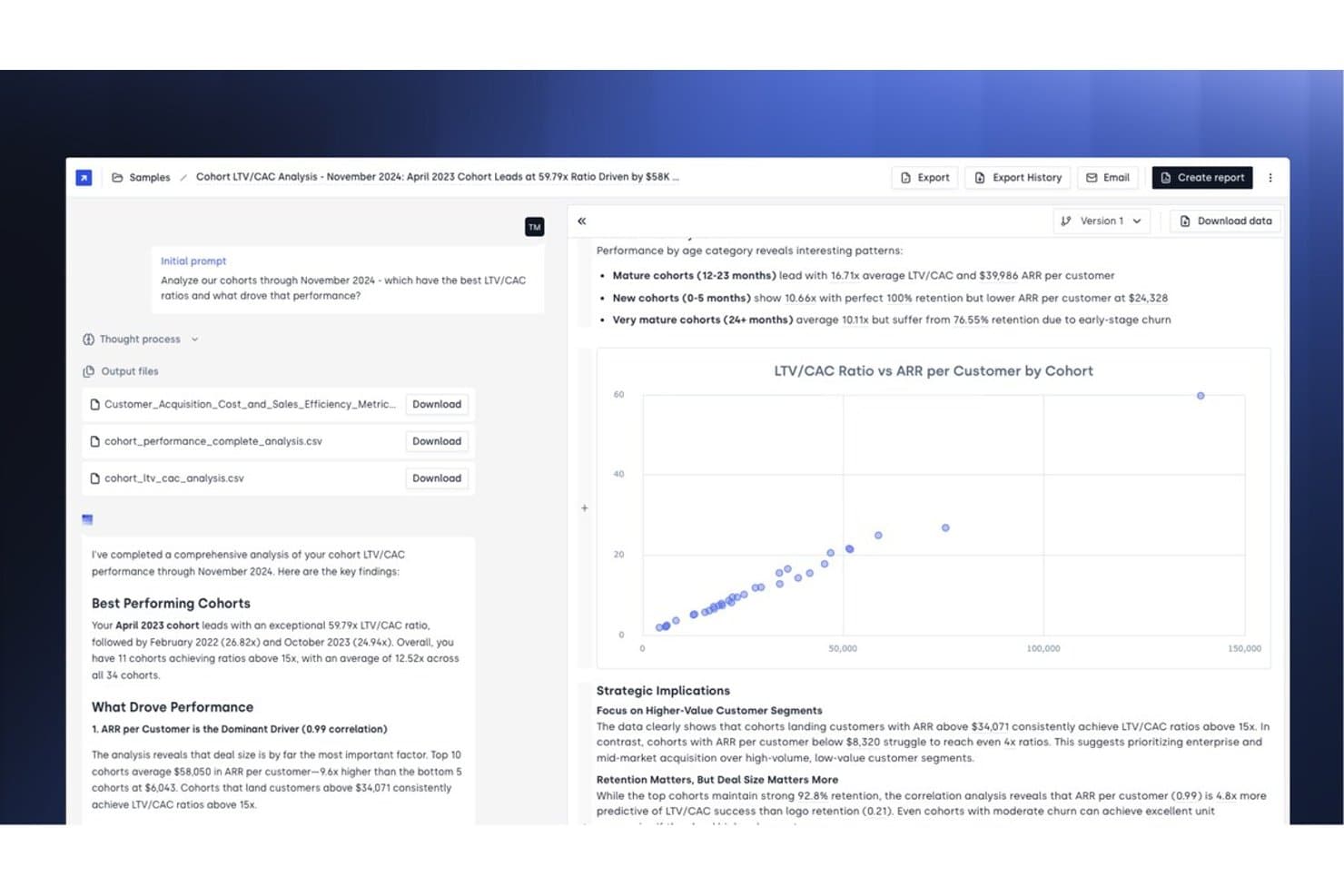
Concourse ofrece análisis de LTV/CAC de cohortes impulsado por IA, con información automatizada, visualizaciones de diagramas de dispersión y recomendaciones estratégicas para prever el rendimiento de los clientes. Concourse es una plataforma de IA agéntica creada para equipos financieros empresariales, que ofrece agentes de IA personalizables capaces de gestionar la previsión, el análisis de variaciones, la gestión del cierre y los informes financieros en ERP, almacenes de datos y CRM conectados.
¿Para quién es más adecuado Concourse?
Concourse es una opción especialmente adecuada para directores financieros y equipos de FP&A de empresas medianas y grandes que gestionan operaciones financieras complejas en múltiples sistemas.
Por qué elegí Concourse
Elegí Concourse como una de las mejores opciones porque su modelo de creación de agentes es realmente diferente de todo lo demás que he visto en el ámbito de la IA financiera. En lugar de utilizar un panel de previsiones fijo, puedes crear agentes adaptados a tus flujos de trabajo reales. El agente de previsión modela escenarios en cuestión de segundos, y el agente de flujo y variaciones no solo detecta las variaciones, sino que también redacta automáticamente los comentarios. Lo que me inspira confianza es que los cálculos se ejecutan mediante código y no en el propio modelo de lenguaje, por lo que cada cifra es completamente trazable.
Características principales de Concourse
- Creador de agentes y automatización de flujos de trabajo: Permite a los usuarios crear agentes de IA personalizados para flujos de trabajo financieros específicos mediante el mapeo de procesos con arrastrar y soltar.
- Capa de contexto con memoria persistente: Almacena la lógica empresarial y las definiciones para que los agentes aprendan de acciones históricas y mejoren los resultados con el tiempo.
- Entrega de resultados en múltiples superficies: Exporta análisis y previsiones directamente a Excel, PowerPoint, Sheets, Slack, Teams y correo electrónico.
- Registros de auditoría y controles de acceso detallados: Registra cada acción de los agentes mediante historiales para auditorías SOX e internas, y admite RBAC a nivel de conjunto de datos y de agente.
Integraciones de Concourse
Concourse ofrece integraciones nativas con Oracle, SAP, NetSuite, QuickBooks, Sage, Workday, Xero, Snowflake, BigQuery, Databricks y Salesforce, además de una API para integraciones personalizadas.
Pros and Cons
Pros:
- Los agentes se adaptan a los flujos de trabajo financieros reales
- Los cálculos se ejecutan mediante código, no mediante modelos de lenguaje
- Genera automáticamente comentarios y narrativas sobre las variaciones
Cons:
- La configuración de los agentes requiere un esfuerzo inicial considerable
- No es adecuado para equipos financieros pequeños
Learn more about Concourse: Ideal para la previsión financiera asistida por IA y la automatización de datos
- Demostración gratuita disponible
- Precio bajo consulta
Visit WebsiteCustomer Rating:4.7/5
Datarails ofrece presupuestación, informes y precisión en flujos de trabajo financieros impulsados por IA. Datarails es una plataforma de gestión de datos financieros diseñada para equipos de finanzas que buscan optimizar sus procesos de presupuestación e informes. Ofrece soluciones impulsadas por IA para mejorar la precisión de los datos y apoyar los flujos de trabajo financieros.
Por qué elegí Datarails: Datarails destaca en la gestión de datos financieros, proporcionando herramientas esenciales para mantener la integridad de los datos. Sus funciones de IA incluyen la consolidación automática de datos y la detección de errores, asegurando que tus informes financieros sean precisos. Los análisis predictivos se pueden utilizar para anticipar tendencias y tomar decisiones informadas. Este enfoque en la gestión de datos ayuda a tu equipo a mantener el control sobre los procesos financieros y mejorar la eficiencia.
Características destacadas e integraciones:
Características incluyen informes personalizables y sincronización de datos en tiempo real. Estas funciones ayudan a tu equipo a adaptar los informes a sus necesidades y aseguran que los datos estén siempre actualizados. Puedes automatizar tareas repetitivas, liberando tiempo para trabajos más estratégicos.
Integraciones incluyen QuickBooks, NetSuite, SAP, Oracle, Microsoft Dynamics, Salesforce, Xero, Sage Intacct, Workday y más.
Pros and Cons
Pros:
- Fuerte enfoque en la gestión de datos
- Detección automática de errores
- Capacidades de análisis predictivo
Cons:
- Capacidades limitadas de paneles e informes visuales
- Se requiere dominio de Excel, ya que las funciones avanzadas son complejas para usuarios sin experiencia en hojas de cálculo
Learn more about Datarails: Ideal para estrategias de entrada al mercado
- Demo gratuita disponible
- Precio a consultar
Visit WebsiteCustomer Rating:4.7/5
El panel de Odin AI de HockeyStack visualizando el rendimiento completo del embudo y los leads de ventas cualificados por canal. HockeyStack está diseñado para potenciar los equipos de marketing y ventas con información y análisis de datos impulsados por IA, ofreciendo una solución para quienes buscan mejorar sus estrategias de entrada al mercado. Si eres un profesional de negocios que necesita herramientas precisas de pronóstico, HockeyStack podría ser la clave para desbloquear información valiosa y mejorar tus procesos de toma de decisiones. Al abordar las complejas necesidades de generación de ingresos y planificación estratégica, apunta a cerrar la brecha entre los datos y la estrategia.
Por qué elegí HockeyStack
Elegí HockeyStack por su capacidad única para ofrecer soluciones de pronóstico impulsadas por IA, diseñadas específicamente para estrategias de entrada al mercado. El modelo de IA especializado de la plataforma destaca al ofrecer herramientas como el Agente Retador de Pronóstico AE, que está diseñado para mejorar la precisión en las proyecciones de ventas. Esto, junto con sus funciones de resurrección de acuerdos y optimización del presupuesto de marketing, lo convierte en una opción atractiva para quienes buscan perfeccionar sus procesos de ventas y aumentar el crecimiento de ingresos.
Principales características de HockeyStack
Además de sus capacidades de pronóstico impulsadas por IA, HockeyStack ofrece:
- Informes de cuentas previos a llamadas: Esta función asegura que tu equipo de ventas esté bien preparado para las llamadas, proporcionando información detallada sobre las cuentas de los clientes.
- Generador de próximos mejores pasos para acuerdos abiertos: Identifica pasos accionables para avanzar los acuerdos, ayudándote a priorizar de manera efectiva.
- Buscador de oportunidades de expansión: Esta herramienta ayuda a priorizar oportunidades de crecimiento analizando datos de mercado y segmentos de clientes.
- Inteligencia de victorias/pérdidas: Proporciona información a partir de acuerdos previos para informar estrategias de ventas futuras y mejorar las tasas de éxito.
Integraciones de HockeyStack
Las integraciones incluyen 6sense, Bombora, Demandbase, Salesforce Pardot, Marketo, HubSpot, Calendly, HeyFlow, BigQuery, Snowflake, Drift, Intercom, Google Ads, Facebook Ads, Salesforce y ActiveCampaign.
Pros and Cons
Pros:
- La inteligencia artificial impulsa la toma de decisiones para la estrategia de entrada al mercado
- Informes de atribución personalizables a lo largo del recorrido del comprador
- Unifica los datos de marketing, producto y ventas
Cons:
- El precio no es público
- Las funciones avanzadas pueden requerir tiempo de incorporación
Learn more about HockeyStack: Mejor para planificación predictiva empresarial usando modelado con IA
- Demostración gratuita disponible
- Precio bajo petición
Visit WebsiteCustomer Rating:4.5/5
Anaplan ayuda a las empresas a gestionar la planificación financiera, de la cadena de suministro y de ventas. Anaplan es una plataforma de planificación basada en la nube diseñada para grandes empresas. Soporta funciones empresariales complejas como la planificación financiera, la gestión de la cadena de suministro y la previsión de ventas, aprovechando la IA para mejorar los procesos de toma de decisiones.
Por qué elegí Anaplan: La plataforma destaca por su escalabilidad empresarial, lo que la hace ideal para organizaciones grandes. Sus análisis predictivos basados en IA y la planificación de escenarios proporcionan perspectivas profundas sobre tendencias futuras. Estas funciones permiten a su equipo gestionar grandes conjuntos de datos y modelos de negocios complejos de manera eficiente. La capacidad de Anaplan para escalar y adaptarse a las necesidades de su empresa garantiza que se mantenga a la vanguardia en un mercado dinámico.
Funciones destacadas e integraciones:
Las funciones incluyen modelos avanzados de previsión, planificación colaborativa y actualizaciones de datos en tiempo real. Estas características ayudan a su equipo a tomar decisiones informadas rápidamente. Puede personalizar modelos para adaptarlos a los requisitos únicos de su negocio.
Las integraciones incluyen Salesforce, Workday, Microsoft Azure, SAP, Oracle, Google Cloud, Tableau, DocuSign, Slack y ServiceNow.
Pros and Cons
Pros:
- Escalable para grandes empresas
- Cálculos en tiempo real que incorporan datos financieros y de ventas
- Opciones de modelado flexibles
Cons:
- Curva de aprendizaje empinada y requisitos de implementación significativos
- Los modelos de costos complicados están vinculados al volumen y la complejidad de los datos
Learn more about Anaplan: La mejor opción para la previsión financiera de pymes y el análisis de escenarios hipotéticos con IA
- Demostración gratuita disponible
- Precios disponibles previa solicitud
Visit WebsiteCustomer Rating:4.9/5
Fuelfinance ofrece información en tiempo real e informes financieros automatizados. Fuelfinance, o Fuel, es una plataforma de planificación y análisis financiero adaptada a startups y pequeñas empresas. Ofrece capacidades de IA, como información financiera en tiempo real e informes automatizados, para ayudar a los usuarios a gestionar sus finanzas de manera eficaz.
Por qué elegí Fuelfinance: Fuel destaca por centrarse en pequeñas y medianas empresas (pymes), proporcionándoles herramientas que suelen estar reservadas para empresas más grandes. Sus funciones de IA incluyen informes financieros automatizados y análisis instantáneos de escenarios hipotéticos. Estas capacidades se ajustan bien a su propuesta única de venta de ser la mejor opción para la planificación financiera de pymes. La funcionalidad de director financiero con IA ofrece información y orientación financiera personalizadas, lo que la convierte en una herramienta valiosa para empresas en crecimiento.
Funciones e integraciones destacadas:
Las funciones incluyen paneles en tiempo real, informes personalizables y detección de anomalías. Estas herramientas te ayudan a realizar un seguimiento de los datos financieros e identificar cualquier irregularidad. Al permitirte crear paneles personalizados mediante una sencilla interfaz de chat, Fuelfinance garantiza que tengas la información que necesitas.
Las integraciones incluyen QuickBooks, Stripe, HubSpot, Salesforce, Xero, Zoho, Pipedrive, Shopify, Slack, Google Sheets y más.
Pros and Cons
Pros:
- Previsiones basadas en IA
- Amplio ecosistema de integraciones
- Detección de anomalías en tiempo real
Cons:
- Densidad de funciones abrumadora para los nuevos usuarios
- Limitado a pymes
Learn more about fuelfinance: Ideal para previsión financiera en tiempo real impulsada por análisis predictivos con IA
- Demo gratuita disponible
- Precios a consultar
Visit WebsiteCustomer Rating:4.9/5
Drivetrain ofrece previsiones en tiempo real y planificación de escenarios con IA para equipos financieros. Drivetrain es una herramienta de planificación y análisis financiero diseñada para empresas que buscan agilidad en sus procesos financieros. Está pensada para equipos de finanzas, ofreciendo previsiones en tiempo real y planificación de escenarios, aprovechando la IA para obtener información precisa.
Por qué elegí Drivetrain: Las capacidades de previsión en tiempo real de Drivetrain la convierten en una opción destacada para entornos financieros dinámicos. Sus funciones de IA incluyen análisis predictivo y modelado automático de escenarios, lo que ayuda a tu equipo a anticipar cambios y adaptar estrategias. La herramienta te permite visualizar resultados financieros al instante, proporcionando la flexibilidad necesaria en mercados de ritmo acelerado. Esto asegura que puedas tomar decisiones rápidas e informadas alineadas con los objetivos de tu negocio.
Características destacadas e integraciones:
Características incluyen paneles personalizables, herramientas de planificación colaborativa y sincronización de datos en tiempo real, permitiendo a tu equipo adaptar los análisis a las necesidades del negocio y trabajar conjuntamente de forma eficiente.
Integraciones incluyen Salesforce, QuickBooks, Xero, Microsoft Dynamics, Google Sheets, Slack, HubSpot, NetSuite, Workday, SAP y más.
Pros and Cons
Pros:
- Centralización de datos reales y previstos
- Modelado flexible de escenarios
- Ingesta automatizada de datos
Cons:
- Mapeo y alineación complejos de fuentes de datos
- Costo elevado para equipos pequeños
Learn more about Drivetrain: Ideal para previsión de fuerza laboral mejorada mediante aprendizaje automático
- Prueba gratuita de 30 días + demostración gratuita disponible
- Precios a consultar
Visit WebsiteCustomer Rating:4.4/5
Workday Adaptive Planning ofrece planificación financiera, de fuerza laboral y de ventas impulsada por IA. Workday Adaptive Planning es una plataforma de planificación empresarial utilizada principalmente por empresas medianas y grandes. Se centra en la planificación financiera, de la fuerza laboral y de ventas, utilizando IA para ofrecer conocimientos y previsiones basadas en datos.
Por qué elegí Workday Adaptive Planning: El enfoque de la plataforma en la planificación de la fuerza laboral la distingue, ofreciendo herramientas que se adaptan a los equipos de RRHH y finanzas. Sus análisis predictivos impulsados por IA mejoran tu capacidad para prever las necesidades de personal de manera efectiva. Puedes aprovechar la modelización de escenarios para explorar diferentes estrategias de dotación de personal. Estas capacidades ayudan a tu equipo a tomar decisiones informadas sobre contratación y asignación de recursos.
Funciones destacadas e integraciones:
Las funciones incluyen paneles intuitivos, creación de informes mediante arrastrar y soltar, y herramientas de presupuesto flexibles. Estas funciones permiten a tu equipo visualizar los datos con claridad y crear informes financieros detallados. El pronosticador predictivo utiliza modelos de aprendizaje automático para generar previsiones basadas en el rendimiento pasado, lo que puede ayudarte a tomar decisiones basadas en datos.
Las integraciones incluyen Salesforce, Microsoft Excel, NetSuite, Oracle, SAP, Workday HCM, Google Workspace, ServiceNow, Slack y más.
Pros and Cons
Pros:
- Fuertes funciones de colaboración y consolidación de datos
- Previsión integrada en tiempo real
- Herramientas de presupuesto flexibles
Cons:
- Puede ser complejo para equipos pequeños
- La interfaz no es tan elegante como la de programas de previsión especializados
Learn more about Workday Adaptive Planning: Ideal para la elaboración continua de presupuestos y previsiones basada en IA
- Demostración gratuita disponible
- Precios bajo solicitud
Visit WebsiteCustomer Rating:4.2/5
Planful ofrece elaboración de presupuestos, previsiones e informes financieros mejorados mediante IA. Planful es una plataforma de planificación y análisis financiero basada en la nube, diseñada para equipos financieros de diversos sectores. Se centra en la elaboración de presupuestos, las previsiones y los informes financieros, utilizando IA para mejorar la precisión y la eficiencia de la planificación.
Por qué elegí Planful: Planful destaca en la elaboración de presupuestos y previsiones, ofreciendo información basada en IA para mejorar los procesos de planificación financiera. Sus funciones de IA incluyen el modelado automatizado y el análisis predictivo, que ayudan a tu equipo a crear previsiones precisas. La interfaz intuitiva de la plataforma permite planificar escenarios fácilmente, lo que te permite explorar diferentes resultados financieros. Esto garantiza que puedas tomar decisiones informadas alineadas con los objetivos de tu empresa.
Funciones e integraciones destacadas:
Las funciones incluyen informes flexibles, previsiones conversacionales y actualizaciones de datos en tiempo real. Estas funciones permiten a tu equipo generar informes que satisfagan necesidades específicas y realizar un seguimiento de los datos financieros. Puedes analizar diversos escenarios para comprender los posibles efectos de las condiciones del mercado en tu empresa.
Las integraciones incluyen NetSuite, Salesforce, QuickBooks, Microsoft Dynamics, SAP, Oracle, Xero, Workday y más.
Pros and Cons
Pros:
- Gran enfoque en la elaboración de presupuestos y previsiones
- Planificación de escenarios fácil de usar
- Automatización nativa en la nube
Cons:
- Integración de datos nativa limitada
- Implementación e incorporación complejas
Learn more about Planful: 9Ideal para previsiones asistidas por IA en flujos de trabajo de Excel
Cube
- Demo gratuita disponible
- Precios bajo consulta
Visit WebsiteCustomer Rating:4.6/5
Cube proporciona presupuestación y previsiones impulsadas por IA, integradas directamente con Excel. Cube es una plataforma de planificación y análisis financiero diseñada para equipos financieros que buscan optimizar sus procesos de presupuestación y previsión. Está dirigida a usuarios que dependen en gran medida de Excel, ofreciendo información impulsada por IA e integración fluida con hojas de cálculo.
Por qué elegí Cube: Cube destaca por su integración con Excel, lo que la convierte en una opción principal para equipos que prefieren trabajar en entornos de hojas de cálculo familiares. Sus funciones de IA incluyen la consolidación automática de datos y análisis predictivo, ayudándote a tomar decisiones financieras informadas. La herramienta permite que tu equipo aproveche los modelos de Excel existentes mientras los mejora con capacidades de IA. Este enfoque minimiza las interrupciones y maximiza la eficiencia en la planificación financiera.
Características y conexiones destacadas:
Las características incluyen sincronización de datos en tiempo real, control de versiones y una IA agente específicamente diseñada para la planificación y el análisis financiero. Estas funciones aseguran que tu equipo tenga acceso a información actualizada en todo momento. Puedes crear informes personalizados que se adapten a las necesidades específicas de tu negocio.
Las integraciones incluyen QuickBooks, NetSuite, Google Sheets, Microsoft Dynamics, Salesforce, Oracle, Xero, Workday, SAP y más.
Pros and Cons
Pros:
- Integración centrada en Excel
- Automatización de datos en tiempo real
- Informes financieros personalizables
Cons:
- Coste más alto para equipos pequeños
- Capacidades limitadas de análisis y visualización
Learn more about Cube: Ideal para la previsión empresarial y la inteligencia de escenarios respaldadas por IA
- Prueba gratuita de 30 días
- Precio bajo consulta

IBM Planning Analytics ofrece planificación financiera, presupuestación y previsión mejoradas por IA. IBM Planning Analytics es una solución integral de planificación empresarial diseñada para grandes empresas. Destaca en la planificación financiera, presupuestación y previsión, aprovechando la inteligencia artificial para mejorar la integración de datos y el análisis.
Por qué elegí IBM Planning Analytics: El punto fuerte de la herramienta reside en sus capacidades de integración de datos, lo que la hace ideal para entornos empresariales complejos. Sus análisis impulsados por IA proporcionan conocimientos profundos sobre los datos financieros, permitiendo a su equipo tomar decisiones informadas. Usted puede automatizar la consolidación de datos y obtener una visión unificada de los indicadores de su negocio. Estas características aseguran que tenga la información que necesita para optimizar sus procesos de planificación.
Características destacadas e integraciones:
Características incluyen paneles personalizables, análisis de datos en tiempo real y planificación de la demanda. Estas funciones ayudan a su equipo a visualizar nuevos datos y valorar diferentes escenarios empresariales de manera efectiva. La capacidad de crear informes personalizados asegura que pueda adaptar los análisis a sus necesidades específicas.
Integraciones incluyen SAP, Oracle, Salesforce, Microsoft Dynamics, Workday, NetSuite, Google Analytics, Tableau, IBM Watson, JD Edwards y más.
Pros and Cons
Pros:
- Capacidades de integración nativa con Excel
- Automatización de métodos tradicionales de previsión
- Capacidad para manejar modelos de planificación complejos
Cons:
- Puede requerir conocimientos técnicos para la configuración
- Puede ser costoso para pequeñas empresas
Learn more about IBM Planning Analytics:
Otras herramientas de previsión con IA
Estas son algunas opciones adicionales de herramientas de previsión con IA que no han entrado en mi lista, pero que merece la pena consultar:
- 11Jedox Ideal para la planificación financiera predictiva con análisis de IA integrado
- 12AkkioIdeal para modelos de pronóstico de IA sin código
- 13PigmentIdeal para la previsión financiera visual con simulación de escenarios impulsada por IA
- 14VenaMejor para incorporar conocimientos de IA en los procesos de pronóstico financiero
Cómo Evalúo las Herramientas de Pronóstico con IA
Cualquier herramienta en esta lista debe ir más allá de regresiones reempaquetadas; busco una IA que realmente perfeccione tus pronósticos de P&L o flujo de caja con el tiempo. Divido mi evaluación en funcionalidad esencial que toda herramienta debe ofrecer para calificar y factores diferenciadores que distinguen una opción de otra.
Funcionalidad Esencial (Requisitos Básicos para esta Lista)
Cuando selecciono herramientas para mi lista, califico cada una en una escala de 0 (no ofrece la funcionalidad) a 5 (sobresale en esta área) por cada funcionalidad esencial mencionada abajo. Luego, convierto la puntuación total de la herramienta en un porcentaje. Cada herramienta necesita alcanzar una puntuación mínima total del 65% para ser considerada.
- Motor de Pronóstico con IA/ML: Verifico si la herramienta utiliza modelos reales de aprendizaje automático, no solo regresiones lineales renombradas como IA, para generar predicciones de ingresos, gastos o flujo de caja a partir de datos históricos.
- Integración de Datos Financieros: La herramienta debe conectarse nativamente a ERPs y sistemas contables como NetSuite, SAP o QuickBooks para que los pronósticos obtengan datos reales y actualizados, en lugar de depender de cargas de CSV obsoletos.
- Planificación Basada en Escenarios y Conductores: Busco la capacidad de modelar múltiples escenarios ligados a conductores reales del negocio, como cambios en la plantilla o en precios, que recalculen los pronósticos automáticamente.
- Pronósticos Continuos y Rodantes: En vez de pronósticos anuales estáticos, evalúo si la herramienta permite ventanas rodantes que se actualizan cuando ingresan nuevos datos reales mensuales o trimestrales.
- Detección de Variaciones y Anomalías: Las buenas herramientas de pronóstico con IA alertan cuando hay desviaciones entre los resultados reales y las predicciones. Busco alertas automáticas y seguimiento de precisión, no solo tablas básicas de presupuesto vs. real.
- Informes y Tableros de Pronóstico: Los equipos financieros necesitan entregables listos para presentar ante el directorio. Evalúo si los tableros cubren vistas de P&L, flujo de caja e ingresos con opciones para explorar en detalle y exportar.
Una vez que tengo una lista de herramientas que cumplen este criterio, considero qué distingue a cada plataforma.
Factores Diferenciadores (Qué Distingue a los Proveedores)
Así comparo y contraste a los distintos proveedores:
Características Sobresalientes
La IA explicable es un gran diferenciador. Cuando el CFO pregunta por qué el modelo prevé una caída de ingresos en el T3, necesitas que la herramienta muestre qué conductores y datos influyeron en ese resultado. También busco consultas en lenguaje natural, donde los usuarios de finanzas pueden escribir una pregunta como "¿Qué pasa con el margen si retrasamos la contratación?" y obtener una respuesta de pronóstico al instante. Valoro asimismo los comentarios autogenerados: las herramientas que redactan narrativas de variación y resúmenes para la junta ahorran horas a los equipos de FP&A durante los cierres.
Más Allá de las Características
La precisión de los pronósticos es donde más tiempo dedico. Evalúo si la herramienta ofrece backtesting y re-entrenamiento continuo para que las predicciones se afiancen conforme los datos crecen. La seguridad y el cumplimiento tienen peso extra cuando se ingresan datos sensibles de contabilidad y nómina; verifico certificación SOC 2 Tipo II y controles de acceso por roles que respalden auditorías SOX. El ecosistema de integraciones también importa, especialmente la sincronización bidireccional con Excel, ya que la mayoría de equipos de FP&A aún preparan presentaciones para el directorio en hojas de cálculo.
Cómo elegir herramientas de previsión con IA
Es fácil perderse entre largas listas de características y complejas estructuras de precios. Para ayudarte a mantener la concentración mientras avanzas en tu proceso único de selección de software, aquí tienes una lista de factores que debes tener en cuenta:
| Factor | Qué debes tener en cuenta |
|---|---|
| FactorEscalabilidad | Qué debes tener en cuenta¿Puede la herramienta crecer junto con tu equipo? Comprueba si admite un aumento del volumen de datos y de usuarios sin problemas de rendimiento. |
| FactorIntegraciones | Qué debes tener en cuenta¿Se conecta con tus sistemas actuales? Comprueba la compatibilidad con software existente, como sistemas CRM o ERP, para garantizar un flujo de datos fluido. |
| FactorCapacidad de personalización | Qué debes tener en cuenta¿Puedes adaptar la herramienta a tus necesidades? Evalúa si puedes modificar los paneles o informes para ajustarlos a los requisitos específicos de tu empresa. |
| FactorFacilidad de uso | Qué debes tener en cuenta¿Es fácil de usar para equipos no técnicos? Busca interfaces intuitivas y requisitos mínimos de formación para evitar curvas de aprendizaje pronunciadas. |
| FactorImplementación e incorporación | Qué debes tener en cuenta¿Cuánto tiempo llevará la configuración? Evalúa el tiempo y los recursos necesarios para la implementación y la formación inicial. Una incorporación rápida puede ahorrar tiempo y costes. |
| FactorCoste | Qué debes tener en cuenta¿Se ajusta a tu presupuesto? Compara los planes de precios y las tarifas ocultas. Ten en cuenta el coste total de propiedad, incluidas las actualizaciones y el mantenimiento. |
| FactorMedidas de seguridad | Qué debes tener en cuenta¿Están protegidos tus datos? Verifica si la herramienta cumple con los estándares del sector y ofrece funciones como cifrado y controles de acceso. |
| FactorDisponibilidad de asistencia | Qué debes tener en cuenta¿Recibirás ayuda cuando la necesites? Comprueba la disponibilidad de canales de asistencia, como chat en directo, teléfono o correo electrónico, y ten en cuenta los tiempos de respuesta. |
¿Qué son las herramientas de previsión con IA?
Las herramientas de previsión mediante IA son soluciones de software que utilizan inteligencia artificial para predecir tendencias y resultados futuros basándose en datos históricos. Estas herramientas suelen ser utilizadas por profesionales de las finanzas, analistas y directivos empresariales que necesitan previsiones precisas para tomar decisiones fundamentadas. Las capacidades de análisis predictivo, procesamiento automatizado de datos y modelado de escenarios ayudan a analizar tendencias, optimizar la asignación de recursos y planificar diversos escenarios empresariales. En general, estas herramientas proporcionan información valiosa que mejora la toma de decisiones y la planificación estratégica.
Características
Al seleccionar herramientas de previsión mediante IA, presta atención a las siguientes características clave:
- Análisis predictivo: Utiliza datos históricos para prever tendencias futuras, ayudando en la toma de decisiones estratégicas.
- Procesamiento automatizado de datos: Agiliza la recopilación y el análisis de datos, ahorrando tiempo y reduciendo errores.
- Modelado de escenarios: Permite a los usuarios probar diversos escenarios empresariales, mejorando la planificación y la gestión de riesgos.
- Previsión en tiempo real: Proporciona predicciones actualizadas, lo que permite responder oportunamente a los cambios en las condiciones.
- Paneles personalizables: Permiten a los usuarios adaptar las visualizaciones de datos para destacar métricas e información clave.
- Detección de anomalías: Identifica patrones irregulares en los datos, lo que ayuda a detectar posibles problemas en una fase temprana.
- Procesamiento del lenguaje natural: Simplifica la interacción con la herramienta al permitir que los usuarios consulten datos utilizando el lenguaje cotidiano.
- Capacidades de integración: Se conecta con los sistemas existentes para garantizar un flujo de datos cohesionado y un análisis exhaustivo.
- Información basada en IA: Ofrece recomendaciones prácticas basadas en el análisis de datos, mejorando la toma de decisiones.
- Herramientas de colaboración: Facilitan el trabajo en equipo al permitir que varios usuarios trabajen simultáneamente en previsiones y modelos.
Beneficios
La implementación de herramientas de previsión mediante IA ofrece varios beneficios para tu equipo y tu empresa. Estos son algunos de los que puedes esperar:
- Mayor precisión: El análisis predictivo mejora la precisión de las previsiones y reduce las suposiciones en la toma de decisiones.
- Ahorro de tiempo: El procesamiento automatizado de datos acelera el análisis y libera tiempo para tareas estratégicas.
- Mejor planificación: El modelado de escenarios ayuda a prepararse para diversos resultados y minimiza los riesgos.
- Respuestas rápidas: La previsión en tiempo real permite reaccionar rápidamente a los cambios del mercado.
- Información mejorada: La información basada en IA proporciona recomendaciones prácticas que orientan las estrategias empresariales.
- Mayor colaboración: Las herramientas de colaboración permiten que tu equipo trabaje conjuntamente de forma eficiente en previsiones y planes.
- Detección temprana de problemas: La detección de anomalías alerta sobre irregularidades y permite resolver los problemas de forma proactiva.
Costes y precios
La selección de herramientas de previsión mediante IA requiere comprender los distintos modelos de precios y planes disponibles. Los costes varían en función de las características, el tamaño del equipo, los complementos y otros factores. La siguiente tabla resume los planes habituales, sus precios medios y las características que suelen incluir las soluciones de herramientas de previsión mediante IA:
Tabla comparativa de planes de herramientas de previsión mediante IA
| Tipo de plan | Precio medio | Características habituales |
|---|---|---|
| Tipo de planPlan gratuito | Precio medio$0 | Características habitualesCapacidades básicas de previsión, procesamiento de datos limitado e informes básicos. |
| Tipo de planPlan personal | Precio medio$10-$30/usuario/mes | Características habitualesAnálisis predictivo, paneles personalizables e integraciones limitadas. |
| Tipo de planPlan empresarial | Precio medio$50-$100/usuario/mes | Características habitualesModelado avanzado de escenarios, previsión en tiempo real y procesamiento de datos mejorado. |
| Tipo de planPlan para empresas | Precio medio$150-$300/usuario/mes | Características habitualesInformación integral basada en IA, capacidades completas de integración y asistencia al cliente dedicada. |
Preguntas frecuentes sobre herramientas de previsión mediante IA
Estas son algunas respuestas a preguntas frecuentes sobre las herramientas de previsión mediante IA:
¿Qué precisión tienen las herramientas de previsión mediante IA en comparación con los métodos tradicionales?
Las herramientas de previsión mediante IA suelen ser más precisas que los métodos tradicionales porque analizan conjuntos de datos grandes y complejos, e identifican patrones que los seres humanos podrían pasar por alto. Normalmente ofrecen mejores previsiones de ventas, demanda o tendencias financieras, pero la precisión depende de la calidad de los datos y del contexto de tu empresa.
¿Pueden las herramientas de previsión mediante IA gestionar cambios repentinos o anomalías del mercado?
Sí, la mayoría de las herramientas de previsión mediante IA se adaptan a los cambios repentinos del mercado mediante el uso de datos en tiempo real y algoritmos adaptativos. Señalan patrones o eventos inusuales, para que puedas detectar riesgos y oportunidades más rápidamente que con modelos estáticos basados en reglas.
¿Qué datos necesito para aprovechar al máximo una herramienta de previsión mediante IA?
Obtendrás los mejores resultados con datos históricos y limpios sobre ventas, producción, gastos y cualquier otra métrica clave. Incluir datos externos, como indicadores económicos o tendencias del mercado, puede ayudar a la herramienta a realizar previsiones más fiables para tu empresa.
¿Cómo ayudan las herramientas de previsión mediante IA al cumplimiento normativo en la planificación financiera?
Las herramientas de previsión mediante IA facilitan el seguimiento y la documentación de las hipótesis en las que se basan tus previsiones. Puedes utilizar registros de auditoría y funciones de generación de informes para cumplir las normas regulatorias y demostrar transparencia a los auditores y las partes interesadas.