

¿Cansado de que el software de seguimiento del tiempo y facturación parezca dar más trabajo del que merece la pena? Las hojas de horas desordenadas, los errores en las facturas y los pagos atrasados no solo te ralentizan, sino que también perjudican tus resultados. Necesitas una herramienta que registre las horas sin esfuerzo, automatice la facturación y mantenga estable el flujo de caja sin complicaciones adicionales.
He pasado años como responsable financiero revisando software que promete automatización, pero acaba generando más estrés. Las mejores herramientas realmente facilitan la vida: te ahorran tiempo, mejoran la precisión y mantienen la facturación libre de frustraciones.
Para facilitarte la búsqueda, he probado y analizado los mejores programas de seguimiento del tiempo y facturación disponibles. Estas opciones simplificarán el registro del tiempo, acelerarán la facturación y te ayudarán a mantener tus finanzas bajo control. ¡Encontremos la opción adecuada para ti!
Por qué confiar en nuestras recomendaciones de software
6,700+
Reviews
20
Industry experts
16+
Evaluation factors
14
Years
Nuestras reseñas reflejan nuestro criterio independiente, no un discurso de ventas. Descubra cómo mantenemos la transparencia.
Para esta guía, evaluamos las herramientas mediante pruebas prácticas e investigación independiente, puntuando las herramientas según nuestros criterios de selección.
Nuestras reseñas reflejan nuestro criterio editorial humano, no un discurso de ventas.
Tabla comparativa de programas de seguimiento del tiempo y facturación
Esta tabla comparativa resume los detalles de precios de mis principales selecciones de programas de seguimiento del tiempo y facturación:
| Tool | Best For | Trial Info | Price | ||
|---|---|---|---|---|---|
| 1 | Ideal para facturar con modelos de clientes combinados | Prueba gratuita de 14 días + demostración gratuita disponible | Desde $24/usuario/mes | Website | |
| 2 | Mejor para el seguimiento de la rentabilidad en tiempo real | Prueba gratuita de 14 días | Desde $10/usuario/mes | Website | |
| 3 | Ideal para informes visuales de costes laborales | Plan gratuito + prueba gratuita de 30 días + demostración gratuita disponible | Desde $9/usuario/mes (facturado anualmente) | Website | |
| 4 | Lo mejor para herramientas integradas de facturación y emisión de facturas | Plan gratuito + prueba gratuita de 30 días + demostración gratuita disponible | Desde $6/usuario/mes (facturado anualmente) | Website | |
| 5 | La mejor opción para el seguimiento personalizable del tiempo hasta la facturación | Plan gratuito + prueba gratuita de 7 días disponible | Desde $3.99/usuario/mes (facturado anualmente) | Website | |
| 6 | Ideal para el seguimiento automático del tiempo | Prueba gratuita de 14 días + plan gratuito + demo gratis disponible | Desde $3.99/usuario/mes (facturado anualmente) | Website | |
| 7 | Ideal para despachos contables | Demostración gratuita disponible | Desde $59/usuario/mes (facturado anualmente) | Website | |
| 8 | Ideal para informes de facturación detallados | Plan gratuito disponible + prueba gratuita de 14 días | Desde $5.83/usuario/mes (facturado anualmente) | Website | |
| 9 | Mejor para la contabilidad de pequeñas empresas | Prueba gratuita de 30 días disponible | Desde $2.50/mes | Website | |
| 10 | Ideal para equipos creativos | Demo gratuita disponible | Desde $10.50/usuario/mes (facturado anualmente) | Website |


Análisis de los mejores programas de seguimiento del tiempo y facturación
A continuación encontrarás mis resúmenes detallados de los mejores programas de seguimiento del tiempo y facturación que han entrado en mi lista. Mis análisis ofrecen una visión exhaustiva de las funciones principales, ventajas y desventajas, integraciones y casos de uso ideales de cada herramienta para ayudarte a encontrar la mejor opción para ti.
 Ideal para facturar con modelos de clientes combinados
- Prueba gratuita de 14 días + demostración gratuita disponible
- Desde $24/usuario/mes
Visit WebsiteCustomer Rating:4.5/5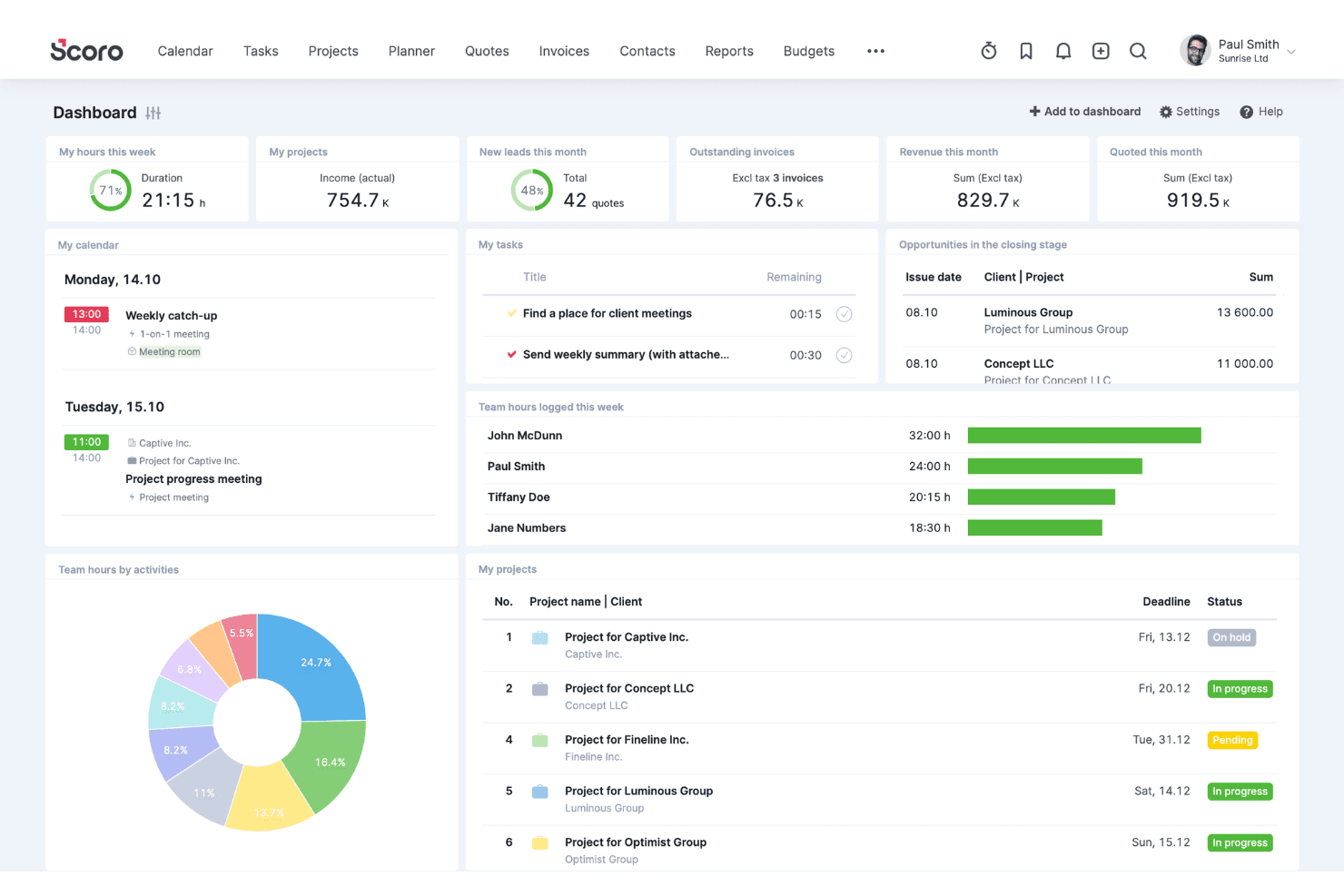
Scoro coordina clientes, ventas, proyectos, recursos, tiempo y facturación. Scoro es una plataforma de automatización de servicios profesionales que combina el registro del tiempo, la facturación, la presupuestación de proyectos y la gestión de cobros, y admite acuerdos por hora, de tarifa fija, de anticipo y de T&M con límite dentro de un único sistema.
¿Para quién es más adecuado Scoro?
Scoro es una opción excelente para directores financieros fraccionales, responsables de control financiero y equipos de firmas de asesoría que gestionan clientes con acuerdos de facturación por hora, de anticipo y de tarifa fija simultáneamente.
Por qué elegí Scoro
He incluido Scoro entre mis opciones principales porque gestiona los modelos de facturación combinados mejor que casi cualquier otra solución que haya visto: la facturación por hora, de tarifa fija, de anticipo, de T&M con límite y por hitos pueden ejecutarse dentro de un único proyecto sin soluciones alternativas. Lo que considero más valioso es cómo las entradas de tiempo pasan directamente a las facturas con la tarifa correcta, ya sea una tarifa basada en el rol para un cliente o un anticipo fijo para otro, sin necesidad de volver a introducir datos manualmente entre sistemas.
Características principales de Scoro
- Flujos de trabajo para la aprobación de hojas de horas: Los responsables pueden revisar y aprobar las hojas de horas enviadas antes de que las horas pasen a las facturas, con recordatorios automáticos para las entradas no enviadas de hasta las ocho semanas anteriores.
- Matriz de estimación de presupuestos: Crea propuestas desglosadas por rol, entregable y esfuerzo, con visibilidad de los costes y el margen, antes de trasladar directamente esas condiciones a los presupuestos y la facturación de los proyectos.
- Paneles de utilización: Los informes en tiempo real muestran las horas facturables frente a las no facturables y las tendencias de productividad del equipo, lo que te ayuda a detectar la prestación excesiva de servicios y gestionar la capacidad.
- Sincronización contable bidireccional: Scoro se conecta bidireccionalmente con QuickBooks Online, Xero, Sage Intacct y Exact Online para mantener alineados los datos financieros de los proyectos y los registros contables sin volver a introducir datos manualmente.
Integraciones de Scoro
Scoro ofrece integraciones nativas con QuickBooks Online, Xero, Sage Intacct, Exact Online y Stripe. También se conecta con Salesforce, Google Calendar, Microsoft 365, Slack y Jira, y cuenta con una API REST, integraciones del mercado de aplicaciones y compatibilidad con Zapier.
Pros and Cons
Pros:
- Gestiona modelos de facturación combinados en un solo proyecto
- Paneles de seguimiento de la rentabilidad de los proyectos en tiempo real
- Flujo de trabajo directo de entrada de tiempo a factura
Cons:
- No ofrece autoservicio para clientes ni portal de pagos
- No ofrece registro pasivo o automatizado del tiempo
 Mejor para el seguimiento de la rentabilidad en tiempo real
- Prueba gratuita de 14 días
- Desde $10/usuario/mes
Visit WebsiteCustomer Rating:4.6/5
Productive conecta el seguimiento de tiempos con información de rentabilidad en tiempo real para respaldar una facturación más precisa. En el vertiginoso mundo de los negocios, Productive surge como una solución versátil diseñada para agencias, consultorías y empresas orientadas a servicios que buscan optimizar sus procesos de seguimiento de tiempos y facturación. Si buscas mejorar la eficiencia operativa y la rentabilidad, Productive ofrece análisis en tiempo real y comunicación centralizada, abordando la necesidad crítica de una gestión fluida de proyectos y finanzas. Con su enfoque en industrias como los servicios de TI, arquitectura y contabilidad, Productive está diseñado para ayudarte a agilizar operaciones y tomar decisiones informadas con confianza.
Por qué elegí Productive
Elegí Productive por su enfoque específico para resolver los complejos retos del seguimiento de tiempos y la facturación. La plataforma destaca por su monitoreo en tiempo real de la rentabilidad, permitiendo supervisar costos, ingresos y márgenes. Además, sus funciones de facturación están adaptadas para el soporte multimoneda y recordatorios automáticos para pagos atrasados, abordando la necesidad común de una gestión financiera eficiente. Estas funciones, combinadas con su integración fluida con herramientas contables como Xero y QuickBooks, hacen de Productive una opción ideal para las empresas que buscan simplificar sus procesos de facturación y finanzas.
Características clave de Productive
Además de sus destacadas capacidades de facturación, también encontré varias otras características que mejoran su utilidad como herramienta de seguimiento de tiempos y facturación.
- Planificación de recursos: Esta función te ayuda a asignar recursos de manera eficaz para evitar cuellos de botella y optimizar los horarios del equipo.
- Gestión de proyectos: Realiza el seguimiento del avance de los proyectos y coordina tareas de manera fluida con las herramientas integradas de gestión de proyectos.
- Presupuestación: Obtén información sobre tu salud financiera con herramientas de presupuestación que te permiten planificar y prever con precisión.
- Informes: Accede a informes personalizados para tener una mejor visibilidad del desempeño del negocio e información sobre la rentabilidad.
Integraciones de Productive
Las integraciones incluyen Xero, Slack, QuickBooks, Google Calendar, Jira, Asana, Trello, Microsoft Teams, Dropbox y HubSpot. Hay una API disponible para integraciones personalizadas.
Pros and Cons
Pros:
- Visibilidad de la rentabilidad en tiempo real
- Soporte de facturación multimoneda
- Seguimiento integrado de tiempos y facturación
Cons:
- No hay plan gratuito disponible
- Curva de aprendizaje para equipos pequeños
Learn more about Productive: Ideal para informes visuales de costes laborales
- Plan gratuito + prueba gratuita de 30 días + demostración gratuita disponible
- Desde $9/usuario/mes (facturado anualmente)
Visit WebsiteCustomer Rating:4.7/5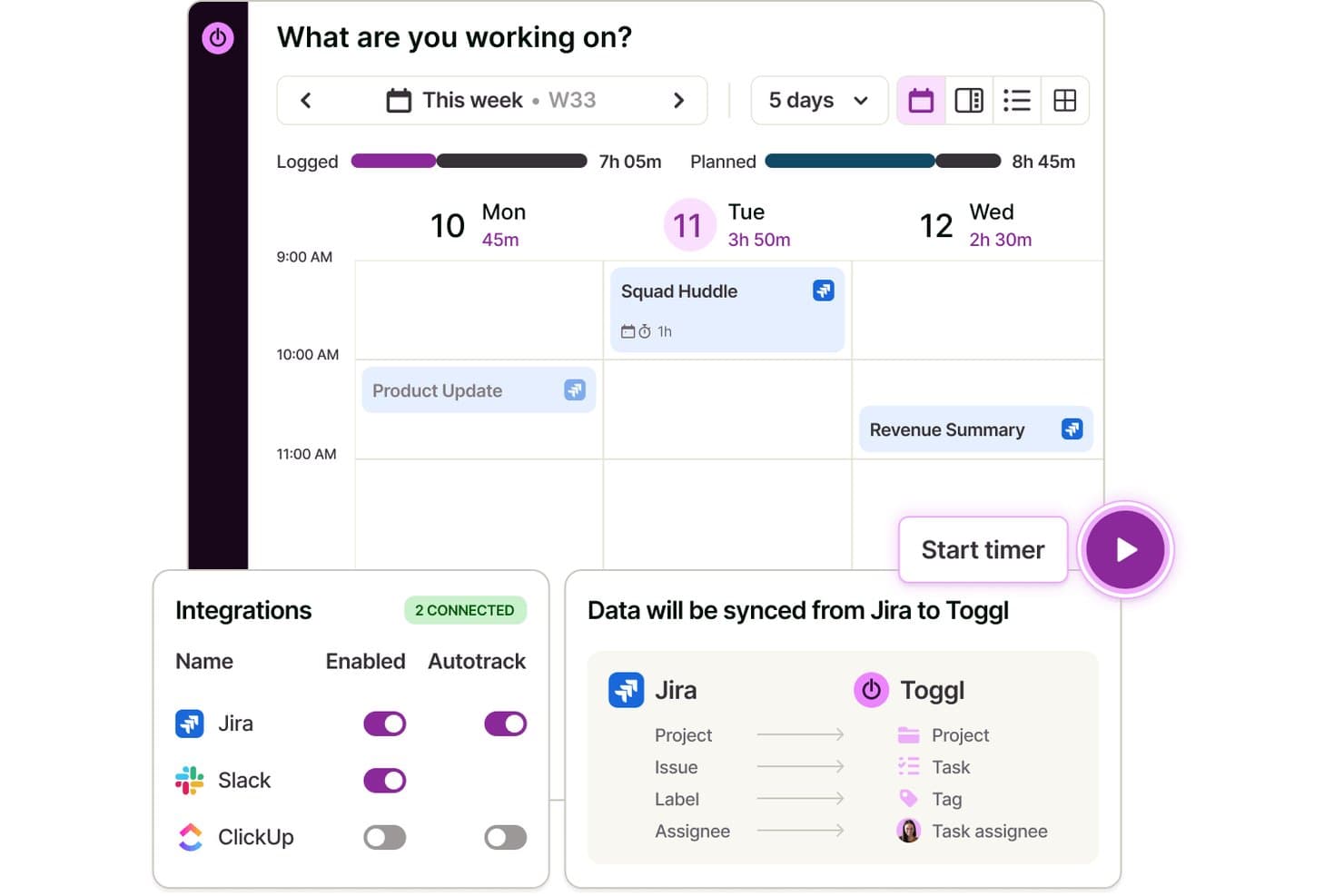
Toggl sincroniza automáticamente los datos de Jira para registrar el tiempo dedicado a las tareas. Toggl es una herramienta de seguimiento del tiempo, planificación de la capacidad y facturación que permite registrar horas facturables de clientes y proyectos, asignar tarifas de facturación, gestionar tareas visualmente y analizar los costes laborales y la rentabilidad del equipo.
¿Para quién es más adecuado Toggl?
Toggl es adecuado para equipos y profesionales independientes que necesitan una forma sencilla de registrar horas facturables, gestionar tareas y proyectos, y comprender en qué se están invirtiendo el tiempo y el dinero de los proyectos.
Por qué elegí Toggl
Elegí Toggl como una de las mejores opciones porque su conjunto de informes premium ofrece un desglose realmente visual de dónde recaen los costes laborales en cada proyecto, cliente y miembro del equipo. Me gusta especialmente asignar una tarifa de coste a cada miembro del equipo y después visualizar esos datos en una tabla dinámica o un gráfico de barras agrupadas, para poder detectar de inmediato qué proyectos están reduciendo los márgenes de beneficio. También puedes programar estos informes para que se envíen automáticamente como archivos PDF, lo que supone un ahorro de tiempo al informar sobre la utilización del equipo cada mes.
Funciones clave de Toggl
- Gestión de proyectos y clientes: Organiza el tiempo registrado por clientes, proyectos y subtareas ilimitados con tarifas de facturación personalizadas.
- Seguimiento del tiempo multiplataforma: Registra el tiempo en la web, el ordenador, el móvil y las extensiones del navegador, todo sincronizado automáticamente.
- Tarifas facturables y creación de facturas: Aplica el estado facturable o no facturable a las horas registradas y genera facturas a partir de las entradas facturables.
- Integraciones con calendarios: Sincroniza los calendarios de Google y Outlook para convertir las reuniones programadas en entradas de tiempo.
Integraciones de Toggl
Toggl ofrece más de 100 integraciones nativas, incluidas Jira, Asana, GitHub, Todoist, Google Calendar y Outlook, entre otras.
Pros and Cons
Pros:
- Informes visuales de costes laborales y rentabilidad
- Asigna tarifas de facturación personalizadas por proyecto o cliente
- Seguimiento automático del tiempo desde el ordenador o el navegador
Cons:
- No incluye herramientas integradas de cobro de pagos
- No admite facturas recurrentes ni contratos de servicios con pagos periódicos
Learn more about Toggl: Lo mejor para herramientas integradas de facturación y emisión de facturas
- Plan gratuito + prueba gratuita de 30 días + demostración gratuita disponible
- Desde $6/usuario/mes (facturado anualmente)
Visit WebsiteCustomer Rating:4.6/5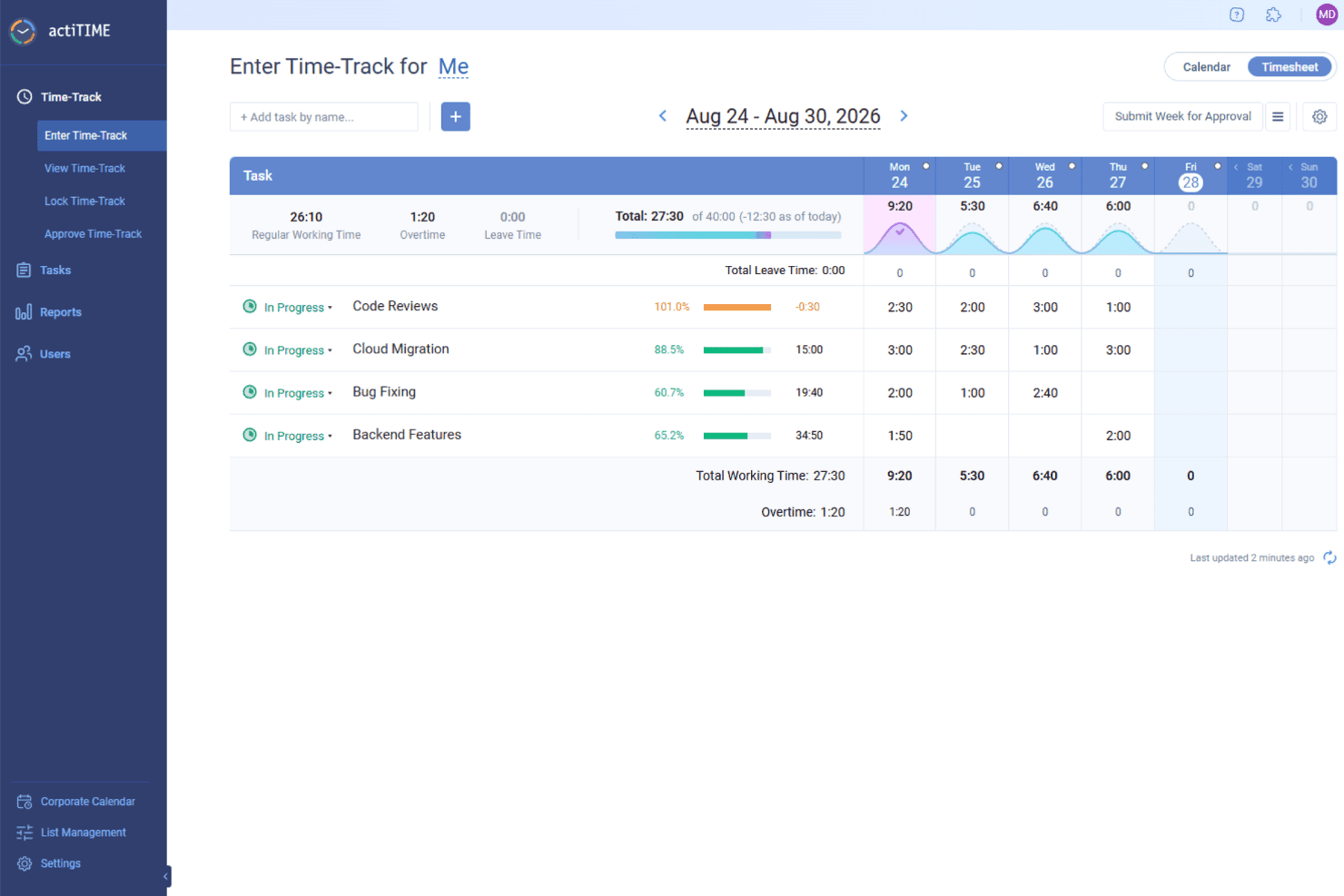
actiTIME realiza un seguimiento de las horas facturables por tarea y proyecto, ayudando a los equipos a calcular los cargos y generar facturas para los clientes. actiTIME es un software versátil que ofrece soluciones para el seguimiento del tiempo y la facturación, lo que lo convierte en una herramienta valiosa para las empresas que buscan gestionar sus proyectos y finanzas. Está diseñado para adaptarse a diversas industrias y proporciona las funciones necesarias para llevar un registro del tiempo y gestionar la facturación.
Por qué elegí actiTIME: Elegí actiTIME porque te ayuda a realizar un seguimiento preciso del tiempo dedicado a las tareas y los proyectos, para que siempre sepas en qué se están invirtiendo los esfuerzos de tu equipo. Puedes registrar horas, gestionar cargas de trabajo y mantenerte alineado con los plazos de los proyectos. Las herramientas integradas de facturación y emisión de facturas también facilitan la gestión de los pagos de los clientes y reducen el trabajo manual. También me gusta que puedas hacer un seguimiento de los presupuestos y del progreso de los proyectos en tiempo real, lo que te ayuda a evitar gastos excesivos y a mantener todo en marcha sin problemas. Además, los flujos de trabajo personalizables te permiten adaptar el sistema a la forma en que tu equipo trabaja mejor.
Características e integraciones destacadas:
Características incluyen análisis del rendimiento, que proporcionan información sobre las tendencias de productividad y la rentabilidad de los proyectos, ayudándote a comprender dónde se pueden realizar mejoras. La función de gestión de ausencias ofrece políticas de permisos personalizables y un seguimiento automatizado del tiempo libre remunerado, lo que garantiza que los recursos del equipo se gestionen eficazmente sin intervención manual. La facturación y el análisis de costes generan informes de facturación y calculan las nóminas, agilizando los aspectos financieros de tus proyectos y asegurando que puedas centrarte en el trabajo importante.
Integraciones incluyen QuickBooks y Zapier.
Pros and Cons
Pros:
- Tarifas de facturación personalizables
- Configuración fácil de proyectos
- Registro manual de horas sencillo
Cons:
- Interfaz de usuario básica
- Funciones avanzadas limitadas
Learn more about actiTIME: La mejor opción para el seguimiento personalizable del tiempo hasta la facturación
- Plan gratuito + prueba gratuita de 7 días disponible
- Desde $3.99/usuario/mes (facturado anualmente)
Visit WebsiteCustomer Rating:4.8/5
Clockify ofrece un seguimiento ilimitado del tiempo con una facturación sencilla para equipos. Clockify es un software de seguimiento del tiempo que se adapta a empresas de todos los tamaños y ofrece funciones que ayudan a gestionar el tiempo y la facturación. Permite a los equipos registrar las horas de trabajo (horas facturables y no facturables), gestionar proyectos y generar informes detallados.
Por qué elegí Clockify: Elegí Clockify porque simplifica tu flujo de facturación de extremo a extremo al convertir las horas registradas de los proyectos en facturas personalizadas y desglosadas por conceptos. Puedes configurar tarifas facturables por rol, cliente o tarea específica, y exigir la aprobación de las hojas de horas antes de emitir las facturas. Esto elimina las discrepancias entre el trabajo registrado y la facturación al cliente, protege tus márgenes de beneficio y ahorra a tu equipo financiero horas de conciliación manual.
Funciones e integraciones destacadas:
Las funciones incluyen una hoja de horas visual que te ayuda a ver en qué se está empleando el tiempo. El panel del proyecto te ofrece una visión general de las actividades y el progreso de tu equipo, mientras que sus informes personalizables te permiten analizar los datos para mejorar la productividad.
Las integraciones incluyen Asana, Trello, Slack, Jira, monday.com, QuickBooks, Notion, Microsoft Teams, Todoist y Google Calendar.
Pros and Cons
Pros:
- Panel detallado del proyecto
- Flexible para el crecimiento del equipo
- Informes personalizables para obtener información útil
Cons:
- Curva de aprendizaje para nuevos usuarios
- Capacidades sin conexión limitadas
Learn more about Clockify: Ideal para el seguimiento automático del tiempo
- Prueba gratuita de 14 días + plan gratuito + demo gratis disponible
- Desde $3.99/usuario/mes (facturado anualmente)
Visit WebsiteCustomer Rating:4.7/5
TimeCamp automatiza el seguimiento de tiempo con facturación y analíticas en un solo clic. TimeCamp es un software de seguimiento de tiempo y facturación dirigido a autónomos y pequeñas empresas. Automatiza el seguimiento de horas y ayuda a gestionar la facturación, facilitando el control de las horas trabajadas y las facturas.
Por qué elegí TimeCamp: TimeCamp ofrece registro automático del tiempo, lo que reduce el ingreso manual y te ahorra tiempo. Las funciones principales de la plataforma te permiten rastrear el tiempo dedicado a diferentes tareas sin tener que iniciar o detener el temporizador manualmente. Además, genera informes detallados que brindan información sobre la productividad y el uso del tiempo. Finalmente, las capacidades de facturación de TimeCamp te ayudan a convertir las horas registradas en facturas sin esfuerzo.
Funciones destacadas e integraciones:
Funciones incluyen una hoja gráfica de tiempo que ofrece una vista visual de tus horas de trabajo. La función de control de asistencia te ayuda a monitorear la presencia y puntualidad del equipo. TimeCamp también ofrece presupuestación de proyectos, permitiéndote controlar los costos y asegurar que los proyectos se mantengan dentro del presupuesto.
Integraciones incluyen Trello, Asana, Slack, QuickBooks, Xero, monday.com, Jira, GitHub, Evernote y Google Calendar.
Pros and Cons
Pros:
- Capacidades de facturación para horas registradas
- Informes detallados de productividad disponibles
- Control de asistencia para monitoreo de equipos
Cons:
- Retrasos ocasionales en el rendimiento
- La configuración inicial puede ser compleja
Learn more about TimeCamp: Ideal para despachos contables
- Demostración gratuita disponible
- Desde $59/usuario/mes (facturado anualmente)
Visit WebsiteCustomer Rating:4.8/5
Karbon simplifica el trabajo con los clientes mediante el seguimiento y la facturación del tiempo de manera colaborativa. Karbon es un software de gestión para despachos contables y equipos de servicios profesionales. Ayuda a gestionar flujos de trabajo, tareas y a mejorar la colaboración entre los miembros del equipo.
Por qué elegí Karbon: Karbon es ideal para despachos contables, ya que ofrece funciones como integración de correo electrónico y gestión de tareas. La opción de integración con el correo electrónico te permite gestionar las comunicaciones con los clientes directamente desde la plataforma, lo que es importante para mantener una correspondencia organizada. Además, su función de gestión de tareas te ayuda a asignar y monitorear las tareas de manera eficiente entre tu equipo.
Características destacadas e integraciones:
Características incluyen automatización de flujos de trabajo, lo que reduce el trabajo manual y aumenta la eficiencia. La función de seguimiento de tiempo te ayuda a monitorear las horas facturables con precisión. Karbon también ofrece análisis detallados que brindan información sobre el desempeño del equipo y el progreso de los proyectos.
Integraciones incluyen QuickBooks Online, Xero, Slack, Microsoft 365, Google Workspace, Outlook, Gmail, Zapier, Practice Ignition y TSheets.
Pros and Cons
Pros:
- Gestión de tareas para un flujo de trabajo eficiente
- Plataforma centralizada para compartir documentos
- Integración de correo electrónico para la comunicación con clientes
Cons:
- La aplicación móvil carece de funcionalidad completa
- Proceso de configuración inicial complejo
Learn more about Karbon: Ideal para informes de facturación detallados
- Plan gratuito disponible + prueba gratuita de 14 días
- Desde $5.83/usuario/mes (facturado anualmente)
Visit WebsiteCustomer Rating:4.5/5
TMetric rastrea las horas facturables con facturación y reportes basados en proyectos. TMetric es un software de seguimiento de tiempo y facturación diseñado para freelancers y pequeñas y medianas empresas. Ayuda a los usuarios a registrar el tiempo, gestionar tareas y generar informes de facturación detallados.
Por qué escogí TMetric: TMetric ofrece informes de facturación detallados, que son esenciales para la facturación precisa y la gestión financiera. La función de seguimiento de tiempo del software te permite registrar las horas con precisión, asegurando que cobres a los clientes correctamente. También proporciona capacidades de gestión de proyectos, ayudándote a mantener las tareas organizadas y en curso.
Características destacadas e integraciones:
Funciones incluyen ingreso manual de tiempo, que permite agregar registros de tiempo para trabajos anteriores. La función de presupuestación te ayuda a establecer límites financieros para los proyectos y evitar sobrepasar el presupuesto. TMetric también ofrece seguimiento de actividad, proporcionando información sobre cómo se emplea el tiempo en las tareas.
Integraciones incluyen Asana, Trello, Jira, Slack, QuickBooks, GitHub, Bitbucket, Freshdesk, Microsoft Outlook y Google Calendar.
Pros and Cons
Pros:
- Función de presupuestación para límites de proyecto
- Ingreso manual de tiempo para mayor flexibilidad
- Informes de facturación detallados para una facturación precisa
Cons:
- Curva de aprendizaje para nuevos usuarios
- La configuración inicial puede ser compleja
Learn more about TMetric: 9Mejor para la contabilidad de pequeñas empresas
Xero
- Prueba gratuita de 30 días disponible
- Desde $2.50/mes
Visit WebsiteCustomer Rating:4.4/5
Xero sincroniza la contabilidad con la facturación y el seguimiento del tiempo para una facturación fluida. Xero es un software de contabilidad diseñado para pequeñas empresas y trabajadores autónomos. Gestiona la contabilidad, la facturación y la administración financiera, convirtiéndose en una herramienta valiosa para quienes necesitan soluciones contables eficientes.
Por qué elegí Xero: Xero está especialmente orientado a la contabilidad de pequeñas empresas y ofrece funciones como la automatización de la contabilidad y el análisis inteligente de datos. El software ofrece almacenamiento seguro en la nube, lo cual es esencial para las empresas que buscan proteger sus datos financieros. También incluye herramientas adaptadas a sectores como la construcción y el comercio minorista, brindando flexibilidad para gestionar tus finanzas.
Funciones destacadas e integraciones:
Funciones incluye la automatización de la contabilidad, que ahorra tiempo al gestionar tareas rutinarias. Los análisis inteligentes de datos de Xero ayudan a tomar decisiones financieras, mientras que el almacenamiento seguro en la nube garantiza que tus datos estén protegidos y accesibles cuando los necesites.
Integraciones incluyen Shopify, HubSpot, Square, Stripe, PayPal, Gusto, Mailchimp, Vend, WorkflowMax y Expensify.
Pros and Cons
Pros:
- Soporte de incorporación y asesores expertos
- Almacenamiento seguro en la nube para proteger los datos
- Información inteligente para la toma de decisiones financieras
Cons:
- Curva de aprendizaje para nuevos usuarios
- Opciones de personalización limitadas
Learn more about Xero: Ideal para equipos creativos
- Demo gratuita disponible
- Desde $10.50/usuario/mes (facturado anualmente)
Visit WebsiteCustomer Rating:4.5/5
FunctionFox ayuda a los equipos creativos a registrar el tiempo y generar facturas detalladas. FunctionFox es una herramienta de gestión de proyectos y seguimiento de tiempo diseñada para equipos creativos y agencias. Ayuda a los usuarios a gestionar proyectos, controlar tiempos y mejorar la eficiencia del flujo de trabajo.
Por qué elegí FunctionFox: FunctionFox está orientado específicamente a equipos creativos, ofreciendo funciones como seguimiento de proyectos y asignación de tareas. La función de seguimiento de proyectos te permite monitorear plazos y presupuestos, lo cual es vital para proyectos creativos. Sus capacidades de asignación de tareas también permiten delegar tareas fácilmente dentro del equipo. Por último, FunctionFox ofrece una interfaz simple que ayuda a tu equipo a centrarse en la creatividad en lugar de en tareas administrativas.
Características destacadas e integraciones:
Características incluyen un blog de proyectos, que facilita la comunicación y colaboración del equipo. La función de reportes en tiempo real te proporciona información sobre el avance del proyecto y la asignación de recursos. FunctionFox también ofrece un cronómetro, lo que permite medir el tiempo dedicado a cada tarea con precisión.
Integraciones incluyen QuickBooks, Microsoft Excel y Basecamp.
Pros and Cons
Pros:
- Reportes en tiempo real para conocer el estado de los proyectos
- Blog de proyectos para la comunicación del equipo
- Interfaz sencilla para fomentar la creatividad
Cons:
- Algunas opciones de personalización son limitadas
- La app móvil no tiene todas las funciones
Learn more about FunctionFox:
Otros programas de seguimiento del tiempo y facturación
Estas son algunas opciones adicionales de programas de seguimiento del tiempo y facturación que no han entrado en mi lista, pero que aún merece la pena revisar:
- 11Zoho InvoiceIdeal para la automatización de facturas
- 12AppolyeMejor para el seguimiento de equipos remotos
- 13SynerionIdeal para la gestión de fuerza laboral
- 14InsightfulIdeal para la asignación automática del tiempo
- 15MonitaskIdeal para hojas de tiempo en línea
- 16PaymoIdeal para la integración de la gestión de proyectos
- 17HubstaffIdeal para facturación personalizada
- 18IntelogosLo mejor con analítica de fuerza laboral impulsada por IA
Cómo Evalúo el Software de Seguimiento de Tiempo y Facturación
Evalúo las herramientas en dos niveles: las capacidades básicas—captura de tiempo facturable, facturación y seguimiento de cuentas por cobrar—que toda herramienta debe tener, y los diferenciadores que hacen que una plataforma sea mejor opción sobre otra.
Funcionalidad Básica (Imprescindibles para Esta Lista)
Cuando selecciono herramientas para mi lista, califico cada una en una escala de 0 (no ofrece la funcionalidad) a 5 (sobresale en esta área) por cada funcionalidad básica indicada abajo. Luego, calculo la puntuación total de la herramienta en porcentaje. Cada herramienta debe lograr una puntuación mínima total del 65% para ser considerada para su inclusión.
- Seguimiento de Tiempo Facturable: Busco temporizadores y opciones de ingreso manual que permitan asignar las horas como facturables a un cliente o servicio específico, como registrar el trabajo de asesoría de forma separada a la preparación de impuestos para el mismo cliente.
- Generación de Facturas: Cada herramienta debe convertir los registros de tiempo y gastos aprobados en facturas personalizables con manejo de impuestos, para que un contador pueda facturar las horas mensuales sin volver a ingresar datos.
- Gestión de Clientes y Proyectos: Verifico si se pueden configurar varios clientes con tarifas diferenciadas por proyecto, miembro del personal o tipo de servicio, ya que la mayoría de las firmas gestionan estructuras de tarifas variadas.
- Pagos en Línea y Seguimiento de Cuentas por Cobrar: La cobranza es importante, así que evalúo si una herramienta permite pagos con tarjeta y ACH, realiza el seguimiento del estado de las facturas y ofrece vistas de antigüedad de cuentas por cobrar para identificar saldos vencidos.
- Facturación Recurrente y de Anticipo: Para firmas con anticipos mensuales o servicios por suscripción, reviso cómo cada plataforma maneja la automatización de facturas recurrentes y el uso de saldos de anticipo.
- Contabilidad e Informes Financieros: Herramientas robustas se sincronizan con plataformas como QuickBooks o Xero y ofrecen informes de utilización, ingresos y antigüedad de cuentas por cobrar que un CFO externo pueda usar en un cierre mensual.
Una vez que tengo una lista de herramientas que cumplen los criterios, considero qué distingue a cada plataforma.
Factores Diferenciadores (Lo que Distingue a los Proveedores)
Así es como comparo y contrasto diferentes proveedores:
Características Destacadas
La automatización del tiempo hasta la facturación es fundamental. Busco herramientas que conviertan hojas de tiempo aprobadas en facturas borrador de forma regular, así una firma que factura a 30 clientes al mes no tiene que crear cada factura manualmente. El análisis de rentabilidad también es relevante, especialmente los paneles que muestran tasas de realización y ajustes por cliente o empleado. Para firmas que trasfieren gastos a los clientes, la captura de gastos con escaneo móvil de recibos y recargos que se trasladan directamente a las facturas elimina mucha reintroducción manual.
Más Allá de las Características
Las integraciones con la pila tecnológica contable son muy relevantes aquí. Verifico si una herramienta ofrece sincronización bidireccional con plataformas como QuickBooks o Xero, ya que las exportaciones unidireccionales generan problemas de conciliación al cierre de mes. La estructura de precios también influye en el ajuste—un contador independiente y una firma de 15 personas tienen necesidades muy distintas, así que evalúo si el precio por usuario se mantiene razonable al agregar nuevos puestos. Para herramientas que manejan datos financieros sensibles de clientes, reviso los registros de auditoría, controles de acceso por roles y cumplimiento con PCI-DSS para almacenamiento de datos de pago.
Cómo elegir un programa de seguimiento del tiempo y facturación
Es fácil perderse entre largas listas de funciones y estructuras de precios complejas. Para ayudarte a mantener la atención mientras avanzas en tu proceso particular de selección de software, aquí tienes una lista de factores que debes tener en cuenta:
| Factor | Qué debes tener en cuenta |
| Escalabilidad | Asegúrate de que el software pueda crecer con tu empresa. Busca soluciones capaces de gestionar un número creciente de usuarios y datos sin que disminuya el rendimiento. |
| Integraciones | Comprueba si el software se integra con las herramientas que ya utilizas, como programas de contabilidad, aplicaciones de gestión de proyectos y sistemas CRM, para conseguir flujos de trabajo más fluidos. |
| Personalización | Considera si puedes adaptar el software a tus necesidades específicas. Las plantillas y los informes personalizables pueden resultar especialmente útiles para requisitos empresariales particulares. |
| Facilidad de uso | Evalúa la sencillez de la interfaz del software. Tu equipo debería poder utilizarla sin una formación extensa, ahorrando tiempo y reduciendo la frustración. |
| Presupuesto | Compara los planes de precios con tu presupuesto. Busca precios transparentes y considera el coste por usuario, especialmente si tienes un equipo grande. |
| Medidas de seguridad | Da prioridad al software con funciones de seguridad sólidas, como el cifrado de datos y la autenticación de dos factores, para proteger la información sensible. |
| Opciones de asistencia | Comprueba qué canales de asistencia están disponibles, como el chat en directo o la asistencia telefónica, para asegurarte de que puedes obtener ayuda cuando la necesites. |
| Funciones de generación de informes | Busca software que ofrezca funciones detalladas de generación de informes para ayudarte a analizar eficazmente los datos de tiempo y facturación. |
Tendencias en los programas de seguimiento del tiempo y facturación
En mi investigación, recopilé innumerables actualizaciones de productos, comunicados de prensa y registros de versiones de diferentes proveedores de software de seguimiento del tiempo y facturación. Estas son algunas de las tendencias emergentes que estoy siguiendo de cerca:
- Información basada en IA: Cada vez más herramientas utilizan la IA para analizar datos de tiempo y facturación, proporcionando información sobre los patrones de productividad y ayudando a los equipos a tomar mejores decisiones. Esta tendencia resulta útil para las empresas que buscan optimizar sus operaciones y reducir las ineficiencias.
- Funciones de comandos de voz: Algunos programas ahora permiten a los usuarios iniciar y detener temporizadores mediante comandos de voz. Esto es especialmente valioso para los profesionales que necesitan gestionar el seguimiento del tiempo mientras realizan varias tareas a la vez.
- Blockchain para la seguridad: Algunos proveedores están explorando la tecnología blockchain para mejorar la seguridad de los datos y la transparencia de las transacciones. Esta tendencia es especialmente relevante para las empresas que gestionan datos financieros confidenciales y requieren una capa adicional de protección.
- Colaboración en tiempo real: Cada vez más herramientas ofrecen funciones que facilitan la colaboración en tiempo real en facturas y proyectos, lo que permite a varios usuarios trabajar juntos y realizar actualizaciones al instante.
- Modelos de facturación por suscripción: Los proveedores están incorporando funciones de facturación por suscripción, lo que permite a las empresas automatizar las facturas recurrentes y gestionar las suscripciones de manera eficiente. Esta tendencia responde a la creciente demanda de servicios basados en suscripciones en diversos sectores.
¿Qué es el software de seguimiento del tiempo y facturación?
El software de seguimiento del tiempo y facturación es una herramienta que ayuda a las empresas a gestionar eficazmente las horas de trabajo y los procesos de facturación. Profesionales como autónomos, propietarios de pequeñas empresas y gestores de proyectos suelen utilizar estas herramientas para garantizar una facturación precisa y una gestión eficaz del tiempo.
Estas herramientas suelen incluir funciones clave como el seguimiento automático del tiempo, capacidades de facturación y colaboración en tiempo real para favorecer la productividad y ayudar a los usuarios a gestionar su trabajo y sus finanzas de manera eficiente. En general, el software de seguimiento del tiempo y facturación ofrece un valor considerable al simplificar las tareas administrativas y mejorar la precisión financiera.
Funciones
Estas son las funciones esenciales que debería tener cualquier buen software de seguimiento del tiempo y facturación:
- Seguimiento automático del tiempo: Registra las horas de trabajo sin introducción manual, garantizando una facturación y una gestión del tiempo precisas y ágiles.
- Funciones de facturación: Crea facturas a partir del tiempo registrado, mejorando el proceso de facturación.
- Colaboración en tiempo real: Permite que varios usuarios trabajen juntos en facturas y proyectos, mejorando el trabajo en equipo y la eficiencia.
- Información basada en IA: Analiza los datos para proporcionar patrones de productividad y apoyo a la toma de decisiones.
- Plantillas personalizables: Permite personalizar las facturas y los informes para adaptarlos a la imagen de marca de la empresa.
- Facturación por suscripción: Automatiza las facturas recurrentes y simplifica la gestión de suscripciones para las empresas.
- Detección de inactividad: Avisa a los usuarios cuando el seguimiento del tiempo está inactivo, garantizando registros de tiempo precisos.
- Funciones de comandos de voz: Ofrece una gestión del tiempo manos libres, útil para los profesionales que realizan varias tareas a la vez.
- Medidas de seguridad: Protege los datos confidenciales mediante cifrado y controles de acceso, garantizando la seguridad de la información.
Ventajas
La implementación de un software de seguimiento del tiempo y facturación ofrece varias ventajas para tu equipo y tu empresa. Estas son algunas de las que puedes esperar:
- Facturación precisa: El seguimiento automático del tiempo y las funciones de facturación garantizan que se contabilicen todas las horas facturables, reduciendo los errores en la facturación a los clientes.
- Mayor productividad: La información basada en IA y la colaboración en tiempo real ayudan a los equipos a identificar ineficiencias y trabajar juntos de forma más eficaz.
- Ahorro de tiempo: Funciones como los comandos de voz y la detección de inactividad minimizan las tareas manuales y liberan tiempo para trabajos más importantes.
- Mejor gestión financiera: Las herramientas de presupuestación de proyectos realizan un seguimiento de los gastos, ayudando a evitar gastos excesivos y a optimizar la asignación de recursos y la rentabilidad.
- Mayor seguridad: Las medidas de seguridad protegen los datos confidenciales y garantizan el cumplimiento de las normas de privacidad.
- Gestión eficiente de suscripciones: La facturación por suscripción automatiza las facturas recurrentes y facilita la gestión de las relaciones continuas con los clientes.
- Personalización de marca: Las plantillas personalizables permiten personalizar y crear facturas e informes, manteniendo una imagen de marca coherente.
Costes y precios
Seleccionar un software de seguimiento del tiempo y facturación requiere comprender los distintos modelos de precios y planes disponibles, que van desde opciones gratuitas hasta costes personalizados. Los costes varían según las funciones, el tamaño del equipo, los complementos y otros factores. La tabla siguiente resume los planes habituales, sus precios medios y las funciones que suelen incluir las soluciones de software de seguimiento del tiempo y facturación:
Tabla comparativa de planes para software de seguimiento del tiempo y facturación
| Tipo de plan | Precio medio | Funciones habituales |
| Plan gratuito | $0 | Seguimiento básico del tiempo, funciones de facturación e informes limitados. |
| Plan personal | $5-$25 /usuario /mes | Seguimiento del tiempo, facturación, gestión de proyectos e informes básicos. |
| Plan empresarial | $25-$50 /usuario /mes | Informes avanzados, integraciones, colaboración en equipo y presupuestos de proyectos. |
| Plan corporativo | $50-$100+/usuario /mes | Funciones personalizables, asistencia exclusiva, mejoras de seguridad y escalabilidad. |
Preguntas frecuentes
Estas son algunas respuestas a preguntas habituales sobre el software de seguimiento del tiempo y facturación:
¿Cuál es el mejor seguimiento del tiempo para la facturación?
El mejor software de seguimiento del tiempo para la facturación dependerá de tus necesidades específicas, pero opciones populares como Clockify ofrecen funciones completas para realizar el seguimiento y facturar las horas facturables. Busca herramientas que automaticen las facturas y se integren con tus sistemas actuales para facilitar el proceso.
¿Cuáles son las ventajas del seguimiento en tiempo real?
El seguimiento en tiempo real proporciona información actualizada sobre el progreso del trabajo, lo que te ayuda a gestionar los proyectos de forma más eficaz. Permite realizar ajustes oportunos y mejora la productividad al ofrecer información precisa sobre cómo se utilizan los recursos. Esta función es beneficiosa para los equipos que buscan optimizar su flujo de trabajo.
¿Cuál es el método principal para registrar el tiempo dedicado a prestar servicios a un cliente?
Las hojas de horas se utilizan habitualmente para registrar el tiempo dedicado a los servicios para clientes, especialmente en sectores basados en servicios. Proporcionan un desglose detallado de las actividades y garantizan una facturación precisa basada en el trabajo realmente realizado. Este método ayuda a mantener la transparencia con los clientes y permite emitir facturas precisas.
¿Cómo puede el seguimiento del tiempo mejorar la productividad?
El seguimiento del tiempo ayuda a identificar en qué se emplea el tiempo y señala las áreas ineficientes. Al analizar estos datos, puedes tomar decisiones fundamentadas para optimizar los flujos de trabajo y asignar mejor los recursos. Esto se traduce en una mayor productividad y una gestión de proyectos más eficaz para tu equipo.